ESP MERCEDES-BENZ SPRINTER 2014 MY14 Operator’s Manual
[x] Cancel search | Manufacturer: MERCEDES-BENZ, Model Year: 2014, Model line: SPRINTER, Model: MERCEDES-BENZ SPRINTER 2014Pages: 338, PDF Size: 6.78 MB
Page 187 of 338
Using the
0074,0075,0079or0045 adjustment but-
tons, you can select the following functions:
R Calling up the service due date
(Y page 260)
R Checking the oil level (Y page 252)
R Checking the DEF supply (Y page 184)
R Preselecting/setting the auxiliary heating
switch-on time (Y page 124)
R Tire pressure monitor (Y page 293)
R Setting the time (Y page 185)
R Activating/deactivating Highbeam Assist
(Y page 194)
R Setting the daytime running lamps
(Y page 185)
Setting the time X
Turn the key to position 2in the ignition
lock.
X Press the 0079menu button repeatedly until
the hours figure flashes.
X Press the 0074or0075 button to set the hour.
X Press the 0045reset button.
The minute display flashes.
X Press the 0074or0075 button to set the minute.
i If you keep the 0074or0075 button pressed,
the value will change continuously.
Activating/deactivating Highbeam
Assist X
Turn the key to position 2in the ignition
lock.
X Press the 0079menu button repeatedly until
the 00CE indicator lamp flashes and the
on
on orOFF
OFF message appears in the display.
X Use the 0074or0075 button to switch High-
beam Assist on/off.
Switching the daytime running lamps
on/off If you switch the daytime running lights
ON ON,
the daytime running lights will automatically
light up when the engine is running. For safety reasons, it is only possible to
change this setting when the vehicle is sta-
tionary. The factory setting is
ON ONin countries
in which constant headlamp mode or daytime
running lights are mandatory.
X Turn the key to position 2in the ignition
lock.
X Press the 0079menu button repeatedly until
the 0058 indicator lamp flashes and the
on on orOFF
OFF message appears in the display.
X Press the 0074or0075 button to activate or
deactivate the daytime running lamps.
i USA only:
If you turn the light switch to 0060or
0058, the corresponding light switches on.
If you turn the light switch to 0058, the
daytime running lamps remain switched
on.
Canada only:
If you turn the light switch to 0058, the low-
beam headlamps switch on. If you turn the
light switch to 0060or0058, the daytime
running lamps remain switched on. On-board computer (vehicles without steering wheel buttons)
185On-board computer and displays Z
Page 196 of 338
Selecting the time format
Using the steering wheel buttons
X
Press the 0080or007F button repeatedly
until the Settings
Settings menu appears in the
display.
X Press the 0063button to switch to the sub-
menu selection.
X Press the 0081or0082 button to select the
Clock/Date
Clock/Date submenu.
X Press the 0063button to select the
12/24 h 12/24 h function.
The selection marker is on the current set-
ting.
X Press the 0081or0082 button to select the
12 h
12 h or24 h
24 h clock format.
Lighting submenu Activating/deactivating Highbeam Assist
Using the steering wheel buttons
X Press the 0080or007F button repeatedly
until the Settings
Settings menu appears in the
display.
X Press the 0063button to switch to the sub-
menu selection.
X Press the 0081or0082 button to select the
Lighting
Lighting submenu.
X Press the 0063button to select the High‐ High‐
beam Assist
beam Assist function.
The selection marker is on the current set-
ting.
X Use the 0081or0082 button to switch
Highbeam Assist On
On orOff
Off .
i For safety reasons, it is not possible to
reset the Highbeam
Highbeam Assist
Assistfunction to the
factory settings during a journey. You will
see the following message in the display: Setting only possible at stand‐ Setting only possible at stand‐
still still.
For further information about Highbeam
Assist, see (Y page 97).
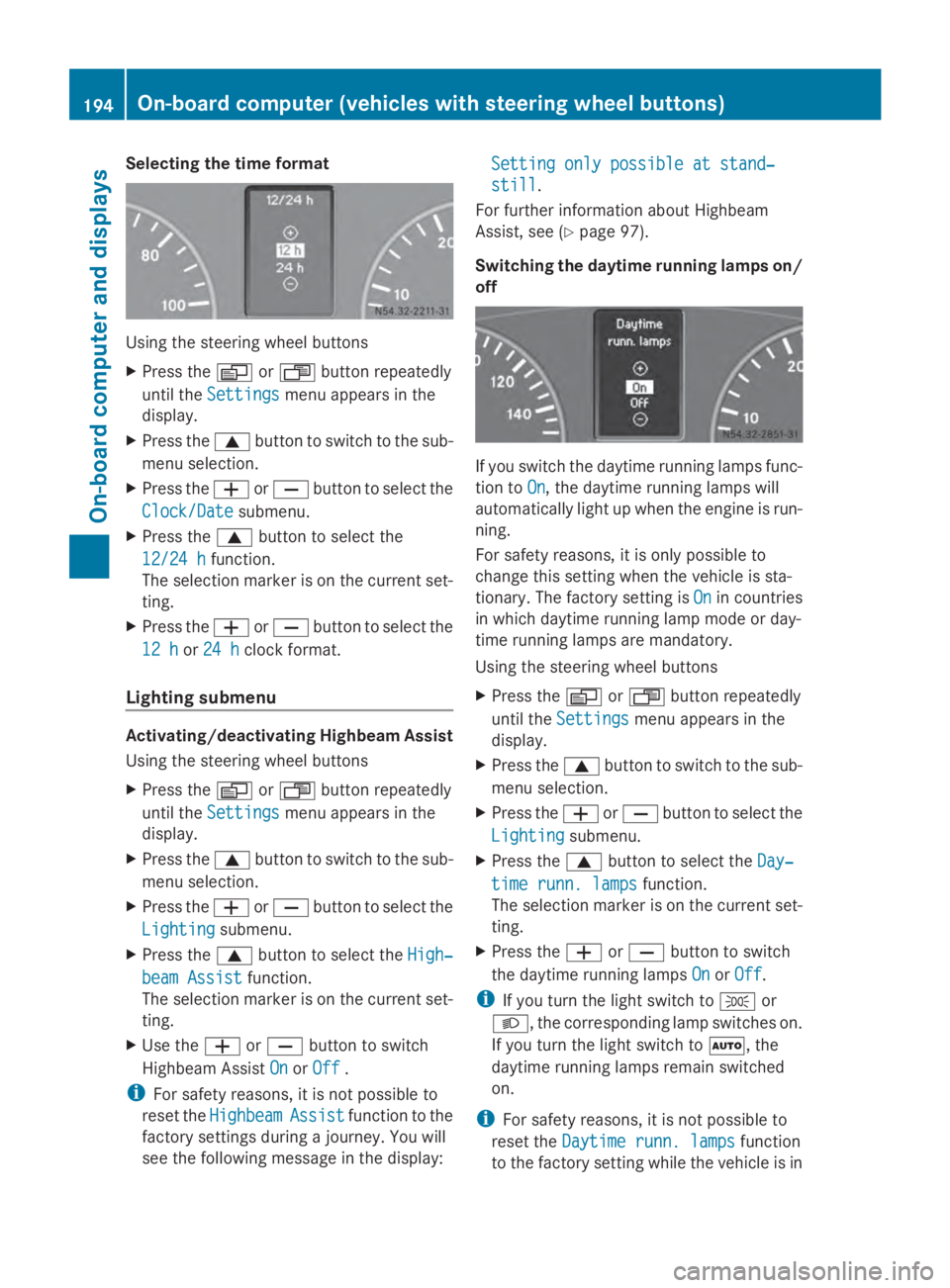
Switching the daytime running lamps on/
off If you switch the daytime running lamps func-
tion to
On On, the daytime running lamps will
automatically light up when the engine is run-
ning.
For safety reasons, it is only possible to
change this setting when the vehicle is sta-
tionary. The factory setting is On Onin countries
in which daytime running lamp mode or day-
time running lamps are mandatory.
Using the steering wheel buttons
X Press the 0080or007F button repeatedly
until the Settings Settings menu appears in the
display.
X Press the 0063button to switch to the sub-
menu selection.
X Press the 0081or0082 button to select the
Lighting
Lighting submenu.
X Press the 0063button to select the Day‐
Day‐
time runn. lamps
time runn. lamps function.
The selection marker is on the current set-
ting.
X Press the 0081or0082 button to switch
the daytime running lamps On OnorOff
Off.
i If you turn the light switch to 0060or
0058, the corresponding lamp switches on.
If you turn the light switch to 0058, the
daytime running lamps remain switched
on.
i For safety reasons, it is not possible to
reset the Daytime runn. lamps Daytime runn. lamps function
to the factory setting while the vehicle is in 194
On-board computer (vehicles with steering wheel buttons)On-board computer and displays
Page 202 of 338
Vehicles with steering wheel buttons
The on-board computer shows warnings, mal-
functions or additional information in the dis-
play. A warning tone sounds with certain dis-
play messages. Display messages of a high
priority are shown in red.
Please respond in accordance with the dis-
play messages and follow the additional
notes in this Operator's Manual.
You can hide low-priority display messages by
pressing the 0080,007F,0041or0068 but-
ton on the steering wheel or the 0045reset but-
ton.
You cannot hide display messages of the
highest priority. These messages will con-
tinue to be shown in the display until their
cause has been eliminated.
The on-board computer stores certain display
messages in the message memory
(Y page 200).
The following shows all the messages that
could appear in the display, arranged alpha-
betically. Message memory
The on-board computer only records and
shows malfunctions and warnings from cer-
tain systems. Therefore, make sure that your
vehicle is safe to use. You could cause an
accident by driving an unsafe vehicle.
The on-board computer stores certain display
messages. In the Message memory menu,
you can call up stored display messages.
Using the steering wheel buttons
X Press the 0080or007F button repeatedly
until the number of stored display mes- sages, e.g.
2
2 messages messages, appears in the dis-
play.
If no malfunctions have occurred, the No No
messages
messages message appears.
X Scroll through the stored display messages
with the 0041or0068 button.
X To exit the message memory menu:
press the 0080or007F button.
When you switch off the ignition, all display
messages are deleted from the message
memory. 200
Display messagesOn-board computer and displays
Page 208 of 338
Display messages on vehicles with steering wheel buttons
Safety systems Display messages Possible causes/consequences and
0050
0050Solutions ABS
ABS
Visit workshop Visit workshop
ABS has been deactivated due to a malfunction. ESP
®
, ASR and
BAS, as well as cruise control, have also been deactivated as a
result.
G WARNING
The brake system continues to function normally, but without the
functions listed above. The wheels could therefore lock if you
brake hard, for example.
This causes steerability and braking to be greatly impaired. The
braking distance can increase in emergency braking situations.
The driven wheels can spin when accelerating.
If ESP ®
is not operational, ESP ®
will not stabilize the vehicle.
There is an increased risk of skidding and accidents.
X Drive on with care.
X Visit a qualified specialist workshop immediately. ABS ABS
Unavailable Unavailable ABS is temporarily unavailable or is deactivated due to undervolt-
age. ESP
®
, ASR and BAS, as well as cruise control, are also
unavailable as a result.
The battery may not be being charged.
G WARNING
The brake system continues to function normally, but without the
functions listed above. The wheels could therefore lock if you
brake hard, for example.
This causes steerability and braking to be greatly impaired. The
braking distance can increase in emergency braking situations.
The driven wheels can spin when accelerating.
If ESP ®
is not operational, ESP ®
will not stabilize the vehicle.
There is an increased risk of skidding and accidents.
X Drive for a short distance at a speed of more than 13 mph
(20 km/h).
If the display message disappears, the functions mentioned
above are available again.
If the display message continues to be displayed:
X Drive on with care.
X Visit a qualified specialist workshop immediately. 206
Display
messagesOn-board computer and displays
Page 211 of 338
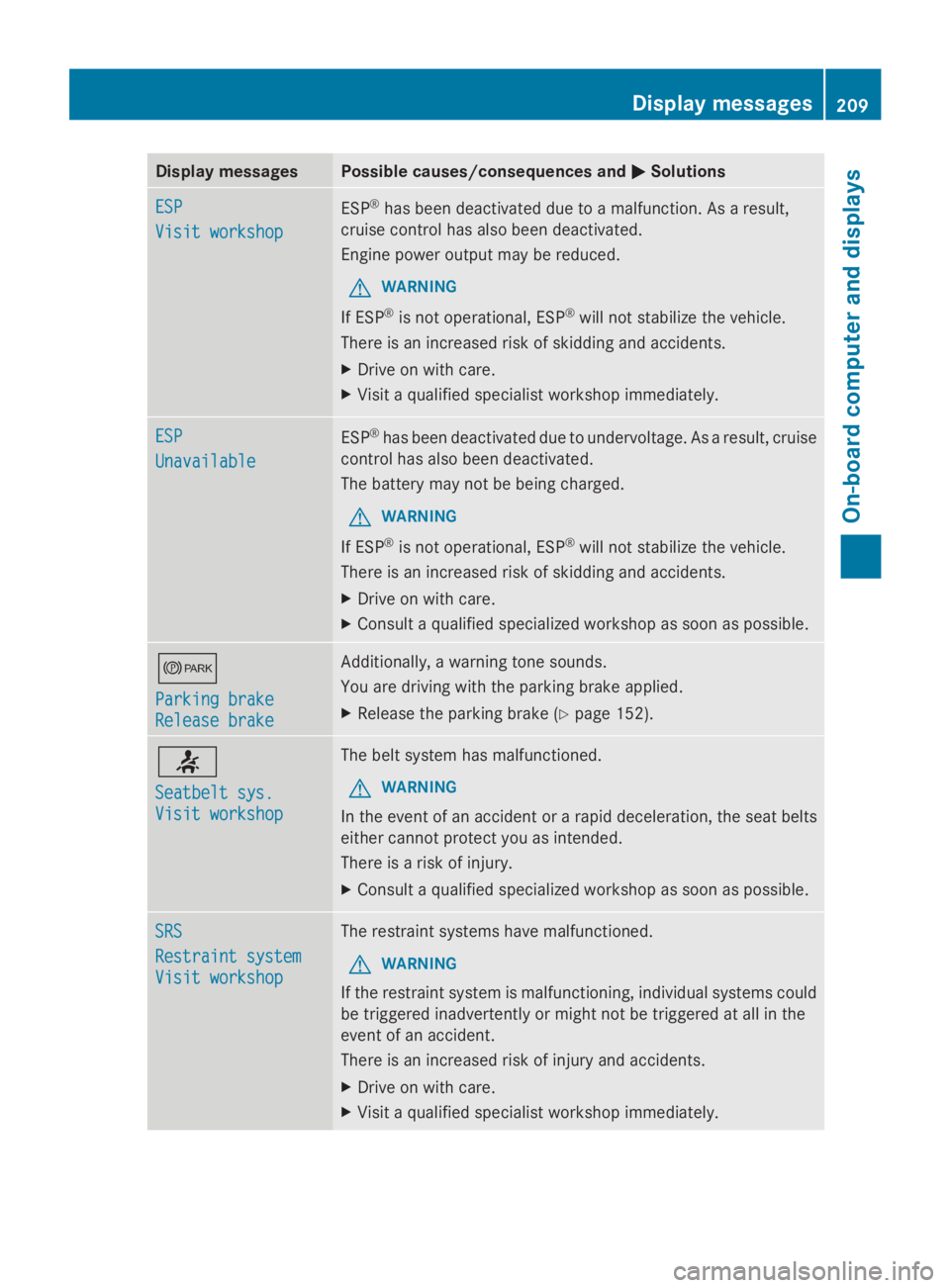
Display messages Possible causes/consequences and
0050
0050Solutions ESP
ESP
Visit workshop Visit workshop
ESP
®
has been deactivated due to a malfunction. As a result,
cruise control has also been deactivated.
Engine power output may be reduced.
G WARNING
If ESP ®
is not operational, ESP ®
will not stabilize the vehicle.
There is an increased risk of skidding and accidents.
X Drive on with care.
X Visit a qualified specialist workshop immediately. ESP ESP
Unavailable Unavailable
ESP
®
has been deactivated due to undervoltage. As a result, cruise
control has also been deactivated.
The battery may not be being charged.
G WARNING
If ESP ®
is not operational, ESP ®
will not stabilize the vehicle.
There is an increased risk of skidding and accidents.
X Drive on with care.
X Consult a qualified specialized workshop as soon as possible. 0066
Parking brake Parking brake
Release brake Release brake Additionally, a warning tone sounds.
You are driving with the parking brake applied.
X
Release the parking brake (Y page 152).0076
Seatbelt sys. Seatbelt sys.
Visit workshop Visit workshop The belt system has malfunctioned.
G WARNING
In the event of an accident or a rapid deceleration, the seat belts
either cannot protect you as intended.
There is a risk of injury.
X Consult a qualified specialized workshop as soon as possible. SRS SRS
Restraint system Restraint system
Visit workshop Visit workshop The restraint systems have malfunctioned.
G WARNING
If the restraint system is malfunctioning, individual systems could
be triggered inadvertently or might not be triggered at all in the
event of an accident.
There is an increased risk of injury and accidents.
X Drive on with care.
X Visit a qualified specialist workshop immediately. Display
messages
209On-board computer and displays Z
Page 223 of 338
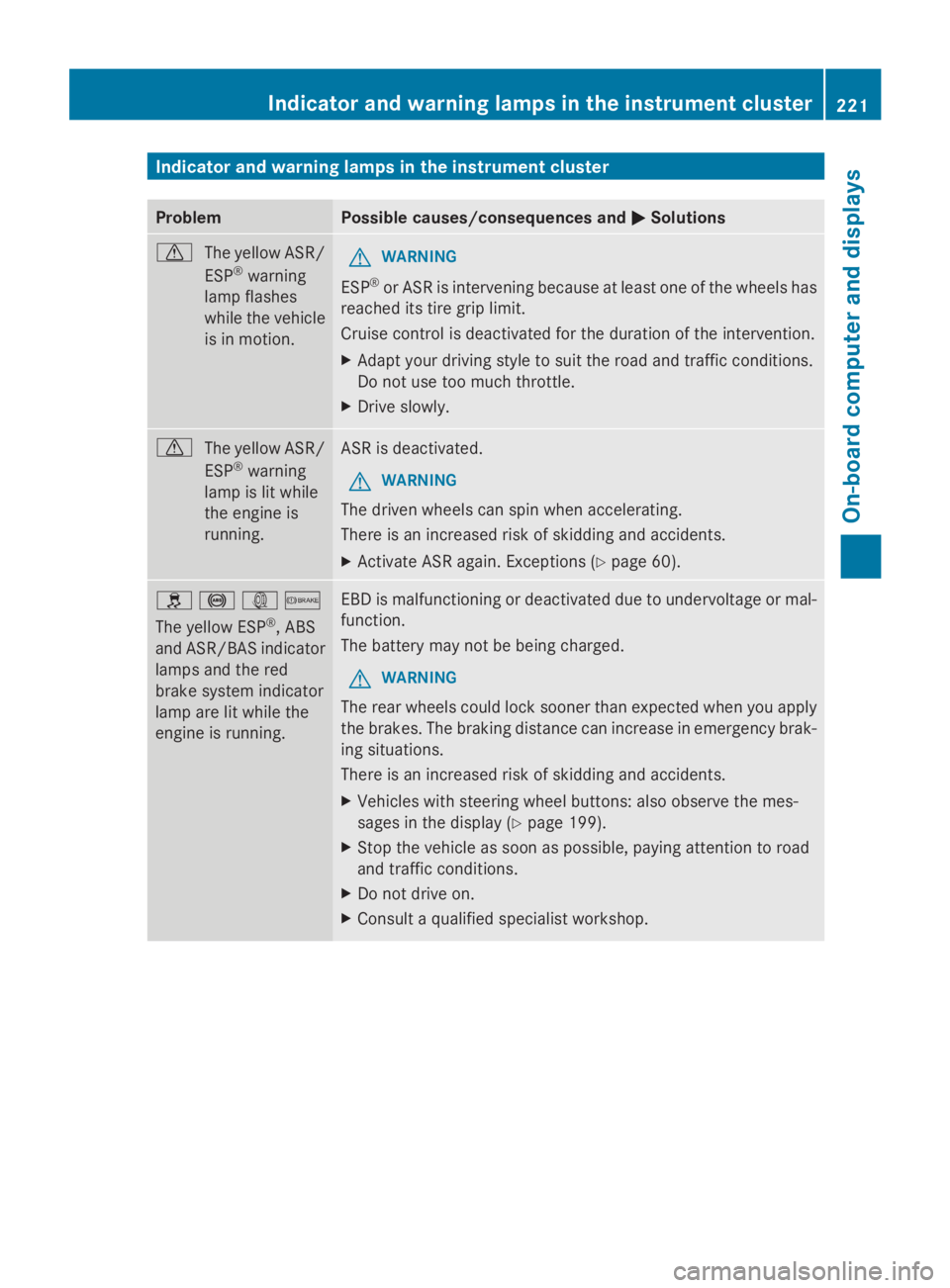
Indicator and warning lamps in the instrument cluster
Problem Possible causes/consequences and
0050
0050Solutions 0072
The yellow ASR/
ESP®
warning
lamp flashes
while the vehicle
is in motion. G
WARNING
ESP ®
or ASR is intervening because at least one of the wheels has
reached its tire grip limit.
Cruise control is deactivated for the duration of the intervention.
X Adapt your driving style to suit the road and traffic conditions.
Do not use too much throttle.
X Drive slowly. 0072
The yellow ASR/
ESP®
warning
lamp is lit while
the engine is
running. ASR is deactivated.
G WARNING
The driven wheels can spin when accelerating.
There is an increased risk of skidding and accidents.
X Activate ASR again. Exceptions (Y page 60).0089
0025003D0065
The yellow ESP ®
, ABS
and ASR/BAS indicator
lamps and the red
brake system indicator
lamp are lit while the
engine is running. EBD is malfunctioning or deactivated due to undervoltage or mal-
function.
The battery may not be being charged.
G WARNING
The rear wheels could lock sooner than expected when you apply
the brakes. The braking distance can increase in emergency brak-
ing situations.
There is an increased risk of skidding and accidents.
X Vehicles with steering wheel buttons: also observe the mes-
sages in the display (Y page 199).
X Stop the vehicle as soon as possible, paying attention to road
and traffic conditions.
X Do not drive on.
X Consult a qualified specialist workshop. Indicator and warning lamps in the instrument cluster
221On-board computer and displays Z
Page 226 of 338
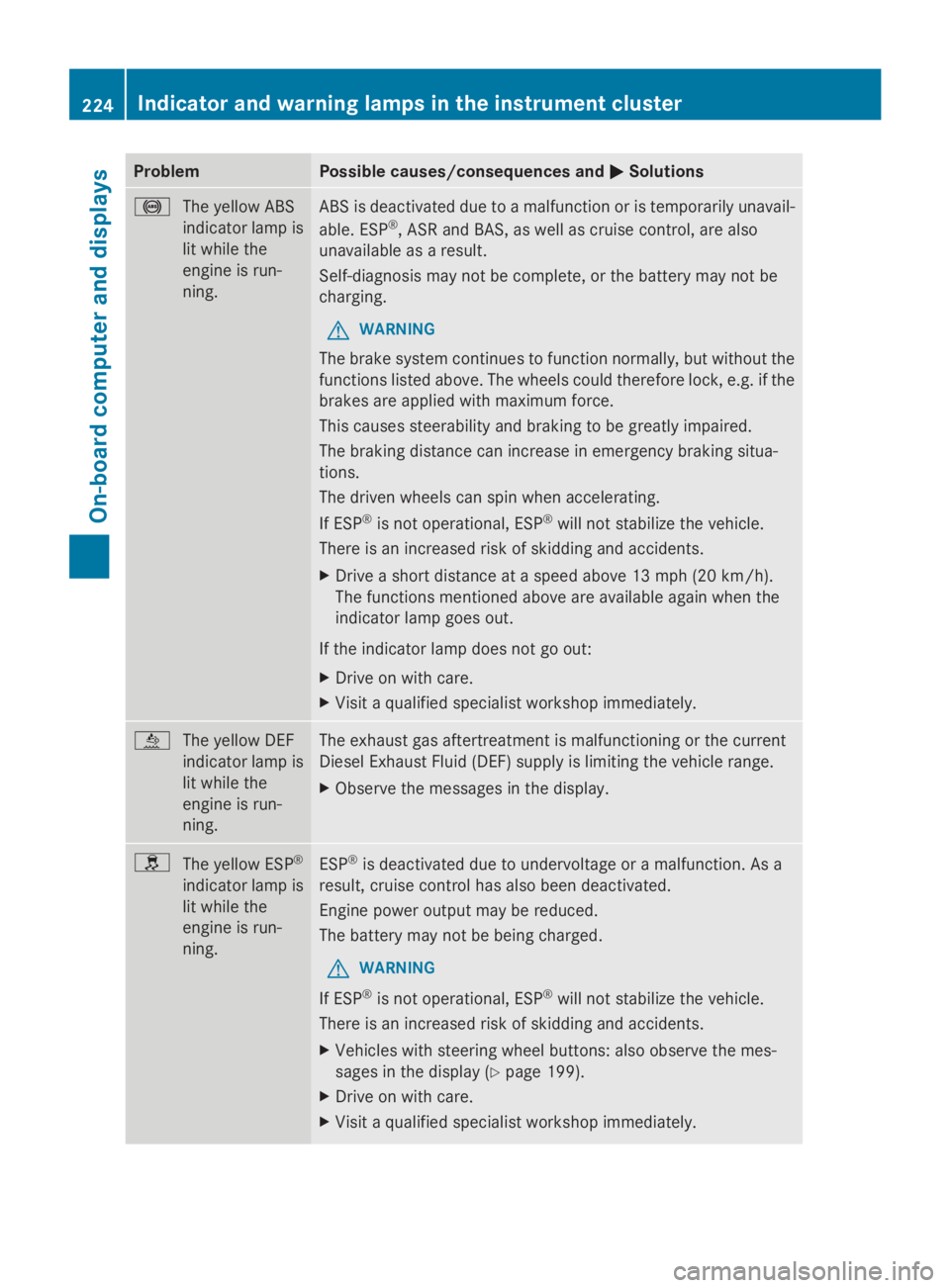
Problem Possible causes/consequences and
0050
0050Solutions 0025
The yellow ABS
indicator lamp is
lit while the
engine is run-
ning. ABS is deactivated due to a malfunction or is temporarily unavail-
able. ESP
®
, ASR and BAS, as well as cruise control, are also
unavailable as a result.
Self-diagnosis may not be complete, or the battery may not be
charging.
G WARNING
The brake system continues to function normally, but without the
functions listed above. The wheels could therefore lock, e.g. if the
brakes are applied with maximum force.
This causes steerability and braking to be greatly impaired.
The braking distance can increase in emergency braking situa-
tions.
The driven wheels can spin when accelerating.
If ESP ®
is not operational, ESP ®
will not stabilize the vehicle.
There is an increased risk of skidding and accidents.
X Drive a short distance at a speed above 13 mph (20 km/h).
The functions mentioned above are available again when the
indicator lamp goes out.
If the indicator lamp does not go out:
X Drive on with care.
X Visit a qualified specialist workshop immediately. 00E2
The yellow DEF
indicator lamp is
lit while the
engine is run-
ning. The exhaust gas aftertreatment is malfunctioning or the current
Diesel Exhaust Fluid (DEF) supply is limiting the vehicle range.
X
Observe the messages in the display. 0089
The yellow ESP ®
indicator lamp is
lit while the
engine is run-
ning. ESP
®
is deactivated due to undervoltage or a malfunction. As a
result, cruise control has also been deactivated.
Engine power output may be reduced.
The battery may not be being charged.
G WARNING
If ESP ®
is not operational, ESP ®
will not stabilize the vehicle.
There is an increased risk of skidding and accidents.
X Vehicles with steering wheel buttons: also observe the mes-
sages in the display (Y page 199).
X Drive on with care.
X Visit a qualified specialist workshop immediately. 224
Indicator and warning lamps in the instrument clusterOn-board computer and displays
Page 234 of 338
Useful information
This Operator's Manual describes all models
as well as standard and optional equipment
of your vehicle that were available at the time
of going to print. Country-specific variations
are possible. Note that your vehicle may not
be equipped with all of the described func-
tions. This also applies to systems and func-
tions relevant to safety.
Read the information on qualified specialist
workshops (Y page 26). Stowage spaces and stowage com-
partments Important safety notes
G
WARNING
If you do not correctly store objects in the
vehicle interior, they can slip or be flung
around, thus striking vehicle occupants.
There is a risk of injury, especially when brak-
ing or abruptly changing directions.
R Always store objects so that they cannot be
flung around in these or in similar situa-
tions.
R Always make sure that objects do not pro-
trude from stowage compartments, parcel
nets or stowage nets.
R Close lockable stowage compartments
while driving.
R Stow and secure objects that are heavy,
hard, pointy, sharp-edged, fragile or too
large in the trunk.
In addition, observe the information in the
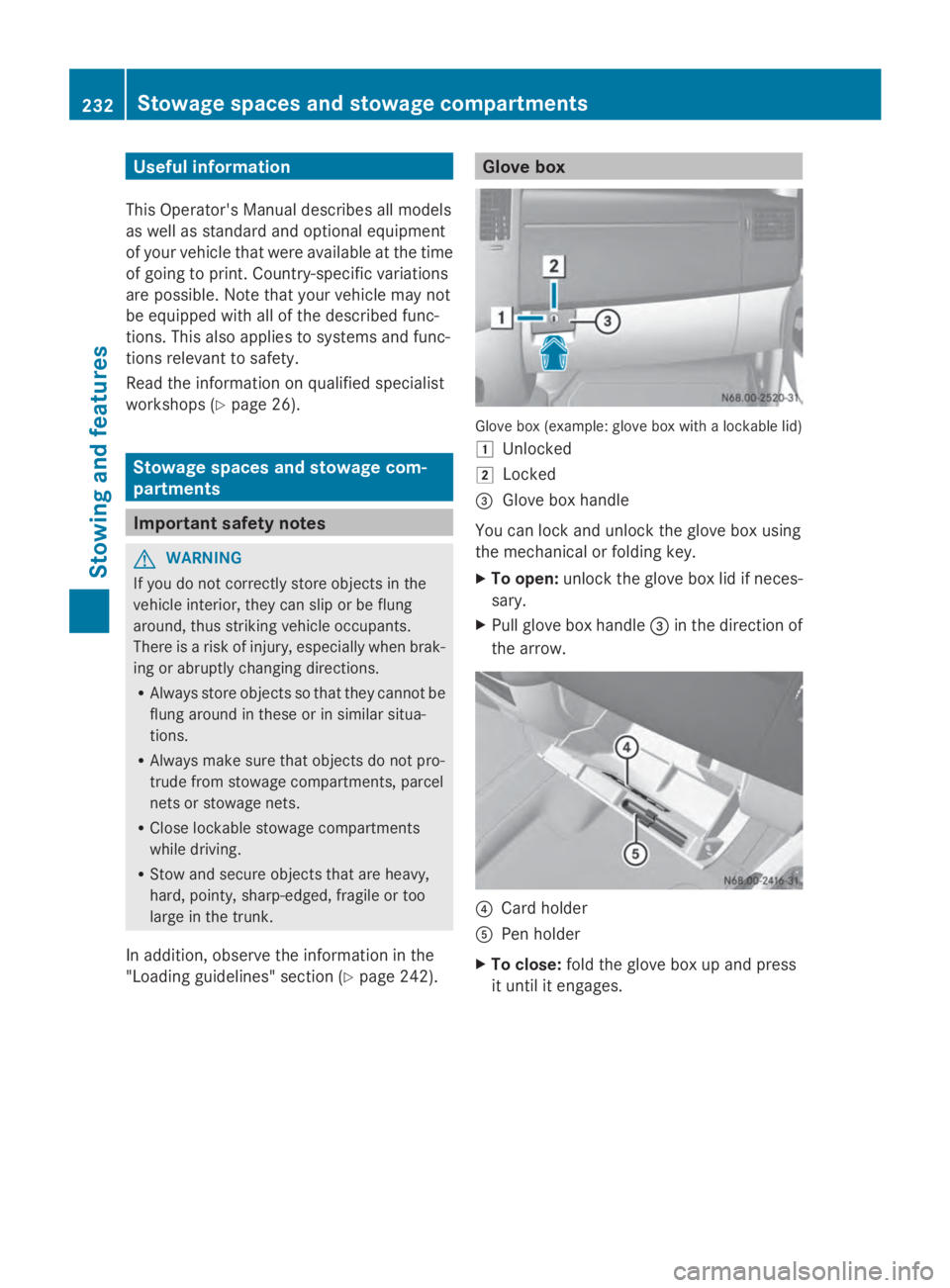
"Loading guidelines" section (Y page 242). Glove box
Glove box (example: glove box with a lockable lid)
0047
Unlocked
0048 Locked
0087 Glove box handle
You can lock and unlock the glove box using
the mechanical or folding key.
X To open: unlock the glove box lid if neces-
sary.
X Pull glove box handle 0087in the direction of
the arrow. 0085
Card holder
0083 Pen holder
X To close: fold the glove box up and press
it until it engages. 232
Stowage spaces and stowage compartmentsStowing and features
Page 240 of 338
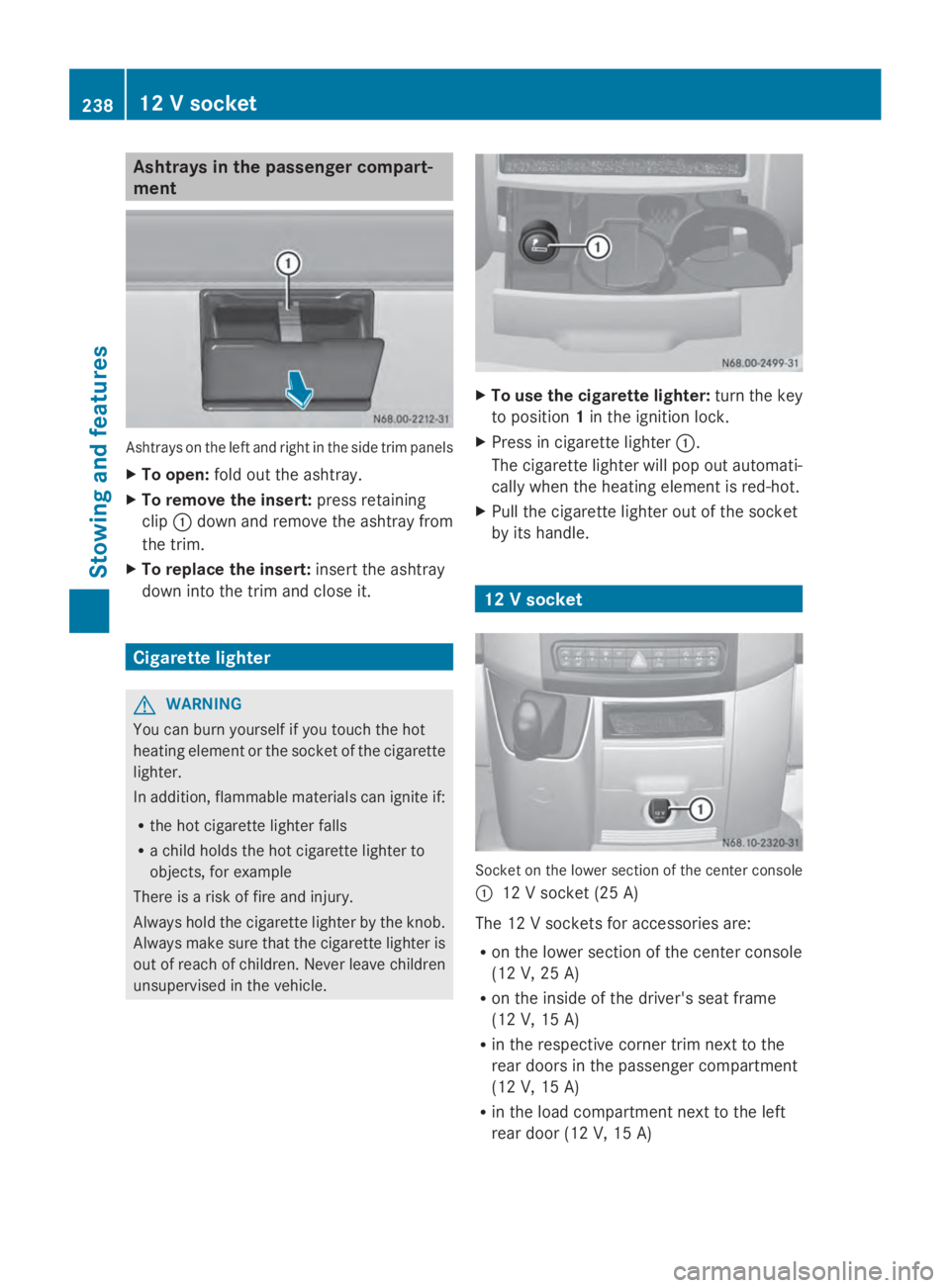
Ashtrays in the passenger compart-
ment Ashtrays on the left and right in the side trim panels
X To open: fold out the ashtray.
X To remove the insert: press retaining
clip 0043down and remove the ashtray from
the trim.
X To replace the insert: insert the ashtray
down into the trim and close it. Cigarette lighter
G
WARNING
You can burn yourself if you touch the hot
heating element or the socket of the cigarette
lighter.
In addition, flammable materials can ignite if:
R the hot cigarette lighter falls
R a child holds the hot cigarette lighter to
objects, for example
There is a risk of fire and injury.
Always hold the cigarette lighter by the knob.
Always make sure that the cigarette lighter is
out of reach of children. Never leave children
unsupervised in the vehicle. X
To use the cigarette lighter: turn the key
to position 1in the ignition lock.
X Press in cigarette lighter 0043.
The cigarette lighter will pop out automati-
cally when the heating element is red-hot.
X Pull the cigarette lighter out of the socket
by its handle. 12 V socket
Socket on the lower section of the center console
0043 12 V socket (25 A)
The 12 V sockets for accessories are:
R on the lower section of the center console
(12 V, 25 A)
R on the inside of the driver's seat frame
(12 V, 15 A)
R in the respective corner trim next to the
rear doors in the passenger compartment
(12 V, 15 A)
R in the load compartment next to the left
rear door (12 V, 15 A) 238
12 V socketStowing and featu
res
Page 242 of 338
Only operate this equipment when the vehicle
is stationary.
You must observe the legal requirements for
the country in which you are currently driving
when operating mobile communication
equipment.
Please remember, a navigation system does
not supply information on the load-bearing
capacity of bridges or the overhead clearance
of underpasses. The driver remains responsi-
ble for safety at all times.
You and others can suffer health-related dam-
age through electromagnetic radiation. By
using an exterior antenna, a possible health
risk caused by electromagnetic fields, as dis-
cussed in scientific circles, is taken into
account. Only have the exterior antenna
installed by a qualified specialist workshop.
You will find information on retrofitting elec-
trical or electronic equipment in the “Vehicle
electronics” section (Y page 318).Installation for PND mobile navigation
devices
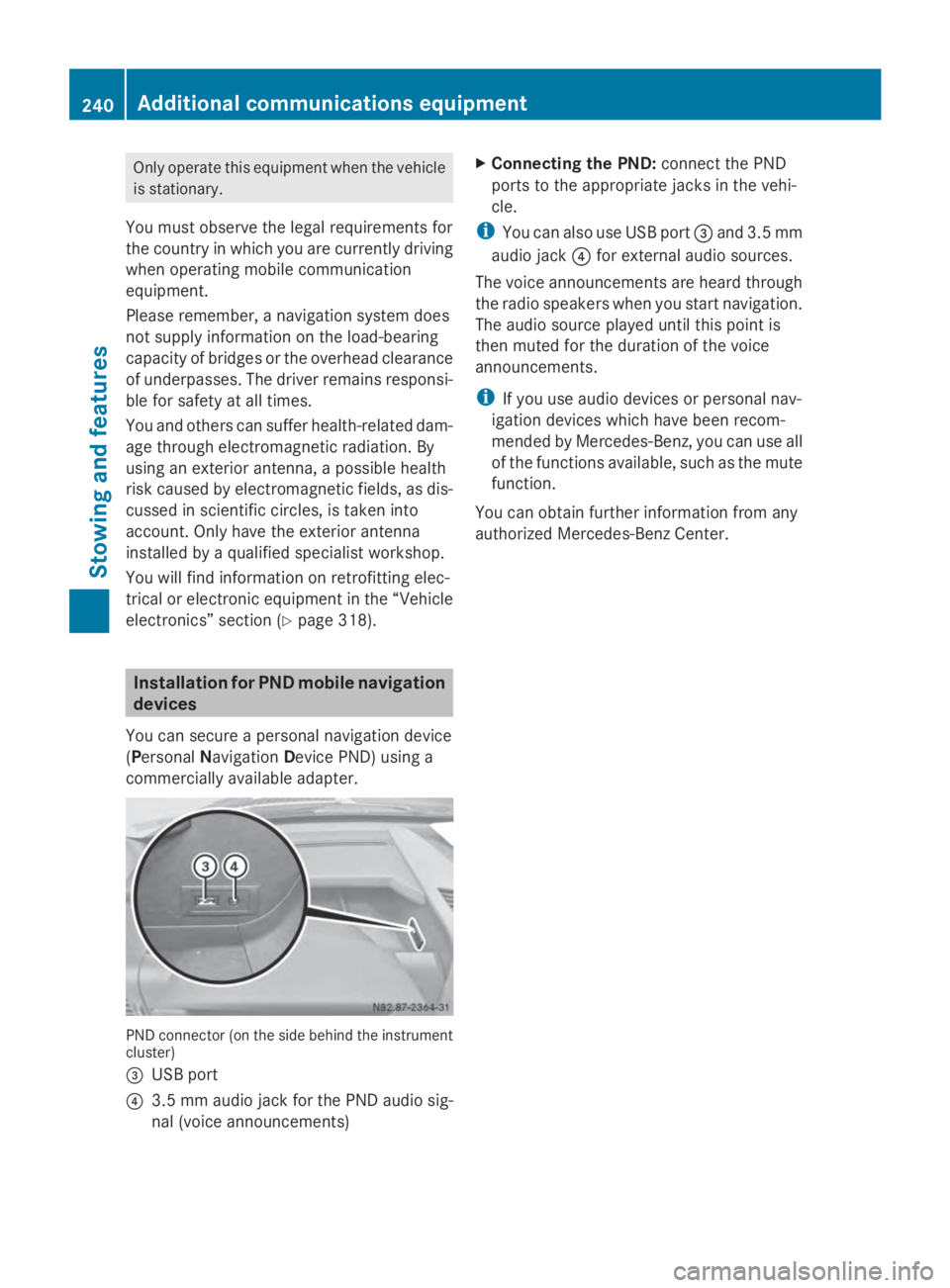
You can secure a personal navigation device
(Personal Navigation Device PND) using a
commercially available adapter. PND connector (on the side behind the instrument
cluster)
0087 USB port
0085 3.5 mm audio jack for the PND audio sig-
nal (voice announcements) X
Connecting the PND: connect the PND
ports to the appropriate jacks in the vehi-
cle.
i You can also use USB port 0087and 3.5 mm
audio jack 0085for external audio sources.
The voice announcements are heard through
the radio speakers when you start navigation.
The audio source played until this point is
then muted for the duration of the voice
announcements.
i If you use audio devices or personal nav-
igation devices which have been recom-
mended by Mercedes-Benz, you can use all
of the functions available, such as the mute
function.
You can obtain further information from any
authorized Mercedes-Benz Center. 240
Additional communications equipmentStowing and features