engine MERCEDES-BENZ SPRINTER 2014 MY14 Operator’s Manual
[x] Cancel search | Manufacturer: MERCEDES-BENZ, Model Year: 2014, Model line: SPRINTER, Model: MERCEDES-BENZ SPRINTER 2014Pages: 338, PDF Size: 6.78 MB
Page 174 of 338
The rear view camera is a visual parking aid.
Information on operation can be found in the
separate Audio 15 supplement.
The camera is in the middle of the roof above
the high-mounted brake lamp (Y page 271).
The rear view camera may show obstacles in
perspectival distortion, incorrectly or not at
all. The rear view camera cannot display all
objects located very near and/or under the
rear bumper. It does not warn you of a colli-
sion, persons or objects.
The area behind the vehicle is displayed in a
mirrored fashion, as in the rear-view mirror or
the exterior mirrors. The guide lines displayed
assist you in backing up.
The function of the rear view camera may be
partially or completely impaired in the follow-
ing circumstances:
R it is raining very heavily or snowing, or it is
foggy.
R the parking space is located in a very dark
place.
R the camera is exposed to very strong white
light. White stripes may appear on the dis-
play.
R the surrounding area is illuminated with flu-
orescent light. The display may flicker.
R if the temperature changes very quickly, for
example if you drive into a heated garage
in the winter.
R ambient temperatures are very high.
R the camera lens is dirty or obstructed.
R the rear of the vehicle is damaged. In this
case, have the position and setting
checked at a specialist workshop.
The rear view camera is switched on when
you engage reverse gear R.
You can find information on cleaning the cam-
era in the "Maintenance and care" section
(Y page 271). Working mode
ADR (working speed governor)
General notes When activated, ADR automatically increases
the engine speed to a preset speed or a speed
you have set.
i
After a cold start, the idling speed of the
engine is increased automatically. If the
preset working speed is lower than the
increased idling speed, the working speed
is only reached once the engine has com-
pleted the warm-up phase.
It is only possible to activate ADR with the
vehicle stationary and the parking brake
applied.
The selector lever of the automatic trans-
mission must be in position P.
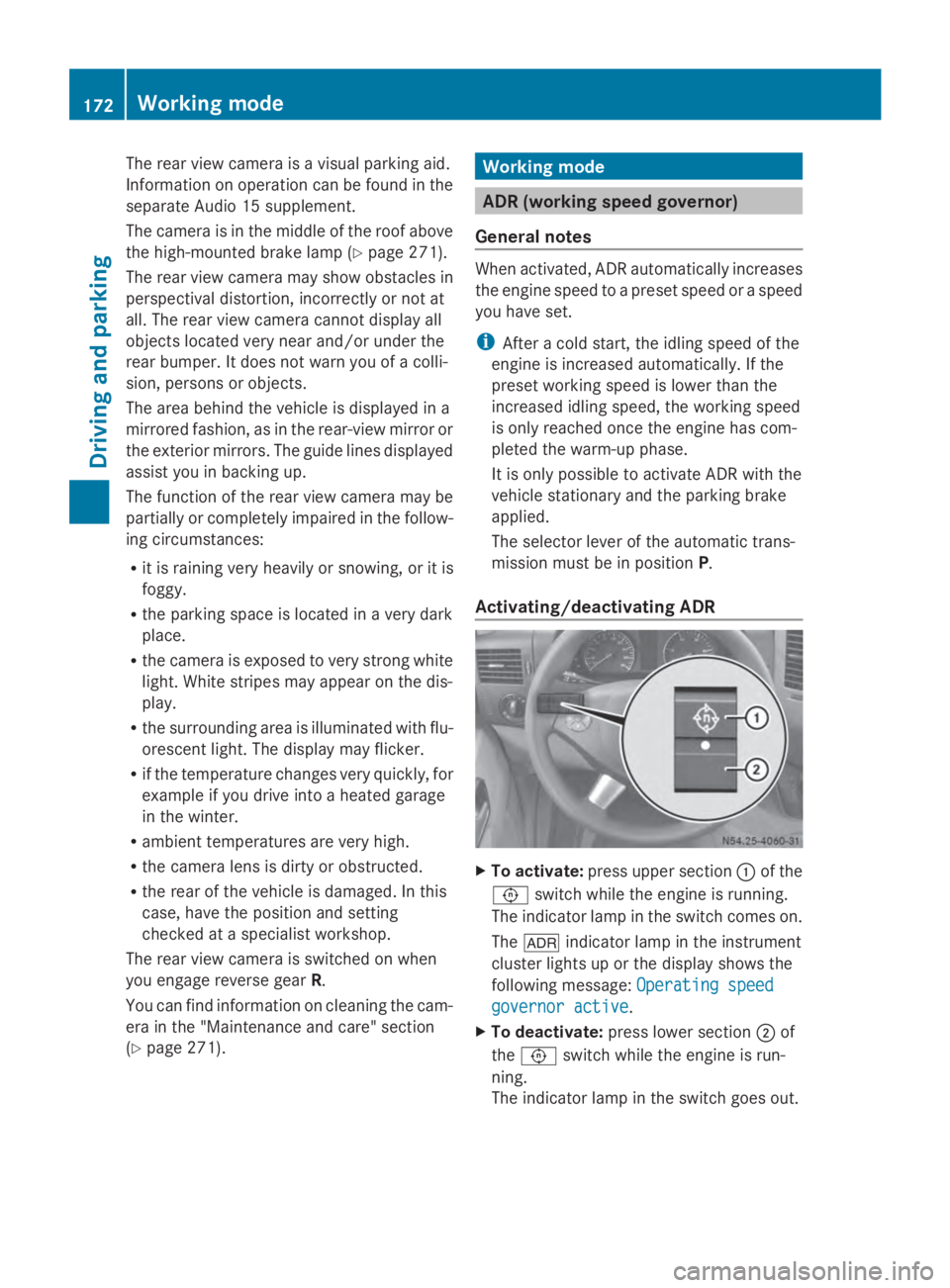
Activating/deactivating ADR X
To activate: press upper section 0043of the
0091 switch while the engine is running.
The indicator lamp in the switch comes on.
The 004E indicator lamp in the instrument
cluster lights up or the display shows the
following message: Operating speed Operating speed
governor active governor active.
X To deactivate: press lower section 0044of
the 0091 switch while the engine is run-
ning.
The indicator lamp in the switch goes out. 172
Working modeDriving and parking
Page 177 of 338
safety. The notes on operation, care and
maintenance issued by the manufacturer
should be observed.
R The bumpers of your vehicle are not suita-
ble for installing detachable trailer cou-
plings.
R Do not install rented trailer couplings or
other detachable trailer couplings to the
bumpers.
R Minimize the risk of damage to the ball cou-
pling. If you do not require the ball coupling,
remove it from the ball coupling recess.
Weight information can be found in the “Per-
missible trailer and drawbar noseweights”
section (Y page 178).
i The height of the ball neck changes
according to the load on the vehicle. If this
is case, use a trailer with a height-adjust-
able trailer drawbar.
Driving tips The maximum permissible speed for vehicle/
trailer combination depends on the type of
trailer. Before setting off, check the vehicle
documents of the your trailer to find out the
permissible maximum speed. Observe the
legally prescribed maximum speed for vehi-
cle/trailer combinations in the relevant coun-
try, state or Canadian province.
When towing a trailer, your vehicle's handling
characteristics will be different in comparison
to when driving without a trailer and it will
consume more fuel.
On long, steep downhill slopes you must
select shift range 3,2or 1in good time.
i This also applies if cruise control is acti-
vated.
This enables you to utilize the engine's brak-
ing effect and you do not need to brake so
heavily to keep the correct speed. which pro-
tects the brake system and prevents the
brakes from overheating and wearing too
quickly. If you need to brake additionally, to
not depress the brake pedal constantly, but
periodically. Driving tips If the trailer begins to swing from side to side:
X
Do not accelerate.
X Do not counter-steer.
X Brake if necessary.
i You can reduce the risk of the trailer
swinging and rocking by retrofitting anti-
roll bars or trailer stability programs. More
information is available from your author-
ized Sprinter Dealer.
R Maintain a greater distance than you would
when driving without towing a trailer.
R Avoid sudden braking. Apply the brakes
gently at first to allow the trailer brake to
overrun. Then, increase the brake force
quickly.
R The figures for the gradient climbing capa-
bilities from a standstill refer to sea level.
When driving in mountainous areas, note
that the power output of the engine, and
with it its gradient climbing capability,
decrease with increasing altitude. Attaching and removing the ball cou-
pling
G
WARNING
If the ball coupling is not correctly installed
and secured, it could come loose while driving
and endanger other road users. There is a risk
of an accident and injury.
Install and secure the ball coupling as descri-
bed in the ball coupling manufacturer's instal-
lation instructions. Make sure that the ball
coupling is correctly installed and secured
before every journey. G
WARNING
If the ball coupling is not installed and secured
correctly the trailer may come loose. There is
a risk of an accident.
Install and secure the ball coupling as descri-
bed in the ball coupling installation instruc-
tions. Make sure that the ball coupling is Towing a trailer
175Driving and parking
Z
Page 179 of 338
Observe the following when towing a trailer:
R Practice driving around bends, stopping
and backing up at a place where there is no
traffic. This enables you to gain experience
and get used to the new handling charac-
teristics.
R Before driving, check:
-that the trailer tow hitch and ball cou-
pling are secure
- that the safety switch for a braked trailer
is functioning properly
- that the safety chains are secure and not
damaged
- that the electrical connections are
secure
- that the lights are working
- that the wheels are in good order and the
tire pressure is correct
R Adjust the exterior mirrors to provide an
unobstructed view of the rear section of the
trailer.
R If the trailer has electronically controlled
brakes, pull the vehicle/trailer combina-
tion away carefully. Brake manually using
the brake controller and check that the
brakes are working.
R Secure the load on the trailer according to
the applicable specifications and current
standards on securing loads
(Y page 244).
R When driving with a trailer, check at regular
intervals that the load is secured and that
the brakes and lights are working.
R Bear in mind that the handling will be less
stable when towing a trailer than when driv-
ing without one. Avoid sudden steering
movements.
R The vehicle/trailer combination is heavier,
accelerates more slowly and has a
decreased gradient climbing capability and
a longer braking distance.
It is more susceptible to crosswinds and
requires cautious steering.
R If possible, do not brake suddenly, but
rather moderately at first so that the trailer can activate its brakes. Then increase the
force on the brake pedal.
R If the automatic transmission repeatedly
shifts between gears when driving on
inclines, restrict the shift range. Select shift
range 4,3,2or 1.
Driving in a low gear and at a low speed
reduces the risk of damaging the engine.
R When driving on a downhill gradient, shift
to a low gear and take advantage of the
engine's braking effect.
Avoid continuous brake application as this
may overheat the vehicle brakes and, if
installed, the trailer brakes.
R If the coolant temperature increases dra-
matically while the air-conditioning system
is switched on, switch off the air-condition-
ing system.
Coolant heat can also be dissipated by
switching the airflow and the temperature
of the heater/air conditioning to the maxi-
mum level. Open the windows if necessary.
R When overtaking, pay particular attention
to the extended length of your vehicle/
trailer combination.
Due to the length of your vehicle/trailer
combination you need an additional dis-
tance before you can return to your original
lane. Uncoupling a trailer
G
WARNING
If you uncouple a trailer with the overrun
brake engaged, you could trap your hand
between the vehicle and the trailer drawbar.
There is a risk of injury.
Do not uncouple a trailer if the overrun brake
is engaged.
! Do not disconnect a trailer with an
engaged overrun brake. Otherwise, your
vehicle could be damaged by the rebound-
ing of the overrun brake. Towing a trailer
177Driving and parking Z
Page 184 of 338
Useful information
This Operator's Manual describes all models
as well as standard and optional equipment
of your vehicle that were available at the time
of going to print. Country-specific variations
are possible. Note that your vehicle may not
be equipped with all of the described func-
tions. This also applies to systems and func-
tions relevant to safety.
Read the information on qualified specialist
workshops (Y page 26). Important safety notes
G
WARNING
If you are driving and reach through the steer-
ing wheel to operate the adjustment knob,
you could lose control of the vehicle. There is
a risk of an accident and injury.
Only operate the adjustment knobs when the
vehicle is stationary. Do not reach through the
steering wheel when driving. G
WARNING
If you operate information systems and com-
munication equipment integrated in the vehi-
cle while driving, you will be distracted from
traffic conditions. You could also lose control
of the vehicle. There is a risk of an accident.
Only operate the equipment when the traffic
situation permits. If you are not sure that this
is possible, park the vehicle paying attention
to traffic conditions and operate the equip-
ment when the vehicle is stationary. G
WARNING
If the instrument cluster has failed or mal-
functioned, you may not recognize function
restrictions in systems relevant to safety. The
operating safety of your vehicle may be
impaired. There is a risk of an accident.
Drive on carefully. Have the vehicle checked
at a qualified specialist workshop immedi-
ately. If uncertainties regarding the operating safety
of the vehicle arise when continuing the jour-
ney, stop the vehicle, paying attention to road
and traffic conditions. Instrument cluster
Overview
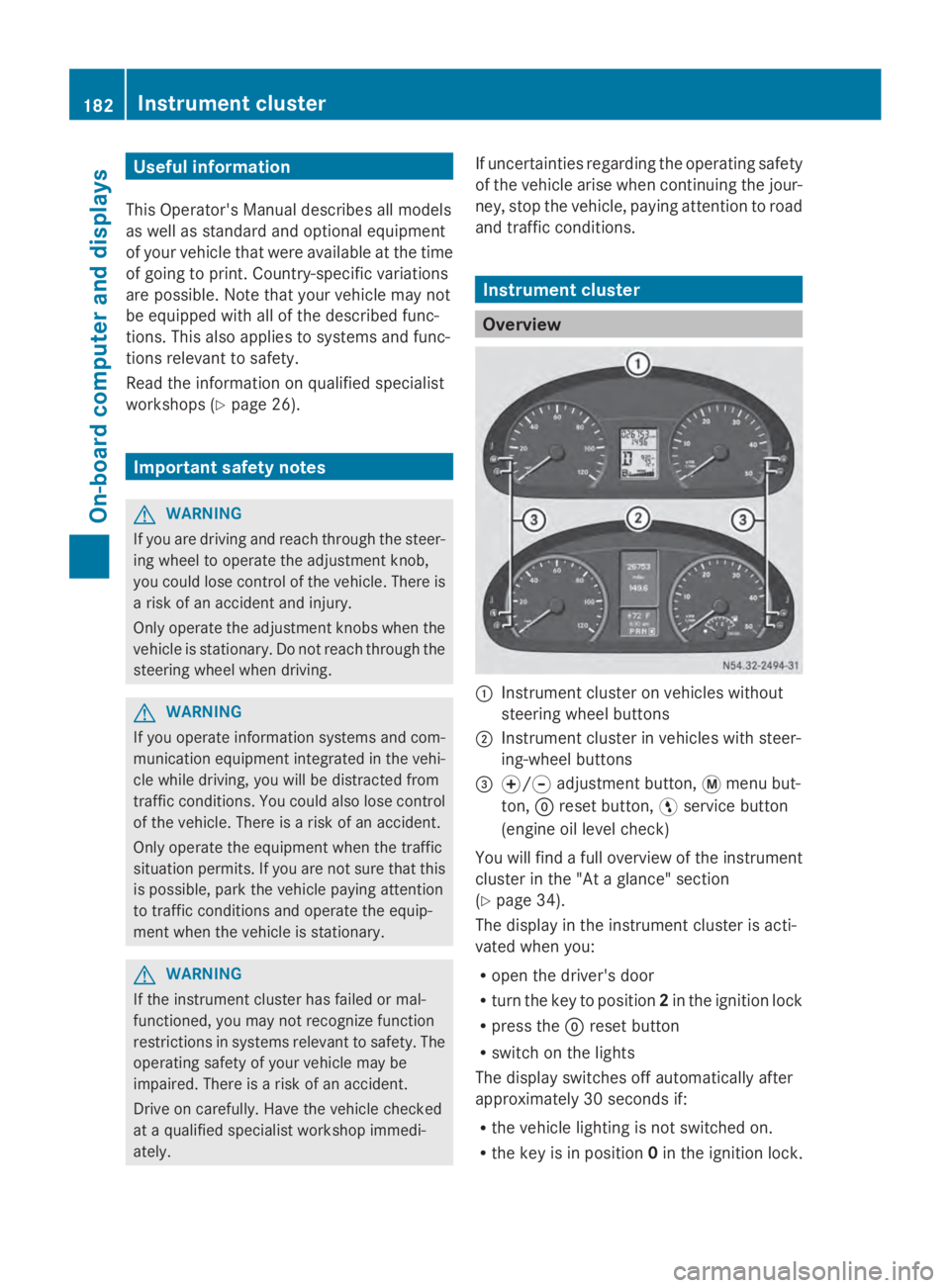
0043
Instrument cluster on vehicles without
steering wheel buttons
0044 Instrument cluster in vehicles with steer-
ing-wheel buttons
0087 0074/0075 adjustment button, 0079menu but-
ton, 0045reset button, 0098service button
(engine oil level check)
You will find a full overview of the instrument
cluster in the "At a glance" section
(Y page 34).
The display in the instrument cluster is acti-
vated when you:
R open the driver's door
R turn the key to position 2in the ignition lock
R press the 0045reset button
R switch on the lights
The display switches off automatically after
approximately 30 seconds if:
R the vehicle lighting is not switched on.
R the key is in position 0in the ignition lock. 182
Instrument clusterOn-board computer and displays
Page 185 of 338
Instrument lighting
When the lights are switched on, you can
adjust the brightness of the instrument clus-
ter lighting using the 0074and 0075buttons.
X To brighten: press the0074button.
X To dim: press the 0075button.
i Vehicles with automatic headlamp mode:
the instrument lighting also adapts to auto-
matic headlamp mode. Tachometer
! Do not drive in the overrevving range, as
this could damage the engine. H
Environmental note
Avoid driving at high engine speeds. This
unnecessarily increases the fuel consumption
of your vehicle and harms the environment as
a result of increased emissions.
The red band in the tachometer indicates the
engine's overrevving range.
To protect the engine, the fuel supply is inter-
rupted when the red band is reached. Outside temperature
You should pay special attention to road con-
ditions when temperatures are around the
freezing point.
On vehicles without steering wheel buttons
(Y page 184) and on vehicles with steering
wheel buttons (Y page 189), the outside tem-
perature display is in the display.
Changes in the outside temperature are dis-
played after a short delay. Speedometer
The speed can also be shown in the display.
You can find information on the digital speed-
ometer for vehicles without steering wheel
buttons under (Y page 184) and for vehicles with steering wheel buttons under
(Y
page 189).
i In some countries, a warning sounds
when the vehicle reaches the maximum
speed limit, e.g. at 75 mph ( 120 km/h). Trip odometer
X To reset: make sure that the display is
showing the trip odometer if you have a
vehicle with steering wheel buttons
(Y page 189).
X Press and hold the 0045reset button until the
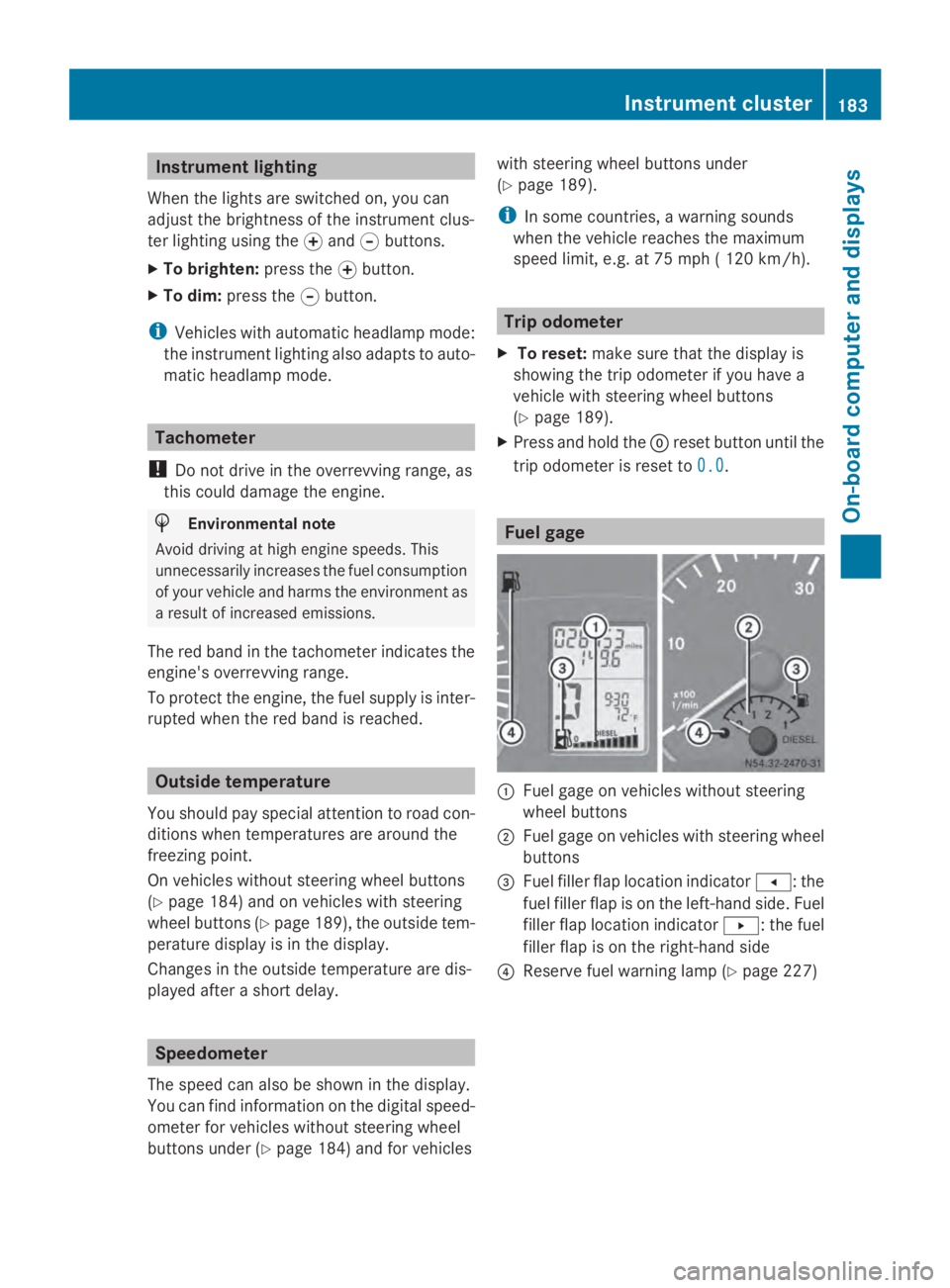
trip odometer is reset to 0.0 0.0. Fuel gage
0043
Fuel gage on vehicles without steering
wheel buttons
0044 Fuel gage on vehicles with steering wheel
buttons
0087 Fuel filler flap location indicator 007F: the
fuel filler flap is on the left-hand side. Fuel
filler flap location indicator 0080: the fuel
filler flap is on the right-hand side
0085 Reserve fuel warning lamp (Y page 227) Instrument cluster
183On-board computer and displays Z
Page 186 of 338
DEF gauge
Vehicles without steering wheel but-
tons If the supply of DEF is less than 1.5 US gal
(5.5 l), the 00E2indicator lamp lights up and
the 0099 dEF Chk
dEF Chk display message appears.
If the supply of DEF falls below the reserve
range of 0.8 US gal (3.0 l), the 00E2indicator
lamp lights up and the 0099StArtS RExx
StArtS RExx
display message appears. In the display, xx
xx
corresponds to the number of possible
remaining engine starts (16 16to0
0).
Further information on DEF consumption can
be found in the "Service products and filling
capacity" section (Y page 324).
Vehicles with steering wheel buttons If the supply of DEF is less than 1.5 US gal
(5.5 l), the Check Diesel Exhaust Fluid
Check Diesel Exhaust Fluid
See
See Operator's
Operator's Manual
Manualmessage is shown
in the display.
If the supply of DEF falls below the reserve
range of 0.8 US gal (3.0 l), the 00E2xx
xx
starts remaining starts remaining message is displayed. In
the display, xx
xxcorresponds to the number of
possible remaining engine starts ( 16
16to0
0).
Further information on DEF consumption can
be found in the "Service products and filling
capacity" section (Y page 324).On-board computer (vehicles without
steering wheel buttons) Operating the on-board computer
General notes The on-board computer is activated as soon
as you turn the key to position 1in the ignition
lock.
The on-board computer shows vehicle infor-
mation and settings in the display. You can control the display and the settings
in the on-board computer using the adjust-
ment buttons on the instrument cluster.
Standard display
0043
Odometer
0044 Trip odometer
0087 Clock
0085 Outside temperature or digital speedom-
eter
0083 Fuel gage (Y page 183)
0084 Selector lever position or current shift
range with automatic transmission
(Ypage 144)
X To call up the standard display: turn the
key to position 2in the ignition lock.
X Press the 0079menu button for longer than
one second.
The information shown in the display
changes from the outside temperature to
the digital speedometer. Menus in the on-board computer
Overview If you wish to exit a menu and go to the stand-
ard display:
X
Press the 0079menu button for longer than
1 second.
Or
X Do not press any button for 10 seconds.
The display accepts the changed settings. 184
On-boa
rdcompu ter (vehicles without steering wheel buttons)On-board computer and displays
Page 187 of 338
Using the
0074,0075,0079or0045 adjustment but-
tons, you can select the following functions:
R Calling up the service due date
(Y page 260)
R Checking the oil level (Y page 252)
R Checking the DEF supply (Y page 184)
R Preselecting/setting the auxiliary heating
switch-on time (Y page 124)
R Tire pressure monitor (Y page 293)
R Setting the time (Y page 185)
R Activating/deactivating Highbeam Assist
(Y page 194)
R Setting the daytime running lamps
(Y page 185)
Setting the time X
Turn the key to position 2in the ignition
lock.
X Press the 0079menu button repeatedly until
the hours figure flashes.
X Press the 0074or0075 button to set the hour.
X Press the 0045reset button.
The minute display flashes.
X Press the 0074or0075 button to set the minute.
i If you keep the 0074or0075 button pressed,
the value will change continuously.
Activating/deactivating Highbeam
Assist X
Turn the key to position 2in the ignition
lock.
X Press the 0079menu button repeatedly until
the 00CE indicator lamp flashes and the
on
on orOFF
OFF message appears in the display.
X Use the 0074or0075 button to switch High-
beam Assist on/off.
Switching the daytime running lamps
on/off If you switch the daytime running lights
ON ON,
the daytime running lights will automatically
light up when the engine is running. For safety reasons, it is only possible to
change this setting when the vehicle is sta-
tionary. The factory setting is
ON ONin countries
in which constant headlamp mode or daytime
running lights are mandatory.
X Turn the key to position 2in the ignition
lock.
X Press the 0079menu button repeatedly until
the 0058 indicator lamp flashes and the
on on orOFF
OFF message appears in the display.
X Press the 0074or0075 button to activate or
deactivate the daytime running lamps.
i USA only:
If you turn the light switch to 0060or
0058, the corresponding light switches on.
If you turn the light switch to 0058, the
daytime running lamps remain switched
on.
Canada only:
If you turn the light switch to 0058, the low-
beam headlamps switch on. If you turn the
light switch to 0060or0058, the daytime
running lamps remain switched on. On-board computer (vehicles without steering wheel buttons)
185On-board computer and displays Z
Page 190 of 338
Menu Overview
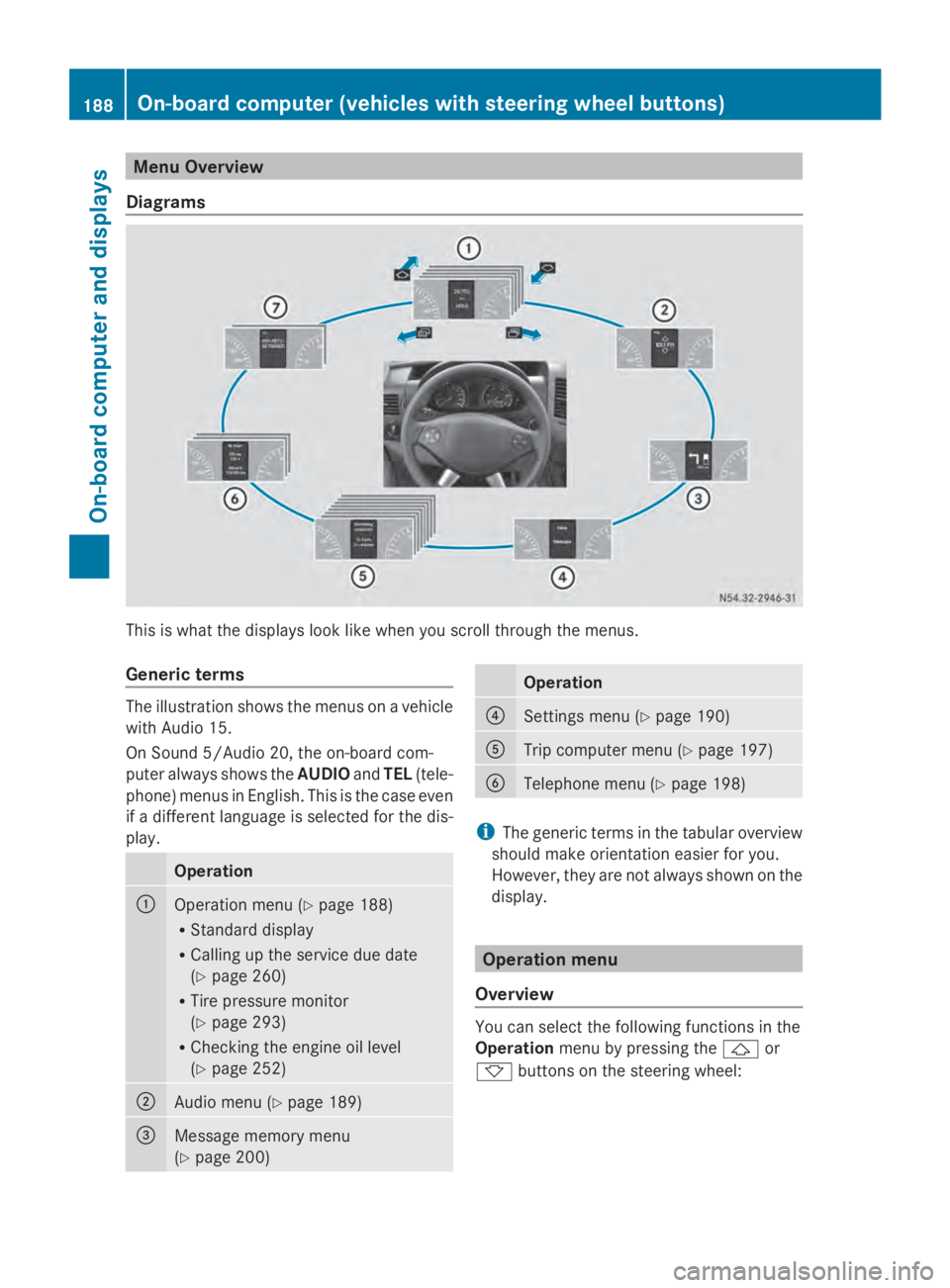
Diagrams This is what the displays look like when you scroll through the menus.
Generic terms The illustration shows the menus on a vehicle
with Audio 15.
On Sound 5/Audio 20, the on-board com-
puter always shows the AUDIOandTEL (tele-
phone) menus in English. This is the case even
if a different language is selected for the dis-
play. Operation
0043
Operation menu (Y
page 188)
R Standard display
R Calling up the service due date
(Y page 260)
R Tire pressure monitor
(Y page 293)
R Checking the engine oil level
(Y page 252) 0044
Audio menu (Y
page 189) 0087
Message memory menu
(Y
page 200) Operation
0085
Settings menu (Y
page 190) 0083
Trip computer menu (Y
page 197) 0084
Telephone menu (Y
page 198) i
The generic terms in the tabular overview
should make orientation easier for you.
However, they are not always shown on the
display. Operation menu
Overview You can select the following functions in the
Operation
menu by pressing the 0041or
0068 buttons on the steering wheel: 188
On-board computer (vehicles with steering wheel buttons)On-board computer and displays
Page 196 of 338
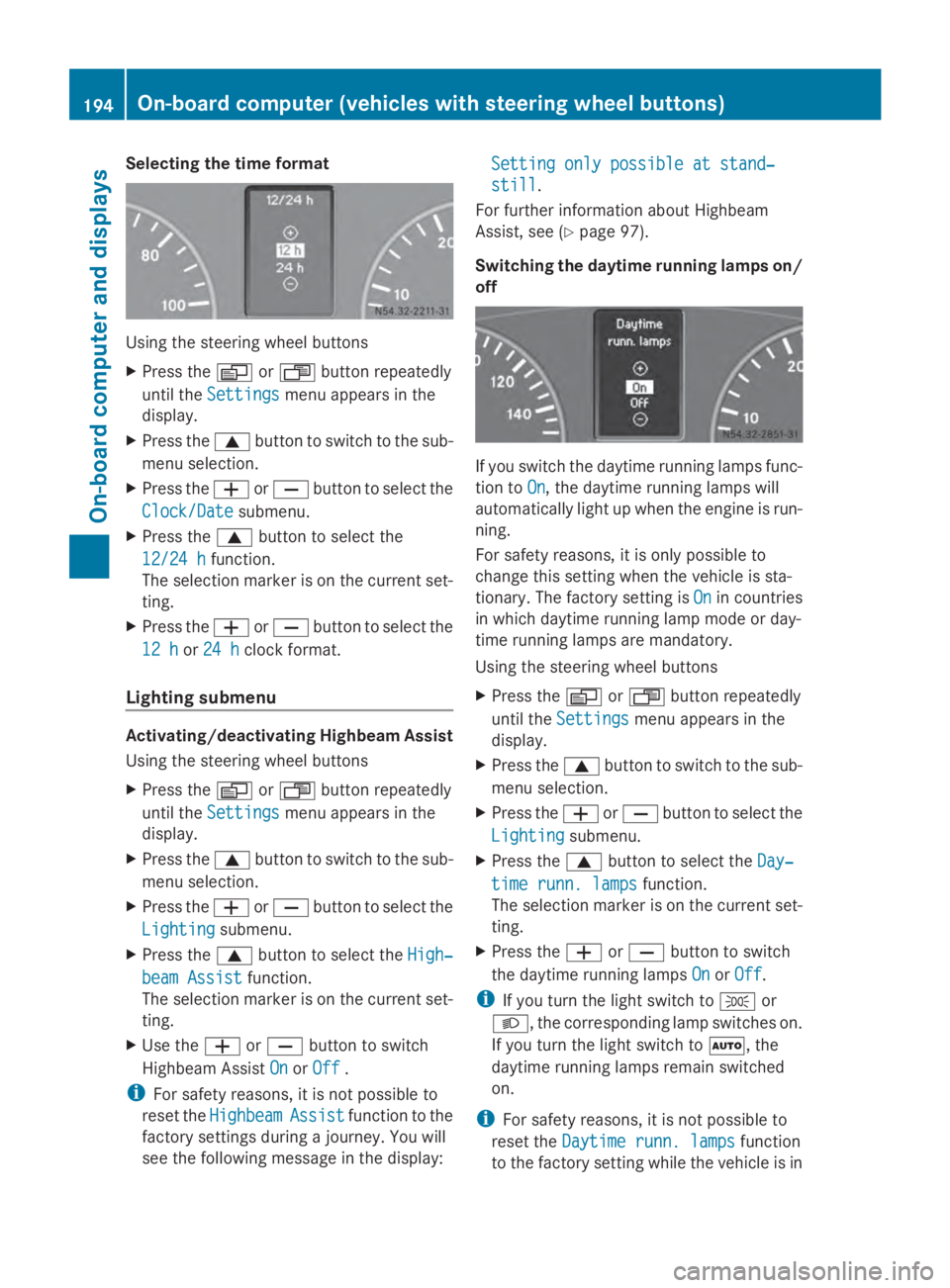
Selecting the time format
Using the steering wheel buttons
X
Press the 0080or007F button repeatedly
until the Settings
Settings menu appears in the
display.
X Press the 0063button to switch to the sub-
menu selection.
X Press the 0081or0082 button to select the
Clock/Date
Clock/Date submenu.
X Press the 0063button to select the
12/24 h 12/24 h function.
The selection marker is on the current set-
ting.
X Press the 0081or0082 button to select the
12 h
12 h or24 h
24 h clock format.
Lighting submenu Activating/deactivating Highbeam Assist
Using the steering wheel buttons
X Press the 0080or007F button repeatedly
until the Settings
Settings menu appears in the
display.
X Press the 0063button to switch to the sub-
menu selection.
X Press the 0081or0082 button to select the
Lighting
Lighting submenu.
X Press the 0063button to select the High‐ High‐
beam Assist
beam Assist function.
The selection marker is on the current set-
ting.
X Use the 0081or0082 button to switch
Highbeam Assist On
On orOff
Off .
i For safety reasons, it is not possible to
reset the Highbeam
Highbeam Assist
Assistfunction to the
factory settings during a journey. You will
see the following message in the display: Setting only possible at stand‐ Setting only possible at stand‐
still still.
For further information about Highbeam
Assist, see (Y page 97).
Switching the daytime running lamps on/
off If you switch the daytime running lamps func-
tion to
On On, the daytime running lamps will
automatically light up when the engine is run-
ning.
For safety reasons, it is only possible to
change this setting when the vehicle is sta-
tionary. The factory setting is On Onin countries
in which daytime running lamp mode or day-
time running lamps are mandatory.
Using the steering wheel buttons
X Press the 0080or007F button repeatedly
until the Settings Settings menu appears in the
display.
X Press the 0063button to switch to the sub-
menu selection.
X Press the 0081or0082 button to select the
Lighting
Lighting submenu.
X Press the 0063button to select the Day‐
Day‐
time runn. lamps
time runn. lamps function.
The selection marker is on the current set-
ting.
X Press the 0081or0082 button to switch
the daytime running lamps On OnorOff
Off.
i If you turn the light switch to 0060or
0058, the corresponding lamp switches on.
If you turn the light switch to 0058, the
daytime running lamps remain switched
on.
i For safety reasons, it is not possible to
reset the Daytime runn. lamps Daytime runn. lamps function
to the factory setting while the vehicle is in 194
On-board computer (vehicles with steering wheel buttons)On-board computer and displays
Page 197 of 338
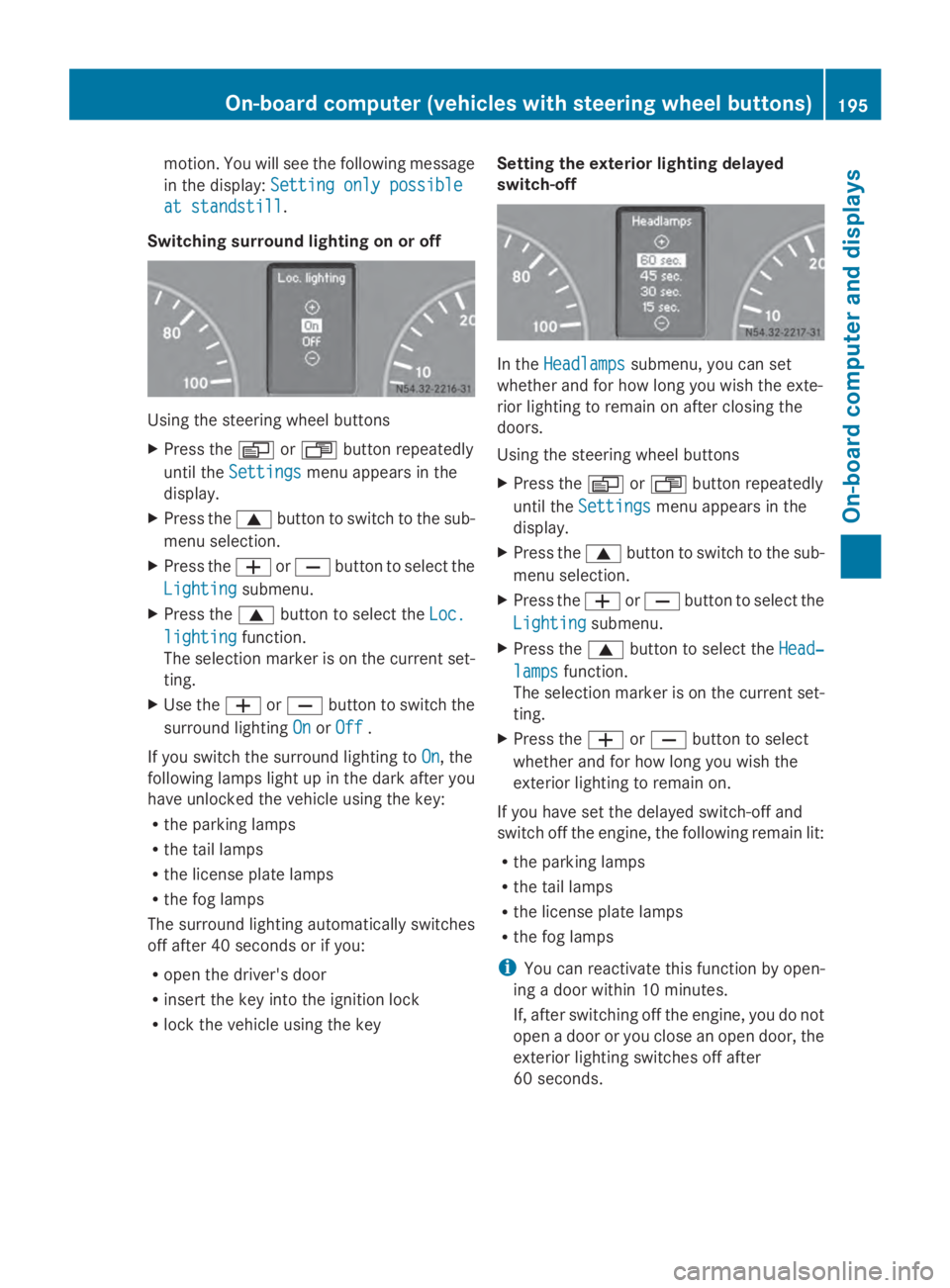
motion. You will see the following message
in the display: Setting only possible
Setting only possible
at standstill
at standstill.
Switching surround lighting on or off Using the steering wheel buttons
X
Press the 0080or007F button repeatedly
until the Settings
Settings menu appears in the
display.
X Press the 0063button to switch to the sub-
menu selection.
X Press the 0081or0082 button to select the
Lighting
Lighting submenu.
X Press the 0063button to select the Loc. Loc.
lighting
lighting function.
The selection marker is on the current set-
ting.
X Use the 0081or0082 button to switch the
surround lighting On OnorOff
Off .
If you switch the surround lighting to On
On, the
following lamps light up in the dark after you
have unlocked the vehicle using the key:
R the parking lamps
R the tail lamps
R the license plate lamps
R the fog lamps
The surround lighting automatically switches
off after 40 seconds or if you:
R open the driver's door
R insert the key into the ignition lock
R lock the vehicle using the key Setting the exterior lighting delayed
switch-off In the
Headlamps Headlamps submenu, you can set
whether and for how long you wish the exte-
rior lighting to remain on after closing the
doors.
Using the steering wheel buttons
X Press the 0080or007F button repeatedly
until the Settings Settings menu appears in the
display.
X Press the 0063button to switch to the sub-
menu selection.
X Press the 0081or0082 button to select the
Lighting
Lighting submenu.
X Press the 0063button to select the Head‐
Head‐
lamps
lamps function.
The selection marker is on the current set-
ting.
X Press the 0081or0082 button to select
whether and for how long you wish the
exterior lighting to remain on.
If you have set the delayed switch-off and
switch off the engine, the following remain lit:
R the parking lamps
R the tail lamps
R the license plate lamps
R the fog lamps
i You can reactivate this function by open-
ing a door within 10 minutes.
If, after switching off the engine, you do not
open a door or you close an open door, the
exterior lighting switches off after
60 seconds. On-board computer (vehicles with steering wheel buttons)
195On-board computer and displays Z