AUX MERCEDES-BENZ SPRINTER 2015 MY15 Operator’s Manual
[x] Cancel search | Manufacturer: MERCEDES-BENZ, Model Year: 2015, Model line: SPRINTER, Model: MERCEDES-BENZ SPRINTER 2015Pages: 334, PDF Size: 5.94 MB
Page 127 of 334
Setting the switch-on time
X Use the same method to select a switch-on
time as described in the "Preselecting a
switch-on time" section.
On-board computer without steering
wheel buttons
X Press the 0045reset button on the instru-
ment cluster.
The hour display flashes.
X Use the 0074and 0075buttons on the instru-
ment cluster to set the hours.
X Press the 0045reset button
The minute display flashes.
X Use the 0074and 0075buttons to set the
minutes.
The switch-on time is set and selected.
On-board computer with steering wheel
buttons
X Press the 0063button on the steering
wheel.
The display shows the Hours
Hours menu.
X Use the 0081and0082 buttons on the
steering wheel to set the hours.
X Press the 0063button.
The display shows the Minutes
Minutes menu.
X Use the 0081and0082 buttons to set the
minutes.
X Press the 0080button.
The switch-on time is set and selected. Operation with the remote control
Important information You can switch the auxiliary heating on/off
and set the operating duration using the
remote control. You can use up to 4 remote
control units on the vehicle. These must be
synchronized for the receiver in your vehicle
(Y page 126). The remote control has a maximum range of
approximately 600 meters. This range is
reduced by:
R sources of interference
R solid objects between the remote control
and the vehicle
R the remote control being in an unfavorable
position in relation to the vehicle
R transmitting from an enclosed space
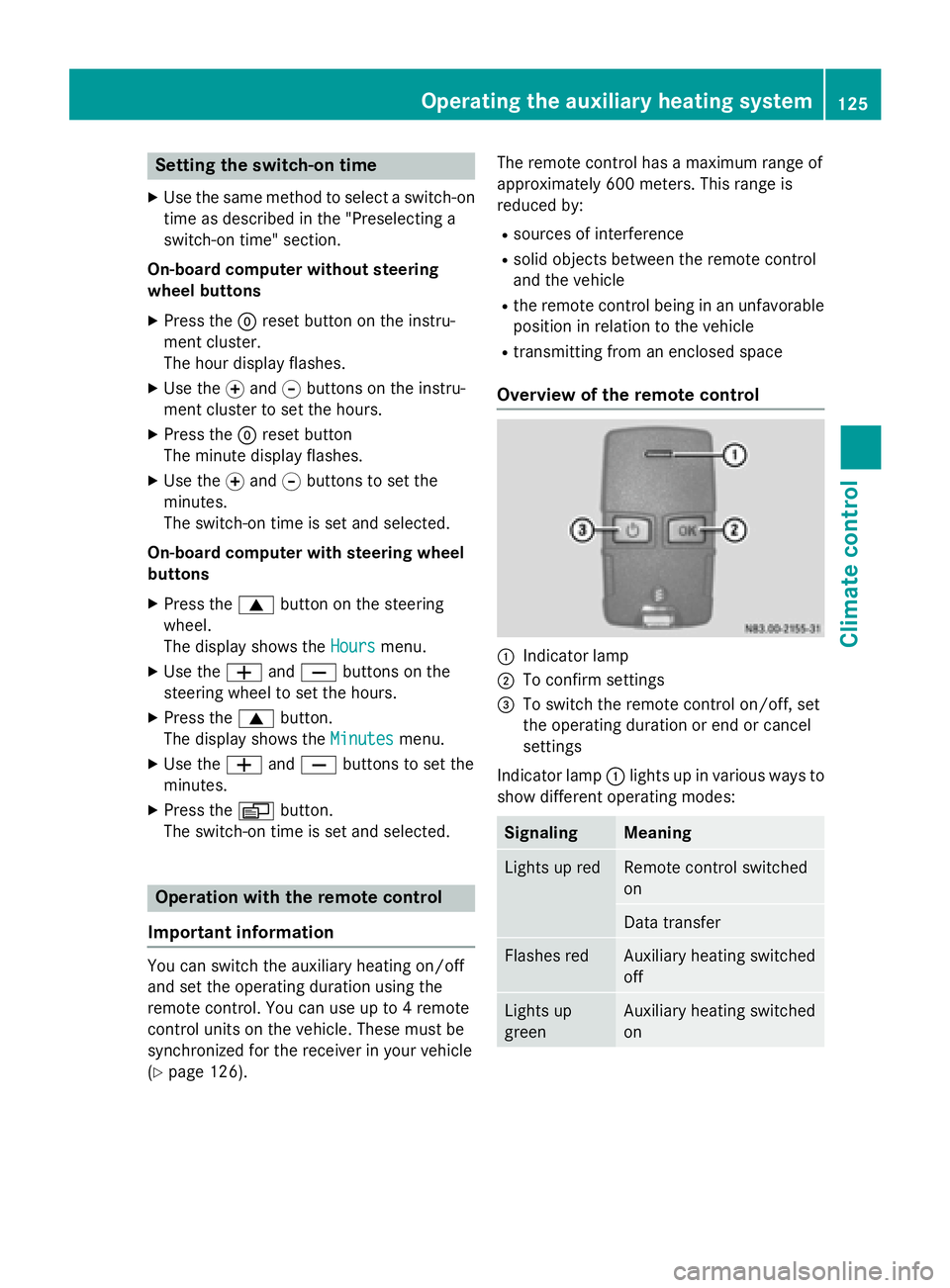
Overview of the remote control 0043
Indicator lamp
0044 To confirm settings
0087 To switch the remote control on/off, set
the operating duration or end or cancel
settings
Indicator lamp 0043lights up in various ways to
show different operating modes: Signaling Meaning
Lights up red Remote control switched
on
Data transfer
Flashes red Auxiliary heating switched
off
Lights up
green Auxiliary heating switched
onOperating the auxiliary heating system
125Climate control Z
Page 128 of 334
Signaling Meaning
Flashes green Change operating duration
active Flashes alter-
nately red and
green Remote control in syn-
chronizing mode
i
When the remote control battery is weak,
indicator lamp 0043flashes red rapidly.
Replace the remote control battery
(Y page 130).
You can find further information on the lamp
status in the "Problems with the auxiliary
heating" section (Y page 132).
Switching the remote control on/off The remote control switches to standby mode
after 10 seconds. Indicator lamp 0043goes out.
X To switch on: press and hold the 00D0
button until indicator lamp 0043lights up red.
If a connection between the remote control and the receiver in the vehicle has been
established and indicator lamp 0043:
R flashes red, the auxiliary heating is
switched off.
R lights up green, the auxiliary heating is
switched on.
X To switch off: press and hold the 00D0
button until indicator lamp 0043goes out.
Switching the auxiliary heating on/off X
Switch on the remote control.
X To switch on: when indicator lamp 0043
flashes red, press the 0070button.
During data transmission, indicator
lamp 0043lights up red.
When indicator lamp 0043lights up green, the
auxiliary heating is switched on.
X To switch off: when indicator lamp 0043
lights up green, press the 0070button.
During data transmission, indicator
lamp 0043lights up red. When indicator lamp
0043flashes red, the
auxiliary heating is switched off.
Changing the operating duration X
Switch on the remote control.
X When indicator lamp 0043flashes red, press
00D0 and0070 simultaneously.
Indicator lamp 0043flashes green.
X Press the 00D0button repeatedly until the
desired operating duration is shown.
R 20 minutes
Indicator lamp 0043flashes green twice.
R 30 minutes
Indicator lamp 0043flashes green three
times.
R 40 minutes
Indicator lamp 0043flashes green four
times.
X Press the 0070button.
During data transmission, indicator
lamp 0043lights up red.
If indicator lamp 0043emits two long, green
flashes, the selected operating duration is
stored.
i If no adjustment is made, indicator
lamp 0043flashes six times and the remote
control goes into standby mode.
Synchronizing the remote control X
Press the 0084auxiliary heating button in
the control panel (Y page 123) for longer
than 10 seconds.
When you press and hold the 0084button,
the red indicator lamp lights up in the but-
ton.
When the red indicator lamp in the 0084
button flashes, the receiver in the vehicle is ready for synchronizing.
X Press and hold the 00D0remote control
button until indicator lamp 0043lights up red.
If there is an active connection between the remote control and the receiver, indicator
lamp 0043flashes alternately red and green. 126
Operating the auxiliary heating systemClimate control
Page 129 of 334
The remote control is in synchronizing
mode.
i If you press the
00D0button again on the
remote control after starting synchroniza-
tion, you will only synchronize this remote
control unit with the receiver. Any other
remote control units that were synchron-
ized will be cleared. Indicator lamp 0043
flashes alternately red and green (very
slowly).
X Press the 0070button on the remote con-
trol.
During data transmission, indicator
lamp 0043lights up red.
When remote control indicator lamp 0043
emits two long green flashes, the selected
operating time is synchronized. The indica-
tor lamp in the 0084auxiliary heating but-
ton goes out. Operation with the timer
Important safety notes This is only for vehicles with a hot-water aux-
iliary heater. G
DANGER
If a switch-on time has been selected, the
auxiliary heating switches on automatically.
R If the ventilation is insufficient, poisonous
exhaust gases can collect, in particular car-
bon monoxide. This is the case in enclosed
spaces, for example. There is a risk of fatal
injuries.
R If highly flammable substances or flamma-
ble materials are nearby, there is a risk of a
risk of fire and explosion.
Always deactivate the preselected switch-on
times if you stop the vehicle in such or similar situations.
Use the timer to: R activate/deactivate immediate heating
mode
R set up to three switch-on times R
set the operating duration from 10to
120 minutes or to continuous operation
R set the heating level (preselected temper-
ature) to a range between 10 and 30
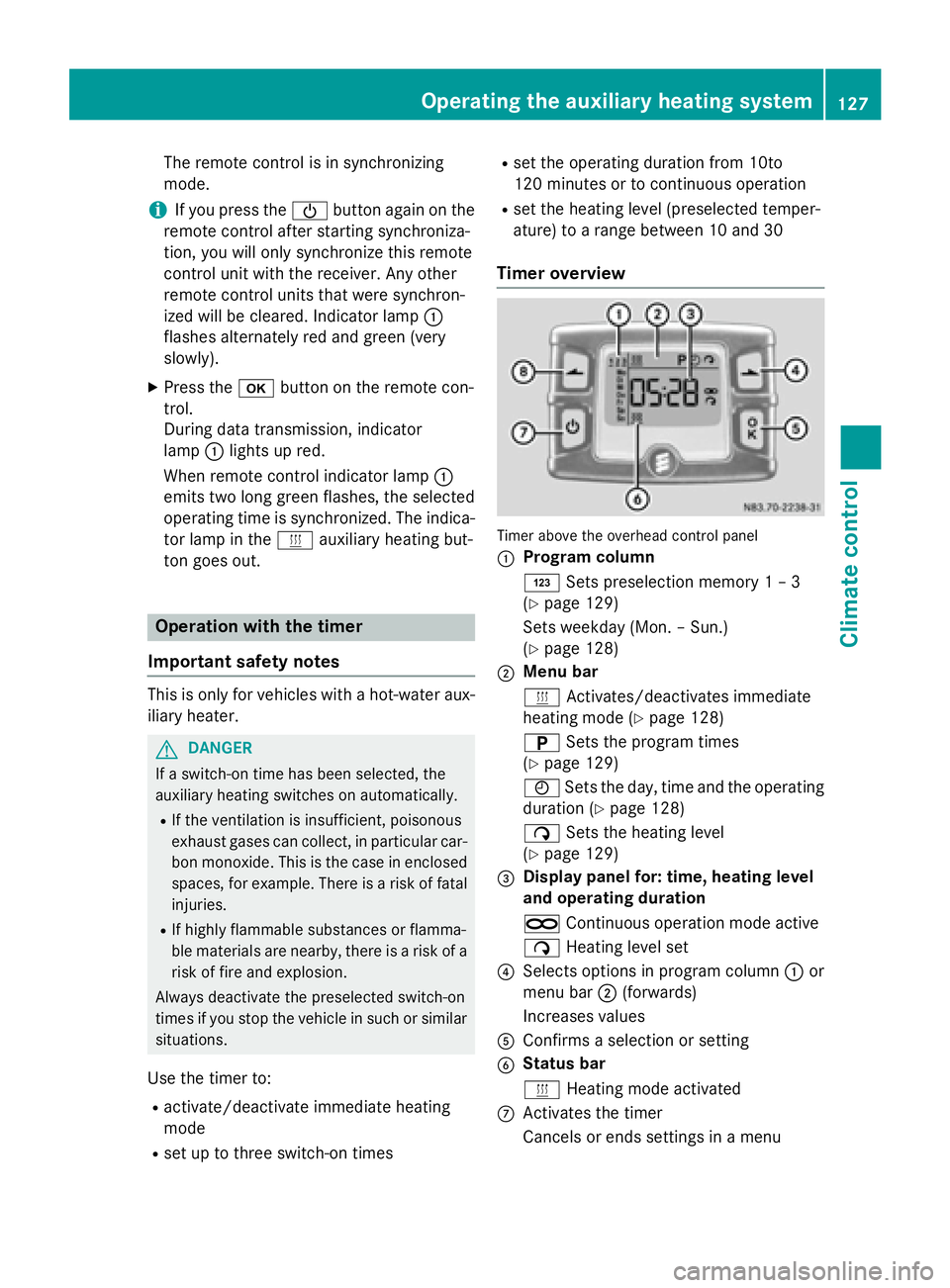
Timer overview Timer above the overhead control panel
0043
Program column
0059
Sets preselection memory 1 – 3
(Y page 129)
Sets weekday (Mon. – Sun.)
(Y page 128)
0044 Menu bar
0084
Activates/deactivates immediate
heating mode (Y page 128)
0045 Sets the program times
(Y page 129)
0045 Sets the day, time and the operating
duration (Y page 128)
00D1 Sets the heating level
(Y page 129)
0087 Display panel for: time, heating level
and operating duration
00D5 Continuous operation mode active
00D1 Heating level set
0085 Selects options in program column 0043or
menu bar 0044(forwards)
Increases values
0083 Confirms a selection or setting
0084 Status bar
0084
Heating mode activated
006B Activates the timer
Cancels or ends settings in a menu Operating the auxiliary heating system
127Climate control Z
Page 130 of 334
006C
Selects options in program column 0043or
menu bar 0044(backwards)
Reduces values
Activating the timer The timer switches to standby mode after
10 seconds. The display goes off.
X Press and hold the 00D0button until the
menu bar appears in the display and the
time is shown.
Setting the day, time and operating
duration You must reset the day, time, and default
value for the operating duration:
R during initial operation
R after a voltage supply interruption (e.g. if
the battery has been disconnected)
R after a malfunction.
You can find further information on malfunc-
tions in the "Problems with the auxiliary heat-
ing" section (Y page 132).
X Press the 00CFor00DB button until the
0045 symbol in menu bar 0044flashes.
X Press the 0070button.
In program column 0043, the day selected
flashes.
X Press the 00CFor00DB button to set the
desired day.
X Press the 0070button.
The day selected is stored. The hour setting
of the clock flashes.
X In the same way, set the hour and subse-
quently the minutes, then confirm by press- ing the 0070button.
The time is stored. Program column 0043dis-
appears and the operating duration
flashes.
i The operating duration set is the default
setting for immediate heating mode. You
can set the operating duration from 10 to
120 minutes or activate continuous opera-
tion. X
Using the 00CFor00DB button, set the
minute value or select the 00D5symbol for
continuous operation.
X Press the 0070button.
The operating duration is stored. The time
is shown.
Activating/deactivating immediate
heating mode X
To switch on: press the00CFor00DB but-
ton until the 0084symbol in the menu bar
flashes.
X Press the 0070button.
The operation duration flashes in the dis-
play.
i You can preset the default value that is
shown (Y page 128).
X Using the 00CFor00DB button, set the
minute value (10 – 120) or select the 00D5
symbol for continuous operation.
X Press the 0070button.
Immediate heating mode is activated. The
time and the 0084symbol appear.
X To switch off: press the00CFor00DB
button until the 0084symbol flashes in the
menu bar, and then press the 0070button.
Immediate heating mode is deactivated.
The 0084 symbol disappears.
The auxiliary heating operates for another
two minutes and then switches off auto-
matically.
i If you switch off the ignition while imme-
diate heating mode (operating duration
10– 120 minutes) is active, immediate
heating mode is also switched off. The aux- iliary heating operates for another
two minutes and then switches off auto-
matically.
If you have set continuous operation as the
operating duration and you switch off the
ignition, the auxiliary heating switches off
automatically after about 15 minute s.If, in
the remaining time, the ignition is switched
on again, continuous operation of the aux-
iliary heating continues. 128
Operating the auxiliary heating systemClimate control
Page 131 of 334
Setting the preselection time
G
WARNING
The auxiliary heating must not be operated if
there are highly flammable substances
nearby or in enclosed spaces without an
extraction system. Make sure that the auxili-
ary heating is not switched on automatically
by the timer in such places. If this possibility
exists, deactivate the respective programmed time.
You can set three preselection times using
the timer.
Observe that when setting the preselection
time, this does not correspond to the switch- on time but to the switch-off or departure
time. The auxiliary heating system starts up
automatically and runs for the operating dura-
tion set prior to departure.
Example: For a planned departure time of
7:00 a.m., you should also set the preselec-
tion time to 7:00 a.m. If the operating dura-
tion is preset to 40 minutes, for example, the
auxiliary heating starts up at 6:20 a.m.
If an identical time (time and day) is set in the preselection memory, only the last time set is
saved.
After a malfunction or if the battery has been disconnected, you must set the preselection
times again. You can find further information
on malfunctions in the "Problems with the
auxiliary heating" section (Y page 132).
X Press the 00CFor00DB button until the
0045 symbol in the menu bar flashes.
X Press the 0070button.
In the program column, the 0059preselec-
tion memory numbers appear. The selected preselection memory flashes.
X Press the 00CFor00DB button to select the
desired preselection memory.
X Press the 0070button.
The preselection memory is selected. The
days are shown. X
Set the day and time as described in the
"Setting the day, time and operating dura-
tion" section (Y page 128).
The preselection time is stored. The pro-
gram column disappears. In the display
panel, the on
on message and the 0084sym-
bol appear.
X Press the 0070button.
The operating duration flashes.
X Press the 00CFor00DB button to set the
minute value (10 – 120).
X Press the 0070button.
The operating duration for the preselection time is saved. The time and number of the
selected preselection memory are shown.
i The preselection memory that will be acti-
vated next is underlined. Additionally, the
day that is set appears.
Deactivating the preselection time X
Carry out the steps as described in the
"Setting the preselection time" section.
If the 0084 symbol in the status bar is shown:
X Press the 00CFor00DB button until the off off
message in the display panel is shown.
X Press the 0070button.
The preselection time is deactivated. The
time is shown.
Setting the heating level You can set the heating level to a range
between 10 and 30.
The heating level corresponds to a preselec-
tion temperature for the vehicle interior. This
is a guide value and may, depending on the
outside temperature, differ from the actual
vehicle interior temperature.
X Press the 00CFor00DB button until the
00D1 symbol in the menu bar flashes.
X Press the 0070button.
The heating level display flashes. Operating the auxiliary heating system
129Climate control Z
Page 132 of 334
X
Using the 00CFand00DB buttons, set the
desired heating level to a range between 10 and 30.
X Press the 0070button.
The heating level is set and the 0084sym-
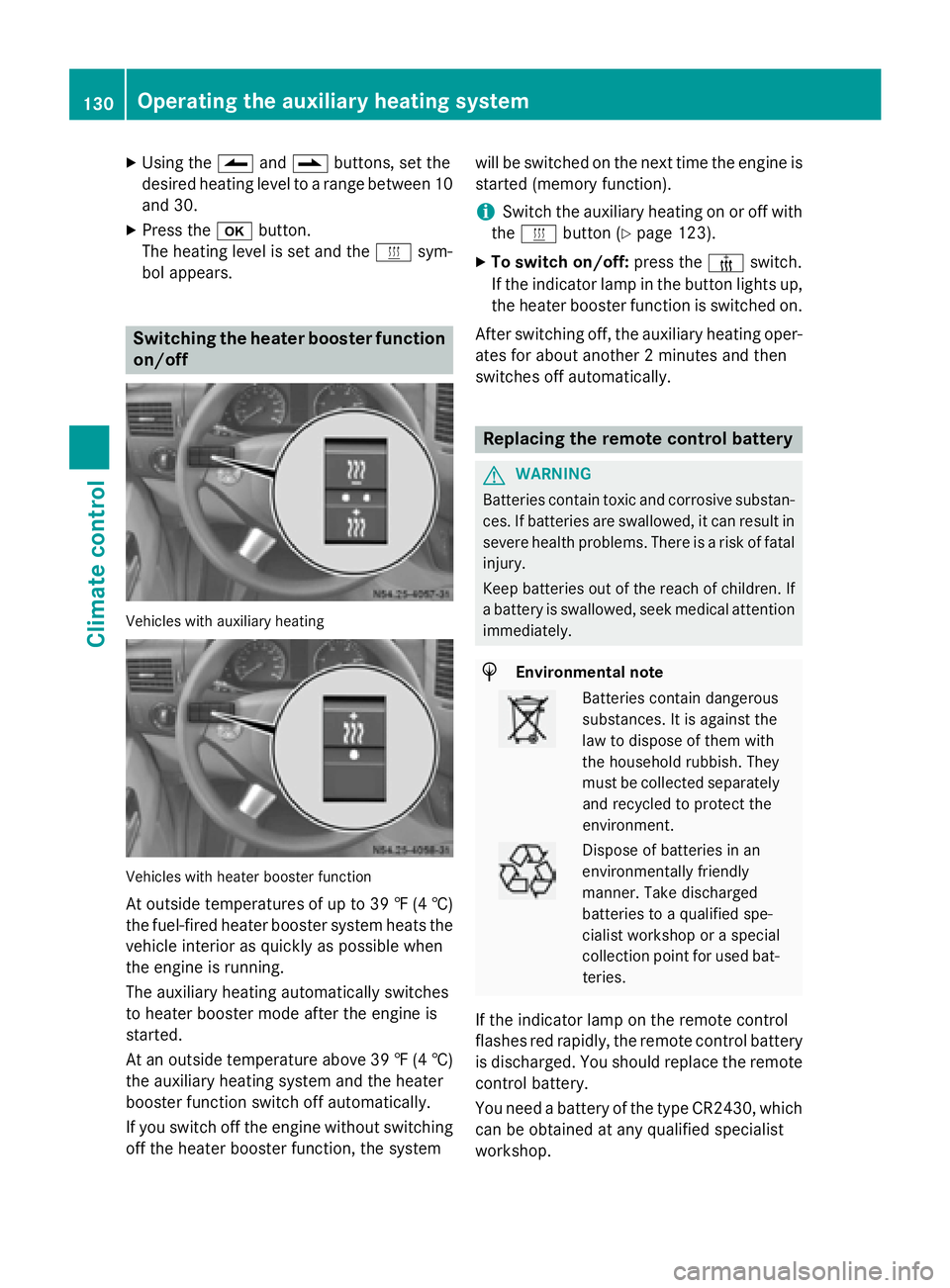
bol appears. Switching the heater booster function
on/off Vehicles with auxiliary heating
Vehicles with heater booster function
At outside temperatures of up to 39 ‡ (4 †)
the fuel-fired heater booster system heats the vehicle interior as quickly as possible when
the engine is running.
The auxiliary heating automatically switches
to heater booster mode after the engine is
started.
At an outside temperature above 39 ‡ (4 †)
the auxiliary heating system and the heater
booster function switch off automatically.
If you switch off the engine without switching off the heater booster function, the system will be switched on the next time the engine is
started (memory function).
i Switch the auxiliary heating on or off with
the 0084 button (Y page 123).
X To switch on/off: press the006Aswitch.
If the indicator lamp in the button lights up,
the heater booster function is switched on.
After switching off, the auxiliary heating oper-
ates for about another 2 minutes and then
switches off automatically. Replacing the remote control battery
G
WARNING
Batteries contain toxic and corrosive substan- ces. If batteries are swallowed, it can result in
severe health problems. There is a risk of fatal injury.
Keep batteries out of the reach of children. If
a battery is swallowed, seek medical attention immediately. H
Environmental note Batteries contain dangerous
substances. It is against the
law to dispose of them with
the household rubbish. They
must be collected separately
and recycled to protect the
environment. Dispose of batteries in an
environmentally friendly
manner. Take discharged
batteries to a qualified spe-
cialist workshop or a special
collection point for used bat-
teries.
If the indicator lamp on the remote control
flashes red rapidly, the remote control battery
is discharged. You should replace the remote
control battery.
You need a battery of the type CR2430, which can be obtained at any qualified specialist
workshop. 130
Operating the auxiliary heating systemClimate control
Page 133 of 334
X
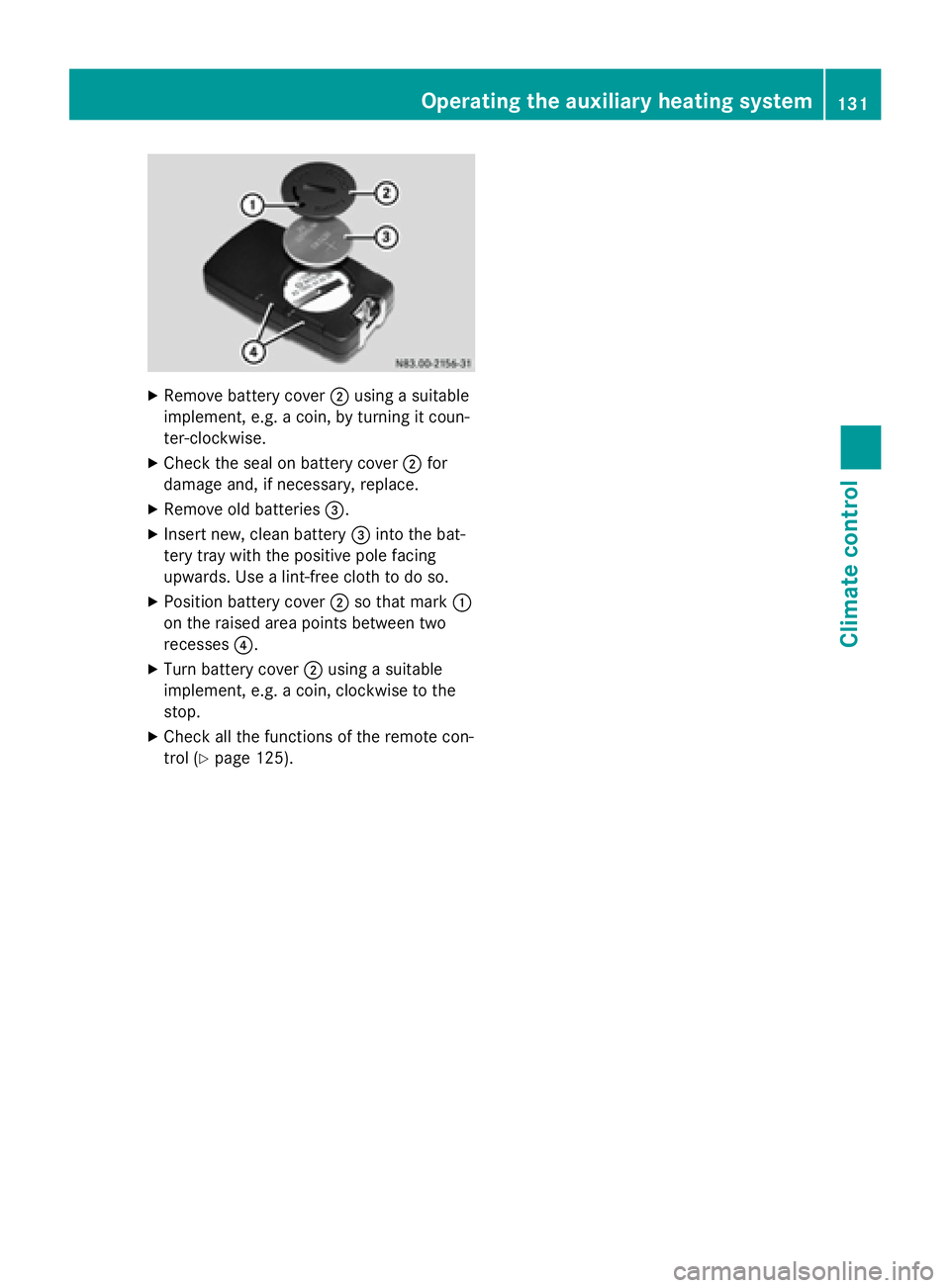
Remove battery cover 0044using a suitable
implement, e.g. a coin, by turning it coun-
ter-clockwise.
X Check the seal on battery cover 0044for
damage and, if necessary, replace.
X Remove old batteries 0087.
X Insert new, clean battery 0087into the bat-
tery tray with the positive pole facing
upwards. Use a lint-free cloth to do so.
X Position battery cover 0044so that mark 0043
on the raised area points between two
recesses 0085.
X Turn battery cover 0044using a suitable
implement, e.g. a coin, clockwise to the
stop.
X Check all the functions of the remote con-
trol (Y page 125). Operating the auxilia
ry heating system
131Climate control Z
Page 134 of 334
Problems with the auxiliary heating
Problem
Possible causes/consequences and
0050
0050Solutions The indicator lamp on
the remote control
flashes red rapidly. The remote control battery is discharged. Data transmission is not
possible.
X Replace the remote control battery (Y page 130).The indicator lamp on
the remote control
flashes red and green in
rapid succession. There is no connection between the remote control and the
receiver in the vehicle.
X Change your position in relation to the vehicle, e.g. hold the
remote control higher or to the side.
X Move closer.
If you cannot establish a connection and the auxiliary heating is
switched on, it can then only be deactivated using the 0084button
(Y page 123).
or Several remote controls are being used at the same time.
X Switch on the remote control again after a short while
(Y page 126).
or The remote control is not synchronized.
X Synchronize the remote control (Y page 126).The indicator lamp on
the remote control
slowly flashes red and
green alternately. The remote control is being synchronized.
X Wait until the remote control synchronization process is com-
plete (Y page 126). The remote control for
the auxiliary heating
cannot be switched on. The remote control battery is discharged.
X Replace the remote control battery (Y page 130).The auxiliary heating
does not switch on. The outside temperature is above 39
‡(4 †). The auxiliary heating
switches off automatically. The auxiliary heating
switches off automati-
cally and/or cannot be
switched on. The fuel tank is less than
00C4full. The auxiliary heating switches off
automatically.
X Refuel at the nearest gas station.
X Then, start the auxiliary heating several times until the fuel lines
are full.
or 132
Operating the auxiliary heating systemClimate control
Page 135 of 334
Problem
Possible causes/consequences and
0050
0050Solutions The low-voltage protection system integrated in the control unit
switches off the auxiliary heating because the on-board voltage is
less than 10 V.
X Have the alternator and battery checked.
or The fuse is blown.
X Replace the fuse; see the "Fuse allocation" supplement.
X Have the cause of the blown fuse determined at a qualified spe-
cialist workshop.
or A malfunction has occurred.
X Switch the ignition on and off twice.
If the auxiliary heating still cannot be switched on, the heating
device is faulty.
X Have the auxiliary heating checked at a qualified specialist
workshop. The auxiliary heating is
overheated. The coolant level is too low.
X Check the coolant level and add more coolant if necessary
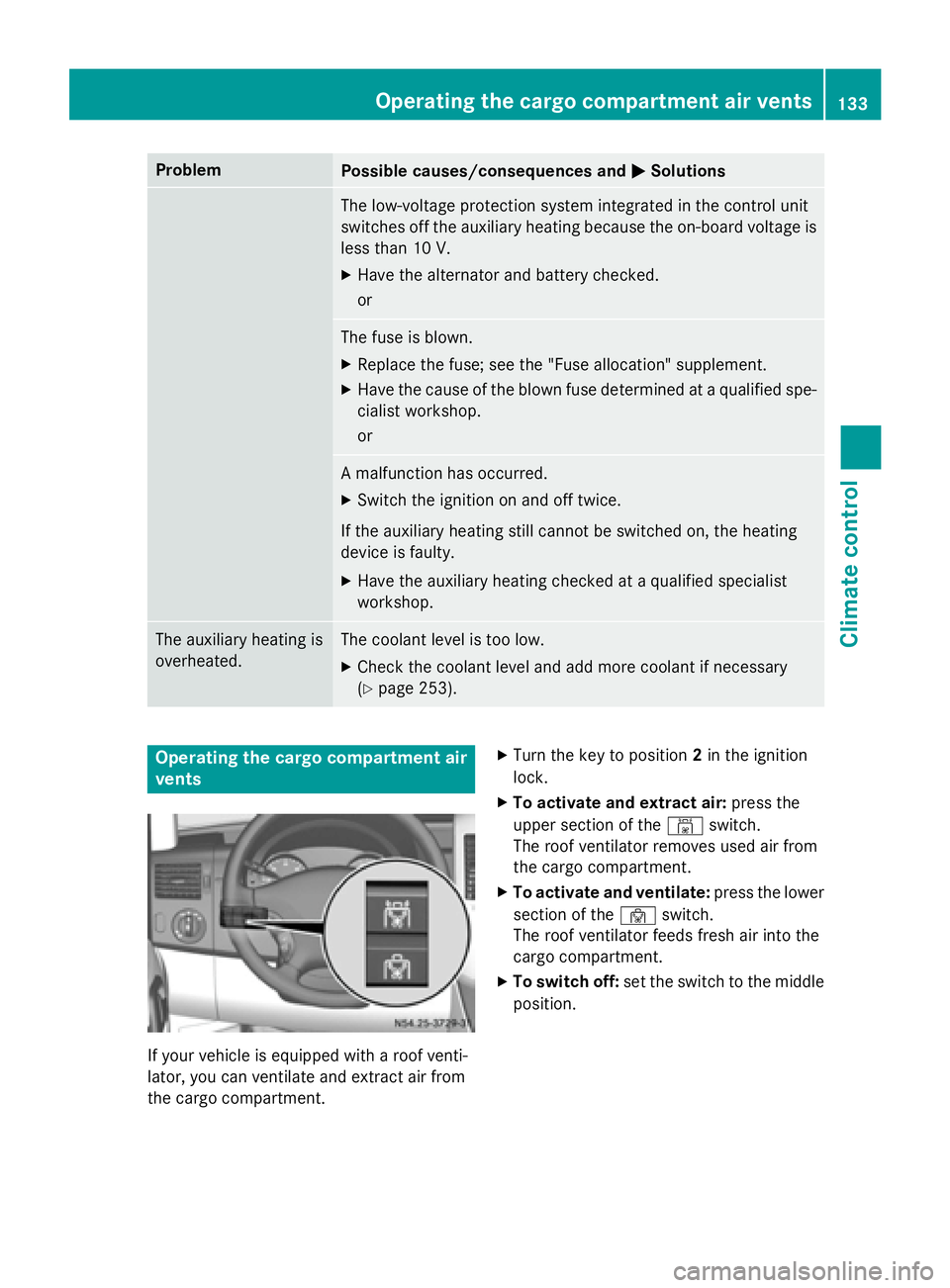
(Y page 253). Operating the cargo compartment air
vents If your vehicle is equipped with a roof venti-
lator, you can ventilate and extract air from
the cargo compartment. X
Turn the key to position 2in the ignition
lock.
X To activate and extract air: press the
upper section of the 00A8switch.
The roof ventilator removes used air from
the cargo compartment.
X To activate and ventilate: press the lower
section of the 00A7switch.
The roof ventilator feeds fresh air into the
cargo compartment.
X To switch off: set the switch to the middle
position. Operating the cargo compartment air vents
133Climate control Z
Page 138 of 334
Useful information
This Operator's Manual describes all models
as well as standard and optional equipment of your vehicle that were available at the time of going to print. Country-specific variations are
possible. Note that your vehicle may not be
equipped with all of the described functions.
This also applies to systems and functions
relevant to safety.
Read the information on qualified specialist
workshops (Y page 25). Breaking-in notes
The first 1000 miles (1500 km)
New or replaced brake pads and brake disks
only reach their optimum braking effect after
a few 100 miles (a few 100 kilometers). Until then, compensate for this by applying greaterforce to the brake pedal.
For the service life and economy of your vehi-
cle it is crucial that you break in the engine
with due care.
R Therefore, protect the engine for the first
1000 miles (1500 km) by driving at varying vehicle and engine speeds.
R Avoid overstraining the vehicle and high
engine speeds during this period, e.g. driv-
ing at full throttle. Do not exceed 00C6of the
maximum speed for each gear.
R Do not change down a gear manually in
order to brake.
R Try to avoid depressing the accelerator
pedal beyond the point of resistance (kick-
down).
R The shift ranges 3,2or 1should only be
engaged when driving slowly, e.g. when
driving in mountainous terrain.
After 1000 miles (1500 km), you can increase
the engine speed gradually and accelerate
the vehicle to full speed.
i You should also observe these notes on
breaking-in if the engine or parts of the drive train on your vehicle have been
replaced. Driving
Important safety notes
G
WARNING
If you switch off the ignition while driving,
safety-relevant functions are only available
with limitations, or not at all. This could affect, for example, the power steering and the brake
boosting effect. You will require considerably
more effort to steer and brake. There is a risk of an accident.
Do not switch off the ignition while driving. G
WARNING
If the parking brake has not been fully
released when driving, the parking brake can:
R overheat and cause a fire
R lose its hold function.
There is a risk of fire and an accident. Release
the parking brake fully before driving off.
If you park the vehicle for more than
three weeks:
R connect the batteries to a trickle charger or
R disconnect the vehicle's starter battery or
R switch off the electrical system using the
battery main switch (Y page 137) and
R disconnect the vehicle's auxiliary battery
Otherwise, you need to check the battery's
condition of charge every three weeks, since standby power consumption can drain the
battery. If the battery voltage is lower than
12.2 V, the battery must be charged. Other-
wise, the battery may be damaged by exhaus-
tive discharging.
Be sure to observe the notes on disconnect-
ing and charging the batteries under "Battery"
(Y page 258). You can obtain information
about trickle chargers from a qualified spe-
cialist workshop. 136
DrivingDriving and parking