instrument cluster MERCEDES-BENZ SPRINTER 2015 MY15 Operator’s Manual
[x] Cancel search | Manufacturer: MERCEDES-BENZ, Model Year: 2015, Model line: SPRINTER, Model: MERCEDES-BENZ SPRINTER 2015Pages: 334, PDF Size: 5.94 MB
Page 49 of 334
If the driver unfastens their seat belt during
the journey, the belt warning is automatically activated again.
i For more information on the
0076seat
belt warning lamp, see "Warning and indi-
cator lamps in the instrument cluster"
(Y page 227). Air bags
Introduction The installation point of an air bag can be rec-
ognized by the SRS/AIR BAG or AIR BAG sym-
bol.
An air bag complements the correctly fas-
tened seat belt. It is no substitute for the seat belt. The air bag provides additional protec-
tion in applicable accident situations.
Not all air bags are deployed in an accident.
The different air bag systems function inde-
pendently from one another (Y page 49).
However, no system available today can com- pletely eliminate injuries and fatalities.
It is also not possible to rule out a risk of injury
caused by an air bag due to the high speed at which the air bag must be deployed.
Important safety notes G
WARNING
If you do not sit in the correct seat position,
the air bag cannot protect as intended and
could even cause additional injury when
deployed. This poses an increased risk of
injury or even fatal injury.
To avoid hazardous situations, always make
sure that all of the vehicle's occupants:
R have fastened their seat belts correctly,
including pregnant women
R are sitting correctly and maintain the great-
est possible distance to the air bags
R follow the following instructions Always make sure that there are no objects
between the air bag and the vehicle's occu-
pants.
R Adjust the seats properly before beginning
your journey. Always make sure that the
seat is in an almost upright position. The
center of the head restraint must support
the head at about eye level.
R Move the driver's and front-passenger
seats as far back as possible. The driver's
seat position must allow the vehicle to be
driven safely.
R Only hold the steering wheel on the out-
side. This allows the air bag to be fully
deployed.
R Always lean against the backrest while driv-
ing. Do not lean forwards or lean against
the door or side window. You may other-
wise be in the deployment area of the air
bags.
R Always keep your feet in the footwell in
front of the seat. Do not put your feet on the
dashboard, for example. Your feet may oth-
erwise be in the deployment area of the air bag.
R For this reason, always secure persons less
than 5 ft (1.50 m) tall in suitable restraint
systems. Up to this height, the seat belt
cannot be worn correctly.
If a child is traveling in your vehicle, also
observe the following notes:
R Always secure children under 12 years of
age and less than 5 ft (1.50 m)in height in
suitable child restraint systems.
R Child restraint systems should be installed
on the rear seats.
R Always secure a child in a rearward-facing
child restraint system on a suitable rear
seat. The front-passenger front air bag can-
not be deactivated.
R Always observe the instructions and safety
notes on "Children in the vehicle"
(Y page 51) and on the "Child restraint
system on the front-passenger seat"
(Y page 55) in addition to the child Occupant safety
47Safety Z
Page 60 of 334
Braking
If ABS intervenes when braking, you will feel a
pulsating in the brake pedal.
The pulsating brake pedal can be an indica-
tion of hazardous road conditions and func-
tions as a reminder to take extra care while
driving.
X If ABS intervenes: continue to depress the
brake pedal with force until the braking sit-
uation is over.
X To make a full brake application:
depress the brake pedal with full force. ASR (acceleration skid control)
General notes Important safety notes
Observe the important safety guidelines for
the driving safety system (Y
page 57).
ASR can neither reduce the risk of an accident nor suspend the laws of physics if the driver
does not pay attention when pulling away or
accelerating. ASR is only an aid. Always adapt
your driving style to suit the prevailing road
and weather conditions.
Vehicles without steering wheel buttons: if
ASR is malfunctioning, the 003Dindicator
lamp lights up while the engine is running and the engine power may be reduced
(Y page 218).
ASR significantly improves traction, i.e. the
transmission of power from the tires to the
road surface, and thus increases the vehicle's driving stability. If the driving wheels start to
spin, ASR brakes individual drive wheels and
limits the engine torque. ASR thus signifi-
cantly assists you when pulling away and
accelerating, especially on wet or slippery
roads.
If traction on the road surface is not sufficient,
even ASR will not allow you to pull away with- out difficulty. The type of tires and total
weight of the vehicle as well as the gradient of
the road also play a crucial role. If ASR intervenes, the
0072warning lamp in
the instrument cluster flashes.
Activating/deactivating ASR G
WARNING
If deactivated, ASR will not attempt to stabi-
lize the vehicle during pulling away and accel- eration. There is an increased risk of skiddingand of an accident.
Only deactivate ASR in the situations descri-
bed in the following.
! If you deactivate ASR, ESP ®
will still inter-
vene to stabilize the vehicle. Frequent brak-
ing automatically triggered by ESP ®
can
damage the brake system.
For this reason, deactivate ASR only briefly and when absolutely necessary. When ESP
®
is intervening and the 0072warn-
ing lamp in the instrument cluster is flashing,
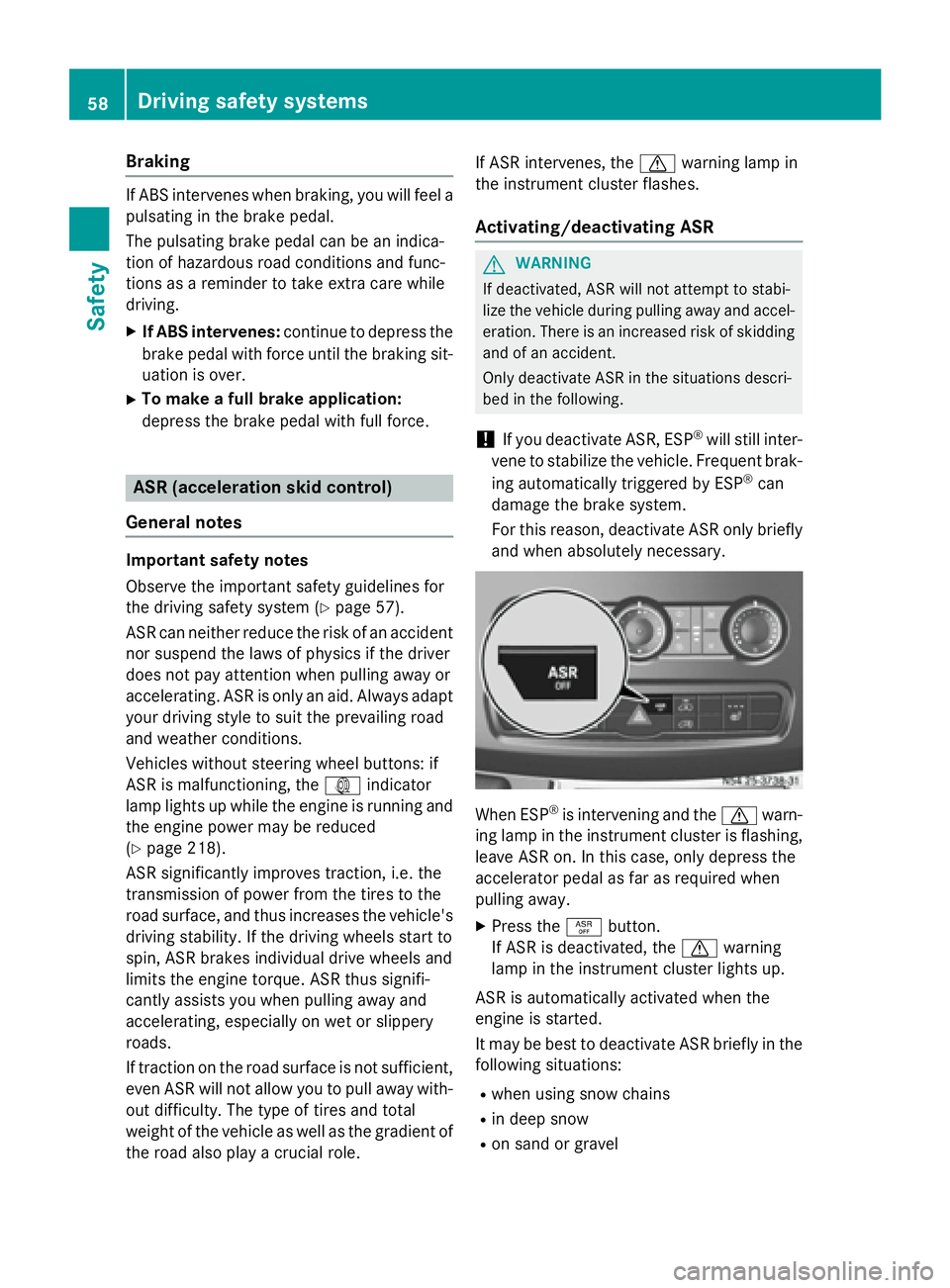
leave ASR on. In this case, only depress the
accelerator pedal as far as required when
pulling away.
X Press the 00E3button.
If ASR is deactivated, the 0072warning
lamp in the instrument cluster lights up.
ASR is automatically activated when the
engine is started.
It may be best to deactivate ASR briefly in the
following situations:
R when using snow chains
R in deep snow
R on sand or gravel 58
Driving safety systemsSafety
Page 61 of 334
If you deactivate ASR:
R engine torque is not limited and the drive
wheels are able to spin. The spinning
wheels will then achieve a cutting effect for
better traction.
R traction control remains active through
brake intervention. If a drive wheel attains
its tire traction limit because one side of the
road is slippery, for example, that wheel is
braked. The traction is then increased in
this situation.
R active brake intervention by ESP ®
to
increase driving stability remains active.
The 0072 warning lamp in the instrument
cluster flashes when ESP ®
is intervening. BAS (Brake Assist System)
G
WARNING
If BAS is malfunctioning, the braking distance
in an emergency braking situation is
increased. There is a risk of an accident.
In an emergency braking situation, depress
the brake pedal with full force. ABS prevents
the wheels from locking.
Vehicles without steering wheel buttons: if
the BAS driving safety system is malfunction-
ing, the 003Dwarning lamp lights up while the
engine is running (Y page 218).
BAS operates in emergency braking situa-
tions. If you depress the brake quickly, BAS
automatically increases the brake pressure,
thereby reducing the stopping distance.
The brakes will function as usual once you
release the brake pedal. BAS is deactivated. EBD (electronic brake force distribu-
tion) G
WARNING
If EBD is malfunctioning, the rear wheels can
lock, e.g. under full braking. This increases the risk of skidding and an accident. You should therefore adapt your driving style
to the different handling characteristics. Have
the brake system checked at a qualified spe-
cialist workshop.
EBD monitors and controls the brake pres-
sure to the rear wheels. This enables EBD to
improve handling during braking.
Observe the information on warning and indi- cator lamps (Y page 218). ESP
®
(Electronic Stability Program)
Important safety notes Observe the important safety guidelines for
the driving safety system (Y
page 57). G
WARNING
If ESP ®
is malfunctioning it will not provide
any vehicle stabilization. There is an increased
risk of skidding or of an accident.
Exercise caution when continuing to drive.
Have ESP ®
checked at a qualified specialist
workshop.
! Do not run the vehicle on a roller dyna-
mometer (e.g. for performance tests). If
you must operate the vehicle on a roller
dynamometer, please consult a qualified
specialist workshop in advance. You could
otherwise damage the drive train or the
brake system.
If ESP ®
is malfunctioning, the 0089warning
lamp lights up while the engine is running and
the engine power may be reduced
(Y page 218).
Only use wheels with the recommended tire
sizes. Only then will ESP ®
function properly.
Crosswind Assist Crosswind Assist does not work if ESP
®
is
deactivated or disabled because of a mal-
function. Driving safety systems
59Safety Z
Page 62 of 334
Crosswind Assist does not react:
R in the event of severe jolts and vibrations,
e.g. as a result of uneven surfaces or pot-
holes
R if the vehicle loses traction, e.g. on snow or
ice or when aquaplaning
R to large and sudden steering movements
by the driver
Crosswind Assist is operational again as soon as the driving conditions return to normal.
Crosswind Assist detects strong crosswind
gusts that can impair the road holding of your
vehicle when driving straight ahead. Cross-
wind Assist intervenes depending on the
direction and strength of the crosswind.
A stabilizing brake application helps you to
keep the vehicle on track.
Information appears in the instrument cluster
In the event that Crosswind Assist intervenes noticeably.
On vehicles without steering wheel but-
tons: the0072 indicator lamp in the instru-
ment cluster flashes.
On vehicles with steering wheel buttons:
the 0072 indicator lamp in the instrument
cluster flashes and the message Crosswind
Crosswind
Assist Active Assist Active appears in the multifunction
display.
Crosswind Assist is active above a vehicle
speed of 50 mph (80 km/h)when the vehicle
is driving straight ahead or cornering gently. Emergency exit
Emergency exit window
G
WARNING
The emergency exit window cannot be locked in place. You risk injury if you exit the vehicle
through the emergency exit window.
R Make sure that nobody becomes trapped,
both when closing and when opening the
emergency exit window.
R The opened emergency exit window must
be held in place by another person. Pay attention to traffic conditions.
G
WARNING
If the emergency exit window is unlocked
while driving, it could open and slam shut and consequently fall down. There is a risk of an
accident and injury.
Before starting off, make sure that the emer-
gency exit window is locked and the locking
pins are undamaged.
! Make sure there is sufficient clearance
when opening the emergency exit window. Hold the open window in position. You
could otherwise damage the emergency
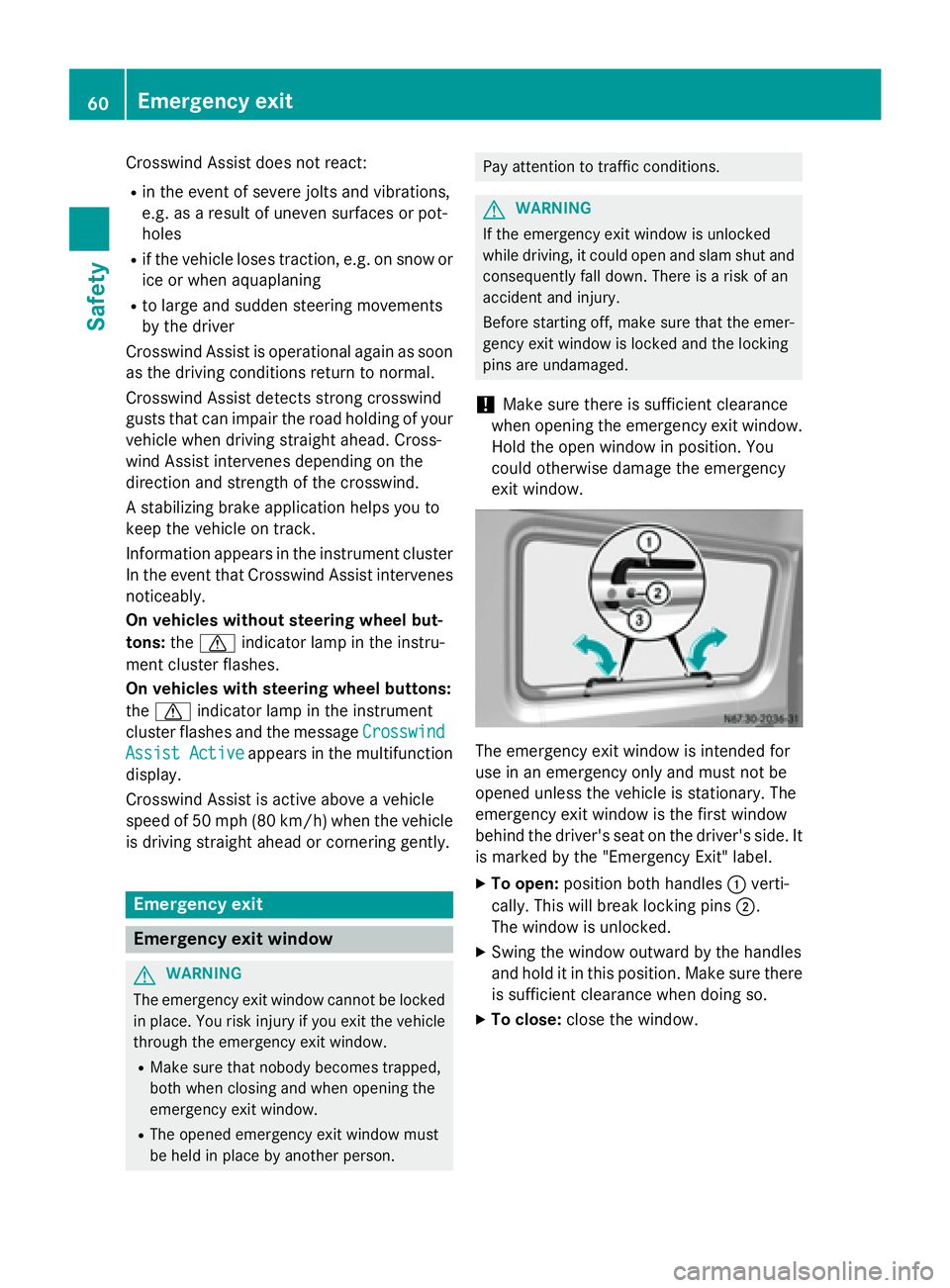
exit window. The emergency exit window is intended for
use in an emergency only and must not be
opened unless the vehicle is stationary. The
emergency exit window is the first window
behind the driver's seat on the driver's side. It
is marked by the "Emergency Exit" label.
X To open: position both handles 0043verti-
cally. This will break locking pins 0044.
The window is unlocked.
X Swing the window outward by the handles
and hold it in this position. Make sure there
is sufficient clearance when doing so.
X To close: close the window. 60
Emergency exitSafety
Page 76 of 334
In order to reduce risks:
R draw the passengers' attention to the elec-
trical step. Wait until the electrical step is
fully extended.
R do not jump out of the vehicle.
R only use the grab handle and step. Only
they are designed for such a load.
R keep grab handles, access steps and entry
sills free from dirt, e.g. mud, clay, snow and ice. Operation and obstacle detection
Electrical step
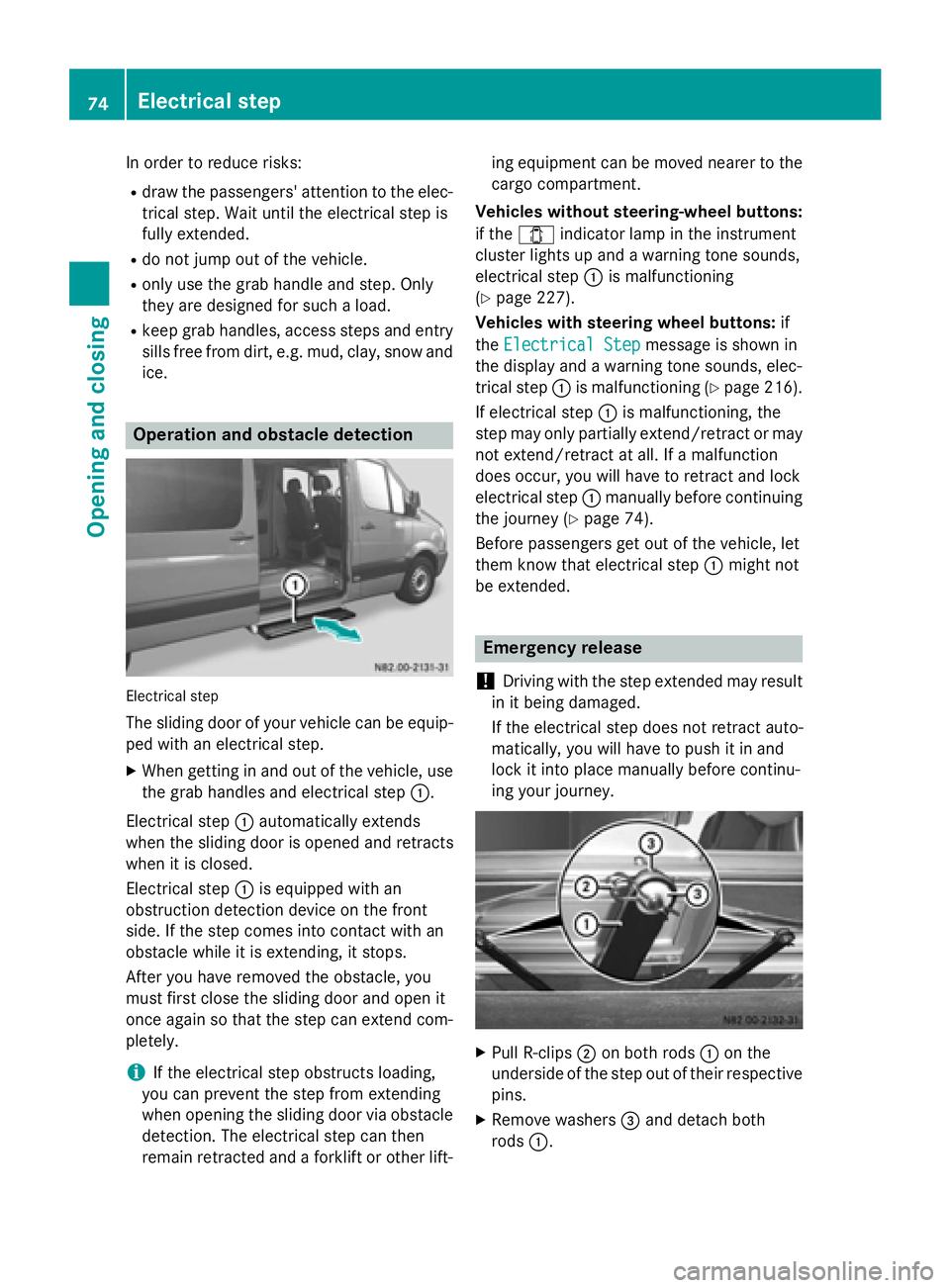
The sliding door of your vehicle can be equip- ped with an electrical step.
X When getting in and out of the vehicle, use
the grab handles and electrical step 0043.
Electrical step 0043automatically extends
when the sliding door is opened and retracts
when it is closed.
Electrical step 0043is equipped with an
obstruction detection device on the front
side. If the step comes into contact with an
obstacle while it is extending, it stops.
After you have removed the obstacle, you
must first close the sliding door and open it
once again so that the step can extend com-
pletely.
i If the electrical step obstructs loading,
you can prevent the step from extending
when opening the sliding door via obstacle
detection. The electrical step can then
remain retracted and a forklift or other lift- ing equipment can be moved nearer to the
cargo compartment.
Vehicles without steering-wheel buttons:
if the 003E indicator lamp in the instrument
cluster lights up and a warning tone sounds,
electrical step 0043is malfunctioning
(Y page 227).
Vehicles with steering wheel buttons: if
the Electrical Step
Electrical Step message is shown in
the display and a warning tone sounds, elec-
trical step 0043is malfunctioning (Y page 216).
If electrical step 0043is malfunctioning, the
step may only partially extend/retract or may not extend/retract at all. If a malfunction
does occur, you will have to retract and lock
electrical step 0043manually before continuing
the journey (Y page 74).
Before passengers get out of the vehicle, let
them know that electrical step 0043might not
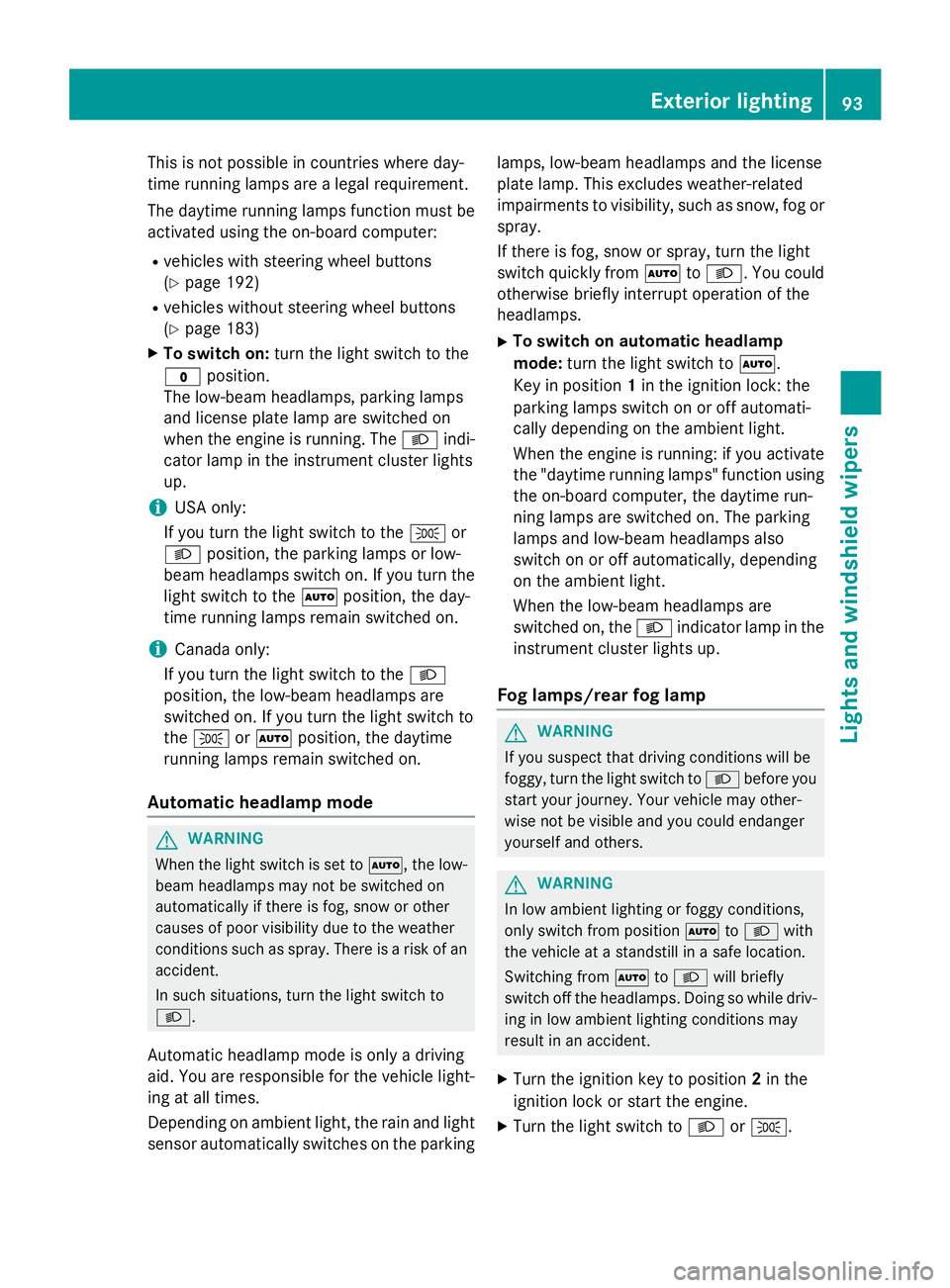
be extended. Emergency release
! Driving with the step extended may result
in it being damaged.
If the electrical step does not retract auto-
matically, you will have to push it in and
lock it into place manually before continu-
ing your journey. X
Pull R-clips 0044on both rods 0043on the
underside of the step out of their respective
pins.
X Remove washers 0087and detach both
rods 0043. 74
Electrical stepOpening and closing
Page 94 of 334
Useful information
This Operator's Manual describes all models
as well as standard and optional equipment of your vehicle that were available at the time of going to print. Country-specific variations are
possible. Note that your vehicle may not be
equipped with all of the described functions.
This also applies to systems and functions
relevant to safety.
Read the information on qualified specialist
workshops (Y page 25). Exterior lighting
Important safety notes
For reasons of safety, we recommend that
you drive with the lights switched on even
during the daytime. There may be differences
in operation due to legal requirements and
voluntary recommendations in some coun-
tries. Bulb failure indicator
The bulb failure indicator is only an aid. You
are responsible for the proper functioning of
the vehicle lighting. Insufficient or non-func-
tioning vehicle lighting puts the operating
safety of the vehicle at risk.
For this reason, check the condition and func-
tion of your vehicle's lighting system and, if
necessary, that of the trailer before each jour- ney.
The bulb failure indicator monitors all of the
exterior lighting lamps, except the perimeter
lamp and the trailer lighting. If a bulb fails,
either the 0049(Ypage 35) indicator lamp
lights up, or you will see a corresponding
message in the display (Y page 208).
i Depending on the equipment, the bulb
failure indicator can fail for all lamps with
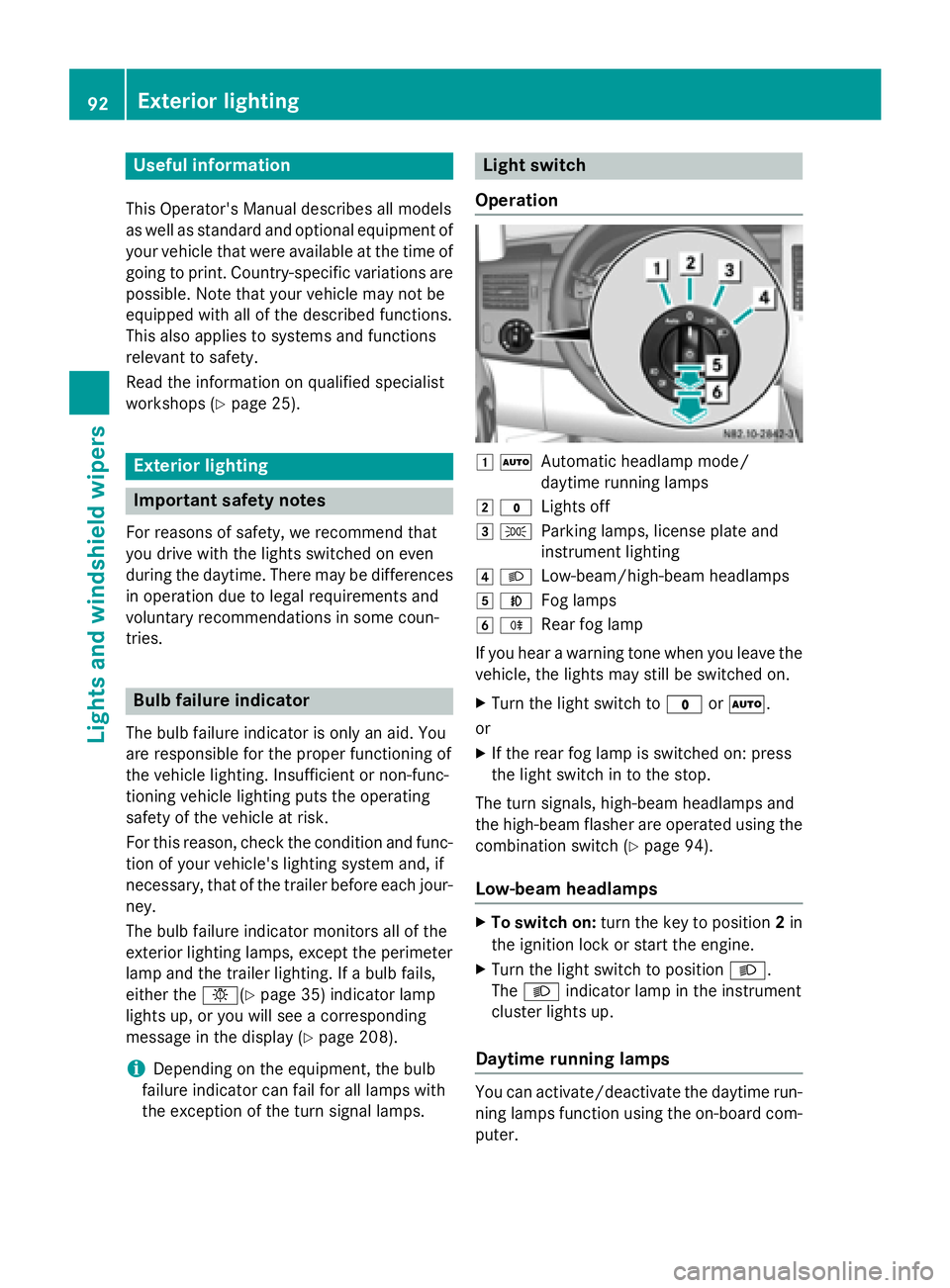
the exception of the turn signal lamps. Light switch
Operation 0047
0058
Automatic headlamp mode/
daytime running lamps
0048 003F
Lights off
0049 0060
Parking lamps, license plate and
instrument lighting
004A 0058
Low-beam/high-beam headlamps
004B 005A
Fog lamps
004C 005E
Rear fog lamp
If you hear a warning tone when you leave the
vehicle, the lights may still be switched on.
X Turn the light switch to 003For0058.
or
X If the rear fog lamp is switched on: press
the light switch in to the stop.
The turn signals, high-beam headlamps and
the high-beam flasher are operated using the combination switch (Y page 94).
Low-beam headlamps X
To switch on: turn the key to position 2in
the ignition lock or start the engine.
X Turn the light switch to position 0058.
The 0058 indicator lamp in the instrument
cluster lights up.
Daytime running lamps You can activate/deactivate the daytime run-
ning lamps function using the on-board com-
puter. 92
Exterior lightingLights and windshield wipers
Page 95 of 334
This is not possible in countries where day-
time running lamps are a legal requirement.
The daytime running lamps function must be
activated using the on-board computer:
R vehicles with steering wheel buttons
(Y page 192)
R vehicles without steering wheel buttons
(Y page 183)
X To switch on: turn the light switch to the
003F position.
The low-beam headlamps, parking lamps
and license plate lamp are switched on
when the engine is running. The 0058indi-
cator lamp in the instrument cluster lights
up.
i USA only:
If you turn the light switch to the 0060or
0058 position, the parking lamps or low-
beam headlamps switch on. If you turn the light switch to the 0058position, the day-
time running lamps remain switched on.
i Canada only:
If you turn the light switch to the 0058
position, the low-beam headlamps are
switched on. If you turn the light switch to
the 0060 or0058 position, the daytime
running lamps remain switched on.
Automatic headlamp mode G
WARNING
When the light switch is set to 0058, the low-
beam headlamps may not be switched on
automatically if there is fog, snow or other
causes of poor visibility due to the weather
conditions such as spray. There is a risk of an
accident.
In such situations, turn the light switch to
0058.
Automatic headlamp mode is only a driving
aid. You are responsible for the vehicle light-
ing at all times.
Depending on ambient light, the rain and light sensor automatically switches on the parking lamps, low-beam headlamps and the license
plate lamp. This excludes weather-related
impairments to visibility, such as snow, fog or
spray.
If there is fog, snow or spray, turn the light
switch quickly from 0058to0058. You could
otherwise briefly interrupt operation of the
headlamps.
X To switch on automatic headlamp
mode: turn the light switch to 0058.
Key in position 1in the ignition lock: the
parking lamps switch on or off automati-
cally depending on the ambient light.
When the engine is running: if you activate
the "daytime running lamps" function using the on-board computer, the daytime run-
ning lamps are switched on. The parking
lamps and low-beam headlamps also
switch on or off automatically, depending
on the ambient light.
When the low-beam headlamps are
switched on, the 0058indicator lamp in the
instrument cluster lights up.
Fog lamps/rear fog lamp G
WARNING
If you suspect that driving conditions will be
foggy, turn the light switch to 0058before you
start your journey. Your vehicle may other-
wise not be visible and you could endanger
yourself and others. G
WARNING
In low ambient lighting or foggy conditions,
only switch from position 0058to0058 with
the vehicle at a standstill in a safe location.
Switching from 0058to0058 will briefly
switch off the headlamps. Doing so while driv-
ing in low ambient lighting conditions may
result in an accident.
X Turn the ignition key to position 2in the
ignition lock or start the engine.
X Turn the light switch to 0058or0060. Exterior lighting
93Lights and windshield wipers Z
Page 96 of 334
i
If your vehicle is only equipped with one
rear fog lamp, you must turn the light
switch to 0058.
i When the light switch is set to
0058, you
cannot switch on the front or rear fog
lamps.
X To switch on the front fog lamps: pull the
light switch out to the first locking point.
The green 005Aindicator lamp on the light
switch lights up.
X To switch on the rear fog lamp: pull the
light switch out to the second locking point.
The yellow 005Eindicator lamp on the light
switch lights up.
X To switch off the front fog lamps/rear
fog lamp: push in the light switch to the
stop.
The 005E and005A indicator lamp on the
light switch go out. Combination switch
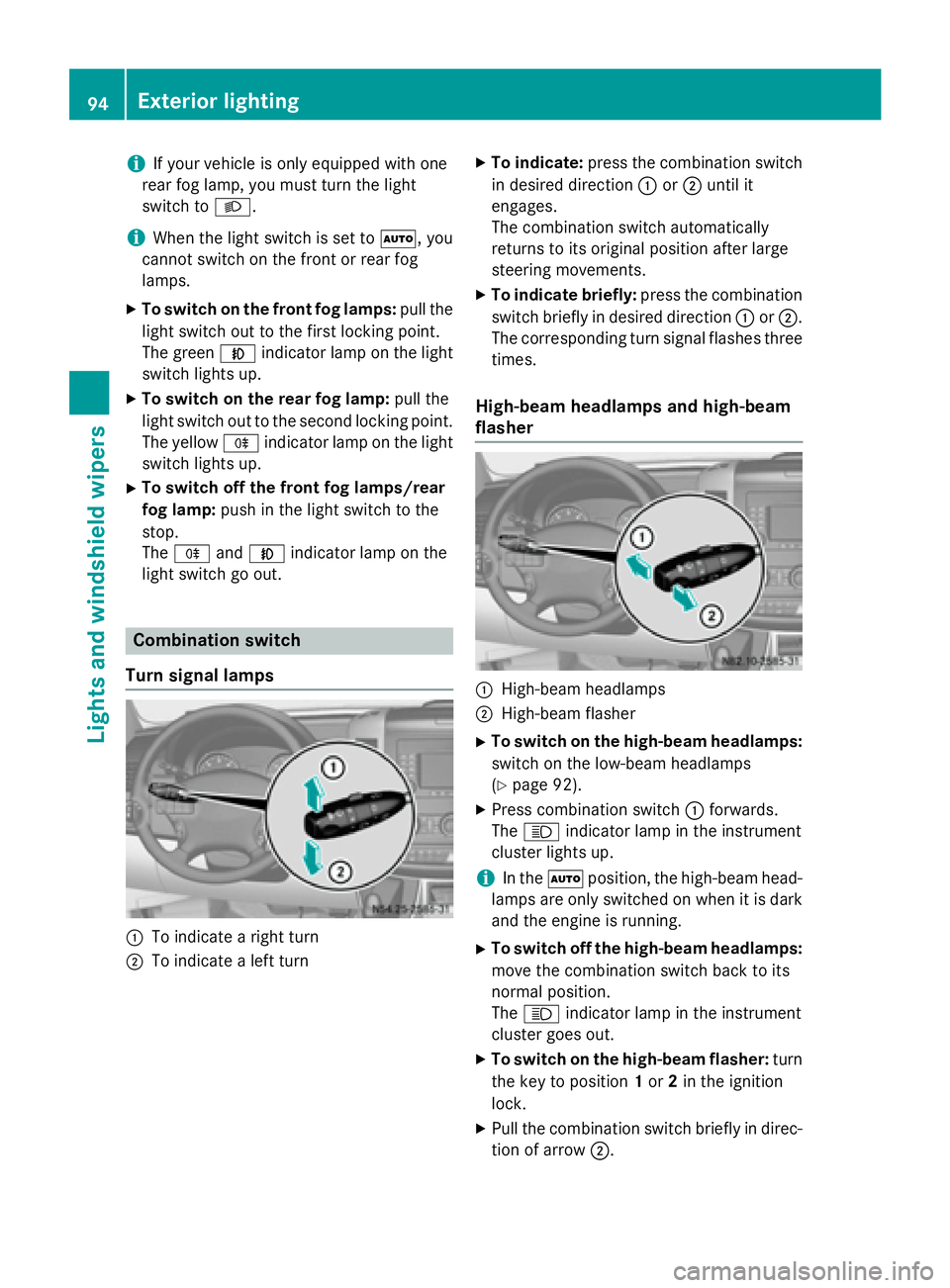
Turn signal lamps 0043
To indicate a right turn
0044 To indicate a left turn X
To indicate: press the combination switch
in desired direction 0043or0044 until it
engages.
The combination switch automatically
returns to its original position after large
steering movements.
X To indicate briefly: press the combination
switch briefly in desired direction 0043or0044.
The corresponding turn signal flashes three
times.
High-beam headlamps and high-beam
flasher 0043
High-beam headlamps
0044 High-beam flasher
X To switch on the high-beam headlamps:
switch on the low-beam headlamps
(Y page 92).
X Press combination switch 0043forwards.
The 0057 indicator lamp in the instrument
cluster lights up.
i In the
0058position, the high-beam head-
lamps are only switched on when it is dark
and the engine is running.
X To switch off the high-beam headlamps:
move the combination switch back to its
normal position.
The 0057 indicator lamp in the instrument
cluster goes out.
X To switch on the high-beam flasher: turn
the key to position 1or 2in the ignition
lock.
X Pull the combination switch briefly in direc-
tion of arrow 0044.94
Exterior lightingLights and windshield wipers
Page 98 of 334
Highbeam Assist
General notes You can use this function to set the head-
lamps to change between low beam and high beam automatically. The system recognizes
vehicles with their lights on, either approach-
ing from the opposite direction or traveling in front of your vehicle, and consequently
switches the headlamps from high beam to
low beam.
Once the system no longer detects any other
vehicles, it reactivates the high-beam head-
lamps.
The system's optical sensor is located behind the windshield near the overhead control
panel.
Important safety notes G
WARNING
Highbeam Assist does not recognize road
users:
R who have no lights, e.g. pedestrians
R who have poor lighting, e.g. cyclists
R whose lighting is blocked, e.g. by a barrier
In very rare cases, Highbeam Assist may fail to
recognize other road users who have lights, or
may recognize them too late. In this or similar situations, the automatic high-beam head-
lamps will not be deactivated or will be acti-
vated regardless. There is a risk of an acci-
dent.
Always carefully observe the traffic conditions and switch off the high-beam headlamps in
good time.
Highbeam Assist cannot take into account
road, weather or traffic conditions. Highbeam Assist is only an aid. You are responsible for
adjusting the vehicle's lighting to the prevail-
ing light, visibility and traffic conditions. In particular, the detection of obstacles can
be restricted if there is:
R poor visibility, e.g. due to fog, heavy rain or
snow
R dirt on the sensors or anything else cover-
ing the sensors
Activating/deactivating Highbeam
Assist X
To activate: switch on the Highbeam
Assist function using the on-board com-
puter (Y page 192).
X Turn the light switch to the 0058position.
X Press the combination switch beyond the
pressure point in the direction of arrow 0043
(Y page 94).
Highbeam Assist is active.
The 00CE or indicator lamp in the
multifunction display lights up when it is
dark and the light sensor activates the low-
beam headlamps.
If you are driving at speeds above approx-
imately 22 mph (35 km/h) and no other
road users have been detected:
The high-beam headlamps are switched on
automatically. The 0057indicator lamp in
the instrument cluster also lights up.
If you are driving at speeds below approx-
imately 19 mph (30 km/h), other road
users are recognized or the roads are ade-
quately lit:
The high-beam headlamps are switched off automatically. The 0057indicator lamp in
the instrument cluster goes out. The 00CE
or indicator lamp in the multifunc-
tion display remains lit.
X To deactivate: move the combination
switch back to its normal position or move the light switch to another position.
The 00CE or indicator lamp in the
multifunction display goes out. 96
Exterior lightingLights and windshield wipers
Page 126 of 334
i
Switch the heater booster function on or
off with the 006Abutton (Y page 130).
X To activate the auxiliary heating sys-
tem: press and hold the upper section of
the 0084 switch for longer than 2 seconds.
The red indicator lamp in the button lights
up. The auxiliary heating heats or ventilates the interior to the temperature that you
have set. The blower switches to the first
level.
X To switch off auxiliary heating: press the
upper section of the 0084button.
or
X Turn the key in the ignition lock to posi-
tion 0.
The red indicator lamp in the button goes
out. The auxiliary heating operates for
another 2 minutes and then switches off
automatically. Selecting a switch-on time
Important information You can use the on-board computer to define
up to three switch-on times, one of which canbe selected.
The yellow indicator lamp in the 0084button
goes out after 30 minutes, if you:
R have selected the switch-on time and
R turn the key to position 0in the ignition lock
On-board computer without steering
wheel buttons X
Turn the key to position 2in the ignition
lock.
X Press the 0084button.
The 0084 symbol flashes in the display.
or
X Press the 0079menu button on the instru-
ment cluster repeatedly until the 0084
symbol flashes in the display.
X Use the 0074or0075 buttons on the instrument
cluster to select the switch-on time 1 1to 3
3. The switch-on time selected is displayed.
X Wait 10 seconds for the standard display to
appear.
The switch-on time is selected. The yellow
indicator lamp in the 0084button lights up.
If you do not preselect a switch-on time,
and --:-- --:-- is shown in the display, this
means that the automatic switch-on mode
is switched off. The yellow indicator lamp in the 0084 button goes out.
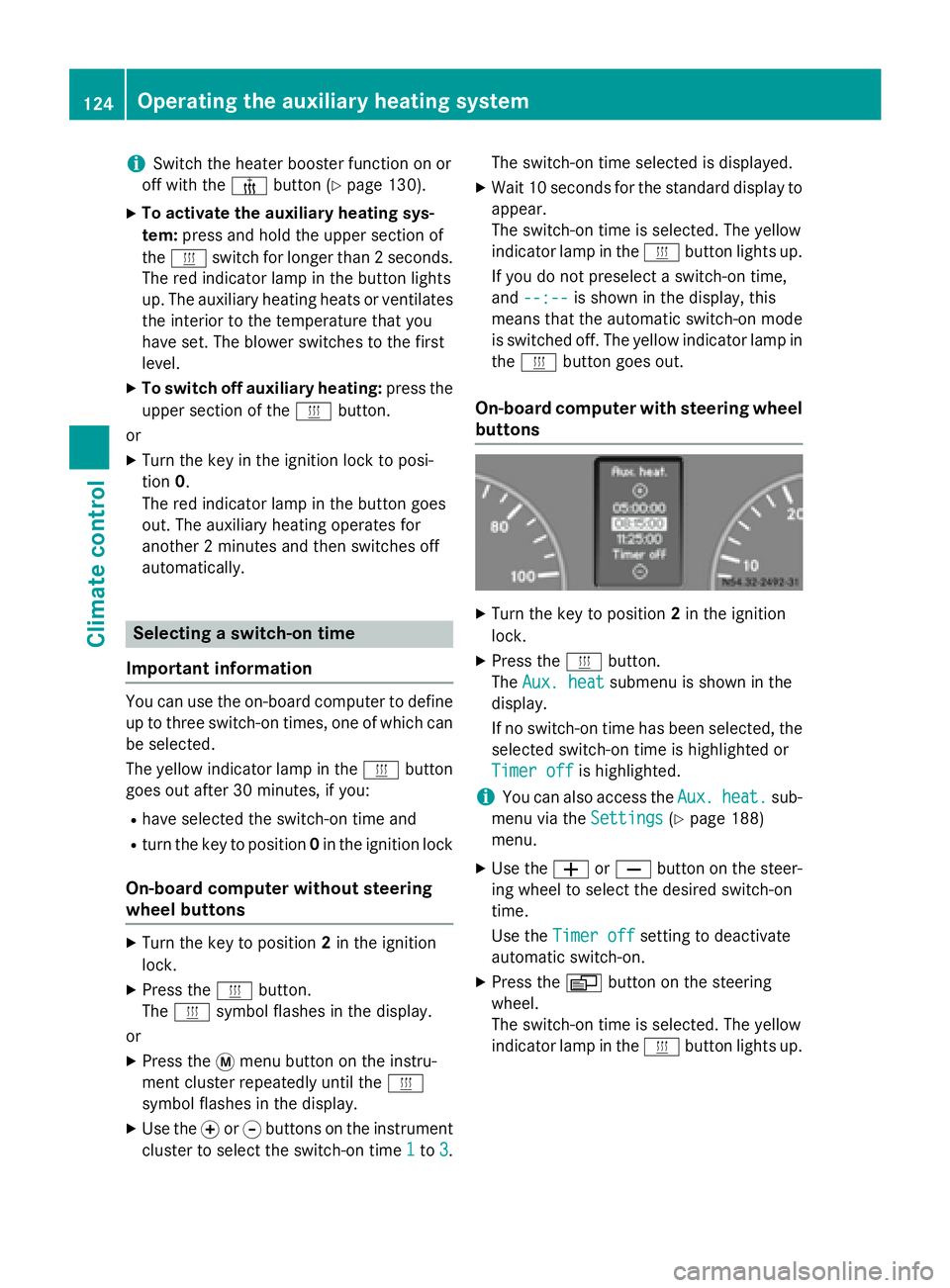
On-board computer with steering wheel
buttons X
Turn the key to position 2in the ignition
lock.
X Press the 0084button.
The Aux. heat Aux. heat submenu is shown in the
display.
If no switch-on time has been selected, the
selected switch-on time is highlighted or
Timer off Timer off is highlighted.
i You can also access the
Aux.
Aux.heat.
heat. sub-
menu via the Settings
Settings(Ypage 188)
menu.
X Use the 0081or0082 button on the steer-
ing wheel to select the desired switch-on
time.
Use the Timer off Timer off setting to deactivate
automatic switch-on.
X Press the 0080button on the steering
wheel.
The switch-on time is selected. The yellow
indicator lamp in the 0084button lights up. 124
Operating the auxiliary heating systemClimate control