instrument cluster MERCEDES-BENZ SPRINTER 2015 MY15 Operator’s Manual
[x] Cancel search | Manufacturer: MERCEDES-BENZ, Model Year: 2015, Model line: SPRINTER, Model: MERCEDES-BENZ SPRINTER 2015Pages: 334, PDF Size: 5.94 MB
Page 229 of 334
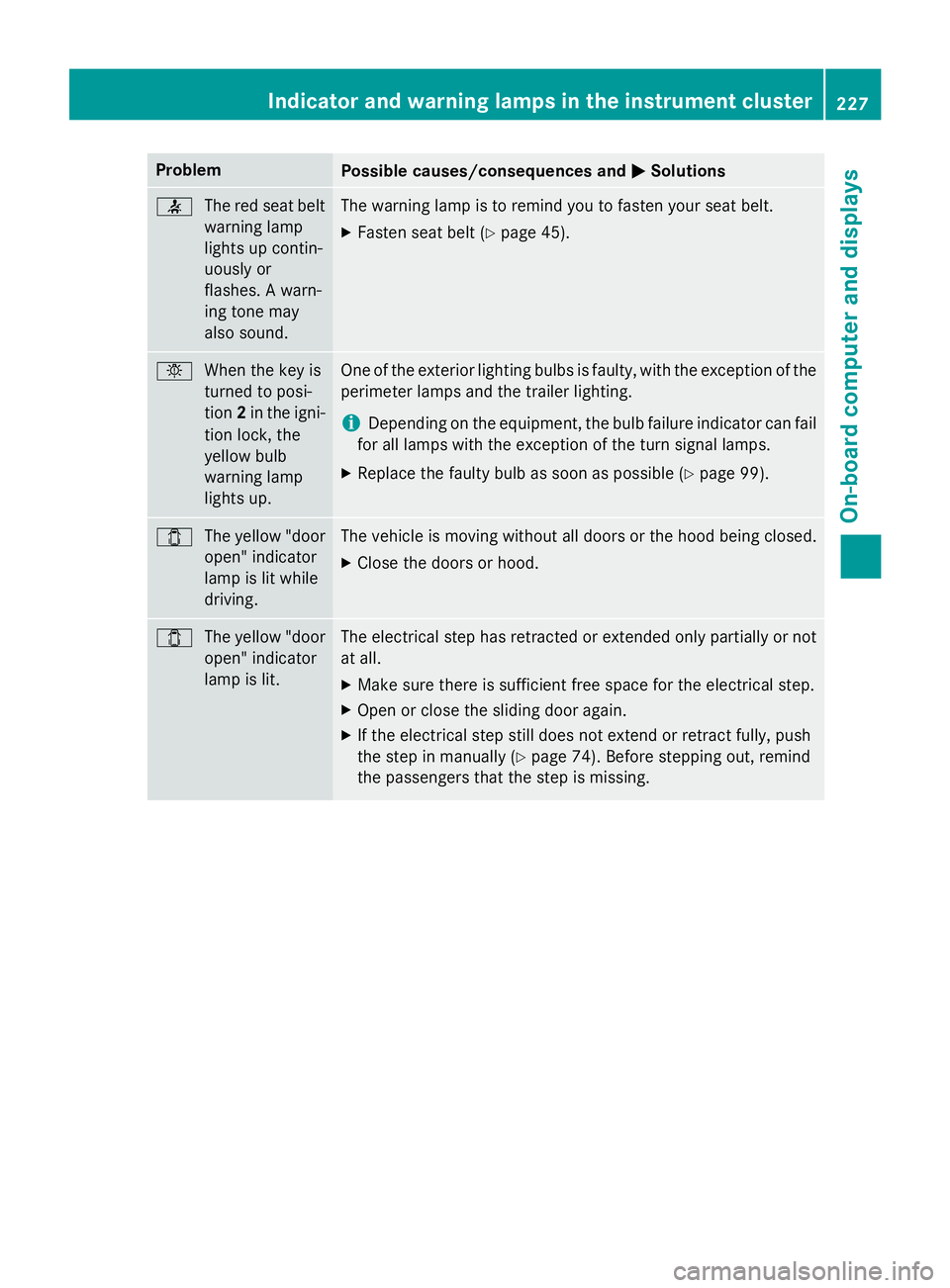
Problem
Possible causes/consequences and
0050
0050Solutions 0076
The red seat belt
warning lamp
lights up contin-
uously or
flashes. A warn-
ing tone may
also sound. The warning lamp is to remind you to fasten your seat belt.
X Fasten seat belt (Y page 45). 0049
When the key is
turned to posi-
tion2in the igni-
tion lock, the
yellow bulb
warning lamp
lights up. One of the exterior lighting bulbs is faulty, with the exception of the
perimeter lamps and the trailer lighting.
i Depending on the equipment, the bulb failure indicator can fail
for all lamps with the exception of the turn signal lamps.
X Replace the faulty bulb as soon as possible (Y page 99).003E
The yellow "door
open" indicator
lamp is lit while
driving. The vehicle is moving without all doors or the hood being closed.
X Close the doors or hood. 003E
The yellow "door
open" indicator
lamp is lit. The electrical step has retracted or extended only partially or not
at all.
X Make sure there is sufficient free space for the electrical step.
X Open or close the sliding door again.
X If the electrical step still does not extend or retract fully, push
the step in manually (Y page 74). Before stepping out, remind
the passengers that the step is missing. Indicator and warning lamps in the instrument cluster
227On-board computer and displays Z
Page 240 of 334
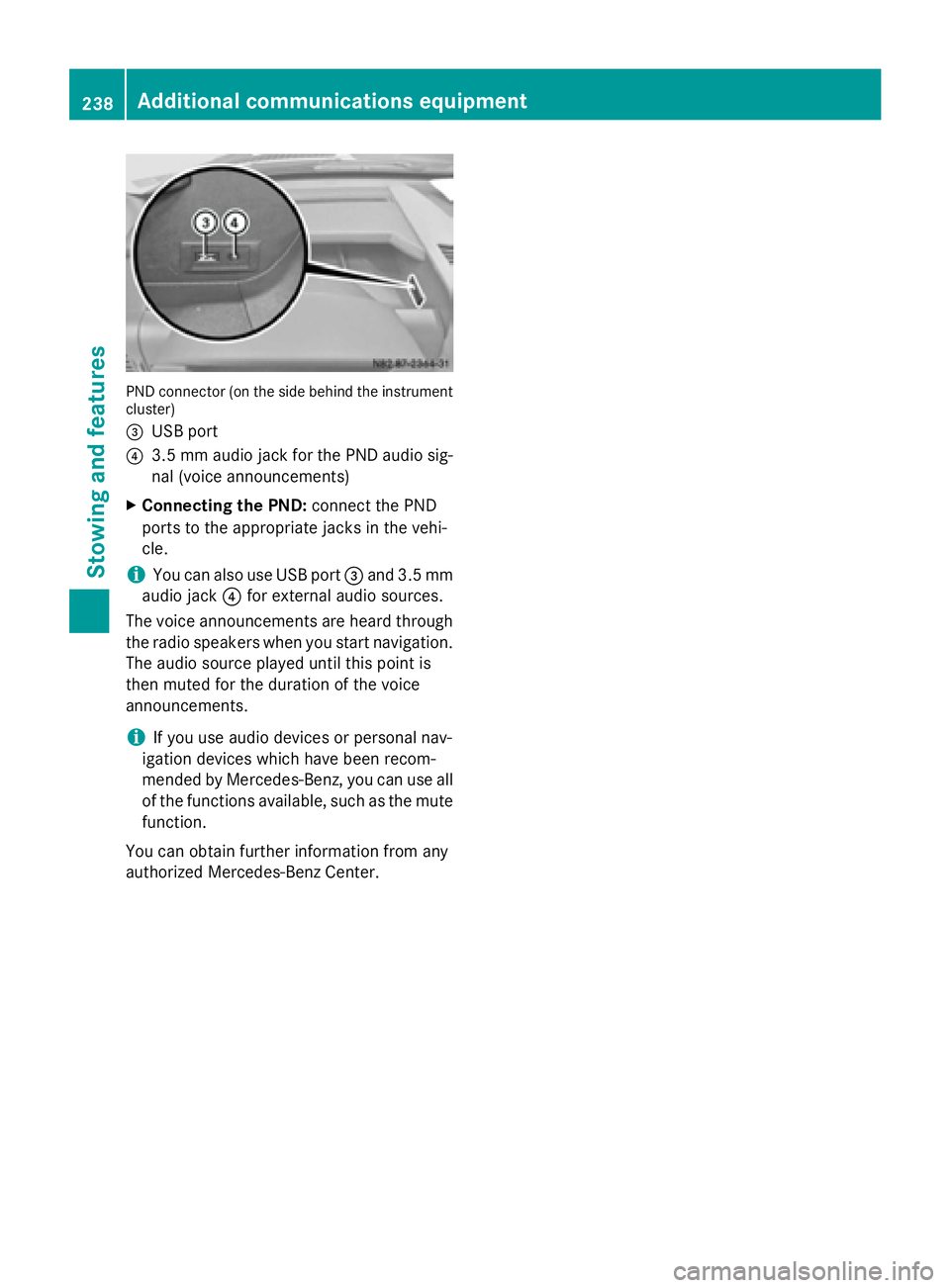
PND connector (on the side behind the instrument
cluster)
0087 USB port
0085 3.5 mm audio jack for the PND audio sig-
nal (voice announcements)
X Connecting the PND: connect the PND
ports to the appropriate jacks in the vehi-
cle.
i You can also use USB port
0087and 3.5 mm
audio jack 0085for external audio sources.
The voice announcements are heard through the radio speakers when you start navigation.The audio source played until this point is
then muted for the duration of the voice
announcements.
i If you use audio devices or personal nav-
igation devices which have been recom-
mended by Mercedes-Benz, you can use all of the functions available, such as the mute
function.
You can obtain further information from any
authorized Mercedes-Benz Center. 238
Additional communications equipmentStowing and features
Page 251 of 334
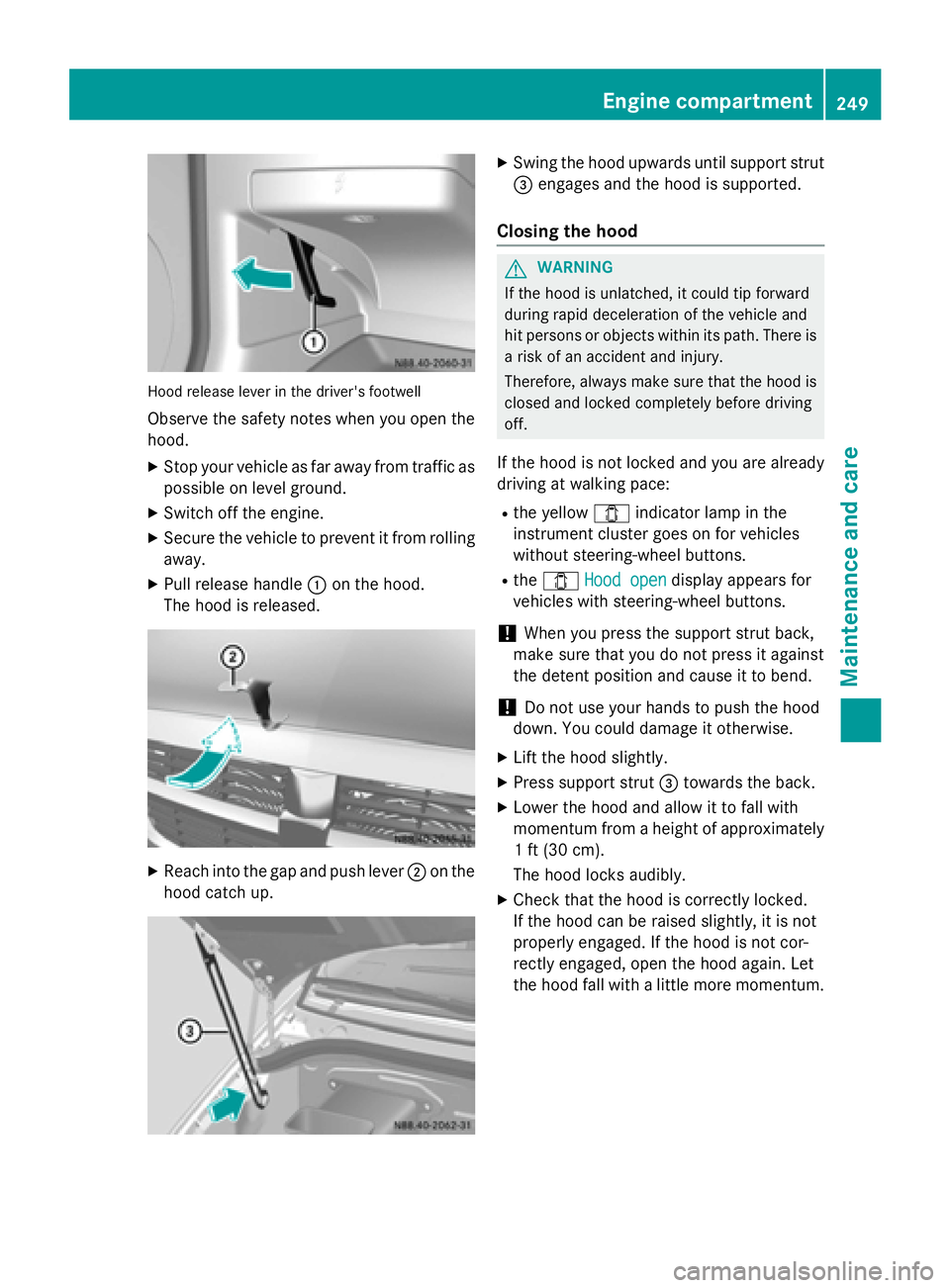
Hood release lever in the driver's footwell
Observe the safety notes when you open the
hood.
X Stop your vehicle as far away from traffic as
possible on level ground.
X Switch off the engine.
X Secure the vehicle to prevent it from rolling
away.
X Pull release handle 0043on the hood.
The hood is released. X
Reach into the gap and push lever 0044on the
hood catch up. X
Swing the hood upwards until support strut
0087 engages and the hood is supported.
Closing the hood G
WARNING
If the hood is unlatched, it could tip forward
during rapid deceleration of the vehicle and
hit persons or objects within its path. There is
a risk of an accident and injury.
Therefore, always make sure that the hood is closed and locked completely before driving
off.
If the hood is not locked and you are already
driving at walking pace:
R the yellow 003Eindicator lamp in the
instrument cluster goes on for vehicles
without steering-wheel buttons.
R the 003E Hood open
Hood open display appears for
vehicles with steering-wheel buttons.
! When you press the support strut back,
make sure that you do not press it against
the detent position and cause it to bend.
! Do not use your hands to push the hood
down. You could damage it otherwise.
X Lift the hood slightly.
X Press support strut 0087towards the back.
X Lower the hood and allow it to fall with
momentum from a height of approximately
1 ft (30 cm).
The hood locks audibly.
X Check that the hood is correctly locked.
If the hood can be raised slightly, it is not
properly engaged. If the hood is not cor-
rectly engaged, open the hood again. Let
the hood fall with a little more momentum. Engine compartment
249Maintenance and care Z
Page 252 of 334
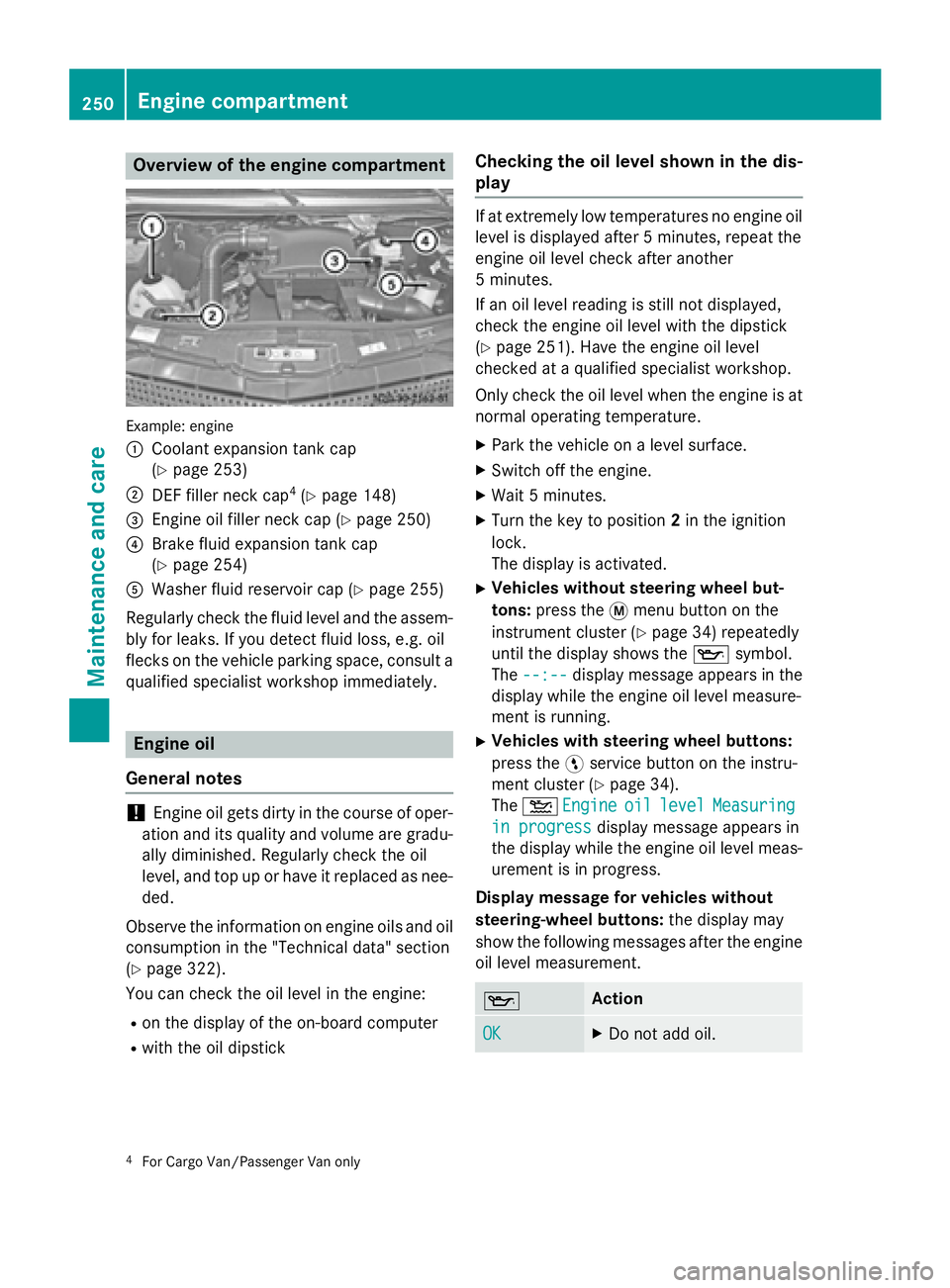
Overview of the engine compartment
Example: engine
0043
Coolant expansion tank cap
(Ypage 253)
0044 DEF filler neck cap 4
(Y page 148)
0087 Engine oil filler neck cap (Y page 250)
0085 Brake fluid expansion tank cap
(Ypage 254)
0083 Washer fluid reservoir cap (Y page 255)
Regularly check the fluid level and the assem- bly for leaks. If you detect fluid loss, e.g. oil
flecks on the vehicle parking space, consult a qualified specialist workshop immediately. Engine oil
General notes !
Engine oil gets dirty in the course of oper-
ation and its quality and volume are gradu- ally diminished. Regularly check the oil
level, and top up or have it replaced as nee-
ded.
Observe the information on engine oils and oil
consumption in the "Technical data" section
(Y page 322).
You can check the oil level in the engine:
R on the display of the on-board computer
R with the oil dipstick Checking the oil level shown in the dis-
play If at extremely low temperatures no engine oil
level is displayed after 5 minutes, repeat the
engine oil level check after another
5 minutes.
If an oil level reading is still not displayed,
check the engine oil level with the dipstick
(Y page 251). Have the engine oil level
checked at a qualified specialist workshop.
Only check the oil level when the engine is at
normal operating temperature.
X Park the vehicle on a level surface.
X Switch off the engine.
X Wait 5 minutes.
X Turn the key to position 2in the ignition
lock.
The display is activated.
X Vehicles without steering wheel but-
tons: press the 0079menu button on the
instrument cluster (Y page 34) repeatedly
until the display shows the 00AFsymbol.
The --:--
--:-- display message appears in the
display while the engine oil level measure-
ment is running.
X Vehicles with steering wheel buttons:
press the 0098service button on the instru-
ment cluster (Y page 34).
The 00B2 Engine Engine oil
oillevel
level Measuring
Measuring
in progress
in progress display message appears in
the display while the engine oil level meas-
urement is in progress.
Display message for vehicles without
steering-wheel buttons: the display may
show the following messages after the engine oil level measurement. 00AF Action
OK OK X
Do not add oil. 4
For Cargo Van/Passenger Van only 250
Engine compartmentMaintenance and care
Page 257 of 334
Washer fluid
G
WARNING
Windshield washer concentrate could ignite if it comes into contact with hot engine compo-
nents or the exhaust system. There is a risk of
fire and injury.
Make sure that no windshield washer con-
centrate is spilled next to the filler neck.
! Only use washer fluid that is suitable for
plastic lamp lenses, e.g. MB SummerFit or
MB WinterFit. Unsuitable washer fluid
could damage the plastic lenses of the
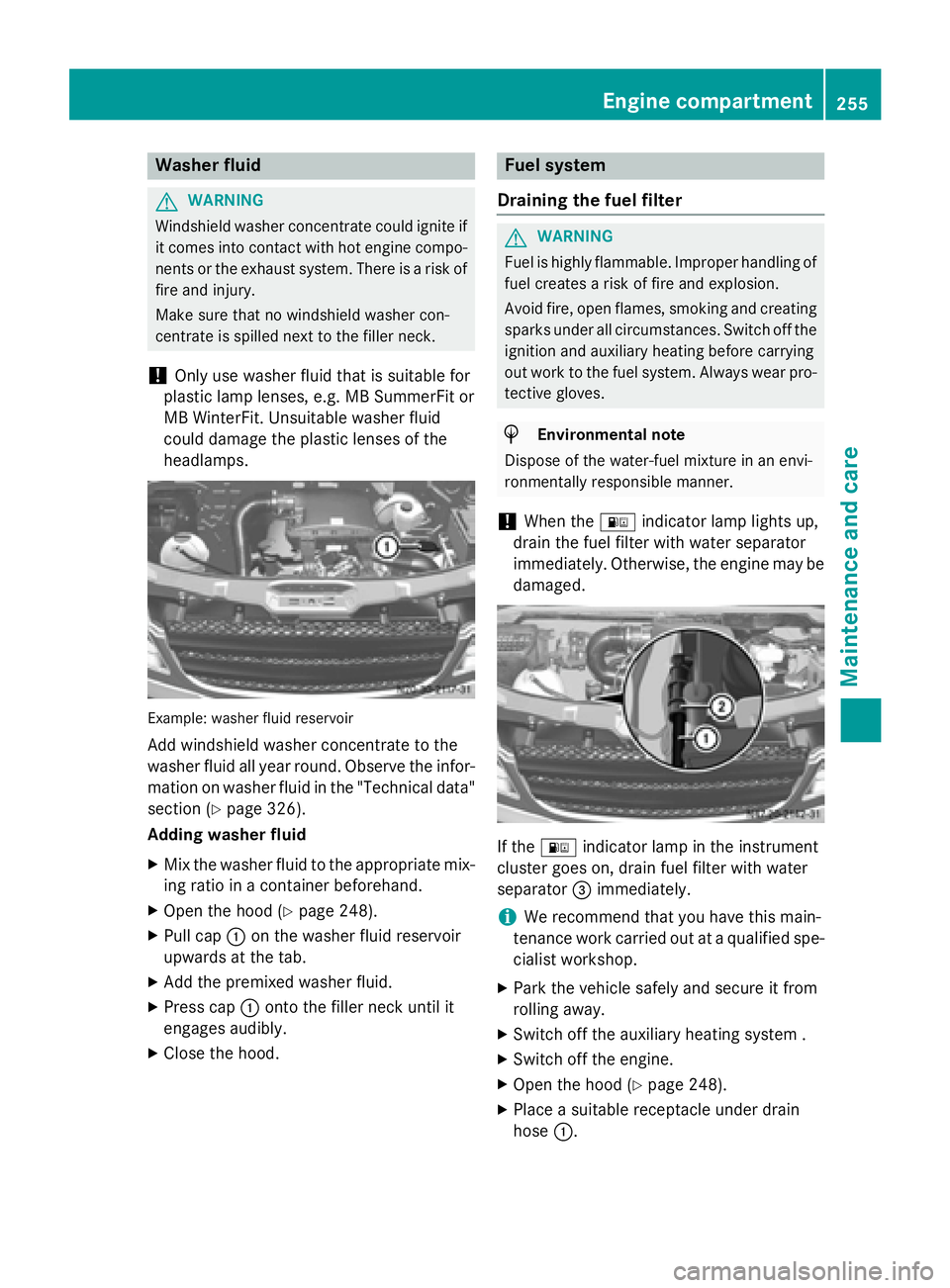
headlamps. Example: washer fluid reservoir
Add windshield washer concentrate to the
washer fluid all year round. Observe the infor- mation on washer fluid in the "Technical data"
section (Y page 326).
Adding washer fluid
X Mix the washer fluid to the appropriate mix-
ing ratio in a container beforehand.
X Open the hood (Y page 248).
X Pull cap 0043on the washer fluid reservoir
upwards at the tab.
X Add the premixed washer fluid.
X Press cap 0043onto the filler neck until it
engages audibly.
X Close the hood. Fuel system
Draining the fuel filter G
WARNING
Fuel is highly flammable. Improper handling of fuel creates a risk of fire and explosion.
Avoid fire, open flames, smoking and creatingsparks under all circumstances. Switch off the
ignition and auxiliary heating before carrying
out work to the fuel system. Always wear pro- tective gloves. H
Environmental note
Dispose of the water-fuel mixture in an envi-
ronmentally responsible manner.
! When the
00B8indicator lamp lights up,
drain the fuel filter with water separator
immediately. Otherwise, the engine may be
damaged. If the
00B8 indicator lamp in the instrument
cluster goes on, drain fuel filter with water
separator 0087immediately.
i We recommend that you have this main-
tenance work carried out at a qualified spe-
cialist workshop.
X Park the vehicle safely and secure it from
rolling away.
X Switch off the auxiliary heating system .
X Switch off the engine.
X Open the hood (Y page 248).
X Place a suitable receptacle under drain
hose 0043. Engine compartment
255Maintenance and care Z
Page 266 of 334
If the indicator/warning lamps do not light up
in the instrument cluster when temperatures
are low, it is probably because the discharged
battery has frozen. Should this be the case, do
not jump-start the vehicle or charge the bat-
tery. The service life of a thawed battery may be shorter. Start-up behavior may deterio-
rate, in particular at low temperatures. Have
the thawed battery checked at a qualified
specialist workshop. G
WARNING
During charging and jump-starting, explosive
gases can escape from the battery. There is a risk of an explosion.
Particularly avoid fire, open flames, creating
sparks and smoking. Ensure there is sufficient
ventilation while charging and jump-starting.
Do not lean over a battery. G
WARNING
Battery acid is caustic. There is a risk of injury. Avoid contact with skin, eyes or clothing. Do
not inhale any battery gases. Do not lean over
the battery. Keep children away from batter-
ies. Wash away battery acid immediately with
plenty of clean water and seek medical atten- tion.
! Only charge the installed battery with a
battery charger that has been tested and
approved by the distributor named on the
inside of the front cover. This device allows the battery to be charged when it is instal-
led in the vehicle. The vehicle's electronics
may otherwise be damaged.
A battery charger unit specially adapted for
Mercedes-Benz vehicles and tested and
approved by Mercedes-Benz is available as an accessory. Only this device permits the
charging of the battery in its installed posi-
tion. Only charge the installed battery with a
battery charger that has been tested and
approved by Mercedes-Benz, using the jump-
start connection point in the engine compart-
ment. Contact an authorized Mercedes-Benz
Center for information and availability. Read the operating instructions for your charger
before charging the battery.
The additional battery can not be charged
from the jump-starting connection point.
Recharge the battery more frequently if you
use the vehicle mainly for short trips and/or
drive at low outside temperatures.
X Charge the battery. Observe the notes in
the operating instructions for your battery
charger.
X If necessary, install battery. Observe the
notes on reconnecting the battery.
i Recharge uninstalled, out of service bat-
teries every three months. This will counter
self-discharging and prevent battery dam-
age. Care
! Dirty battery clamps and battery surfaces
cause leak currents which lead to the bat-
teries discharging.
! Do not use cleaning agents containing
fuel. Cleaning agents containing fuel cor-
rode the battery housing.
! If dirt gets into the battery cell, battery
self-discharge will increase and the battery
may be damaged.
The following points on battery care must be
observed: X Regularly check the battery terminals and
the fastening of the negative cable to the
chassis to ensure that they are firmly
seated.
X Always keep the battery terminals and bat-
tery surfaces clean and dry.
X Lightly grease the undersides of the battery
terminals with acid-resistant grease.
X Only clean the battery casing with a com-
mercially available cleaning product. 264
BatteryMaintenance and care
Page 294 of 334
standstill. Do not carry out any sudden steer-
ing maneuvers.
The tire pressure monitor has a yellow 0077
warning lamp in the instrument cluster for
indicating pressure loss/malfunctions (USA)
or pressure loss (Canada). Depending on how
the warning lamp flashes or lights up, an
underinflated tire or a malfunction in the tire
pressure monitor is displayed:
R if the 0077 warning lamp is lit continuously,
the tire pressure on one or more tires is
significantly too low. The tire pressure mon-
itor is not malfunctioning.
R USA only: if the 0077warning lamp flashes
for 60 seconds and then remains lit con-
stantly, the tire pressure monitor is mal-
functioning.
Only vehicles with steering wheel buttons: the on-board computer displays information on
tire pressure. After a few minutes of driving,
the current tire pressure of each tire is shown
in the on-board computer.
USA only: if the tire pressure monitor is mal-
functioning, it may be more than 10 minutes
before the malfunction is shown. The 0077
tire pressure warning lamp flashes for
60 seconds and then remains lit. When the
malfunction has been rectified, the 0077tire
pressure warning lamp goes out after a few
minutes of driving.
The tire pressure values indicated by the on-
board computer may differ from those meas-
ured at a gas station with a pressure gage.
The tire pressures shown by the on-board
computer refer to those measured at sea
level. At high altitudes, the tire pressure val-
ues indicated by a pressure gage are higher
than those shown by the on-board computer. In this case, do not reduce the tire pressures.
If radio transmitting equipment (e.g. wireless headphones, two-way radios) is operated
inside the vehicle or in the vicinity of the vehi-
cle, this can interfere with the operation of the tire pressure monitor. Checking the tire pressure electroni-
cally (vehicles with steering wheel but-
tons)
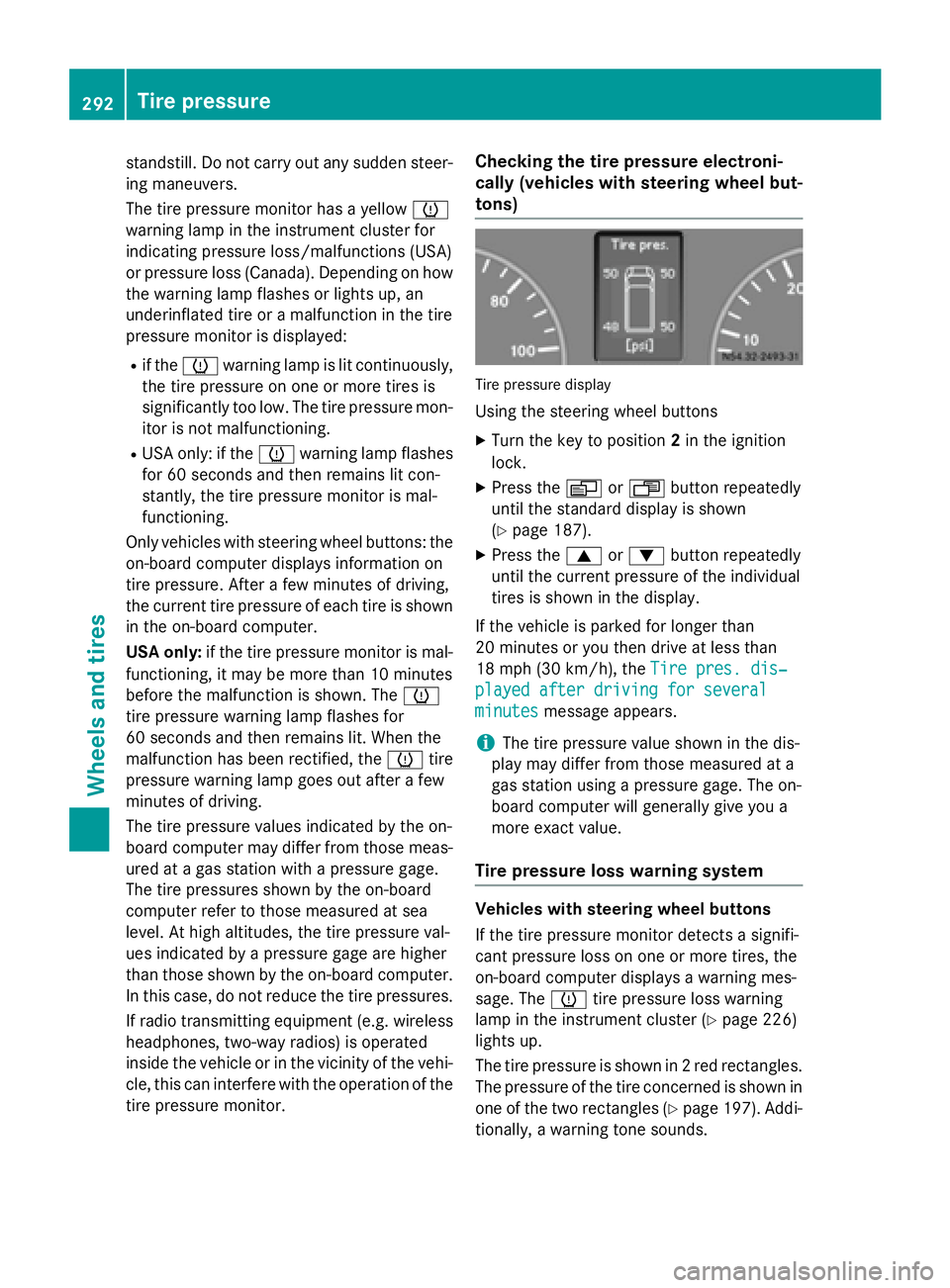
Tire pressure display
Using the steering wheel buttons
X Turn the key to position 2in the ignition
lock.
X Press the 0080or007F button repeatedly
until the standard display is shown
(Y page 187).
X Press the 0063or0064 button repeatedly
until the current pressure of the individual
tires is shown in the display.
If the vehicle is parked for longer than
20 minutes or you then drive at less than
18 mph (30 km/h), the Tire pres. dis‐ Tire pres. dis‐
played after driving for several played after driving for several
minutes minutes message appears.
i The tire pressure value shown in the dis-
play may differ from those measured at a
gas station using a pressure gage. The on-
board computer will generally give you a
more exact value.
Tire pressure loss warning system Vehicles with steering wheel buttons
If the tire pressure monitor detects a signifi-
cant pressure loss on one or more tires, the
on-board computer displays a warning mes-
sage. The 0077tire pressure loss warning
lamp in the instrument cluster (Y page 226)
lights up.
The tire pressure is shown in 2 red rectangles. The pressure of the tire concerned is shown in
one of the two rectangles (Y page 197). Addi-
tionally, a warning tone sounds. 292
Tire pressureWheels and tires
Page 295 of 334
Each tire that is affected by a significant loss
of pressure is highlighted in the pressure dis-
play.
Restarting the tire pressure monitor When you restart the tire pressure monitor,
the currently set tire pressure are taken as
reference values for monitoring.
In most cases, the tire pressure monitor
detects the new reference values automati-
cally, e.g. after you have:
R changed the tire pressure
R changed wheels or tires
R installed new wheels or tires
However, you can also define reference val-
ues manually as described here.
Before restarting the tire pressure moni-
tor:
X Set the tire pressure to the value recom-
mended on the Tire and Loading Informa-
tion placard or the tire pressure table on
the B-pillar on the driver's side
(Y page 288).
Observe the notes on tire pressure when
doing so (Y page 288).
X Make sure that the tire pressure is correct
on all four wheels.
Restarting the tire pressure monitor
(vehicles without steering wheel but-
tons):
X Turn the key to position 2in the ignition
lock.
X Press the 0079menu button on the instru-
ment cluster repeatedly until the display
shows the following message:
+CAL- TPMS
+CAL- TPMS
X Press the 0074button on the instrument clus-
ter.
The display shows:
OK TPMS
OK TPMS
The tire pressure monitor activation proc-
ess has begun. The tire pressures meas-
ured for the individual wheels are stored as the new reference values, provided that the
tire pressure monitor considers them to be plausible.
If you wish to cancel the restart:
X Press the 0075button or the 0079menu button
on the instrument cluster.
The activation process is canceled auto-
matically if 30 second s elapse without
input.
Restarting the tire pressure monitor
(vehicles with steering wheel buttons): X Turn the key to position 2in the ignition
lock.
X Press the 0080or007F button on the steer-
ing wheel until the standard display
(Y page 187) appears in the display.
X Press the 0063or0064 button on the steer-
ing wheel repeatedly until the current pres-
sure of the individual tires is displayed or
the display shows the following message:
Tire
Tire pres. pres. displayed
displayed after
afterdriving
driving
for several minutes
for several minutes
X Press the 0045reset button on the instru-
ment cluster.
The display shows the following message:
Monitor current tire pressure? Monitor current tire pressure?
X Press the 0081button on the steering
wheel.
The display shows the following message:
Tire pres. monitor reactivated Tire pres. monitor reactivated
The tire pressure monitor activation proc-
ess has begun. The tire pressures meas-
ured for the individual wheels are stored as the new reference values, provided that the
tire pressure monitor considers them to be plausible.
If you wish to cancel the restart:
X Press the 0082button on the steering
wheel. Tire pressure
293Wheels and tires Z