transmission MERCEDES-BENZ SPRINTER 2015 MY15 Operator’s Manual
[x] Cancel search | Manufacturer: MERCEDES-BENZ, Model Year: 2015, Model line: SPRINTER, Model: MERCEDES-BENZ SPRINTER 2015Pages: 334, PDF Size: 5.94 MB
Page 101 of 334
Motion detector
G
WARNING
The motion detector sends the invisible infra- red radiation emitted by LEDs (light emitting
diodes).
These LEDs are classified as class 1M lasers
and can damage the retina if you:
R look directly into the unfiltered laser beam
of the motion detector for an extended
period
R look directly into the laser beam of the
motion detector using optical instruments,
e.g. eyeglasses or a magnifying glass.
There is a risk of injury.
Never look directly into the motion detector.
The cargo compartment lighting is also
switched on by the motion detector in the
cargo compartment of Cargo Vans equipped
with this feature.
If the motion detector detects a movement in the cargo compartment when the vehicle is
stationary, the cargo compartment lighting
switches on for approximately two minutes.
The cargo compartment lighting can be
switched on by the motion detector within
four seconds if:
R the rear interior light switch (Y page 98) is
set to automatic control.
R the vehicle is stationary, the parking brake
is applied and the brake pedal is not being
depressed
Or
R the selector lever is in position Pon vehi-
cles with automatic transmission and the
brake pedal is not being depressed and
R the vehicle has not been locked from the
outside using the key
The motion detector switches off automati-
cally if no change is detected in the vehicle for
several hours, e.g. if a door is opened, if the
ignition key is turned, etc. This prevents the
battery from becoming discharged. Changing bulbs
Important safety notes
G
DANGER
Xenon bulbs carry a high voltage. You can get an electric shock if you remove the cover of
the Xenon bulb and touch the electrical con-
tacts. There is a risk of fatal injury.
Never touch the parts or the electrical con-
tacts of the Xenon bulb. Always have work on
the Xenon bulbs carried out at a qualified spe-
cialist workshop. G
WARNING
Bulbs, lamps and connectors can get very hot when operating. If you change a bulb, you
could burn yourself on these components.
There is a risk of injury.
Allow these components to cool down before changing a bulb.
! Make sure the bulbs are always securely
installed.
If your vehicle is equipped with Bi-Xenon
bulbs, you can recognize this by the following: the cone of light from the Xenon bulbs moves
from the top to the bottom and back again
when you start the engine. For this to be
observed, the low-beam headlamps must be
switched on before starting the engine.
The bulbs and lamps are an essential compo- nent of vehicle safety. You must therefore
make sure that these function correctly at all
times. Have the headlamp setting checked
regularly.
R Always switch off the vehicle's lighting sys-
tem before changing a bulb.
This will prevent a short circuit.
R Do not touch the glass tube of new bulbs
with your bare hands. Always use a clean,
lint-free cloth or only touch the base of the bulb when installing.
Even minor contamination can burn into
the glass surface and reduce the service life
of the bulbs. Changing bulbs
99Lights and windshield wipers Z
Page 128 of 334
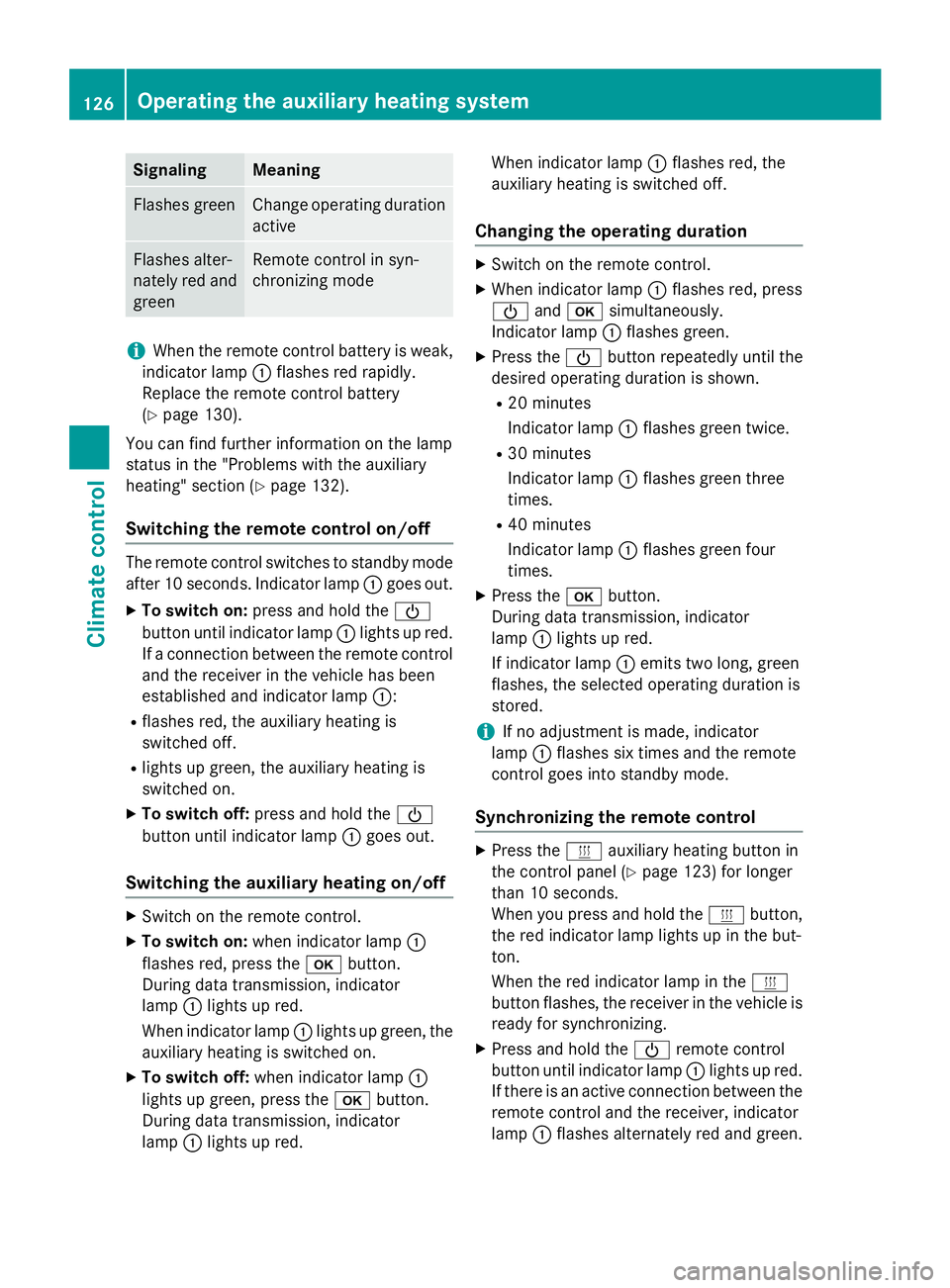
Signaling Meaning
Flashes green Change operating duration
active Flashes alter-
nately red and
green Remote control in syn-
chronizing mode
i
When the remote control battery is weak,
indicator lamp 0043flashes red rapidly.
Replace the remote control battery
(Y page 130).
You can find further information on the lamp
status in the "Problems with the auxiliary
heating" section (Y page 132).
Switching the remote control on/off The remote control switches to standby mode
after 10 seconds. Indicator lamp 0043goes out.
X To switch on: press and hold the 00D0
button until indicator lamp 0043lights up red.
If a connection between the remote control and the receiver in the vehicle has been
established and indicator lamp 0043:
R flashes red, the auxiliary heating is
switched off.
R lights up green, the auxiliary heating is
switched on.
X To switch off: press and hold the 00D0
button until indicator lamp 0043goes out.
Switching the auxiliary heating on/off X
Switch on the remote control.
X To switch on: when indicator lamp 0043
flashes red, press the 0070button.
During data transmission, indicator
lamp 0043lights up red.
When indicator lamp 0043lights up green, the
auxiliary heating is switched on.
X To switch off: when indicator lamp 0043
lights up green, press the 0070button.
During data transmission, indicator
lamp 0043lights up red. When indicator lamp
0043flashes red, the
auxiliary heating is switched off.
Changing the operating duration X
Switch on the remote control.
X When indicator lamp 0043flashes red, press
00D0 and0070 simultaneously.
Indicator lamp 0043flashes green.
X Press the 00D0button repeatedly until the
desired operating duration is shown.
R 20 minutes
Indicator lamp 0043flashes green twice.
R 30 minutes
Indicator lamp 0043flashes green three
times.
R 40 minutes
Indicator lamp 0043flashes green four
times.
X Press the 0070button.
During data transmission, indicator
lamp 0043lights up red.
If indicator lamp 0043emits two long, green
flashes, the selected operating duration is
stored.
i If no adjustment is made, indicator
lamp 0043flashes six times and the remote
control goes into standby mode.
Synchronizing the remote control X
Press the 0084auxiliary heating button in
the control panel (Y page 123) for longer
than 10 seconds.
When you press and hold the 0084button,
the red indicator lamp lights up in the but-
ton.
When the red indicator lamp in the 0084
button flashes, the receiver in the vehicle is ready for synchronizing.
X Press and hold the 00D0remote control
button until indicator lamp 0043lights up red.
If there is an active connection between the remote control and the receiver, indicator
lamp 0043flashes alternately red and green. 126
Operating the auxiliary heating systemClimate control
Page 129 of 334
The remote control is in synchronizing
mode.
i If you press the
00D0button again on the
remote control after starting synchroniza-
tion, you will only synchronize this remote
control unit with the receiver. Any other
remote control units that were synchron-
ized will be cleared. Indicator lamp 0043
flashes alternately red and green (very
slowly).
X Press the 0070button on the remote con-
trol.
During data transmission, indicator
lamp 0043lights up red.
When remote control indicator lamp 0043
emits two long green flashes, the selected
operating time is synchronized. The indica-
tor lamp in the 0084auxiliary heating but-
ton goes out. Operation with the timer
Important safety notes This is only for vehicles with a hot-water aux-
iliary heater. G
DANGER
If a switch-on time has been selected, the
auxiliary heating switches on automatically.
R If the ventilation is insufficient, poisonous
exhaust gases can collect, in particular car-
bon monoxide. This is the case in enclosed
spaces, for example. There is a risk of fatal
injuries.
R If highly flammable substances or flamma-
ble materials are nearby, there is a risk of a
risk of fire and explosion.
Always deactivate the preselected switch-on
times if you stop the vehicle in such or similar situations.
Use the timer to: R activate/deactivate immediate heating
mode
R set up to three switch-on times R
set the operating duration from 10to
120 minutes or to continuous operation
R set the heating level (preselected temper-
ature) to a range between 10 and 30
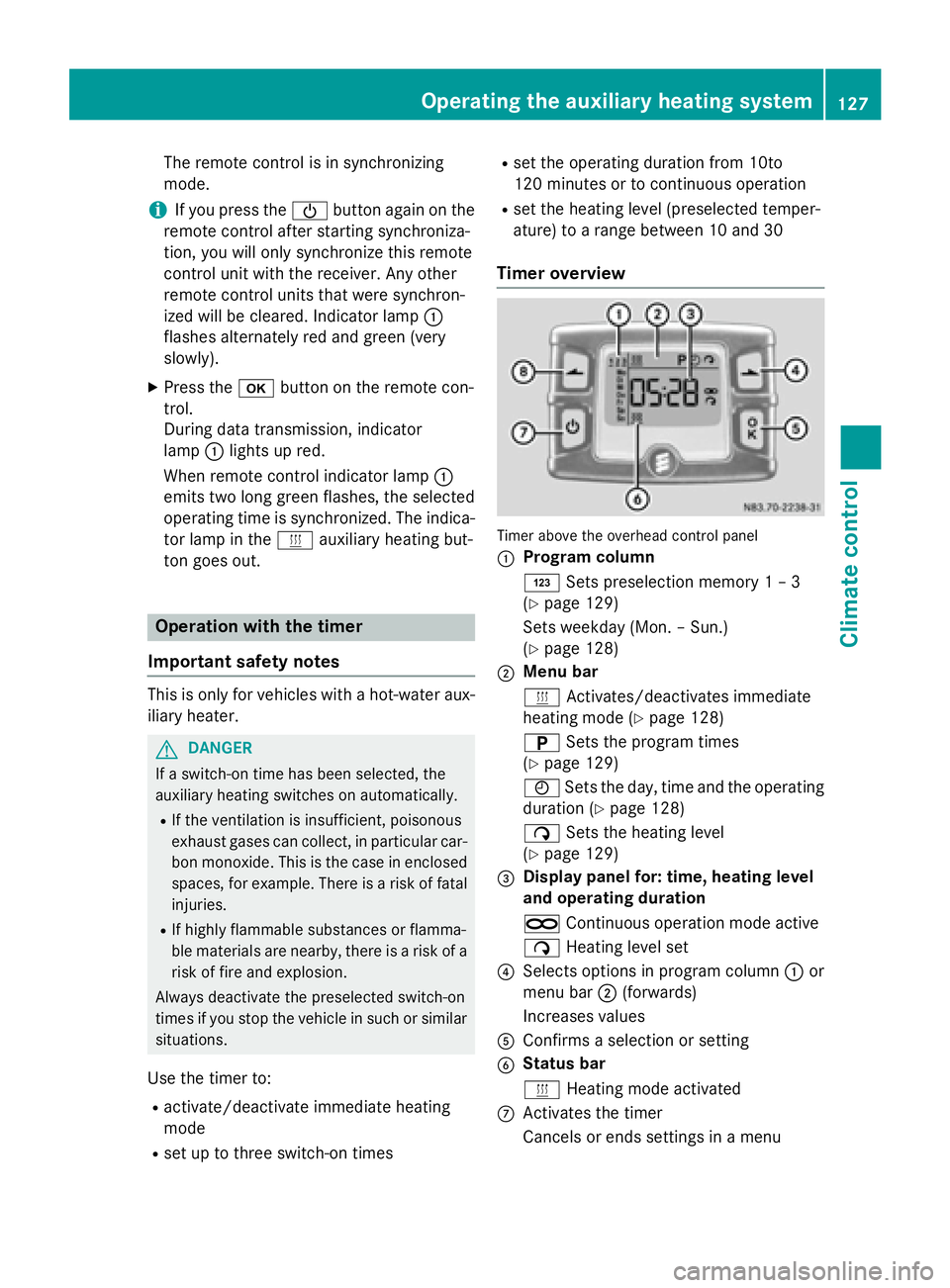
Timer overview Timer above the overhead control panel
0043
Program column
0059
Sets preselection memory 1 – 3
(Y page 129)
Sets weekday (Mon. – Sun.)
(Y page 128)
0044 Menu bar
0084
Activates/deactivates immediate
heating mode (Y page 128)
0045 Sets the program times
(Y page 129)
0045 Sets the day, time and the operating
duration (Y page 128)
00D1 Sets the heating level
(Y page 129)
0087 Display panel for: time, heating level
and operating duration
00D5 Continuous operation mode active
00D1 Heating level set
0085 Selects options in program column 0043or
menu bar 0044(forwards)
Increases values
0083 Confirms a selection or setting
0084 Status bar
0084
Heating mode activated
006B Activates the timer
Cancels or ends settings in a menu Operating the auxiliary heating system
127Climate control Z
Page 134 of 334
Problems with the auxiliary heating
Problem
Possible causes/consequences and
0050
0050Solutions The indicator lamp on
the remote control
flashes red rapidly. The remote control battery is discharged. Data transmission is not
possible.
X Replace the remote control battery (Y page 130).The indicator lamp on
the remote control
flashes red and green in
rapid succession. There is no connection between the remote control and the
receiver in the vehicle.
X Change your position in relation to the vehicle, e.g. hold the
remote control higher or to the side.
X Move closer.
If you cannot establish a connection and the auxiliary heating is
switched on, it can then only be deactivated using the 0084button
(Y page 123).
or Several remote controls are being used at the same time.
X Switch on the remote control again after a short while
(Y page 126).
or The remote control is not synchronized.
X Synchronize the remote control (Y page 126).The indicator lamp on
the remote control
slowly flashes red and
green alternately. The remote control is being synchronized.
X Wait until the remote control synchronization process is com-
plete (Y page 126). The remote control for
the auxiliary heating
cannot be switched on. The remote control battery is discharged.
X Replace the remote control battery (Y page 130).The auxiliary heating
does not switch on. The outside temperature is above 39
‡(4 †). The auxiliary heating
switches off automatically. The auxiliary heating
switches off automati-
cally and/or cannot be
switched on. The fuel tank is less than
00C4full. The auxiliary heating switches off
automatically.
X Refuel at the nearest gas station.
X Then, start the auxiliary heating several times until the fuel lines
are full.
or 132
Operating the auxiliary heating systemClimate control
Page 137 of 334
Useful information
............................136
Breaking-in notes .............................. 136
Driving ............................................... 136
Automatic transmission ...................142
Refueling ............................................ 145
Parking ............................................... 149
Driving tips ........................................ 151
Driving systems ................................ 159
Working mode ................................... 172
Towing a trailer ................................. 173 135Driving and parking
Page 142 of 334
i
Depending on the equipment installed,
the vehicle either automatically locks cen-
trally after switching on the ignition or after pulling away. The locking knobs in the
doors drop down.
You can open the doors from the inside at
any time.
Automatic door locking can be deactivated
(Y page 71). Driving off
G
WARNING
If the engine speed is above the idling speed
and you engage transmission position Dor R,
the vehicle could pull away suddenly. There is a risk of an accident.
When engaging transmission position Dor R,
always firmly depress the brake pedal and do not simultaneously accelerate.
! Only shift into reverse gear
Rwhen the
vehicle is stationary. Otherwise, you could
damage the transmission.
X Depress the brake pedal and keep it
depressed.
The selector lever lock is released.
X Move the selector lever to position Dor R.
On vehicles with a reverse warning feature, when reverse gear is engaged a warning
tone sounds to alert other road users
(Y page 140).
X Release the parking brake (Y page 150).
The 0066 indicator lamp in the instrument
cluster goes out.
X Release the brake pedal.
X Carefully depress the accelerator pedal.
i After pulling away or switching on the
ignition, the vehicle automatically locks
centrally. The locking knobs in the doors
drop down.
You can open the doors from the inside at
any time. You can also deactivate the automatic lock-
ing feature (Y page 71). Reverse warning device
G
WARNING
Other road users may ignore or fail to hear the warning tone of the reverse warning feature.
There is a risk of injury if you fail to ensure that
the area in which you are maneuvering is
clear.
Make sure that there are no persons or
objects in the area in which you are maneu-
vering. It may be necessary to enlist the help
of a second person when maneuvering.
The reverse warning feature is a system
designed to assist you in ensuring the safety
of other road users.
A warning signal sounds to alert other road
users when reverse gear is engaged. The vol-
ume of the warning tone can be reduced for
night-time driving.
X To reduce the volume of the warning
tone: engage reverse gear twice in quick
succession.
The warning tone is now quieter.
i The warning tone sounds at a normal vol-
ume by default. The volume of the warning
tone has to be reduced each time you
engage reverse gear if necessary. 140
DrivingDriving an
d parking
Page 144 of 334
Problem
Possible causes/consequences and
0050
0050Solutions The engine does not
start.
The starter motor can-
not be heard. The on-board voltage is too low. The battery is too weak or dis-
charged.
X Jump-start the vehicle (Y page 276).
If the engine cannot be jump-started, the starter motor is faulty.
X Consult a qualified specialist workshop. The engine does not
start.
The starter motor can-
not be heard. The battery is discharged or faulty.
X Check the battery for damage.
X Charge the battery (Y page 263).Automatic transmission
Important safety notes
G
WARNING
If the engine speed is above the idling speed
and you engage transmission position Dor R,
the vehicle could pull away suddenly. There is a risk of an accident.
When engaging transmission position Dor R,
always firmly depress the brake pedal and do not simultaneously accelerate.
! Vehicles with automatic transmission
may roll only briefly in the neutral position
N. Prolonged rolling of the wheels, e.g.
when being towed, will result in transmis-
sion damage.
i Be sure to observe the instructions in the
"Tow-starting and towing away" section
(Y page 277). Selector lever
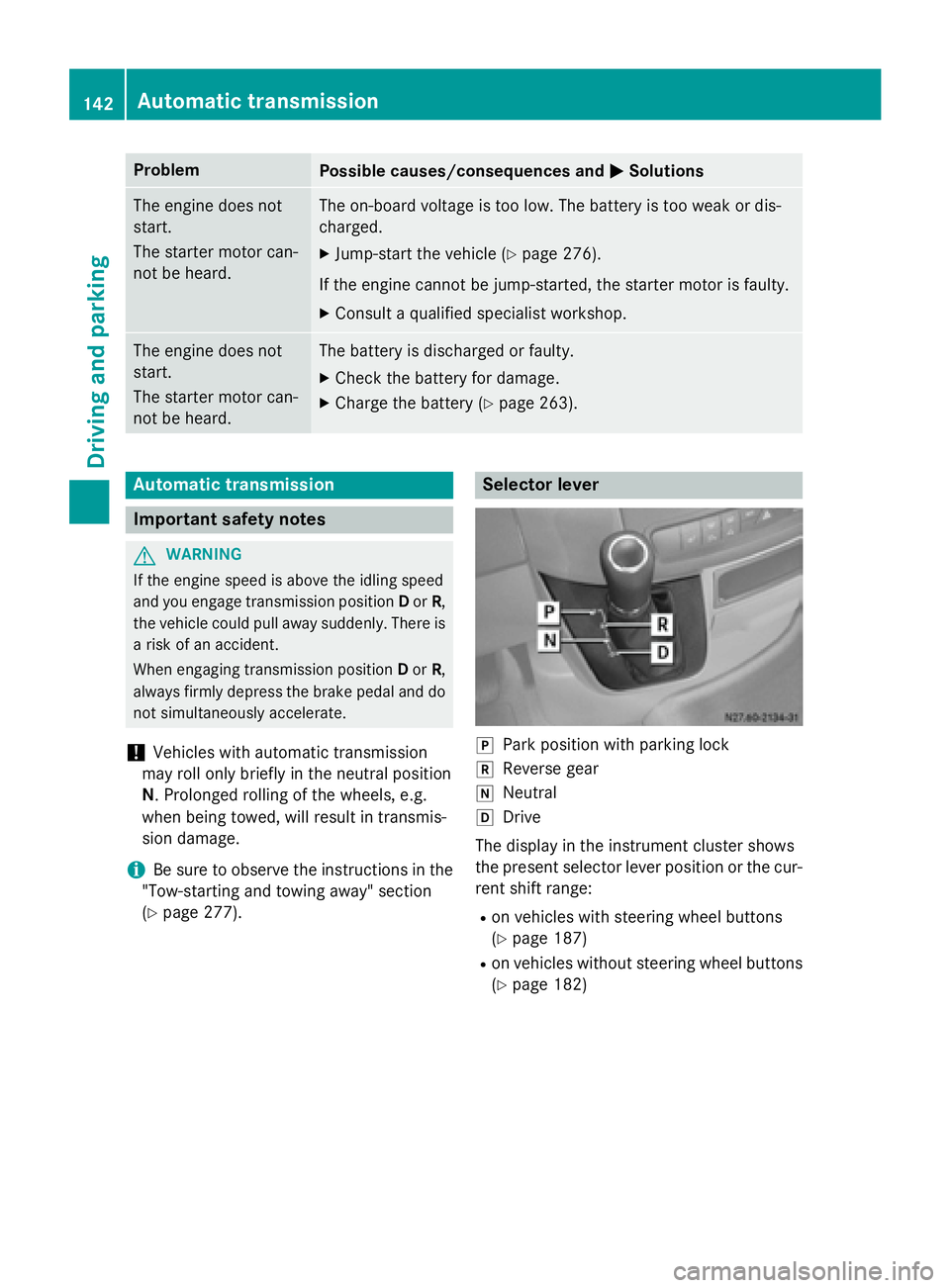
005D
Park position with parking lock
005E Reverse gear
005C Neutral
005B Drive
The display in the instrument cluster shows
the present selector lever position or the cur-
rent shift range:
R on vehicles with steering wheel buttons
(Y page 187)
R on vehicles without steering wheel buttons
(Y page 182) 142
Automatic transmissionDriving and parking
Page 145 of 334
Selector lever positions
0045 Park position
This prevents the vehicle from roll-
ing away when stopped. Only move
the selector lever to Pif the vehicle
is stationary.
You can only remove the key when the selector lever is in this position.
The selector lever is locked in posi- tion Pif the key is removed.
The parking lock should not be
used as a brake when parking.
Always apply the parking brake as
well once you have parked the vehi-
cle. 0046 Reverse gear
Only move the selector lever to
R
when the vehicle is stationary. 0044 Neutral
No power is transmitted from the
engine to the drive wheels. Releas-
ing the brakes will allow you to
move the vehicle freely, e.g. by
pushing.
Do not move the selector lever to N
while driving. The automatic trans-
mission could otherwise be dam-
aged.
If ASR is deactivated or ESP ®
has
malfunctioned: only move the
selector lever to Nif the vehicle is
in danger of skidding, e.g. on icy
roads. 003A Drive
The automatic transmission
changes gear itself. All forward
gears are available.
You can influence the gearshifts
and shift gears yourself or limit the
shift range. Changing gear
The 5-speed automatic transmission adapts
to your individual driving style by continu-
ously adjusting its shift points. These shift
point adjustments take into account the cur-
rent operating and driving conditions. If the
operating or driving conditions change, the
automatic transmission reacts by adjusting
the gearshift program.
When the selector lever is in position D, the
automatic transmission selects the individual gears automatically. This depends on:
R any restriction in the shift range
(Y page 144)
R the position of the accelerator pedal
R the road speed Touchshift
When the selector lever is in position D, you
can perform gearshifts yourself.
X To shift down: press the selector lever to
the left towards D–.
The automatic transmission shifts to the
next gear down, depending on the gear cur-
rently engaged. The shift range is also
restricted.
i The automatic transmission does not shift
down if you press the selector lever
towards D–while traveling at too high a
speed. This protects the engine from over-
revving.
X To shift up: briefly press the selector lever
to the right towards D+.
The automatic transmission shifts to the
next gear up, depending on the current
gearshift program. This also extends the
shift range. Automatic transmission
143Driving and parking Z
Page 146 of 334
X
To derestrict the shift range: press and
hold the selector lever towards D+until D
D
appears in the display again.
The automatic transmission shifts from the
current shift range directly to D.
X To select the optimum shift range: press
and hold the selector lever to the left
towards D–.
The automatic transmission will shift to a
range which allows easy acceleration and
deceleration. To do this, the automatic
transmission will shift down one or more
gears. Shift ranges
When the selector lever is in position Dyou
can restrict or derestrict the shift range for
the automatic transmission.
X To derestrict/restrict the shift range:
press the selector lever briefly to the right
towards D+or left towards D–.
The display shows the selected shift range.
The automatic transmission shifts only as
far as the relevant gear.
i If the maximum engine speed for the
restricted shift range is reached and you
depress the accelerator pedal, the auto-
matic transmission will not shift up. Driving situations
0038
Use the braking effect of the engine
on steep downhill gradients and for
driving:
R on steep mountain roads
R in mountainous terrain
R in arduous conditions 0037
Use the braking effect of the engine
on extremely steep downhill gradi-
ents and long downhill stretches. Driving tips
Accelerator pedal position Your style of driving influences how the auto-
matic transmission shifts gear:
R little throttle: early upshifts
R lots of throttle: later upshifts
Kickdown Use kickdown for maximum acceleration:
X Depress the accelerator pedal beyond the
pressure point.
The automatic transmission shifts to the
next gear down, depending on the engine
speed.
X Ease off on the accelerator pedal once the
desired speed is reached.
The automatic transmission shifts up again.
Maneuvering Maneuvering in a tight space:
X Control the vehicle's speed by braking
carefully.
X Depress the accelerator pedal slightly and
evenly.
i You can shift back and forth between
drive position Dand reverse gear Rat low
speeds without applying the brakes. This
can help you, for example when rapidly
maneuvering the vehicle or rocking it out of snow or slush.
Towing a trailer X
Drive at moderate engine speeds on steep
uphill gradients.
X Depending on the uphill or downhill gradi-
ent, shift down to a shift range adapted to
the driving situation (Y page 144), even if
cruise control is activated. 144
Automatic transmissionDriving an
d parking
Page 147 of 334
Problems with the transmission
Problem
Possible causes/consequences and
0050
0050Solutions The transmission mal-
functions when shifting
gear. The transmission is losing oil.
X Have the transmission checked immediately at a qualified spe-
cialist workshop. The acceleration char-
acteristics have deter-
iorated noticeably.
The transmission does
not shift. The transmission is in emergency mode.
It is only possible to shift into second gear or reverse gear
R.
X Stop the vehicle.
X Depress the brake pedal.
X Move the selector lever to position P.
X Switch off the engine.
X Wait at least 10 seconds before restarting the engine.
X Depress the brake pedal.
X Move the selector lever to position Dor R.
In position D, the transmission shifts into second gear; in posi-
tion R, the transmission shifts into reverse gear.
X Have the transmission checked immediately at a qualified spe-
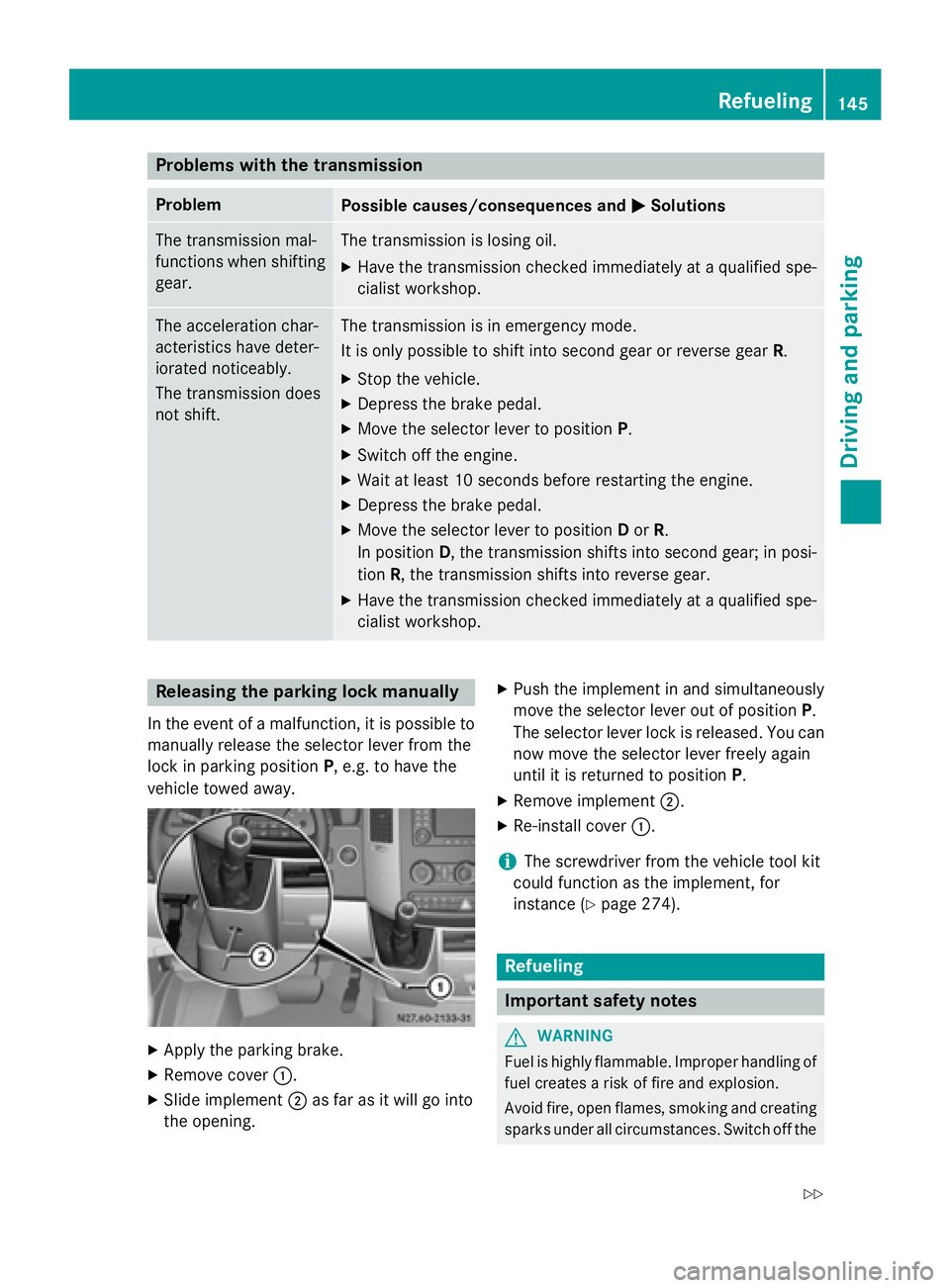
cialist workshop. Releasing the parking lock manually
In the event of a malfunction, it is possible to
manually release the selector lever from the
lock in parking position P, e.g. to have the
vehicle towed away. X
Apply the parking brake.
X Remove cover 0043.
X Slide implement 0044as far as it will go into
the opening. X
Push the implement in and simultaneously
move the selector lever out of position P.
The selector lever lock is released. You can now move the selector lever freely again
until it is returned to position P.
X Remove implement 0044.
X Re-install cover 0043.
i The screwdriver from the vehicle tool kit
could function as the implement, for
instance (Y page 274). Refueling
Important safety notes
G
WARNING
Fuel is highly flammable. Improper handling of fuel creates a risk of fire and explosion.
Avoid fire, open flames, smoking and creatingsparks under all circumstances. Switch off the Refueling
145Driving and parking
Z