transmission MERCEDES-BENZ SPRINTER 2015 MY15 Operator’s Manual
[x] Cancel search | Manufacturer: MERCEDES-BENZ, Model Year: 2015, Model line: SPRINTER, Model: MERCEDES-BENZ SPRINTER 2015Pages: 334, PDF Size: 5.94 MB
Page 198 of 334
Resetting the trip computer
Using the steering wheel buttons
X Press the 0080or007F button to select
After start
After start.
X Press the 0063or0064 button to select the
function you would like to reset.
X Press and hold the 0045reset button until the
values are reset to "0". Telephone menu
Introduction G
WARNING
If you operate information systems and com-
munication equipment integrated in the vehi- cle while driving, you will be distracted from
traffic conditions. You could also lose control of the vehicle. There is a risk of an accident.
Only operate the equipment when the traffic
situation permits. If you are not sure that this
is possible, park the vehicle paying attention
to traffic conditions and operate the equip-
ment when the vehicle is stationary.
You must observe the legal requirements of
the country in which you are currently driving when operating a mobile phone in the vehicle.
If it is permitted to operate a mobile phone
while the vehicle is in motion, only operate it
when road and traffic conditions permit.
If you have connected a mobile phone to the
Sprinter hands-free system, you can operate
it using the functions in the TEL
TEL menu.
X Switch on the mobile phone (see the sep-
arate operating instructions).
X Switch on the audio equipment (see the
separate operating instructions).
X Establish a Bluetooth ®
connection
between the mobile phone and the audio
equipment (see the separate operating
instructions). X
Press the 0080or007F button on the steer-
ing wheel to select the TEL TELmenu.
X When Please enter PIN:
Please enter PIN: appears in the
display, enter the PIN using the mobile
phone or audio equipment.
The mobile phone will search for a network. The display remains blank during this time.
You will see the mobile phone operational
readiness display once the mobile phone
has found a network.
i You can obtain further information about
suitable mobile phones and connecting
mobile phones via Bluetooth ®
at any quali-
fied specialist workshop.
i If the mobile phone operational readiness
symbol goes out, your vehicle is outside of
the transmission and reception range.
Accepting a call X
Press the 0061button on the steering
wheel to accept an incoming call.
The display shows the call duration.
Rejecting or ending a call X
Press 0076button on the steering wheel to
reject or end a call.
The caller then hears the engaged tone.
The display shows the mobile phone opera- tional readiness symbol again.
Dialing a number from the phone book You can enter new telephone numbers into
the phone book via the mobile phone (see the
separate operating instructions). If your
mobile phone is able to receive calls, you can
search for and dial a number from the phone book. 196
On-board computer (vehicles with steering wheel buttons)On-board computer and displays
Page 279 of 334
R
Only use jumper cables that have a suffi-
cient cross-section and insulated terminal
clamps.
R If the battery is fully discharged, attach the
battery of another vehicle for a few minutes before attempting to start. This charges the
empty battery a little.
R Make sure that the two vehicles do not
touch.
Make sure that:
R the jumper cables are not damaged.
R bare parts of the terminal clamps do not
come into contact with other metal parts
while the jumper cables are connected to
the battery.
R the jumper cables cannot come into con-
tact with parts such as the V-belt pulley or
the fan. These parts move when the engine
is started and while it is running.
i Jumper cables and further information
regarding jump starting can be obtained at any qualified specialist workshop. Before connecting the jumper cables
On vehicles with a battery main switch, check whether the battery main switch is switched
on (Y page 137).
X Apply the parking brake.
X Move the selector lever of the automatic
transmission to position P.
X Switch off all electrical consumers, e.g.
audio equipment, blower.
X Turn the key to position 0in the ignition
lock and remove it (Y page 138).
X Open the hood (Y page 248). Tow-starting and towing away
Important safety notes
G
WARNING
Functions relevant to safety are restricted or
no longer available if:
R the engine is not running.
R the brake system or the power steering is
malfunctioning.
R there is a malfunction in the voltage supply
or the vehicle's electrical system.
If your vehicle is being towed, much more
force may be necessary to steer or brake.
There is a risk of an accident.
In such cases, use a tow bar. Before towing,
make sure that the steering moves freely. G
WARNING
You can no longer steer the vehicle if the
steering wheel lock has been engaged. There is a risk of an accident.
Always switch off the ignition when towing the
vehicle with a tow cable or a tow bar. G
WARNING
When towing or tow-starting another vehicle
and its weight is greater than the permissible gross weight of your vehicle, the:
R the towing eye could detach itself
R the vehicle/trailer combination could roll-
over.
There is a risk of an accident.
When towing or tow-starting another vehicle,
its weight should not be greater than the per- missible gross weight of your vehicle.
Information on the gross vehicle weight can
be found on the vehicle identification plate
(Y page 316).
! Only secure the tow rope or tow bar at the
towing eyes. Otherwise, the vehicle could
be damaged. Tow-starting and towing away
277Roadside Assistance Z
Page 280 of 334
!
Observe the following points when towing
with a tow rope:
R Secure the tow rope on the same side on
both vehicles.
R Ensure that the tow cable is not longer
than legally permitted. Mark the tow
cable in the middle, e.g. with a white
cloth (30 x 30 cm). This will make other
road users aware that the vehicle is being towed.
R Only secure the tow cable to the towing
eye.
R Observe the brake lamps of the towing
vehicle while driving. Always maintain a
distance so that the tow rope does not
sag.
R Do not use steel cables or chains to tow
your vehicle. You could otherwise dam-
age the vehicle.
! Do not use the towing eye for recovery,
this could damage the vehicle. If in doubt,
recover the vehicle with a crane.
! When towing, pull away slowly and
smoothly. If the tractive power is too high,
the vehicles could be damaged.
When towing away, you must observe the
legal requirements for the country in which
you are currently driving.
It is preferable to have the vehicle transpor-
ted on a transporter or trailer instead of tow-
ing it.
The automatic transmission selector lever
must be in the Nposition when towing the
vehicle.
The battery must be connected and charged.
Otherwise, you:
R cannot turn the key in the ignition lock to
position 2
R cannot move the selector lever to position
N on vehicles with automatic transmission
Before the vehicle is towed, switch off the
automatic locking feature (Y page 71). You
could otherwise lock yourself out of the vehi-
cle when pushing or towing away the vehicle. Installing/removing the towing eye
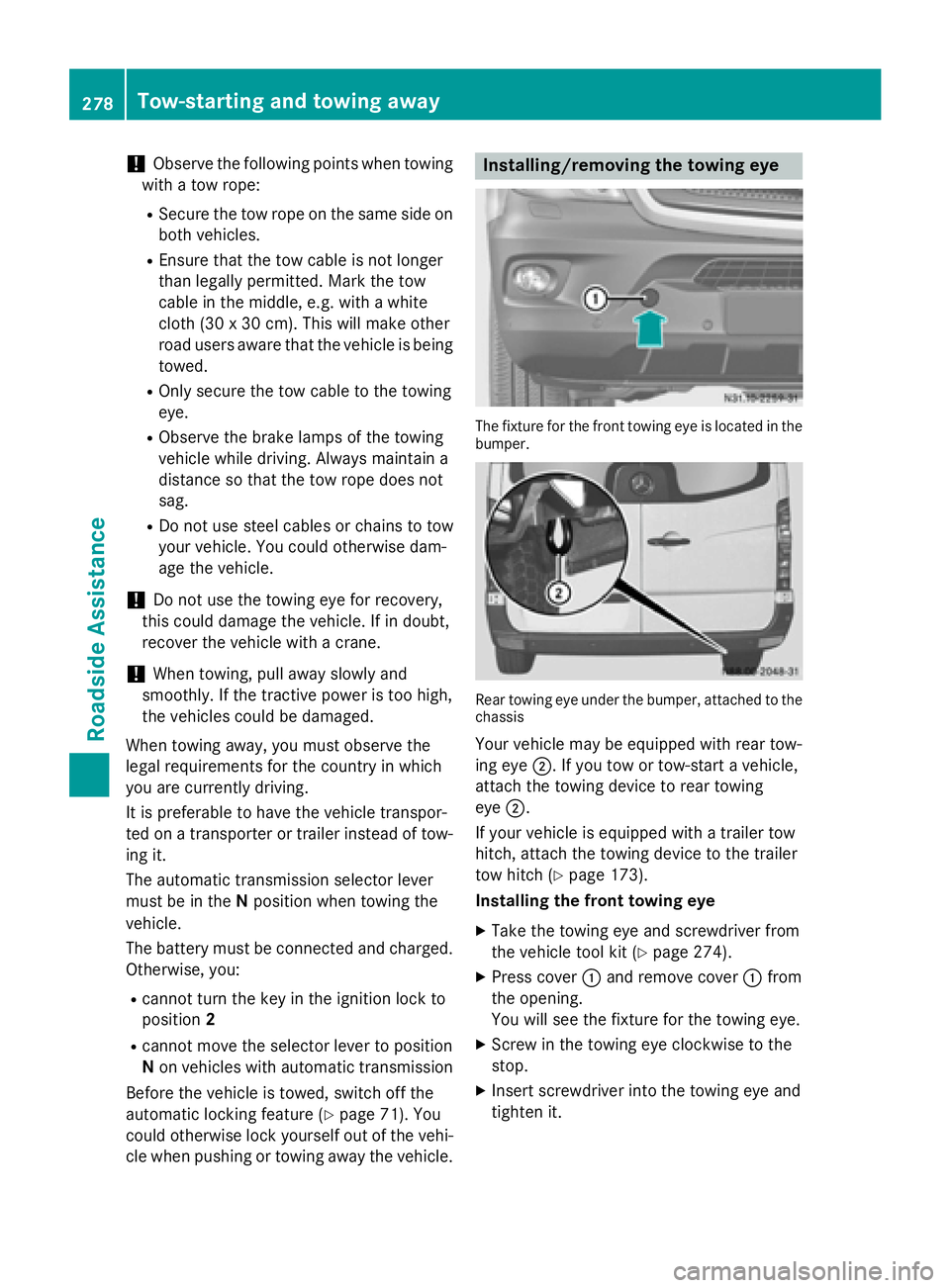
The fixture for the front towing eye is located in the
bumper. Rear towing eye under the bumper, attached to the
chassis
Your vehicle may be equipped with rear tow-
ing eye 0044. If you tow or tow-start a vehicle,
attach the towing device to rear towing
eye 0044.
If your vehicle is equipped with a trailer tow
hitch, attach the towing device to the trailer
tow hitch (Y page 173).
Installing the front towing eye
X Take the towing eye and screwdriver from
the vehicle tool kit (Y page 274).
X Press cover 0043and remove cover 0043from
the opening.
You will see the fixture for the towing eye.
X Screw in the towing eye clockwise to the
stop.
X Insert screwdriver into the towing eye and
tighten it. 278
Tow-starting and towing awayRoadside Assistance
Page 281 of 334
Removing the front towing eye
X
Remove the screwdriver from the vehicle
tool kit.
X Insert the screwdriver into the towing eye
and turn the screwdriver counter-clock-
wise.
X Unscrew the towing eye.
X Insert cover 0043with the lug at the bottom
and press it in at the top until it engages.
X Place the towing eye and screwdriver back
in the vehicle tool kit. Towing away in the event of malfunc-
tions
With transmission damage !
Always use new bolts when installing the
propeller shafts.
i Only have the propeller shafts fitted/
removed by qualified, skilled personnel.
If the vehicle has transmission damage, have
the propeller shaft removed before towing
away. Towing with the front or rear axle
raised
General notes !
The ignition must be switched off if the
vehicle is being towed with the front or rear
axle raised. Otherwise, ESP ®
may intervene
and damage the brake system.
! Always use new bolts when installing the
propeller shafts.
i Only have the propeller shafts fitted/
removed by qualified, skilled personnel.
Observe the following before towing a vehicle
with a raised front or rear axle:
R the information on towing in the event of
malfunctions (Y page 279) and
R the important safety notes (Y page 277).If the front axle is damaged, raise the vehicle
at the front axle and if the rear axle is dam-
aged, raise the vehicle at the rear axle.
Towing If the front axle is raised, the vehicle may be
towed a maximum of 30 miles (50 km). For a
towing distance of over 30 miles (50 km), the propeller shafts to the driven axles must be
removed.
X Turn the key to position 2in the ignition
lock.
X Depress the brake pedal and keep it
depressed.
X Shift the automatic transmission to posi-
tion N.
X Release the brake pedal.
X Release the parking brake.
X Turn the key to position 1in the ignition
lock and leave it in this position.
X Switch on the hazard warning lamps
(Y page 95).
X If the front axle is raised, do not exceed the
towing speed of 30 mph (50 km/h) and the towing distance of 30 miles (50 km). Towing the vehicle with both axles on
the ground
Important safety notes G
WARNING
You can no longer steer the vehicle if the
steering wheel lock has been engaged. There is a risk of an accident.
Always switch off the ignition when towing the
vehicle with a tow cable or a tow bar.
! Do not exceed a towing speed of 31 mph
(50 km/h). You could otherwise damage
the transmission.
! Always use new bolts when installing the
propeller shafts. Tow-starting and towing away
279Roadside Assistance Z
Page 282 of 334
i
Only have the propeller shafts fitted/
removed by qualified, skilled personnel.
Before towing the vehicle, observe the fol-
lowing:
R the information on towing in the event of
malfunctions (Y page 279) and
R the important safety notes (Y page 277).
Towing You may only tow the vehicle a maximum dis-
tance of 30 miles (50 km). For a towing dis-
tance of over 30 miles (50 km), the propeller
shafts to the driven axles must be removed.
X Turn the key to position 2in the ignition
lock.
X Depress the brake pedal and keep it
depressed.
X Shift the automatic transmission to posi-
tion N.
X Release the brake pedal.
X Release the parking brake.
X Leave the key in position 2in the ignition
lock.
X Switch on the hazard warning lamps
(Y page 95).
X Do not exceed the towing speed of 30 mph
(50 km/h) and the towing distance of
30 miles (50 km). Recovering a vehicle that is stuck
! When recovering a vehicle that has
become stuck, pull it as smoothly and
evenly as possible. Excessive tractive
power could damage the vehicles.
If the drive wheels get trapped on loose or
muddy ground, recover the vehicle with the
utmost care. This is especially the case if the
vehicle is laden.
Never attempt to recover a vehicle with a
trailer attached. Pull out the vehicle backwards, if possible,
using the tracks it made when it became
stuck. Transporting the vehicle
! You may only secure the vehicle by the
wheels, not by parts of the vehicle such as
axle or steering components. Otherwise,
the vehicle could be damaged. Tow-starting (emergency engine
starting)
Vehicles with automatic transmission !
Vehicles with automatic transmission
must not be tow-started. You could other-
wise damage the automatic transmission.
You can find information on jump-starting
under "Jump-starting“ (Y page 276). Electrical fuses
G
WARNING
If you manipulate or bridge a faulty fuse or if
you replace it with a fuse with a higher amper- age, the electric cables could be overloaded.
This could result in a fire. There is a risk of an
accident and injury.
Always replace faulty fuses with the specified
new fuses having the correct amperage.
! Only use fuses that have been approved
for Sprinter vehicles and that have the
required fuse rating for the systems con-
cerned. Components or systems could oth- erwise be damaged.
The fuses in your vehicle switch off defective power circuits. If a fuse blows, all the com-
ponents on the circuit and their functions will
cease to operate.
Blown fuses must be replaced with fuses of
the same rating, which you can recognize by
the color and fuse rating. Observe the infor- 280
Electrical fusesRoadside Assistance
Page 308 of 334
Single tires:
if the tires are of identical
dimensions, you can rotate both wheels on
both the front and rear axles so that the tires'
original direction of rotation is maintained. On unidirectional tires, an arrow on the sidewall
shows the prescribed direction of rotation of
the tire.
Twin rear tires: if the tires are of identical
dimensions, you can rotate the wheels on the
front axle and the inner wheels on the rear
axle in pairs such that the original direction of
tire rotation is retained. With unidirectional
tires, you may rotate the outside wheels at
the rear axle from one side to the other. Direction of rotation
Tires with a specified direction of rotation
have additional benefits, e.g. if there is a risk
of hydroplaning. You will only gain these ben-
efits if the correct direction of rotation is
observed.
An arrow on the sidewall of the tire indicates its correct direction of rotation.
You may mount a spare wheel against the
direction of rotation. Observe the time
restriction on use as well as the speed limi-
tation specified on the spare wheel. Storing wheels
Store wheels that are not being used in a cool, dry and preferably dark place. Protect the
tires from contact with oil, grease and fuel. Mounting a wheel
Vehicle preparation X
Stop the vehicle as far away as possible
from traffic and on a level, firm and non-slip
surface.
X If your vehicle poses a risk to approaching
traffic, switch on the hazard warning lamps.
X Apply the parking brake. X
Turn the front wheels to the straight-ahead
position.
X Move the selector lever of the automatic
transmission to position P.
X Switch off the engine.
X Passengers should leave the vehicle. Make
sure that the passengers are not endan-
gered as they do so.
X Make sure that no one is near the danger
area while the wheel is being changed. Any-
one who is not directly assisting in the
wheel change should, for example, stand
behind the barrier.
X Place the warning triangle or warning lamp
at a suitable distance.
Observe legal requirements.
X Secure the vehicle to prevent it from rolling
away.
i Observe the safety notes on parking in the
section on "Driving and parking"
(Y page 149).
X On level terrain: place chocks or other
suitable objects under the front and rear of the wheel that is diagonally opposite the
wheel to be changed.
X On slight inclines: place chocks or other
suitable objects under the wheels on the
front and rear axles opposite the wheel to
be changed.
X Take the vehicle tool kit and the jack from
the footwell on the co-driver's side
(Y page 274).
X Remove the spare wheel from the spare
wheel bracket (Y page 313). Observe the
safety notes in the "Spare wheel" section
(Y page 312).
X On wheels with wheel bolts, remove the
hub caps. 306
Changing wheelsWheels and tires
Page 311 of 334
Removing a wheel
!
Do not place the wheel bolts or the wheel
nuts in sand or dirt. The threads of the
wheel bolts and wheel nuts could otherwise
be damaged when being tightened.
X Unscrew the wheel bolts or nuts.
X On front wheels with wheel nuts, remove
the wheel nut cover.
X Remove the wheel.
Installing the adapter G
WARNING
If you tighten the adapter bolts when the vehi- cle is raised, the jack could tip over. There is a risk of injury.
Make sure that the vehicle is properly pre-
pared for a wheel change. Tighten the adapter
bolts with particular care and attention.
Always observe the instructions and safety
notes on "Changing a wheel" (Y page 305).G
WARNING
If you do not tighten the bolts of the adapter to the specified tightening torque, the adapter
may come loose with the spare wheel. There
is a risk of an accident.
Tighten the bolts of the adapter to the speci-
fied tightening torque. Have the spare wheel
replaced with a complete wheel and an extra- wide tire at a qualified specialist workshop
immediately.
! Vehicles with Super Single tires:
if you
install the spare wheel, do not exceed the
maximum speed of 40 mph (60 km/h) and
do not drive further than 65 miles(100 km).
The transmission could otherwise be dam-
aged by the difference in wheel rotation
speeds.
On vehicles with Super Single tires, you must
attach the narrow spare wheel to the rear axle by means of an adapter. The adapter is bolted
to the spare wheel using the adapter bolts for transportation. The handling characteristics of your vehicle
are affected when driving with a spare wheel
installed. After changing a wheel, drive to the
nearest specialist workshop and have the
spare wheel replaced with a wheel and tire
assembly that has a Super Single tire.
X Clean the wheel and wheel hub contact
surfaces.
X Unscrew the six adapter bolts on the spare
wheel and remove the adapter.
X Tighten the adapter with the six adapter
bolts evenly in a crosswise pattern through
the outer holes on the wheel hub.
X Tighten the six adapter bolts on the wheel
hub to a tightening torque of 177 lb-ft
(240 Nm).
X Push the wheel onto the adapter and attach
it.
Mounting a new wheel G
WARNING
Oiled or greased wheel bolts or damaged
wheel bolts/hub threads can cause the wheel bolts to come loose. As a result, you could
lose a wheel while driving. There is a risk of
accident.
Never oil or grease wheel bolts. In the event of damage to the threads, contact a qualified
specialist workshop immediately. Have the
damaged wheel bolts or hub threads
replaced/renewed. Do not continue driving. G
WARNING
If you tighten the wheel bolts or wheel nuts
when the vehicle is raised, the jack could tip
over. There is a risk of injury.
Only tighten the wheel bolts or wheel nuts
when the vehicle is on the ground.
Always observe the instructions and safety
notes on "Changing a wheel" (Y page 305).
Only use wheel bolts or wheel nuts that have
been designed for the wheel and the vehicle. For safety reasons, we recommend that you
only use wheel bolts or wheel nuts which have Changing wheels
309Wheels and tires Z
Page 312 of 334
been approved for Sprinter vehicles and the
respective wheel.
! For a steel wheel, only use the short wheel
bolts to mount the steel spare wheel. Using other wheel bolts to mount the steel spare wheel could damage the brake system.
! On vehicles equipped with a tire pressure
monitor, electronic components are loca-
ted in the wheel.
Tire-mounting tools should not be used
near the valve. This could damage the elec-
tronic components.
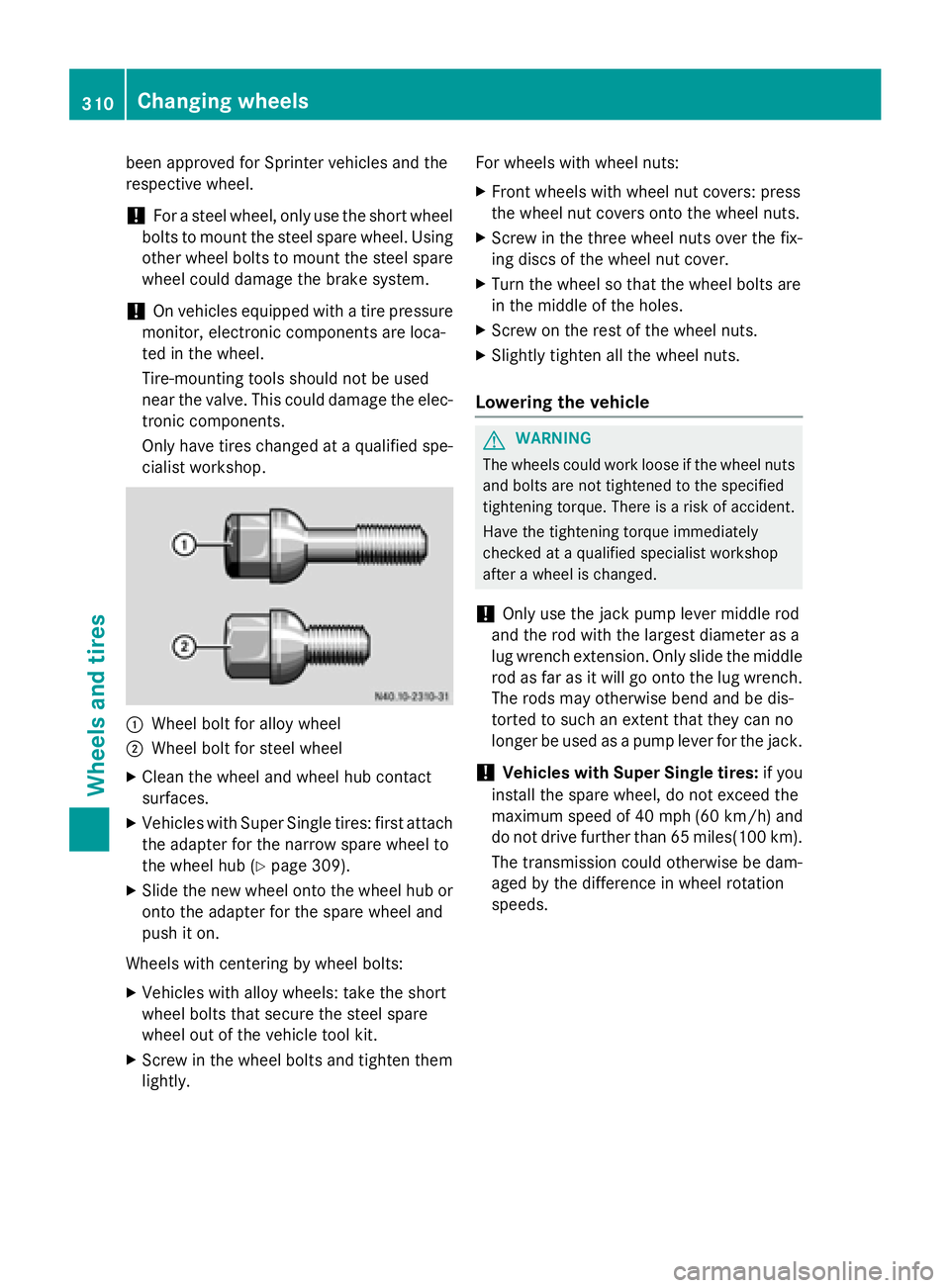
Only have tires changed at a qualified spe- cialist workshop. 0043
Wheel bolt for alloy wheel
0044 Wheel bolt for steel wheel
X Clean the wheel and wheel hub contact
surfaces.
X Vehicles with Super Single tires: first attach
the adapter for the narrow spare wheel to
the wheel hub (Y page 309).
X Slide the new wheel onto the wheel hub or
onto the adapter for the spare wheel and
push it on.
Wheels with centering by wheel bolts:
X Vehicles with alloy wheels: take the short
wheel bolts that secure the steel spare
wheel out of the vehicle tool kit.
X Screw in the wheel bolts and tighten them
lightly. For wheels with wheel nuts:
X Front wheels with wheel nut covers: press
the wheel nut covers onto the wheel nuts.
X Screw in the three wheel nuts over the fix-
ing discs of the wheel nut cover.
X Turn the wheel so that the wheel bolts are
in the middle of the holes.
X Screw on the rest of the wheel nuts.
X Slightly tighten all the wheel nuts.
Lowering the vehicle G
WARNING
The wheels could work loose if the wheel nuts and bolts are not tightened to the specified
tightening torque. There is a risk of accident.
Have the tightening torque immediately
checked at a qualified specialist workshop
after a wheel is changed.
! Only use the jack pump lever middle rod
and the rod with the largest diameter as a
lug wrench extension. Only slide the middle rod as far as it will go onto the lug wrench. The rods may otherwise bend and be dis-
torted to such an extent that they can no
longer be used as a pump lever for the jack.
! Vehicles with Super Single tires:
if you
install the spare wheel, do not exceed the
maximum speed of 40 mph (60 km/ h)and
do not drive further than 65 miles(100 km ).
The transmission could otherwise be dam-
aged by the difference in wheel rotation
speeds. 310
Changing wheelsWheels and tires
Page 318 of 334
Vehicle electronics
Tampering with the engine electron-
ics G
WARNING
Always have work on the engine electronics
and related components carried out at a quali- fied specialist workshop. Otherwise, the vehi-cle's operating safety could be affected.
! Only have engine electronics and the cor-
responding parts, such as control units,
sensors or connector leads, serviced in a
qualified specialist workshop. Otherwise,
the vehicle parts may wear more quickly.
This can lead to loss of the New Vehicle
Limited Warranty. Installing electrical or electronic
equipment
G
WARNING
You and others may damage your health due
to excessive electromagnetic radiation. By
using an external antenna, the possible health risks of electromagnetic fields, which are
under discussion among the scientific com-
munity, should be largely prevented.
Therefore, only have the exterior antenna
installed at a qualified specialist workshop.
Electrical and electronic devices may have a
detrimental effect on both the comfort and
the operating safety of the vehicle. If equip-
ment of this kind is installed, its electromag-
netic compatibility must be checked and veri-
fied.
If these devices are linked to functions asso-
ciated with resistance to interference, they
must have type approval. This applies to the
device or its interfaces to the vehicle elec-
tronics, e.g. charging brackets.
A telephone or two-way radio to be installed in
the vehicle must be approved. Further infor-
mation can be obtained from any Sprinter
Dealer. For operation of mobile phones and two-way
radios, Mercedes Benz recommends connec- tion to an approved exterior antenna. This is
the only way to ensure optimum reception
quality inside the vehicle and to minimize
mutual interference between the vehicle elec-
tronics, mobile phones and two-way radios.
The transmission output of the mobile phone
or two-way radio may not exceed the follow-
ing maximum transmission output (PEAK): Frequency range Maximum trans-
mission output
(PEAK) Shortwave
(f < 50 MHz) 100 W
4 m waveband 30 W
2 m waveband 50 W
Trunked radio/Tetra 35 W
70 cm waveband 35 W
GSM/UMTS/LTE 10 W
Identification plates
Vehicle identification plate with vehi-
cle identification number (VIN)
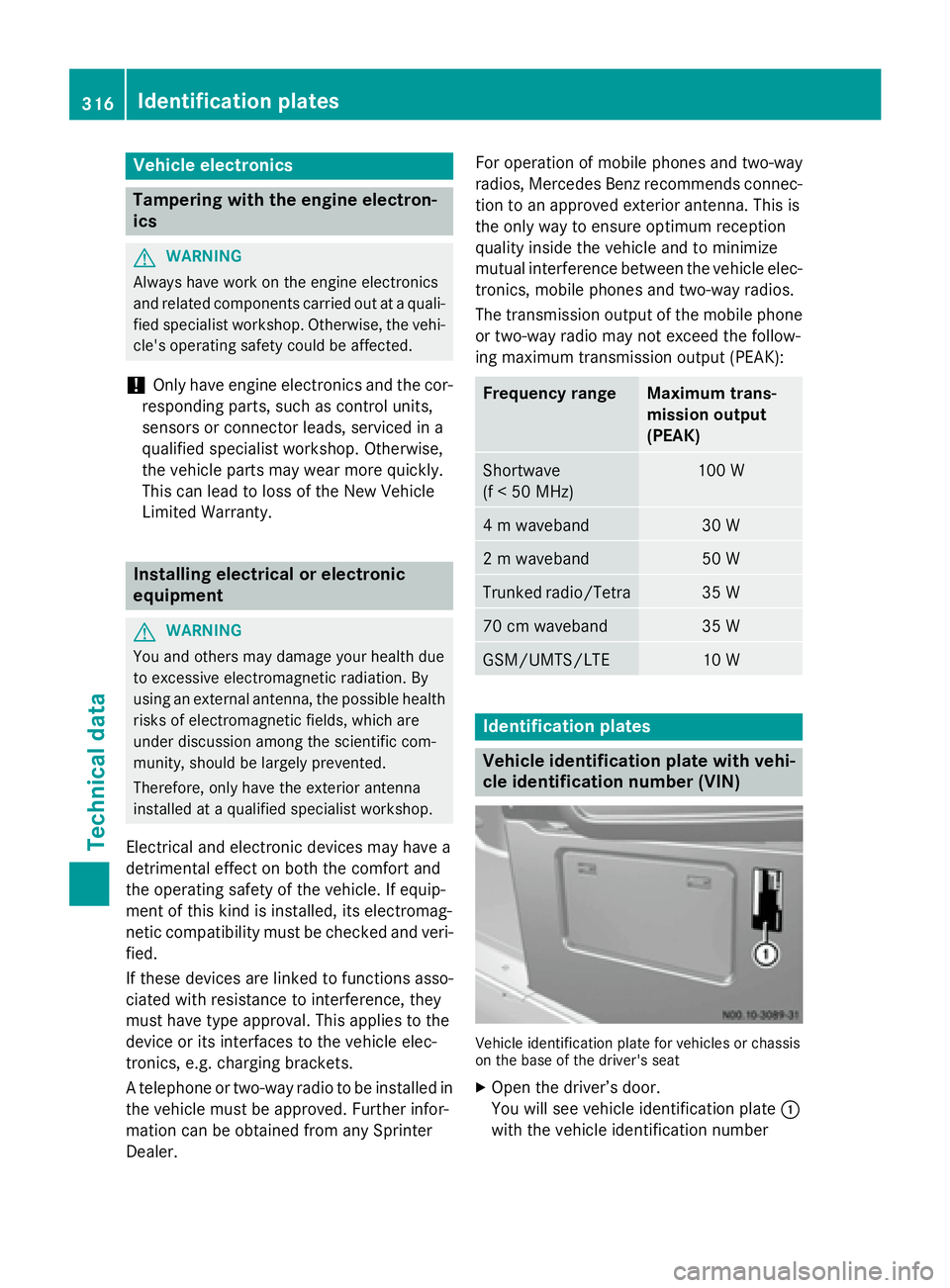
Vehicle identification plate for vehicles or chassis
on the base of the driver's seat
X Open the driver’s door.
You will see vehicle identification plate 0043
with the vehicle identification number 316
Identification platesTechnical data
Page 320 of 334
Service products and capacities
Important safety notes
G
WARNING
Service products may be poisonous and haz-
ardous to health. There is a risk of injury.
Comply with instructions on the use, storage
and disposal of service products on the labels of the respective original containers. Always
store service products sealed in their original containers. Always keep service products out
of the reach of children. H
Environmental note
Dispose of service products in an environ-
mentally responsible manner.
Service products include the following:
R Fuels, e.g. diesel
R Additives for the exhaust gas aftertreat-
ment, e.g. Diesel Exhaust Fluid (DEF)
R Lubricants, e.g. engine oil, transmission oil
R Coolant
R Brake fluid
R Washer fluid
R Climate control system refrigerants
Approved service products comply with the
highest quality standards and are listed in the MB Specifications for Service Products. Only
use service products approved for the vehi-
cle. This is an important condition for the war-
ranty.
You will recognize the approved service prod- ucts by the inscription on the container: MB
Approval (e.g. MB Approval 228.5)
Other identifications and recommendations
refer to quality level or a specification accord-
ing to an MB Sheet Number (e.g. MB 228.5).
They are therefore not necessarily approved.
Further information can be obtained at any
qualified specialist workshop.
Additives for approved service products are
neither required nor permitted. Approved fuel additives are the exception. Additives can cause engine damage and must therefore not
be added to the service products.
The use of additives is always the responsi-
bility of the vehicle operator. The use of addi- tives may result in the restriction or loss of
your Limited Warranty entitlements. Fuel
Important safety notes G
WARNING
Fuel is highly flammable. Improper handling of fuel creates a risk of fire and explosion.
Avoid fire, open flames, smoking and creatingsparks under all circumstances. Switch off the
engine and, if applicable, the auxiliary heating before refueling. G
WARNING
Fuel is poisonous and hazardous to health.
There is a risk of injury.
You must make sure that fuel does not come into contact with your skin, eyes or clothing
and that it is not swallowed. Do not inhale fuel
vapors. Keep fuel away from children.
If you or others come into contact with fuel,
observe the following:
R Wash away fuel from skin immediately
using soap and water.
R If fuel comes into contact with your eyes,
immediately rinse them thoroughly with
clean water. Seek medical assistance with-
out delay.
R If fuel is swallowed, seek medical assis-
tance without delay. Do not induce vomit-
ing.
R Immediately change out of clothing which
has come into contact with fuel.
When handling, storing and disposing of fuels,
please observe the relevant regulations. 318
Service products and capacitiesTechnical data