automatic transmission MERCEDES-BENZ SPRINTER 2015 MY15 Operator’s Manual
[x] Cancel search | Manufacturer: MERCEDES-BENZ, Model Year: 2015, Model line: SPRINTER, Model: MERCEDES-BENZ SPRINTER 2015Pages: 334, PDF Size: 5.94 MB
Page 162 of 334
Activation conditions
To activate cruise control, all of the following
activation conditions must be fulfilled:
R the parking brake must be released. The
0066 indicator lamp in the instrument clus-
ter is off
R you are driving faster than 20 mph
(30 km/h)
R neither the brake or clutch pedal is
depressed
i Other drive and brake systems not descri-
bed in this Operator's Manual, such as a
retarder, may affect cruise control. You can
find information on this in the separate
operating instructions provided by the
body manufacturer.
Storing and maintaining the current
speed X
Accelerate the vehicle to the desired speed
above 20 mph (30 km/h).
X Briefly push the cruise control lever up 0043
or down 0087.
X Release the accelerator pedal.
Cruise control is activated. The current
speed is stored.
Setting the speed It may be a moment before the vehicle starts
to accelerate or brake to the set speed. Take
this delay into account when setting the
speed.
X Briefly push the cruise control lever up 0043
to increase the speed or down 0087to reduce
the speed.
The last stored speed increases or decrea- ses in 1 mph increments (1 km/h incre-
ments).
or
X Press and hold the cruise control lever
up 0043 or down 0087until the desired speed
has been reached. X
Release the cruise control lever.
The current speed is stored.
i Cruise control is not deactivated if you
depress the accelerator pedal. If you accel- erate briefly to overtake, for example,
cruise control resumes the vehicle’s speed
to the last speed stored after you have fin- ished overtaking.
Deactivating cruise control There are various ways to deactivate cruise
control:
X Briefly press the cruise control lever for-
wards 0085.
or
X Apply the brakes.
The last speed set remains stored. The last
speed stored is deleted when you switch off
the engine.
Cruise control is deactivated automatically
when: R you apply the brakes
R you apply the parking brake and the 0066
indicator lamp in the instrument cluster
lights up
R you are driving slower than 20 mph
(30 km/h)
R you shift the automatic transmission to
neutral position Nwhile the vehicle is in
motion
R ESP ®
or ASR intervenes
R there is a malfunction in the ESP ®
, ASR or
ABS system 160
Driving systemsDriving and parking
Page 169 of 334
The
Lane Keep. Assist Deactivated
Lane Keep. Assist Deactivated
message appears in the display and the
00B0 indicator lamp in the instrument clus-
ter flashes and then lights up continuously.
Lane Keeping Assist is deactivated.
X To activate: press thejbutton in the
center console again (Y page 37).
On vehicles without steering wheel but-
tons:
ON ON flashes briefly in the display and the
00B0 indicator lamp in the instrument clus-
ter flashes and then goes out.
On vehicles with steering wheel but-
tons:
The Lane Lane Keep.
Keep. Assist
Assist Activated
Activated mes-
sage appears in the display and the 00B0
indicator lamp in the instrument cluster
flashes and then goes out.
Lane Keeping Assist is activated.
A Lane Keeping Assist warning is suppressed if:
R a driving safety system intervenes, such as
ABS, BAS or ESP ®
.
R you have set the turn signal and a lane
change is detected. In this case, the warn-
ings are suppressed for a certain period of
time.
R you accelerate hard, e.g. kickdown on vehi-
cles with an automatic transmission.
R you brake hard.
R you steer actively, e.g. swerve to avoid an
obstacle or change lane quickly.
R you cut the corner on a sharp bend.
In order that you are warned only when nec-
essary and in good time if you cross the lane marking, the system recognizes certain con-
ditions and warns you accordingly.
Lane Keeping Assist warns you earlier if:
R you approach the outer lane marking on a
bend.
R the road has very wide lanes, e.g. a free-
way.
R the system recognizes solid lane markings. Warnings are given later if:
R the road has narrow lanes.
R you cut the corner on a bend. PARKTRONIC
General notes PARKTRONIC is an electronic parking aid. The
system is equipped with ultrasonic sensors inthe front and rear bumpers to monitor the
area around your vehicle. PARKTRONIC indi-
cates visually and audibly the distance
between your vehicle and an object.
Your vehicle features two separate sound
emitters with different frequencies for the
warning tones. The warning ranges in front of
and behind the vehicle are indicated by dif-
ferent warning tones.
PARKTRONIC is activated automatically when you:
R turn the key to position 2in the ignition lock
R release the parking brake and
R move the selector lever to D,Nor R
PARKTRONIC is deactivated at speeds above
11 mph (18 km/h) . PARKTRONIC is reactiva-
ted at speeds below 10 mph (16 km/h).
Important safety notes PARKTRONIC is only an aid. It cannot replace
your own awareness of the immediate sur-
roundings. You are responsible for safe
maneuvering, parking and pulling away. Whenmaneuvering, parking and pulling away, make
sure that there are no persons, animals or
objects in the maneuvering area.
! Pay particular attention to obstacles
above or below the sensors when parking,
such as flower pots or trailer towbars.
PARKTRONIC does not recognize such
objects when they are in the immediate
vicinity of the vehicle. You could damage
the vehicle or objects. Driving systems
167Driving and parking Z
Page 178 of 334
X
Remove the objects that are preventing the
trailer from rolling, e.g. wheel chocks.
X Release the trailer parking brake.
i The subharness of the vehicle has a cable
connection to the brake lamp indicator
lamp.
Observe the maximum permissible trailer
dimensions (width and length).
Most federal states and all Canadian provin-
ces require by law:
R safety chains between the towing vehicle
and the trailer. The chains should be cross-
wound under the trailer drawbar. They must be fastened to the vehicle's trailer cou-
pling, not to the bumper or the axle.
Leave enough slack in the chains. This
allows you to drive round tight corners.
R a separate brake system for certain types
of trailer.
R a safety switch for braked trailers. Find out
the specific requirements according to the
applicable laws.
If the trailer detaches from the towing vehi- cle, the safety switch applies the trailer's
brakes. Towing a trailer
There are numerous legal requirements con-
cerning the towing of a trailer, e.g. speed
restrictions. Make sure your vehicle/trailer
combination complies with local laws. This
not only means where you live, but also any-
where you are driving to. Information is avail-
able from the police and local authorities.
Observe the following when towing a trailer:
R Practice driving around bends, stopping
and backing up at a place where there is no
traffic. This enables you to gain experience and get used to the new handling charac-
teristics.
R Before driving, check:
- that the trailer tow hitch and ball cou-
pling are secure
- that the safety switch for a braked trailer
is functioning properly
- that the safety chains are secure and not
damaged
- that the electrical connections are
secure
- that the lights are working
- that the wheels are in good order and the
tire pressure is correct
R Adjust the exterior mirrors to provide an
unobstructed view of the rear section of the
trailer.
R If the trailer has electronically controlled
brakes, pull the vehicle/trailer combina-
tion away carefully. Brake manually using
the brake controller and check that the
brakes are working.
R Secure the load on the trailer according to
the applicable specifications and current
standards on securing loads (Y page 242).
R When driving with a trailer, check at regular
intervals that the load is secured and that
the brakes and lights are working.
R Bear in mind that the handling will be less
stable when towing a trailer than when driv-
ing without one. Avoid sudden steering
movements.
R The vehicle/trailer combination is heavier,
accelerates more slowly and has a
decreased gradient climbing capability and
a longer braking distance.
It is more susceptible to crosswinds and
requires cautious steering.
R If possible, do not brake suddenly, but
rather moderately at first so that the trailer
can activate its brakes. Then increase the
force on the brake pedal.
R If the automatic transmission repeatedly
shifts between gears when driving on 176
Towing a trailerDriving and pa
rking
Page 184 of 334
0087
Fuel filler flap location indicator 007F: the
fuel filler flap is on the left-hand side. Fuel filler flap location indicator 0080: the fuel
filler flap is on the right-hand side
0085 Reserve fuel warning lamp (Y page 224)DEF gauge
Vehicles without steering wheel but-
tons If the supply of DEF is less than 1.5 US gal
(5.5 l), the 00E2indicator lamp lights up and
the 0099 dEF Chk
dEF Chk display message appears.
If the supply of DEF falls below the reserve
range of 0.8 US gal (3.0 l), the 00E2indicator
lamp lights up and the 0099StArtS RExx StArtS RExx
display message appears. In the display, xx
xx
corresponds to the number of possible
remaining engine starts (16 16to0
0).
When the number of remaining engine starts
is 0
0 the engine management prevents the
vehicle being driven at a speed exceeding
5 mph (8 km/h). The multifunction display
shows the StArtS IdLE
StArtS IdLE message and you
hear a warning tone sequence.
Further information on DEF consumption can be found in the "Service products and filling
capacity" section (Y page 320).
Vehicles with steering wheel buttons If the supply of DEF is less than 1.5 US gal
(5.5 l), the Check Diesel Exhaust Fluid
Check Diesel Exhaust Fluid
See
See Operator's
Operator's Manual
Manualmessage is shown
in the display.
If the DEF supply falls below the reserve range
of 0.8 US ga l(3.0 l), the 00E2XX starts XX starts
remaining
remaining message is displayed. In the dis-
play, XX
XXcorresponds to the number of possi-
ble remaining engine starts (16 16to0
0).
When the number of remaining engine starts
is 0
0 the engine management prevents the
vehicle from being driven at a speed exceed- ing 5 mph (8 km/h). The multifunction display
shows the Idle Mode
Idle Mode message and you hear
a warning tone sequence. Further information on DEF consumption can
be found in the "Service products and filling
capacity" section (Y page 320). On-board computer (vehicles without
steering wheel buttons)
Operating the on-board computer
General notes The on-board computer is activated as soon
as you turn the key to position 1in the ignition
lock.
The on-board computer shows vehicle infor-
mation and settings in the display.
You can control the display and the settings in the on-board computer using the adjustment
buttons on the instrument cluster.
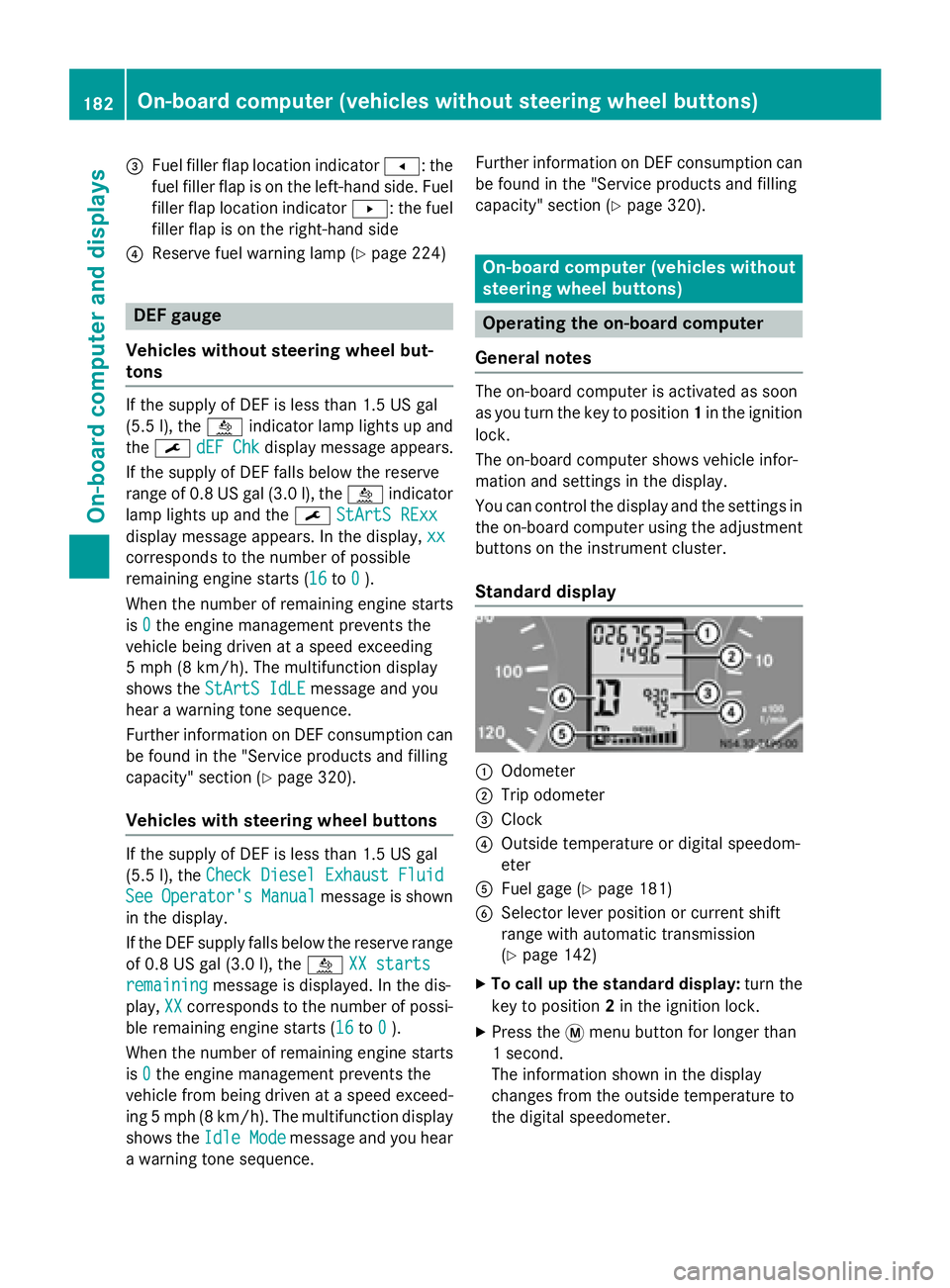
Standard display 0043
Odometer
0044 Trip odometer
0087 Clock
0085 Outside temperature or digital speedom-
eter
0083 Fuel gage (Y page 181)
0084 Selector lever position or current shift
range with automatic transmission
(Ypage 142)
X To call up the standard display: turn the
key to position 2in the ignition lock.
X Press the 0079menu button for longer than
1 second.
The information shown in the display
changes from the outside temperature to
the digital speedometer. 182
On-board computer (vehicles without steering wheel buttons)On-board computer and displays
Page 279 of 334
R
Only use jumper cables that have a suffi-
cient cross-section and insulated terminal
clamps.
R If the battery is fully discharged, attach the
battery of another vehicle for a few minutes before attempting to start. This charges the
empty battery a little.
R Make sure that the two vehicles do not
touch.
Make sure that:
R the jumper cables are not damaged.
R bare parts of the terminal clamps do not
come into contact with other metal parts
while the jumper cables are connected to
the battery.
R the jumper cables cannot come into con-
tact with parts such as the V-belt pulley or
the fan. These parts move when the engine
is started and while it is running.
i Jumper cables and further information
regarding jump starting can be obtained at any qualified specialist workshop. Before connecting the jumper cables
On vehicles with a battery main switch, check whether the battery main switch is switched
on (Y page 137).
X Apply the parking brake.
X Move the selector lever of the automatic
transmission to position P.
X Switch off all electrical consumers, e.g.
audio equipment, blower.
X Turn the key to position 0in the ignition
lock and remove it (Y page 138).
X Open the hood (Y page 248). Tow-starting and towing away
Important safety notes
G
WARNING
Functions relevant to safety are restricted or
no longer available if:
R the engine is not running.
R the brake system or the power steering is
malfunctioning.
R there is a malfunction in the voltage supply
or the vehicle's electrical system.
If your vehicle is being towed, much more
force may be necessary to steer or brake.
There is a risk of an accident.
In such cases, use a tow bar. Before towing,
make sure that the steering moves freely. G
WARNING
You can no longer steer the vehicle if the
steering wheel lock has been engaged. There is a risk of an accident.
Always switch off the ignition when towing the
vehicle with a tow cable or a tow bar. G
WARNING
When towing or tow-starting another vehicle
and its weight is greater than the permissible gross weight of your vehicle, the:
R the towing eye could detach itself
R the vehicle/trailer combination could roll-
over.
There is a risk of an accident.
When towing or tow-starting another vehicle,
its weight should not be greater than the per- missible gross weight of your vehicle.
Information on the gross vehicle weight can
be found on the vehicle identification plate
(Y page 316).
! Only secure the tow rope or tow bar at the
towing eyes. Otherwise, the vehicle could
be damaged. Tow-starting and towing away
277Roadside Assistance Z
Page 280 of 334
!
Observe the following points when towing
with a tow rope:
R Secure the tow rope on the same side on
both vehicles.
R Ensure that the tow cable is not longer
than legally permitted. Mark the tow
cable in the middle, e.g. with a white
cloth (30 x 30 cm). This will make other
road users aware that the vehicle is being towed.
R Only secure the tow cable to the towing
eye.
R Observe the brake lamps of the towing
vehicle while driving. Always maintain a
distance so that the tow rope does not
sag.
R Do not use steel cables or chains to tow
your vehicle. You could otherwise dam-
age the vehicle.
! Do not use the towing eye for recovery,
this could damage the vehicle. If in doubt,
recover the vehicle with a crane.
! When towing, pull away slowly and
smoothly. If the tractive power is too high,
the vehicles could be damaged.
When towing away, you must observe the
legal requirements for the country in which
you are currently driving.
It is preferable to have the vehicle transpor-
ted on a transporter or trailer instead of tow-
ing it.
The automatic transmission selector lever
must be in the Nposition when towing the
vehicle.
The battery must be connected and charged.
Otherwise, you:
R cannot turn the key in the ignition lock to
position 2
R cannot move the selector lever to position
N on vehicles with automatic transmission
Before the vehicle is towed, switch off the
automatic locking feature (Y page 71). You
could otherwise lock yourself out of the vehi-
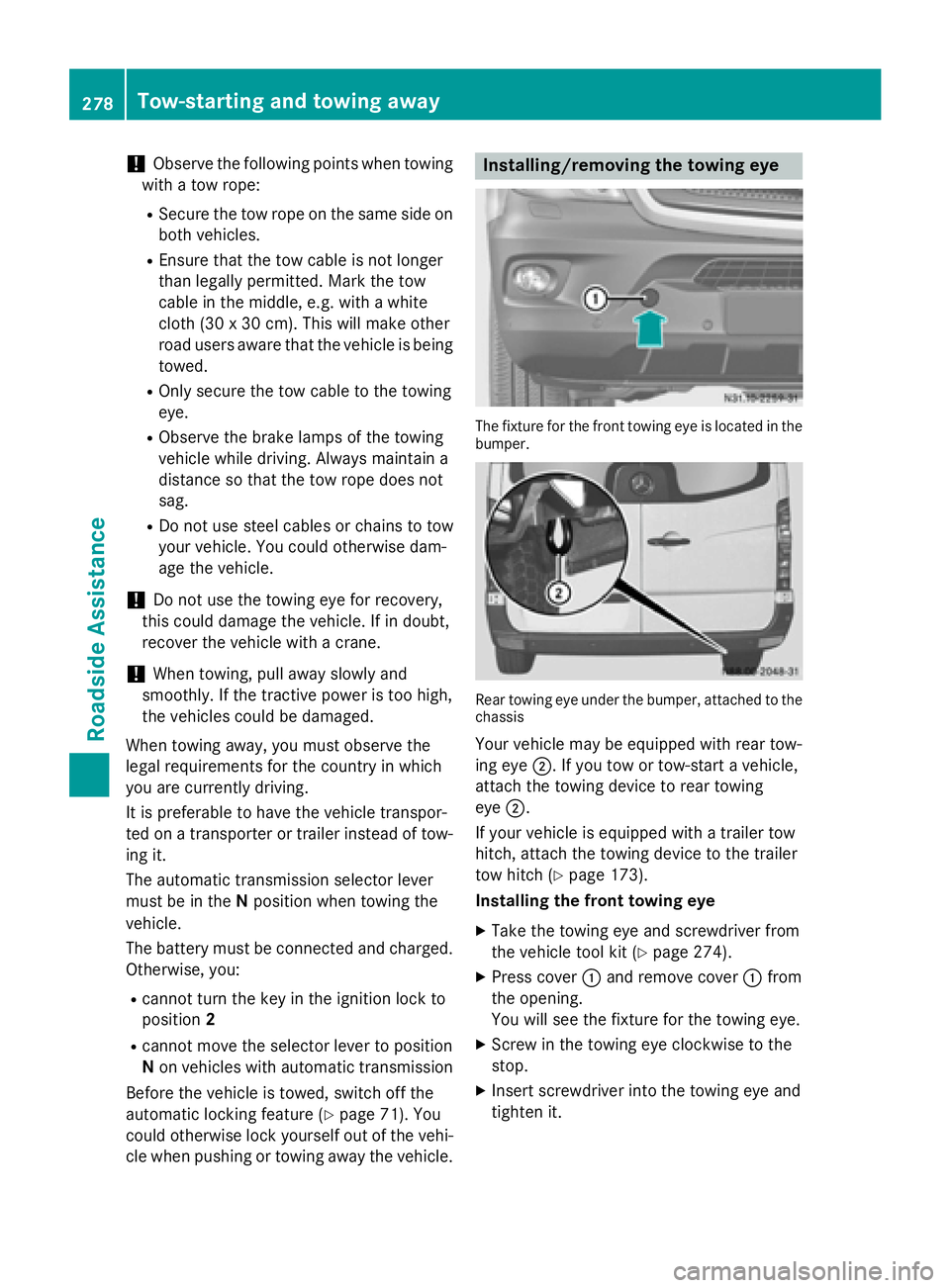
cle when pushing or towing away the vehicle. Installing/removing the towing eye
The fixture for the front towing eye is located in the
bumper. Rear towing eye under the bumper, attached to the
chassis
Your vehicle may be equipped with rear tow-
ing eye 0044. If you tow or tow-start a vehicle,
attach the towing device to rear towing
eye 0044.
If your vehicle is equipped with a trailer tow
hitch, attach the towing device to the trailer
tow hitch (Y page 173).
Installing the front towing eye
X Take the towing eye and screwdriver from
the vehicle tool kit (Y page 274).
X Press cover 0043and remove cover 0043from
the opening.
You will see the fixture for the towing eye.
X Screw in the towing eye clockwise to the
stop.
X Insert screwdriver into the towing eye and
tighten it. 278
Tow-starting and towing awayRoadside Assistance
Page 281 of 334
Removing the front towing eye
X
Remove the screwdriver from the vehicle
tool kit.
X Insert the screwdriver into the towing eye
and turn the screwdriver counter-clock-
wise.
X Unscrew the towing eye.
X Insert cover 0043with the lug at the bottom
and press it in at the top until it engages.
X Place the towing eye and screwdriver back
in the vehicle tool kit. Towing away in the event of malfunc-
tions
With transmission damage !
Always use new bolts when installing the
propeller shafts.
i Only have the propeller shafts fitted/
removed by qualified, skilled personnel.
If the vehicle has transmission damage, have
the propeller shaft removed before towing
away. Towing with the front or rear axle
raised
General notes !
The ignition must be switched off if the
vehicle is being towed with the front or rear
axle raised. Otherwise, ESP ®
may intervene
and damage the brake system.
! Always use new bolts when installing the
propeller shafts.
i Only have the propeller shafts fitted/
removed by qualified, skilled personnel.
Observe the following before towing a vehicle
with a raised front or rear axle:
R the information on towing in the event of
malfunctions (Y page 279) and
R the important safety notes (Y page 277).If the front axle is damaged, raise the vehicle
at the front axle and if the rear axle is dam-
aged, raise the vehicle at the rear axle.
Towing If the front axle is raised, the vehicle may be
towed a maximum of 30 miles (50 km). For a
towing distance of over 30 miles (50 km), the propeller shafts to the driven axles must be
removed.
X Turn the key to position 2in the ignition
lock.
X Depress the brake pedal and keep it
depressed.
X Shift the automatic transmission to posi-
tion N.
X Release the brake pedal.
X Release the parking brake.
X Turn the key to position 1in the ignition
lock and leave it in this position.
X Switch on the hazard warning lamps
(Y page 95).
X If the front axle is raised, do not exceed the
towing speed of 30 mph (50 km/h) and the towing distance of 30 miles (50 km). Towing the vehicle with both axles on
the ground
Important safety notes G
WARNING
You can no longer steer the vehicle if the
steering wheel lock has been engaged. There is a risk of an accident.
Always switch off the ignition when towing the
vehicle with a tow cable or a tow bar.
! Do not exceed a towing speed of 31 mph
(50 km/h). You could otherwise damage
the transmission.
! Always use new bolts when installing the
propeller shafts. Tow-starting and towing away
279Roadside Assistance Z
Page 282 of 334
i
Only have the propeller shafts fitted/
removed by qualified, skilled personnel.
Before towing the vehicle, observe the fol-
lowing:
R the information on towing in the event of
malfunctions (Y page 279) and
R the important safety notes (Y page 277).
Towing You may only tow the vehicle a maximum dis-
tance of 30 miles (50 km). For a towing dis-
tance of over 30 miles (50 km), the propeller
shafts to the driven axles must be removed.
X Turn the key to position 2in the ignition
lock.
X Depress the brake pedal and keep it
depressed.
X Shift the automatic transmission to posi-
tion N.
X Release the brake pedal.
X Release the parking brake.
X Leave the key in position 2in the ignition
lock.
X Switch on the hazard warning lamps
(Y page 95).
X Do not exceed the towing speed of 30 mph
(50 km/h) and the towing distance of
30 miles (50 km). Recovering a vehicle that is stuck
! When recovering a vehicle that has
become stuck, pull it as smoothly and
evenly as possible. Excessive tractive
power could damage the vehicles.
If the drive wheels get trapped on loose or
muddy ground, recover the vehicle with the
utmost care. This is especially the case if the
vehicle is laden.
Never attempt to recover a vehicle with a
trailer attached. Pull out the vehicle backwards, if possible,
using the tracks it made when it became
stuck. Transporting the vehicle
! You may only secure the vehicle by the
wheels, not by parts of the vehicle such as
axle or steering components. Otherwise,
the vehicle could be damaged. Tow-starting (emergency engine
starting)
Vehicles with automatic transmission !
Vehicles with automatic transmission
must not be tow-started. You could other-
wise damage the automatic transmission.
You can find information on jump-starting
under "Jump-starting“ (Y page 276). Electrical fuses
G
WARNING
If you manipulate or bridge a faulty fuse or if
you replace it with a fuse with a higher amper- age, the electric cables could be overloaded.
This could result in a fire. There is a risk of an
accident and injury.
Always replace faulty fuses with the specified
new fuses having the correct amperage.
! Only use fuses that have been approved
for Sprinter vehicles and that have the
required fuse rating for the systems con-
cerned. Components or systems could oth- erwise be damaged.
The fuses in your vehicle switch off defective power circuits. If a fuse blows, all the com-
ponents on the circuit and their functions will
cease to operate.
Blown fuses must be replaced with fuses of
the same rating, which you can recognize by
the color and fuse rating. Observe the infor- 280
Electrical fusesRoadside Assistance
Page 308 of 334
Single tires:
if the tires are of identical
dimensions, you can rotate both wheels on
both the front and rear axles so that the tires'
original direction of rotation is maintained. On unidirectional tires, an arrow on the sidewall
shows the prescribed direction of rotation of
the tire.
Twin rear tires: if the tires are of identical
dimensions, you can rotate the wheels on the
front axle and the inner wheels on the rear
axle in pairs such that the original direction of
tire rotation is retained. With unidirectional
tires, you may rotate the outside wheels at
the rear axle from one side to the other. Direction of rotation
Tires with a specified direction of rotation
have additional benefits, e.g. if there is a risk
of hydroplaning. You will only gain these ben-
efits if the correct direction of rotation is
observed.
An arrow on the sidewall of the tire indicates its correct direction of rotation.
You may mount a spare wheel against the
direction of rotation. Observe the time
restriction on use as well as the speed limi-
tation specified on the spare wheel. Storing wheels
Store wheels that are not being used in a cool, dry and preferably dark place. Protect the
tires from contact with oil, grease and fuel. Mounting a wheel
Vehicle preparation X
Stop the vehicle as far away as possible
from traffic and on a level, firm and non-slip
surface.
X If your vehicle poses a risk to approaching
traffic, switch on the hazard warning lamps.
X Apply the parking brake. X
Turn the front wheels to the straight-ahead
position.
X Move the selector lever of the automatic
transmission to position P.
X Switch off the engine.
X Passengers should leave the vehicle. Make
sure that the passengers are not endan-
gered as they do so.
X Make sure that no one is near the danger
area while the wheel is being changed. Any-
one who is not directly assisting in the
wheel change should, for example, stand
behind the barrier.
X Place the warning triangle or warning lamp
at a suitable distance.
Observe legal requirements.
X Secure the vehicle to prevent it from rolling
away.
i Observe the safety notes on parking in the
section on "Driving and parking"
(Y page 149).
X On level terrain: place chocks or other
suitable objects under the front and rear of the wheel that is diagonally opposite the
wheel to be changed.
X On slight inclines: place chocks or other
suitable objects under the wheels on the
front and rear axles opposite the wheel to
be changed.
X Take the vehicle tool kit and the jack from
the footwell on the co-driver's side
(Y page 274).
X Remove the spare wheel from the spare
wheel bracket (Y page 313). Observe the
safety notes in the "Spare wheel" section
(Y page 312).
X On wheels with wheel bolts, remove the
hub caps. 306
Changing wheelsWheels and tires
Page 326 of 334
Information about oil consumption
!
If the vehicle is predominantly used for
short-distance driving, this could lead to a
malfunction in the automatic cleaning func- tion for the diesel particle filter. As a result,
fuel may accumulate in the engine oil and
cause engine failure.
Therefore, if you mainly drive short distan-
ces, you should drive on a highway or on
rural roads for 20 minutes every 310 miles
(500 km). This ensures sufficient regener-
ation of the diesel particle filter.
Depending on the driving style, the vehicle
consumes a maximum of 1.0 US qt (1.0 l) of
engine oil over a distance of 620 miles
(1000 km).
Oil consumption may be higher if:
R the vehicle is new.
R you mainly operate the vehicle under ardu-
ous operating conditions.
R you frequently drive at high engine speeds.
Regular maintenance is one of the precondi-
tions for moderate rates of consumption.
You can only estimate the oil consumption
after you have driven a considerable distance.
Check the engine oil level on a regular basis,
e.g. weekly or each time you refuel
(Y page 250). Transmission and power steering oil
Automatic transmission Service product: automatic transmission
fluid Product name/number Maintenance
interval Shell ATF 3403/M-115
MB Sheet No. 236.10 —
Fuchs/Shell ATF 3353
MB Sheet No. 236.12 Further information can be obtained at any
qualified specialist workshop.
Rear axle Service product: transmission oil
Product name/number Maintenance
interval BP Energear Hypo DC
80W-90
MB Sheet No. 235.20 —
Mobil Delvac Synthetic
Gear Oil 75W-90
MB Sheet No. 235.8 Further information can be obtained at any
qualified specialist workshop.
Steering Service product: power steering fluid
Product name/number Maintenance
interval Mobil ATF‑
D,
Exxon Mobil Corporation
or equivalent
MB Sheet No. 236.3 —
The steering is maintenance-free. Further
information can be obtained at any qualified
specialist workshop. Brake fluid
G
WARNING
Brake fluid is hazardous to health. Do not
swallow brake fluid. See a doctor immediately if you swallow brake fluid.
Make sure that brake fluid does not come into
contact with skin, clothing or eyes. Rinse
affected areas with plenty of clean water and
consult a doctor if necessary. 324
Service products and capacitiesTechnical data