headlamp MERCEDES-BENZ SPRINTER 2015 MY15 Operator’s Manual
[x] Cancel search | Manufacturer: MERCEDES-BENZ, Model Year: 2015, Model line: SPRINTER, Model: MERCEDES-BENZ SPRINTER 2015Pages: 334, PDF Size: 5.94 MB
Page 183 of 334
The display in the instrument cluster is acti-
vated when you:
R open the driver's door
R turn the key to position 2in the ignition lock
R press the 0045reset button
R switch on the lights
The display switches off automatically after
approximately 30 seconds if:
R the key is in position 0in the ignition lock.
R the vehicle lighting is not switched on. Instrument lighting
When the lights are switched on, you can
adjust the brightness of the instrument clus-
ter lighting using the 0074and 0075buttons.
X To brighten: press the0074button.
X To dim: press the 0075button.
i Vehicles with automatic headlamp mode:
the instrument lighting also adapts to auto-
matic headlamp mode. Tachometer
! Do not drive in the overrevving range, as
this could damage the engine. H
Environmental note
Avoid driving at high engine speeds. This
unnecessarily increases the fuel consumption of your vehicle and harms the environment asa result of increased emissions.
The red band in the tachometer indicates the engine's overrevving range.
To protect the engine, the fuel supply is inter-
rupted when the red band is reached. Outside temperature
You should pay special attention to road con-
ditions when temperatures are around the
freezing point. On vehicles without steering wheel buttons
(Y page 182) and on vehicles with steering
wheel buttons (Y page 187), the outside tem-
perature display is in the display.
Changes in the outside temperature are dis-
played after a short delay. Speedometer
The speed can also be shown in the display.
You can find information on the digital speed-
ometer for vehicles without steering wheel
buttons under (Y page 182) and for vehicles
with steering wheel buttons under
(Y page 187).
i In some countries, a warning sounds
when the vehicle reaches the maximum
speed limit, e.g. at 75 mph (120 km/h). Trip odometer
X To reset: make sure that the display is
showing the trip odometer if you have a
vehicle with steering wheel buttons
(Y page 187).
X Press and hold the 0045reset button until the
trip odometer is reset to 0.0 0.0. Fuel gauge
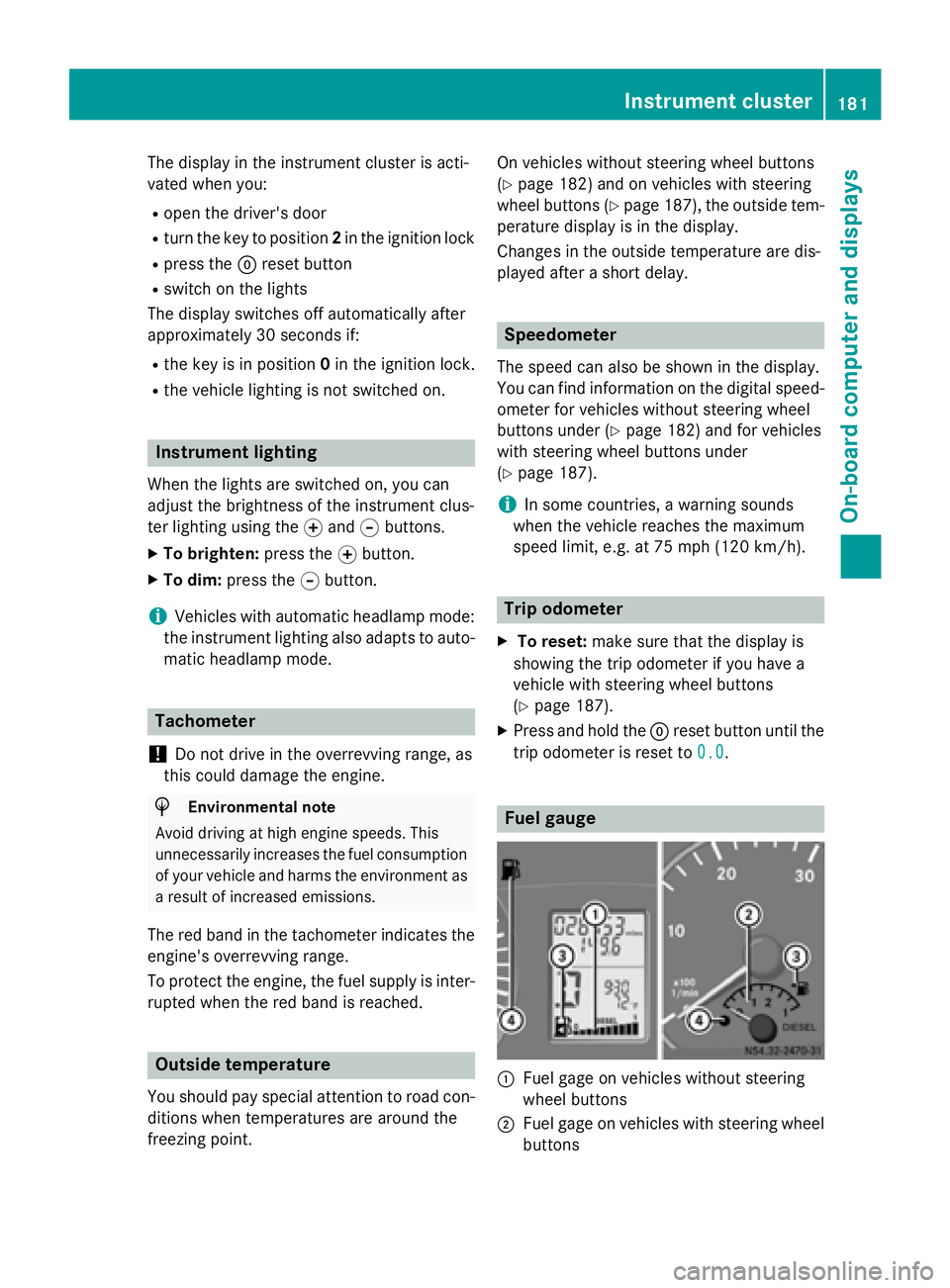
0043
Fuel gage on vehicles without steering
wheel buttons
0044 Fuel gage on vehicles with steering wheel
buttons Instrument cluster
181On-board computer and displays Z
Page 185 of 334
Menus in the on-board computer
Overview If you wish to exit a menu and go to the stand-
ard display:
X Press the 0079menu button for longer than
1 second.
or
X Do not press any button for 10 seconds.
The display accepts the changed settings.
Using the 0074,0075,0079or0045 adjustment but-
tons, you can select the following functions:
R Calling up the service due date
(Y page 258)
R Checking the oil level (Y page 250)
R Checking the DEF supply (Y page 182)
R Preselecting/setting the auxiliary heating
switch-on time (Y page 124)
R Tire pressure monitor (Y page 291)
R Setting the time (Y page 183)
R Activating/deactivating Highbeam Assist
(Y page 192)
R Setting the daytime running lamps
(Y page 92)
Setting the time X
Turn the key to position 2in the ignition
lock.
X Press the 0079menu button repeatedly until
the hours figure flashes.
X Press the 0074or0075 button to set the hour.
X Press the 0045reset button.
The minute display flashes.
X Press the 0074or0075 button to set the minute.
i If you keep the
0074or0075 button pressed,
the value will change continuously. Activating/deactivating Highbeam
Assist X
Turn the key to position 2in the ignition
lock.
X Press the 0079menu button repeatedly until
the 00CE indicator lamp flashes and the on on
or OFF
OFF message appears in the display.
X Use the 0074or0075 button to switch High-
beam Assist on/off.
Switching the daytime running lamps
on/off If you switch the daytime running lamps
on on,
the daytime running lamps will automatically
light up when the engine is running.
For safety reasons, it is only possible to
change this setting when the vehicle is sta-
tionary. The factory setting is on onin countries
in which daytime running lamp mode or day-
time running lamps are mandatory.
X Turn the key to position 2in the ignition
lock.
X Press the 0079menu button repeatedly until
the 0058 indicator lamp flashes and the on on
or OFF
OFF message appears in the display.
X Press the 0074or0075 button to activate or
deactivate the daytime running lamps.
i USA only:
If you turn the light switch to 0060or0058,
the corresponding light switches on. If you
turn the light switch to 0058, the daytime
running lamps remain switched on.
Canada only:
If you turn the light switch to 0058, the low-
beam headlamps switch on. If you turn the light switch to 0060or0058, the daytime
running lamps remain switched on. On-board computer (vehicles without steering wheel buttons)
183On-board computer and displays Z
Page 195 of 334
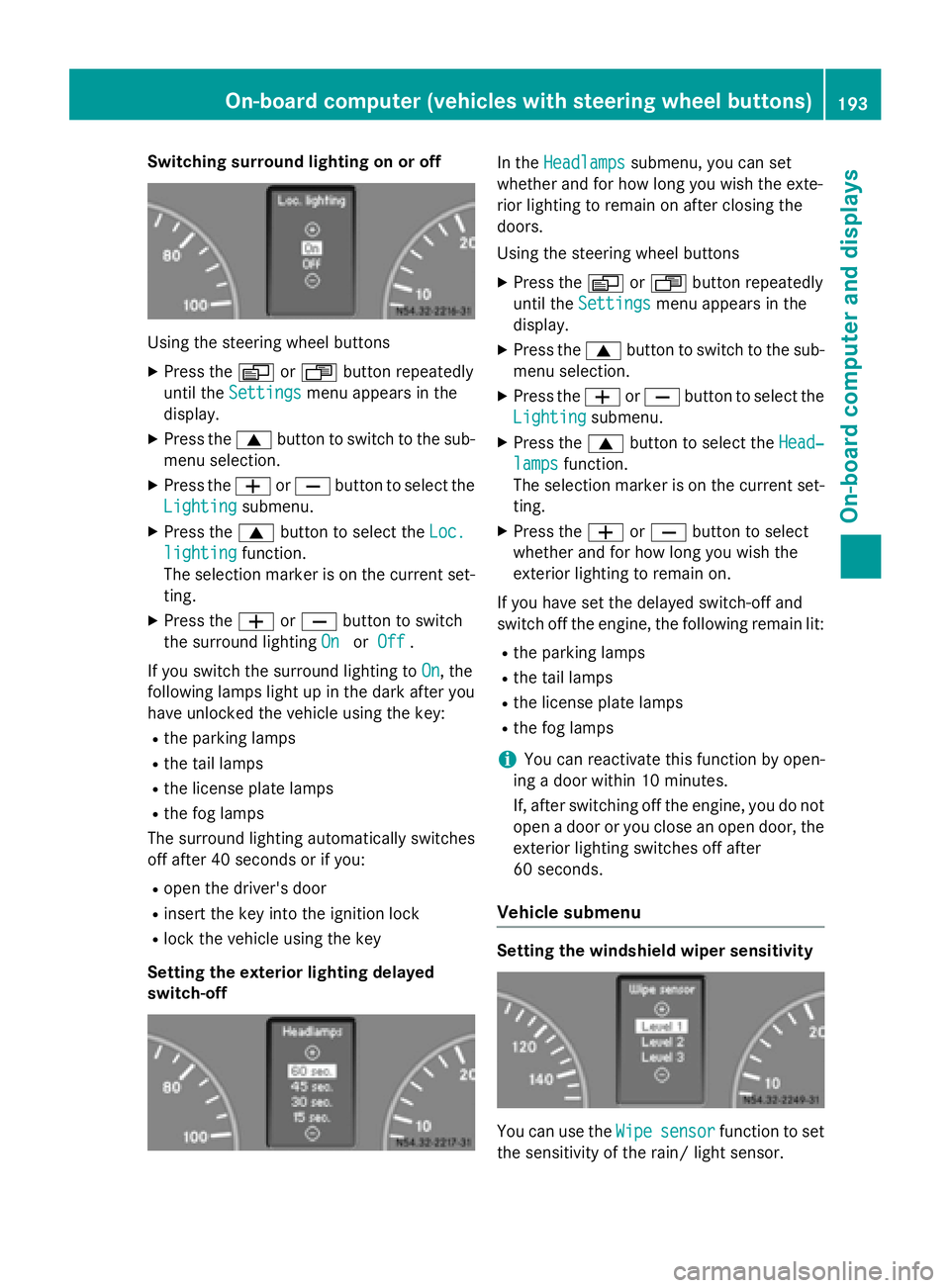
Switching surround lighting on or off
Using the steering wheel buttons
X Press the 0080or007F button repeatedly
until the Settings
Settings menu appears in the
display.
X Press the 0063button to switch to the sub-
menu selection.
X Press the 0081or0082 button to select the
Lighting
Lighting submenu.
X Press the 0063button to select the Loc.
Loc.
lighting
lighting function.
The selection marker is on the current set-
ting.
X Press the 0081or0082 button to switch
the surround lighting On
OnorOff
Off .
If you switch the surround lighting to On
On, the
following lamps light up in the dark after you
have unlocked the vehicle using the key:
R the parking lamps
R the tail lamps
R the license plate lamps
R the fog lamps
The surround lighting automatically switches
off after 40 seconds or if you:
R open the driver's door
R insert the key into the ignition lock
R lock the vehicle using the key
Setting the exterior lighting delayed
switch-off In the
Headlamps Headlamps submenu, you can set
whether and for how long you wish the exte-
rior lighting to remain on after closing the
doors.
Using the steering wheel buttons
X Press the 0080or007F button repeatedly
until the Settings Settings menu appears in the
display.
X Press the 0063button to switch to the sub-
menu selection.
X Press the 0081or0082 button to select the
Lighting
Lighting submenu.
X Press the 0063button to select the Head‐
Head‐
lamps
lamps function.
The selection marker is on the current set-
ting.
X Press the 0081or0082 button to select
whether and for how long you wish the
exterior lighting to remain on.
If you have set the delayed switch-off and
switch off the engine, the following remain lit:
R the parking lamps
R the tail lamps
R the license plate lamps
R the fog lamps
i You can reactivate this function by open-
ing a door within 10 minutes.
If, after switching off the engine, you do not open a door or you close an open door, the
exterior lighting switches off after
60 seconds.
Vehicle submenu Setting the windshield wiper sensitivity
You can use the
Wipe Wipesensor
sensor function to set
the sensitivity of the rain/ light sensor. On-board computer (vehicles with steering wheel buttons)
193On-board computer and displays Z
Page 210 of 334
Lights
Display messages
Possible causes/consequences and
0050
0050Solutions 0049
Low beam left Low beam left The left-hand low beam is faulty
3
.
X Halogen headlamps: replace the bulb as soon as possible
(Y page 100).
X Bi-Xenon headlamps: consult a qualified specialist workshop
as soon as possible. 0049
Low beam right Low beam right The right-hand low-beam headlamp is faulty
3
.
X Halogen headlamps: replace the bulb as soon as possible
(Y page 100).
X Bi-Xenon headlamps: consult a qualified specialist workshop
as soon as possible. 0049
Cornering lt. left Cornering lt. left The left-hand cornering light is faulty
3
.
X Replace the bulb as soon as possible (Y page 100).0049
Cornering Cornering
lt.
lt.right
right The right-hand cornering light is faulty
3
.
X Replace the bulb as soon as possible (Y page 100).0049
Lights on auto‐ Lights on auto‐
matic. Remove key matic. Remove key The automatic headlamp feature is active: the light switch is in the
0058 position and you have forgotten to remove the key.
X Remove the key from the ignition lock. 0049
Turn signal left Turn signal left The left-hand turn signal is faulty.
X Change the bulb as soon as possible in the front (Y page 102) or
rear (Y page 103) indicator lamp. 0049
Turn signal right Turn signal right The right-hand turn signal is faulty.
X Change the bulb as soon as possible in the front (Y page 102) or
rear (Y page 103) indicator lamp. 0049
Brake lamp left Brake lamp left The left brake lamp is faulty
3
.
X Replace the bulb as soon as possible (Y page 103).0049
Brake lamp right Brake lamp right The right brake lamp is faulty
3
.
X Replace the bulb as soon as possible (Y page 103).3
Depending on the equipment, the bulb-failure indicator may not be featured for any lamps other than the turn
signals. 208
Display messagesOn-board computer and displays
Page 211 of 334
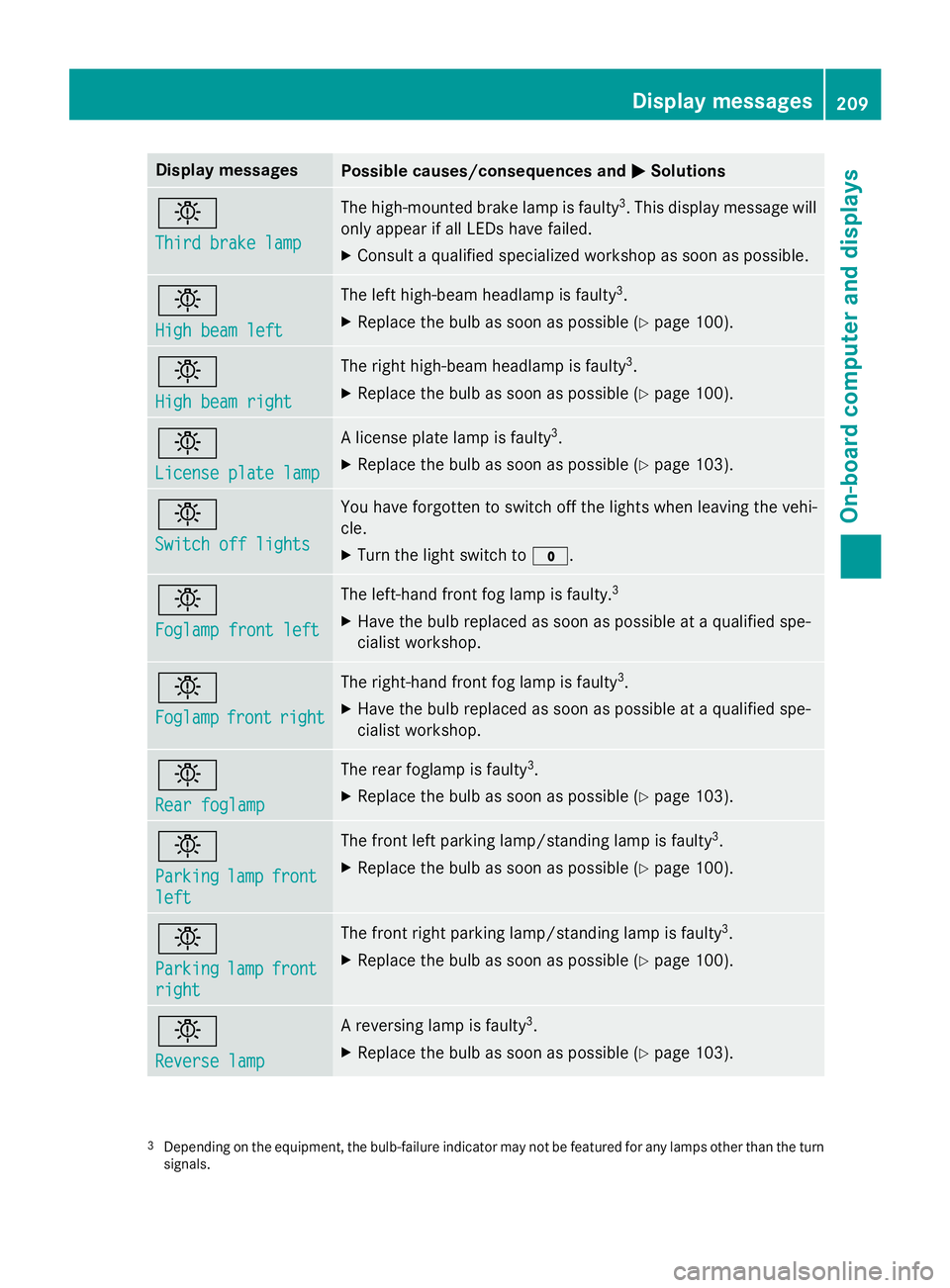
Display messages
Possible causes/consequences and
0050
0050Solutions 0049
Third brake lamp Third brake lamp The high-mounted brake lamp is faulty
3
. This display message will
only appear if all LEDs have failed.
X Consult a qualified specialized workshop as soon as possible. 0049
High beam left High beam left The left high-beam headlamp is faulty
3
.
X Replace the bulb as soon as possible (Y page 100).0049
High beam right High beam right The right high-beam headlamp is faulty
3
.
X Replace the bulb as soon as possible (Y page 100).0049
License plate lamp License plate lamp A license plate lamp is faulty
3
.
X Replace the bulb as soon as possible (Y page 103).0049
Switch off lights Switch off lights You have forgotten to switch off the lights when leaving the vehi-
cle.
X Turn the light switch to 003F.0049
Foglamp front left Foglamp front left The left-hand front fog lamp is faulty.
3
X Have the bulb replaced as soon as possible at a qualified spe-
cialist workshop. 0049
Foglamp Foglamp
front
frontright
right The right-hand front fog lamp is faulty
3
.
X Have the bulb replaced as soon as possible at a qualified spe-
cialist workshop. 0049
Rear foglamp Rear foglamp The rear foglamp is faulty
3
.
X Replace the bulb as soon as possible (Y page 103).0049
Parking Parking
lamp
lampfront
front
left
left The front left parking lamp/standing lamp is faulty
3
.
X Replace the bulb as soon as possible (Y page 100).0049
Parking Parking
lamp
lampfront
front
right
right The front right parking lamp/standing lamp is faulty
3
.
X Replace the bulb as soon as possible (Y page 100).0049
Reverse lamp Reverse lamp A reversing lamp is faulty
3
.
X Replace the bulb as soon as possible (Y page 103).3
Depending on the equipment, the bulb-failure indicator may not be featured for any lamps other than the turn
signals. Display
messages
209On-board computer and displays Z
Page 257 of 334
Washer fluid
G
WARNING
Windshield washer concentrate could ignite if it comes into contact with hot engine compo-
nents or the exhaust system. There is a risk of
fire and injury.
Make sure that no windshield washer con-
centrate is spilled next to the filler neck.
! Only use washer fluid that is suitable for
plastic lamp lenses, e.g. MB SummerFit or
MB WinterFit. Unsuitable washer fluid
could damage the plastic lenses of the
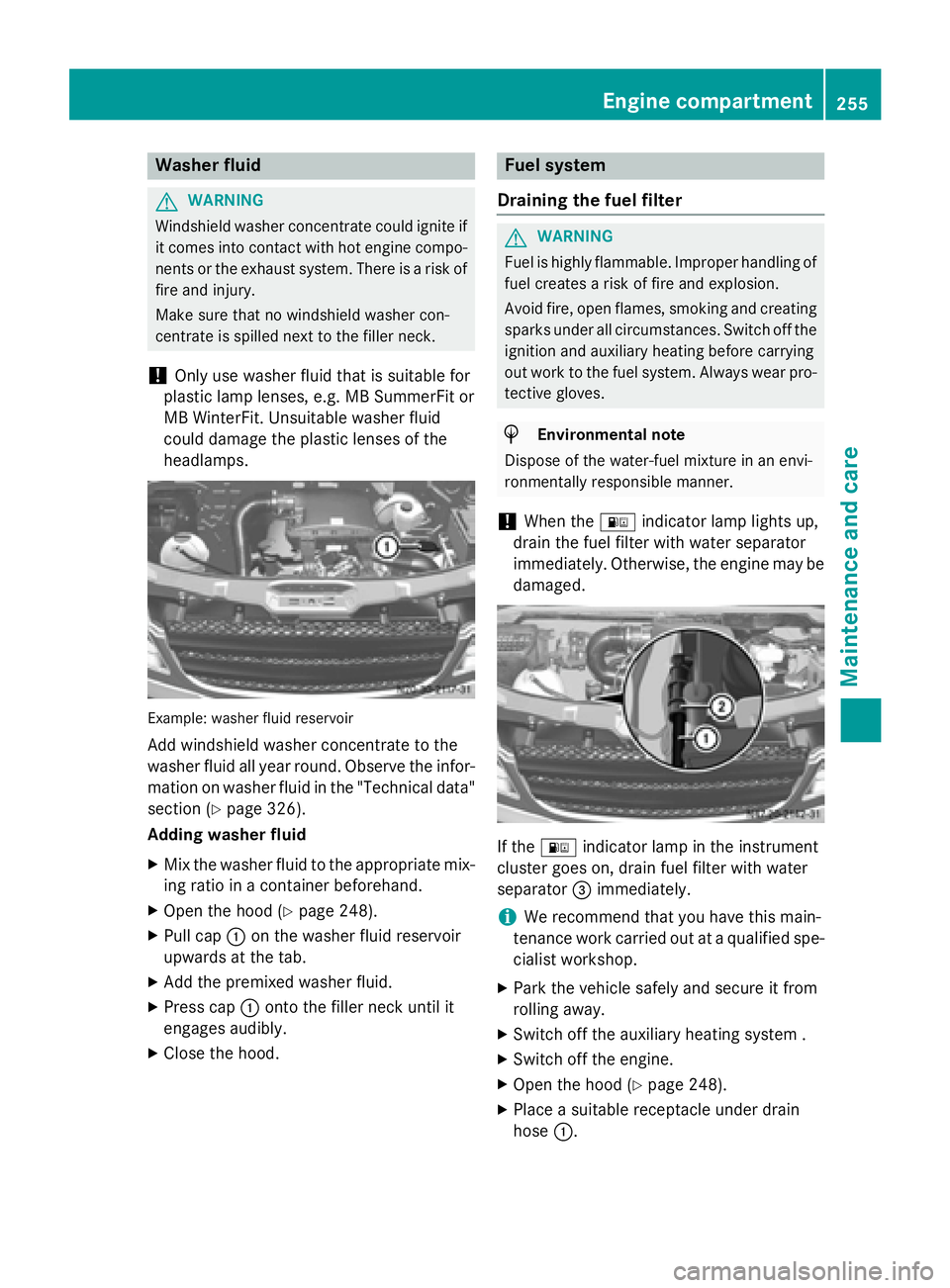
headlamps. Example: washer fluid reservoir
Add windshield washer concentrate to the
washer fluid all year round. Observe the infor- mation on washer fluid in the "Technical data"
section (Y page 326).
Adding washer fluid
X Mix the washer fluid to the appropriate mix-
ing ratio in a container beforehand.
X Open the hood (Y page 248).
X Pull cap 0043on the washer fluid reservoir
upwards at the tab.
X Add the premixed washer fluid.
X Press cap 0043onto the filler neck until it
engages audibly.
X Close the hood. Fuel system
Draining the fuel filter G
WARNING
Fuel is highly flammable. Improper handling of fuel creates a risk of fire and explosion.
Avoid fire, open flames, smoking and creatingsparks under all circumstances. Switch off the
ignition and auxiliary heating before carrying
out work to the fuel system. Always wear pro- tective gloves. H
Environmental note
Dispose of the water-fuel mixture in an envi-
ronmentally responsible manner.
! When the
00B8indicator lamp lights up,
drain the fuel filter with water separator
immediately. Otherwise, the engine may be
damaged. If the
00B8 indicator lamp in the instrument
cluster goes on, drain fuel filter with water
separator 0087immediately.
i We recommend that you have this main-
tenance work carried out at a qualified spe-
cialist workshop.
X Park the vehicle safely and secure it from
rolling away.
X Switch off the auxiliary heating system .
X Switch off the engine.
X Open the hood (Y page 248).
X Place a suitable receptacle under drain
hose 0043. Engine compartment
255Maintenance and care Z
Page 328 of 334
must be used in the system all year round to
ensure anti-corrosion protection and a raised
boiling point – even in countries with high
outside temperatures.
To prevent damage to the engine cooling sys- tem, use only approved corrosion inhibitor/
antifreeze that comply with the Mercedes-
Benz Specifications for Service Products.
We recommend corrosion inhibitor/anti-
freeze that meets the requirements in MB
Specifications for Service Products Sheet
Number 325.
Check the antifreeze/corrosion inhibitor con- centration in the coolant every six months.
The percentage of corrosion inhibitor/anti-
freeze additive in the engine cooling system
should:
R be at least 50%. This way, the engine cool-
ing system is protected against freezing
down to approximately -35 ‡ (-37 †).
R not exceed 55% (antifreeze protection
down to -49 ‡ [-45 †]). Otherwise, heat
will not be dissipated as effectively.
If there has been coolant loss, do not refill
only with water. If the vehicle has lost coolant,
add equal parts water and corrosion inhibi-
tor/antifreeze additive. The water used as
part of the coolant mixture must fulfill certain requirements; these are usually fulfilled by
drinking water. If the water quality is not suf-ficient, you must treat the water.
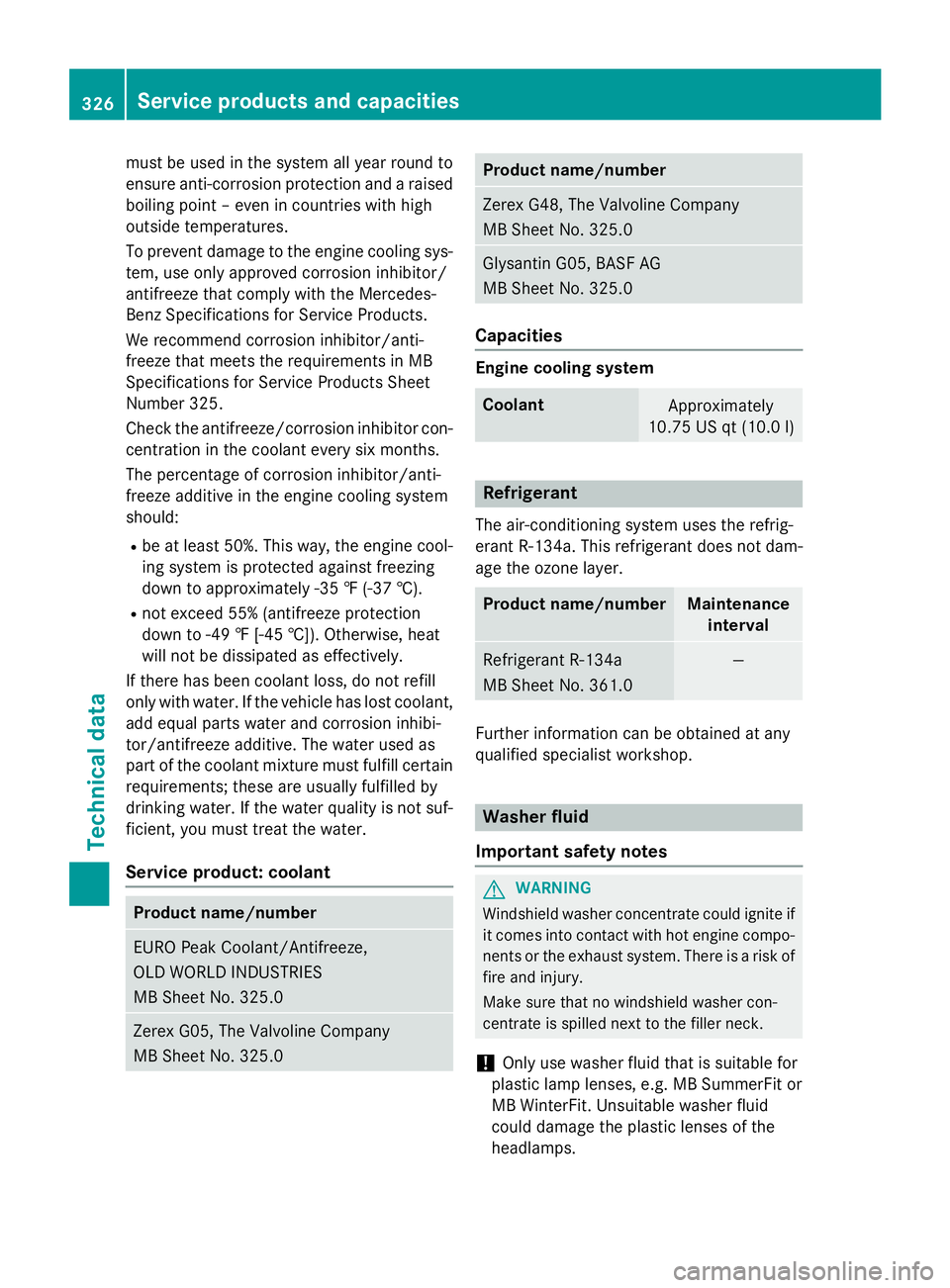
Service product: coolant Product name/number
EURO Peak Coolant/Antifreeze,
OLD WORLD INDUSTRIES
MB Sheet No. 325.0
Zerex G05, The Valvoline Company
MB Sheet No. 325.0 Product name/number
Zerex G48, The Valvoline Company
MB Sheet No. 325.0
Glysantin G05, BASF AG
MB Sheet No. 325.0
Capacities
Engine cooling system
Coolant
Approximately
10.75 US qt (10.0 l) Refrigerant
The air-conditioning system uses the refrig-
erant R‑134a. This refrigerant does not dam-
age the ozone layer. Product name/number Maintenance
interval Refrigerant R‑134a
MB Sheet No. 361.0 —
Further information can be obtained at any
qualified specialist workshop. Washer fluid
Important safety notes G
WARNING
Windshield washer concentrate could ignite if it comes into contact with hot engine compo-
nents or the exhaust system. There is a risk of
fire and injury.
Make sure that no windshield washer con-
centrate is spilled next to the filler neck.
! Only use washer fluid that is suitable for
plastic lamp lenses, e.g. MB SummerFit or
MB WinterFit. Unsuitable washer fluid
could damage the plastic lenses of the
headlamps. 326
Service products and capacitiesTechnical data
Page 329 of 334
When handling washer fluid, observe the
important safety notes on service products
(Y page 318).
Mixing ratio Add windshield washer concentrate to the
washer fluid all year round. Adapt the mixing
ratio to the ambient temperature.
At temperatures above freezing:
X Fill up the washer fluid reservoir with a mix-
ture of water and windshield washer con-
centrate, e.g. Summerwash to prevent
smearing.
At temperatures below freezing: X Fill up the washer fluid reservoir with a mix-
ture of water and windshield washer con-
centrate, e.g. Winterwash if there is a dan- ger of frost.
This prevents washer fluid from freezing on the windshield.
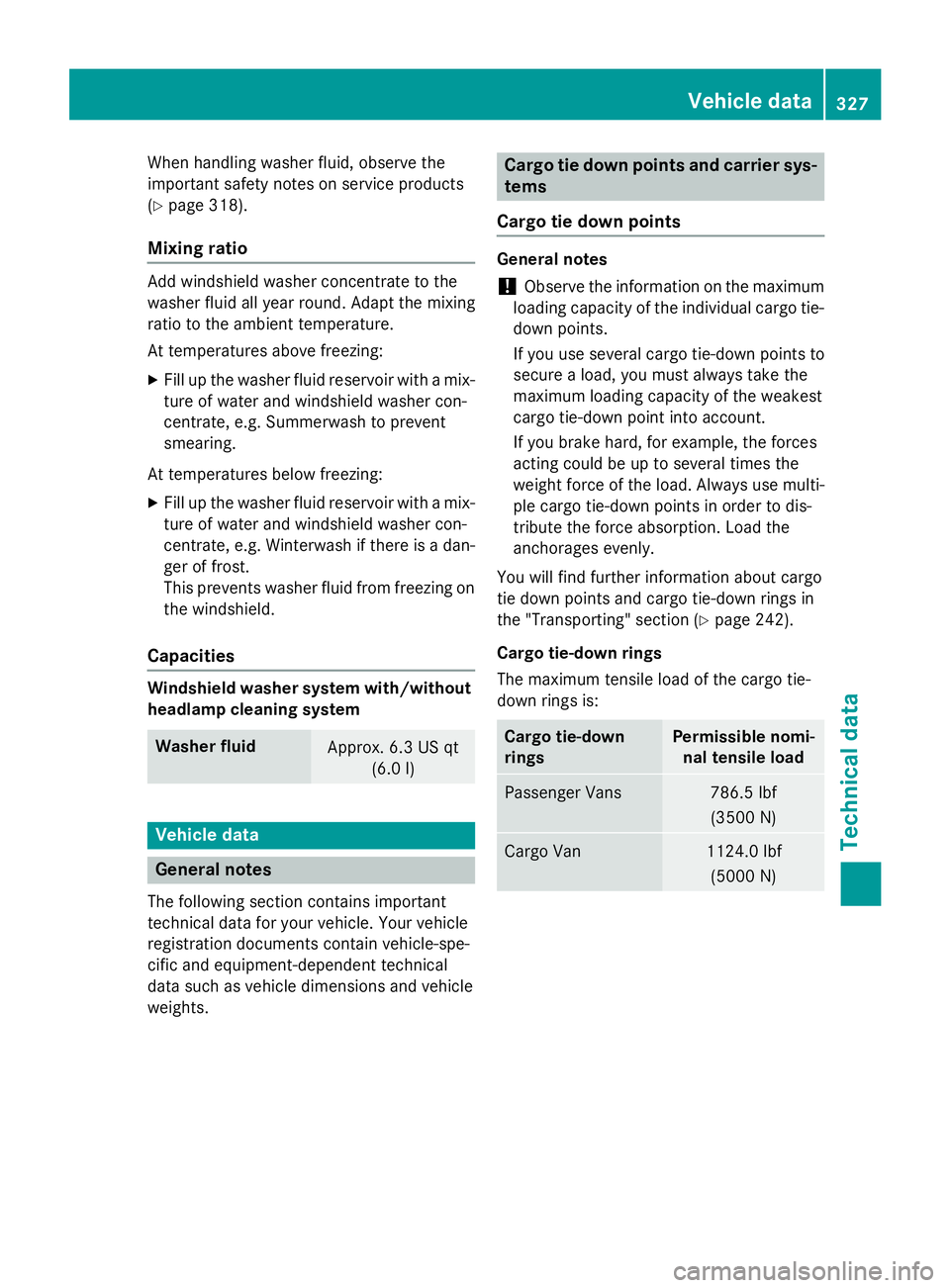
Capacities Windshield washer system with/without
headlamp cleaning system Washer fluid
Approx. 6.3 US qt
(6.0l) Vehicle data
General notes
The following section contains important
technical data for your vehicle. Your vehicle
registration documents contain vehicle-spe-
cific and equipment-dependent technical
data such as vehicle dimensions and vehicle
weights. Cargo tie down points and carrier sys-
tems
Cargo tie down points General notes
! Observe the information on the maximum
loading capacity of the individual cargo tie-
down points.
If you use several cargo tie-down points to
secure a load, you must always take the
maximum loading capacity of the weakest
cargo tie-down point into account.
If you brake hard, for example, the forces
acting could be up to several times the
weight force of the load. Always use multi-
ple cargo tie-down points in order to dis-
tribute the force absorption. Load the
anchorages evenly.
You will find further information about cargo
tie down points and cargo tie-down rings in
the "Transporting" section (Y page 242).
Cargo tie-down rings
The maximum tensile load of the cargo tie-
down rings is: Cargo tie-down
rings Permissible nomi-
nal tensile load Passenger Vans 786.5 lbf
(3500 N) Cargo Van 1124.0 lbf
(5000 N) Vehicle data
327Technical data Z