warning lights MERCEDES-BENZ SPRINTER 2015 MY15 Operator’s Manual
[x] Cancel search | Manufacturer: MERCEDES-BENZ, Model Year: 2015, Model line: SPRINTER, Model: MERCEDES-BENZ SPRINTER 2015Pages: 334, PDF Size: 5.94 MB
Page 110 of 334
Switching the rear window wiper on/
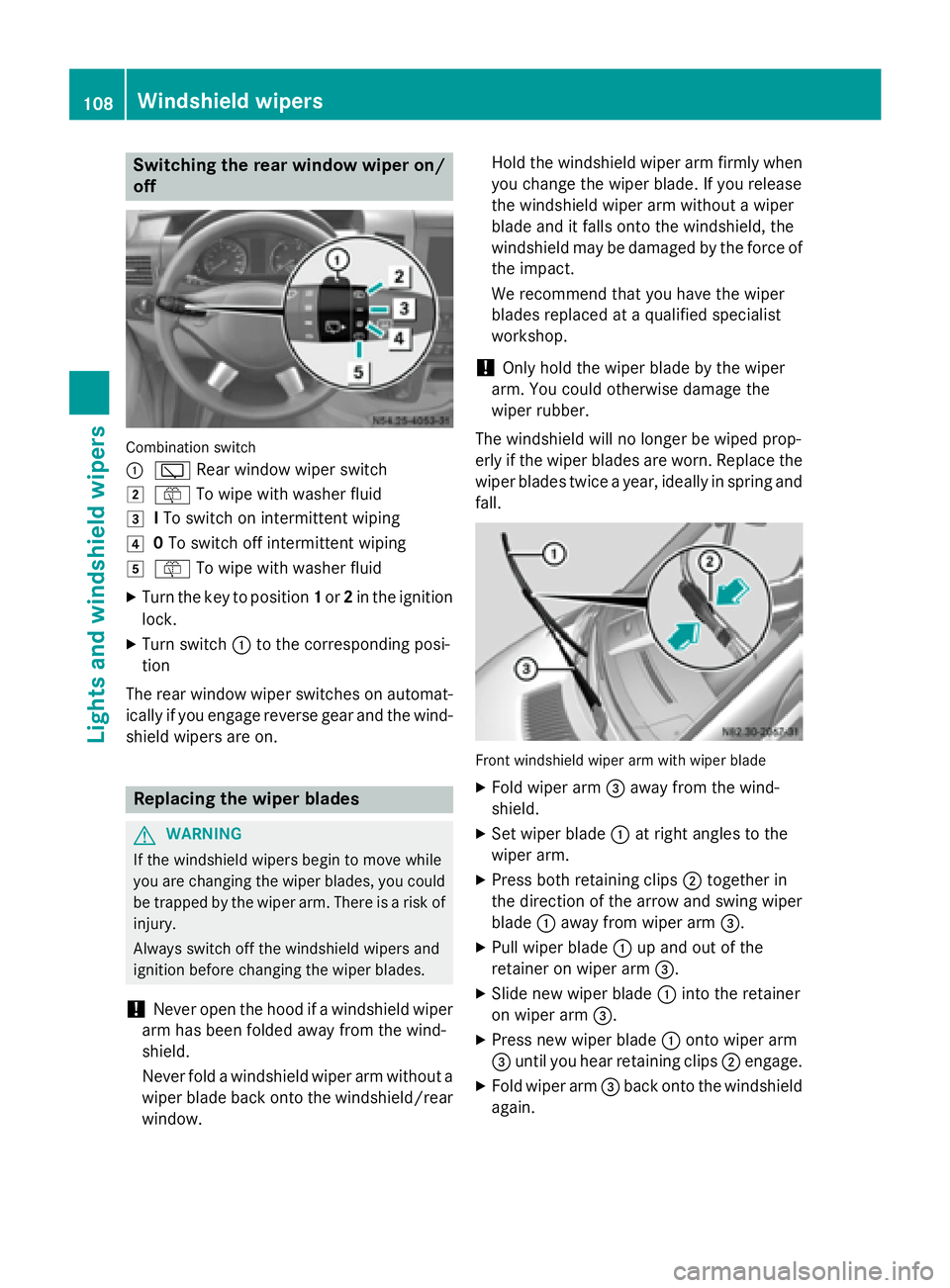
off Combination switch
0043
00C5 Rear window wiper switch
0048 00E2 To wipe with washer fluid
0049 ITo switch on intermittent wiping
004A 0To switch off intermittent wiping
004B 00E2 To wipe with washer fluid
X Turn the key to position 1or 2in the ignition
lock.
X Turn switch 0043to the corresponding posi-
tion
The rear window wiper switches on automat-
ically if you engage reverse gear and the wind-
shield wipers are on. Replacing the wiper blades
G
WARNING
If the windshield wipers begin to move while
you are changing the wiper blades, you could be trapped by the wiper arm. There is a risk of
injury.
Always switch off the windshield wipers and
ignition before changing the wiper blades.
! Never open the hood if a windshield wiper
arm has been folded away from the wind-
shield.
Never fold a windshield wiper arm without a
wiper blade back onto the windshield/rear window. Hold the windshield wiper arm firmly when
you change the wiper blade. If you release
the windshield wiper arm without a wiper
blade and it falls onto the windshield, the
windshield may be damaged by the force of
the impact.
We recommend that you have the wiper
blades replaced at a qualified specialist
workshop.
! Only hold the wiper blade by the wiper
arm. You could otherwise damage the
wiper rubber.
The windshield will no longer be wiped prop-
erly if the wiper blades are worn. Replace the
wiper blades twice a year, ideally in spring and
fall. Front windshield wiper arm with wiper blade
X Fold wiper arm 0087away from the wind-
shield.
X Set wiper blade 0043at right angles to the
wiper arm.
X Press both retaining clips 0044together in
the direction of the arrow and swing wiper
blade 0043away from wiper arm 0087.
X Pull wiper blade 0043up and out of the
retainer on wiper arm 0087.
X Slide new wiper blade 0043into the retainer
on wiper arm 0087.
X Press new wiper blade 0043onto wiper arm
0087 until you hear retaining clips 0044engage.
X Fold wiper arm 0087back onto the windshield
again. 108
Windshield wipersLights and windshield wipers
Page 122 of 334
switched off prematurely or cannot be acti-
vated.
X Switch off any consumers that are not
required, e.g. reading lamps or interior
lighting.
If enough on-board voltage is available again
within 30 seconds, the rear window heating
automatically switches on again. It otherwise
remains switched off. Switching air-recirculation mode
on/off
Important safety notes When you switch on air-recirculation mode,
the windows could fog up more quickly, in
particular at low outside temperatures. Only
switch on air-recirculation mode for a short
time.
You can deactivate the intake of fresh air if
unpleasant odors enter the vehicle from out-
side. The air inside the vehicle will only be
circulated.
Heating/air-conditioning system Air-recirculation mode switches off automat-
ically after about 10 to 30 minutes, depending
on the outside temperature.
X Switch on climate control (Y page 116).
X To switch on/off: press the008Aswitch.
If the indicator lamp in the 008Abutton
lights up, air-recirculation mode is activa-
ted.
Rear-compartment heating/rear-com-
partment air conditioning On vehicles with a rear-compartment heating
and air-conditioning system, you can acti-
vate/deactivate air-recirculation mode for
the rear-compartment climate control.
X Switch on climate control (Y page 116).
X To activate: set the temperature control of
rear-compartment heating 0087(Ypage 115) or rear-compartment air conditioning sys-
tem
0044(Ypage 116) to the center position.
Only one of the two climate control sys-
tems in the rear compartment is activated
and is in air-recirculation mode.
X To deactivate: turn the temperature con-
trol of rear-compartment heating 0087
(Y page 115) or rear-compartment air-con-
ditioning system 0044(Ypage 116) clock-
wise or counterclockwise. Only change the
temperature in small increments. Adjusting the air vents
Important safety notes
G
WARNING
Very hot or very cold air can flow from the air vents. This could result in burns or frostbite in the immediate vicinity of the air vents. There
is a risk of injury.
Make sure that all vehicle occupants always
maintain a sufficient distance to the air out-
lets. If necessary, redirect the airflow to
another area of the vehicle interior.
The center and side air vents are adjustable.
On vehicles with a rear-compartment air-con-
ditioning system, you can also adjust the air
vents in the roof duct.
i For virtually draft-free ventilation, adjust
the sliders of the center air vents to the
center position.
In order to ensure the direct flow of fresh air
through the air vents into the vehicle interior, please observe the following notes:
R keep the air inlet grille on the hood free of
blockages, such as ice, snow or leaves.
R never cover the vents or the ventilation
grilles in the vehicle interior. 120
Adjusting the air ventsClimate control
Page 132 of 334
X
Using the 00CFand00DB buttons, set the
desired heating level to a range between 10 and 30.
X Press the 0070button.
The heating level is set and the 0084sym-
bol appears. Switching the heater booster function
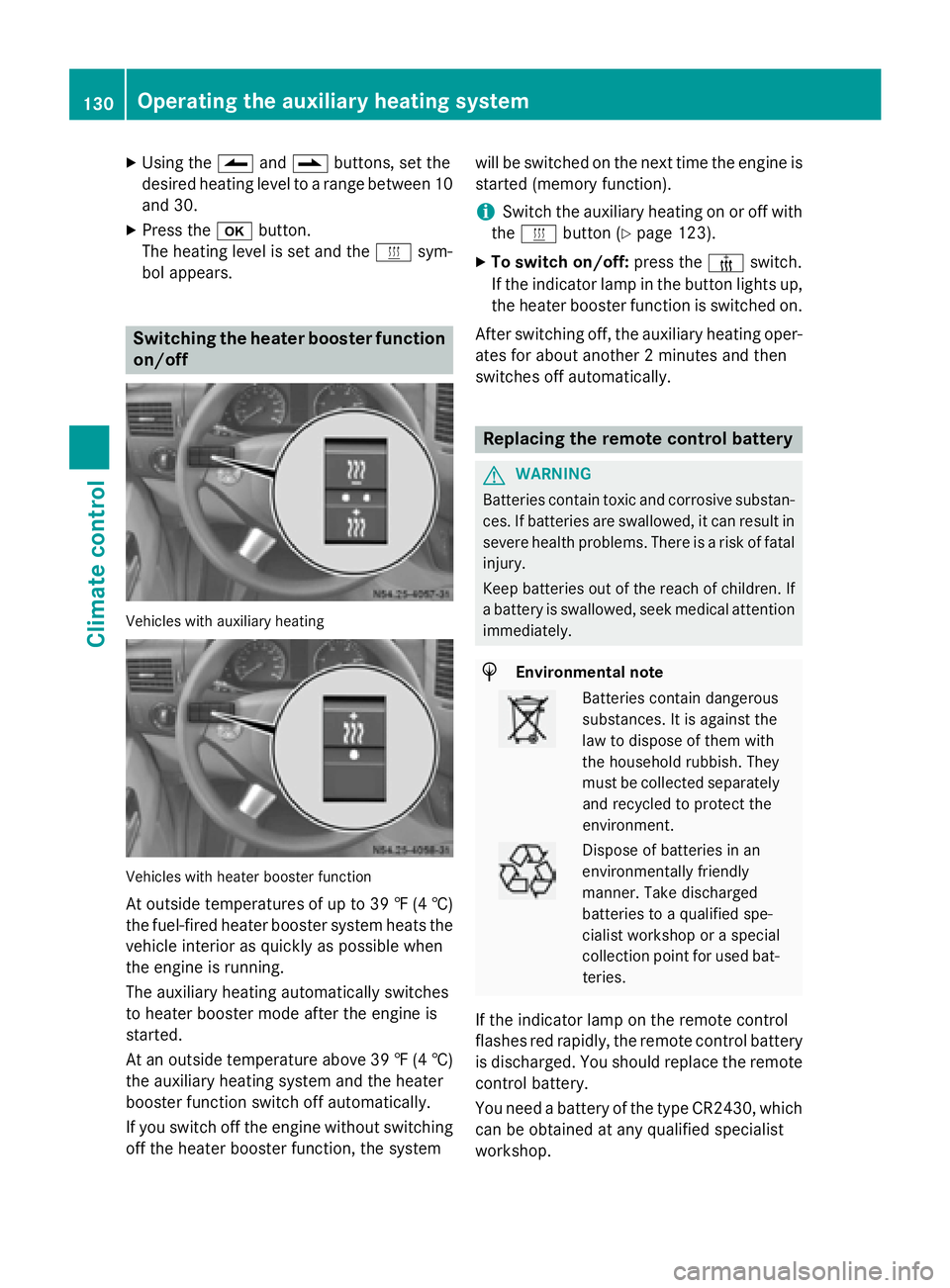
on/off Vehicles with auxiliary heating
Vehicles with heater booster function
At outside temperatures of up to 39 ‡ (4 †)
the fuel-fired heater booster system heats the vehicle interior as quickly as possible when
the engine is running.
The auxiliary heating automatically switches
to heater booster mode after the engine is
started.
At an outside temperature above 39 ‡ (4 †)
the auxiliary heating system and the heater
booster function switch off automatically.
If you switch off the engine without switching off the heater booster function, the system will be switched on the next time the engine is
started (memory function).
i Switch the auxiliary heating on or off with
the 0084 button (Y page 123).
X To switch on/off: press the006Aswitch.
If the indicator lamp in the button lights up,
the heater booster function is switched on.
After switching off, the auxiliary heating oper-
ates for about another 2 minutes and then
switches off automatically. Replacing the remote control battery
G
WARNING
Batteries contain toxic and corrosive substan- ces. If batteries are swallowed, it can result in
severe health problems. There is a risk of fatal injury.
Keep batteries out of the reach of children. If
a battery is swallowed, seek medical attention immediately. H
Environmental note Batteries contain dangerous
substances. It is against the
law to dispose of them with
the household rubbish. They
must be collected separately
and recycled to protect the
environment. Dispose of batteries in an
environmentally friendly
manner. Take discharged
batteries to a qualified spe-
cialist workshop or a special
collection point for used bat-
teries.
If the indicator lamp on the remote control
flashes red rapidly, the remote control battery
is discharged. You should replace the remote
control battery.
You need a battery of the type CR2430, which can be obtained at any qualified specialist
workshop. 130
Operating the auxiliary heating systemClimate control
Page 141 of 334
Wear suitable footwear to ensure correct
usage of the pedals.
X Secure the load as per the loading guide-
lines (Y page 240).
X Make sure that the floormats and carpets
are properly secured so that they cannot
slip and obstruct the pedals.
X Close all doors. Starting the engine
G
WARNING
Combustion engines emit poisonous exhaust
gases such as carbon monoxide. Inhaling
these exhaust gases leads to poisoning. There is a risk of fatal injury. Therefore never leave
the engine running in enclosed spaces with-
out sufficient ventilation.
! Do not depress the accelerator pedal
when starting the engine.
X Before starting the engine, make sure that:
R all the doors are closed.
R all the vehicle occupants are wearing
their seat belts correctly.
R the parking brake is applied.
i If you depress the brake pedal before
starting the engine, the pedal travel is short
and pedal resistance is high.
If you depress the brake pedal again after
starting the engine, pedal travel and resist-
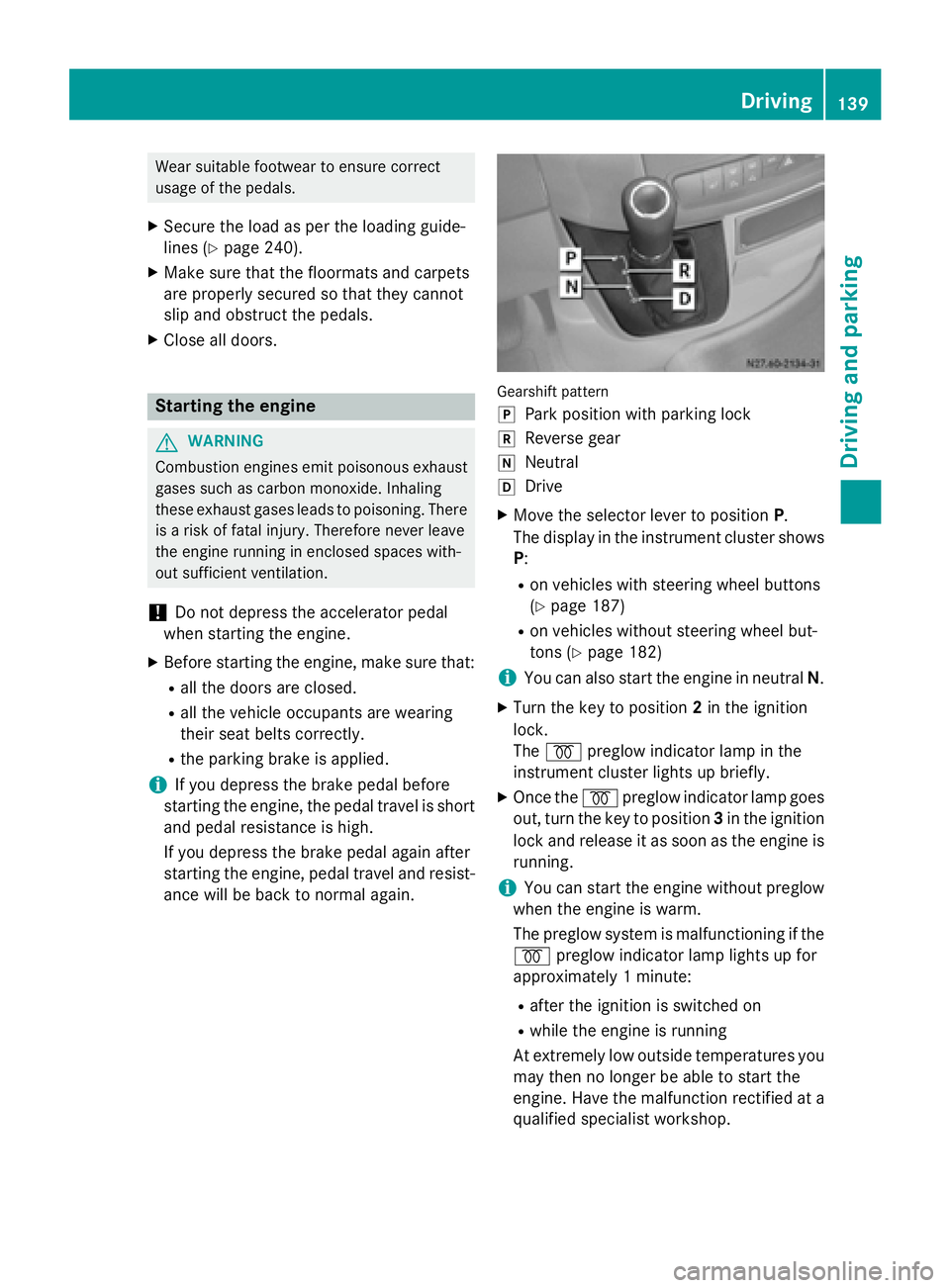
ance will be back to normal again. Gearshift pattern
005D
Park position with parking lock
005E Reverse gear
005C Neutral
005B Drive
X Move the selector lever to position P.
The display in the instrument cluster shows
P:
R on vehicles with steering wheel buttons
(Y page 187)
R on vehicles without steering wheel but-
tons (Y page 182)
i You can also start the engine in neutral
N.
X Turn the key to position 2in the ignition
lock.
The 0028 preglow indicator lamp in the
instrument cluster lights up briefly.
X Once the 0028preglow indicator lamp goes
out, turn the key to position 3in the ignition
lock and release it as soon as the engine is running.
i You can start the engine without preglow
when the engine is warm.
The preglow system is malfunctioning if the
0028 preglow indicator lamp lights up for
approximately 1 minute:
R after the ignition is switched on
R while the engine is running
At extremely low outside temperatures you
may then no longer be able to start the
engine. Have the malfunction rectified at a qualified specialist workshop. Driving
139Driving and parking Z
Page 152 of 334
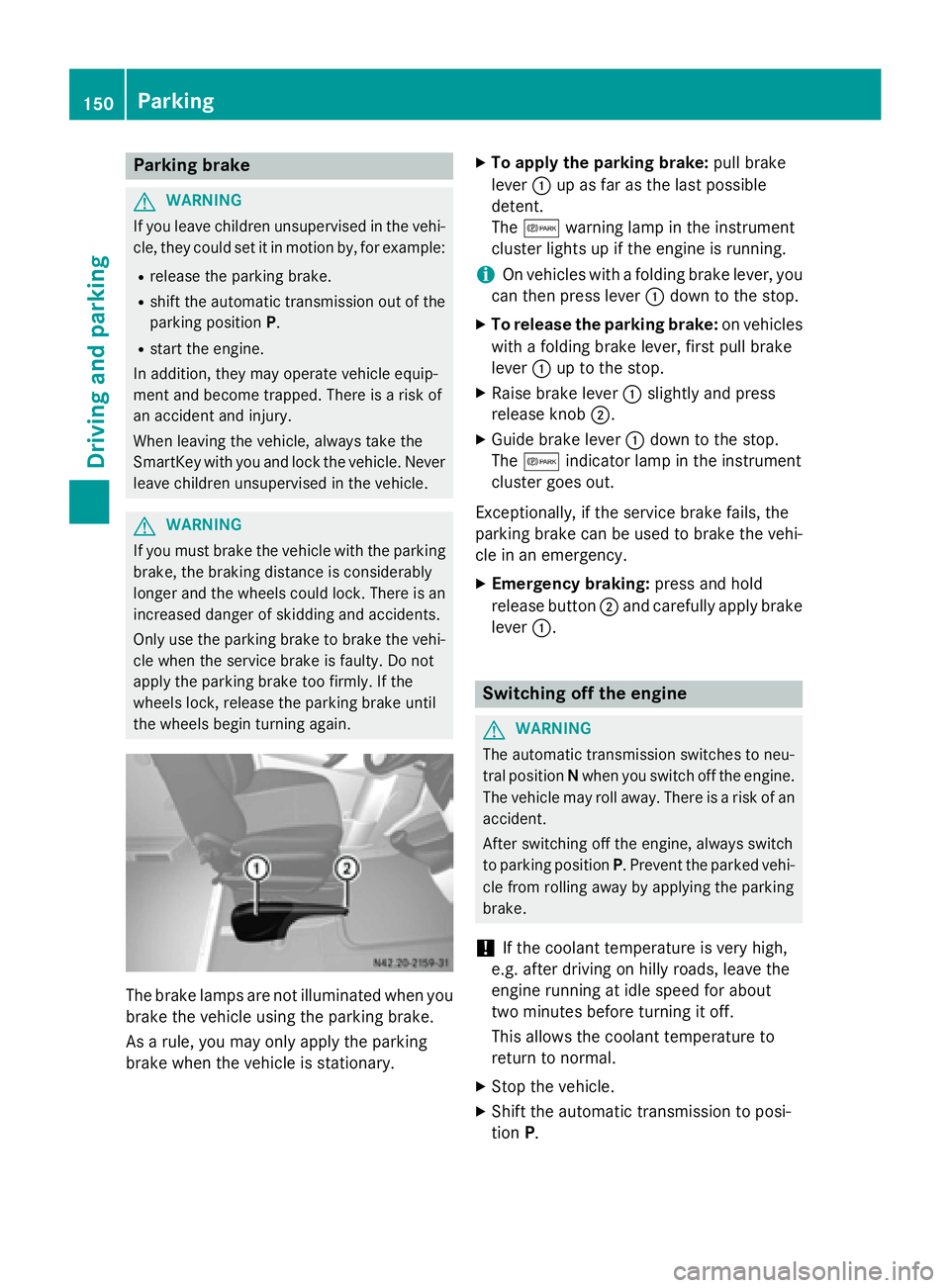
Parking brake
G
WARNING
If you leave children unsupervised in the vehi- cle, they could set it in motion by, for example:
R release the parking brake.
R shift the automatic transmission out of the
parking position P.
R start the engine.
In addition, they may operate vehicle equip-
ment and become trapped. There is a risk of
an accident and injury.
When leaving the vehicle, always take the
SmartKey with you and lock the vehicle. Never
leave children unsupervised in the vehicle. G
WARNING
If you must brake the vehicle with the parking brake, the braking distance is considerably
longer and the wheels could lock. There is an
increased danger of skidding and accidents.
Only use the parking brake to brake the vehi- cle when the service brake is faulty. Do not
apply the parking brake too firmly. If the
wheels lock, release the parking brake until
the wheels begin turning again. The brake lamps are not illuminated when you
brake the vehicle using the parking brake.
As a rule, you may only apply the parking
brake when the vehicle is stationary. X
To apply the parking brake: pull brake
lever 0043up as far as the last possible
detent.
The 0066 warning lamp in the instrument
cluster lights up if the engine is running.
i On vehicles with a folding brake lever, you
can then press lever 0043down to the stop.
X To release the parking brake: on vehicles
with a folding brake lever, first pull brake
lever 0043up to the stop.
X Raise brake lever 0043slightly and press
release knob 0044.
X Guide brake lever 0043down to the stop.
The 0066 indicator lamp in the instrument
cluster goes out.
Exceptionally, if the service brake fails, the
parking brake can be used to brake the vehi- cle in an emergency.
X Emergency braking: press and hold
release button 0044and carefully apply brake
lever 0043. Switching off the engine
G
WARNING
The automatic transmission switches to neu-
tral position Nwhen you switch off the engine.
The vehicle may roll away. There is a risk of an
accident.
After switching off the engine, always switch
to parking position P. Prevent the parked vehi-
cle from rolling away by applying the parking
brake.
! If the coolant temperature is very high,
e.g. after driving on hilly roads, leave the
engine running at idle speed for about
two minutes before turning it off.
This allows the coolant temperature to
return to normal.
X Stop the vehicle.
X Shift the automatic transmission to posi-
tion P. 150
ParkingDriving and parking
Page 164 of 334
Up to a speed of about 45 mph (70 km/h), the
distance warning function can also react to
stationary obstacles, such as stopped or
parked vehicles.
If you approach an obstacle and the distance
warning function detects a risk of a collision,
the system will alert you both visually and
acoustically.
In particular, the detection of obstacles can
be impaired in the case of:
R there is dirt on the sensors or anything else
covering the sensors
R it is snowing or raining heavily
R there is interference from other radar sour-
ces
R there are strong radar reflections, for
example in parking garages
R a narrow vehicle traveling in front, e.g. a
motorbike
R a vehicle traveling in front on a different line
Following damage to the front end of the vehi-
cle, have the configuration and operation of
the radar sensor checked at a qualified spe-
cialist workshop. This also applies to colli-
sions at slow speeds where there is no visible
damage to the front of the vehicle.
Activating/deactivating the distance
warning function
When you switch on the engine, the distance
warning function switches on after a few sec-
onds.
X To deactivate: press the00D4button
(Y page 37).
Vehicles without steering wheel but-
tons: the00C7 warning lamp in the instru-
ment cluster lights up and the OFF
OFF message
flashes.
Vehicles with steering wheel buttons:
the 00C7 warning lamp in the instrument cluster lights up and the
Distance Warn‐ Distance Warn‐
ing Deactivated
ing Deactivated message appears.
X To activate: press the00D4button again
(Y page 37).
Vehicles without steering wheel but-
tons: the00C7 warning lamp in the instru-
ment cluster goes out and the ON
ON message
flashes.
Vehicles with steering wheel buttons:
the 00C7 warning lamp in the instrument
cluster goes out and the Distance Warn‐ Distance Warn‐
ing Activated
ing Activated message appears in the
multifunction display.
Adaptive Brake Assist i
Observe the "Important safety notes" sec-
tion for driving safety systems (Y page 57). G
WARNING
Adaptive Brake Assist cannot always clearly
identify objects and complex traffic situa-
tions.
In such cases, Adaptive Brake Assist can:
R intervene unnecessarily
R not intervene
There is a risk of an accident.
Always pay careful attention to the traffic sit- uation and be ready to brake. Terminate the
intervention in a non-critical driving situation. G
WARNING
Adaptive Brake Assist does not react:
R to people or animals
R to oncoming vehicles
R to crossing traffic
R to stationary obstacles
R when cornering
As a result, the Adaptive Brake Assist may not intervene in all critical conditions. There is a
risk of an accident.
Always pay careful attention to the traffic sit- uation and be ready to brake. 162
Driving systemsDriving and parking
Page 167 of 334
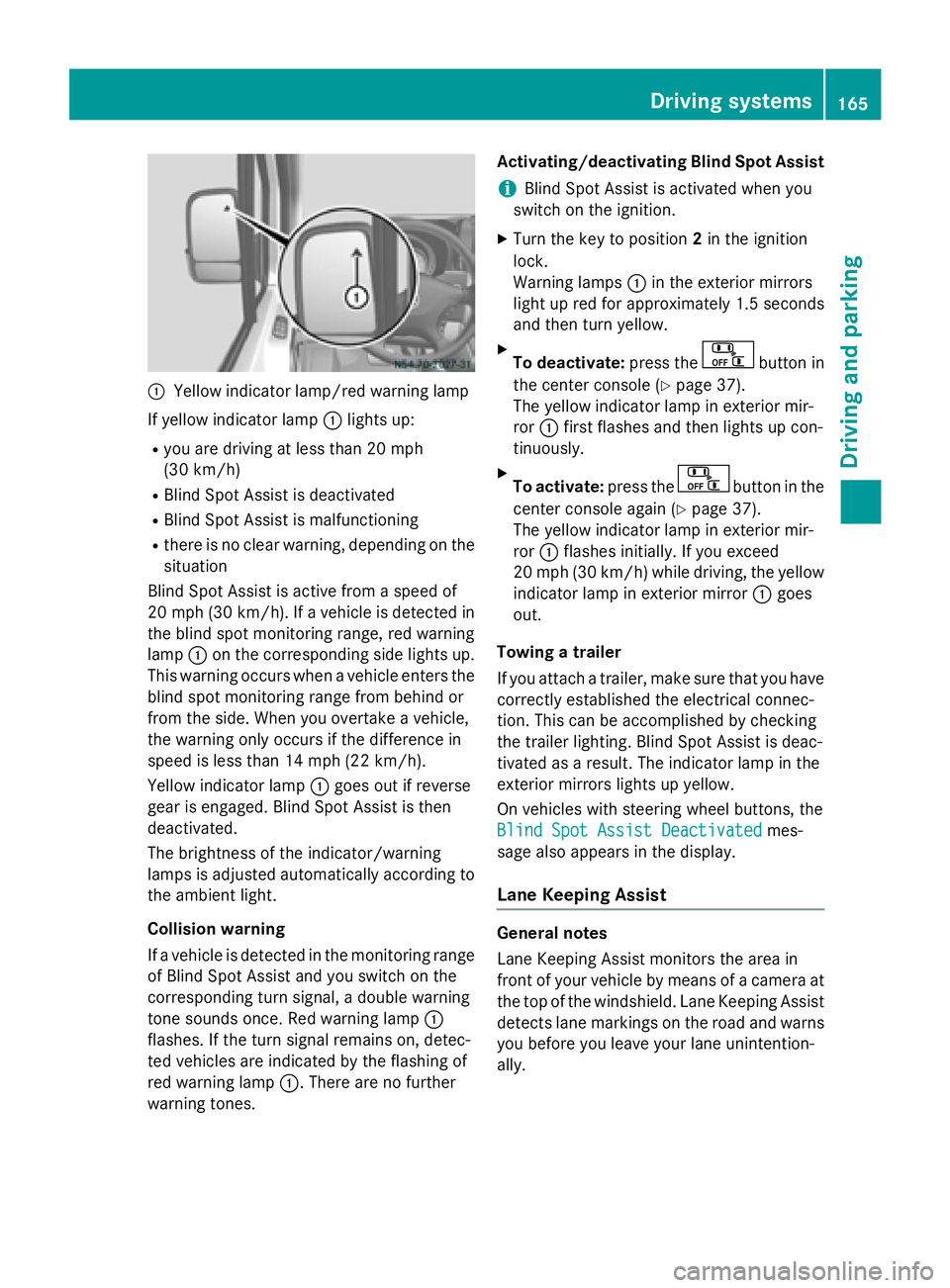
0043
Yellow indicator lamp/red warning lamp
If yellow indicator lamp 0043lights up:
R you are driving at less than 20 mph
(30 km/h)
R Blind Spot Assist is deactivated
R Blind Spot Assist is malfunctioning
R there is no clear warning, depending on the
situation
Blind Spot Assist is active from a speed of
20 mph (30 km/h). If a vehicle is detected in
the blind spot monitoring range, red warning
lamp 0043on the corresponding side lights up.
This warning occurs when a vehicle enters the blind spot monitoring range from behind or
from the side. When you overtake a vehicle,
the warning only occurs if the difference in
speed is less than 14 mph (22 km/h).
Yellow indicator lamp 0043goes out if reverse
gear is engaged. Blind Spot Assist is then
deactivated.
The brightness of the indicator/warning
lamps is adjusted automatically according to
the ambient light.
Collision warning
If a vehicle is detected in the monitoring range of Blind Spot Assist and you switch on the
corresponding turn signal, a double warning
tone sounds once. Red warning lamp 0043
flashes. If the turn signal remains on, detec-
ted vehicles are indicated by the flashing of
red warning lamp 0043. There are no further
warning tones. Activating/deactivating Blind Spot Assist
i Blind Spot Assist is activated when you
switch on the ignition.
X Turn the key to position 2in the ignition
lock.
Warning lamps 0043in the exterior mirrors
light up red for approximately 1.5 seconds
and then turn yellow.
X To deactivate: press the button in
the center console (Y page 37).
The yellow indicator lamp in exterior mir-
ror 0043first flashes and then lights up con-
tinuously.
X To activate: press the button in the
center console again (Y page 37).
The yellow indicator lamp in exterior mir-
ror 0043flashes initially. If you exceed
20 mph (30 km/h) while driving, the yellow
indicator lamp in exterior mirror 0043goes
out.
Towing a trailer
If you attach a trailer, make sure that you have
correctly established the electrical connec-
tion. This can be accomplished by checking
the trailer lighting. Blind Spot Assist is deac-
tivated as a result. The indicator lamp in the
exterior mirrors lights up yellow.
On vehicles with steering wheel buttons, the
Blind Spot Assist Deactivated
Blind Spot Assist Deactivated mes-
sage also appears in the display.
Lane Keeping Assist General notes
Lane Keeping Assist monitors the area in
front of your vehicle by means of a camera at
the top of the windshield. Lane Keeping Assist detects lane markings on the road and warns you before you leave your lane unintention-
ally. Driving systems
165Driving and parking Z
Page 168 of 334
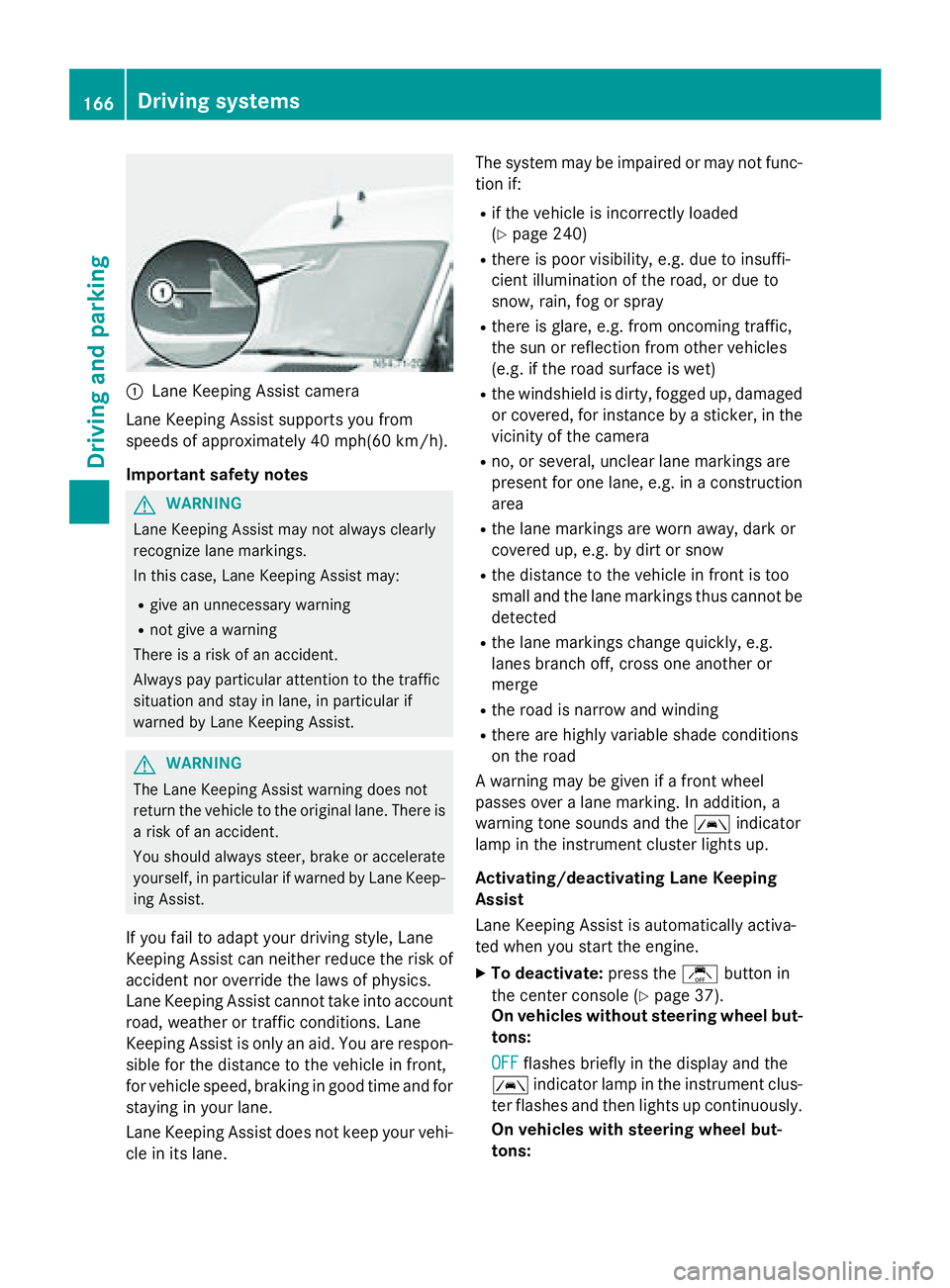
0043
Lane Keeping Assist camera
Lane Keeping Assist supports you from
speeds of approximately 40 mph(60 km/h).
Important safety notes G
WARNING
Lane Keeping Assist may not always clearly
recognize lane markings.
In this case, Lane Keeping Assist may:
R give an unnecessary warning
R not give a warning
There is a risk of an accident.
Always pay particular attention to the traffic
situation and stay in lane, in particular if
warned by Lane Keeping Assist. G
WARNING
The Lane Keeping Assist warning does not
return the vehicle to the original lane. There is a risk of an accident.
You should always steer, brake or accelerate
yourself, in particular if warned by Lane Keep-ing Assist.
If you fail to adapt your driving style, Lane
Keeping Assist can neither reduce the risk of
accident nor override the laws of physics.
Lane Keeping Assist cannot take into account road, weather or traffic conditions. Lane
Keeping Assist is only an aid. You are respon-
sible for the distance to the vehicle in front,
for vehicle speed, braking in good time and for
staying in your lane.
Lane Keeping Assist does not keep your vehi- cle in its lane. The system may be impaired or may not func-
tion if:
R if the vehicle is incorrectly loaded
(Y page 240)
R there is poor visibility, e.g. due to insuffi-
cient illumination of the road, or due to
snow, rain, fog or spray
R there is glare, e.g. from oncoming traffic,
the sun or reflection from other vehicles
(e.g. if the road surface is wet)
R the windshield is dirty, fogged up, damaged
or covered, for instance by a sticker, in the
vicinity of the camera
R no, or several, unclear lane markings are
present for one lane, e.g. in a construction
area
R the lane markings are worn away, dark or
covered up, e.g. by dirt or snow
R the distance to the vehicle in front is too
small and the lane markings thus cannot be
detected
R the lane markings change quickly, e.g.
lanes branch off, cross one another or
merge
R the road is narrow and winding
R there are highly variable shade conditions
on the road
A warning may be given if a front wheel
passes over a lane marking. In addition, a
warning tone sounds and the 00B0indicator
lamp in the instrument cluster lights up.
Activating/deactivating Lane Keeping
Assist
Lane Keeping Assist is automatically activa-
ted when you start the engine.
X To deactivate: press thejbutton in
the center console (Y page 37).
On vehicles without steering wheel but-
tons:
OFF
OFF flashes briefly in the display and the
00B0 indicator lamp in the instrument clus-
ter flashes and then lights up continuously.
On vehicles with steering wheel but-
tons: 166
Driving systemsDriving and parking
Page 169 of 334
The
Lane Keep. Assist Deactivated
Lane Keep. Assist Deactivated
message appears in the display and the
00B0 indicator lamp in the instrument clus-
ter flashes and then lights up continuously.
Lane Keeping Assist is deactivated.
X To activate: press thejbutton in the
center console again (Y page 37).
On vehicles without steering wheel but-
tons:
ON ON flashes briefly in the display and the
00B0 indicator lamp in the instrument clus-
ter flashes and then goes out.
On vehicles with steering wheel but-
tons:
The Lane Lane Keep.
Keep. Assist
Assist Activated
Activated mes-
sage appears in the display and the 00B0
indicator lamp in the instrument cluster
flashes and then goes out.
Lane Keeping Assist is activated.
A Lane Keeping Assist warning is suppressed if:
R a driving safety system intervenes, such as
ABS, BAS or ESP ®
.
R you have set the turn signal and a lane
change is detected. In this case, the warn-
ings are suppressed for a certain period of
time.
R you accelerate hard, e.g. kickdown on vehi-
cles with an automatic transmission.
R you brake hard.
R you steer actively, e.g. swerve to avoid an
obstacle or change lane quickly.
R you cut the corner on a sharp bend.
In order that you are warned only when nec-
essary and in good time if you cross the lane marking, the system recognizes certain con-
ditions and warns you accordingly.
Lane Keeping Assist warns you earlier if:
R you approach the outer lane marking on a
bend.
R the road has very wide lanes, e.g. a free-
way.
R the system recognizes solid lane markings. Warnings are given later if:
R the road has narrow lanes.
R you cut the corner on a bend. PARKTRONIC
General notes PARKTRONIC is an electronic parking aid. The
system is equipped with ultrasonic sensors inthe front and rear bumpers to monitor the
area around your vehicle. PARKTRONIC indi-
cates visually and audibly the distance
between your vehicle and an object.
Your vehicle features two separate sound
emitters with different frequencies for the
warning tones. The warning ranges in front of
and behind the vehicle are indicated by dif-
ferent warning tones.
PARKTRONIC is activated automatically when you:
R turn the key to position 2in the ignition lock
R release the parking brake and
R move the selector lever to D,Nor R
PARKTRONIC is deactivated at speeds above
11 mph (18 km/h) . PARKTRONIC is reactiva-
ted at speeds below 10 mph (16 km/h).
Important safety notes PARKTRONIC is only an aid. It cannot replace
your own awareness of the immediate sur-
roundings. You are responsible for safe
maneuvering, parking and pulling away. Whenmaneuvering, parking and pulling away, make
sure that there are no persons, animals or
objects in the maneuvering area.
! Pay particular attention to obstacles
above or below the sensors when parking,
such as flower pots or trailer towbars.
PARKTRONIC does not recognize such
objects when they are in the immediate
vicinity of the vehicle. You could damage
the vehicle or objects. Driving systems
167Driving and parking Z
Page 173 of 334
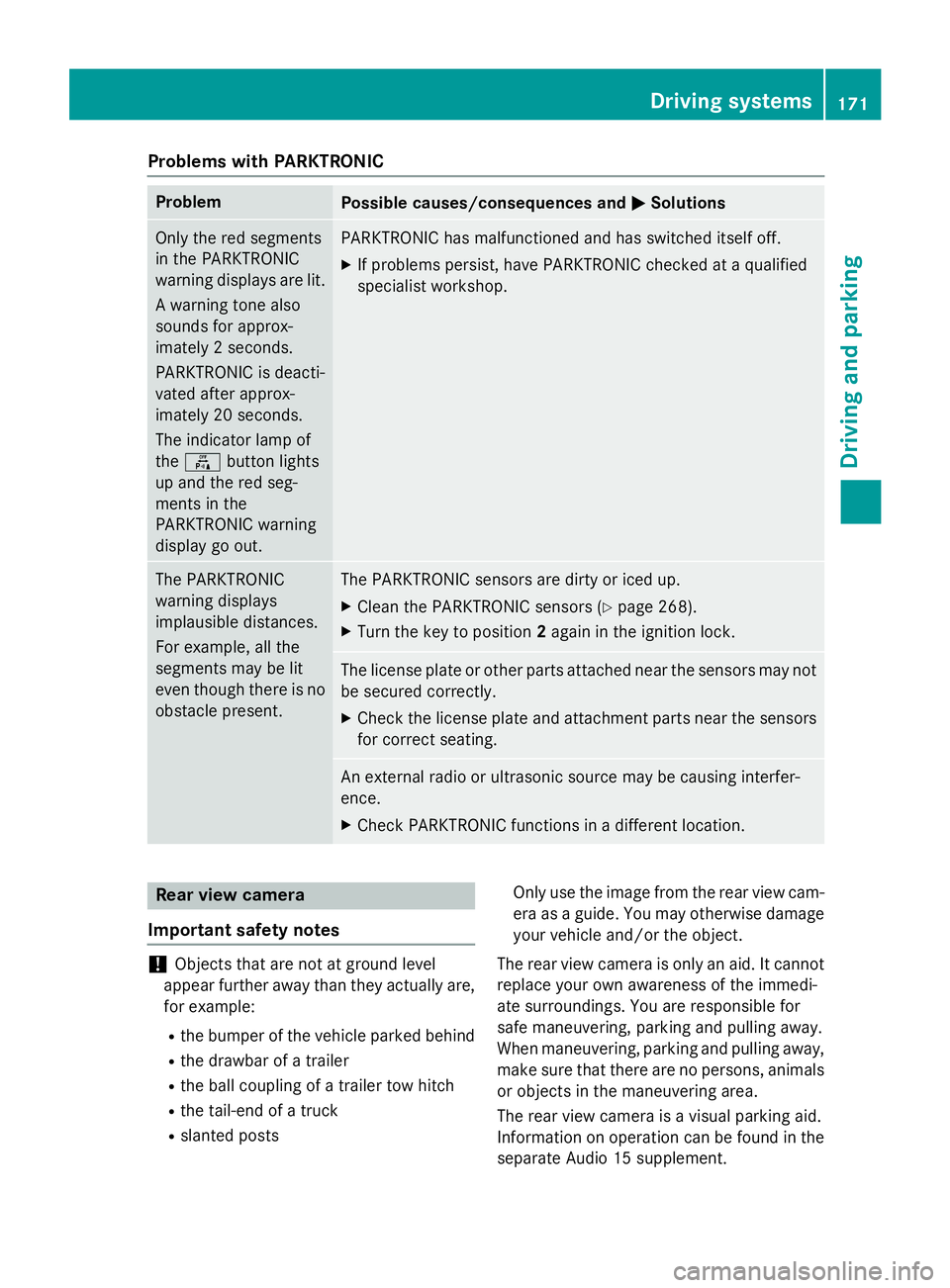
Problems with PARKTRONIC
Problem
Possible causes/consequences and
0050
0050Solutions Only the red segments
in the PARKTRONIC
warning displays are lit.
A warning tone also
sounds for approx-
imately 2 seconds.
PARKTRONIC is deacti-
vated after approx-
imately 20 seconds.
The indicator lamp of
the 0069 button lights
up and the red seg-
ments in the
PARKTRONIC warning
display go out. PARKTRONIC has malfunctioned and has switched itself off.
X If problems persist, have PARKTRONIC checked at a qualified
specialist workshop. The PARKTRONIC
warning displays
implausible distances.
For example, all the
segments may be lit
even though there is no
obstacle present. The PARKTRONIC sensors are dirty or iced up.
X Clean the PARKTRONIC sensors (Y page 268).
X Turn the key to position 2again in the ignition lock. The license plate or other parts attached near the sensors may not
be secured correctly.
X Check the license plate and attachment parts near the sensors
for correct seating. An external radio or ultrasonic source may be causing interfer-
ence.
X Check PARKTRONIC functions in a different location. Rear view camera
Important safety notes !
Objects that are not at ground level
appear further away than they actually are, for example:
R the bumper of the vehicle parked behind
R the drawbar of a trailer
R the ball coupling of a trailer tow hitch
R the tail-end of a truck
R slanted posts Only use the image from the rear view cam-
era as a guide. You may otherwise damageyour vehicle and/or the object.
The rear view camera is only an aid. It cannot
replace your own awareness of the immedi-
ate surroundings. You are responsible for
safe maneuvering, parking and pulling away.
When maneuvering, parking and pulling away, make sure that there are no persons, animals
or objects in the maneuvering area.
The rear view camera is a visual parking aid.
Information on operation can be found in the
separate Audio 15 supplement. Driving systems
171Driving and parking Z