warning lights MERCEDES-BENZ SPRINTER 2015 MY15 Operator’s Manual
[x] Cancel search | Manufacturer: MERCEDES-BENZ, Model Year: 2015, Model line: SPRINTER, Model: MERCEDES-BENZ SPRINTER 2015Pages: 334, PDF Size: 5.94 MB
Page 60 of 334
Braking
If ABS intervenes when braking, you will feel a
pulsating in the brake pedal.
The pulsating brake pedal can be an indica-
tion of hazardous road conditions and func-
tions as a reminder to take extra care while
driving.
X If ABS intervenes: continue to depress the
brake pedal with force until the braking sit-
uation is over.
X To make a full brake application:
depress the brake pedal with full force. ASR (acceleration skid control)
General notes Important safety notes
Observe the important safety guidelines for
the driving safety system (Y
page 57).
ASR can neither reduce the risk of an accident nor suspend the laws of physics if the driver
does not pay attention when pulling away or
accelerating. ASR is only an aid. Always adapt
your driving style to suit the prevailing road
and weather conditions.
Vehicles without steering wheel buttons: if
ASR is malfunctioning, the 003Dindicator
lamp lights up while the engine is running and the engine power may be reduced
(Y page 218).
ASR significantly improves traction, i.e. the
transmission of power from the tires to the
road surface, and thus increases the vehicle's driving stability. If the driving wheels start to
spin, ASR brakes individual drive wheels and
limits the engine torque. ASR thus signifi-
cantly assists you when pulling away and
accelerating, especially on wet or slippery
roads.
If traction on the road surface is not sufficient,
even ASR will not allow you to pull away with- out difficulty. The type of tires and total
weight of the vehicle as well as the gradient of
the road also play a crucial role. If ASR intervenes, the
0072warning lamp in
the instrument cluster flashes.
Activating/deactivating ASR G
WARNING
If deactivated, ASR will not attempt to stabi-
lize the vehicle during pulling away and accel- eration. There is an increased risk of skiddingand of an accident.
Only deactivate ASR in the situations descri-
bed in the following.
! If you deactivate ASR, ESP ®
will still inter-
vene to stabilize the vehicle. Frequent brak-
ing automatically triggered by ESP ®
can
damage the brake system.
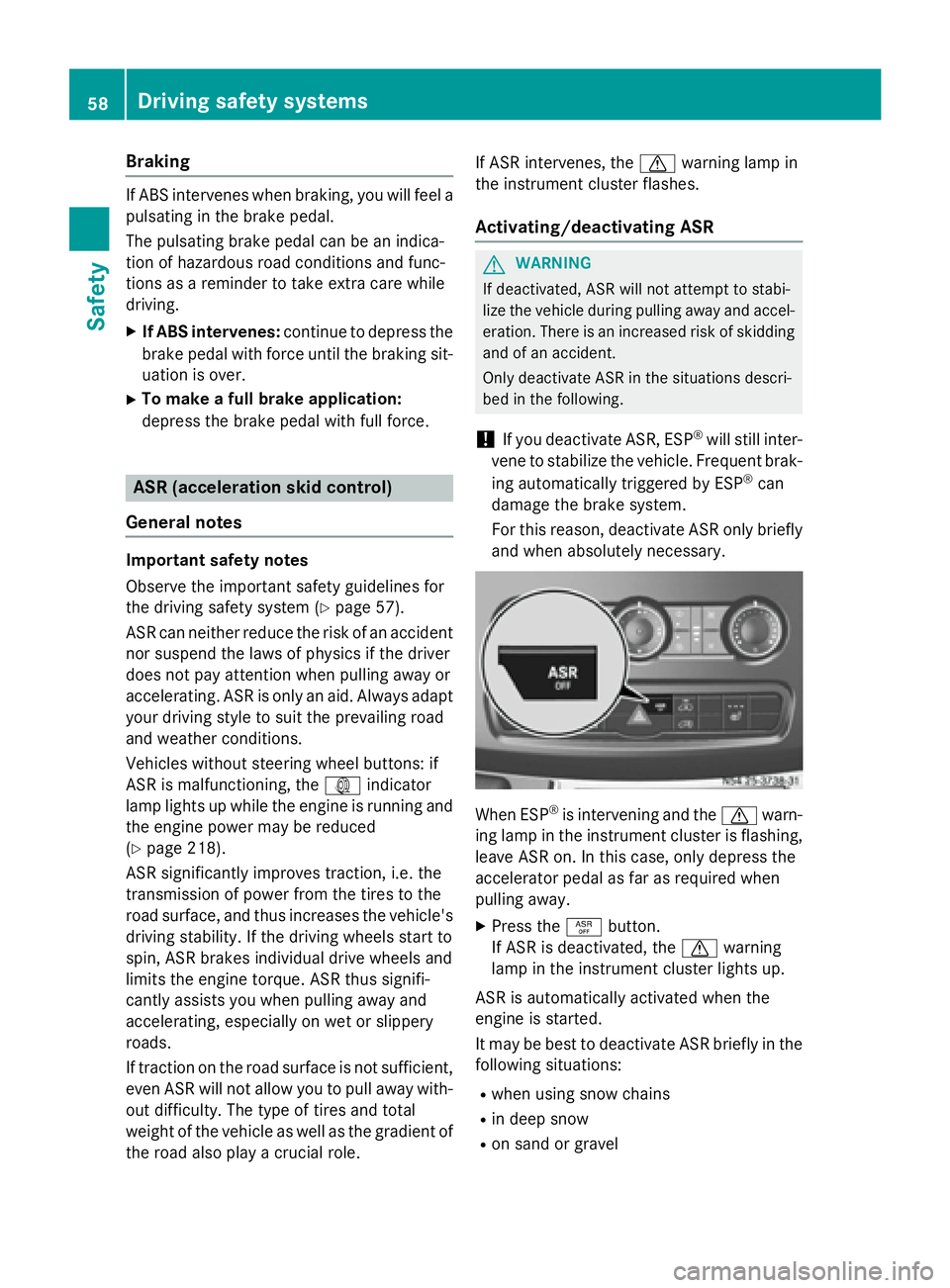
For this reason, deactivate ASR only briefly and when absolutely necessary. When ESP
®
is intervening and the 0072warn-
ing lamp in the instrument cluster is flashing,
leave ASR on. In this case, only depress the
accelerator pedal as far as required when
pulling away.
X Press the 00E3button.
If ASR is deactivated, the 0072warning
lamp in the instrument cluster lights up.
ASR is automatically activated when the
engine is started.
It may be best to deactivate ASR briefly in the
following situations:
R when using snow chains
R in deep snow
R on sand or gravel 58
Driving safety systemsSafety
Page 61 of 334
If you deactivate ASR:
R engine torque is not limited and the drive
wheels are able to spin. The spinning
wheels will then achieve a cutting effect for
better traction.
R traction control remains active through
brake intervention. If a drive wheel attains
its tire traction limit because one side of the
road is slippery, for example, that wheel is
braked. The traction is then increased in
this situation.
R active brake intervention by ESP ®
to
increase driving stability remains active.
The 0072 warning lamp in the instrument
cluster flashes when ESP ®
is intervening. BAS (Brake Assist System)
G
WARNING
If BAS is malfunctioning, the braking distance
in an emergency braking situation is
increased. There is a risk of an accident.
In an emergency braking situation, depress
the brake pedal with full force. ABS prevents
the wheels from locking.
Vehicles without steering wheel buttons: if
the BAS driving safety system is malfunction-
ing, the 003Dwarning lamp lights up while the
engine is running (Y page 218).
BAS operates in emergency braking situa-
tions. If you depress the brake quickly, BAS
automatically increases the brake pressure,
thereby reducing the stopping distance.
The brakes will function as usual once you
release the brake pedal. BAS is deactivated. EBD (electronic brake force distribu-
tion) G
WARNING
If EBD is malfunctioning, the rear wheels can
lock, e.g. under full braking. This increases the risk of skidding and an accident. You should therefore adapt your driving style
to the different handling characteristics. Have
the brake system checked at a qualified spe-
cialist workshop.
EBD monitors and controls the brake pres-
sure to the rear wheels. This enables EBD to
improve handling during braking.
Observe the information on warning and indi- cator lamps (Y page 218). ESP
®
(Electronic Stability Program)
Important safety notes Observe the important safety guidelines for
the driving safety system (Y
page 57). G
WARNING
If ESP ®
is malfunctioning it will not provide
any vehicle stabilization. There is an increased
risk of skidding or of an accident.
Exercise caution when continuing to drive.
Have ESP ®
checked at a qualified specialist
workshop.
! Do not run the vehicle on a roller dyna-
mometer (e.g. for performance tests). If
you must operate the vehicle on a roller
dynamometer, please consult a qualified
specialist workshop in advance. You could
otherwise damage the drive train or the
brake system.
If ESP ®
is malfunctioning, the 0089warning
lamp lights up while the engine is running and
the engine power may be reduced
(Y page 218).
Only use wheels with the recommended tire
sizes. Only then will ESP ®
function properly.
Crosswind Assist Crosswind Assist does not work if ESP
®
is
deactivated or disabled because of a mal-
function. Driving safety systems
59Safety Z
Page 70 of 334
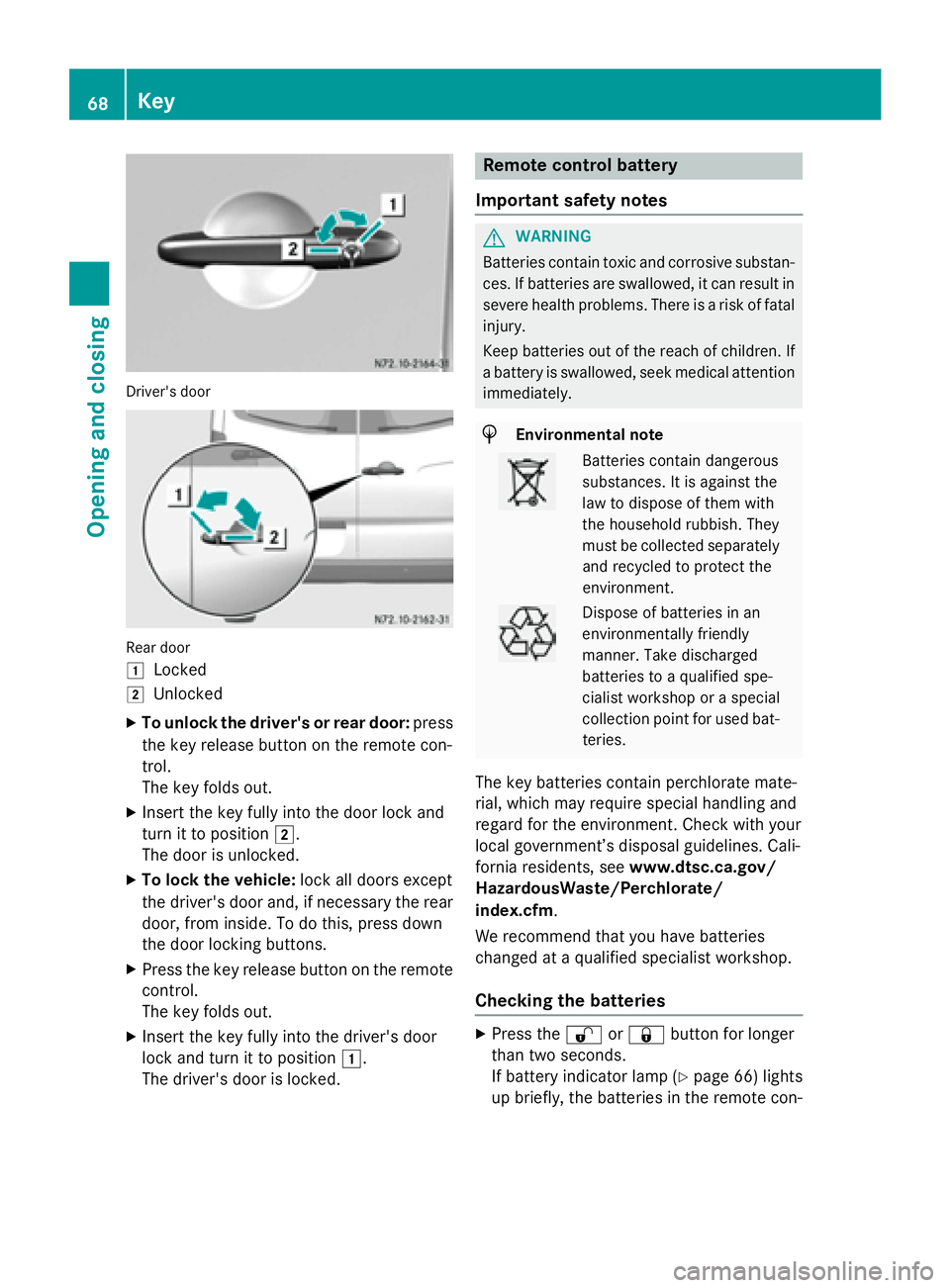
Driver's door
Rear door
0047
Locked
0048 Unlocked
X To unlock the driver's or rear door: press
the key release button on the remote con-
trol.
The key folds out.
X Insert the key fully into the door lock and
turn it to position 0048.
The door is unlocked.
X To lock the vehicle: lock all doors except
the driver's door and, if necessary the rear
door, from inside. To do this, press down
the door locking buttons.
X Press the key release button on the remote
control.
The key folds out.
X Insert the key fully into the driver's door
lock and turn it to position 0047.
The driver's door is locked. Remote control battery
Important safety notes G
WARNING
Batteries contain toxic and corrosive substan- ces. If batteries are swallowed, it can result in
severe health problems. There is a risk of fatal injury.
Keep batteries out of the reach of children. If
a battery is swallowed, seek medical attention immediately. H
Environmental note Batteries contain dangerous
substances. It is against the
law to dispose of them with
the household rubbish. They
must be collected separately
and recycled to protect the
environment. Dispose of batteries in an
environmentally friendly
manner. Take discharged
batteries to a qualified spe-
cialist workshop or a special
collection point for used bat-
teries.
The key batteries contain perchlorate mate-
rial, which may require special handling and
regard for the environment. Check with your
local government’s disposal guidelines. Cali-
fornia residents, see www.dtsc.ca.gov/
HazardousWaste/Perchlorate/
index.cfm.
We recommend that you have batteries
changed at a qualified specialist workshop.
Checking the batteries X
Press the 0036or0037 button for longer
than two seconds.
If battery indicator lamp (Y page 66) lights
up briefly, the batteries in the remote con- 68
KeyOpening and closing
Page 73 of 334
Central locking
Important safety notes
G
WARNING
Activate the child-proof door locks if children are traveling in the vehicle. The children could
otherwise open the doors while the vehicle is
in motion, injuring themselves and others. G
WARNING
Do not leave children unsupervised in the
vehicle, even if they are secured in a child
restraint system. Children could otherwise
injure themselves on parts of the vehicle.
They could be severely or even fatally injured by prolonged exposure to intense heat or
cold.
If children open a door, they could:
R injure other people
R get out of the vehicle and thereby injure
themselves or be injured by a passing vehi-
cle
R severely injure themselves by falling down,
in particular due to the vehicle height
Always take the key with you when leaving the
vehicle, even if you are only leaving for a short time.
You can open a locked front door from the
inside at any time. You can open a locked
sliding door or rear door from the inside if it
has been previously unlocked from inside. Locking and unlocking manually
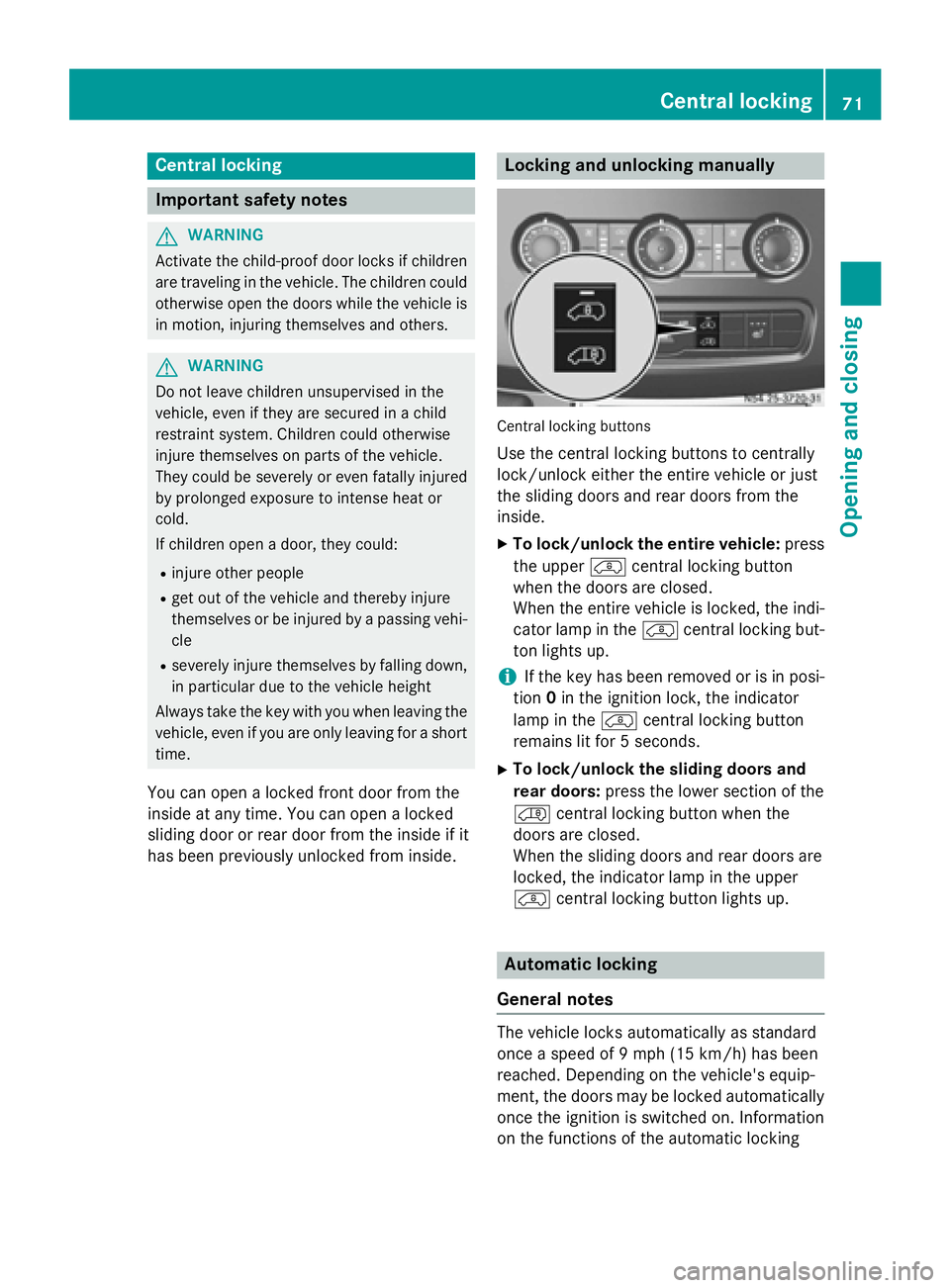
Central locking buttons
Use the central locking buttons to centrally
lock/unlock either the entire vehicle or just
the sliding doors and rear doors from the
inside.
X To lock/unlock the entire vehicle: press
the upper 00BFcentral locking button
when the doors are closed.
When the entire vehicle is locked, the indi-
cator lamp in the 00BFcentral locking but-
ton lights up.
i If the key has been removed or is in posi-
tion 0in the ignition lock, the indicator
lamp in the 00BFcentral locking button
remains lit for 5 seconds.
X To lock/unlock the sliding doors and
rear doors: press the lower section of the
00C0 central locking button when the
doors are closed.
When the sliding doors and rear doors are
locked, the indicator lamp in the upper
00BF central locking button lights up. Automatic locking
General notes The vehicle locks automatically as standard
once a speed of 9 mph
(15 km/h)has been
reached. Depending on the vehicle's equip-
ment, the doors may be locked automatically once the ignition is switched on. Information
on the functions of the automatic locking Central locking
71Opening and closing Z
Page 76 of 334
In order to reduce risks:
R draw the passengers' attention to the elec-
trical step. Wait until the electrical step is
fully extended.
R do not jump out of the vehicle.
R only use the grab handle and step. Only
they are designed for such a load.
R keep grab handles, access steps and entry
sills free from dirt, e.g. mud, clay, snow and ice. Operation and obstacle detection
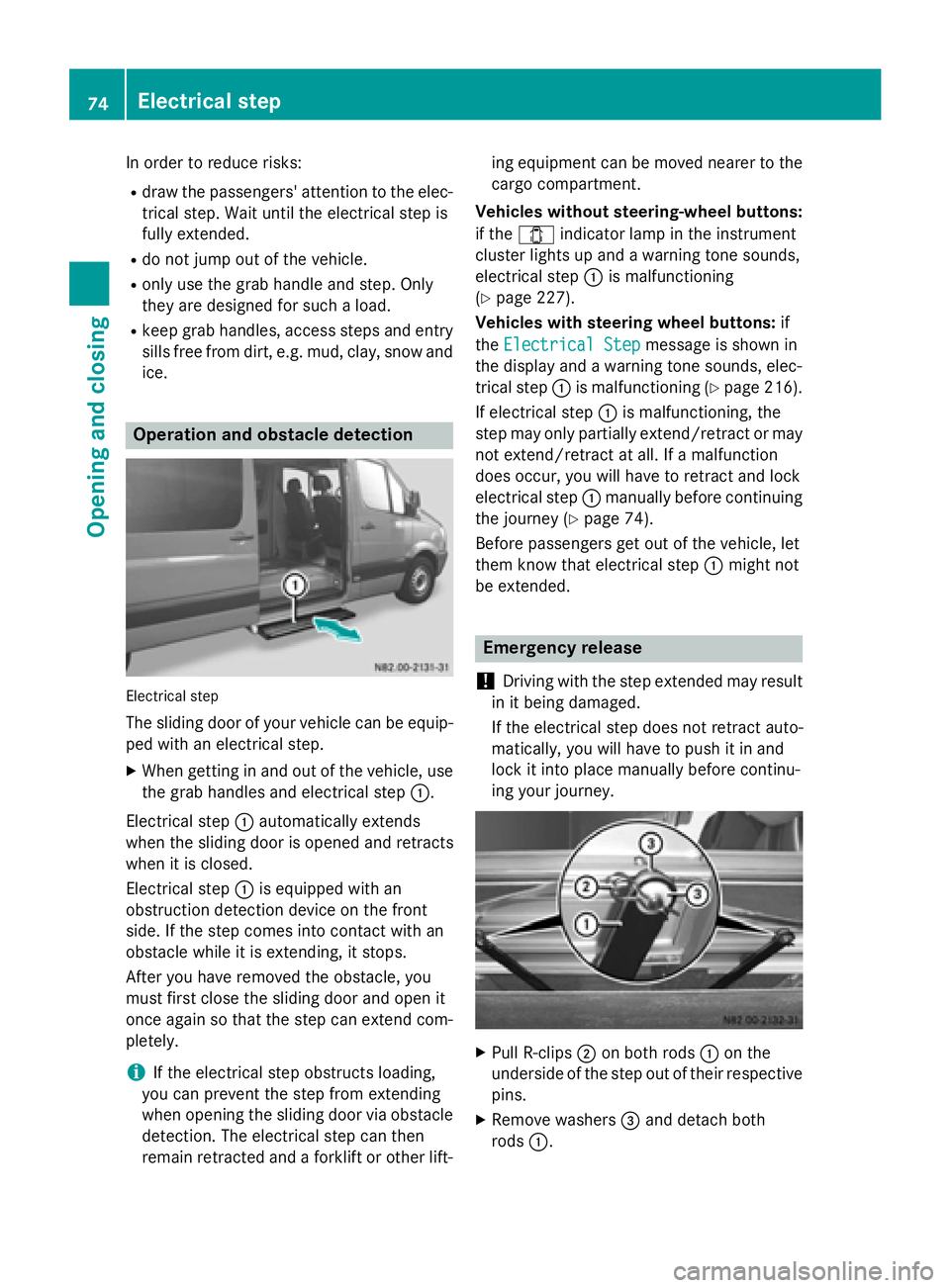
Electrical step
The sliding door of your vehicle can be equip- ped with an electrical step.
X When getting in and out of the vehicle, use
the grab handles and electrical step 0043.
Electrical step 0043automatically extends
when the sliding door is opened and retracts
when it is closed.
Electrical step 0043is equipped with an
obstruction detection device on the front
side. If the step comes into contact with an
obstacle while it is extending, it stops.
After you have removed the obstacle, you
must first close the sliding door and open it
once again so that the step can extend com-
pletely.
i If the electrical step obstructs loading,
you can prevent the step from extending
when opening the sliding door via obstacle
detection. The electrical step can then
remain retracted and a forklift or other lift- ing equipment can be moved nearer to the
cargo compartment.
Vehicles without steering-wheel buttons:
if the 003E indicator lamp in the instrument
cluster lights up and a warning tone sounds,
electrical step 0043is malfunctioning
(Y page 227).
Vehicles with steering wheel buttons: if
the Electrical Step
Electrical Step message is shown in
the display and a warning tone sounds, elec-
trical step 0043is malfunctioning (Y page 216).
If electrical step 0043is malfunctioning, the
step may only partially extend/retract or may not extend/retract at all. If a malfunction
does occur, you will have to retract and lock
electrical step 0043manually before continuing
the journey (Y page 74).
Before passengers get out of the vehicle, let
them know that electrical step 0043might not
be extended. Emergency release
! Driving with the step extended may result
in it being damaged.
If the electrical step does not retract auto-
matically, you will have to push it in and
lock it into place manually before continu-
ing your journey. X
Pull R-clips 0044on both rods 0043on the
underside of the step out of their respective
pins.
X Remove washers 0087and detach both
rods 0043. 74
Electrical stepOpening and closing
Page 94 of 334
Useful information
This Operator's Manual describes all models
as well as standard and optional equipment of your vehicle that were available at the time of going to print. Country-specific variations are
possible. Note that your vehicle may not be
equipped with all of the described functions.
This also applies to systems and functions
relevant to safety.
Read the information on qualified specialist
workshops (Y page 25). Exterior lighting
Important safety notes
For reasons of safety, we recommend that
you drive with the lights switched on even
during the daytime. There may be differences
in operation due to legal requirements and
voluntary recommendations in some coun-
tries. Bulb failure indicator
The bulb failure indicator is only an aid. You
are responsible for the proper functioning of
the vehicle lighting. Insufficient or non-func-
tioning vehicle lighting puts the operating
safety of the vehicle at risk.
For this reason, check the condition and func-
tion of your vehicle's lighting system and, if
necessary, that of the trailer before each jour- ney.
The bulb failure indicator monitors all of the
exterior lighting lamps, except the perimeter
lamp and the trailer lighting. If a bulb fails,
either the 0049(Ypage 35) indicator lamp
lights up, or you will see a corresponding
message in the display (Y page 208).
i Depending on the equipment, the bulb
failure indicator can fail for all lamps with
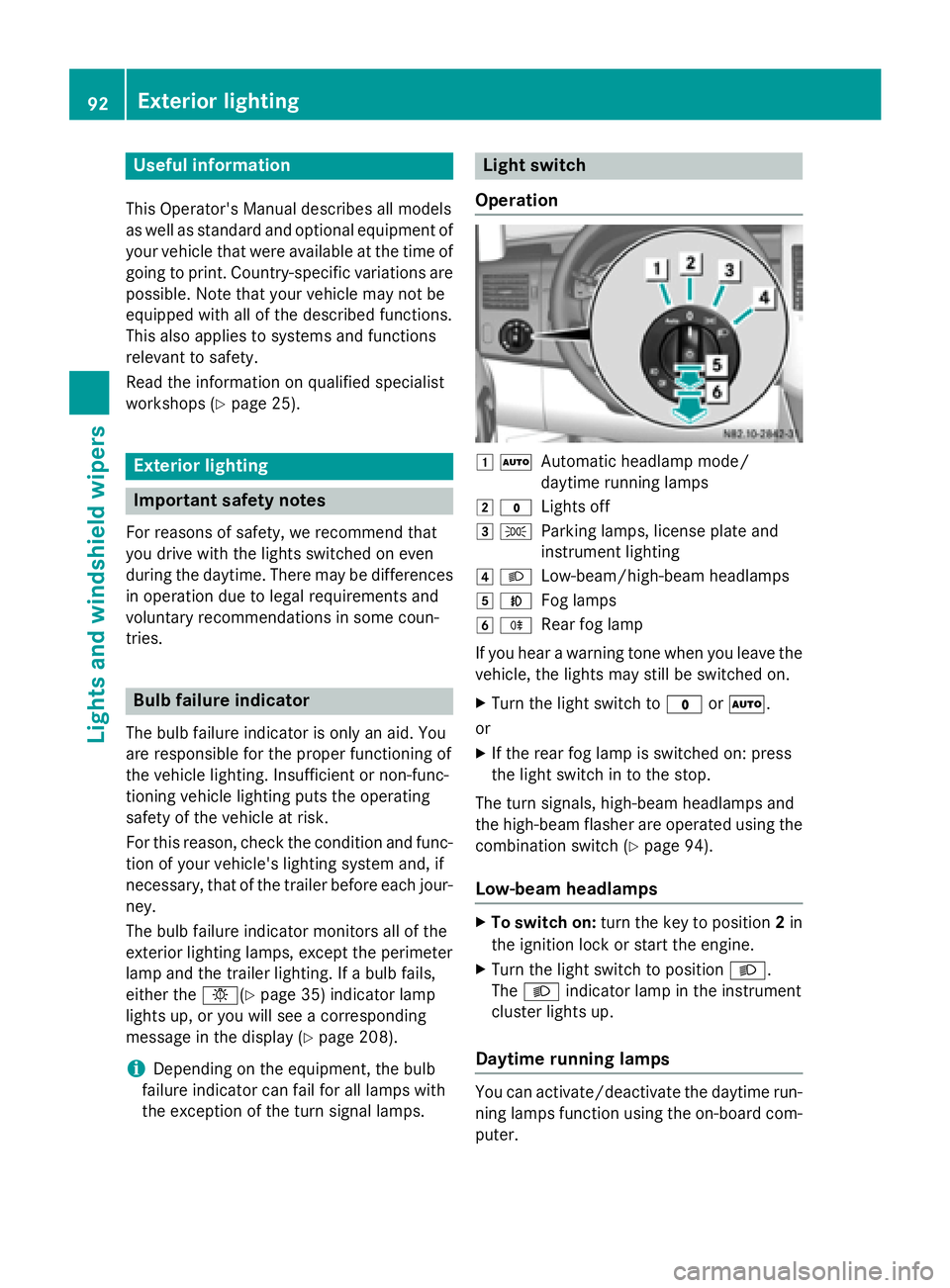
the exception of the turn signal lamps. Light switch
Operation 0047
0058
Automatic headlamp mode/
daytime running lamps
0048 003F
Lights off
0049 0060
Parking lamps, license plate and
instrument lighting
004A 0058
Low-beam/high-beam headlamps
004B 005A
Fog lamps
004C 005E
Rear fog lamp
If you hear a warning tone when you leave the
vehicle, the lights may still be switched on.
X Turn the light switch to 003For0058.
or
X If the rear fog lamp is switched on: press
the light switch in to the stop.
The turn signals, high-beam headlamps and
the high-beam flasher are operated using the combination switch (Y page 94).
Low-beam headlamps X
To switch on: turn the key to position 2in
the ignition lock or start the engine.
X Turn the light switch to position 0058.
The 0058 indicator lamp in the instrument
cluster lights up.
Daytime running lamps You can activate/deactivate the daytime run-
ning lamps function using the on-board com-
puter. 92
Exterior lightingLights and windshield wipers
Page 95 of 334
This is not possible in countries where day-
time running lamps are a legal requirement.
The daytime running lamps function must be
activated using the on-board computer:
R vehicles with steering wheel buttons
(Y page 192)
R vehicles without steering wheel buttons
(Y page 183)
X To switch on: turn the light switch to the
003F position.
The low-beam headlamps, parking lamps
and license plate lamp are switched on
when the engine is running. The 0058indi-
cator lamp in the instrument cluster lights
up.
i USA only:
If you turn the light switch to the 0060or
0058 position, the parking lamps or low-
beam headlamps switch on. If you turn the light switch to the 0058position, the day-
time running lamps remain switched on.
i Canada only:
If you turn the light switch to the 0058
position, the low-beam headlamps are
switched on. If you turn the light switch to
the 0060 or0058 position, the daytime
running lamps remain switched on.
Automatic headlamp mode G
WARNING
When the light switch is set to 0058, the low-
beam headlamps may not be switched on
automatically if there is fog, snow or other
causes of poor visibility due to the weather
conditions such as spray. There is a risk of an
accident.
In such situations, turn the light switch to
0058.
Automatic headlamp mode is only a driving
aid. You are responsible for the vehicle light-
ing at all times.
Depending on ambient light, the rain and light sensor automatically switches on the parking lamps, low-beam headlamps and the license
plate lamp. This excludes weather-related
impairments to visibility, such as snow, fog or
spray.
If there is fog, snow or spray, turn the light
switch quickly from 0058to0058. You could
otherwise briefly interrupt operation of the
headlamps.
X To switch on automatic headlamp
mode: turn the light switch to 0058.
Key in position 1in the ignition lock: the
parking lamps switch on or off automati-
cally depending on the ambient light.
When the engine is running: if you activate
the "daytime running lamps" function using the on-board computer, the daytime run-
ning lamps are switched on. The parking
lamps and low-beam headlamps also
switch on or off automatically, depending
on the ambient light.
When the low-beam headlamps are
switched on, the 0058indicator lamp in the
instrument cluster lights up.
Fog lamps/rear fog lamp G
WARNING
If you suspect that driving conditions will be
foggy, turn the light switch to 0058before you
start your journey. Your vehicle may other-
wise not be visible and you could endanger
yourself and others. G
WARNING
In low ambient lighting or foggy conditions,
only switch from position 0058to0058 with
the vehicle at a standstill in a safe location.
Switching from 0058to0058 will briefly
switch off the headlamps. Doing so while driv-
ing in low ambient lighting conditions may
result in an accident.
X Turn the ignition key to position 2in the
ignition lock or start the engine.
X Turn the light switch to 0058or0060. Exterior lighting
93Lights and windshield wipers Z
Page 97 of 334
Cornering lamps
The cornering lamps improve the illumination of the road over a wide angle in the direction
you are turning, enabling better visibility in
tight bends, for example.
The cornering light function switches on
automatically, if:
R you are traveling at a speed of less than
25 mph (40 km/h) and you switch on a turn signal or turn the steering wheel.
R you are traveling at a speed between
25 mph (40 km/ h)and 43 mph (70 km/h)
and turn the steering wheel.
The cornering lamp may remain lit for a short
time, but is automatically switched off after
no more than 3 minutes.
i If reverse gear is engaged the lamp on the
opposite side of the vehicle switches on
instead. Hazard warning lamps
G
WARNING
The rear exterior light will be covered if you:
R open the rear doors by 90°
R open the rear dropside.
The vehicle will then be difficult for other road users to see or will not be seen by them at all,
particularly if it is dark or visibility is poor.
There is a risk of an accident.
You should therefore ensure in this and simi-
lar situations that the vehicle is visible from
the rear in accordance with the relevant
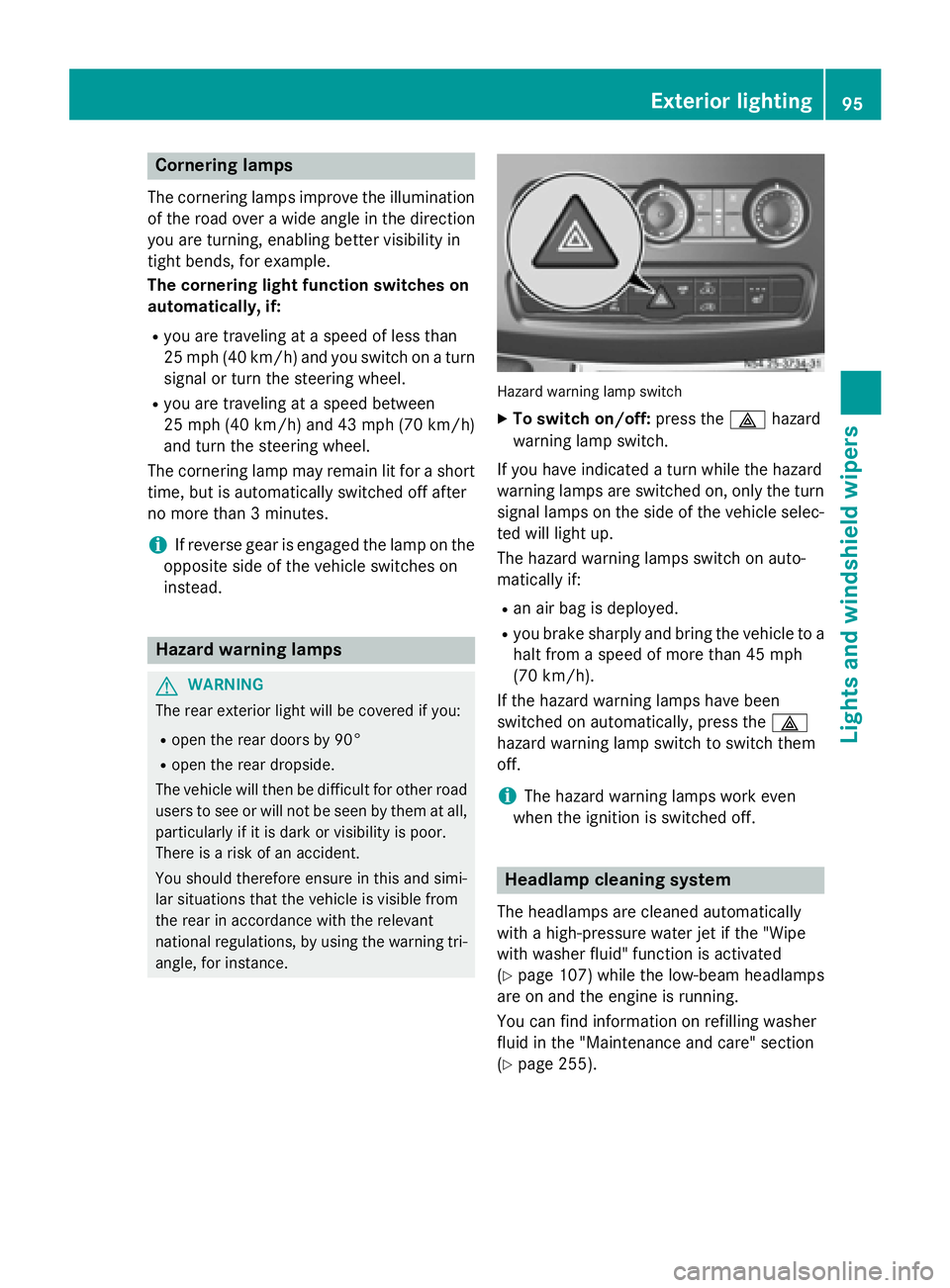
national regulations, by using the warning tri- angle, for instance. Hazard warning lamp switch
X
To switch on/off: press the002Fhazard
warning lamp switch.
If you have indicated a turn while the hazard
warning lamps are switched on, only the turn signal lamps on the side of the vehicle selec- ted will light up.
The hazard warning lamps switch on auto-
matically if:
R an air bag is deployed.
R you brake sharply and bring the vehicle to a
halt from a speed of more than 45 mph
(70 km/h).
If the hazard warning lamps have been
switched on automatically, press the 002F
hazard warning lamp switch to switch them
off.
i The hazard warning lamps work even
when the ignition is switched off. Headlamp cleaning system
The headlamps are cleaned automatically
with a high-pressure water jet if the "Wipe
with washer fluid" function is activated
(Y page 107) while the low-beam headlamps
are on and the engine is running.
You can find information on refilling washer
fluid in the "Maintenance and care" section
(Y page 255). Exterior lighting
95Lights and windshield wipers Z
Page 98 of 334
Highbeam Assist
General notes You can use this function to set the head-
lamps to change between low beam and high beam automatically. The system recognizes
vehicles with their lights on, either approach-
ing from the opposite direction or traveling in front of your vehicle, and consequently
switches the headlamps from high beam to
low beam.
Once the system no longer detects any other
vehicles, it reactivates the high-beam head-
lamps.
The system's optical sensor is located behind the windshield near the overhead control
panel.
Important safety notes G
WARNING
Highbeam Assist does not recognize road
users:
R who have no lights, e.g. pedestrians
R who have poor lighting, e.g. cyclists
R whose lighting is blocked, e.g. by a barrier
In very rare cases, Highbeam Assist may fail to
recognize other road users who have lights, or
may recognize them too late. In this or similar situations, the automatic high-beam head-
lamps will not be deactivated or will be acti-
vated regardless. There is a risk of an acci-
dent.
Always carefully observe the traffic conditions and switch off the high-beam headlamps in
good time.
Highbeam Assist cannot take into account
road, weather or traffic conditions. Highbeam Assist is only an aid. You are responsible for
adjusting the vehicle's lighting to the prevail-
ing light, visibility and traffic conditions. In particular, the detection of obstacles can
be restricted if there is:
R poor visibility, e.g. due to fog, heavy rain or
snow
R dirt on the sensors or anything else cover-
ing the sensors
Activating/deactivating Highbeam
Assist X
To activate: switch on the Highbeam
Assist function using the on-board com-
puter (Y page 192).
X Turn the light switch to the 0058position.
X Press the combination switch beyond the
pressure point in the direction of arrow 0043
(Y page 94).
Highbeam Assist is active.
The 00CE or indicator lamp in the
multifunction display lights up when it is
dark and the light sensor activates the low-
beam headlamps.
If you are driving at speeds above approx-
imately 22 mph (35 km/h) and no other
road users have been detected:
The high-beam headlamps are switched on
automatically. The 0057indicator lamp in
the instrument cluster also lights up.
If you are driving at speeds below approx-
imately 19 mph (30 km/h), other road
users are recognized or the roads are ade-
quately lit:
The high-beam headlamps are switched off automatically. The 0057indicator lamp in
the instrument cluster goes out. The 00CE
or indicator lamp in the multifunc-
tion display remains lit.
X To deactivate: move the combination
switch back to its normal position or move the light switch to another position.
The 00CE or indicator lamp in the
multifunction display goes out. 96
Exterior lightingLights and windshield wipers
Page 101 of 334
Motion detector
G
WARNING
The motion detector sends the invisible infra- red radiation emitted by LEDs (light emitting
diodes).
These LEDs are classified as class 1M lasers
and can damage the retina if you:
R look directly into the unfiltered laser beam
of the motion detector for an extended
period
R look directly into the laser beam of the
motion detector using optical instruments,
e.g. eyeglasses or a magnifying glass.
There is a risk of injury.
Never look directly into the motion detector.
The cargo compartment lighting is also
switched on by the motion detector in the
cargo compartment of Cargo Vans equipped
with this feature.
If the motion detector detects a movement in the cargo compartment when the vehicle is
stationary, the cargo compartment lighting
switches on for approximately two minutes.
The cargo compartment lighting can be
switched on by the motion detector within
four seconds if:
R the rear interior light switch (Y page 98) is
set to automatic control.
R the vehicle is stationary, the parking brake
is applied and the brake pedal is not being
depressed
Or
R the selector lever is in position Pon vehi-
cles with automatic transmission and the
brake pedal is not being depressed and
R the vehicle has not been locked from the
outside using the key
The motion detector switches off automati-
cally if no change is detected in the vehicle for
several hours, e.g. if a door is opened, if the
ignition key is turned, etc. This prevents the
battery from becoming discharged. Changing bulbs
Important safety notes
G
DANGER
Xenon bulbs carry a high voltage. You can get an electric shock if you remove the cover of
the Xenon bulb and touch the electrical con-
tacts. There is a risk of fatal injury.
Never touch the parts or the electrical con-
tacts of the Xenon bulb. Always have work on
the Xenon bulbs carried out at a qualified spe-
cialist workshop. G
WARNING
Bulbs, lamps and connectors can get very hot when operating. If you change a bulb, you
could burn yourself on these components.
There is a risk of injury.
Allow these components to cool down before changing a bulb.
! Make sure the bulbs are always securely
installed.
If your vehicle is equipped with Bi-Xenon
bulbs, you can recognize this by the following: the cone of light from the Xenon bulbs moves
from the top to the bottom and back again
when you start the engine. For this to be
observed, the low-beam headlamps must be
switched on before starting the engine.
The bulbs and lamps are an essential compo- nent of vehicle safety. You must therefore
make sure that these function correctly at all
times. Have the headlamp setting checked
regularly.
R Always switch off the vehicle's lighting sys-
tem before changing a bulb.
This will prevent a short circuit.
R Do not touch the glass tube of new bulbs
with your bare hands. Always use a clean,
lint-free cloth or only touch the base of the bulb when installing.
Even minor contamination can burn into
the glass surface and reduce the service life
of the bulbs. Changing bulbs
99Lights and windshield wipers Z