parking brake MERCEDES-BENZ SPRINTER 2015 MY15 Operator’s Manual
[x] Cancel search | Manufacturer: MERCEDES-BENZ, Model Year: 2015, Model line: SPRINTER, Model: MERCEDES-BENZ SPRINTER 2015Pages: 334, PDF Size: 5.94 MB
Page 165 of 334
Adaptive Brake Assist aids you when braking
during hazardous situations at speeds above
20 mph (30 km/h). With the help of Adaptive Brake Assist, the distance warning signal can
detect obstacles that are in the path of your
vehicle for an extended period of time.
When you approach an obstacle and adaptive Brake Assist detects that there is a risk of a
collision, adaptive Brake Assist calculates the
braking force necessary to avoid a collision.
Should you apply the brakes forcefully, adap- tive Brake Assist will automatically increase
the braking force to the calculated level.
X Keep the brake pedal depressed until the
emergency braking situation is over.
ABS prevents the wheels from locking.
The brakes function as usual again if:
R you release the brake pedal
R there is no longer any danger of a collision
R no obstacle is detected in front of your
vehicle
Adaptive Brake Assist is then deactivated.
Up to the maximum vehicle speed, adaptive
Brake Assist can react to moving obstacles
that have already been recognized as such at least once over the period of observation.
Adaptive Brake Assist does not react to sta-
tionary obstacles.
In particular, the detection of obstacles can
be impaired if:
R there is dirt on the sensors or anything else
covering the sensors
R it is snowing or raining heavily
R there is interference from other radar sour-
ces
R there are strong radar reflections, for
example in parking garages
R a narrow vehicle traveling in front, e.g. a
motorbike
R a vehicle traveling in front on a different line
If adaptive Brake Assist is not available due to a malfunction in the radar sensor system, thefull brake boosting effect with the help of BAS
remains available. Following damage to the front end of the vehi-
cle, have the configuration and operation of
the radar sensor checked at a qualified spe-
cialist workshop. This also applies to colli-
sions at slow speeds where there is no visible damage to the front of the vehicle. Lane Tracking package
Blind Spot Assist General notes
Blind Spot Assist uses a radar sensor system
to monitor the areas on both sides of your
vehicle. It supports you from speeds of
approximately 20 mph (30 km/h). A warning
display in the exterior mirrors draws your
attention to vehicles detected in the moni-
tored area. If you then switch on the corre-
sponding turn signal to change lane, you will
also receive an optical and audible collision
warning. For this purpose, Blind Spot Assist
uses sensors in the rear bumper and behind
the protective strips of the B-pillars.
Important safety notes G
WARNING
Blind Spot Assist does not react to:
R vehicles overtaken too closely on the side,
placing them in the blind spot area
R vehicles which approach with a large speed
differential and overtake your vehicle
As a result, Blind Spot Assist may not give
warnings in such situations. There is a risk of an accident.
Always observe the traffic conditions care-
fully, and maintain a safe lateral distance.
Blind Spot Assist is only an aid. It may fail to
detect some vehicles and is no substitute for
attentive driving.
i USA only:
This device has been approved by the FCC as a "Vehicular Radar System". The radar
sensor is intended for use in an automotive Driving systems
163Driving and parking Z
Page 168 of 334
0043
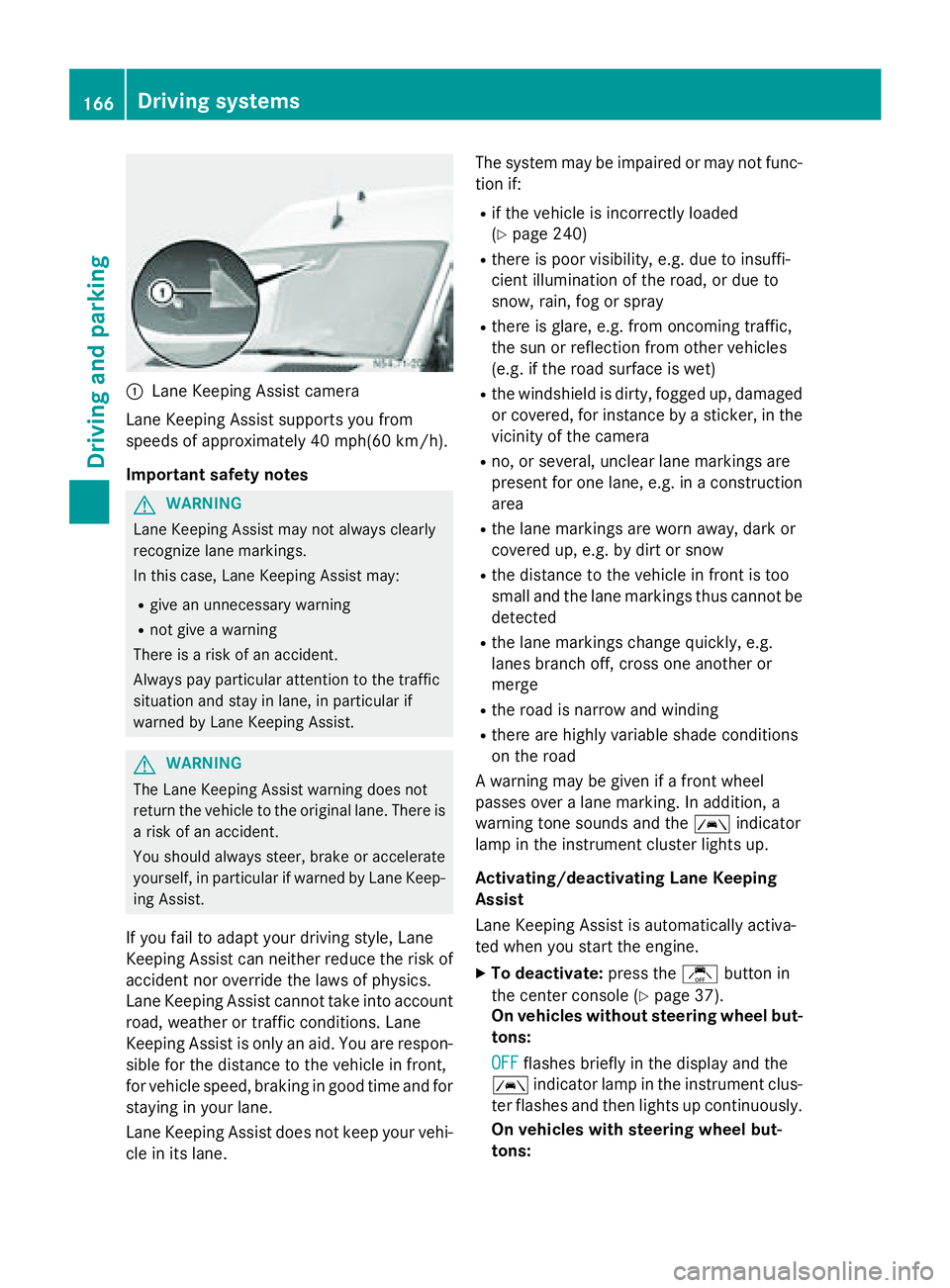
Lane Keeping Assist camera
Lane Keeping Assist supports you from
speeds of approximately 40 mph(60 km/h).
Important safety notes G
WARNING
Lane Keeping Assist may not always clearly
recognize lane markings.
In this case, Lane Keeping Assist may:
R give an unnecessary warning
R not give a warning
There is a risk of an accident.
Always pay particular attention to the traffic
situation and stay in lane, in particular if
warned by Lane Keeping Assist. G
WARNING
The Lane Keeping Assist warning does not
return the vehicle to the original lane. There is a risk of an accident.
You should always steer, brake or accelerate
yourself, in particular if warned by Lane Keep-ing Assist.
If you fail to adapt your driving style, Lane
Keeping Assist can neither reduce the risk of
accident nor override the laws of physics.
Lane Keeping Assist cannot take into account road, weather or traffic conditions. Lane
Keeping Assist is only an aid. You are respon-
sible for the distance to the vehicle in front,
for vehicle speed, braking in good time and for
staying in your lane.
Lane Keeping Assist does not keep your vehi- cle in its lane. The system may be impaired or may not func-
tion if:
R if the vehicle is incorrectly loaded
(Y page 240)
R there is poor visibility, e.g. due to insuffi-
cient illumination of the road, or due to
snow, rain, fog or spray
R there is glare, e.g. from oncoming traffic,
the sun or reflection from other vehicles
(e.g. if the road surface is wet)
R the windshield is dirty, fogged up, damaged
or covered, for instance by a sticker, in the
vicinity of the camera
R no, or several, unclear lane markings are
present for one lane, e.g. in a construction
area
R the lane markings are worn away, dark or
covered up, e.g. by dirt or snow
R the distance to the vehicle in front is too
small and the lane markings thus cannot be
detected
R the lane markings change quickly, e.g.
lanes branch off, cross one another or
merge
R the road is narrow and winding
R there are highly variable shade conditions
on the road
A warning may be given if a front wheel
passes over a lane marking. In addition, a
warning tone sounds and the 00B0indicator
lamp in the instrument cluster lights up.
Activating/deactivating Lane Keeping
Assist
Lane Keeping Assist is automatically activa-
ted when you start the engine.
X To deactivate: press thejbutton in
the center console (Y page 37).
On vehicles without steering wheel but-
tons:
OFF
OFF flashes briefly in the display and the
00B0 indicator lamp in the instrument clus-
ter flashes and then lights up continuously.
On vehicles with steering wheel but-
tons: 166
Driving systemsDriving and parking
Page 169 of 334
The
Lane Keep. Assist Deactivated
Lane Keep. Assist Deactivated
message appears in the display and the
00B0 indicator lamp in the instrument clus-
ter flashes and then lights up continuously.
Lane Keeping Assist is deactivated.
X To activate: press thejbutton in the
center console again (Y page 37).
On vehicles without steering wheel but-
tons:
ON ON flashes briefly in the display and the
00B0 indicator lamp in the instrument clus-
ter flashes and then goes out.
On vehicles with steering wheel but-
tons:
The Lane Lane Keep.
Keep. Assist
Assist Activated
Activated mes-
sage appears in the display and the 00B0
indicator lamp in the instrument cluster
flashes and then goes out.
Lane Keeping Assist is activated.
A Lane Keeping Assist warning is suppressed if:
R a driving safety system intervenes, such as
ABS, BAS or ESP ®
.
R you have set the turn signal and a lane
change is detected. In this case, the warn-
ings are suppressed for a certain period of
time.
R you accelerate hard, e.g. kickdown on vehi-
cles with an automatic transmission.
R you brake hard.
R you steer actively, e.g. swerve to avoid an
obstacle or change lane quickly.
R you cut the corner on a sharp bend.
In order that you are warned only when nec-
essary and in good time if you cross the lane marking, the system recognizes certain con-
ditions and warns you accordingly.
Lane Keeping Assist warns you earlier if:
R you approach the outer lane marking on a
bend.
R the road has very wide lanes, e.g. a free-
way.
R the system recognizes solid lane markings. Warnings are given later if:
R the road has narrow lanes.
R you cut the corner on a bend. PARKTRONIC
General notes PARKTRONIC is an electronic parking aid. The
system is equipped with ultrasonic sensors inthe front and rear bumpers to monitor the
area around your vehicle. PARKTRONIC indi-
cates visually and audibly the distance
between your vehicle and an object.
Your vehicle features two separate sound
emitters with different frequencies for the
warning tones. The warning ranges in front of
and behind the vehicle are indicated by dif-
ferent warning tones.
PARKTRONIC is activated automatically when you:
R turn the key to position 2in the ignition lock
R release the parking brake and
R move the selector lever to D,Nor R
PARKTRONIC is deactivated at speeds above
11 mph (18 km/h) . PARKTRONIC is reactiva-
ted at speeds below 10 mph (16 km/h).
Important safety notes PARKTRONIC is only an aid. It cannot replace
your own awareness of the immediate sur-
roundings. You are responsible for safe
maneuvering, parking and pulling away. Whenmaneuvering, parking and pulling away, make
sure that there are no persons, animals or
objects in the maneuvering area.
! Pay particular attention to obstacles
above or below the sensors when parking,
such as flower pots or trailer towbars.
PARKTRONIC does not recognize such
objects when they are in the immediate
vicinity of the vehicle. You could damage
the vehicle or objects. Driving systems
167Driving and parking Z
Page 170 of 334
PARKTRONIC can suffer interference from:
R ultrasonic sources such as a truck's
compressed-air brakes, an automatic car
wash or a pneumatic drill
R attachments to the vehicle, e.g. rear
mounted racks
R number plates (vehicle license plates)
that are not affixed flat against the
bumper
R dirty or icy sensors
Remove a detachable trailer coupling if it is no longer required. PARKTRONIC measures the
minimum detection range to an obstacle from the bumper, not the ball coupling.
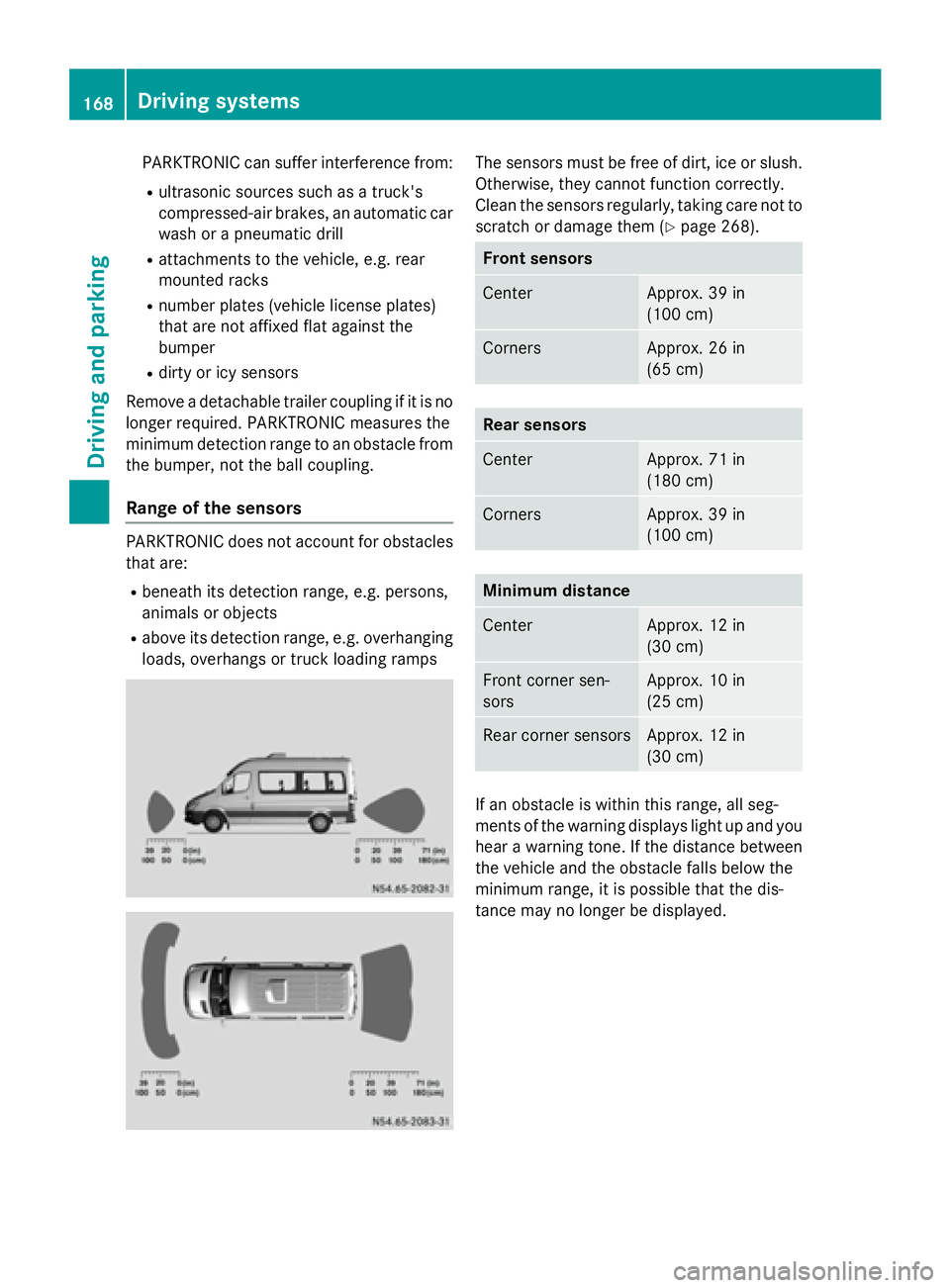
Range of the sensors PARKTRONIC does not account for obstacles
that are:
R beneath its detection range, e.g. persons,
animals or objects
R above its detection range, e.g. overhanging
loads, overhangs or truck loading ramps The sensors must be free of dirt, ice or slush.
Otherwise, they cannot function correctly.
Clean the sensors regularly, taking care not to
scratch or damage them (Y page 268). Front sensors
Center Approx. 39 in
(100 cm)
Corners Approx. 26 in
(65 cm)
Rear sensors
Center Approx. 71 in
(180 cm)
Corners Approx. 39 in
(100 cm)
Minimum distance
Center Approx. 12 in
(30 cm)
Front corner sen-
sors Approx. 10 in
(25 cm)
Rear corner sensors Approx. 12 in
(30 cm)
If an obstacle is within this range, all seg-
ments of the warning displays light up and you
hear a warning tone. If the distance between the vehicle and the obstacle falls below the
minimum range, it is possible that the dis-
tance may no longer be displayed. 168
Driving systemsDriving and parking
Page 174 of 334
The camera is in the middle of the roof above
the high-mounted brake lamp (Y page 269).
The rear view camera may show obstacles in perspectival distortion, incorrectly or not at
all. The rear view camera cannot display all
objects located very near and/or under the
rear bumper. It does not warn you of a colli-
sion, persons or objects.
The area behind the vehicle is displayed in a
mirrored fashion, as in the rear-view mirror or
the exterior mirrors.
The function of the rear view camera may be
partially or completely impaired in the follow-
ing circumstances:
R it is raining very heavily or snowing, or it is
foggy.
R the parking space is located in a very dark
place.
R the camera is exposed to very strong white
light. White stripes may appear on the dis-
play.
R the surrounding area is illuminated with flu-
orescent light. The display may flicker.
R if the temperature changes very quickly, for
example if you drive into a heated garage in the winter.
R ambient temperatures are very high.
R the camera lens is dirty or obstructed.
R the rear of the vehicle is damaged. In this
case, have the position and setting
checked at a specialist workshop.
The rear view camera is activated when you
engage reverse gear R.
You can find information on cleaning the cam-
era in the "Maintenance and care" section
(Y page 269). Working mode
ADR (working speed governor)
General notes When activated, ADR automatically increases
the engine speed to a preset speed or a speed
you have set.
i After a cold start, the idling speed of the
engine is increased automatically. If the
preset working speed is lower than the
increased idling speed, the working speed
is only reached once the engine has com-
pleted the warm-up phase.
It is only possible to activate ADR with the
vehicle stationary and the parking brake
applied.
The selector lever of the automatic trans-
mission must be in position P.
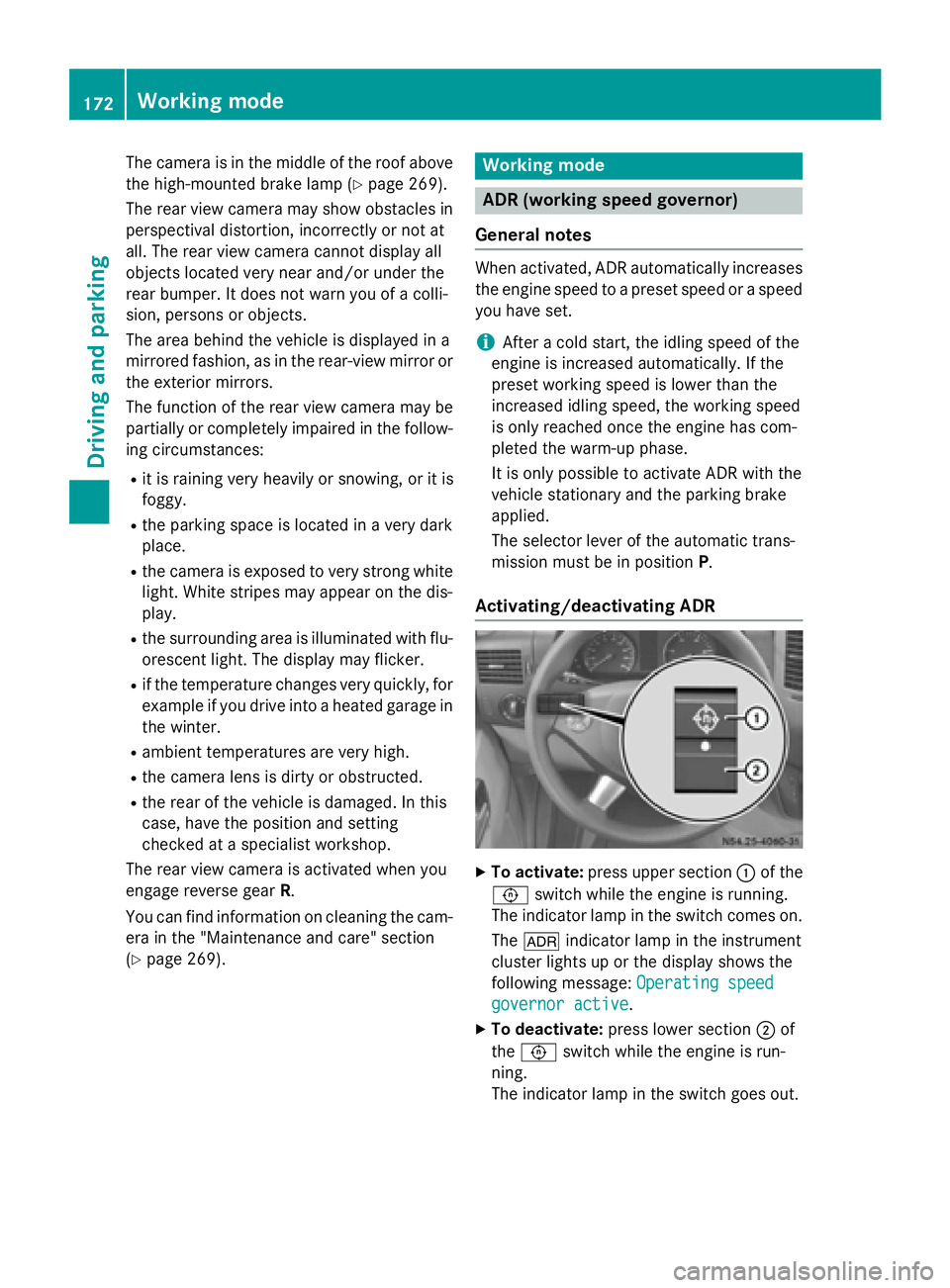
Activating/deactivating ADR X
To activate: press upper section 0043of the
0091 switch while the engine is running.
The indicator lamp in the switch comes on.
The 004E indicator lamp in the instrument
cluster lights up or the display shows the
following message: Operating speed Operating speed
governor active
governor active.
X To deactivate: press lower section 0044of
the 0091 switch while the engine is run-
ning.
The indicator lamp in the switch goes out. 172
Working modeDriving and parking
Page 175 of 334
ADR is automatically deactivated if:
R you release the parking brake.
R the brake pedal is depressed.
R the vehicle moves.
R the control unit detects a malfunction.
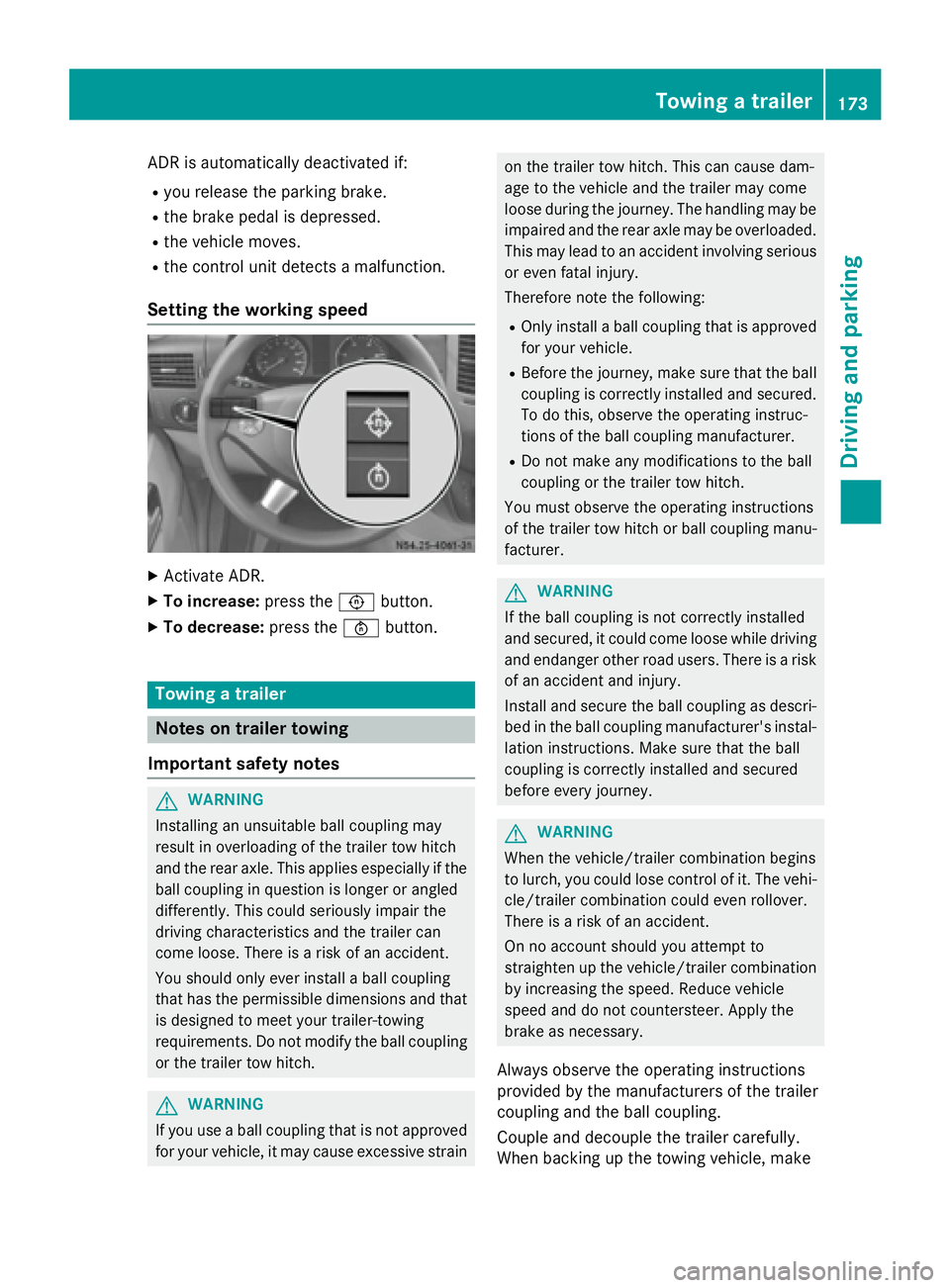
Setting the working speed X
Activate ADR.
X To increase: press the0091button.
X To decrease: press the0092button. Towing a trailer
Notes on trailer towing
Important safety notes G
WARNING
Installing an unsuitable ball coupling may
result in overloading of the trailer tow hitch
and the rear axle. This applies especially if the ball coupling in question is longer or angled
differently. This could seriously impair the
driving characteristics and the trailer can
come loose. There is a risk of an accident.
You should only ever install a ball coupling
that has the permissible dimensions and that
is designed to meet your trailer-towing
requirements. Do not modify the ball coupling
or the trailer tow hitch. G
WARNING
If you use a ball coupling that is not approved for your vehicle, it may cause excessive strain on the trailer tow hitch. This can cause dam-
age to the vehicle and the trailer may come
loose during the journey. The handling may be
impaired and the rear axle may be overloaded.
This may lead to an accident involving serious
or even fatal injury.
Therefore note the following:
R Only install a ball coupling that is approved
for your vehicle.
R Before the journey, make sure that the ball
coupling is correctly installed and secured.
To do this, observe the operating instruc-
tions of the ball coupling manufacturer.
R Do not make any modifications to the ball
coupling or the trailer tow hitch.
You must observe the operating instructions
of the trailer tow hitch or ball coupling manu-
facturer. G
WARNING
If the ball coupling is not correctly installed
and secured, it could come loose while driving and endanger other road users. There is a risk
of an accident and injury.
Install and secure the ball coupling as descri-
bed in the ball coupling manufacturer's instal- lation instructions. Make sure that the ball
coupling is correctly installed and secured
before every journey. G
WARNING
When the vehicle/trailer combination begins
to lurch, you could lose control of it. The vehi- cle/trailer combination could even rollover.
There is a risk of an accident.
On no account should you attempt to
straighten up the vehicle/trailer combination
by increasing the speed. Reduce vehicle
speed and do not countersteer. Apply the
brake as necessary.
Always observe the operating instructions
provided by the manufacturers of the trailer
coupling and the ball coupling.
Couple and decouple the trailer carefully.
When backing up the towing vehicle, make Towing a trailer
173Driving and parking Z
Page 177 of 334
is case, use a trailer with a height-adjusta-
ble trailer drawbar.
Driving tips The maximum permissible speed for vehicle/
trailer combination depends on the type of
trailer. Before setting off, check the vehicle
documents of the your trailer to find out the
permissible maximum speed. Observe the
legally prescribed maximum speed for vehi-
cle/trailer combinations in the relevant coun-
try, state or Canadian province.
When towing a trailer, your vehicle's handling
characteristics will be different in comparison to when driving without a trailer and it will
consume more fuel.
On long, steep downhill slopes you must
select shift range 3,2or 1in good time.
i This also applies if cruise control is acti-
vated.
This enables you to utilize the engine's brak-
ing effect and you do not need to brake so
heavily to keep the correct speed, which pro-
tects the brake system and prevents the
brakes from overheating and wearing too
quickly. If you need to brake additionally, to
not depress the brake pedal constantly, but
periodically.
Driving tips If the trailer begins to swing from side to side:
X Do not accelerate.
X Do not counter-steer.
X Brake if necessary.
i You can reduce the risk of the trailer
swinging and rocking by retrofitting anti-
roll bars or trailer stability programs. More information is available from your author-
ized Sprinter Dealer.
R Maintain a greater distance than you would
when driving without towing a trailer.
R Avoid sudden braking. Apply the brakes
gently at first to allow the trailer brake to overrun. Then, increase the brake force
quickly.
R The figures for the gradient climbing capa-
bilities from a standstill refer to sea level.
When driving in mountainous areas, note
that the power output of the engine, and
with it its gradient climbing capability,
decrease with increasing altitude. Coupling up a trailer
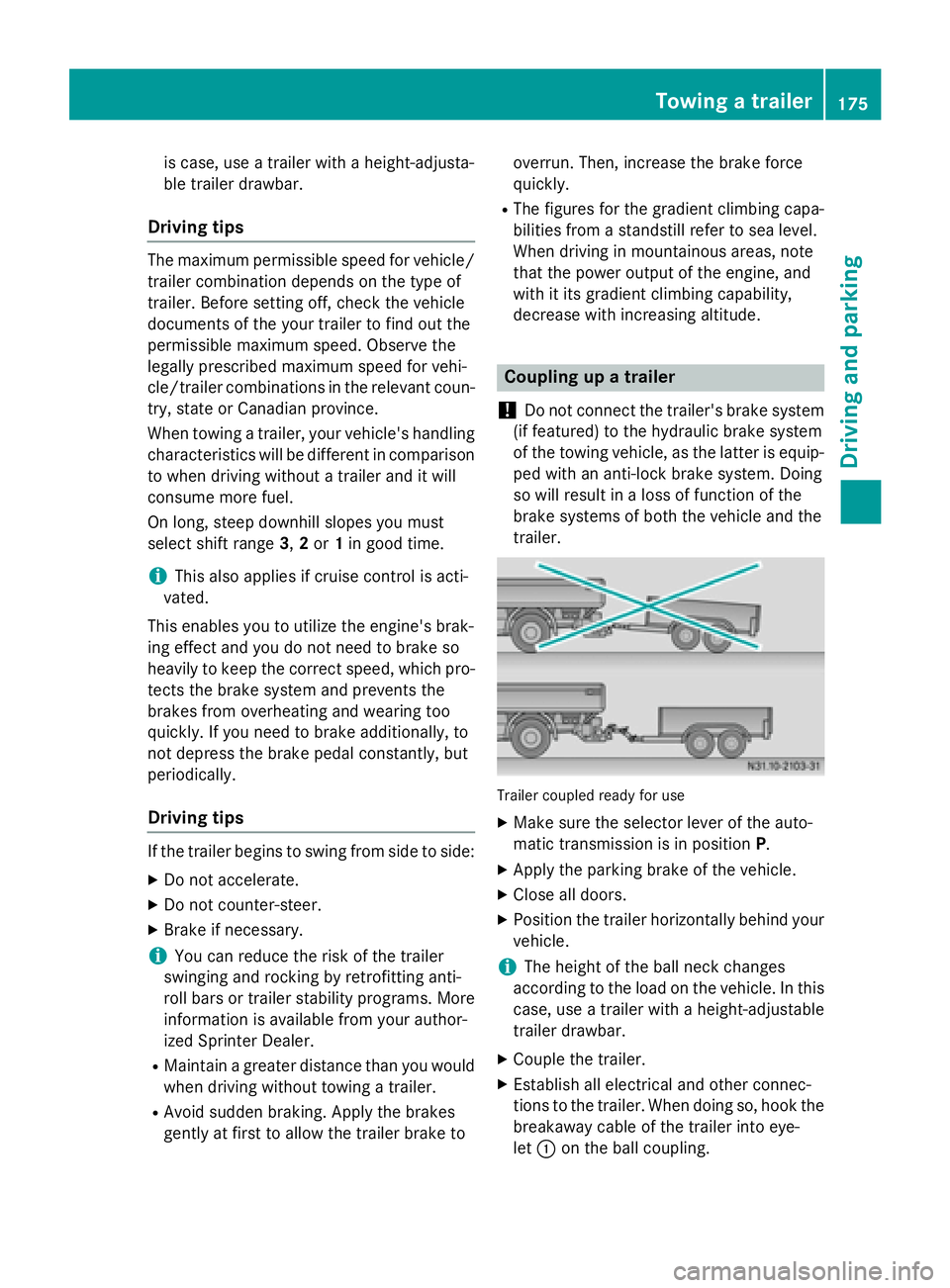
! Do not connect the trailer's brake system
(if featured) to the hydraulic brake system
of the towing vehicle, as the latter is equip- ped with an anti-lock brake system. Doing
so will result in a loss of function of the
brake systems of both the vehicle and the
trailer. Trailer coupled ready for use
X Make sure the selector lever of the auto-
matic transmission is in position P.
X Apply the parking brake of the vehicle.
X Close all doors.
X Position the trailer horizontally behind your
vehicle.
i The height of the ball neck changes
according to the load on the vehicle. In this
case, use a trailer with a height-adjustable
trailer drawbar.
X Couple the trailer.
X Establish all electrical and other connec-
tions to the trailer. When doing so, hook the
breakaway cable of the trailer into eye-
let 0043 on the ball coupling. Towing a trailer
175Driving and parking Z
Page 178 of 334
X
Remove the objects that are preventing the
trailer from rolling, e.g. wheel chocks.
X Release the trailer parking brake.
i The subharness of the vehicle has a cable
connection to the brake lamp indicator
lamp.
Observe the maximum permissible trailer
dimensions (width and length).
Most federal states and all Canadian provin-
ces require by law:
R safety chains between the towing vehicle
and the trailer. The chains should be cross-
wound under the trailer drawbar. They must be fastened to the vehicle's trailer cou-
pling, not to the bumper or the axle.
Leave enough slack in the chains. This
allows you to drive round tight corners.
R a separate brake system for certain types
of trailer.
R a safety switch for braked trailers. Find out
the specific requirements according to the
applicable laws.
If the trailer detaches from the towing vehi- cle, the safety switch applies the trailer's
brakes. Towing a trailer
There are numerous legal requirements con-
cerning the towing of a trailer, e.g. speed
restrictions. Make sure your vehicle/trailer
combination complies with local laws. This
not only means where you live, but also any-
where you are driving to. Information is avail-
able from the police and local authorities.
Observe the following when towing a trailer:
R Practice driving around bends, stopping
and backing up at a place where there is no
traffic. This enables you to gain experience and get used to the new handling charac-
teristics.
R Before driving, check:
- that the trailer tow hitch and ball cou-
pling are secure
- that the safety switch for a braked trailer
is functioning properly
- that the safety chains are secure and not
damaged
- that the electrical connections are
secure
- that the lights are working
- that the wheels are in good order and the
tire pressure is correct
R Adjust the exterior mirrors to provide an
unobstructed view of the rear section of the
trailer.
R If the trailer has electronically controlled
brakes, pull the vehicle/trailer combina-
tion away carefully. Brake manually using
the brake controller and check that the
brakes are working.
R Secure the load on the trailer according to
the applicable specifications and current
standards on securing loads (Y page 242).
R When driving with a trailer, check at regular
intervals that the load is secured and that
the brakes and lights are working.
R Bear in mind that the handling will be less
stable when towing a trailer than when driv-
ing without one. Avoid sudden steering
movements.
R The vehicle/trailer combination is heavier,
accelerates more slowly and has a
decreased gradient climbing capability and
a longer braking distance.
It is more susceptible to crosswinds and
requires cautious steering.
R If possible, do not brake suddenly, but
rather moderately at first so that the trailer
can activate its brakes. Then increase the
force on the brake pedal.
R If the automatic transmission repeatedly
shifts between gears when driving on 176
Towing a trailerDriving and pa
rking
Page 179 of 334
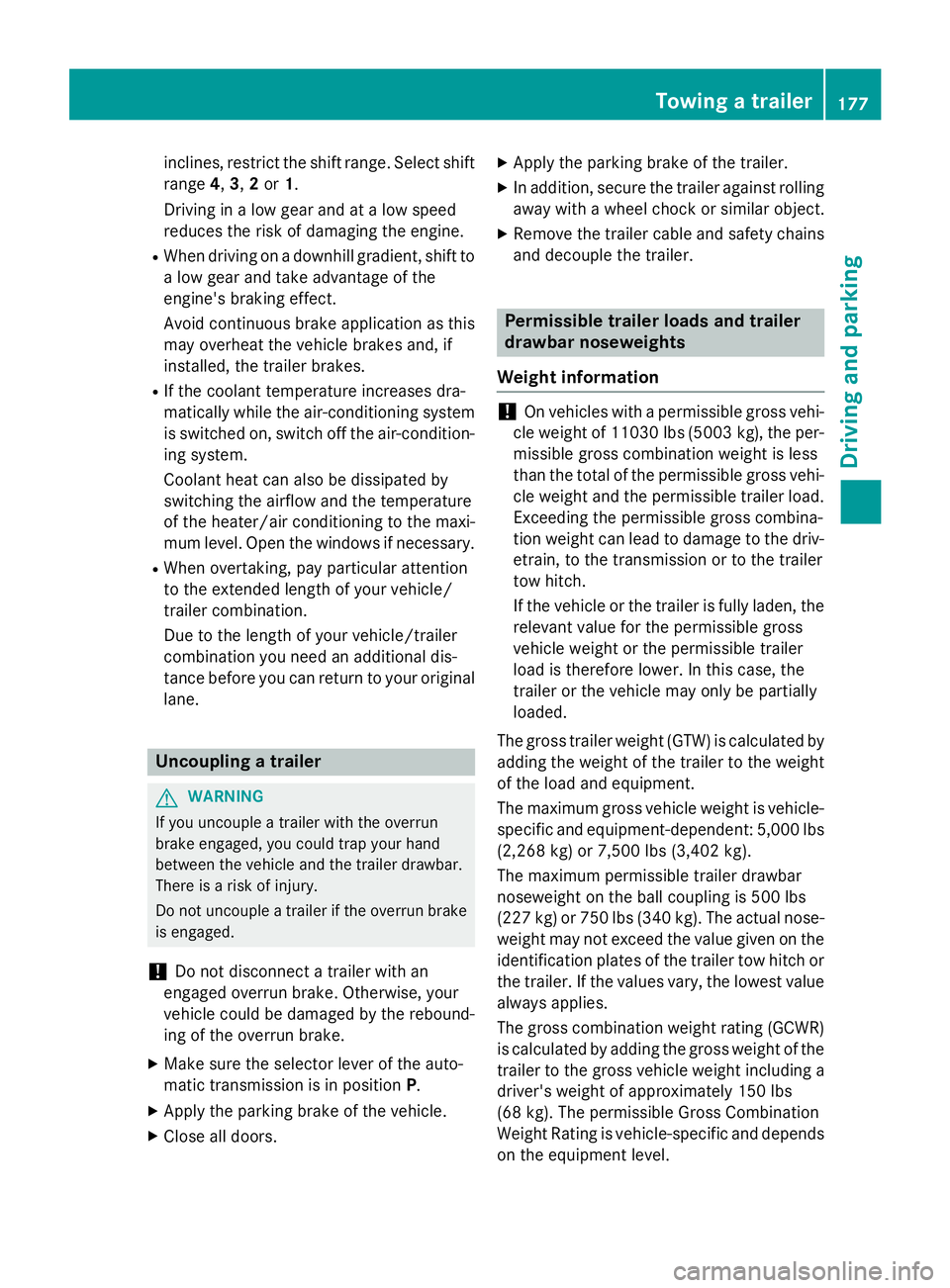
inclines, restrict the shift range. Select shift
range 4,3, 2or 1.
Driving in a low gear and at a low speed
reduces the risk of damaging the engine.
R When driving on a downhill gradient, shift to
a low gear and take advantage of the
engine's braking effect.
Avoid continuous brake application as this
may overheat the vehicle brakes and, if
installed, the trailer brakes.
R If the coolant temperature increases dra-
matically while the air-conditioning system
is switched on, switch off the air-condition-
ing system.
Coolant heat can also be dissipated by
switching the airflow and the temperature
of the heater/air conditioning to the maxi-
mum level. Open the windows if necessary.
R When overtaking, pay particular attention
to the extended length of your vehicle/
trailer combination.
Due to the length of your vehicle/trailer
combination you need an additional dis-
tance before you can return to your original
lane. Uncoupling a trailer
G
WARNING
If you uncouple a trailer with the overrun
brake engaged, you could trap your hand
between the vehicle and the trailer drawbar.
There is a risk of injury.
Do not uncouple a trailer if the overrun brake is engaged.
! Do not disconnect a trailer with an
engaged overrun brake. Otherwise, your
vehicle could be damaged by the rebound- ing of the overrun brake.
X Make sure the selector lever of the auto-
matic transmission is in position P.
X Apply the parking brake of the vehicle.
X Close all doors. X
Apply the parking brake of the trailer.
X In addition, secure the trailer against rolling
away with a wheel chock or similar object.
X Remove the trailer cable and safety chains
and decouple the trailer. Permissible trailer loads and trailer
drawbar noseweights
Weight information !
On vehicles with a permissible gross vehi-
cle weight of 11030 lbs (5003 kg), the per- missible gross combination weight is less
than the total of the permissible gross vehi-
cle weight and the permissible trailer load.
Exceeding the permissible gross combina-
tion weight can lead to damage to the driv-
etrain, to the transmission or to the trailer
tow hitch.
If the vehicle or the trailer is fully laden, the relevant value for the permissible gross
vehicle weight or the permissible trailer
load is therefore lower. In this case, the
trailer or the vehicle may only be partially
loaded.
The gross trailer weight (GTW) is calculated by adding the weight of the trailer to the weight
of the load and equipment.
The maximum gross vehicle weight is vehicle-specific and equipment-dependent: 5,000 lbs
(2,268 kg) or 7,500 lbs (3,402 kg).
The maximum perm issible trailer drawbar
noseweight on the ball coupling is 500 lbs
(227 kg) or 750 lbs (340 kg). Theactual nose-
weight may not exceed the value given on the
identification plates of the trailer tow hitch or
the trailer. If the values vary, the lowest value always applies.
The gross combination weight rating (GCWR)is calculated by adding the gross weight of the
trailer to the gross vehicle weight including a
driver's weight of approximately 150 lbs
(68 kg). The permissible Gross Combination
Weight Rating is vehicle-specific and depends
on the equipment level. Towing a trailer
177Driving and parking Z
Page 209 of 334
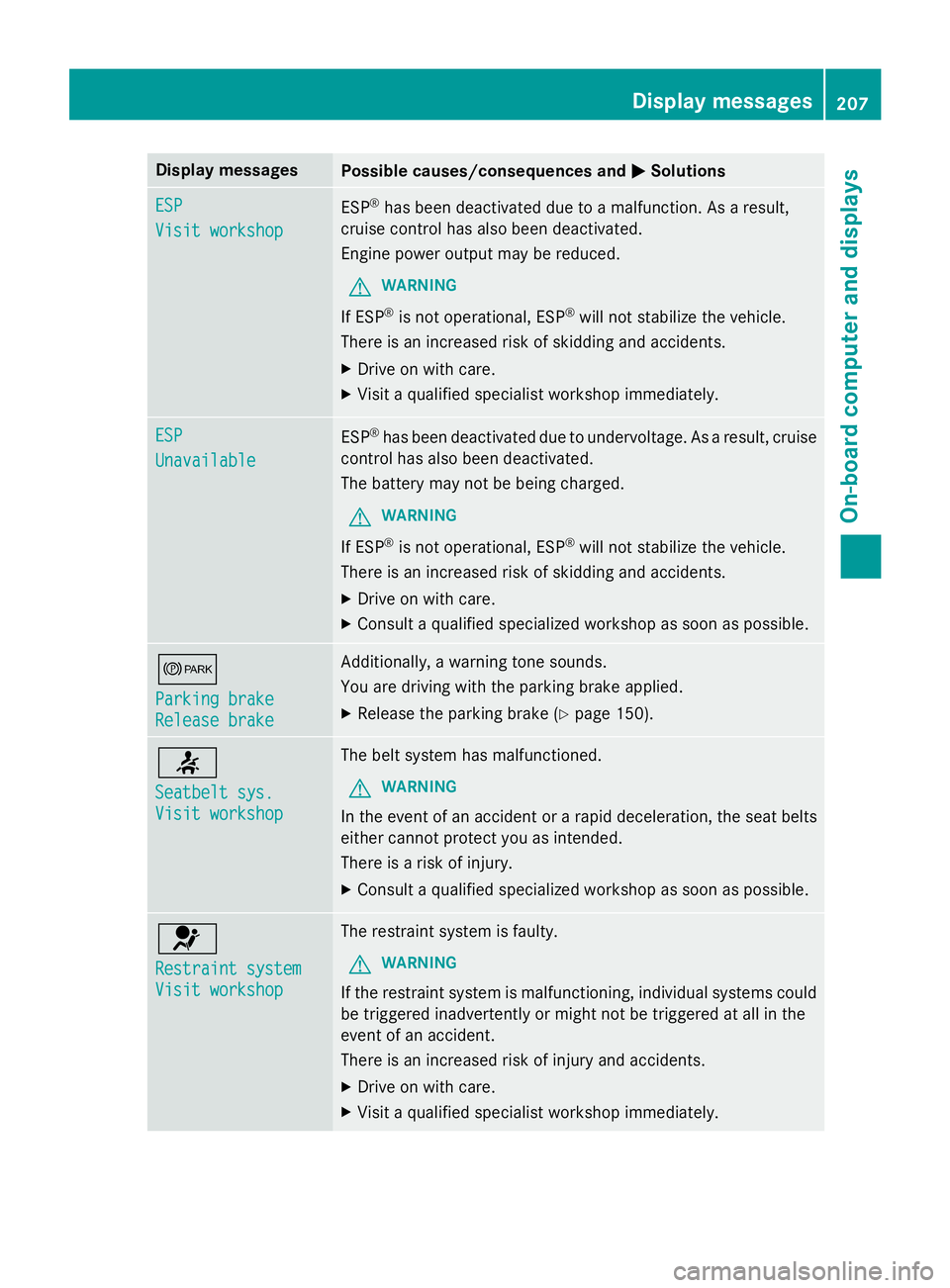
Display messages
Possible causes/consequences and
0050
0050Solutions ESP
ESP
Visit workshop Visit workshop
ESP
®
has been deactivated due to a malfunction. As a result,
cruise control has also been deactivated.
Engine power output may be reduced.
G WARNING
If ESP ®
is not operational, ESP ®
will not stabilize the vehicle.
There is an increased risk of skidding and accidents.
X Drive on with care.
X Visit a qualified specialist workshop immediately. ESP ESP
Unavailable Unavailable
ESP
®
has been deactivated due to undervoltage. As a result, cruise
control has also been deactivated.
The battery may not be being charged.
G WARNING
If ESP ®
is not operational, ESP ®
will not stabilize the vehicle.
There is an increased risk of skidding and accidents.
X Drive on with care.
X Consult a qualified specialized workshop as soon as possible. 0066
Parking brake Parking brake
Release brake Release brake Additionally, a warning tone sounds.
You are driving with the parking brake applied.
X Release the parking brake (Y page 150).0076
Seatbelt sys. Seatbelt sys.
Visit workshop Visit workshop The belt system has malfunctioned.
G WARNING
In the event of an accident or a rapid deceleration, the seat belts
either cannot protect you as intended.
There is a risk of injury.
X Consult a qualified specialized workshop as soon as possible. 0075
Restraint system Restraint system
Visit workshop Visit workshop The restraint system is faulty.
G WARNING
If the restraint system is malfunctioning, individual systems could
be triggered inadvertently or might not be triggered at all in the
event of an accident.
There is an increased risk of injury and accidents.
X Drive on with care.
X Visit a qualified specialist workshop immediately. Display
messages
207On-board computer and displays Z