rear view mirror MERCEDES-BENZ SPRINTER 2015 MY15 Operator’s Manual
[x] Cancel search | Manufacturer: MERCEDES-BENZ, Model Year: 2015, Model line: SPRINTER, Model: MERCEDES-BENZ SPRINTER 2015Pages: 334, PDF Size: 5.94 MB
Page 9 of 334
Interior lighting .............................. 105
License plate lamp .........................1
03
License plate lamp (Chassis Cab) .. 104
Low-beam headlamps .................... 100
Overview of lamp types (front
bulbs) ............................................. 100
Overview of lamp types (rear
bulbs, Cargo Van/Passenger
Van) ............................................... 102
Overview of lamp types (rear
bulbs, Chassis Cab) ....................... 104
Parking lamps ................................ 100
Perimeter lamp ..................... .104, 105
Rear fog lamp ................................ 103
Rear fog lamp (Chassis Cab) .......... 104
Rear interior light ........................... 106
Standing lamps (rear, Chassis
Cab) ............................................... 104
Standing lamps (rear) .................... 103
Tail lamps ...................................... 103
Tail lamps (Chassis Cab) ................ 104
Turn signals (front) ......................... 102
Turn signals (rear, Chassis Cab) ..... 104
Turn signals (rear) .......................... 103
Warning and indicator lamps ......... 227
see Replacing bulbs
Changing bulbs
see Replacing bulbs
Checklist
Before driving off-road ................... 157
Child seat
Forward-facing restraint system ...... 55
LATCH-type (ISOFIX) child seat
anchors ............................................ 53
On the front-passenger sea t............ 55
Rearward-facing restraint system .... 55
Top Tether ....................................... 54
Child-proof locks
Important safety notes .................... 55
Rear door ......................................... 56
Sliding door ..................................... 56
Children
In the vehicle ................................... 51
Restraint systems ............................ 52
Special seat belt retractor ............... 52
Chock ................................................. 151
Cigarette lighter ................................ 235 Cleaning
Mirror turn signal ........................... 268
Trailer tow hitch ............................. 270
Climate control
Air-conditioning system ................. 114
Auxiliary heating ............................ 122
Checking/cleaning the air filter
(rear-compartment air condition-
ing) ................................................ 256
Cooling with air dehumidification .. 117
Defrosting the windows ................. 118
Heating .......................................... 113
Important safety notes .................. 112
Operating the cargo compartment
air vents ......................................... 133
Overview of systems ...................... 112
Problem with the rear window
defroster ........................................ 119
Problems with the windshield
heating .......................................... 119
Rear-compartment air condition-
ing ................................................. 116
Rear-compartment heating ............ 115
Reheat function (air dehumidifica- tion) ............................................... 118
Setting the air distribution ............. 117
Setting the air vents ...................... 120
Setting the airflow ......................... 118
Setting the temperature ................ 117
Switching air-recirculation mode
on/of f............................................ 120
Switching on/of f........................... 116
Switching the rear window
defroster on/of f............................ 119
Switching windshield heating on/
off .................................................. 119
Cockpit
Overview .......................................... 32
see Instrument cluster
COLLISION PREVENTION ASSIST
Activating/deactivating the dis-
tance warning function .................. 162
COMAND display
Cleaning ......................................... 270
Combination switch ............................ 94
Communications equipment
Operation ....................................... 237
PND fittings ................................... 237 Index
7
Page 15 of 334
Light switch .....................................92
Low-beam headlamps
...................... 92
Parking lamps .................................. 92
Rear fog lamp .................................. 93
Setting the exterior lighting
delayed switch-off (vehicles with
steering wheel buttons) ................. 193
Switching the daytime running
lamps on/off (switch) ...................... 92
Turn signals ..................................... 94
see Changing a bulb
see Interior lighting
Limited Warranty ................................ 22
Load distribution ............................... 242
Load securing aids
Carrier systems ............................. 245
Loading guidelines
Important safety notes .................. 240
Loading rails
Installing cargo tie-down rings ....... 244
Maximum tensile strength ............. 328
Loads
Securing ........................................ 242
Transporting .................................. 240
Locator lighting
Setting (vehicles with steering
wheel buttons) ............................... 193
Locking
see Central locking
Locking and unlocking manually ....... 71
Locking centrally
see Central locking
Low-beam headlamps
Display message ............................ 208
Driving abroad ............................... 153
Replacing bulb s............................. 100
Switching on/of f.............................. 92
Lumbar support ................................... 83 M
M+S tires ............................................ 286
Maintenance ...................................... 256
Malfunctions
Message memory (on-board com-
puter) ............................................. 198
Maximum speed
Speed limitation ............................. 153 Menu (vehicles with steering
wheel buttons)
Audio ............................................. 187
Operation ....................................... 186
Setting s......................................... 188
Telephone ...................................... 196
Message
see Display message
Message memory (on-board com-
puter) .................................................. 198
Mirrors
Exterior mirrors ................................ 89
Rear-view mirror .............................. 89
Mobile navigation devices ................ 237
Mobile phone ..................................... 237
Important safety notes .................. 236
Pre-installation ............................... 237
Type approval/frequency .............. 316
Mounting wheels
Lowering the vehicle ...................... 310
Mounting a new whee l................... 309
Preparing the vehicle ..................... 306
Raising the vehicl e......................... 307
Removing a whee l.......................... 309
Removing and mounting the spare
wheel ............................................. 313
Securing the vehicle against roll-
ing away ........................................ 306 N
Navigation Fittings for PND mobile navigation
devices .......................................... 237
Notes on breaking-in a new vehi-
cle ....................................................... 136 O
Occupant safety Children in the vehicle ..................... 51
Important safety notes .................... 42
Pets in the vehicle ........................... 56
Odometer
Display (vehicles with steering
wheel buttons) ............................... 187
Display (vehicles without steering wheel buttons) ............................... 182 Index
13
Page 17 of 334
Perimeter lamp
Replacing bulbs ............................. 104
Pets in the vehicle ...............................56
Plastic trim (cleaning instruc-
tions) .................................................. 270
Power supply
Battery isolating switch ................. 137
Switching off ..................................1 37
Switching on .................................. 137
Power take-off
Engine speed setting ..................... 172
Power washers .................................. 266
Power windows
see Side windows
Preparing for a journey
Checks in the vehicle ..................... 138
Visual check of the vehicle exte-
rior ................................................. 138
Protection of the environment
General notes .................................. 23
Pulling away ...................................... 140 Q
Qualified specialist workshop ........... 25R
Radiator cover ..................................... 27
Radio
Changing stations (vehicles with
steering wheel buttons) ................. 187
see separate operating instructions
Radio-wave reception/transmis-
sion in the vehicle
Declaration of conformity ................ 24
Rain and light sensor
Setting the sensitivity (vehicles
with steering wheel buttons) ......... 193
Windshield wiper ........................... 107
Range (vehicles with steering
wheel buttons) .................................. 195
Rear bench seat
Installing/removing (Passenger
Van) ................................................. 85
Stowage compartment (crewcab) .. 233 Rear compartment
Activating/deactivating climate
control .......................................... .116
Setting the air vents ..................... .121
Rear door
Child-proof locks .............................. 56
Important safety notes .................... 75
Opening/closing .............................. 75
Rear fog lamp
Replacing bulbs ............................ .103
Switching on/off .............................. 93
Rear fog lamp (Chassis Cab)
Replacing bulbs ............................ .104
Rear interior light
Replacing bulbs ............................ .106
Rear lamps
see Lights
Rear rack
Notes ............................................. 245
Rear view camera
Cleaning instructions ..................... 269
Important safety notes .................. 171
Switching on .................................. 171
Rear window defroster
Problem (malfunction) ................... 119
Switching on/off ........................... 119
Rear window wiper ........................... 108
Switching on/off ........................... 108
Rear-compartment air-condition-
ing system
see Climate control
Rear-compartment heating
see Climate control
Rear-view mirror
Anti-glare mode ............................... 89
Refilling
DEF filler neck ............................... 148
Important safety notes (Diesel
Exhaust Fluid – DEF) ..................... .147
Refilling procedure (Diesel
Exhaust Fluid – DEF) ..................... .148
Refrigerant ......................................... 326
Refueling
Fuel filler fla p................................. 146
Fuel gauge ..................................... 181
Important safety notes (fuel )......... 145
Refueling procedure (fuel )............. 146
see Fuel Index
15
Page 34 of 334
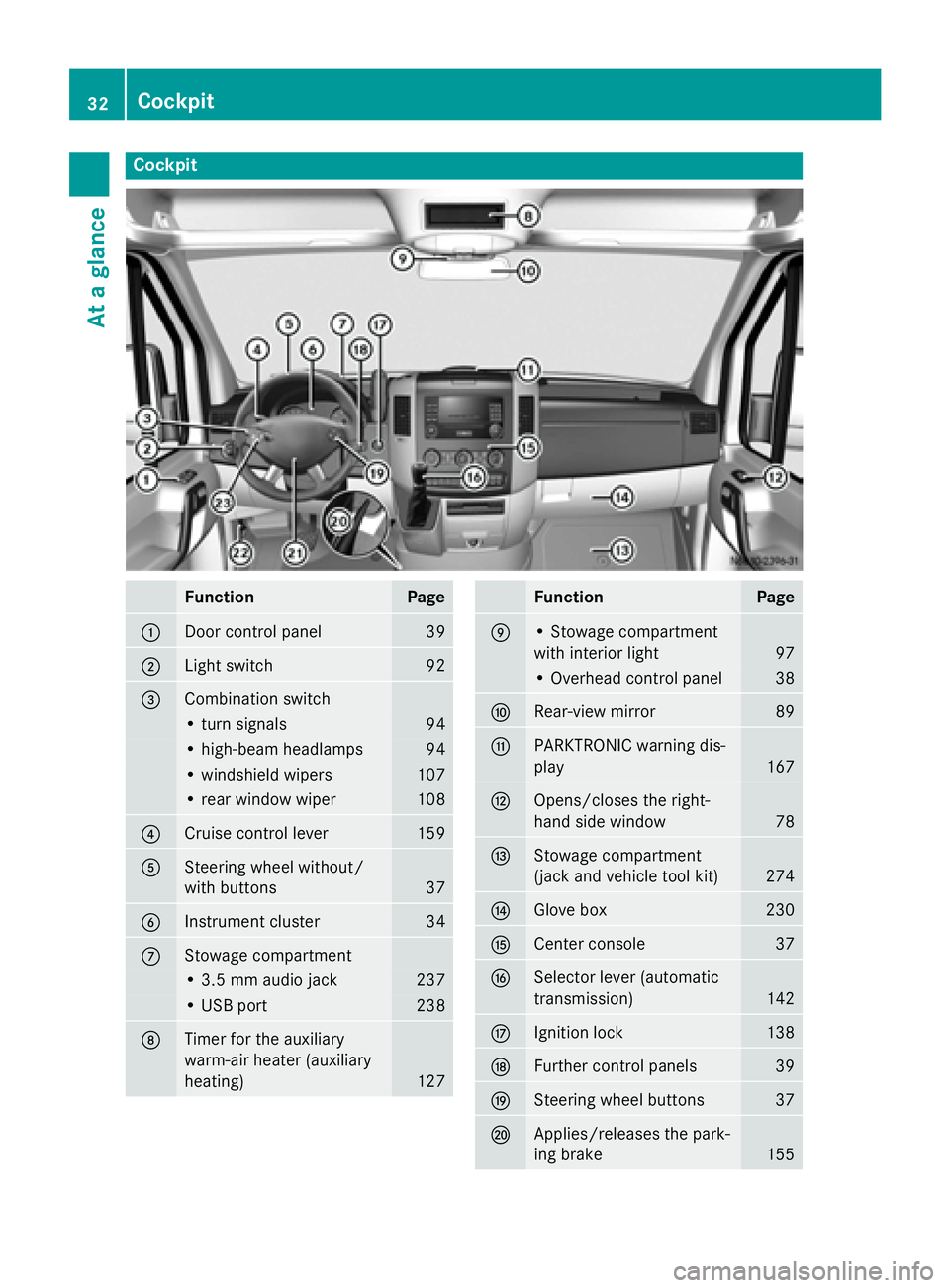
Cockpit
Function Page
0043
Door control panel 39
0044
Light switch 92
0087
Combination switch
• turn signals 94
• high-beam headlamps 94
• windshield wipers 107
• rear window wiper 108
0085
Cruise control lever 159
0083
Steering wheel without/
with buttons
37
0084
Instrument cluster 34
006B
Stowage compartment
• 3.5 mm audio jack 237
• USB port 238
006C
Timer for the auxiliary
warm-air heater (auxiliary
heating)
127 Function Page
006D
• Stowage compartment
with interior light
97
• Overhead control panel 38
006E
Rear-view mirror 89
006F
PARKTRONIC warning dis-
play
167
0070
Opens/closes the right-
hand side window
78
0071
Stowage compartment
(jack and vehicle tool kit)
274
0072
Glove box 230
0073
Center console 37
0074
Selector lever (automatic
transmission)
142
0075
Ignition lock 138
0076
Further control panels 39
0077
Steering wheel buttons 37
0078
Applies/releases the park-
ing brake
15532
CockpitAt a glance
Page 64 of 334
Tow-away alarm
Operation A visual and audible alarm is triggered if the
inclination of the vehicle changes when the
tow-away alarm is armed. This can be the
case if the vehicle is raised on one side, for
example.
Arming/disarming The tow-away alarm is automatically armed
approximately 20 second
s after you lock the
vehicle.
The tow-away alarm is automatically deacti-
vated when you unlock the vehicle.
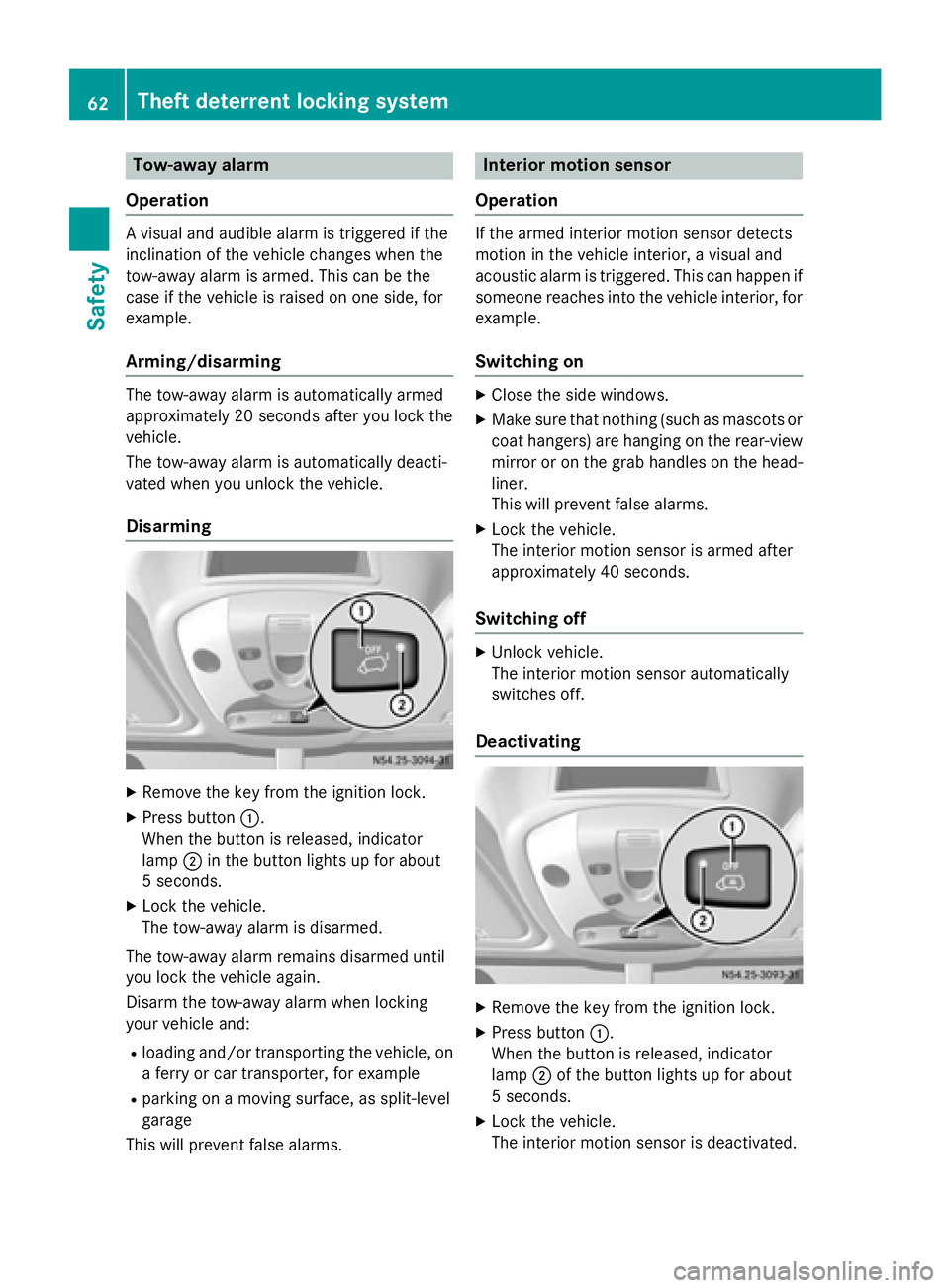
Disarming X
Remove the key from the ignition lock.
X Press button 0043.
When the button is released, indicator
lamp 0044in the button lights up for about
5 second s.
X Lock the vehicle.
The tow-away alarm is disarmed.
The tow-away alarm remains disarmed until
you lock the vehicle again.
Disarm the tow-away alarm when locking
your vehicle and: R loading and/or transporting the vehicle, on
a ferry or car transporter, for example
R parking on a moving surface, as split-level
garage
This will prevent false alarms. Interior motion sensor
Operation If the armed interior motion sensor detects
motion in the vehicle interior, a visual and
acoustic alarm is triggered. This can happen if
someone reaches into the vehicle interior, for example.
Switching on X
Close the side windows.
X Make sure that nothing (such as mascots or
coat hangers) are hanging on the rear-view
mirror or on the grab handles on the head- liner.
This will prevent false alarms.
X Lock the vehicle.
The interior motion sensor is armed after
approximately 40 seconds.
Switching off X
Unlock vehicle.
The interior motion sensor automatically
switches off.
Deactivating X
Remove the key from the ignition lock.
X Press button 0043.
When the button is released, indicator
lamp 0044of the button lights up for about
5 seconds.
X Lock the vehicle.
The interior motion sensor is deactivated. 62
Theft deterrent locking systemSafety
Page 91 of 334
Mirrors
Rear-view mirror
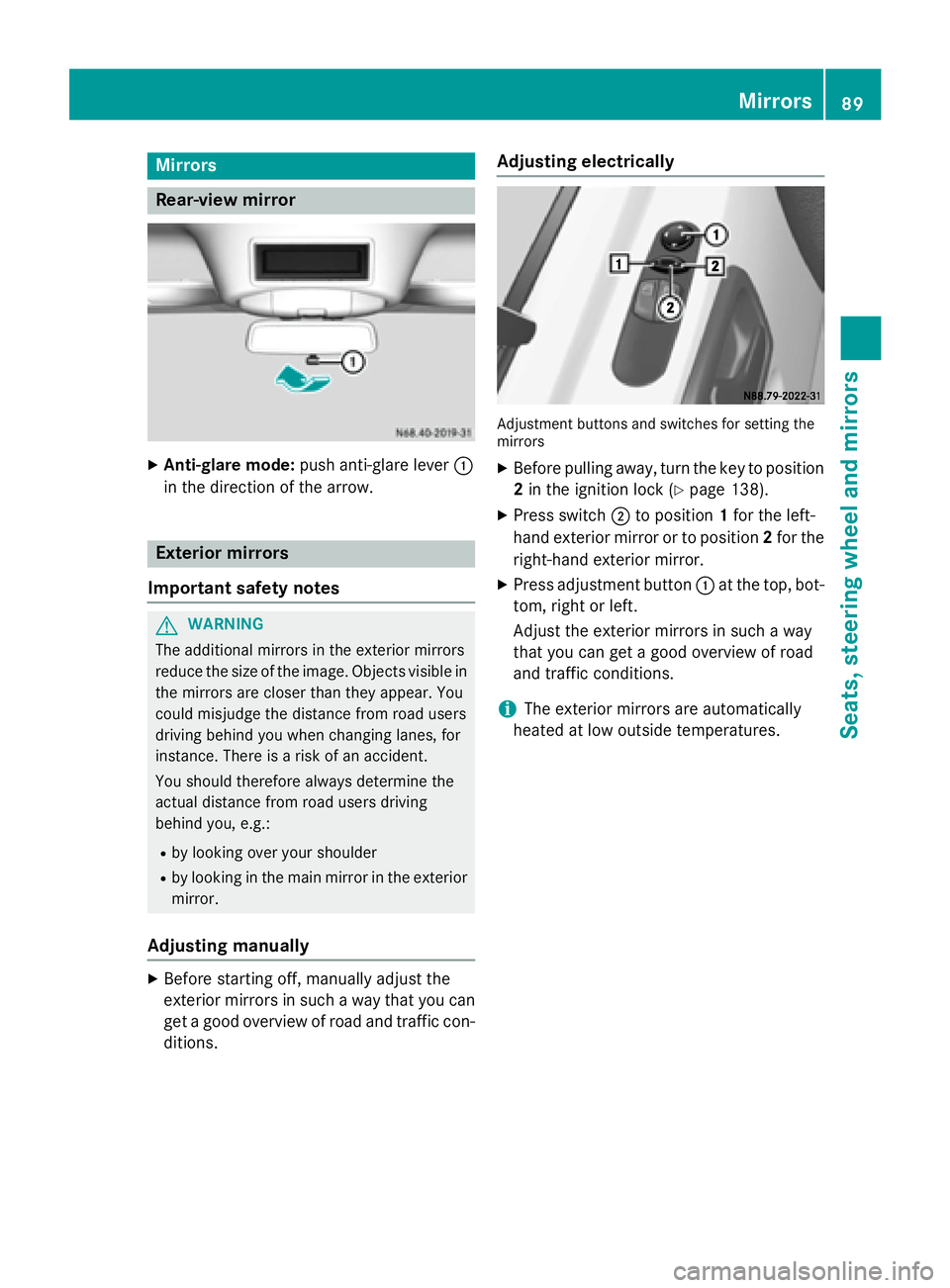
X
Anti-glare mode: push anti-glare lever 0043
in the direction of the arrow. Exterior mirrors
Important safety notes G
WARNING
The additional mirrors in the exterior mirrors
reduce the size of the image. Objects visible in the mirrors are closer than they appear. You
could misjudge the distance from road users
driving behind you when changing lanes, for
instance. There is a risk of an accident.
You should therefore always determine the
actual distance from road users driving
behind you, e.g.:
R by looking over your shoulder
R by looking in the main mirror in the exterior
mirror.
Adjusting manually X
Before starting off, manually adjust the
exterior mirrors in such a way that you can
get a good overview of road and traffic con- ditions. Adjusting electrically
Adjustment buttons and switches for setting the
mirrors
X Before pulling away, turn the key to position
2 in the ignition lock (Y page 138).
X Press switch 0044to position 1for the left-
hand exterior mirror or to position 2for the
right-hand exterior mirror.
X Press adjustment button 0043at the top, bot-
tom, right or left.
Adjust the exterior mirrors in such a way
that you can get a good overview of road
and traffic conditions.
i The exterior mirrors are automatically
heated at low outside temperatures. Mirrors
89Seats, steering wheel and mirrors Z
Page 174 of 334
The camera is in the middle of the roof above
the high-mounted brake lamp (Y page 269).
The rear view camera may show obstacles in perspectival distortion, incorrectly or not at
all. The rear view camera cannot display all
objects located very near and/or under the
rear bumper. It does not warn you of a colli-
sion, persons or objects.
The area behind the vehicle is displayed in a
mirrored fashion, as in the rear-view mirror or
the exterior mirrors.
The function of the rear view camera may be
partially or completely impaired in the follow-
ing circumstances:
R it is raining very heavily or snowing, or it is
foggy.
R the parking space is located in a very dark
place.
R the camera is exposed to very strong white
light. White stripes may appear on the dis-
play.
R the surrounding area is illuminated with flu-
orescent light. The display may flicker.
R if the temperature changes very quickly, for
example if you drive into a heated garage in the winter.
R ambient temperatures are very high.
R the camera lens is dirty or obstructed.
R the rear of the vehicle is damaged. In this
case, have the position and setting
checked at a specialist workshop.
The rear view camera is activated when you
engage reverse gear R.
You can find information on cleaning the cam-
era in the "Maintenance and care" section
(Y page 269). Working mode
ADR (working speed governor)
General notes When activated, ADR automatically increases
the engine speed to a preset speed or a speed
you have set.
i After a cold start, the idling speed of the
engine is increased automatically. If the
preset working speed is lower than the
increased idling speed, the working speed
is only reached once the engine has com-
pleted the warm-up phase.
It is only possible to activate ADR with the
vehicle stationary and the parking brake
applied.
The selector lever of the automatic trans-
mission must be in position P.
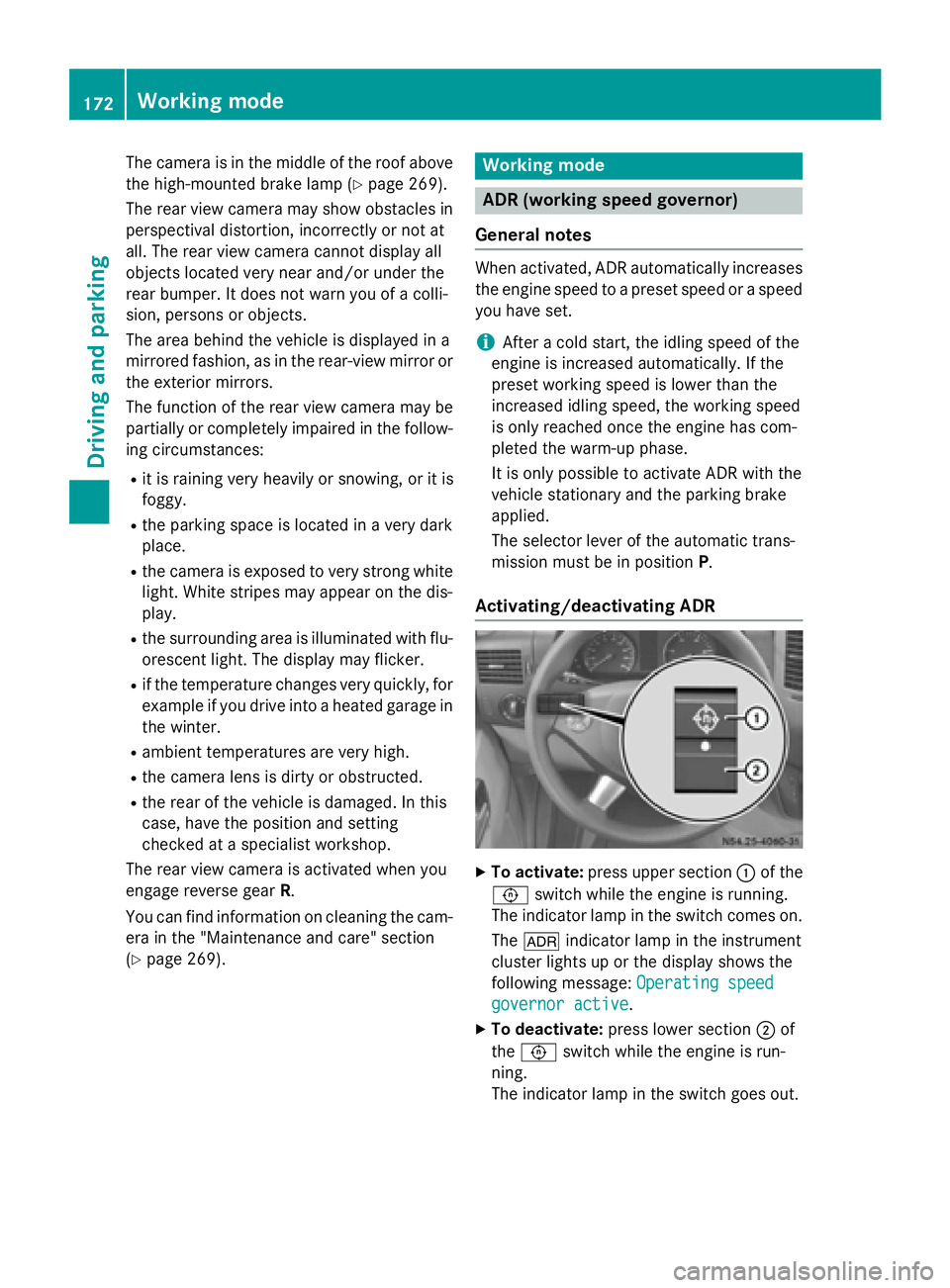
Activating/deactivating ADR X
To activate: press upper section 0043of the
0091 switch while the engine is running.
The indicator lamp in the switch comes on.
The 004E indicator lamp in the instrument
cluster lights up or the display shows the
following message: Operating speed Operating speed
governor active
governor active.
X To deactivate: press lower section 0044of
the 0091 switch while the engine is run-
ning.
The indicator lamp in the switch goes out. 172
Working modeDriving and parking
Page 178 of 334
X
Remove the objects that are preventing the
trailer from rolling, e.g. wheel chocks.
X Release the trailer parking brake.
i The subharness of the vehicle has a cable
connection to the brake lamp indicator
lamp.
Observe the maximum permissible trailer
dimensions (width and length).
Most federal states and all Canadian provin-
ces require by law:
R safety chains between the towing vehicle
and the trailer. The chains should be cross-
wound under the trailer drawbar. They must be fastened to the vehicle's trailer cou-
pling, not to the bumper or the axle.
Leave enough slack in the chains. This
allows you to drive round tight corners.
R a separate brake system for certain types
of trailer.
R a safety switch for braked trailers. Find out
the specific requirements according to the
applicable laws.
If the trailer detaches from the towing vehi- cle, the safety switch applies the trailer's
brakes. Towing a trailer
There are numerous legal requirements con-
cerning the towing of a trailer, e.g. speed
restrictions. Make sure your vehicle/trailer
combination complies with local laws. This
not only means where you live, but also any-
where you are driving to. Information is avail-
able from the police and local authorities.
Observe the following when towing a trailer:
R Practice driving around bends, stopping
and backing up at a place where there is no
traffic. This enables you to gain experience and get used to the new handling charac-
teristics.
R Before driving, check:
- that the trailer tow hitch and ball cou-
pling are secure
- that the safety switch for a braked trailer
is functioning properly
- that the safety chains are secure and not
damaged
- that the electrical connections are
secure
- that the lights are working
- that the wheels are in good order and the
tire pressure is correct
R Adjust the exterior mirrors to provide an
unobstructed view of the rear section of the
trailer.
R If the trailer has electronically controlled
brakes, pull the vehicle/trailer combina-
tion away carefully. Brake manually using
the brake controller and check that the
brakes are working.
R Secure the load on the trailer according to
the applicable specifications and current
standards on securing loads (Y page 242).
R When driving with a trailer, check at regular
intervals that the load is secured and that
the brakes and lights are working.
R Bear in mind that the handling will be less
stable when towing a trailer than when driv-
ing without one. Avoid sudden steering
movements.
R The vehicle/trailer combination is heavier,
accelerates more slowly and has a
decreased gradient climbing capability and
a longer braking distance.
It is more susceptible to crosswinds and
requires cautious steering.
R If possible, do not brake suddenly, but
rather moderately at first so that the trailer
can activate its brakes. Then increase the
force on the brake pedal.
R If the automatic transmission repeatedly
shifts between gears when driving on 176
Towing a trailerDriving and pa
rking