battery MERCEDES-BENZ SPRINTER 2015 MY15 Operator’s Manual
[x] Cancel search | Manufacturer: MERCEDES-BENZ, Model Year: 2015, Model line: SPRINTER, Model: MERCEDES-BENZ SPRINTER 2015Pages: 334, PDF Size: 5.94 MB
Page 238 of 334
In addition, flammable materials can ignite if:
R the hot cigarette lighter falls
R a child holds the hot cigarette lighter to
objects, for example
There is a risk of fire and injury.
Always hold the cigarette lighter by the knob.
Always make sure that the cigarette lighter is
out of reach of children. Never leave children unsupervised in the vehicle. X
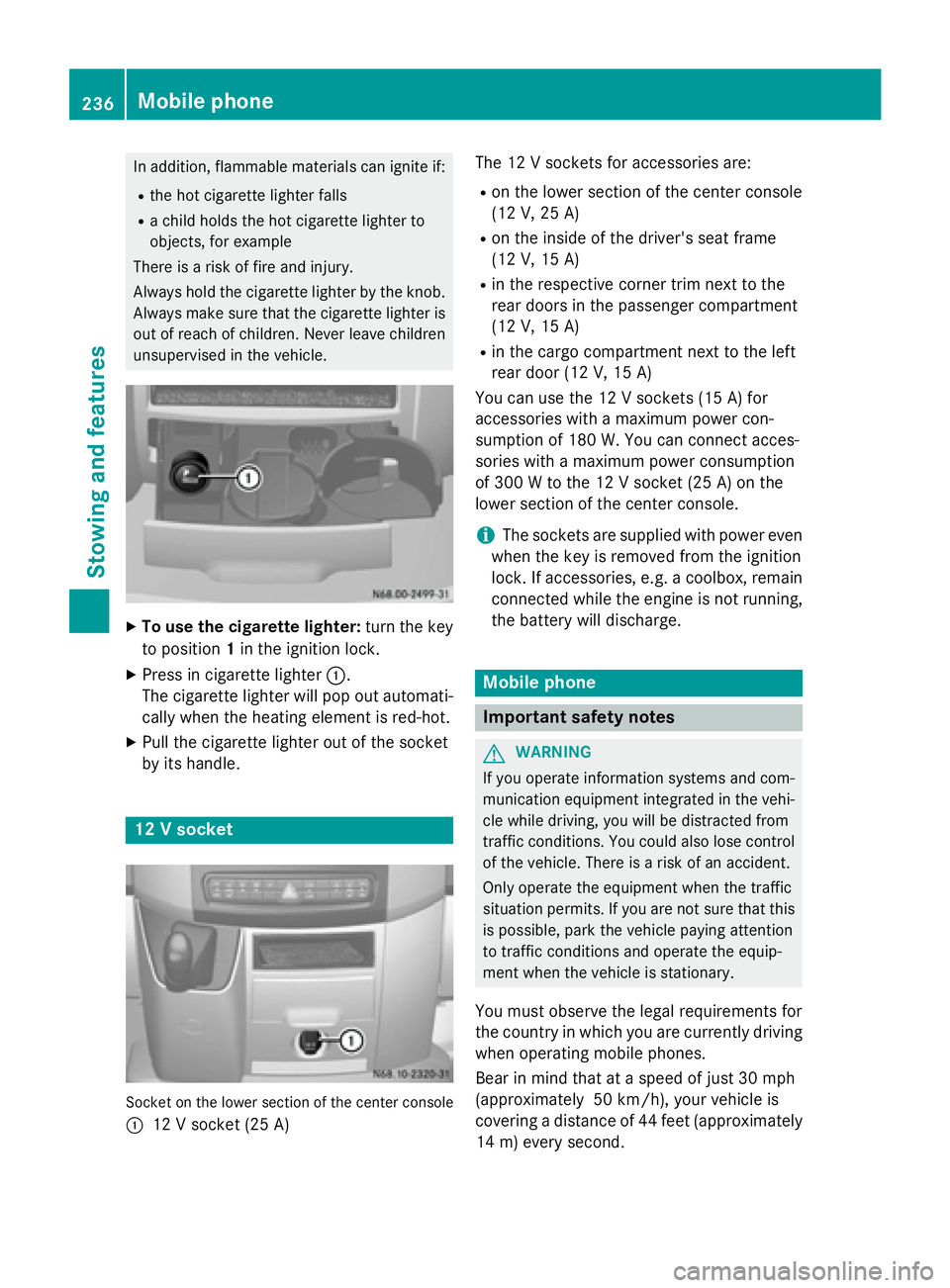
To use the cigarette lighter: turn the key
to position 1in the ignition lock.
X Press in cigarette lighter 0043.
The cigarette lighter will pop out automati- cally when the heating element is red-hot.
X Pull the cigarette lighter out of the socket
by its handle. 12 V socket
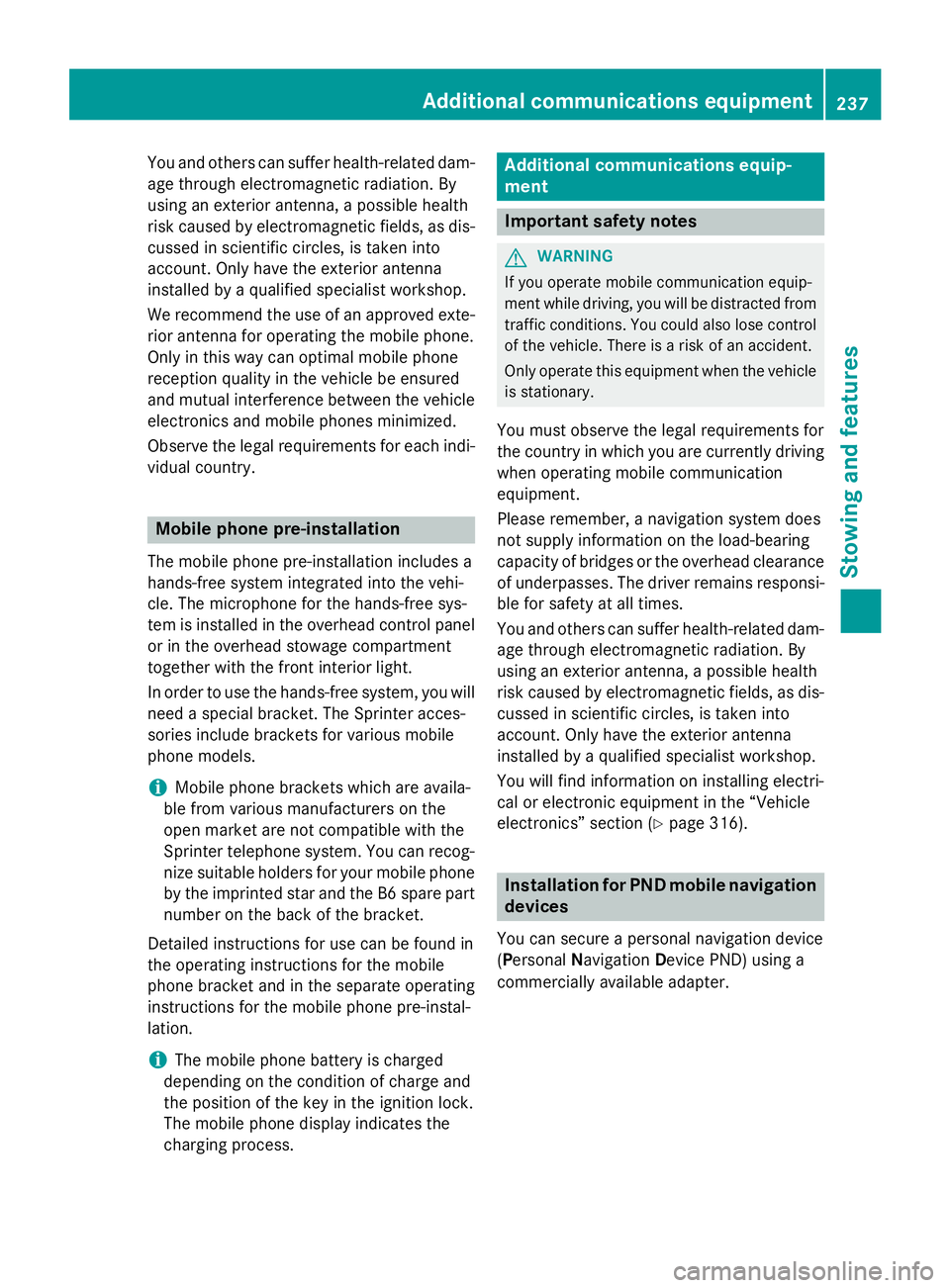
Socket on the lower section of the center console
0043 12 V socket (25 A) The 12 V sockets for accessories are:
R
on the lower section of the center console
(12 V, 25 A)
R on the inside of the driver's seat frame
(12 V, 15 A)
R in the respective corner trim next to the
rear doors in the passenger compartment
(12 V, 15 A)
R in the cargo compartment next to the left
rear door (12 V, 15 A)
You can use the 12 V sockets (15 A) for
accessories with a maximum power con-
sumption of 180 W. Youcan connect acces-
sories with a maximum power consumption
of 300 Wto the 12 V socket (25 A) on the
lower section of the center console.
i The sockets are supplied with power even
when the key is removed from the ignition
lock. If accessories, e.g. a coolbox, remain
connected while the engine is not running, the battery will discharge. Mobile phone
Important safety notes
G
WARNING
If you operate information systems and com-
munication equipment integrated in the vehi- cle while driving, you will be distracted from
traffic conditions. You could also lose control of the vehicle. There is a risk of an accident.
Only operate the equipment when the traffic
situation permits. If you are not sure that this
is possible, park the vehicle paying attention
to traffic conditions and operate the equip-
ment when the vehicle is stationary.
You must observe the legal requirements for
the country in which you are currently driving when operating mobile phones.
Bear in mind that at a speed of just 30 mph
(approximately 50 km/h), your vehicle is
covering a distance of 44 fee t(approximately
14 m) every second. 236
Mobile phoneStowing and features
Page 239 of 334
You and others can suffer health-related dam-
age through electromagnetic radiation. By
using an exterior antenna, a possible health
risk caused by electromagnetic fields, as dis-cussed in scientific circles, is taken into
account. Only have the exterior antenna
installed by a qualified specialist workshop.
We recommend the use of an approved exte-
rior antenna for operating the mobile phone.
Only in this way can optimal mobile phone
reception quality in the vehicle be ensured
and mutual interference between the vehicle
electronics and mobile phones minimized.
Observe the legal requirements for each indi- vidual country. Mobile phone pre-installation
The mobile phone pre-installation includes a
hands-free system integrated into the vehi-
cle. The microphone for the hands-free sys-
tem is installed in the overhead control panel or in the overhead stowage compartment
together with the front interior light.
In order to use the hands-free system, you will
need a special bracket. The Sprinter acces-
sories include brackets for various mobile
phone models.
i Mobile phone brackets which are availa-
ble from various manufacturers on the
open market are not compatible with the
Sprinter telephone system. You can recog- nize suitable holders for your mobile phoneby the imprinted star and the B6 spare part
number on the back of the bracket.
Detailed instructions for use can be found in
the operating instructions for the mobile
phone bracket and in the separate operating
instructions for the mobile phone pre-instal-
lation.
i The mobile phone battery is charged
depending on the condition of charge and
the position of the key in the ignition lock.
The mobile phone display indicates the
charging process. Additional communications equip-
ment
Important safety notes
G
WARNING
If you operate mobile communication equip-
ment while driving, you will be distracted from traffic conditions. You could also lose controlof the vehicle. There is a risk of an accident.
Only operate this equipment when the vehicleis stationary.
You must observe the legal requirements for
the country in which you are currently driving when operating mobile communication
equipment.
Please remember, a navigation system does
not supply information on the load-bearing
capacity of bridges or the overhead clearance
of underpasses. The driver remains responsi- ble for safety at all times.
You and others can suffer health-related dam-
age through electromagnetic radiation. By
using an exterior antenna, a possible health
risk caused by electromagnetic fields, as dis- cussed in scientific circles, is taken into
account. Only have the exterior antenna
installed by a qualified specialist workshop.
You will find information on installing electri-
cal or electronic equipment in the “Vehicle
electronics” section (Y page 316). Installation for PND mobile navigation
devices
You can secure a personal navigation device
(Personal Navigation Device PND) using a
commercially available adapter. Additional communications equipment
237Stowing and features Z
Page 249 of 334
Useful information
............................248
Engine compartment ........................248
Vehicle interior ................................. 256
Maintenance ...................................... 256
Battery ............................................... 258
Care .................................................... 265 247Maintenance and care
Page 260 of 334
Service due date has been exceeded
Vehicles with steering wheel buttons:
if
you have missed the service due date, one of
the following messages appears in the display and warning tone also sounds.
R 0099 Service A overdue by ... days Service A overdue by ... days
R 0099 Service
Service A
Aoverdue
overdue by
by...
... km
km(kmkm)
Vehicles without steering wheel buttons:
if you have missed the service due date, the
0099 or009A symbol for the service flashes
for 10 seconds after the ignition is switched
on. A minus sign also appears in front of the
service due date.
Calling up the service due date X
Turn the key to position 2in the ignition
lock.
The display is activated.
Vehicles without steering wheel buttons X Press the 0079menu button on the instru-
ment cluster repeatedly until the 0099or
009A symbol for the service appears in the
display.
Additionally, you will see the remaining dis-
tance in miles (mi mi) or kilometers ( km km) or the
remaining time in days ( d
d).
Vehicles with steering wheel buttons
X Press the 0080or007F button on the steer-
ing wheel until the standard display
(Y page 187) appears in the display.
X Press the 0041or0068 button on the steer-
ing wheel repeatedly until the service mes-
sage appears in the display, for example:
R 0099 Service A due in ... days
Service A due in ... days
R 0099 Service A due in ... km Service A due in ... km (kmkm) Battery
Important safety notes
Work on the battery, e.g. removing or instal-
ling, requires specialist knowledge and the
use of special tools. Therefore, always have work on the battery carried out at a qualified
specialist workshop. G
WARNING
Work carried out incorrectly on the battery
can lead, for example, to a short circuit and
thus damage the vehicle electronics. This can lead to function restrictions applying to
safety-relevant systems, e.g. the lighting sys-
tem, ABS (anti-lock braking system) or ESP ®
(Electronic Stability Program). The operating
safety of your vehicle may be restricted. You
could lose control of the vehicle, for example:
R braking
R in the event of abrupt steering maneuver
and/or when the vehicle's speed is not
adapted to the road conditions
There is a risk of an accident.
In the event of a short circuit or a similar inci- dent, contact a qualified specialist workshop
immediately. Do not drive any further. You
should have all work involving the battery car-
ried out at a qualified specialist workshop.
Further information can be found under "ABS"
(Y page 57) and under "ESP ®
" (Y page 59). G
WARNING
Electrostatic build-up can lead to the creation of sparks, which could ignite the highly explo-
sive gases of a battery. There is a risk of an
explosion.
Before handling the battery, touch the vehicle body to remove any existing electrostatic
build-up.
The flammable gas mix is produced when the
battery is charged or when the vehicle is
jump-started.
Always make sure that neither you nor the
battery are electrostatically charged. Electro- static charging results, for example, from:
R wearing synthetic clothing
R friction between clothing and the seat 258
BatteryMaintenance and care
Page 261 of 334
R
dragging or pushing the battery across car-
pet flooring or any other synthetic materi-
als
R rubbing the battery with cloths or towels.
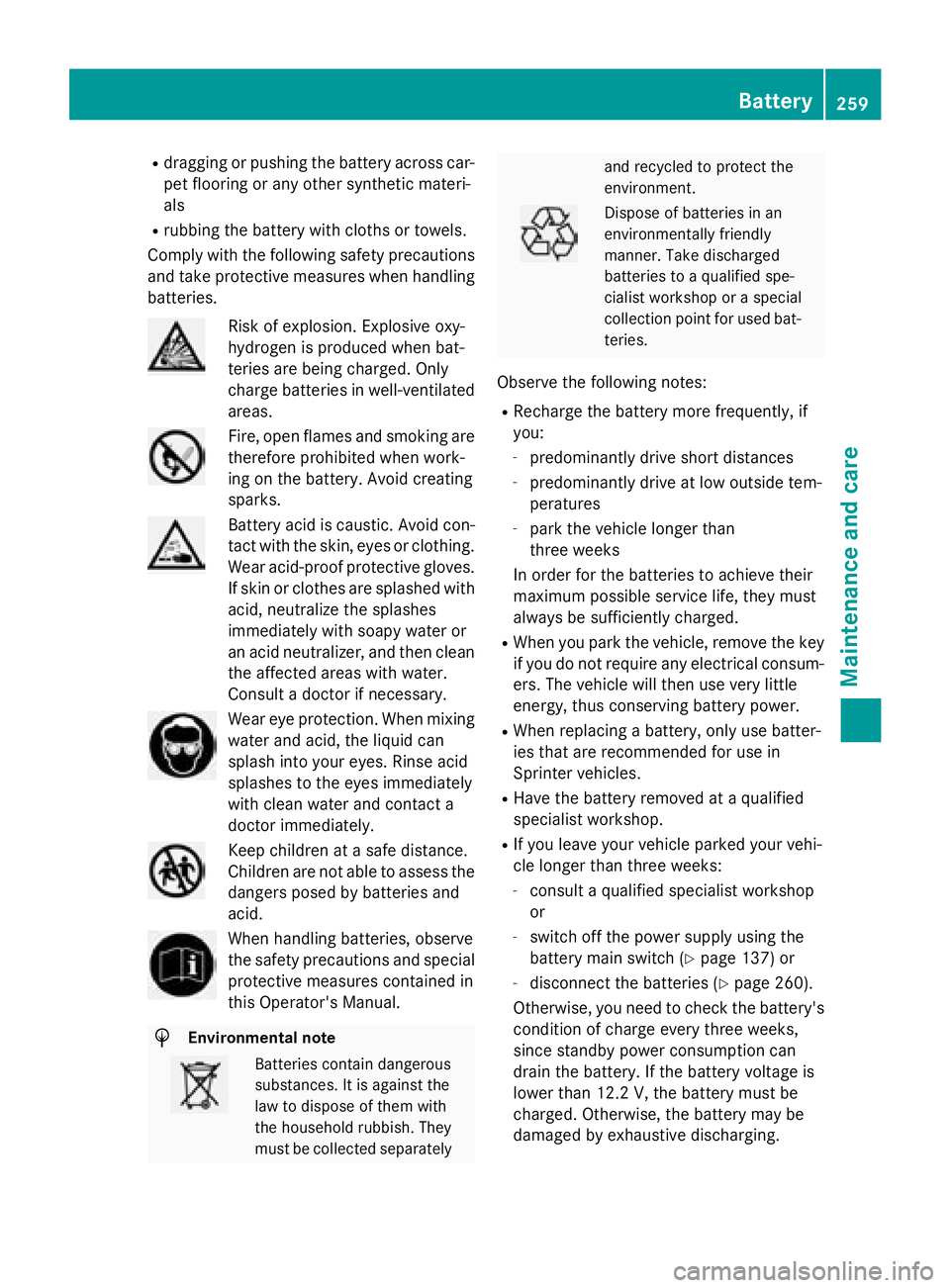
Comply with the following safety precautions
and take protective measures when handling
batteries. Risk of explosion. Explosive oxy-
hydrogen is produced when bat-
teries are being charged. Only
charge batteries in well-ventilated
areas. Fire, open flames and smoking are
therefore prohibited when work-
ing on the battery. Avoid creating
sparks. Battery acid is caustic. Avoid con-
tact with the skin, eyes or clothing. Wear acid-proof protective gloves.
If skin or clothes are splashed with
acid, neutralize the splashes
immediately with soapy water or
an acid neutralizer, and then clean the affected areas with water.
Consult a doctor if necessary. Wear eye protection. When mixing
water and acid, the liquid can
splash into your eyes. Rinse acid
splashes to the eyes immediately
with clean water and contact a
doctor immediately. Keep children at a safe distance.
Children are not able to assess the
dangers posed by batteries and
acid. When handling batteries, observe
the safety precautions and special
protective measures contained in
this Operator's Manual. H
Environmental note Batteries contain dangerous
substances. It is against the
law to dispose of them with
the household rubbish. They
must be collected separately and recycled to protect the
environment.
Dispose of batteries in an
environmentally friendly
manner. Take discharged
batteries to a qualified spe-
cialist workshop or a special
collection point for used bat-
teries.
Observe the following notes:
R Recharge the battery more frequently, if
you:
- predominantly drive short distances
- predominantly drive at low outside tem-
peratures
- park the vehicle longer than
three weeks
In order for the batteries to achieve their
maximum possible service life, they must
always be sufficiently charged.
R When you park the vehicle, remove the key
if you do not require any electrical consum- ers. The vehicle will then use very little
energy, thus conserving battery power.
R When replacing a battery, only use batter-
ies that are recommended for use in
Sprinter vehicles.
R Have the battery removed at a qualified
specialist workshop.
R If you leave your vehicle parked your vehi-
cle longer than three weeks:
- consult a qualified specialist workshop
or
- switch off the power supply using the
battery main switch (Y page 137) or
- disconnect the batteries (Y page 260).
Otherwise, you need to check the battery's condition of charge every three weeks,
since standby power consumption can
drain the battery. If the battery voltage is
lower than 12.2 V, the battery must be
charged. Otherwise, the battery may be
damaged by exhaustive discharging. Battery
259Maintenance and care Z
Page 262 of 334
Be sure to observe the notes on charging
the batteries (Y
page 263). Installation locations
Your vehicle may be equipped with three bat-
teries, depending on the equipment version:
R a starter battery in the battery case in the
driver's footwell
R additional battery in the engine compart-
ment
R auxiliary battery under the driver's seat
Have the auxiliary battery removed at a quali-
fied specialist workshop. Installing/removing the floor cover-
ing (starter battery) G
WARNING
Objects in the driver's footwell can restrict the pedal travel or obstruct a depressed pedal.
The operating and road safety of the vehicle is
jeopardized. There is a risk of an accident.
Make sure that all objects in the vehicle are
stowed correctly, and that they cannot enter
the driver's footwell. Install the floormats
securely and as specified in order to ensure
sufficient clearance for the pedals. Do not use loose floormats and do not place floormats on
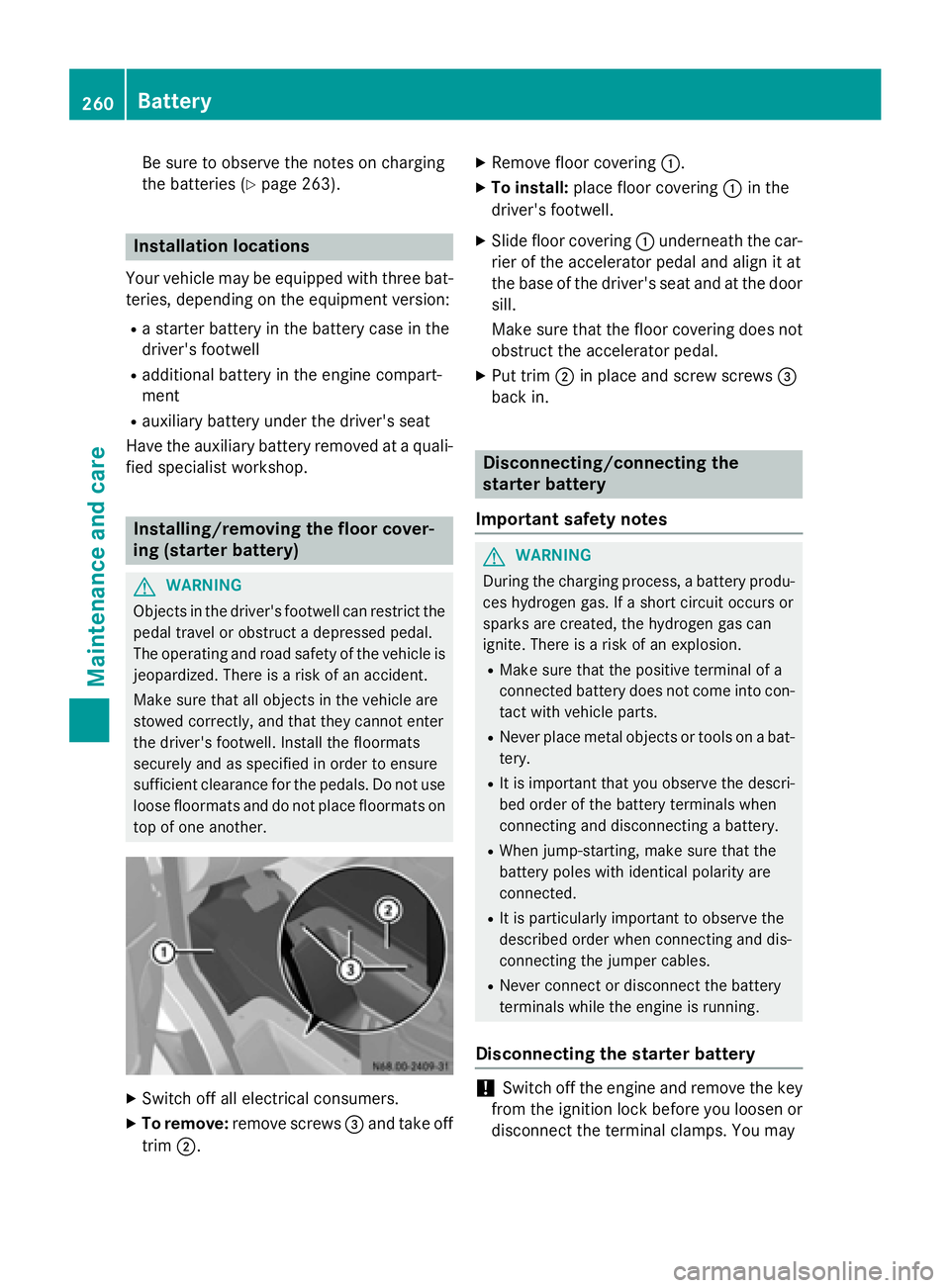
top of one another. X
Switch off all electrical consumers.
X To remove: remove screws 0087and take off
trim 0044. X
Remove floor covering 0043.
X To install: place floor covering 0043in the
driver's footwell.
X Slide floor covering 0043underneath the car-
rier of the accelerator pedal and align it at
the base of the driver's seat and at the door sill.
Make sure that the floor covering does notobstruct the accelerator pedal.
X Put trim 0044in place and screw screws 0087
back in. Disconnecting/connecting the
starter battery
Important safety notes G
WARNING
During the charging process, a battery produ- ces hydrogen gas. If a short circuit occurs or
sparks are created, the hydrogen gas can
ignite. There is a risk of an explosion.
R Make sure that the positive terminal of a
connected battery does not come into con-
tact with vehicle parts.
R Never place metal objects or tools on a bat-
tery.
R It is important that you observe the descri-
bed order of the battery terminals when
connecting and disconnecting a battery.
R When jump-starting, make sure that the
battery poles with identical polarity are
connected.
R It is particularly important to observe the
described order when connecting and dis-
connecting the jumper cables.
R Never connect or disconnect the battery
terminals while the engine is running.
Disconnecting the starter battery !
Switch off the engine and remove the key
from the ignition lock before you loosen or
disconnect the terminal clamps. You may 260
BatteryMaintenance and care
Page 263 of 334
otherwise destroy electronic components
such as the alternator.
Always disconnect the starter battery in the battery case in the driver's footwell first.
! Always disconnect the battery in
the order described below. Never swap the
terminal clamps. You may otherwise dam-
age the vehicle electronics.
If the vehicle is expected to be out of use for over 3 weeks, disconnect the batteries. This
will prevent battery discharge caused by off-
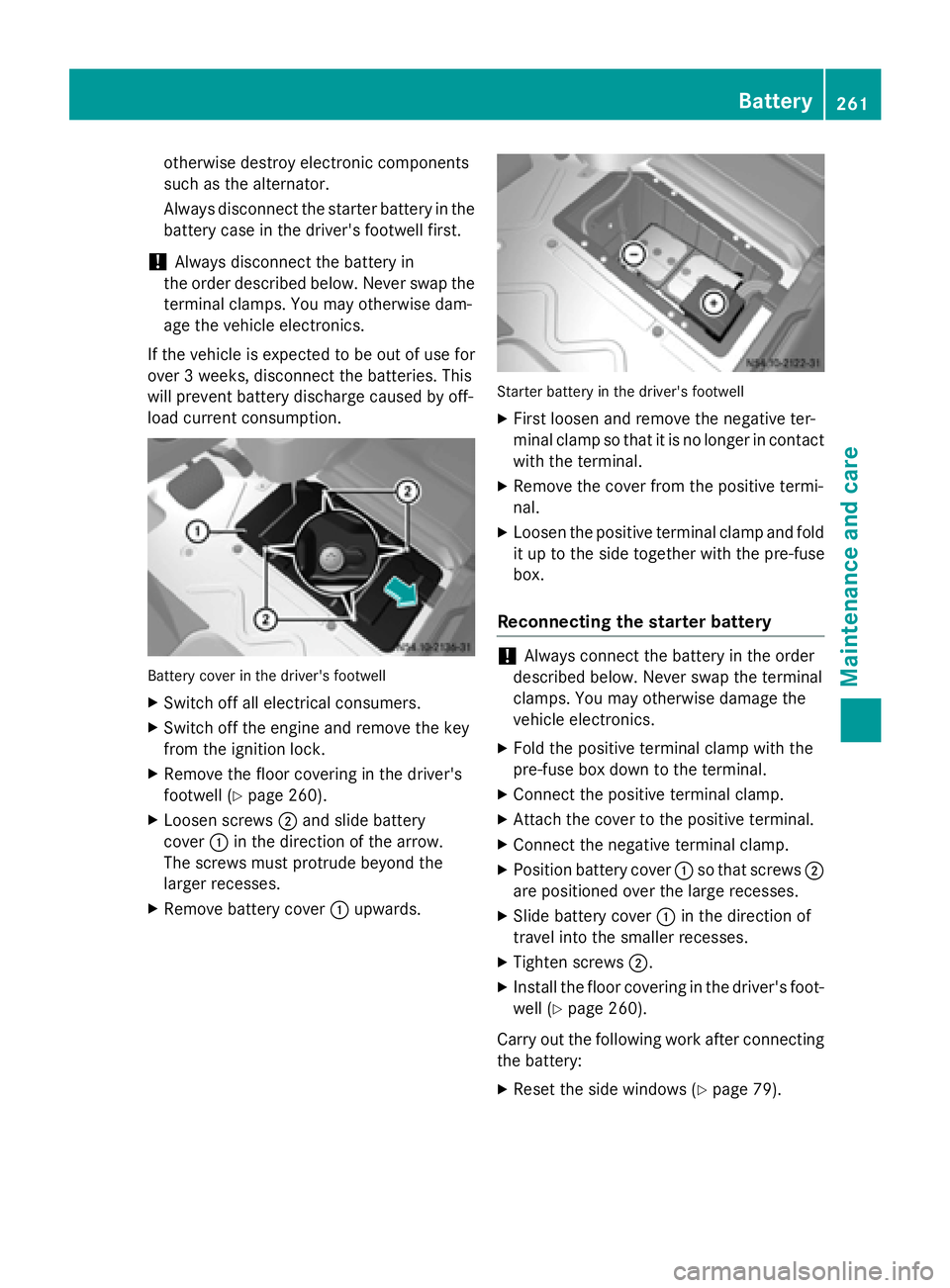
load current consumption. Battery cover in the driver's footwell
X Switch off all electrical consumers.
X Switch off the engine and remove the key
from the ignition lock.
X Remove the floor covering in the driver's
footwell (Y page 260).
X Loosen screws 0044and slide battery
cover 0043in the direction of the arrow.
The screws must protrude beyond the
larger recesses.
X Remove battery cover 0043upwards. Starter battery in the driver's footwell
X First loosen and remove the negative ter-
minal clamp so that it is no longer in contact
with the terminal.
X Remove the cover from the positive termi-
nal.
X Loosen the positive terminal clamp and fold
it up to the side together with the pre-fuse
box.
Reconnecting the starter battery !
Always connect the battery in the order
described below. Never swap the terminal
clamps. You may otherwise damage the
vehicle electronics.
X Fold the positive terminal clamp with the
pre-fuse box down to the terminal.
X Connect the positive terminal clamp.
X Attach the cover to the positive terminal.
X Connect the negative terminal clamp.
X Position battery cover 0043so that screws 0044
are positioned over the large recesses.
X Slide battery cover 0043in the direction of
travel into the smaller recesses.
X Tighten screws 0044.
X Install the floor covering in the driver's foot-
well (Y page 260).
Carry out the following work after connecting
the battery:
X Reset the side windows (Y page 79). Battery
261Maintenance and care Z
Page 264 of 334
Removing/installing the starter bat-
tery
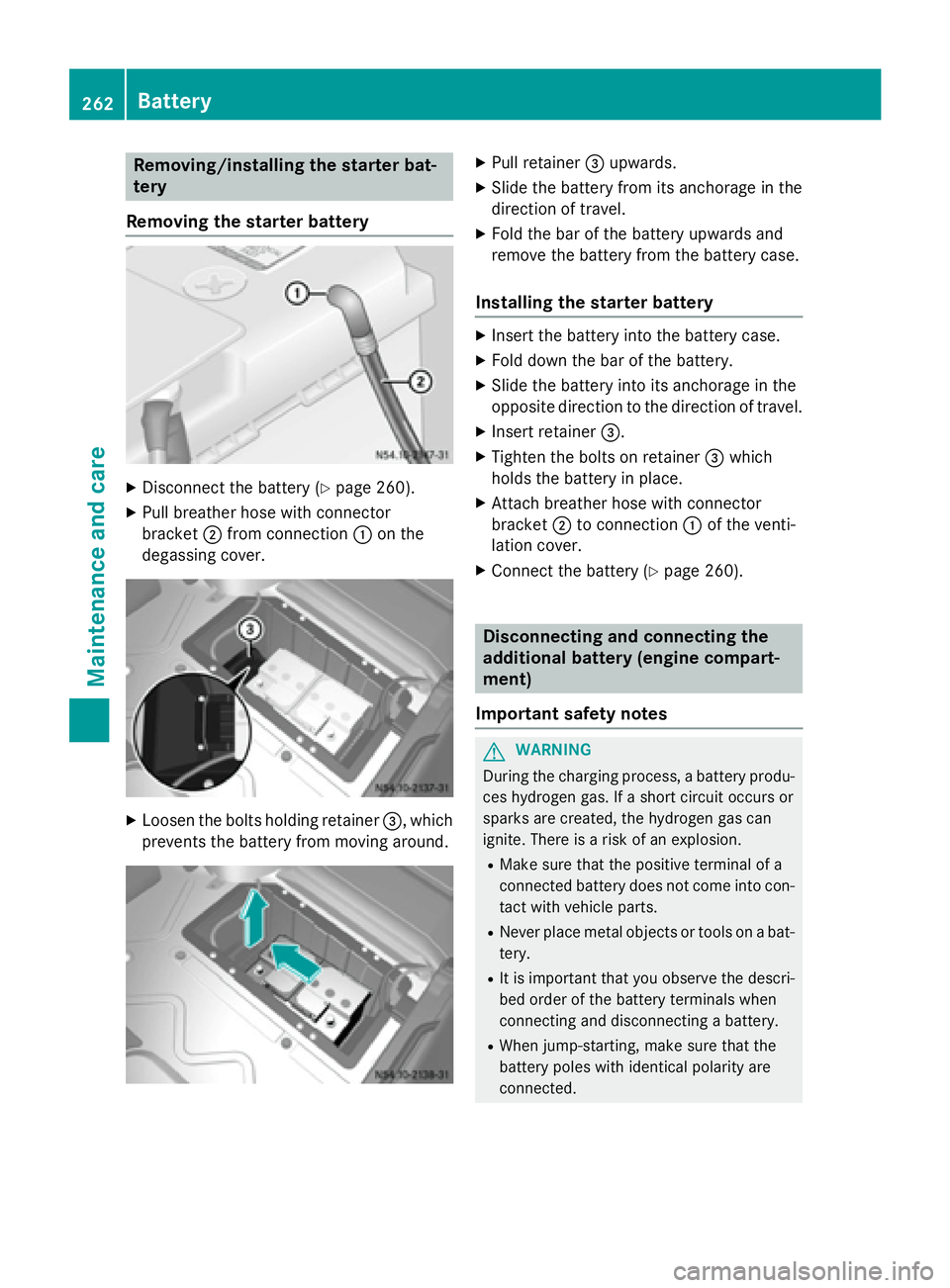
Removing the starter battery X
Disconnect the battery (Y page 260).
X Pull breather hose with connector
bracket 0044from connection 0043on the
degassing cover. X
Loosen the bolts holding retainer 0087, which
prevents the battery from moving around. X
Pull retainer 0087upwards.
X Slide the battery from its anchorage in the
direction of travel.
X Fold the bar of the battery upwards and
remove the battery from the battery case.
Installing the starter battery X
Insert the battery into the battery case.
X Fold down the bar of the battery.
X Slide the battery into its anchorage in the
opposite direction to the direction of travel.
X Insert retainer 0087.
X Tighten the bolts on retainer 0087which
holds the battery in place.
X Attach breather hose with connector
bracket 0044to connection 0043of the venti-
lation cover.
X Connect the battery (Y page 260). Disconnecting and connecting the
additional battery (engine compart-
ment)
Important safety notes G
WARNING
During the charging process, a battery produ- ces hydrogen gas. If a short circuit occurs or
sparks are created, the hydrogen gas can
ignite. There is a risk of an explosion.
R Make sure that the positive terminal of a
connected battery does not come into con-
tact with vehicle parts.
R Never place metal objects or tools on a bat-
tery.
R It is important that you observe the descri-
bed order of the battery terminals when
connecting and disconnecting a battery.
R When jump-starting, make sure that the
battery poles with identical polarity are
connected. 262
BatteryMaintenance and care
Page 265 of 334
R
It is particularly important to observe the
described order when connecting and dis-
connecting the jumper cables.
R Never connect or disconnect the battery
terminals while the engine is running.
Disconnecting the additional battery !
Switch off the engine and remove the key
from the ignition lock before you loosen or disconnect the terminal clamps. You may
otherwise destroy electronic components
such as the alternator.
Always disconnect the starter battery in the
battery case in the driver's footwell first.
! Always disconnect the battery in
the order described below. Never swap the terminal clamps. You may otherwise dam-
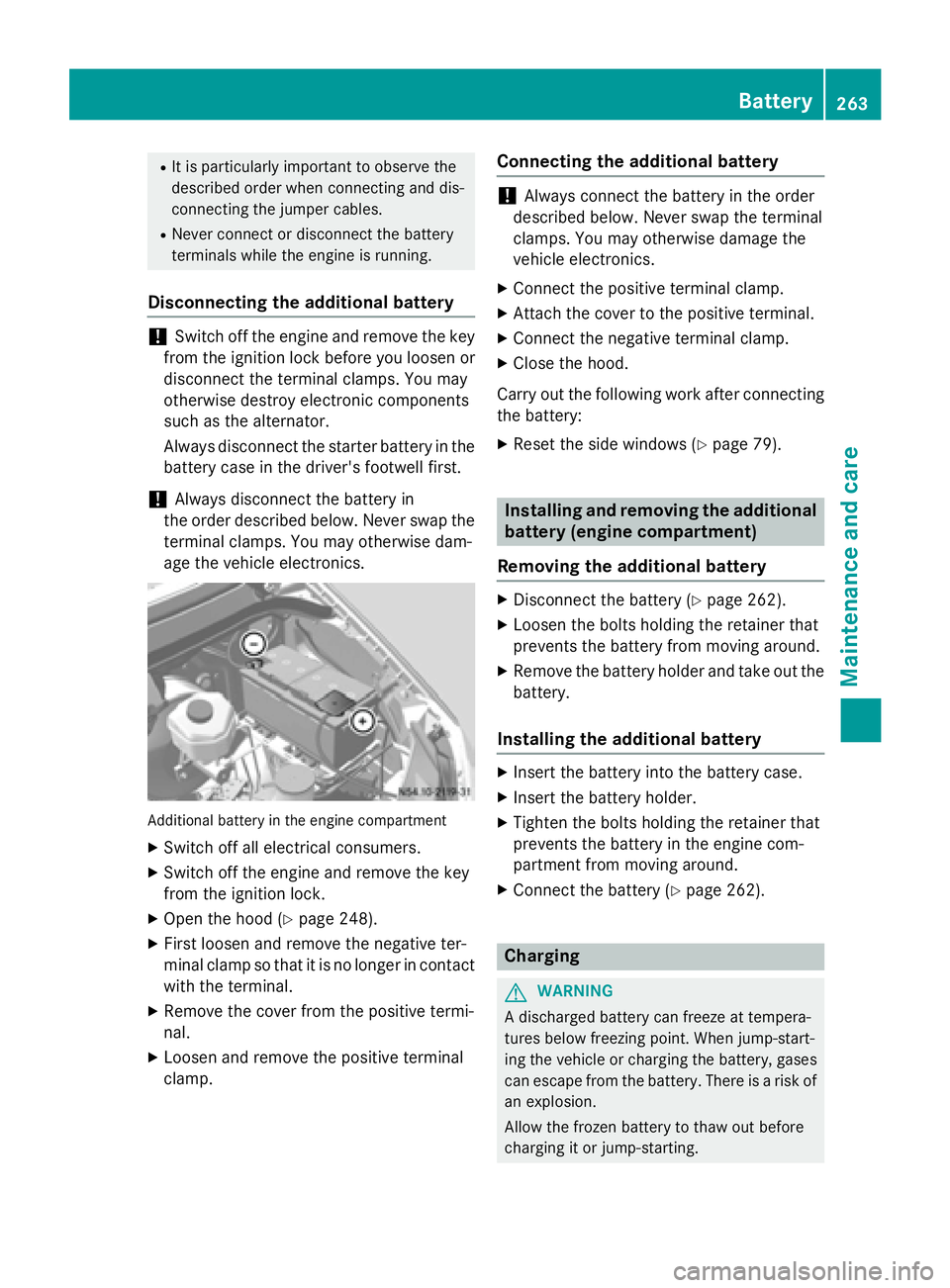
age the vehicle electronics. Additional battery in the engine compartment
X Switch off all electrical consumers.
X Switch off the engine and remove the key
from the ignition lock.
X Open the hood (Y page 248).
X First loosen and remove the negative ter-
minal clamp so that it is no longer in contact
with the terminal.
X Remove the cover from the positive termi-
nal.
X Loosen and remove the positive terminal
clamp. Connecting the additional battery !
Always connect the battery in the order
described below. Never swap the terminal
clamps. You may otherwise damage the
vehicle electronics.
X Connect the positive terminal clamp.
X Attach the cover to the positive terminal.
X Connect the negative terminal clamp.
X Close the hood.
Carry out the following work after connecting
the battery:
X Reset the side windows (Y page 79). Installing and removing the additional
battery (engine compartment)
Removing the additional battery X
Disconnect the battery (Y page 262).
X Loosen the bolts holding the retainer that
prevents the battery from moving around.
X Remove the battery holder and take out the
battery.
Installing the additional battery X
Insert the battery into the battery case.
X Insert the battery holder.
X Tighten the bolts holding the retainer that
prevents the battery in the engine com-
partment from moving around.
X Connect the battery (Y page 262). Charging
G
WARNING
A discharged battery can freeze at tempera-
tures below freezing point. When jump-start-
ing the vehicle or charging the battery, gases can escape from the battery. There is a risk of
an explosion.
Allow the frozen battery to thaw out before
charging it or jump-starting. Battery
263Maintenance and care Z
Page 266 of 334
If the indicator/warning lamps do not light up
in the instrument cluster when temperatures
are low, it is probably because the discharged
battery has frozen. Should this be the case, do
not jump-start the vehicle or charge the bat-
tery. The service life of a thawed battery may be shorter. Start-up behavior may deterio-
rate, in particular at low temperatures. Have
the thawed battery checked at a qualified
specialist workshop. G
WARNING
During charging and jump-starting, explosive
gases can escape from the battery. There is a risk of an explosion.
Particularly avoid fire, open flames, creating
sparks and smoking. Ensure there is sufficient
ventilation while charging and jump-starting.
Do not lean over a battery. G
WARNING
Battery acid is caustic. There is a risk of injury. Avoid contact with skin, eyes or clothing. Do
not inhale any battery gases. Do not lean over
the battery. Keep children away from batter-
ies. Wash away battery acid immediately with
plenty of clean water and seek medical atten- tion.
! Only charge the installed battery with a
battery charger that has been tested and
approved by the distributor named on the
inside of the front cover. This device allows the battery to be charged when it is instal-
led in the vehicle. The vehicle's electronics
may otherwise be damaged.
A battery charger unit specially adapted for
Mercedes-Benz vehicles and tested and
approved by Mercedes-Benz is available as an accessory. Only this device permits the
charging of the battery in its installed posi-
tion. Only charge the installed battery with a
battery charger that has been tested and
approved by Mercedes-Benz, using the jump-
start connection point in the engine compart-
ment. Contact an authorized Mercedes-Benz
Center for information and availability. Read the operating instructions for your charger
before charging the battery.
The additional battery can not be charged
from the jump-starting connection point.
Recharge the battery more frequently if you
use the vehicle mainly for short trips and/or
drive at low outside temperatures.
X Charge the battery. Observe the notes in
the operating instructions for your battery
charger.
X If necessary, install battery. Observe the
notes on reconnecting the battery.
i Recharge uninstalled, out of service bat-
teries every three months. This will counter
self-discharging and prevent battery dam-
age. Care
! Dirty battery clamps and battery surfaces
cause leak currents which lead to the bat-
teries discharging.
! Do not use cleaning agents containing
fuel. Cleaning agents containing fuel cor-
rode the battery housing.
! If dirt gets into the battery cell, battery
self-discharge will increase and the battery
may be damaged.
The following points on battery care must be
observed: X Regularly check the battery terminals and
the fastening of the negative cable to the
chassis to ensure that they are firmly
seated.
X Always keep the battery terminals and bat-
tery surfaces clean and dry.
X Lightly grease the undersides of the battery
terminals with acid-resistant grease.
X Only clean the battery casing with a com-
mercially available cleaning product. 264
BatteryMaintenance and care