lock MERCEDES-BENZ SPRINTER 2015 MY15 Operator’s Manual
[x] Cancel search | Manufacturer: MERCEDES-BENZ, Model Year: 2015, Model line: SPRINTER, Model: MERCEDES-BENZ SPRINTER 2015Pages: 334, PDF Size: 5.94 MB
Page 110 of 334
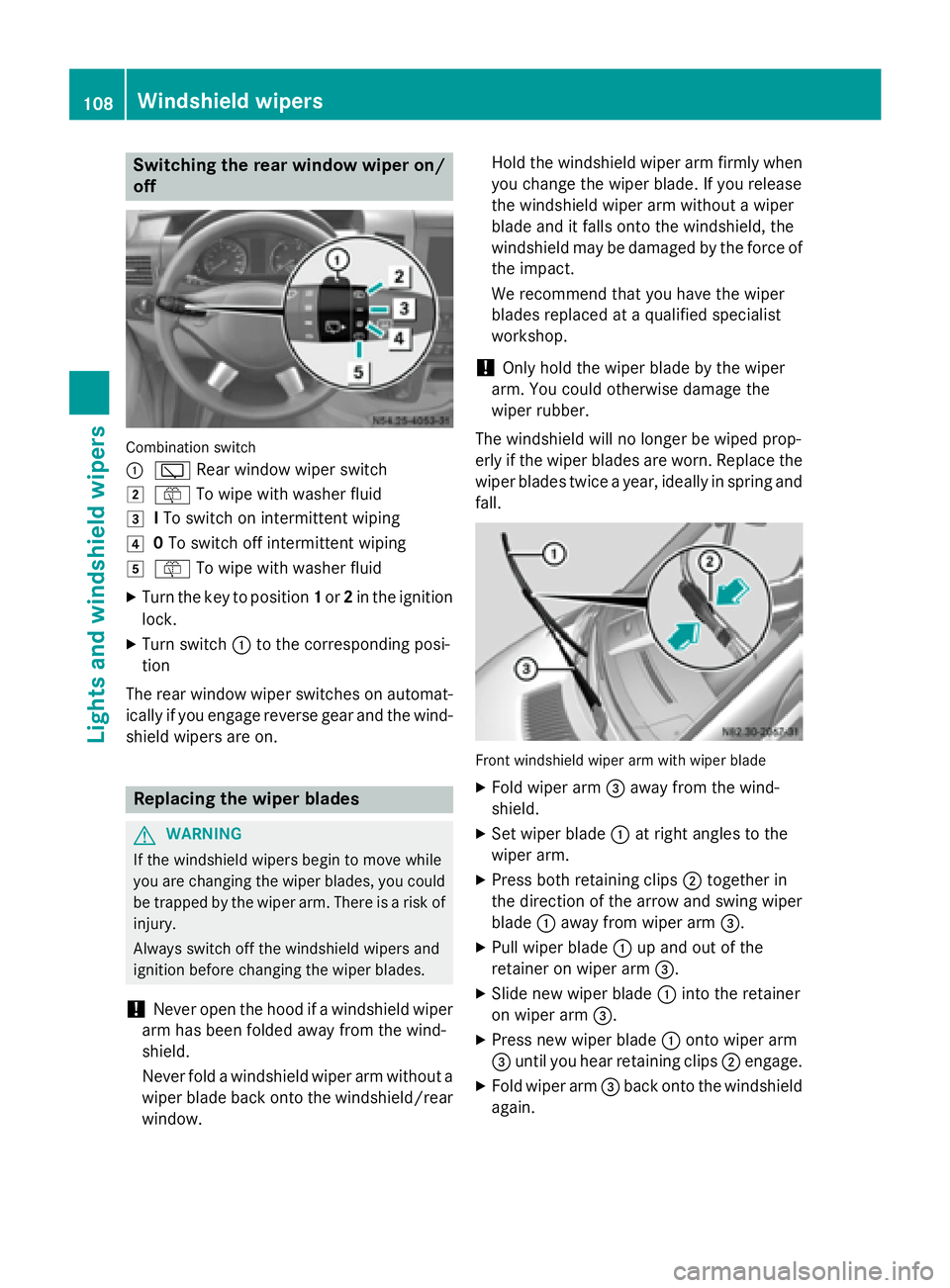
Switching the rear window wiper on/
off Combination switch
0043
00C5 Rear window wiper switch
0048 00E2 To wipe with washer fluid
0049 ITo switch on intermittent wiping
004A 0To switch off intermittent wiping
004B 00E2 To wipe with washer fluid
X Turn the key to position 1or 2in the ignition
lock.
X Turn switch 0043to the corresponding posi-
tion
The rear window wiper switches on automat-
ically if you engage reverse gear and the wind-
shield wipers are on. Replacing the wiper blades
G
WARNING
If the windshield wipers begin to move while
you are changing the wiper blades, you could be trapped by the wiper arm. There is a risk of
injury.
Always switch off the windshield wipers and
ignition before changing the wiper blades.
! Never open the hood if a windshield wiper
arm has been folded away from the wind-
shield.
Never fold a windshield wiper arm without a
wiper blade back onto the windshield/rear window. Hold the windshield wiper arm firmly when
you change the wiper blade. If you release
the windshield wiper arm without a wiper
blade and it falls onto the windshield, the
windshield may be damaged by the force of
the impact.
We recommend that you have the wiper
blades replaced at a qualified specialist
workshop.
! Only hold the wiper blade by the wiper
arm. You could otherwise damage the
wiper rubber.
The windshield will no longer be wiped prop-
erly if the wiper blades are worn. Replace the
wiper blades twice a year, ideally in spring and
fall. Front windshield wiper arm with wiper blade
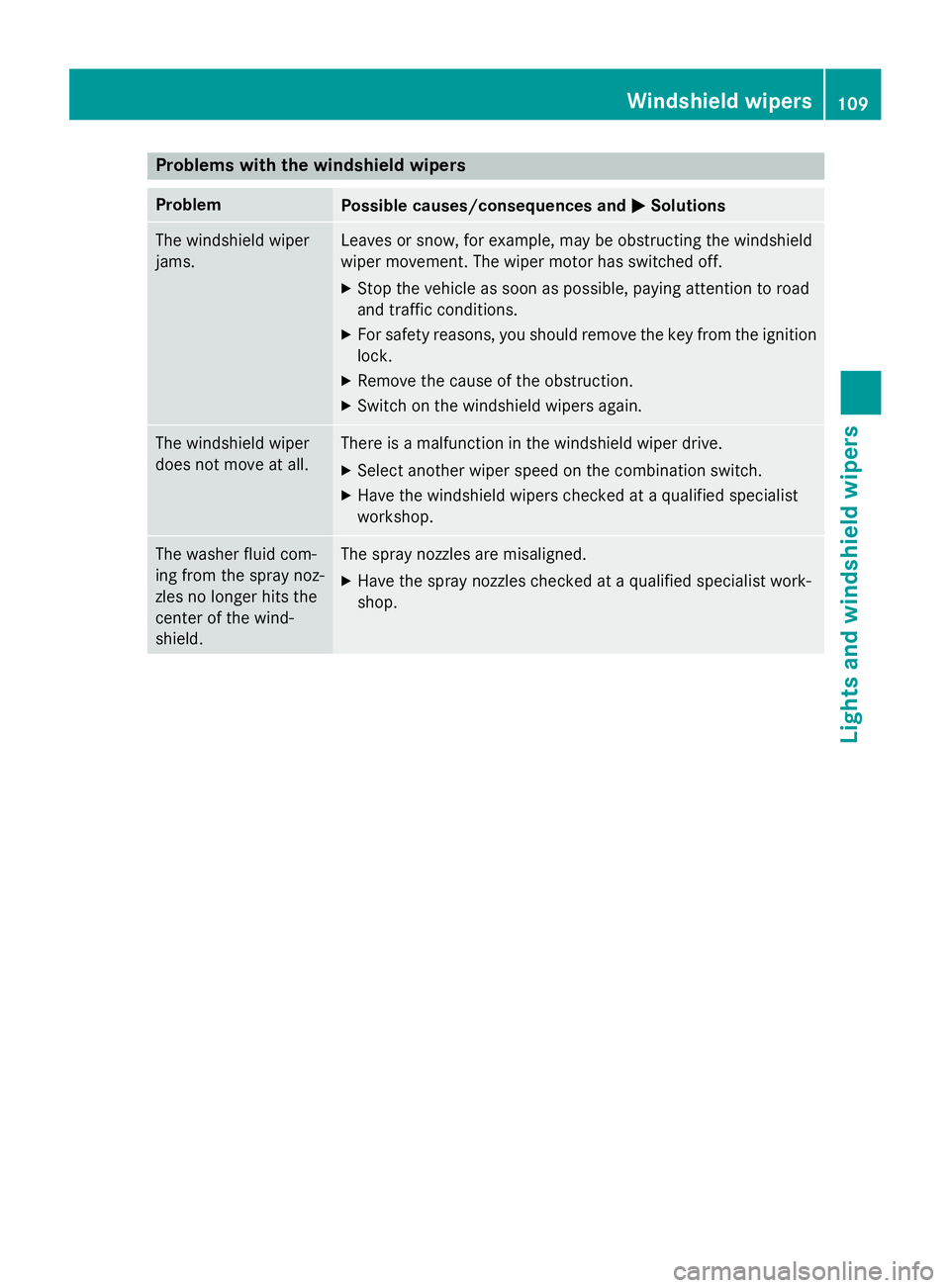
X Fold wiper arm 0087away from the wind-
shield.
X Set wiper blade 0043at right angles to the
wiper arm.
X Press both retaining clips 0044together in
the direction of the arrow and swing wiper
blade 0043away from wiper arm 0087.
X Pull wiper blade 0043up and out of the
retainer on wiper arm 0087.
X Slide new wiper blade 0043into the retainer
on wiper arm 0087.
X Press new wiper blade 0043onto wiper arm
0087 until you hear retaining clips 0044engage.
X Fold wiper arm 0087back onto the windshield
again. 108
Windshield wipersLights and windshield wipers
Page 111 of 334
Problems with the windshield wipers
Problem
Possible causes/consequences and
0050
0050Solutions The windshield wiper
jams. Leaves or snow, for example, may be obstructing the windshield
wiper movement. The wiper motor has switched off.
X Stop the vehicle as soon as possible, paying attention to road
and traffic conditions.
X For safety reasons, you should remove the key from the ignition
lock.
X Remove the cause of the obstruction.
X Switch on the windshield wipers again. The windshield wiper
does not move at all. There is a malfunction in the windshield wiper drive.
X Select another wiper speed on the combination switch.
X Have the windshield wipers checked at a qualified specialist
workshop. The washer fluid com-
ing from the spray noz-
zles no longer hits the
center of the wind-
shield. The spray nozzles are misaligned.
X Have the spray nozzles checked at a qualified specialist work-
shop. Windshield wipers
109Lights and windshield wipers Z
Page 118 of 334
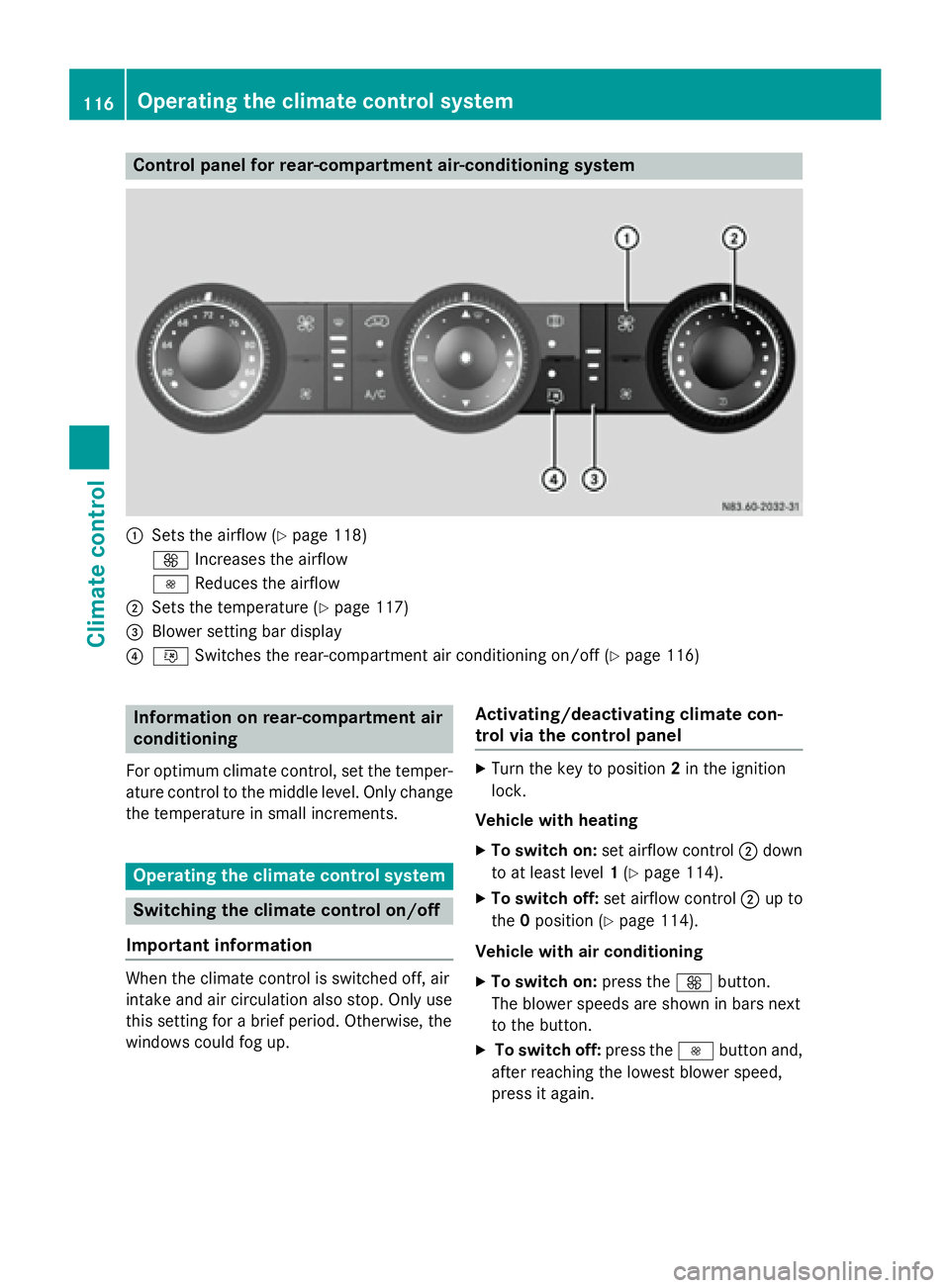
Control panel for rear-compartment air-conditioning system
0043
Sets the airflow (Y page 118)
0097 Increases the airflow
0095 Reduces the airflow
0044 Sets the temperature (Y page 117)
0087 Blower setting bar display
0085 0074 Switches the rear-compartment air conditioning on/off (Y page 116)Information on rear-compartment air
conditioning
For optimum climate control, set the temper- ature control to the middle level. Only change
the temperature in small increments. Operating the climate control system
Switching the climate control on/off
Important information When the climate control is switched off, air
intake and air circulation also stop. Only use
this setting for a brief period. Otherwise, the
windows could fog up. Activating/deactivating climate con-
trol via the control panel X
Turn the key to position 2in the ignition
lock.
Vehicle with heating
X To switch on: set airflow control 0044down
to at least level 1(Y page 114).
X To switch off: set airflow control 0044up to
the 0position (Y page 114).
Vehicle with air conditioning
X To switch on: press the0097button.
The blower speeds are shown in bars next
to the button.
X To switch off: press the0095button and,
after reaching the lowest blower speed,
press it again. 116
Operating the climate control systemClimate control
Page 119 of 334
Activating/deactivating rear-compart-
ment climate control via the control
panel X
Turn the key to position 2in the ignition
lock.
Vehicle with rear-compartment heating/
rear-compartment air conditioning
X To switch on/off: press the0074switch.
If the indicator lamp in the button lights up, the rear-compartment heating/rear-com-
partment air conditioning is switched on. Switching the cooling with air dehu-
midification function on/off
Important information If you switch off the "Cooling with air dehu-
midification" function, the air inside the vehi- cle will not be cooled (in warm weather) or
dehumidified. The windows could fog up morequickly.
The cooling with air dehumidification function
is only available when the engine is running.
The air inside the vehicle is cooled and dehu- midified according to the temperature selec-
ted.
Condensation may appear on the underside
of the vehicle when in cooling mode. This is
normal and not a sign that there is a malfunc- tion.
Switching on/off Vehicle with air conditioning
X Press the 005Abutton.
If the indicator lamp in the button lights up, cooling with air dehumidification is
switched on. Setting the temperature
Increasing/reducing temperature in
the front compartment via the control
panel Only change the temperature in small incre-
ments. Start at the center position, or at 72 ‡
(22 †).
X Switch on climate control (Y page 116).
X Turn temperature control 0043clockwise to
increase or counterclockwise to reduce the temperature (Y page 114).
Increasing/reducing temperature in
the rear compartment via the control
panel Only change the temperature in small incre-
ments.
X Switch on climate control (Y page 116).
X Turn rear-compartment temperature con-
trol 0087(Ypage 115) or rear-compartment
air-conditioning system 0044(Ypage 116)
clockwise to increase or counterclockwise
to reduce the temperature.
i Vehicles with additional air conditioning
and heating in the rear compartment: if you set the temperature control to the center
position, only one of the two climate con-
trol systems works in the rear compart-
ment and in air-recirculation mode
(Y page 120). Setting the air distribution
Air distribution settings The air distribution symbols have the follow-
ing meanings:
0078
Directs air through the center and
side air vents
007E
0085 Directs air to the windshield and the
air vents Operating the climate control system
117Climate control
Page 122 of 334
switched off prematurely or cannot be acti-
vated.
X Switch off any consumers that are not
required, e.g. reading lamps or interior
lighting.
If enough on-board voltage is available again
within 30 seconds, the rear window heating
automatically switches on again. It otherwise
remains switched off. Switching air-recirculation mode
on/off
Important safety notes When you switch on air-recirculation mode,
the windows could fog up more quickly, in
particular at low outside temperatures. Only
switch on air-recirculation mode for a short
time.
You can deactivate the intake of fresh air if
unpleasant odors enter the vehicle from out-
side. The air inside the vehicle will only be
circulated.
Heating/air-conditioning system Air-recirculation mode switches off automat-
ically after about 10 to 30 minutes, depending
on the outside temperature.
X Switch on climate control (Y page 116).
X To switch on/off: press the008Aswitch.
If the indicator lamp in the 008Abutton
lights up, air-recirculation mode is activa-
ted.
Rear-compartment heating/rear-com-
partment air conditioning On vehicles with a rear-compartment heating
and air-conditioning system, you can acti-
vate/deactivate air-recirculation mode for
the rear-compartment climate control.
X Switch on climate control (Y page 116).
X To activate: set the temperature control of
rear-compartment heating 0087(Ypage 115) or rear-compartment air conditioning sys-
tem
0044(Ypage 116) to the center position.
Only one of the two climate control sys-
tems in the rear compartment is activated
and is in air-recirculation mode.
X To deactivate: turn the temperature con-
trol of rear-compartment heating 0087
(Y page 115) or rear-compartment air-con-
ditioning system 0044(Ypage 116) clock-
wise or counterclockwise. Only change the
temperature in small increments. Adjusting the air vents
Important safety notes
G
WARNING
Very hot or very cold air can flow from the air vents. This could result in burns or frostbite in the immediate vicinity of the air vents. There
is a risk of injury.
Make sure that all vehicle occupants always
maintain a sufficient distance to the air out-
lets. If necessary, redirect the airflow to
another area of the vehicle interior.
The center and side air vents are adjustable.
On vehicles with a rear-compartment air-con-
ditioning system, you can also adjust the air
vents in the roof duct.
i For virtually draft-free ventilation, adjust
the sliders of the center air vents to the
center position.
In order to ensure the direct flow of fresh air
through the air vents into the vehicle interior, please observe the following notes:
R keep the air inlet grille on the hood free of
blockages, such as ice, snow or leaves.
R never cover the vents or the ventilation
grilles in the vehicle interior. 120
Adjusting the air ventsClimate control
Page 124 of 334
On vehicles with rear-compartment air con-
ditioning, adjustable air vents are integrated
into the roof duct.
X To adjust the airflow: open or close the
air flap in air vents 0043as needed.
X To adjust the air distribution: turn air
vent 0043to the desired position. Operating the auxiliary heating sys-
tem Important safety notes
G
DANGER
If the exhaust pipe is blocked or adequate
ventilation is not possible, poisonous gases
such as carbon monoxide (CO) may enter the vehicle. This is the case, for example in
enclosed spaces or if the vehicle gets stuck in
snow. There is a risk of fatal injury.
Switch the auxiliary heating off in enclosed
spaces without extraction systems, e.g. in
garages. If the vehicle is stuck in snow and
you have to leave the auxiliary heating run-
ning, keep the exhaust pipe and the area
around the vehicle free of snow. To ensure an adequate supply of fresh air, open a window
on the side of the vehicle that is not facing into
the wind. G
WARNING
When the auxiliary heating is switched on,
parts of the vehicle can become very hot, e.g. the exhaust system.
Flammable materials such as leaves, grass or
twigs may ignite if they come into contact
with:
R hot parts of the exhaust system
R the exhaust gas itself
There is a risk of fire. When the auxiliary heating is switched on,
make sure that:
R no flammable materials come into contact
with hot vehicle components
R the exhaust gas can escape from the
exhaust pipe unhindered
R the exhaust gas does not come into contact
with flammable materials.
! Turn on the auxiliary heating at least once
a month for approximately 10 minutes. The
auxiliary heating could otherwise be dam-
aged.
! Make sure that the flow of hot air is not
blocked. The auxiliary heating will other-
wise overheat and switch off.
Your vehicle may be equipped with either an
auxiliary hot-water heater or an auxiliary
warm-air heater. Adjustment and operation of the:
R hot-water auxiliary heater is done via the
on-board computer and with the auxiliary
heating button in the control panel
(Y page 123) or with the remote control
(Y page 125).
R auxiliary warm-air heater is done via the
timer above the overhead control panel
(Y page 127).
The auxiliary heating works independently of
the engine and supplements the climate con- trol system in the vehicle. The auxiliary heat-
ing heats the air in the vehicle interior to the
temperature set.
If your vehicle is equipped with a hot-water
auxiliary heater, the auxiliary heating also
keeps the coolant warm. This way, the load on
the engine is minimized and fuel is saved.
The heater booster function (Y page 130) of
the auxiliary heating supports the climate
control system when the engine is running
and the outside temperature is low.
You can use the auxiliary heating at an out-
side temperature of up to 39 ‡ (4 †). At an
outside temperature above 39 ‡ (4 †) the 122
Operating the auxiliary heating systemClimate control
Page 125 of 334
auxiliary heating system and the heater boos-
ter function switch off automatically. Heating time
The heating time when operating the auxiliary heating with the vehicle is stationary without
the engine running depends on the outside
temperature and the electrical consumers
switched on. Outside
tempera-
ture Heating
time Possible
startup proce-
dures
Above
23 ‡
(00F85 †) Approx.
20 minutes 6
23 ‡
(00F85 †) to
5 ‡
(00F815 †) Approx.
40 minutes 3
Below 5 ‡
(00F815 †) Approx.
50 minutes 2
You can then switch on the auxiliary heating
again.
If you do not start the engine for a while, the
total duration of heating is limited to a maxi-
mum of 120 minutes to protect the starter
battery. Switching on the auxiliary heating is
then automatically disabled. You can, for
example, switch on the auxiliary heating with- out the engine running if the outside temper-
ature is 00F85 ‡ (00F820 †) a maximum of two
times. If you try it again, the indicator lamps in
the 0084 button (Y page 123) flash alter-
nately for approximately 2 minutes to signal
switch-on interlock. The auxiliary heating can-
not be switched on without starting the
engine.
When the condition of charge of the starter
battery is sufficient again, the switch-on inter-
lock will be deactivated. To charge the starter
battery, let the engine run. The engine run
time required to reach the necessary condi- tion of charge depends on the outside tem-
perature and on the electrical consumers
switched on. Outside tempera-
ture Engine runtime
Above 32 ‡ (0 †) at least 10 minutes
32 ‡ (0 †) to 14 ‡
(00F810 †) at least 15 minutes
Below 14 ‡ (00F810 †) at least 20 minutes
Before switching on
X Check the fuel level and top up if necessary.
The auxiliary heating is operated directly
using the vehicle's fuel. The tank must be at
least a quarter full to ensure that the aux-
iliary heating functions.
X Switch on climate control (Y page 116).
X Set the temperature control to the desired
temperature (Y page 117).
X Set the air distribution as required
(Y page 117).
X Open the center (Y page 121) and side air
vents (Y page 121) and set them to the
middle position.
i The auxiliary heating automatically
switches to heater booster mode after the
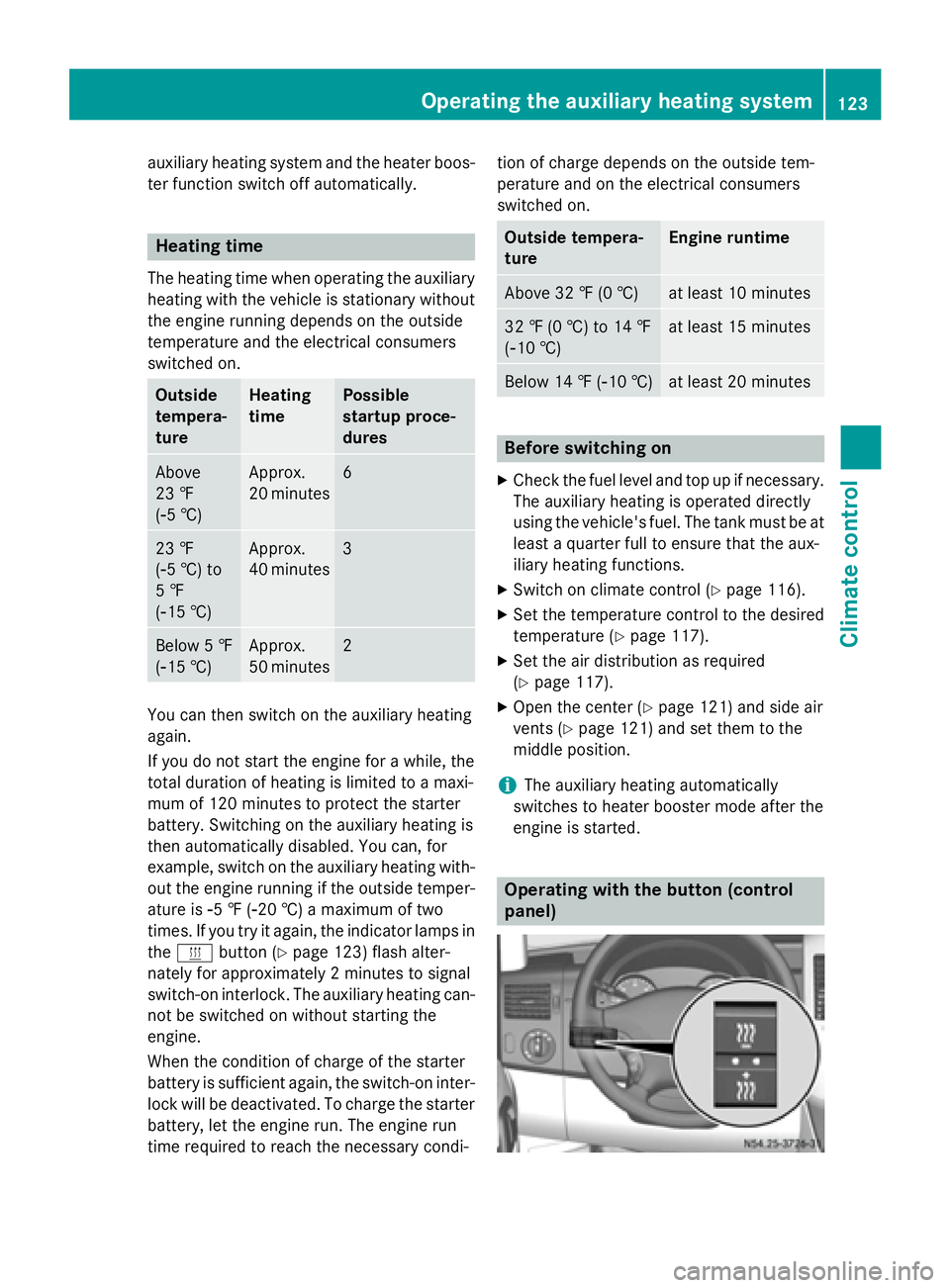
engine is started. Operating with the button (control
panel)Operating the auxiliary heating system
123Climate control Z
Page 126 of 334
i
Switch the heater booster function on or
off with the 006Abutton (Y page 130).
X To activate the auxiliary heating sys-
tem: press and hold the upper section of
the 0084 switch for longer than 2 seconds.
The red indicator lamp in the button lights
up. The auxiliary heating heats or ventilates the interior to the temperature that you
have set. The blower switches to the first
level.
X To switch off auxiliary heating: press the
upper section of the 0084button.
or
X Turn the key in the ignition lock to posi-
tion 0.
The red indicator lamp in the button goes
out. The auxiliary heating operates for
another 2 minutes and then switches off
automatically. Selecting a switch-on time
Important information You can use the on-board computer to define
up to three switch-on times, one of which canbe selected.
The yellow indicator lamp in the 0084button
goes out after 30 minutes, if you:
R have selected the switch-on time and
R turn the key to position 0in the ignition lock
On-board computer without steering
wheel buttons X
Turn the key to position 2in the ignition
lock.
X Press the 0084button.
The 0084 symbol flashes in the display.
or
X Press the 0079menu button on the instru-
ment cluster repeatedly until the 0084
symbol flashes in the display.
X Use the 0074or0075 buttons on the instrument
cluster to select the switch-on time 1 1to 3
3. The switch-on time selected is displayed.
X Wait 10 seconds for the standard display to
appear.
The switch-on time is selected. The yellow
indicator lamp in the 0084button lights up.
If you do not preselect a switch-on time,
and --:-- --:-- is shown in the display, this
means that the automatic switch-on mode
is switched off. The yellow indicator lamp in the 0084 button goes out.
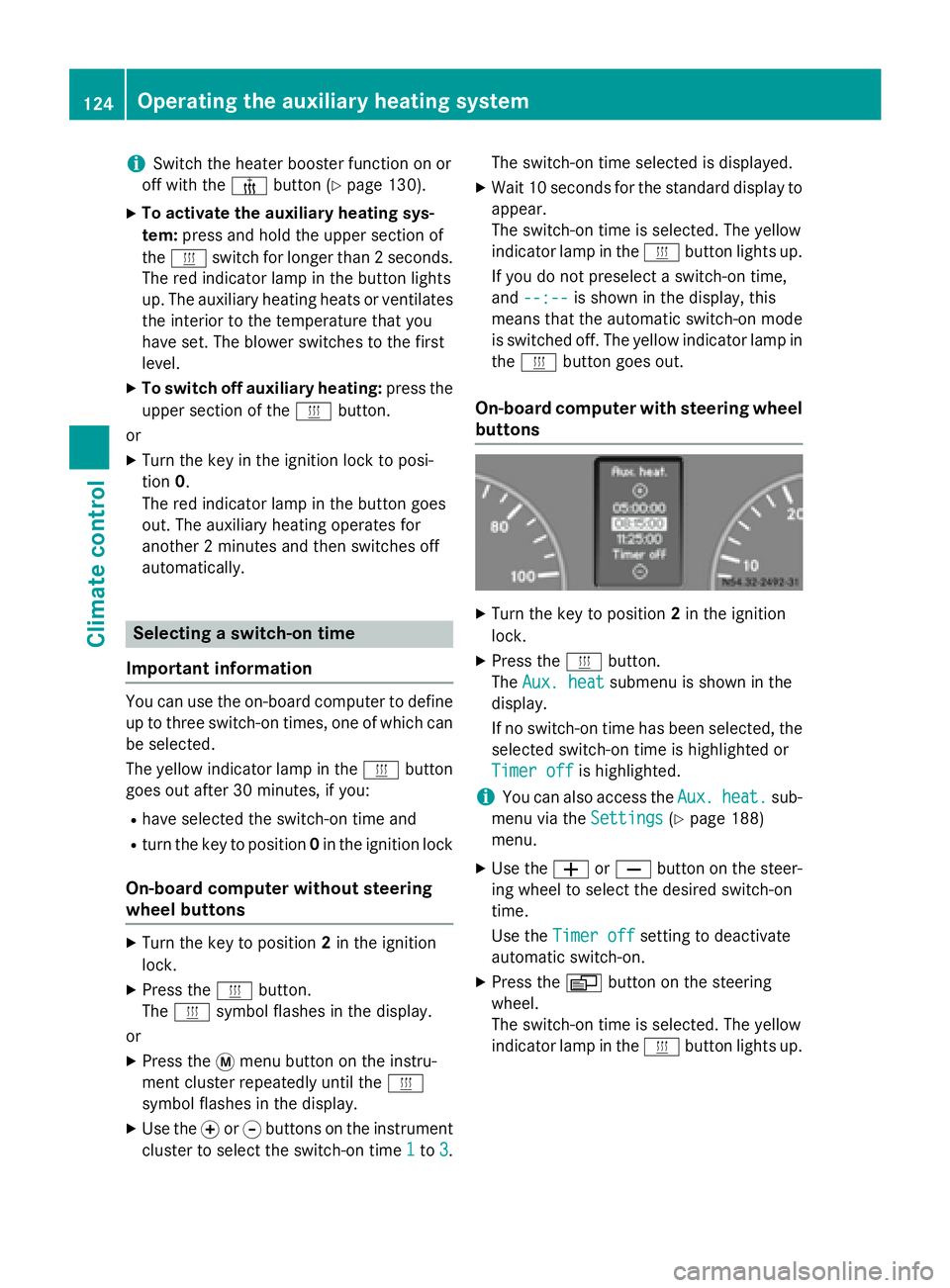
On-board computer with steering wheel
buttons X
Turn the key to position 2in the ignition
lock.
X Press the 0084button.
The Aux. heat Aux. heat submenu is shown in the
display.
If no switch-on time has been selected, the
selected switch-on time is highlighted or
Timer off Timer off is highlighted.
i You can also access the
Aux.
Aux.heat.
heat. sub-
menu via the Settings
Settings(Ypage 188)
menu.
X Use the 0081or0082 button on the steer-
ing wheel to select the desired switch-on
time.
Use the Timer off Timer off setting to deactivate
automatic switch-on.
X Press the 0080button on the steering
wheel.
The switch-on time is selected. The yellow
indicator lamp in the 0084button lights up. 124
Operating the auxiliary heating systemClimate control
Page 130 of 334
006C
Selects options in program column 0043or
menu bar 0044(backwards)
Reduces values
Activating the timer The timer switches to standby mode after
10 seconds. The display goes off.
X Press and hold the 00D0button until the
menu bar appears in the display and the
time is shown.
Setting the day, time and operating
duration You must reset the day, time, and default
value for the operating duration:
R during initial operation
R after a voltage supply interruption (e.g. if
the battery has been disconnected)
R after a malfunction.
You can find further information on malfunc-
tions in the "Problems with the auxiliary heat-
ing" section (Y page 132).
X Press the 00CFor00DB button until the
0045 symbol in menu bar 0044flashes.
X Press the 0070button.
In program column 0043, the day selected
flashes.
X Press the 00CFor00DB button to set the
desired day.
X Press the 0070button.
The day selected is stored. The hour setting
of the clock flashes.
X In the same way, set the hour and subse-
quently the minutes, then confirm by press- ing the 0070button.
The time is stored. Program column 0043dis-
appears and the operating duration
flashes.
i The operating duration set is the default
setting for immediate heating mode. You
can set the operating duration from 10 to
120 minutes or activate continuous opera-
tion. X
Using the 00CFor00DB button, set the
minute value or select the 00D5symbol for
continuous operation.
X Press the 0070button.
The operating duration is stored. The time
is shown.
Activating/deactivating immediate
heating mode X
To switch on: press the00CFor00DB but-
ton until the 0084symbol in the menu bar
flashes.
X Press the 0070button.
The operation duration flashes in the dis-
play.
i You can preset the default value that is
shown (Y page 128).
X Using the 00CFor00DB button, set the
minute value (10 – 120) or select the 00D5
symbol for continuous operation.
X Press the 0070button.
Immediate heating mode is activated. The
time and the 0084symbol appear.
X To switch off: press the00CFor00DB
button until the 0084symbol flashes in the
menu bar, and then press the 0070button.
Immediate heating mode is deactivated.
The 0084 symbol disappears.
The auxiliary heating operates for another
two minutes and then switches off auto-
matically.
i If you switch off the ignition while imme-
diate heating mode (operating duration
10– 120 minutes) is active, immediate
heating mode is also switched off. The aux- iliary heating operates for another
two minutes and then switches off auto-
matically.
If you have set continuous operation as the
operating duration and you switch off the
ignition, the auxiliary heating switches off
automatically after about 15 minute s.If, in
the remaining time, the ignition is switched
on again, continuous operation of the aux-
iliary heating continues. 128
Operating the auxiliary heating systemClimate control
Page 133 of 334
X
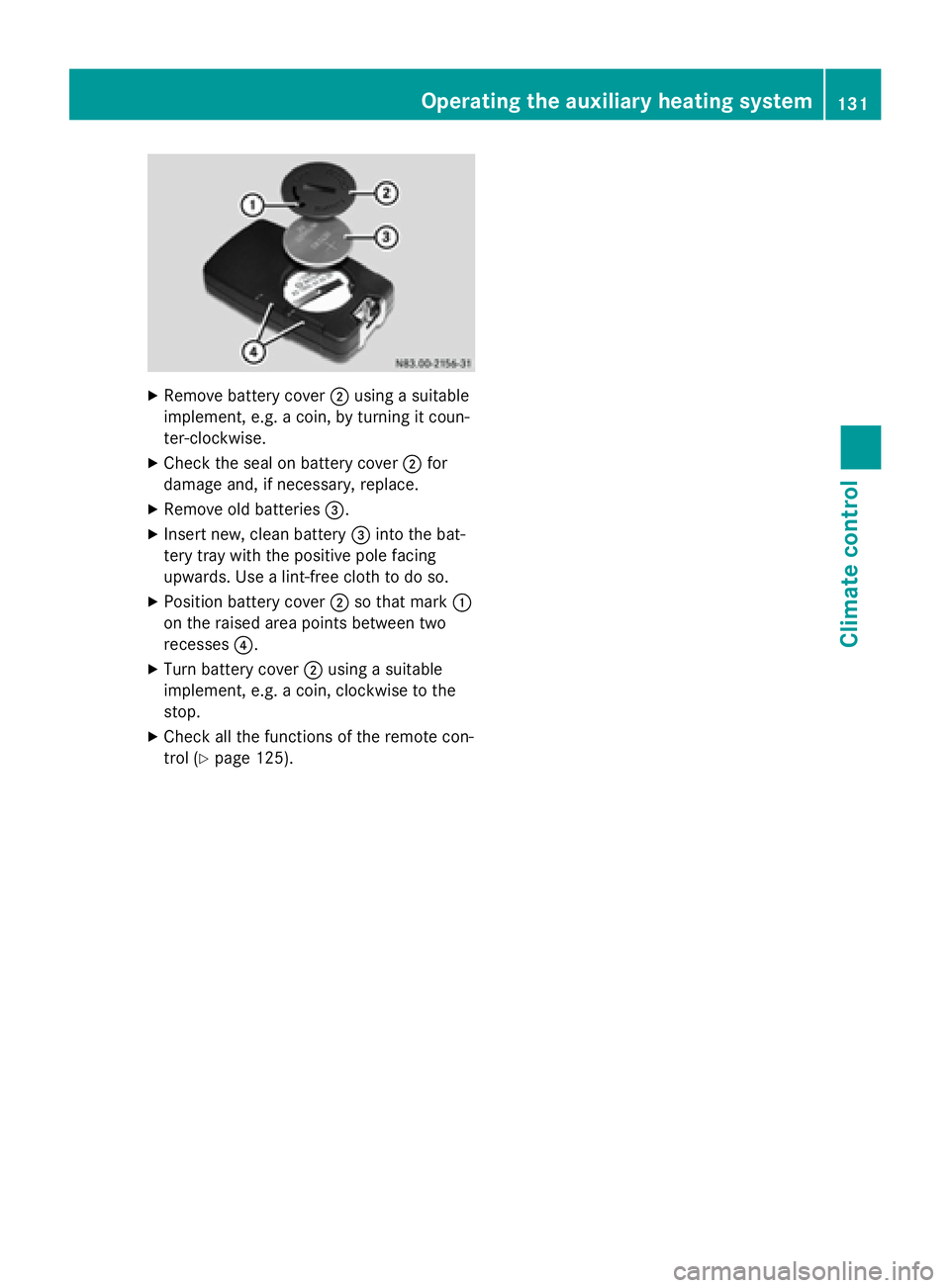
Remove battery cover 0044using a suitable
implement, e.g. a coin, by turning it coun-
ter-clockwise.
X Check the seal on battery cover 0044for
damage and, if necessary, replace.
X Remove old batteries 0087.
X Insert new, clean battery 0087into the bat-
tery tray with the positive pole facing
upwards. Use a lint-free cloth to do so.
X Position battery cover 0044so that mark 0043
on the raised area points between two
recesses 0085.
X Turn battery cover 0044using a suitable
implement, e.g. a coin, clockwise to the
stop.
X Check all the functions of the remote con-
trol (Y page 125). Operating the auxilia
ry heating system
131Climate control Z