cooling MERCEDES-BENZ SPRINTER 2015 MY15 Operator’s Manual
[x] Cancel search | Manufacturer: MERCEDES-BENZ, Model Year: 2015, Model line: SPRINTER, Model: MERCEDES-BENZ SPRINTER 2015Pages: 334, PDF Size: 5.94 MB
Page 6 of 334
1, 2, 3 ...
12 V socket ........................................ 236 A
ABS (Anti-lock Braking System) Display message ............................ 204
Function/notes ................................ 57
Important safety notes .................... 57
Indicator lamp ................................ 218
Access step in the bumper
Cleaning .........................................2 69
Activating/deactivating cooling
with air dehumidification ................. 117
Activating/deactivating the roof
ventilator .......................................... .133
Adaptive Brake Assist
Function/notes ............................ .162
ADAPTIVE ESP ®
see ESP ®
(Electronic Stability Program)
Add-on equipment ............................... 26
Additional indicators
Replacing bulbs (roof) .................... 104
Additives
Diesel ............................................ 320
Engine oil ....................................... 323
ADR (working speed governor) ........172
Air bags
Deployment ..................................... 49
Front air bag (driver, front
passenger) ....................................... 48
Important safety notes .................... 47
Introduction ..................................... 47
Thoraxbag ........................................ 48
Window curtain air bag .................... 49
Air filter
Indicator lamp ................................ 225
Air pressure
see Tire pressure
Air vents
Adjusting for the passenger com-
partment ........................................ 121
Adjusting on the roof ..................... 121
Important safety notes .................. 120
Setting the center air vents ........... 121
Setting the side air vents .............. .121 Air-conditioning system
Refrigerant ..................................... 326
see Climate control
Air-recirculation mode
Important safety notes .................. 120
Switching on/off ........................... 120
Anti-lock Braking System
see ABS (Anti-lock Braking System)
Anti-theft system
Interior motion sensor ..................... 62
Armrests .............................................. 87
Ashtray ............................................... 235
ASR (acceleration skid control)
Activating/deactivating ................... 58
Display message ............................ 205
Function/notes ................................ 58
Important safety notes .................... 58
Indicator lamp ................................ 218
ATA (Anti-Theft Alarm system)
Activating/deactivating ................... 61
Switching off the alarm .................... 61
Authorized workshop
see Qualified specialist workshop
Automatic car wash (care) ...............265
Automatic climate control
see Climate control
Automatic headlamp mode ................ 93
Automatic locking ............................... 71
Automatic transmission
Accelerator pedal position ............. 144
Changing gear ............................... 143
Changing gear yoursel f.................. 143
Driving tips .................................... 144
Emergency running mod e.............. 145
Important safety notes .................. 142
Kickdown ....................................... 144
Maneuvering .................................. 144
Overview ........................................ 142
Problem (malfunction) ................... 145
Releasing the parking lock man-
uall y............................................... 145
Selector lever ................................ 142
Selector lever positions ................. 143
Shift ranges ................................... 144
Starting the engine ........................ 139
Touchshift ...................................... 143
Trailer towing ................................. 144 4
Index
Page 9 of 334
Interior lighting .............................. 105
License plate lamp .........................1
03
License plate lamp (Chassis Cab) .. 104
Low-beam headlamps .................... 100
Overview of lamp types (front
bulbs) ............................................. 100
Overview of lamp types (rear
bulbs, Cargo Van/Passenger
Van) ............................................... 102
Overview of lamp types (rear
bulbs, Chassis Cab) ....................... 104
Parking lamps ................................ 100
Perimeter lamp ..................... .104, 105
Rear fog lamp ................................ 103
Rear fog lamp (Chassis Cab) .......... 104
Rear interior light ........................... 106
Standing lamps (rear, Chassis
Cab) ............................................... 104
Standing lamps (rear) .................... 103
Tail lamps ...................................... 103
Tail lamps (Chassis Cab) ................ 104
Turn signals (front) ......................... 102
Turn signals (rear, Chassis Cab) ..... 104
Turn signals (rear) .......................... 103
Warning and indicator lamps ......... 227
see Replacing bulbs
Changing bulbs
see Replacing bulbs
Checklist
Before driving off-road ................... 157
Child seat
Forward-facing restraint system ...... 55
LATCH-type (ISOFIX) child seat
anchors ............................................ 53
On the front-passenger sea t............ 55
Rearward-facing restraint system .... 55
Top Tether ....................................... 54
Child-proof locks
Important safety notes .................... 55
Rear door ......................................... 56
Sliding door ..................................... 56
Children
In the vehicle ................................... 51
Restraint systems ............................ 52
Special seat belt retractor ............... 52
Chock ................................................. 151
Cigarette lighter ................................ 235 Cleaning
Mirror turn signal ........................... 268
Trailer tow hitch ............................. 270
Climate control
Air-conditioning system ................. 114
Auxiliary heating ............................ 122
Checking/cleaning the air filter
(rear-compartment air condition-
ing) ................................................ 256
Cooling with air dehumidification .. 117
Defrosting the windows ................. 118
Heating .......................................... 113
Important safety notes .................. 112
Operating the cargo compartment
air vents ......................................... 133
Overview of systems ...................... 112
Problem with the rear window
defroster ........................................ 119
Problems with the windshield
heating .......................................... 119
Rear-compartment air condition-
ing ................................................. 116
Rear-compartment heating ............ 115
Reheat function (air dehumidifica- tion) ............................................... 118
Setting the air distribution ............. 117
Setting the air vents ...................... 120
Setting the airflow ......................... 118
Setting the temperature ................ 117
Switching air-recirculation mode
on/of f............................................ 120
Switching on/of f........................... 116
Switching the rear window
defroster on/of f............................ 119
Switching windshield heating on/
off .................................................. 119
Cockpit
Overview .......................................... 32
see Instrument cluster
COLLISION PREVENTION ASSIST
Activating/deactivating the dis-
tance warning function .................. 162
COMAND display
Cleaning ......................................... 270
Combination switch ............................ 94
Communications equipment
Operation ....................................... 237
PND fittings ................................... 237 Index
7
Page 10 of 334
Ports ..............................................2
37
Type approval/frequency .............. 316
Consumption statistics (on-board
computer) .......................................... 195
Control panel
Above the windshield ....................... 38
Center console ................................ 37
Climate control ................................ 37
Driver's door ................................... .39
Left and right side of the steering
wheel ............................................... 39
Conversions/equipment .................... 26
Coolant (engine)
Adding ........................................... 254
Checking the level .........................2 53
Display message ............................ 212
Displaying the temperature (on-
board computer) ............................ 187
Filling capacity ............................... 326
Important safety notes .................. 253
Cooling
see Climate control
Cornering lamps
Replacing bulbs ............................ .101
Cornering light function
Function/notes ................................ 95
Courtesy lights
Replacing bulbs ............................ .105
Crosswind driving assistance ............ 59
Cruise control
Activating ....................................... 160
Activation conditions ..................... 160
Cruise control lever ....................... 159
Deactivating ................................... 160
Display message ............................ 214
Driving system ............................... 159
Function/notes ............................ .159
Important safety notes .................. 159
Problem (malfunction) ................... 161
Setting a speed .............................. 160
Storing and maintaining current
speed ............................................. 160
Cup holder ......................................... 235
Cup holder
see Cup holders
Cup holders ........................................ 234
Curtains (cleaning instructions) ...... 271Customer Assistance Center
(CAC)
..................................................... 28
Customer Relations Department ....... 28 D
Dashboard see Cockpit
Dashboard lighting
see Instrument cluster lighting
Data
see Technical data
Daytime running lamps
Activating/deactivating (vehicles
with steering wheel buttons) ......... 192
Changing bulbs (halogen head-
lamps) ............................................ 101
Switching on/off (switch) ................ 92
Switching on/off (vehicles with-
out steering wheel buttons) ........... 183
Dealership
see Qualified specialist workshop
Declarations of conformity ................. 24
DEF
Exhaust gas aftertreatment ............. 25
DEF (Diesel Exhaust Fluid )
Refilling .......................................... 147
Delayed switch-off ............................ 193
Diagnostics connection
Operating safety and vehicle
approval .......................................... .25
Diesel .................................................. 319
Diesel engine
Preglow indicator lamp .................. 225
Diesel Exhaust Fluid (DEF)
Display messages (vehicles with
steering wheel buttons) ................ .211
Display messages (vehicles with-
out steering wheel buttons) ........... 200
Indicator lamp ................................ 221
Information on consumption .......... 321
Level indicator ............................... 182
Notes ............................................. 320
Storage .......................................... 321
Tank content .................................. 321
Diesel particle filter
Display message ............................ 211
Short-distance driving .................... 153 8
Index
Page 114 of 334
Useful information
This Operator's Manual describes all models
as well as standard and optional equipment of your vehicle that were available at the time of going to print. Country-specific variations are
possible. Note that your vehicle may not be
equipped with all of the described functions.
This also applies to systems and functions
relevant to safety.
Read the information on qualified specialist
workshops (Y page 25). Overview of climate control systems
Important safety notes
Observe the recommended settings on the
following pages. Otherwise, the windows
could fog up.
Climate control regulates the temperature
and the humidity in the vehicle interior and
filters undesirable substances from the air.
Climate control is only operational when the
engine is running. The system only functions
optimally when the side windows are closed.
i Ventilate the vehicle for a brief period
during warm weather. In order to cool the
vehicle more rapidly, switch climate control
to air-recirculation mode briefly. This will
speed up the cooling process and the
desired vehicle interior temperature will be reached more quickly.
i The integrated filter can filter out most
particles of dust and completely filters out
pollen. A clogged filter reduces the airflow
into the vehicle interior. For this reason,
you should always observe the interval for
replacing the filter, which is specified in the Maintenance Booklet. As it depends on
environmental conditions, e.g. heavy air
pollution, the interval may be shorter than
that stated in the Maintenance Booklet. 112
Overview of climate control systemsClimate control
Page 116 of 334
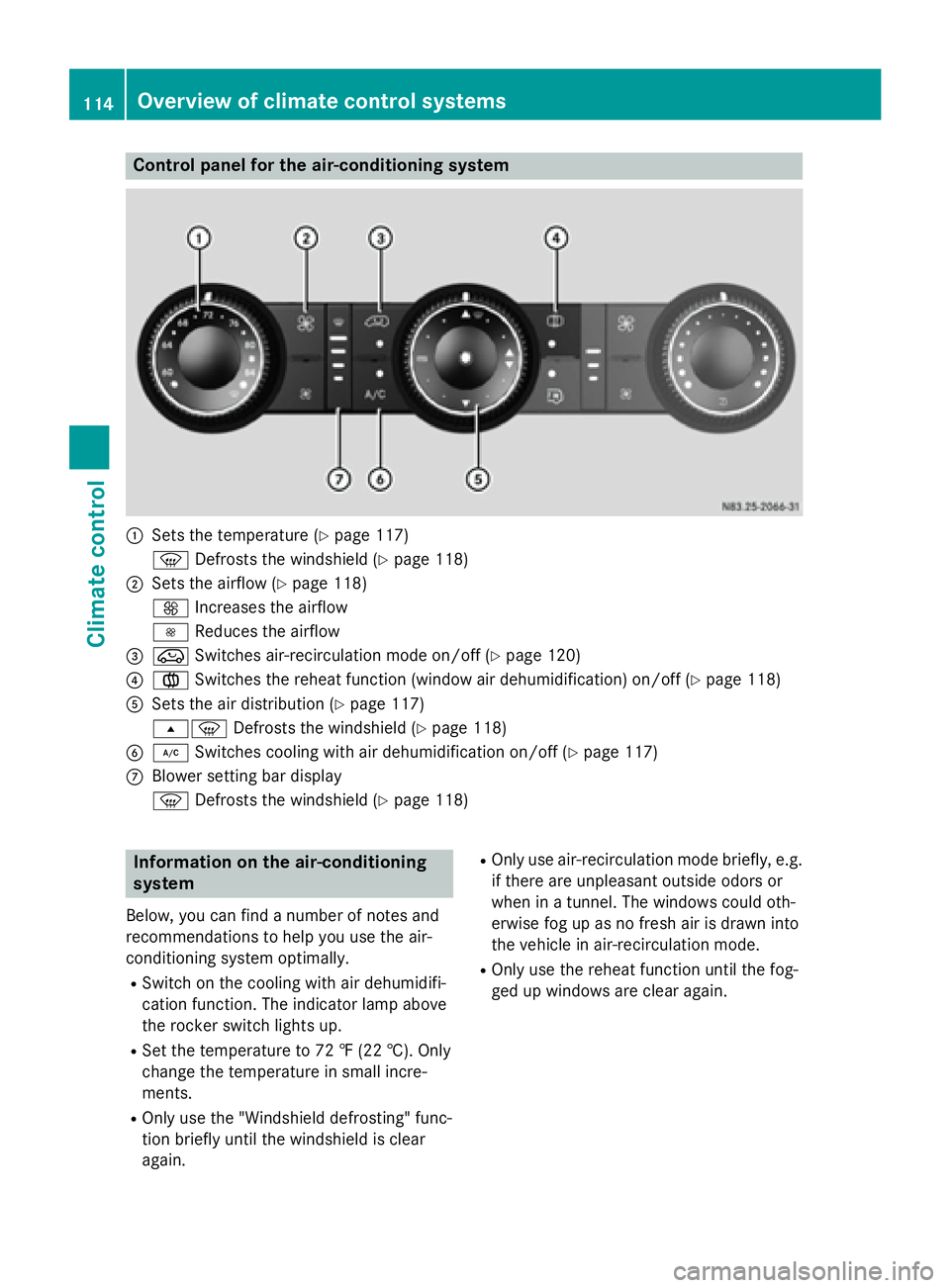
Control panel for the air-conditioning system
0043
Sets the temperature (Y page 117)
0085 Defrosts the windshield (Y page 118)
0044 Sets the airflow (Y page 118)
0097 Increases the airflow
0095 Reduces the airflow
0087 008A Switches air-recirculation mode on/off (Y page 120)
0085 0083 Switches the reheat function (window air dehumidification) on/off (Y page 118)
0083 Sets the air distribution (Y page 117)
007E0085 Defrosts the windshield (Y page 118)
0084 005A Switches cooling with air dehumidification on/off (Y page 117)
006B Blower setting bar display
0085 Defrosts the windshield (Y page 118)Information on the air-conditioning
system
Below, you can find a number of notes and
recommendations to help you use the air-
conditioning system optimally.
R Switch on the cooling with air dehumidifi-
cation function. The indicator lamp above
the rocker switch lights up.
R Set the temperature to 72 ‡ (22 †). Only
change the temperature in small incre-
ments.
R Only use the "Windshield defrosting" func-
tion briefly until the windshield is clear
again. R
Only use air-recirculation mode briefly, e.g.
if there are unpleasant outside odors or
when in a tunnel. The windows could oth-
erwise fog up as no fresh air is drawn into
the vehicle in air-recirculation mode.
R Only use the reheat function until the fog-
ged up windows are clear again. 114
Overview of climate control systemsClimate control
Page 119 of 334
Activating/deactivating rear-compart-
ment climate control via the control
panel X
Turn the key to position 2in the ignition
lock.
Vehicle with rear-compartment heating/
rear-compartment air conditioning
X To switch on/off: press the0074switch.
If the indicator lamp in the button lights up, the rear-compartment heating/rear-com-
partment air conditioning is switched on. Switching the cooling with air dehu-
midification function on/off
Important information If you switch off the "Cooling with air dehu-
midification" function, the air inside the vehi- cle will not be cooled (in warm weather) or
dehumidified. The windows could fog up morequickly.
The cooling with air dehumidification function
is only available when the engine is running.
The air inside the vehicle is cooled and dehu- midified according to the temperature selec-
ted.
Condensation may appear on the underside
of the vehicle when in cooling mode. This is
normal and not a sign that there is a malfunc- tion.
Switching on/off Vehicle with air conditioning
X Press the 005Abutton.
If the indicator lamp in the button lights up, cooling with air dehumidification is
switched on. Setting the temperature
Increasing/reducing temperature in
the front compartment via the control
panel Only change the temperature in small incre-
ments. Start at the center position, or at 72 ‡
(22 †).
X Switch on climate control (Y page 116).
X Turn temperature control 0043clockwise to
increase or counterclockwise to reduce the temperature (Y page 114).
Increasing/reducing temperature in
the rear compartment via the control
panel Only change the temperature in small incre-
ments.
X Switch on climate control (Y page 116).
X Turn rear-compartment temperature con-
trol 0087(Ypage 115) or rear-compartment
air-conditioning system 0044(Ypage 116)
clockwise to increase or counterclockwise
to reduce the temperature.
i Vehicles with additional air conditioning
and heating in the rear compartment: if you set the temperature control to the center
position, only one of the two climate con-
trol systems works in the rear compart-
ment and in air-recirculation mode
(Y page 120). Setting the air distribution
Air distribution settings The air distribution symbols have the follow-
ing meanings:
0078
Directs air through the center and
side air vents
007E
0085 Directs air to the windshield and the
air vents Operating the climate control system
117Climate control
Page 121 of 334
i
If the windows still fog up, set the control
as described for defrosting (Y page 118).
Vehicle with air conditioning
X Activate cooling with air dehumidification
(Y page 117).
X Press the 0066button (Y page 114).
The reheat function is switched on. The
indicator lamp in the switch lights up.
To switch off the reheat function, press the
0066 button again. The indicator lamp in
the button goes out.
Windows fogged up on the outside You should only select this setting until the
windshield is clear again.
X Switch on the windshield wipers
(Y page 107).
X Switch on climate control (Y page 116).
X Adjust air distribution to the footwell
(Y page 117).
X Close the air vents (Y page 120).Window heating
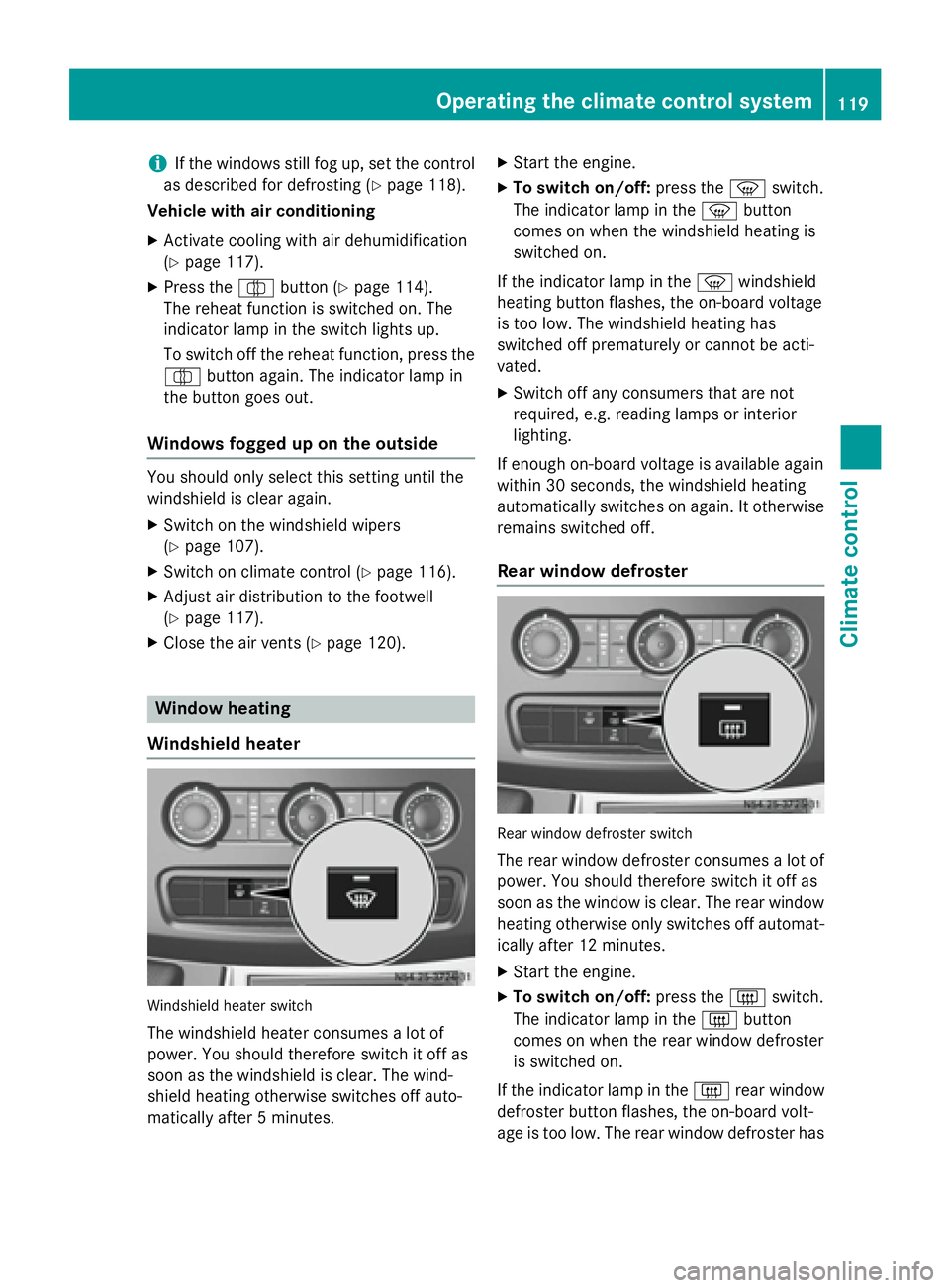
Windshield heater Windshield heater switch
The windshield heater consumes a lot of
power. You should therefore switch it off as
soon as the windshield is clear. The wind-
shield heating otherwise switches off auto-
matically after 5 minutes. X
Start the engine.
X To switch on/off: press the0085switch.
The indicator lamp in the 0085button
comes on when the windshield heating is
switched on.
If the indicator lamp in the 0085windshield
heating button flashes, the on-board voltage
is too low. The windshield heating has
switched off prematurely or cannot be acti-
vated.
X Switch off any consumers that are not
required, e.g. reading lamps or interior
lighting.
If enough on-board voltage is available again
within 30 seconds, the windshield heating
automatically switches on again. It otherwise
remains switched off.
Rear window defroster Rear window defroster switch
The rear window defroster consumes a lot of
power. You should therefore switch it off as
soon as the window is clear. The rear window
heating otherwise only switches off automat- ically after 12 minutes.
X Start the engine.
X To switch on/off: press the0071switch.
The indicator lamp in the 0071button
comes on when the rear window defroster
is switched on.
If the indicator lamp in the 0071rear window
defroster button flashes, the on-board volt-
age is too low. The rear window defroster has Operating the climate control system
119Climate control
Page 214 of 334
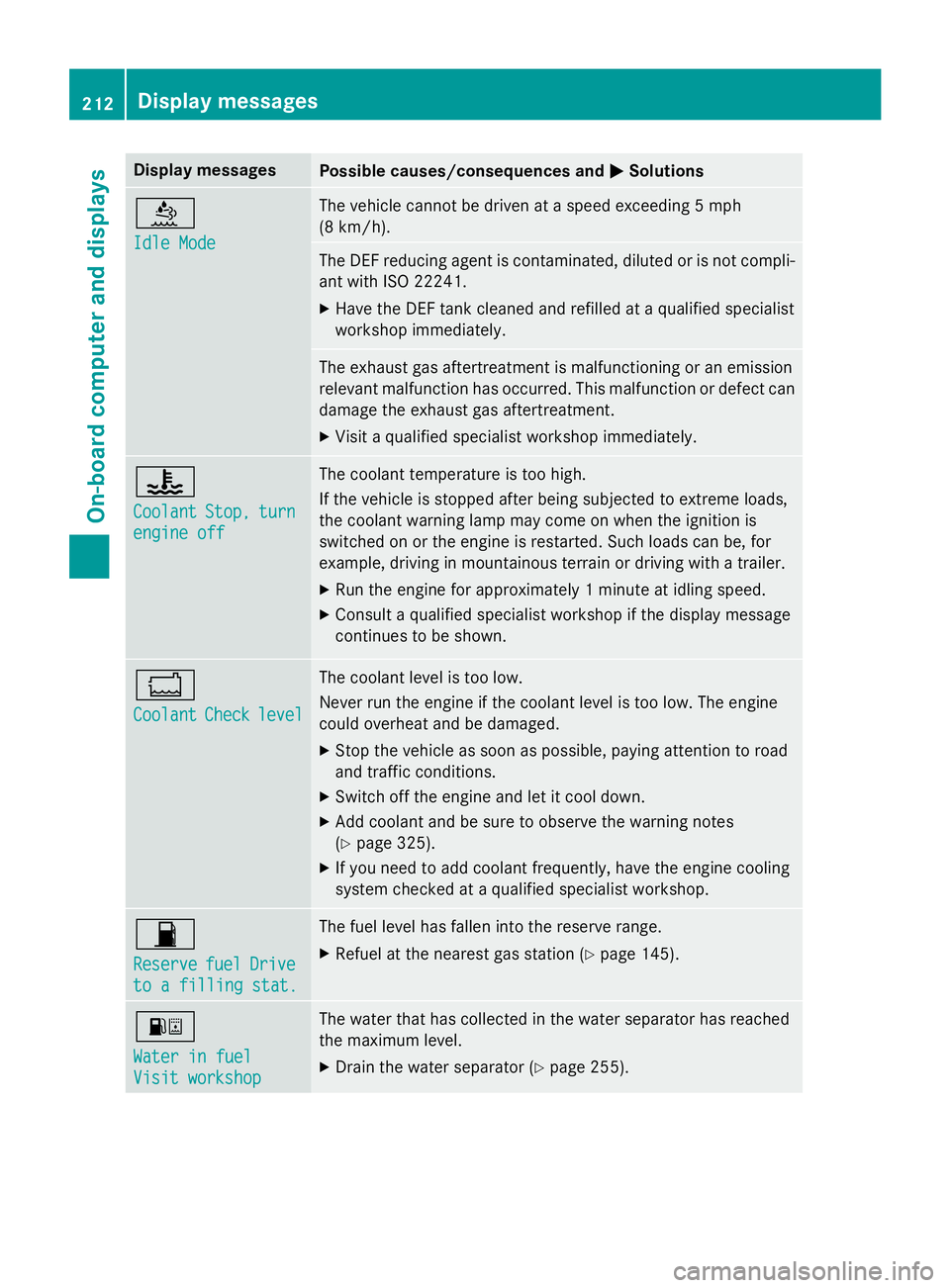
Display messages
Possible causes/consequences and
0050
0050Solutions 00E2
Idle Mode Idle Mode The vehicle cannot be driven at a speed exceeding 5 mph
(8 km/h).
The DEF reducing agent is contaminated, diluted or is not compli-
ant with ISO 2224 1.
X Have the DEF tank cleaned and refilled at a qualified specialist
workshop immediately. The exhaust gas aftertreatment is malfunctioning or an emission
relevant malfunction has occurred. This malfunction or defect can
damage the exhaust gas aftertreatment.
X Visit a qualified specialist workshop immediately. 00AC
Coolant Coolant
Stop,
Stop,turn
turn
engine off
engine off The coolant temperature is too high.
If the vehicle is stopped after being subjected to extreme loads,
the coolant warning lamp may come on when the ignition is
switched on or the engine is restarted. Such loads can be, for
example, driving in mountainous terrain or driving with a trailer.
X Run the engine for approximately 1 minute at idling speed.
X Consult a qualified specialist workshop if the display message
continues to be shown. 00BC
Coolant Coolant
Check
Checklevel
level The coolant level is too low.
Never run the engine if the coolant level is too low. The engine
could overheat and be damaged.
X Stop the vehicle as soon as possible, paying attention to road
and traffic conditions.
X Switch off the engine and let it cool down.
X Add coolant and be sure to observe the warning notes
(Y page 325).
X If you need to add coolant frequently, have the engine cooling
system checked at a qualified specialist workshop. 00B5
Reserve Reserve
fuel
fuelDrive
Drive
to a filling stat.
to a filling stat. The fuel level has fallen into the reserve range.
X Refuel at the nearest gas station (Y page 145).00B8
Water in fuel Water in fuel
Visit workshop Visit workshop The water that has collected in the water separator has reached
the maximum level.
X Drain the water separator (Y page 255).212
Display messagesOn-board computer and displays
Page 225 of 334
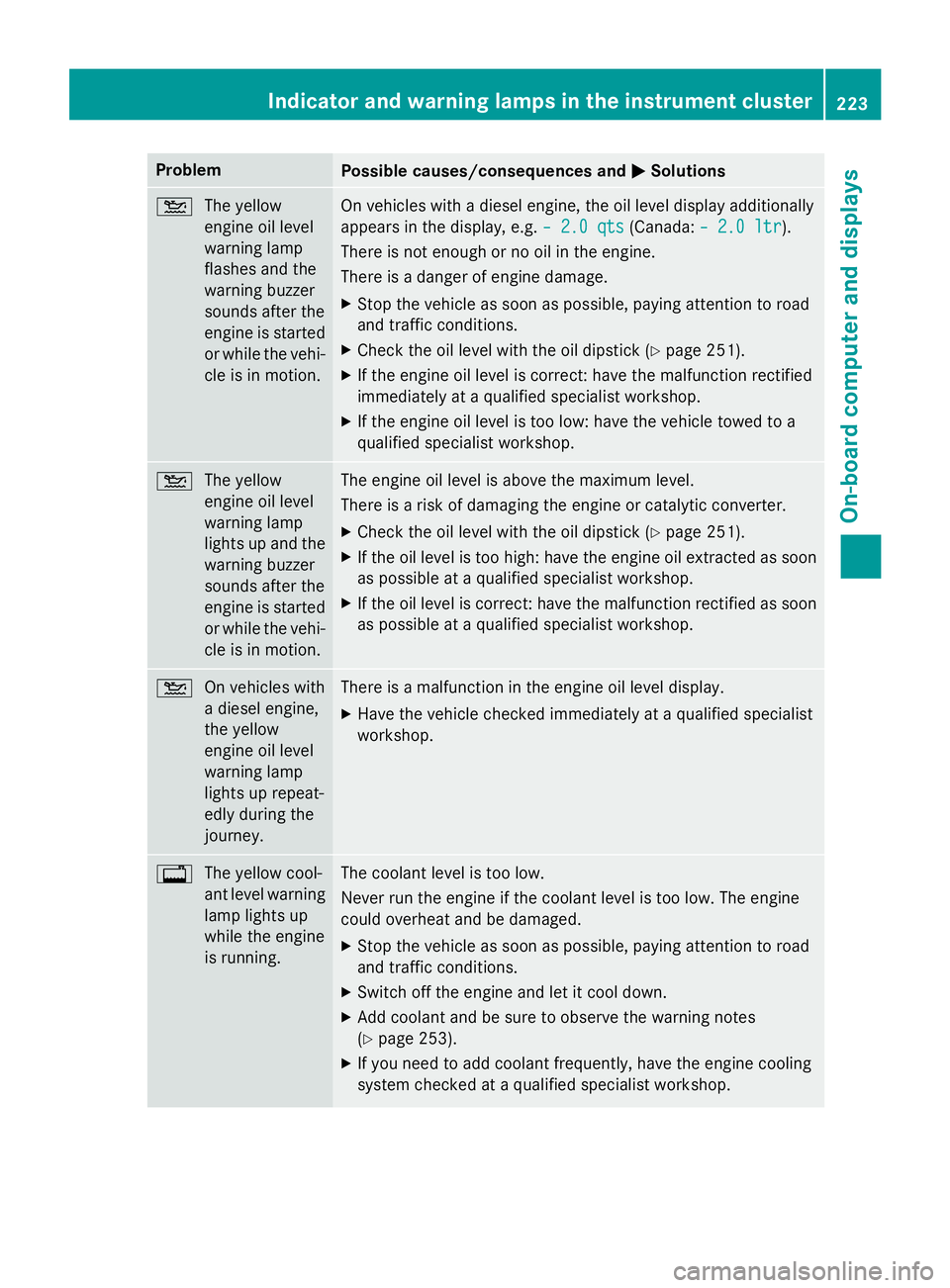
Problem
Possible causes/consequences and
0050
0050Solutions 00B2
The yellow
engine oil level
warning lamp
flashes and the
warning buzzer
sounds after the
engine is started
or while the vehi-
cle is in motion. On vehicles with a diesel engine, the oil level display additionally
appears in the display, e.g.
– 2.0 qts – 2.0 qts(Canada:– 2.0 ltr
– 2.0 ltr).
There is not enough or no oil in the engine.
There is a danger of engine damage.
X Stop the vehicle as soon as possible, paying attention to road
and traffic conditions.
X Check the oil level with the oil dipstick (Y page 251).
X If the engine oil level is correct: have the malfunction rectified
immediately at a qualified specialist workshop.
X If the engine oil level is too low: have the vehicle towed to a
qualified specialist workshop. 00B2
The yellow
engine oil level
warning lamp
lights up and the
warning buzzer
sounds after the
engine is started
or while the vehi-
cle is in motion. The engine oil level is above the maximum level.
There is a risk of damaging the engine or catalytic converter.
X Check the oil level with the oil dipstick (Y page 251).
X If the oil level is too high: have the engine oil extracted as soon
as possible at a qualified specialist workshop.
X If the oil level is correct: have the malfunction rectified as soon
as possible at a qualified specialist workshop. 00B2
On vehicles with
a diesel engine,
the yellow
engine oil level
warning lamp
lights up repeat-
edly during the
journey. There is a malfunction in the engine oil level display.
X Have the vehicle checked immediately at a qualified specialist
workshop. 003F
The yellow cool-
ant level warning
lamp lights up
while the engine
is running. The coolant level is too low.
Never run the engine if the coolant level is too low. The engine
could overheat and be damaged.
X Stop the vehicle as soon as possible, paying attention to road
and traffic conditions.
X Switch off the engine and let it cool down.
X Add coolant and be sure to observe the warning notes
(Y page 253).
X If you need to add coolant frequently, have the engine cooling
system checked at a qualified specialist workshop. Indicator and warning lamps in the instrument cluster
223On-board computer and displays Z
Page 255 of 334
X
Replace cap 0085on the filler neck and
tighten.
When doing so, make sure that the cap
engages correctly.
X Check the oil level with the oil dipstick
(Y page 251) or on the display
(Y page 250).
X Close the hood. Coolant
G
WARNING
The engine cooling system is pressurized, par- ticularly when the engine is warm. When
opening the cap, you could be scalded by hotcoolant spraying out. There is a risk of injury.
Let the engine cool down before opening the
cap. Wear eye and hand protection when
opening the cap. Open the cap slowly half a
turn to allow pressure to escape.
Only check the coolant level and/or fill the
coolant if the vehicle is on a level surface and the engine has cooled down. The coolant tem-
perature must be below 122 ‡ (50 †).
! Check the engine cooling and heating sys-
tem regularly for leaks.
If a large quantity of coolant is lost, have the
cause traced and rectified at a qualified
specialist workshop. G
WARNING
Coolant contains glycol and is therefore toxic. Do not swallow the coolant. See a doctor
immediately if you swallow coolant.
Make sure that coolant does not come into
contact with skin, eyes or clothing. In case of
contact with eyes, rinse immediately with
plenty of clean water. Clean affected areas of skin and clothing with soap and water imme-
diately. Change any affected clothing imme-
diately. G
WARNING
If antifreeze comes into contact with hot com- ponents in the engine compartment, it may
ignite. There is a risk of fire and injury.
Let the engine cool down before you add anti-
freeze. Make sure that antifreeze is not spilled
next to the filler neck. Thoroughly clean the
antifreeze from components before starting
the engine.
! Take care not to spill any coolant on pain-
ted surfaces. You could otherwise damage
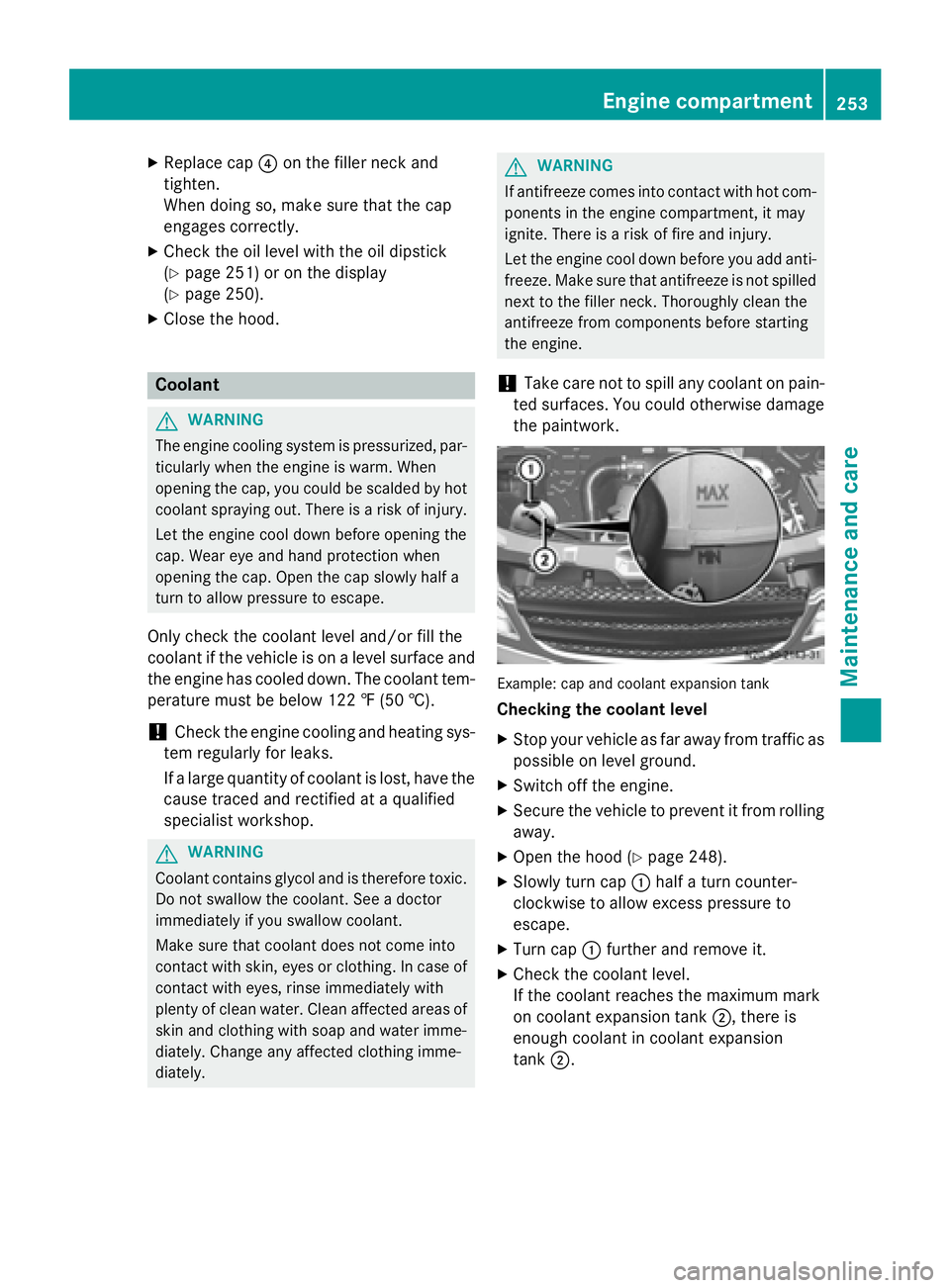
the paintwork. Example: cap and coolant expansion tank
Checking the coolant level
X Stop your vehicle as far away from traffic as
possible on level ground.
X Switch off the engine.
X Secure the vehicle to prevent it from rolling
away.
X Open the hood (Y page 248).
X Slowly turn cap 0043half a turn counter-
clockwise to allow excess pressure to
escape.
X Turn cap 0043further and remove it.
X Check the coolant level.
If the coolant reaches the maximum mark
on coolant expansion tank 0044, there is
enough coolant in coolant expansion
tank 0044. Engine compartment
253Maintenance and care Z