mirror MERCEDES-BENZ SPRINTER 2016 MY16 Operator’s Manual
[x] Cancel search | Manufacturer: MERCEDES-BENZ, Model Year: 2016, Model line: SPRINTER, Model: MERCEDES-BENZ SPRINTER 2016Pages: 290, PDF Size: 6.44 MB
Page 76 of 290
Move the seat forward or back first. This will
help to avoid contact with other parts of the
interior.
Push the handbrake lever down to the stop.
The parking brake or handbrake lever could
otherwise be damaged.
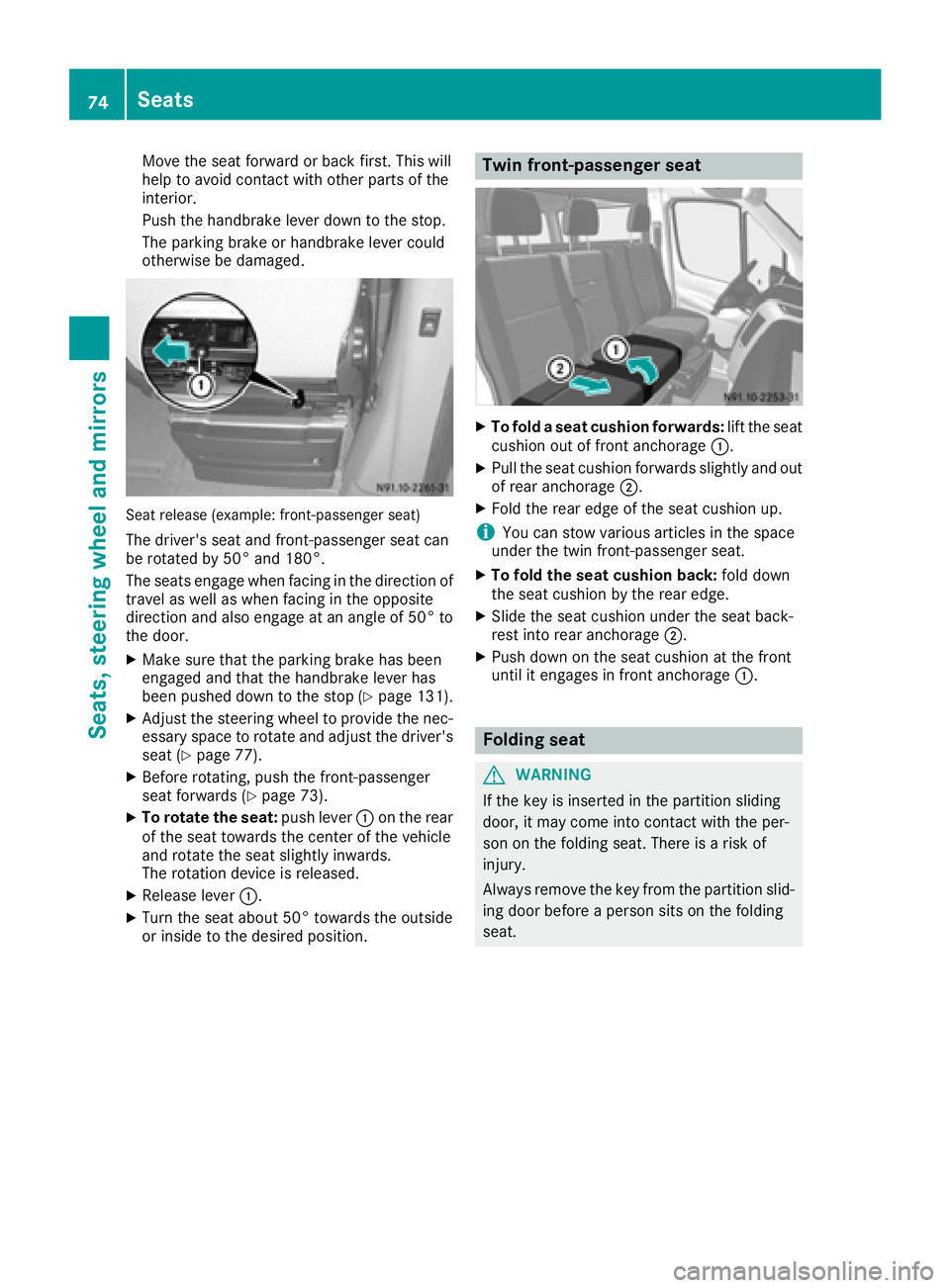
Seat release (example: front-passenger seat)
The driver's seat and front-passenger seat can
be rotated by 50° and 180°.
The seats engage when facing in the direction oftravel as well as when facing in the opposite
direction and also engage at an angle of 50° to
the door.
XMake sure that the parking brake has been
engaged and that the handbrake lever has
been pushed down to the stop (
Ypage 131).
XAdjust the steering wheel to provide the nec-
essary space to rotate and adjust the driver's seat (
Ypage 77).
XBefore rotating, push the front-passenger
seat forwards (Ypage 73).
XTo rotate the seat: push lever:on the rear
of the seat towards the center of the vehicle
and rotate the seat slightly inwards.
The rotation device is released.
XRelease lever :.
XTurn the seat about 50° towards the outside
or inside to the desired position.
Twin front-passenger seat
XTo fold a seat cushion forwards: lift the seat
cushion out of front anchorage :.
XPull the seat cushion forwards slightly and out
of rear anchorage;.
XFold the rear edge of the seat cushion up.
iYou can stow various articles in the space
under the twin front-passenger seat.
XTo fold the seat cushion back: fold down
the seat cushion by the rear edge.
XSlide the seat cushion under the seat back-
rest into rear anchorage ;.
XPush down on the seat cushion at the front
until it engages in front anchorage :.
Folding seat
GWARNING
If the key is inserted in the partition sliding
door, it may come into contact with the per-
son on the folding seat. There is a risk of
injury.
Always remove the key from the partition slid-
ing door before a person sits on the folding
seat.
74Seats
Seats, steering wheel and mirrors
Page 77 of 290
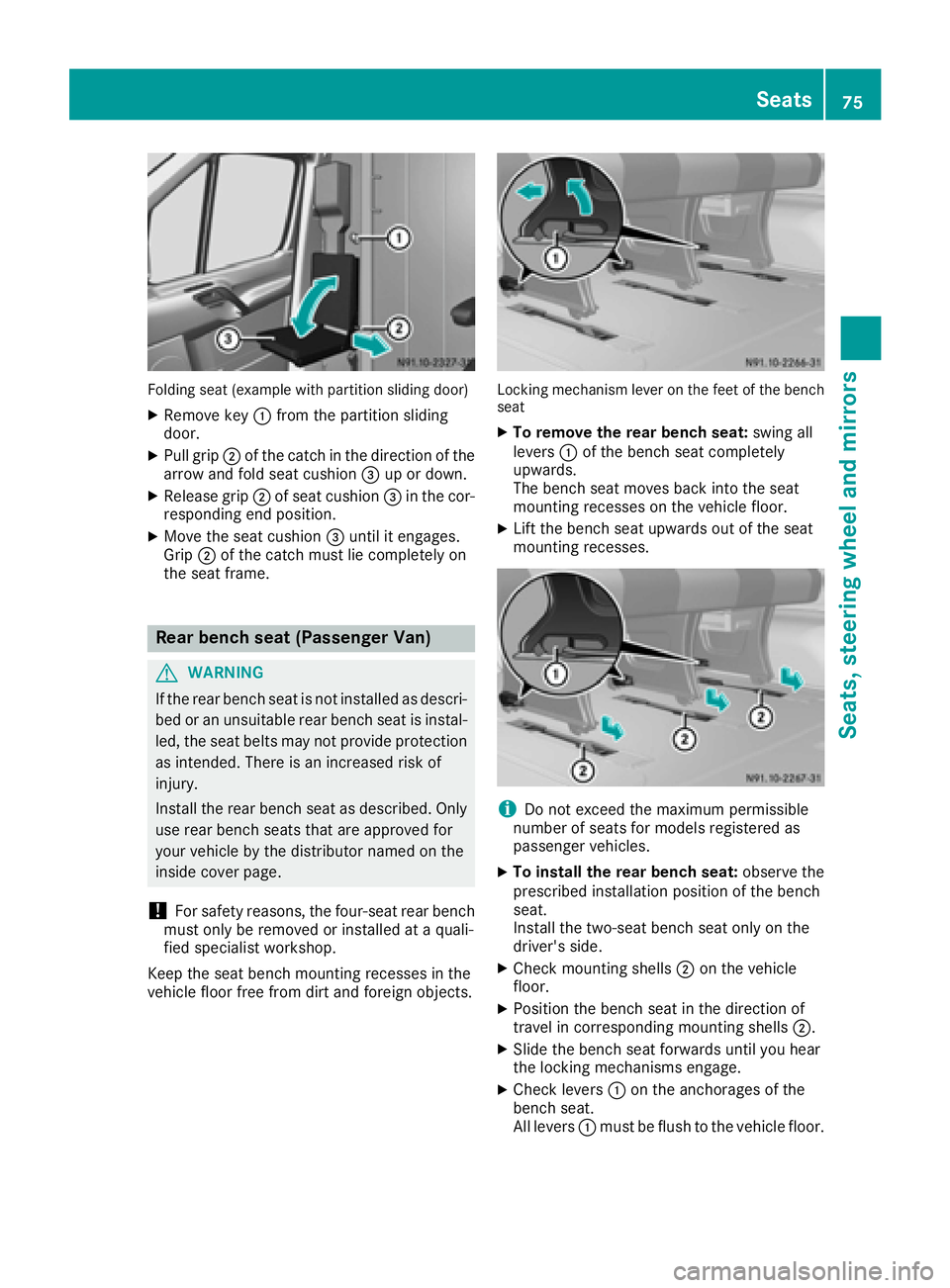
Folding seat (example with partition sliding door)
XRemove key:from the partition sliding
door.
XPull grip ;of the catch in the direction of the
arrow and fold seat cushion =up or down.
XRelease grip ;of seat cushion =in the cor-
responding end position.
XMove the seat cushion =until it engages.
Grip ;of the catch must lie completely on
the seat frame.
Rear bench seat (Passenger Van)
GWARNING
If the rear bench seat is not installed as descri- bed or an unsuitable rear bench seat is instal-
led, the seat belts may not provide protection
as intended. There is an increased risk of
injury.
Install the rear bench seat as described. Only
use rear bench seats that are approved for
your vehicle by the distributor named on the
inside cover page.
!For safety reasons, the four-seat rear bench
must only be removed or installed at a quali-
fied specialist workshop.
Keep the seat bench mounting recesses in the
vehicle floor free from dirt and foreign objects.
Locking mechanism lever on the feet of the bench
seat
XTo remove the rear bench seat: swing all
levers :of the bench seat completely
upwards.
The bench seat moves back into the seat
mounting recesses on the vehicle floor.
XLift the bench seat upwards out of the seat
mounting recesses.
iDo not exceed the maximum permissible
number of seats for models registered as
passenger vehicles.
XTo install the rear bench seat: observe the
prescribed installation position of the bench
seat.
Install the two-seat bench seat only on the
driver's side.
XCheck mounting shells ;on the vehicle
floor.
XPosition the bench seat in the direction of
travel in corresponding mounting shells ;.
XSlide the bench seat forwards until you hear
the locking mechanisms engage.
XCheck levers:on the anchorages of the
bench seat.
All levers :must be flush to the vehicle floor.
Seats75
Seats, steering wheel and mirrors
Z
Page 78 of 290
Head restraints
GWARNING
If head restraints are not installed and adjus-
ted correctly, they cannot provide protection
as intended. There is an increased risk of
injury in the head and neck area, e.g. in the
event of an accident or when braking.
Always drive with the head restraints instal-
led. Before driving off, make sure for every
vehicle occupant that the center of the head
restraint supports the back of the head at
about eye level.
Do not change over the head restraints for the
front and rear seats. Otherwise, it will not be
possible to correctly adjust the height and angle
of the head restraints.
Adjust the head restraint so that it is as close as
possible to your head.
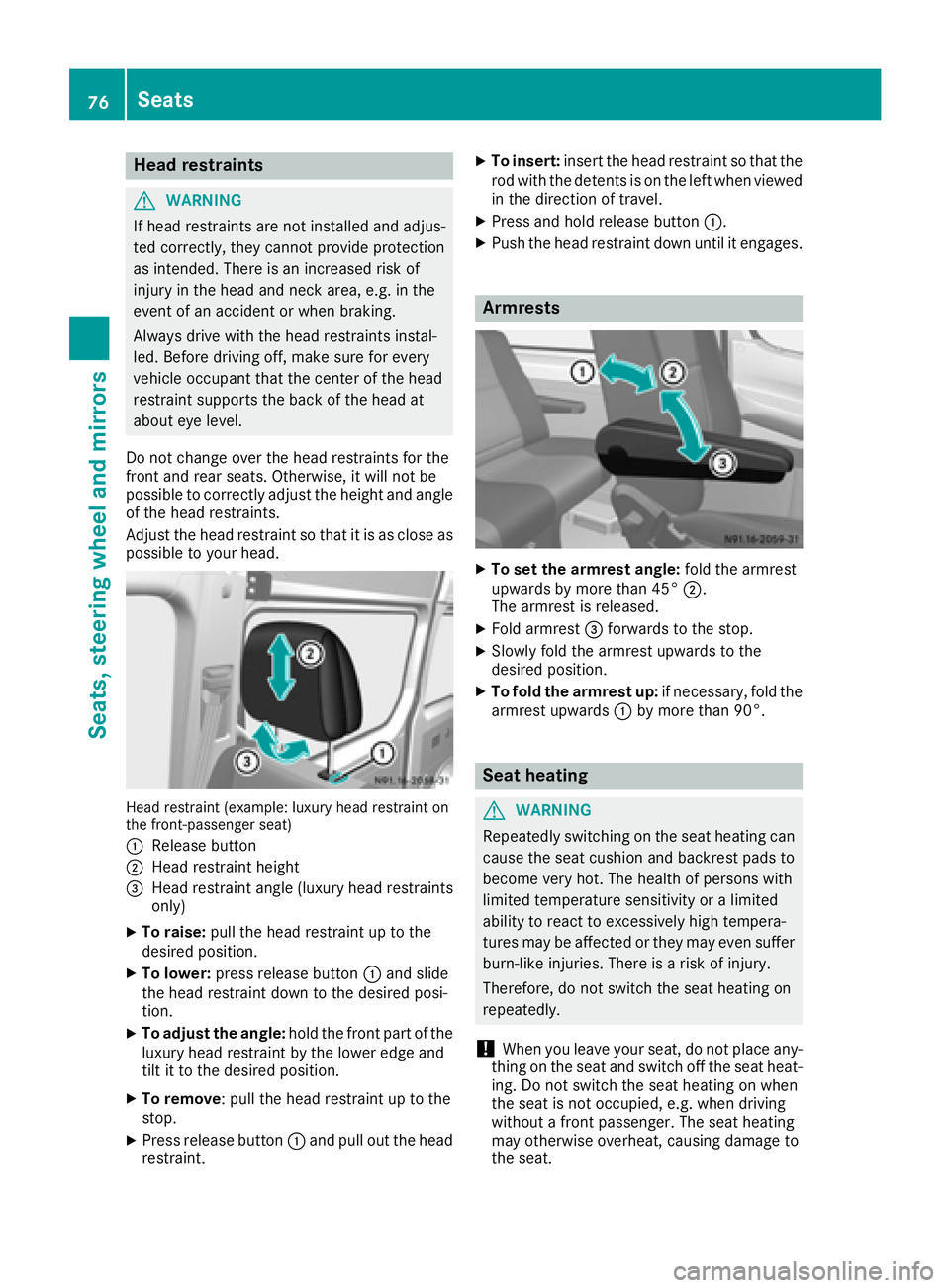
Head restraint (example: luxury head restraint on
the front-passenger seat)
:
Release button
;Head restraint height
=Head restraint angle (luxury head restraints
only)
XTo raise: pull the head restraint up to the
desired position.
XTo lower: press release button :and slide
the head restraint down to the desired posi-
tion.
XTo adjust the angle: hold the front part of the
luxury head restraint by the lower edge and
tilt it to the desired position.
XTo remove : pull the head restraint up to the
stop.
XPress release button :and pull out the head
restraint.
XTo insert: insert the head restraint so that the
rod with the detents is on the left when viewed in the direction of travel.
XPress and hold release button :.
XPush the head restraint down until it engages.
Armrests
XTo set the armrest angle:fold the armrest
upwards by more than 45° ;.
The armrest is released.
XFold armrest =forwards to the stop.
XSlowly fold the armrest upwards to the
desired position.
XTo fold the armrest up: if necessary, fold the
armrest upwards :by more than 90°.
Seat heating
GWARNING
Repeatedly switching on the seat heating can
cause the seat cushion and backrest pads to
become very hot. The health of persons with
limited temperature sensitivity or a limited
ability to react to excessively high tempera-
tures may be affected or they may even suffer
burn-like injuries. There is a risk of injury.
Therefore, do not switch the seat heating on
repeatedly.
!When you leave your seat, do not place any-
thing on the seat and switch off the seat heat-
ing. Do not switch the seat heating on when
the seat is not occupied, e.g. when driving
without a front passenger. The seat heating
may otherwise overheat, causing damage to
the seat.
76Seats
Seats, steering wheel and mirrors
Page 79 of 290
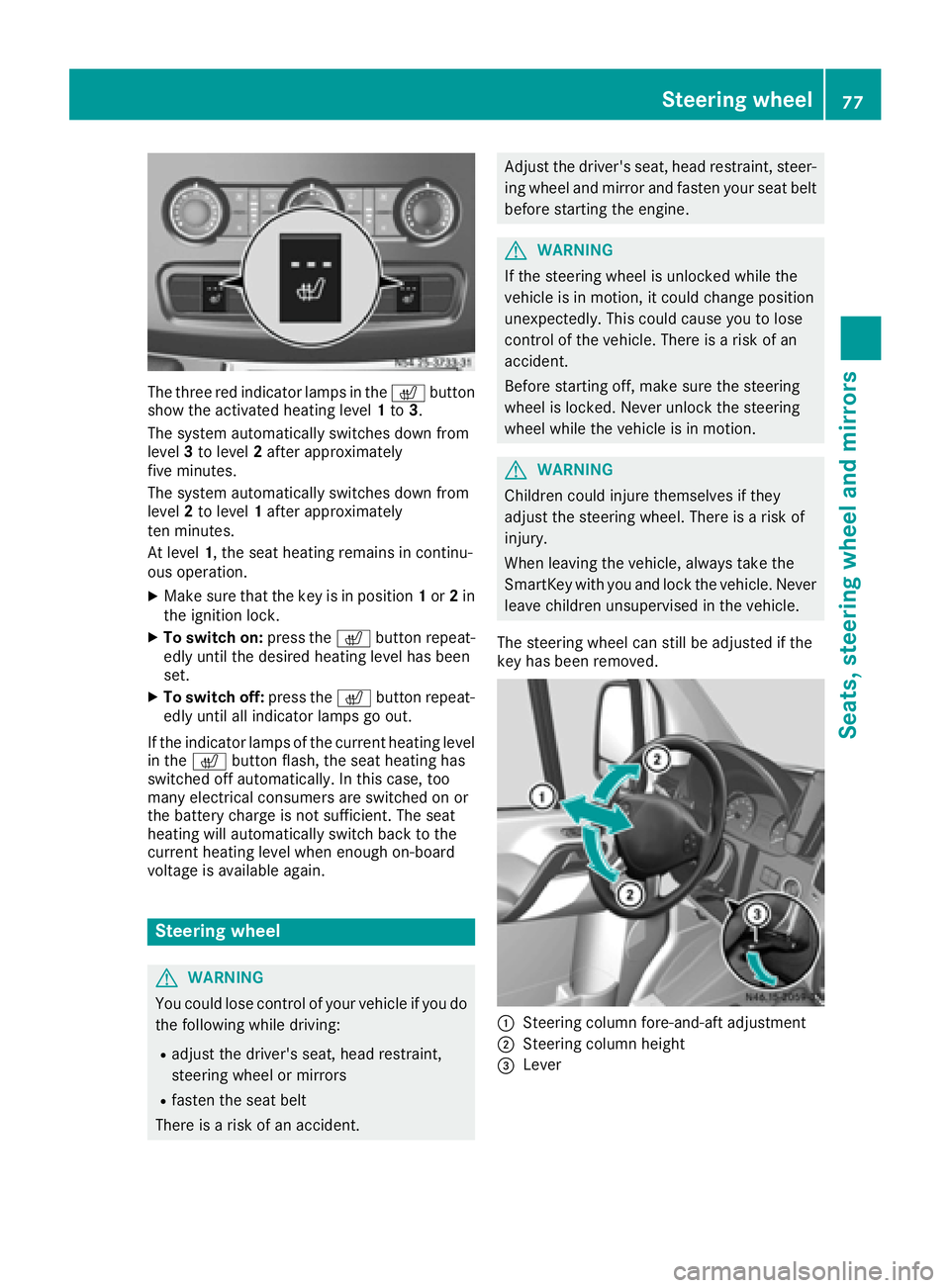
The three red indicator lamps in thecbutton
show the activated heating level 1to 3.
The system automatically switches down from
level 3to level 2after approximately
five minutes.
The system automatically switches down from
level 2to level 1after approximately
ten minutes.
At level 1, the seat heating remains in continu-
ous operation.
XMake sure that the key is in position 1or 2in
the ignition lock.
XTo switch on: press thecbutton repeat-
edly until the desired heating level has been
set.
XTo switch off: press thecbutton repeat-
edly until all indicator lamps go out.
If the indicator lamps of the current heating level
in the cbutton flash, the seat heating has
switched off automatically. In this case, too
many electrical consumers are switched on or
the battery charge is not sufficient. The seat
heating will automatically switch back to the
current heating level when enough on-board
voltage is available again.
Steering wheel
GWARNING
You could lose control of your vehicle if you do the following while driving:
Radjust the driver's seat, head restraint,
steering wheel or mirrors
Rfasten the seat belt
There is a risk of an accident.
Adjust the driver's seat, head restraint, steer- ing wheel and mirror and fasten your seat belt
before starting the engine.
GWARNING
If the steering wheel is unlocked while the
vehicle is in motion, it could change position
unexpectedly. This could cause you to lose
control of the vehicle. There is a risk of an
accident.
Before starting off, make sure the steering
wheel is locked. Never unlock the steering
wheel while the vehicle is in motion.
GWARNING
Children could injure themselves if they
adjust the steering wheel. There is a risk of
injury.
When leaving the vehicle, always take the
SmartKey with you and lock the vehicle. Never
leave children unsupervised in the vehicle.
The steering wheel can still be adjusted if the
key has been removed.
:Steering column fore-and-aft adjustment
;Steering column height
=Lever
Steering wheel77
Seats, steering wheel and mirrors
Z
Page 80 of 290
XTo set the steering wheel:swing lever=
down until it engages.
The steering wheel is unlocked.
XMove the steering wheel to the desired posi-
tion.
XPull lever =up to the stop.
The steering wheel is locked again.
Mirrors
Rear-view mirror
XAnti-glare mode: push anti-glare lever :in
the direction of the arrow.
Exterior mirrors
Important safety notes
GWARNING
The additional mirrors in the exterior mirrors
reduce the size of the image. Objects visible in
the mirrors are closer than they appear. You
could misjudge the distance from road users
driving behind you when changing lanes, for
instance. There is a risk of an accident.
You should therefore always determine the
actual distance from road users driving
behind you, e.g.:
Rby looking over your shoulder
Rby looking in the main mirror in the exterior
mirror.
Adjusting manually
XBefore starting off, manually adjust the exte-
rior mirrors in such a way that you can get a
good overview of road and traffic conditions.
Adjusting electrically
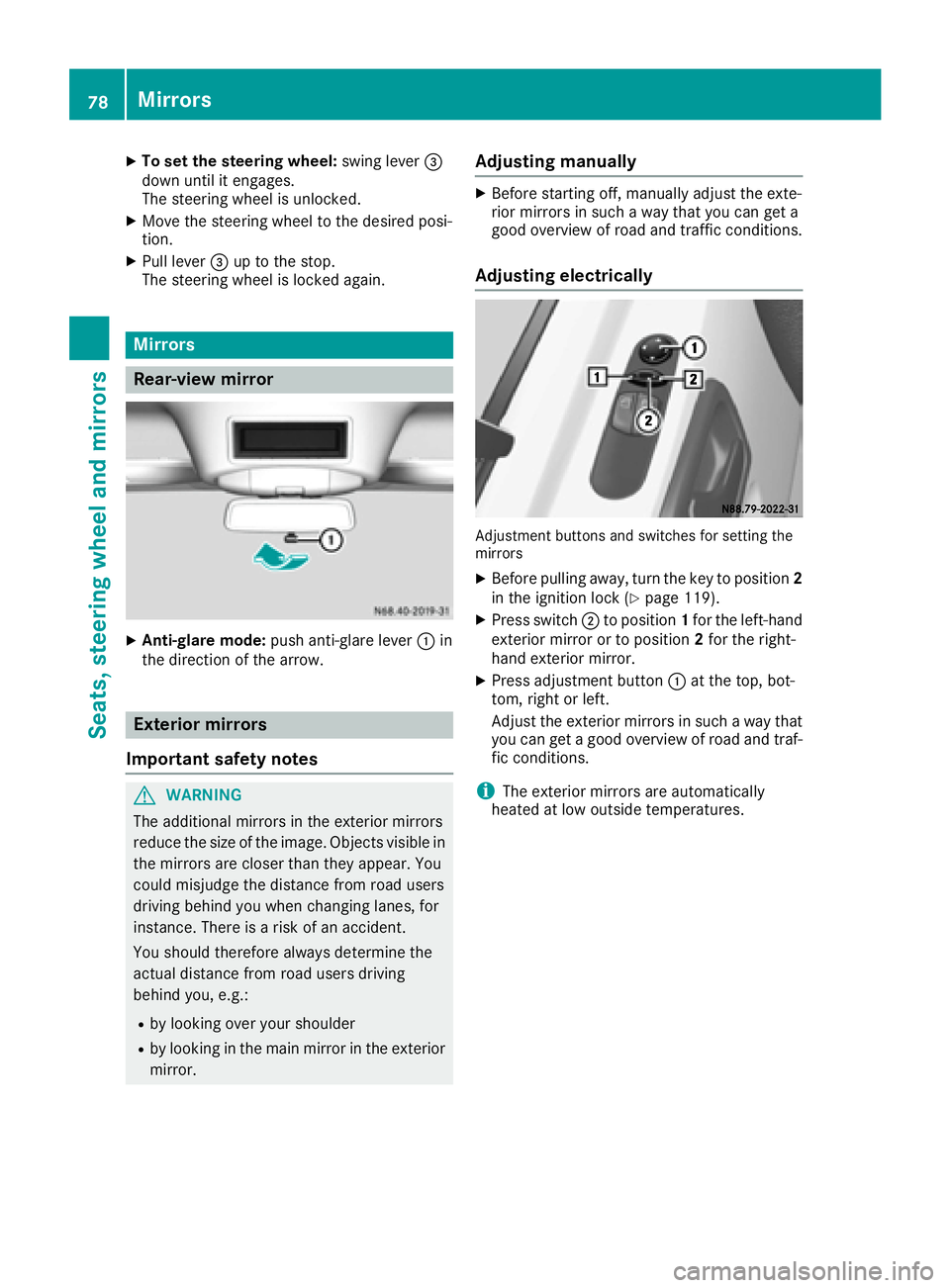
Adjustment buttons and switches for setting the
mirrors
XBefore pulling away, turn the key to position 2
in the ignition lock (Ypage 119).
XPress switch ;to position 1for the left-hand
exterior mirror or to position 2for the right-
hand exterior mirror.
XPress adjustment button :at the top, bot-
tom, right or left.
Adjust the exterior mirrors in such a way that
you can get a good overview of road and traf- fic conditions.
iThe exterior mirrors are automatically
heated at low outside temperatures.
78Mirrors
Seats, steering wheel and mirrors
Page 88 of 290
Changing bulbs
Important safety notes
GDANGER
Xenon bulbs carry a high voltage. You can get an electric shock if you remove the cover of
the Xenon bulb and touch the electrical con-
tacts. There is a risk of fatal injury.
Never touch the parts or the electrical con-
tacts of the Xenon bulb. Always have work on
the Xenon bulbs carried out at a qualified spe-
cialist workshop.
GWARNING
Bulbs, lamps and connectors can get very hot
when operating. If you change a bulb, you
could burn yourself on these components.
There is a risk of injury.
Allow these components to cool down before
changing a bulb.
!Make sure the bulbs are always securely
installed.
If your vehicle is equipped with Bi-Xenon bulbs,
you can recognize this by the following: the cone
of light from the Xenon bulbs moves from the
top to the bottom and back again when you start
the engine. For this to be observed, the low-
beam headlamps must be switched on before
starting the engine.
The bulbs and lamps are an essential compo-
nent of vehicle safety. You must therefore make
sure that these function correctly at all times.
Have the headlamp setting checked regularly.
RAlways switch off the vehicle's lighting sys-
tem before changing a bulb.
This will prevent a short circuit.
RDo not touch the glass tube of new bulbs with your bare hands. Always use a clean, lint-free
cloth or only touch the base of the bulb when
installing.
Even minor contamination can burn into the
glass surface and reduce the service life of the
bulbs.
RDo not use a bulb that has been dropped or
that has scratches on its glass tube.
The bulb could explode.
ROnly use bulbs in closed lamps which have
been designed for this purpose.
ROnly use spare bulbs of the same type and
with the prescribed voltage
RProtect the bulbs from moisture when in use.
If the new bulb still does not light up, consult a
qualified specialist workshop.
RHave the LEDs and bulbs of the following
lamps changed at a qualified specialist work-
shop:
-the additional turn signals in the exterior
mirrors
-the high-mounted brake lamp
-LED daytime running lamps (Bi-Xenon
headlamps)
-Bi-Xenon lamps (Bi-Xenon headlamps)
-front fog lamps
If you require assistance changing bulbs, con-
sult a qualified specialist workshop.
Front bulbs
Overview of bulb replacement – bulb
types
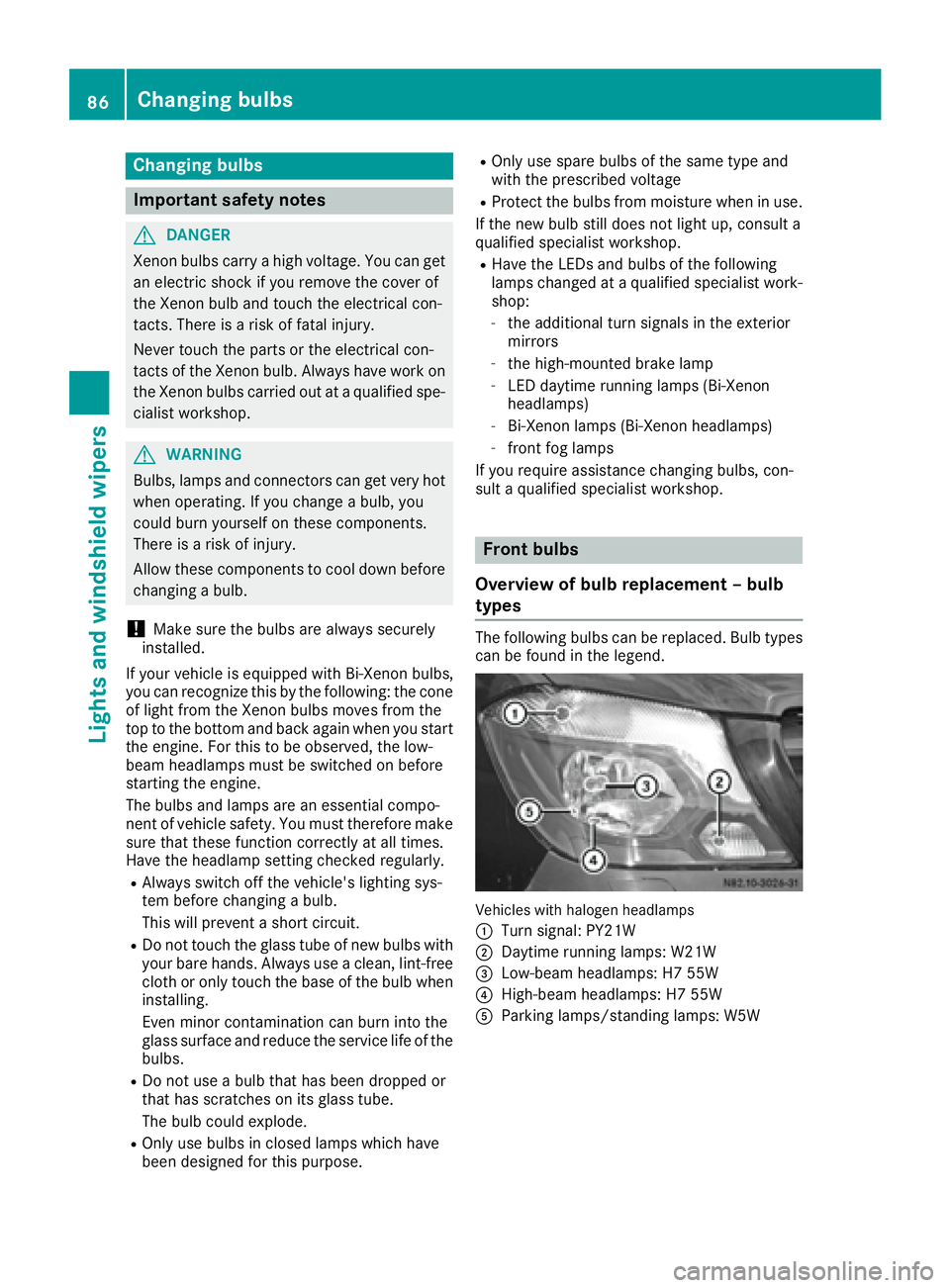
The following bulbs can be replaced. Bulb types can be found in the legend.
Vehicle swit hhalogen headlamps
:
Turn signal: PY21W
;Daytime running lamps: W21W
=Low-beam headlamps: H7 55W
?High-beam headlamps: H7 55W
AParking lamps/standing lamps: W5W
86Changing bulbs
Lights and windshield wipers
Page 89 of 290
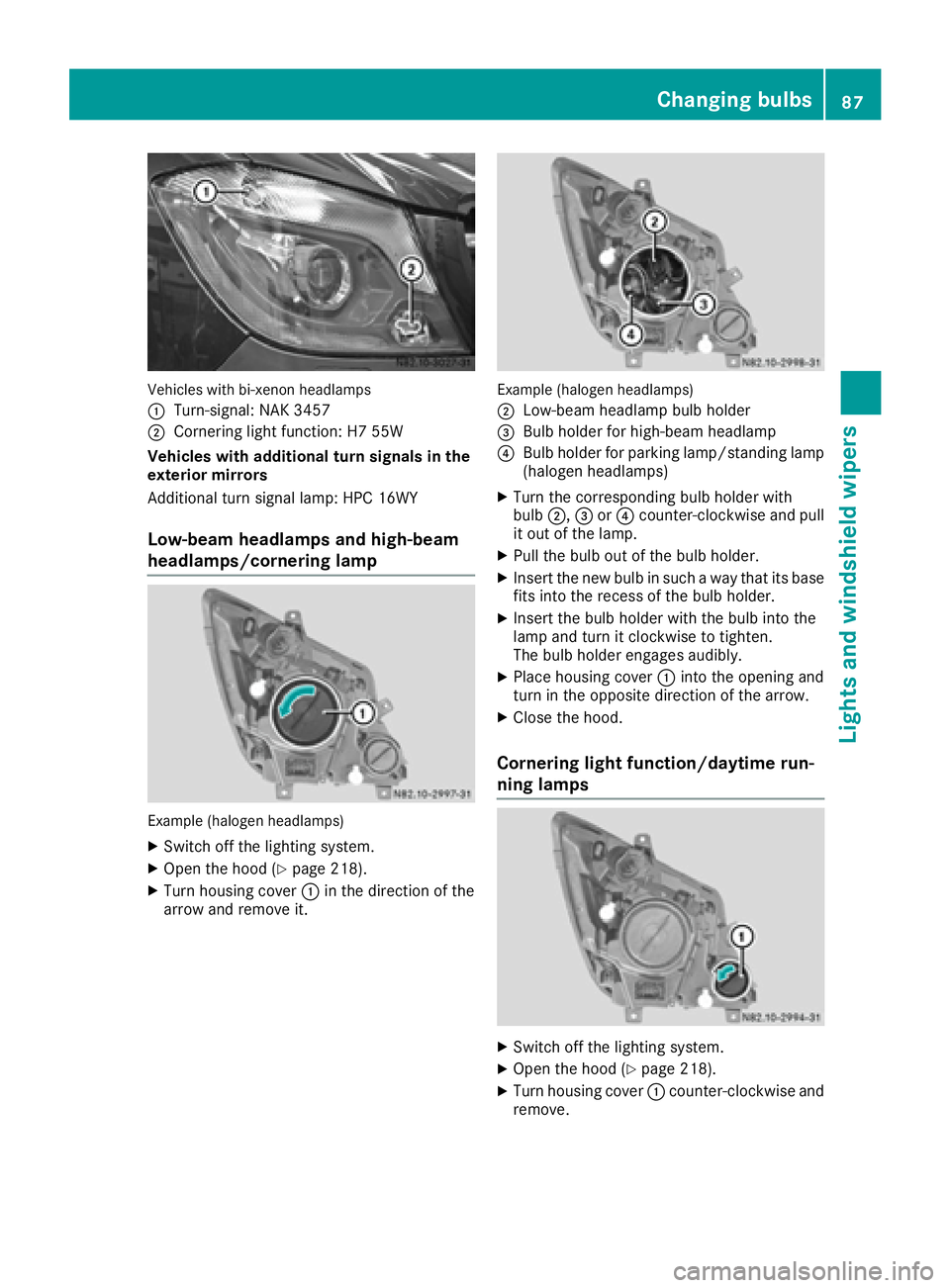
Vehicles with bi-xenon headlamps
:
Turn-signal: NAK 3457
;Cornering light function: H7 55W
Vehicles with additional turn signals in the
exterior mirrors
Additional turn signal lamp: HPC 16WY
Low-beam headlamps and high-beam
headlamps/cornering lamp
Example (halogen headlamps)
XSwitch off the lighting system.
XOpen the hood (Ypage 218).
XTurn housing cover :in the direction of the
arrow and remove it.
Example (halogen headlamps)
;
Low-beam headlamp bulb holder
=Bulb holder for high-beam headlamp
?Bulb holder for parking lamp/standing lamp
(halogen headlamps)
XTurn the corresponding bulb holder with
bulb ;,=or? counter-clockwise and pull
it out of the lamp.
XPull the bulb out of the bulb holder.
XInsert the new bulb in such a way that its base fits into the recess of the bulb holder.
XInsert the bulb holder with the bulb into the
lamp and turn it clockwise to tighten.
The bulb holder engages audibly.
XPlace housing cover :into the opening and
turn in the opposite direction of the arrow.
XClose the hood.
Cornering light function/daytime run-
ning lamps
XSwitch off the lighting system.
XOpen the hood (Ypage 218).
XTurn housing cover :counter-clockwise and
remove.
Changing bulbs87
Lights and windshield wipers
Z
Page 141 of 290
Rules for driving off-road
!Always bear the vehicle's ground clearance
in mind and avoid obstacles, e.g. deep ruts.
Obstacles may damage the following parts of
the vehicle:
Rthe chassis
Rthe drive train
Rthe fuel and supply tanks
For this reason, you should always drive
slowly when driving off-road. If you have to
drive over obstacles, have the front
passenger direct you.
iWe recommend that you additionally carry a
shovel and a recovery rope with shackle in the
vehicle.
REnsure that loads and items of luggage are
securely stowed or lashed down
(
Ypage 212).
RBefore driving off-road, stop the vehicle and
shift to a low gear.
RIf the surface demands it, temporarily deacti-
vate ASR when pulling away (Ypage 53).
ROnly drive off-road with the engine running
and a gear engaged.
RDrive slowly and smoothly. Walking pace is
necessary in many situations.
RAvoid spinning the drive wheels.
RMake sure that the wheels always remain in
contact with the ground.
RDrive with extreme care over unknown terrain
where you can only see for a short distance.
As a precaution, get out of the vehicle to take
a look at the route to be taken in advance.
RCheck the water depth before fording.
RWatch out for obstacles (e.g. rocks, holes,
tree stumps and ruts).
RAvoid edges where the surface could crumble
or break away.
Checklist after driving off-road
!If you detect damage to the vehicle after
driving off-road, have the vehicle checked
immediately at a qualified specialist work-
shop.
Off-road driving places a higher demand on your
vehicle than normal road operation. Check your
vehicle after driving on rough terrain. By doing
so you will notice any damage in good time and reduce the risk of an accident for yourself and
other road users. Clean your vehicle thoroughly
before driving on public roads.
Observe the following points after driving off-
road, on construction sites and before driving on
public roads:
XVehicles with all-wheel drive:
deactivate
all-wheel drive (Ypage 148).
XActivate ASR (Ypage 53).
XClean the headlamps and tail lamps and
check them for damage.
XClean the front and rear license plates.
XClean the windshield, windows and exterior
mirrors.
XClean the steps, door sills and grab handles.
This increases safety of footing.
XClean the wheels and tires, wheel arches and
the underbody of the vehicle with a water jet.
This increases road grip, especially on wet
road surfaces.
XCheck the wheels and tires and wheel arches
for trapped foreign objects and remove them.
Trapped foreign objects can damage the
wheels and tires or may be fl
ung out from the
vehicle when you continue driving.
XCheck the underbody for trapped branches or
other parts of plants and remove them.
Trapped branches or other parts of plants
increase the risk of fire and can cause dam-
age to fuel lines, brake hoses and the rubber
bellows of axle joints and drive shafts.
XClean the brake disks, brake pads and axle
joints, particularly after operation in sand,
mud, grit and gravel, water or similarly dirty
conditions.
XCheck the entire floor assembly, the tires,
wheels, bodywork structure, brakes, steering,
chassis and exhaust system for any damage.
XCheck the service brake for operating safety,
e.g. carry out a brake test.
XIf you notice strong vibrations after driving off-
road, check the wheels and drive train for for-
eign objects again. Remove any foreign
objects which can lead to imbalances and
thus cause vibrations.
Driving tips139
Driving and parking
Z
Page 146 of 290
XKeep the brake pedal depressed until the
emergency braking situation is over.
ABS prevents the wheels from locking.
The brakes function as usual again if:
Ryou release the brake pedal
Rthere is no longer any danger of a collision
Rno obstacle is detected in front of your vehicle
Adaptive Brake Assist is then deactivated.
Up to the maximum vehicle speed, adaptive
Brake Assist can react to moving obstacles that
have already been recognized as such at least
once over the period of observation. Adaptive
Brake Assist does not react to stationary obsta-
cles.
In particular, the detection of obstacles can be
impaired if:
Rdirt on the sensors or anything else covering
the sensors
Rsnow or heavy rain
Rinterference from other radar sources
Rthere are strong radar reflections, for exam-
ple in parking garages
Ra narrow vehicle traveling in front, e.g. a
motorbike
Ra vehicle traveling in front on a different line
If adaptive Brake Assist is not available due to a
malfunction in the radar sensor system, the full
brake boosting effect with the help of BAS
remains available.
Following damage to the front end of the vehicle,
have the configuration and operation of the
radar sensor checked at a qualified specialist
workshop. This also applies to collisions at slow
speeds where there is no visible damage to the
front of the vehicle.
Lane Tracking package
Blind Spot Assist
General notes
Blind Spot Assist uses a radar sensor system to
monitor the areas on both sides of your vehicle.
It supports you from speeds of approximately
20 mph (30 km/h). A warning display in the
exterior mirrors draws your attention to vehicles detected in the monitored area. If you then
switch on the corresponding turn signal to
change lane, you will also receive an optical and
audible collision warning. For this purpose, Blind Spot Assist uses sensors in the rear bumper and
behind the protective strips of the B-pillars.
Important safety notes
GWARNING
Blind Spot Assist does not react to:
Rvehicles overtaken too closely on the side,
placing them in the blind spot area
Rvehicles which approach with a large speed
differential and overtake your vehicle
As a result, Blind Spot Assist may not give
warnings in such situations. There is a risk of
an accident.
Always observe the traffic conditions care-
fully, and maintain a safe lateral distance.
Blind Spot Assist is only an aid. It may fail to
detect some vehicles and is no substitute for
attentive driving.
iUSA only:
This device has been approved by the FCC as
a "Vehicular Radar System". The radar sensor is intended for use in an automotive radar
system only. Removal, tampering, or altering
of the device will void any warranties, and is
not permitted by the FCC. Do not tamper with,
alter, or use in any non-approved way.
Any unauthorized modification to this device
could void the user’s authority to operate the
equipment.
Monitoring range of the sensors
In particular, the detection of obstacles can be
impaired in the case of:
Rdirt on the sensors or anything else covering
the sensors
Rpoor visibility, e.g. due to fog, heavy rain or
snow
Rnarrow and short vehicles, e.g. motorcycles
or bicycles
Rvery wide lanes
Rnarrow lanes
Rvehicles not driving in the middle of their lane
Rbarriers or other road boundaries
Vehicles in the monitoring range are then not
indicated.
144Driving systems
Driving and parking
Page 148 of 290
Collision warning
If a vehicle is detected in the monitoring range of
Blind Spot Assist and you switch on the corre-
sponding turn signal, a double warning tone
sounds once. Red warning lamp:flashes. If
the turn signal remains on, detected vehicles
are indicated by the flashing of red warning
lamp :. There are no further warning tones.
Activating/deactivating Blind Spot Assist
iBlind Spot Assist is activated when you
switch on the ignition.
XTurn the key to position 2in the ignition lock.
Warning lamps :in the exterior mirrors light
up red for approximately 1.5 seconds and
then turn yellow.
XTo deactivate: press thekbutton in the
center console (Ypage 35).
The yellow indicator lamp in exterior mirror :
first flashes and then lights up continuously.
XTo activate: press thekbutton in the
center console again (Ypage 35).
The yellow indicator lamp in exterior mirror :
flashes initially. If you exceed 20 mph
(30 km/h) while driving, the yellow indicator
lamp in exterior mirror :goes out.
Towing a trailer
If you attach a trailer, make sure that you have
correctly established the electrical connection.
This can be accomplished by checking the trailer
lighting. Blind Spot Assist is deactivated as a
result. The indicator lamp in the exterior mirrors
lights up yellow.
On veh icles wit
h steering wheel buttons, the
Blind Spot Assist Deactivatedmessage
also appears in the display.
Lane Keeping Assist
General notes
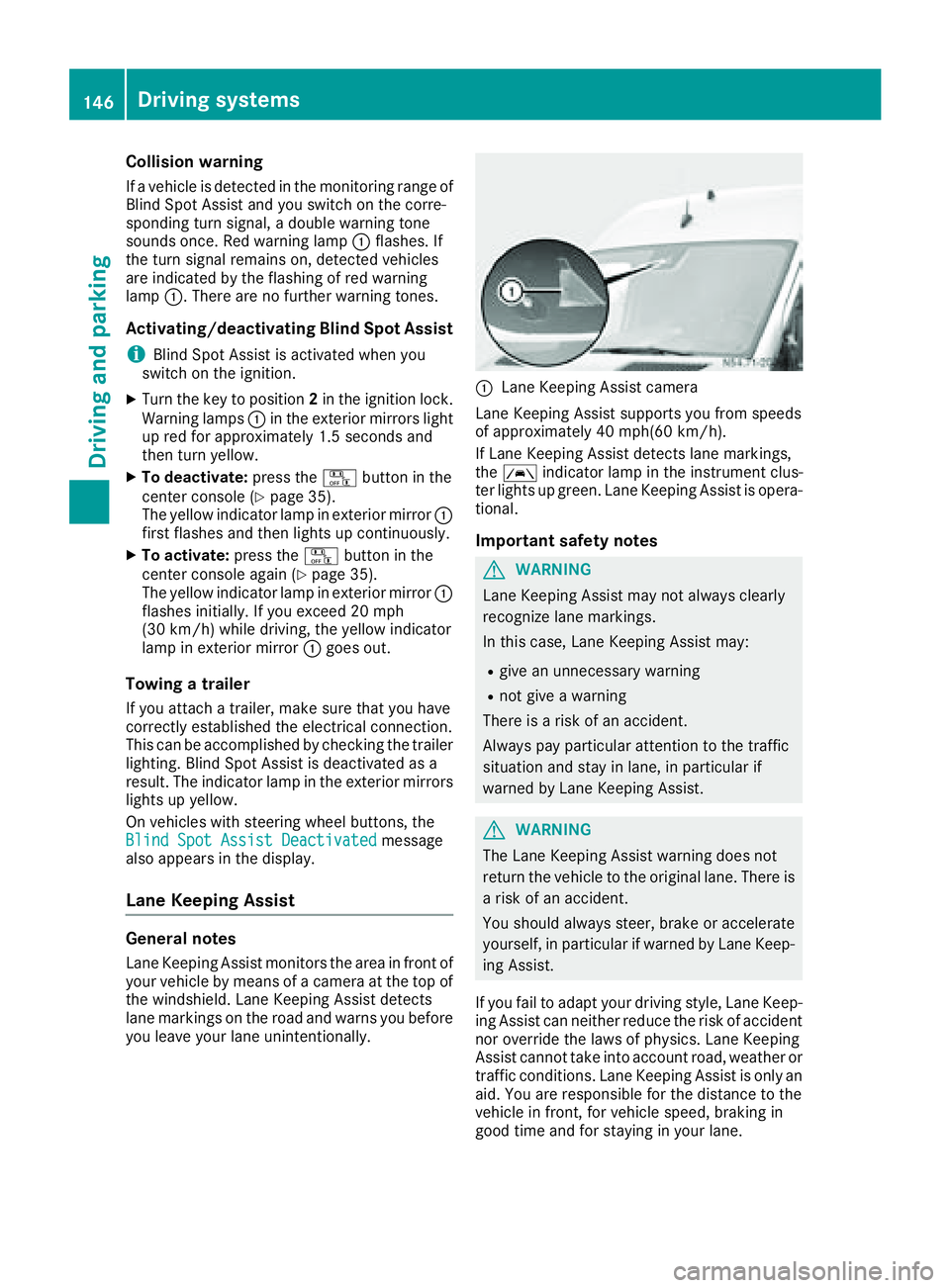
Lane Keeping Assist monitors the area in front of
your vehicle by means of a camera at the top of
the windshield. Lane Keeping Assist detects
lane markings on the road and warns you before
you leave your lane unintentionally.
:Lane Keeping Assist camera
Lane Keeping Assist supports you from speeds
of approximately 40 mph(60 km/h).
If Lane Keeping Assist detects lane markings,
the à indicator lamp in the instrument clus-
ter lights up green. Lane Keeping Assist is opera-
tional.
Important safety notes
GWARNING
Lane Keeping Assist may not always clearly
recognize lane markings.
In this case, Lane Keeping Assist may:
Rgive an unnecessary warning
Rnot give a warning
There is a risk of an accident.
Always pay particular attention to the traffic
situation and stay in lane, in particular if
warned by Lane Keeping Assist.
GWARNING
The Lane Keeping Assist warning does not
return the vehicle to the original lane. There is
a risk of an accident.
You should always steer, brake or accelerate
yourself, in particular if warned by Lane Keep-
ing Assist.
If you fail to adapt your driving style, Lane Keep-
ing Assist can neither reduce the risk of accident
nor override the laws of physics. Lane Keeping
Assist cannot take into account road, weather or traffic conditions. Lane Keeping Assist is only an
aid. You are responsible for the distance to the
vehicle in front, for vehicle speed, braking in
good time and for staying in your lane.
146Driving systems
Driving and parking