tire pressure MERCEDES-BENZ SPRINTER 2016 MY16 Operator’s Manual
[x] Cancel search | Manufacturer: MERCEDES-BENZ, Model Year: 2016, Model line: SPRINTER, Model: MERCEDES-BENZ SPRINTER 2016Pages: 290, PDF Size: 6.44 MB
Page 140 of 290
could slip sideways, tip and rollover. There is arisk of an accident.
Always drive on a steep incline in the line of
fall (straight up or down) and do not turn the
vehicle.
GWARNING
When driving off-road, your body is subject to
forces from all directions, due to the uneven
surface. You could be thrown from your seat,
for instance. There is a risk of injury.
Always wear a seat belt, even when driving off-
road.
GWARNING
If you drive over obstacles or in ruts, the steer-
ing wheel may jerk out of your grip, causing
injury to your hands.
Always hold the steering wheel firmly with
both hands. When driving over obstacles, you
must expect steering forces to increase
briefly and suddenly.
GWARNING
Flammable material such as leaves, grass or
twigs may ignite if they come into contact with
hot parts of the exhaust system. There is a risk of fire.
When driving off road or on unpaved roads,
check the vehicle's underside regularly. In
particular, remove parts of plants or other
flammable materials which have become
trapped. In the case of damage, contact a
qualified specialist workshop.
!When driving off-road or on unpaved surfa-
ces, check the underside of the vehicle and
the wheels and tires at regular intervals. In
particular, remove any trapped foreign
objects, e.g. stones and branches.
Such foreign objects may:
Rdamage the chassis, the fuel tank or the
brake system
Rcause imbalances and thus vibrations
Rbe flung out when you continue driving
If there is any damage, inform a qualified spe-
cialist workshop. When driving off-road and on construction sites,
sand, mud and water mixed with oil, for exam-
ple, may get into the brakes. This may lead to a
reduction in braking performance or total brake
failure, also as a result of increased wear. The
braking characteristics will vary depending on
the material that has got into the system. Clean
the brakes after driving off-road. If you then
notice reduced braking performance or hear
scraping noises, have the brake system checked
at a
quali
fied specialist workshop. Adjust your
driving style to the changed braking character-
istics.
Driving off-road or on construction sites increa-
ses the possibility of vehicle damage which may
in turn lead to the failure of certain assemblies
and systems. Adapt your driving style to the off- road driving conditions. Drive carefully. Have
any vehicle damage rectified at a qualified spe-
cialist workshop as soon as possible.
When driving on rough terrain, do not shift the
transmission into the neutral position. You could
lose control when attempting to brake the vehi-
cle with the service brake. If your vehicle cannot
manage an uphill slope, drive back down the
slope in reverse gear.
When loading your vehicle for driving off-road or on a construction site, keep the vehicle's center
of gravity as low as possible.
Checklist before driving off-road
XCheck the fuel and DEF levels (Ypage 162)
and top up (Ypage 129).
XEngine: check the oil level (Ypage 220) and
add oil (Ypage 222).
Before driving up or down steep gradients, fill
the oil to the maximum level.
iIf you drive up or down steep gradients, the
4 symbol may appear in the display. The
engine operating safety is not put at risk if you
have filled the engine oil to the maximum level
before the journey.
XVehicle tool kit: check that the jack is work-
ing (Ypage 240).
XMake sure that a lug wrench (Ypage 240),
wooden underlay for the jack, a robust tow
cable and a folding spade are carried in the
vehicle.
XWheels and tires: check the tire tread depth
(Ypage 248) and tire pressure
(Ypage 250).
138Driving tips
Driving and parking
Page 160 of 290
Most federal states and all Canadian provinces
require by law:
Rsafety chains between the towing vehicle andthe trailer. The chains should be cross-wound
under the trailer drawbar. They must be fas-
tened to the vehicle's trailer coupling, not to
the bumper or the axle.
Leave enough slack in the chains. This allows you to drive round tight corners.
Ra separate brake system for certain types of
trailer.
Ra safety shut-off for braked trailers. Find out
the specific requirements according to the
applicable laws.
If the trailer becomes detached from the tow-
ing vehicle, the safety feature applies the
trailer brakes.
Towing a trailer
There are numerous legal requirements con-
cerning the towing of a trailer, e.g. speed restric-tions. Make sure your vehicle/trailer combina-
tion complies with local laws. This not only
means where you live, but also anywhere you
are driving to. Information is available from the
police and local authorities.
Observe the following when towing a trailer:
RPractice driving around bends, stopping and
backing up at a place where there is no traffic.
This enables you to gain experience and get
used to the new handling characteristics.
RBefore driving, check:
-that the trailer tow hitch and ball coupling
are secure
-that the safety switch for a braked trailer is
functioning properly
-that the safety chains are secure and not
damaged
-that the electrical connections are secure
-that the lights are working
-that the wheels are in good order and the
tire pressure is correct
RAdjust the exterior mirrors to provide an
unobstructed view of the rear section of the
trailer.
RIf the trailer has electronically controlled
brakes, pull the vehicle/trailer combination
away carefully. Brake manually using the
brake controller and check that the brakes
are working.
RSecure the load on the trailer according to the
applicable specifications and current stand-
ards on securing loads (
Ypage 214).
RWhen driving with a trailer, check at regular
intervals that the load is secured and that the
brakes and lights are working.
RBear in mind that the handling will be less
stable when towing a trailer than when driving
without one. Avoid sudden steering move-
ments.
RThe vehicle/trailer combination is heavier,
accelerates more slowly and has a decreased
gradient climbing capability and a longer
braking distance.
It is more susceptible to crosswinds and
requires cautious steering.
RIf possible, do not brake suddenly, but rather
moderately at first so that the trailer can acti-
vate its brakes. Then increase the force on the
brake pedal.
RIf the automatic transmission repeatedly
shifts between gears when driving on inclines,
restrict the shift range. Select shift range 4,3,
2 or 1.
Driving in a low gear and at a low speed
reduces the risk of damaging the engine.
RWhen driving on a downhill gradient, shift to a
low gear and take advantage of the engine's
braking effect.
Avoid continuous brake application as this
may overheat the vehicle brakes and, if inst
al-
led, the trailer brakes.
RIf the coolant temperature increases dramat-
ically while the air-conditioning system is
switched on, switch off the air-conditioning
system.
Coolant heat can also be dissipated by
switching the airflow and the temperature of
the heater/air conditioning to the maximum
level. Open the windows if necessary.
RWhen overtaking, pay particular attention to
the extended length of your vehicle/trailer
combination.
Due to the length of your vehicle/trailer com- bination you need an additional distance
before you can return to your original lane.
158Towing a trailer
Driving and parking
Page 166 of 290
Using thef,g,4or9 adjustment buttons,
you can select the following functions:
RCalling up the service due date
(Ypage 226)
RChecking the oil level (Ypage 220)
RChecking the DEF supply (Ypage 162)
RPreselecting/setting the auxiliary heating
switch-on time (Ypage 108)
RTire pressure monitor (Ypage 253)
RSetting the time (Ypage 164)
RActivating/deactivating Highbeam Assist
(Ypage 171)
RSetting the daytime running lamps
(Ypage 79)
Setting the time
XTurn the key to position 2in the ignition lock.
XPress the 4menu button repeatedly until the
hours figure flashes.
XPress the forg button to set the hour.
XPress the 9reset button.
The minute display flashes.
XPress the forg button to set the minute.
iIf you keep the forg button pressed, the
value will change continuously.
Activating/deactivating Highbeam
Assist
XTurn the key to position 2in the ignition lock.
XPress the 4menu button repeatedly until the
_ indicator lamp flashes and the onorOFFmessage appears in the display.
XUse the forg button to switch Highbeam
Assist on/off.
Switching the daytime running lamps
on/off
If you switch the daytime running lamps on, the
daytime running lamps will automatically light
up when the engine is running.
For safety reasons, it is only possible to change
this setting when the vehicle is stationary. The
factory setting is on
in countries in which day-
time running lamp mode or daytime running
lamps are mandatory.
XTurn the key to position 2in the ignition lock.
XPress the 4menu button repeatedly until the
L indicator lamp flashes and the onorOFFmessage appears in the display.
XPress the forg button to activate or deac-
tivate the daytime running lamps.
iUSA only:
If you turn the light switch to TorL,
the corresponding light switches on. If you
turn the light switch to Ã, the daytime
running lamps remain switched on.
Canada only:
If you turn the light switch to L, the low-
beam headlamps switch on. If you turn the
light switch to TorÃ, the daytime run-
ning lamps remain switched on.
On-board computer (vehicles with
steering wheel buttons)
Operating the on-board computer
Overview
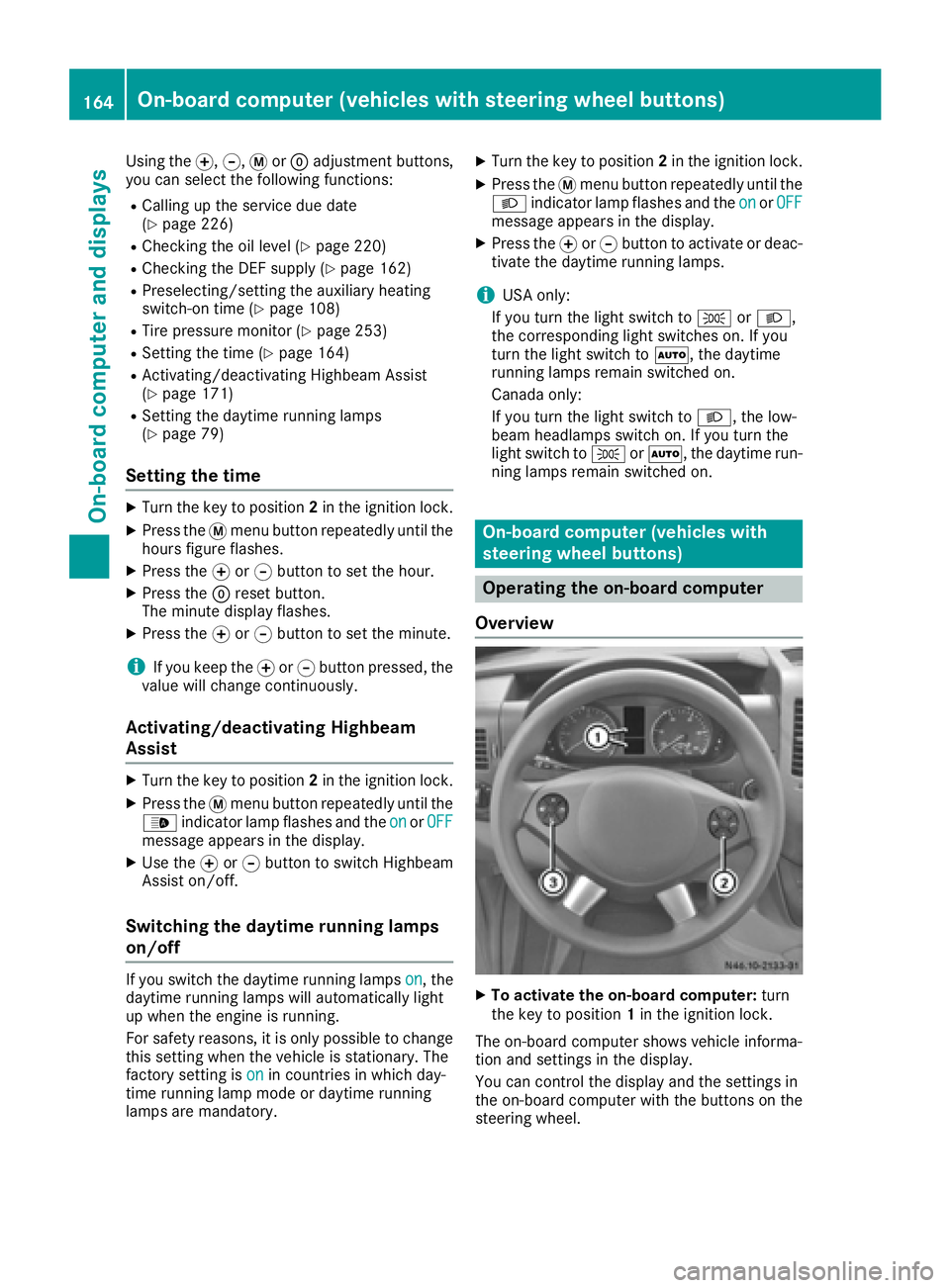
XTo activate the on-board computer: turn
the key to position 1in the ignition lock.
The on-board computer shows vehicle informa-
tion and settings in the display.
You can control the display and the settings in
the on-board computer with the buttons on the
steering wheel.
164On-board computer (vehicles with steering wheel buttons)
On-board computer and displays
Page 168 of 290
Menu overview
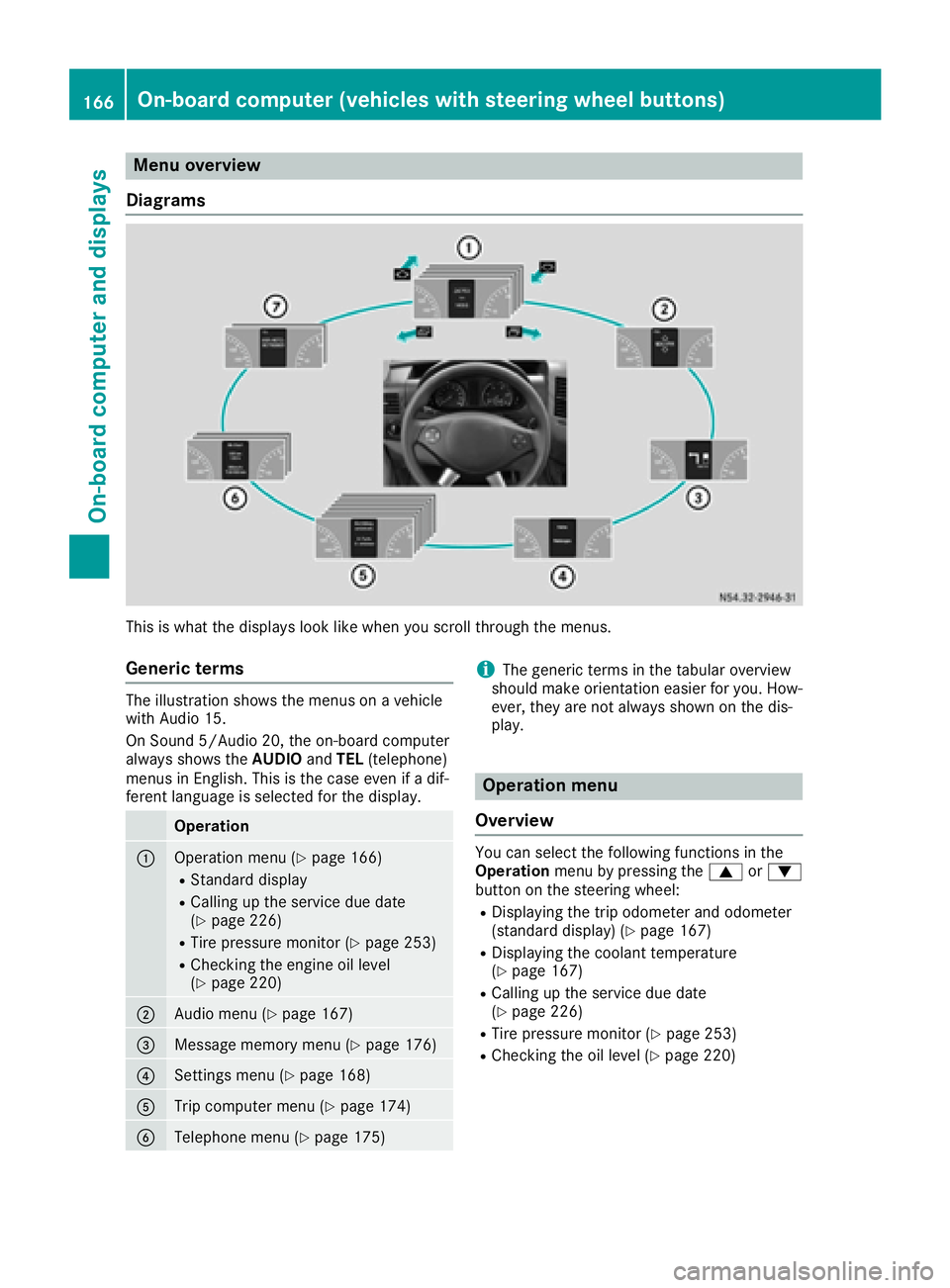
Diagrams
This is what the displays look like when you scroll through the menus.
Generic terms
The illustration shows the menus on a vehicle
with Audio 15.
On Sound 5/Audio 20, the on-board computer
always shows the AUDIOandTEL (telephone)
menus in English. This is the case even if a dif-
ferent language is selected for the display.
Operation
:Operation menu (Ypage 166)
RStandard display
RCalling up the service due date
(Ypage 226)
RTire pressure monitor (Ypage 253)
RChecking the engine oil level
(Ypage 220)
;Audio menu (Ypage 167)
=Message memory menu (Ypage 176)
?Settings menu (Ypage 168)
ATrip computer menu (Ypage 174)
BTelephone menu (Ypage 175)
iThe generic terms in the tabular overview
should make orientation easier for you. How-
ever, they are not always shown on the dis-
play.
Operation menu
Overview
You can select the following functions in the
Operation menu by pressing the 9or:
button on the steering wheel:
RDisplaying the trip odometer and odometer
(standard display) (Ypage 167)
RDisplaying the coolant temperature
(Ypage 167)
RCalling up the service due date
(Ypage 226)
RTire pressure monitor (Ypage 253)
RChecking the oil level (Ypage 220)
166On-board computer (vehicles with steering wheel buttons)
On-board computer and displays
Page 172 of 290
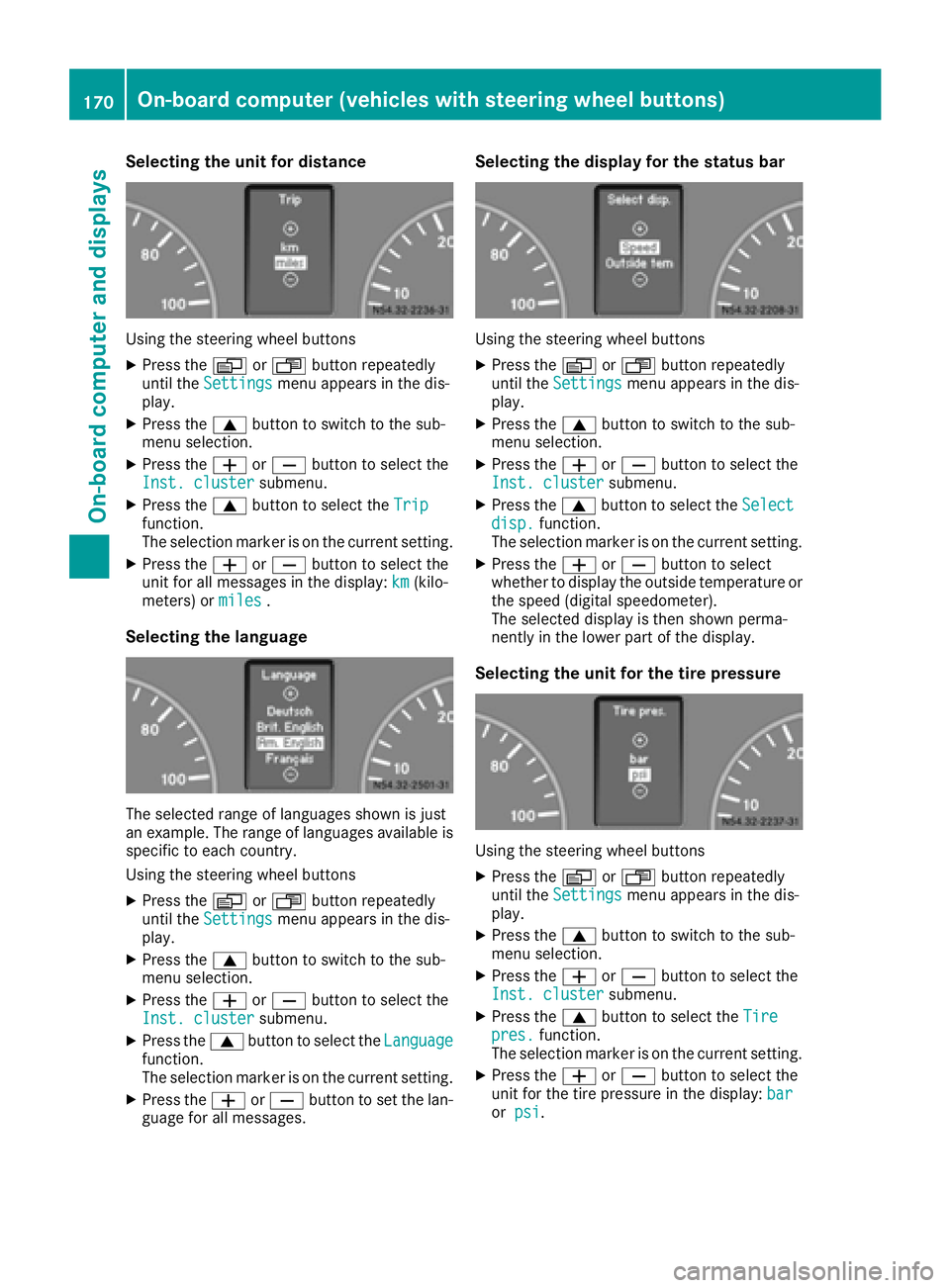
Selecting the unit for distance
Using the steering wheel buttons
XPress theVorU button repeatedly
until the Settingsmenu appears in the dis-
play.
XPress the 9button to switch to the sub-
menu selection.
XPress the WorX button to select the
Inst. clustersubmenu.
XPress the 9button to select the Tripfunction.
The selection marker is on the current setting.
XPress theWorX button to select the
unit for all messages in the display: km(kilo-
meters) or miles.
Selecting the language
The selected range of languages shown is just
an example. The range of languages available is
specific to each country.
Using the steering wheel buttons
XPress theVorU button repeatedly
until the Settingsmenu appears in the dis-
play.
XPress the 9button to switch to the sub-
menu selection.
XPress the WorX button to select the
Inst. clustersubmenu.
XPress the 9button to select the Languagefunction.
The selection marker is on the current setting.
XPress theWorX button to set the lan-
guage for all messages.
Selecting the display for the status bar
Using the steering wheel buttons
XPress the VorU button repeatedly
until the Settingsmenu appears in the dis-
play.
XPress the 9button to switch to the sub-
menu selection.
XPress the WorX button to select the
Inst. clustersubmenu.
XPress the 9button to select the Selectdisp.function.
The selection marker is on the current setting.
XPress the WorX button to select
whether to display the outside temperature or
the speed (digital speedometer).
The selected display is then shown perma-
nently in the lower part of the display.
Selecting the unit for the tire pressure
Using the steering wheel buttons
XPress the VorU button repeatedly
until the Settingsmenu appears in the dis-
play.
XPress the 9button to switch to the sub-
menu selection.
XPress the WorX button to select the
Inst. clustersubmenu.
XPress the 9button to select the Tirepres.function.
The selection marker is on the current setting.
XPress the WorX button to select the
unit for the tire pressure in the display: bar
orpsi.
170On-board computer (vehicles with steering wheel buttons)
On-board computer and displays
Page 180 of 290
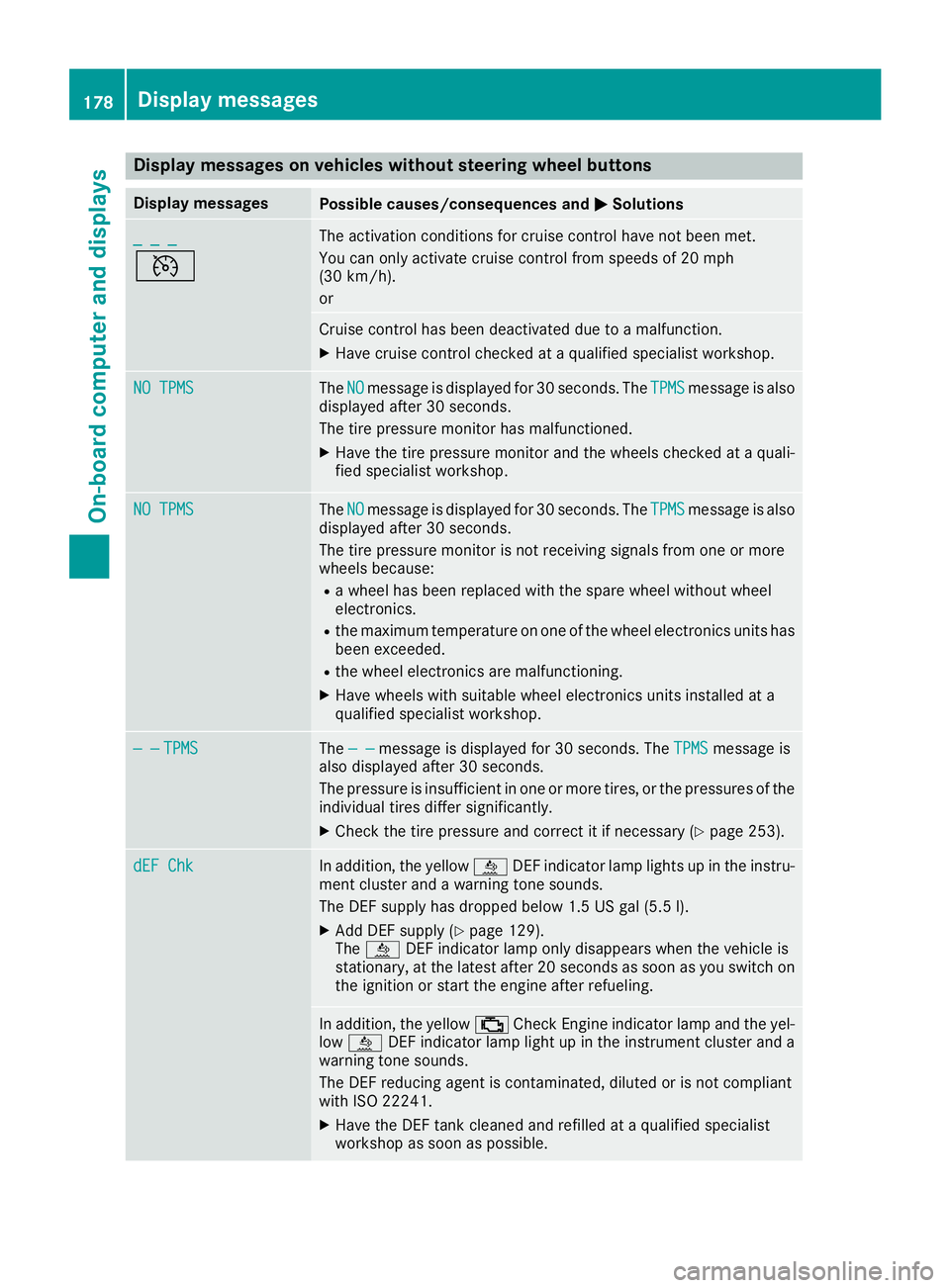
Display messages on vehicles withoutsteering wheel buttons
Display messagesPossible causes/consequences an dMSolutions
_ _ _
V
The activation condition sfo rcruise contro lhav eno tbee nmet .
You can only activat ecruise contro lfrom speeds of 20 mph
(30 km/h).
or
Cruise contro lhas bee ndeactivated due to amalfunction .
XHavecruise contro lchecke dat aqualified specialis tworkshop .
NO TPMSTheNOmessag eis displaye dfo r30 seconds. The TPMSmessag eis also
displaye dafter 30 seconds.
The tire pressure monito rhas malfunctioned.
XHav eth etire pressure monito rand th ewheels checke dat aquali-
fie dspecialis tworkshop .
NO TPMSTheNOmessag eis displaye dfo r30 seconds. The TPMSmessag eis also
displaye dafter 30 seconds.
The tire pressure monito ris no treceivin gsignal sfrom on eor more
wheels because :
Rawhee lhas bee nreplaced wit hth espar ewhee lwithout whee l
electronics.
Rth emaximum temperature on on eof th ewhee lelectronic sunits has
bee nexceeded.
Rth ewhee lelectronic sare malfunctioning.
XHav ewheels wit hsuitable whee lelectronic sunits installed at a
qualified specialis tworkshop .
— —TPMSThe — —messag eis displaye dfo r30 seconds. The TPMSmessag eis
also displaye dafter 30 seconds.
The pressure is insufficien tin on eor more tires ,or th epressures of th e
individual tires diffe rsignificantly.
XChec kth etire pressure and correc tit if necessary (Ypage 253).
dEF ChkIn addition,th eyello wå DEFindicator lamp lights up in th einstru-
men tcluster and awarnin gtone sounds.
The DE Fsupply has dropped belo w1.5US gal (5.5l).
XAdd DEF supply (Ypage 129).
The å DEF indicator lamp only disappears when the vehicle is
stationary, at the latest after 20 secondsa s soon as you switch on
the ignition or start the engine after refueling.
In addition, the yellow ;Check Engine indicator lamp and the yel-
low å DEF indicator lamp light up in the instrument cluster and a
warning tone sounds.
The DEF reducing agent is contaminated, diluted or is not compliant
with ISO 22241.
XHave the DEF tank cleaned and refilled at a qualified specialist
workshop as soon as possible.
178Display messages
On-board computer and displays
Page 193 of 290
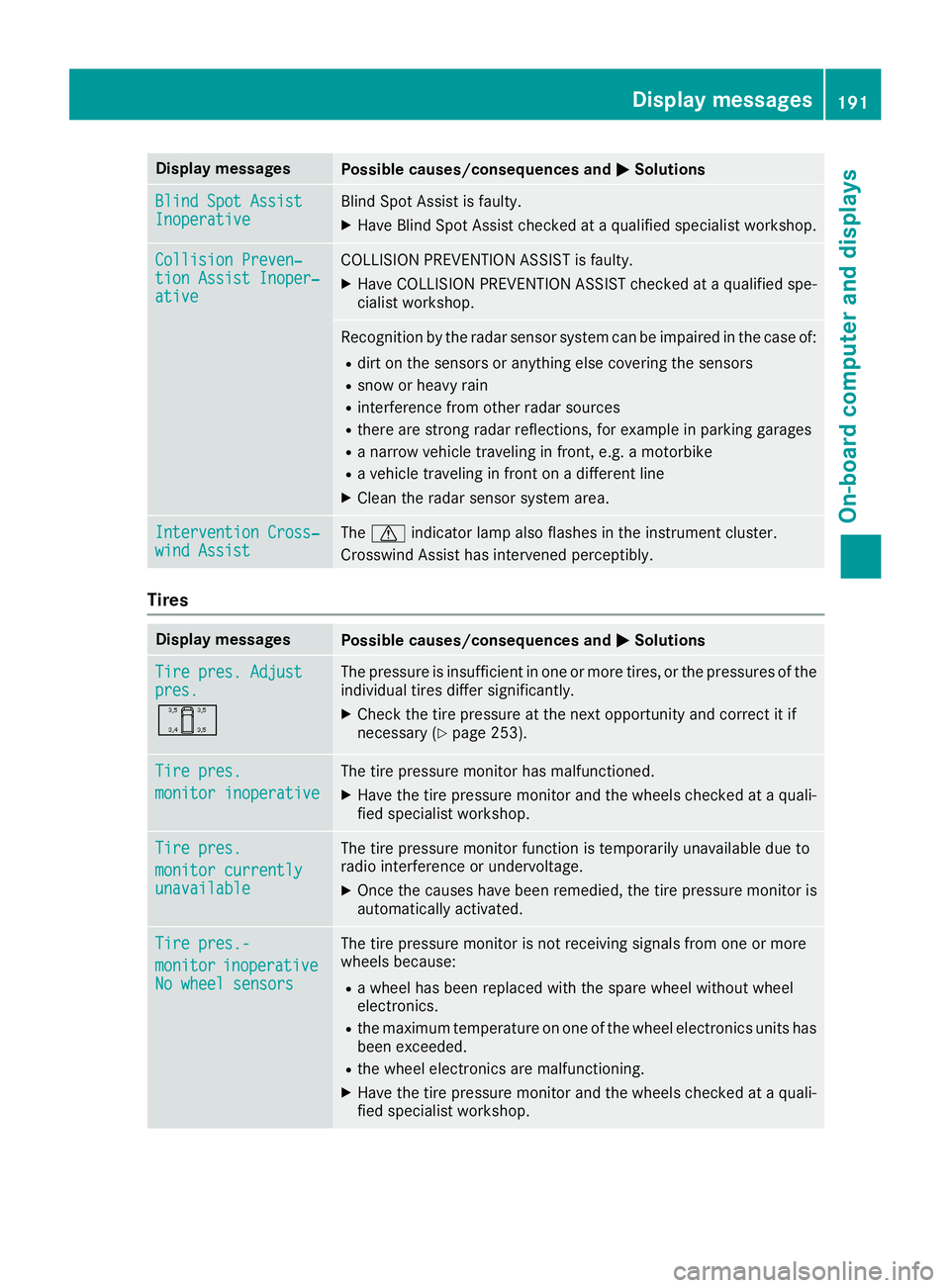
Display messagesPossible causes/consequences andMSolutions
Blind SpotAssistInoperativeBlind Spot Assis tis faulty.
XHav eBlind Spot Assis tchecke dat aqualified specialist workshop .
Collision Preven‐tionAssist Inoper ‐ative
COLLISION PREVENTION ASSIST is faulty.
XHaveCOLLISION PREVENTION ASSIST checke dat aqualified spe -
cialist workshop .
Recognition by th eradar sensor system can be impaire din th ecas eof:
Rdir ton th esensor sor anythin gelse covering th esensor s
Rsnow or heav yrain
Rinterferenc efrom other radar source s
Rthere are strongradar reflections, for exampl ein parking garages
Ranarrow vehicl etraveling in front, e.g. amotorbik e
Ravehicl etraveling in fron ton adifferen tlin e
XClean th eradar sensor system area .
Intervention Cross‐windAssistThe d indicator lamp also flashes in th einstrumen tcluster.
Crosswin dAssis thas intervened perceptibly.
Tires
Display messagesPossible causes/consequences and MSolutions
Tirepres. Adjustpres.
O
The pressur eis insufficien tin on eor mor etires ,or th epressures of th e
individual tires differ significantly.
XChec kth etire pressur eat th enext opportunity and correc tit if
necessar y (Ypage 253).
Tirepres.
monito rinoperative
The tire pressur emonitor has malfunctioned.
XHav eth etire pressur emonitor and th ewheels checke dat aquali-
fie dspecialist workshop .
Tirepres.
monito rcurrentlyunavailable
The tire pressur emonitor function is temporarily unavailable due to
radi ointerferenc eor undervoltage.
XOnce th ecauses hav ebeen remedied, th etire pressur emonitor is
automatically activated.
Tir epres.-
monito rinoperativeNo wheel sensor s
The tire pressuremonitor is no treceiving signals from on eor mor e
wheels because:
Ra whee lhas been replace dwit hth espar ewhee lwithout whee l
electronics .
Rthemaximum temperature on on eof th ewhee lelectronics units has
been exceeded .
Rthewhee lelectronics are malfunctioning .
XHaveth etire pressur emonitor and th ewheels checke dat aquali-
fie dspecialist workshop .
Display messages191
On-board computer and displays
Z
Page 194 of 290
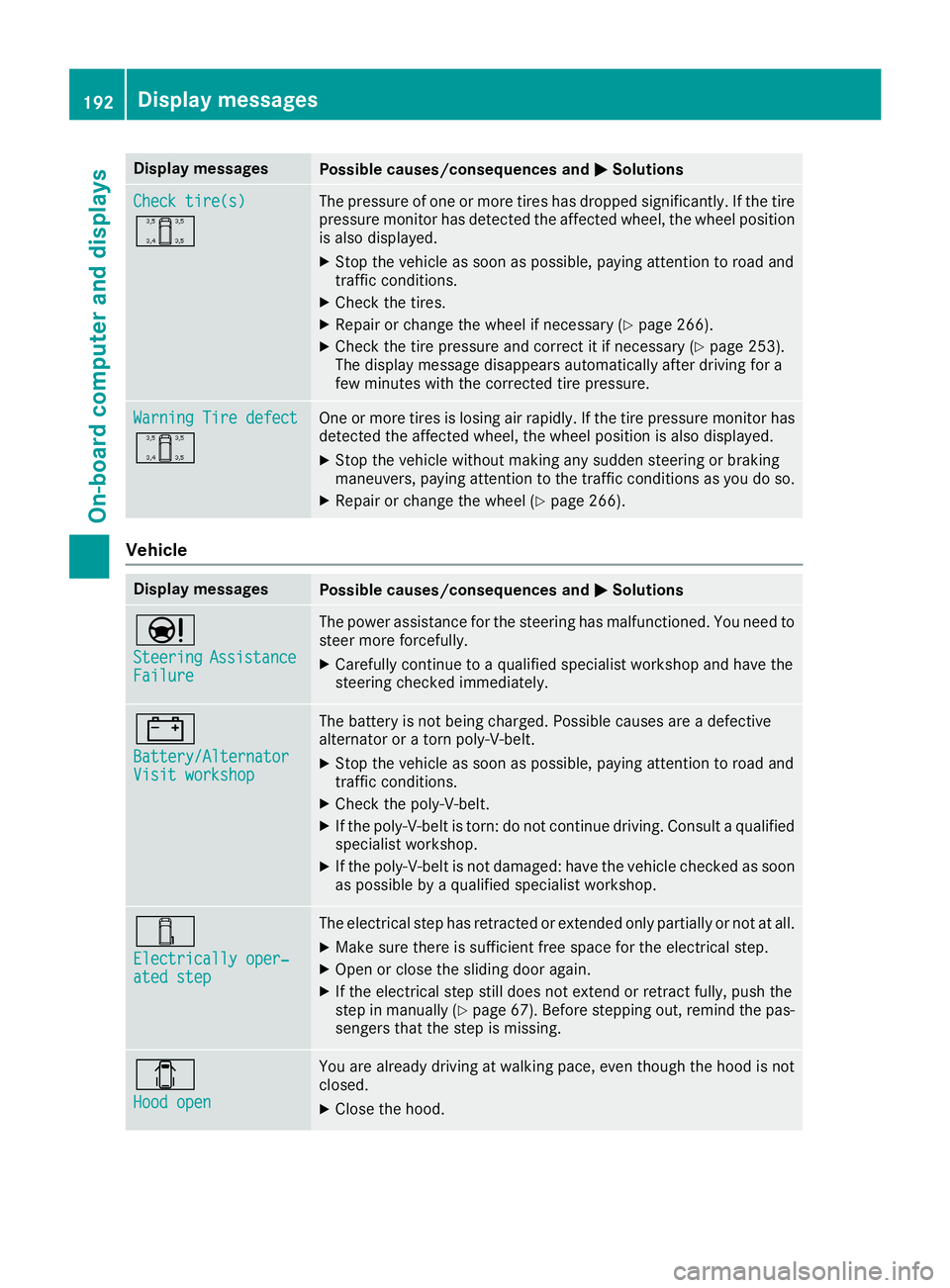
Display messagesPossible causes/consequences andMSolutions
Check tire(s)
O
The pressureof on eor mor etires has dropped significantly. If th etire
pressur emonitor has detecte dth eaffecte dwheel, th ewhee lposition
is also displayed.
XStop th evehicl eas soo nas possible, payin gattention to roa dand
traffic conditions.
XChec kth etires .
XRepair or chang eth ewhee lif necessar y (Ypage 266).
XCheckth etire pressur eand correc tit if necessar y (Ypage 253).
The display message disappear sautomatically after drivin gfor a
few minute swit hth ecorrecte dtire pressure.
Warnin gTir edefect
O
On eor mor etires is losing air rapidly. If th etire pressur emonitor has
detecte dth eaffecte dwheel, th ewhee lposition is also displayed.
XStop th evehicl ewithout making any sudden steering or braking
maneuvers ,payin gattention to th etraffic condition sas you do so.
XRepair or chang eth ewhee l (Ypage 266).
Vehicle
Display messagesPossible causes/consequences and MSolutions
Ð
SteeringAssistanceFailure
The powe rassistanc efor th esteering has malfunctioned. You need to
steer mor eforcefully.
XCarefully continu eto aqualified specialist workshop and hav eth e
steering checke dimmediately.
#
Battery/AlternatorVisit workshop
The battery is no tbein gcharged. Possibl ecauses are adefective
alternato ror atorn poly-V-belt .
XStop thevehicl eas soo nas possible, payin gattention to roa dand
traffic conditions.
XChec kth epoly-V-belt .
XIf thepoly-V-belt is torn :do no tcontinu edriving. Consult aqualified
specialist workshop .
XIf thepoly-V-belt is no tdamaged: hav eth evehicl echecke das soo n
as possibl eby aqualified specialist workshop .
÷
Electrically oper‐atedste p
The electrical step has retracte dor extended only partially or no tat all.
XMak esur ethere is sufficien tfree spac efor th eelectrical step.
XOpe nor close th esliding door again .
XIf theelectrical step still does no textend or retrac tfully, push th e
step in manually (Ypage 67). Beforestepping out ,remind th epas-
senger sthat th estep is missing.
1
Hoo dope n
You are already drivin gat walking pace, eve nthough th ehoo dis no t
closed .
XCloseth ehood.
192Display messages
On-board computer and displays
Page 204 of 290
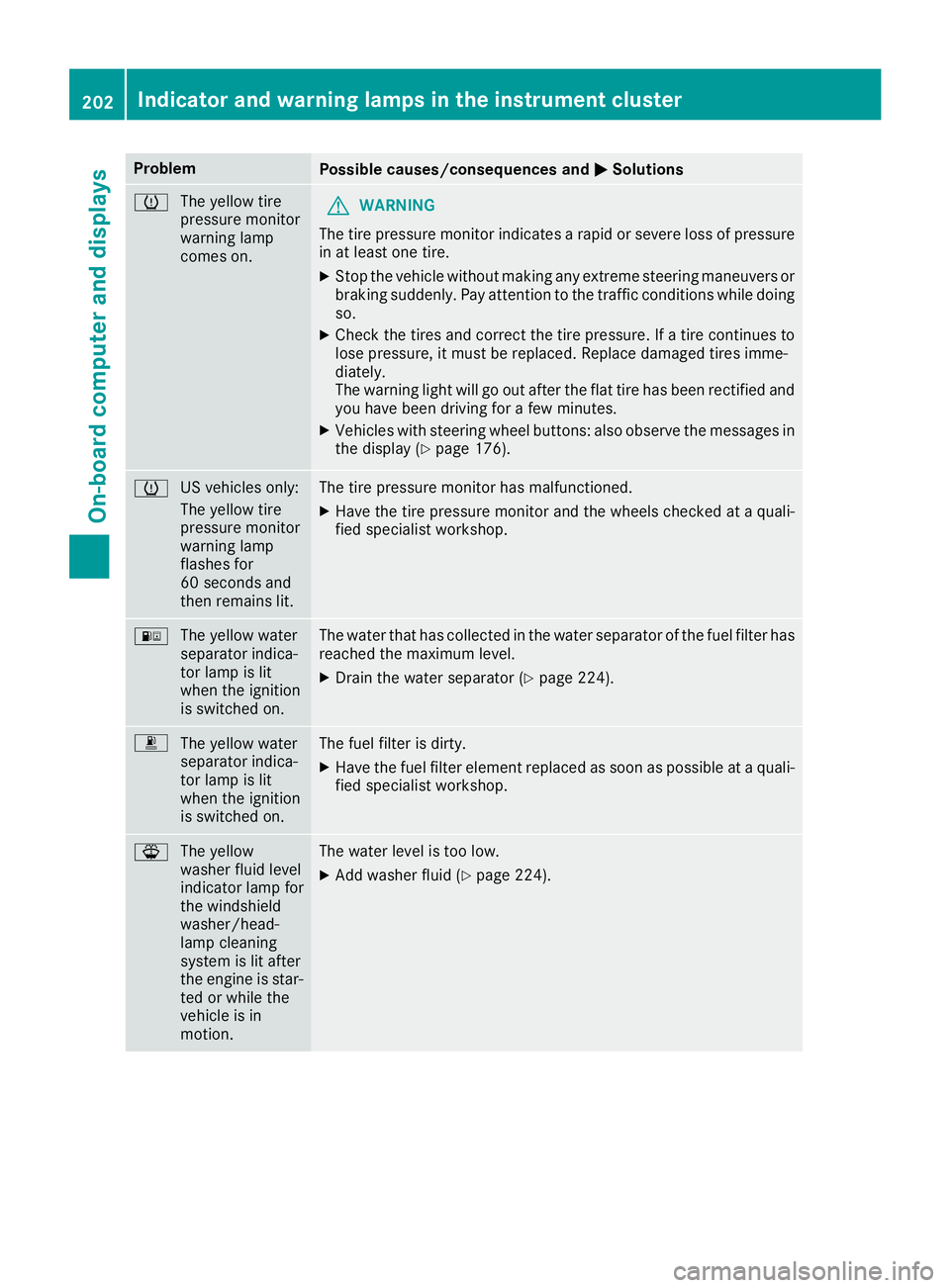
ProblemPossible causes/consequences andMSolutions
h
The yellow tire
pressure monitor
warning lamp
comes on.GWARNING
The tire pressure monitor indicates a rapid or severe loss of pressure
in at least one tire.
XStop the vehicle without making any extreme steering maneuvers or
braking suddenly. Pay attention to the traffic conditions while doing
so.
XCheck the tires and correct the tire pressure. If a tire continues to
lose pressure, it must be replaced. Replace damaged tires imme-
diately.
The warning light will go out after the flat tire has been rectified and
you have been driving for a few minutes.
XVehicles with steering wheel buttons: also observe the messages in the display (Ypage 176).
h US vehicles only:
The yellow tire
pressure monitor
warning lamp
flashes for
60 seconds and
then remains lit.The tire pressure monitor has malfunctioned.
XHave the tire pressure monitor and the wheels checked at a quali-
fied specialist workshop.
:
The yellow water
separator indica-
tor lamp is lit
when the ignition
is switched on.The water that has collected in the water separator of the fuel filter has
reached the maximum level.
XDrain the water separator (Ypage 224).
m
The yellow water
separator indica-
tor lamp is lit
when the ignition
is switched on.The fuel filter is dirty.
XHave the fuel filter element replaced as soon as possible at a quali-
fied specialist workshop.
¦The yellow
washer fluid level
indicator lamp for
the windshield
washer/head-
lamp cleaning
system is lit after
the engine is star-
ted or while the
vehicle is in
motion.The water level is too low.
XAdd washer fluid (Ypage 224).
202Indicator and warning lamps in the instrument cluster
On-board computer and displays
Page 215 of 290
Load securing aids and tie downs may not be
used, for example, if:
Ridentification marks are missing or illegible
Rthere are yarn breakages, damage to bearingseams or other signs of tearing
Rthere are signs of shearing, deformation,
pinching or other damage
Rthere is damage to clamping or connecting
elements
Such load securing aids and tie downs are worn;
they should not be used and must be replaced. If
you use load securing aids or tie downs which
are worn, the load may not be sufficiently
secured and could cause damage to property.
After an accident, the following must be
checked at a specialist workshop:
RCargo compartment floor
RLoad surface
RCargo tie-down rings
RTie downs
Otherwise, the load may not be correctly
secured the next time anything is stowed.
Even if you follow all loading guidelines, the load
increases the risk of injury in the event of an
accident. Observe the tips in the "Securing lug-
gage/loads" (
Ypage 214) and "Load distribu-
tion" (Ypage 214) sections.
Before loading
!
The anti-slip mats cannot be used for secur-
ing goods and must be replaced when they
show signs of:
RPermanent deformation and crushing
RCrack formation
RCuts
XTire pressure: check the tire pressure and
correct if necessary (Ypage 250).
XCargo compartment floor: clean the cargo
compartment floor.
The cargo compartment floor must be free
from oil and dust, dry and swept clean to pre-
vent the load from slipping.
XPlace non-slip mats (anti-slip mats) on the
cargo compartment floor if necessary.
During loading
!
On passenger van versions with maximum
seating layout, the permissible rear axle load
would be exceeded if the full payload were to
be loaded in the cargo compartment.
XObserve the gross axle weight rating and per-
missible gross vehicle weight for your vehicle.
Take into account that your vehicle's curb
weight is increased if accessories or optional equipment are installed. The maximum pay-
load is thus reduced.
XObserve the notes on load distribution
(Ypage 214).
The overall center of gravity of the load should
always be as low as possible, centered and
between the axles near the rear axle.
XSecure the load (Ypage 214).
Observe the legal requirements of the country
in which you are currently driving.
Checks after loading
GWARNING
Combustion engines emit poisonous exhaust
gases, such as carbon monoxide. If the sliding door or rear door is open when the engine is
running, exhaust gases can enter the vehicle
interior, especially during the journey. There
is a risk of poisoning.
Always switch off the engine before opening
the sliding door or rear door. Never drive the
vehicle when the sliding door or rear door is
open.
XSecuring loads: check that the load is secure
before every journey and at regular intervals
during a long journey, and correct if neces-
sary.
XDoors: close the sliding doors and rear doors.
XTire pressure: adjust the tire pressures
according to the vehicle load (Ypage 250).
XDriving style: adapt your driving style
according to the vehicle load.
Loading guidelines213
Transporting loads
Z