steering wheel MERCEDES-BENZ SPRINTER 2016 MY16 Operator’s Manual
[x] Cancel search | Manufacturer: MERCEDES-BENZ, Model Year: 2016, Model line: SPRINTER, Model: MERCEDES-BENZ SPRINTER 2016Pages: 290, PDF Size: 6.44 MB
Page 39 of 290
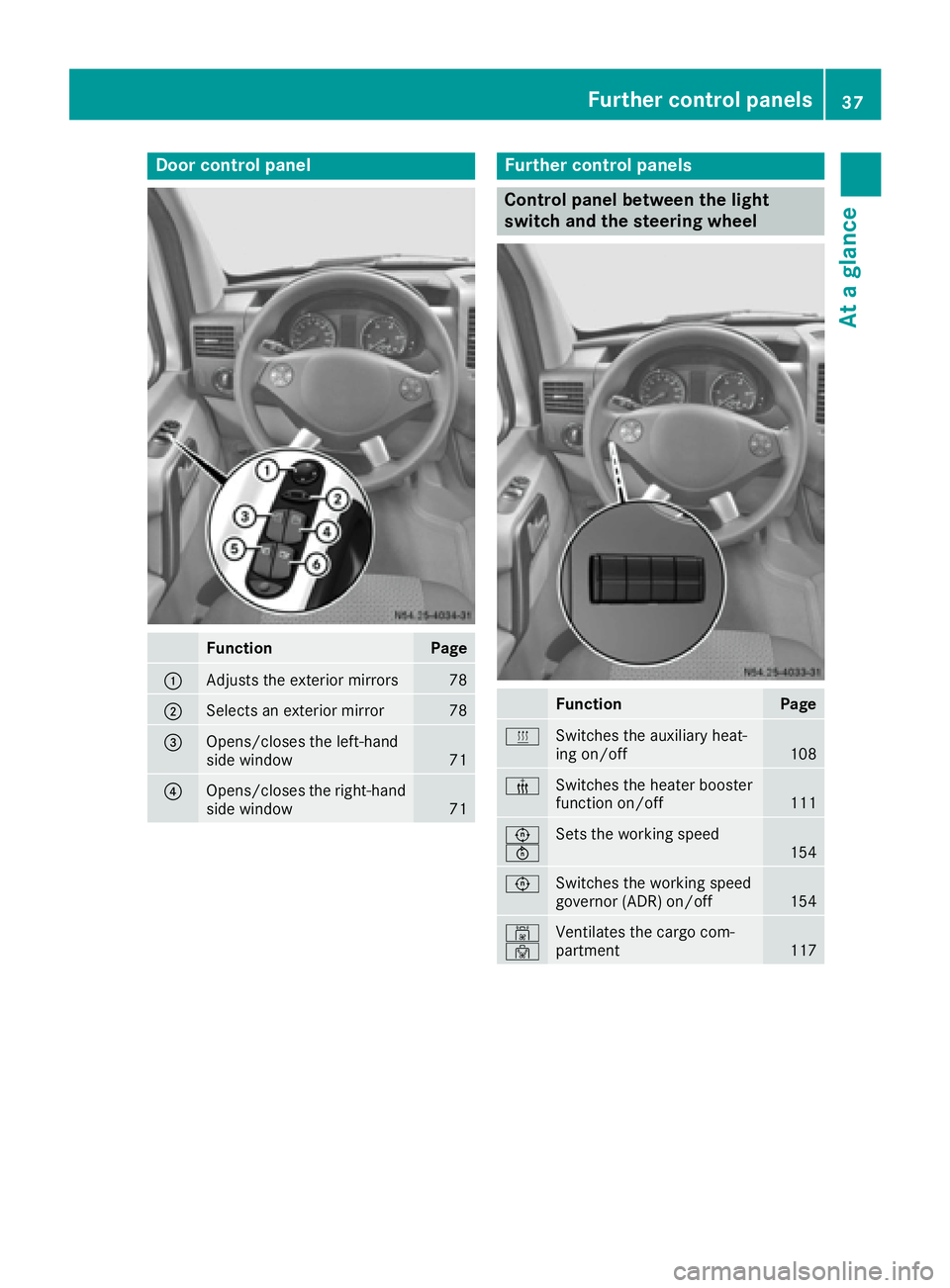
Door controlpanel
FunctionPage
:Adjust sth eexterio rmirrors78
;Selects an exterio rmirro r78
=Opens/closes th eleft-han d
sid ewindow71
?Opens/closes th eright-hand
sid ewindow71
Further contro lpanels
Contro lpanel between th eligh t
switch an dth esteering wheel
FunctionPage
ySwitches th eauxiliar yheat -
in g on/off10 8
±Switches th eheater booster
function on/off11 1
E
FSets th eworking speed15 4
ESwitches th eworking speed
governor (ADR) on/off15 4
´
·Ventilates th ecargo com-
partmen t117
Further control panels37
At a glance
Page 40 of 290
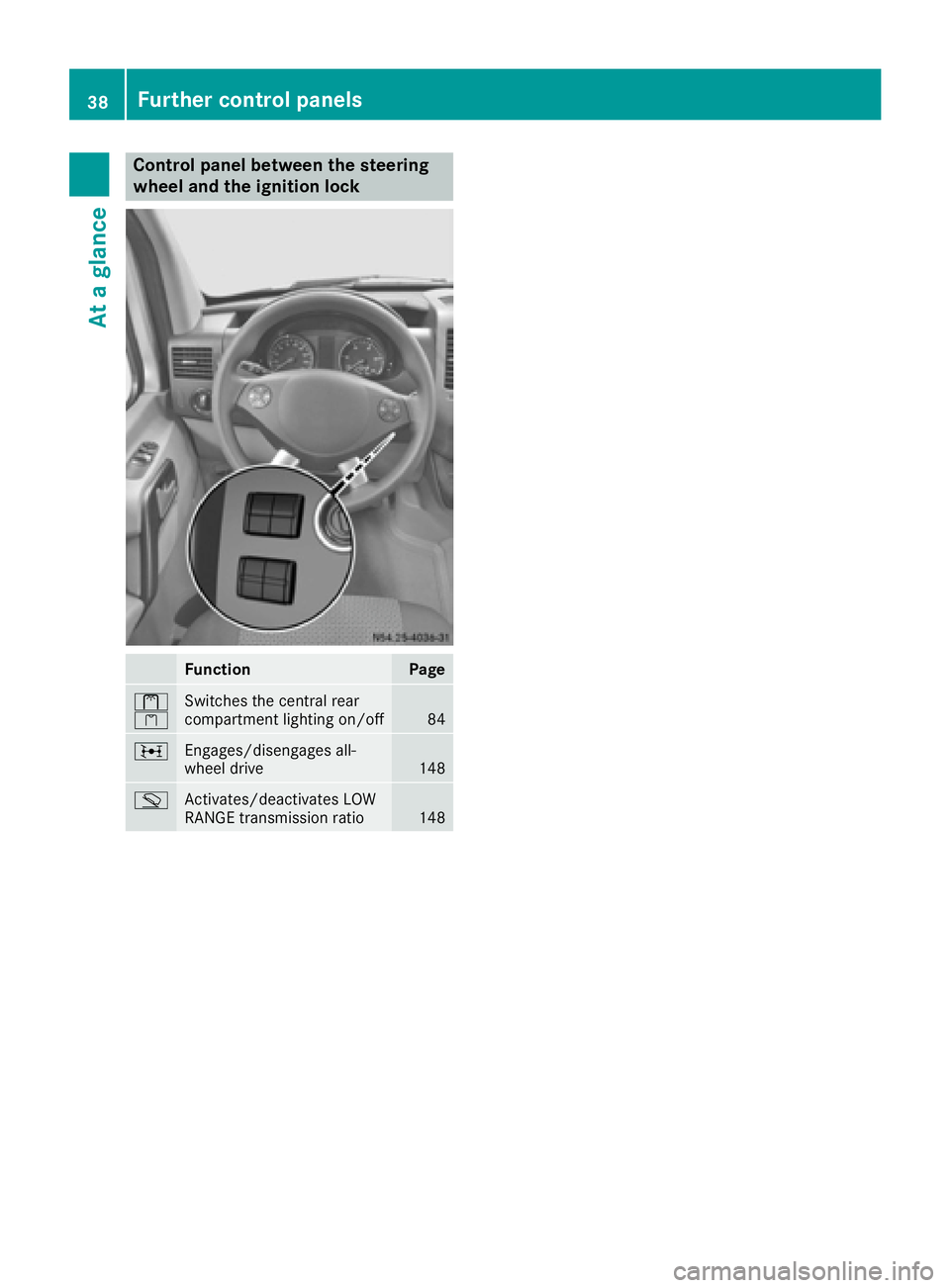
Control panel between the steering
wheel and the ignition lock
FunctionPage
l
kSwitches the central rear
compartment lighting on/off84
;Engages/disengages all-
wheel drive148
mActivates/deactivates LOW
RANGE transmission ratio148
38Further control panels
At a glance
Page 41 of 290
Useful information
This Operator's Manual describes all models as
well as standard and optional equipment of your
vehicle that were available at the time of going
to print. Country-specific variations are possi-
ble. Note that your vehicle may not be equipped
with all of the described functions. This also
applies to systems and functions relevant to
safety.
Read the information on qualified specialist
workshops (
Ypage 26).
Occupant safety
Restraint system introduction
The restraint system can reduce the risk of vehi-cle occupants coming into contact with parts of
the vehicle's interior in the event of an accident.
Furthermore, the restraint system may also
reduce the forces exerted on the vehicle occu-
pants when an accident occurs.
The restraint system includes:
RSeat belt system
RAir bags
RChild restraint system
RChild seat securing systems
The components of the restraint system work in
conjunction with each other. They can only offer
the intended level of protection if all vehicle
occupants:
Rare correctly wearing their seat belts.
(Ypage 41)
Radjust their seat and head restraint properly
(Ypage 72).
The driver is also responsible for ensuring that
the steering wheel has been correctly posi-
tioned. Observe the information relating to the
correct driver's seat position (
Ypage 72).
Always ensure the air bag can inflate properly if
deployed (
Ypage 43).
An air bag supplements a correctly fastened
seat belt. As an additional safety device, the air bag increases the level of protection for vehicle
occupants in the event of an accident. For exam-
ple, if the protection already provided by a cor-
rectly fastened seat belt will suffice, the air bags
are not deployed. Furthermore, only the air bags
that would increase the degree of protection
afforded to the vehicle occupants in the event of an accident are deployed. Seat belts and air
bags generally do not protect against objects
penetrating the vehicle from the outside.
Information on restraint system operation can
be found under "Triggering of Emergency Ten-
sioning Devices and air bags" (
Ypage 45).
See “Children in the vehicle” for information on children traveling with you as well as vehicle
restraint systems (
Ypage 47).
Important safety notes
GWARNING
Modifications to the restraint system, may
cause it to no longer work as intended. The
restraint system may then not perform its
intended protective function and may fail in an
accident or trigger unexpectedly, for example.
This poses an increased risk of injury or even fatal injury.
Never modify parts of the restraint system.
Never tamper with the wiring, the electronic
components or their software.
If it is necessary to modify an airbag system to
accommodate a person with disabilities, con-
tact an authorized Sprinter dealership for
details. USA only: contact our Customer
Assistance Center at 1‑ 877‑762‑8267 for
details.
Restraint system warning lamp
The functions of the restraint system are
checked after the ignition is switched on and at
regular intervals while the engine is running.
Therefore, malfunctions can be detected in
good time.
The 6 restraint system warning lamp in the
instrument cluster lights up when the ignition is
switched on. It goes out no later than a few sec-
onds after the vehicle is started. The compo-
nents of the restraint system are in operational
readiness.
Occupant safety39
Safety
Z
Page 46 of 290
must be such that the vehicle can be driven
safely.
RKeep hands on the outside of the steering
wheel rim. This allows the air bag to deploy
fully.
RAlways sit with your back against the seat
backrest when driving. Do not lean forward,
on the door or against the side window. Oth-
erwise, you are in the air bag deployment
area.
RAlways keep your feet in the footwell in front
of the seat. Do not, for example, place your
feet on the dashboard. Otherwise, your feet
are in the air bag deployment area.
RSuitable restraint systems must always be
used for persons under 5 ft (1.50m)in height.
The seat belt cannot be worn correctly by
persons who do not reach this height.
If children are also traveling in the vehicle,
please take note of the following points.
RAlways secure children younger than twelve
years of age and under 5 ft (1.50 m) tall in
suitable child restraint systems.
RChild restraint systems should preferably be
installed on the rear seats.
RIf you secure a child in a rearward-facing child
restraint system, always do so on a suitable
rear seat. The front-passenger front air bag
cannot be deactivated.
RBe sure to observe the instructions and safety
notes on "Children in the vehicle"
(
Ypage 47) and "Child restraint system on
the front-passenger seat" (Ypage 51) in
addition to the child restraint system manu-
facturer's installation instructions.
Objects in the passenger compartment
could prevent an air bag from functioning
properly. To prevent risks due to the required
air bag speed after deployment, ensure the fol-
lowing before starting the journey:
Rthere are no persons, animals or objects
between the vehicle occupants and an air
bag.
Rthere are no objects between the seat, door
and B-pillar.
Rno hard objects, e.g. coat hangers, hang on
the grab handles or coat hooks.
Rno accessories, such as cup holders, are
attached to the vehicle within the deployment area of an air bag, e.g. to doors or side win-
dows.
Rthere are no heavy, sharp or fragile objects in
the pockets of items of clothing. Such items
should be suitably stowed elsewhere.
GWARNING
If you modify the air bag cover or affix objects
such as stickers to it, the air bag can no longer
function correctly. There is an increased risk
of injury.
Never modify an air bag cover or affix objects
to it.
GWARNING
Sensors to control the air bags are located in
the doors. Modifications or work not per-
formed correctly to the doors or door panel-
ing, as well as damaged doors, can lead to the
function of the sensors being impaired. The air
bags might therefore not function properly
anymore. Consequently, the air bags cannot
protect vehicle occupants as they are
designed to do. There is an increased risk of
injury.
Never modify the doors or parts of the doors.
Always have work on the doors or door pan-
eling carried out at a qualified specialist work-
shop.
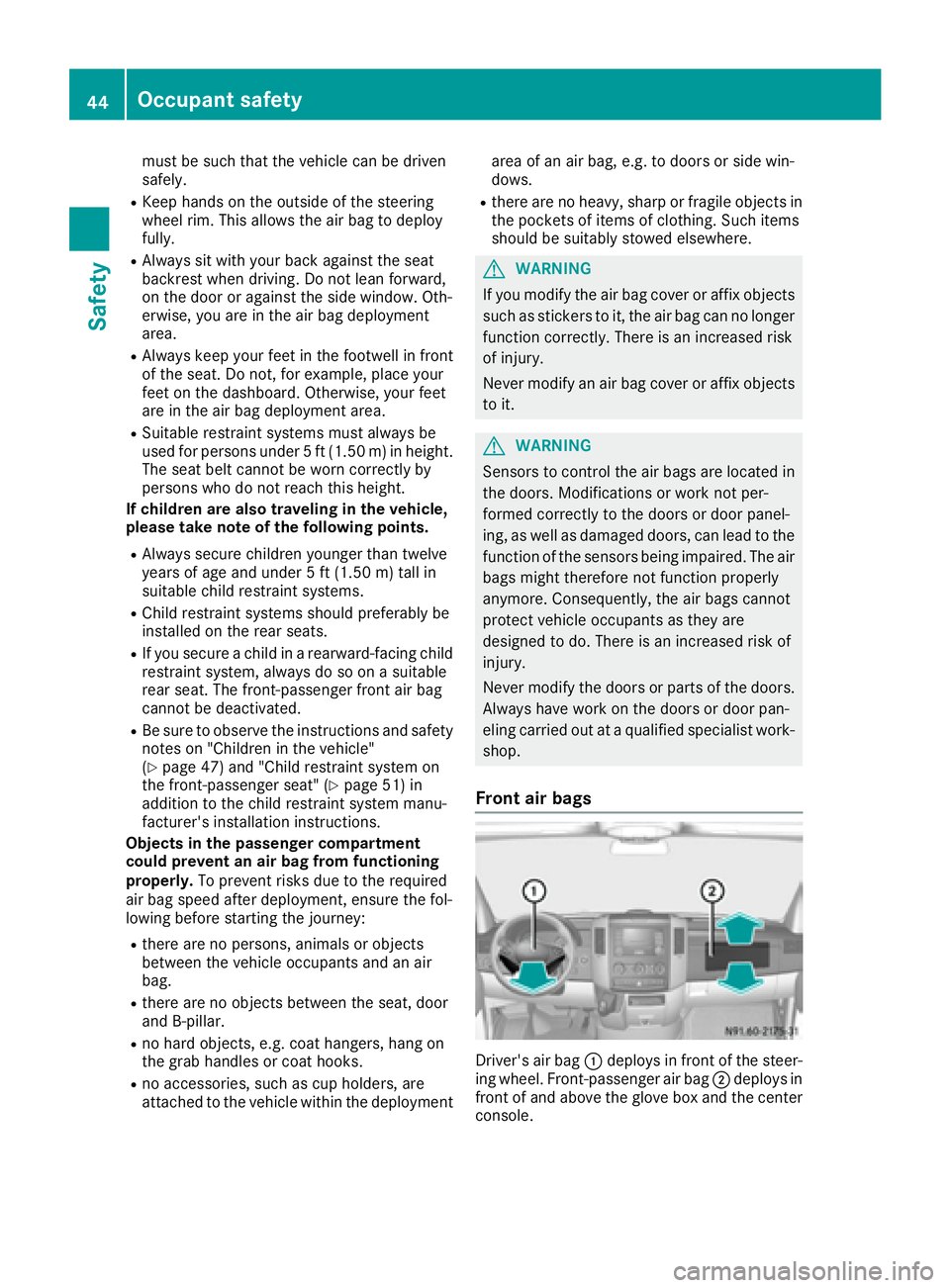
Front air bags
Driver's air bag :deploys in front of the steer-
ing wheel. Front-passenger air bag ;deploys in
front of and above the glove box and the center
console.
44Occupant safety
Safety
Page 55 of 290
Pay particular attention to the information
regarding tires, tire tread and winter operation
under "Wheels and tires" (
Ypage 247).
ABS (Anti-lock Braking System)
Important safety notes
Observe the important safety guidelines for the
driving safety system (Ypage 52).
GWARNING
If ABS is faulty, the wheels could lock when
braking. The steerability and braking charac-
teristics may be severely impaired. Addition-
ally, further driving safety systems are deac-
tivated. There is an increased danger of skid-
ding and accidents.
Drive on carefully. Have ABS checked imme-
diately at a qualified specialist workshop.
If ABS is malfunctioning, other systems will also
fail, including driving safety systems. Observe
the information relating to the !warning
lamp (
Ypage 195).
ABS regulates brake pressure in such a way that
the wheels do not lock when you brake. This
allows you to continue steering the vehicle when
braking.
ABS works from a speed of about 5 mph
(8 km/h), regardless of road-surface conditions. ABS works on slippery surfaces, even when you
only brake gently.
The yellow !warning lamp in the instrument
cluster lights up when the ignition is switched
on. The lamp goes out when the engine starts
running.
Braking
If ABS intervenes when braking, you will feel a
pulsating in the brake pedal.
The pulsating brake pedal can be an indication
of hazardous road conditions and functions as a
reminder to take extra care while driving.
XIf ABS intervenes: continue to depress the
brake pedal with force until the braking sit-
uation is over.
XTo make a full brake application: depress
the brake pedal with full force.
ASR (acceleration skid control)
General notes
Important safety notes
Observe the important safety guidelines for the
driving safety system (Ypage 52).
ASR can neither reduce the risk of an accident
nor suspend the laws of physics if the driver
does not pay attention when pulling away or
accelerating. ASR is only an aid. Always adapt
your driving style to suit the prevailing road and
weather conditions.
If you activate or deactivate the all-wheel drive
in a vehicle with this option, ASR will be deacti- vated for the duration of the activation/deacti-
vation process.
Vehicles without steering wheel buttons: if ASR
is malfunctioning, the :indicator lamp lights
up while the engine is running and the engine
power may be reduced (
Ypage 195).
ASR significantly improves traction, i.e. the
transmission of power from the tires to the road surface, and thus increases the vehicle's driving
stability. If the driving wheels start to spin, ASR
brakes individual drive wheels and limits the
engine torque. ASR thus significantly assists you
when pulling away and accelerating, especially
on wet or slippery roads.
If traction on the road surface is not sufficient,
even ASR will not allow you to pull away without
difficulty. The type of tires and total weight of the
vehicle as well as the gradient of the road also
play a crucial role.
If ASR intervenes, the dwarning lamp in the
instrument cluster flashes.
Activating/deactivating ASR
GWARNING
If deactivated, ASR will not attempt to stabi-
lize the vehicle during pulling away and accel- eration. There is an increased risk of skidding
and of an accident.
Only deactivate ASR in the situations descri-
bed in the following.
!If you deactivate ASR, ESP®will still inter-
vene to stabilize the vehicle. Frequent braking
automatically triggered by ESP
®can damage
the brake system.
Driving safety systems53
Safety
Z
Page 56 of 290
For this reason, deactivate ASR only briefly
and when absolutely necessary.
When ESP®is intervening and thedwarning
lamp in the instrument cluster is flashing, leave
ASR on. In this case, only depress the acceler-
ator pedal as far as required when pulling away.
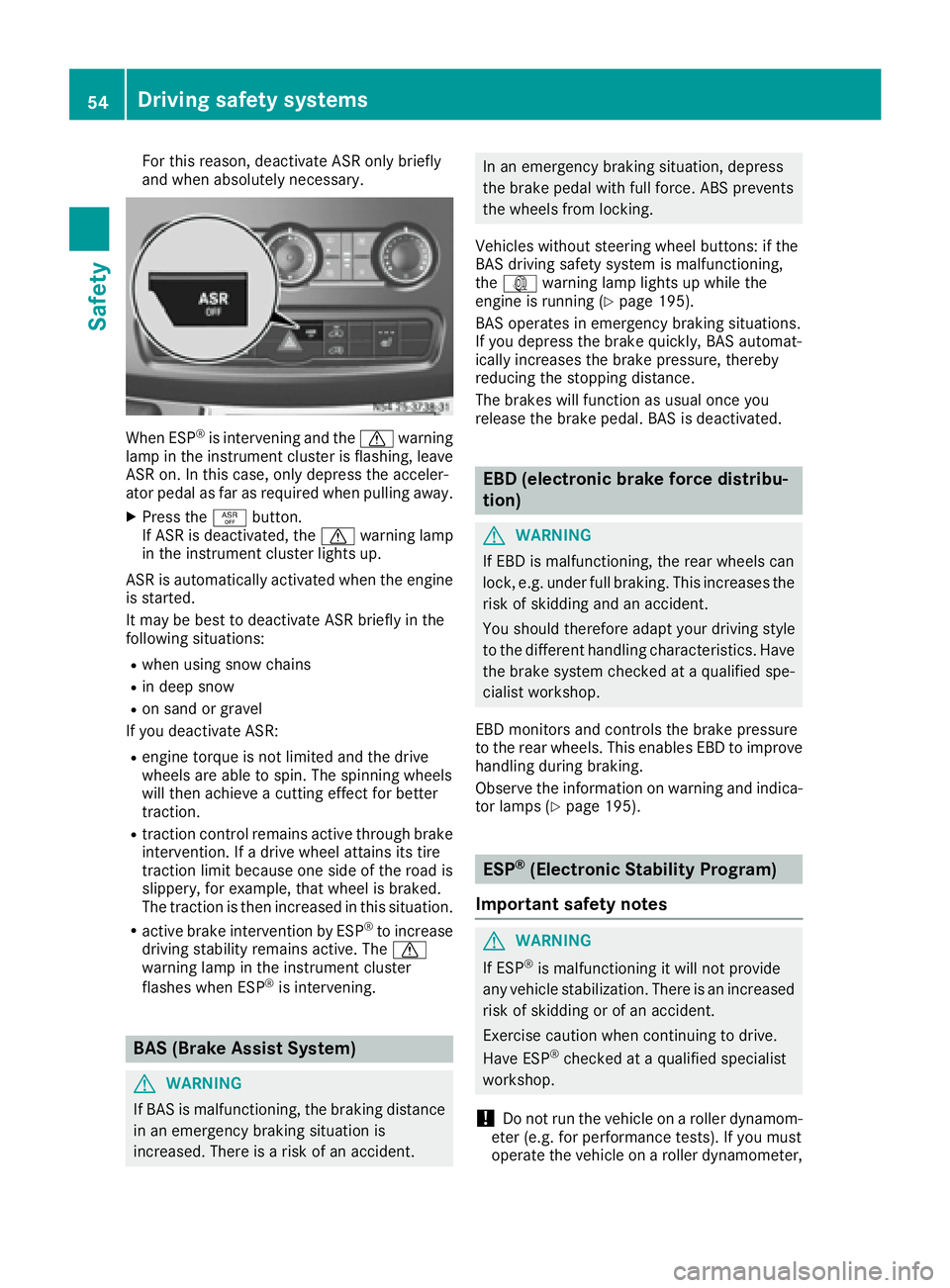
XPress the àbutton.
If ASR is deactivated, the dwarning lamp
in the instrument cluster lights up.
ASR is automatically activated when the engine
is started.
It may be best to deactivate ASR briefly in the
following situations:
Rwhen using snow chains
Rin deep snow
Ron sand or gravel
If you deactivate ASR:
Rengine torque is not limited and the drive
wheels are able to spin. The spinning wheels
will then achieve a cutting effect for better
traction.
Rtraction control remains active through brake
intervention. If a drive wheel attains its tire
traction limit because one side of the road is
slippery, for example, that wheel is braked.
The traction is then increased in this situation.
Ractive brake intervention by ESP®to increase
driving stability remains active. The d
warning lamp in the instrument cluster
flashes when ESP
®is intervening.
BAS (Brake Assist System)
GWARNING
If BAS is malfunctioning, the braking distance
in an emergency braking situation is
increased. There is a risk of an accident.
In an emergency braking situation, depress
the brake pedal with full force. ABS prevents
the wheels from locking.
Vehicles without steering wheel buttons: if the
BAS driving safety system is malfunctioning,
the : warning lamp lights up while the
engine is running (
Ypage 195).
BAS operates in emergency braking situations.
If you depress the brake quickly, BAS automat-
ically increases the brake pressure, thereby
reducing the stopping distance.
The brakes will function as usual once you
release the brake pedal. BAS is deactivated.
EBD (electronic brake force distribu-
tion)
GWARNING
If EBD is malfunctioning, the rear wheels can
lock, e.g. under full braking. This increases the
risk of skidding and an accident.
You should therefore adapt your driving style
to the different handling characteristics. Have
the brake system checked at a qualified spe-
cialist workshop.
EBD monitors and controls the brake pressure
to the rear wheels. This enables EBD to improve
handling during braking.
Observe the information on warning and indica-
tor lamps (
Ypage 195).
ESP®(Electronic Stability Program)
Important safety notes
GWARNING
If ESP
®is malfunctioning it will not provide
any vehicle stabilization. There is an increased
risk of skidding or of an accident.
Exercise caution when continuing to drive.
Have ESP
®checked at a qualified specialist
workshop.
!Do not run the vehicle on a roller dynamom-
eter (e.g. for performance tests). If you must
operate the vehicle on a roller dynamometer,
54Driving safety systems
Safety
Page 57 of 290
please consult a qualified specialist workshop
in advance. You could otherwise damage the
drive train or the brake system.
If you activate or deactivate the all-wheel drive
in a vehicle with this option, ESP
®will be deac-
tivated for the duration of the activation/deac-
tivation process.
If ESP
®is malfunctioning, the hindicator
lamp lights up while the engine is running and
the engine power may be reduced
(
Ypage 194).
iOnly use wheels with the recommended tire
sizes. Only then will ESP®function properly.
4ETS (Electronic Traction System)
!A function or performance test should only
be carried out on a two-axle dynamometer.
Before you operate the vehicle on such a
dynamometer, please consult a qualified
workshop. You could otherwise damage the
drive train or the brake system.
4ETS is only active when all-wheel drive is acti-
vated (
Ypage 148).
4ETS ensures permanent drive for all four
wheels, and together with ESP
®it improves the
vehicle's traction.
If a driven wheel spins due to lack of traction:
RWhen pulling away, make use of the traction
control integrated in ESP®. Depress the
accelerator pedal as far as necessary.
RWhile driving, slowly take your foot off the
accelerator pedal.
In wintry driving conditions, always use winter
tires (M+S tires) and if necessary, snow chains
(
Ypage 249). This is the only way to get the full
benefit from the all-wheel drive system.
Crosswind Assist
Crosswind Assist does not work if ESP®is deac-
tivated or disabled because of a malfunction.
Crosswind Assist does not react:
Rin the event of severe jolts and vibrations, e.g.
as a result of uneven surfaces or potholes
Rif the vehicle loses traction, e.g. on snow or
ice or when aquaplaning
Rto large and sudden steering movements by
the driver Crosswind Assist is operational again as soon as
the driving conditions return to normal.
Crosswind Assist detects strong crosswind
gusts that can impair the road holding of your
vehicle when driving straight ahead. Crosswind
Assist intervenes depending on the direction
and strength of the crosswind.
A stabilizing brake application helps you to keep
the vehicle on track.
Information appears in the instrument cluster In the event that Crosswind Assist intervenes
noticeably.
On vehicles without steering wheel buttons:
the d indicator lamp in the instrument clus-
ter flashes.
On vehicles with steering wheel buttons: the
d indicator lamp in the instrument cluster
flashes and the message Crosswind Assist
Activeappears in the multifunction display.
Crosswind Assist is active above a vehicle speed
of 50 mph (80 km/h) when the vehicle is driving
straight ahead or cornering gently.
Emergency exit
Emergency exit window
GWARNING
The emergency exit window cannot be locked in place. You risk injury if you exit the vehicle
through the emergency exit window.
RMake sure that nobody becomes trapped,
both when closing and when opening the
emergency exit window.
RThe opened emergency exit window must
be held in place by another person.
Pay attention to traffic conditions.
GWARNING
If the emergency exit window is unlocked
while driving, it could open and slam shut and consequently fall down. There is a risk of an
accident and injury.
Before starting off, make sure that the emer-
gency exit window is locked and the locking
pins are undamaged.
!Make sure there is sufficient clearance
when opening the emergency exit window.
Emergency exit55
Safety
Z
Page 65 of 290
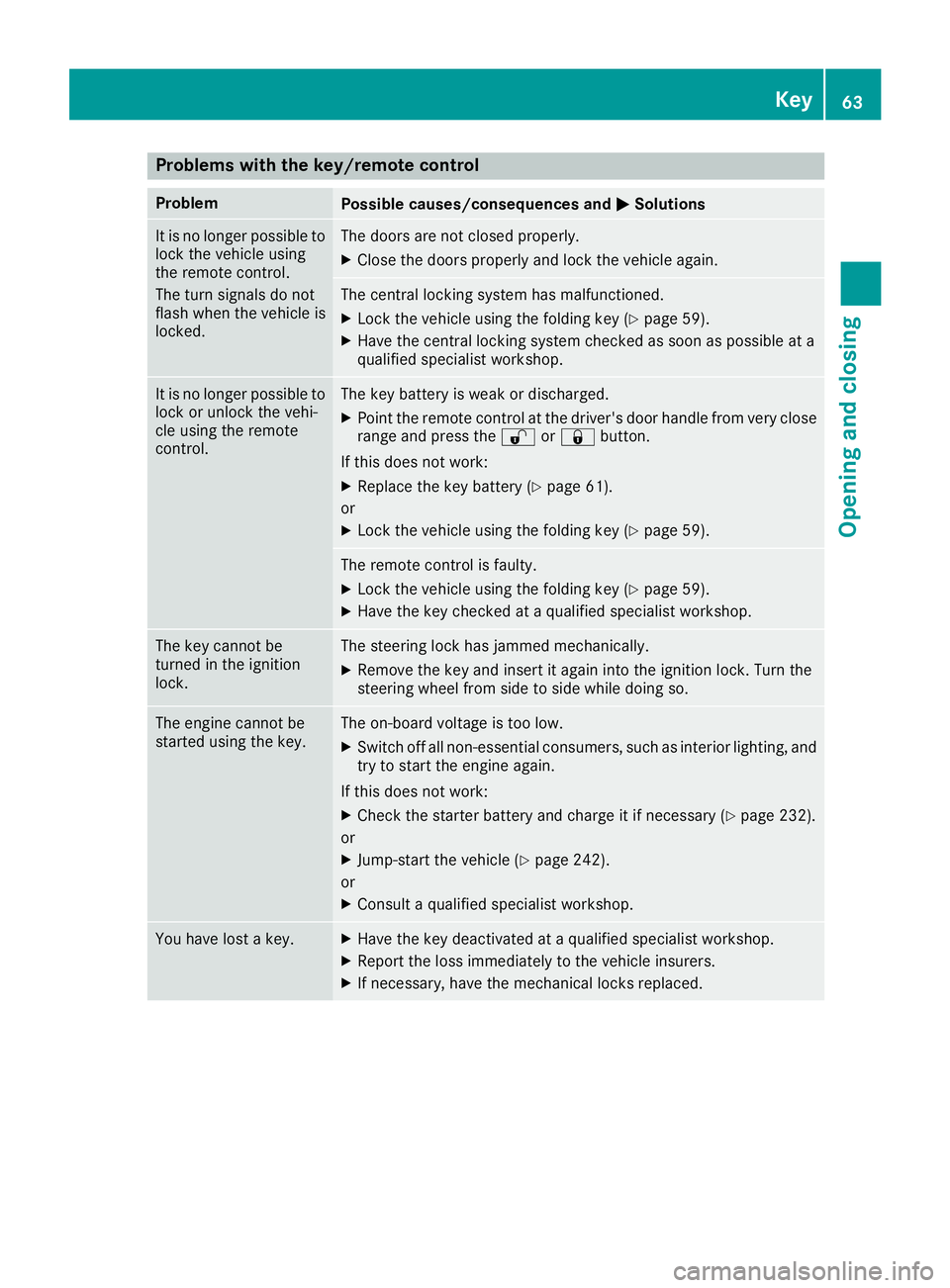
Problems with the key/remote control
ProblemPossible causes/consequences andMSolutions
It is no longer possible to
lock the vehicle using
the remote control.
The turn signals do not
flash when the vehicle is
locked.The doors are not closed properly.
XClose the doors properly and lock the vehicle again.
The central locking system has malfunctioned.
XLock the vehicle using the folding key (Ypage 59).
XHave the central locking system checked as soon as possible at a
qualified specialist workshop.
It is no longer possible to
lock or unlock the vehi-
cle using the remote
control.The key battery is weak or discharged.
XPoint the remote control at the driver's door handle from very close
range and press the %or& button.
If this does not work:
XReplace the key battery (Ypage 61).
or
XLock the vehicle using the folding key (Ypage 59).
The remote control is faulty.
XLock the vehicle using the folding key (Ypage 59).
XHave the key checked at a qualified specialist workshop.
The key cannot be
turned in the ignition
lock.The steering lock has jammed mechanically.
XRemove the key and insert it again into the ignition lock. Turn the
steering wheel from side to side while doing so.
The engine cannot be
started using the key.The on-board voltage is too low.
XSwitch off all non-essential consumers, such as interior lighting, and
try to start the engine again.
If this does not work:
XCheck the starter battery and charge it if necessary (Ypage 232).
or
XJump-start the vehicle (Ypage 242).
or
XConsult a qualified specialist workshop.
You have lost a key.XHave the key deactivated at a qualified specialist workshop.
XReport the loss immediately to the vehicle insurers.
XIf necessary, have the mechanical locks replaced.
Key63
Opening and closing
Z
Page 69 of 290
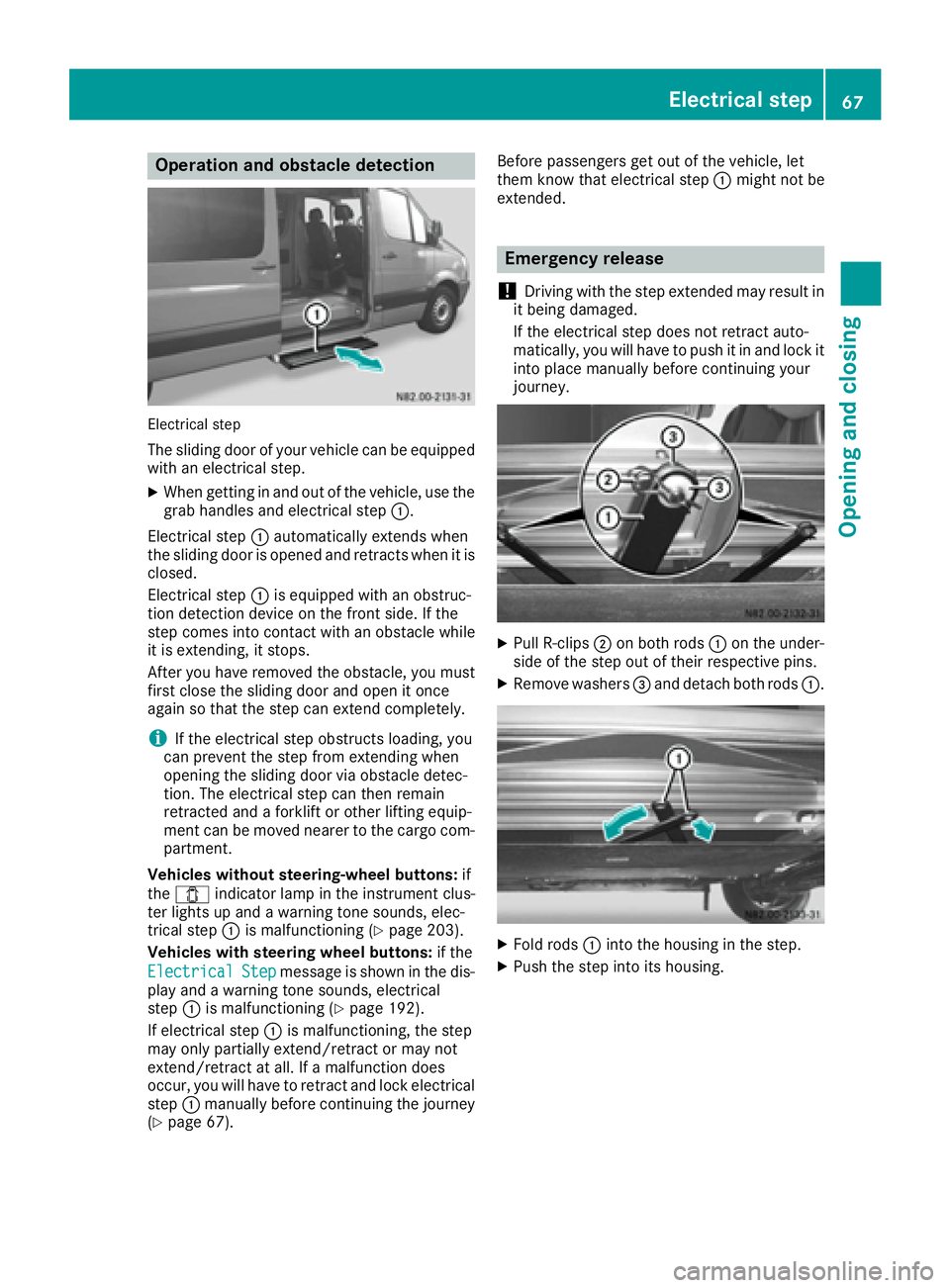
Operation and obstacle detection
Electrical step
The sliding door of your vehicle can be equipped
with an electrical step.
XWhen getting in and out of the vehicle, use thegrab handles and electrical step :.
Electrical step :automatically extends when
the sliding door is opened and retracts when it is
closed.
Electrical step :is equipped with an obstruc-
tion detection device on the front side. If the
step comes into contact with an obstacle while
it is extending, it stops.
After you have removed the obstacle, you must
first close the sliding door and open it once
again so that the step can extend completely.
iIf the electrical step obstructs loading, you
can prevent the step from extending when
opening the sliding door via obstacle detec-
tion. The electrical step can then remain
retracted and a forklift or other lifting equip-
ment can be moved nearer to the cargo com-
partment.
Vehicles without steering-wheel buttons: if
the 1 indicator lamp in the instrument clus-
ter lights up and a warning tone sounds, elec-
trical step :is malfunctioning (
Ypage 203).
Vehicles with steering wheel buttons: if the
Electrical
Stepmessage is shown in the dis-
play and a warning tone sounds, electrical
step :is malfunctioning (
Ypage 192).
If electrical step :is malfunctioning, the step
may only partially extend/retract or may not
extend/retract at all. If a malfunction does
occur, you will have to retract and lock electrical
step :manually before continuing the journey
(
Ypage 67). Before passengers get out of the vehicle, let
them know that electrical step
:might not be
extended.
Emergency release
!
Driving with the step extended may result in
it being damaged.
If the electrical step does not retract auto-
matically, you will have to push it in and lock it
into place manually before continuing your
journey.
XPull R-clips ;on both rods :on the under-
side of the step out of their respective pins.
XRemove washers =and detach both rods :.
XFold rods:into the housing in the step.
XPush the step into its housing.
Electrical step67
Opening and closing
Z
Page 74 of 290
Useful information
This Operator's Manual describes all models as
well as standard and optional equipment of your
vehicle that were available at the time of going
to print. Country-specific variations are possi-
ble. Note that your vehicle may not be equipped
with all of the described functions. This also
applies to systems and functions relevant to
safety.
Read the information on qualified specialist
workshops (
Ypage 26).
Seats
Important safety notes
GWARNING
You could lose control of your vehicle if you do the following while driving:
Radjust the driver's seat, head restraint,
steering wheel or mirrors
Rfasten the seat belt
There is a risk of an accident.
Adjust the driver's seat, head restraint, steer-
ing wheel and mirror and fasten your seat belt before starting the engine.
GWARNING
If the driver's seat is not engaged, it could
move unexpectedly while the vehicle is in
motion. This could cause you to lose control of the vehicle. There is a risk of an accident.
Always make sure that the driver's seat is
engaged before starting the engine.
GWARNING
When you adjust a seat, you or other vehicle
occupants could become trapped, e.g. on the seat guide rail. There is a risk of injury.
Make sure when adjusting a seat that no one
has any body parts in the sweep of the seat.
GWARNING
The seat belt does not offer the intended level of protection if you have not moved the back-
rest to an almost vertical position. When brak-
ing or in the event of an accident, you could
slide underneath the seat belt and sustain
abdomen or neck injuries, for example. This
poses an increased risk of injury or even fatal
injury.
Adjust the seat properly before beginning
your journey. Always ensure that the backrest
is in an almost vertical position and that the
shoulder section of your seat belt is routed
across the center of your shoulder.
GWARNING
If head restraints are not installed and adjus-
ted correctly, they cannot provide protection
as intended. There is an increased risk of
injury in the head and neck area, e.g. in the
event of an accident or when braking.
Always drive with the head restraints instal-
led. Before driving off, make sure for every
vehicle occupant that the center of the head
restraint supports the back of the head at
about eye level.
Your seat must be adjusted in such a way that
you can wear the seat belt correctly.
Observe the following points:
RPosition the backrest in an almost vertical
position so that you are sitting virtually
upright. Do not drive with the backrest
reclined too far back.
RYour arms should be slightly bent when you
are holding the steering wheel.
RAvoid seat positions that prevent the seat belt
from being routed correctly. The shoulder
section of the belt must be routed over the
middle of your shoulder and be pulled tight
against your upper body. The lap belt must
always pass across your lap as low down as
possible, i.e. over your hip joints.
RAdjust the head restraint so that it supports
the back of the head at eye level.
RThe distance from the pedals should be such
that you can depress them fully.
If you swap over the head restraints for the front
and rear seats, you will not be able to adjust the
height and angle of the head restraints to the
correct position.
72Seats
Seats, steering wheel and mirrors