lock MERCEDES-BENZ SPRINTER 2016 MY16 Operator’s Manual
[x] Cancel search | Manufacturer: MERCEDES-BENZ, Model Year: 2016, Model line: SPRINTER, Model: MERCEDES-BENZ SPRINTER 2016Pages: 290, PDF Size: 6.44 MB
Page 94 of 290
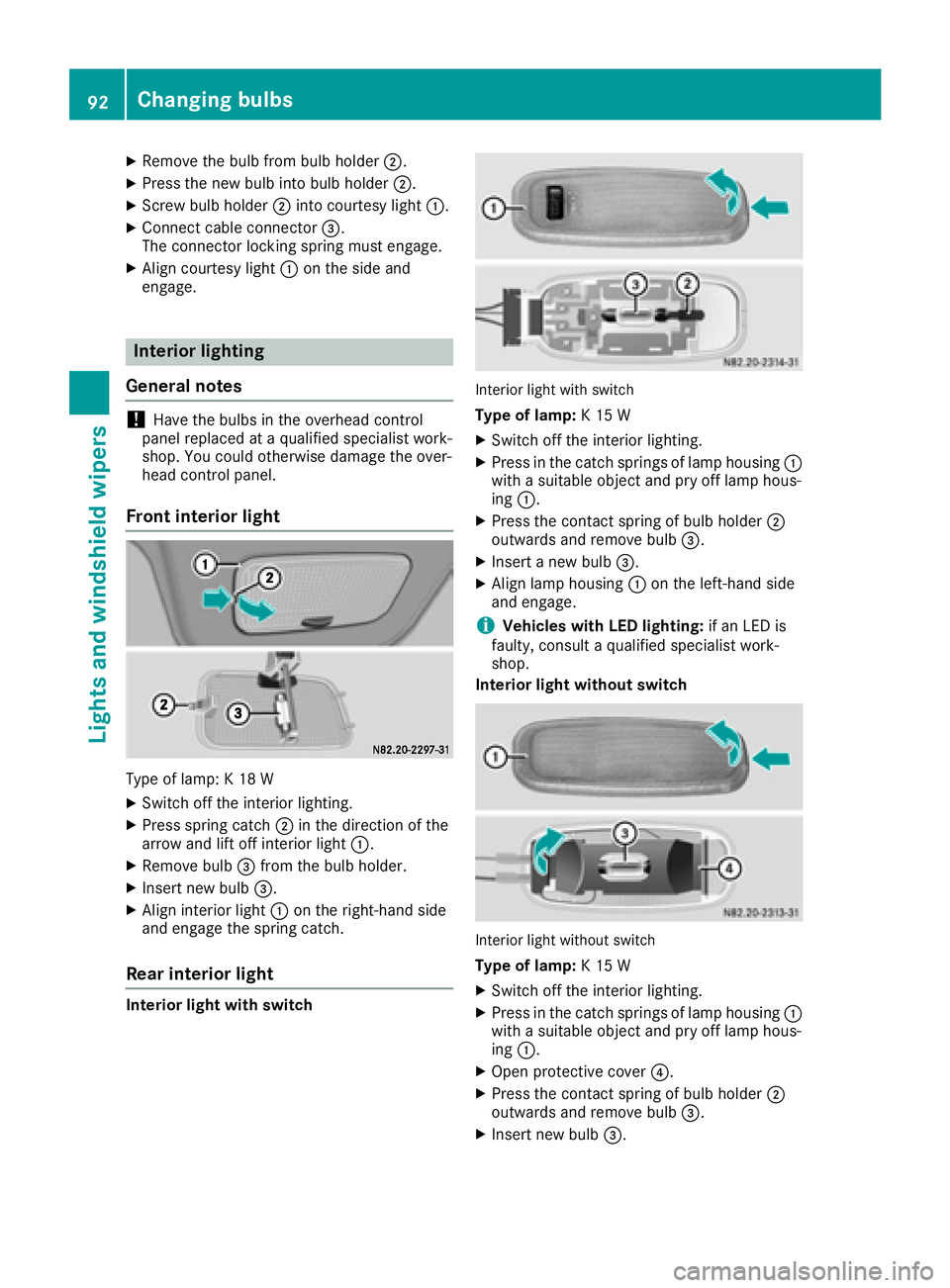
XRemove thebulb from bulb holder ;.
XPress thene wbulb int obulb holder ;.
XScrew bulb holder ;intocourtesy ligh t:.
XConnect cable connecto r=.
The connecto rlockin gspring mus tengage .
XAlign courtesy ligh t: on th eside and
engage .
Interior lighting
General notes
!Hav eth ebulbs in th eoverhead control
panel replace dat aqualified specialist work-
shop. You could otherwise damag eth eover-
head control panel.
Front interior light
Type of lamp : K18 W
XSwitc hoff th einterior lighting .
XPress spring catch ;in th edirection of th e
arrow and lift off interior ligh t:.
XRemove bulb =from th ebulb holder.
XInser tne wbulb =.
XAlign interior ligh t: on th eright-hand side
and engage th espring catch .
Rear interior light
Interior ligh twith switch
Interio rligh twit hswitch
Type of lamp: K15 W
XSwitc hoff th einterior lighting .
XPress in thecatch spring sof lamp housing :
wit h a suitable objec tand pry off lamp hous -
ing :.
XPress th econtact spring of bulb holder ;
outwards and remove bulb =.
XInsert anewbulb =.
XAlign lamp housing :on th eleft-han dside
and engage .
iVehicles with LED lighting: if an LEDis
faulty, consult aqualified specialist work-
shop.
Interior ligh twithout switch
Interio rligh twithout switch
Type of lamp: K15 W
XSwitc hoff th einterior lighting .
XPress in thecatch spring sof lamp housing :
wit h a suitable objec tand pry off lamp hous -
ing :.
XOpen protective cover ?.
XPress thecontact spring of bulb holder ;
outwards and remove bulb =.
XInsertne wbulb =.
92Changing bulbs
Lights and windshield wipers
Page 95 of 290
XFold protective cover?back into place.
XAlign lamp housing :on the left-hand side
and engage.
iVehicles with LED lighting: if an LED is
faulty, consult a qualified specialist work-
shop.
Cargo compartment lamp
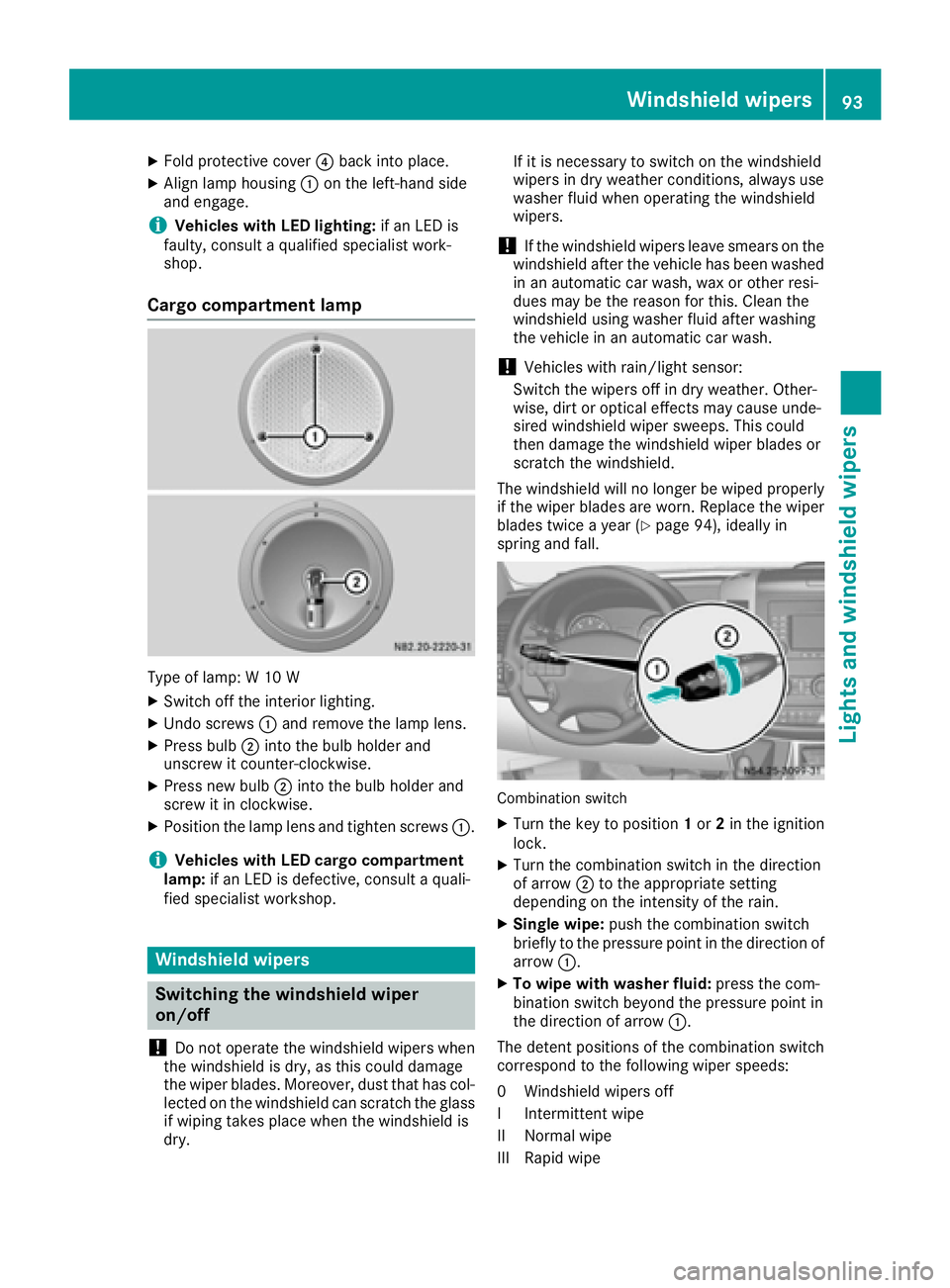
Type of lamp: W 10 W
XSwitch off the interior lighting.
XUndo screws :and remove the lamp lens.
XPress bulb ;into the bulb holder and
unscrew it counter-clockwise.
XPress new bulb ;into the bulb holder and
screw it in clockwise.
XPosition the lamp lens and tighten screws :.
iVehicles with LED cargo compartment
lamp: if an LED is defective, consult a quali-
fied specialist workshop.
Windshield wipers
Switching the windshield wiper
on/off
!
Do not operate the windshield wipers when
the windshield is dry, as this could damage
the wiper blades. Moreover, dust that has col-
lected on the windshield can scratch the glass
if wiping takes place when the windshield is
dry. If it is necessary to switch on the windshield
wipers in dry weather conditions, always use
washer fluid when operating the windshield
wipers.
!If the windshield wipers leave smears on the
windshield after the vehicle has been washed
in an automatic car wash, wax or other resi-
dues may be the reason for this. Clean the
windshield using washer fluid after washing
the vehicle in an automatic car wash.
!Vehicles with rain/light sensor:
Switch the wipers off in dry weather. Other-
wise, dirt or optical effects may cause unde-
sired windshield wiper sweeps. This could
then damage the windshield wiper blades or
scratch the windshield.
The windshield will no longer be wiped properly
if the wiper blades are worn. Replace the wiper
blades twice a year (
Ypage 94), ideally in
spring and fall.
Combination switch
XTurn the key to position 1or 2in the ignition
lock.
XTurn the combination switch in the direction
of arrow ;to the appropriate setting
depending on the intensity of the rain.
XSingle wipe: push the combination switch
briefly to the pressure point in the direction of arrow :.
XTo wipe with washer fluid: press the com-
bination switch beyond the pressure point in
the direction of arrow :.
The detent positions of the combination switch
correspond to the following wiper speeds:
0W indshield wipers off
II ntermittent wipe
II Normal wipe
III Rapid wipe
Windshield wipers93
Lights and windshield wiper s
Z
Page 96 of 290
iCanada only:
If the wind shield wiper s areswitched on and
you stop the veh icle, the windshield wiper
speed isreduced. For example, ifyou have
selected level IIand stop the veh icle,wipin g
continues with intermittent wipe whilethe
veh icle is stationary. Ifintermittent wipe is
selected, the intervals become longer.
Vehicles with a rain and light sensor: you
can use level Ias the universal setting. The
rain and light sensor sets the appropriate wip-
ing frequency automatically, according to the
intensity of the rain. When you stop the veh i-
cle, leve lsIII and IIare swit ched down to
level Iautomatically.
The wind shield wiper will return to the original
level when you drive faster than 5 mph
(8 km/h).
You can adjust the sensitivit y of the rain and
light sensor using the on-board computer
(
Ypage 173).
In formation on checking the washer fluid level
can befound inthe "Maintenance and care"
section (
Ypage 224).
Switching the rear window wiper on/
off
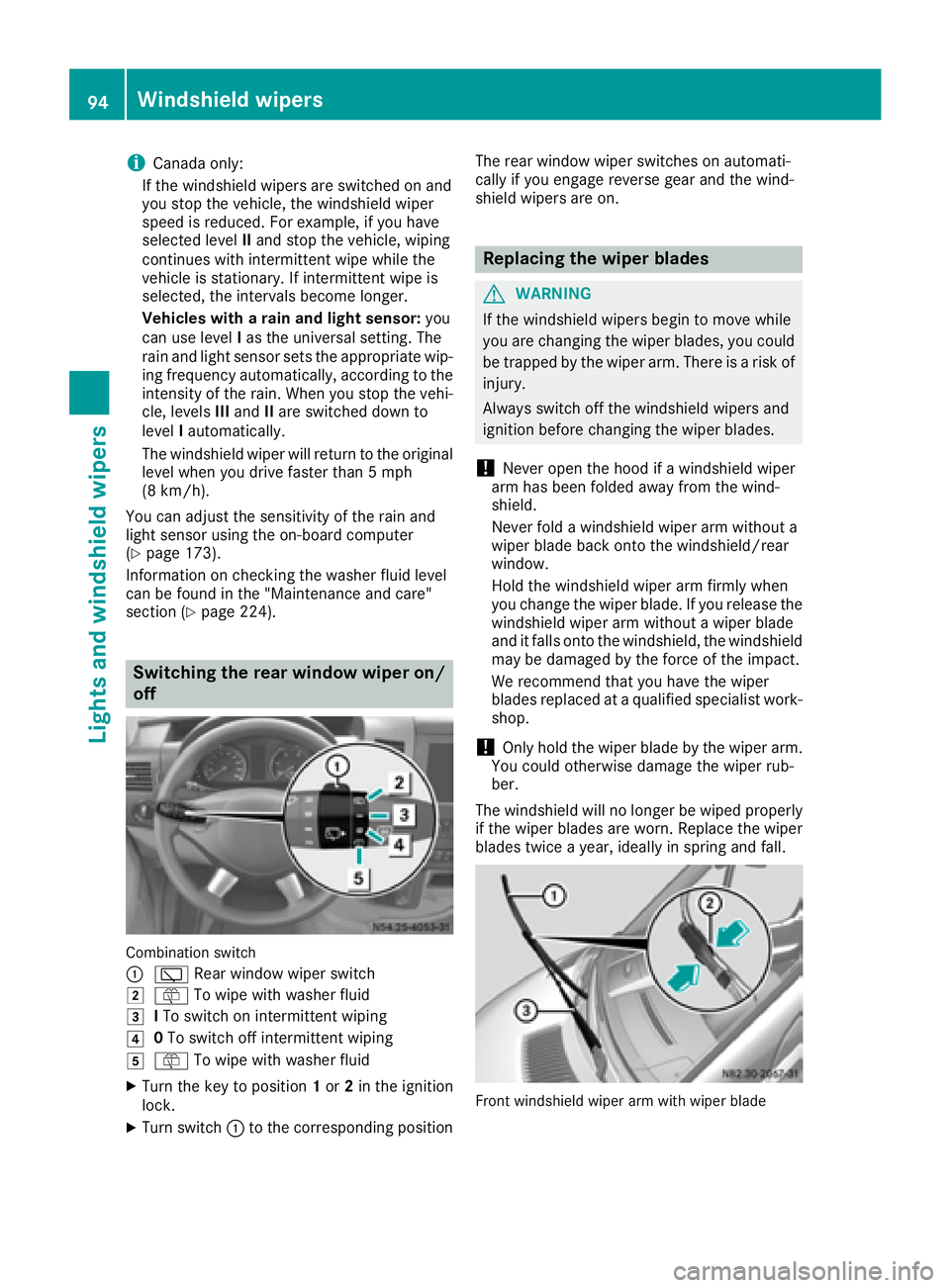
Combination switch
:
è Rearwindowwiper swit ch
2ôTowipe wit h washer fluid
3ITo swit ch on intermittent wiping
40To swit ch off intermittent wiping
5ô Towipe wit h washer fluid
XTurn the key to position 1or 2in the ignition
lock.
XTurn switch: to the corresponding position The rear
window wiper switches on automati-
cally ifyou engage reverse gear and the wind-
shield wipers are on.
Replacing the wiper blades
GWARNING
If the wind shield wipers begin to move while
you are changing the wiperblades, you could
be trapped by the wiper arm. There is a risk of
injury.
Alwa ysswit ch off the windshield wipers and
ignition before changing the wiper blades.
!Never open the hood if a windshield wiper
arm has been folded away from the wind-
shield.
Never fold a windshield wiper armwithout a
wiper blade back onto the windshield/rear
window.
Hold the windshield wiper arm firmly when
you change the wiperblade. Ifyou release the
windshield wiper arm without a wiperblade
and it falls onto the windshield, the windshield
may bedamaged by the force of the impact.
We recommend that you have the wiper
blades replaced at a qualified specialist work-
shop.
!Only hold the wiper blade by the wiper arm.
You could otherwise damage the wiper rub-
ber.
The windshield will no longer be wiped properly
if the wiper blades are worn. Replace the wiper
blades twice a year, ideally in spring and fall.
Frontwindshield wiper arm wit hwiper blade
94Windshield wipers
Lights and windshield wipers
Page 98 of 290
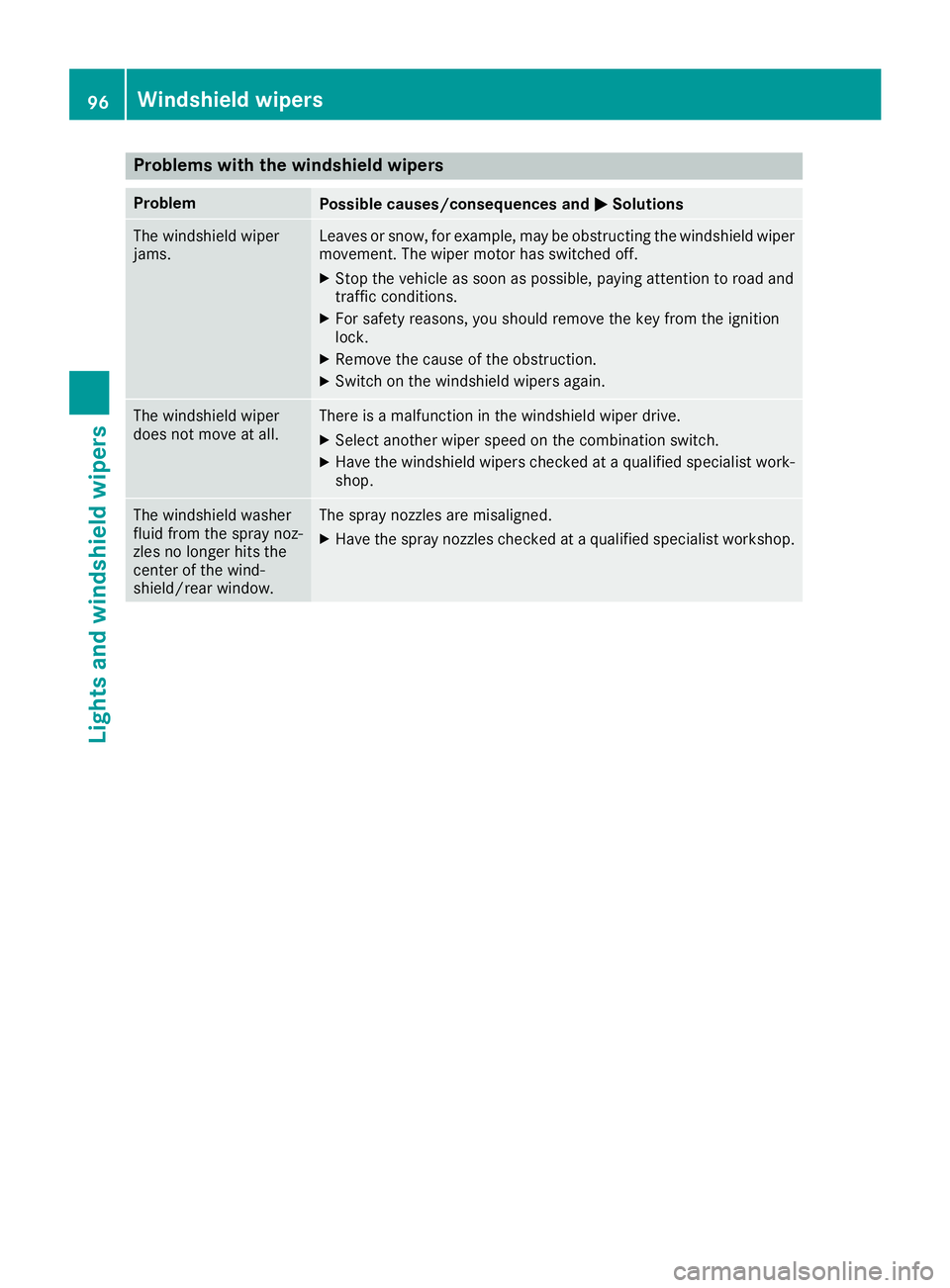
Problems with the windshield wipers
ProblemPossible causes/consequences andMSolutions
The windshield wiper
jams.Leaves or snow, for example, may be obstructing the windshield wiper
movement. The wiper motor has switched off.
XStop the vehicle as soon as possible, paying attention to road and
traffic conditions.
XFor safety reasons, you should remove the key from the ignition
lock.
XRemove the cause of the obstruction.
XSwitch on the windshield wipers again.
The windshield wiper
does not move at all.There is a malfunction in the windshield wiper drive.
XSelect another wiper speed on the combination switch.
XHave the windshield wipers checked at a qualified specialist work-
shop.
The windshield washer
fluid from the spray noz-
zles no longer hits the
center of the wind-
shield/rear window.The spray nozzles are misaligned.
XHave the spray nozzles checked at a qualified specialist workshop.
96Windshield wipers
Lights and windshield wipers
Page 103 of 290
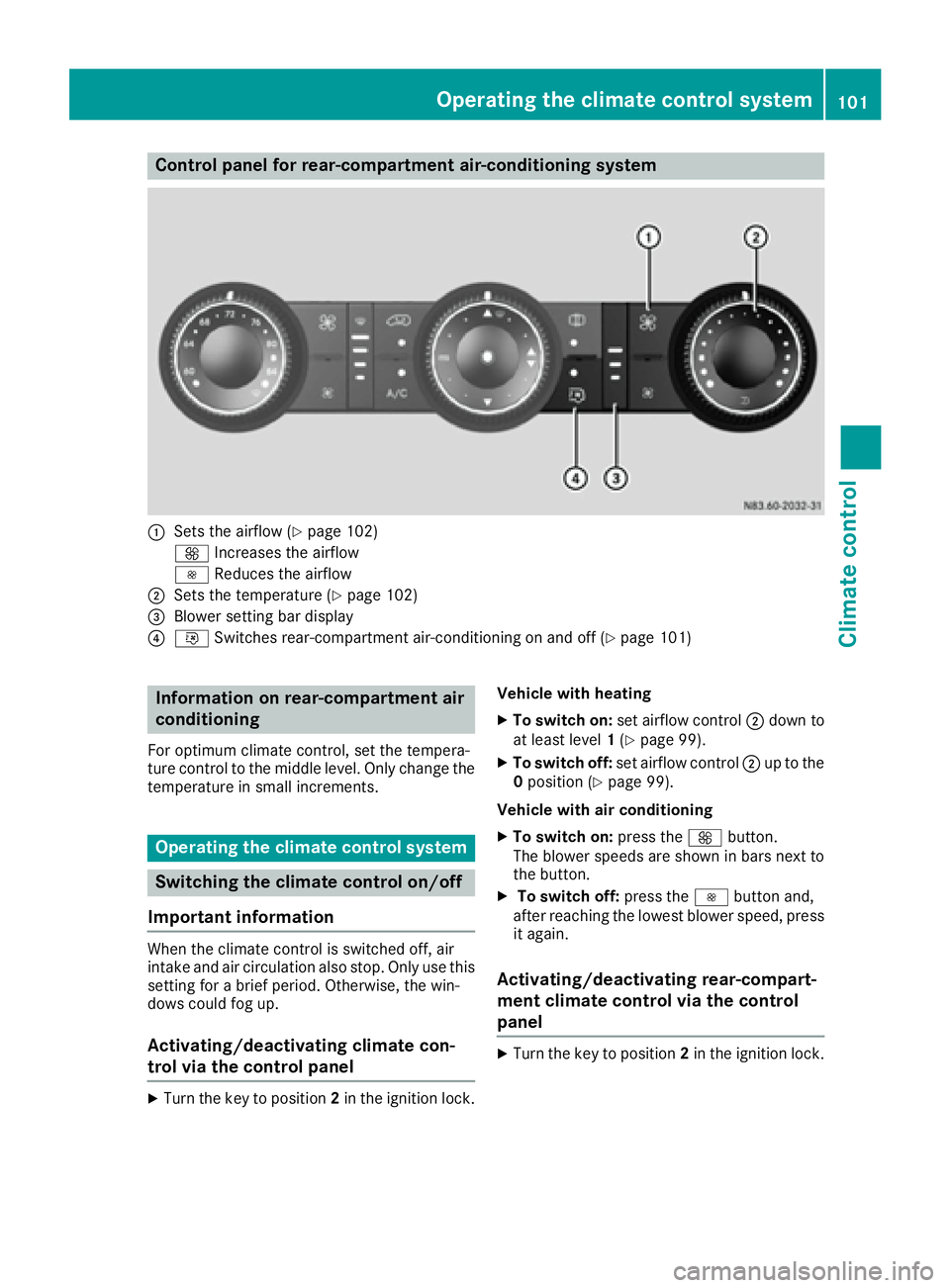
Control panel for rear-compartment air-conditioning system
:Sets the airflow (Ypage 102)
K Increases the airflow
I Reduces the airflow
;Sets the temperature (Ypage 102)
=Blower setting bar display
?iSwitches rear-compartment air-conditioning on and off (Ypage 101)
Information on rear-compartment air
conditioning
For optimum climate control, set the tempera-
ture control to the middle level. Only change the
temperature in small increments.
Operating the climate control system
Switching the climate control on/off
Important information
When the climate control is switched off, air
intake and air circulation also stop. Only use this
setting for a brief period. Otherwise, the win-
dows could fog up.
Activating/deactivating climate con-
trol via the control panel
XTurn the key to position 2in the ignition lock. Vehicle with heating
XTo switch on:
set airflow control ;down to
at least level 1(Ypage 99).
XTo switch off: set airflow control ;up to the
0 position (Ypage 99).
Vehicle with air conditioning
XTo switch on: press theKbutton.
The blower speeds are shown in bars next to
the button.
XTo switch off: press theIbutton and,
after reaching the lowest blower speed, press
it again.
Activating/deactivating rear-compart-
ment climate control via the control
panel
XTurn the key to position 2in the ignition lock.
Operating the climate control system101
Climate control
Page 104 of 290
Vehicle with rear-compartment heating/
rear-compartment air conditioning
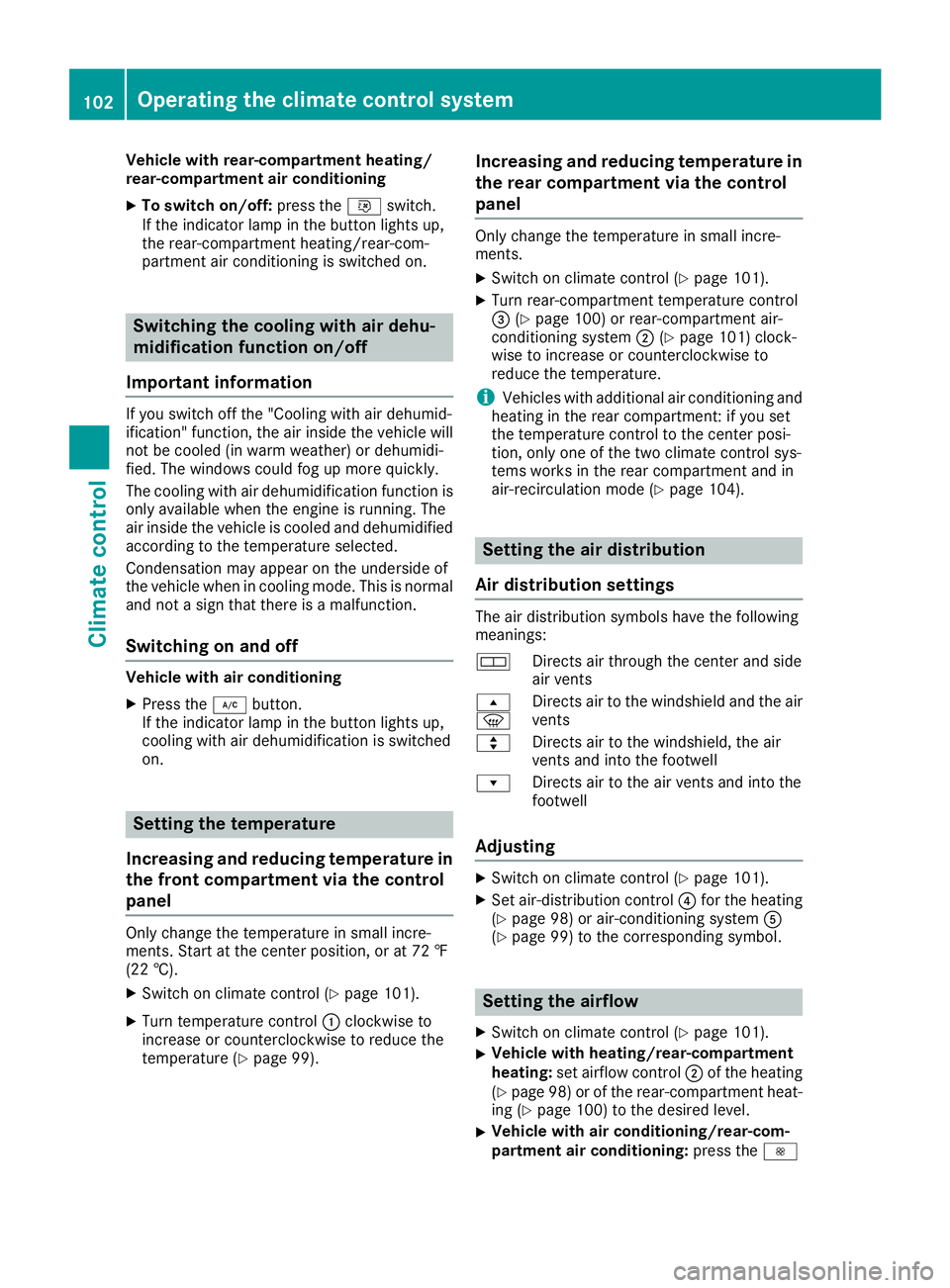
XTo switch on/off:press theiswitch.
If the indicator lamp in the button lights up,
the rear-compartment heating/rear-com-
partment air conditioning is switched on.
Switching the cooling with air dehu-
midification function on/off
Important information
If you switch off the "Cooling with air dehumid-
ification" function, the air inside the vehicle will
not be cooled (in warm weather) or dehumidi-
fied. The windows could fog up more quickly.
The cooling with air dehumidification function is
only available when the engine is running. The
air inside the vehicle is cooled and dehumidified
according to the temperature selected.
Condensation may appear on the underside of
the vehicle when in cooling mode. This is normal
and not a sign that there is a malfunction.
Switching on and off
Vehicle with air conditioning
XPress the ¿button.
If the indicator lamp in the button lights up,
cooling with air dehumidification is switched
on.
Setting the temperature
Increasing and reducing temperature in
the front compartment via the control
panel
Only change the temperature in small incre-
ments. Start at the center position, or at 72 ‡
(22 †).
XSwitch on climate control (Ypage 101).
XTurn temperature control :clockwise to
increase or counterclockwise to reduce the
temperature (
Ypage 99).
Increasing and reducing temperature in
the rear compartment via the control
panel
Only change the temperature in small incre-
ments.
XSwitch on climate control (Ypage 101).
XTurn rear-compartment temperature control
= (Ypage 100) or rear-compartment air-
conditioning system ;(Ypage 101) clock-
wise to increase or counterclockwise to
reduce the temperature.
iVehicles with additional air conditioning and
heating in the rear compartment: if you set
the temperature control to the center posi-
tion, only one of the two climate control sys-
tems works in the rear compartment and in
air-recirculation mode (
Ypage 104).
Setting the air distribution
Air distribution settings
The air distribution symbols have the following
meanings:
m Directs air through the center and side
air vents
s
z Directs air to the windshield and the air
vents
q Directs air to the windshield, the air
vents and into the footwell
r Directs air to the air vents and into the
footwell
Adjusting
XSwitch on climate control (Ypage 101).
XSet air-distribution control ?for the heating
(Ypage 98) or air-conditioning system A
(Ypage 99) to the corresponding symbol.
Setting the airflow
XSwitch on climate control (Ypage 101).
XVehicle with heating/rear-compartment
heating: set airflow control ;of the heating
(
Ypage 98) or of the rear-compartment heat-
ing (Ypage 100) to the desired level.
XVehicle with air conditioning/rear-com-
partment air conditioning: press theI
102Operating the climate control system
Climate control
Page 107 of 290
Heating and air-conditioning system
Air-recirculation mode switches off automati-
cally after about 10 to 30 minutes, depending on
the outside temperature.
XSwitch on climate control (Ypage 101).
XTo activate/deactivate:press theebut-
ton.
If the indicator lamp in the ebutton lights
up, air-recirculation mode is activated.
Rear-compartment heating and rear-
compartment air-conditioning system
On vehicles with rear-compartment heating and
a rear-compartment air-conditioning system,
you can activate or deactivate air-recirculation
mode for the rear-compartment climate control.
XSwitch on climate control (Ypage 101).
XTo activate: set the temperature control of
rear-compartment heating =(Ypage 100) or
rear-compartment air conditioning system ;
(
Ypage 101) to the center position.
Only one of the two climate control systems in
the rear compartment is activated and is in
air-recirculation mode.
XTo deactivate: turn the temperature control
of rear-compartment heating =(Ypage 100)
or rear-compartment air-conditioning sys-
tem ;(
Ypage 101) clockwise or counter-
clockwise. Only change the temperature in
small increments.
Adjusting the air vents
Important safety notes
GWARNING
Very hot or very cold air can flow from the air
vents. This could result in burns or frostbite in
the immediate vicinity of the air vents. There
is a risk of injury.
Make sure that all vehicle occupants always
maintain a sufficient distance to the air out-
lets. If necessary, redirect the airflow to
another area of the vehicle interior.
The center and side air vents are adjustable. On vehicles with a rear-compartment air-condi-
tioning system, you can also adjust the air vents
in the roof duct.
iFor virtually draft-free ventilation, adjust the
sliders of the center air vents to the center
position.
In order to ensure the direct flow of fresh air
through the air vents into the vehicle interior,
please observe the following notes:
Rkeep the air inlet grille on the hood free of
blockages, such as ice, snow or leaves.
Rnever cover the vents or the ventilation grilles
in the vehicle interior.
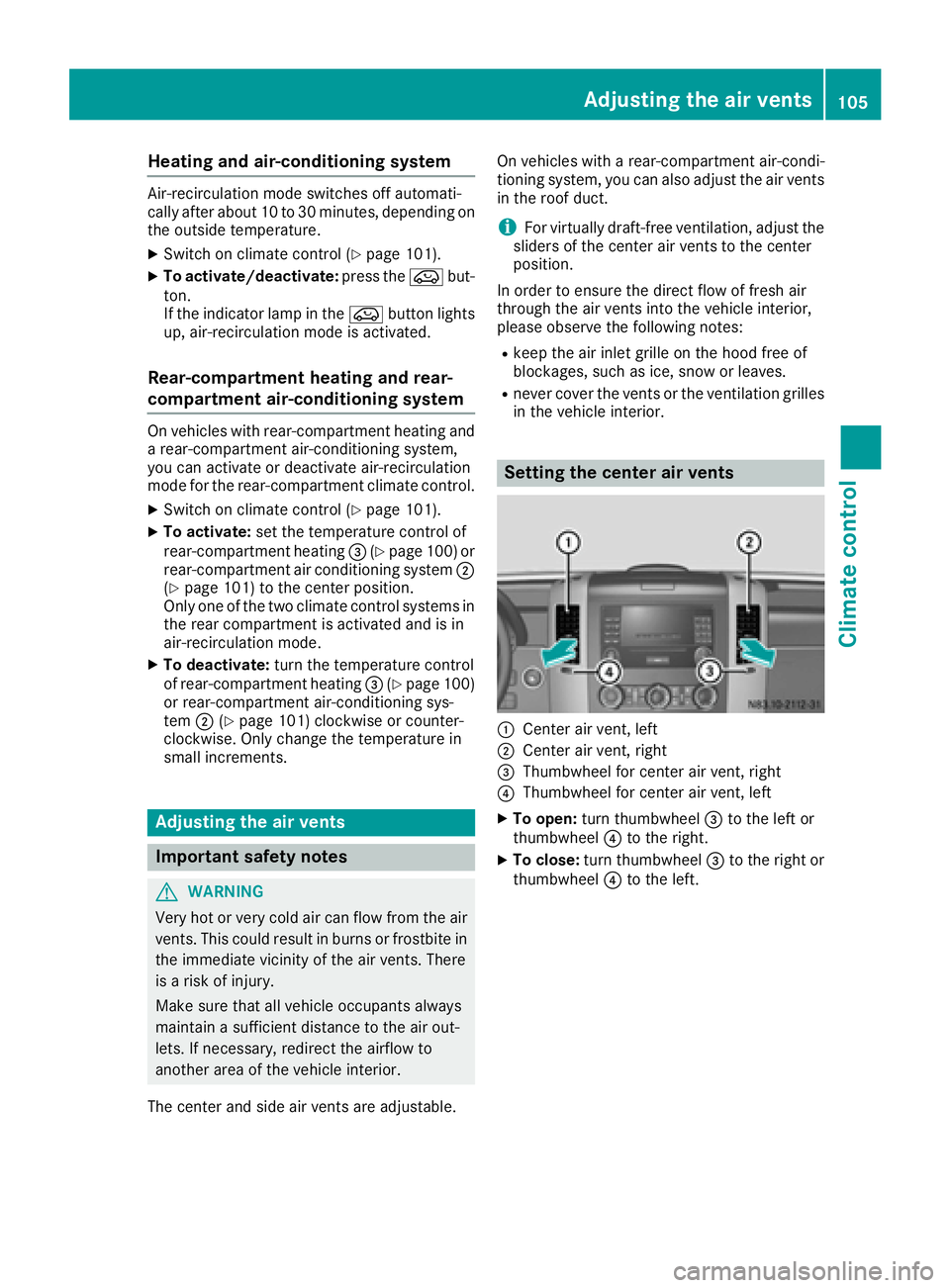
Setting the center air vents
:Center air vent, left
;Center air vent, right
=Thumbwheel for center air vent, right
?Thumbwheel for center air vent, left
XTo open: turn thumbwheel =to the left or
thumbwheel ?to the right.
XTo close: turn thumbwheel =to the right or
thumbwheel ?to the left.
Adjusting the air vents105
Climate control
Z
Page 108 of 290
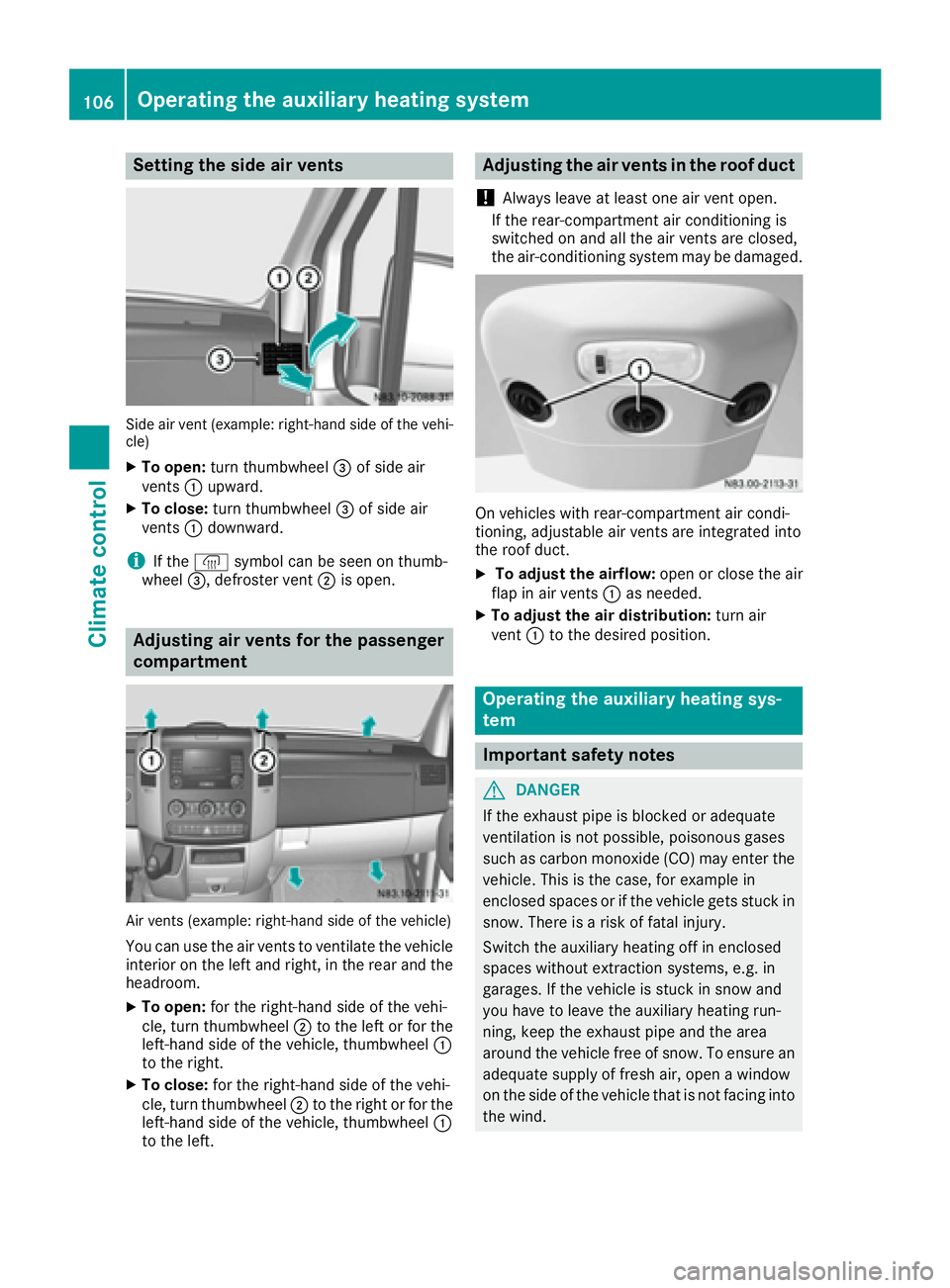
Setting the side air vents
Side air vent (example: right-hand side of the vehi-
cle)
XTo open:turn thumbwheel =of side air
vents :upward.
XTo close: turn thumbwheel =of side air
vents :downward.
iIf the ® symbol can be seen on thumb-
wheel =, defroster vent ;is open.
Adjusting air vents for the passenger
compartment
Air vents (example: right-hand side of the vehicle)
You can use the air vents to ventilate the vehicle
interior on the left and right, in the rear and the
headroom.
XTo open: for the right-hand side of the vehi-
cle, turn thumbwheel ;to the left or for the
left-hand side of the vehicle, thumbwheel :
to the right.
XTo close: for the right-hand side of the vehi-
cle, turn thumbwheel ;to the right or for the
left-hand side of the vehicle, thumbwheel :
to the left.
Adjusting the air vents in the roof duct
!
Always leave at least one air vent open.
If the rear-compartment air conditioning is
switched on and all the air vents are closed,
the air-conditioning system may be damaged.
On vehicles with rear-compartment air condi-
tioning, adjustable air vents are integrated into
the roof duct.
XTo adjust the airflow: open or close the air
flap in air vents :as needed.
XTo adjust the air distribution: turn air
vent :to the desired position.
Operating the auxiliary heating sys-
tem
Important safety notes
GDANGER
If the exhaust pipe is blocked or adequate
ventilation is not possible, poisonous gases
such as carbon monoxide (CO) may enter the vehicle. This is the case, for example in
enclosed spaces or if the vehicle gets stuck in
snow. There is a risk of fatal injury.
Switch the auxiliary heating off in enclosed
spaces without extraction systems, e.g. in
garages. If the vehicle is stuck in snow and
you have to leave the auxiliary heating run-
ning, keep the exhaust pipe and the area
around the vehicle free of snow. To ensure anadequate supply of fresh air, open a window
on the side of the vehicle that is not facing into
the wind.
106Operating the auxiliary heating system
Climate control
Page 109 of 290
GWARNING
When the auxiliary heating is switched on,
parts of the vehicle can become very hot, e.g.
the exhaust system.
Flammable materials such as leaves, grass or
twigs may ignite if they come into contact
with:
Rhot parts of the exhaust system
Rthe exhaust gas itself
There is a risk of fire.
When the auxiliary heating is switched on,
make sure that:
Rno flammable materials come into contact
with hot vehicle components
Rthe exhaust gas can escape from the
exhaust pipe unhindered
Rthe exhaust gas does not come into contact
with flammable materials.
!Turn on the auxiliary heating at least once a
month for approximately 10 minutes. The
auxiliary heating could otherwise be dam-
aged.
!Make sure that the flow of hot air is not
blocked. The auxiliary heating will otherwise
overheat and switch off.
Your vehicle may be equipped with either an
auxiliary hot-water heater or an auxiliary warm-
air heater. Adjustment and operation of the:
Rhot-water auxiliary heater is done via the on-
board computer and with the auxiliary heating
button in the control panel (
Ypage 108) or
with the remote control (Ypage 109).
Rauxiliary warm-air heater is done via the timer
above the overhead control panel
(
Ypage 114).
The auxiliary heating works independently of the
engine and supplements the climate control
system in the vehicle. The auxiliary heating
heats the air in the vehicle interior to the tem-
perature set.
If your vehicle is equipped with a hot-water aux-
iliary heater, the auxiliary heating also keeps the
coolant warm. This way, the load on the engine
is minimized and fuel is saved.
The heater booster function (
Ypage 111) of the
au xiliary heating supports the climate control system when the engine is running and the out-
side temperature is low.
You can use the auxiliary heating at an outside
temperature of up to 39 ‡ (4 †). At an outside
temperature above 39 ‡ (4 †) the auxiliary
heating system and the heater booster function
switch off automatically.
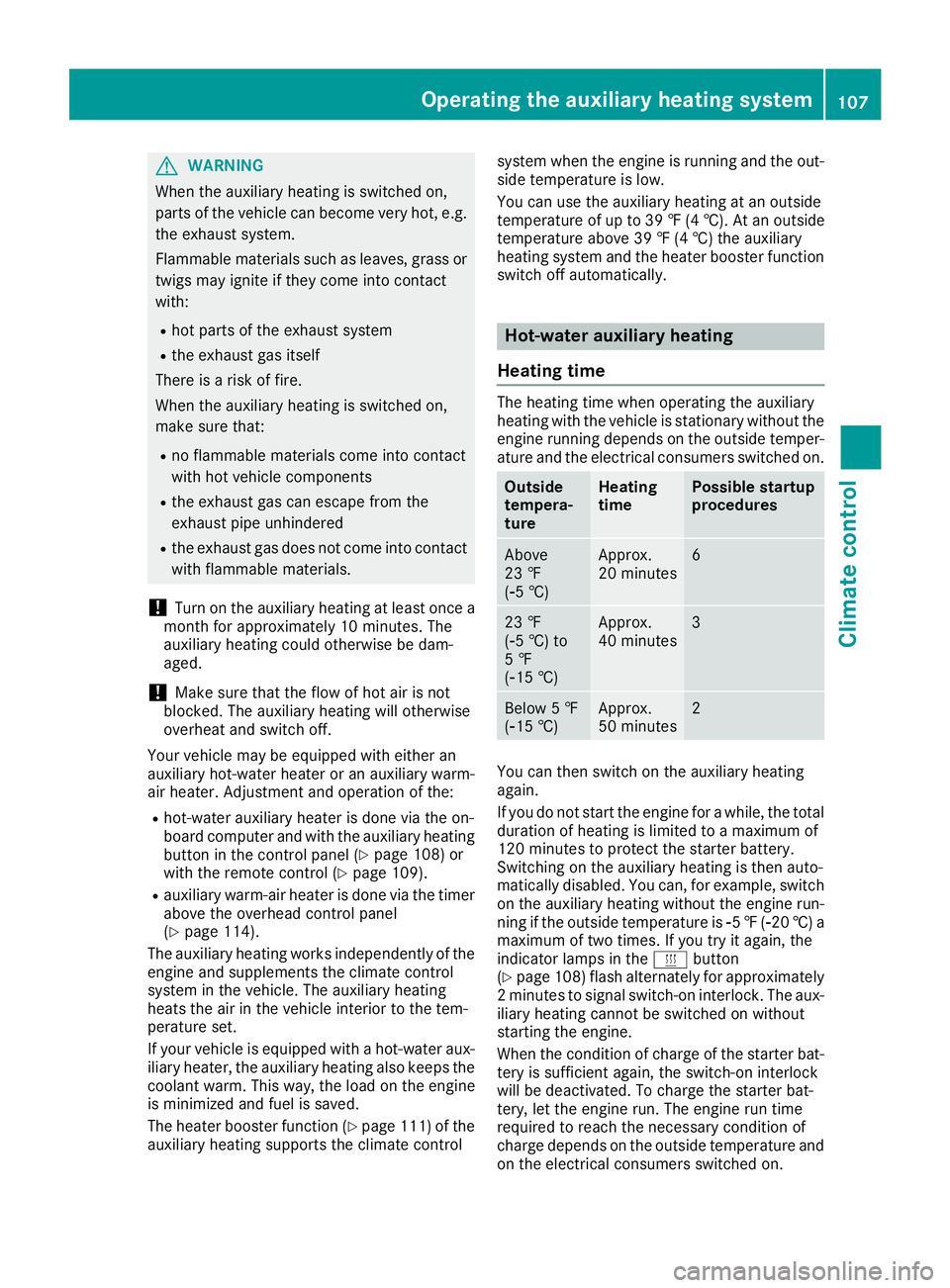
Hot-water auxiliary heating
Heating time
The heating time when operating the auxiliary
heating with the vehicle is stationary without the
engine running depends on the outside temper-
ature and the electrical consumers switched on.
Outside
tempera-
tureHeating
timePossible startup
procedures
Above
23 ‡
(Ò5 †)Approx.
20 minutes6
23 ‡
(Ò5 †) to
5 ‡
(Ò15 †)Approx.
40 minutes3
Below 5 ‡
(Ò15 †)Approx.
50 minutes2
You can then switch on the auxiliary heating
again.
If you do not start the engine for a while, the total
duration of heating is limited to a maximum of
120 minutes to protect the starter battery.
Switching on the auxiliary heating is then auto-
matically disabled. You can, for example, switch
on the auxiliary heating without the engine run- ning if the outside temperature is Ò5‡( Ò20 †) a
maximum of two times. If you try it again, the
indicator lamps in the ybutton
(
Ypage 108) flash alternately for approximately
2 minutes to signal switch-on interlock. The aux-
iliary heating cannot be switched on without
starting the engine.
When the condition of charge of the starter bat-
tery is sufficient again, the switch-on interlock
will be deactivated. To charge the starter bat-
tery, let the engine run. The engine run time
required to reach the necessary condition of
charge depends on the outside temperature and
on the electrical consumers switched on.
Operating the auxiliary heating system107
Climate control
Z
Page 110 of 290
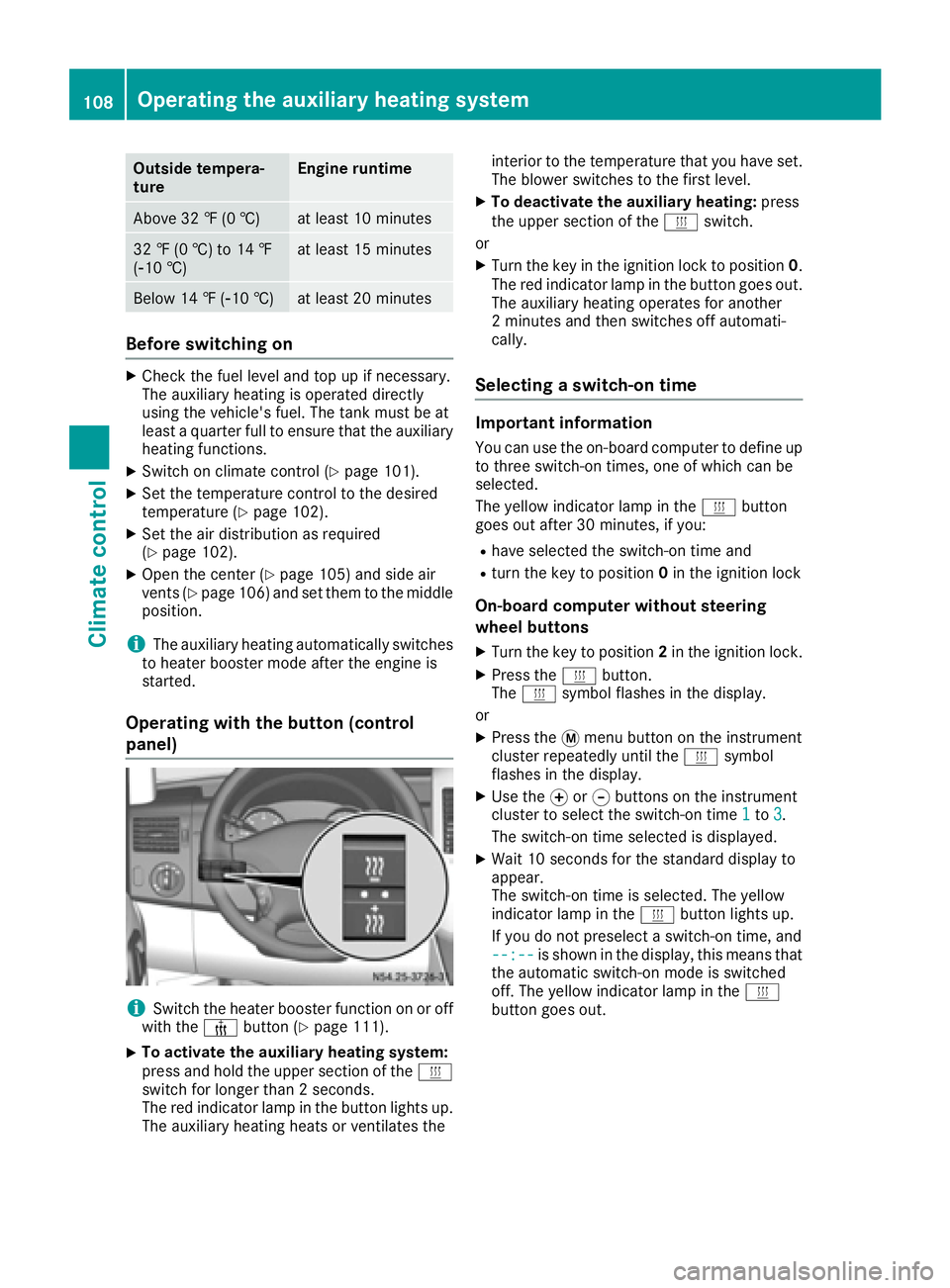
Outside tempera-
tureEngine runtime
Above 32 ‡ (0 †)at least 10 minutes
32 ‡ (0 †) to 14 ‡
(Ò10 †)at least 15 minutes
Below 14 ‡ (Ò10 †)at least 20 minutes
Before switching on
XCheck the fuel level and top up if necessary.
The auxiliary heating is operated directly
using the vehicle's fuel. The tank must be at
least a quarter full to ensure that the auxiliary
heating functions.
XSwitch on climate control (Ypage 101).
XSet the temperature control to the desired
temperature (Ypage 102).
XSet the air distribution as required
(Ypage 102).
XOpen the center (Ypage 105) and side air
vents (Ypage 106) and set them to the middle
position.
iThe auxiliary heating automatically switches
to heater booster mode after the engine is
started.
Operating with the button (control
panel)
iSwitch the heater booster function on or off
with the ¢button (Ypage 111).
XTo activate the auxiliary heating system:
press and hold the upper section of the y
switch for longer than 2 seconds.
The red indicator lamp in the button lights up.
The auxiliary heating heats or ventilates the interior to the temperature that you have set.
The blower switches to the first level.
XTo deactivate the auxiliary heating:
press
the upper section of the yswitch.
or
XTurn the key in the ignition lock to position 0.
The red indicator lamp in the button goes out.
The auxiliary heating operates for another
2 minutes and then switches off automati-
cally.
Selecting a switch-on time
Important information
You can use the on-board computer to define up
to three switch-on times, one of which can be
selected.
The yellow indicator lamp in the ybutton
goes out after 30 minutes, if you:
Rhave selected the switch-on time and
Rturn the key to position 0in the ignition lock
On-board computer without steering
wheel buttons
XTurn the key to position 2in the ignition lock.
XPress the ybutton.
The y symbol flashes in the display.
or
XPress the 4menu button on the instrument
cluster repeatedly until the ysymbol
flashes in the display.
XUse the forg buttons on the instrument
cluster to select the switch-on time 1to3.
The switch-on time selected is displayed.
XWait 10 seconds for the standard display to
appear.
The switch-on time is selected. The yellow
indicator lamp in the ybutton lights up.
If you do not preselect a switch-on time, and
--:--
is shown in the display, this means that
the automatic switch-on mode is switched
off. The yellow indicator lamp in the y
button goes out.
108Operating the auxiliary heating system
Climate control