service indicator MERCEDES-BENZ SPRINTER 2016 MY16 Operator’s Manual
[x] Cancel search | Manufacturer: MERCEDES-BENZ, Model Year: 2016, Model line: SPRINTER, Model: MERCEDES-BENZ SPRINTER 2016Pages: 290, PDF Size: 6.44 MB
Page 10 of 290
Dealership
see Qualified specialist workshop
Declarations of conformity .................26
DEF (Diesel Exhaust Flui d )
Refillin g.......................................... 12 9
Delayed switch-off ............................ 17 2
Diagnostics connection
Operatin gsafet yand vehicl e
approva l........................................... 26
Diesel .................................................. 27 8
Diesel engin e
Preglow indicato rlamp .................. 20 1
Diesel Exhaust Flui d(DEF)
Displa ymessage s(vehicles wit h
steerin gwhee lbuttons )................ .187
Display messages (vehicles with-
out steering wheel buttons) ........... 178
Indicator lamp ................................ 197
Level indicator ............................... 162
Notes ............................................. 279
Storage .......................................... 280
Tank content .................................. 280
Diesel particle filter
Display message ............................ 187
Indicator lamp ................................ 201
Short-distance driving .................... 134
Digital speedometer
Setting the unit (vehicles with
steering wheel buttons) ................. 169
Display
Display messages .......................... 176
Outside temperature (vehicles
with steering wheel buttons) ......... 167
Outside temperature display
(vehicles without steering wheel
buttons) ......................................... 163
Standard display (vehicles with
steering wheel buttons) ................. 167
Standard display (vehicles with-
ou
t steering wheel buttons) ........... 163
see Warning and indicator lamps
Display message (vehicle with
steering wheel buttons)
Service interval display .................. 226
Display message (vehicle without
steering wheel buttons)
Service interval display .................. 226 Display messages
Calling up the message memory .... 176
Driving systems ............................. 190
Engine ............................................ 187
Important safety notes .................. 176
Lights ............................................. 185
Safety systems .............................. 181
SmartKey ....................................... 193
Tires ............................................... 191
Vehicle ........................................... 192
Distance recorder ............................. 167
see Odometer
see Trip odometer
Distance warning function
Activating/deactivating ................. 143
Function/notes ............................. 142
Warning lamp ................................. 143
Door lock
see Central locking
Doors
Central locking/unlocking
(SmartKey) ....................................... 59
Control panel ................................... 37
Display message ............................ 193
Indicator lamp ................................ 203
Drinking and driving ......................... 133
Drinks holder
see Bottle holder
Driver's seat
see Seats
Driver's/front-passenger door
Unlocking ......................................... 65
Driving abroad ................................... 134
Driving off-road
see Off-road driving
Driving on flooded roads .................. 136
Driving on rough terrain
Checklist before driving off-road .... 138
Driving safety systems
4ETS (Electronic Traction Sys-
tem) ................................................. 55
ABS (Anti-lock Braking System) ....... 53
Adaptive Brake Assist .................... 143
ASR (Acceleration Skid Control) ...... 53
BAS (Brake Assist System) .............. 54
Distance warning function ............. 142
EBD (electronic brake force distri-
bution) ............................................. 54
8Index
Page 11 of 290
ESP®(Electronic Stability Pro-
gram) ............................................... 54
Important safety information ........... 52
Overview .......................................... 52
Driving systems
Blind Spot Assist ............................ 144
Cruise control ................................ 140
Display message ............................ 190
Lane Keeping Assist ...................... 146
PARKTRONIC ................................. 151
Driving tips
Automatic transmission ................. 126
Brakes ........................................... 135
Break-in period .............................. 118
Downhill gradient ........................... 135
Drinking and driving ....................... 133
Driving abroad ............................... 134
Driving in winter ............................. 137
Driving on flooded roads ................ 136
Driving on wet roads ...................... 136
Exhaust check ............................... 134
Fuel ................................................ 133
General .......................................... 133
Hydroplaning ................................. 136
Icy road surfaces ........................... 137
Important safety notes .................. 118
Limited braking efficiency on sal-
ted roads ....................................... 136
New brake disks ............................ 136
New brake pads/linings ................ 136
Off-road driving .............................. 137
Overrun cut-off .............................. 133
Snow chains .................................. 249
Speed limitation ............................. 134
Towing a trailer .............................. 155
Transport by rail ............................. 135
Wet road surface ........................... 136
DSR (Downhill Speed Regulation) .... 149
E
EBD (electronic brake force distri-
bution)
Display message ............................ 183
Function/notes ................................ 54
Indicator lamps .............................. 195
Electrical closing assist ...................... 66Electrical fuses
see Fuses
Electrical step
Cleaning ......................................... 237
Display message ............................ 192
Emergency release .......................... 67
Function ........................................... 67
Important safety notes .................... 66
Indicator lamp ................................ 203
Manual retraction ............................ 67
Obstacle detection ........................... 67
Electrical system
Battery main switch ....................... 118
Electronic brake force distribution
see EBD (electronic brake force
distribution)
Electronic Stability Program
see ESP
®(Electronic Stability Program)
Electronic Traction System
see 4ETS (Electronic Traction System)
Emergency exit .................................... 55
Emergency exit window ..................... 55
Emergency Tensioning Devices
Activation ......................................... 45
Emissions control
Service and warranty information .... 22
Engine
ADR (working speed governor) ...... 154
Changing the power output ............. 26
Check Engine warning lamp ........... 200
Cleaning instructions ..................... 234
Engine number ............................... 277
Engine speed setting (working
mode) ............................................ 155
Irregular running ............................ 123
Jump-starting ................................. 242
Operating safety .............................. 26
Starting .......................................... 120
Starting problems .......................... 123
Switching off .................................. 132
Tow-starting (vehicle) ..................... 246
Engine electronics
Notes ............................................. 275
Problem (malfunction) ................... 123
Engine oil
Adding ........................................... 222
Additives ........................................ 281
Index9
Page 20 of 290
Setting the unit (vehicles with
steering wheel buttons) ................. 169
Theft deterrent systems
Immobilizer ...................................... 56
Tow-away alarm ............................... 57
Tightening torques for wheel nuts/
wheel bolts ........................................ 271
Time
Setting the time (vehicles with
steering wheel buttons) ................. 171
Setting the time (vehicles without
steering wheel buttons) ................. 164
Timer
Activating ....................................... 115
Auxiliary heating ............................ 114
Important safety notes .................. 114
Overview ........................................ 114
Setting the heating level (auxiliary
heating) ......................................... 116
Setting the preselection time
(auxiliary heating) .......................... 115
Setting weekday, time and oper-
ating duration (auxiliary heating) ... 115
Switching immediate heating
mode on/off (auxiliary heating) ..... 115
Tire pressure
Calling up (on-board computer) ..... 253
Checking manually ........................ 253
Display messages (vehicles with
steering wheel buttons) ................. 191
Display messages (vehicles with-
out steering wheel buttons) ........... 178
Maximum ....................................... 252
Notes ............................................. 251
Recommended ............................... 250
Setting the unit (vehicles with
steering wheel buttons) ................. 170
Tire label ........................................ 251
Tire pressure loss warning system .. 255
Tire pressure monitor
Checking the tire pressure elec-
tronically ........................................ 254
Display message ............................ 191
Function/notes ............................. 253
Indicator lamp ................................ 202
Restarting ...................................... 255
Warning lamp ................................. 255
Tire pressure table ............................ 257 Tires
Aspect ratio (definition) ................. 265
Average weight of the vehicle
occupants (definition) .................... 264
Bar (definition) ............................... 264
Chang ing a w
heel .......................... 266
Characteristics .............................. 264
Checking ........................................ 248
Curb weight (definition) ................. 265
Definition of terms ......................... 264
Direction of rotation ...................... 267
Distribution of the vehicle occu-
pants (definition) ............................ 266
DOT (Department of Transporta-
tion) (definition) ............................. 264
DOT, Tire Identification Number
(TIN) ............................................... 263
GAWR (Gross Axle Weight Rating)
(definition) ..................................... 264
GTW (Gross Trailer Weight) (defi-
nition) ............................................ 264
GVW (Gross Vehicle Weight) (def-
inition) ........................................... 264
GVWR (Gross Vehicle Weight Rat-
ing) (definition) .............................. 265
Important safety notes .................. 247
Increased vehicle weight due to
optional equipment (definition) ...... 264
Kilopascal (kPa) (definition) ........... 265
Labeling (overview) ........................ 261
Load bearing index (definition) ...... 266
Load index ..................................... 263
Load index (definition) ................... 265
M+S tires ....................................... 249
Maximum load on a tire (defini-
tion) ............................................... 265
Maximum loaded vehicle weight
(definition) ..................................... 265
Maximum permissible tire pres-
sure (definition) ............................. 265
Maximum tire load ......................... 263
Maximum tire load (definition) ....... 265
Optional equipment weight (defi-
nition) ............................................ 265
PSI (pounds per square inch) (def- inition) ........................................... 265
Replacing ....................................... 266
Service life ..................................... 248
18Index
Page 34 of 290
Instrument cluster
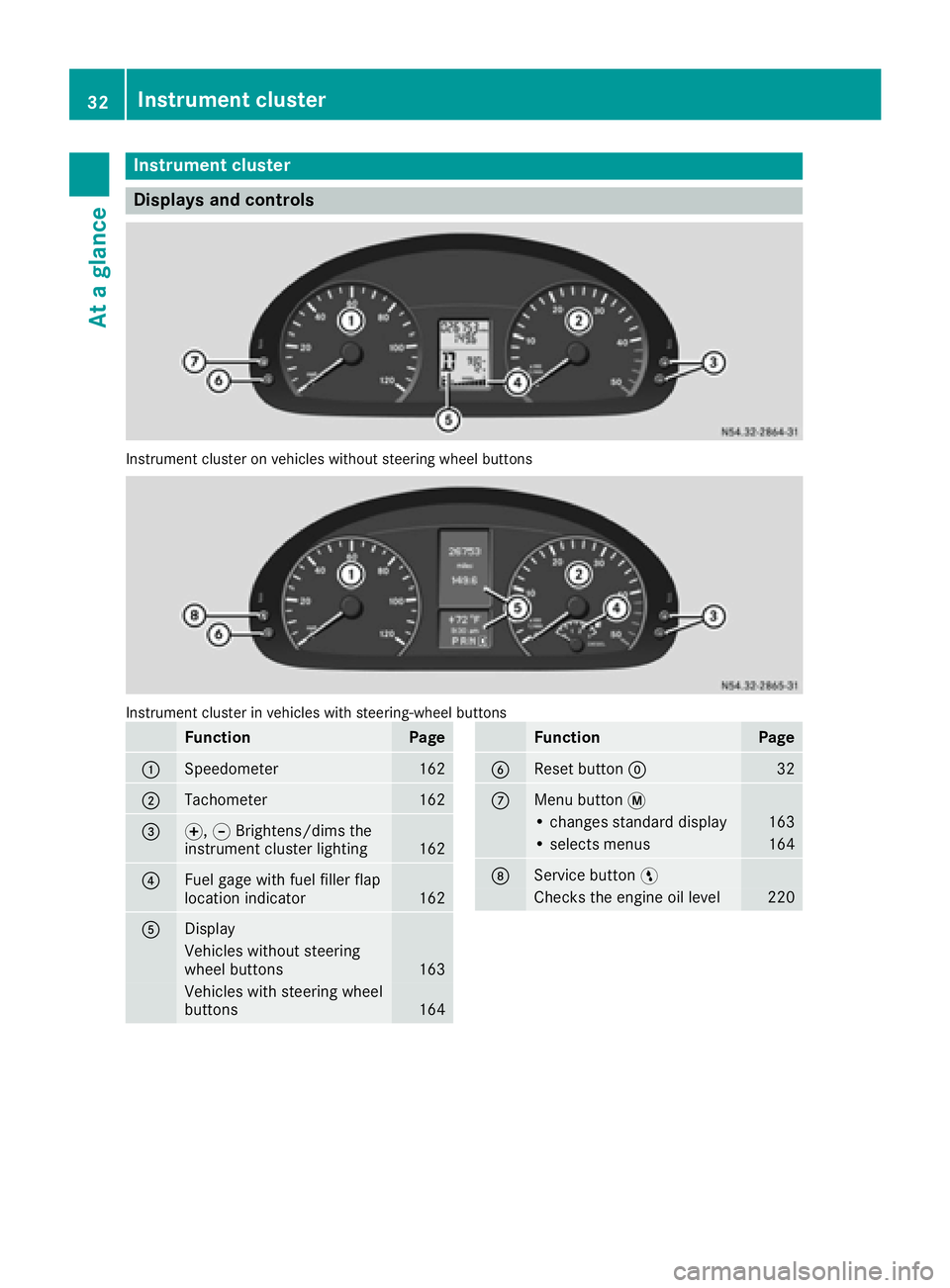
Displays and controls
Instrumentcluste ron vehicles without steering whee lbuttons
Instrumen tcluste rin vehicles wit hsteering-wheel buttons
FunctionPag e
:Speedometer162
;Tachometer162
=f, gBrightens/dims th e
instrumen tcluste rlighting16 2
?Fue lgage wit hfuel filler flap
location indicator16 2
ADisplay
Vehicles without steering
whee lbuttons16 3
Vehicles wit hsteering whee l
buttons16 4
FunctionPag e
BReset butto n932
CMen ubutto n4
• changes standard display16 3
•select smenus16 4
DService butto nË
Checks th eengin eoil level22 0
32Instrument cluster
At a glance
Page 131 of 290
Problems with the fuel and fuel tank
If your vehicle is losing fuel, the fuel lines or thefuel tank are defective.
XTurn the key immediately to position 0in the
ignition lock and remove it.
XDo not restart the engine under any circum-
stances.
XConsult a qualified specialist workshop.
If the fuel tank has been run dry, after refueling
carry out the following steps:
XBefore starting the engine: switch on the igni-
tion three or four times.
XTurn the key to position 2in the ignition lock
(Ypage 119).
The % preglow indicator lamp in the instru-
ment cluster lights up briefly.
XOnce the %preglow indicator lamp goes
out, turn the key to position 3in the ignition
lock and release it as soon as the engine is
running.
You can start the diesel engine without preglow
when the engine is warm.
Diesel Exhaust Fluid (DEF)
Important safety notes
!Only use DEF in accordance with
ISO 22241. Never mix DEF with additives or
thin it with tap water. The exhaust gas after-
treatment may otherwise be damaged.
Observe the MB Specifications for Service
Products, Sheet 352.0.
Damage that results from the use of additives
or tap water leads to the loss of the New
Vehicle Limited Warranty.
!If DEF comes into contact with a painted or
aluminum surface, wash the surface off
immediately with plenty of water.
!DEF is not a diesel additive and must not be
mixed with fuel in the tank. Even small
amounts of DEF can cause engine damage.
Damage that results from the blending of DEF
will not be covered by the New Vehicle Limi-
ted Warranty.
iIf the outside temperature is below 12 ‡
( Ò 11 †) it may be difficult to top up. If the DEF
is frozen and there is an active warning indi- cator, topping up may not be possible. Park
the vehicle in a warm place, e.g. in a garage,
until the DEF has become liquid again. Top-
ping up is then possible again. Alternatively,
have the DEF tank refilled at a qualified spe-
cialist workshop.
iIf you add DEF at temperatures below 12 ‡
( Ò 11 †) it is possible that the level is not
shown correctly due to the frozen DEF.
Drive for at least 20 minute s(heating phase in
the tank activated) and then st
op the vehicle
for at least 30 seconds. The level is then
shown correctly.
You will find further information on DEF in the
"Service products" section (
Ypage 277).
Refueling procedure
DEF filler neck
Non-lockable DEF filler cap
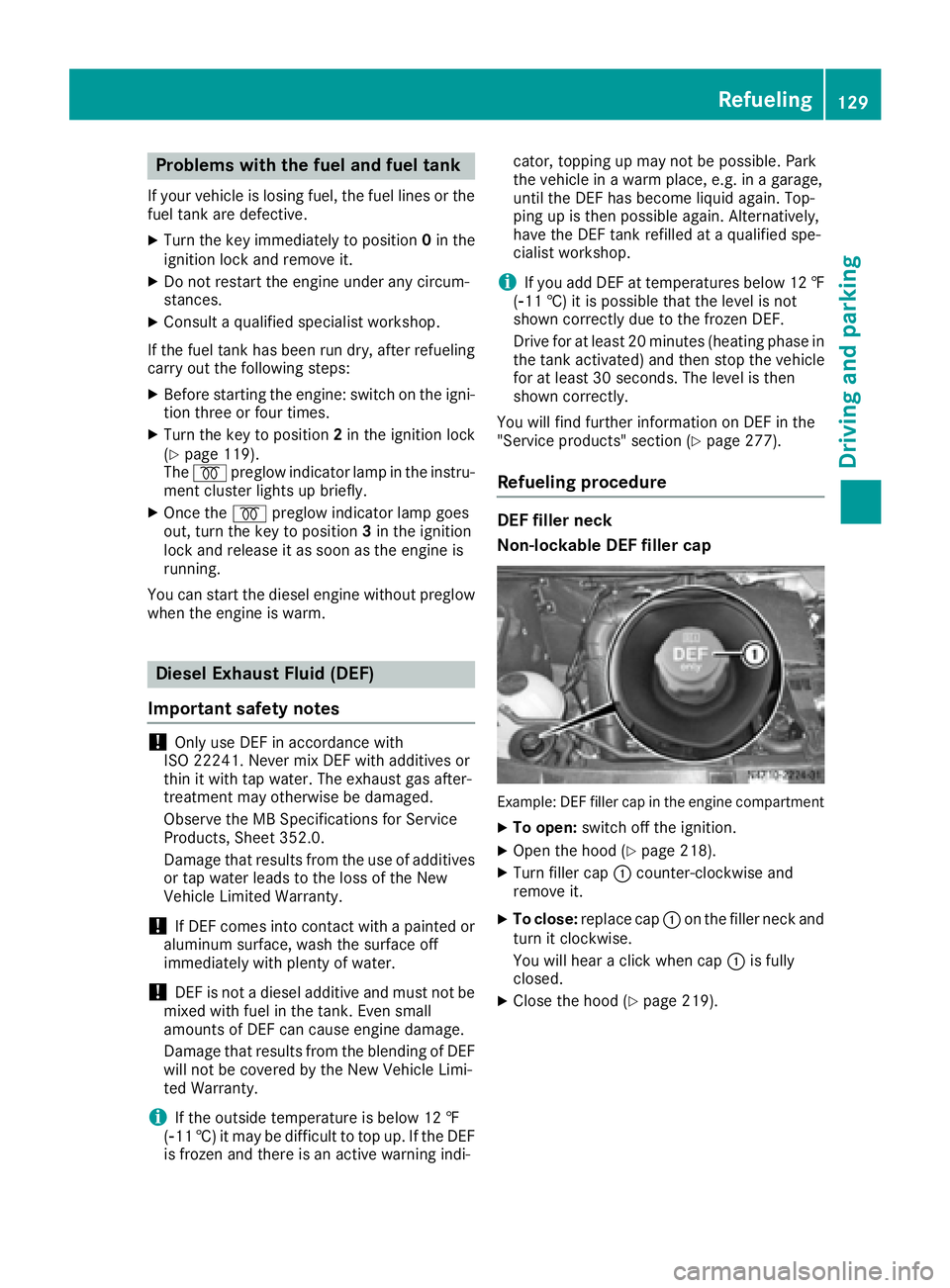
Example: DEF filler cap in the engine compartment
XTo open: switch off the ignition.
XOpen the hood (Ypage 218).
XTurn filler cap :counter-clockwise and
remove it.
XTo close: replace cap :on the filler neck and
turn it clockwise.
You will hear a click when cap :is fully
closed.
XClose the hood (Ypage 219).
Refueling129
Driving and parking
Z
Page 133 of 290
Always park your vehicle safely and according to
legal requirements and secure it against rolling
away.
To ensure that the vehicle is properly secured
against rolling away unintentionally:
Rthe parking brake must be firmly applied
Rthe selector lever must be in positionPand
the key must be removed from the ignition
lock
Ron steep uphill or downhill gradients, the front
wheels must be turned towards the curb
Rthe rear axle must be secured, e.g. with a
wheel chock, on steep uphill or downhill gra-
dients
Use the wheel chock (
Ypage 132) to do so.
If you leave the vehicle parked for more than
three weeks:
Rconnect the batteries to a trickle charger or
Rdisconnect the vehicle's starter battery or
Rswitch off the electrical system using the bat-
tery main switch (Ypage 118) and
Rdisconnect the vehicle's auxiliary battery
Otherwise, you need to check the battery's con-
dition of charge every three weeks, since
standby power consumption can drain the bat-
tery. If the battery voltage is lower than 12.2 V,
the battery must be charged. Otherwise, the
battery may be damaged by exhaustive dis-
charging.
Be sure to observe the notes on disconnecting
and chargi ng th
e batteries under "Bat-
tery“ (Ypage 227). You can obtain information
about trickle chargers from a qualified specialist
workshop.
Parking brake
GWARNING
If you leave children unsupervised in the vehi-
cle, they could set it in motion by, for example:
Rrelease the parking brake.
Rshift the automatic transmission out of the
parking position P.
Rstart the engine.
In addition, they may operate vehicle equip-
ment and become trapped. There is a risk of
an accident and injury.
When leaving the vehicle, always take the
SmartKey with you and lock the vehicle. Never
leave children unsupervised in the vehicle.
GWARNING
If you must brake the vehicle with the parking brake, the braking distance is considerably
longer and the wheels could lock. There is an
increased danger of skidding and accidents.
Only use the parking brake to brake the vehi-
cle when the service brake is faulty. Do not
apply the parking brake too firmly. If the
wheels lock, release the parking brake until
the wheels begin turning again.
The brake lamps are not illuminated when you
brake the vehicle using the parking brake.
As a rule, you may only apply the parking brake
when the vehicle is stationary.
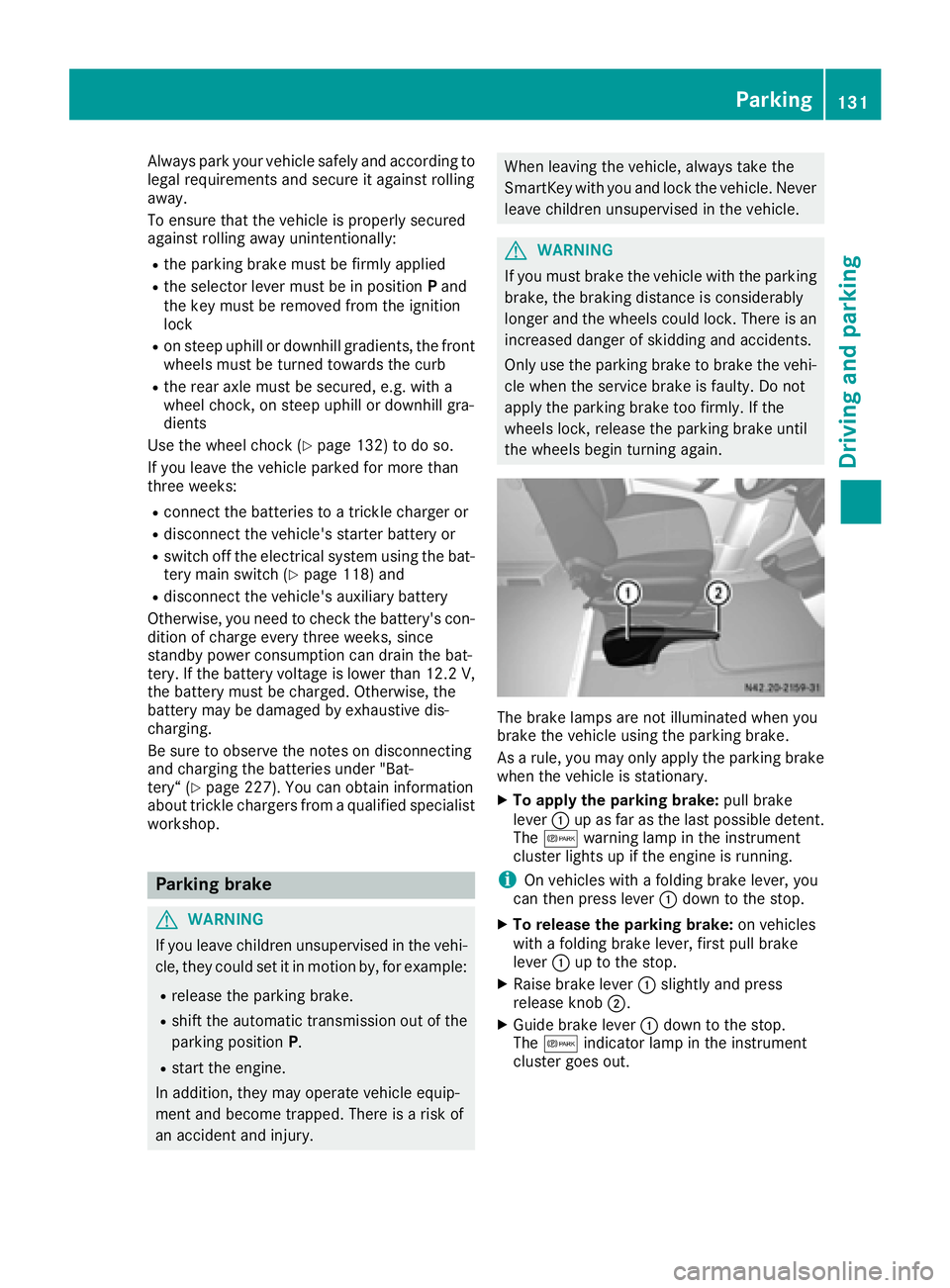
XTo apply the parking brake: pull brake
lever :up as far as the last possible detent.
The c warning lamp in the instrument
cluster lights up if the engine is running.
iOn vehicles with a folding brake lever, you
can then press lever :down to the stop.
XTo release the parking brake: on vehicles
with a folding brake lever, first pull brake
lever :up to the stop.
XRaise brake lever :slightly and press
release knob ;.
XGuide brake lever :down to the stop.
The c indicator lamp in the instrument
cluster goes out.
Parking131
Driving an d parking
Z
Page 166 of 290
Using thef,g,4or9 adjustment buttons,
you can select the following functions:
RCalling up the service due date
(Ypage 226)
RChecking the oil level (Ypage 220)
RChecking the DEF supply (Ypage 162)
RPreselecting/setting the auxiliary heating
switch-on time (Ypage 108)
RTire pressure monitor (Ypage 253)
RSetting the time (Ypage 164)
RActivating/deactivating Highbeam Assist
(Ypage 171)
RSetting the daytime running lamps
(Ypage 79)
Setting the time
XTurn the key to position 2in the ignition lock.
XPress the 4menu button repeatedly until the
hours figure flashes.
XPress the forg button to set the hour.
XPress the 9reset button.
The minute display flashes.
XPress the forg button to set the minute.
iIf you keep the forg button pressed, the
value will change continuously.
Activating/deactivating Highbeam
Assist
XTurn the key to position 2in the ignition lock.
XPress the 4menu button repeatedly until the
_ indicator lamp flashes and the onorOFFmessage appears in the display.
XUse the forg button to switch Highbeam
Assist on/off.
Switching the daytime running lamps
on/off
If you switch the daytime running lamps on, the
daytime running lamps will automatically light
up when the engine is running.
For safety reasons, it is only possible to change
this setting when the vehicle is stationary. The
factory setting is on
in countries in which day-
time running lamp mode or daytime running
lamps are mandatory.
XTurn the key to position 2in the ignition lock.
XPress the 4menu button repeatedly until the
L indicator lamp flashes and the onorOFFmessage appears in the display.
XPress the forg button to activate or deac-
tivate the daytime running lamps.
iUSA only:
If you turn the light switch to TorL,
the corresponding light switches on. If you
turn the light switch to Ã, the daytime
running lamps remain switched on.
Canada only:
If you turn the light switch to L, the low-
beam headlamps switch on. If you turn the
light switch to TorÃ, the daytime run-
ning lamps remain switched on.
On-board computer (vehicles with
steering wheel buttons)
Operating the on-board computer
Overview
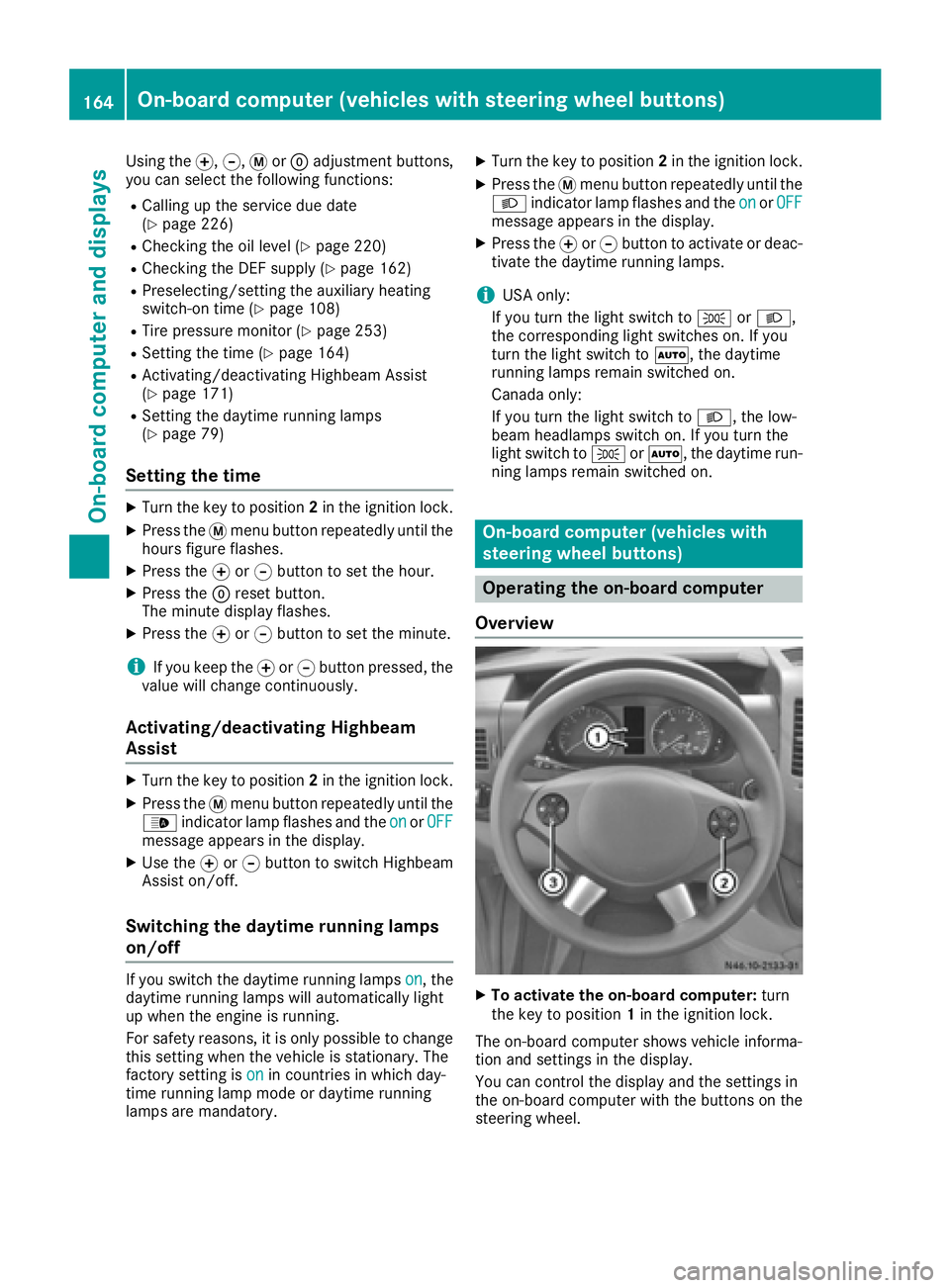
XTo activate the on-board computer: turn
the key to position 1in the ignition lock.
The on-board computer shows vehicle informa-
tion and settings in the display.
You can control the display and the settings in
the on-board computer with the buttons on the
steering wheel.
164On-board computer (vehicles with steering wheel buttons)
On-board computer and displays
Page 178 of 290
Redialing
The on-board computer saves the last names or
numbers dialed in the redial memory.
Using the steering wheel buttons
XUse theVorU button to select the TELmenu.
The display shows the mobile phone opera-
tional readiness symbol.
XPress the6button.
The display shows the most recently dialed
numbers or names in the redial memory.
XPress the 9or: button to select the
desired name or number.
XTo start dialing: press the6button.
The on-board computer dials the correspond-
ing phone number.
When a connection is established, the name
of the other person and/or the call duration
appear in the display.
or
XTo exit the redial memory: press the~
button.
Display messages
Notes on display messages
Important safety notes
GWARNING
No information will be displayed if either the
instrument cluster or the display is inopera-
tive.
As a result, you will not be able to see warning
and indicator lamps or information about the
driving conditions, such as speed or outside
temperature. Driving characteristics may be
impaired. Adjust your driving style and vehicle
speed accordingly.
Contact a qualified specialist workshop
immediately.
GWARNING
If service work is not carried out correctly, the operating safety of your vehicle may be affec-
ted. This could cause you to lose control of
your vehicle and cause an accident. More-
over, the safety systems may no longer be
able to protect you or others as they are
designed to do.
Always have service work carried out at a
qualified specialist workshop.
iIf you turn the key to position 2in the igni-
tion, a display check is performed. All warning
and indicator lamps (except the turn signal
indicator lamps) and the display are activa-
ted. Before starting the journey, check that
the warning and indicator lamps are operating
correctly.
Vehicles without steering wheel but-
tons
Warnings, malfunctions or additional informa-
tion may also be shown in the display. The fol-
lowing tables show all the display messages. A
warning tone sounds with certain display mes-
sages.
Vehicles with steering wheel buttons
The on-board computer shows warnings, mal-
functions or additional information in the dis-
play. A warning tone sounds with certain display
messages. Display messages of a high priority
are shown in red.
Please respond in accordance with the display
messages and follow the additional notes in this Operator's Manual.
You can hide low-priority display messages by
pressing the V,U,9or: button
on the steering wheel or the 9reset button.
You cannot hide display messages of the highest
priority. These messages will continue to be
shown in the display until their cause has been
eliminated.
The on-board computer stores certain display
messages in the message memory
(
Ypage 176).
Message memory
The on-board computer only records and shows
malfunctions and warnings from certain sys-
tems. Therefore, make sure that your vehicle is
safe to use. You could otherwise cause an acci-
dent by driving an unsafe vehicle.
176Display messages
On-board computer and displays
Page 203 of 290
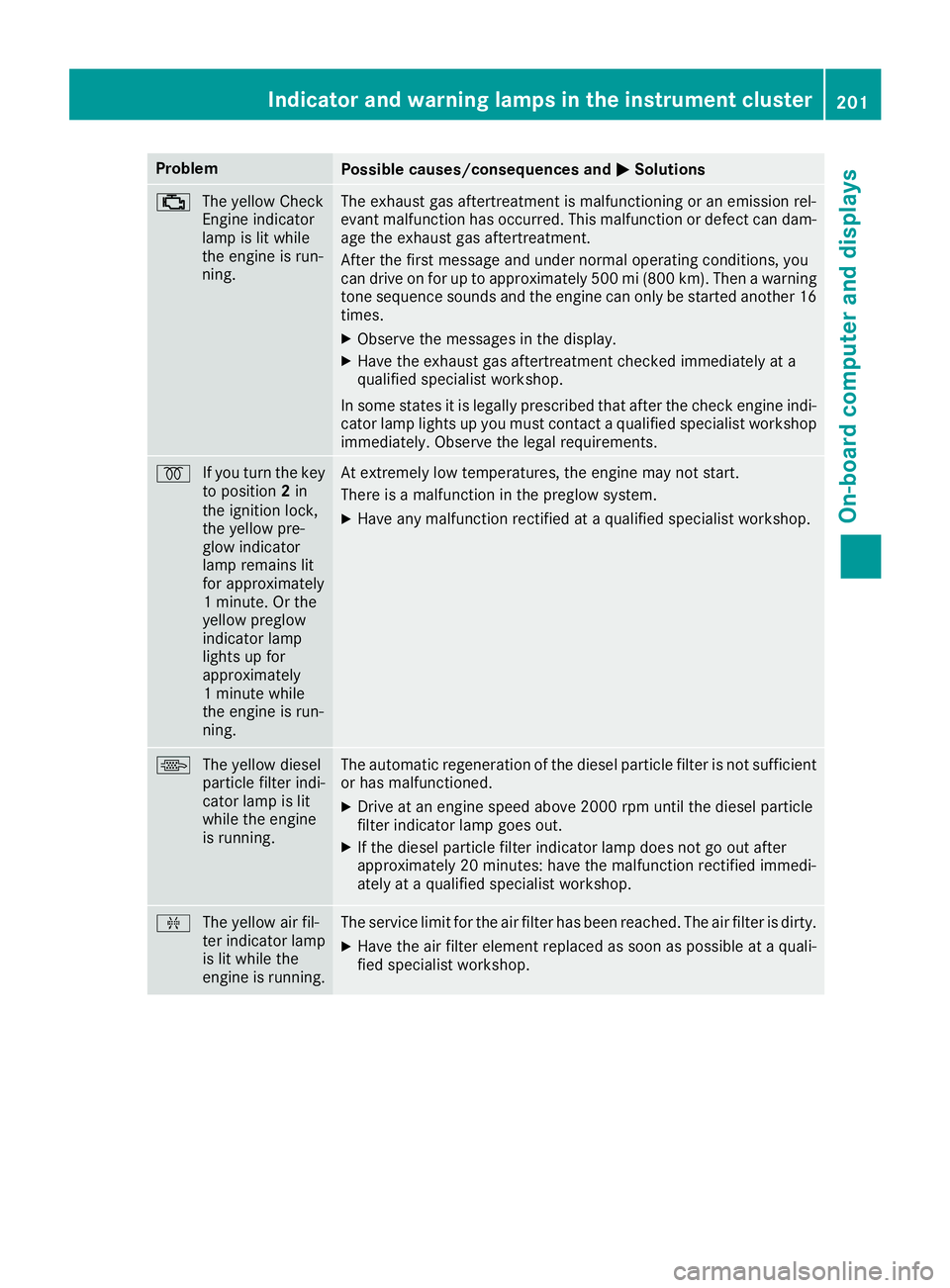
ProblemPossible causes/consequences andMSolutions
;
The yellow Check
Engine indicator
lamp is lit while
the engine is run-
ning.The exhaust gas aftertreatment is malfunctioning or an emission rel-
evant malfunction has occurred. This malfunction or defect can dam-
age the exhaust gas aftertreatment.
After the first message and under normal operating conditions, you
can drive on for up to approximately 500 mi (800 km). Then a warning
tone sequence sounds and the engine can only be started another 16
times.
XObserve the messages in the display.
XHave the exhaust gas aftertreatment checked immediately at a
qualified specialist workshop.
In some states it is legally prescribed that after the check engine indi- cator lamp lights up you must contact a qualified specialist workshop
immediately. Observe the legal requirements.
% If you turn the key
to position 2in
the ignition lock,
the yellow pre-
glow indicator
lamp remains lit
for approximately
1 minute. Or the
yellow preglow
indicator lamp
lights up for
approximately
1 minute while
the engine is run-
ning.At extremely low temperatures, the engine may not start.
There is a malfunction in the preglow system.
XHave any malfunction rectified at a qualified specialist workshop.
\ The yellow diesel
particle filter indi-
cator lamp is lit
while the engine
is running.The automatic regeneration of the diesel particle filter is not sufficient
or has malfunctioned.
XDrive at an engine speed above 2000 rpm until the diesel particle
filter indicator lamp goes out.
XIf the diesel particle filter indicator lamp does not go out after
approximately 20 minutes: have the malfunction rectified immedi-
ately at a qualified specialist workshop.
ÈThe yellow air fil-
ter indicator lamp
is lit while the
engine is running.The service limit for the air filter has been reached. The air filter is dirty.
XHave the air filter element replaced as soon as possible at a quali-
fied specialist workshop.
Indicator and warning lamps in the instrument cluster201
On-board computer and displays
Z
Page 227 of 290
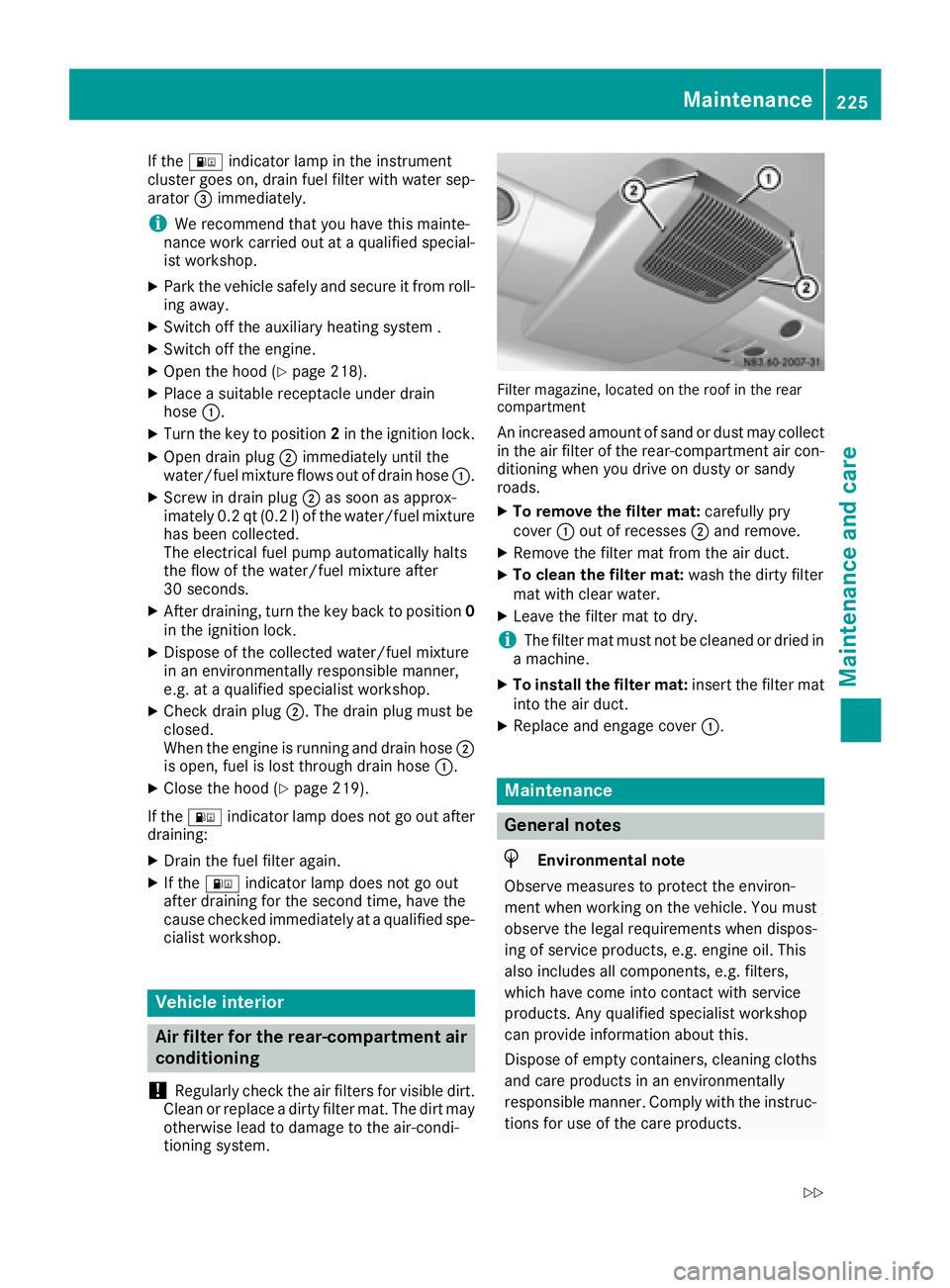
If the: indicator lamp in the instrument
cluster goes on, drain fuel filter with water sep-
arator =immediately.
iWe recommend that you have this mainte-
nance work carried out at a qualified special- ist workshop.
XPark the vehicle safely and secure it from roll-
ing away.
XSwitch off the auxiliary heating system .
XSwitch off the engine.
XOpen the hood (Ypage 218).
XPlace a suitable receptacle under drain
hose :.
XTurn the key to position 2in the ignition lock.
XOpen drain plug ;immediately until the
water/fuel mixture flows out of drain hose :.
XScrew in drain plug;as soon as approx-
imately 0.2 qt (0.2 l)of the water/fuel mixture
has been collected.
The electrical fuel pump automatically halts
the flow of the water/fuel mixture after
30 seconds.
XAfter draining, turn the key back to position 0
in the ignition lock.
XDispose of the collected water/fuel mixture
in an environmentally responsible manner,
e.g. at a qualified specialist workshop.
XCheck drain plug ;. The drain plug must be
closed.
When the engine is running and drain hose ;
is open, fuel is lost through drain hose :.
XClose the hood (Ypage 219).
If the : indicator lamp does not go out after
draining:
XDrain the fuel filter again.
XIf the : indicator lamp does not go out
after draining for the second time, have the
cause checked immediately at a qualified spe-
cialist workshop.
Vehicle interior
Air filter for the rear-compartment air
conditioning
!
Regularly check the air filters for visible dirt.
Clean or replace a dirty filter mat. The dirt may
otherwise lead to damage to the air-condi-
tioning system.
Filter magazine, located on the roof in the rear
compartment
An increased amount of sand or dust may collect in the air filter of the rear-compartment air con-
ditioning when you drive on dusty or sandy
roads.
XTo remove the filter mat: carefully pry
cover :out of recesses ;and remove.
XRemove the filter mat from the air duct.
XTo clean the filter mat: wash the dirty filter
mat with clear water.
XLeave the filter mat to dry.
iThe filter mat must not be cleaned or dried in
a machine.
XTo install the filter mat: insert the filter mat
into the air duct.
XReplace and engage cover :.
Maintenance
General notes
HEnvironmental note
Observe measures to protect the environ-
ment when working on the vehicle. You must
observe the legal requirements when dispos-
ing of service products, e.g. engine oil. This
also includes all components, e.g. filters,
which have come into contact with service
products. Any qualified specialist workshop
can provide information about this.
Dispose of empty containers, cleaning cloths
and care products in an environmentally
responsible manner. Comply with the instruc-
tions for use of the care products.
Maintenance225
Maintenance and care
Z