air condition MERCEDES-BENZ SPRINTER 2017 MY17 Operator’s Manual
[x] Cancel search | Manufacturer: MERCEDES-BENZ, Model Year: 2017, Model line: SPRINTER, Model: MERCEDES-BENZ SPRINTER 2017Pages: 286, PDF Size: 4.36 MB
Page 33 of 286
tion with other information (if necessary, after
consultation with an authorized expert), could
be traced to a person.
Examples include:
Raccident reports
Rdamage to the vehicle
Rwitness statements
Further additional functions that have been con-
tractually agreed upon with the customer allow
certain vehicle data to be conveyed by the vehi-
cle as well. The additional functions include, for
example, vehicle location in case of an emer-
gency.
COMAND/mbrace (Canada: TELEAID)
If the vehicle is equipped with COMAND or
mbrace, additional data about the vehicle’s
operation, the use of the vehicle in certain sit-
uations, and the location of the vehicle may be
compiled through COMAND or the mbrace sys-
tem.
For additional information please refer to the
COMAND User Manual and/or the mbrace
Terms and Conditions.
Event Data Recorders
This vehicle is equipped with an event data
recorder (EDR). The main purpose of an EDR is
to record, in certain crash or near crash-like sit-
uations, such as an air bag deployment or hitting a road obstacle, data that will assist in under-
standing how a vehicle’s systems performed.
The EDR is designed to record data related to
vehicle dynamics and safety systems for a short
period of time, typically 30 seconds or less.
The EDR in this vehicle is designed to record
such data as:
RHow various systems in your vehicle were
operating;
RWhether or not the driver and passenger
safety belts were buckled/fastened;
RHow far (if at all) the driver was depressing the
accelerator and/or brake pedal; and,
RHow fast the vehicle was traveling.
These data can help provide a better under-
standing of the circumstances in which crashes and injuries occur. NOTE: EDR data are recorded
by your vehicle only if a non-trivial crash situa- tion occurs; no data are recorded by the EDR
under normal driving conditions and no personal
data (e.g., name, gender, age, and crash loca-
tion) are recorded. However, other parties, such
as l
aw enforcement could combine the EDR data
with the type of personally identifying data rou-
tinely acquired during a crash investigation.
Access to the vehicle and/or the EDR is needed
to read data that is recorded by an EDR, and
special equipment is required. In addition to the
vehicle manufacturer, other parties that have
the special equipment, such as law enforce-
ment, can read the information by accessing the
vehicle or the EDR.
EDR data may be used in civil and criminal mat-
ters as a tool in accident reconstruction, acci-
dent claims, and vehicle safety. Since the Crash
Data Retrieval CDR tool that is used to extract
data from the EDR is commercially available,
Mercedes-Benz USA, LLC ("MBUSA") expressly
disclaims any and all liability arising from the
extraction of this information by unauthorized
Mercedes-Benz personnel.
MBUSA will not share EDR data with others
without the consent of the vehicle owners or, if
the vehicle is leased, without the consent of the
lessee. Exceptions to this representation
include responses to subpoenas by law enforce- ment; by federal, state or local government; in
connection with or arising out of litigation invol v-
i
ng MBUSA or its subsidiaries and affiliates; or,
as required by law.
Warning: The EDR is a component of the
Restraint System Module. Tampering with, alter-
ing, modifying or removing the EDR component
may result in a malfunction of the Restraint Sys-
tem Module and other systems.
State laws or regulations regarding EDRs that
conflict with federal regulation are pre-empted.
This means that in the event of such conflict, the
federal regulation governs. As of February 2013, 13 states have enacted laws relating to EDRs.
Introduction31
Z
Page 38 of 286
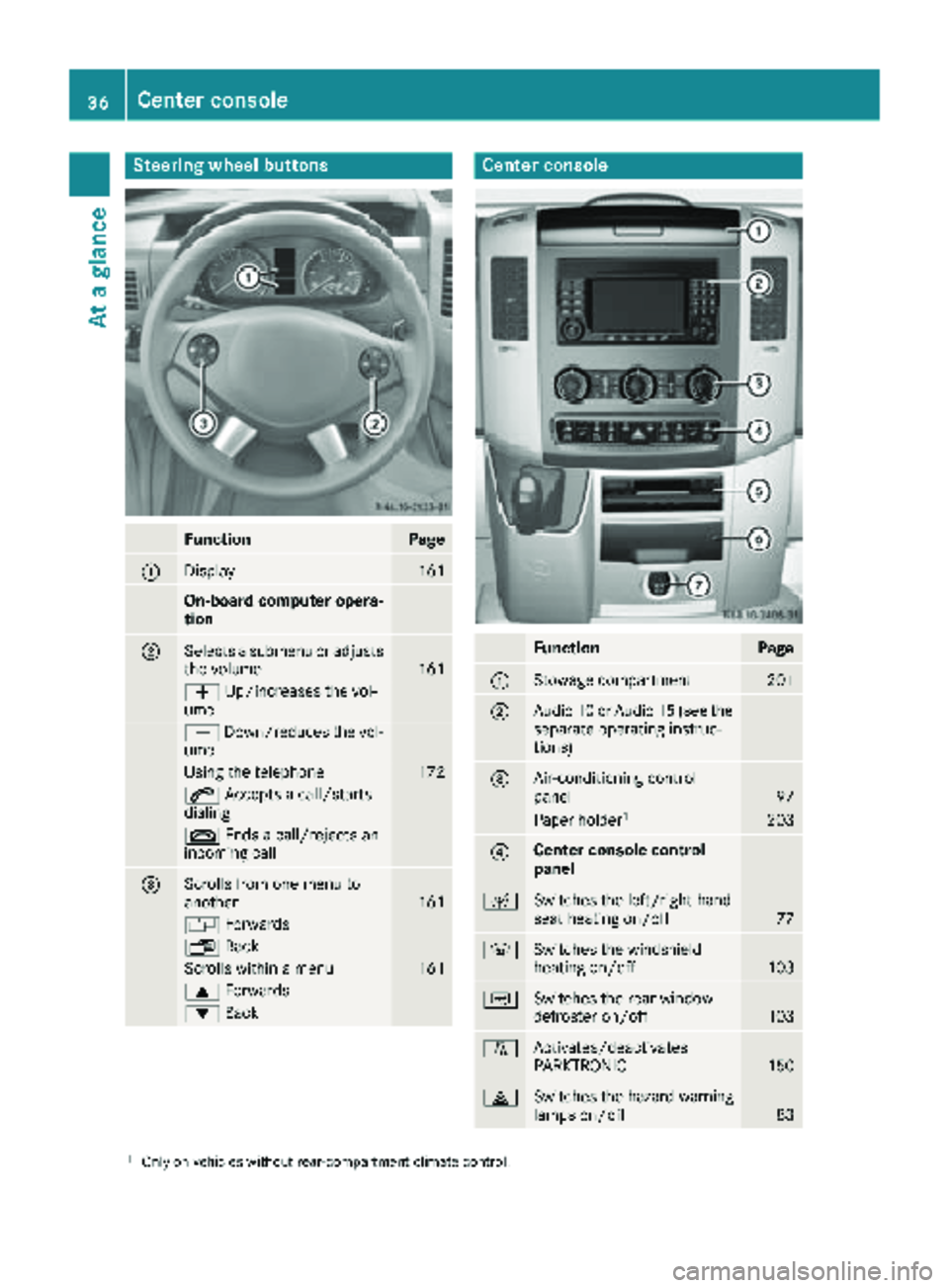
Steering wheel buttons
FunctionPage
:Display161
On-board computer opera-
tion
;Selects a submenu or adjusts
the volume161
WUp/increases the vol-
ume
X Down/reduces the vol-
ume
Using the telephone172
6 Accepts a call/starts
dialing
~ Ends a call/rejects an
incoming call
=Scrolls from one menu to
another161
V Forwards
UBack
Scrolls within a menu161
9Forwards
:Back
Center console
FunctionPage
:Stowage compartment201
;Audio 10 or Audio 15 (see the
separate operating instruc-
tions)
=Air-conditioning control
panel97
Paper holder1203
?Center console control
panel
cSwitches the left/right-hand
seat heating on/off77
zSwitches the windshield
heating on/off103
|Switches the rear window
defroster on/off103
fActivates/deactivates
PARKTRONIC150
£Switches the hazard warning
lamps on/off83
1Only on vehicles without rear-compartment climate control.
36Center console
At a glance
Page 55 of 286
As a result, they could:
Ractivate vehicle equipment and become
trapped, for example
Ractivate or deactivate systems, thereby
endangering other road users
Unsecured animals could also be flung around
the vehicle in the event of an accident or sud-
den steering or braking, thereby injuring vehi- cle occupants. There is a risk of an accident
and injury.
Never leave animals unattended in the vehi-
cle. Always secure animals properly during
the journey, e.g. use a suitable animal trans-
port box.
Driving safety systems
Overview
In this section, you will find information about
the following driving safety systems:
RABS ( Anti-lock Braking System)
RASR (Acceleration SkidControl)
RBAS ( Brake Assist System)
REBD ( Electronic Brake Force Distribution)
RESP®(E lectronic StabilityProgram)
Important safety notes
If you fail to adapt your driving style or if you are
inattentive, the driving safety systems can nei-
ther reduce the risk of accident nor override the
laws of physics. Driving safety systems are
merely aids designed to assist driving. You are
responsible for the distance to the vehicle in
front, for vehicle speed, braking in good time
and for staying in your lane. Always adapt your
driving style to the prevailing road and weather
conditions and maintain a sufficient, safe dis-
tance from other road users. Drive carefully.
Please note that the driving safety systems
described only work optimally when:
Rthere is adequate contact between the tires
and the road surface
Ryou use winter tires (M+S tires), with snow
chains if necessary, when the road conditions
are wintry Pay particular attention to the information
regarding tires, tire tread and winter operation
under "Wheels and tires" (
Ypage 243).
ABS (Anti-lock Braking System)
Important safety notes
Observe the important safety guidelines for the
driving safety system (Ypage 53).
GWARNING
If ABS is faulty, the wheels could lock when
braking. The steerability and braking charac-
teristics may be severely impaired. Addition-
ally, further driving safety systems are deac-
tivated. There is an increased danger of skid-
ding and accidents.
Drive on carefully. Have ABS checked imme-
diately at a qualified specialist workshop.
If ABS is malfunctioning, other systems will also
fail, including driving safety systems. Observe
the information relating to the !warning
lamp (
Ypage 191).
ABS regulates brake pressure in such a way that
the wheels do not lock when you brake. This
allows you to continue steering the vehicle when
braking.
ABS works from a speed of about 5 mph
(8 km/h), regardless of road-surface conditions. ABS works on slippery surfaces, even when you
only brake gently.
The yellow !warning lamp in the instrument
cluster lights up when the ignition is switched
on. The lamp goes out when the engine starts
running.
Braking
If ABS intervenes when braking, you will feel a
pulsating in the brake pedal.
The pulsating brake pedal can be an indication
of hazardous road conditions and functions as a
reminder to take extra care while driving.
XIf ABS intervenes: continue to depress the
brake pedal with force until the braking sit-
uation is over.
XTo make a full brake application: depress
the brake pedal with full force.
Driving safety systems53
Safety
Z
Page 58 of 286
Crosswind Assist is operational again as soon as
the driving conditions return to normal.
Cros swind Assist detects strong crosswind
gusts that can impair the road holding of your
veh icle when driving straight ahead. Cros swind
Assist intervenes dependin g on thedirection
and strength of the crosswind .
A stabiliz ing brake application helps you to keep
the veh icleon track.
In formation appears inthe instrument cluster In
the event that Cros swind Assist intervenes
noticeably.
On vehicles without steering wheel buttons:
the d indicator lamp inthe instrument clus-
ter flashes.
On vehicles with steering wheel buttons: the
d indicator lamp inthe instrument cluster
flashes and the message Crosswind Assist
Activeappearsinthe multifunction display.
Cros swind Assist isactive above a veh iclespeed
of 50 mph (80 km/h) when the veh icle is driving
straight ahead or cornering gently.
Emergency exit
Emergency exit window
GWAR NING
The emergency exit wind ow cannotbelocked
in plac e. You risk injury ifyou exit the vehicle
through the emergency exit wind ow.
RMake sure that nobodybecomes tr apped,
both when closing and when opening the
emergency exit wind ow.
RThe opened emergency exit wind ow must
be held in plac eby another person.
Pay attention to traff icconditions.
GWAR NING
If the emergency exit wind owisunlocked
while driv ing,itcould open and slam shut and
consequently fall down. There isa risk of an
acc iden t and injury.
Before starting off, make sure that the emer-
gency exit wind owislocked and the locking
pin s are undamage d.
!Make sure there issuff icient clearance
when opening the emergency exit wind ow.Hold the open window in position. You could
otherwise damage the emergency exit win-
dow.
The emergency exit wind
owisintended for use
in an emergency only and must not be opened
unless the vehicle isstationary. The emergency
exit window isthe first window behind the driv-
er's seat on the driver's side. It is marked by the
"Emergency Exit" label.
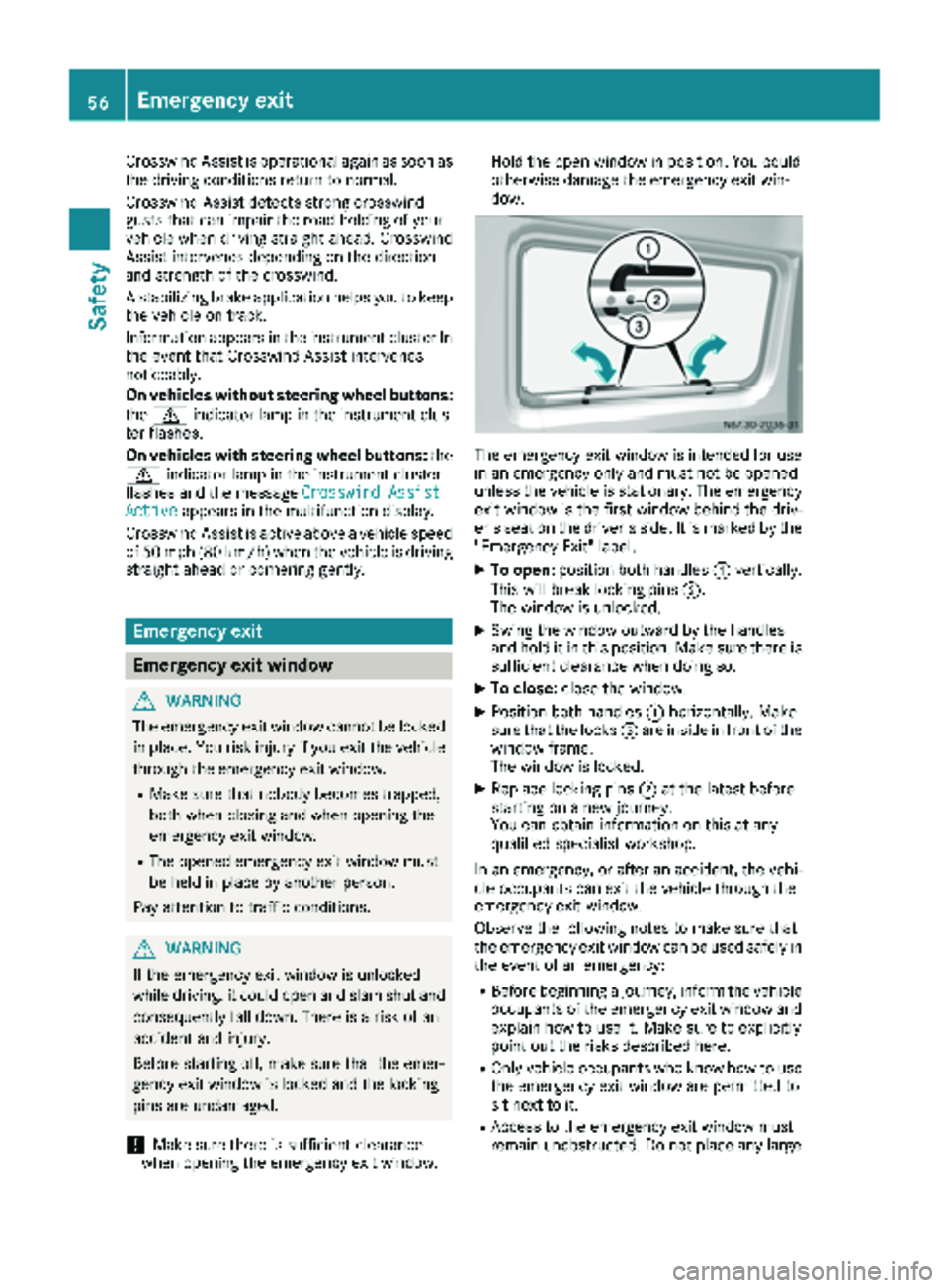
XTo open: position both handles :vertically.
This willbreak locking pins ;.
The wind ow is unlocked.
XSwin g the window outward by the handles
and hold it in this position. Make sure there is
sufficient clearance when doing so.
XTo close: close the window.
XPosition both handles :horizontally. Make
sure that the locks =are inside infront of the
window frame.
The wind ow is locked.
XReplace locking pins ;at the latest before
starting on a new journey.
You can obtain information on this at any
qualif ied specialist workshop.
In an emergency, or after an accident, the vehi-
cle occupants can exit the vehicle through the
emergency exit wind ow.
Observe the foll owing notes to make sure that
the emergency exit window can be used safely in
the event of an emergency:
RBefore beginning a journey, inform the vehicle
occupants of the emergency exit wind ow and
explain how to use it. Make sure to explicitly
poin t out the risks describe d here.
ROnlyvehicle occupants who know how to use
the emergency exit wind ow are permitted to
sit next to it.
RAccess to the emergency exit wind ow must
remain unobstructed. Do not place any large
56Emergency exit
Safety
Page 83 of 286
The daytime running lamps function must be
activated using the on-board computer:
Rvehicles with steering wheel buttons
(Ypage 168)
Rvehicles without steering wheel buttons
(Ypage 161)
XTo switch on:turn the light switch to the
$ position.
The low-beam headlamps, parking lamps and
license plate lamp are switched on when the
engine is running. The Lindicator lamp in
the instrument cluster lights up.
iUSA only:
If you turn the light switch to the TorL
position, the parking lamps or low-beam
headlamps switch on. If you turn the light
switch to the Ãposition, the daytime run-
ning lamps remain switched on.
iCanada only:
If you turn the light switch to the Lposi-
tion, the low-beam headlamps are switched
on. If you turn the light switch to the Tor
à position, the daytime running lamps
remain switched on.
Automatic headlamp mode
GWARNING
When the light switch is set to Ã, the low-
beam headlamps may not be switched on
automatically if there is fog, snow or other
causes of poor visibility due to the weather
conditions such as spray. There is a risk of an
accident.
In such situations, turn the light switch to
L.
Automatic headlamp mode is only a driving aid.
You are responsible for the vehicle lighting at all
times.
Depending on ambient light, the rain and light
sensor automatically switches on the parking
lamps, low-beam headlamps and the license
plate lamp. This excludes weather-related
impairments to visibility, such as snow, fog or
spray.
If there is fog, snow or spray, turn the light
switch quickly from ÃtoL. You could
otherwise briefly interrupt operation of the
headlamps.
XTo switch on automatic headlamp mode:
turn the light switch to Ã.
Key in position 1in the ignition lock: the park-
ing lamps switch on or off automatically
depending on the ambient light.
When the engine is running: if you activate the
"daytime running lamps" function using the
on-board computer, the daytime running
lamps are switched on. The parking lamps and
low-beam headlamps also switch on or off
automatically, depending on the ambient
light.
When the low-beam headlamps are switched
on, the Lindicator lamp in the instrument
cluster lights up.
Fog lamps/rear fog lamp
GWARNING
If you suspect that driving conditions will be
foggy, turn the light switch to Lbefore you
start your journey. Your vehicle may other-
wise not be visible and you could endanger
yourself and others.
GWARNING
In low ambient lighting or foggy conditions,
only switch from position ÃtoL with
the vehicle at a standstill in a safe location.
Switching from ÃtoL will briefly
switch off the headlamps. Doing so while driv-
ing in low ambient lighting conditions may
result in an accident.
XTurn the ignition key to position 2in the igni-
tion lock or start the engine.
XTurn the light switch to LorT.
iIf your vehicle is only equipped with one rear
fog lamp, you must turn the light switch to
L.
iWhen the light switch is set to Ãyou
cannot switch on the front and rear foglamps.
XTo switch on the front fog lamps: pull the
light switch out to the first locking point.
The green Nindicator lamp on the light
switch lights up.
Exterior lighting81
Lights and windshield wipers
Z
Page 88 of 286
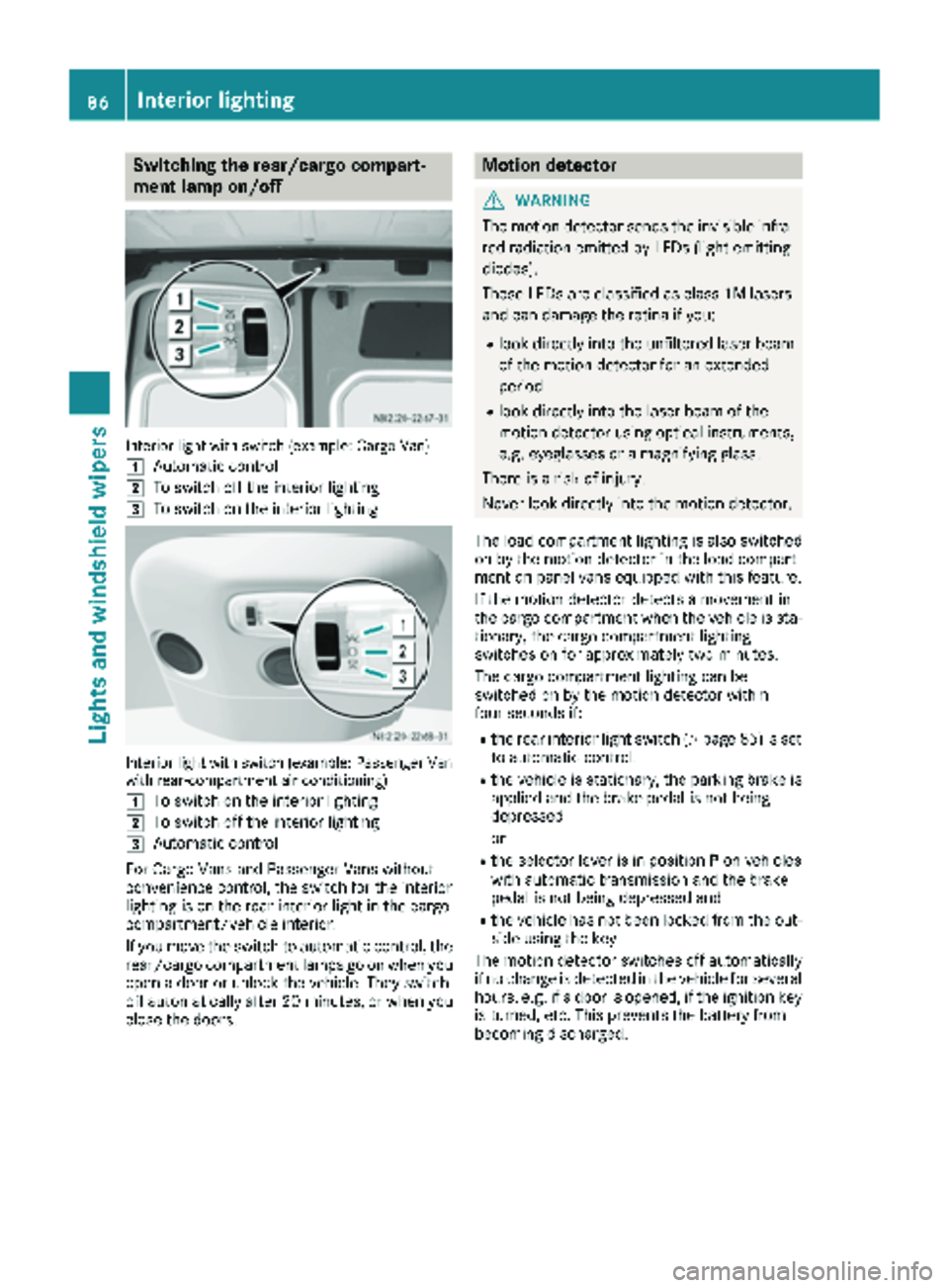
Switching the rear/cargo compart-
ment lamp on/off
Interior light with switch (example: Cargo Van)
1
Automatic control
2To switch off the interior lighting
3To switch on the interior lighting
Interior light with switch (example: Passenger Van
with rear-compartment air conditioning)
1
To switch on the interior lighting
2To switch off the interior lighting
3Automatic control
For Cargo Vans and Passenger Vans without
convenience control, the switch for the interior
lighting is on the rear interior light in the cargo
compartment/vehicle interior.
If you move the switch to automatic control, the
rear/cargo compartment lamps go on when you
open a door or unlock the vehicle. They switch
off automatically after 20 minutes, or when you
close the doors.
Motion detector
GWARNING
The motion detector sends the invisible infra- red radiation emitted by LEDs (light emitting
diodes).
These LEDs are classified as class 1M lasers
and can damage the retina if you:
Rlook directly into the unfiltered laser beam
of the motion detector for an extended
period
Rlook directly into the laser beam of the
motion detector using optical instruments,
e.g. eyeglasses or a magnifying glass.
There is a risk of injury.
Never look directly into the motion detector.
The load compartment lighting is also switched
on by the motion detector in the load compart-
ment on panel vans equipped with this feature.
If the motion detector detects a movement in
the cargo compartment when the vehicle is sta-
tionary, the cargo compartment lighting
switches on for approximately two minutes.
The cargo compartment lighting can be
switched on by the motion detector within
four seconds if:
Rthe rear interior light switch (Ypage 85) is set
to automatic control.
Rthe vehicle is stationary, the parking brake is
applied and the brake pedal is not being
depressed
or
Rthe selector lever is in position Pon vehicles
with automatic transmission and the brake
pedal is not being depressed and
Rthe vehicle has not been locked from the out-
side using the key
The motion detector switches off automatically
if no change is detected in the vehicle for several
hours, e.g. if a door is opened, if the ignition key
is turned, etc. This prevents the battery from
becoming discharged.
86Interior lighting
Lights and windshield wipers
Page 100 of 286
?Sets the air distribution (Ypage 101)
sz Defrosts the windshield (
Ypage 102)
Information on heating
Below, you can find a number of notes and rec-
ommendations to help you use the heating opti-
mally.
RSet the temperature control to the middle
level. Only change the temperature in small
increments.
If you wish to heat up the vehicle interior as
quickly as possible, set the temperature con-
trol to thezmaximum setting. When the
desired interior temperature has been reached, turn the temperature control back
down in small steps.
ROnly use the settings for defrosting the wind-
shield briefly, until the windshield is clear
again.
ROnly use air-recirculation mode briefly, e.g. if
there are unpleasant outside odors or when in
a tunnel. The windows could otherwise fog up
as no fresh air is drawn into the vehicle in air-
recirculation mode. The indicator lamp in the
h button comes on when the function is
switched on.
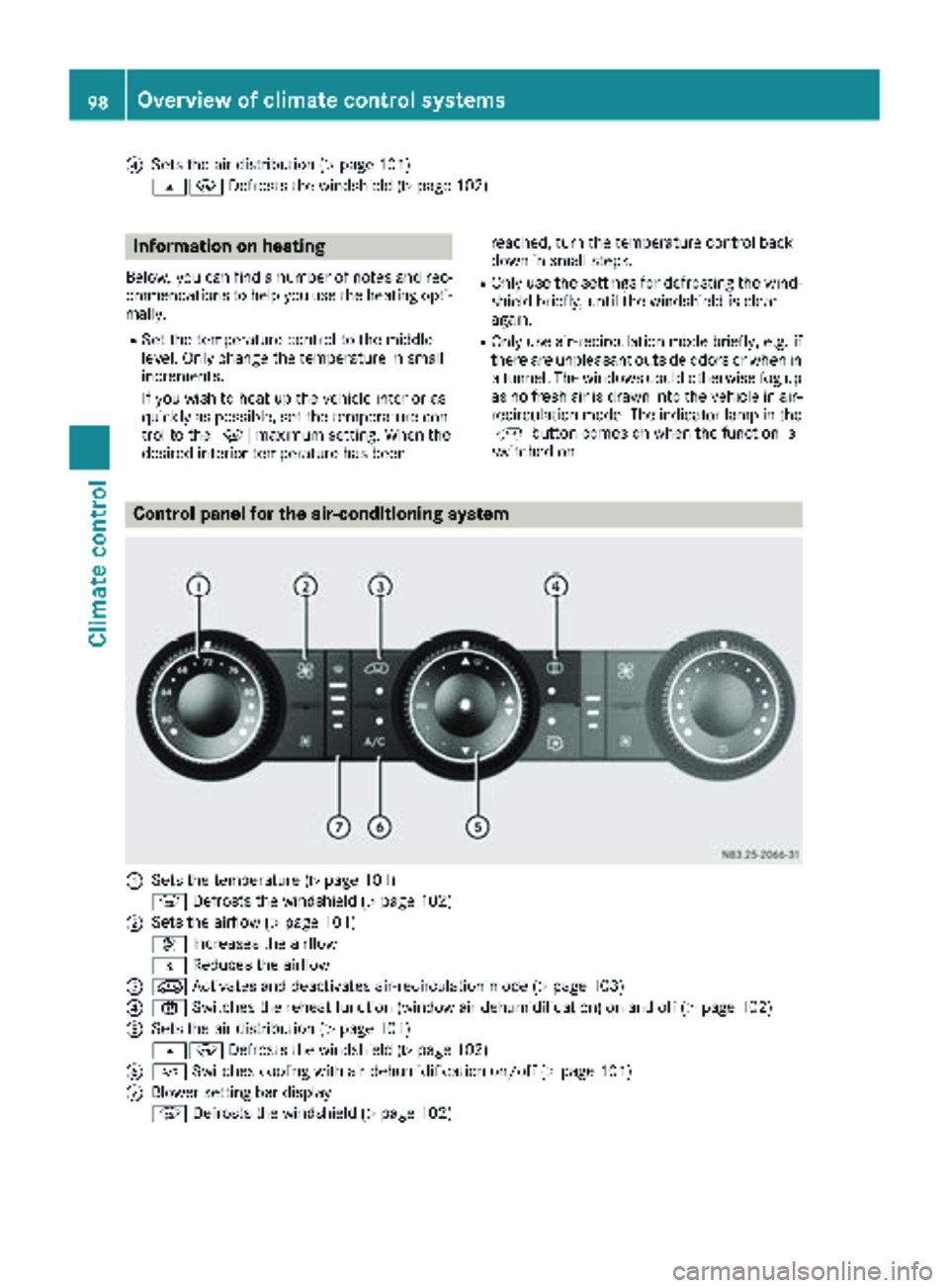
Control panel for the air-conditioning system
:Sets the temperature (Ypage 101)
z Defrosts the windshield (
Ypage 102)
;Sets the airflow (Ypage 101)
K Increases the airflow
I Reduces the airflow
=eActivates and deactivates air-recirculation mode (Ypage 103)
?xSwitches the reheat function (window air dehumidification) on and off (Ypage 102)
ASets the air distribution (Ypage 101)
sz Defrosts the windshield (
Ypage 102)
B¿Switches cooling with air dehumidification on/off (Ypage 101)
CBlower setting bar display
zDefrosts the windshield (
Ypage 102)
98Overview of climate control systems
Climate control
Page 101 of 286
Optimum use of the air-conditioning
system
Below, you can find a number of notes and rec-
ommendations to help you use the air-condi-
tioning system optimally.
RSwitch on the cooling with air dehumidifica-
tion function. The indicator lamp above the
rocker switch lights up.
RSet the temperature to 72 ‡ (22 †). Only
change the temperature in small increments.
ROnly use the "Windshield defrosting" function
briefly until the windshield is clear again.
ROnly use air-recirculation mode briefly, e.g. if
there are unpleasant outside odors or when in
a tunnel. The windows could otherwise fog up
as no fresh air is drawn into the vehicle in air-
recirculation mode.
ROnly use reheat mode until the windows are
clear again.
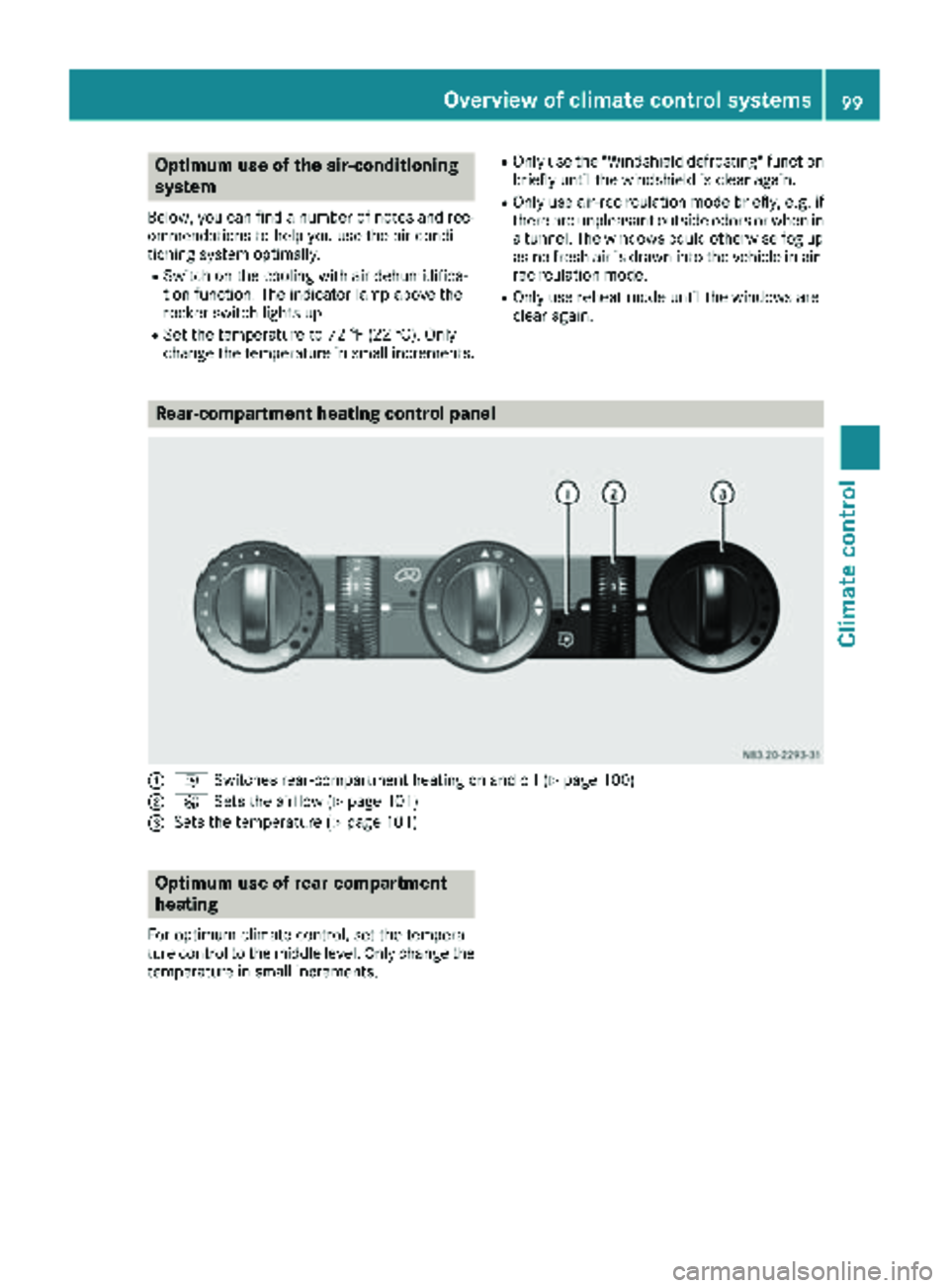
Rear-compartment heating control panel
:i Switches rear-compartment heating on and off (Ypage 100)
;KSets the airflow (Ypage 101)
=Sets the temperature (Ypage 101)
Optimum use of rear-compartment
heating
For optimum climate control, set the tempera-
ture control to the middle level. Only change the
temperature in small increments.
Overview of climate control systems99
Climate control
Page 102 of 286
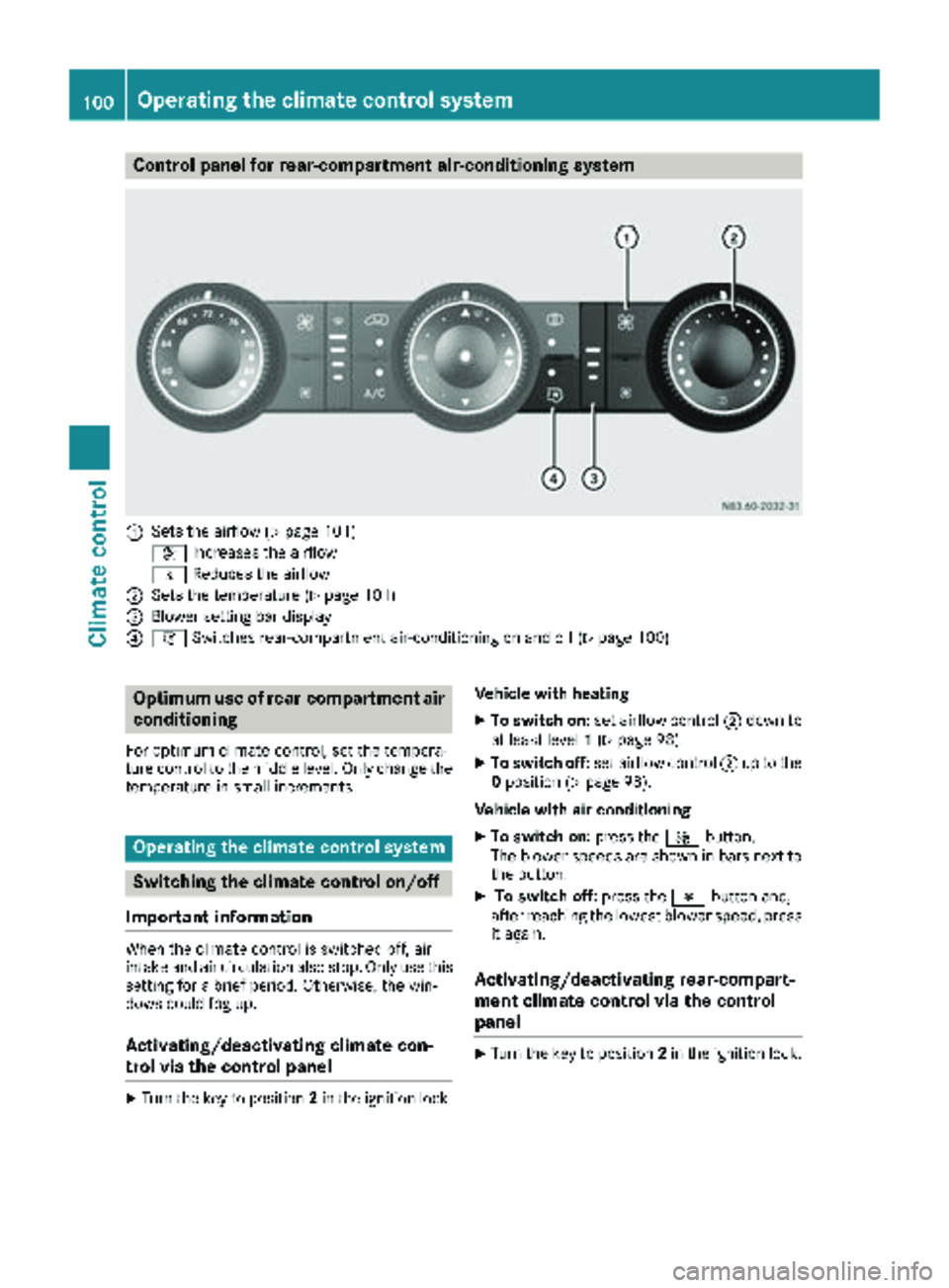
Control panel for rear-compartment air-conditioning system
:Sets the airflow (Ypage 101)
K Increases the airflow
I Reduces the airflow
;Sets the temperature (Ypage 101)
=Blower setting bar display
?iSwitches rear-compartment air-conditioning on and off (Ypage 100)
Optimum use of rear-compartment air
conditioning
For optimum climate control, set the tempera-
ture control to the middle level. Only change the
temperature in small increments.
Operating the climate control system
Switching the climate control on/off
Important information
When the climate control is switched off, air
intake and air circulation also stop. Only use this
setting for a brief period. Otherwise, the win-
dows could fog up.
Activating/deactivating climate con-
trol via the control panel
XTurn the key to position 2in the ignition lock. Vehicle with heating
XTo switch on:
set airflow control ;down to
at least level 1(Ypage 98).
XTo switch off: set airflow control ;up to the
0 position (Ypage 98).
Vehicle with air conditioning
XTo switch on: press theKbutton.
The blower speeds are shown in bars next to
the button.
XTo switch off: press theIbutton and,
after reaching the lowest blower speed, press
it again.
Activating/deactivating rear-compart-
ment climate control via the control
panel
XTurn the key to position 2in the ignition lock.
100Operating the climate control system
Climate control
Page 103 of 286
Vehicle with rear-compartment heating/
rear-compartment air conditioning
XTo switch on/off:press theiswitch.
If the indicator lamp in the button lights up,
the rear-compartment heating/rear-com-
partment air conditioning is switched on.
Switching the cooling with air dehu-
midification function on/off
Important information
If you switch off the "Cooling with air dehumid-
ification" function, the air inside the vehicle will
not be cooled (in warm weather) or dehumidi-
fied. The windows could fog up more quickly.
The cooling with air dehumidification function is
only available when the engine is running. The
air inside the vehicle is cooled and dehumidified
according to the temperature selected.
Condensation may appear on the underside of
the vehicle when in cooling mode. This is normal
and not a sign that there is a malfunction.
Switching on and off
Vehicle with air conditioning
XPress the ¿button.
If the indicator lamp in the button lights up,
cooling with air dehumidification is switched
on.
Setting the temperature
Increasing and reducing temperature in
the front compartment via the control
panel
Only change the temperature in small incre-
ments. Start at the center position, or at 72 ‡
(22 †).
XSwitch on climate control (Ypage 100).
XTurn temperature control :clockwise to
increase or counterclockwise to reduce the
temperature (
Ypage 98).
Increasing and reducing temperature in
the rear compartment via the control
panel
Only change the temperature in small incre-
ments.
XSwitch on climate control (Ypage 100).
XTurn rear-compartment temperature control
= (Ypage 99) or rear-compartment air-con-
ditioning system ;(Ypage 100) clockwise
to increase or counterclockwise to reduce the
temperature.
iVehicles with additional air conditioning and
heating in the rear compartment: if you set
the temperature control to the center posi-
tion, only one of the two climate control sys-
tems works in the rear compartment and in
air-recirculation mode (
Ypage 103).
Setting the air distribution
Air distribution settings
The air distribution symbols have the following
meanings:
m Directs air through the center and side
air vents
s
z Directs air to the windshield and the air
vents
q Directs air to the windshield, the air
vents and into the footwell
r Directs air to the air vents and into the
footwell
Adjusting
XSwitch on climate control (Ypage 100).
XSet air-distribution control ?for the heating
(Ypage 97) or air-conditioning system A
(Ypage 98) to the corresponding symbol.
Setting the airflow
XSwitch on climate control (Ypage 100).
XVehicle with heating/rear-compartment
heating: set airflow control ;of the heating
(
Ypage 97) or of the rear-compartment heat-
ing (Ypage 99) to the desired level.
XVehicle with air conditioning/rear-com-
partment air conditioning: press theI
Operating the climate control system101
Climate control