air condition MERCEDES-BENZ SPRINTER 2017 MY17 Operator’s Manual
[x] Cancel search | Manufacturer: MERCEDES-BENZ, Model Year: 2017, Model line: SPRINTER, Model: MERCEDES-BENZ SPRINTER 2017Pages: 286, PDF Size: 4.36 MB
Page 158 of 286
the heater/air conditioning to the maximum
level. Open the windows if necessary.
RWhen overtaking, pay particular attention to
the extended length of your vehicle/trailer
combination.
Due to the length of your vehicle/trailer com-bination you need an additional distance
before you can return to your original lane.
Uncoupling a trailer
GWARNING
If you uncouple a trailer with the overrun
brake engaged, you could trap your hand
between the vehicle and the trailer drawbar.
There is a risk of injury.
Do not uncouple a trailer if the overrun brake
is engaged.
!Do not disconnect a trailer with an engaged
overrun brake. Otherwise, your vehicle could
be damaged by the rebounding of the overrun
brake.
XMake sure the selector lever of the automatic
transmission is in position P.
XApply the parking brake of the vehicle.
XClose all doors.
XApply the parking brake of the trailer.
XIn addition, secure the trailer against rolling
away with a wheel chock or similar object.
XRemove the trailer cable and safety chains
and decouple the trailer.
Permissible trailer loads and trailer
drawbar noseweights
Weight information
!On vehicles with a permissible gross vehicle
weight of 11030 lbs (5003 kg), the permissi -
bl egros scombin ation weight is less than the
total of the permissible gross vehicle weight
and the permissible trailer load. Exceeding
the permissible gross combination weight can
lead to damage to the drivetrain, to the trans-
mission or to the trailer tow hitch.
If the vehicle or the trailer is fully laden, the
relevant value for the permissible gross vehi-
cle weight or the permissible trailer load is therefore lower. In this case, the trailer or the
vehicle may only be partially loaded.
The gross trailer weight (GTW) is calculated by
adding the weight of the trailer to the weight of
the load and equipment. If the trailer is equipped with a separate functional braking system, then
the maximum gross trailer weight is 5000 lbs
(2268 kg )or 7500 lb s(3402 kg).
GWARNING
If you to w atrailer without aseparat efunc-
tional brakin gsystem and agross trailer
weigh t(GTW) of mor ethan 1635 lbs (750kg),
the nthe vehicl ebr ake system may overheat.
This increases the braking distance and the
brake system may even fail. There is an
increased risk of accident and injury, possibly
even fatal.
Always use a trailer with a separate functional
braking system when towing a trailer with a
gross trailer weight (GTW) of more than
1635 lbs (750kg).
Th emaximu mpermissibl etrailer dr awbar nose-
weight on the ball coupling is 500 lbs (227 kg) or
750 lbs (340 kg). The actual noseweight may not
exceed the value given on the identification
plates of the trailer tow hitch or the trailer. If the
values vary, the lowest value always applies.
The gross combination weight rating (GCWR) is
calculated by adding the gross weight of the
trailer to the gross vehicle weight including a
driver's weight of approximately 150 lbs (68 kg).
The maximum permissible gross combination
weight is vehicle-specific and equipment-
dependent.
When driving with a trailer, you should not
exceed the maximum permitted gross combi-
nation weight rating (GCWR).
The permissible values, which must not be
exceeded, can be found in your vehicle docu-
ments and on the trailer tow hitch type plates for the t
railer and the vehicle (Ypage 272). The
basic values approved by the manufacturer can
also be found in the "Technical data" section
(
Ypage 282). If the values vary, the lowest
value always applies.
156Towing a trailer
Driving and parking
Page 160 of 286
Useful information
This Operator's Manual describes all models as
well as standard and optional equipment of your
vehicle that were available at the time of going
to print. Country-specific variations are possi-
ble. Note that your vehicle may not be equipped
with all of the described functions. This also
applies to systems and functions relevant to
safety.
Read the information on qualified specialist
workshops (
Ypage 27).
Important safety notes
GWARNING
If you are driving and reach through the steer- ing wheel to operate the adjustment knob,
you could lose control of the vehicle. There is
a risk of an accident and injury.
Only operate the adjustment knobs when thevehicle is stationary. Do not reach through the
steering wheel when driving.
GWARNING
If you operate information systems and com-
munication equipment integrated in the vehi-
cle while driving, you will be distracted from
traffic conditions. You could also lose control
of the vehicle. There is a risk of an accident.
Only operate the equipment when the traffic
situation permits. If you are not sure that this
is possible, park the vehicle paying attention
to traffic conditions and operate the equip-
ment when the vehicle is stationary.
GWARNING
If the instrument cluster has failed or mal-
functioned, you may not recognize function
restrictions in systems relevant to safety. The
operating safety of your vehicle may be
impaired. There is a risk of an accident.
Drive on carefully. Have the vehicle checked
at a qualified specialist workshop immedi-
ately. You must observe the legal requirements for the
country in which you are currently driving when
operating the on-board computer.
The on-board computer display only shows mes-
sages and warnings from certain systems. You
should therefore make sure your vehicle is oper-
ating safely at all times. If the operating safety of
your vehicle is impaired, stop the vehicle as
soon as possible, paying attention to road and
traffic conditions. Then consult a qualified spe-
cialist workshop.
Instrument cluster
Overview
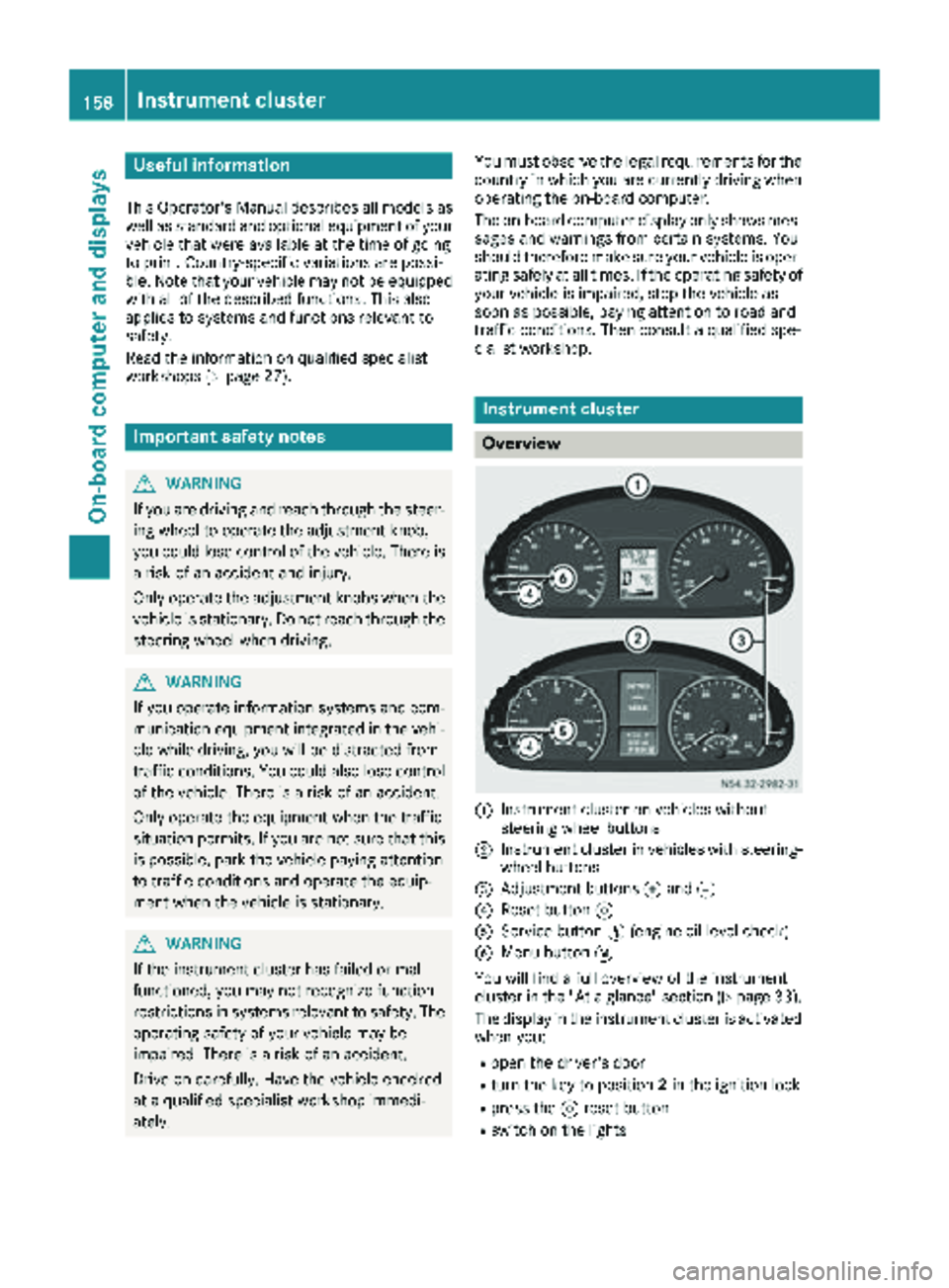
:Instrument cluster on vehicles without
steering wheel buttons
;Instrument cluster in vehicles with steering-
wheel buttons
=Adjustment buttons fand g
?Reset button 9
AService button Ë(engine oil level check)
BMenu button 4
You will find a full overview of the instrument
cluster in the "At a glance" section (
Ypage 33).
The display in the instrument cluster is activated when you:
Ropen the driver's door
Rturn the key to position 2in the ignition lock
Rpress the 9reset button
Rswitch on the lights
158Instrument cluster
On-board computer and displays
Page 175 of 286
Redialing
The on-board computer saves the last names or
numbers dialed in the redial memory.
Using the steering wheel buttons
XUse theVorU button to select the TELmenu.
The display shows the mobile phone opera-
tional readiness symbol.
XPress the6button.
The display shows the most recently dialed
numbers or names in the redial memory.
XPress the 9or: button to select the
desired name or number.
XTo start dialing: press the6button.
The on-board computer dials the correspond-
ing phone number.
When a connection is established, the name
of the other person and/or the call duration
appear in the display.
or
XTo exit the redial memory: press the~
button.
Display messages
Notes on display messages
Important safety notes
GWARNING
No information will be displayed if either the
instrument cluster or the display is inopera-
tive.
As a result, you will not be able to see warning
and indicator lamps or information about the
driving conditions, such as speed or outside
temperature. Driving characteristics may be
impaired. Adjust your driving style and vehicle
speed accordingly.
Contact a qualified specialist workshop
immediately.
GWARNING
If service work is not carried out correctly, the operating safety of your vehicle may be affec-
ted. This could cause you to lose control of
your vehicle and cause an accident. More-
over, the safety systems may no longer be
able to protect you or others as they are
designed to do.
Always have service work carried out at a
qualified specialist workshop.
iIf you turn the key to position 2in the igni-
tion, a display check is performed. All warning
and indicator lamps (except the turn signal
indicator lamps) and the display are activa-
ted. Before starting the journey, check that
the warning and indicator lamps are operating
correctly.
Vehicles without steering wheel but-
tons
Warnings, malfunctions or additional informa-
tion may also be shown in the display. The fol-
lowing tables show all the display messages. A
warning tone sounds with certain display mes-
sages.
Vehicles with steering wheel buttons
The on-board computer shows warnings, mal-
functions or additional information in the dis-
play. A warning tone sounds with certain display
messages. Display messages of a high priority
are shown in red.
Please respond in accordance with the display
messages and follow the additional notes in this Operator's Manual.
You can hide low-priority display messages by
pressing the V,U,9or: button
on the steering wheel or the 9reset button.
You cannot hide display messages of the highest
priority. These messages will continue to be
shown in the display until their cause has been
eliminated.
The on-board computer stores certain display
messages in the message memory
(
Ypage 173).
Message memory
The on-board computer only records and shows
malfunctions and warnings from certain sys-
tems. Therefore, make sure that your vehicle is
safe to use. You could otherwise cause an acci-
dent by driving an unsafe vehicle.
Display messages173
On-board computer and displays
Z
Page 178 of 286
Display messagesPossible causes/consequences andMSolutions
In addition,th eyellow ;CheckEngin eindicator lamp and th eyel-
low å DEFindicator lamp ligh tup in th einstrumen tcluste rand a
warning tone sounds.
You canno tdrive th evehicl eat aspeed exceedin g 5mph (8 km/h).
XVisit aqualified specialist workshop immediately.
Errflashes for 5seconds, in addition th eà indicator lamp flashes in
th einstrumen tcluste rand then lights up yellow continuously.
Lan eKeepin gAssis tis deactivated and temporarily inoperative.
Possibl ecauses are:
RThere are no lan emarking spresent.
RThe camera' sfunctionalit yis impaire ddue to heav yrain ,snow or
fog .
RThe camera canno trecogniz eth eroa dmarkings:
-It is to odark .
-The lan emarking sare wor nor are covered, for example, by dir tor
snow.
RThe windshield is dirty in th ecamera' sfield of vision .
XStop thevehicl epayin gattention to roa dand traffic conditions.
XSecur eth evehicl eto preven tit from rollin gaway (Ypage 127).
XClean th ewindshield (Ypage 231), particularly in th ecamera' s
field of vision .
If th eà indicator lamp goe sout ,Lan eKeepin gAssis tis opera-
tional again .
If th eproblem persists ,visit aqualified specialist workshop .
Errflashes for5seconds ,th e_ indicator lamp also flashes and then
goe sout .
Highbea mAssis tis deactivated and temporarily no toperational or
Highbea mAssis tis malfunctioning .
Possibl ecauses are:
RThe camera' sfunctionalit yis impaire ddue to heav yrain ,snow or
fog .
RThe windshield is dirty in th ecamera' sfield of vision .
XStop thevehicl epayin gattention to roa dand traffic conditions.
XSecur eth evehicl eto preven tit from rollin gaway (Ypage 127).
XClean th ewindshield (Ypage 231), particularly in th ecamera' s
field of vision .
If th e_ indicator lamp goe sout ,Highbea mAssis tis operational
again .
If th eproblem persists ,visit aqualified specialist workshop .
176Display messages
On-board computer and displays
Page 182 of 286
Display messagesPossible causes/consequences andMSolutions
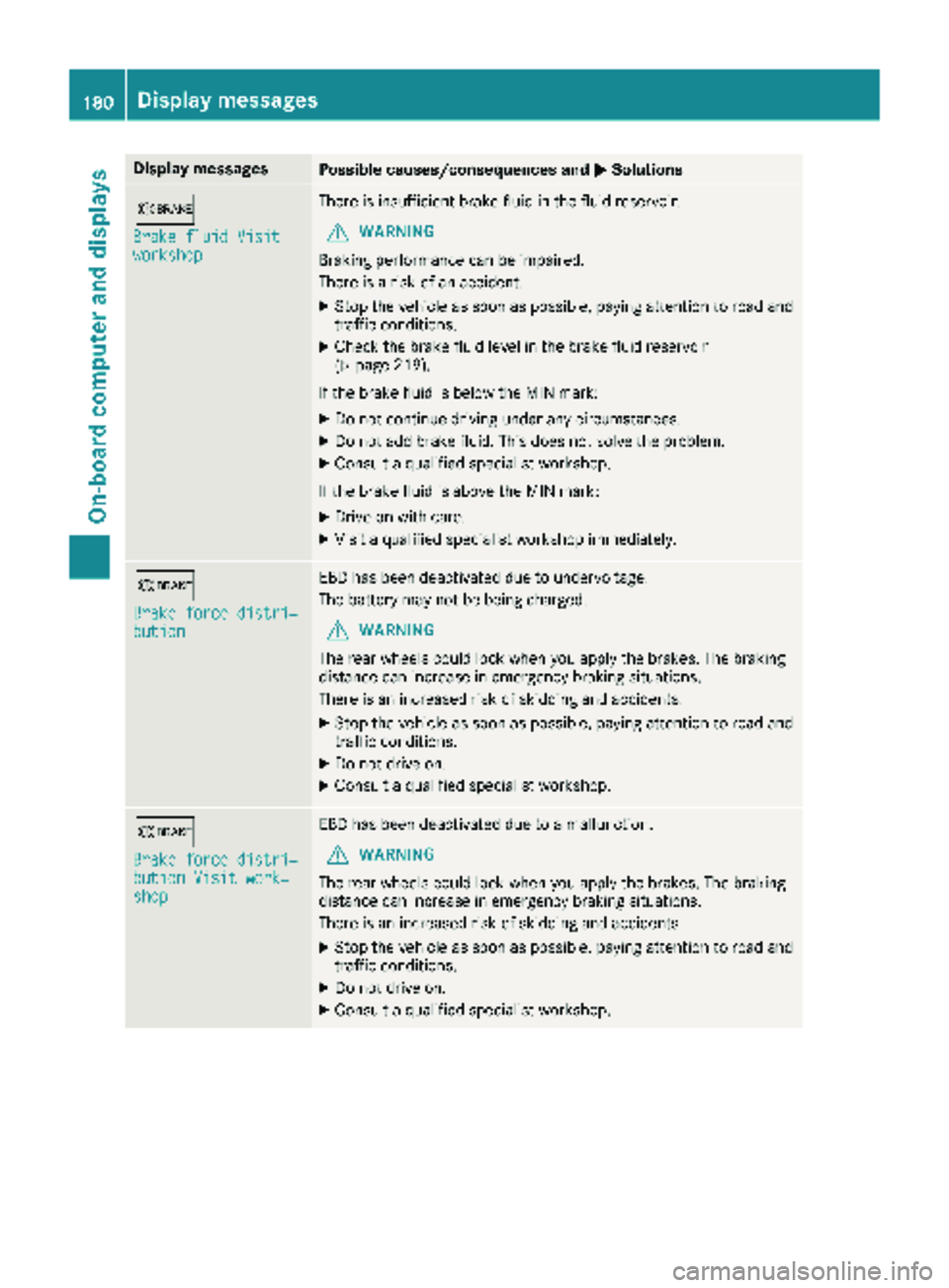
b
Brake fluid Visitworkshop
There is insufficientbrak eflui din th efluid reservoir .
GWARNING
Braking performance can be impaired.
There is aris kof an accident.
XStop th evehicl eas soo nas possible, payin gattention to roa dand
traffic conditions.
XChec kth ebrak efluid level in th ebrak efluid reservoir
(Ypage 219).
If th ebrak eflui dis belo wtheMIN mark:
XDo no tcontinu edrivin gunder any circumstances.
XDo no tadd brak efluid .This does no tsolv eth eproblem .
XConsult aqualified specialist workshop .
If th ebrak eflui dis abov eth eMIN mark:
XDrive on wit hcare.
XVisit aqualified specialist workshop immediately.
b
Brake force distri ‐bution
EBDhas been deactivated due to undervoltage.
The battery may no tbe bein gcharged.
GWARNIN G
The rear wheels could loc kwhen you apply th ebrakes. The braking
distanc ecan increas ein emergenc ybraking situations.
There is an increased ris kof skiddin gand accidents .
XStop thevehicl eas soo nas possible, payin gattention to roa dand
traffic conditions.
XDo no tdrive on .
XConsult aqualified specialist workshop .
b
Brake force distri‐bution Visit work‐shop
EBDhas been deactivated due to amalfunction .
GWARNING
The rear wheels could loc kwhen you apply th ebrakes. The braking
distanc ecan increas ein emergenc ybraking situations.
There is an increased ris kof skiddin gand accidents .
XStop thevehicl eas soo nas possible, payin gattention to roa dand
traffic conditions.
XDo no tdrive on .
XConsult aqualified specialist workshop .
180Display messages
On-board computer and displays
Page 186 of 286
Display messagesPossible causes/consequences andMSolutions
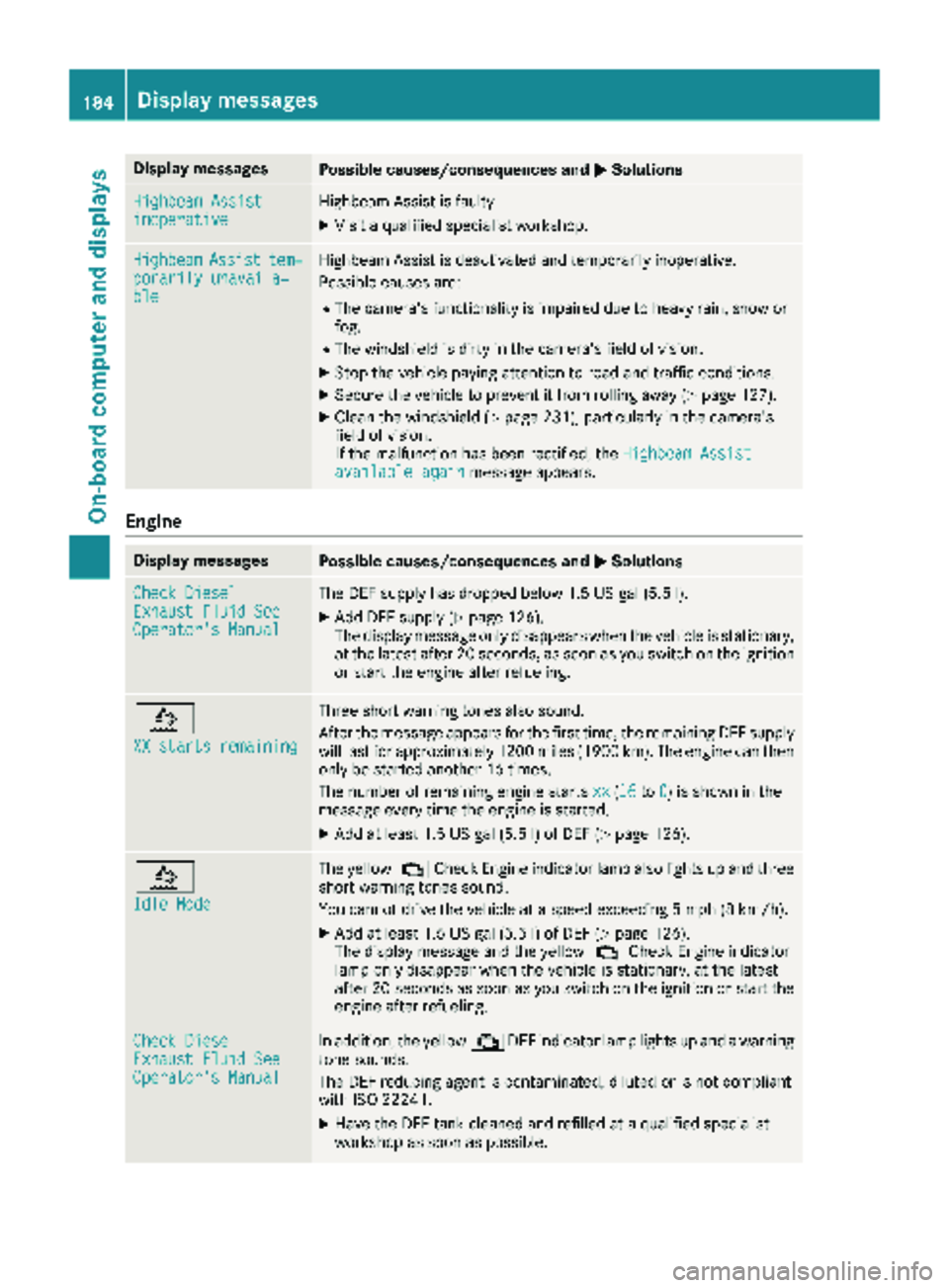
Highbeam AssistinoperativeHighbeamAssis tis faulty.
XVisit aqualified specialist workshop .
HighbeamAssisttem‐porarily unavaila‐ble
Highbea mAssis tis deactivated and temporarily inoperative.
Possibl ecauses are:
RThe camera' sfunctionalit yis impaire ddue to heav yrain ,snow or
fog .
RThe windshield is dirty in th ecamera' sfield of vision .
XStop thevehicl epayin gattention to roa dand traffic conditions.
XSecur eth evehicl eto preven tit from rollin gaway (Ypage 127).
XClean th ewindshield (Ypage 231), particularly in th ecamera' s
field of vision .
If th emalfunction has been rectified, th eHighbeam Assist
available againmessage appears.
Engine
Display messagesPossible causes/consequences and MSolutions
Check DieselExhaustFluid SeeOperator' sManual
The DE Fsupply has dropped belo w1.5US gal (5. 5l).
XAd dDE Fsupply (Ypage 126).
The display message only disappear swhen th evehicl eis stationary,
at th elatest after 20 seconds, as soo nas you switch on th eignition
or start th eengin eafter refueling.
å
XX starts remaining
Three short warning tone salso sound.
Afte rth emessage appear sfor th efirst time, th eremaining DE Fsupply
will last for approximately 1200 mile s(1900 km). The engin ecan then
only be started another 16 times .
The number of remaining engin estart sxx
(16to 0)is shown in th e
message every time th eengin eis started.
XAd dat least 1. 5US gal (5.5l)of DEF (Ypage 126).
å
Idle Mode
The yellow ;Check Engine indicator lamp also lights up and three
short warning tones sound.
You cannot drive the vehicle at a speed exceeding 5 mph (8 km/h).
XAdd at least 1.5 US gal (5.5 l)of DEF (Ypage 126).
The display message and the yellow ;Check Engine indicator
lamp only disappear when the vehicle is stationary, at the latest
after 20 seconds as soon as you switch on the ignition or start the
engine after refueling.
Check DieselExhaust Fluid SeeOperator's Manual
In addition, the yellow ;DEF indicator lamp lights up and a warning
tone sounds.
The DEF reducing agent is contaminated, diluted or is not compliant
with ISO 22241.
XHave the DEF tank cleaned and refilled at a qualified specialist
workshop as soon as possible.
184Display messages
On-board computer and displays
Page 189 of 286
Display messagesPossible causes/consequences andMSolutions
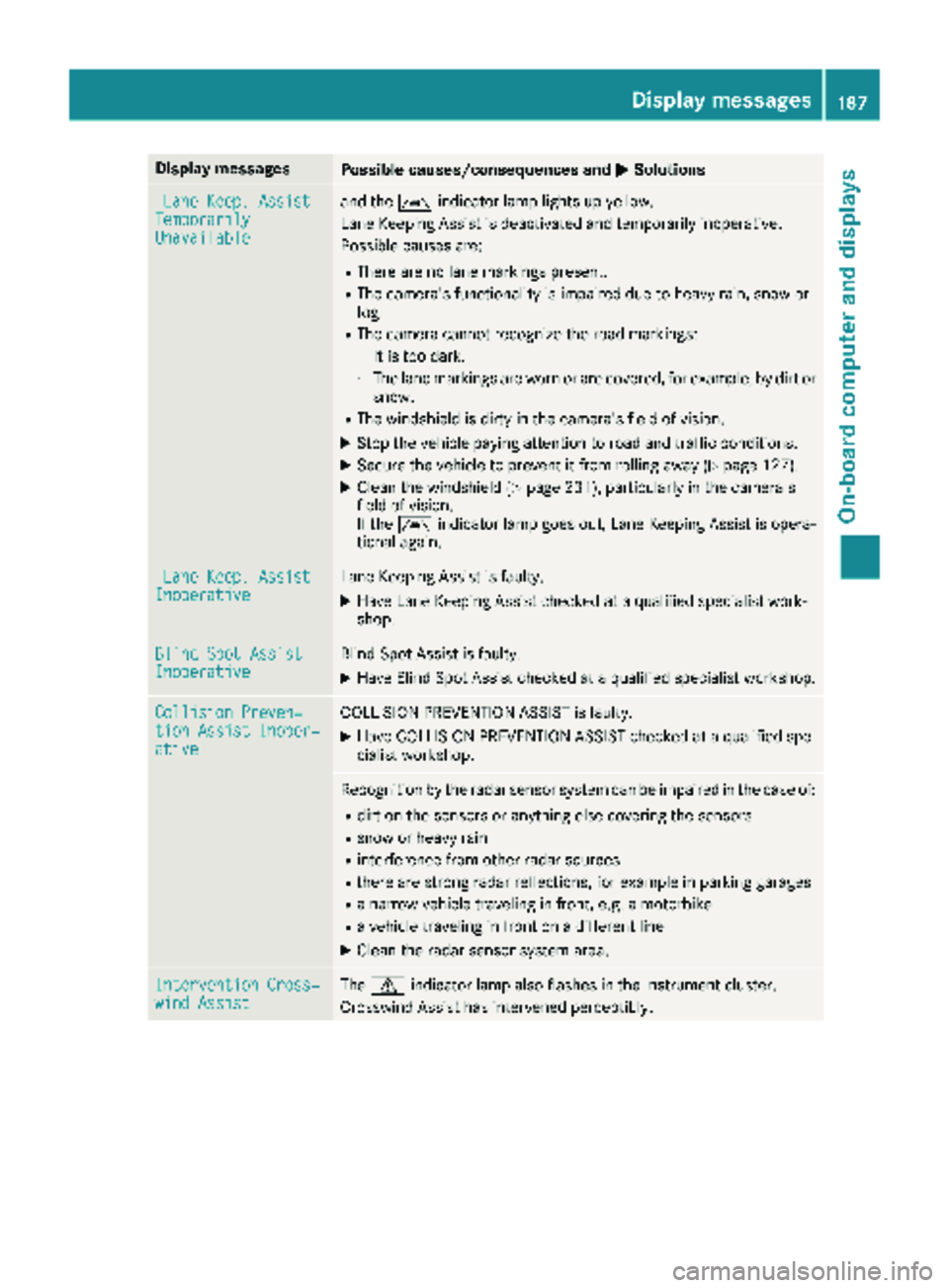
LaneKeep. AssistTemporarilyUnavailable
and th eà indicator lamp lights up yellow.
Lan eKeepin gAssis tis deactivated and temporarily inoperative.
Possibl ecauses are:
RThere are no lan emarking spresent.
RThe camera' sfunctionalit yis impaire ddue to heav yrain ,snow or
fog .
RThe camera canno trecogniz eth eroa dmarkings:
-It is to odark .
-The lan emarking sare wor nor are covered, for example, by dir tor
snow.
RThe windshield is dirty in th ecamera' sfield of vision .
XStop thevehicl epayin gattention to roa dand traffic conditions.
XSecur eth evehicl eto preven tit from rollin gaway (Ypage 127).
XClean th ewindshield (Ypage 231), particularly in th ecamera' s
field of vision .
If th eà indicator lamp goe sout ,Lan eKeepin gAssis tis opera-
tional again .
LaneKeep. AssistInoperativeLan eKeepin gAssis tis faulty.
XHav eLan eKeepin gAssis tchecke dat aqualified specialist work-
shop.
Blind Spo tAssistInoperativeBlind Spot Assis tis faulty.
XHav eBlind Spot Assis tchecke dat aqualified specialist workshop .
Collision Preven‐tionAssist Inoper ‐ative
COLLISION PREVENTION ASSIST is faulty.
XHaveCOLLISION PREVENTION ASSIST checke dat aqualified spe -
cialist workshop .
Recognition by th eradar sensor system can be impaire din th ecas eof:
Rdir ton th esensor sor anythin gelse covering th esensor s
Rsnow or heav yrain
Rinterferenc efrom other radar source s
Rthere are strongradar reflections, for exampl ein parking garages
Ranarrow vehicl etraveling in front, e.g. amotorbik e
Ravehicl etraveling in fron ton adifferen tlin e
XClean th eradar sensor system area .
Intervention Cross‐windAssistThe d indicator lamp also flashes in th einstrumen tcluster.
Crosswin dAssis thas intervened perceptibly.
Display messages18 7
On-board computer and displays
Z
Page 190 of 286
Tires
Display messagesPossible causes/consequences andMSolutions
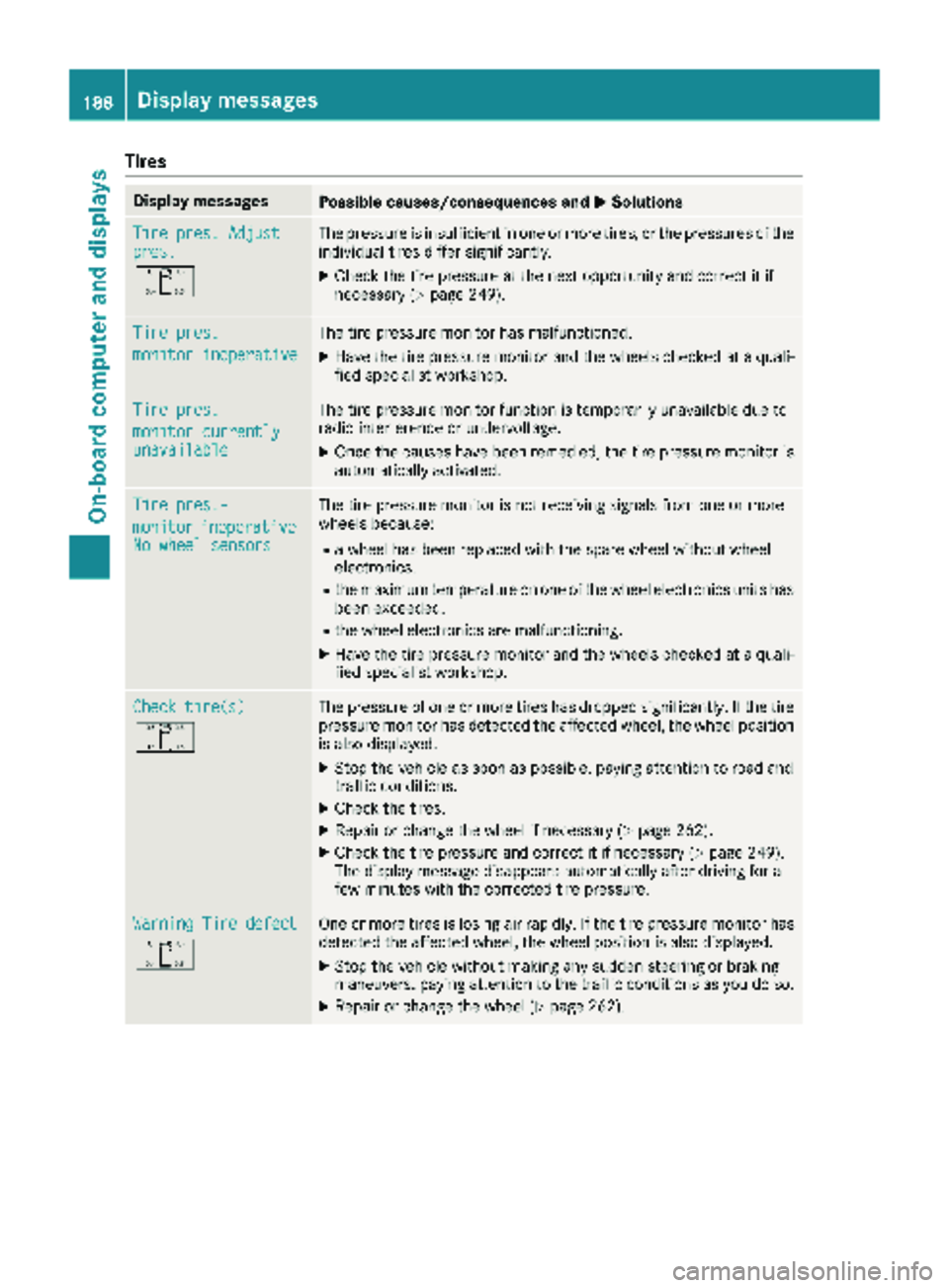
Tire pres. Adjustpres.
O
The pressure is insufficient in one or more tires, or the pressures of the
individual tires differ significantly.
XCheck the tire pressure at the next opportunity and correct it if
necessary (Ypage 249).
Tire pres.
monitor inoperative
The tire pressure monitor has malfunctioned.
XHave the tire pressure monitor and the wheels checked at a quali-
fied specialist workshop.
Tire pres.
monitor currentlyunavailable
The tire pressure monitor function is temporarily unavailable due to
radio interference or undervoltage.
XOnce the causes have been remedied, the tire pressure monitor is
automatically activated.
Tire pres.-
monitorinoperativeNo wheel sensors
The tire pressure monitor is not receiving signals from one or more
wheels because:
Ra wheel has been replaced with the spare wheel without wheel
electronics.
Rthe maximum temperature on one of the wheel electronics units has
been exceeded.
Rthe wheel electronics are malfunctioning.
XHave the tire pressure monitor and the wheels checked at a quali-
fied specialist workshop.
Check tire(s)
O
The pressure of one or more tires has dropped significantly. If the tire
pressure monitor has detected the affected wheel, the wheel position
is also displayed.
XStop the vehicle as soon as possible, paying attention to road and
traffic conditions.
XCheck the tires.
XRepair or change the wheel if necessary (Ypage 262).
XCheck the tire pressure and correct it if necessary (Ypage 249).
The display message disappears automatically after driving for a
few minutes with the corrected tire pressure.
Warning Tire defect
O
One or more tires is losing air rapidly. If the tire pressure monitor has
detected the affected wheel, the wheel position is also displayed.
XStop the vehicle without making any sudden steering or braking
maneuvers, paying attention to the traffic conditions as you do so.
XRepair or change the wheel (Ypage 262).
188Displa y messages
On-board computer and displays
Page 194 of 286
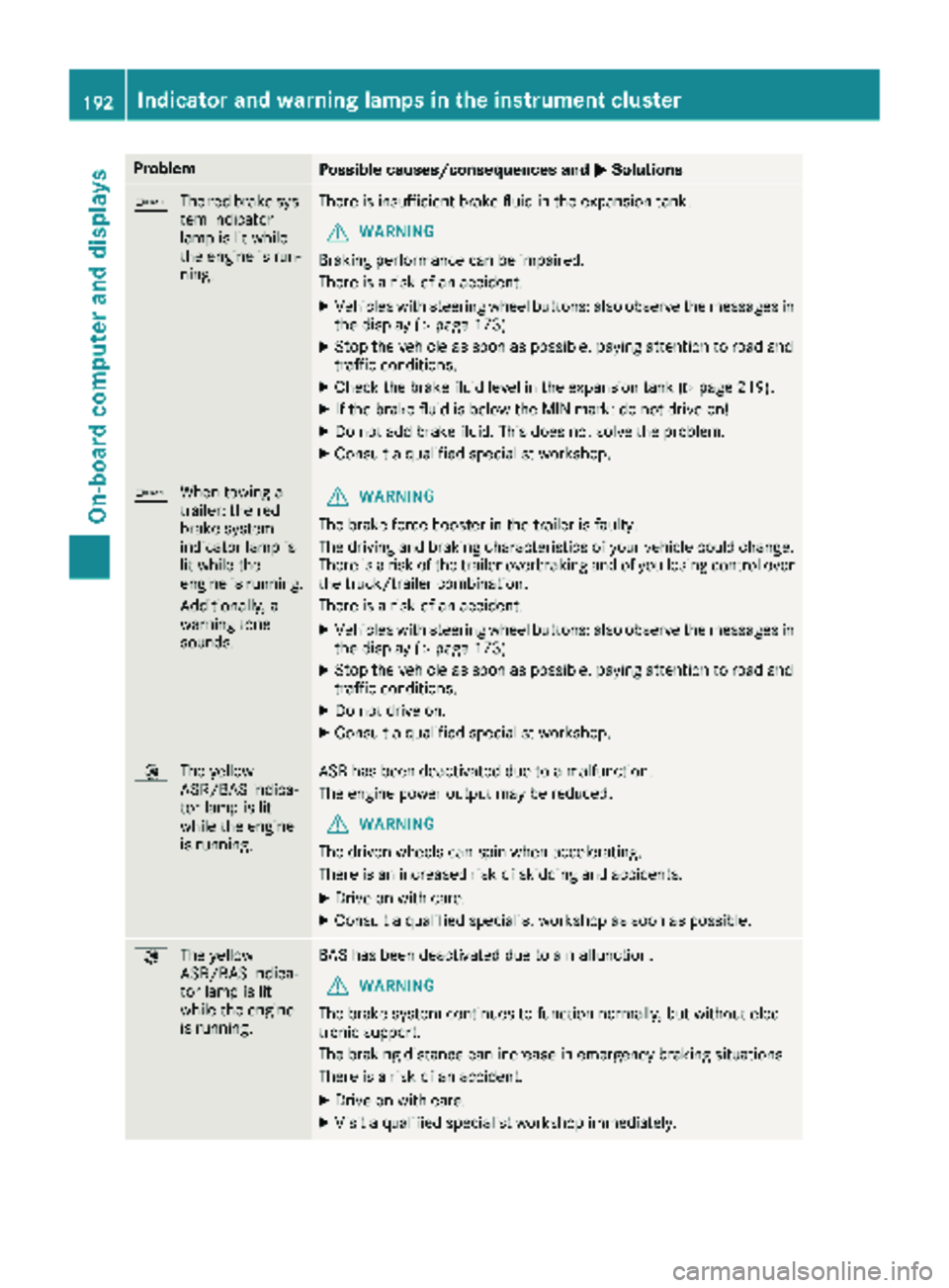
ProblemPossible causes/consequences andMSolutions
b
The red brake sys-
tem indicator
lamp is lit while
the engine is run-
ning.There is insufficient brake fluid in the expansion tank.
GWARNING
Braking performance can be impaired.
There is a risk of an accident.
XVehicles with steering wheel buttons: also observe the messages in
the display (Ypage 173).
XStop the vehicle as soon as possible, paying attention to road and
traffic conditions.
XCheck the brake fluid level in the expansion tank (Ypage 219).
XIf the brake fluid is below the MIN mark: do not drive on!
XDo not add brake fluid. This does not solve the problem.
XConsult a qualified specialist workshop.
b When towing a
trailer: the red
brake system
indicator lamp is
lit while the
engine is running.
Additionally, a
warning tone
sounds.GWARNING
The brake force booster in the trailer is faulty.
The driving and braking characteristics of your vehicle could change.
There is a risk of the trailer overbraking and of you losing control over
the truck/trailer combination.
There is a risk of an accident.
XVehicles with steering wheel buttons: also observe the messages in
the display (Ypage 173).
XStop the vehicle as soon as possible, paying attention to road and
traffic conditions.
XDo not drive on.
XConsult a qualified specialist workshop.
: The yellow
ASR/BAS indica-
tor lamp is lit
while the engine
is running.ASR has been deactivated due to a malfunction.
The engine power output may be reduced.
GWARNING
The driven wheels can spin when accelerating.
There is an increased risk of skidding and accidents.
XDrive on with care.
XConsult a qualified specialist workshop as soon as possible.
: The yellow
ASR/BAS indica-
tor lamp is lit
while the engine
is running.BAS has been deactivated due to a malfunction.
GWARNING
The brake system continues to function normally, but without elec-
tronic support.
The braking distance can increase in emergency braking situations.
There is a risk of an accident.
XDrive on with care.
XVisit a qualified specialist workshop immediately.
192Indicator and warning lamps in the instrument cluster
On-board computer and displays
Page 196 of 286
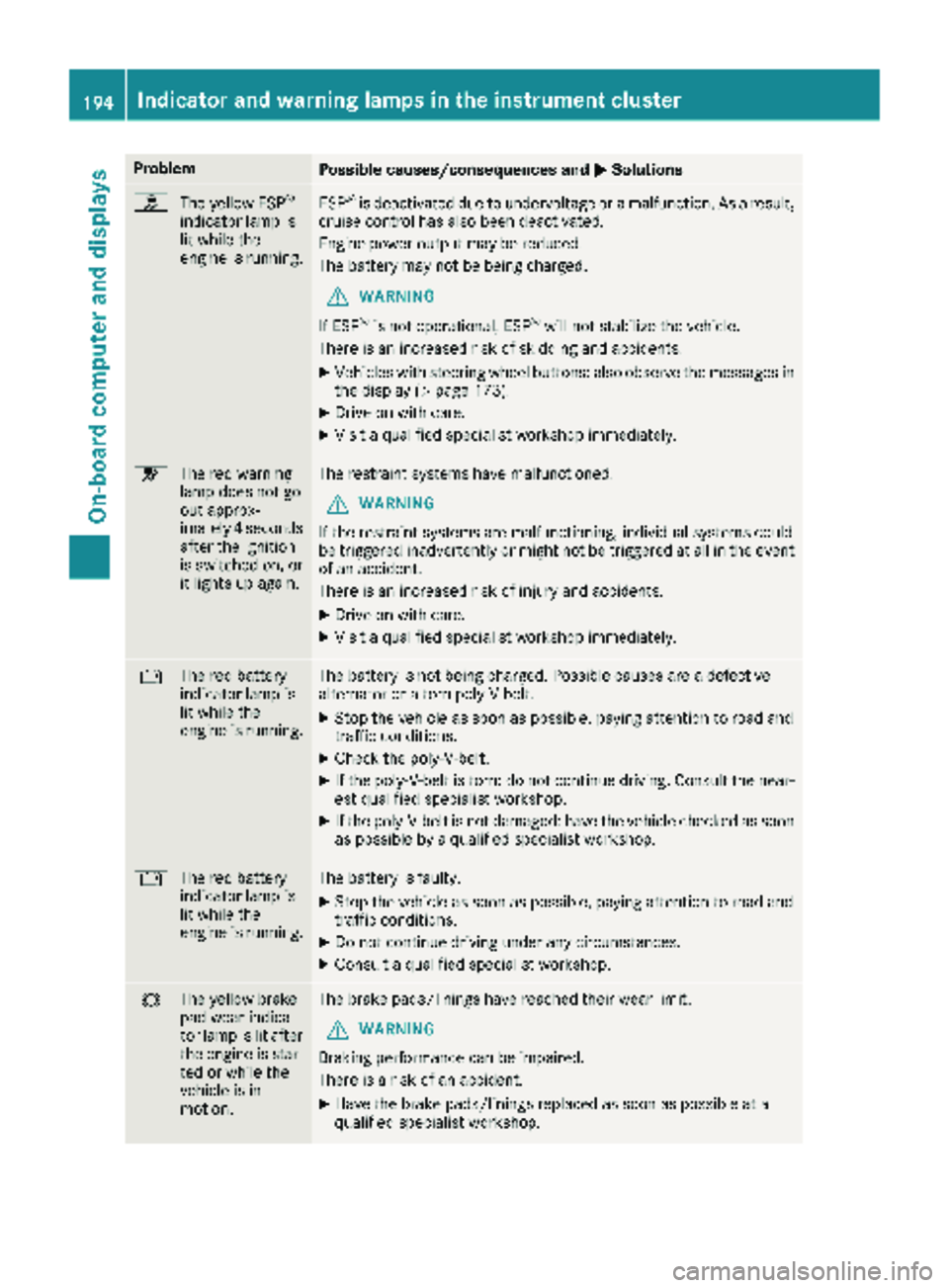
ProblemPossible causes/consequences andMSolutions
h
The yellow ESP®
indicator lamp is
lit while the
engine is running.ESP®is deactivated due to undervoltage or a malfunction. As a result,
cruise control has also been deactivated.
Engine power output may be reduced.
The battery may not be being charged.
GWARNING
If ESP
®is not operational, ESP®will not stabilize the vehicle.
There is an increased risk of skidding and accidents.
XVehicles with steering wheel buttons: also observe the messages in the display (Ypage 173).
XDrive on with care.
XVisit a qualified specialist workshop immediately.
6 The red warning
lamp does not go
out approx-
imately 4 seconds
after the ignition
is switched on, or
it lights up again.The restraint systems have malfunctioned.
GWARNING
If the restraint systems are malfunctioning, individual systems could
be triggered inadvertently or might not be triggered at all in the event
of an accident.
There is an increased risk of injury and accidents.
XDrive on with care.
XVisit a qualified specialist workshop immediately.
# The red battery
indicator lamp is
lit while the
engine is running.The battery is not being charged. Possible causes are a defective
alternator or a torn poly-V-belt.
XStop the vehicle as soon as possible, paying attention to road and
traffic conditions.
XCheck the poly-V-belt.
XIf the poly-V-belt is torn: do not continue driving. Consult the near-
est qualified specialist workshop.
XIf the poly-V-belt is not damaged: have the vehicle checked as soon
as possible by a qualified specialist workshop.
#The red battery
indicator lamp is
lit while the
engine is running.The battery is faulty.
XStop the vehicle as soon as possible, paying attention to road and
traffic conditions.
XDo not continue driving under any circumstances.
XConsult a qualified specialist workshop.
#The yellow brake
pad wear indica-
tor lamp is lit after
the engine is star-
ted or while the
vehicle is in
motion.The brake pads/linings have reached their wear limit.
GWARNING
Braking performance can be impaired.
There is a risk of an accident.
XHave the brake pads/linings replaced as soon as possible at a
qualified specialist workshop.
194Indicator and warning lamps in the instrument cluster
On-board computer and displays