battery MERCEDES-BENZ SPRINTER 2017 MY17 Operator’s Manual
[x] Cancel search | Manufacturer: MERCEDES-BENZ, Model Year: 2017, Model line: SPRINTER, Model: MERCEDES-BENZ SPRINTER 2017Pages: 286, PDF Size: 4.36 MB
Page 62 of 286
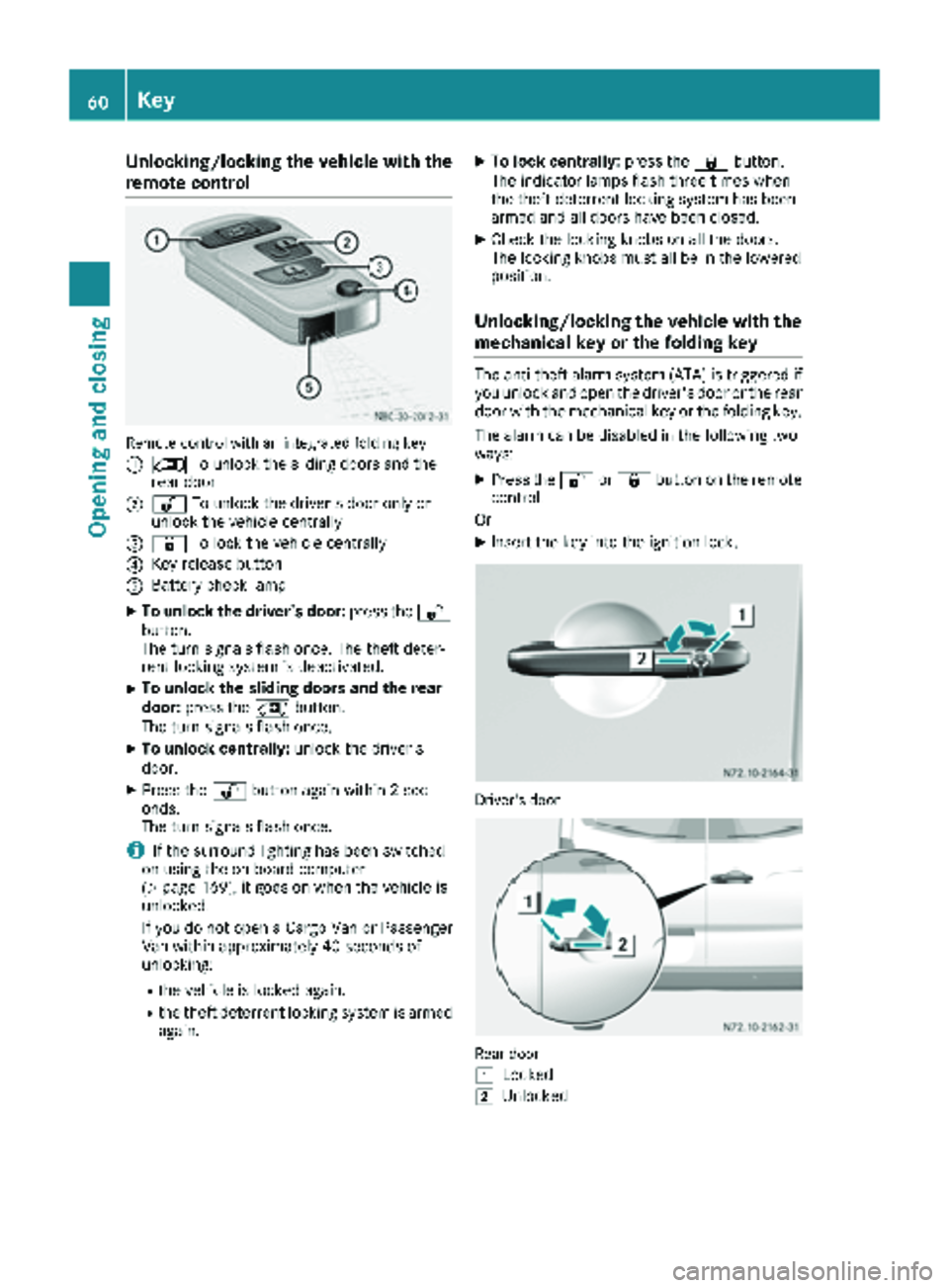
Unlocking/locking the vehicle with the
remote control
Remote control with an integrated folding key
:
5To unlock the sliding doors and the
rear door
;% To unlock the driver's door only or
unlock the vehicle centrally
=& To lock the vehicle centrally
?Key release button
ABattery check lamp
XTo unlock the driver's door: press the%
button.
The turn signals flash once. The theft deter-
rent locking system is deactivated.
XTo unlock the sliding doors and the rear
door: press the 5button.
The turn signals flash once.
XTo unlock centrally: unlock the driver's
door.
XPress the %button again within 2 sec-
onds.
The turn signals flash once.
iIf the surround lighting has been switched
on using the on-board computer
(
Ypage 169), it goes on when the vehicle is
unlocked.
If you do not open a Cargo Van or Passenger
Van within approximately 40 seconds of
unlocking:
Rthe vehicle is locked again.
Rthe theft deterrent locking system is armed
again.
XTo lock centrally: press the&button.
The indicator lamps flash three times when
the theft deterrent locking system has been
armed and all doors have been closed.
XCheck the locking knobs on all the doors.
The locking knobs must all be in the lowered
position.
Unlocking/locking the vehicle with the
mechanical key or the folding key
The anti-theft alarm system (ATA) is triggered if you unlock and open the driver's door or the rear
door with the mechanical key or the folding key.
The alarm can be disabled in the following two
ways:
XPress the %or& button on the remote
control.
Or
XInsert the key into the ignition lock.
Driver's door
Rear door
1
Locked
2Unlocked
60Key
Opening and closing
Page 63 of 286
XTo unlock the driver's or rear door:press
the key release button on the remote control.
The key folds out.
XInsert the key fully into the door lock and turn it to position 2.
The door is unlocked.
XTo lock the vehicle: lock all doors except the
driver's door and, if necessary the rear door,
from inside. To do this, press down the door
locking buttons.
XPress the key release button on the remote
control.
The key folds out.
XInsert the key fully into the driver's door lock
and turn it to position 1.
The driver's door is locked.
Remote control battery
Important safety notes
GWARNING
Batteries contain toxic and corrosive substan- ces. If batteries are swallowed, it can result in
severe health problems. There is a risk of fatalinjury.
Keep batteries out of the reach of children. If
a battery is swallowed, seek medical attention immediately.
HEnvironmental note
Batteries contain dangerous
substances. It is against the
law to dispose of them with
the household rubbish. They
must be collected separatelyand recycled to protect the
environment.
Dispose of batteries in an
environmentally friendly
manner. Take discharged
batteries to a qualified spe-
cialist workshop or a special
collection point for used bat-
teries.
The key batteries contain perchlorate material,
which may require special handling and regard for the environment. Check with your local gov-
ernment’s disposal guidelines. California resi-
dents, see
www.dtsc.ca.gov/
HazardousWaste/Perchlorate/index.cfm .
We recommend that you have batteries
changed at a qualified specialist workshop.
Checking the batteries
XPress the %or& button for longer than
two seconds.
If battery indicator lamp (
Ypage 59 )lights up
briefly, the batteries in the remote control still
have sufficient charge. Otherwise, change the
batteries immediately.
iIf the remote control is checked within the
signal reception range of the vehicle, pressing
the & or% button:
Rlock or
Runlock the vehicle
Changing batteries
You need a CR 2025 2 3 V cell battery, which can
be obtained from any qualified specialist work-
shop.
When changing the batteries, do not press any
of the buttons on the remote control.
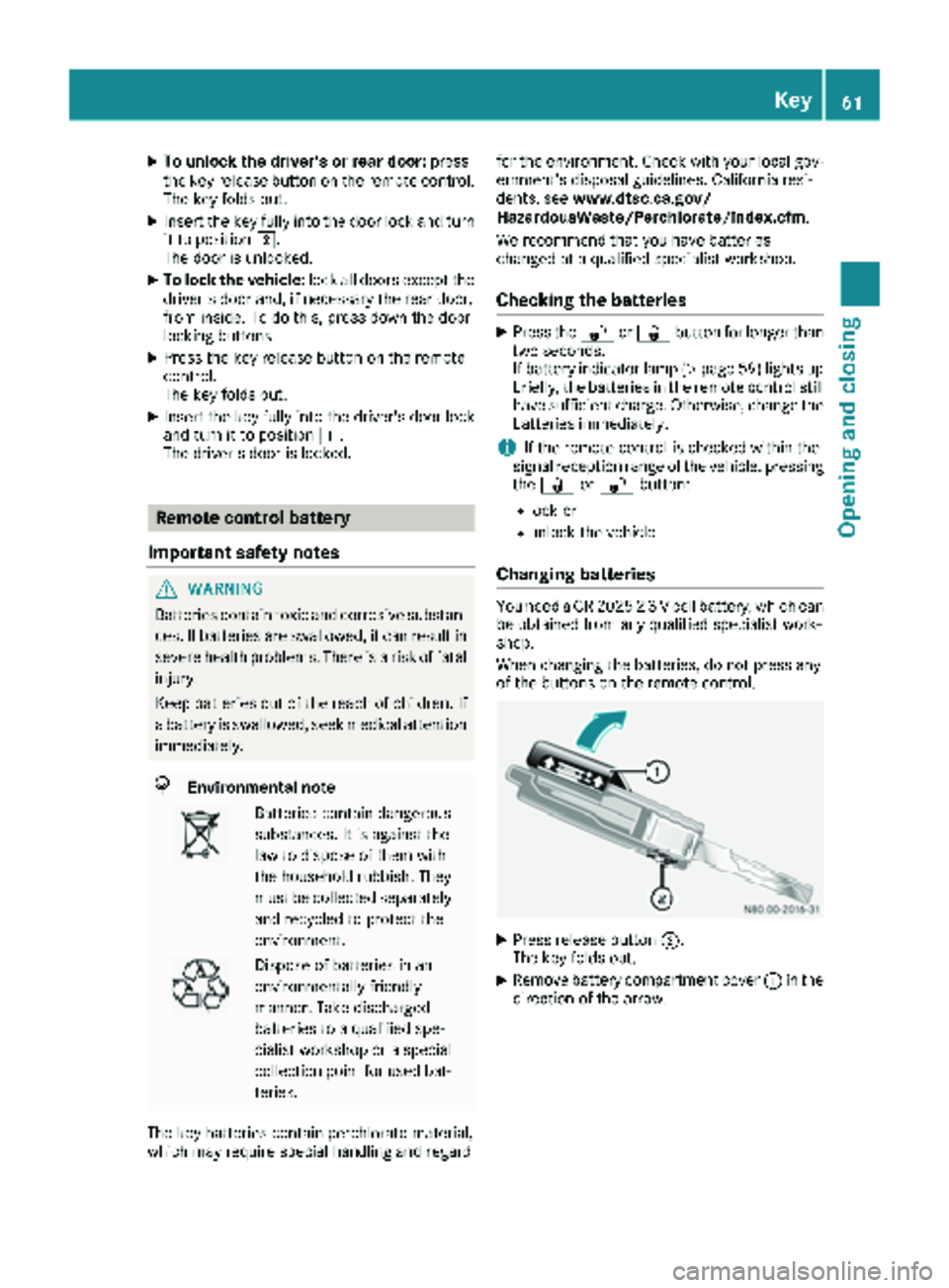
XPress release button ;.
The key folds out.
XRemove battery compartment cover :in the
direction of the arrow.
Key61
Opening and closing
Z
Page 64 of 286
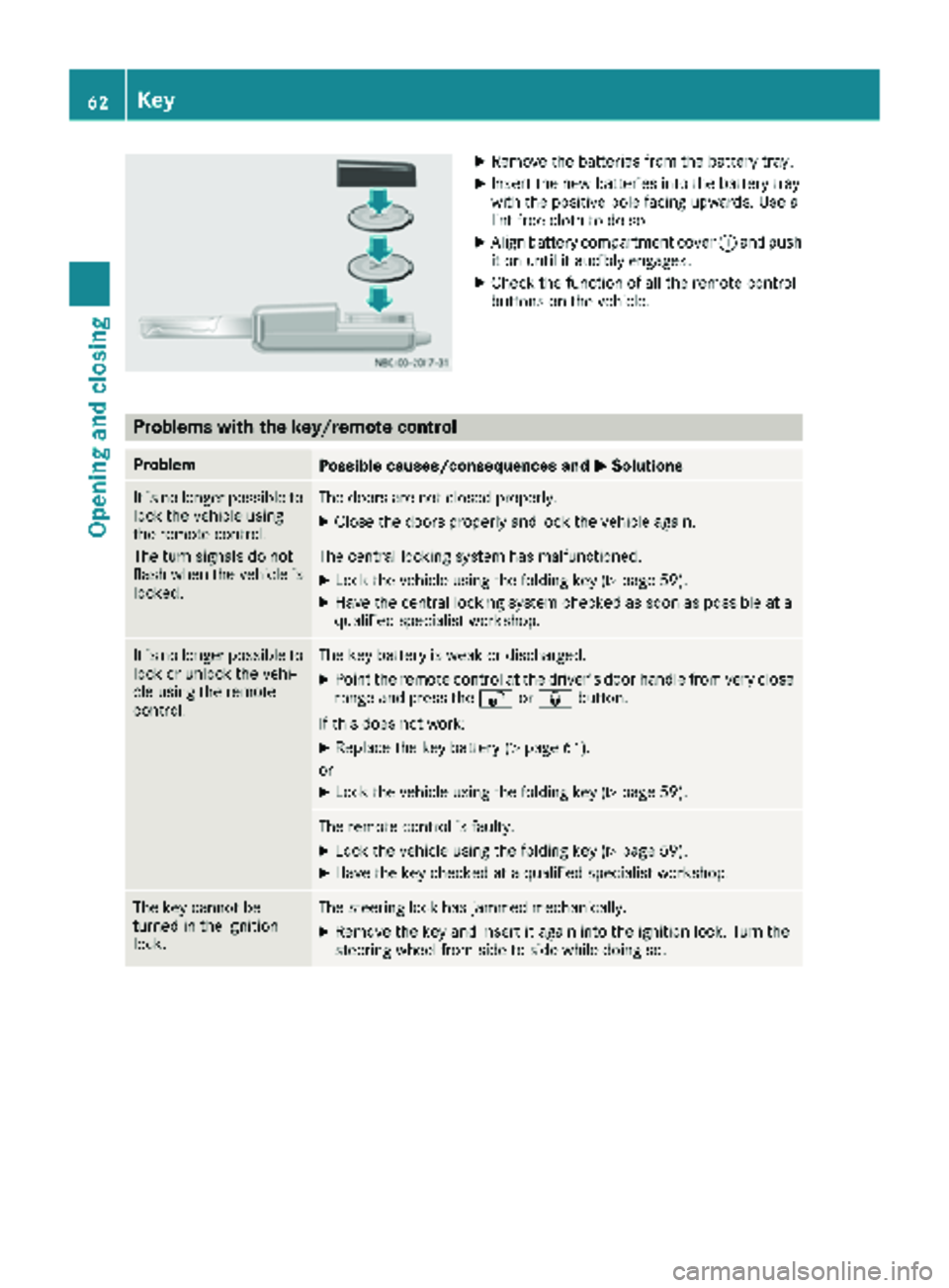
XRemove thebatterie sfrom th ebattery tray.
XInser tth ene wbatterie sint oth ebattery tray
wit hth epositive pole facing upwards. Use a
lint-free cloth to do so.
XAlign battery compartmen tcover :and push
it on until it audibly engages.
XChec kth efunction of all th eremot econtrol
buttons on th evehicle.
Problems with the key/remote control
ProblemPossible causes/consequences and MSolutions
It is no longer possibleto
loc kth evehicl eusin g
th eremot econtrol .
The tur nsignals do no t
flas hwhen th evehicl eis
locked.The door sare no tclosed properly.
XClose th edoor sproperly and loc kth evehicl eagain .
The central lockin gsystem has malfunctioned.
XLoc kth evehicl eusin gth efoldin gke y (Ypage 59).
XHav eth ecentral lockin gsystem checke das soo nas possibl eat a
qualified specialist workshop.
It is no longer possibl eto
loc kor unlock th evehi-
cle usin gth eremot e
control .The keybattery is weak or discharged.
XPoin tth eremot econtrol at th edriver' sdoor handle from ver yclose
range and press th e% or& button.
If this does no twork:
XReplac eth eke ybattery (Ypage 61).
or
XLoc kth evehicl eusin gth efoldin gke y (Ypage 59).
The remot econtrol is faulty.
XLoc kth evehicl eusin gth efoldin gke y (Ypage 59).
XHav eth eke ychecke dat aqualified specialist workshop.
The ke ycanno tbe
turne din th eignition
lock.The steering loc khas jammed mechanically.
XRemove th eke yand insert it again int oth eignition lock. Turn th e
steering whee lfrom side to side while doin gso.
62Key
Opening and closing
Page 65 of 286
ProblemPossible causes/consequences andMSolutions
The engine cannot be
started using the key.The on-board voltage is too low.
XSwitch off all non-essential consumers, such as interior lighting, and
try to start the engine again.
If this does not work:
XCheck the starter battery and charge it if necessary (Ypage 228).
or
XJump-start the vehicle (Ypage 238).
or
XConsult a qualified specialist workshop.
You have lost a key.XHave the key deactivated at a qualified specialist workshop.
XReport the loss immediately to the vehicle insurers.
XIf necessary, have the mechanical locks replaced.
Central locking
Important safety notes
GWARNING
If children are left unsupervised in the vehicle,
they could:
Ropen the doors, thus endangering other
people or road users.
Rget out and disrupt traffic.
Roperate the vehicle's equipment.
Additionally, children could set the vehicle in
motion if, for example, they:
Rrelease the parking brake.
Rshifting the automatic transmission out of
park position P
RStart the engine.
There is a risk of an accident and injury.
When leaving the vehicle, always take the
SmartKey with you and lock the vehicle. Never
leave children or animals unattended in the
vehicle. Always keep the SmartKey out of
reach of children.
GWARNING
If persons, particularly children are subjected to prolonged exposure to extreme heat or
cold, there is a risk of injury, possibly even
fatal. Never leave children unattended in the
vehicle.
You can open a locked front door from the inside
at any time. You can open a locked sliding door
or rear door from the inside if it has been previ-
ously unlocked from inside.
Locking and unlocking manually
Central locking buttons
Use the central locking buttons to centrally
lock/unlock either the entire vehicle or just the sliding doors and rear doors from the inside.
Central locking63
Opening and closing
Z
Page 79 of 286
XTo set the armrest angle:fold the armrest
upwards by more than 45° ;.
The armrest is released.
XFold armrest =forwards to the stop.
XSlowly fold the armrest upwards to the
desired position.
XTo fold the armrest up: if necessary, fold the
armrest upwards :by more than 90°.
Seat heating
GWARNING
Repeatedly switching on the seat heating can
cause the seat cushion and backrest pads to
become very hot. The health of persons with
limited temperature sensitivity or a limited
ability to react to excessively high tempera-
tures may be affected or they may even suffer
burn-like injuries. There is a risk of injury.
Therefore, do not switch the seat heating on
repeatedly.
!When you leave your seat, do not place any-
thing on the seat and switch off the seat heat-
ing. Do not switch the seat heating on when
the seat is not occupied, e.g. when driving
without a front passenger. The seat heating
may otherwise overheat, causing damage to
the seat.
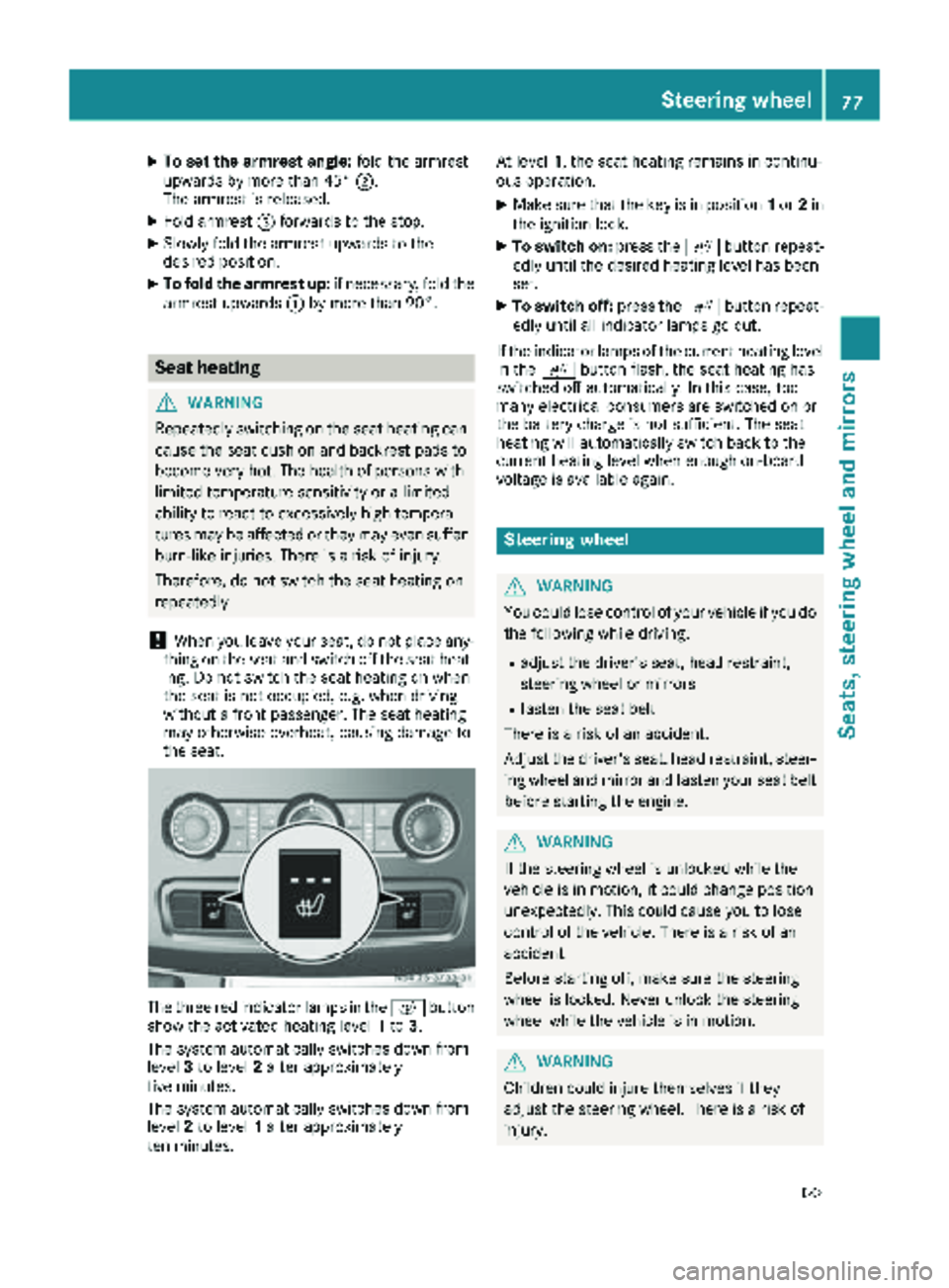
The three red indicator lamps in the cbutton
show the activated heating level 1to 3.
The system automatically switches down from
level 3to level 2after approximately
five minutes.
The system automatically switches down from
level 2to level 1after approximately
ten minutes. At level
1, the seat heating remains in continu-
ous operation.
XMake sure that the key is in position 1or 2in
the ignition lock.
XTo switch on: press thecbutton repeat-
edly until the desired heating level has been
set.
XTo switch off: press thecbutton repeat-
edly until all indicator lamps go out.
If the indicator lamps of the current heating level
in the cbutton flash, the seat heating has
switched off automatically. In this case, too
many electrical consumers are switched on or
the battery charge is not sufficient. The seat
heating will automatically switch back to the
current heating level when enough on-board
voltage is available again.
Steering wheel
GWARNING
You could lose control of your vehicle if you do the following while driving:
Radjust the driver's seat, head restraint,
steering wheel or mirrors
Rfasten the seat belt
There is a risk of an accident.
Adjust the driver's seat, head restraint, steer-
ing wheel and mirror and fasten your seat belt before starting the engine.
GWARNING
If the steering wheel is unlocked while the
vehicle is in motion, it could change position
unexpectedly. This could cause you to lose
control of the vehicle. There is a risk of an
accident.
Before starting off, make sure the steering
wheel is locked. Never unlock the steering
wheel while the vehicle is in motion.
GWARNING
Children could injure themselves if they
adjust the steering wheel. There is a risk of
injury.
Steering wheel77
Seats, steering wheel and mirrors
Z
Page 88 of 286
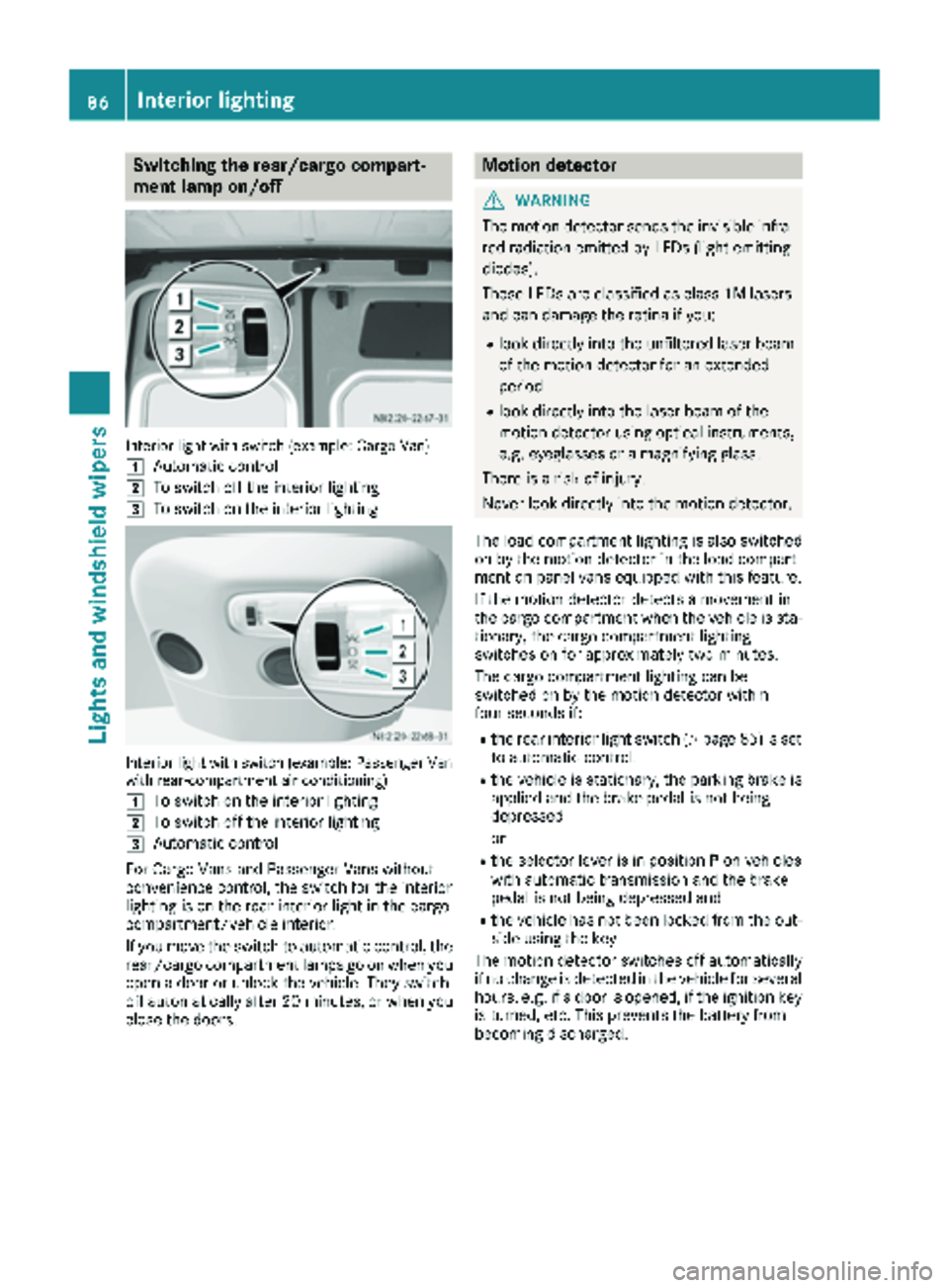
Switching the rear/cargo compart-
ment lamp on/off
Interior light with switch (example: Cargo Van)
1
Automatic control
2To switch off the interior lighting
3To switch on the interior lighting
Interior light with switch (example: Passenger Van
with rear-compartment air conditioning)
1
To switch on the interior lighting
2To switch off the interior lighting
3Automatic control
For Cargo Vans and Passenger Vans without
convenience control, the switch for the interior
lighting is on the rear interior light in the cargo
compartment/vehicle interior.
If you move the switch to automatic control, the
rear/cargo compartment lamps go on when you
open a door or unlock the vehicle. They switch
off automatically after 20 minutes, or when you
close the doors.
Motion detector
GWARNING
The motion detector sends the invisible infra- red radiation emitted by LEDs (light emitting
diodes).
These LEDs are classified as class 1M lasers
and can damage the retina if you:
Rlook directly into the unfiltered laser beam
of the motion detector for an extended
period
Rlook directly into the laser beam of the
motion detector using optical instruments,
e.g. eyeglasses or a magnifying glass.
There is a risk of injury.
Never look directly into the motion detector.
The load compartment lighting is also switched
on by the motion detector in the load compart-
ment on panel vans equipped with this feature.
If the motion detector detects a movement in
the cargo compartment when the vehicle is sta-
tionary, the cargo compartment lighting
switches on for approximately two minutes.
The cargo compartment lighting can be
switched on by the motion detector within
four seconds if:
Rthe rear interior light switch (Ypage 85) is set
to automatic control.
Rthe vehicle is stationary, the parking brake is
applied and the brake pedal is not being
depressed
or
Rthe selector lever is in position Pon vehicles
with automatic transmission and the brake
pedal is not being depressed and
Rthe vehicle has not been locked from the out-
side using the key
The motion detector switches off automatically
if no change is detected in the vehicle for several
hours, e.g. if a door is opened, if the ignition key
is turned, etc. This prevents the battery from
becoming discharged.
86Interior lighting
Lights and windshield wipers
Page 108 of 286
GWARNING
When the auxiliary heating is switched on,
parts of the vehicle can become very hot, e.g.
the exhaust system.
Flammable materials such as leaves, grass or
twigs may ignite if they come into contact
with:
Rhot parts of the exhaust system
Rthe exhaust gas itself
There is a risk of fire.
When the auxiliary heating is switched on,
make sure that:
Rno flammable materials come into contact
with hot vehicle components
Rthe exhaust gas can escape from the
exhaust pipe unhindered
Rthe exhaust gas does not come into contact
with flammable materials.
!Turn on the auxiliary heating at least once a
month for approximately 10 minutes. The
auxiliary heating could otherwise be dam-
aged.
!Make sure that the flow of hot air is not
blocked. The auxiliary heating will otherwise
overheat and switch off.
Your vehicle may be equipped with either an
auxiliary hot-water heater or an auxiliary warm-
air heater. Adjustment and operation of the:
Rhot-water auxiliary heater is done via the on-
board computer and with the auxiliary heating
button in the control panel (
Ypage 107) or
with the remote control (Ypage 108).
Rauxiliary warm-air heater is done via the timer
above the overhead control panel
(
Ypage 112).
The auxiliary heating works independently of the
engine and supplements the climate control
system in the vehicle. The auxiliary heating
heats the air in the vehicle interior to the tem-
perature set.
If your vehicle is equipped with a hot-water aux-
iliary heater, the auxiliary heating also keeps the
coolant warm. This way, the load on the engine
is minimized and fuel is saved.
The heater booster function (
Ypage 110) of the
auxiliary heating supports the climate control system when the engine is running and the out-
side temperature is low.
You can use the auxiliary heating at an outside
temperature of up to 39 ‡ (4 †). At an outside
temperature above 39 ‡ (4 †) the auxiliary
heating system and the heater booster function
switch off automatically.
Hot-water auxiliary heating
Heating time
The heating time when operating the auxiliary
heating with the vehicle is stationary without the
engine running depends on the outside temper-
ature and the electrical consumers switched on.
Outside
tempera-
tureHeating
timePossible startup
procedures
Above 23‡
(Ò5 †)Approx.
20 minutes6
23 ‡
(Ò5 †) to
5 ‡
( Ò15 †)Approx.
40 minutes3
Below 5‡
( Ò 15 †)Approx.
50 minutes2
You can then switch on the auxiliary heating
again.
If you do not start the engine for a while, the total
duration of heating is limited to a maximum of
120 minutes to protect the starter battery.
Switching on the auxiliary heating is then auto-
matically disabled. You can, for example, switch
on the auxiliary heating without the engine run-
ning if the outside temperature is Ò5‡( Ò20 †) a
maximum of two times. If you try it again, the
indicator lamps in the ybutton
(
Ypage 107) flash alternately for approximately
2 minutes to signal switch-on interlock. The aux-
iliary heating cannot be switched on without
starting the engine.
When the condition of charge of the starter bat-
tery is sufficient again, the switch-on interlock
will be deactivated. To charge the starter bat-
tery, let the engine run. The engine run time
required to reach the necessary condition of
charge depends on the outside temperature and
on the electrical consumers switched on.
106Operating the auxiliary heating system
Climate control
Page 111 of 286
SignalingMeaning
Flashes redAuxiliary heating switched
off
Lights up
greenAuxiliary heating switched
on
Flashes greenChange operating duration
active
Flashes alter-
nately red and
greenRemote control in synchro-
nizing mode
iWhen the remote control battery is weak,
indicator lamp :flashes red rapidly. Replace
the remote control battery (
Ypage 110).
You can find information on further lamp sta-
tuses in the "Problems with the hot-water aux-
iliary heater" section (
Ypage 111).
Switching the remote control on/off
The remote control switches to standby mode
after 10 seconds. Indicator lamp :goes out.
XTo switch on: press and hold the Übutton
until indicator lamp :lights up red.
If a connection between the remote control
and the receiver in the vehicle has been estab-
lished and indicator lamp ::
Rflashes red, the auxiliary heating is switched
off.
Rlights up green, the auxiliary heating is
switched on.
XTo switch off:press and hold the Übut-
ton until indicator lamp :goes out.
Switching the auxiliary heating on/off
XSwitch on the remote control.
XTo switch on: when indicator lamp :flashes
red, press the bbutton.
During data transmission, indicator lamp :
lights up red.
When indicator lamp :lights up green, the
auxiliary heating is switched on.
XTo switch off: when indicator lamp :lights
up green, press the bbutton.
During data transmission, indicator lamp :
lights up red.
When indicator lamp :flashes red, the aux-
iliary heating is switched off.
Changing the operating duration
XSwitch on the remote control.
XWhen indicator lamp :flashes red, press
Ü andb simultaneously.
Indicator lamp :flashes green.
XPress the Übutton repeatedly until the
desired operating duration is shown.
R20 minutes
Indicator lamp :flashes green twice.
R30 minutes
Indicator lamp :flashes green three
times.
R40 minutes
Indicator lamp :flashes green four times.
XPress the bbutton.
During data transmission, indicator lamp :
lights up red.
If indicator lamp :emits two long, green
flashes, the selected operating duration is
stored.
iIf no adjustment is made, indicator lamp :
flashes six times and the remote control goes
into standby mode.
Synchronizing the remote control
XPress the yauxiliary heating button in the
control panel (Ypage 107) for longer than
10 seconds.
When you press and hold the ybutton, the
red indicator lamp lights up in the butt
on.
When the red indicator lamp in the ybut-
ton flashes, the receiver in the vehicle is ready
for synchronizing.
XPress and hold the Üremote control but-
ton until indicator lamp :lights up red.
If there is an active connection between the
remote control and the receiver, indicator
lamp :flashes alternately red and green.
The remote control is in synchronizing mode.
iIf you press the Übutton again on the
remote control after starting synchronization,
you will only synchronize this remote control
unit with the receiver. Any other remote con-
trol units that were synchronized will be
cleared. Indicator lamp :flashes alternately
red and green (very slowly).
XPress the bbutton on the remote control.
During data transmission, indicator lamp :
lights up red.
When remote control indicator lamp :emits
two long green flashes, the selected operat-
Operating the auxiliary heating system109
Climate control
Z
Page 112 of 286
ing time is synchronized. The indicator lamp in
they auxiliary heating button goes out.
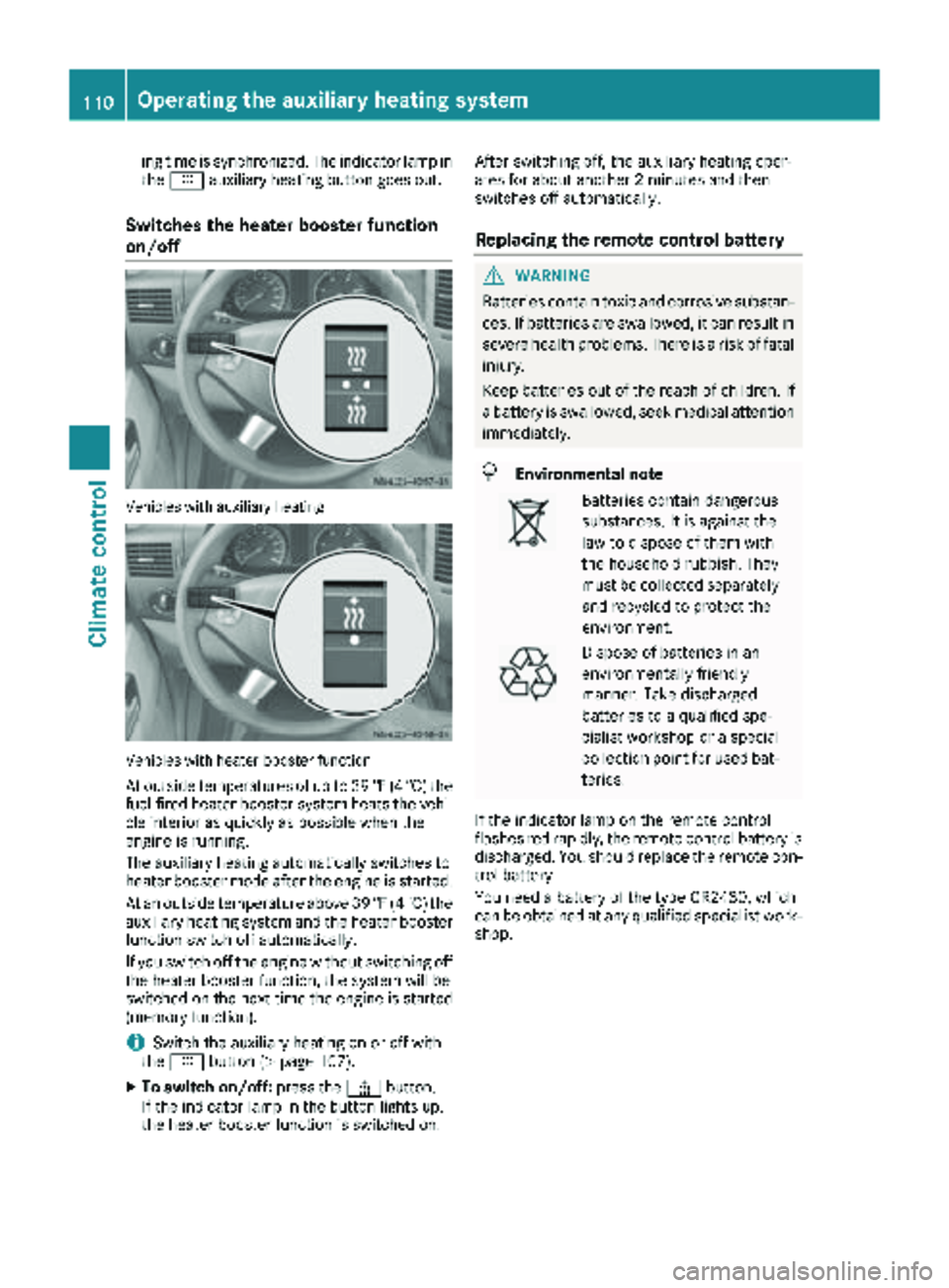
Switches the heater booster function
on/off
Vehicles with auxiliary heating
Vehicles with heater booster function
At outside temperatures of up to 39 ‡(4 †) the
fuel-fired heater booster system heats the vehi-
cle interior as quickly as possible when the
engine is running.
The auxiliary heating automatically switches to
heater booster mode after the engine is started.
At an outside temperature above 39 ‡(4 †) the
auxiliary heating system and the heater booster
function switch off automatically.
If you switch off the engine without switching off
the heater booster function, the system will be
switched on the next time the engine is started (memory function).
iSwitch the auxiliary heating on or off with
the y button (Ypage 107).
XTo switch on/off: press the¢button.
If the indicator lamp in the button lights up,
the heater booster function is switched on. After switching off, the auxiliary heating oper-
ates for about another 2 minutes and then
switches off automatically.
Replacing the remote control battery
GWARNING
Batteries contain toxic and corrosive substan- ces. If batteries are swallowed, it can result in
severe health problems. There is a risk of fatalinjury.
Keep batteries out of the reach of children. If
a battery is swallowed, seek medical attention
immediately.
HEnvironmental note
Batteries contain dangerous
substances. It is against the
law to dispose of them with
the household rubbish. They
must be collected separately and recycled to protect the
environment.
Dispose of batteries in an
environmentally friendly
manner. Take discharged
batteries to a qualified spe-
cialist workshop or a special
collection point for used bat-
teries.
If the indicator lamp on the remote control
flashes red rapidly, the remote control battery is
discharged. You should replace the remote con-
trol battery.
You need a battery of the type CR2430, which
can be obtained at any qualified specialist work-
shop.
110Operating the auxiliary heating system
Climate control
Page 113 of 286
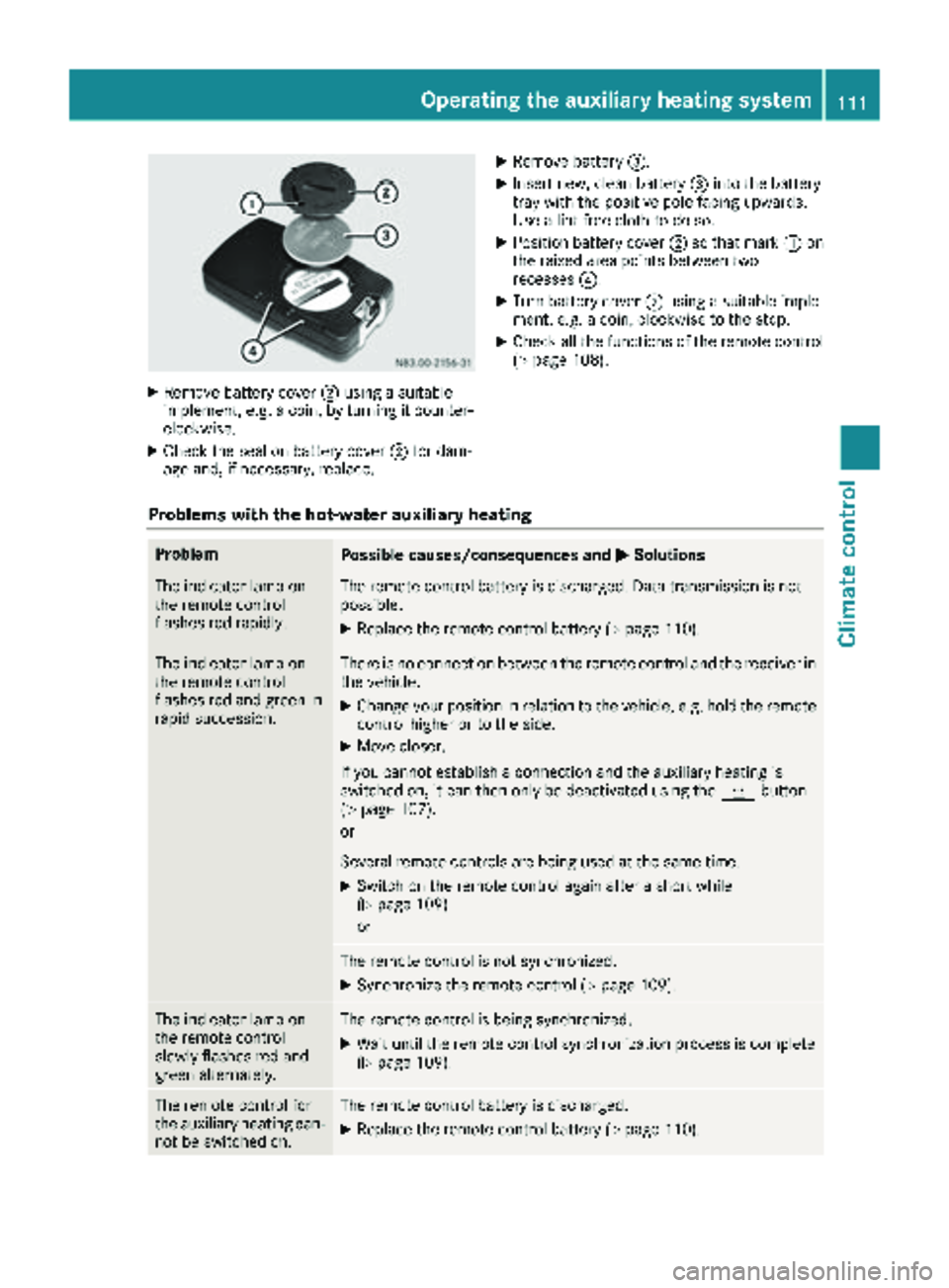
XRemove battery cover;usin g asuitable
implement ,e.g. acoin, by turnin git counter-
clockwise.
XChec kth eseal on battery cover ;for dam-
age and ,if necessary, replace .
XRemove battery=.
XInsertnew, clean battery =intoth ebattery
tray wit hth epositive pole facing upwards.
Use alint-free cloth to do so.
XPosition battery cover ;so that mar k: on
th eraised area points between two
recesses ?.
XTurn battery cover ;usin g asuitable imple-
ment, e.g. acoin, clockwise to th estop.
XChec kall th efunction sof th eremot econtrol
(Ypage 108).
Problems with the hot-water auxiliary heating
ProblemPossible causes/consequences and MSolutions
The indicator lamp on
theremot econtrol
flashes red rapidly.The remot econtrol battery is discharged. Dat atransmission is no t
possible.
XReplac eth eremot econtrol battery (Ypage 110).
The indicator lamp on
theremot econtrol
flashes red and green in
rapi dsuccession.There is no connection between th eremot econtrol and th ereceiver in
th evehicle.
XChange your position in relation to th evehicle, e.g. hold th eremot e
control higher or to th eside .
XMov ecloser .
If you canno testablis h aconnection and th eauxiliary heating is
switched on ,it can then only be deactivated usin gth ey button
(
Ypage 107).
or
Several remot econtrol sare bein gused at th esam etime.
XSwitc hon th eremot econtrol again after ashort while
(Ypage 109).
or
The remot econtrol is no tsynchronized.
XSynchroniz eth eremot econtrol (Ypage 109).
The indicator lamp on
theremot econtrol
slowly flashes red and
green alternately.The remot econtrol is bein gsynchronized.
XWait until th eremot econtrol synchronization process is complete
(Ypage 109).
The remot econtrol for
th eauxiliary heating can -
no tbe switched on .The remotecontrol battery is discharged.
XReplac eth eremot econtrol battery (Ypage 110).
Operating the auxiliary heating system111
Climate control
Z