battery MERCEDES-BENZ SPRINTER 2017 MY17 Operator’s Manual
[x] Cancel search | Manufacturer: MERCEDES-BENZ, Model Year: 2017, Model line: SPRINTER, Model: MERCEDES-BENZ SPRINTER 2017Pages: 286, PDF Size: 4.36 MB
Page 196 of 286
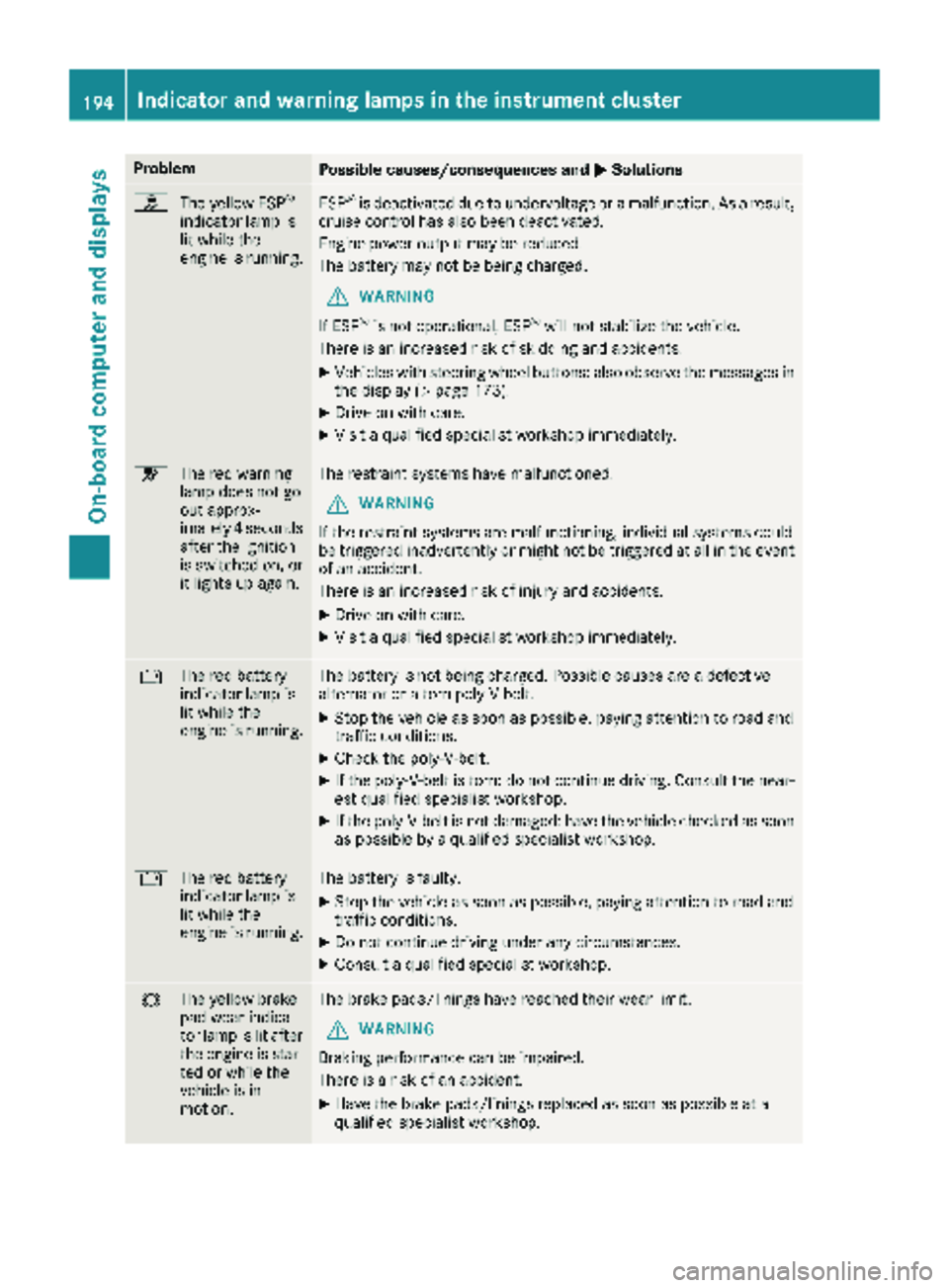
ProblemPossible causes/consequences andMSolutions
h
The yellow ESP®
indicator lamp is
lit while the
engine is running.ESP®is deactivated due to undervoltage or a malfunction. As a result,
cruise control has also been deactivated.
Engine power output may be reduced.
The battery may not be being charged.
GWARNING
If ESP
®is not operational, ESP®will not stabilize the vehicle.
There is an increased risk of skidding and accidents.
XVehicles with steering wheel buttons: also observe the messages in the display (Ypage 173).
XDrive on with care.
XVisit a qualified specialist workshop immediately.
6 The red warning
lamp does not go
out approx-
imately 4 seconds
after the ignition
is switched on, or
it lights up again.The restraint systems have malfunctioned.
GWARNING
If the restraint systems are malfunctioning, individual systems could
be triggered inadvertently or might not be triggered at all in the event
of an accident.
There is an increased risk of injury and accidents.
XDrive on with care.
XVisit a qualified specialist workshop immediately.
# The red battery
indicator lamp is
lit while the
engine is running.The battery is not being charged. Possible causes are a defective
alternator or a torn poly-V-belt.
XStop the vehicle as soon as possible, paying attention to road and
traffic conditions.
XCheck the poly-V-belt.
XIf the poly-V-belt is torn: do not continue driving. Consult the near-
est qualified specialist workshop.
XIf the poly-V-belt is not damaged: have the vehicle checked as soon
as possible by a qualified specialist workshop.
#The red battery
indicator lamp is
lit while the
engine is running.The battery is faulty.
XStop the vehicle as soon as possible, paying attention to road and
traffic conditions.
XDo not continue driving under any circumstances.
XConsult a qualified specialist workshop.
#The yellow brake
pad wear indica-
tor lamp is lit after
the engine is star-
ted or while the
vehicle is in
motion.The brake pads/linings have reached their wear limit.
GWARNING
Braking performance can be impaired.
There is a risk of an accident.
XHave the brake pads/linings replaced as soon as possible at a
qualified specialist workshop.
194Indicator and warning lamps in the instrument cluster
On-board computer and displays
Page 208 of 286
12 V socket
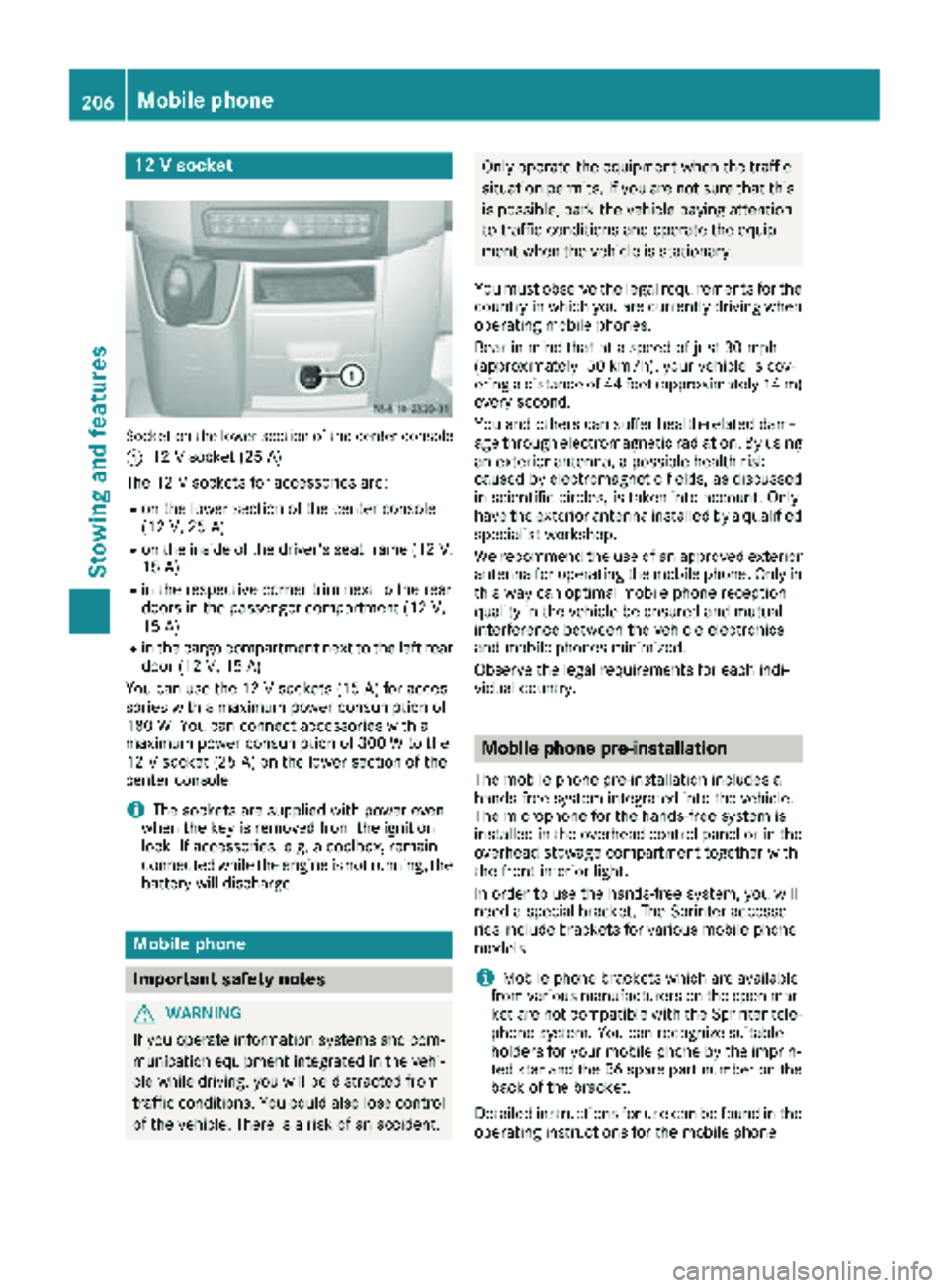
Socket on the lower section of the center console
:
12 V socket (25 A)
The 12 V sockets for accessories are:
Ron the lower section of the center console
(12 V, 25 A)
Ron the inside of the driver's seat frame (12V,
15 A)
Rin the respective corner trim next to the rear
doors in the passenger compartment (12 V,
15 A)
Rin the cargo compartment next to the left rear door (12 V,15 A)
You can use the 12 V sockets (15 A) for acces-
sories with a maximum power consumption of
180 W. You can connect accessories with a
maximum power consumption of 300 W to the
12 V socket (25 A) on the lower section of the
center console.
iThe sockets are supplied with power even
when the key is removed from the ignition
lock. If accessories, e.g. a coolbox, remain
connected while the engine is not running, the
battery will discharge.
Mobile phone
Important safety notes
GWARNING
If you operate information systems and com-
munication equipment integrated in the vehi-
cle while driving, you will be distracted from
traffic conditions. You could also lose control
of the vehicle. There is a risk of an accident.
Only operate the equipment when the traffic
situation permits. If you are not sure that this is possible, park the vehicle paying attention
to traffic conditions and operate the equip-
ment when the vehicle is stationary.
You must observe the legal requirements for the
country in which you are currently driving when
operating mobile phones.
Bear in mind that at a speed of just 30 mph
(approximately 50 km/h), your vehicle is cov-
ering a distance of 44 feet (approximately 14 m)
every second.
You and others can suffer health-related dam-
age through electromagnetic radiation. By using
an exterior antenna, a possible health risk
caused by electromagnetic fields, as discussed
in scientific circles, is taken into account. Only
have the exterior antenna installed by a qualified
specialist workshop.
We recommend the use of an approved exterior
antenna for operating the mobile phone. Only in
this way can optimal mobile phone reception
quality in the vehicle be ensured and mutual
interference between the vehicle electronics
and mobile phones minimized.
Observe the legal requirements for each indi-
vidual country.
Mobile phone pre-installation
The mobile phone pre-installation includes a
hands-free system integrated into the vehicle.
The microphone for the hands-free system is
installed in the overhead control panel or in the
overhead stowage compartment together with
the front interior light.
In order to use the hands-free system, you will
need a special bracket. The Sprinter accesso-
ries include brackets for various mobile phone
models.
iMobile phone brackets which are available
from various manufacturers on the open mar- ket are not compatible with the Sprinter tele-
phone system. You can recognize suitable
holders for your mobile phone by the imprin-
ted star and the B6 spare part number on the back of the bracket.
Detailed instructions for use can be found in the
operating instructions for the mobile phone
206Mobile phone
Stowing and features
Page 209 of 286
bracket and in the separate operating instruc-
tions for the mobile phone pre-installation.
iThe mobile phone battery is charged
depending on the condition of charge and the
position of the key in the ignition lock. The
mobile phone display indicates the charging
process.
Additional communications equip-
ment
Important safety notes
GWARNING
If you operate mobile communication equip-
ment while driving, you will be distracted from traffic conditions. You could also lose control
of the vehicle. There is a risk of an accident.
Only operate this equipment when the vehicle
is stationary.
You must observe the legal requirements for the
country in which you are currently driving when
operating mobile communication equipment.
Please remember, a navigation system does not
supply information on the load-bearing capacity of bridges or the overhead clearance of under-
passes. The driver remains responsible for
safety at all times.
You and others can suffer health-related dam-
age through electromagnetic radiation. By using
an exterior antenna, a possible health risk
caused by electromagnetic fields, as discussed
in scientific circles, is taken into account. Only
have the exterior antenna installed by a qualified
specialist workshop.
You will find information on installing electrical
or electronic equipment in the “Vehicle elec-
tronics” section (
Ypage 271).
Installation for PND mobile navigation
devices
You can secure a personal navigation device
(Personal Navigation Device PND) using a com-
mercially available adapter.
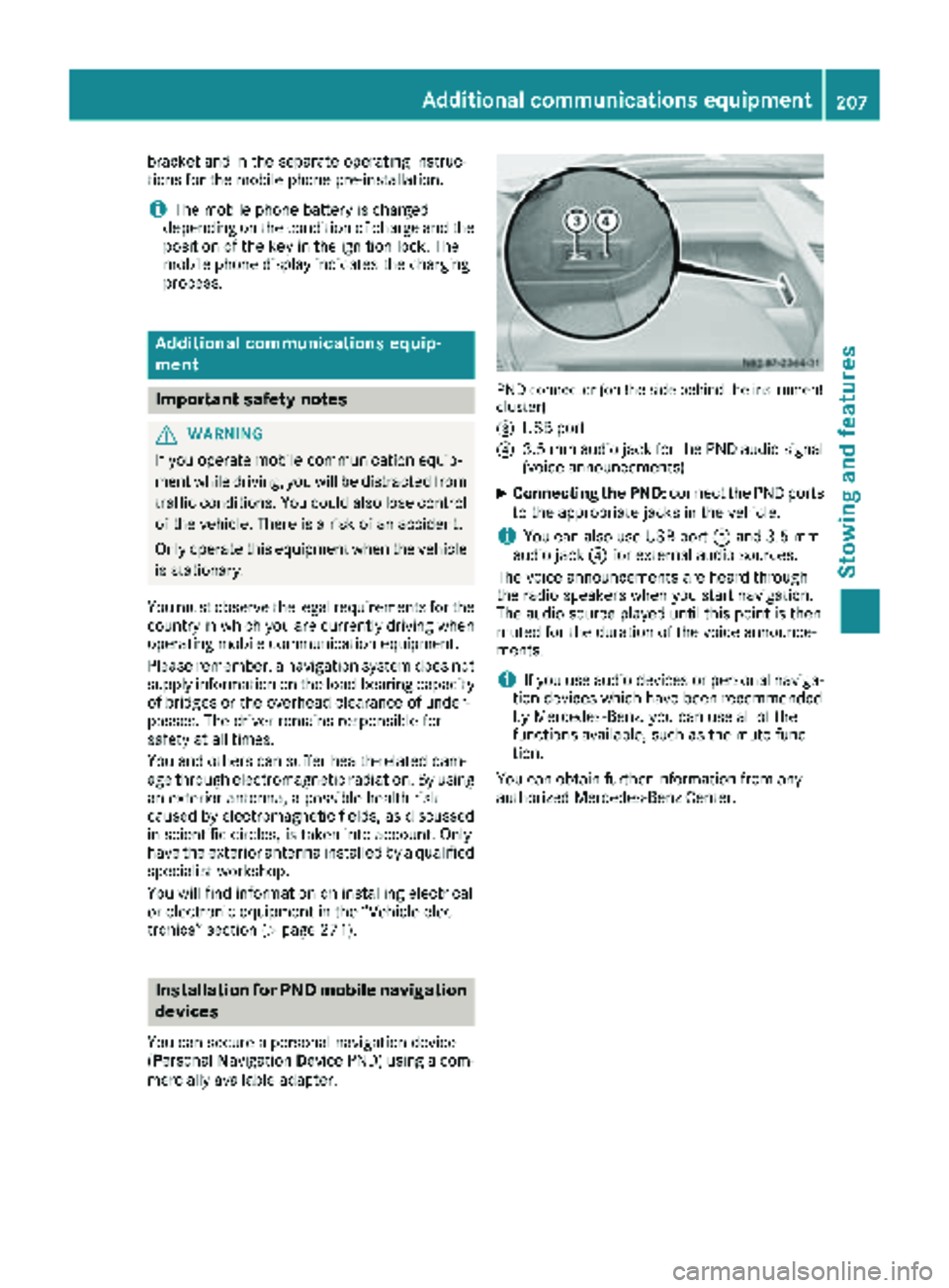
PND connector (on the side behind the instrument
cluster)
=
USB port
?3.5 mm audio jack for the PND audio signal
(voice announcements)
XConnecting the PND: connect the PND ports
to the appropriate jacks in the vehicle.
iYou can also use USB port =and 3.5 mm
audio jack ?for external audio sources.
The voice announcements are heard through
the radio speakers when you start navigation.
The audio source played until this point is then
muted for the duration of the voice announce-
ments.
iIf you use audio devices or personal naviga-
tion devices which have been recommended
by Mercedes-Benz, you can use all of the
functions available, such as the mute func-
tion.
You can obtain further information from any
authorized Mercedes-Benz Center.
Additional communications equipment207
Stowing and features
Z
Page 225 of 286
Vehicles without steering wheel buttons
XPress the4menu button on the instrument
cluster repeatedly until the ¯or°
symbol for the service appears in the display.
Additionally, you will see the remaining dis-
tance in miles ( mi
) or kilometers ( km) or the
remaining time in days ( d).
Vehicles with steering wheel buttons
XPress the VorU button on the steering
wheel until the standard display (Ypage 164)
appears in the display.
XPress the &or* button on the steering
wheel repeatedly until the service message
appears in the display, for example:
R¯ Service A in ... days
R¯Service A in ... mi(km)
Battery
Important safety notes
Work on the battery, e.g. removing or installing,
requires specialist knowledge and the use of
special tools. Therefore, always have work on
the battery carried out at a qualified specialist
workshop.
GWARNING
Work carried out incorrectly on the battery
can lead, for example, to a short circuit and
thus damage the vehicle electronics. This can
lead to function restrictions applying to
safety-relevant systems, e.g the lighting sys-
tem, the ABS (anti-lock braking system) or the
ESP
®(Electronic Stability Program). The oper-
ating safety of your vehicle may be restricted.
You could lose control of the vehicle, for
example:
Rwhen braking
Rin the event of abrupt steering maneuvers
and/or when the vehicle's speed is not
adapted to the road conditions
There is a risk of an accident.
In the event of a short circuit or a similar inci-
dent, contact a qualified specialist workshop
immediately. Do not drive any further. You
should have all work involving the battery car- ried out at a qualified specialist workshop.
Further information can be found under "ABS"
(
Ypage 53) and under "ESP®" (Ypage 55).
GWARNING
Electrostatic build-up can lead to the creation of sparks, which could ignite the highly explo-
sive gases of a battery. There is a risk of an
explosion.
Before handling the battery, touch the vehicle
body to remove any existing electrostatic
build-up.
The flammable gas mix is produced when the
battery is charged or when the vehicle is jump-
started.
Always make sure that neither you nor the bat-
tery are electro statically charged. Electrostatic
charging results, for example, from:
Rwearing synthetic clothing
Rfriction between clothing and the seat
Rdragging or pushing the battery across carpet
flooring or any other synthetic materials
Rrubbing the battery with cloths or towels.
Comply with the following safety precautions
and take protective measures when handling
batteries.
Risk of explosion. Explosive oxyhy-
drogen is produced when batteries
are being charged. Only charge bat-
teries in well-ventilated areas.
Fire, open flames and smoking are
therefore prohibited when working
on the battery. Avoid creating
sparks.
Battery acid is caustic. Avoid con-
tact with the skin, eyes or clothing.
Wear acid-proof protective gloves. If
skin or clothes are splashed with
acid, neutralize the splashes imme-
diately with soapy water or an acid
neutralizer, and then clean the affec-
ted areas with water. Consult a doc- tor if necessary.
Wear eye protection. When mixing
water and acid, the liquid can splash
into your eyes. Rinse acid splashes
to the eyes immediately with clean
Battery223
Maintenance and care
Z
Page 226 of 286
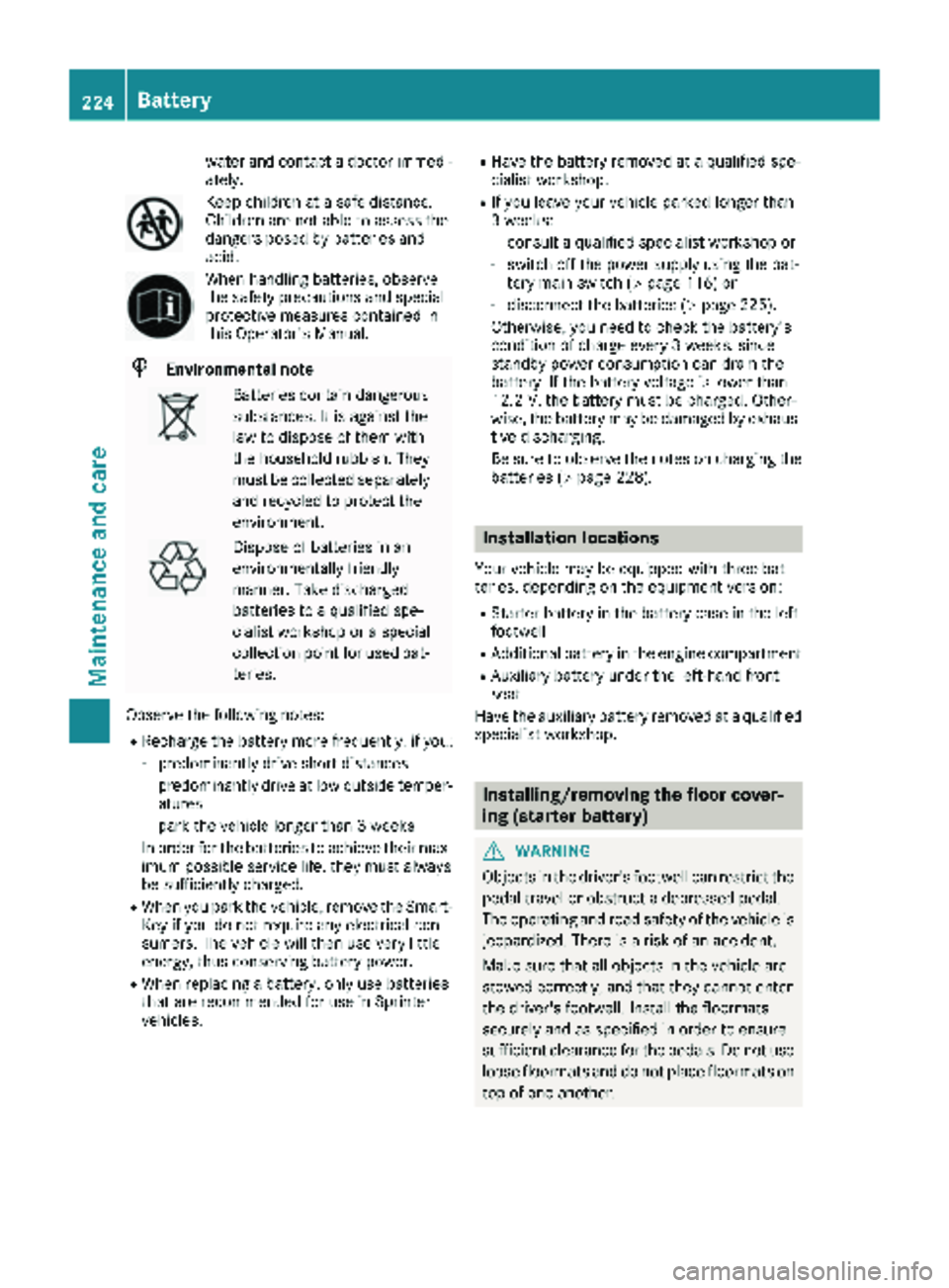
water and contact a doctor immedi-
ately.
Keep children at a safe distance.
Children are not able to assess the
dangers posed by batteries and
acid.
When handling batteries, observe
the safety precautions and special
protective measures contained in
this Operator's Manual.
HEnvironmental note
Batteries contain dangerous
substances. It is against the
law to dispose of them with
the household rubbish. They
must be collected separatelyand recycled to protect the
environment.
Dispose of batteries in an
environmentally friendly
manner. Take discharged
batteries to a qualified spe-
cialist workshop or a special
collection point for used bat-
teries.
Observe the following notes:
RRecharge the battery more frequently, if you:
-predominantly drive short distances
-predominantly drive at low outside temper-
atures
-park the vehicle longer than 3 weeks
In order for the batteries to achieve their max- imum possible service life, they must always
be sufficiently charged.
RWhen you park the vehicle, remove the Smart-Key if you do not require any electrical con-
sumers. The vehicle will then use very little
energy, thus conserving battery power.
RWhen replacing a battery, only use batteries
that are recommended for use in Sprinter
vehicles.
RHave the battery removed at a qualified spe-
cialist workshop.
RIf you leave your vehicle parked longer than
3 weeks:
-consult a qualified specialist workshop or
-switch off the power supply using the bat-
tery main switch (Ypage 116) or
-disconnect the batteries (Ypage 225).
Otherwise, you need to check the battery's
condition of charge every 3 weeks, since
standby power consumption can drain the
battery. If the battery voltage is lower than
12.2 V, the battery must be charged. Other-
wise, the battery may be damaged by exhaus-
tive discharging.
Be sure to observe the notes on charging the batteries (
Ypage 228).
Installation locations
Your vehicle may be equipped with three bat-
teries, depending on the equipment version:
RStarter battery in the battery case in the left
footwell
RAdditional battery in the engine compartment
RAuxiliary battery under the left-hand front
seat
Have the auxiliary battery removed at a qualified
specialist workshop.
Installing/removing the floor cover-
ing (starter battery)
GWARNING
Objects in the driver's footwell can restrict the pedal travel or obstruct a depressed pedal.
The operating and road safety of the vehicle is
jeopardized. There is a risk of an accident.
Make sure that all objects in the vehicle are
stowed correctly, and that they cannot enter
the driver's footwell. Install the floormats
securely and as specified in order to ensure
sufficient clearance for the pedals. Do not use
loose floormats and do not place floormats on
top of one another.
224Battery
Maintenance and care
Page 227 of 286
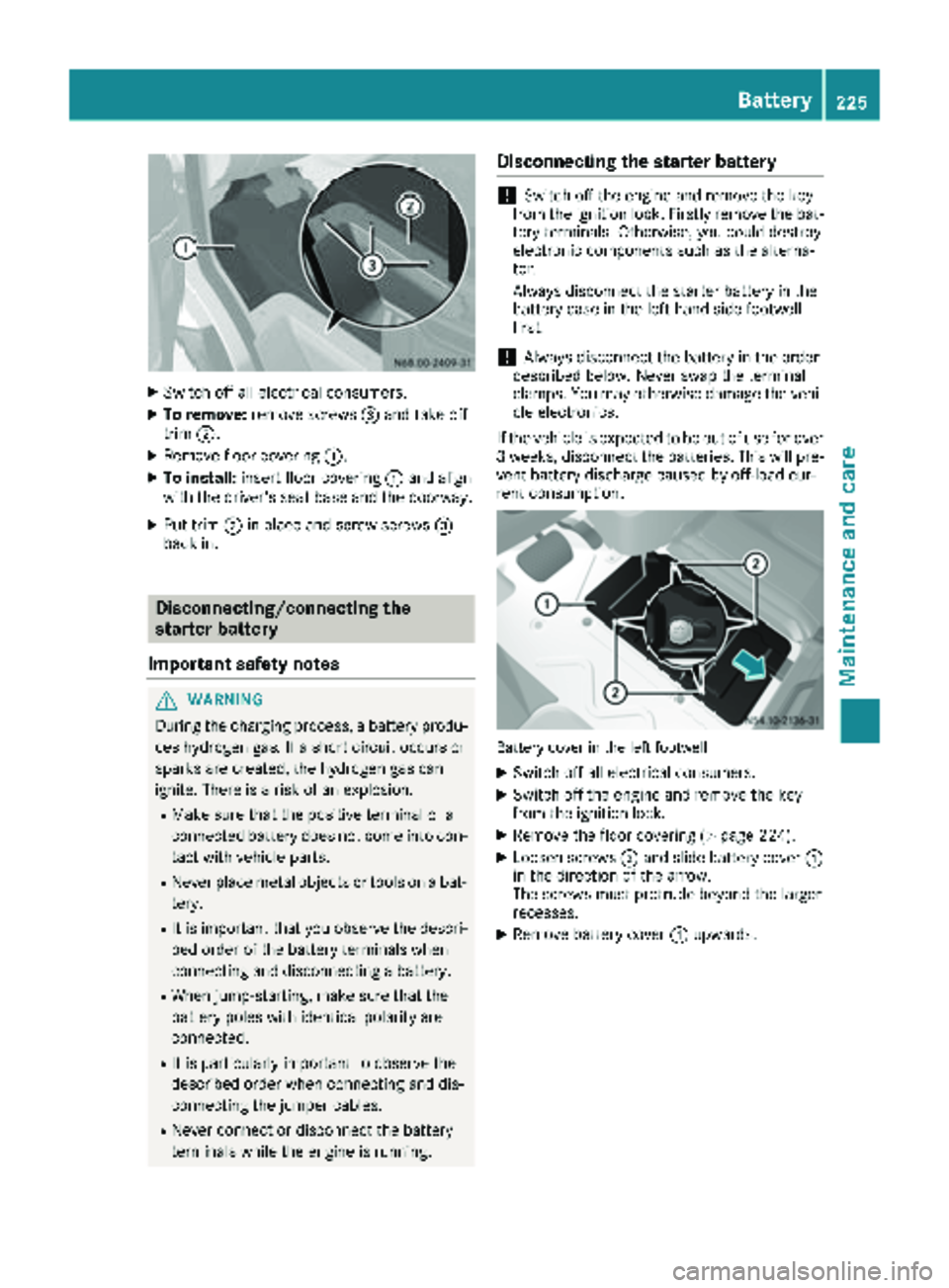
XSwitch off all electrical consumers.
XTo remove:remove screws =and take off
trim ;.
XRemove floor covering :.
XTo install:insert floor covering :and align
with the driver's seat base and the doorway.
XPut trim ;in place and screw screws =
back in.
Disconnecting/connecting the
starter battery
Important safety notes
GWARNING
During the charging process, a battery produ-
ces hydrogen gas. If a short circuit occurs or
sparks are created, the hydrogen gas can
ignite. There is a risk of an explosion.
RMake sure that the positive terminal of a
connected battery does not come into con- tact with vehicle parts.
RNever place metal objects or tools on a bat-
tery.
RIt is important that you observe the descri-
bed order of the battery terminals when
connecting and disconnecting a battery.
RWhen jump-starting, make sure that the
battery poles with identical polarity are
connected.
RIt is particularly important to observe the
described order when connecting and dis-
connecting the jumper cables.
RNever connect or disconnect the battery
terminals while the engine is running.
Disconnecting the starter battery
!Switch off the engine and remove the key
from the ignition lock. Firstly remove the bat-
tery terminals. Otherwise, you could destroy
electronic components such as the alterna-
tor.
Always disconnect the starter battery in the
battery case in the left-hand side footwell
first.
!Always disconnect the battery in the order
described below. Never swap the terminal
clamps. You may otherwise damage the vehi- cle electronics.
If the vehicle is expected to be out of use for over
3 weeks, disconnect the batteries. This will pre-
vent battery discharge caused by off-load cur-
rent consumption.
Battery cover in the left footwell
XSwitch off all electrical consumers.
XSwitch off the engine and remove the key
from the ignition lock.
XRemove the floor covering (Ypage 224).
XLoosen screws ;and slide battery cover :
in the direction of the arrow.
The screws must protrude beyond the larger
recesses.
XRemove battery cover :upwards.
Battery225
Maintenance and care
Z
Page 228 of 286
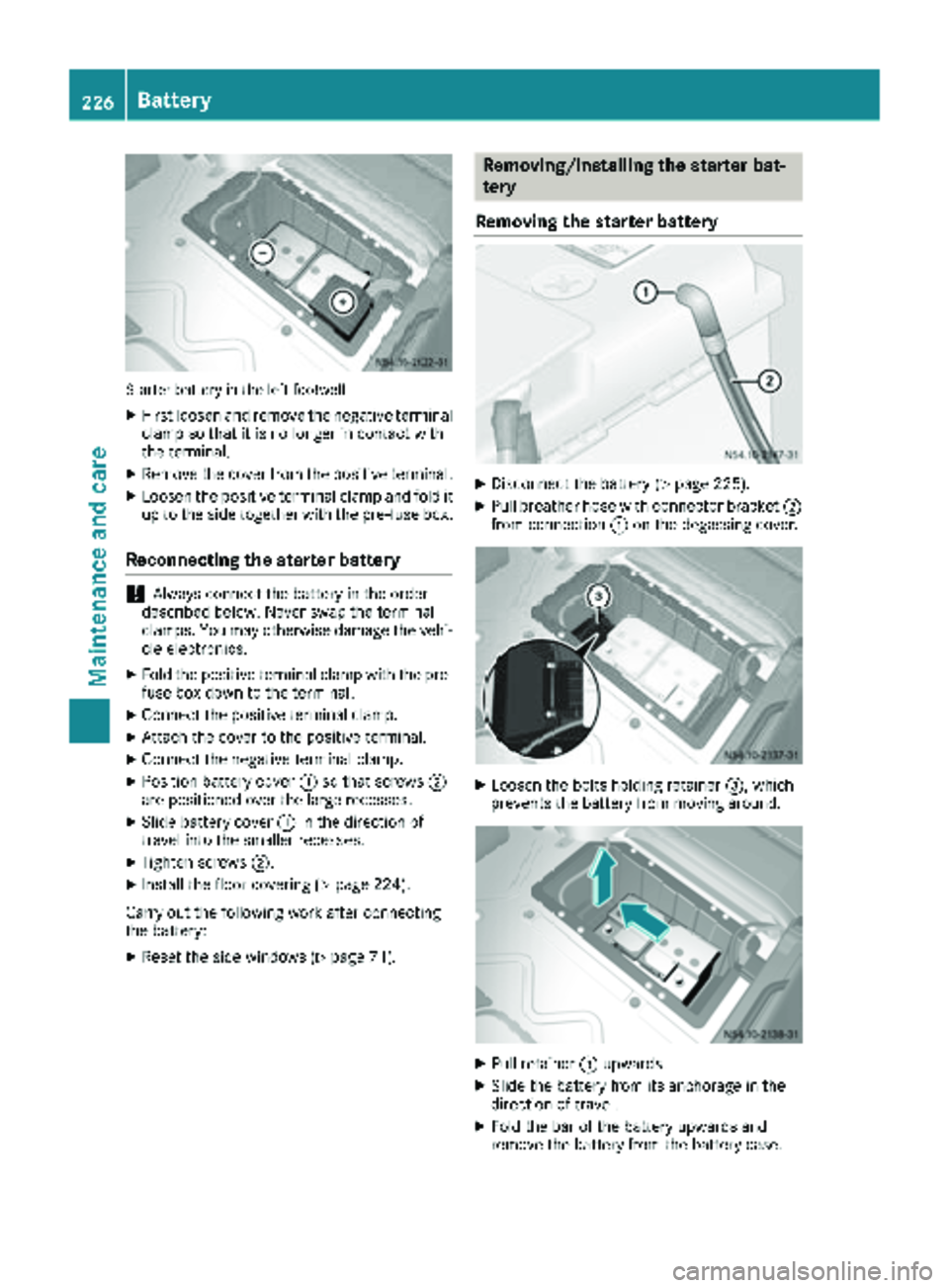
Starter battery in the left footwell
XFirst loosen and remove the negative terminal
clamp so that it is no longer in contact with
the terminal.
XRemove the cover from the positive terminal.
XLoosen the positive terminal clamp and fold it
up to the side together with the pre-fuse box.
Reconnecting the starter battery
!Always connect the battery in the order
described below. Never swap the terminal
clamps. You may otherwise damage the vehi-
cle electronics.
XFold the positive terminal clamp with the pre-
fuse box down to the terminal.
XConnect the positive terminal clamp.
XAttach the cover to the positive terminal.
XConnect the negative terminal clamp.
XPosition battery cover :so that screws ;
are positioned over the large recesses.
XSlide battery cover :in the direction of
travel into the smaller recesses.
XTighten screws ;.
XInstall the floor covering (Ypage 224).
Carry out the following work after connecting
the battery:
XReset the side windows (Ypage 71).
Removing/installing the starter bat-
tery
Removing the starter battery
XDisconnect the battery (Ypage 225).
XPull breather hose with connector bracket ;
from connection :on the degassing cover.
XLoosen the bolts holding retainer =, which
prevents the battery from moving around.
XPull retainer =upwards.
XSlide the battery from its anchorage in the
direction of travel.
XFold the bar of the battery upwards and
remove the battery from the battery case.
226Battery
Maintenance and care
Page 229 of 286
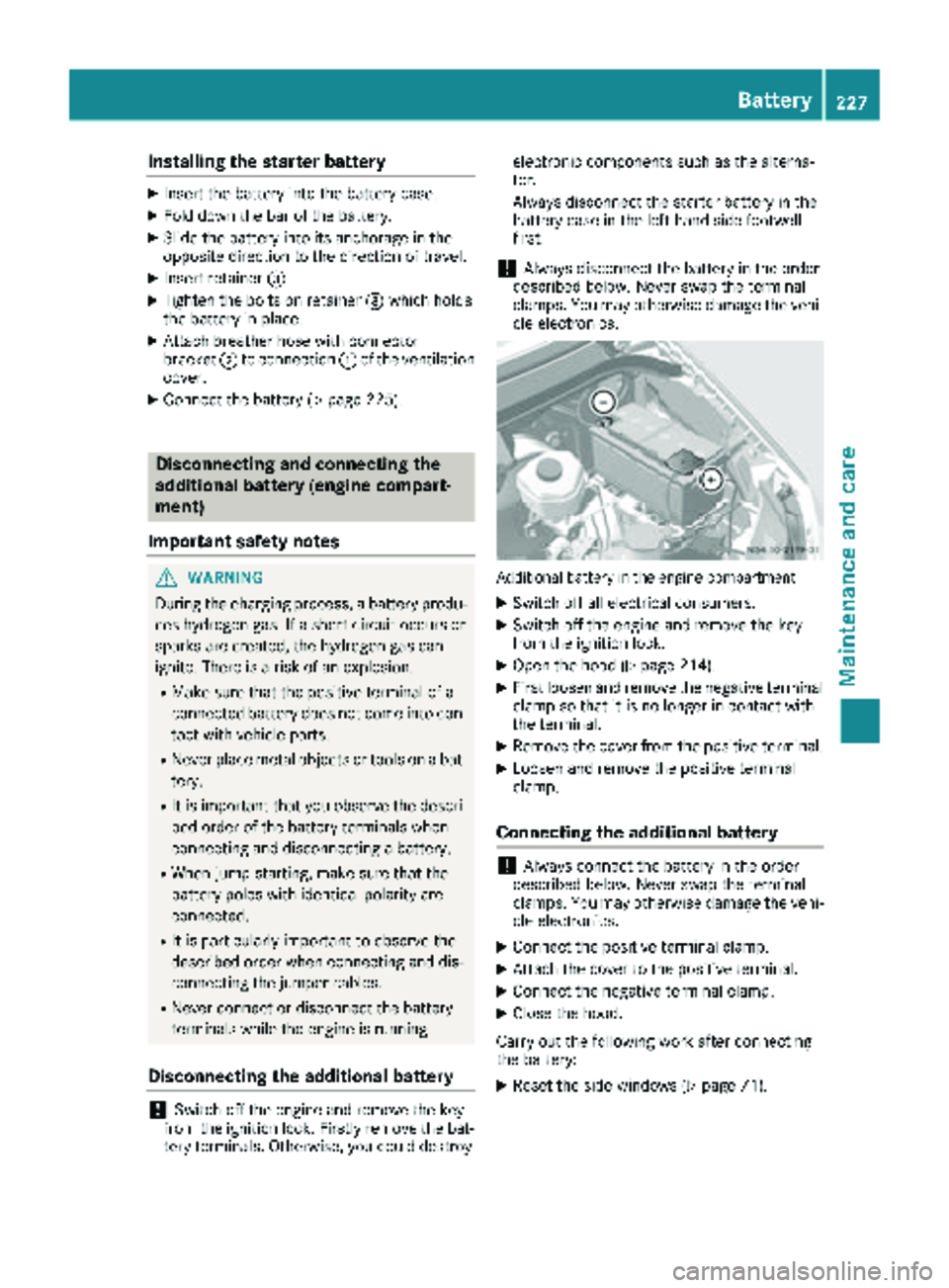
Installing the starter battery
XInsertth ebattery int oth ebattery case.
XFold down th ebar of th ebattery.
XSlide th ebattery int oits anchorage in th e
opposit edirection to th edirection of travel .
XInsertretainer =.
XTightenth ebolt son retainer =whic hhold s
th ebattery in place.
XAttac hbreather hos ewit hconnecto r
bracke t; to connection :of th eventilation
cover .
XConnect th ebattery (Ypage 225).
Disconnecting and connecting the
additional battery (engine compart-
ment)
Important safety notes
GWARNIN G
During th echarging process, abattery produ-
ce shydrogen gas. If ashort circuit occur sor
sparks are created, th ehydrogen gas can
ignite. Ther eis aris kof an explosion .
RMakesur ethat th epositive termina lof a
connecte dbattery does no tcome int ocon-
tac twit hvehicl eparts.
RNever plac emetal objects or tools on abat -
tery.
RIt is important that you observ eth edescri-
bed order of th ebattery terminals when
connecting and disconnecting abattery.
RWhen jump-starting ,mak esur ethat th e
battery pole swit hidentical polarit yare
connected.
RIt is particularly important to observ eth e
describe dorder when connecting and dis-
connecting th ejumper cables.
RNever connec tor disconnect th ebattery
terminals while th eengin eis running.
Disconnecting the additional battery
!Switc hoff th eengin eand remove th eke y
from th eignition lock. Firstly remove th ebat -
tery terminals. Otherwise, you could destroy electronic component
ssuc has th ealterna-
tor.
Always disconnect th estarter battery in th e
battery cas ein th eleft-han dside footwell
first .
!Always disconnect th ebattery in th eorder
describe dbelow. Never swap th etermina l
clamps. You may otherwise damag eth evehi-
cle electronics .
Additional battery in th eengin ecompartmen t
XSwitchoff all electrical consumers.
XSwitc hoff th eengin eand remove th eke y
from th eignition lock.
XOpen th ehoo d (Ypage 214).
XFirst loosen and remove th enegative termina l
clam pso that it is no longer in contact wit h
th eterminal.
XRemove th ecover from th epositive terminal.
XLoosen and remove th epositive termina l
clamp.
Connecting the additional battery
!Always connec tth ebattery in th eorder
describe dbelow. Never swap th etermina l
clamps. You may otherwise damag eth evehi-
cle electronics .
XConnect thepositive termina lclamp.
XAttac hth ecover to th epositive terminal.
XConnect th enegative termina lclamp.
XClose th ehood.
Carr yout th efollowin gwor kafter connecting
th ebattery:
XReset th eside windows (Ypage 71).
Battery227
Maintenance and care
Z
Page 230 of 286
Installing and removing the additional
battery (engine compartment)
Removing the additional battery
XDisconnect th ebattery (Ypage 227).
XLoosen th ebolt sholding th eretainer that pre -
vents th ebattery from moving around.
XRemove th ebattery holder and tak eout th e
battery.
Installing the additional battery
XInser tth ebattery int oth ebattery case.
XInser tth ebattery holder.
XTighte nth ebolt sholding th eretainer that
prevents th ebattery in th eengin ecompart-
men tfrom moving around.
XConnect th ebattery (Ypage 227).
Charging
GWARNIN G
A discharged battery can freez eat tempera-
tures belo wfreezing point. When jump-start -
ing th evehicl eor charging th ebattery, gase s
can escape from th ebattery. Ther eis aris kof
an explosion .
Allow th efrozen battery to thaw out before
charging it or jump-starting .
If th eindicator/warning lamp sdo no tligh tup in
th einstrumen tcluste rwhen temperatures are
low, it is probably because th edischarged bat -
tery has frozen .Should this be th ecase, do no t
jump-start th evehicl eor charge th ebattery. The
servic elife of athawed battery may be shorter.
Start-up behavior may deteriorate, in particular
at low temperatures .Hav eth ethawed battery
checke dat aqualified specialist workshop.
GWARNIN G
During charging and jump-starting ,explosive
gase scan escape from th ebattery. Ther eis a
ris kof an explosion .
Particularly avoi dfire, open flames, creating
sparks and smoking. Ensur ethere is sufficien t
ventilation while charging and jump-starting .
Do no tlean ove r abattery.
GWARNIN G
Battery acid is caustic. Ther eis aris kof injury.
Avoid contact wit hskin, eyes or clothing .Do
no tinhale any battery gases. Do no tlean ove r
th ebattery. Kee pchildren away from batter-
ies. Wash away battery acid immediately wit h
plenty of clean water and seek medical atten -
tion .
!Only charge th einstalled battery wit h abat-
tery charge rthat has been tested and
approve dby th edistributo rnamed on th e
inside of th efron tcover .This device allows
th ebattery to be charge dwhen it is installed
in th evehicle. The vehicle's electronics may
otherwise be damaged.
A battery charge runit specially adapted for
Mercedes-Ben zvehicles and tested and
approve dby Mercedes-Ben zis available as an
accessory. Only this device permit sth echarging
of th ebattery in it sinstalled position .Only
charge th einstalled battery wit h abattery
charge rthat has been tested and approve dby
Mercedes-Benz, usin gth ejump-start connec -
tion poin tin th eengin ecompartment. Contac t
an authorize dMercedes-Ben zCente rfor infor-
mation and availability. Read th eoperating
instruction sfor your charge rbefore charging
th ebattery.
The additional battery canno tbe charge dfrom
th eju
mp-starting connection point.
Recharge th ebattery mor efrequentl yif you use
th evehicl emainly for short trips and/o rdriv eat
low outside temperatures .
XCharge thebattery. Observ eth enote sin th e
operating instruction sfor your battery
charger.
XIf necessary, instal lbattery. Observ eth e
note son reconnecting th ebattery.
iRecharge uninstalled, out of servic ebatter-
ies every three months. This will counter self -
dischargin gand preven tbattery damage.
Care
!
Dirt ybattery clamps and battery surfaces
caus eleak currents whic hlead to th ebatter-
ies discharging.
228Battery
Maintenance and care
Page 231 of 286
!Do not use cleaning agents containing fuel.
Cleaning agents containing fuel corrode the
battery housing.
!If dirt gets into the battery cell, battery self-
discharge will increase and the battery may
be damaged.
The following points on battery care must be
observed:
XRegularly check the battery terminals and the
fastening of the negative cable to the chassis
to ensure that they are firmly seated.
XAlways keep the battery terminals and battery
surfaces clean and dry.
XLightly grease the undersides of the battery
terminals with acid-resistant grease.
XOnly clean the battery casing with a commer-
cially available cleaning product.
Care
Notes on care
GWARNING
If you use openings in the bodywork or
detachable parts as steps, you could:
Rslip and/or fall
Rdamage the vehicle and cause yourself to
fall.
There is a risk of injury.
Always use secure climbing aids, e.g. a suita-
ble ladder.
!For cleaning your vehicle, do not use any of
the following:
Rdry, rough or hard cloths
Rabrasive cleaning agents
Rsolvents
Rcleaning agents containing solvents
Do not scrub.
Do not touch the surfaces or protective films
with hard objects, e.g. a ring or ice scraper.
You could otherwise scratch or damage the
surfaces and protective film.
!Do not park your vehicle for a long period of
time directly after cleaning, particularly after
cleaning the wheel rim with wheel cleaner.
Wheel cleaner can lead to the increased cor- rosion of the brake discs and pads. Therefore,
drive for a few minutes after cleaning. By
heating up the brakes, the brake discs and
pads dry. The vehicle can then be parked for a
long period of time.
HEnvironmental note
Only clean your vehicle at specially designed
wash bays. Dispose of empty containers and
used cleaning products in an environmentally
responsible manner.
HEnvironmental note
Dispose of empty packaging and cleaning
cloths in an environmentally responsible man-
ner.
Regular care of your vehicle is a condition for
retaining the quality in the long term.
Use care products and cleaning agents recom-
mended and approved for Sprinter vehicles.
Washing the vehicle and cleaning the
paintwork
Automatic car wash
GWARNING
Braking efficiency is reduced after washing
the vehicle. There is a risk of an accident.
After the vehicle has been washed, brake
carefully while paying attention to the traffic
conditions until full braking power is restored.
!Never clean your vehicle in a Touchless
Automatic Car Wash as these use special
cleaning agents. These cleaning agents can
damage the paintwork or plastic parts.
!Make sure that the automatic car wash is
suitable for the size of the vehicle.
Before washing the vehicle in an automatic
car wash, fold in the exterior mirrors and
remove any additional antennas. Otherwise,
the exterior mirror, antenna or the vehicle
itself could be damaged.
Make sure that the exterior mirrors are fully
folded out again and that any additional
antennas are re-installed when you leave the
automatic car wash.
Care229
Maintenance and care
Z