service MERCEDES-BENZ SPRINTER 2017 MY17 Operator’s Manual
[x] Cancel search | Manufacturer: MERCEDES-BENZ, Model Year: 2017, Model line: SPRINTER, Model: MERCEDES-BENZ SPRINTER 2017Pages: 286, PDF Size: 4.36 MB
Page 134 of 286
Low-beam headlamps
When driving in countries in which traffic drives
on the opposite side of the road to the country
where the vehicle is registered, the halogen
headlamps must be partially masked. This pre-
vents glare to oncoming traffic and no longer
illuminates the edge of the road to the same
height and distance.
Have the halogen headlamps masked at a quali-fied specialist workshop before you cross the
border, but as close to it as possible.
When returning from your journey, remove the
adhesive surfaces from the halogen headlamps
as close to the border as possible. Clean the
glass of the headlamps if necessary.
It is not necessary to adjust Bi-Xenon head-
lamps. Legal requirements are fulfilled even
without adjustment.
Transport by rail
Transporting your vehicle by rail may be subject
to certain restrictions or require special meas-
ures to be taken in some countries due to vary-ing tunnel heights and loading standards.
You can obtain further information from any
authorized Sprinter dealer.
Braking
Important safety notes
GWARNING
If you shift down on a slippery road surface in an attempt to increase the engine's braking
effect, the drive wheels could lose their grip.
There is an increased danger of skidding and
accidents.
Do not shift down for additional engine brak-
ing on a slippery road surface.
GWARNING
If you rest your foot on the brake pedal while
driving, the braking system can overheat. This increases the stopping distance and can even
cause the braking system to fail. There is a
risk of an accident.
Never use the brake pedal as a footrest. Never
depress the brake pedal and the accelerator
pedal at the same time.
!Depressing the brake pedal constantly
results in excessive and premature wear to
the brake pads.
Downhill gradients
!Depressing the brake pedal constantly
results in excessive and premature wear to
the brake pads.
On long and steep downhill gradients, you
should change down to shift range 2or1 in
good time. This should be observed in particular
when driving with a laden vehicle and when tow-
ing a trailer.
iYou must also change the shift range in
good time when cruise control is switched on.
You thereby make use of the braking effect of
the engine and do not have to brake as often to
maintain the speed. This relieves the load on the
service brake and prevents the brakes from
overheating and wearing too quickly.
Heavy and light loads
GWARNING
If you rest your foot on the brake pedal while
driving, the braking system can overheat. This increases the stopping distance and can even
cause the braking system to fail. There is a
risk of an accident.
Never use the brake pedal as a footrest. Never
depress the brake pedal and the accelerator
pedal at the same time.
!Depressing the brake pedal constantly
results in excessive and premature wear to
the brake pads.
If the brakes have been subjected to a heavy
load, do not stop the vehicle immediately. Drive
on for a short while. The brakes are cooled down
more quickly in the airflow.
132Driving tips
Driving and parking
Page 135 of 286
Wet road surfaces
If you have been driving for a long time in heavy
rain without braking, there may be a delayed
response when you first apply the brakes. This
may also occur after driving through a car wash
or deep water.
You must depress the brake pedal more firmly.
Maintain a longer distance to the vehicle in
front.
While paying attention to the traffic conditions,
you should brake the vehicle firmly after driving
on a wet road surface or through a car wash. This
heats the brake discs, so that they dry more
quickly, which protects them against corrosion.
Limited braking performance on salt-
treated roads
When driving on salted roads, salt may start to
build up on the brake disks and brake pads. Thiscan increase braking distances considerably.
Maintain a greater distance to the vehicle in
front.
To remove any build-up of salt that may have
formed:
XApply the brakes at the start of the journey,
occasionally during journey and at the end of
the journey. Make sure that you do not endan-
ger other road users when doing so.
Checking the brake pad thickness
In addition to monitoring using the brake pad
wear sensor, regularly monitor and check all of
the brake pads by performing a visual inspection
to look for pad material wear.
If you are unable to check the brake wear on the
inside of the wheels, remove the wheels with the tools provided.
Make sure that the brake pad material thickness
never falls below 0.12 in (3 mm). Have the brake pads checked and replaced at a qualified spe-
cialist workshop, if necessary.
Do not solely rely on the brake pad wear sensor.
It is strongly recommended that you have the
brake pads checked at a qualified specialist
workshop at every service displayed in the main-
tenance interval indicator, prior to long journeys
and whenever the wheels are removed.
New brake discs and brake pads/
linings
New brake pads and brake discs only reach their
optimal braking effect after a few
100 kilometers. Until then, compensate for this
by applying greater force to the brake pedal.
For safety reasons, Mercedes-Benz recom-
mends only installing the following brake discs
and brake pads/linings:
Rbrake discs that have been approved by
Mercedes-Benz
Rbrake pads/linings that have been approved
by Mercedes-Benz or are of an equivalent
standard of quality
Other brake discs or brake pads/linings can
compromise the safety of your vehicle.
Always replace all brake discs and brake pads/
linings on an axle at the same time. Always
install new brake pads/linings when replacing
brake discs.
Parking brake
GWARNING
If you must brake the vehicle with the parking brake, the braking distance is considerably
longer and the wheels could lock. There is an
increased danger of skidding and accidents.
Only use the parking brake to brake the vehi-
cle when the service brake is faulty. Do not
apply the parking brake too firmly. If the
wheels lock, release the parking brake until
the wheels begin turning again.
When driving on wet roads or dirt-covered sur-
faces, road salt and/or dirt may get into the
parking brake. This causes corrosion and a
reduction of braking force.
In order to prevent this, drive with the parking
brake lightly applied from time to time. When
doing so, drive for a distance of approximately
110 yds (100 m) at a maximum speed of 12 mph
(20 km/h).
The brake lamps are not illuminated when you
brake the vehicle using the parking brake.
Driving tips133
Driving and parking
Z
Page 137 of 286
longed rolling of the wheels, e.g. when being
towed, will result in transmission damage.
If the vehicle threatens to skid or cannot be
stopped when moving at low speed:
XShift the transmission to neutral position N.
XTry to maintain control of the vehicle using
corrective steering.
Drive particularly carefully on slippery roads.
Avoid sudden acceleration, steering and braking
maneuvers. Do not use cruise control.
You can find further information on winter tires
and snow chains in the "Winter operation" sec-
tion (
Ypage 245).
Driving off-road
Important safety notes
GWARNING
If you drive on a steep incline at an angle or
turn when driving on an incline, the vehicle
could slip sideways, tip and rollover. There is a risk of an accident.
Always drive on a steep incline in the line of
fall (straight up or down) and do not turn the
vehicle.
GWARNING
When driving off-road, your body is subject to
forces from all directions, due to the uneven
surface. You could be thrown from your seat,
for instance. There is a risk of injury.
Always wear a seat belt, even when driving off-
road.
GWARNING
If you drive over obstacles or in ruts, the steer-
ing wheel may jerk out of your grip, causing
injury to your hands.
Always hold the steering wheel firmly with
both hands. When driving over obstacles, you
must expect steering forces to increase
briefly and suddenly.
GWARNING
Flammable material such as leaves, grass or
twigs may ignite if they come into contact with
hot parts of the exhaust system. There is a risk of fire.
When driving off road or on unpaved roads,
check the vehicle's underside regularly. In
particular, remove parts of plants or other
flammable materials which have become
trapped. In the case of damage, contact a
qualified specialist workshop.
!When driving off-road or on unpaved surfa-
ces, check the underside of the vehicle and
the wheels and tires at regular intervals. In
particular, remove any trapped foreign
objects, e.g. stones and branches.
Such foreign objects may:
Rdamage the chassis, the fuel tank or the
brake system
Rcause imbalances and thus vibrations
Rbe flung out when you continue driving
If there is any damage, inform a qualified spe-
cialist workshop.
When driving off-road and on construction sites,
sand, mud and water mixed with oil, for exam-
ple, may get into the brakes. This may lead to a
reduction in braking performance or total brake
failure, also as a result of increased wear. The
braking characteristics will vary depending on
the material that has got into the system. Clean
the brakes after driving off-road. If you then
notice reduced braking performance or hear
scraping noises, have the brake system checked
at a qualified specialist workshop. Adjust your
driving style to the changed braking character-
istics.
Driving off-road or on construction sites increa-
ses the possibility of vehicle damage which may
in turn lead to the failure of certain assemblies
and systems. Adapt your driving style to the off- road driving c
onditions. Drive carefully. Have
any vehicle damage rectified at a qualified spe-
cialist workshop as soon as possible.
When driving on rough terrain, do not shift the
transmission into the neutral position. You could
lose control when attempting to brake the vehi-
cle with the service brake. If your vehicle cannot
manage an uphill slope, drive back down the
slope in reverse gear.
Driving tips135
Driving and parking
Z
Page 139 of 286
XCheck the wheels and tires and wheel archesfor trapped foreign objects and remove them.
Trapped foreign objects can damage the
wheels and tires or may beflung out from the
veh icle when you continue driving.
XCheck the underbo dyfor trapped branches or
other parts of plants and remove them.
XClean the brake disks, brake padsand axle
jo ints, particular lyafter operation insand,
mud, grit and gravel, water or similarly dirt y
conditions.
XCheck the entire floor assembly, the tires,
wheels, bodywork structure, brakes, steering,
chassis and exhaust system for any damage.
XCheck the service brake for operating safety,
e.g. carry out a brake test.
XIf you notice strong vibrations after driving off-
road, check the wheels and drive train for for-
eign objects again. Remove any foreign
objects which can lead to imbalances and
thus cause vibrations.
Driving systems
Cruise control
General notes
Cruise control maintains the speed of the veh i-
cle for you.
Use cruise control ifroad and traff icconditions
make itappropriate to maintain a steady speed
for a prolonged period. You can set any speed
from 20 mph upwards inincrements of 1 mph.
iIfyou have set km /has the unit for the dig-
ital speedometer (Ypage 167), you can set
any speed from 30 km /hupwards inincre-
ments of 1 km/h.
Cruise control should not beactivated when
driv ing off-road or on construction sites.
Cruise control may not be ableto maintain the
stored speed on uphillordownhill gradients. If
the gradient evens out and the veh icle's speed
does not fall below 20 mph (30 km/h), the
stored speed is resumed.
iThe speed shown in the speedometer may
differ slightly from the speed stored by cruise
control.
Important safety notes
If you fail to adapt your driving style or if you are
inattentive, cruise control can neither reduce
the risk of an accident nor override the laws of
physics. Cruise control cannot take road,
weather and traffic conditions into account.
Cruise control is only an aid. You are responsible
for the distance to the vehicle in front, for vehi-
cle speed, for braking in good time and for stay-
ing in lane.
Do not use cruise control:
Rin traffic conditions that are unsuitable for
driving at a constant speed, e.g. in heavy traf-
fic, on winding roads or off-road.
Ron slippery roads. Braking or accelerating
may cause the drive wheels to lose traction
and the vehicle could then skid.
Rwhen there is poor visibility, e.g. due to fog,
heavy rain or snow.
If there is a change of drivers, make sure that
you inform the new driver about the set cruise
speed.
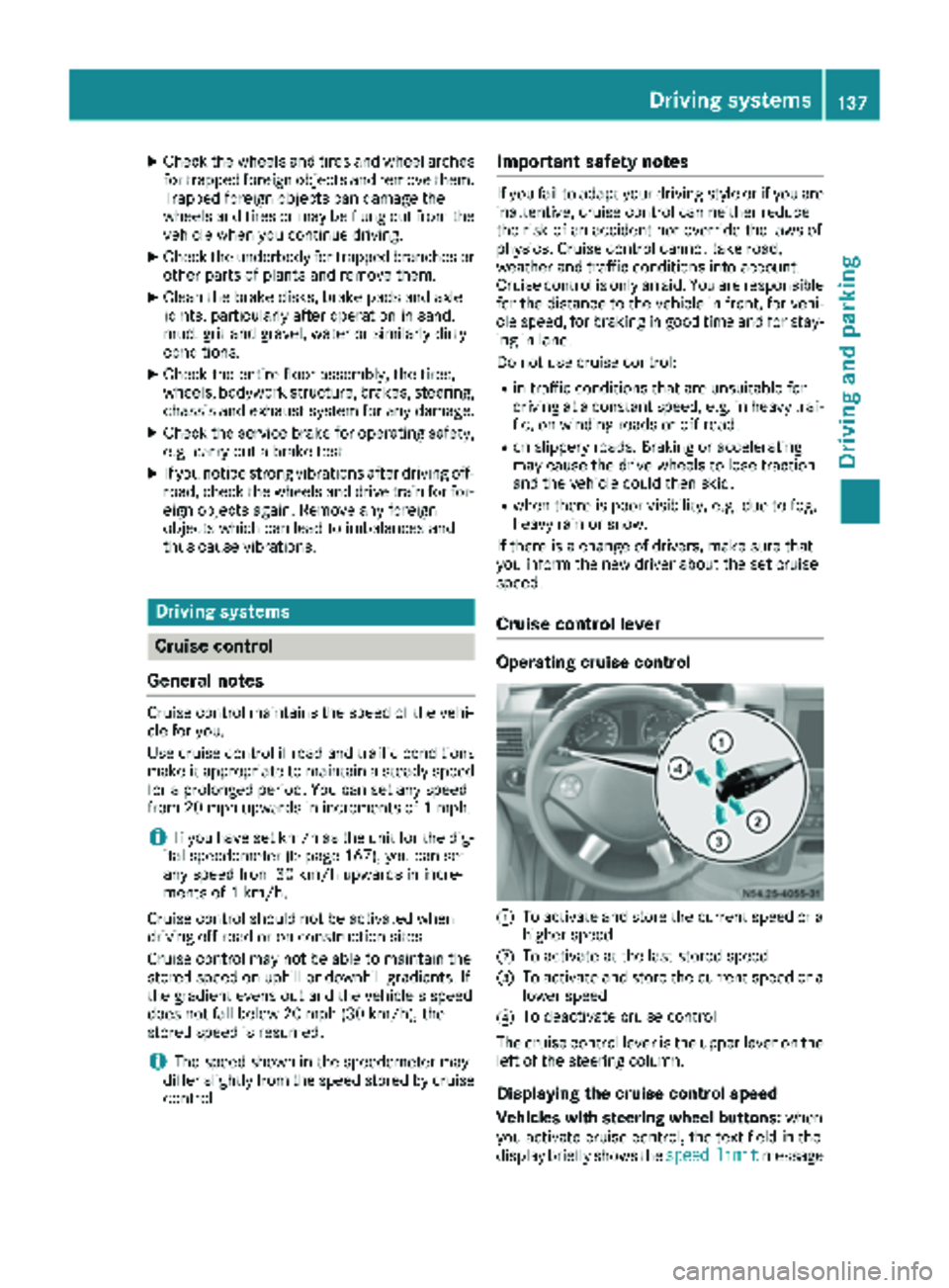
Cruise control lever
Operating cruise control
:To activate and store the current speed or a
higher speed
;To activate at the last stored speed
=To activate and store the current speed or a
lower speed
?To deactivate cruise control
The cruise control lever is the upper lever on the
left of the steering column.
Displaying the cruise control speed
Vehicles with steering wheel buttons: when
you activate cruise control, the text field in the
display briefly shows the speed
limitmessage
Driving systems137
Driving and parking
Z
Page 160 of 286
Useful information
This Operator's Manual describes all models as
well as standard and optional equipment of your
vehicle that were available at the time of going
to print. Country-specific variations are possi-
ble. Note that your vehicle may not be equipped
with all of the described functions. This also
applies to systems and functions relevant to
safety.
Read the information on qualified specialist
workshops (
Ypage 27).
Important safety notes
GWARNING
If you are driving and reach through the steer- ing wheel to operate the adjustment knob,
you could lose control of the vehicle. There is
a risk of an accident and injury.
Only operate the adjustment knobs when thevehicle is stationary. Do not reach through the
steering wheel when driving.
GWARNING
If you operate information systems and com-
munication equipment integrated in the vehi-
cle while driving, you will be distracted from
traffic conditions. You could also lose control
of the vehicle. There is a risk of an accident.
Only operate the equipment when the traffic
situation permits. If you are not sure that this
is possible, park the vehicle paying attention
to traffic conditions and operate the equip-
ment when the vehicle is stationary.
GWARNING
If the instrument cluster has failed or mal-
functioned, you may not recognize function
restrictions in systems relevant to safety. The
operating safety of your vehicle may be
impaired. There is a risk of an accident.
Drive on carefully. Have the vehicle checked
at a qualified specialist workshop immedi-
ately. You must observe the legal requirements for the
country in which you are currently driving when
operating the on-board computer.
The on-board computer display only shows mes-
sages and warnings from certain systems. You
should therefore make sure your vehicle is oper-
ating safely at all times. If the operating safety of
your vehicle is impaired, stop the vehicle as
soon as possible, paying attention to road and
traffic conditions. Then consult a qualified spe-
cialist workshop.
Instrument cluster
Overview
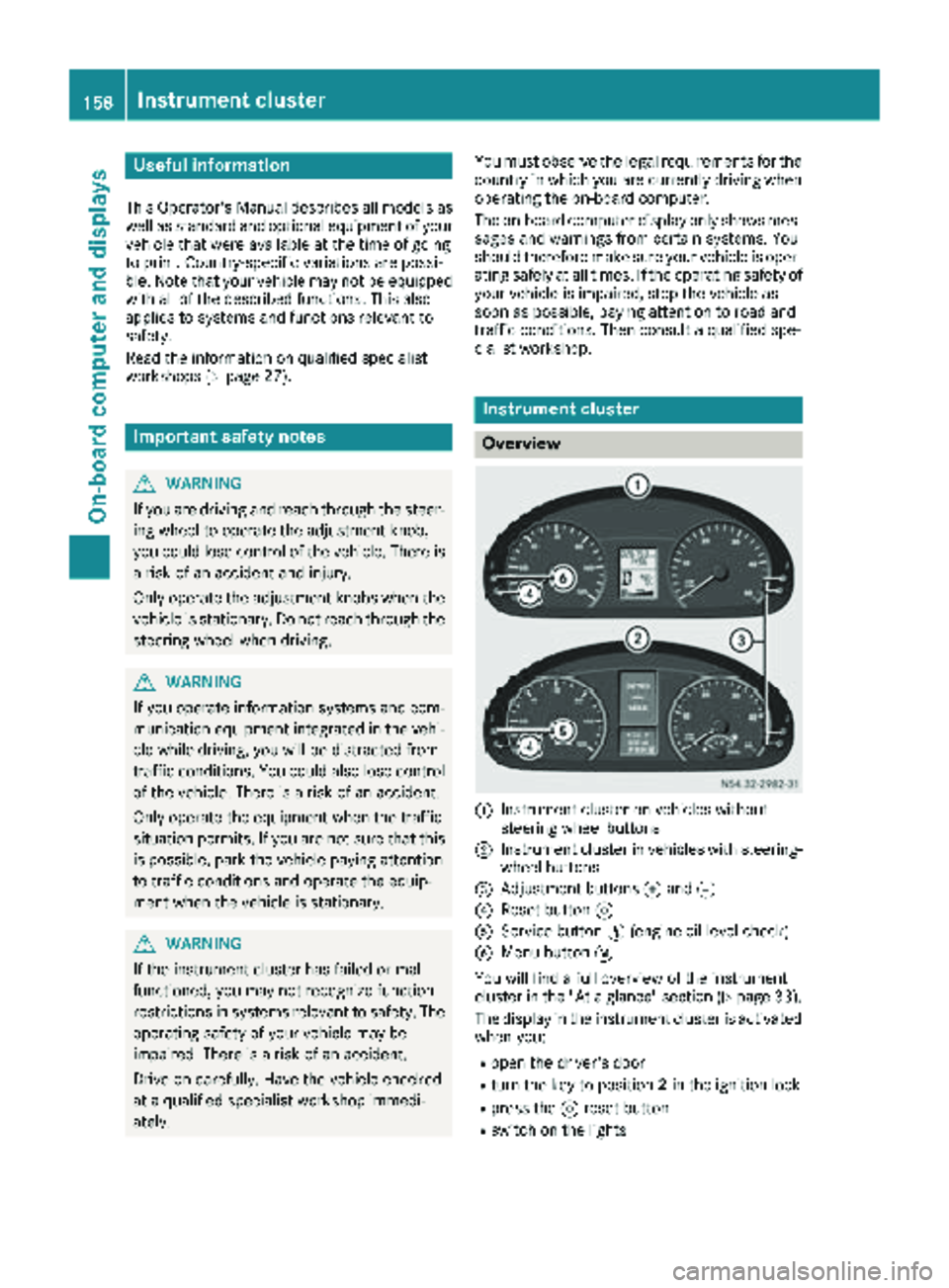
:Instrument cluster on vehicles without
steering wheel buttons
;Instrument cluster in vehicles with steering-
wheel buttons
=Adjustment buttons fand g
?Reset button 9
AService button Ë(engine oil level check)
BMenu button 4
You will find a full overview of the instrument
cluster in the "At a glance" section (
Ypage 33).
The display in the instrument cluster is activated when you:
Ropen the driver's door
Rturn the key to position 2in the ignition lock
Rpress the 9reset button
Rswitch on the lights
158Instrument cluster
On-board computer and displays
Page 163 of 286
Using thef,g,4or9 adjustment buttons,
you can select the following functions:
RCalling up the service due date
(Ypage 222)
RChecking the oil level (Ypage 216)
RChecking the DEF supply (Ypage 159)
RPreselecting/setting the auxiliary heating
switch-on time (Ypage 107)
RTire pressure monitor(Ypage 249)
RSetting the time (Ypage 161)
RActivating/deactivating Highbeam Assist
(Ypage 168)
RSetting the daytime running lamps
(Ypage 80)
Setting the time
XTurn the SmartKey to position 2in the ignition
lock.
XPress the 4menu button repeatedly until the
hours figure flashes.
XPress the forg button to set the hour.
XPress the 9reset button.
The minute display flashes.
XPress the forg button to set the minute.
iIf you keep the forg button pressed, the
value will change continuously.
Activating/deactivating Highbeam
Assist
XTurn the SmartKey to position 2in the ignition
lock.
XPress the 4menu button repeatedly until the
_ indicator lamp flashes and the onorOFFmessage appears in the display.
XUse the forg button to switch Highbeam
Assist on/off.
Switching the daytime running lamps
on/off
If you switch the daytime running lamps on, the
daytime running lamps will automatically light
up when the engine is running.
For safety reasons, it is only possible to change
this setting when the vehicle is stationary. The
factory setting is on
in countries where daytime
running lamp mode or daytime running lamps
are mandatory.
XTurn the SmartKey to position 2in the ignition
lock.
XPress the 4menu button repeatedly until the
L indicator lamp flashes and the onorOFFmessage appears in the display.
XPress the forg button to activate or deac-
tivate the daytime running lamps.
iUSA only:
If you turn the light switch to TorL,
the corresponding light switches on. If you
turn the light switch to Ã, the daytime
running lamps remain switched on.
Canada only:
If you turn the light switch to L, the low-
beam headlamps switch on. If you turn the
light switch to TorÃ, the daytime run-
ning lamps remain switched on.
On-board computer (vehicles with
steering wheel buttons)
Operating the on-board computer
Overview
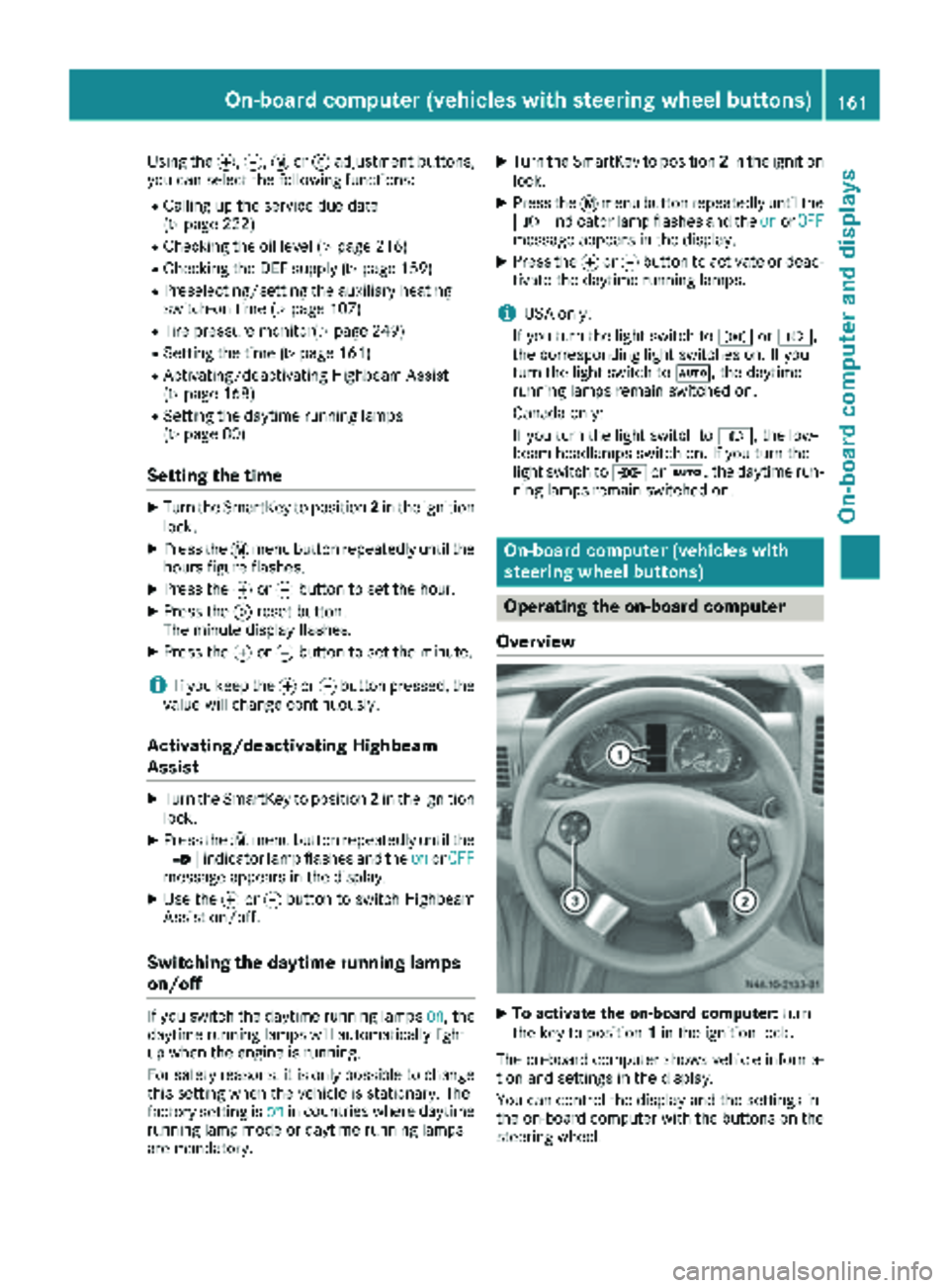
XTo activate the on-board computer: turn
the key to position 1in the ignition lock.
The on-board computer shows vehicle informa-
tion and settings in the display.
You can control the display and the settings in
the on-board computer with the buttons on the
steering wheel.
On-board computer (vehicles with steering wheel buttons)161
On-board computer and displays
Z
Page 165 of 286
Menu overview
Diagrams
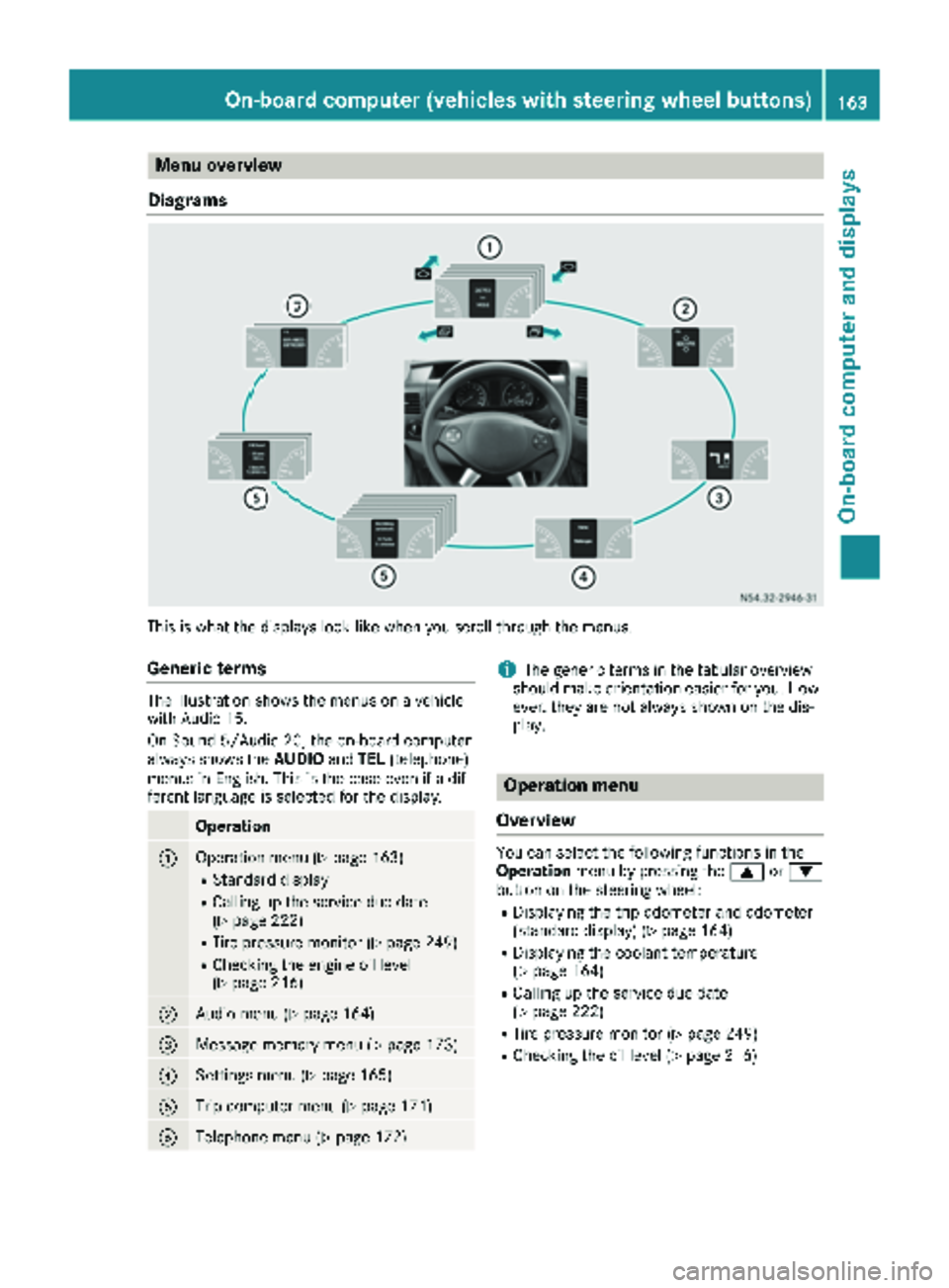
This is what the displays look like when you scroll through the menus.
Generic terms
The illustration shows the menus on a vehicle
with Audio 15.
On Sound 5/Audio 20, the on-board computer
always shows the AUDIOandTEL (telephone)
menus in English. This is the case even if a dif-
ferent language is selected for the display.
Operation
:Operation menu (Ypage 163)
RStandard display
RCalling up the service due date
(Ypage 222)
RTire pressure monitor (Ypage 249)
RChecking the engine oil level
(Ypage 216)
;Audio menu (Ypage 164)
=Message memory menu (Ypage 173)
?Settings menu (Ypage 165)
ATrip computer menu (Ypage 171)
BTelephone menu (Ypage 172)
iThe generic terms in the tabular overview
should make orientation easier for you. How-
ever, they are not always shown on the dis-
play.
Operation menu
Overview
You can select the following functions in the
Operation menu by pressing the 9or:
button on the steering wheel:
RDisplaying the trip odometer and odometer
(standard display) (Ypage 164)
RDisplaying the coolant temperature
(Ypage 164)
RCalling up the service due date
(Ypage 222)
RTire pressure monitor (Ypage 249)
RChecking the oil level (Ypage 216)
On-board computer (vehicles with steering wheel buttons)163
On-board computer and displays
Z
Page 175 of 286
Redialing
The on-board computer saves the last names or
numbers dialed in the redial memory.
Using the steering wheel buttons
XUse theVorU button to select the TELmenu.
The display shows the mobile phone opera-
tional readiness symbol.
XPress the6button.
The display shows the most recently dialed
numbers or names in the redial memory.
XPress the 9or: button to select the
desired name or number.
XTo start dialing: press the6button.
The on-board computer dials the correspond-
ing phone number.
When a connection is established, the name
of the other person and/or the call duration
appear in the display.
or
XTo exit the redial memory: press the~
button.
Display messages
Notes on display messages
Important safety notes
GWARNING
No information will be displayed if either the
instrument cluster or the display is inopera-
tive.
As a result, you will not be able to see warning
and indicator lamps or information about the
driving conditions, such as speed or outside
temperature. Driving characteristics may be
impaired. Adjust your driving style and vehicle
speed accordingly.
Contact a qualified specialist workshop
immediately.
GWARNING
If service work is not carried out correctly, the operating safety of your vehicle may be affec-
ted. This could cause you to lose control of
your vehicle and cause an accident. More-
over, the safety systems may no longer be
able to protect you or others as they are
designed to do.
Always have service work carried out at a
qualified specialist workshop.
iIf you turn the key to position 2in the igni-
tion, a display check is performed. All warning
and indicator lamps (except the turn signal
indicator lamps) and the display are activa-
ted. Before starting the journey, check that
the warning and indicator lamps are operating
correctly.
Vehicles without steering wheel but-
tons
Warnings, malfunctions or additional informa-
tion may also be shown in the display. The fol-
lowing tables show all the display messages. A
warning tone sounds with certain display mes-
sages.
Vehicles with steering wheel buttons
The on-board computer shows warnings, mal-
functions or additional information in the dis-
play. A warning tone sounds with certain display
messages. Display messages of a high priority
are shown in red.
Please respond in accordance with the display
messages and follow the additional notes in this Operator's Manual.
You can hide low-priority display messages by
pressing the V,U,9or: button
on the steering wheel or the 9reset button.
You cannot hide display messages of the highest
priority. These messages will continue to be
shown in the display until their cause has been
eliminated.
The on-board computer stores certain display
messages in the message memory
(
Ypage 173).
Message memory
The on-board computer only records and shows
malfunctions and warnings from certain sys-
tems. Therefore, make sure that your vehicle is
safe to use. You could otherwise cause an acci-
dent by driving an unsafe vehicle.
Display messages173
On-board computer and displays
Z
Page 199 of 286
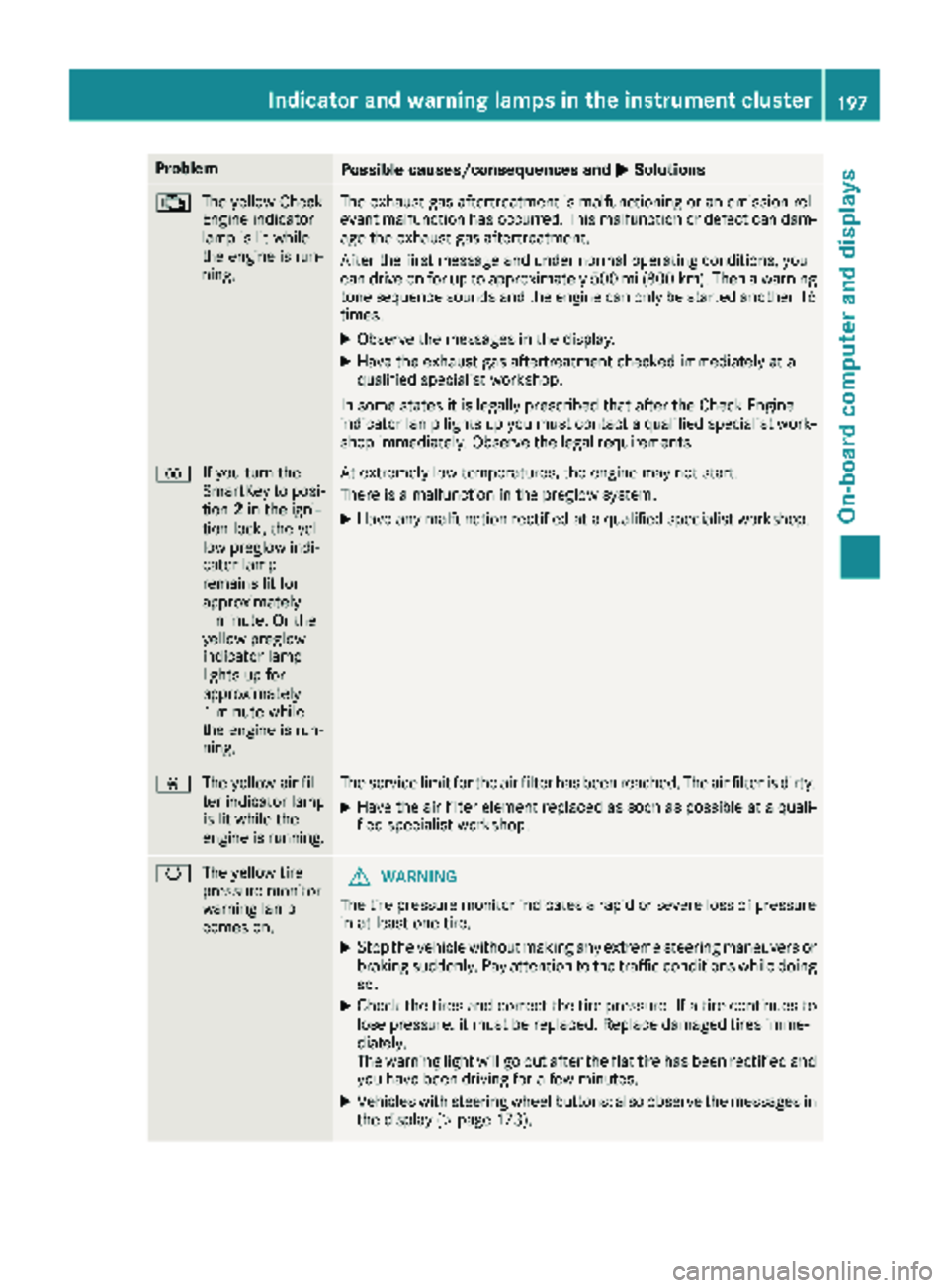
ProblemPossible causes/consequences andMSolutions
;
The yellow Check
Engine indicator
lamp is lit while
the engine is run-
ning.The exhaust gas aftertreatment is malfunctioning or an emission rel-
evant malfunction has occurred. This malfunction or defect can dam-
age the exhaust gas aftertreatment.
After the first message and under normal operating conditions, you
can drive on for up to approximately 500 mi (800 km). Then a warning
tone sequence sounds and the engine can only be started another 16
times.
XObserve the messages in the display.
XHave the exhaust gas aftertreatment checked immediately at a
qualified specialist workshop.
In some states it is legally prescribed that after the Check Engine
indicator lamp lights up you must contact a qualified specialist work-
shop immediately. Observe the legal requirements.
% If you turn the
SmartKey to posi-
tion2in the igni-
tion lock, the yel-
low preglow indi-
cator lamp
remains lit for
approximately
1 minute. Or the
yellow preglow
indicator lamp
lights up for
approximately
1 minute while
the engine is run-
ning.At extremely low temperatures, the engine may not start.
There is a malfunction in the preglow system.
XHave any malfunction rectified at a qualified specialist workshop.
È The yellow air fil-
ter indicator lamp
is lit while the
engine is running.The service limit for the air filter has been reached. The air filter is dirty.
XHave the air filter element replaced as soon as possible at a quali-
fied specialist workshop.
hThe yellow tire
pressure monitor
warning lamp
comes on.GWARNING
The tire pressure monitor indicates a rapid or severe loss of pressure
in at least one tire.
XStop the vehicle without making any extreme steering maneuvers or
braking suddenly. Pay attention to the traffic conditions while doing
so.
XCheck the tires and correct the tire pressure. If a tire continues to
lose pressure, it must be replaced. Replace damaged tires imme-
diately.
The warning light will go out after the flat tire has been rectified and
you have been driving for a few minutes.
XVehicles with steering wheel buttons: also observe the messages in the display (Ypage 173).
Indicator and warning lamps in the instrument cluster197
On-board computer and displays
Z
Page 210 of 286
Useful information
This Operator's Manual describes all models as
well as standard and optional equipment of your
vehicle that were available at the time of going
to print. Country-specific variations are possi-
ble. Note that your vehicle may not be equipped
with all of the described functions. This also
applies to systems and functions relevant to
safety.
Read the information on qualified specialist
workshops (
Ypage 27).
Loading guidelines
Important safety notes
GWARNING
As a result of improperly placed or unevenly
distributed loads, the center of gravity of the
load being transported may be too high or too
far back. This can significantly impair handling
as well as steering and braking characteris-
tics. There is a risk of an accident.
Always make sure that the center of gravity of
the load is:
Rbetween the axles
and
Ras low as possible, near the rear axle.
GWARNING
When objects are unsecured or inadequately
secured, they can slip, turn over or be thrown
about, striking vehicle occupants. This also
applies to:
Rluggage or loads
Ra rear bench seat which has been removed
and is being transported in the vehicle in an
exceptional case.
There is a risk of injury, particularly in the
event of braking maneuvers or abrupt
changes in direction.
Always stow objects in such a way that they
cannot be tossed about. Before traveling,
secure objects, luggage or loads to prevent
them slipping or tipping over. If you remove a
rear bench seat, it is advisable to store it out- side the vehicle.
GWARNING
When the permissible wheel loads, axle loads
and/or the maximum permissible gross vehi-
cle weight are exceeded, driving safety is
compromised. The handling as well as steer-
ing and braking characteristics may be signif-
icantly impaired. Overloaded tires may over-
heat, causing them to burst. There is a risk of
an accident.
When transporting a load, always observe the
permissible wheel loads, axle loads and the
maximum permissible gross vehicle weight
for the vehicle (including occupants).
GWARNING
When you load the roof, the center of gravity
of the vehicle rises and the driving character-
istics change. If you exceed the maximum roof
load, the driving characteristics, as well as
steering and braking, will be greatly impaired.
There is a risk of an accident.
Never exceed the maximum roof load and
adjust your driving style.
!If you are using a roof carrier, observe the
maximum roof load and maximum roof carrier
load.
You will find information about the maximum
roof load in the "Technical data" section
(
Ypage 282) and information about roof carri-
ers in the "Carrier systems" section
(
Ypage 212).
RDo not stack luggage or loads higher than the
backrests.
RStow objects preferably in the cargo com-
partment.
RWhen transporting luggage, always use the
cargo tie-down rings and a parcel net, if pres-
ent.
RUse cargo tie-down rings and fasteners which
are suitable for the weight and size of the
load.
Always observe the operating instructions of the respective manufacturer when using suitable
load securing aids or tie downs. In particular, the
information on service life.
208Loading guidelines
Transporting loads