ESP MERCEDES-BENZ SPRINTER 2017 MY17 Operator’s Manual
[x] Cancel search | Manufacturer: MERCEDES-BENZ, Model Year: 2017, Model line: SPRINTER, Model: MERCEDES-BENZ SPRINTER 2017Pages: 286, PDF Size: 4.36 MB
Page 188 of 286
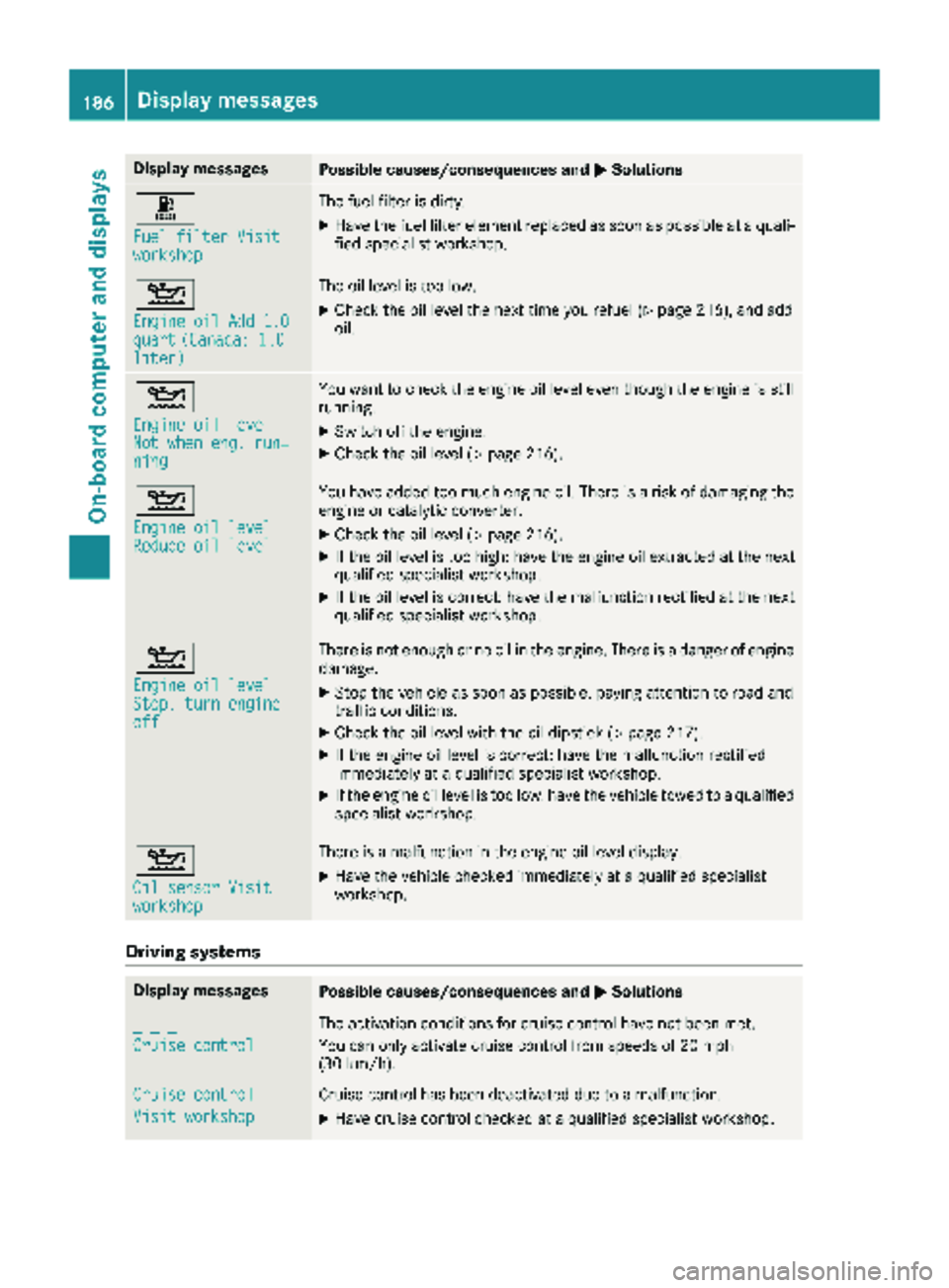
Display messagesPossible causes/consequences andMSolutions
m
Fuelfilter Visitworkshop
The fuel filter is dirty.
XHav eth efuel filter elemen treplace das soo nas possibl eat aquali-
fie dspecialist workshop .
4
Engine oil Add 1.0quart(Canada: 1.0liter)
The oil level is toolow.
XChec kth eoil level th enext time you refuel (Ypage 216), and add
oil.
4
Engine oil levelNot whe neng .run ‐ning
You wan tto chec kth eengin eoil level eve nthough th eengin eis still
running.
XSwitc hoff th eengine.
XChec kth eoil level (Ypage 216).
4
Engine oil levelReduce oil level
You haveadded to omuc hengin eoil. There is aris kof damaging th e
engin eor catalytic converter.
XChec kth eoil level (Ypage 216).
XIf theoil level is to ohigh :hav eth eengin eoil extracted at th enext
qualified specialist workshop .
XIf theoil level is correct: hav eth emalfunction rectifie dat th enext
qualified specialist workshop .
4
Engine oil levelStop, turnengineoff
There is no tenough or no oil in th eengine. There is adanger of engin e
damage.
XStop th evehicl eas soo nas possible, payin gattention to roa dand
traffic conditions.
XChec kth eoil level wit hth eoil dipstick (Ypage 217).
XIf theengin eoil level is correct: hav eth emalfunction rectifie d
immediately at aqualified specialist workshop .
XIf theengin eoil level is to olow: hav eth evehicl etowed to aqualified
specialist workshop .
4
Oil sensor Visitworkshop
There isamalfunction in th eengin eoil level display.
XHav eth evehicl echecke dimmediately at aqualified specialist
workshop .
Driving systems
Display messagesPossible causes/consequences and MSolutions
_ _ _
Cruise control
The activation condition sfor cruise control hav eno tbeen met .
You can only activat ecruise control from speeds of 20 mph
(30 km/h).
Cruise contro l
Visit workshop
Cruisecontrol has been deactivated due to amalfunction .
XHavecruise control checke dat aqualified specialist workshop .
186Display messages
On-board computer and displays
Page 189 of 286
Display messagesPossible causes/consequences andMSolutions
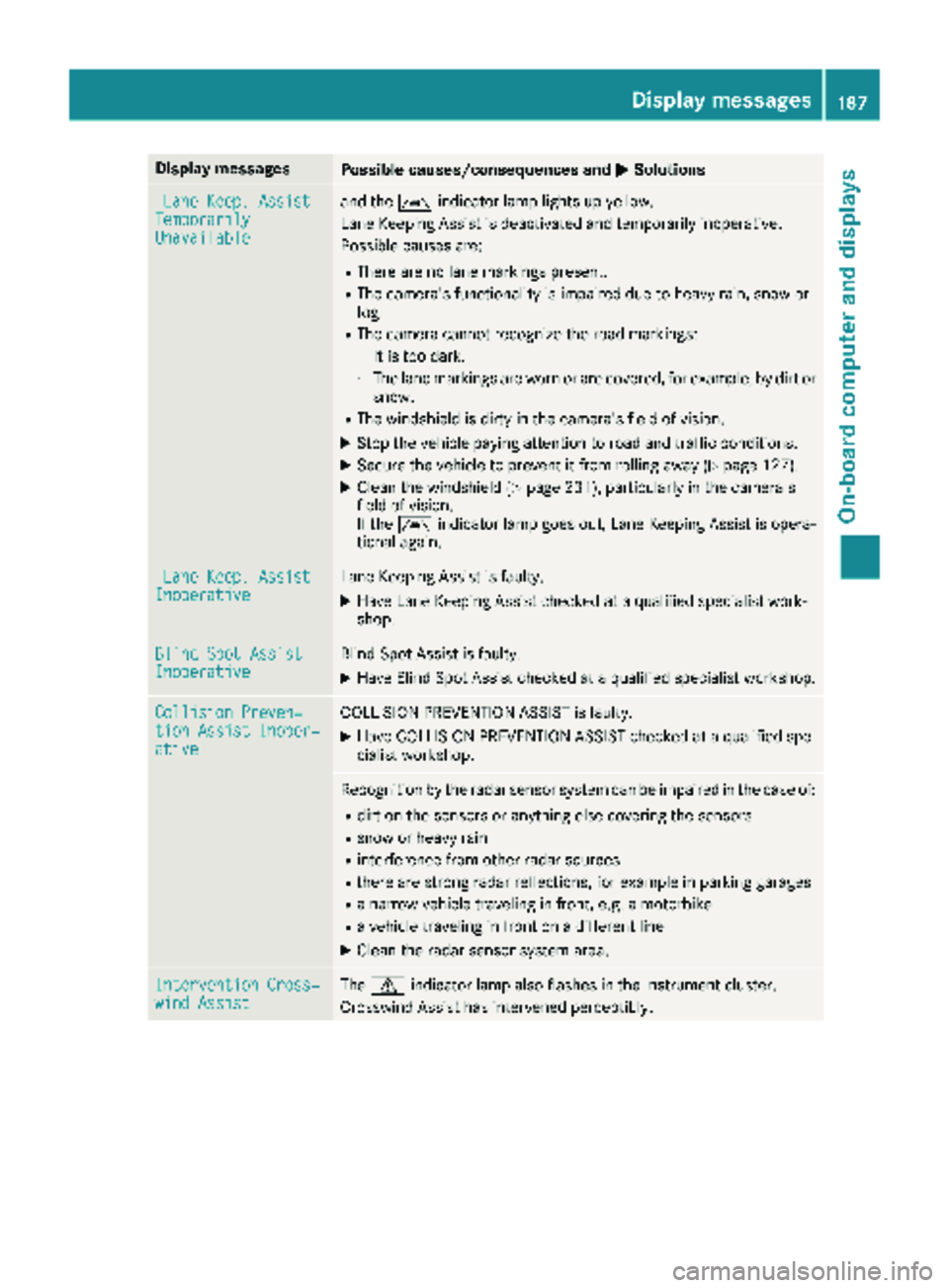
LaneKeep. AssistTemporarilyUnavailable
and th eà indicator lamp lights up yellow.
Lan eKeepin gAssis tis deactivated and temporarily inoperative.
Possibl ecauses are:
RThere are no lan emarking spresent.
RThe camera' sfunctionalit yis impaire ddue to heav yrain ,snow or
fog .
RThe camera canno trecogniz eth eroa dmarkings:
-It is to odark .
-The lan emarking sare wor nor are covered, for example, by dir tor
snow.
RThe windshield is dirty in th ecamera' sfield of vision .
XStop thevehicl epayin gattention to roa dand traffic conditions.
XSecur eth evehicl eto preven tit from rollin gaway (Ypage 127).
XClean th ewindshield (Ypage 231), particularly in th ecamera' s
field of vision .
If th eà indicator lamp goe sout ,Lan eKeepin gAssis tis opera-
tional again .
LaneKeep. AssistInoperativeLan eKeepin gAssis tis faulty.
XHav eLan eKeepin gAssis tchecke dat aqualified specialist work-
shop.
Blind Spo tAssistInoperativeBlind Spot Assis tis faulty.
XHav eBlind Spot Assis tchecke dat aqualified specialist workshop .
Collision Preven‐tionAssist Inoper ‐ative
COLLISION PREVENTION ASSIST is faulty.
XHaveCOLLISION PREVENTION ASSIST checke dat aqualified spe -
cialist workshop .
Recognition by th eradar sensor system can be impaire din th ecas eof:
Rdir ton th esensor sor anythin gelse covering th esensor s
Rsnow or heav yrain
Rinterferenc efrom other radar source s
Rthere are strongradar reflections, for exampl ein parking garages
Ranarrow vehicl etraveling in front, e.g. amotorbik e
Ravehicl etraveling in fron ton adifferen tlin e
XClean th eradar sensor system area .
Intervention Cross‐windAssistThe d indicator lamp also flashes in th einstrumen tcluster.
Crosswin dAssis thas intervened perceptibly.
Display messages18 7
On-board computer and displays
Z
Page 190 of 286
Tires
Display messagesPossible causes/consequences andMSolutions
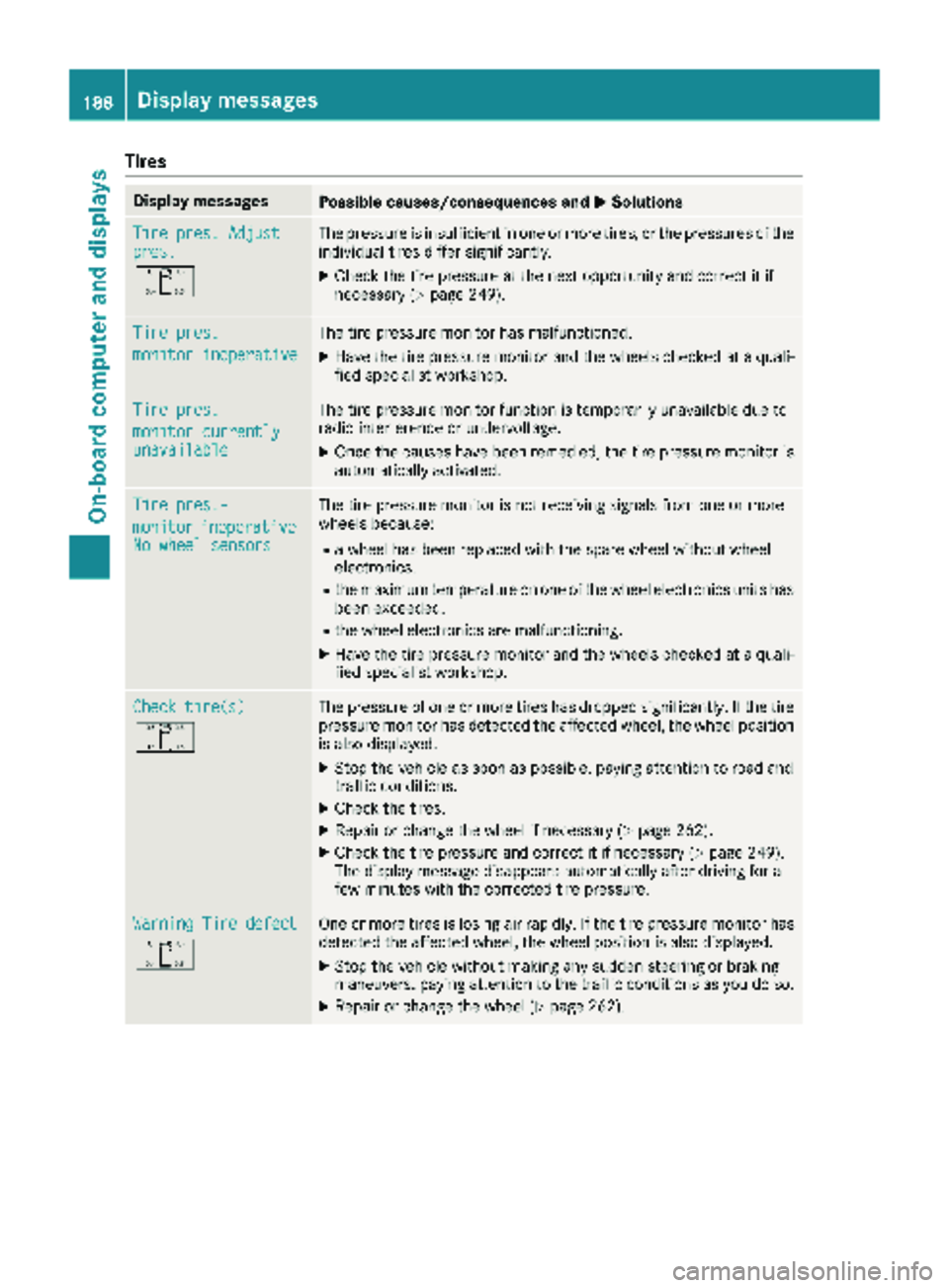
Tire pres. Adjustpres.
O
The pressure is insufficient in one or more tires, or the pressures of the
individual tires differ significantly.
XCheck the tire pressure at the next opportunity and correct it if
necessary (Ypage 249).
Tire pres.
monitor inoperative
The tire pressure monitor has malfunctioned.
XHave the tire pressure monitor and the wheels checked at a quali-
fied specialist workshop.
Tire pres.
monitor currentlyunavailable
The tire pressure monitor function is temporarily unavailable due to
radio interference or undervoltage.
XOnce the causes have been remedied, the tire pressure monitor is
automatically activated.
Tire pres.-
monitorinoperativeNo wheel sensors
The tire pressure monitor is not receiving signals from one or more
wheels because:
Ra wheel has been replaced with the spare wheel without wheel
electronics.
Rthe maximum temperature on one of the wheel electronics units has
been exceeded.
Rthe wheel electronics are malfunctioning.
XHave the tire pressure monitor and the wheels checked at a quali-
fied specialist workshop.
Check tire(s)
O
The pressure of one or more tires has dropped significantly. If the tire
pressure monitor has detected the affected wheel, the wheel position
is also displayed.
XStop the vehicle as soon as possible, paying attention to road and
traffic conditions.
XCheck the tires.
XRepair or change the wheel if necessary (Ypage 262).
XCheck the tire pressure and correct it if necessary (Ypage 249).
The display message disappears automatically after driving for a
few minutes with the corrected tire pressure.
Warning Tire defect
O
One or more tires is losing air rapidly. If the tire pressure monitor has
detected the affected wheel, the wheel position is also displayed.
XStop the vehicle without making any sudden steering or braking
maneuvers, paying attention to the traffic conditions as you do so.
XRepair or change the wheel (Ypage 262).
188Displa y messages
On-board computer and displays
Page 191 of 286
Vehicle
Display messagesPossible causes/consequences andMSolutions
Ð
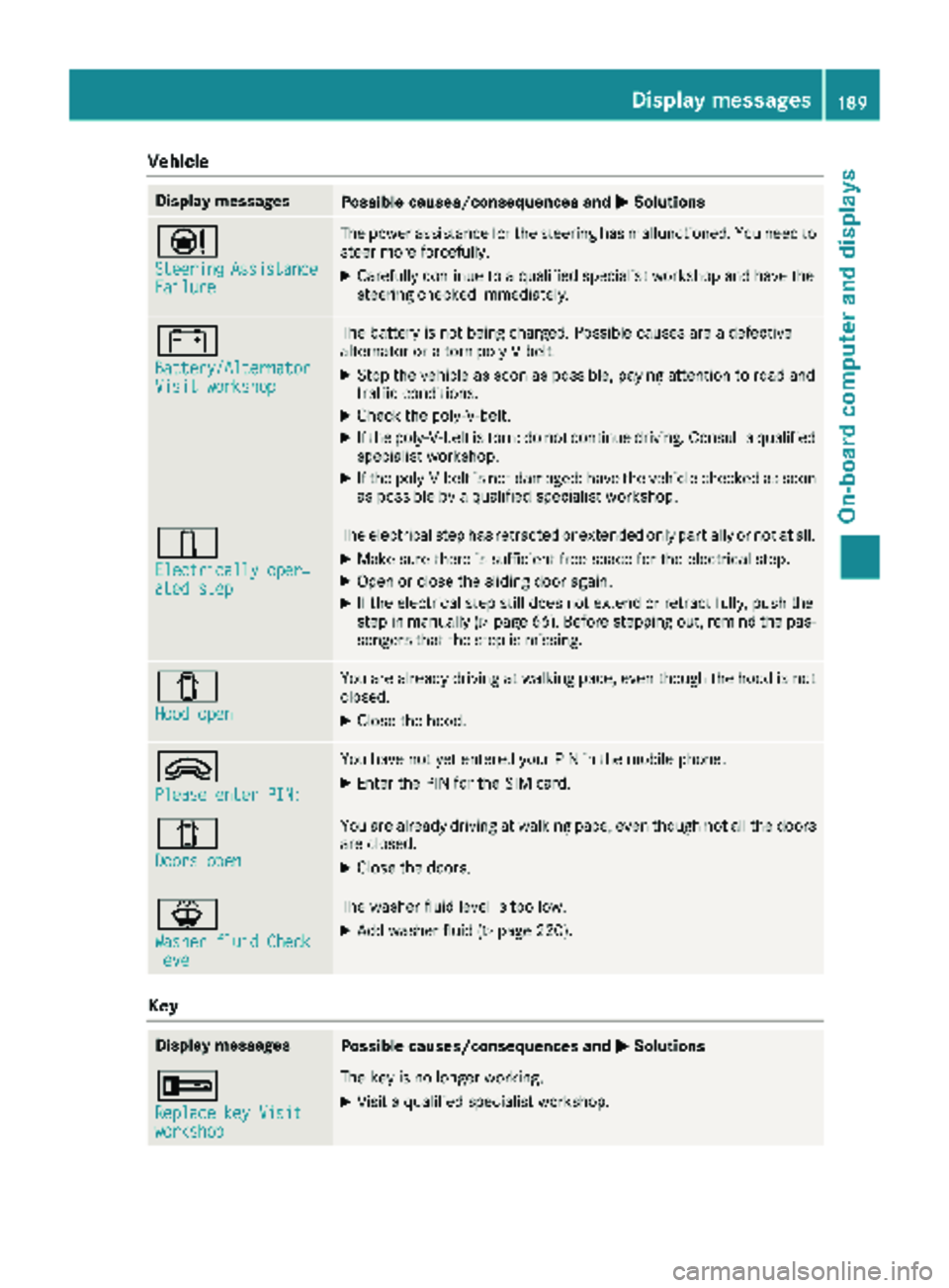
SteeringAssistanceFailure
The power assistance for the steering has malfunctioned. You need to
steer more forcefully.
XCarefully continue to a qualified specialist workshop and have the
steering checked immediately.
#
Battery/AlternatorVisit workshop
The battery is not being charged. Possible causes are a defective
alternator or a torn poly-V-belt.
XStop the vehicle as soon as possible, paying attention to road and
traffic conditions.
XCheck the poly-V-belt.
XIf the poly-V-belt is torn: do not continue driving. Consult a qualified
specialist workshop.
XIf the poly-V-belt is not damaged: have the vehicle checked as soon
as possible by a qualified specialist workshop.
÷
Electrically oper‐ated step
The electrical step has retracted or extended only partially or not at all.
XMake sure there is sufficient free space for the electrical step.
XOpen or close the sliding door again.
XIf the electrical step still does not extend or retract fully, push the
step in manually (Ypage 66). Before stepping out, remind the pas-
sengers that the step is missing.
1
Hood open
You are already driving at walking pace, even though the hood is not
closed.
XClose the hood.
9
Please enter PIN:
You have not yet entered your PIN in the mobile phone.
XEnter the PIN for the SIM card.
1
Doors open
You are already driving at walking pace, even though not all the doors
are closed.
XClose the doors.
¦
Washer fluid Checklevel
The washer fluid level is too low.
XAdd washer fluid (Ypage 220).
Key
Display messagesPossible causes/consequences and MSolutions
+
Replace key Visitworkshop
The key is no longer working.
XVisit a qualified specialist workshop.
Display messages189
On-board computer and displays
Z
Page 192 of 286
Indicator and warning lamps in the instrument cluster
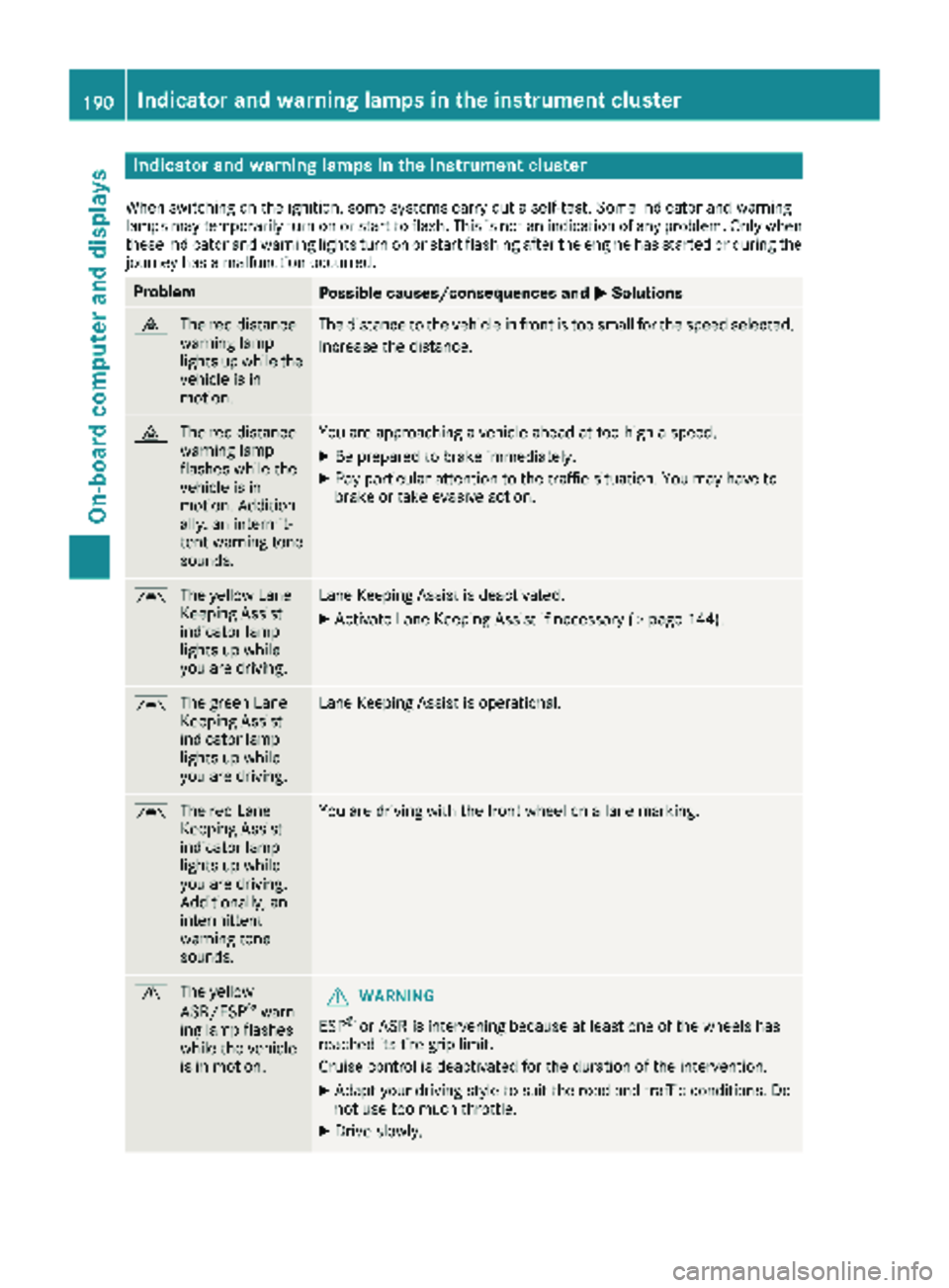
When switching on theignition ,som esystems carry out aself-test .Some indicator and warning
lamp smay temporarily tur non or start to flash. This is no tan indication of any problem .Only when
these indicator and warning lights tur non or start flashin gafter th eengin ehas started or during th e
journey has amalfunction occurred .
ProblemPossible causes/consequences and MSolutions
·
The red distanc e
warning lamp
lights up while th e
vehicl eis in
motion .The distanc eto th evehicl ein fron tis to osmall for th espee dselected.
Increase th edistance.
·
The red distanc e
warning lamp
flashes while th e
vehicl eis in
motion .Addition -
ally, an intermit -
tent warning tone
sounds.You are approachin g avehicl eahead at to ohigh aspeed.
XBe prepare dto brak eimmediately.
XPay particular attention to th etraffic situation .You may hav eto
brak eor tak eevasive action .
Ã
The yellow Lan e
Keepin gAssist
indicator lamp
lights up while
you are driving .LaneKeepin gAssist is deactivated.
XActivat eLan eKeepin gAssist if necessar y (Ypage 144).
Ã
The green Lan e
Keepin gAssist
indicator lamp
lights up while
you are driving .LaneKeepin gAssist is operational.
Ã
The red Lan e
Keepin gAssist
indicator lamp
lights up while
you are driving .
Additionally, an
intermittent
warning tone
sounds.You are driving wit hth efron twhee lon alan emarking.
d
The yellow
ASR/ESP®warn-
ing lamp flashes
while th evehicl e
is in motion .GWARNING
ES P
®or AS Ris intervening because at least on eof th ewheels has
reached it stire gri plimit.
Cruis econtrol is deactivated for th eduration of th eintervention .
XAdapt your driving style to suit th eroad and traffic conditions. Do
no tuse to omuc hthrottle.
XDrive slowly.
190Indicator and warning lamps in the instrument cluster
On-board computer and displays
Page 193 of 286
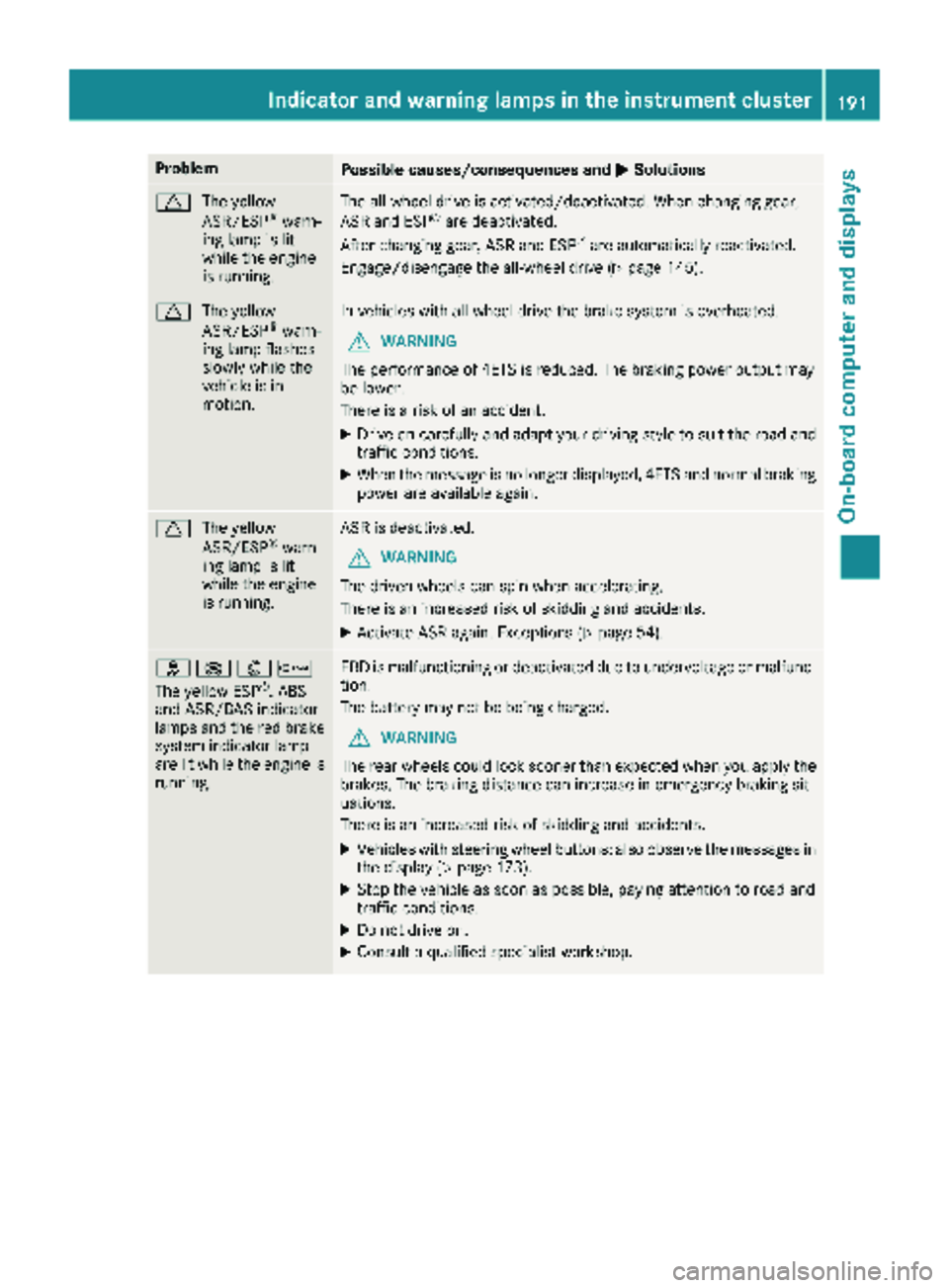
ProblemPossible causes/consequences andMSolutions
d
The yellow
ASR/ESP®warn-
ing lamp is lit
while the engine
is running.
The all-wheel drive is activated/deactivated. When changing gear,
ASR and ESP®are deactivated.
After changing gear, ASR and ESP®are automatically reactivated.
Engage/disengage the all-wheel drive (
Ypage 145).
d The yellow
ASR/ESP®warn-
ing lamp flashes
slowly while the
vehicle is in
motion.
In vehicles with all-wheel drive the brake system is overheated.
GWARNING
The performance of 4ETS is reduced. The braking power output may
be lower.
There is a risk of an accident.
XDrive on carefully and adapt your driving style to suit the road and
traffic conditions.
XWhen the message is no longer displayed, 4ETS and normal braking
power are available again.
d The yellow
ASR/ESP®warn-
ing lamp is lit
while the engine
is running.
ASR is deactivated.
GWARNING
The driven wheels can spin when accelerating.
There is an increased risk of skidding and accidents.
XActivate ASR again. Exceptions (Ypage 54).
h !:b
The yellow ESP®, ABS
and ASR/BAS indicator
lamps and the red brake
system indicator lamp
are lit while the engine is
running.
EBD is malfunctioning or deactivated due to undervoltage or malfunc-
tion.
The battery may not be being charged.
GWARNING
The rear wheels could lock sooner than expected when you apply the
brakes. The braking distance can increase in emergency braking sit-
uations.
There is an increased risk of skidding and accidents.
XVehicles with steering wheel buttons: also observe the messages in
the display (Ypage 173).
XStop the vehicle as soon as possible, paying attention to road and
traffic conditions.
XDo not drive on.
XConsult a qualified specialist workshop.
Indicator and warning lamps in the instrument cluster191
On-board computer and displays
Z
Page 195 of 286
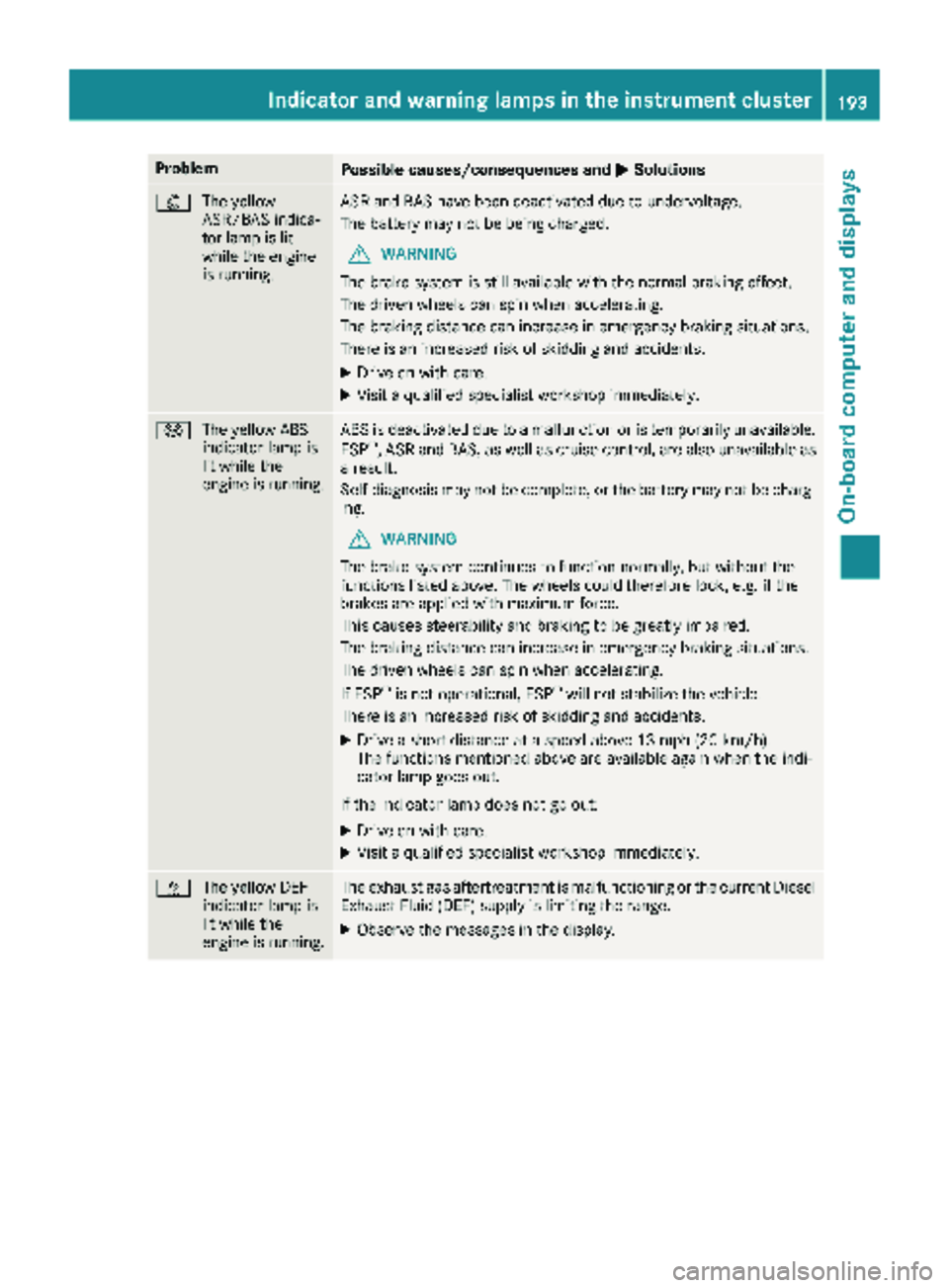
ProblemPossible causes/consequences andMSolutions
:
The yellow
ASR/BAS indica-
tor lamp is lit
while the engine
is running.ASR and BAS have been deactivated due to undervoltage.
The battery may not be being charged.
GWARNING
The brake system is still available with the normal braking effect.
The driven wheels can spin when accelerating.
The braking distance can increase in emergency braking situations.
There is an increased risk of skidding and accidents.
XDrive on with care.
XVisit a qualified specialist workshop immediately.
! The yellow ABS
indicator lamp is
lit while the
engine is running.ABS is deactivated due to a malfunction or is temporarily unavailable.
ESP®, ASR and BAS, as well as cruise control, are also unavailable as
a result.
Self-diagnosis may not be complete, or the battery may not be charg-
ing.
GWARNING
The brake system continues to function normally, but without the
functions listed above. The wheels could therefore lock, e.g. if the
brakes are applied with maximum force.
This causes steerability and braking to be greatly impaired.
The braking distance can increase in emergency braking situations.
The driven wheels can spin when accelerating.
If ESP
®is not operational, ESP®will not stabilize the vehicle.
There is an increased risk of skidding and accidents.
XDrive a short distance at a speed above 13 mph (20 km/h).
The functions mentioned above are available again when the indi-
cator lamp goes out.
If the indicator lamp does not go out:
XDrive on with care.
XVisit a qualified specialist workshop immediately.
å The yellow DEF
indicator lamp is
lit while the
engine is running.The exhaust gas aftertreatment is malfunctioning or the current Diesel
Exhaust Fluid (DEF) supply is limiting the range.
XObserve the messages in the display.
Indicator and warning lamps in the instrument cluster193
On-board computer and displays
Z
Page 196 of 286
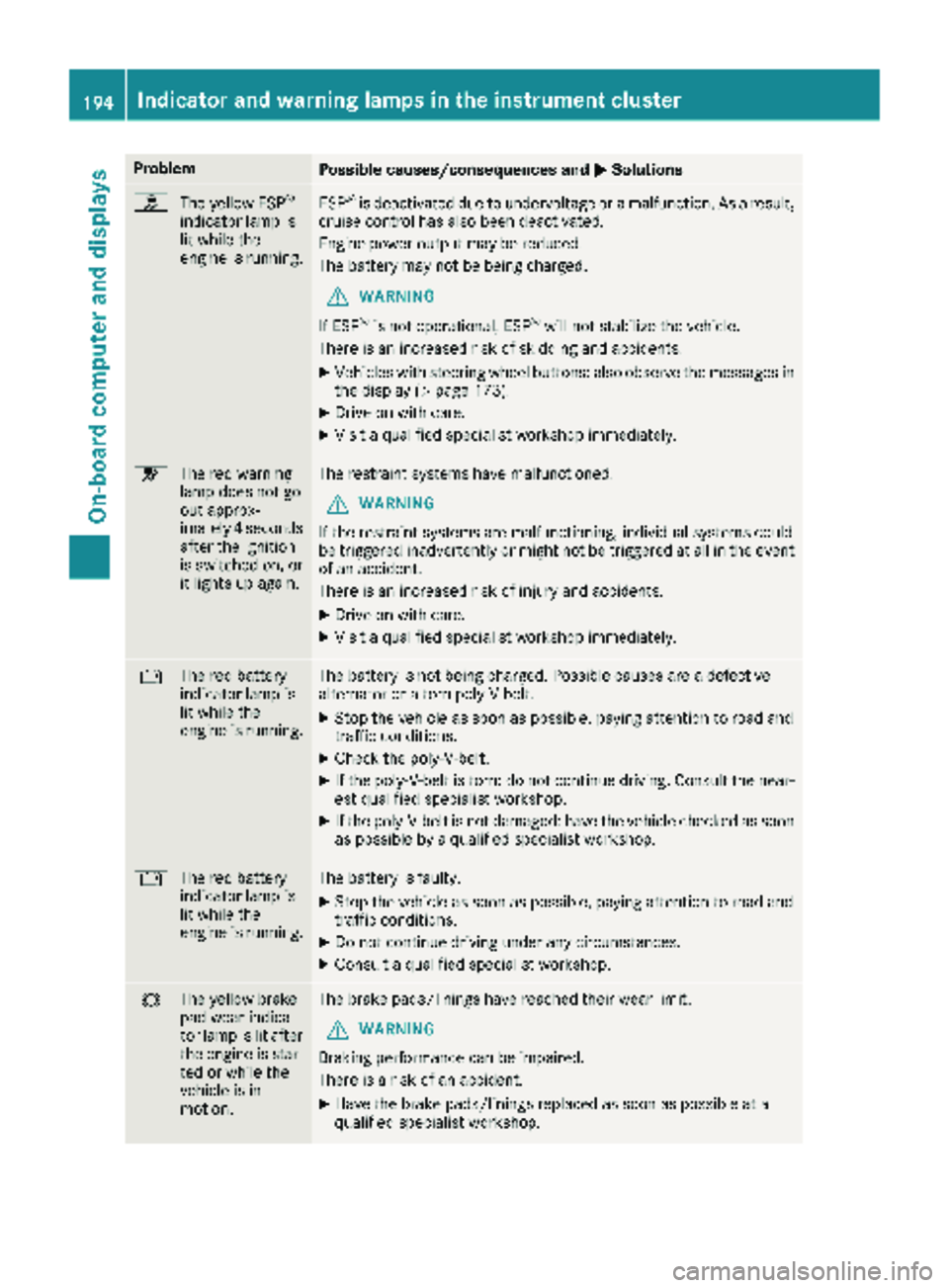
ProblemPossible causes/consequences andMSolutions
h
The yellow ESP®
indicator lamp is
lit while the
engine is running.ESP®is deactivated due to undervoltage or a malfunction. As a result,
cruise control has also been deactivated.
Engine power output may be reduced.
The battery may not be being charged.
GWARNING
If ESP
®is not operational, ESP®will not stabilize the vehicle.
There is an increased risk of skidding and accidents.
XVehicles with steering wheel buttons: also observe the messages in the display (Ypage 173).
XDrive on with care.
XVisit a qualified specialist workshop immediately.
6 The red warning
lamp does not go
out approx-
imately 4 seconds
after the ignition
is switched on, or
it lights up again.The restraint systems have malfunctioned.
GWARNING
If the restraint systems are malfunctioning, individual systems could
be triggered inadvertently or might not be triggered at all in the event
of an accident.
There is an increased risk of injury and accidents.
XDrive on with care.
XVisit a qualified specialist workshop immediately.
# The red battery
indicator lamp is
lit while the
engine is running.The battery is not being charged. Possible causes are a defective
alternator or a torn poly-V-belt.
XStop the vehicle as soon as possible, paying attention to road and
traffic conditions.
XCheck the poly-V-belt.
XIf the poly-V-belt is torn: do not continue driving. Consult the near-
est qualified specialist workshop.
XIf the poly-V-belt is not damaged: have the vehicle checked as soon
as possible by a qualified specialist workshop.
#The red battery
indicator lamp is
lit while the
engine is running.The battery is faulty.
XStop the vehicle as soon as possible, paying attention to road and
traffic conditions.
XDo not continue driving under any circumstances.
XConsult a qualified specialist workshop.
#The yellow brake
pad wear indica-
tor lamp is lit after
the engine is star-
ted or while the
vehicle is in
motion.The brake pads/linings have reached their wear limit.
GWARNING
Braking performance can be impaired.
There is a risk of an accident.
XHave the brake pads/linings replaced as soon as possible at a
qualified specialist workshop.
194Indicator and warning lamps in the instrument cluster
On-board computer and displays
Page 208 of 286
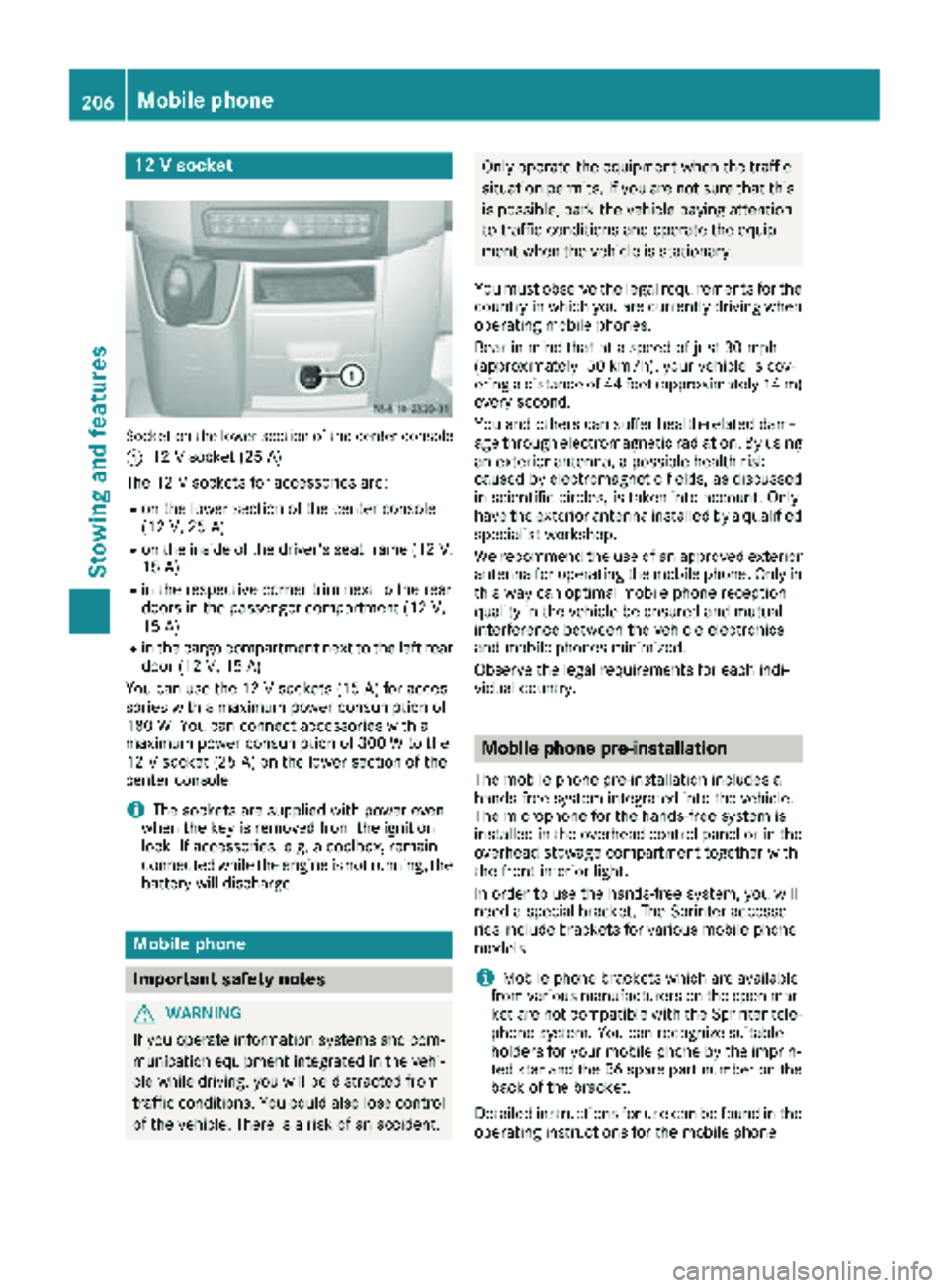
12 V socket
Socket on the lower section of the center console
:
12 V socket (25 A)
The 12 V sockets for accessories are:
Ron the lower section of the center console
(12 V, 25 A)
Ron the inside of the driver's seat frame (12V,
15 A)
Rin the respective corner trim next to the rear
doors in the passenger compartment (12 V,
15 A)
Rin the cargo compartment next to the left rear door (12 V,15 A)
You can use the 12 V sockets (15 A) for acces-
sories with a maximum power consumption of
180 W. You can connect accessories with a
maximum power consumption of 300 W to the
12 V socket (25 A) on the lower section of the
center console.
iThe sockets are supplied with power even
when the key is removed from the ignition
lock. If accessories, e.g. a coolbox, remain
connected while the engine is not running, the
battery will discharge.
Mobile phone
Important safety notes
GWARNING
If you operate information systems and com-
munication equipment integrated in the vehi-
cle while driving, you will be distracted from
traffic conditions. You could also lose control
of the vehicle. There is a risk of an accident.
Only operate the equipment when the traffic
situation permits. If you are not sure that this is possible, park the vehicle paying attention
to traffic conditions and operate the equip-
ment when the vehicle is stationary.
You must observe the legal requirements for the
country in which you are currently driving when
operating mobile phones.
Bear in mind that at a speed of just 30 mph
(approximately 50 km/h), your vehicle is cov-
ering a distance of 44 feet (approximately 14 m)
every second.
You and others can suffer health-related dam-
age through electromagnetic radiation. By using
an exterior antenna, a possible health risk
caused by electromagnetic fields, as discussed
in scientific circles, is taken into account. Only
have the exterior antenna installed by a qualified
specialist workshop.
We recommend the use of an approved exterior
antenna for operating the mobile phone. Only in
this way can optimal mobile phone reception
quality in the vehicle be ensured and mutual
interference between the vehicle electronics
and mobile phones minimized.
Observe the legal requirements for each indi-
vidual country.
Mobile phone pre-installation
The mobile phone pre-installation includes a
hands-free system integrated into the vehicle.
The microphone for the hands-free system is
installed in the overhead control panel or in the
overhead stowage compartment together with
the front interior light.
In order to use the hands-free system, you will
need a special bracket. The Sprinter accesso-
ries include brackets for various mobile phone
models.
iMobile phone brackets which are available
from various manufacturers on the open mar- ket are not compatible with the Sprinter tele-
phone system. You can recognize suitable
holders for your mobile phone by the imprin-
ted star and the B6 spare part number on the back of the bracket.
Detailed instructions for use can be found in the
operating instructions for the mobile phone
206Mobile phone
Stowing and features
Page 209 of 286
bracket and in the separate operating instruc-
tions for the mobile phone pre-installation.
iThe mobile phone battery is charged
depending on the condition of charge and the
position of the key in the ignition lock. The
mobile phone display indicates the charging
process.
Additional communications equip-
ment
Important safety notes
GWARNING
If you operate mobile communication equip-
ment while driving, you will be distracted from traffic conditions. You could also lose control
of the vehicle. There is a risk of an accident.
Only operate this equipment when the vehicle
is stationary.
You must observe the legal requirements for the
country in which you are currently driving when
operating mobile communication equipment.
Please remember, a navigation system does not
supply information on the load-bearing capacity of bridges or the overhead clearance of under-
passes. The driver remains responsible for
safety at all times.
You and others can suffer health-related dam-
age through electromagnetic radiation. By using
an exterior antenna, a possible health risk
caused by electromagnetic fields, as discussed
in scientific circles, is taken into account. Only
have the exterior antenna installed by a qualified
specialist workshop.
You will find information on installing electrical
or electronic equipment in the “Vehicle elec-
tronics” section (
Ypage 271).
Installation for PND mobile navigation
devices
You can secure a personal navigation device
(Personal Navigation Device PND) using a com-
mercially available adapter.
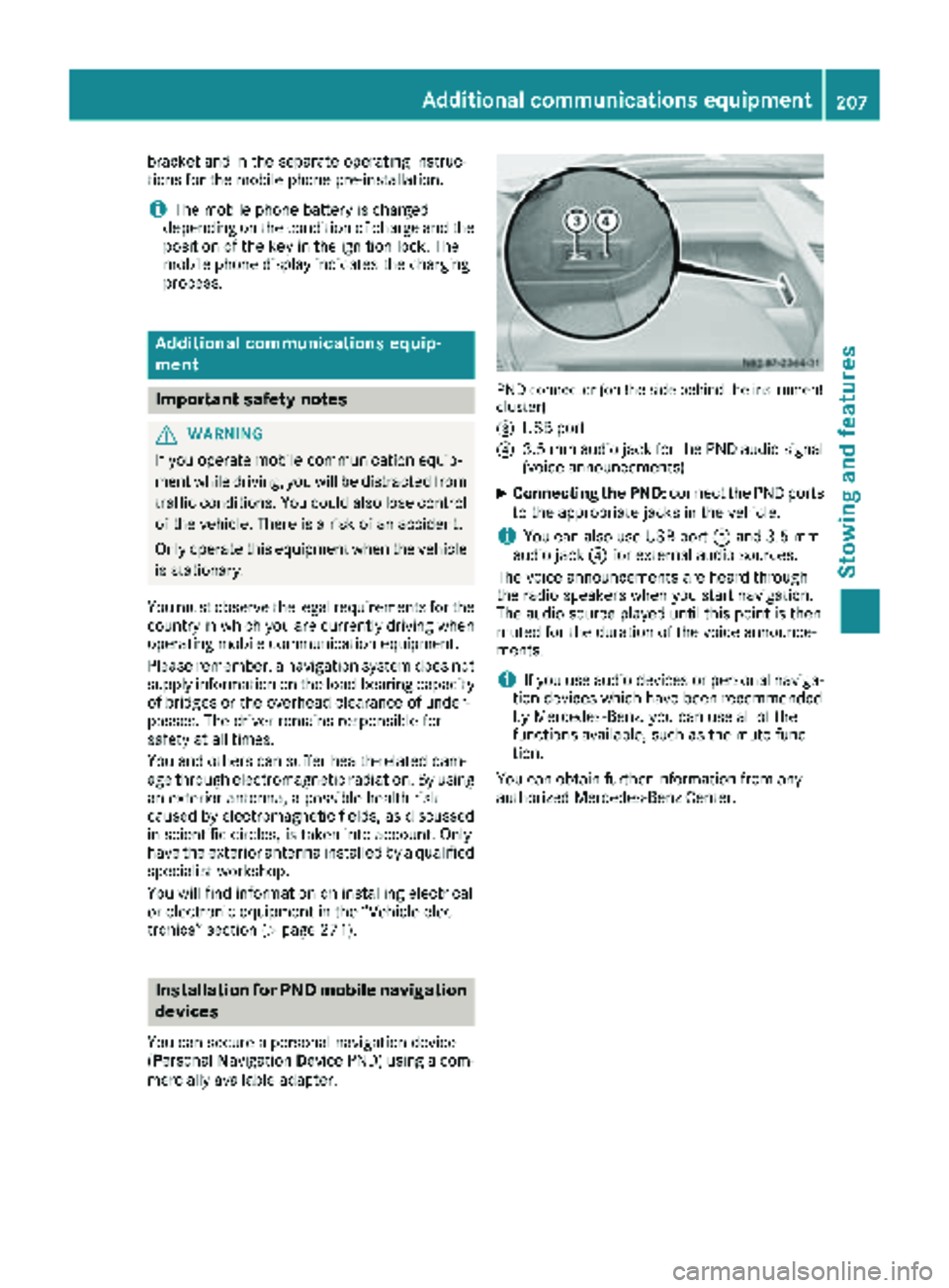
PND connector (on the side behind the instrument
cluster)
=
USB port
?3.5 mm audio jack for the PND audio signal
(voice announcements)
XConnecting the PND: connect the PND ports
to the appropriate jacks in the vehicle.
iYou can also use USB port =and 3.5 mm
audio jack ?for external audio sources.
The voice announcements are heard through
the radio speakers when you start navigation.
The audio source played until this point is then
muted for the duration of the voice announce-
ments.
iIf you use audio devices or personal naviga-
tion devices which have been recommended
by Mercedes-Benz, you can use all of the
functions available, such as the mute func-
tion.
You can obtain further information from any
authorized Mercedes-Benz Center.
Additional communications equipment207
Stowing and features
Z