automatic transmission MERCEDES-BENZ SPRINTER 2018 MY18 Operator’s Manual
[x] Cancel search | Manufacturer: MERCEDES-BENZ, Model Year: 2018, Model line: SPRINTER, Model: MERCEDES-BENZ SPRINTER 2018Pages: 294, PDF Size: 4.36 MB
Page 57 of 294
Drive on carefully. Have ABS checked imme-
diately at a qualified specialist workshop.
If ABS is malfunctioning, other systems will also
fail, including driving safety systems. Observe
the information relating to the !warning
lamp (
Ypage 196).
ABS regulates brake pressure in such a way that the wheels do not lock when you brake. This
allows you to continue steering the vehicle when
braking.
ABS works from a speed of about 5 mph
(8 km/h), regardless of road-surface conditions. ABS works on slippery surfaces, even when you
only brake gently.
The yellow !warning lamp in the instrument
cluster lights up when the ignition is switched
on. The lamp goes out when the engine starts
running.
Braking
If ABS intervenes when braking, you will feel a
pulsating in the brake pedal.
The pulsating brake pedal can be an indication
of hazardous road conditions and functions as a
reminder to take extra care while driving.
XIf ABS intervenes: continue to depress the
brake pedal with force until the braking sit-
uation is over.
XTo make a full brake application: depress
the brake pedal with full force.
ASR (acceleration skid control)
General notes
Important safety notes
Observe the important safety guidelines for the
driving safety system (Ypage 54).
ASR can neither reduce the risk of an accident
nor suspend the laws of physics if the driver
does not pay attention when pulling away or
accelerating. ASR is only an aid. Always adapt
your driving style to suit the prevailing road and
weather conditions.
If you activate or deactivate the all-wheel drive
in a vehicle with this option, ASR will be deacti- vated for the duration of the activation/deacti-
vation process. Vehicles without steering wheel buttons: if ASR
is malfunctioning, the
:indicator lamp lights
up while the engine is running and the engine
power may be reduced (
Ypage 196).
ASR significantly improves traction, i.e. the
transmission of power from the tires to the road surface, and thus increases the vehicle's driving
stability. If the driving wheels start to spin, ASR
brakes individual drive wheels and limits the
engine torque. ASR thus significantly assists you
when pulling away and accelerating, especially
on wet or slippery roads.
If traction on the road surface is not sufficient,
even ASR will not allow you to pull awa
y without
difficulty. The type of tires and total weight of the
vehicle as well as the gradient of the road also
play a crucial role.
If ASR intervenes, the dwarning lamp in the
instrument cluster flashes.
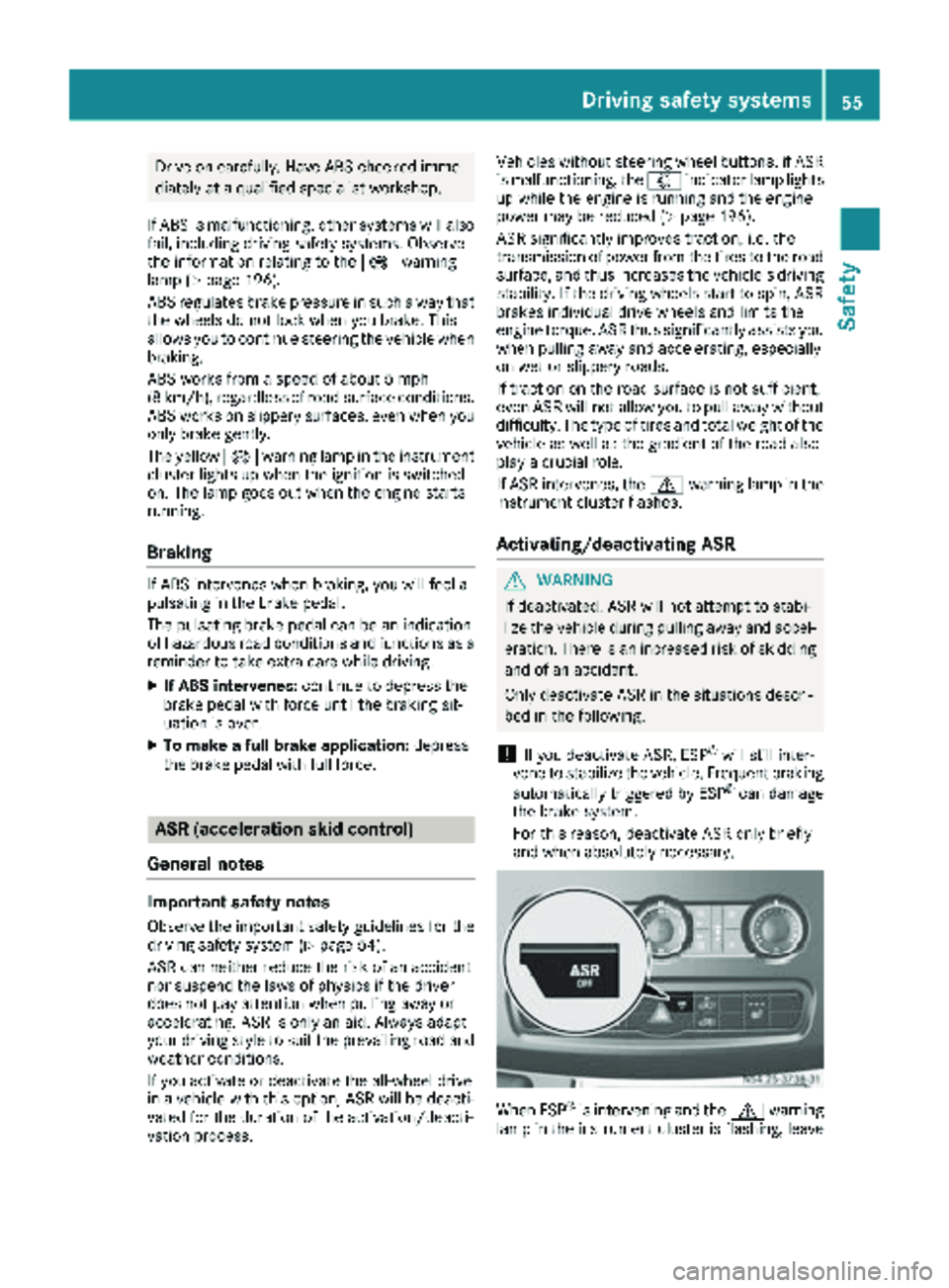
Activating/deactivating ASR
GWARNING
If deactivated, ASR will not attempt to stabi-
lize the vehicle during pulling away and accel- eration. There is an increased risk of skidding
and of an accident.
Only deactivate ASR in the situations descri-
bed in the following.
!If you deactivate ASR, ESP®will still inter-
vene to stabilize the vehicle. Frequent braking
automatically triggered by ESP
®can damage
the brake system.
For this reason, deactivate ASR only briefly
and when absolutely necessary.
When ESP®is intervening and the dwarning
lamp in the instrument cluster is flashing, leave
Driving safet ysystem s55
Safety
Z
Page 63 of 294
Useful information
This Operator's Manual describes all models as
well as standard and optional equipment of your
vehicle that were available at the time of going
to print. Country-specific variations are possi-
ble. Note that your vehicle may not be equipped
with all of the described functions. This also
applies to systems and functions relevant to
safety.
Read the information on qualified specialist
workshops (
Ypage 27).
Key
Important safety notes
GWARNING
When the double locks are activated, the
doors can no longer be opened from the
inside. People in the vehicle can no longer get
out, e.g. in hazardous situations. There is a
risk of injury.
Therefore, do not leave any people unsuper-
vised in the vehicle, particularly children, eld-
erly people or people in need of special assis-
tance. Do not activate the double lock when
people are in the vehicle.
GWARNING
If you leave children unsupervised in the vehi-
cle, they could set it in motion by, for example:
Rrelease the parking brake.
Rshift the automatic transmission out of park
position Por shift manual transmission into
neutral.
Rstart the engine.
In addition, they may operate vehicle equip-
ment and become trapped. There is a risk of
an accident and injury.
When leaving the vehicle, always take the
SmartKey with you and lock the vehicle. Never
leave children unsupervised in the vehicle.
GWARNING
If you attach heavy or large objects to the
SmartKey, the SmartKey could be uninten-
tionally turned in the ignition lock. This could
cause the engine to be switched off. There is a risk of an accident.
Do not attach any heavy or large objects to the
SmartKey. Remove any bulky key rings before
inserting the SmartKey into the ignition lock.
Do not keep the key with remote control:
Rwith electronic devices, e.g. a mobile phone
or another key with remote control
Rwith metallic objects, e.g. coins or metal foil
Rin metallic objects, e.g. metal cases
This can affect the key's functionality.
Key functions of the remote control
General notes
The vehicle is equipped with either two or four
remote controls with a folding key or four
mechanical keys. In this Operator's Manual,
both the mechanical keys and the keys with
remote control are referred to as keys. The
remote control key has a range of up to 32 ft
(10 m). Use the remote control of the key only
when in immediate proximity of the vehicle. This
prevents theft.
Remote controls that are not included in the
scope of delivery for the vehicle must be pro-
grammed before use. Further information can
be obtained at any authorized Sprinter Dealer.
The key's remote control locks/unlocks the
driver's door and/or the following centrally if
the factory settings have not been changed:
Rthe driver's and the front-passenger door
Rthe sliding doors
Rthe rear doors
iIf the driver's or front-passenger door is not
closed, the corresponding door is not locked.
If a sliding door or a rear door is not closed
properly, none of the rear doors are locked.
If there is a key is in the ignition lock, the remote
control is inoperative. When locking or unlock-
ing the vehicle with the remote control, always
pay attention to the indicator lamp signaling.
Also check the locking knobs of the doors.
Key61
Opening and closing
Z
Page 67 of 294
ProblemPossible causes/consequences andMSolutions
The engine cannot be
started using the key.The on-board voltage is too low.
XSwitch off all non-essential consumers, such as interior lighting, and
try to start the engine again.
If this does not work:
XCheck the starter battery and charge it if necessary (Ypage 233).
or
XJump-start the vehicle (Ypage 243).
or
XConsult a qualified specialist workshop.
You have lost a key.XHave the key deactivated at a qualified specialist workshop.
XReport the loss immediately to the vehicle insurers.
XIf necessary, have the mechanical locks replaced.
Central locking
Important safety notes
GWARNING
If children are left unsupervised in the vehicle,
they could:
Ropen the doors, thus endangering other
people or road users.
Rget out and disrupt traffic.
Roperate the vehicle's equipment.
Additionally, children could set the vehicle in
motion if, for example, they:
Rrelease the parking brake.
Rshifting the automatic transmission out of
park position P
RStart the engine.
There is a risk of an accident and injury.
When leaving the vehicle, always take the
SmartKey with you and lock the vehicle. Never
leave children or animals unattended in the
vehicle. Always keep the SmartKey out of
reach of children.
GWARNING
If persons, particularly children are subjected to prolonged exposure to extreme heat or
cold, there is a risk of injury, possibly even
fatal. Never leave children unattended in the
vehicle.
You can open a locked front door from the inside
at any time. You can open a locked sliding door
or rear door from the inside if it has been previ-
ously unlocked from inside.
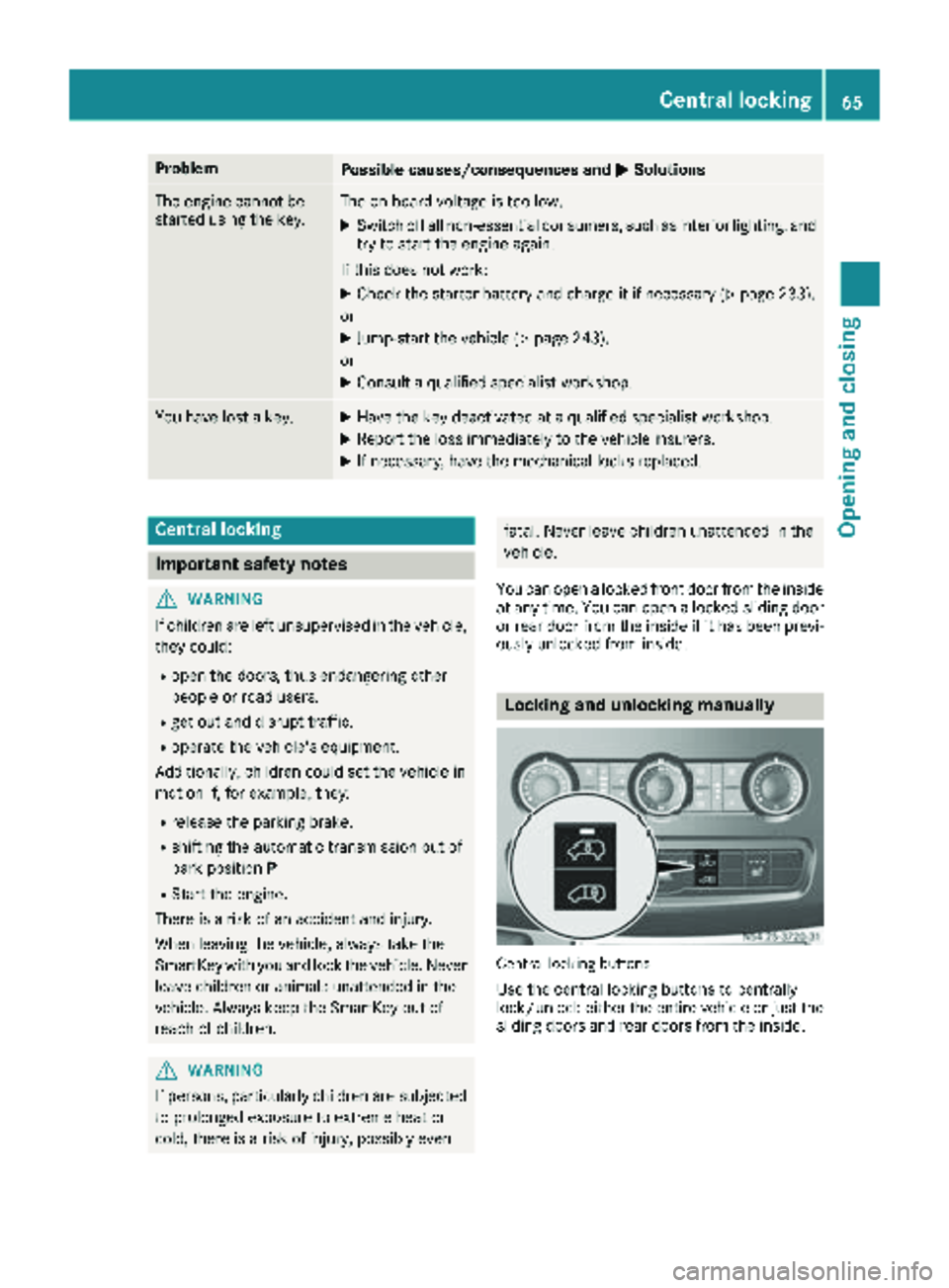
Locking and unlocking manually
Central locking buttons
Use the central locking buttons to centrally
lock/unlock either the entire vehicle or just the sliding doors and rear doors from the inside.
Central locking65
Opening and closing
Z
Page 90 of 294
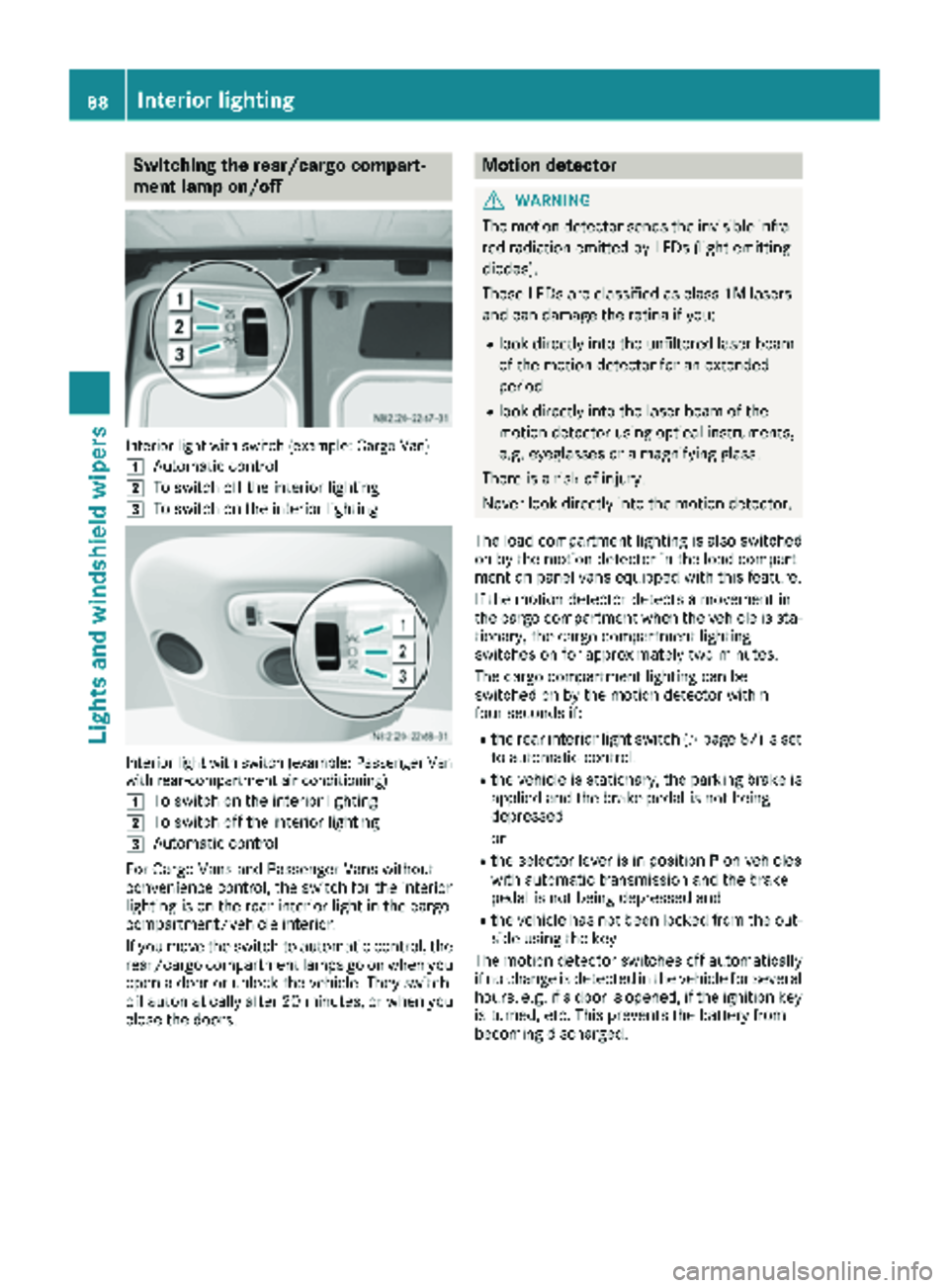
Switching the rear/cargo compart-
ment lamp on/off
Interior light with switch (example: Cargo Van)
1
Automatic control
2To switch off the interior lighting
3To switch on the interior lighting
Interior light with switch (example: Passenger Van
with rear-compartment air conditioning)
1
To switch on the interior lighting
2To switch off the interior lighting
3Automatic control
For Cargo Vans and Passenger Vans without
convenience control, the switch for the interior
lighting is on the rear interior light in the cargo
compartment/vehicle interior.
If you move the switch to automatic control, the
rear/cargo compartment lamps go on when you
open a door or unlock the vehicle. They switch
off automatically after 20 minutes, or when you
close the doors.
Motion detector
GWARNING
The motion detector sends the invisible infra- red radiation emitted by LEDs (light emitting
diodes).
These LEDs are classified as class 1M lasers
and can damage the retina if you:
Rlook directly into the unfiltered laser beam
of the motion detector for an extended
period
Rlook directly into the laser beam of the
motion detector using optical instruments,
e.g. eyeglasses or a magnifying glass.
There is a risk of injury.
Never look directly into the motion detector.
The load compartment lighting is also switched
on by the motion detector in the load compart-
ment on panel vans equipped with this feature.
If the motion detector detects a movement in
the cargo compartment when the vehicle is sta-
tionary, the cargo compartment lighting
switches on for approximately two minutes.
The cargo compartment lighting can be
switched on by the motion detector within
four seconds if:
Rthe rear interior light switch (Ypage 87) is set
to automatic control.
Rthe vehicle is stationary, the parking brake is
applied and the brake pedal is not being
depressed
or
Rthe selector lever is in position Pon vehicles
with automatic transmission and the brake
pedal is not being depressed and
Rthe vehicle has not been locked from the out-
side using the key
The motion detector switches off automatically
if no change is detected in the vehicle for several
hours, e.g. if a door is opened, if the ignition key
is turned, etc. This prevents the battery from
becoming discharged.
88Interior lighting
Lights and windshield wipers
Page 123 of 294
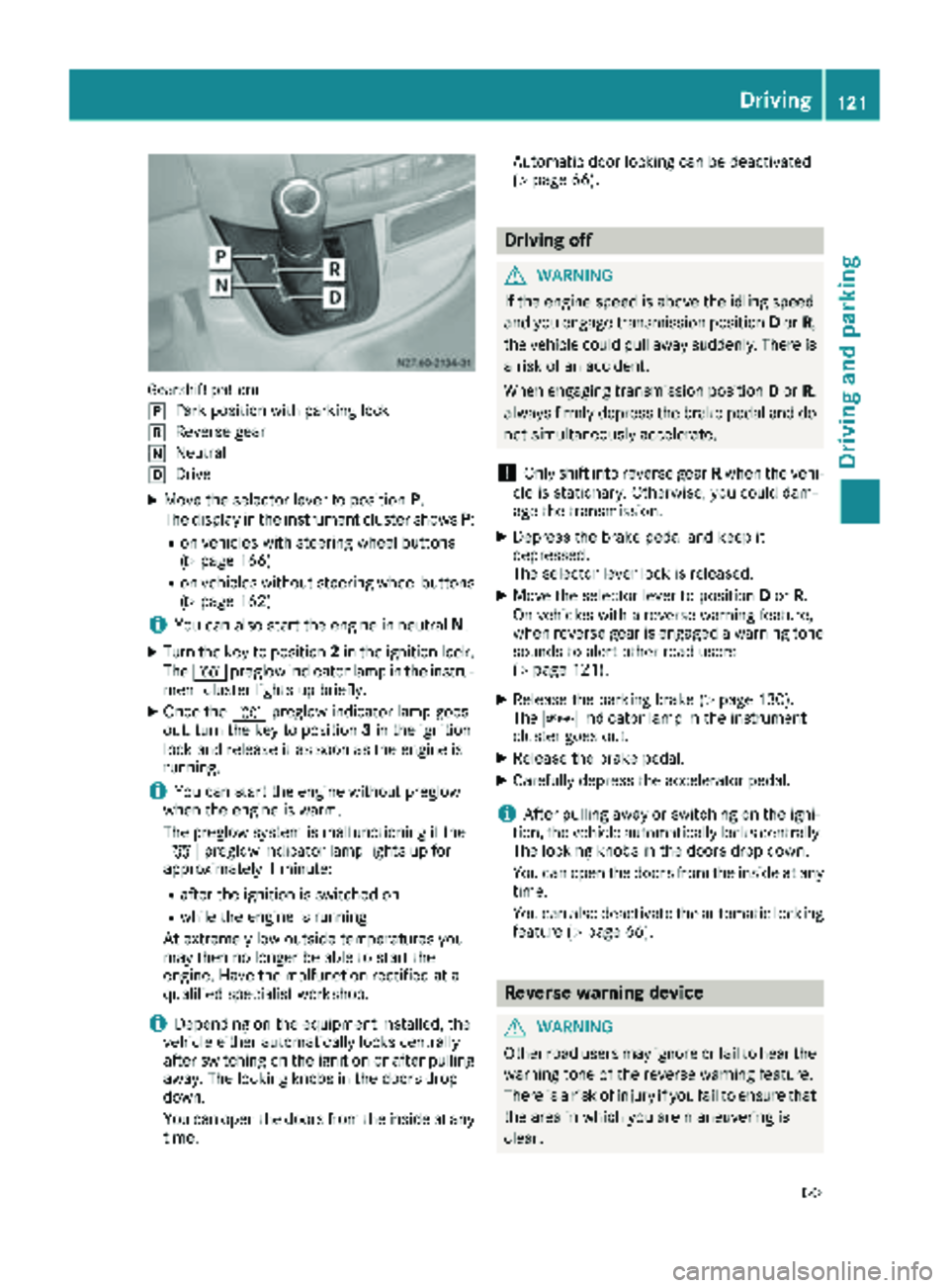
Gearshift pattern
j
Park position with parking lock
kReverse gear
iNeutral
hDrive
XMove the selector lever to positionP.
The display in the instrument cluster shows P:
Ron vehicles with steering wheel buttons
(Ypage 166)
Ron vehicles without steering wheel buttons
(Ypage 162)
iYou can also start the engine in neutral N.
XTurn the key to position 2in the ignition lock.
The % preglow indicator lamp in the instru-
ment cluster lights up briefly.
XOnce the %preglow indicator lamp goes
out, turn the key to position 3in the ignition
lock and release it as soon as the engine is
running.
iYou can start the engine without preglow
when the engine is warm.
The preglow system is malfunctioning if the
% preglow indicator lamp lights up for
approximately 1 minute:
Rafter the ignition is switched on
Rwhile the engine is running
At extremely low outside temperatures you
may then no longer be able to start the
engine. Have the malfunction rectified at a
qualified specialist workshop.
iDepending on the equipment installed, the
vehicle either automatically locks centrally
after switching on the ignition or after pulling
away. The locking knobs in the doors drop
down.
You can open the doors from the inside at any
time. Automatic door locking can be deactivated
(
Ypage 66).
Driving off
GWARNING
If the engine speed is above the idling speed
and you engage transmission position Dor R,
the vehicle could pull away suddenly. There is
a risk of an accident.
When engaging transmission position Dor R,
always firmly depress the brake pedal and do not simultaneously accelerate.
!Only shift into reverse gear Rwhen the vehi-
cle is stationary. Otherwise, you could dam-
age the transmission.
XDepress the brake pedal and keep it
depressed.
The selector lever lock is released.
XMove the selector lever to position Dor R.
On vehicles with a reverse warning feature,
when reverse gear is engaged a warning tone
sounds to alert other road users
(
Ypage 121).
XRelease the parking brake (Ypage 130).
The c indicator lamp in the instrument
cluster goes out.
XRelease the brake pedal.
XCarefully depress the accelerator pedal.
iAfter pulling away or switching on the igni-
tion, the vehicle automatically locks centrally.
The locking knobs in the doors drop down.
You can open the doors from the inside at any
time.
You can also deactivate the automatic locking
feature (
Ypage 66).
Reverse warning device
GWARNING
Other road users may ignore or fail to hear the warning tone of the reverse warning feature.
There is a risk of injury if you fail to ensure that
the area in which you are maneuvering is
clear.
Driving121
Driving and parking
Z
Page 125 of 294
ProblemPossible causes/consequences andMSolutions
The vehicle cannot be
driven at a speed
exceeding 5 mph
(8 km/h).
The yellow;Check
Engine lamp and the yel-
low å DEF indicator
lamp
2light up.
The exhaust gas aftertreatment system is defective or an emissions-
relevant malfunction has occurred.
This malfunction or defect can damage the exhaust gas aftertreat-
ment.
XObserve the messages in the display:
Ron vehicles without steering-wheel buttons (Ypage 177)
Ron vehicles with steering wheel buttons (Ypage 187).
The engine does not
start.
The starter motor cannot
be heard.The battery isolating switch is switched off.
XSwitch on the power supply (Ypage 119).
The engine does not
start.
The starter motor cannot
be heard.The on-board voltage is too low. The battery is too weak or discharged.
XJump-start the vehicle (Ypage 243).
If the engine cannot be jump-started, the starter motor is faulty.
XConsult a qualified specialist workshop.
The engine does not
start.
The starter motor cannot
be heard.The battery is discharged or faulty.
XCheck the battery for damage.
XCharge the battery (Ypage 233).
Automatic transmission
Important safety notes
GWARNING
If the engine speed is above the idling speed
and you engage transmission position Dor R,
the vehicle could pull away suddenly. There is
a risk of an accident.
When engaging transmission position Dor R,
always firmly depress the brake pedal and do not simultaneously accelerate.
!Vehicles with automatic transmission may
roll only briefly in the neutral position N. Pro-
longed rolling of the wheels, e.g. when being
towed, will result in transmission damage.
Towing (
Ypage 244)
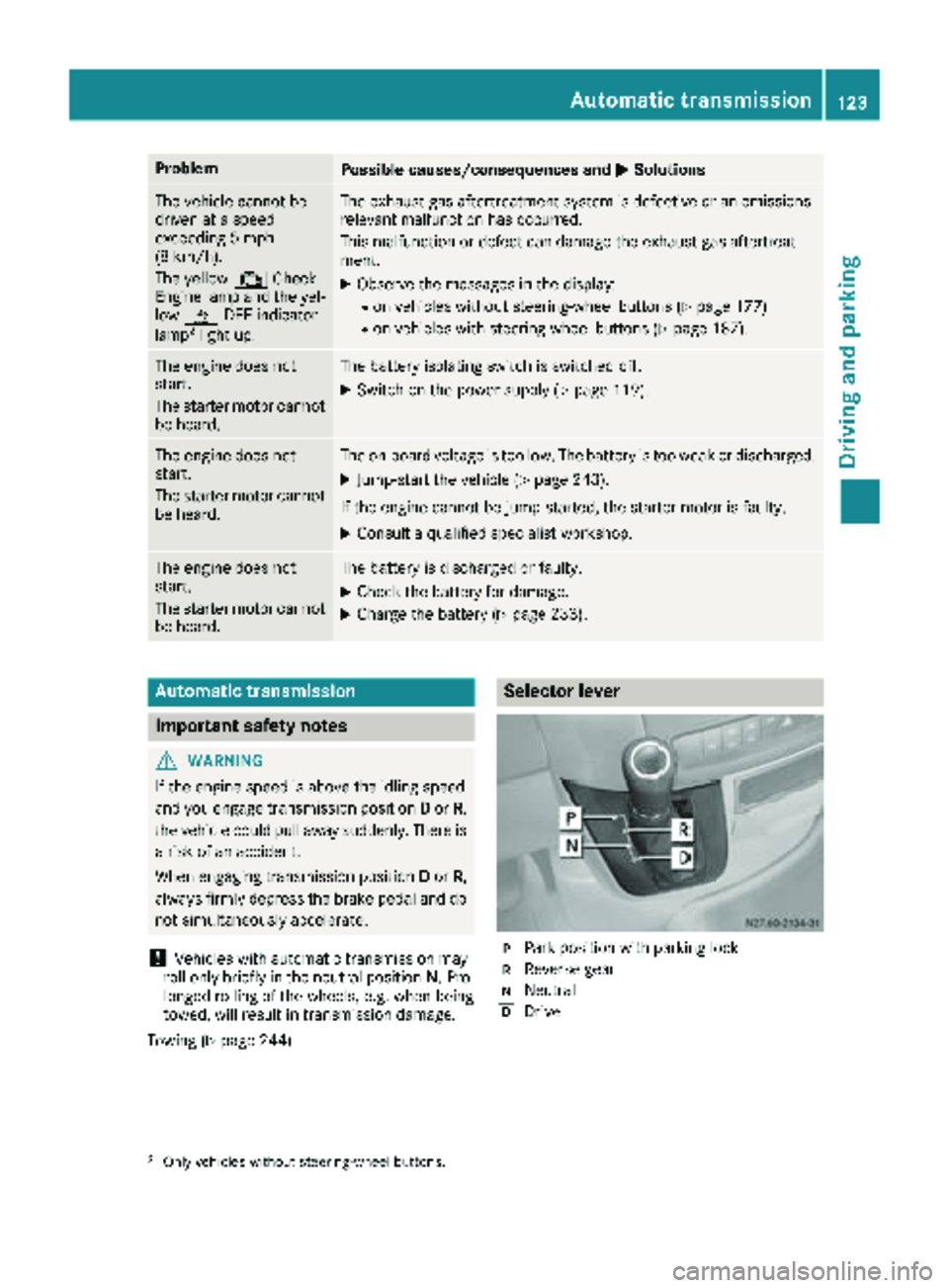
Selector lever
jPark position with parking lock
kReverse gear
iNeutral
hDrive
2Only vehicles without steering-wheel buttons.
Automatic transmission123
Driving and parking
Z
Page 126 of 294
The display in the instrument cluster shows the
present selector lever position or the current
shift range:
Ron vehicles with steering wheel buttons
(Ypage 166)
Ron vehicles without steering wheel buttons
(Ypage 162)
Selector lever positions
BPark position
This prevents the vehicle from rolling
away when stopped. Only move the
selector lever toPif the vehicle is
stationary.
You can only remove the key when
the selector lever is in this position.
The selector lever is locked in posi-
tion Pif the key is removed.
The parking lock should not be used
as a brake when parking. Always
apply the parking brake as well once
you have parked the vehicle.
CReverse gear
Only move the selector lever to R
when the vehicle is stationary.
ANeutral
No power is transmitted from the
engine to the drive wheels. Releasing
the brakes will allow you to move the
vehicle freely, e.g. by pushing.
Do not move the selector lever to N
while driving. The automatic trans-
mission could otherwise be dam-
aged.
If ASR is deactivated or ESP
®has
malfunctioned: only move the selec-
tor lever to Nif the vehicle is in dan-
ger of skidding, e.g. on icy roads.
7Drive
The automatic transmission changes
gear itself. All forward gears are avail-
able.
You can influence the gearshifts and
shift gears yourself or limit the shift
range.
Changing gear
The 5-speed automatic transmission adapts to
your individual driving style by continuously
adjusting its shift points. These shift point
adjustments take into account the current oper-
ating and driving conditions. If the operating or
driving conditions change, the automatic trans-
mission reacts by adjusting the gearshift pro-
gram.
When the selector lever is in position D, the
automatic transmission selects the individual
gears automatically. This depends on:
Rany restriction in the shift range
(Ypage 125)
Rthe position of the accelerator pedal
Rthe road speed
Touchshift
When the selector lever is in position D, you can
perform gearshifts yourself.
XTo shift down: press the selector lever to the
left towards D–.
The automatic transmission shifts to the next gear down, depending on the gear currently
engaged. The shift range is also restricted.
iThe automatic transmission does not shift
down if you press the selector lever towards
D– while traveling at too high a speed. This
protects the engine from overrevving.
XTo shift up: briefly press the selector lever to
the right towards D+.
The automatic transmission shifts to the next
gear up, depending on the current gearshift
program. This also extends the shift range.
XTo derestrict the shift range: press and hold
the selector lever towards D+until D
appears
in the display again.
The automatic transmission shifts from the
current shift range directly to D.
XTo select the optimum shift range: press
and hold the selector lever to the left towards
D–.
The automatic transmission will shift to a
range which allows easy acceleration and
deceleration. To do this, the automatic trans-
mission will shift down one or more gears.
124Automatic transmission
Driving and parking
Page 127 of 294
Shift ranges
When the selector lever is in positionDyou can
restrict or derestrict the shift range for the auto- matic transmission.
XTo extend and restrict the shift range:
press the selector lever briefly to the right
towards D+or left towards D–.
The display shows the selected shift range.
The automatic transmission shifts only as far
as the relevant gear.
iIf the maximum engine speed for the restric-
ted shift range is reached and you depress the
accelerator pedal, the automatic transmis-
sion will not shift up.
Driving situations
5Use the braking effect of the engine
on steep downhill gradients and for
driving:
Ron steep mountain roads
Rin mountainous terrain
Rin arduous conditions
4Use the braking effect of the engine
on extremely steep downhill gradi-
ents and long downhill stretches.
Driving tips
Accelerator pedal position
Your style of driving influences how the auto-
matic transmission shifts gear:
Rlittle throttle: early upshifts
Rlots of throttle: later upshifts
Kickdown
Use kickdown for maximum acceleration:
XDepress the accelerator pedal beyond the
pressure point.
The automatic transmission shifts to the next
gear down, depending on the engine speed.
XEase off on the accelerator pedal once the
desired speed is reached.
The automatic transmission shifts up again.
Maneuvering
Maneuvering in a tight space:
XControl the vehicle's speed by braking care-
fully.
XDepress the accelerator pedal slightly and
evenly.
iYou can shift back and forth between drive
position Dand reverse gear Rat low speeds
without applying the brakes. This can help
you, for example when rapidly maneuvering
the vehicle or rocking it out of snow or slush.
Towing a trailer
XDrive at moderate engine speeds on steep
uphill gradients.
XDepending on the uphill or downhill gradient,
shift down to a shift range adapted to the
driving situation (
Ypage 125), even if cruise
control is activated.
Automatic transmission125
Driving and parking
Z
Page 131 of 294
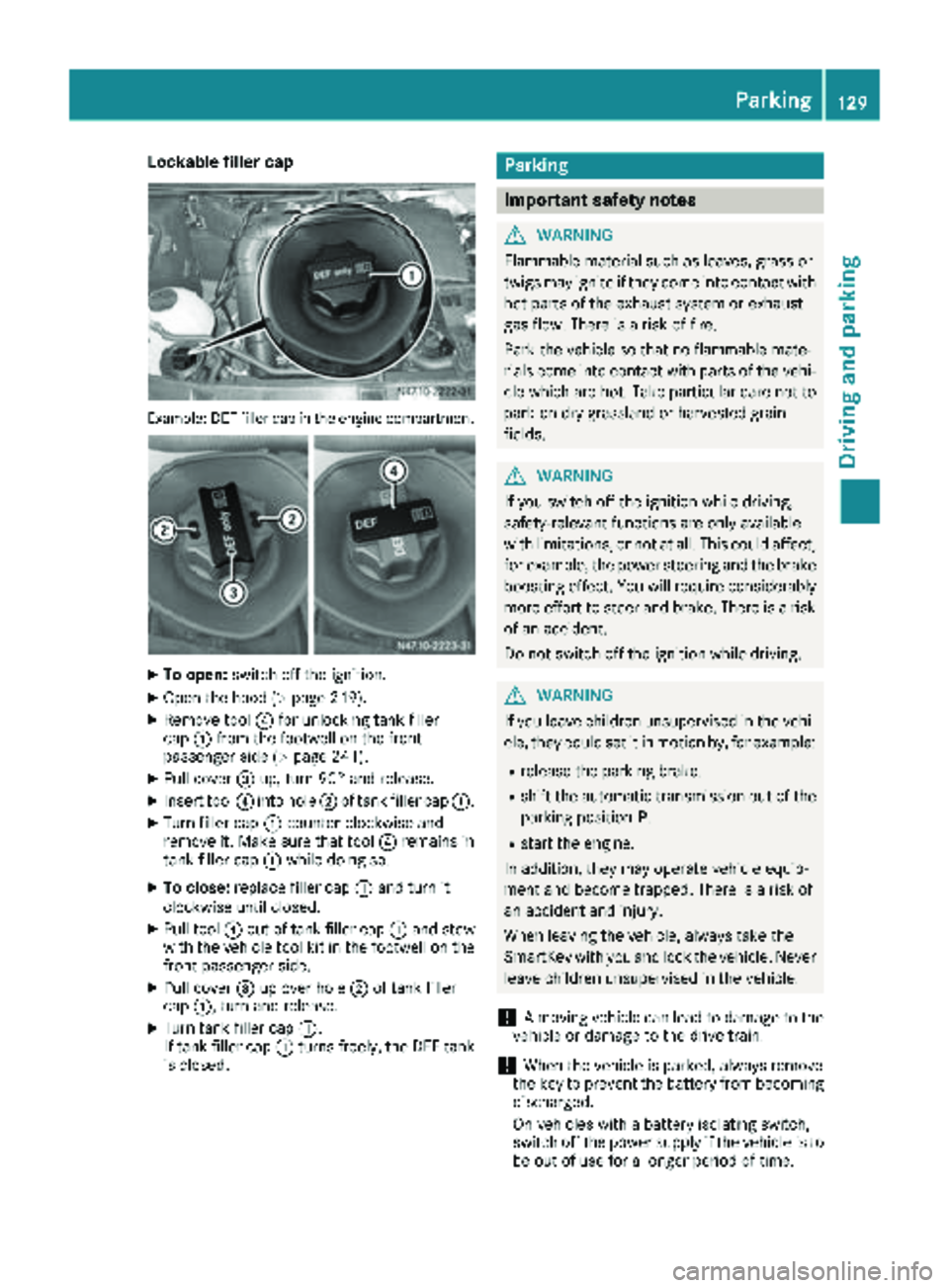
Lockable filler cap
Example: DEF filler cap in the engine compartment
XTo open:switch off the ignition.
XOpen the hood (Ypage 219).
XRemove tool ?for unlocking tank filler
cap :from the footwell on the front-
passenger side (
Ypage 241).
XPull cover =up, turn 90° and release.
XInsert tool ?into hole ;of tank filler cap :.
XTurn filler cap:counter-clockwise and
remove it. Make sure that tool ?remains in
tank filler cap :while doing so.
XTo close: replace filler cap :and turn it
clockwise until closed.
XPull tool ?out of tank filler cap :and stow
with the vehicle tool kit in the footwell on the
front-passenger side.
XPull cover =up over hole ;of tank filler
cap :, turn and release.
XTurn tank filler cap :.
If tank filler cap :turns freely, the DEF tank
is closed.
Parking
Important safety notes
GWARNING
Flammable material such as leaves, grass or
twigs may ignite if they come into contact with
hot parts of the exhaust system or exhaust
gas flow. There is a risk of fire.
Park the vehicle so that no flammable mate-
rials come into contact with parts of the vehi-
cle which are hot. Take particular care not to
park on dry grassland or harvested grain
fields.
GWARNING
If you switch off the ignition while driving,
safety-relevant functions are only available
with limitations, or not at all. This could affect, for example, the power steering and the brake
boosting effect. You will require considerably
more effort to steer and brake. There is a risk
of an accident.
Do not switch off the ignition while driving.
GWARNING
If you leave children unsupervised in the vehi-
cle, they could set it in motion by, for example:
Rrelease the parking brake.
Rshift the automatic transmission out of the
parking position P.
Rstart the engine.
In addition, they may operate vehicle equip-
ment and become trapped. There is a risk of
an accident and injury.
When leaving the vehicle, always take the
SmartKey with you and lock the vehicle. Never
leave children unsupervised in the vehicle.
!A moving vehicle can lead to damage to the
vehicle or damage to the drive train.
!When the vehicle is parked, always remove
the key to prevent the battery from becoming
discharged.
On vehicles with a battery isolating switch,
switch off the power supply if the vehicle is to
be out of use for a longer period of time.
Parking129
Driving and parking
Z
Page 132 of 294
Always park your vehicle safely and according to
legal requirements and secure it against rolling
away.
To ensure that the vehicle is properly secured
against rolling away unintentionally:
Rthe parking brake must be firmly applied
Rthe selector lever must be in positionPand
the key must be removed from the ignition
lock
Ron steep uphill or downhill gradients, the front
wheels must be turned towards the curb
Rthe rear axle must be secured, e.g. with a
wheel chock, on steep uphill or downhill gra-
dients
Use the wheel chock (
Ypage 131) to do so.
If you leave the vehicle parked for more than
three weeks:
Rconnect the batteries to a trickle charger or
Rdisconnect the vehicle's starter battery or
Rswitch off the electrical system using the bat-
tery main switch (Ypage 118) and
Rdisconnect the vehicle's auxiliary battery
Otherwise, you need to check the battery's con-
dition of charge every 3 weeks, since standby
power consumption can drain the battery. If the
battery voltage is lower than 12.2 V,the battery
must be charged. Otherwise, the battery may be damaged by exhaustive discharging.
Be sure to observe the notes on disconnecting
and charging the batte
ries under "Bat-
tery“ (Ypage 228). You can obtain information
about trickle chargers from a qualified specialist
workshop.
Parking brake
GWARNING
If you leave children unsupervised in the vehi-
cle, they could set it in motion by, for example:
Rrelease the parking brake.
Rshift the automatic transmission out of the
parking position P.
Rstart the engine.
In addition, they may operate vehicle equip-
ment and become trapped. There is a risk of
an accident and injury.
When leaving the vehicle, always take the
SmartKey with you and lock the vehicle. Never
leave children unsupervised in the vehicle.
GWARNING
If you must brake the vehicle with the parking brake, the braking distance is considerably
longer and the wheels could lock. There is an
increased danger of skidding and accidents.
Only use the parking brake to brake the vehi-
cle when the service brake is faulty. Do not
apply the parking brake too firmly. If the
wheels lock, release the parking brake until
the wheels begin turning again.
The brake lamps are not illuminated when you
brake the vehicle using the parking brake.
As a rule, you may only apply the parking brake
when the vehicle is stationary.
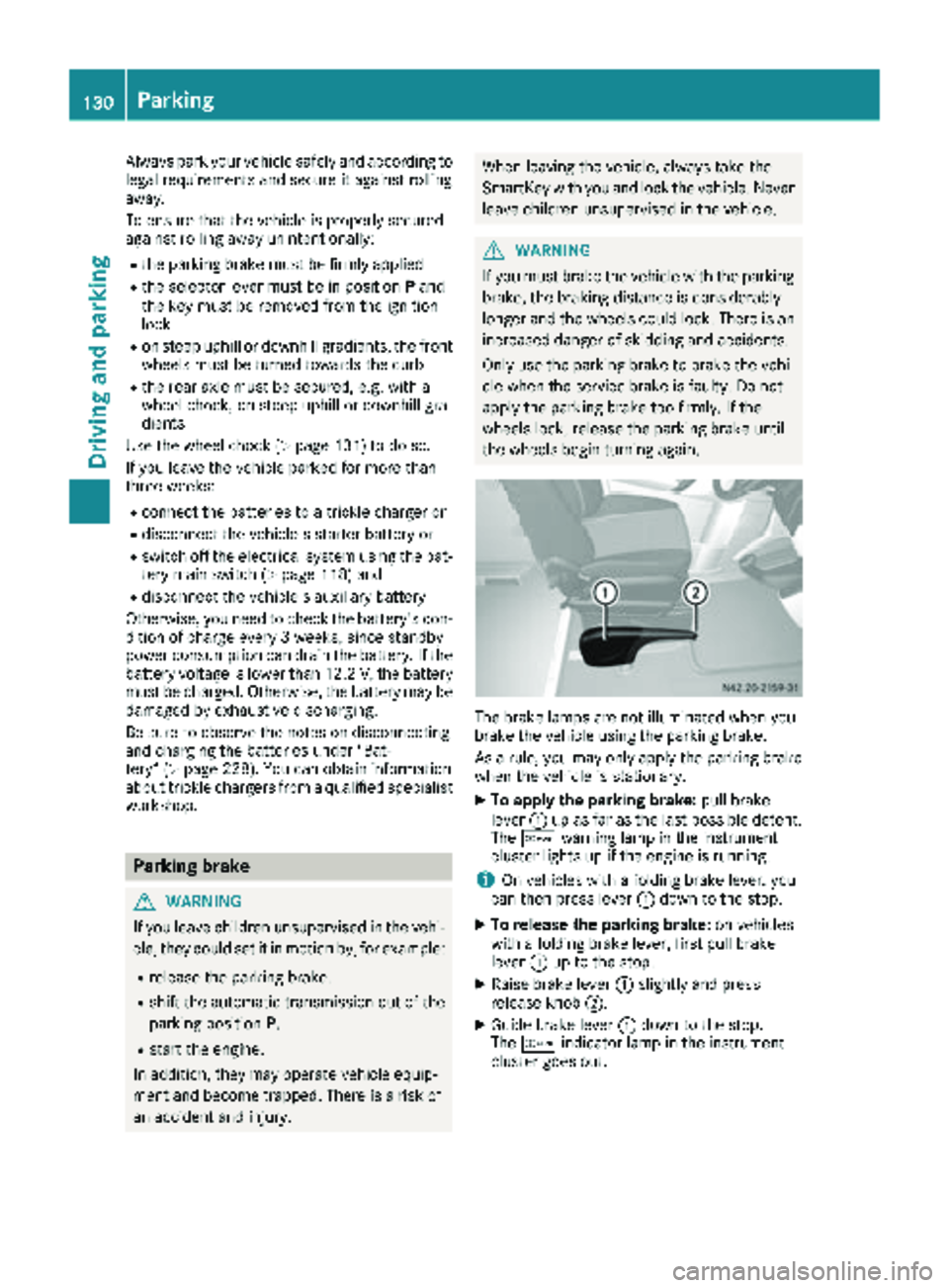
XTo apply the parking brake: pull brake
lever :up as far as the last possible detent.
The c warning lamp in the instrument
cluster lights up if the engine is running.
iOn vehicles with a folding brake lever, you
can then press lever :down to the stop.
XTo release the parking brake: on vehicles
with a folding brake lever, first pull brake
lever :up to the stop.
XRaise brake lever :slightly and press
release knob ;.
XGuide brake lever :down to the stop.
The c indicator lamp in the instrument
cluster goes out.
130Parking
Driving an d parking