buttons MERCEDES-BENZ SPRINTER 2018 MY18 Operator’s Manual
[x] Cancel search | Manufacturer: MERCEDES-BENZ, Model Year: 2018, Model line: SPRINTER, Model: MERCEDES-BENZ SPRINTER 2018Pages: 294, PDF Size: 4.36 MB
Page 230 of 294
Additionally, you will see the remaining dis-
tance in miles (mi) or kilometers ( km) or the
remaining time in days ( d).
Vehicles with steering wheel buttons
XPress the VorU button on the steering
wheel until the standard display (Ypage 166)
appears in the display.
XPress the &or* button on the steering
wheel repeatedly until the service message
appears in the display, for example:
R¯ Service A in ... days
R¯Service A in ... mi(km)
Battery
Important safety notes
Work on the battery, e.g. removing or installing,
requires specialist knowledge and the use of
special tools. Therefore, always have work on
the battery carried out at a qualified specialist
workshop.
GWARNING
Work carried out incorrectly on the battery
can lead, for example, to a short circuit and
thus damage the vehicle electronics. This can
lead to function restrictions applying to
safety-relevant systems, e.g. the lighting sys-
tem, the ABS (anti-lock braking system) or the
ESP
®(Electronic Stability Program). The oper-
ating safety of your vehicle may be restricted.
You could lose control of the vehicle, for
example:
Rwhen braking
Rin the event of abrupt steering maneuvers
and/or when the vehicle's speed is not
adapted to the road conditions
There is a risk of an accident.
In the event of a short circuit or a similar inci-
dent, contact a qualified specialist workshop
immediately. Do not drive any further. You
should have all work involving the battery car- ried out at a qualified specialist workshop.
Further information can be found under "ABS"
(
Ypage 54) and under "ESP®" (Ypage 56).
GWARNING
Electrostatic build-up can lead to the creation of sparks, which could ignite the highly explo-
sive gases of a battery. There is a risk of an
explosion.
Before handling the battery, touch the vehicle
body to remove any existing electrostatic
build-up.
The flammable gas mix is produced when the
battery is charged or when the vehicle is jump-
started.
Always make sure that neither you nor the bat-
tery are electro statically charged. Electrostatic
charging results, for example, from:
Rwearing synthetic clothing
Rfriction between clothing and the seat
Rdragging or pushing the battery across carpet
flooring or any other synthetic materials
Rrubbing the battery with cloths or towels.
Comply with the following safety precautions
and take protective measures when handling
batteries.
Risk of explosion. Explosive oxyhy-
drogen is produced when batteries
are being charged. Only charge bat-
teries in well-ventilated areas.
Fire, open flames and smoking are
therefore prohibited when working
on the battery. Avoid creating
sparks.
Battery acid is caustic. Avoid con-
tact with the skin, eyes or clothing.
Wear acid-proof protective gloves. If
skin or clothes are splashed with
acid, neutralize the splashes imme-
diately with soapy water or an acid
neutralizer, and then clean the affec-
ted areas with water. Consult a doc- tor if necessary.
Wear eye protection. When mixing
water and acid, the liquid can splash
into your eyes. Rinse acid splashes
to the eyes immediately with clean
water and contact a doctor immedi-
ately.
Keep children at a safe distance.
Children are not able to assess the
228Battery
Maintenance and care
Page 257 of 294
flated tire causes the tire to overheat and canlead to tire failure. Underinflation also
reduces fuel efficiency and tire tread life, and
may affect the vehicle's handling and stop-
ping ability.
Please note that the TPMS is not a substitute
for proper tire maintenance, and it is the driv-
er's responsibility to maintain correct tire
pressure, even if underinflation has not
reached the level to trigger illumination of the
TPMS low tire pressure telltale.
USA only:
Your vehicle has also been equipped with a
TPMS malfunction indicator to indicate if the
system is not operating properly. The TPMS
malfunction indicator is combined with the
low tire pressure telltale. When the system
detects a malfunction, the warning lamp will
flash for approximately a minute and then
remain continuously illuminated. This
sequence will be repeated every time the vehi-
cle is started as long as the malfunction
exists.
When the malfunction indicator is illuminated,
the system may not be able to detect or signal
low tire pressure as intended. TPMS malfunc-
tions may occur for a variety of reasons,
including the mounting of incompatible
replacement or alternate tires or wheels on
the vehicle that prevent the TPMS from func-
tioning properly. Always check the TPMS mal-
function telltale after replacing one or more
tires or wheels on your vehicle to ensure that
the replacement or alternate tires and wheels
allow the TPMS to continue to function prop-
erly.
Vehicles with a tire pressure monitor are equip-
ped with sensors in the wheels that monitor the
tire pressure of all four tires. The tire pressure
monitor monitors the pressure in all four tires;
you set this pressure when you activate the tire pressure monitor. The tire pressure monitor
warns you when the pressure drops in one or
more of the ti
res. The tire pressure monitor only
functions if the corresponding sensors are
installed on all wheels. You should always adjust the tire pressure
according to the vehicle load. Restart the tire
pressure monitor if you change the tire pres-
sure.
The tire pressure monitor does not warn you if a
tire pressure is incorrect. Observe the notes on the recommended tire pressure (
Ypage 251).
The tire pressure monitor is not able to warn you
of a sudden loss of pressure, e.g. following pen- etration by a foreign object. In this event, brake
the vehicle until it comes to a standstill. Do not
carry out any sudden steering maneuvers.
The tire pressure monitor has a yellow h
warning lamp in the instrument cluster for indi-
cating pressure loss/malfunctions (USA) or
pressure loss (Canada). Depending on how the
warning lamp flashes or lights up, an underin-
flated tire or a malfunction in the tire pressure
monitor is displayed:
Rif the h warning lamp is lit continuously,
the tire pressure on one or more tires is sig-
nificantly too low. The tire pressure monitor is
not malfunctioning.
RUSA only: if the hwarning lamp flashes for
60 seconds and then remains lit constantly,
the tire pressure monitor is malfunctioning.
Only vehicles with steering wheel buttons: the
on-board computer displays information on tire
pressure. After a few minutes of driving, the cur-
rent tire pressure of each tire is shown in the on-
board computer.
USA only: if the tire pressure monitor is mal-
functioning, it may be more than 10 minutes
before the malfunction is shown. The htire
pressure warning lamp flashes for 60 seconds
and then remains lit. When the malfunction has been rectified, the htire pressure warning
lam p goes ou
t after a few minutes of driving.
The tire pressure values indicated by the on-
board computer may differ from those meas-
ured at a gas station with a pressure gauge. The
tire pressures shown by the on-board computer
refer to those measured at sea level. At high
altitudes, the tire pressure values indicated by a pressure gauge are higher than those shown by
the on-board computer. In this case, do not
reduce the tire pressures.
If radio transmitting equipment (e.g. wireless
headphones, two-way radios) is operated inside
the vehicle or in the vicinity of the vehicle, this
can interfere with the operation of the tire pres-
sure monitor.
Tire pressure255
Wheels and tires
Z
Page 258 of 294
Checking the tire pressure electroni-
cally (vehicles with steering wheel but-
tons)
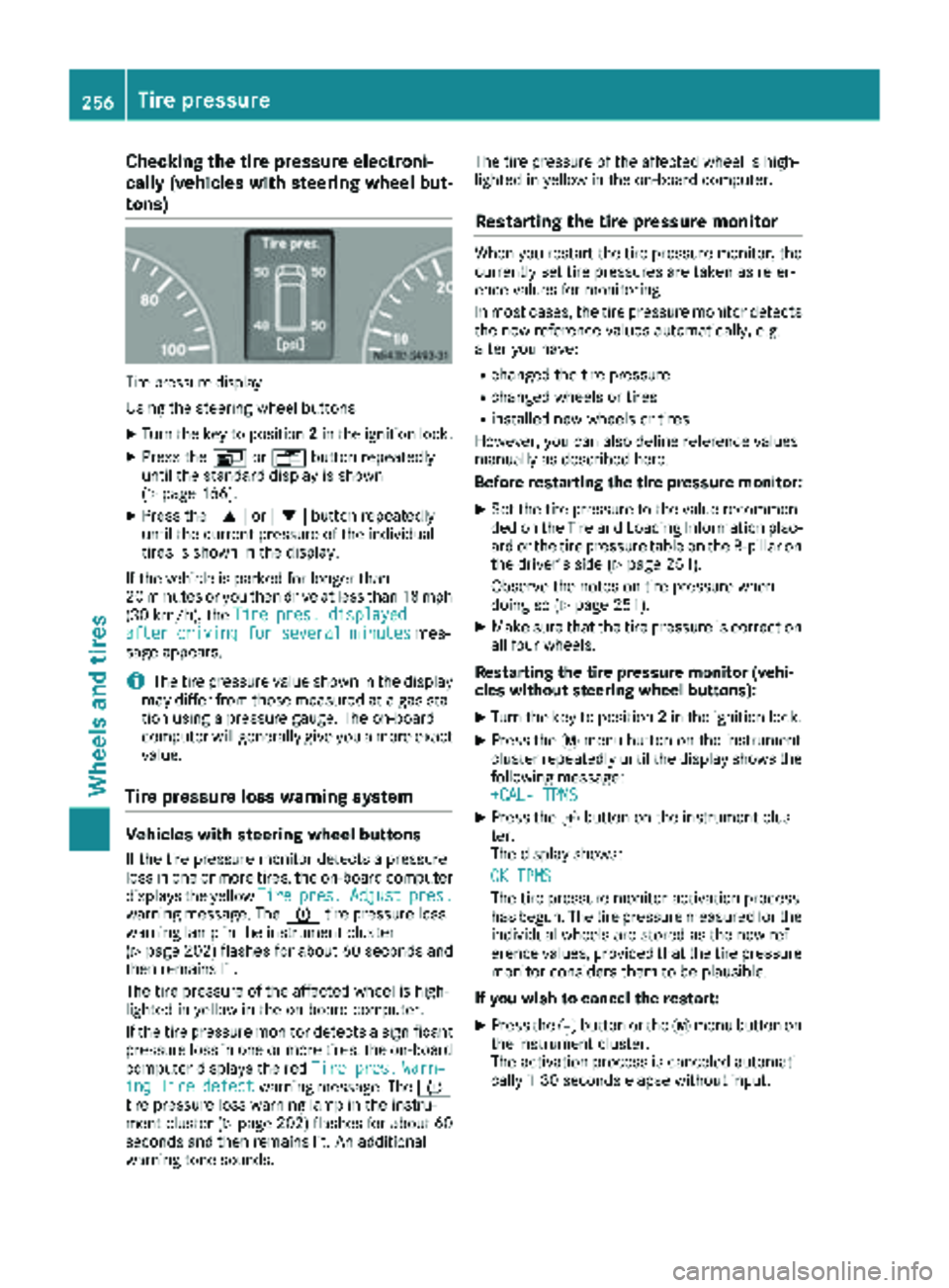
Tire pressuredisplay
Using the steering wheel buttons
XTurn the key to position 2in the ignition lock.
XPress the VorU button repeatedly
until the standard display is shown
(
Ypage 166).
XPress the 9or: button repeatedly
until the current pressure of the individual
tires is shown in the display.
If the vehicle is parked for longer than
20 minutes or you then drive at less than 18 mph
(30 km/h), the Tire pres. displayed
after driving for several minutesmes-
sage appears.
iThe tire pressure value shown in the display
may differ from those measured at a gas sta-
tion using a pressure gauge. The on-board
computer will generally give you a more exact
value.
Tire pressure loss warning system
Vehicles with steering wheel buttons
If the tire pressure monitor detects a pressure
loss in one or more tires, the on-board computer
displays the yellow Tire
pres.Adjustpres.warning message. The htire pressure loss
warning lamp in the instrument cluster
(
Ypage 202) flashes for about 60 seconds and
then remains lit.
The tire pressure of the affected wheel is high-
lighted in yellow in the on-board computer.
If the tire pressure monitor detects a significant
pressure loss in one or more tires, the on-board
computer displays the red Tire pres.
Warn‐ingTiredefectwarning message. Theh
tire pressure loss warning lamp in the instru-
ment cluster (
Ypage 202) flashes for about 60
seconds and then remains lit. An additional
warning tone sounds. The tire pressure of the affected wheel is high-
lighted in yellow in the on-board computer.
Restarting the tire pressure monitor
When you restart the tire pressure monitor, the
currently set tire pressures are taken as refer-
ence values for monitoring.
In most cases, the tire pressure monitor detects
the new reference values automatically, e.g.
after you have:
Rchanged the tire pressure
Rchanged wheels or tires
Rinstalled new wheels or tires
However, you can also define reference values
manually as described here.
Before restarting the tire pressure monitor:
XSet the tire pressure to the value recommen- ded on the Tire and Loading Information plac-
ard or the tire pressure table on the B-pillar on
the driver's side (
Ypage 251).
Observe the notes on tire pressure when
doing so (
Ypage 251).
XMake sure that the tire pressure is correct on
all four wheels.
Restarting the tire pressure monitor (vehi-
cles without steering wheel buttons):
XTurn the key to position 2in the ignition lock.
XPress the 4menu button on the instrument
cluster repeatedly until the display shows the
following message:
+CAL- TPMS
XPress the fbutton on the instrument clus-
ter.
The display shows:
OK TPMS
The tire pressure monitor activation process
has begun. The tire pressure measured for the individual wheels are stored as the new ref-
erence values, provided that the tire pressure
monitor considers them to be plausible.
If you wish to cancel the restart:
XPress the gbutton or the 4menu button on
the instrument cluster.
The activation process is canceled automati-
cally if 30 seconds elapse without input.
256Tire pressure
Wheels and tires
Page 259 of 294
Restarting the tire pressure monitor (vehi-
cles with steering wheel buttons):
XTurn the key to position2in the ignition lock.
XPress the VorU button on the steering
wheel until the standard display (Ypage 166)
appears in the display.
XPress the 9or: button on the steering
wheel repeatedly until the current pressure of
the individual tires is displayed or the display
shows the following message:
Tire pres. displayed after driving
for several minutes
XPress the 9reset button on the instrument
cluster.
The display shows the following message: Monitor current tire pressure?
XPress the
Wbutton on the steering wheel.
The display shows the following message:
Tire pres. monitor reactivated
The tire pressure monitor activation process
has begun. The tire pressure measured for the individual wheels are stored as the new ref-
erence values, provided that the tire pressure
monitor considers them to be plausible.
If you wish to cancel the restart:
XPress the Xbutton on the steering wheel.
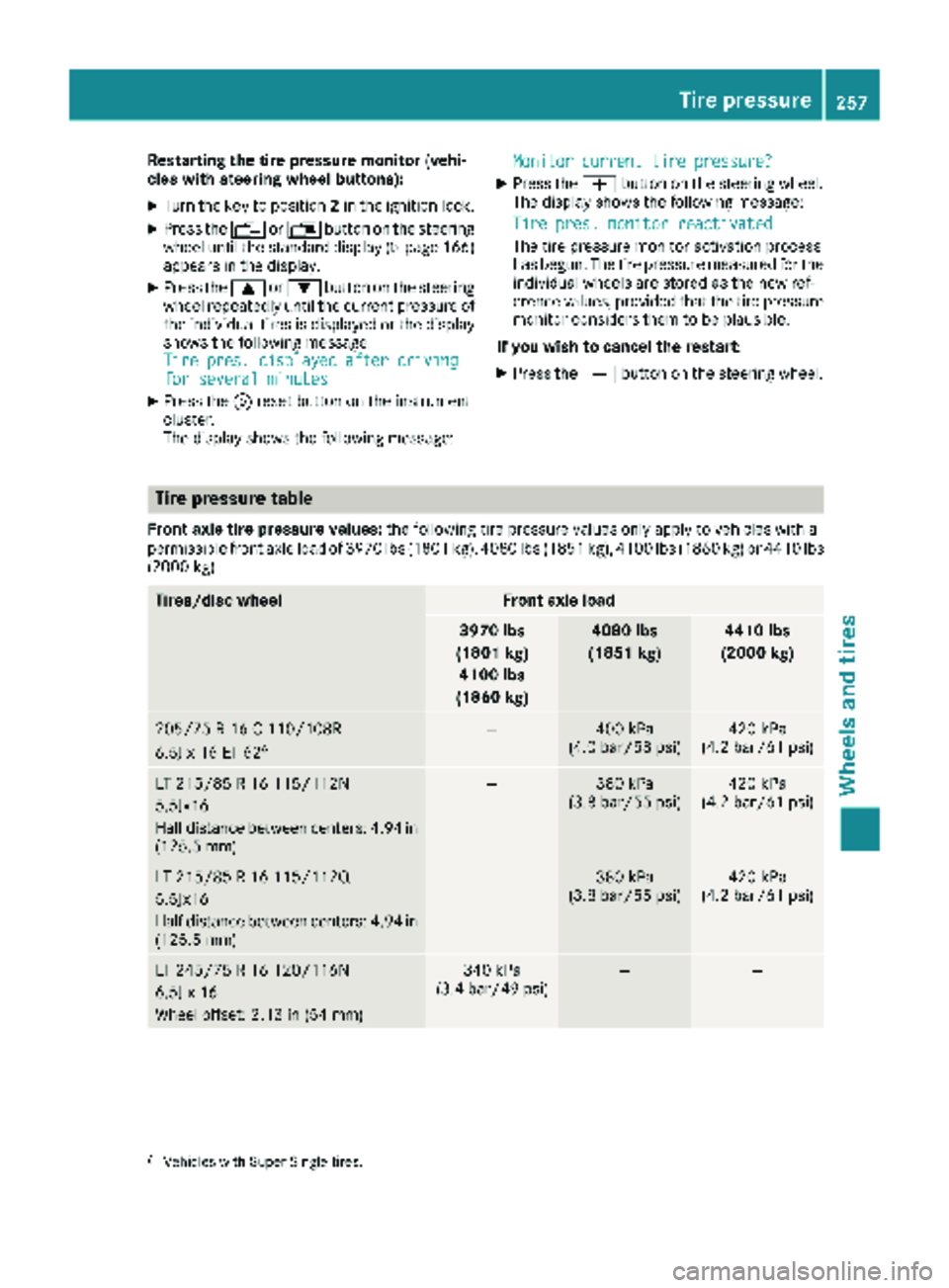
Tire pressure table
Front axle tire pressure values: the following tire pressure values only apply to vehicles with a
permissible front axle load of 3970 lb s(1801 kg), 4080 lbs (1851 kg), 4100 lbs (1860 kg) or 4410 lbs
(2000 kg).
Tires/disc wheelFront axle load
3970 lbs
(1801 kg) 4100 lbs
(1860 kg)4080 lbs
(1851 kg)4410 lbs
(2000 kg)
205/75 R 16 C 110/108R
6.5J x 16 ET 626—400 kPa
(4.0 bar/58 psi)420 kPa
(4.2 bar/61 psi)
LT 215/85 R 16 115/112N
5.5Jx16
Half distance between centers: 4.94 in
(125.5 mm)—380 kPa
(3.8 bar/55 psi)420 kPa
(4.2 bar/61 psi)
LT 215/85 R 16 115/112Q
5.5Jx16
Half distance between centers: 4.94 in
(125.5 mm)—380 kPa
(3.8 bar/55 psi)420 kPa
(4.2 bar/61 psi)
LT 245/75 R 16 120/116N
6.5J x 16
Wheel offset: 2.13 in (54 mm)340 kPa
(3.4 bar/49 psi)——
6Vehicles with Super Single tires.
Tire pressure257
Wheels and tires
Z
Page 283 of 294
wheel buttons to call up theTrip computer
menu (Ypage 173).
Diesel Exhaust Fluid (DEF)
General notes
When opening the DEF tank filler cap at high
outside temperatures, ammonia vapors may
escape.
Ammonia vapors have a pungent smell and pri-
marily cause irritation of the:
Rskin
Rmucous membranes
Reyes
You may experience a burning sensation in your
eyes, nose and throat, as well as coughing and
watering of the eyes.
Do not inhale ammonia vapors. Avoid contact
with DEF.
Do not allow DEF to come into direct contact
with your skin; it is hazardous to your health.
Rinse any affected areas off with plenty of clean water. Consult a doctor if necessary.
If DEF heats up, e.g. in direct sunlight, in the DEF
supply reservoir for some time to over 122 ‡
(50 †) , ammonia vapor will develop.
To conform to emission regulations, you must
operate the vehicle with DEF and refill the supply
regularly. The engine management recognizes
attempts to operate the vehicle without DEF,
with thinned DEF or with another reducing
agent. After previous warning messages, the
engine management then prevents a further
engine start.
When the number of remaining engine starts is 0
the engine management prevents the vehicle
from being driven at a speed exceeding 5 mph
(8 km/h). The multifunction display shows the
Idle Mode
message.
DEF consumption
DEF consumption depends on operational and
driving conditions and it is not necessary to wait
until the next scheduled service to replenish the
fluid. Therefore, refill the DEF supply tank regu-
larly during vehicle operation or, at the latest,
after receiving the first warning message via the
on-board computer.
Low ambient temperatures
DEF freezes at a temperature of approximately
12‡(Ò11 †). The vehicle is equipped with a DEF
preheating system at the factory. Winter oper-
ation is therefore also guaranteed at tempera-
tures under 12 ‡ (Ò11 †).
iIf you add DEF at temperatures below 12 ‡
(Ò11 †) it is possible that the level is not
shown correctly due to the frozen DEF.
Drive for at least 20 minutes (heating phase in
the fuel tank activated) and then stop the
vehicle for at least 30 seconds. The level is
then shown correctly.
Additives
!Do not mix DEF with any additives and do
not dilute DEF with tap water. Otherwise, the
exhaust gas aftertreatment may be damaged.
Observe the MB Specifications for Service
Products, Sheet No. 352.0.
Damage that arises through the use of addi-
tives or tap water will invalidate the New Vehi-
cle Limited Warranty.
Storage
!Containers made of aluminum, copper, cop-
per alloys as well as unalloyed or galvanized
steel are not suitable for storing DEF. If stored
in these types of containers, DEF could cause
constituents of these metals to dissolve and
cause irreparable damage to the exhaust gas
aftertrea tment.
Da
mage caused by such impurities in the DEF
will invalidate the New Vehicle Limited War-
ranty.
Only store DEF in containers made of high-alloy
Cr‑ Ni steel or Mo ‑Cr‑Ni steel in accordance with
DIN EN 10 088 ‑1/2/3 or plastic containers
made of polypropylene or polyethylene.
Purity
!Impurities in DEF (e.g. caused by other ser-
vice products, cleaning agents, dust, etc.)
result in increased emissions, malfunctions,
catalytic converter damage or engine dam-
age.
The purity of DEF is essential to prevent mal-
functions in the exhaust gas aftertreatment.
If DEF is pumped out of the DEF tank, e.g. during
repair work, the same liquid must not be used to
refill the tank. Its purity is no longer guaranteed.
Service products and capacities281
Technical data
Z