cruise control MERCEDES-BENZ SPRINTER 2018 MY18 Operator’s Manual
[x] Cancel search | Manufacturer: MERCEDES-BENZ, Model Year: 2018, Model line: SPRINTER, Model: MERCEDES-BENZ SPRINTER 2018Pages: 294, PDF Size: 4.36 MB
Page 10 of 294
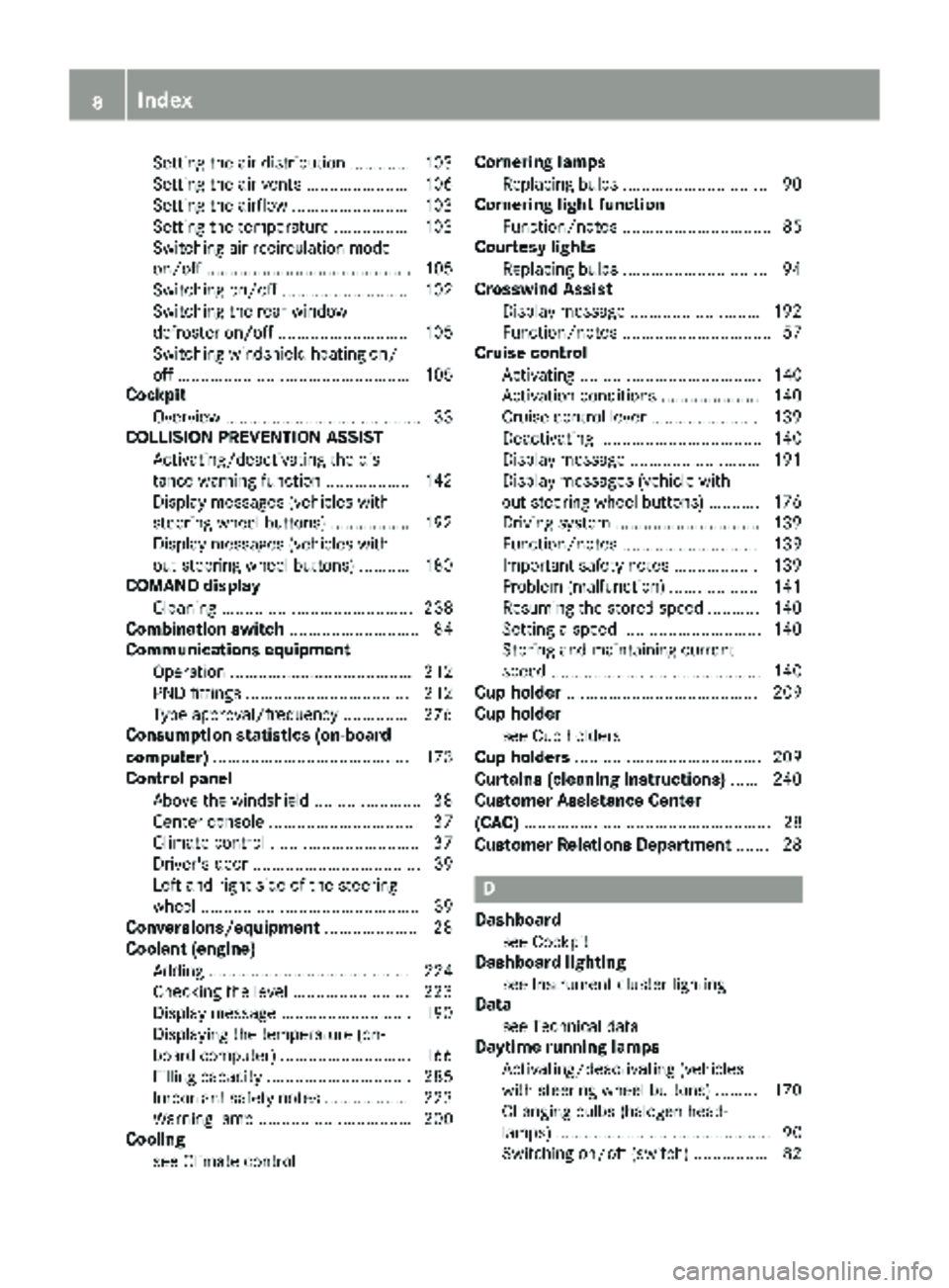
Setting the air distribution ............. 103
Setting the air vents ...................... 106
Setting the airflow ......................... 103
Setting the temperature ................ 103
Switching air-recirculation mode
on/off ............................................ 105
Switching on/off ........................... 102
Switching the rear window
defroster on/off ............................ 105
Switching windshield heating on/
off .................................................. 105
Cockpit
Overview .......................................... 33
COLLISION PREVENTION ASSIST
Activating/deactivating the dis-
tance warning function .................. 142
Display messages (vehicles with
steering wheel buttons) ................. 192
Display messages (vehicles with-
out steering wheel buttons) ........... 180
COMAND display
Cleaning ......................................... 238
Combination switch ............................ 84
Communications equipment
Operation ....................................... 212
PND fittings ................................... 212
Type approval/frequency .............. 276
Consumption statistics (on-board
computer) .......................................... 173
Control panel
Above the windshield ....................... 38
Center console ................................ 37
Climate control ................................ 37
Driver's door .................................... 39
Left and right side of the steering
wheel ............................................... 39
Conversions/equipment .................... 28
Coolant (engine)
Adding ........................................... 224
Checking the level ......................... 223
Display message ............................ 190
Displaying the temperature (on-
board computer) ............................ 166
Filling capacity ............................... 285
Important safety notes .................. 223
Warning lamp ................................. 200
Cooling
see Climate control Cornering lamps
Replacing bulbs ............................... 90
Cornering light function
Function/notes ................................ 85
Courtesy lights
Replacing bulbs ............................... 94
Crosswind Assist
Display message ............................ 192
Fu
nction/notes ................................ 57
Cruise control
Activating ....................................... 140
Activation conditions ..................... 140
Cruise control lever ....................... 139
Deactivating ................................... 140
Display message ............................ 191
Display messages (vehicle with-
out steering wheel buttons) ........... 176
Driving system ............................... 139
Function/notes ............................. 139
Important safety notes .................. 139
Problem (malfunction) ................... 141
Resuming the stored speed ........... 140
Setting a speed .............................. 140
Storing and maintaining current
speed ............................................. 140
Cup holder ......................................... 209
Cup holder
see Cup holders
Cup holders ........................................ 209
Curtains (cleaning instructions) ...... 240
Customer Assistance Center
(CAC) ..................................................... 28
Customer Relations Department ....... 28
D
Dashboard
see Cockpit
Dashboard lighting
see Instrument cluster lighting
Data
see Technical data
Daytime running lamps
Activating/deactivating (vehicles
with steering wheel buttons) ......... 170
Changing bulbs (halogen head-
lamps) .............................................. 90
Switching on/off (switch) ................ 82
8Index
Page 35 of 294
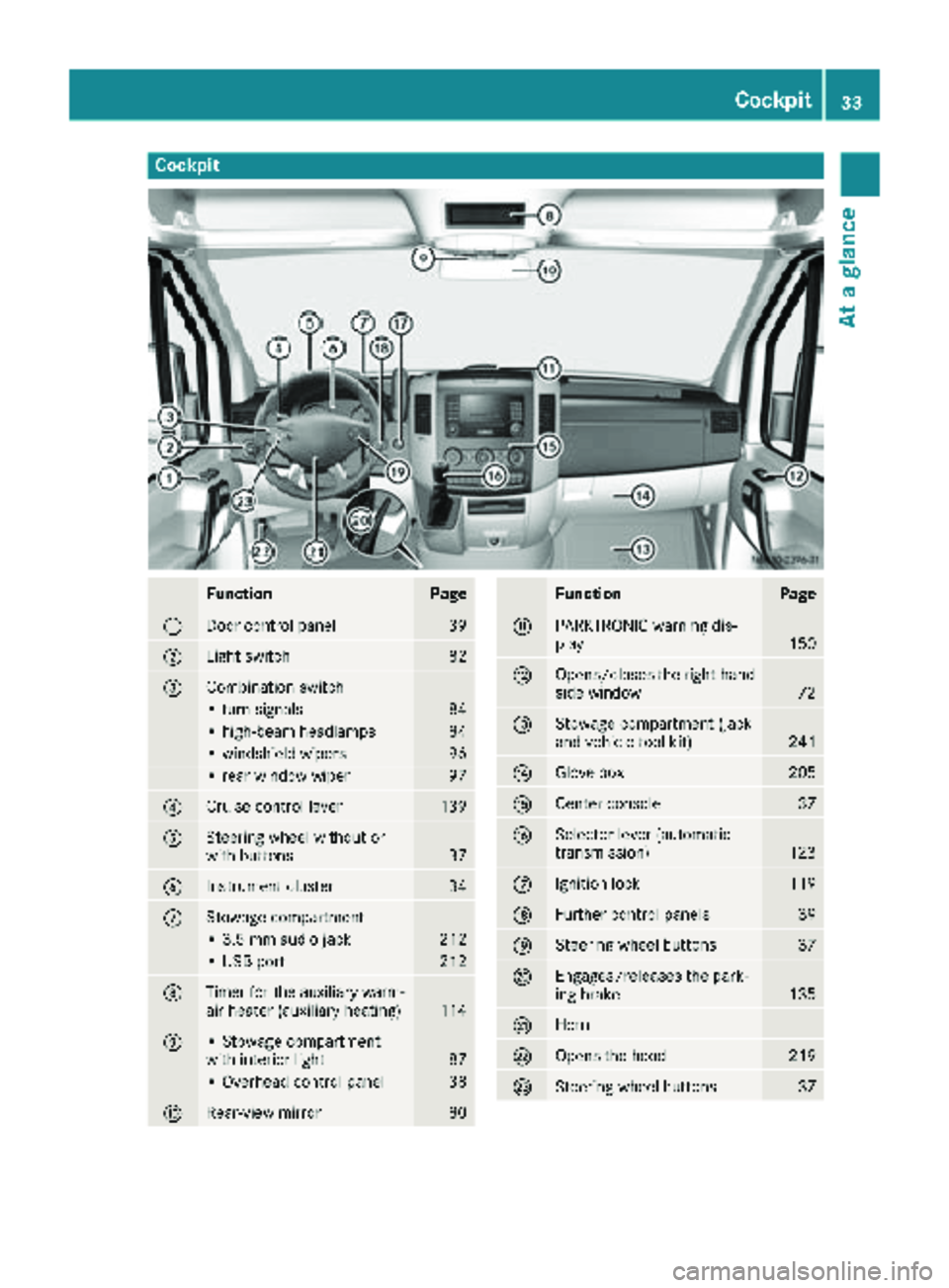
Cockpit
FunctionPage
:Door control panel39
;Light switch82
=Combination switch
• turn signals84
• high-beam headlamps84
• windshield wipers96
• rear window wiper97
?Cruise control lever139
ASteering wheel without or
with buttons37
BInstrument cluster34
CStowage compartment
• 3.5 mm audio jack212
• USB port212
DTimer for the auxiliary warm-
air heater (auxiliary heating)114
E• Stowage compartment
with interior light87
• Overhead control panel38
FRear-view mirror80
FunctionPage
GPARKTRONIC warning dis-
play150
HOpens/closes the right-hand
side window72
IStowage compartment (jack
and vehicle tool kit)241
JGlove box205
KCenter console37
LSelector lever (automatic
transmission)123
MIgnition lock119
NFurther control panels39
OSteering wheel buttons37
PEngages/releases the park-
ing brake135
QHorn
ROpens the hood219
SSteering wheel buttons37
Cockpit33
At a glance
Page 127 of 294
Shift ranges
When the selector lever is in positionDyou can
restrict or derestrict the shift range for the auto- matic transmission.
XTo extend and restrict the shift range:
press the selector lever briefly to the right
towards D+or left towards D–.
The display shows the selected shift range.
The automatic transmission shifts only as far
as the relevant gear.
iIf the maximum engine speed for the restric-
ted shift range is reached and you depress the
accelerator pedal, the automatic transmis-
sion will not shift up.
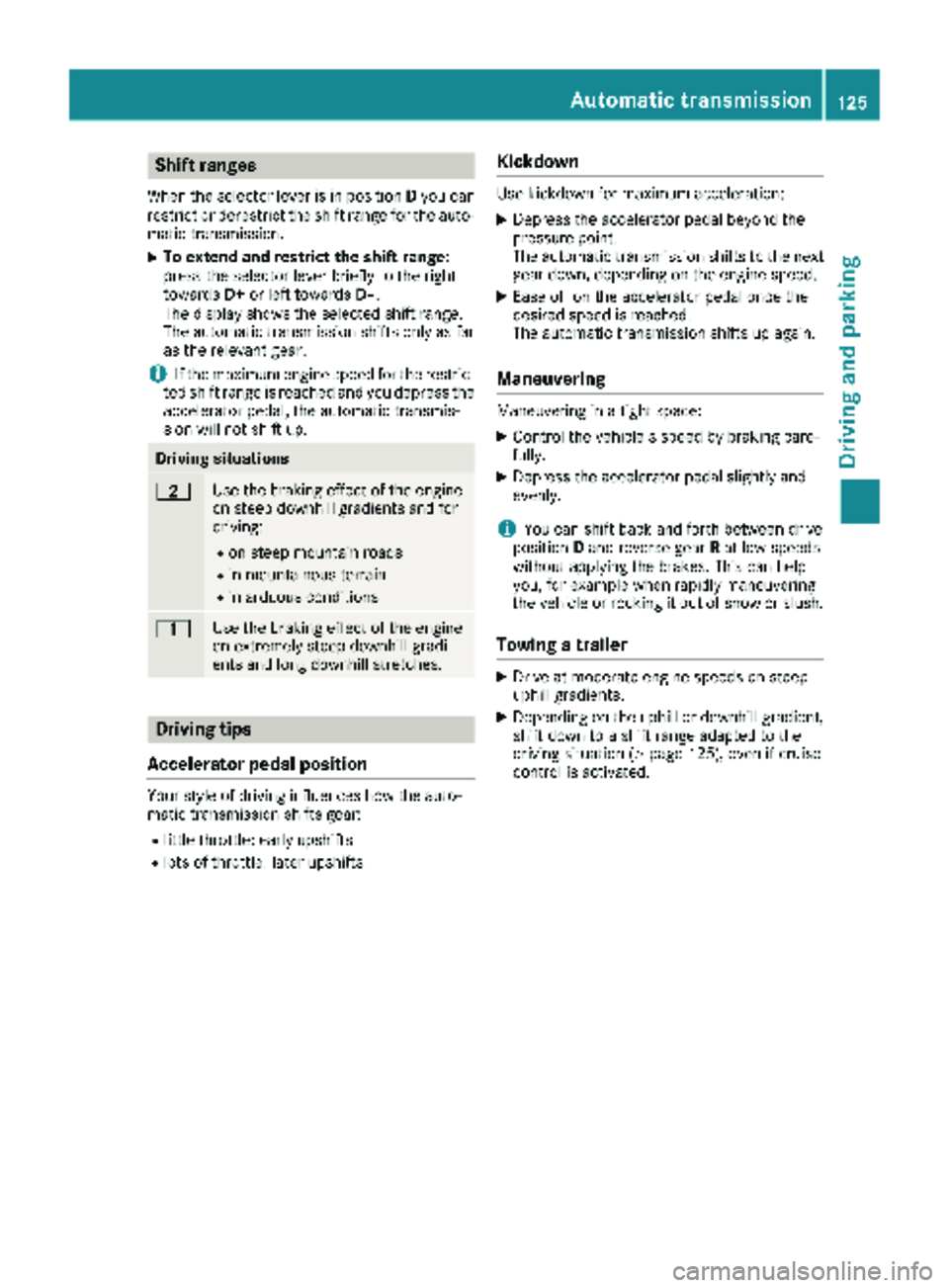
Driving situations
5Use the braking effect of the engine
on steep downhill gradients and for
driving:
Ron steep mountain roads
Rin mountainous terrain
Rin arduous conditions
4Use the braking effect of the engine
on extremely steep downhill gradi-
ents and long downhill stretches.
Driving tips
Accelerator pedal position
Your style of driving influences how the auto-
matic transmission shifts gear:
Rlittle throttle: early upshifts
Rlots of throttle: later upshifts
Kickdown
Use kickdown for maximum acceleration:
XDepress the accelerator pedal beyond the
pressure point.
The automatic transmission shifts to the next
gear down, depending on the engine speed.
XEase off on the accelerator pedal once the
desired speed is reached.
The automatic transmission shifts up again.
Maneuvering
Maneuvering in a tight space:
XControl the vehicle's speed by braking care-
fully.
XDepress the accelerator pedal slightly and
evenly.
iYou can shift back and forth between drive
position Dand reverse gear Rat low speeds
without applying the brakes. This can help
you, for example when rapidly maneuvering
the vehicle or rocking it out of snow or slush.
Towing a trailer
XDrive at moderate engine speeds on steep
uphill gradients.
XDepending on the uphill or downhill gradient,
shift down to a shift range adapted to the
driving situation (
Ypage 125), even if cruise
control is activated.
Automatic transmission125
Driving and parking
Z
Page 136 of 294
Low-beam headlamps
When driving in countries in which traffic drives
on the opposite side of the road to the country
where the vehicle is registered, the halogen
headlamps must be partially masked. This pre-
vents glare to oncoming traffic and no longer
illuminates the edge of the road to the same
height and distance.
Have the halogen headlamps masked at a quali-fied specialist workshop before you cross the
border, but as close to it as possible.
When returning from your journey, remove the
adhesive surfaces from the halogen headlamps
as close to the border as possible. Clean the
glass of the headlamps if necessary.
It is not necessary to adjust Bi-Xenon head-
lamps. Legal requirements are fulfilled even
without adjustment.
Transport by rail
Transporting your vehicle by rail may be subject
to certain restrictions or require special meas-
ures to be taken in some countries due to vary-ing tunnel heights and loading standards.
You can obtain further information from any
authorized Sprinter dealer.
Braking
Important safety notes
GWARNING
If you shift down on a slippery road surface in an attempt to increase the engine's braking
effect, the drive wheels could lose their grip.
There is an increased danger of skidding and
accidents.
Do not shift down for additional engine brak-
ing on a slippery road surface.
GWARNING
If you rest your foot on the brake pedal while
driving, the braking system can overheat. This increases the stopping distance and can even
cause the braking system to fail. There is a
risk of an accident.
Never use the brake pedal as a footrest. Never
depress the brake pedal and the accelerator
pedal at the same time.
!Depressing the brake pedal constantly
results in excessive and premature wear to
the brake pads.
Downhill gradients
!Depressing the brake pedal constantly
results in excessive and premature wear to
the brake pads.
On long and steep downhill gradients, you
should change down to shift range 2or1 in
good time. This should be observed in particular
when driving with a laden vehicle and when tow-
ing a trailer.
iYou must also change the shift range in
good time when cruise control is switched on.
You thereby make use of the braking effect of
the engine and do not have to brake as often to
maintain the speed. This relieves the load on the
service brake and prevents the brakes from
overheating and wearing too quickly.
Heavy and light loads
GWARNING
If you rest your foot on the brake pedal while
driving, the braking system can overheat. This increases the stopping distance and can even
cause the braking system to fail. There is a
risk of an accident.
Never use the brake pedal as a footrest. Never
depress the brake pedal and the accelerator
pedal at the same time.
!Depressing the brake pedal constantly
results in excessive and premature wear to
the brake pads.
If the brakes have been subjected to a heavy
load, do not stop the vehicle immediately. Drive
on for a short while. The brakes are cooled down
more quickly in the airflow.
134Driving tips
Driving and parking
Page 139 of 294
longed rolling of the wheels, e.g. when being
towed, will result in transmission damage.
If the vehicle threatens to skid or cannot be
stopped when moving at low speed:
XShift the transmission to neutral position N.
XTry to maintain control of the vehicle using
corrective steering.
Drive particularly carefully on slippery roads.
Avoid sudden acceleration, steering and braking
maneuvers. Do not use cruise control.
You can find further information on winter tires
and snow chains in the "Winter operation" sec-
tion (
Ypage 250).
Driving off-road
Important safety notes
GWARNING
If you drive on a steep incline at an angle or
turn when driving on an incline, the vehicle
could slip sideways, tip and rollover. There is a risk of an accident.
Always drive on a steep incline in the line of
fall (straight up or down) and do not turn the
vehicle.
GWARNING
When driving off-road, your body is subject to
forces from all directions, due to the uneven
surface. You could be thrown from your seat,
for instance. There is a risk of injury.
Always wear a seat belt, even when driving off-
road.
GWARNING
If you drive over obstacles or in ruts, the steer-
ing wheel may jerk out of your grip, causing
injury to your hands.
Always hold the steering wheel firmly with
both hands. When driving over obstacles, you
must expect steering forces to increase
briefly and suddenly.
GWARNING
Flammable material such as leaves, grass or
twigs may ignite if they come into contact with
hot parts of the exhaust system. There is a risk of fire.
When driving off road or on unpaved roads,
check the vehicle's underside regularly. In
particular, remove parts of plants or other
flammable materials which have become
trapped. In the case of damage, contact a
qualified specialist workshop.
!When driving off-road or on unpaved surfa-
ces, check the underside of the vehicle and
the wheels and tires at regular intervals. In
particular, remove any trapped foreign
objects, e.g. stones and branches.
Such foreign objects may:
Rdamage the chassis, the fuel tank or the
brake system
Rcause imbalances and thus vibrations
Rbe flung out when you continue driving
If there is any damage, inform a qualified spe-
cialist workshop.
When driving off-road and on construction sites,
sand, mud and water mixed with oil, for exam-
ple, may get into the brakes. This may lead to a
reduction in braking performance or total brake
failure, also as a result of increased wear. The
braking characteristics will vary depending on
the material that has got into the system. Clean
the brakes after driving off-road. If you then
notice reduced braking performance or hear
scraping noises, have the brake system checked
at a qualified specialist workshop. Adjust your
driving style to the changed braking character-
istics.
Driving off-road or on construction sites increa-
ses the possibility of vehicle damage which may
in turn lead to the failure of certain assemblies
and systems. Adapt your driving style to the off- road driving c
onditions. Drive carefully. Have
any vehicle damage rectified at a qualified spe-
cialist workshop as soon as possible.
When driving on rough terrain, do not shift the
transmission into the neutral position. You could
lose control when attempting to brake the vehi-
cle with the service brake. If your vehicle cannot
manage an uphill slope, drive back down the
slope in reverse gear.
Driving tips137
Driving and parking
Z
Page 141 of 294
XCheck the wheels and tires and wheel archesfor trapped foreign objects and remove them.
Trapped foreign objects can damage the
wheels and tires or may beflung out from the
veh icle when you continue driving.
XCheck the underbo dyfor trapped branches or
other parts of plants and remove them.
XClean the brake disks, brake padsand axle
jo ints, particular lyafter operation insand,
mud, grit and gravel, water or similarly dirt y
conditions.
XCheck the entire floor assembly, the tires,
wheels, bodywork structure, brakes, steering,
chassis and exhaust system for any damage.
XCheck the service brake for operating safety,
e.g. carry out a brake test.
XIf you notice strong vibrations after driving off-
road, check the wheels and drive train for for-
eign objects again. Remove any foreign
objects which can lead to imbalances and
thus cause vibrations.
Driving systems
Cruise control
General notes
Cruise control maintains the speed of the veh i-
cle for you.
Use cruise control ifroad and traff icconditions
make itappropriate to maintain a steady speed
for a prolonged period. You can set any speed
from 20 mph upwards inincrements of 1 mph.
iIfyou have set km /has the unit for the dig-
ital speedometer (Ypage 168), you can set
any speed from 30 km /hupwards inincre-
ments of 1 km/h.
Cruise control should not beactivated when
driv ing off-road or on construction sites.
Cruise control may not be ableto maintain the
stored speed on uphillordownhill gradients. If
the gradient evens out and the veh icle's speed
does not fall below 20 mph (30 km/h), the
stored speed is resumed.
iThe speed shown in the speedometer may
differ slightly from the speed stored by cruise
control.
Important safety notes
If you fail to adapt your driving style or if you are
inattentive, cruise control can neither reduce
the risk of an accident nor override the laws of
physics. Cruise control cannot take road,
weather and traffic conditions into account.
Cruise control is only an aid. You are responsible
for the distance to the vehicle in front, for vehi-
cle speed, for braking in good time and for stay-
ing in lane.
Do not use cruise control:
Rin traffic conditions that are unsuitable for
driving at a constant speed, e.g. in heavy traf-
fic, on winding roads or off-road
Ron slippery roads. Braking or accelerating can
cause the drive wheels to lose traction and
the vehicle could then skid
Rwhen visibility is poor, e.g. due to fog, heavy
rain or snow
If there is a change of drivers, make sure that
you inform the new driver about the set cruise
speed.
Cruise control lever
Operating cruise control
:To activate and store the current speed or a
higher speed
;To activate at the last stored speed
=To activate and store the current speed or a
lower speed
?To deactivate cruise control
The cruise control lever is the upper lever on the
left of the steering column.
Displaying the cruise control speed
Vehicles with steering wheel buttons: when
you activate cruise control, the text field in the
display briefly shows the Cr.
controlmessage
Driving systems139
Driving and parking
Z
Page 142 of 294
and the stored speed. The status area of the
display then shows theVsymbol and the
stored speed.
Vehicles without steering wheel buttons:
when you activate cruise control, the display
briefly shows the Vsymbol and the stored
speed.
Activation conditions
To activate cruise control, all of the following
activation conditions must be fulfilled:
Rthe parking brake must be released. The c
indicator lamp in the instrument cluster is off
Ryou are driving faster than 20 mph (30 km/h)
Rneither the brake or clutch pedal is depressed
iOther drive and brake systems not descri-
bed in this Operator's Manual, such as a
retarder, may affect cruise control. You can
find information on this in the separate oper-
ating instructions provided by the body man-
ufacturer.
Storing and maintaining the current
speed
XAccelerate the vehicle to the desired speed
above 20 mph (30 km/h).
XBriefly push the cruise control lever up :or
down ?.
XRelease the accelerator pedal.
Cruise control is activated. The current speed
is stored.
The display shows the Vsymbol and the
stored speed.
Resuming the stored speed
GWARNING
If you call up the stored speed and it differs
from the current speed, the vehicle acceler-
ates or decelerates. If you do not know the
stored speed, the vehicle could accelerate or brake unexpectedly. There is a risk of an acci-
dent.
Pay attention to the road and traffic condi-
tions before calling up the stored speed. If you
do not know the stored speed, store the
desired speed again.
XBriefly pull the cruise control lever towards
you =.
XRelease the accelerator pedal.
Cruise control is activated and resumes the
vehicle's speed to the last speed stored.
The display shows the Vsymbol and the
stored speed.
iWhen you pull the cruise control lever
towards you for the first time after starting the
engine, cruise control adopts the current
speed.
Setting the speed
It may be a moment before the vehicle starts to
accelerate or brake to the set speed. Take this
delay into account when setting the speed.
XBriefly push the cruise control lever up :to
increase the speed or down =to reduce the
speed.
The last stored speed increases or decreases
in 1 mph increments (1 km/h increments).
or
XPress and hold the cruise control lever up :
or down =until the desired speed has been
reached.
XRelease the cruise control lever.
The current speed is stored.
The display shows the Vsymbol and the
stored speed.
iCruise control is not deactivated if you
depress the accelerator pedal. If you acceler-
ate briefly to overtake, for example, cruise
control resumes the vehicle’s speed to the
last speed stored after you have finished over-
taking.
Deactivating cruise control
There are various ways to deactivate cruise con- trol:
XBriefly press the cruise control lever for-
wards ?.
or
XApply the brakes.
The last speed set remains stored. The last
speed stored is deleted when you switch off the
engine.
140Driving systems
Driving and parking
Page 143 of 294
Cruise controlisdeactivated automatically
when:
Ryou apply the brakes
Ryouapply the parking brake and the c
indicator lamp inthe instrument cluster lights
up
Ryou are driving slower than 20 mph (30 km/h)
Ryou shift the automat ictransmission to neu-
tral position Nwhile the vehicle is inmotion
RESP®or ASR intervenes
Rthere isa malfunction inthe ESP®, ASR or ABS
system
Problems with cruise control
ProblemPossible causes/consequences and MSolutions
On vehicleswit h steering
wheel buttons, the
speed cannot beset
when cruise control is
activated.The displ ay shows a high-priority message. Thus a change in speed is
not possible.
XProceed as instructed by the message inthe display.
XDeactivate cruise control
COLLISION PREVENTION ASSIST
General notes
COLL ISION PREVENTION AS SISTcomprises the
dist ance warning function and adaptive Brake
Assist.
Distance warning function
Important safety notes
iNote the section on 'Important safety notes'
(Ypage 54).
GWAR NING
The distance warning function does not react:
Rto people or animals
Rto oncoming veh icles
Rto crossing traff ic
Rwhen cornering
The distance warning function may not give
warnings inall critical situations. There isa
risk of an acc ident.
Alwa ys pay careful attention to the traff icsit-
uation and beready to brake.
Alwa ys adapt your speed to suit the pre vailing
road and traff icconditions.
GWARNING
The distance warning function cannot always
clearly identify objects and co mplex traffic
situations.
In such cases, the distance warning function
may:
Rgive an unnecessary warning
Rnot give a warning
There isa risk of an accident.
Always pay careful attention to the traffic sit-
uation and donot rely solely on the distance
warning function.
Operation
The distance warning function can help you to
minimize the risk of a front-end collision with a
vehicle ahead or reduce the effects of such a
collision. If the distance warning function
detects that there is a risk of a collision, you will
be warned visually and acoustically. Without
your intervention, the distance warning function
cannot prevent a collision.
The distance warning function willissue a warn-
ing at speeds of around 20 mph (30 km/h)or
more if:
Ryou approach a vehicle ahead of you very
quickly. You will then hear an intermittent
warning tone and the red ·warning lamp
in the instrument cluster flashes.
Driving systems141
Driving and parking
Z
Page 150 of 294
Conditions for engaging/disengaging
LOW RANGE can only be engaged or disengaged
if:
Rthe engine is running
Rthe vehicle is stationary
Rthe brake pedal is depressed
Rthe selector lever of the automatic transmis-
sion is in positionPor N
Rall-wheel drive is engaged
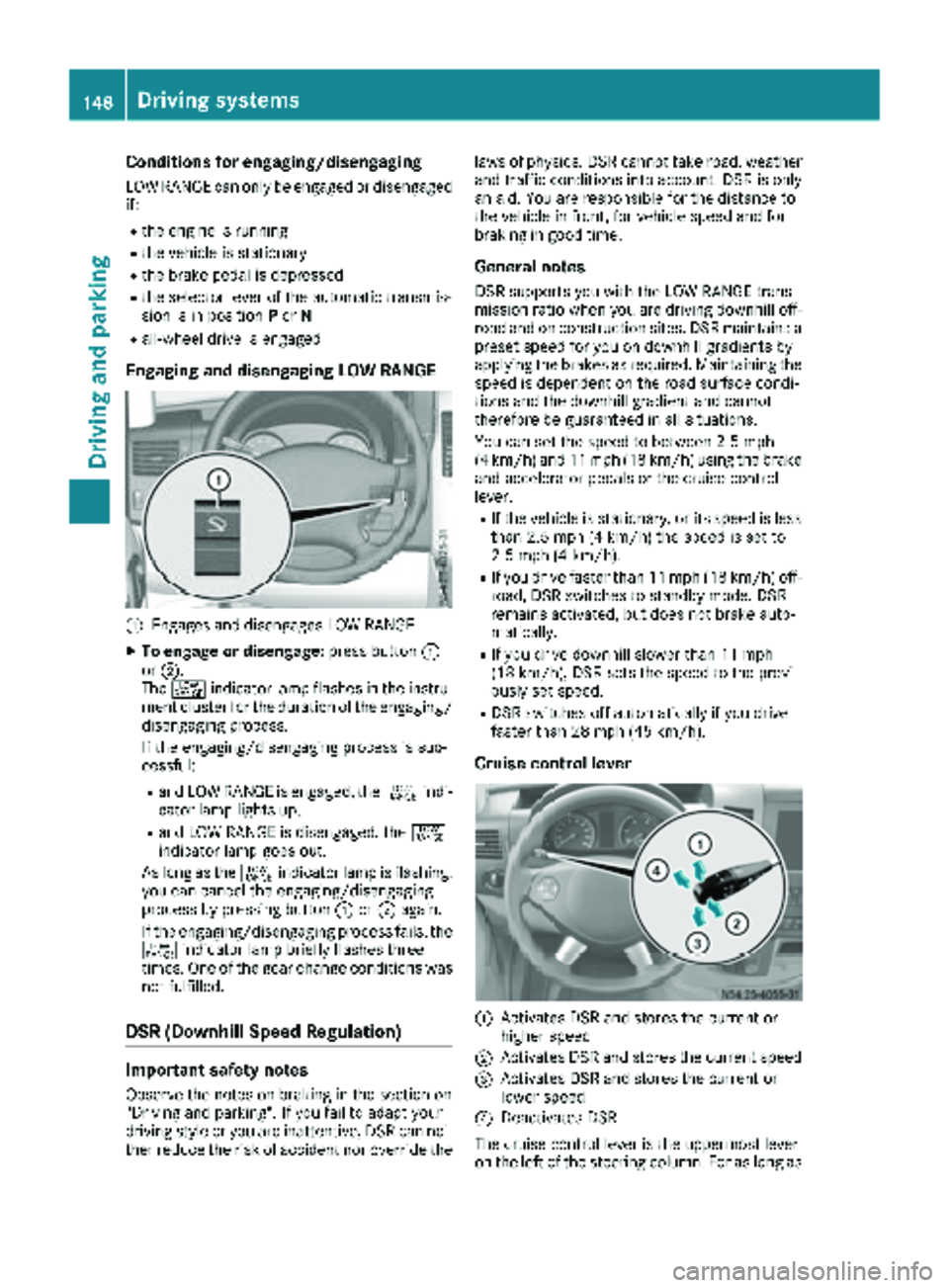
Engaging and disengaging LOW RANGE
:Engages and disengages LOW RANGE
XTo engage or disengage: press button:
or ;.
The + indicator lamp flashes in the instru-
ment cluster for the duration of the engaging/
disengaging process.
If the engaging/disengaging process is suc-
cessful:
Rand LOW RANGE is engaged, the +indi-
cator lamp lights up.
Rand LOW RANGE is disengaged, the +
indicator lamp goes out.
As long as the +indicator lamp is flashing,
you can cancel the engaging/disengaging
process by pressing button :or; again.
If the engaging/disengaging process fails, the + indicator lamp briefly flashes three
times. One of the gear change conditions was
not fulfilled.
DSR (Downhill Speed Regulation)
Important safety notes
Observe the notes on braking in the section on
"Driving and parking". If you fail to adapt your
driving style or you are inattentive, DSR can nei-
ther reduce the risk of accident nor override the laws of physics. DSR cannot take road, weather
and traffic conditions into account. DSR is only
an aid. You are responsible for the distance to
the vehicle in front, for vehicle speed and for
braking in good time.
General notes
DSR supports you with the LOW RANGE trans-
mission ratio when you are driving downhill off-
road and on construction sites. DSR maintains a
preset speed for you on downhill gradients by
applying the brakes as required. Maintaining the
speed is dependent on the road surface condi-
tions and the downhill gradient and cannot
therefore be guaranteed in all situations.
You can set the speed to between 2.5 mph
(4 km/h) and 11 mph (18 km/h) using the brake
and accelerator pedals or the cruise control
lever.
RIf the vehicle is stationary, or its speed is less
than 2.5 mph (4 km/h) the speed is set to
2.5 mph (4 km/h).
RIf you drive faster than 11 mph (18 km/h) off-
road, DSR switches to standby mode. DSR
remains activated, but does not brake auto-
matically.
RIf you drive downhill slower than 11 mph
(18 km/h), DSR sets the speed to the previ-
ously set speed.
RDSR switches off automatically if you drive
faster than 28 mph (45 km/h).
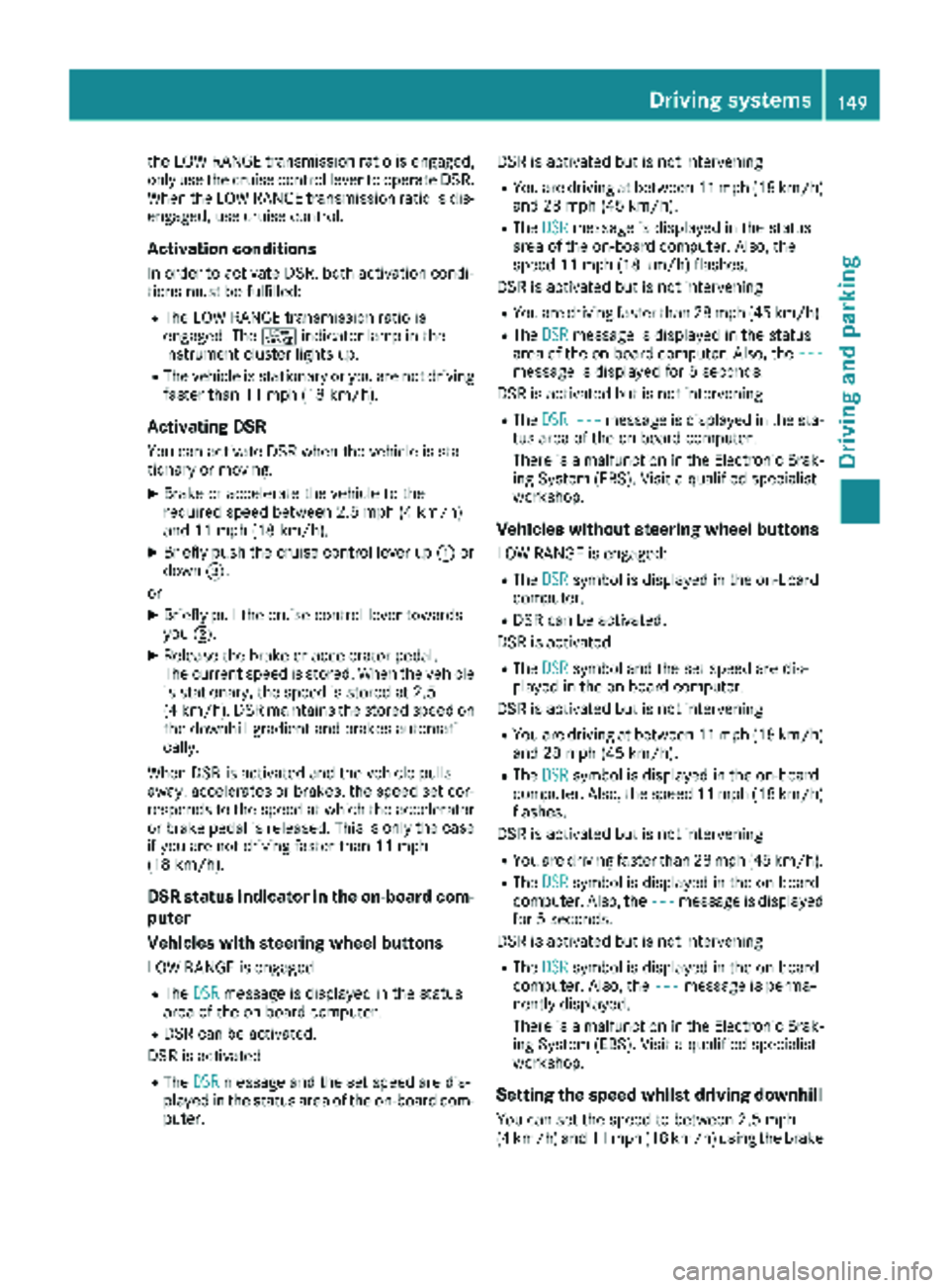
Cruise control lever
:Activates DSR and stores the current or
higher speed
;Activates DSR and stores the current speed
=Activates DSR and stores the current or
lower speed
?Deactivates DSR
The cruise control lever is the uppermost lever
on the left of the steering column. For as long as
148Driving systems
Driving and parking
Page 151 of 294
the LOW RANGE transmission ratio is engaged,
only use the cruise control lever to operate DSR.
When the LOW RANGE transmission ratio is dis-
engaged, use cruise control.
Activation conditions
In order to activate DSR, both activation condi-
tions must be fulfilled:
RThe LOW RANGE transmission ratio is
engaged. The+indicator lamp in the
instrument cluster lights up.
RThe vehicle is stationary or you are not driving faster than 11 mph (18 km/h).
Activating DSR
You can activate DSR when the vehicle is sta-
tionary or moving.
XBrake or accelerate the vehicle to the
required speed between 2.5 mph (4 km/h)
and 11 mph (18 km/h).
XBriefly push the cruise control lever up :or
down =.
or
XBriefly pull the cruise control lever towards
you ;.
XRelease the brake or accelerator pedal.
The current speed is stored. When the vehicle
is stationary, the speed is stored at 2.5
(4 km/h). DSR maintains the stored speed on
the downhill gradient and brakes automati-
cally.
When DSR is activated and the vehicle pulls
away, accelerates or brakes, the speed set cor-
responds to the speed at which the accelerator
or brake pedal is released. Thi s i
s only the case
if you are not driving faster than 11 mph
(18 km/h).
DSR status indicator in the on-board com-
puter
Vehicles with steering wheel buttons
LOW RANGE is engaged
RThe DSRmessage is displayed in the status
area of the on-board computer.
RDSR can be activated.
DSR is activated
RThe DSRmessage and the set speed are dis-
played in the status area of the on-board com-
puter. DSR is activated but is not intervening
RYou are driving at between 11 mph (18 km/h)
and 28 mph (45 km/h).
RThe
DSRmessage is displayed in the status
area of the on-board computer. Also, the
speed 11 mph (18 km/h) flashes.
DSR is activated but is not intervening
RYou are driving faster than 28 mph (45 km/h).
RThe DSRmessage is displayed in the status
area of the on-board computer. Also, the ---
message is displayed for 5 seconds.
DSR is activated but is not intervening
RThe DSR---message is displayed in the sta-
tus area of the on-board computer.
There is a malfunction in the Electronic Brak-
ing System (EBS). Visit a qualified specialist
workshop.
Vehicles without steering wheel buttons
LOW RANGE is engaged:
RThe DSRsymbol is displayed in the on-board
computer.
RDSR can be activated.
DSR is activated
RThe DSRsymbol and the set speed are dis-
played in the on-board computer.
DSR is activated but is not intervening
RYou are driving at between 11 mph (18 km/h)
and 28 mph (45 km/h).
RThe DSRsymbol is displayed in the on-board
computer. Also, the speed 11 mph (18 km/h)
flashes.
DSR is activated but is not intervening
RYou are driving faster than 28 mph (45 km/h).
RThe DSRsymbol is displayed in the on-board
computer. Also, the ---message is displayed
for 5 seconds.
DSR is activated but is not intervening
RThe DSRsymbol is displayed in the on-board
computer. Also, the ---message is perma-
nently displayed.
There is a malfunction in the Electronic Brak-
ing System (EBS). Visit a qualified specialist
workshop.
Setting the speed whilst driving downhill
You can set the speed to between 2.5 mph
(4 km/h) and 11 mph (18 km/h) using the brake
Driving system s149
Driving an d parking
Z