fuel consumption MERCEDES-BENZ SPRINTER 2018 MY18 Operator’s Manual
[x] Cancel search | Manufacturer: MERCEDES-BENZ, Model Year: 2018, Model line: SPRINTER, Model: MERCEDES-BENZ SPRINTER 2018Pages: 294, PDF Size: 4.36 MB
Page 13 of 294
Notes about oil grades ................... 282
Oil change ...................................... 283
Oil level (note) ............................... 221
Viscosity ........................................ 282
Warning lamp .................................200
Engine speed setting (working
mode) ................................................. 153
ESP
®(Electronic Stability Pro-
gram)
Crosswind Assist .............................5 7
Display message ............................ 184
Important safety information ........... 56
Indicator lamp ................................ 199
Warning lamp ................................. 195
Exhaust check ................................... 133
Exhaust gas aftertreatment
DEF level indicator .........................1 61
DEF reducing agent ....................... 281
Diesel Exhaust Fluid (DEF) ............. 281
Indicator lamp ................................ 202
Refilling DEF .................................. 128
Exterior lighting
see Lights
Exterior mirrors
Adjusting ......................................... 80
Important safety notes .................... 80
Eyeglasses compartment ................. 206
F
Fire extinguisher............................... 243
First-aid kit ......................................... 242
Flat tire
Changing a wheel/mounting the
spare wheel ................................... 268
General notes ................................ 267
Fog lamps
Switching on/off .............................. 83
Fogged up-up windows
see Climate control
Folding seat ......................................... 76
Frequencies
Mobile phone ................................. 276
Two-way radio ................................ 276
Front interior light
Replacing bulbs ............................... 95
Fuel
Additives (diesel) ........................... 280 Consumption information .............. 280
Consumption statistics .................. 173
Diesel at very low outside temper-
atures ............................................ 279
Driving tips ....................................1 32
Fuel gauge ..................................... 161
Problem (malfunction) ................... 128
Quality (diesel) ............................... 279
Refueling ........................................ 126
Showing the range (vehicles with
steering wheel buttons) ................. 173
Tank content/reserve fuel ............. 279
Fuel filter with water separator
draining ......................................... 225
Indicator lamp ................................ 203
Fuel gauge ......................................... 161
Fuel tank
Problem (malfunction) ................... 128
Fuel tank
see Fuel tank
Fuses .................................................. 247
G
Gasoline
Reserve fuel warning lamp ............. 201
General driving tips
Driving short distances .................. 133
Genuine parts ...................................... 29
Glove box ........................................... 205
GTW (Gross Trailer Weight) (defini-
tion) .................................................... 265
H
Handbrake
see Parking brake
Hazard warning lamps ........................ 85
Head restraints
Adjusting ......................................... 78
Headlamps
Adding fluid to cleaning system ..... 225
Cleaning system (function) .............. 85
Fogging up ....................................... 86
see Automatic headlamp mode
Headliner (cleaning instructions) .... 239
Heating
see Climate control
Index11
Page 27 of 294
Proper use
Observe the following information when oper-
ating your vehicle:
Rthe safety notes in these operating instruc-
tions
Rthe technical data in these Operating Instruc-
tions
Rtraffic laws and regulations
Rmotor vehicle laws and safety standards
There are various warning stickers affixed to the
vehicle. If you remove warning stickers, you and
others may fail to recognize the dangers. Leave
the warning stickers in their original position.
GWARNING
Modifications to electronic components, their software as well as wiring can impair their
function and/or the function of other net-
worked components. In particular, systems
relevant to safety could also be affected. As a
result, these may no longer function as inten-
ded and/or jeopardize the operating safety of
the vehicle. There is an increased risk of an
accident and injury.
Never tamper with the wiring as well as elec-
tronic components or their software. You
should have all work to electrical and elec-
tronic equipment carried out at a qualified
specialist workshop.
The general operating permit for your vehicle
could be rendered invalid if you carry out mod-
ifications to electronic components, their soft-
ware as well as wiring.
GWARNING
Gases and fluids from substances that con-
stitute a health hazard or react aggressively
can escape even from securely closed con-
tainers. When transporting such substances
in the vehicle interior, your ability to concen-
trate or your health could be affected during
the journey. Malfunctions, short circuits or
electrical component system failures may
also result. There is a risk of an accident and
fire.
Do not store or transport any substances in
the vehicle interior which are hazardous to
health or react aggressively.
These instructions must also be observed for
vehicles where the cargo compartment is not
fully separated from the driver's cab.
Partition with door/window: always keep the
door/window in the partition closed during
transport.
Examples of substances that are hazardous to
health and/or react aggressively:
RSolvents
RFuel
ROil and grease
RCleaning agents
RAcids
Protection of the environment
Economic and environmentally aware
driving
HEnvironmental note
Daimler's declared policy is one of compre-
hensive environmental protection.
The objectives are for the natural resources
that form the basis of our existence on this
planet to be used sparingly and in a manner
that takes the requirements of both nature
and humanity into account.
You too can help to protect the environment
by operating your vehicle in an environmen-
tally responsible manner.
Fuel consumption and the rate of engine,
transmission, brake and tire wear are affected
by these factors:
Roperating conditions of your vehicle
Ryour personal driving style
You can influence both factors. You should
bear the following in mind:
Introduction25
Z
Page 134 of 294
Rswitch off the electrical system using the bat-
tery main switch (Ypage 118) and
Rdisconnect the vehicle's auxiliary battery
Otherwise, you need to check the battery's con- dition of charge every 3 weeks, since standby
power consumption can drain the battery. If the
battery voltage is lower than 12.2 V, the battery
must be charged. Otherwise, the battery may be
damaged by exhaustive discharging.
Be sure to observe the notes on disconnecting
and charging the batteries under "Battery"
(
Ypage 228). You can obtain information about
trickle chargers from a qualified specialist work-
shop.
If you leave the vehicle parked for longer than
6 weeks, the vehicle may suffer damage as a
result of lack of use. In this event, consult a
qualified specialist workshop.
Driving tips
General notes
Important safety notes
GWARNING
The driver's attention to the road must always be his/her primary focus when driving. For
your safety and the safety of others, we rec-
ommend that you pull over to a safe location
and stop before placing or taking a telephone
call. If you choose to use the telephone while
driving, please use the hands-free device and
only use the telephone when road, weather
and traffic conditions permit.
Some jurisdictions prohibit the driver from
using a mobile phone while driving a vehicle.
Bear in mind that at a speed of just 30 mph
(approximately 50 km/h), your vehicle covers
a distance of 44 feet (approximately 14 m)
every second.
GWARNING
If you switch off the ignition while driving,
safety-relevant functions are only available
with limitations, or not at all. This could affect, for example, the power steering and the brake
boosting effect. You will require considerably
more effort to steer and brake. There is a risk
of an accident.
Do not switch off the ignition while driving.
!Always observe the ground clearance of the
vehicle and avoid obstacles. On vehicles with a step, ground clearance is further restricted.
Obstacles can damage the vehicle.
If you must drive over obstacles, drive espe-
cially slowly and carefully. If necessary, have
another person direct you.
Drive sensibly – save fuel
In order to save fuel, observe the following tips:
XThe tires should always be inflated to the rec-
ommended tire pressure.
XRemove unnecessary loads.
XRemove roof carriers when they are not nee-
ded.
XWarm up the engine at low engine speeds.
XAvoid frequent acceleration or braking.
XHave all maintenance work carried out as
indicated by the service intervals in the Main-
tenance Booklet or by the service interval dis-
play.
Fuel consumption also increases when driving in cold weather, in stop-start traffic and in moun-
tainous terrain.
Overrun cutoff
If you are in overrun mode and take your foot off
the accelerator pedal, the fuel supply is cut off
when the engine speed is out of the idle speed
control range.
Drinking and driving
GWARNING
Drinking and driving and/or taking drugs and driving are very dangerous combinations.
Even a small amount of alcohol or drugs can
affect your reflexes, perceptions and judg-
ment.
The possibility of a serious or even fatal acci-
dent are greatly increased when you drink or
take drugs and drive.
132Driving tips
Driving and parking
Page 163 of 294
The display switches off automatically after
approximately 30 seconds if:
Rthe key is in position0in the ignition lock.
Rthe vehicle lighting is not switched on.
Instrument lighting
When the lights are switched on, you can adjust
the brightness of the instrument cluster lighting
using the fand gbuttons.
XTo brighten: press thefbutton.
XTo dim: press the gbutton.
iVehicles with automatic headlamp mode:
the instrument lighting also adapts to auto-
matic headlamp mode.
Tachometer
!
Do not drive in the overrevving range, as this
could damage the engine.
HEnvironmental note
Avoid driving at high engine speeds. This
unnecessarily increases the fuel consumption
of your vehicle and harms the environment as
a result of increased emissions.
The red band in the tachometer indicates the
engine's overrevving range.
To protect the engine, the fuel supply is inter-
rupted when the red band is reached.
Outside temperature
You should pay special attention to road condi-
tions when temperatures are around the freez-
ing point.
On vehicles without steering wheel buttons
(
Ypage 162) and on vehicles with steering
wheel buttons (Ypage 166), the outside tem-
perature display is in the display.
Changes in the outside temperature are dis-
played after a short delay.
Speedometer
The speed can also be shown in the display. You
can find information on the digital speedometer for vehicles without steering wheel buttons
under (
Ypage 162) and for vehicles with steer-
ing wheel buttons under (Ypage 166).
iIn some countries, a warning sounds when
the vehicle reaches the maximum speed limit,
e.g. at 75 mph (120 km/h).
Trip odometer
XTo reset: make sure that the display is show-
ing the trip odometer if you have a vehicle with
steering wheel buttons (
Ypage 166).
XPress and hold the 9reset button until the
trip odometer is reset to 0.0.
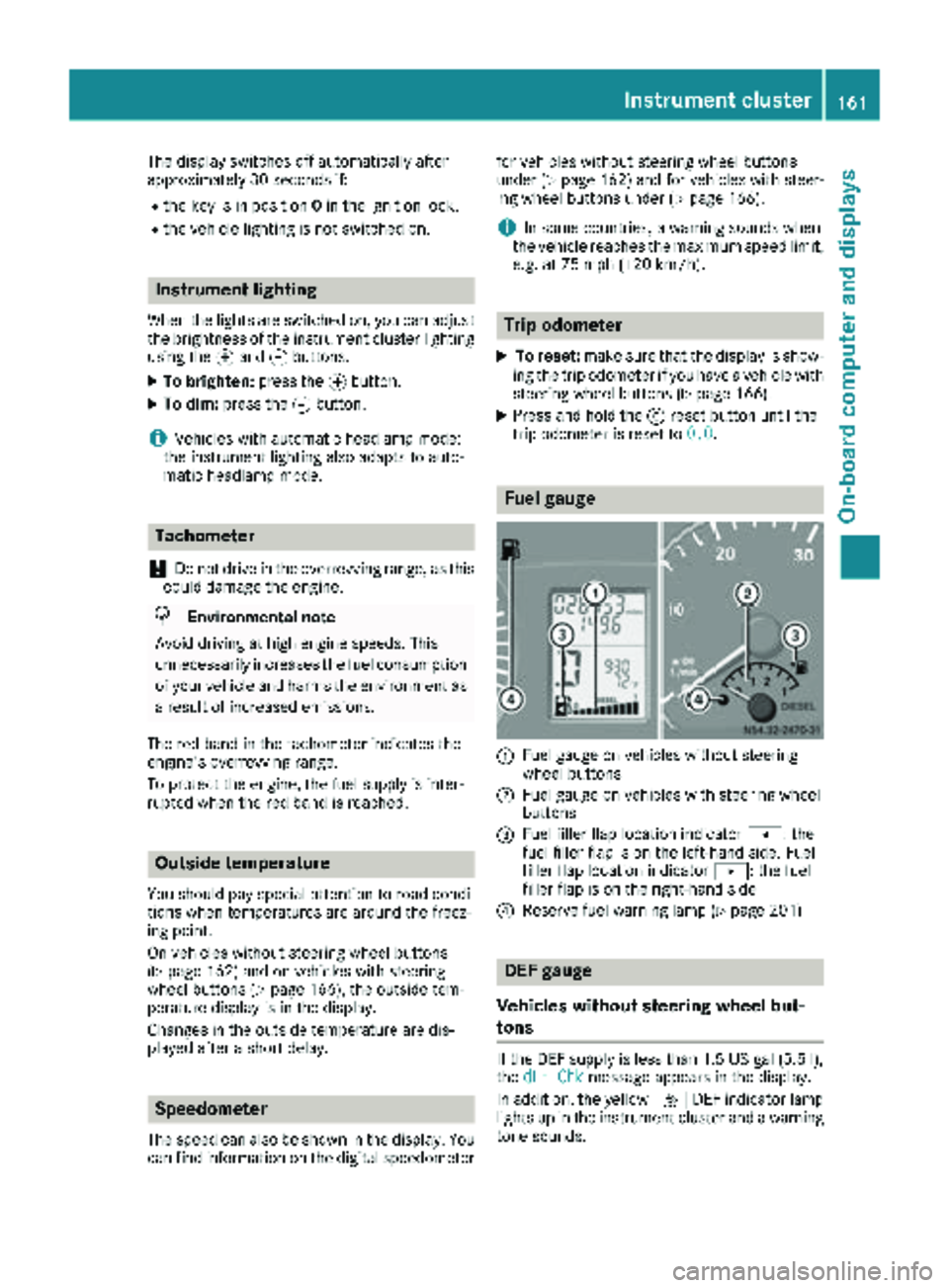
Fuel gauge
:Fuel gauge on vehicles without steering
wheel buttons
;Fuel gauge on vehicles with steering wheel
buttons
=Fuel filler flap location indicator t: the
fuel filler flap is on the left-hand side. Fuel
filler flap location indicator u: the fuel
filler flap is on the right-hand side
?Reserve fuel warning lamp (Ypage 201)
DEF gauge
Vehicles without steering wheel but-
tons
If the DEF supply is less than 1.5 US gal (5.5 l),
the dEF Chkmessage appears in the display.
In addition, the yellow åDEF indicator lamp
lights up in the instrument cluster and a warning
tone sounds.
Instrument cluster161
On-board computer and displays
Z
Page 175 of 294
Trip computer menu
General notes
You can call up or reset statistical data for the
vehicle in the Trip computer menu.
iWhen you call up the trip computer again, it
displays the last function called up.
The units of the statistical information dis-
played are set permanently for each specific
country, and are therefore independent of the
units selected in the Settings
menu.
Trip computer "From Start" or "From
Reset"
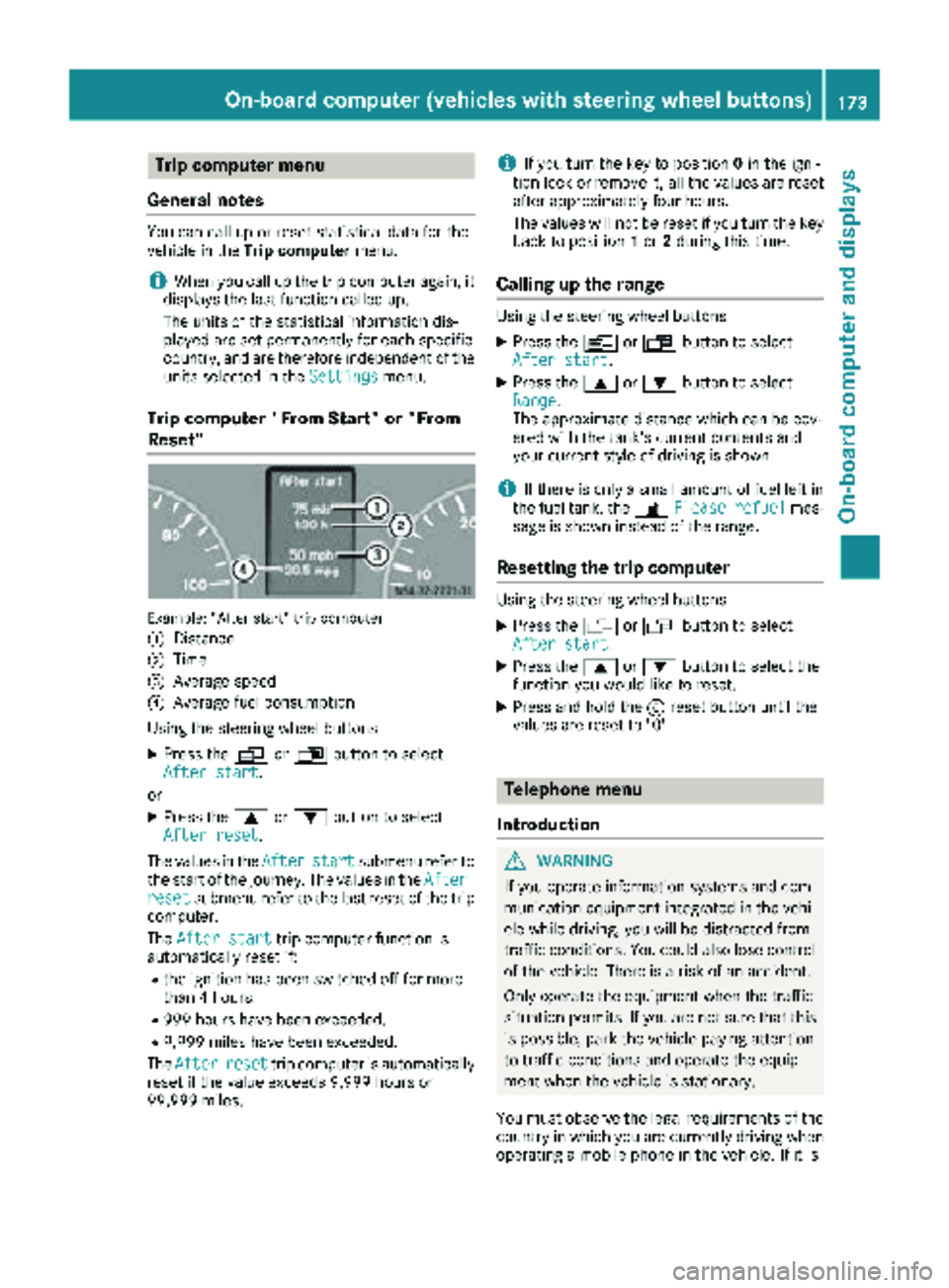
Example: "After start" trip computer
:
Distance
;Time
=Average speed
?Average fuel consumption
Using the steering wheel buttons
XPress the VorU button to select
After start.
or
XPress the 9or: button to select
After reset.
The values in the After
startsubmenu refer to
the start of the journey. The values in the After
resetsubmenu refer to the last reset of the trip
computer.
The After start
trip computer function is
automatically reset if:
Rthe ignition has been switched off for more
than 4 hours.
R999 hours have been exceeded.
R9,999 miles have been exceeded.
The After
resettrip computer is automatically
reset if the value exceeds 9,999 hours or
99,999 miles.
iIf you turn the key to position 0in the igni-
tion lock or remove it, all the values are reset
after approximately four hours.
The values will not be reset if you turn the key
back to position 1or 2during this time.
Calling up the range
Using the steering wheel buttons
XPress the VorU button to select
After start.
XPress the 9or: button to select
Range.
The approximate distance which can be cov-
ered with the tank's current contents and
your current style of driving is shown.
iIf there is only a small amount of fuel left in
the fuel tank, the 7Please refuelmes-
sage is shown instead of the range.
Resetting the trip computer
Using the steering wheel buttons
XPress the VorU button to select
After start.
XPress the 9or: button to select the
function you would like to reset.
XPress and hold the 9reset button until the
values are reset to "0".
Telephone menu
Introduction
GWARNING
If you operate information systems and com-
munication equipment integrated in the vehi-
cle while driving, you will be distracted from
traffic conditions. You could also lose control
of the vehicle. There is a risk of an accident.
Only operate the equipment when the traffic
situation permits. If you are not sure that this
is possible, park the vehicle paying attention
to traffic conditions and operate the equip-
ment when the vehicle is stationary.
You must observe the legal requirements of the
country in which you are currently driving when
operating a mobile phone in the vehicle. If it is
On-board computer (vehicles withsteering whee lbu ttons)173
On-board computer and displays
Z
Page 255 of 294
Important notes on tire pressure
GWARNING
If th etire pressur edrops repeatedly, th e
wheel, valv eor tire may be damaged. Tir e
pressur ethat is to olow may result in atire
blow-out .Ther eis aris kof an accident.
RChec kth etire for foreign objects .
RCheckwhether th ewhee lis losing air or th e
valv eis leaking .
If you are unable to rectify th edamage, con-
tac t a qualified specialist workshop.
Use asuitable pressur egauge to chec kth etire
pressure. The outer appearanc eof atire does
no tpermit any reliable conclusio nabout th etire
pressure. On vehicles equipped wit hth eelec -
tronic tire pressur emonitor, th etire pressur e
can be checke dusin gth eon-board computer.
The tire temperature and pressur eincreas e
when th evehicl eis in motion .This is dependen t
on th edriving spee dand th eload.
Therefore, you should only correc ttire pressur e
when th etires are cold.
The tires are cold:
Rif th evehicl ehas been parked for at least
three hour swithout direct sunligh ton th e
tires ,and
Rif th evehicl ehas no tbeen driven further than
1 mile (1. 6km)
Tir etemperature changes depending on th e
ambien ttemperature, driving spee dand tire
load. If th etire temperature changes by 18 ‡
(10 †), th etire pressur echa
nges by approx
-
imately 10 kP a(0.1 ba r/1.5psi) . Take this into
account when checking the pressure of warm
tires. Only correct the tire pressure if it is too low
for the current operating conditions. If you
check the tire pressure when the tires are warm,
it results in a higher value than when the tires
are cold. This is normal. Do not under any cir-
cumstances release the air in order to adjust the pressure to the prescribed value for cold tires.
The tire pressure would otherwise be too low. Observe the recommended tire pressures for
cold tires:
Ron the Tire and Loading Information placard5
on the B-pillar on the driver's side, or
Ron the tire pressure plate on the B-pillar on the
driver's side of the vehicle
Underinflated or overinflated tires
Underinflated tires:
GWARNING
Tires with pressure that is too low can over-
heat and burst as a consequence. In addition, they also suffer from excessive and/or irreg-
ular wear, which can severely impair the brak-
ing properties and the driving characteristics.
There is a risk of an accident.
Avoid tire pressures that are too low in all the
tires, including the spare wheel.
Underinflated tires can:
Rfail from being overheated
Radversely affect handling
Rwear excessively and/or unevenly
Rhave an adverse effect on fuel consumption
Overinflated tires
GWARNING
Tires with excessively high pressure can burst
because they are damaged more easily by
road debris, potholes etc. In addition, they
also suffer from irregular wear, which can
severely impair the braking properties and the driving characteristics. There is a risk of an
accident.
Avoid tire pressures that are too high in all the
tires, including the spare wheel.
Overinflated tires can:
Rincrease the braking distance
Radversely affect handling
Rwear excessively and/or unevenly
5Only for vehicles with a gross weight of less than 10,000 lbs (4,536 kg).
Tire pressure253
Wheels and tires
Z
Page 282 of 294
To prevent operating problems, diesel with bet-
ter flow qualities is available during the winter
months. You can obtain information at the gas
station or from your fuel supplier.
Your vehicle is equipped with a fuel preheating
system. This improves the flow properties of the
diesel by approximately 14.5 ‡ (8 †). ULTRA-
LOW SULFUR DIESEL can be used without risk
of malfunction down to an outside temperature
of approximately 14 ‡ (Ò10 †).
Fuel additives
!Do not add gasoline or kerosene to diesel
fuel to improve its flow characteristics. Gas-
oline or kerosene impairs the lubricating
properties of the diesel fuel. This can result in
damage to the fuel injection system, for
example.
B20 fuels with bio-diesel content
!Continuous use of fuels with bio-diesel con-
tent over 5% (B20 fuels) can lead to fuel filter
clogging. Deposits may also form on the fuel
injector. This may reduce the engine output.
Unburned fuel can get into the oil pan. This
causes the engine oil level to rise. This can
cause engine mechanical damage.
To avoid damages and performance degrada-
tion, observe the following points:
RFill up with fuels with bio-diesel content of
5% (ULSD) or less, whenever possible.
RRegularly monitor your engine oil level if
you use B20 fuels on a regular basis.
RStrictly follow the oil change intervals quo-
ted in the instrument cluster and within
your maintenance booklet.
RUse only engine oils and filters approved for
use in your vehicle.
RIf you do not plan to drive your vehicle for
several weeks, completely fill the fuel tank
in advance with ULSD fuel.
For more information, consult the gas station
staff. The identification of fuels with bio-diesel
content (ULSD or B20) must be clear. If the
marking does not make this clear, do not refuel
from that pump.
Do not refuel with any fuels that have not been
approved for your vehicle.
For more information about refueling
(
Ypage 127).
Information on fuel consumption
HEnvironmental note
CO
2(carbon dioxide) is the gas which scien-
tists believe to be principally responsible for
global warming (the greenhouse effect). Your
vehicle's CO
2emissions are directly related to
fuel consumption and therefore depend on:
Refficient use of the fuel by the engine
Rdriving style
Rother non-technical factors, such as envi-
ronmental influences, road conditions or
traffic flow
You can minimize your vehicle's CO
2emis-
sions by driving carefully and having it serv-
iced regularly.
Fuel consumption depends on:
Rthe vehicle version
Rthe style of driving
Rthe operating conditions
Rthe type or quality of the fuel used
The vehicle will use more fuel than usual in the
following situations:
Rat very low outside temperatures
Rin city traffic
Rduring short journeys
Ron mountainous terrain
Rwhen towing a trailer
To keep fuel consumption low, observe the
advice in the "Protection of the environment"
section (
Ypage 25).
The following components of the different vehi-
cle versions influence fuel consumption:
Rtire sizes, tire tread, tire pressure, tire condi-
tion
Rbody
Rtransmission ratios for the drive assemblies
Radditional equipment (e.g. air-conditioning
system, auxiliary heating system)
For these reasons, the actual consumption fig-
ures for your vehicle may deviate from the con-
sumption figures determined according to EU
Directive 80/1268/EE C.
Data concerning fuel consumption are recorded in the on-board computer; use the steering
280Service products and capacities
Technical data
Page 283 of 294
wheel buttons to call up theTrip computer
menu (Ypage 173).
Diesel Exhaust Fluid (DEF)
General notes
When opening the DEF tank filler cap at high
outside temperatures, ammonia vapors may
escape.
Ammonia vapors have a pungent smell and pri-
marily cause irritation of the:
Rskin
Rmucous membranes
Reyes
You may experience a burning sensation in your
eyes, nose and throat, as well as coughing and
watering of the eyes.
Do not inhale ammonia vapors. Avoid contact
with DEF.
Do not allow DEF to come into direct contact
with your skin; it is hazardous to your health.
Rinse any affected areas off with plenty of clean water. Consult a doctor if necessary.
If DEF heats up, e.g. in direct sunlight, in the DEF
supply reservoir for some time to over 122 ‡
(50 †) , ammonia vapor will develop.
To conform to emission regulations, you must
operate the vehicle with DEF and refill the supply
regularly. The engine management recognizes
attempts to operate the vehicle without DEF,
with thinned DEF or with another reducing
agent. After previous warning messages, the
engine management then prevents a further
engine start.
When the number of remaining engine starts is 0
the engine management prevents the vehicle
from being driven at a speed exceeding 5 mph
(8 km/h). The multifunction display shows the
Idle Mode
message.
DEF consumption
DEF consumption depends on operational and
driving conditions and it is not necessary to wait
until the next scheduled service to replenish the
fluid. Therefore, refill the DEF supply tank regu-
larly during vehicle operation or, at the latest,
after receiving the first warning message via the
on-board computer.
Low ambient temperatures
DEF freezes at a temperature of approximately
12‡(Ò11 †). The vehicle is equipped with a DEF
preheating system at the factory. Winter oper-
ation is therefore also guaranteed at tempera-
tures under 12 ‡ (Ò11 †).
iIf you add DEF at temperatures below 12 ‡
(Ò11 †) it is possible that the level is not
shown correctly due to the frozen DEF.
Drive for at least 20 minutes (heating phase in
the fuel tank activated) and then stop the
vehicle for at least 30 seconds. The level is
then shown correctly.
Additives
!Do not mix DEF with any additives and do
not dilute DEF with tap water. Otherwise, the
exhaust gas aftertreatment may be damaged.
Observe the MB Specifications for Service
Products, Sheet No. 352.0.
Damage that arises through the use of addi-
tives or tap water will invalidate the New Vehi-
cle Limited Warranty.
Storage
!Containers made of aluminum, copper, cop-
per alloys as well as unalloyed or galvanized
steel are not suitable for storing DEF. If stored
in these types of containers, DEF could cause
constituents of these metals to dissolve and
cause irreparable damage to the exhaust gas
aftertrea tment.
Da
mage caused by such impurities in the DEF
will invalidate the New Vehicle Limited War-
ranty.
Only store DEF in containers made of high-alloy
Cr‑ Ni steel or Mo ‑Cr‑Ni steel in accordance with
DIN EN 10 088 ‑1/2/3 or plastic containers
made of polypropylene or polyethylene.
Purity
!Impurities in DEF (e.g. caused by other ser-
vice products, cleaning agents, dust, etc.)
result in increased emissions, malfunctions,
catalytic converter damage or engine dam-
age.
The purity of DEF is essential to prevent mal-
functions in the exhaust gas aftertreatment.
If DEF is pumped out of the DEF tank, e.g. during
repair work, the same liquid must not be used to
refill the tank. Its purity is no longer guaranteed.
Service products and capacities281
Technical data
Z
Page 285 of 294
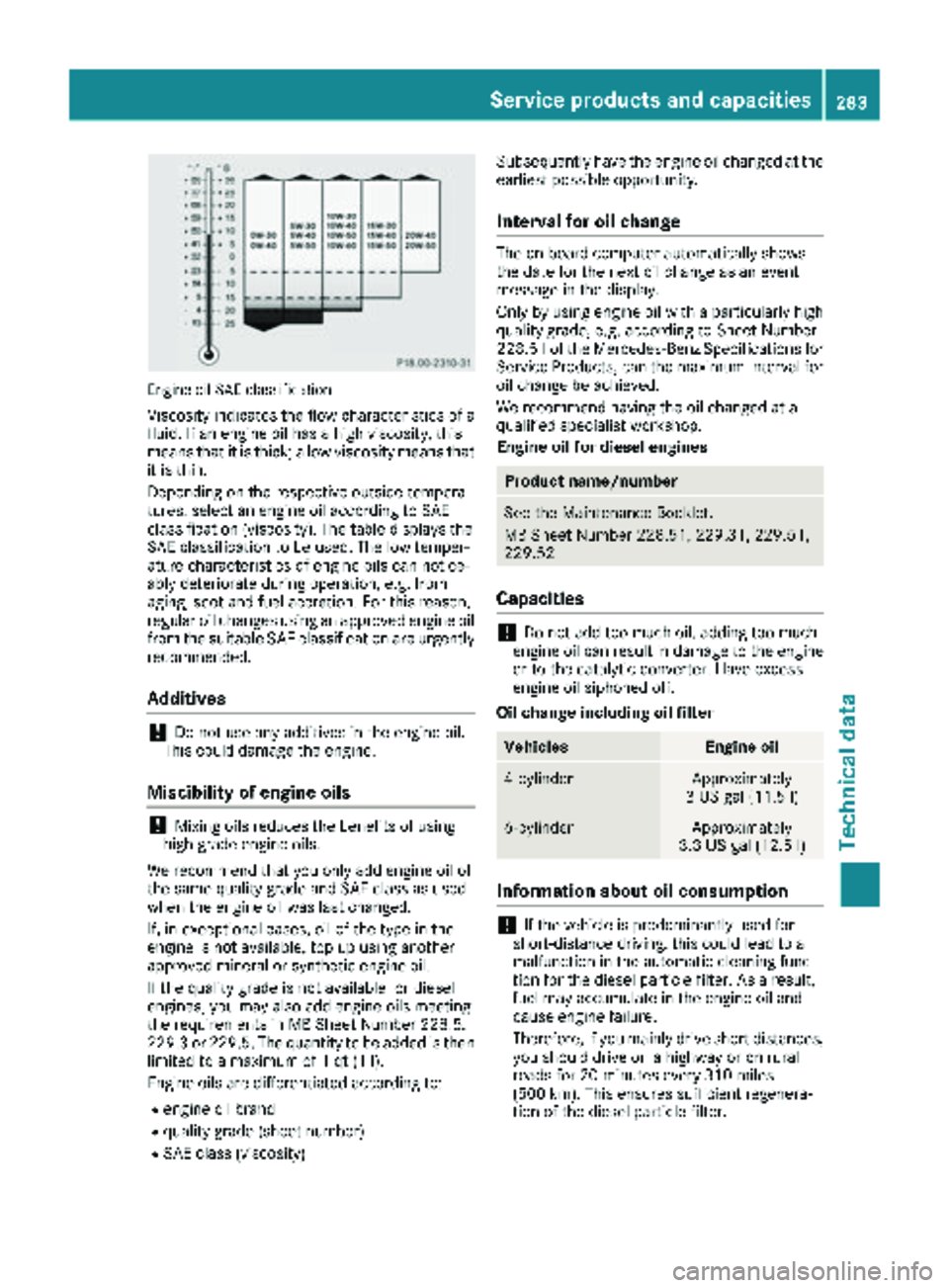
Engine oil SAE classification
Viscosity indicates the flow characteristics of a
fluid. If an engine oil has a high viscosity, this
means that it is thick; a low viscosity means thatit is thin.
Depending on the respective outside tempera-
tures, select an engine oil according to SAE
classification (viscosity). The table displays the
SAE classification to be used. The low temper-
ature characteristics of engine oils can notice-
ably deteriorate during operation, e.g. from
aging, soot and fuel accretion. For this reason,
regular oil changes using an approved engine oil
from the suitable SAE classification are urgently
recommended.
Additives
!Do not use any additives in the engine oil.
This could damage the engine.
Miscibility of engine oils
!Mixing oils reduces the benefits of using
high grade engine oils.
We recommend that you only add engine oil of
the same quality grade and SAE class as used
when the engine oil was last changed.
If, in exceptional cases, oil of the type in the
engine is not available, top up using another
approved mineral or synthetic engine oil.
If the quality grade is not available for diesel
engines, you may also add engine oils meeting
the requirements in MB Sheet Number 228.5,
229.3 or 229.5. The quantity to be added is then
limited to a maximum of 1 qt (1 l).
Engine oils are differentiated according to:
Rengine oil brand
Rquality grade (sheet number)
RSAE class (viscosity) Subsequently have the engine oil changed at the
earliest possible opportunity.
Interval for oil change
The on-board computer automatically shows
the date for the next oil change as an event
message in the display.
Only by using engine oil with a particularly high
quality grade, e.g. according to Sheet Number
228.51 of the Mercedes-Benz Specifications for
Service Products, can the maximum interval for
oil change be achieved.
We recommend having the oil changed at a
qualified specialist workshop.
Engine oil for diesel engines
Product name/number
See the Maintenance Booklet.
MB Sheet Number 228.51, 229.31, 229.51,
229.52
Capacities
!Do not add too much oil. adding too much
engine oil can result in damage to the engine
or to the catalytic converter. Have excess
engine oil siphoned off.
Oil change including oil filter
VehiclesEngine oil
4-cylinderApproximately
3 US gal (11.5 l)
6-cylinderApproximately
3.3 US gal (12.5 l)
Information about oil consumption
!If the vehicle is predominantly used for
short-distance driving, this could lead to a
malfunction in the automatic cleaning func-
tion for the diesel particle filter. As a result,
fuel may accumulate in the engine oil and
cause engine failure.
Therefore, if you mainly drive short distances,
you should drive on a highway or on rural
roads for 20 minutes every 310 miles
(500 km). This ensures sufficient regenera-
tion of the diesel particle filter.
Service products and capacities283
Technical data
Z
Page 286 of 294
Depending on the driving style, the vehicle con-
sumes a maximum of 1.0 qt (1.0l)of engine oil
over a distance of 620 miles (1000 km).
Oil consumption may be higher if:
RThe vehicle is new.
RYou mainly operate the vehicle under arduous
operating conditions.
RYou frequently drive at high engine speeds.
Regular maintenance is one of the preconditions
for moderate rates of consumption.
You can only estimate the oil consumption after
you have driven a considerable distance.
Check the engine oil level on a regular basis, e.g.
weekly or each time you refuel (
Ypage 221).
Transmission and power steering oil
Automatic transmission
Service product: automatic transmission
fluid
Product name/numberMaintenance interval
Shell ATF 3403/M-115
MB Sheet No. 236.10—
Fuchs/Shell ATF 3353
MB Sheet No. 236.12
Further information can be obtained at any
qualified specialist workshop.
Rear axle
Service product: transmission oil
Product name/numberMaintenanceinterval
BP Energear Hypo DC
80W-90
MB Sheet No. 235.20—
Mobil Delvac Synthetic
Gear Oil 75W-90
MB Sheet No. 235.8
Further information can be obtained at any
qualified specialist workshop.
Steering
Service product: power steering fluid
Product name/numberMaintenanceinterval
Mobil ATF‑D,
Exxon Mobil Corporation
or equivalent
MB Sheet No. 236.3—
The steering is maintenance-free. Further infor-
mation can be obtained at any qualified special-
ist workshop.
Brake fluid
GWARNING
The brake fluid constantly absorbs moisture
from the air. This lowers the boiling point of
the brake fluid. If the boiling point of the brake
fluid is too low, vapor pockets may form in the
brake system when the brakes are applied
hard. This would impair braking efficiency.
There is a risk of an accident.
You should have the brake fluid renewed at
the specified intervals.
!Brake fluid corrodes paint, plastic and rub-
ber. If paint, plastic or rubber has come into
contact with brake fluid, rinse with water
immediately.
When handling, storing and disposing of brake
fluid, please observe the relevant regulations
and the important safety notes for service prod-
ucts.
Over a period of time, the brake fluid absorbs
moisture from the air. This reduces its boiling
point.
Have the brake fluid replaced at specified inter-
vals by a qualified specialist workshop.
iThere is usually a notice in the engine com-
partment to remind you when the next brake
fluid change is due.
Only use brake fluid approved by Mercedes-
Benz in accordance with MB-Freigabe or MB-
Approval 331.0.
284Service products and capacities
Technical data