power steering MERCEDES-BENZ SPRINTER 2018 MY18 Operator’s Manual
[x] Cancel search | Manufacturer: MERCEDES-BENZ, Model Year: 2018, Model line: SPRINTER, Model: MERCEDES-BENZ SPRINTER 2018Pages: 294, PDF Size: 4.36 MB
Page 8 of 294
Display message ............................ 183
Notes ............................................. 284
Warning lamp ................................. 197
Brake force distribution
Display message ............................ 183
see EBD (electronic brake force
distribution)
Brake lamps
Replacing bulbs ............................... 92
Brake lamps (Chassis Cab)
Replacing bulbs ............................... 93
Brake linings
Display message ............................ 182
Indicator lamp ................................ 199
Brake pads/linings
New ............................................... 135
Brake system
Warning lamp ................................. 196
Brakes
ABS .................................................. 54
Adaptive Brake Assist .................... 142
Applying the parking brake ............ 130
BAS .................................................. 56
Brake fluid (notes) ......................... 284
Checking brake fluid level .............. 224
Display message ............................ 183
EBD .................................................. 56
Important safety notes .................. 134
New brake pads/linings ................ 135
Parking brake (notes) ..................... 135
Riding tips ...................................... 134
Breakdown
Fire extinguisher ............................ 243
First-aid kit .................................... 242
Jump-starting ................................. 243
Reflective safety jacket .................. 242
Vehicle tool kit ............................... 241
Warning lamp ................................. 242
Warning triangle ............................ 242
see Towing away
Bulb failure indicator .......................... 82
C
California
Important notice for retail cus-
tomers and lessees .......................... 23 Car
see Vehicle
Care
Access step in the bumper ............ 238
Car wash ........................................ 234
Display ........................................... 238
Exterior lights ................................ 237
Interior ........................................... 238
Notes ............................................. 234
Paint .............................................. 236
Plastic trim .................................... 239
Power washer ................................ 235
Rear view camera .......................... 237
Roof lining ...................................... 239
Seat belt ........................................ 239
Seat cover ..................................... 239
Selector lever ................................ 239
Sensors ......................................... 237
Sliding door ................................... 238
Steering wheel ............................... 239
Step (electrical) ............................. 238
Trim pieces .................................... 239
Washing by hand ........................... 235
Washing the engine ....................... 235
Wheels ........................................... 236
Windows ........................................ 236
Wiper blades .................................. 236
Cargo compartment
Activating/deactivating ventila-
tion ................................................ 117
Cargo compartment floor ................... 29
Cargo tie-down points and tie
downs
Important safety notes .................. 215
Cargo tie-down rings
Installing ........................................ 217
Permissible tensile load ................. 287
Carrier system
Ladder rack ................................... 218
Center console overview .................... 37
Central locking
Automatic locking ............................ 66
Important safety notes .................... 65
Locking/unlocking (buttons) ........... 65
Locking/unlocking (SmartKey) ........ 61
Locking/unlocking manually ............ 65
Central locking system
see Central locking
6Index
Page 16 of 294
Message memory (on-board com-
puter).................................................. 175
Mirrors
Exterior mirrors ................................ 80
Rear-view mirror .............................. 80
Mobile navigation devices ................212
Mobile phone
Important safety notes .................. 211
Pre-installation ............................... 211
Type approval/frequency .............. 276
Mobile phone
see Mobile phone
Mounting wheels
Lowering the vehicle ......................2 72
Mounting a new wheel ................... 271
Preparing the vehicle ..................... 268
Raising the vehicle ......................... 268
Removing a wheel .......................... 270
Removing and mounting the spare
wheel ............................................. 274
Securing the vehicle against roll-
ing away ........................................ 268
N
Navigation
Fittings for PND mobile navigation
devices .......................................... 212
Notes on breaking-in a new vehi-
cle ....................................................... 118
O
Occupant safety
Air bags ...........................................4 5
Belt warning ..................................... 45
Children in the vehicle .....................4 9
Important safety notes .................... 41
Introduction to the restraint sys-
tem .................................................. 41
Pets in the vehicle ........................... 54
Restraint system warning lamp ........ 41
Seat belt .......................................... 42
Odometer
Display (vehicles with steering
wheel buttons) ............................... 166
Display (vehicles without steering
wheel buttons) ............................... 162 Off-road driving
Checklist after driving off-road ...... 138
Checklist before driving off-road .... 138
Important safety notes .................. 137
Rules for driving off-road ............... 138
Oil
see Engine oil
Oil sensor
Display message ............................ 191
On-board computer (vehicles with
steering wheel buttons)
Audio menu ................................... 166
Checking the oil level ..................... 221
Display message ............................ 175
Illumination submenu .................... 170
Menu overview .............................. 165
Operating ....................................... 163
Operation menu ............................. 165
Settings menu ............................... 167
Standard display ............................ 166
Telephone menu ............................ 173
Trip computer menu ...................... 173
On-board computer (vehicles with-
out steering wheel buttons)
Checking the oil level ..................... 221
Display message ............................ 175
General notes ................................ 162
Setting the clock ............................ 163
Standard display ............................ 162
Operating Instructions
Before the first journey .................... 23
Limited Warranty ............................. 23
Operating safety
Limited Warranty ............................. 23
Operating safety and vehicle
approval
Attachments and bodies .................. 28
Changing the engine power out-
put ................................................... 27
C
orrect use ...................................... 25
Declaration of conformity ................ 27
Equipment and conversions ............. 28
Important safety notes .................... 26
Information about body/equip-
ment mounting directives ................ 28
Notes on operating the vehicle ........ 26
Qualified specialist workshop .......... 27
Registering your vehicle ................... 28
14Index
Page 17 of 294
Operator's ManualGeneral notes ................................. .23
Vehicle equipment ........................... 23
Outline lamp
Replacing bulbs ............................... 94
Outside temperature display ........... 161
Overhead control panel ...................... 38
Overrevving range ............................. 161
Overrun cutoff ................................... 132
P
Paintwork (cleaning instructions) ... 236
Paper holder ...................................... 208
Parking ............................................... 129
Important safety notes .................. 129
Parking brake ................................ 130
Wheel chock .................................. 131
see PARKTRONIC
Parking aid
see PARKTRONIC
Parking assistance
see PARKTRONIC
Parking brake
Display message ............................ 184
Notes/function .............................. 130
Parking brake
see Parking brake
Parking lamps
Replacing bulbs ............................... 91
Switching on/off .............................. 82
PARKTRONIC
Deactivating/activating ................. 152
Driving system ............................... 150
Function/notes ............................. 150
Important safety notes .................. 150
Problem (malfunction) ................... 153
Range of the sensors ..................... 150
Roll-back warning .......................... 152
Trailer towing ................................. 152
Warning display ............................. 151
Partition sliding door
Important safety notes .................... 71
Opening/closing .............................. 71
Passenger compartment air-condi-
tioning system
see Climate control Passenger compartment heating
see Climate control
Perimeter lamp
Replacing bulbs ............................... 93
Perimeter/side marker lamp
Changing bulbs ................................ 91
Pets in the vehicle ............................... 54
Plastic trim (cleaning instruc-
tions) .................................................. 239
Power assistance for the steering
Display message ............................ 194
Warning lamp ................................. 204
Power supply
Battery isolating switch ................. 118
Switching off .................................. 119
Switching on .................................. 119
Power take-off
Engine speed setting ..................... 153
Power washers .................................. 235
Power windows
see Side windows
Preparing for a journey
Checks in the vehicle ..................... 120
Visual check of the vehicle exte-
rior ................................................. 120
Protection of the e
nvironment
General notes .................................. 25
Pulling away ...................................... 121
Q
QR code
Rescue card ..................................... 30
Qualified specialist workshop ........... 27
R
Radiator cover..................................... 29
Radio
Changing stations (vehicles with
steering wheel buttons) ................. 166
see separate operating instructions
Radio-wave reception/transmis-
sion in the vehicle
Declaration of conformity ................ 27
Rain and light sensor
Setting the sensitivity (vehicles
with steering wheel buttons) ......... 171
Index15
Page 19 of 294
Display message ............................ 184
Fastening ......................................... 44
Important safety guidelines .............42
Introduction .....................................4 2
Releasin g ......................................... 45
Warning lamp ................................. 203
Warning lamp (function) ................... 45
Seat heating ......................................... 79
Seats
Adjusting lumbar support ................ 75
Adjusting the front-passenger
seat .................................................. 75
Adjusting the head restraint ............ 78
Armrest ............................................ 78
Cleaning the cover ......................... 239
Correct driver's seat position ........... 74
Folding seat ..................................... 76
Important safety notes .................... 74
Rear bench seat ............................... 77
Seat heating .................................... 79
Setting the driver's seat ................... 75
Swivel seat ....................................... 75
Twin front-passenger seat ................ 76
Securing loads
Important safety notes .................. 215
Selector lever
Cleaning ......................................... 239
see Automatic transmission
Sensors (cleaning instructions) ....... 237
Service center
see Qualified specialist workshop
Service interval display
Calling up the service due date ...... 227
Exceeding a service due date ........ 227
Notes ............................................. 227
Service due date (automatic dis-
play) ............................................... 227
Service products
Brake fluid ..................................... 284
Coolant (engine) ............................ 285
Diesel Exhaust Fluid (DEF) ............. 281
Engine oil ....................................... 282
Fuel ................................................ 278
Important safety notes .................. 278
Power steering fluid ....................... 284
Refrigerant ..................................... 286
Transmission oil ............................. 284
Washer fluid ................................... 286 Setting the air distribution
............... 103
Setting the airflow ............................ 103
Setting the clock
Vehicles with steeri
ng wheel but-
tons ............................................... 169
Vehicles without steering wheel
buttons .......................................... 163
Settings
Resetting all (vehicles with steer-
ing wheel buttons) ......................... 167
Resetting submenus (vehicles
with steering wheel buttons) ......... 167
Short journeys (diesel particle fil-
ter) ...................................................... 133
Side impact air bag ............................. 46
Side marker lamp
Changing bulbs ................................ 91
Side windows
Cleaning ......................................... 236
Hinged side windows ....................... 72
Important safety information ........... 72
Opening/closing .............................. 72
Overview .......................................... 72
Problem (malfunction) ..................... 73
Resetting ......................................... 73
Sliding door
Cleaning ......................................... 238
Closing assist ................................... 68
Important safety notes .................... 67
Opening/closing from the inside ..... 67
Opening/closing from the out-
side .................................................. 67
SmartKey
Changing the battery ....................... 63
Changing the locking system set-
tings ............................................... 172
Checking the battery ....................... 63
Display message ............................ 194
Door central locking/unlocking ....... 61
Important safety notes .................... 61
Loss ................................................. 64
Problem (malfunction) ..................... 64
Snow chains ...................................... 251
Sockets .............................................. 211
Spare wheel
General notes ................................ 273
Important safety notes .................. 273
Index17
Page 23 of 294
Two-way radiosType approval/frequency .............. 276
TWR (Tongue Weight Rating) (defi-
nition) ................................................. 266
Type plate
Vehicle identification number
(VIN) .............................................. 276
U
UnlockingFrom inside the vehicle (central
unlocking button) ............................. 65
USB port ............................................. 212
V
Vehicle
Data acquisition ............................... 30
Display message ............................ 194
Electronics ..................................... 276
Equipment ....................................... 23
Individual settings (vehicles with
steering wheel buttons) ................. 167
Limited Warranty ............................. 23
Loading .......................................... 259
Locking (SmartKey) .......................... 61
Lowering ........................................ 272
Maintenance .................................... 24
Operating safety .............................. 26
Parking for a long period ................ 131
Pulling away ................................... 121
Raising ........................................... 268
Registration ..................................... 28
Reporting problems ......................... 28
Securing from rolling away ............ 129
Towing away .................................. 244
Transporting .................................. 247
Unlocking (SmartKey) ...................... 61
Vehicle battery
see Battery (vehicle)
Vehicle bodies ..................................... 28
Body/equipment mounting direc-
tives for trucks ................................. 28
Vehicle data ....................................... 286
Vehicle identification number .......... 276
Vehicle identification plate .............. 276
Vehicle tool kit .................................. 241 VIN
...................................................... 276
Voltage supply
Fuses ............................................. 247
W
WarningStickers ........................................... 25
Warning and indicator lamp
Power assistance for the steering .. 204
Warning and indicator lamps
Brakes ........................................... 197
Check Engine ................................. 201
Coolant .......................................... 200
Diesel Exhaust Fluid (DEF) ............. 198
Distance warning function ............. 195
Electrical step ................................ 204
ESP
®.............................................. 195
ESP®function ................................ 199
Lane Keeping Assist ...................... 195
Overview .......................................... 35
Seat belt ........................................ 203
Warning lamp .................................... 242
Warning triangle ................................ 242
Warning- and indicator lamps
ABS ................................................ 196
Air filter .......................................... 202
ASR ................................................ 195
BAS ................................................ 196
Battery charge ............................... 199
Brake wear .................................... 199
Bulbs .............................................. 203
Doors ............................................. 203
Engine oil level ............................... 200
Preglow .......................................... 202
Reserve fuel ................................... 201
Tire pressure monitor .................... 202
Water separator ............................. 203
Windshield washer fluid ................. 203
Warranty .............................................. 23
Washer fluid
Adding ........................................... 225
Capacities ...................................... 286
Display message ............................ 194
Indicator lamp ................................ 203
Notes ............................................. 286
Wiping with ...................................... 96
Index21
Page 38 of 294
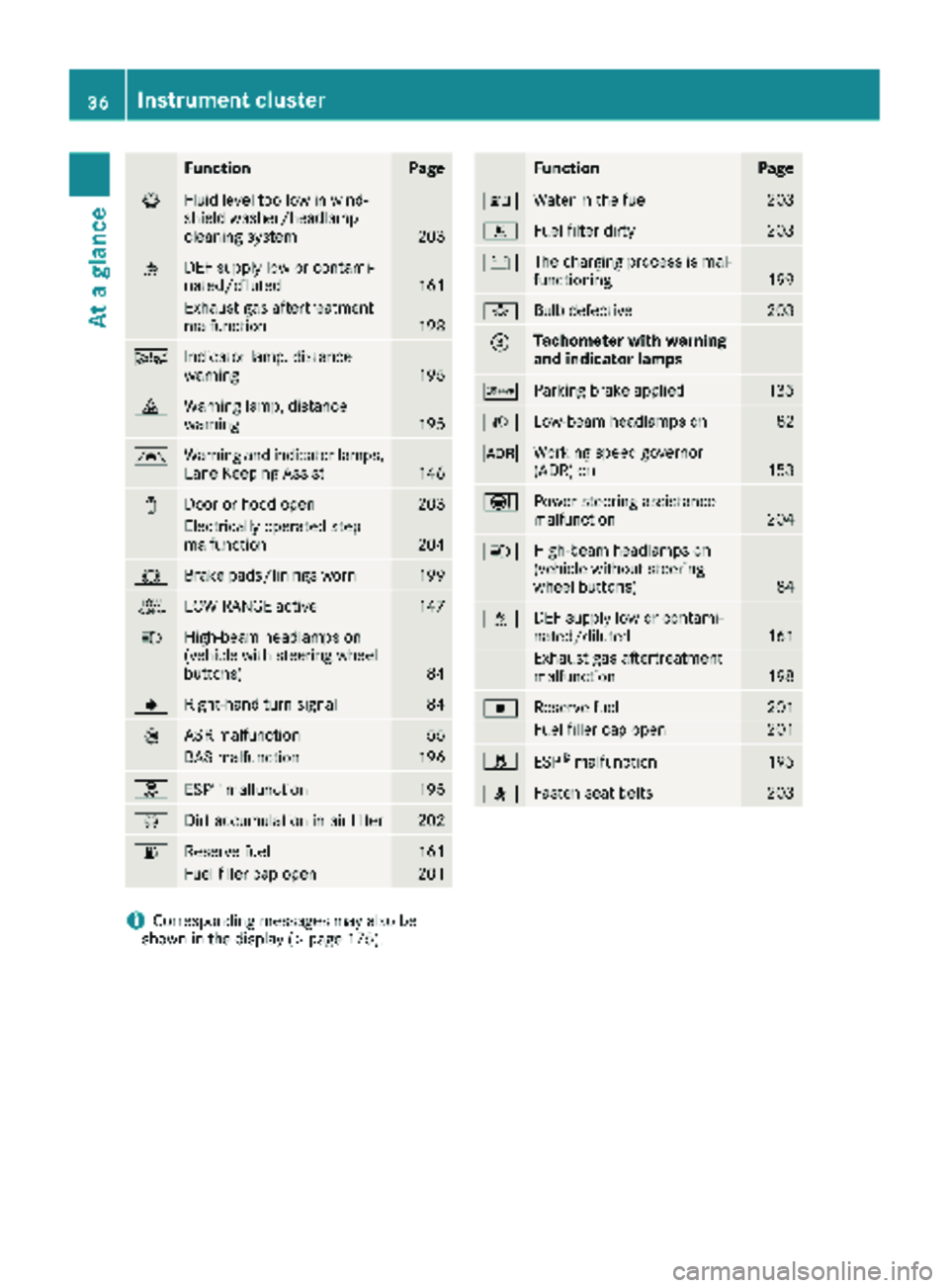
FunctionPage
¦Fluid level too low in wind-
shield washer/headlamp
cleaning system
203
åDEF supply low or contami-
nated/diluted161
Exhaust gas aftertreatment
malfunction198
ÄIndicator lamp, distance
warning195
·Warning lamp, distance
warning195
ÃWarning and indicator lamps,
Lane Keeping Assist146
1Door or hood open203
Electrically operated step
malfunction204
#Brake pads/linings worn199
+LOW RANGE active147
KHigh-beam headlamps on
(vehicle with steering wheel
buttons)
84
JRight-hand turn signal84
:ASR malfunction55
BAS malfunction196
hESP®malfunction195
ÈDirt accumulation in air filter202
6Reserve fuel161
Fuel filler cap open201
FunctionPage
:Water in the fuel203
mFuel filter dirty203
#The charging process is mal-
functioning199
bBulb defective203
=Tachometer with warning
and indicator lamps
cParking brake applied135
LLow-beam headlamps on82
KWorking speed governor
(ADR) on153
ÐPower steering assistance
malfunction204
KHigh-beam headlamps on
(vehicle without steering
wheel buttons)
84
åDEF supply low or contami-
nated/diluted161
Exhaust gas aftertreatment
malfunction198
|Reserve fuel201
Fuel filler cap open201
hESP®malfunction195
7Fasten seat belts203
iCorresponding messages may also be
shown in the display (Ypage 175).
36Instrument cluster
At a glance
Page 57 of 294
Drive on carefully. Have ABS checked imme-
diately at a qualified specialist workshop.
If ABS is malfunctioning, other systems will also
fail, including driving safety systems. Observe
the information relating to the !warning
lamp (
Ypage 196).
ABS regulates brake pressure in such a way that the wheels do not lock when you brake. This
allows you to continue steering the vehicle when
braking.
ABS works from a speed of about 5 mph
(8 km/h), regardless of road-surface conditions. ABS works on slippery surfaces, even when you
only brake gently.
The yellow !warning lamp in the instrument
cluster lights up when the ignition is switched
on. The lamp goes out when the engine starts
running.
Braking
If ABS intervenes when braking, you will feel a
pulsating in the brake pedal.
The pulsating brake pedal can be an indication
of hazardous road conditions and functions as a
reminder to take extra care while driving.
XIf ABS intervenes: continue to depress the
brake pedal with force until the braking sit-
uation is over.
XTo make a full brake application: depress
the brake pedal with full force.
ASR (acceleration skid control)
General notes
Important safety notes
Observe the important safety guidelines for the
driving safety system (Ypage 54).
ASR can neither reduce the risk of an accident
nor suspend the laws of physics if the driver
does not pay attention when pulling away or
accelerating. ASR is only an aid. Always adapt
your driving style to suit the prevailing road and
weather conditions.
If you activate or deactivate the all-wheel drive
in a vehicle with this option, ASR will be deacti- vated for the duration of the activation/deacti-
vation process. Vehicles without steering wheel buttons: if ASR
is malfunctioning, the
:indicator lamp lights
up while the engine is running and the engine
power may be reduced (
Ypage 196).
ASR significantly improves traction, i.e. the
transmission of power from the tires to the road surface, and thus increases the vehicle's driving
stability. If the driving wheels start to spin, ASR
brakes individual drive wheels and limits the
engine torque. ASR thus significantly assists you
when pulling away and accelerating, especially
on wet or slippery roads.
If traction on the road surface is not sufficient,
even ASR will not allow you to pull awa
y without
difficulty. The type of tires and total weight of the
vehicle as well as the gradient of the road also
play a crucial role.
If ASR intervenes, the dwarning lamp in the
instrument cluster flashes.
Activating/deactivating ASR
GWARNING
If deactivated, ASR will not attempt to stabi-
lize the vehicle during pulling away and accel- eration. There is an increased risk of skidding
and of an accident.
Only deactivate ASR in the situations descri-
bed in the following.
!If you deactivate ASR, ESP®will still inter-
vene to stabilize the vehicle. Frequent braking
automatically triggered by ESP
®can damage
the brake system.
For this reason, deactivate ASR only briefly
and when absolutely necessary.
When ESP®is intervening and the dwarning
lamp in the instrument cluster is flashing, leave
Driving safet ysystem s55
Safety
Z
Page 58 of 294
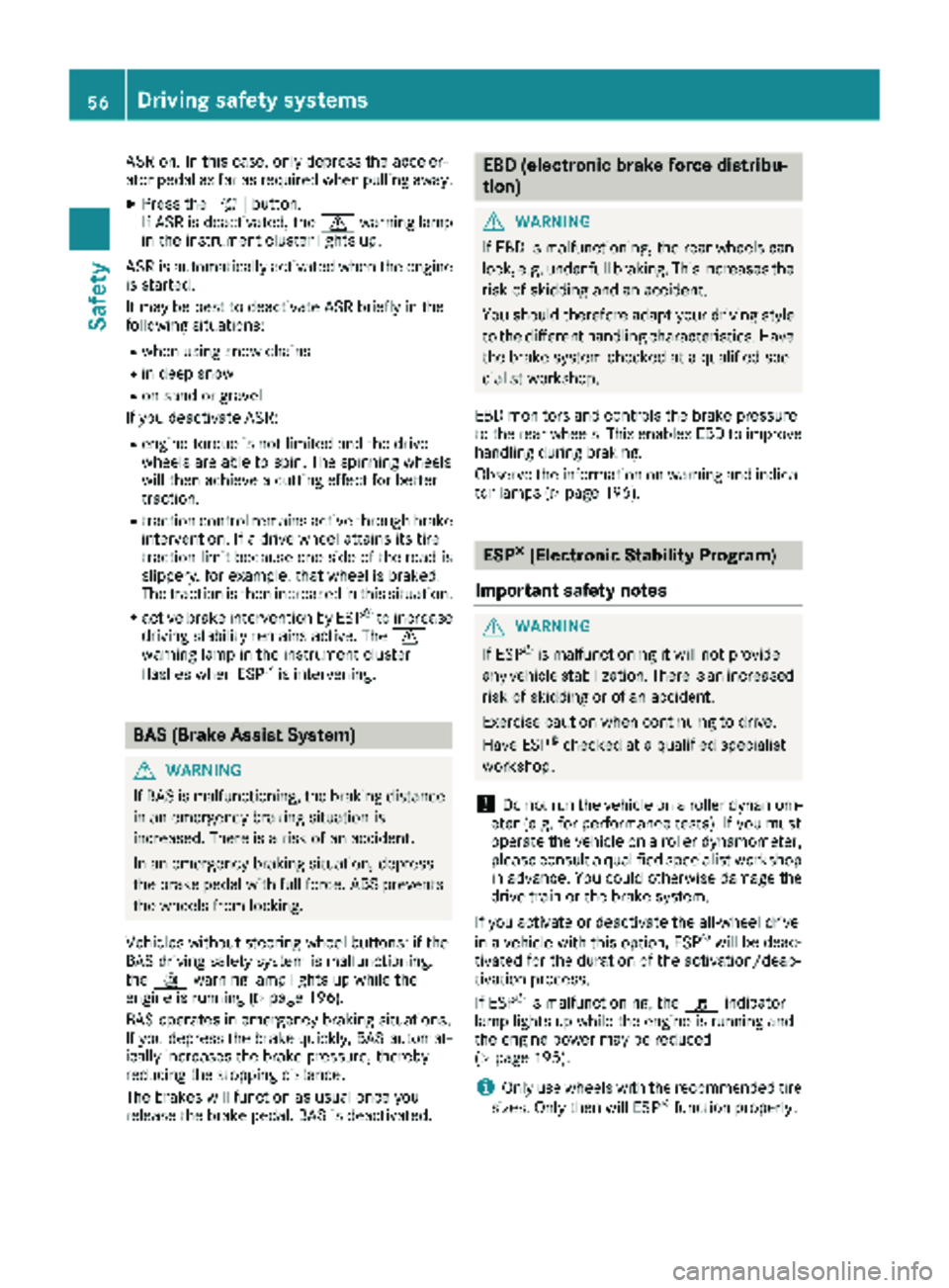
ASR on. In this case, only depress the acceler-
ator pedal as far as required when pulling away.
XPress theàbutton.
If ASR is deactivated, the dwarning lamp
in the instrument cluster lights up.
ASR is automatically activated when the engine
is started.
It may be best to deactivate ASR briefly in the
following situations:
Rwhen using snow chains
Rin deep snow
Ron sand or gravel
If you deactivate ASR:
Rengine torque is not limited and the drive
wheels are able to spin. The spinning wheels
will then achieve a cutting effect for better
traction.
Rtraction control remains active through brake
intervention. If a drive wheel attains its tire
traction limit because one side of the road is
slippery, for example, that wheel is braked.
The traction is then increased in this situation.
Ractive brake intervention by ESP®to increase
driving stability remains active. The d
warning lamp in the instrument cluster
flashes when ESP
®is intervening.
BAS (Brake Assist System)
GWARNING
If BAS is malfunctioning, the braking distance
in an emergency braking situation is
increased. There is a risk of an accident.
In an emergency braking situation, depress
the brake pedal with full force. ABS prevents
the wheels from locking.
Vehicles without steering wheel buttons: if the
BAS driving safety system is malfunctioning,
the : warning lamp lights up while the
engine is running (
Ypage 196).
BAS operates in emergency braking situations.
If you depress the brake quickly, BAS automat-
ically increases the brake pressure, thereby
reducing the stopping distance.
The brakes will function as usual once you
release the brake pedal. BAS is deactivated.
EBD (electronic brake force distribu-
tion)
GWARNING
If EBD is malfunctioning, the rear wheels can
lock, e.g. under full braking. This increases the
risk of skidding and an accident.
You should therefore adapt your driving style
to the different handling characteristics. Have
the brake system checked at a qualified spe-
cialist workshop.
EBD monitors and controls the brake pressure
to the rear wheels. This enables EBD to improve
handling during braking.
Observe the information on warning and indica-
tor lamps (
Ypage 196).
ESP®(Electronic Stability Program)
Important safety notes
GWARNING
If ESP
®is malfunctioning it will not provide
any vehicle stabilization. There is an increased
risk of skidding or of an accident.
Exercise caution when continuing to drive.
Have ESP
®checked at a qualified specialist
workshop.
!Do not run the vehicle on a roller dynamom-
eter (e.g. for performance tests). If you must
operate the vehicle on a roller dynamometer,
please consult a qualified specialist workshop
in advance. You could otherwise damage the
drive train or the brake system.
If you activate or deactivate the all-wheel drive
in a vehicle with this option, ESP
®will be deac-
tivated for the duration of the activation/deac-
tivation process.
If ESP
®is malfunctioning, the hindicator
lamp lights up while the engine is running and
the engine power may be reduced
(
Ypage 195).
iOnly use wheels with the recommended tire
sizes. Only then will ESP®function properly.
56Driving safety systems
Safety
Page 120 of 294
Useful information
This Operator's Manual describes all models as
well as standard and optional equipment of your
vehicle that were available at the time of going
to print. Country-specific variations are possi-
ble. Note that your vehicle may not be equipped
with all of the described functions. This also
applies to systems and functions relevant to
safety.
Read the information on qualified specialist
workshops (
Ypage 27).
Breaking-in notes
The first 1000 miles (1500 km)
New or replaced brake pads and brake disks
only reach their optimum braking effect after a
few 100 miles (a few 100 kilometers). Until then,
compensate for this by applying greater force to
the brake pedal.
For the service life and economy of your vehicle
it is crucial that you break in the engine with due
care.
RTherefore, protect the engine for the first
1000 miles (1500 km) by driving at varying
vehicle and engine speeds.
RAvoid overstraining the vehicle and high
engine speeds during this period, e.g. driving
at full throttle. Do not exceed Øof the max-
imum speed for each gear.
RDo not change down a gear manually in order to brake.
RTry to avoid depressing the accelerator pedal
beyond the point of resistance (kickdown).
RThe shift ranges 3,2or 1should only be
engaged when driving slowly, e.g. when driv-
ing in mountainous terrain.
After 1000 miles (1500 km), you can increase
the engine speed gradually and accelerate the
vehicle to full speed.
iYou should also observe these notes on
breaking-in if the engine or parts of the drive
train on your vehicle have been replaced.
Driving
Important safety notes
GWARNING
If you switch off the ignition while driving,
safety-relevant functions are only available
with limitations, or not at all. This could affect, for example, the power steering and the brake
boosting effect. You will require considerably
more effort to steer and brake. There is a risk
of an accident.
Do not switch off the ignition while driving.
GWARNING
If the parking brake has not been fully
released when driving, the parking brake can:
Roverheat and cause a fire
Rlose its hold function.
There is a risk of fire and an accident. Release
the parking brake fully before driving off.
If you park the vehicle for more than
three weeks:
Rconnect the batteries to a trickle charger or
Rdisconnect the vehicle's starter battery or
Rswitch off the electrical system using the bat-
tery main switch (Ypage 118) and
Rdisconnect the vehicle's auxiliary battery
Otherwise, you need to check the battery's con-
dition of charge every 3 weeks, since standby
power consumption can drain the battery. If the
battery voltage is lower than 12.2 V, the battery
must be charged. Otherwise, the battery may be damaged by exhaustive discharging.
Be sure to observe the notes on disconnecting
and charging the batteries under "Battery"
(
Ypage 228). You can obtain information about
trickle chargers from a qualified specialist work-
shop.
Battery isolating switch
Important safety notes
!Make sure that the key is in position 0in the
ignition lock and that at least five minutes
have passed before removing or reconnecting
118Driving
Driving and parking
Page 121 of 294
the battery main switch. You could otherwise
damage components of the electrical system.
You can use the battery isolating switch to dis-
connect the power supply to all your vehicle's
consumers. This will prevent uncontrolled bat-
tery discharge caused by off-load current con-
sumption.
If your vehicle is equipped with an auxiliary bat-
tery in the engine compartment, you will need to
disconnect both batteries. Only then is the elec- trical system fully disconnected from the power
supply.
iOnly switch the vehicle to de-energized
using the battery main switch if:
Rthe vehicle is stationary for a lengthy period
Rit is absolutely necessary
After the power supply has been activated,
you will need to reset the side windows
(
Ypage 73).
Switching off the power supply
Battery main switch to the left of the center con-
sole
XRemove the key from the ignition lock and
wait for at least five minutes.
XPress button ;in the direction of the arrow
and hold.
XPull connector :from the ground pin.
XPush connector :as far to the side as pos-
sible so that it cannot make contact with the
ground pin.
All starter battery consumers are disconnec-
ted from the power supply.
Switching on the power supply
XInsert the key into the ignition lock.
XPress connector :onto ground pin ;until
you feel it engage and the lock inhibitor is
released.
Connector :must be in full contact with
ground pin ;.
All consumers are reconnected to the DC
power supply.
Key positions
gTo insert and remove the key, lock the steer-
ing wheel
1To unlock the steering wheel, power supply
for some consumers (e.g. the radio)
2To switch on the ignition. Power supply for
all consumers, preglow and drive position
3To start the engine
On vehicles with a battery main switch, you must
first switch on the power supply (
Ypage 118).
iTo unlock the steering, move the steering
wheel slightly while turning the key to position
1 .
Driving119
Dr iving an d parking
Z