charging MERCEDES-BENZ SPRINTER 2019 MY19 with 7” screen
[x] Cancel search | Manufacturer: MERCEDES-BENZ, Model Year: 2019, Model line: SPRINTER, Model: MERCEDES-BENZ SPRINTER 2019Pages: 354, PDF Size: 6.15 MB
Page 197 of 354
Overview and operation
Overview of
the MBUX multimedia sy stem &
WARNING Risk of distraction from infor‐
mation sy stems and communications
equipment
If yo u operate information and communica‐
tion equipment integ rated in theve hicle when
driving, you will be distracted from the tra ffic
situation. This could also cause youto lose
control of theve hicle. #
Only operate this equipment when the
traf fic situation permits. #
Ifyo u cannot be sure of this, stop the
ve hicle whilst paying attention toroad
and traf fic conditions and ope rate the
equipment with theve hicle stationar y. Yo
u must obse rveth e legal requirements forthe
country in whi chyou are cur rently driving when
ope rating the multimedia sy stem.
MBUX stands for Mercedes-Benz User Experi‐
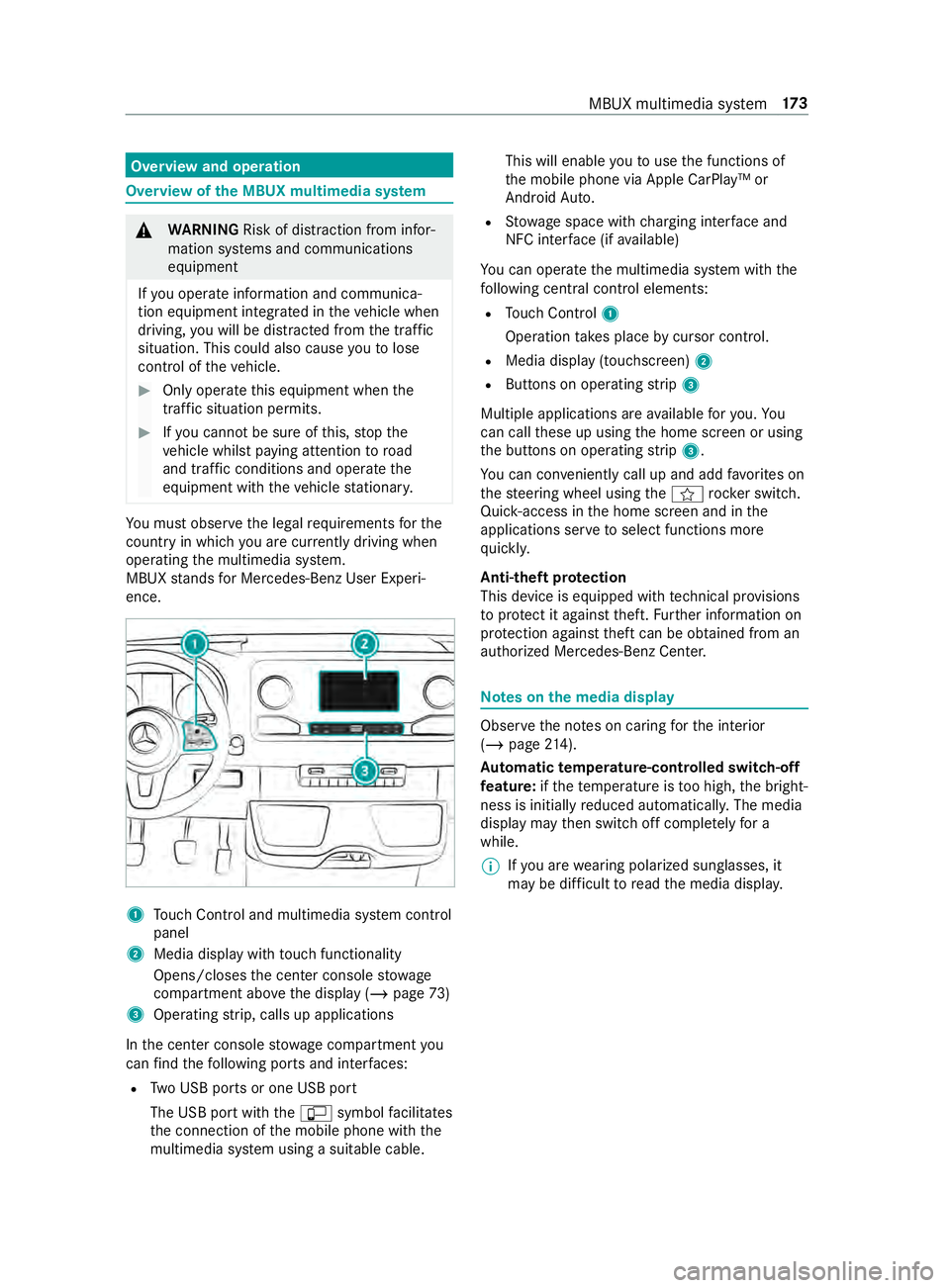
ence. 1
Touch Control and multimedia sy stem cont rol
panel
2 Media display with touch functionality
Opens/closes the center console stowage
compartment abo vethe display (/ page73)
3 Operating strip, calls up applications
In the center console stowage compartment you
can find thefo llowing ports and inter faces:
R Two USB ports or one USB port
The USB port with the00C2 symbol facilitates
th e connection of the mobile phone with the
multimedia sy stem using a suitable cable. This will enable
youto use the functions of
th e mobile phone via Apple CarPlay™ or
Android Auto.
R Stow age space with charging inter face and
NFC inter face (if available)
Yo u can operate the multimedia sy stem with the
fo llowing central control elements:
R Touch Control 1
Operation takes place bycursor control.
R Media display (tou chscreen) 2
R Buttons on operating strip 3
Multiple applications are available foryo u. Yo u
can call these up using the home screen or using
th e buttons on operating strip 3.
Yo u can con veniently call up and add favo rite s on
th esteering wheel using the004B rock er switch.
Quic k-access in the home screen and in the
applications ser vetoselect functions more
qu ickl y.
Anti-theft pr otection
This device is equipped with tech nical pr ovisions
to protect it against theft. Further information on
pr otection against theft can be obtained from an
authorized Mercedes-Benz Center. Note
s onthe media display Obser
vethe no tes on caring forth e interior
(/ page 214).
Au tomatic temperature-cont rolled switch-off
fe ature: ifth ete mp erature is too high, the bright‐
ness is initially reduced automaticall y.The media
display may then switch off comple tely for a
while.
% If
yo u are wearing polarized sun glasses, it
may be dif ficult toread the media displa y. MBUX multimedia sy
stem 17 3
Page 243 of 354
&
WARNING Risk ofexplosion due toelec‐
tros tatic charge
Electros tatic charge can cause spa rks which
may ignite the highly flammable gas mixture
in the batter y. #
Todischar geany electrostatic charge
th at may ha vebuilt up, touch the me tal
ve hicle body before handling the bat‐
te ry. The highly
flammable gas mixture is created while
th e battery is charging and when jump-s tarting. &
WARNING Danger of chemical burns
from the battery acid
Battery acid is caustic. #
Avoid contact with the skin, eyes or
clo thing. #
Do not lean overth e batter y. #
Do not inhale battery gases. #
Keep children away from the batter y. #
Immedia tely rinse battery acid off thor‐
oughly with plenty of clean water and
seek medical attention immediately. +
ENVIRONMENTAL
NOTEEnvironmental
damage caused byimproper disposal of
batteries Bat
teries contain pollutants. It is
illegal todispose of them with the household
ru bbish. #
Dispose of batteries in an
environmen tally responsible manner.
Ta ke dischar ged batteries toaqu alified
specialist workshop or toa collection
point for used batteries. If
th e12 V battery has tobe connected, con tact a
qu alified specialist workshop.
Obser vethe saf ety no tes and pr otective meas‐
ures when handling batteries. Risk of
explosion Fire, open
flames and smoking are
prohibited when handling the batter y.
Av oid creating spar ks. Electrolyte
or battery acid is cor ro‐
sive. Avoid contact with the skin, eyes
and clo thing. Wear suitable pr otective
clo thing, in particular glove s, an apron
and a saf ety mas k.Immedia tely rinse
electrolyte acid splashes off wi th
clean water.If necessar y,seek medi‐
cal advice. We
areye pr otection. Ke
ep children at a safe dis tance. Obser
vethese Operating Instructions.
If yo u do not use theve hicle for a long period or
drive short dis tances regular ly:
R connect the battery toach arge rre commen‐
ded for Mercedes-Benz.
R consult a qualified specialist workshop todis‐
connect the battery St
arting assistance and charging the12 V
battery #
Always use the jump-s tart connection point in
th e engine compartment when charging the
battery and jump-s tarting.
* NO
TEDamaging the battery thro ugh
ove rvoltage When
charging using a battery charge r with‐
out a maximum charging voltage, the battery
or theve hicle electronics may be damaged. #
Only use battery charge rs with a maxi‐
mum charging voltage of 14.8 V. Breakdown assis
tance 219
Page 244 of 354
&
WARNING Risk ofexplosion from hydro‐
ge nga s igniting
A battery generates hydrogen gas during the
ch arging process. If there is a short circuit or
spar ksstart toform ,th ere is a danger of the
hy drogen gas igniting. #
Make sure that the positive term inal of
th e connected battery does not come
into contact with vehicle parts. #
Never place me tal objects or tools on a
batter y. #
When connecting and disconnecting the
batter y,yo u must obse rveth e described
order forth e battery clamps. #
When giving starting assistance, alw ays
make sure that you on lyconnect battery
te rm inals with identical polarity. #
During starting assis tance, you must
obse rveth e described order for con‐
necting and disconnecting the jumper
cables. #
Do not connect or disconnect the bat‐
te ry cla mp s while the engine is running. &
WARNING Risk ofexplosion during
ch arging process and starting assis tance
During thech arging process and starting
assis tance, the battery may release an explo‐
sive gas mixture. #
Avoid fire , open flames, creating spar ks
and smoking. #
Make sure that there is suf ficient venti‐
lation du ring thech arging process and
during starting assis tance. #
Do not lean over a batter y. &
WARNING Risk ofexplosion from a fro‐
zen battery
A dischar ged battery may freeze at temp era‐
tures slightly abo veor below freezing point.
During starting assis tance or battery charg‐
ing, battery gas may be released. #
Alwaysth aw a frozen battery out first
before charging it or per form ing starting
assis tance. If
th ewa rning/indicator lamps do not light up in
th e instrument display around or below freezing point, it is
very likely that the discharged battery
has frozen.
In this case, obser vethefo llowing points:
R do not give theve hicle starting assis tance or
ch arge the battery
R the service life of a battery that has been
th awe d may be reduced drastically
R thest art-up behavior may de teriorate, partic‐
ularly at low temp eratures
R it is recommended that you ha veath awed
battery checked at a qualified specialist work‐
shop
* NO
TEDama gecaused bynume rous or
ex tended attempts tostart the engine Nume
rous or extended attempts tostart the
engine may damage the catalytic con verter
due tonon-combu sted fuel. #
Avoid numerous and extended attem pts
to start the engine. Obser
vethefo llowing points during starting
assis tance and when charging the battery:
R only use undamaged jumper cables/charging
cables with a suf ficient cross-section and
insula tedte rm inal clamps
R non-insulated parts of thete rm inal clamps
must not come into con tact wi thother me tal
parts while the jumper cables/charging
cables are connected tothe battery/jump-
st art connection point
R the jumper cables/charging cable must not
come into contact with any parts which may
mo vewhen the engine is running
R alwa ys make sure that nei ther you nor the
battery is electros tatically charged
R alwayske ep away from fire and open flames
R do not lean over a battery
R when charging: only use a battery charger
th at has been tested and appr ovedby
Mercedes-Benz and read the operating
instructions foryo ur charge r before charging
th e batter y.
Obser vethe additional following points during
st arting assis tance:
R starting assis tance may only be pr ovided
using batteries with a nominal voltage of 12 V
R theve hicles must not touch each other 220
Breakdown assis tance
Page 245 of 354
R
vehicles with a gasoline engine: only per‐
fo rm starting assis tance when the engine and
ex haust sy stem are cold #
Vehicles with a battery main switch: check
whe ther the battery main switch is switched
on (/ page114). #
Secu retheve hicle using the parking brake. #
Vehicles with automatic transmission:
shift the transmission toposition 005D. #
Switch off the ignition and all electrical con‐
sumers. #
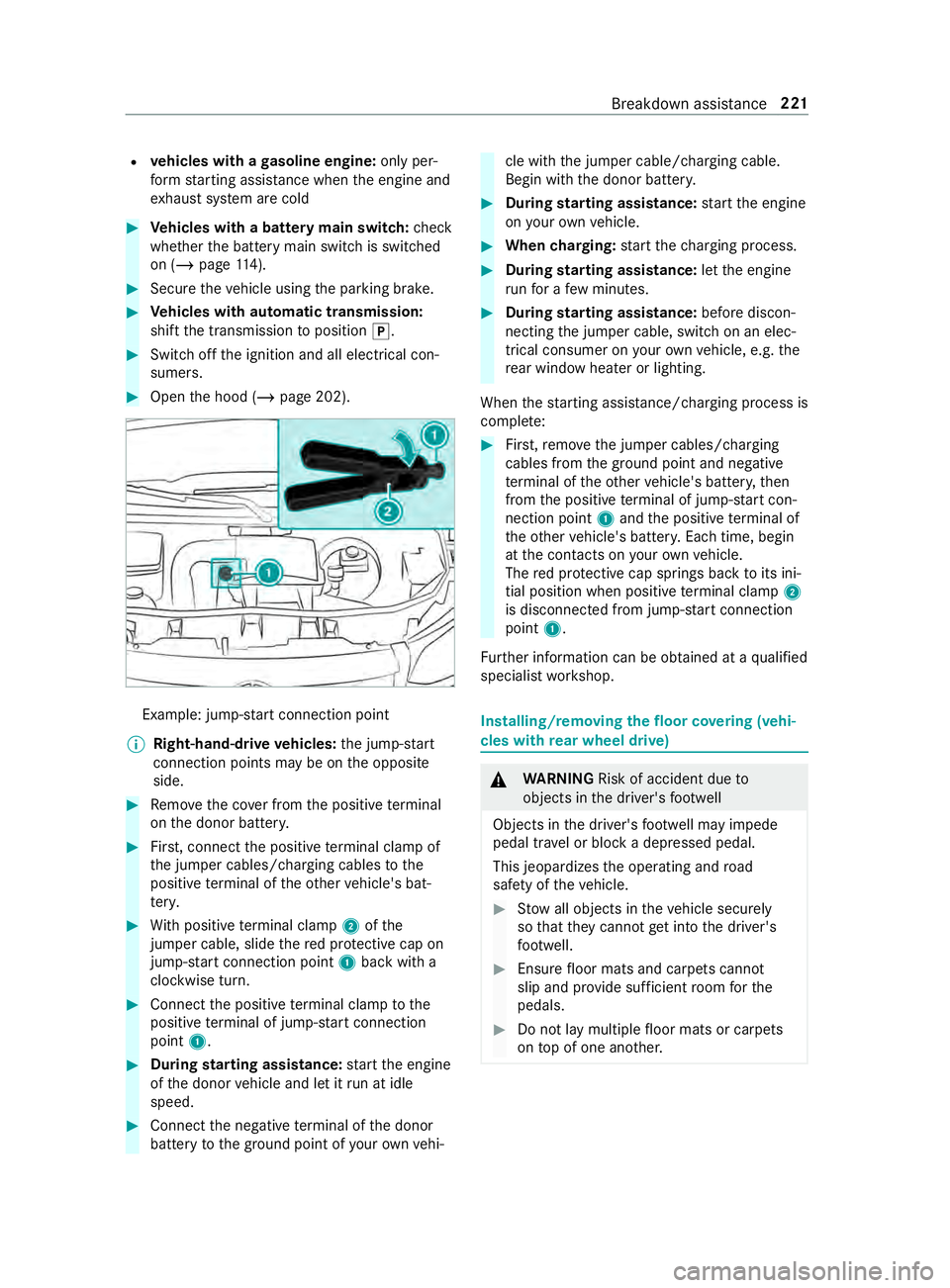
Open the hood (/ page 202). Example: jump-s
tart connection point
% Right-hand-drive
vehicles: the jump-s tart
connection points may be on the opposite
side. #
Remo vethe co ver from the positive term inal
on the donor batter y. #
First, connect the positive term inal clamp of
th e jumper cables/charging cables tothe
positive term inal of theot her vehicle's bat‐
te ry. #
With positive term inal clamp 2ofthe
jumper cable, slide there d pr otective cap on
jump-s tart connection point 1back with a
clockwise turn. #
Connect the positive term inal clamp tothe
positive term inal of jump-s tart connection
point 1. #
During starting assistance: start the engine
of the donor vehicle and let it run at idle
speed. #
Connect the negative term inal of the donor
battery tothe ground point of your ow nve hi‐ cle with
the jumper cable/charging cable.
Begin with the donor batter y. #
During starting assistance: start the engine
on your ow nve hicle. #
When charging: start thech arging process. #
During starting assistance: letthe engine
ru nfo r a few minutes. #
During starting assistance: before discon‐
necting the jumper cable, switch on an elec‐
trical consumer on your ow nve hicle, e.g. the
re ar wind owheater or lighting.
When thest arting assis tance/charging process is
comple te: #
First,re mo vethe jumper cables/charging
cables from the ground point and negative
te rm inal of theot her vehicle's batter y,then
from the positive term inal of jump-s tart con‐
nection point 1and the positive term inal of
th eot her vehicle's batter y.Each time, begin
at the contacts on your ow nve hicle.
The red pr otective cap springs back toits ini‐
tial position when positive term inal clamp 2
is disconnected from jump-s tart connection
point 1.
Fu rther information can be obtained at a qualified
specialist workshop. Installing/removing
thefloor co vering (vehi‐
cles with rear wheel drive) &
WARNING Risk of accident due to
objects in the driver's foot we ll
Objects in the driver's foot we ll may impede
pedal tr avel or block a depressed pedal.
This jeopardizes the operating and road
saf ety of theve hicle. #
Stow all objects in theve hicle securely
so that they cannot getinto the driver's
fo ot we ll. #
Ensure floor mats and carpets cannot
slip and pr ovide suf ficient room forthe
pedals. #
Do not lay multiple floor mats or carpets
on top of one ano ther. Breakdown assis
tance 221
Page 331 of 354
Sound settings .................................
188
Tr ans ferred vehicle data ...................1 88
Animals Pets in theve hicle .............................. 40
Anti-lock braking sy stem
see ABS (Anti-lock Braking Sy stem)
Anti-skid chains
see Snow chains
Anti-theft Alarm sy stem
see ATA (Anti -Theft Alarm sy stem)
Anti-theft pr otection
Immobilizer ........................................ 55
Anti- theft pr otection
see ATA (Anti -Theft Alarm sy stem)
Apple CarPlay™ .................................... 186
Connecting an iPhone ®
............ 186, 187
Ending .............................................. 187
No tes ................................................ 186
Overview .......................................... 186
Sound settings .................................. 187
Tr ans ferred vehicle data ...................1 88
Ashtr ays
In the windshield stowage com‐
partment ............................................ .74
ASR (accele ration skid control) ...........137
Assistance graphic (on-board com‐
puter) ..................................................... 16 6
ASS YST PLUS ........................................ 202
Battery disconnection pe riods ......... 202
Displaying the service due date .......2 02
Fu nction/no tes ................................ 202
Re gular maintenance work ............... 202
Special service requirements .......... .202
ATA (Anti-Theft Alarm sy stem) .............. 56
Ac tivating/deactivating the interior
motion sensor .................................... 57
Fu nction ............................................. 56
Interior motion sensor function .......... 57
St opping the alarm ............................. 56
Switching theto w- aw ay alarm
on/off ................................................ 57
To w- aw ay alarm function .................... 56
At tachments .......................................... .19
AT TENTION ASSI ST....................... 151, 15 2
Fu nction ............................................ 151
Setting .............................................. 15 2
Sy stem limitations ............................1 51
Au thorized workshop
see Qualified specialist workshop Au
tomatic distance control
see Active Dis tance Assi stDISTRONIC
Au tomatic driving lights ........................79
Au tomatic transmission
DIRECT SELECT le ver ........................ 11 5
Engaging drive position ..................... 11 7
Engaging neutral ............................... 11 6
Engaging reve rsege ar ...................... .116
Kickdown .......................................... 11 8
Re stricting the shift range ................. 11 7
Selecting pa rkposition .....................1 16
Tr ansmission position display .......... .115
Tr ansmission positions ...................... 11 5
Au xiliary heating .................................... 99
Fu nction ............................................. 99
Axle load ................................................ 261 B
Back suppo rt
see Lumbar support (4-w ay)
BA S (Brake Assist Sy stem) .................. 137
Battery Charging ........................................... 219
Charging a vehicle battery ................2 19
Disconnecting the auxiliary battery
in the engine compartment .............. 224
Disconnecting thest ar ter battery .... 222
Jump -sta rting (vehicle) ...................... 219
Ke y .................................................... .42
No tes (vehicle) ..................................2 18
Re moving or ins talling thest ar ter
battery .............................................2 23
St arter battery .................................. 221
Battery main switch Notes ................................................ 11 4
Switching the po wer supp lyon/off ... 11 4
Belt see Seat belt
Blind Spot Assi st.................................. 15 2
Ac tivating/deactivating .................... 154
Fu nction ........................................... 15 2
Re ar Cross Traf fic Alert .................... 154
Sy stem limitations ............................1 52
Blue tooth ®
............................................ 180
Ac tivating/deactivating .................... 180
Information .......................................1 80
Bottle holder .......................................... .74
Brake ABS (Anti-lo ckBraking Sy stem) ........ 137
Ac tive Brake Assi st........................... 13 9
BA S (Brake Assi stSystem) ............... 137 Index
307
Page 333 of 354
Changing bulbs
...................................... .83
High beam .......................................... 84
Indicator (front) .................................. 84
Interior lamps (rear compartment) ..... 88
License plate lamp ............................ .86
Light bulb types haloge n headlamps ..84
Low beam ........................................... 84
No tes .................................................83
Ta il lamp bulb types (Cargo Van
and Passenger Van) ............................ 85
Ta il lamp bulb types (chassis) ............ .87
Tu rn signal light (rear) (chassis) ..........87
Changing lamps see Changing bulbs
Changing owner ...................................... 21
Cha racteristics of the tire .................. .245
Charging Battery .............................................. 219
Mobile phone (wireless) ..................... 77
Child saf ety lock (doors) ........................ 39
Child seat front-passenger seat (no tes) .............. 38
front-passenger seat (rear ward-
fa cing/for ward-facing) ....................... 38
LA TC H-type (ISOFIX) (ins talling) ........ .36
LA TC H-type (ISOFIX) (no tes) ............... 36
No tes on the safe transpor tation of
ch ildren .............................................. 34
Re arwa rd-facing child restra int sys‐
te m (Information) .............................. .38
To pTe ther ...........................................37
Child ren
No tes on safe transpor tation .............. 34
Special seat belt retractor .................. 35
Ci ga rette lighter ..................................... 75
Cleaning see Care
Cleaning water drain valve of the air
intake box ............................................ .208
Climate control Activating/deactivating ...................... 95
Ad justing rear-compartment heat‐
ing ...................................................... 96
Air distribution settings ...................... 97
automatically controlling (rear
passenger compartment) .................. .97
Au xilia ryheating ................................. 99
Cargo compartment ventilation ........ 102
Clearing fogged up windo ws............... 97
Control panel for 3-zone auto matic
clima tecontrol ................................... 95 Control panel
for dual-zone auto‐
matic clima tecontrol .......................... 94
Controlling automatically .................... 96
Hot- wate r auxilia ryheater ................1 00
Re frigerant ........................................ 271
Setting the air distribution .................. 97
Switching ai r-re circulation mode
on/off ................................................ 98
Switching synchronization function
on/off (control panel) ......................... 97
Switching the A/C function on/off ....96
Switching there ar wind ow
defros ter on/off ................................. 98
Switching the windshield heater
on/off ................................................ 98
Ve ntilating theve hicle (con veni‐
ence opening) ..................................... 54
Ve ntilation nozzles at front ................. 98
Ve ntilation nozzles in thero of ............ 99
Ve ntilation nozzles, rear passenger
compartment .................................... .99
Cockpit (o verview) .................................. .6
Combination switch see High beam
see High-beam flasher
see Indicator
Compu ter
see On-board computer
Contacts ................................................ 185
Calling up ........................................ .185
Deleting ............................................ 185
Downloading (from mobile phone) .... 185
Information .......................................1 85
Making a call ................................... .185
Na me form at .................................... 185
Con venience closing .............................. 54
Con venience opening ............................. 54
Con versions ............................................ 19
Coolant Filling capacities .............................. .270
Coolant (engine) Che cking le vel .................................. 206
No tes ............................................... 269
Copyright License ............................................... 27
Tr ademar ks......................................... 27
Cornering light ...................................... .80
Crosswind Assist Function/no tes ................................ 13 8
Cruise control ...................................... .141
Ac tivating ......................................... 14 2 Index
309
Page 341 of 354
Loading
Definitions ........................................ 24 6
Loading guidelines .........................72,19 5
Loading information table ...................240
Low beam Activating/deactivating ...................... 79
Changing bulbs ................................. .84
Setting for abroad (symmetrical) ........ 79
LO Wrange ............................................. 11 9
Lu bricant additives
see Additive
Lu mbar support (4-w ay)........................ 64 M
M+S tires .............................................. 233
Maintenance Vehicle ................................................ 21
Maintenance see ASS YST PLUS
Malfunction Restra int sy stem ................................ 28
Malfunction message see Display message
Manual parking brake ..........................13 3
App lying/ releasing .......................... .133
Emer gency braking ........................... 13 4
Fo lding up/down .............................. 13 3
Manually inflating air bello ws(ENR) ...1 24
Matte finish (cleaning instructions) ....211
Maximum load Determ ining ...................................... 241
Sample calculation ........................... 24 2
Maximum tire load ...............................244
Maximum tire pressure .......................24 5
MBUX multimedia sy stem (o ver‐
vi ew )...................................................... 173
Mechanical key
Locking door ...................................... 45
Re moving/inserting ........................... 42
Un locking door .................................. .45
Media Menu (on-boa rdcompu ter) ............... 16 9
Operating media playback ................1 69
Selecting a media sou rce ................. 16 9
Media display Entering characters .......................... 17 9
Home screen .................................... 174
No tes ................................................ 173Media mode
Adding a favo rite song ......................1 91
Connecting Blue tooth®
audio
equipment ........................................ 19 0
Connecting USB devices .................. 19 0
Controlling media playback .............. 191
Copyright and trademar ks................ 189
No tes about the sear chfunction in
categories ......................................... 191
Overview of the media menu ............ 19 0
Re moving a favo rite song .................. 191
St arting a sear chin categories ........ .192
St arting media playback .................. .191
Suppor tedfo rm at and data storage
media ............................................... 189
Using theke yword sear ch................ 19 2
Memory function (seat) .........................64
Menu (on-board computer) Assis tance graphic ........................... 16 6
Media ............................................... 16 9
Overview .......................................... 16 4
Ra dio ................................................ 16 8
Service ............................................. 16 6
Settings ............................................ 17 0
Te lephone ........................................ .169
Tr ip .................................................. .167
Mercedes PRO Information ....................................... 171
Mercedes PRO connect Accident mana gement ...................... 172
Calling the Cus tomer Center ............. 171
Information .......................................1 71
Making a call via theov erhead con‐
trol panel .......................................... 171
Ro adside Assis tance call via the
Ro adside Assis tance button .............. 171
Tr ans ferred data ...............................1 72
Mercedes-Benz emer gency call sys‐
tem
Information on data processing ........ 217
Message (multifunction display) see Display messa ge
Message memory ................................. 277
Mir rors
Ad justing the inside rearview mir ror ... 91
Mir rors
see Outside mir rors
Mobile phone ........................................ 260
Fr equencies ...................................... 260
Tr ansmission output (maximum) ...... 260
Wi reless charging .............................. .78 Index
317
Page 346 of 354
Sur
round lighting
Switching on/off ................................ 81
Sur round View
see 360° Camera
Switch-off delay time Exterior ............................................... 81
Interior ............................................... 83
Switching air-recirc ulation mode
on/off ...................................................... 98
Switching on ignition (start/s top
button) .................................................. 103
Switching seat heating on/off .............. 70
Switching synchronization function
on/off (control panel) ............................97
Switching the A/C function on/off ...... 96
Switching there ar window
defros ter on/o ff..................................... 98
Switching the windshield heater
on/o ff...................................................... 98
Sy stem settings
Re set function (multimedia sys‐
te m) .................................................. 181
Setting the dis tance unit ................... 181
Setting the time and date automat‐
ically .................................................1 79
Setting the time zone ....................... 180
Setting the time/date form at .......... .180
Sy stem settings
see Blue tooth®
see Language
see Wi-Fi T
Ta ilpipes (care) ...................................... 212
Ta nk capacity
Fu el .................................................. 266
Re ser ve(fuel) ...................................2 66
Ta nk content
DEF ................................................... 267
Te ch nical data
Information ...................................... 260
No tes (trailer hitch) ........................... 271
Ti re pressure monitor .......................2 40
Ve hicle identification plate ............... 261
Te lephone ...................................... 169, 182
Ac tivating functions du ring a call ...... 184
Connecting a mobile phone (Near
Field Communication (NFC)) ............ 183
Connecting a mobile phone (Pass‐
ke y) .................................................. 182Connecting a mobile phone
(Secure Simple
Pairing) .................... 182
De-authorizing a mobile phone ......... 183
Incoming call during an existing
call .................................................. .184
Information ....................................... 182
Menu (on-board computer) ............... 16 9
Mobile phone voice recognition ........ 184
No tes ................................................ 182
Re ception and transmission vol‐
ume .................................................. 183
Switching mobile phones ................. 183
Switching mobile phones (Near
Field Communication (NFC)) ............ 183
Te lephone menu overview ................1 82
Te lephone operation ........................ .184
Using Near Field Communication
(NFC) ................................................ 183
Wi reless charging (mobile phone) ...... .78
Te mp erature grade ............................... 24 3
Ti e-d owney es ...................................... .198
Time Manual time setting .......................... 180
Setting the time and date automat‐
ically .................................................1 79
Setting the time zone ....................... 180
Setting the time/date form at .......... .180
Ti re and Loading Information plac‐
ard ........................................................ .240
Ti re Identification Number (TIN) .........24 4
Ti re information table ..........................24 0
Ti re labeling .......................................... 24 3
Characteristics ................................ .245
DO T,Tire Identification Number
(TIN) ................................................. 24 4
Load index ........................................ 24 5
Load-bearing capacity ...................... 24 5
Maximum tire load ........................... 24 4
Maximum tire pressure .................... 24 5
Overview .......................................... 24 3
Size designation ............................... 24 5
Speed rating ..................................... 24 5
Te mp erature grade ........................... 24 3
Ti re qu ality grades ............................ 24 3
Tr action grade .................................. 24 3
Tr ead wear grade .............................. 24 3
Ti re load (maximum) ............................ 24 4
Ti re pressure
Checking (tire pressure moni toring
sy stem) ............................................ 239
Maximum ......................................... 24 5
No tes ............................................... 234 322
Index
Page 350 of 354

0024The electric parking brake
malfunctioning
yellow indicator
lamp does not light up ...................... 298
0077Ti repressure monitoring sys‐
te m wa rning lamp flashes ................ 304
0077Ti repressure monitoring sys‐
te m wa rning lamp lights up .............. 305
Wa rranty ................................................. 24
Wa rranty terms and conditions ............ 20
Wa sher fluid
see Windshield washer fluid (no tes)
Wa shing byhand (care) ........................ 211
Wheel rotation ...................................... 24 9
Wheel size categori es.......................... 250
Wheel wrench ...................................... .250
Wheels Care .................................................. 212
Characteristics of the tire ................. 24 5
Checking .......................................... 232
Checking the tire pressure (tire
pressure monitoring sy stem) ............ 239
Definitions ........................................2 46
DO T,Tire Identification Number
(TIN) ................................................. 24 4
Flat tire ............................................. 218
Ins talling .......................................... 253
Load index ........................................ 24 5
Load-bearing capacity ...................... 24 5
Maximum tire load ........................... 24 4
Maximum tire pressure .................... 24 5
No ise ................................................ 232
No tes on ins talling ............................ 24 8
Overview of tire labeling ...................2 43
Re moving ........................................ .253
Re placing .................................. 248, 251
Re starting the tire pressure moni‐
to r ................................................... .240
Ro tating ............................................ 24 9
Selecting .......................................... 24 8
Size designation ............................... 24 5
Snow chains .................................... .233
Speed rating ..................................... 24 5
St oring ............................................. 250
Te mp erature grade ........................... 24 3
Ti re and Loading In form ation plac‐
ard .................................................... 24 0
Ti re pressure (no tes) ........................ 234
Ti re pressure monitoring sy stem
(function) .......................................... 238
Ti re pressure table ...........................2 35
Ti re qu ality grades ............................ 24 3Tr
action grade .................................. 24 3
Tr ead wear grade .............................. 24 3
Un usual driving characteristics ........ 232
Wi -Fi ....................................................... 180
Overview .......................................... 180
Setting .............................................. 181
Wi ndow curtain airbag .......................... 32
Wi ndo ws
see Side window
Wi ndo ws(care) .................................... .212
Wi ndshield ..............................................89
Re placing the wiper blades ................89
Re placing the wiper blades (WET
WIPER SYSTEM) .................................. 89
Wi ndshield
see Windshield
Wi ndshield washer fluid
Information ....................................... 271
Wi ndshield washer fluid (no tes) ......... 270
Wi ndshield wipers
Re placing the wiper blades ................89
Re placing the wiper blades (WET
WIPER SYSTEM) .................................. 89
Switching on/o ff................................ 88
Wi nter driving (snow chains) .............. 233
Wi nter tires ...........................................2 33
Wi per blades
Ca re .................................................. 212
Re placing (rear window) .....................90
Re placing (WET WIPER SYSTEM) ........ 89
Re placing (windshield) ........................ 89
Wire lesscharging
Fu nction/no tes ..................................77
Mobile phone .....................................78
Wo rkshop
see Qualified specialist workshop 326
Index