radio MERCEDES-BENZ SPRINTER 2019 MY19 with 7” screen
[x] Cancel search | Manufacturer: MERCEDES-BENZ, Model Year: 2019, Model line: SPRINTER, Model: MERCEDES-BENZ SPRINTER 2019Pages: 354, PDF Size: 6.15 MB
Page 264 of 354
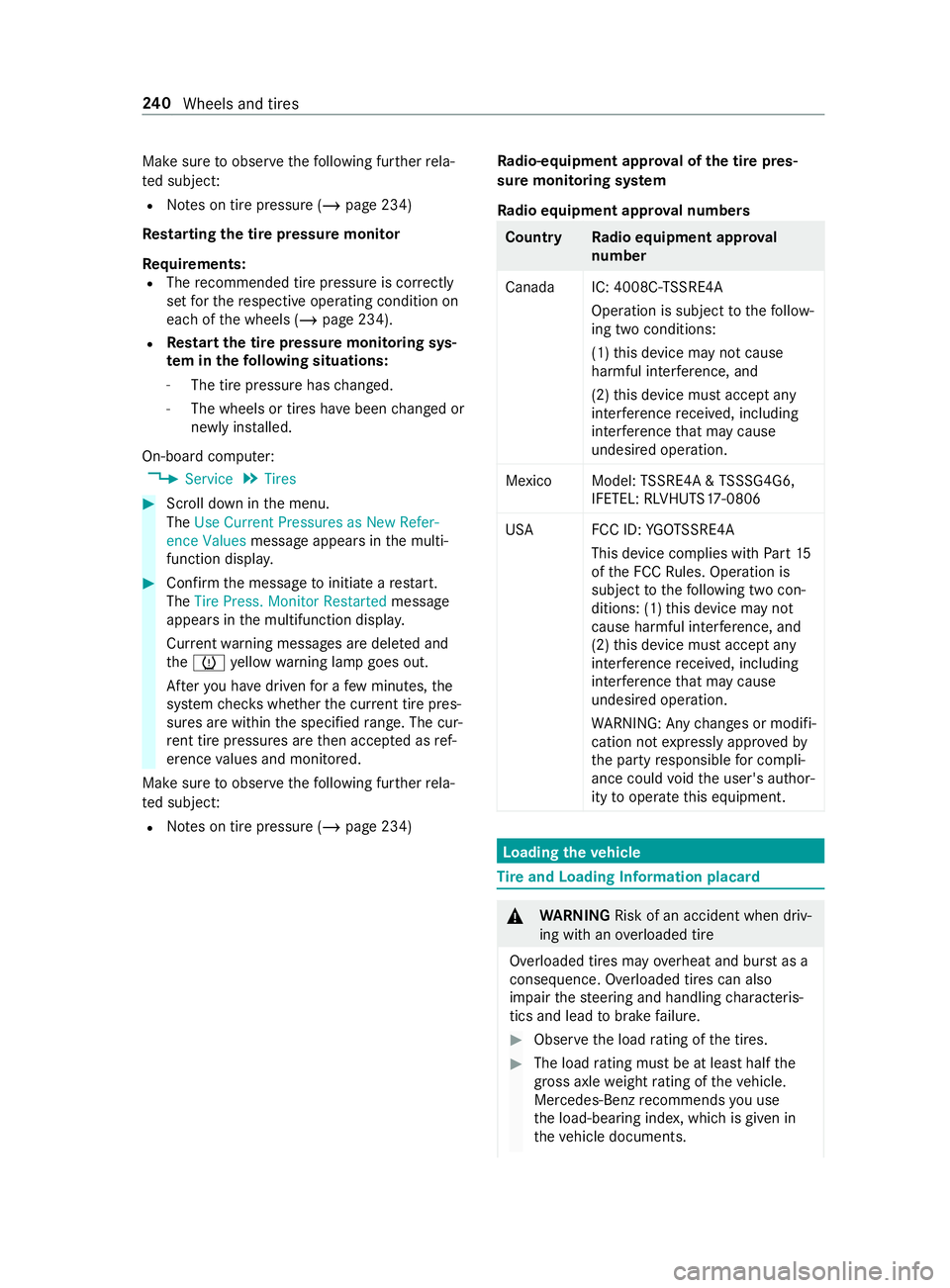
Make sure
toobser vethefo llowing fur ther rela‐
te d subject:
R Notes on tire pressure (/ page 234)
Rest arting the tire pressure monitor
Requ irements:
R The recommended tire pressure is cor rectly
set forth ere spective operating condition on
each of the wheels (/ page 234).
R Re
start the tire pressure monitoring sys‐
te m in the following situations:
- The tire pressure has changed.
- The wheels or tires ha vebeen changed or
newly ins talled.
On-board computer: 4 Service 5
Tires #
Scroll down in the menu.
The Use Current Pressures as New Refer-
ence Values message appears in the multi‐
function displa y. #
Con firm the message toinitiate a restart.
The Tire Press. Monitor Restarted message
appears in the multifunction displa y.
Cur rent wa rning messages are dele ted and
th e0077 yellow warning lamp goes out.
Af teryo u ha vedriven for a few minutes, the
sy stem checks whe ther the cur rent tire pres‐
su res are within the specified range. The cur‐
re nt tire pressures are then accep ted as ref‐
erence values and monitored.
Make sure toobser vethefo llowing fur ther rela‐
te d subject:
R Notes on tire pressure (/ page 234) Ra
dio-equipment appr oval of the tire pres‐
sure monitoring sy stem
Ra dio equipment appr oval numbers Countr
yRadio equipment appr oval
number
Canada IC: 4008C- TSSRE4A
Ope ration is subject tothefo llow‐
ing two conditions:
(1) this device may not cause
harmful inter fere nce, and
(2) this device must acce ptany
inter fere nce received, including
inter fere nce that may cause
undesired operation.
Mexic oM odel:TSSRE4A & TSSSG4G6,
IFETEL: RLVHUTS17-0806
US AF CC ID:YGOTSSRE4A
This device complies wi th Part15
of the FCC Rules. Operation is
subject tothefo llowing two con‐
ditions: (1) this device may not
cause harmful inter fere nce, and
(2) this device must acce ptany
inter fere nce received, including
inter fere nce that may cause
undesired operation.
WA RNING: Any changes or modi fi‐
cation not expressly appr ovedby
th e party responsible for compli‐
ance could void the user's author‐
ity tooperate this equipment. Loading the
vehicle Ti
re and Loading Information placard &
WARNING Risk of an accident when driv‐
ing wi than ove rloaded tire
Overloaded tires may overheat and bur stas a
consequence. Overloaded tires can also
impair thesteering and handling characteris‐
tics and lead tobrake failure. #
Obser vethe load rating of the tires. #
The load rating mu stbe at least half the
gross axleweight rating of theve hicle.
Mercedes-Benz recommends you use
th e load-bearing index, which is given in
th eve hicle documents. 240
Wheels and tires
Page 284 of 354
Information on
technical data
The given data only applies tovehicles with
st andard equipment. Further information can be
obtained at a qualified specialist workshop. On-board electronics
Note
s onworkon the engine electronics *
NO
TES Premature wearthro ugh
improper main tenance Improper maintenance may cause
vehicle
components towe ar more quickly and the
ve hicle's operating permit may be in validated. #
Always ha vewo rkon the engine elec‐
tronics and related components car ried
out at a qualified specialist workshop. Tw
o-w ayradios In
stallation no tesfo r two-w ayradios &
WARNING Risk of accident due to
improper workon two-w ayradios
The electromagnetic radiation from two-w ay
ra dios can inter fere with the on-board elec‐
tronics if RF transmit ters are manipulated or
re trofitted inco rrectl y.
This could jeopardize the operating saf ety of
th eve hicle. #
You should ha veall workon electrical
and electronic components car ried out
at a qualified specialist workshop. &
WARNING Risk of accident from incor‐
re ct ope ration of two-w ayradios
If yo u operate two- wayra dios incor rectly in
th eve hicle, the electromagnetic radiation
could inter fere with the on-board electronics,
e.g.:
R ifth e two-w ayradio is not connected to
an exterior antenna
R ifth eex terior antenna is not cor rectly
mounted or is not of low reflection
This could jeopardies the operating saf ety of
th eve hicle. #
Have the lo w-reflection exterior antenna
ins talled at a qualified specialist work‐
shop. #
When operating two-w ayradios in the
ve hicle, alw ays connect them tothe
lo w- reflection exterior antenna. *
NO
TEInva lidation of the operating per‐
mit due tofailure tocomply wi th the
instructions for ins tallation and use The operating permit may be in
validated if the
instructions for ins tallation and use of two-
wa yra dios are not obser ved. #
Only use appr oved frequency bands. #
Obser vethe maximum permissible out‐
put po wer in these frequency bands. #
Only use appr oved antenna positions. Use
Tech nical Specification ISO/TS 21609 (Road
Ve hicles - EMC guidelines for ins tallation of af ter‐
mar ketra dio frequency transmitting equipment)
when retrofitting two-w ayradios. Comply with the
legal requirements for de tach able parts.
If yo ur vehicle has ins talling for two-w ayradio
equipment, use the po wer supp lyor antenna con‐
nections intended for use with the ins talling.
Obser vethe manufacturer's supplement during
ins tallation.
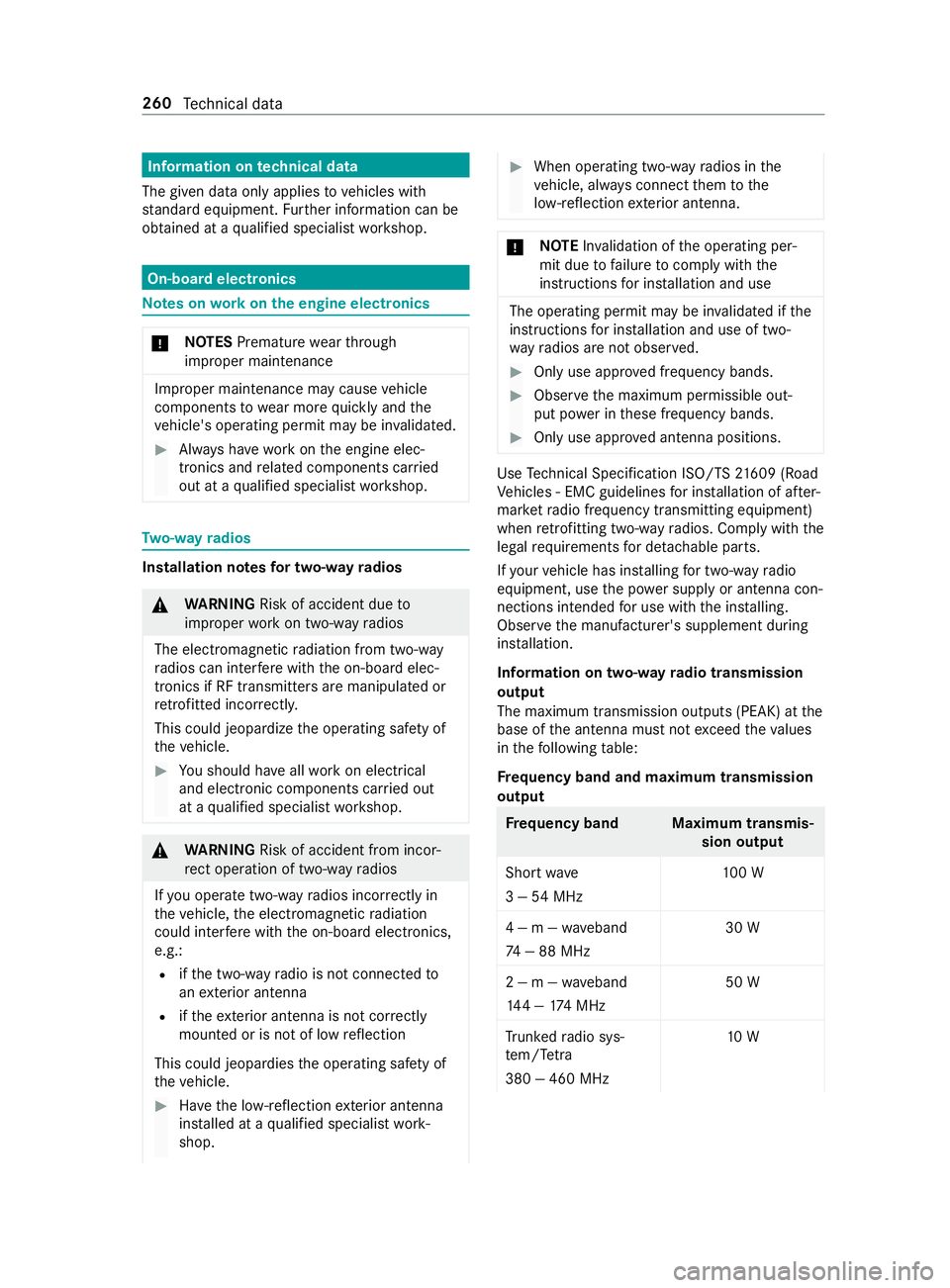
Information on two-w ayradio transmission
output
The maximum transmission outputs (PEAK) at the
base of the antenna must not exceed theva lues
in thefo llowing table:
Fr equency band and maximum transmission
output Fr
equency band Maximum transmis‐
sion output
Sho rtwa ve
3 — 54MHz 10
0 W
4 — m — waveband
74 — 88 MHz 30 W
2 — m — waveband
14 4 — 174 MHz 50 W
Tr unked radio sys‐
te m/T etra
380 — 460 MHz 10 W260
Tech nical da ta
Page 285 of 354
Fr
equency band Maximum transmis‐
sion output
70 — cm — waveband
420 — 450 MHz 35 W
Tw o-w ayradio
(2G/3G/4G) 10 WThe
following can be used in theve hicle without
re strictions:
R two-w ayradios with a maximum transmission
output of up to100 mW
R two-w ayradios with transmit ter frequencies
in the 380 – 410 MHz frequency band and a
maximum transmission output of up to2 W
(trunked radio sy stem/T etra)
R mobile phones (2G/3G/4G)
There are no restrictions when positioning the
antenna on the outside of theve hicle forth efo l‐
lowing frequency bands:
R Trunked radio sy stem/T etra
R 70 — cm — waveband
R 2G/3G/4G Ve
hicle identi fication pla te,ve hicle identi fi‐
cation number (VIN) and engine number
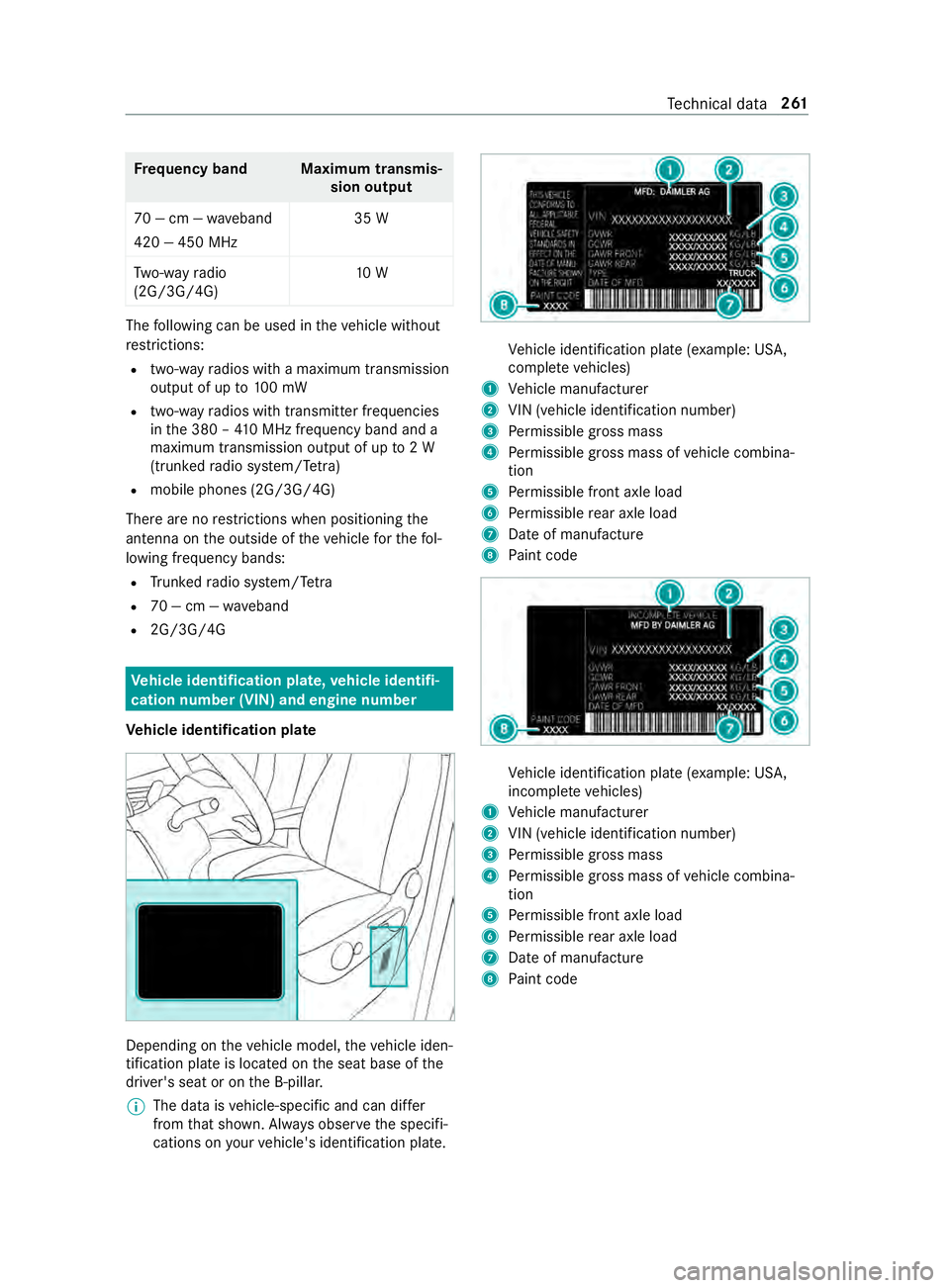
Ve hicle identi fication pla te Depending on
theve hicle model, theve hicle iden‐
tification plate is located on the seat base of the
driver's seat or on the B-pillar.
% The data is
vehicle-specific and can dif fer
from that shown. Alw ays obser vethe specifi‐
cations on your vehicle's identification plate. Ve
hicle identification plate (e xample: US A,
comple te vehicles)
1 Vehicle manufacturer
2 VIN (vehicle identification number)
3 Perm issible gross mass
4 Perm issible gross mass of vehicle combina‐
tion
5 Perm issible front axle load
6 Perm issible rear axle load
7 Date of manufacture
8 Paint code Ve
hicle identification plate (e xample: US A,
incomple te vehicles)
1 Vehicle manufacturer
2 VIN (vehicle identification number)
3 Perm issible gross mass
4 Perm issible gross mass of vehicle combina‐
tion
5 Perm issible front axle load
6 Perm issible rear axle load
7 Date of manufacture
8 Paint code Te
ch nical da ta261
Page 314 of 354
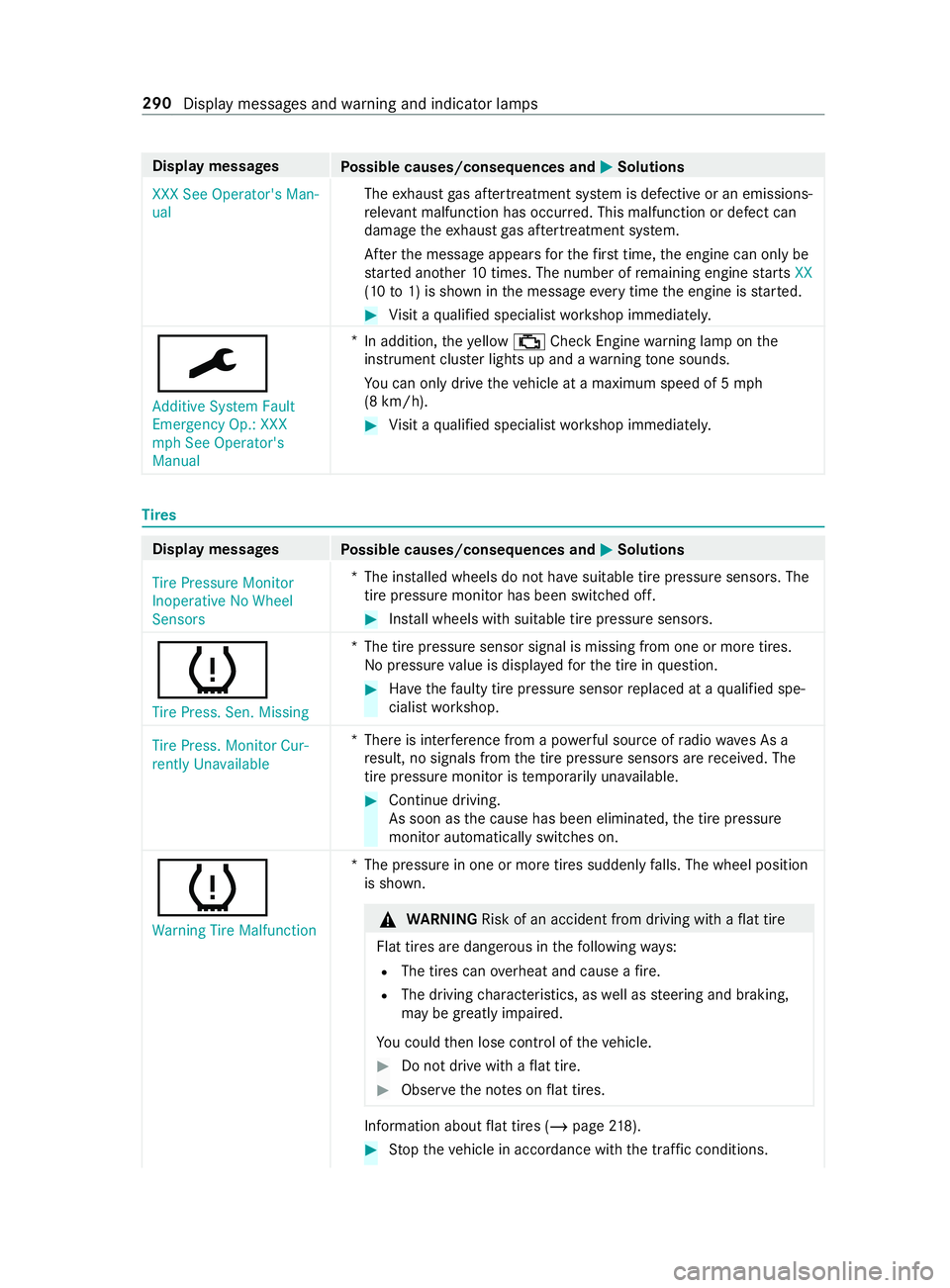
Display messages
Possible causes/consequences and 0050 0050Solutions
XXX See Operator's Man-
ual The
exhaust gas af tertre atment sy stem is defective or an emissions-
re leva nt malfunction has occu rred. This malfunction or defect can
damage theex haust gas af tertre atment sy stem.
Af terth e message appears forth efirs t time, the engine can only be
st ar ted ano ther 10 times. The number of remaining engine starts XX
(10 to1) is shown in the message everytime the engine is star ted. #
Visit a qualified specialist workshop immediately.
0099 Additive System Fault
Emergency Op.: XXX
mph See Operator's
Manual *
In addition, theye llow 00B9 Check Engine warning lamp on the
instrument clus ter lights up and a warning tone sounds.
Yo u can only drive theve hicle at a maximum speed of 5 mph
(8 km/h). #
Visit a qualified specialist workshop immediately. Ti
res Display messages
Possible causes/consequences and 0050 0050Solutions
Tire Pressure Monitor
Inoperative No Wheel
Sensors *T
he ins talled wheels do not ha vesuitable tire pressure sensors. The
tire pressure monitor has been switched off. #
Install wheels with suitable tire pressure sensors.
0077
Tire Press. Sen. Missing *T
he tire pressure sensor signal is missing from one or more tires.
No pressure value is displa yedfo rth e tire in question. #
Have thefa ulty tire pressure sensor replaced at a qualified spe‐
cialist workshop.
Tire Press. Monitor Cur-
rently Unavailable *T
here is inter fere nce from a po werful source of radio wav es As a
re sult, no signals from the tire pressure sensors are received. The
tire pressure monitor is temp orarily una vailable. #
Continue driving.
As soon as the cause has been eliminated, the tire pressure
monitor automatically switches on.
0077 Warning Tire Malfunction *T
he pressure in one or more tires suddenly falls. The wheel position
is shown. &
WARNING Risk of an accident from driving wi thaflat tire
Flat tires are dangerous in thefo llowing ways:
R The tires can overheat and cause a fire.
R The driving characteristics, as well as steering and braking,
may be greatly impaired.
Yo u could then lose cont rol of theve hicle. #
Do not drive with a flat tire. #
Obse rveth e no tes on flat tires. In
fo rm ation about flat tires (/ page218). #
Stop theve hicle in accordance with the tra ffic conditions. 290
Display messages and warning and indicator lamps
Page 316 of 354
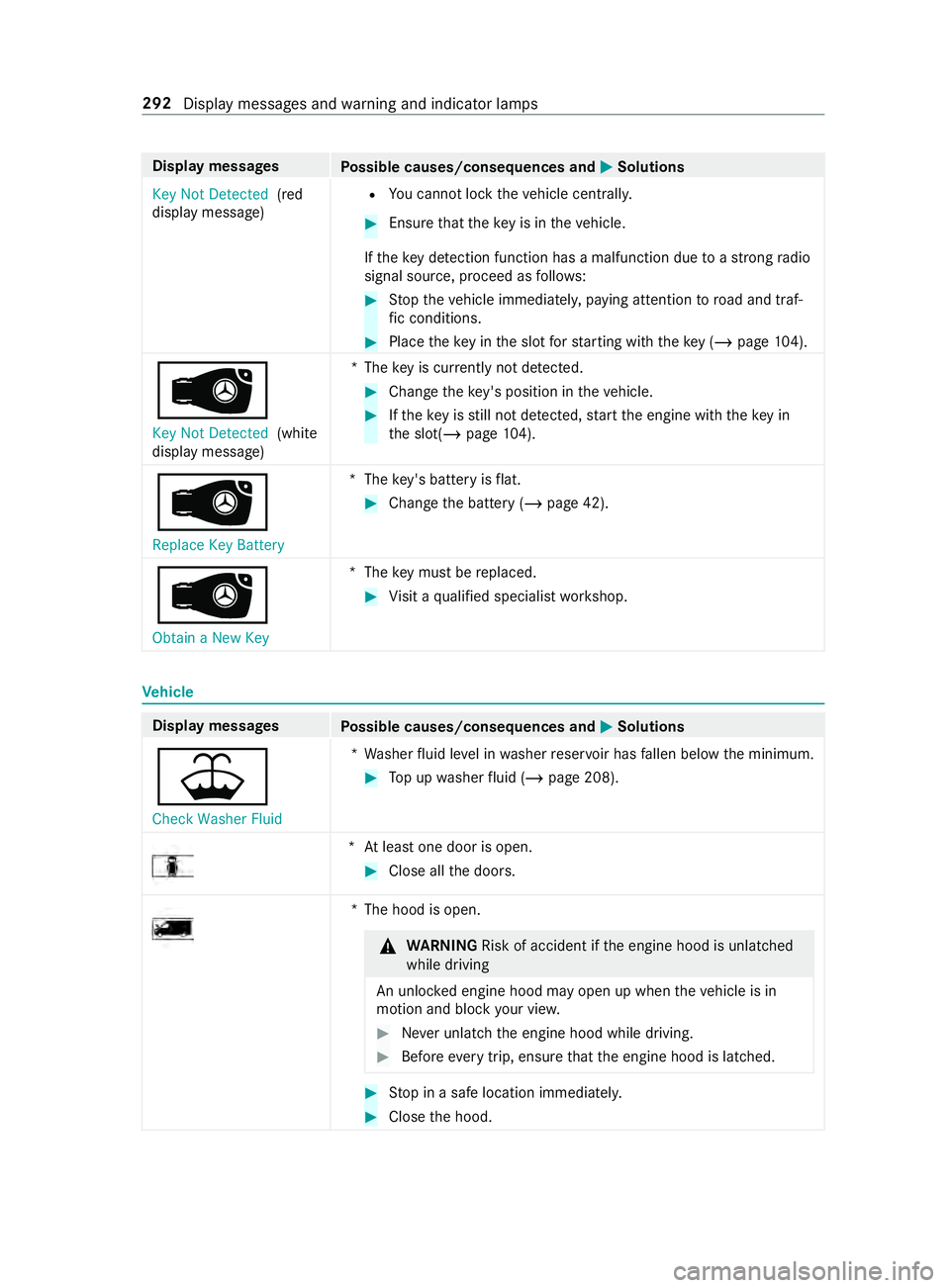
Display messages
Possible causes/consequences and 0050 0050Solutions
Key Not Detected (red
display message) R
You cannot lock theve hicle centra lly. #
Ensure that theke y is in theve hicle.
If th eke y de tection function has a malfunction due toastro ngradio
signal source, proceed as follo ws: #
Stop theve hicle immediately, paying attention toroad and traf‐
fi c conditions. #
Place theke y in the slot forst arting with theke y (/ page104).
00AF Key No t Detected (white
display message) *T
hekey is cur rently not de tected. #
Change theke y's position in theve hicle. #
Ifth eke y is still not de tected, start the engine with theke y in
th e slot(/ page104).
00AF
Replace Key Ba ttery*T
hekey's bat tery isflat. #
Change the battery (/ page 42).
00AF
Obtain a New Key *T
hekey must be replaced. #
Visit a qualified specialist workshop. Ve
hicle Display messages
Possible causes/consequences and 0050 0050Solutions
00B2
Check Washer Fluid *W
asher fluid le vel in washer reser voir has fallen below the minimum. #
Top up washer fluid (/ page 208). *A
t least one door is open. #
Close all the doors. *T
he hood is open. &
WARNING Risk of accident if the engine hood is unlatched
while driving
An unloc ked engine hood may open up when theve hicle is in
motion and block your vie w. #
Never unlatch the engine hood while driving. #
Before every trip, ensure that the engine hood is latched. #
Stop in a safe location immediately. #
Close the hood. 292
Display messages and warning and indicator lamps
Page 334 of 354
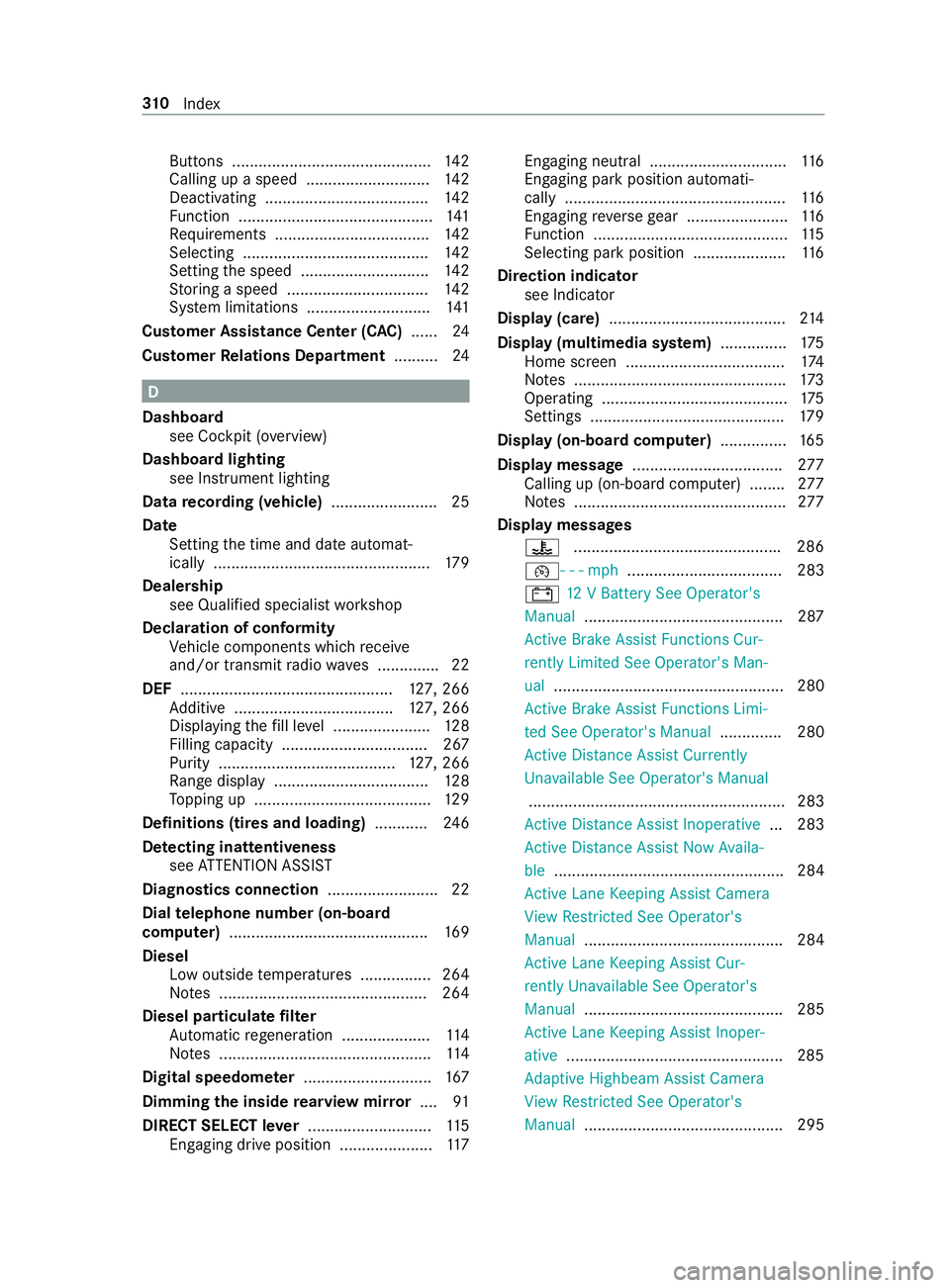
Buttons .............................................
14 2
Calling up a speed ............................ 14 2
Deactivating .................................... .142
Fu nction ............................................ 141
Re quirements .................................. .142
Selecting .......................................... 14 2
Setting the speed ............................. 14 2
St oring a speed ................................ 14 2
Sy stem limitations ............................1 41
Cus tomer Assi stance Center (C AC)...... 24
Cus tomer Relations Department ..........24 D
Dashboa rd
see Cockpit (o verview)
Dashboa rdlighting
see Instrument lighting
Data recording (vehicle) ........................ 25
Date Setting the time and date automat‐
ically .................................................1 79
Dealership see Qualified specialist workshop
Declaration of conformity Vehicle components which recei ve
and/or transmit radio wav es .............. 22
DEF ................................................ 127, 266
Ad ditive .................................... 127, 266
Displ aying thefill le vel ...................... 12 8
Filling capacity ................................. 267
Pu rity ........................................ 127, 266
Ra nge displ ay................................... 12 8
To pping up ........................................ 12 9
Definitions (ti res and loading) ............24 6
De tecting inat tentiveness
see ATTENTION ASSIST
Diagnostics connection .........................22
Dial telephone number (on-board
computer) ............................................ .169
Diesel Low outside temp eratures ................2 64
No tes ............................................... 264
Diesel particulate filter
Au tomatic rege neration .................... 11 4
No tes ................................................ 11 4
Digital speedome ter ............................. 167
Dimming the inside rearview mir ror.... 91
DIRECT SELECT le ver............................ 11 5
Engaging drive position ..................... 11 7Engaging neutral ...............................
11 6
Engaging pa rkposition automati‐
cally .................................................. 11 6
Engaging reve rsege ar ...................... .116
Fu nction ............................................ 11 5
Selecting pa rkposition .....................1 16
Direction indicator see Indicator
Display (care) ........................................ 214
Display (multimedia sy stem) .............. .175
Home screen .................................... 174
No tes ................................................ 173
Operating .......................................... 175
Settings ............................................ 17 9
Display (on-boa rdcompu ter) ............... 16 5
Display message .................................. 277
Calling up (on-board co mputer) ........ 277
No tes ................................................ 277
Display messages 00AC .............................................. .286
00B2- - - mph................................... 283
003D 12V Battery See Operator's
Manual .............................................2 87
Ac tive Brake Assi stFunctions Cur‐
re ntly Limited See Ope rator's Man‐
ual .................................................... 280
Ac tive Brake Assi stFunctions Limi‐
te d See Operator's Manual .............. 280
Ac tive Dis tance Assi stCur rently
Un available See Operator's Manual
.......................................................... 283
Ac tive Dis tance Assi stInoperative ... 283
Ac tive Dis tance Assi stNow Availa‐
ble .................................................... 284
Ac tive Lane Keeping Assist Camera
Vi ew Restricted See Ope rator's
Manual ............................................. 284
Ac tive Lane Keeping Assist Cur‐
re ntly Una vailable See Opera tor's
Manual ............................................. 285
Ac tive Lane Keeping Assist Inoper‐
ative .................................................2 85
Ad aptive Highbeam Assist Camera
Vi ew Restricted See Ope rator's
Manual ............................................. 295 310
Index
Page 338 of 354
Emer
gency
Assis tance overview .......................... .16
Fir st-aid kit (so ftsided) ..................... 216
Saf etyve st ........................................ 216
Wa rning lamp .................................... 216
Emer gency braking
Elect ric pa rking brake ...................... .136
Manual parking brake ....................... 13 4
Emer gency call sy stem
Au tomatic emergency call ............... .217
Information ....................................... 216
Manual emer gency call ..................... 217
Overview ...........................................2 16
Emer gency engine start ..................... .228
Emer gency operation mode
St arting theve hicle .......................... 104
Emer gency Tensioning Devices
Ac tivation ........................................... 29
En gaging drive position (automatic
transmission) ........................................ 11 7
Engaging neut ral (automatic trans‐
mission) ................................................ .116
Engaging reve rsege ar .......................... 11 6
Engaging/disengaging LOW RANGE ...11 9
Engine Engine number ................................ .261
Jump-s tarting .................................... 219
Pa rking (s tart/s top button) .............. 13 2
Problems .......................................... 127
St arting (in emer gency operation
mode) ............................................... 104
St arting (s tart/s top button) .............1 04
Engine data Showing ............................................ 181
Engine electronics (no tes) ...................2 60
Engine number ...................................... 261
Engine oil .............................................. 205
Ad ditive ............................................ 267
Checking the oil le vel (on-board
computer) ........................................ 205
Checking the oil le vel with a dip‐
st ick ................................................ .204
Filling capacity ................................. 268
To pping up .......................................2 05
Engine output Notes on changes .............................. .23
ENR (electronic le vel control) ..............121
Fu nction ............................................ 121
Lo we ring theve hicle .........................1 23
Manually inflating air bello ws............ 124 Problems ..........................................
12 5
Ra ising theve hicle ............................1 23
Entering characters
Fu nction/no tes ................................ 178
Setting theke yboard ........................ 17 9
Using the media display ...................1 79
Environmental pr otection
No tes .................................................. 18
ESC (Electronic Stability Control)
see ESP ®
(Electronic Stability Prog ram)
ESP ®
Crosswind Assist .............................. 13 8
Tr ailer stabilization .......................... .139
ESP ®
(Electronic Stability Prog ram) ...13 8
Ac tivating/deactivating .................... 13 8
Fu nction/no tes ................................ 13 8
Exhaust emission moni toring .............1 07
Exterior lighting Care .................................................. 212
Exterior lighting see Lights F
Fa tigue de tection
see ATTENTION ASSIST
Favo rites
Ad ding .............................................. 17 7
Calling up ........................................ .177
Del eting ............................................ 178
Moving ..............................................1 78
Overview .......................................... 17 7
Re naming ......................................... 178
Firs t-aid kit (soft sided) ........................216
Flat tire .................................................. 218
Changing a wheel ............................ .251
No tes ................................................ 218
Floor co vering
Ins talling/ removing (s tarter bat‐
te ry ) .................................................. 221
Floor mat .................................................78
Fore ign trip
Instructions ...................................... 107
symmetrical low beam ....................... 79
Fr ee software ........................................ .27
Fr equencies
Mobile phone .................................. .260
Tw o-w ayradio .................................. 260
Fr ont airbag (driver, front passenger) .. 32314
Index
Page 342 of 354
Mobile phone
see Android Auto
see Apple CarPlay™
see Mobile phone
see Telephone
Mobile phone voice recognition
St arting ............................................ 184
St opping ...........................................1 84
Model series .......................................... 261
Mounting a load .............................. 72,19 5
Multi Purpose Vehicle (MPV) .................24
Multifunction display (on-board
computer) ............................................. 16 5
Multifunction steering wheel
But tonov erview ................................ 16 4
Multifunction steering wheel
see Steering wheel
Multimedia sy stem
Ad justs thevo lume .......................... .177
Con figuring display settings .............1 79
Entering characters .......................... 178
Main functions ..................................1 75
Re storing thefa ctory settings ........... 181
Switching the sound on or off ........... 176
Multimedia sy stem
see Display (multimedia sy stem)
see MBUX multimedia sy stem (o verview)
see Touch Control N
Ne arField Communication (NFC) .......1 83
Connecting the mobile phone to
th e multimedia sy stem ..................... 183
Gene ral information .......................... 183
Switching mobile phones ................. 183
Using a mobile phone ....................... 183
NFC see Near Field Communication (NFC)
No zzles
see Air vents O
Occupant saf ety
Pe ts in theve hicle .............................. 40
Occupant saf ety
see Airbag
see Restra int sy stem
see Seat belt
Odome ter
see Display total dis tance (trip menu) Oil
see Engine oil
On-board co mputer .............................. 16 4
Ad justing thest ationary heater/
ve ntilation ......................................... 101
Assi stance graphic menu ................ .166
Displ aying the service due date .......2 02
Media menu ..................................... 16 9
Menus overview .............................. .164
Multifunction display ........................ 16 5
Operating ......................................... 16 4
Ra dio menu ...................................... 16 8
Service menu ................................... 16 6
Settings menu .................................. 17 0
Te lephone menu .............................. .169
Tr ip menu .......................................... 167
On-board diagnostics inter face
see Diagno stics connection
On-boa rdelectronics
Engine electronics ............................ 260
No tes ............................................... 260
Tw o-w ayradios .................................2 60
Open-source software ...........................27
Opening and closing the loc kable
compartment abo vethe windshield .....73
Opening the cup holder in there ar
passenger comp artment....................... 74
Opening/closing the hood .................. 202
Operating fluids
Ad ditives (fuel) .................................2 64
Brake fluid ........................................ 269
Coolant (engine) .............................. .269
DEF ................................................. .266
Engine oil .......................................... 267
Fu el (diesel) ...................................... 264
Fu el (gasoline) ..................................2 64
No tes ............................................... 263
Wi ndshield washer fluid ............ 270,271
Operating Instructions (vehicle
equipment) ............................................. 20
Operating saf ety
Chan ges in the engine po wer out‐
put ...................................................... 23
Declaration of conformity (wire less
ve hicle components) .......................... 22
Information ......................................... 21
Operating sy stem
On-board computer .......................... 16 4
Outside mir rors ...................................... 90
fo lding in/out .................................... .90
Setting ................................................ 90 318
Index
Page 343 of 354
Setting options ...................................
14
Overhead control panel Adjusting the interior lighting .............82
Overview ............................................ 10P
Pa int (cleaning instructions) ................211
Pa int code ............................................ .261
Pa rk position
Engaging ........................................... 11 6
Engaging au tomatically .................... .116
Pa rking aid
see Parking Assist PARKTRONIC
Pa rking Assist PARKTRONIC ...............14 5
Ac tivating ......................................... 14 6
Ad justing warning tones ................... 14 6
Drive AwayAssi st............................. 154
Fu nction ........................................... 14 5
Switching off .................................... 14 6
Sy stem limitations ............................1 45
Pa rking brake (electrical)
see Electric parking brake
Pa rking brake (manual)
see Manual parking brake
Pa rking for an extended period ...........13 6
Pa rking light .......................................... .79
Pa rtition sliding door
Fr om the cargo compartment .............51
Fr om the driver's compartment ..........51
Pe rm issible gross mass ...................... .261
Pe rm issible towing me thods .............. .224
Pe ts in the vehicle .................................. 40
Phone book see Contacts
Placing a load on the wheel ar ch........ 201
Pla stic trim (care) ................................ .214
Po we r supp ly
Battery main switch .......................... 11 4
Switching on (s tart/s top button) ...... 103
Po we rwa sher (care) ............................2 10
Po we r windo ws
see Side window Q
QR code (rescue card) ...........................24
Qualified specialist workshop .............. 23 R
Ra ck systems (information) ................19 8
Ra dar senso rs....................................... 13 6
Ra dio
Ac tivating/deactivating radio text .... 194
Calling up thest ation list .................. 19 3
Del eting channels ............................ .193
Direct frequency entry ..................... .193
Displ aying information ...................... 194
Displ aying radio text ......................... 194
Editing station presets ...................... 19 3
Menu (on-board computer) ............... 16 8
Moving stations ................................ 19 3
Overview .......................................... 19 2
Sea rching forst ations ...................... 19 3
Setting a channel .............................. 19 3
Setting thewa veband .......................1 93
Showing accident reports .................1 94
St oring radio stations ...................... .193
Switching on ..................................... 19 2
Switching the HD radio function
on/off .............................................. 19 3
Ra dio connection
Ke y .................................................... .41
Re alwo od (care) .................................. .214
Re ar
Motion de tector .................................. 83
Re ar ben chseat
see Seats
Re ar Cross Traf fic Alert ...................... .154
Re ar fog light .......................................... 79
Re ar view camera ................................. 147
Care .................................................. 212
Fu nction ........................................... 147
Switching au tomatic operation
on/off (360° Camera) ...................... 151
Re ar window wiper
Re placing ...........................................90
Switching on/off ................................ 89
Re ar-co mpartment heating ................... 96
Re ar-end doors
Opening and closing (from inside) ...... 51
Opening and closing (from outside) ....50
Re ducing agent
see DEF
Re frigerant (air conditioning)
No tes ................................................ 271
Re fueling
Displaying the DEF fill le vel .............. .128
Displ aying the DEF range .................. 12 8 Index
319
Page 348 of 354
Coupling/Decoupling
the trailer .......1 59
Gross axle weight rating ................... 261
Information ....................................... 16 0
Lane Keeping Assist .........................1 55
No tes ................................................ 157
Pe rm issible trailer loads and trailer
dr aw bar nose weights ........................ 161
Po we r supply .................................... 16 2
Soc ket .............................................. 15 9
Tr ailer loads ...................................... 272
Tr ailer stabilization ............................... 13 9
Tr ansfer redve hicle data
Android Auto .................................... 188
Apple CarPl ay™ ................................ 188
Tr ansmission position display .............11 5
Tr ansmission ratio
LO Wrange ........................................ 11 9
Tr ansmission ratio
see Engaging/disengaging LOW RANGE
Tr anspo rtby rail .................................. .108
Tr anspo rting (vehicle breakd own) ...... 227
Tr ead weargrade .................................. 24 3
Tr im element (care) .............................. 214
Tr ip
Display total dis tance ....................... 167
Menu (on-board computer) ............... 167
Tr ip computer
Re setting .......................................... 16 8
Showing ............................................ 167
Tr ip distance ........................................ .167
Showing ............................................ 167
Tr ip odom eter
Re setting .......................................... 16 8
Tr ip odom eter
see Trip dis tance
Tu rn signal light
Ad ditional turn signal light (all-
wheel drive vehicles) .......................... 85
Tw o-w ayradio telephone
see Mobile phone
Tw o-w ayradios
Fr equencies ...................................... 260
Ins tallation no tes .............................. 260
Tr ansmission output (maximum) ...... 260 U
Un its of measurement
Setting .............................................. 181
Un locking setting .................................. .42Un
locking/locking
Swit ching automatic locking fea‐
ture on/off ........................................ .45
Un locking and opening front doors
from inside ........................................ .44
USB soc ket in the rear passenger
comp artment .......................................... 77
Using a sun visor .................................... 92
Using kickdown .................................... 11 8
Using thete lephone
see Calls V
Ve hicle ................................................... 104
Cor rect use ........................................ 23
Data recording ................................... 25
Diagnostics connection ...................... 22
Equipment .......................................... 20
Implied warranty ................................ .24
Locking (auto matic) ............................ 45
Locking/unlocking (emergency key) .. 45
Lo we ring .......................................... 254
Maintenance ....................................... 21
Notify ing problems ............................ .24
Pa rking (s tart/s top button) .............. 13 2
Pa rking for an extended pe riod ........ 13 6
QR code rescue card .......................... 24
Qualified specialist workshop .............23
Ra ising .............................................. 251
Re gistration ........................................23
St arting (in emer gency operation
mode) ............................................... 104
St arting (s tart/s top button) .............1 04
Switching on po wer supply (s tart/
st op button) ...................................... 103
Un locking (from inside) ...................... 44
Ve ntilating (co nvenience opening) ...... 54
Ve hicle comp onents which receive
and/or transmit radio waves
Declaration of conformity ................... 22
Ve hicle data
Showing ............................................ 181
Tr ans ferring toAndroid Auto™ ......... 188
Tr ans ferring toApple CarPl ay™ ........ 188
Ve hicle height ................................... 271
Ve hicle length ................................... 271
Ve hicle width .................................... 271
Wheelbase ........................................2 71
Ve hicle data memory
Electronic control units ...................... 25
Service pr oviders .............................. .26324
Index