ignition MERCEDES-BENZ SPRINTER 2019 MY19 with 7” screen
[x] Cancel search | Manufacturer: MERCEDES-BENZ, Model Year: 2019, Model line: SPRINTER, Model: MERCEDES-BENZ SPRINTER 2019Pages: 354, PDF Size: 6.15 MB
Page 165 of 354
Canceling a brake application of
Active Brake
Assi st
Yo u can cancel a brake application of Active
Brake Assi stat any time by:
R Fully depressing the accelerator pedal or with
kickdown.
R Fully releasing the brake pedal (only during
situation-dependent braking assis tance).
Ac tive Brake Assi stmay cancel the brake applica‐
tion when one of thefo llowing conditions is fulfil‐
led:
R You maneuver toavo idthe obs tacle.
R Thereis no longer a risk of collision.
R An obs tacle is no longer de tected in front of
yo ur vehicle.
Sy stem limitations
The sy stem may be impaired or may not function
in thefo llowing situations:
R The sensors are af fected bysno w,rain, fog or
heavy spr ay.
R The sensors are dirty, fogged up, damaged or
co vered.
R The sensors are af fected byinter fere nce from
ot her radar sources, e.g. strongradar reflec‐
tions in parking garage s.
R If a loss of tire pressure or a defective tire has
been de tected and displa yed.
R Full sy stem per form ance is not available for a
fe w seconds af ter switching on the ignition or
af te r driving off.
The sy stem may not react cor rectly in thefo llow‐
ing situations:
R In complex traf fic situations, objects may not
al wa ys be clear lyde tected.
R Pedestrians or vehicles mo vequickly into the
de tection range of the sensors.
R Pedestrians are obscured by other objects.
R In bends with a nar rowradius. Setting
Active Brake Assi st Requ
irements:
R The ignition is switched on Multimedia sy
stem:
4 © 5
Settings 5
Assistance
5 Active Brake Assist
The following settings are available:
R Early
R Medium
R Late #
Select a setting.
The Medium setting is selec ted automatically
eve rytime the engine is star ted.
Deactivating Active Brake Assi st
% It is
recommended that Active Brake Assi stis
alw ays left activated. #
Select Off.
The dis tance warning function and autono‐
mous braking function are deactivated.
% When
Active Brake Assi stis deactivated, the
00D4 symbol appears inthest atus area of
th e multifunction displa y. Cruise control
Fu
nction of cruise control
Cruise cont rol accelerates and brakes theve hicle
automatically in order tomaintain a pr eviously
st ored speed.
If yo u accelerate toove rtake, forex ample, the
st ored speed is not dele ted. If youre mo veyour
fo ot from the accelerator pedal af terove rtaking,
cruise control will resume speed regulation back
to thestored speed.
Cruise contro l is operated using the cor respond‐
ing steering wheel buttons. You can store any
ro ad speed abo ve15 mp h (20 km/h).
If yo ufa ilto adapt your driving style, cruise con‐
trol can neither reduce therisk of an accident nor
ove rride the la wsof ph ysics. It cannot take into
account road, weather or traf fic conditions.
Cruise control is only an aid. You are responsible
fo rth e dis tance totheve hicle in front, forve hicle
speed, braking in good time and forst ay ing in
yo ur lane.
Displa ysinthe multifunction display
The status of cruise control and thestored speed
are shown in the multifunction displa y. Driving and pa
rking 141
Page 171 of 354
Re
ar view camera Fu
nction of there ar view camera If
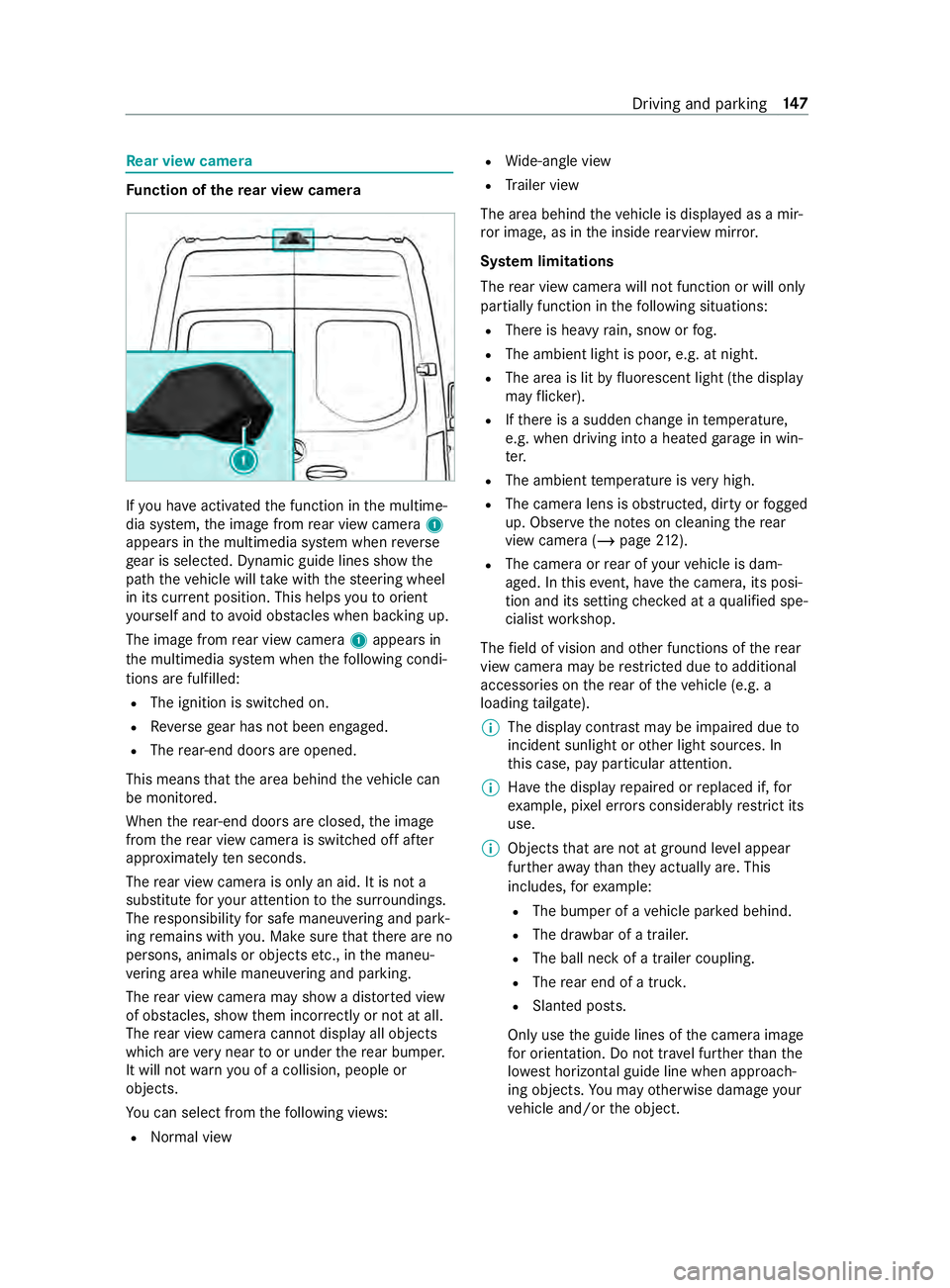
yo u ha veactivated the function in the multime‐
dia sy stem, the image from rear view camera 1
appears in the multimedia sy stem when reve rse
ge ar is selec ted. Dynamic guide lines show the
path theve hicle will take with thesteering wheel
in its cur rent position. This helps youto orient
yo urself and toavo id obs tacles when ba cking up.
The image from rear view camera 1appears in
th e multimedia sy stem when thefo llowing condi‐
tions are fulfilled:
R The ignition is switched on.
R Reversege ar has not been engaged.
R The rear-end doors are opened.
This means that the area behind theve hicle can
be monitored.
When there ar-end doors are closed, the image
from there ar view camera is swit ched off af ter
appr oximately ten seconds.
The rear view camera is only an aid. It is not a
substitute foryo ur attention tothe sur roundings.
The responsibility for safe maneu vering and pa rk‐
ing remains with you. Make sure that there are no
persons, animals or objects etc., in the maneu‐
ve ring area while maneuvering and pa rking.
The rear view camera may show a dis torted view
of obs tacles, show them incor rectly or not at all.
The rear view camera cannot display all objects
which are very near toor under there ar bumper.
It will not warnyou of a collision, people or
objects.
Yo u can select from thefo llowing vie ws:
R Norma l view R
Wide-angle view
R Trailer view
The area behind theve hicle is displa yed as a mir‐
ro r image, as in the inside rearview mir ror.
Sy stem limitations
The rear view camera will not function or will only
partially function in thefo llowing situations:
R There is heavy rain, snow or fog.
R The ambient light is poor, e.g. at night.
R The area is lit byfluorescent light (the displ ay
may flic ke r).
R Ifth ere is a sudden change in temp erature,
e.g. when driving into a heated garage in win‐
te r.
R The ambient temp erature is very high.
R The camera lens is obstructed, dirty or fogged
up. Obser vethe no tes on cleaning there ar
view camera (/ page212).
R The camera or rear of your vehicle is dam‐
aged. In this event, ha vethe camera, its posi‐
tion and its setting checked at a qualified spe‐
cialist workshop.
The field of vision and other functions of there ar
view camera may be restricted due toadditional
accesso ries on there ar of theve hicle (e.g. a
loading tailgate).
% The display contrast may be impaired due
to
incident sunlight or other light sources. In
th is case, pay particular attention.
% Ha
ve the display repaired or replaced if, for
ex ample, pixel er rors considerably restrict its
use.
% Objects that are not at ground le vel appear
fur ther aw ay than they actually are. This
includes, forex ample:
R The bumper of a vehicle par ked behind.
R The dr awbar of a trailer.
R The ball neck of a trailer coupling.
R The rear end of a truc k.
R Slanted posts.
Only use the guide lines of the camera image
fo r orientation. Do not tr avel fur ther than the
lo west horizontal guide line when approach‐
ing objects. You may otherwise damage your
ve hicle and/or the object. Driving and parking
147
Page 175 of 354
The image from
the 360° Camera appears auto‐
matically in the multimedia sy stem when thefo l‐
lowing conditions are fulfilled:
R The ignition is switched on.
R The rear-end doors are opened.
This means that the area behind theve hicle can
be monitored.
When there ar-end doors are closed, the image
from there ar view camera is swit ched off af ter
appr oximately ten seconds.
See the no tes on cleaning the 360° Camera
(/ page 212).
Selec ting a view for the 360° Came ra
Re quirements:
R The Auto. Rear View Cam. is activated inthe
multimedia sy stem (/ page151). #
Engage reve rsege ar. #
Select the desired view in the multimedia sys‐
te m.
Ac tivating/deactivating automatic ope ration
of the rear view camera
The rear view camera is only an aid. It is not a
substitute foryo u paying attention tothe sur‐
ro undings. You are alw aysre sponsible for safe
maneu vering, pa rking in and exiting from a park‐
ing space. Make sure that no persons, animals or
objects etc. are in the path of your vehicle. Pay
attention toyour sur roundings and be ready to
brake at all times.
Multimedia sy stem:
4 © 5
Settings 5
Assistance
5 Camera & Parking #
Activate or deacti vate Auto. Rear View Cam..
Ac tivating/deactivating maneuvering assis‐
tance
Multimedia sy stem:
4 © 5
Settings 5
Assistance
5 Camera & Parking #
Activate or deacti vate Maneuvering Assist..
% When maneuvering assis tance is acti vated,
th efo llowing functions are active:
R Drive AwayAssi st (/ page 154)
R Rear Cross Traf fic Alert (/ page 154) AT
TENTION ASSI ST Fu
nction of ATTENTION ASSI ST
AT TENTION ASSIST can assist you on long,
mon otonous jou rney s, e.g. on free ways and
ex pressw ays. If ATTENTION ASSIST de tects indi‐
cators of fatigue or increased lapses in concen‐
tration on the part of the driver, it suggests taking
a brea k.
AT TENTION ASSIST is only an aid. It cannot
alw ays de tect dr owsiness or increased lapses in
concentration in good time. The sy stem is not a
substitute for a well-res ted and attentive driver.
On long journe ys,ta ke regular and timely breaks
th at allow youto rest properly.
Yo u can choose between two settings:
R Standard: normal sy stem sensitivity
R Sensitive: higher system sensitivity. The
driver is warned earlier and the attention le vel
de tected bythe sy stem (Attention Le vel) is
adap ted accordingly.
If fatigue or increased lapses in concentration are
de tected, theATTENTION ASSIST: Take a Break!
wa rning appears in the Instrument Displa y.Yo u
can acknowledge the message and take a break if
necessar y.Ifyo u do not take a break and ATTEN‐
TION ASSIST continues todetect increased lap‐
ses in concentration, you will be warned again
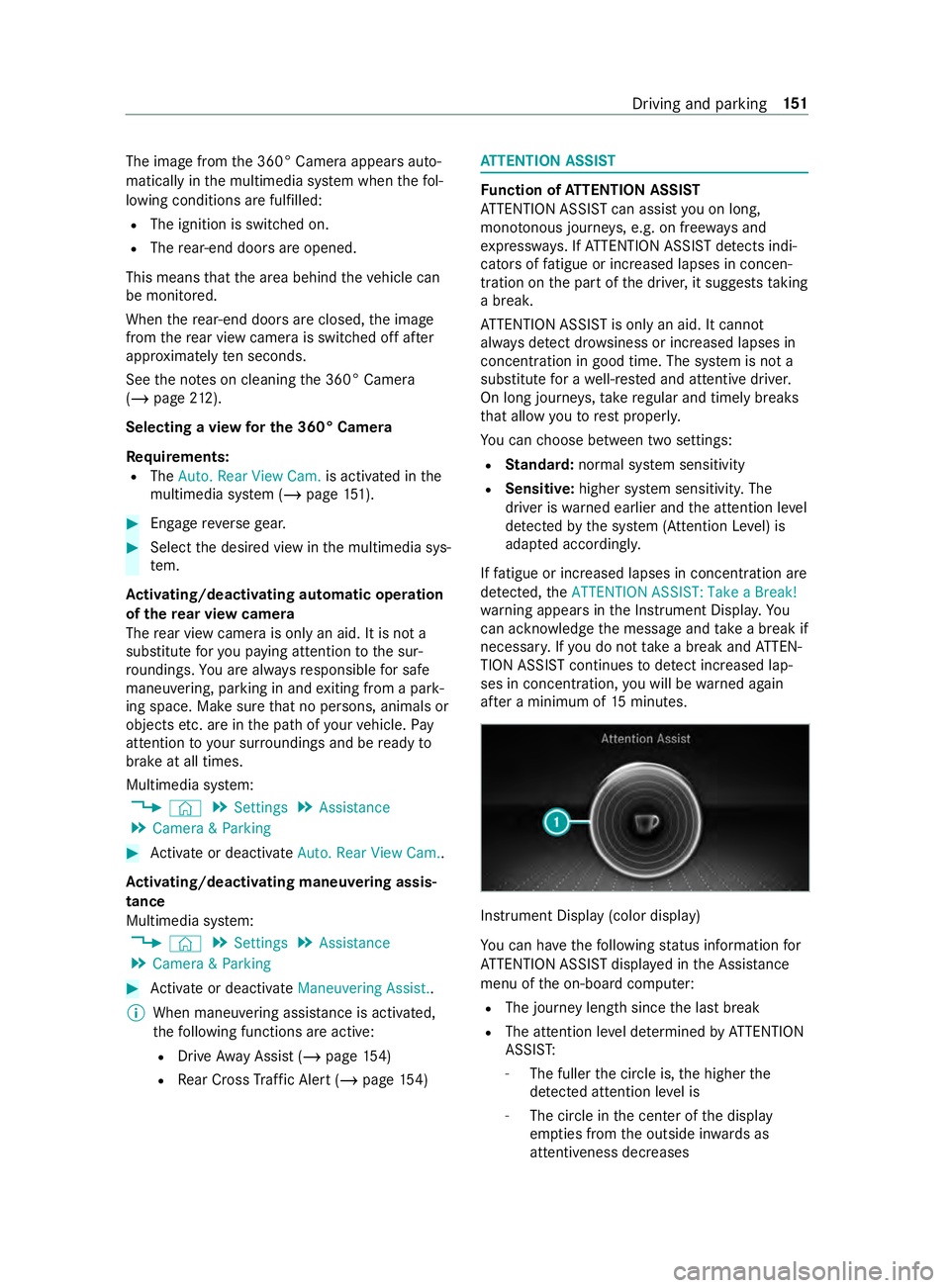
af te r a minimum of 15minutes. Instrument Display (color display)
Yo
u can ha vethefo llowing status information for
AT TENTION ASSIST displa yed in the Assis tance
menu of the on-board computer:
R The journey length since the last break
R The attention le vel de term ined byATTENTION
ASSIS T:
- The fuller the circle is, the higher the
de tected attention le vel is
- The circle in the center of the display
em pties from the outside in wards as
attentiveness decreases Driving and parking
151
Page 177 of 354
sequently enters
the monitoring range di rectly
next toyour vehicle, thewa rning lamp in the out‐
side mir ror lights up red.
% When a trailer is connected,
thera dar sen‐
sor's field of vision may be impaired, thereby
making limited monitoring possible. Alw ays
pay careful attention tothe tra ffic situation
and maintain a safe dis tance at the side of
th eve hicle.
If a vehicle is de tected close to yourvehicle in the
lateral monitoring range and you swit chon the
turn signal indica tor in the cor responding direc‐
tion, a warning tone sounds. The redwa rning
lamp in the outside mir rorflashes. If the turn sig‐
nal indicator remains switched on, all other
de tected vehicles are indicated only bytheflash‐
ing of there dwa rning lamp.
If yo uove rtake a vehicle quickl y,no warning is
given.
Exit warning
The exitwa rning is an additional function of Blind
Spot Assist and warnsve hicle occupants when
leaving theve hicle about any approaching vehi‐
cles. &
WARNING Risk of accident despite exit
wa rning
The exitwa rning reacts nei ther tostationary
objects nor tovehicles approaching you at a
great lydif fere nt speed.
As a result, theex itwa rning cannot warndriv‐
ers in these situations. #
Always pay particular attention tothe
traf fic situation when opening the doors
and make sure there is suf ficient clear‐
ance. %
An
exitwa rning is not issued for sliding doors
and rear-end doors. Overview
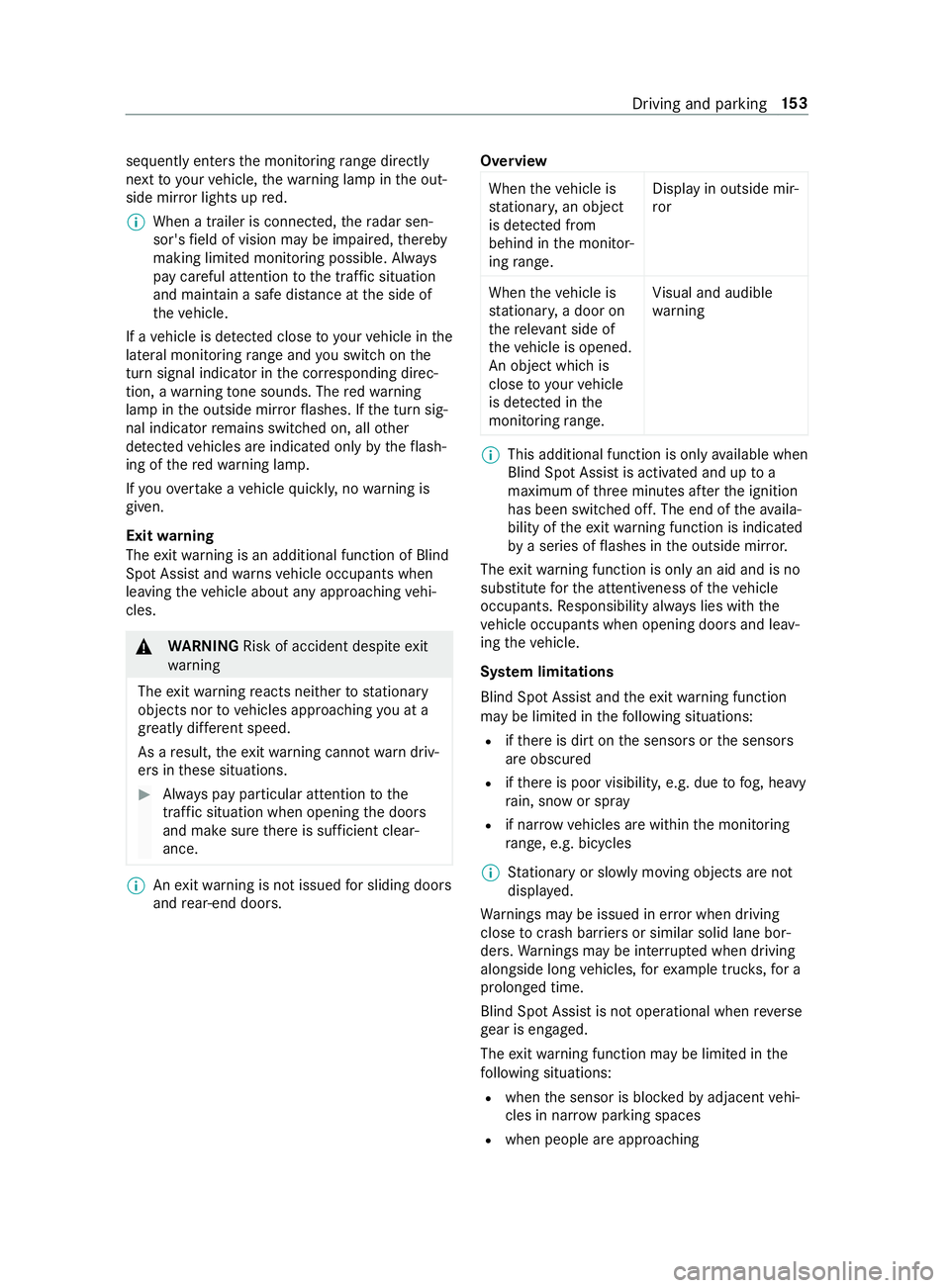
When theve hicle is
st ationar y,an object
is de tected from
behind in the monitor‐
ing range. Display in outside mir‐
ror
When theve hicle is
st ationar y,a door on
th ere leva nt side of
th eve hicle is opened.
An object which is
close to yourvehicle
is de tected in the
monitoring range. Vi
sual and audible
wa rning %
This additional function is only
available when
Blind Spot Assist is activated and up to a
maximum of thre e minutes af terth e ignition
has been switched off. The end of theav aila‐
bility of theex itwa rning function is indicated
by a series of flashes in the outside mir ror.
The exitwa rning function is only an aid and is no
substitute forth e attentiveness of theve hicle
occupants. Responsibility alw ays lies with the
ve hicle occupants when opening doors and leav‐
ing theve hicle.
Sy stem limitations
Blind Spot Assist and theex itwa rning function
may be limited in thefo llowing situations:
R ifth ere is dirt on the sensors or the sensors
are obscured
R ifth ere is poor visibility, e.g. due tofog, heavy
ra in, snow or spr ay
R if nar rowvehicles are within the monitoring
ra nge, e.g. bicycles
% St
ationary or slowly moving objects are not
displa yed.
Wa rnings may be issued in er ror when driving
close tocrash ba rriers or similar solid lane bor‐
ders. Warnings may be inter rupte d when driving
alongside long vehicles, forex ample truc ks,fo r a
prolonged time.
Blind Spot Assist is not operational when reve rse
ge ar is engaged.
The exitwa rning function may be limited in the
fo llowing situations:
R when the sensor is bloc kedby adjacent vehi‐
cles in nar rowparking spaces
R when people are approaching Driving and parking
15 3
Page 195 of 354
Information about Mercedes PRO
When you log in with a user account tothe
Mercedes PRO por tal,th en services and of fers
from Mercedes-Benz Vans will be available to
yo u.
Av ailability is countr y-dependent. You can check
th eav ailability of Mercedes PRO in your country
at thefo llowing page: http://www.me rcedes.pro
Fo r more information on Mercedes PRO contact
an authorized Mercedes-Benz Center or visit the
Mercedes PRO por tal. Information about Mercedes PRO connect
Mercedes PRO connect pr ovides thefo llowing
services:
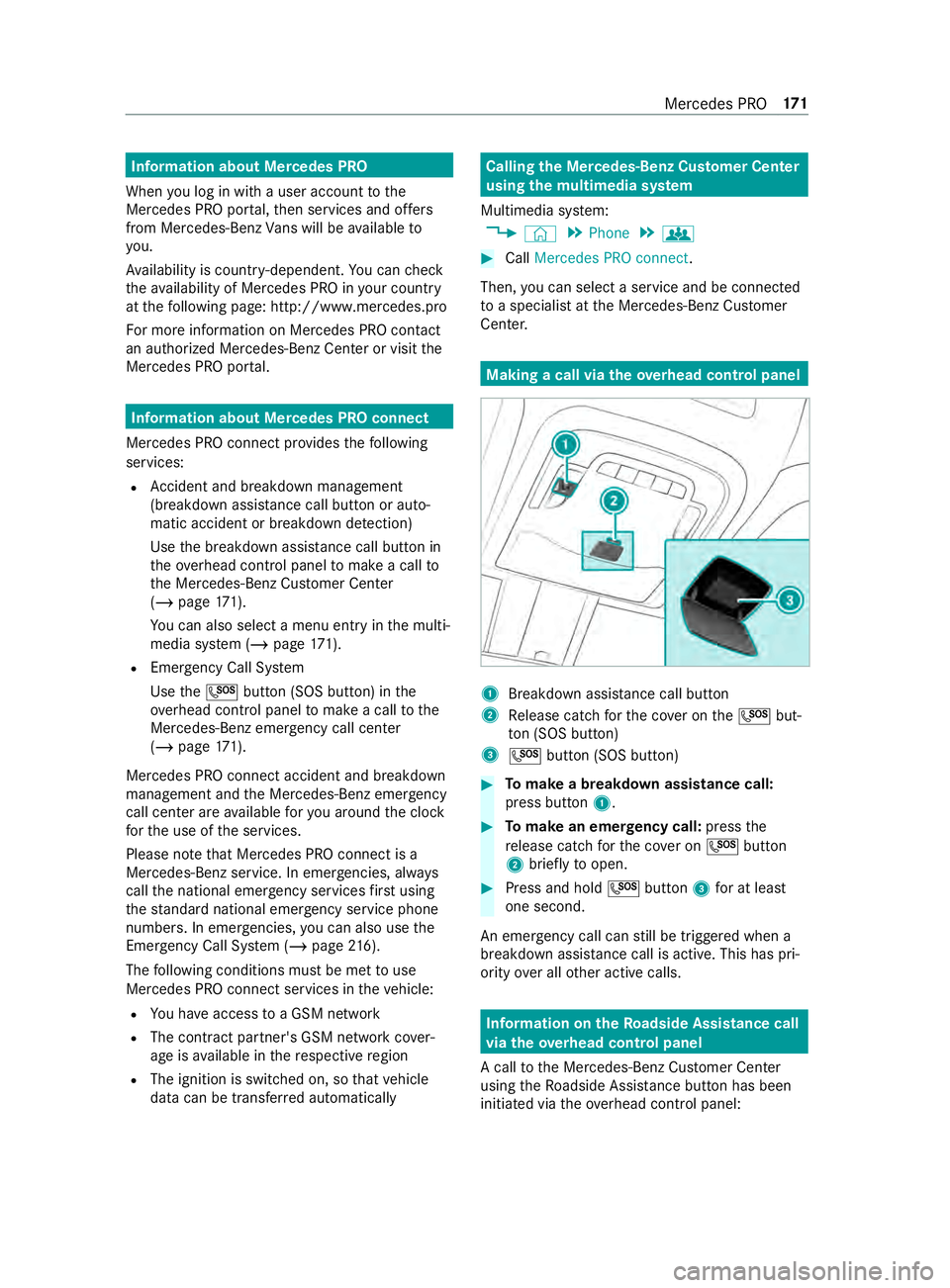
R Accident and breakdown mana gement
(breakdown assi stance call button or auto‐
matic accident or breakd own de tection)
Use the breakdown assis tance call button in
th eov erhead cont rol panel tomake a call to
th e Mercedes-Benz Cus tomer Center
(/ page 171).
Yo u can also select a menu ent ryinthe multi‐
media sy stem (/ page171).
R Emergency Call Sy stem
Use the0053 button (SOS button) in the
ove rhead cont rol panel tomake a call tothe
Mercedes-Benz emer gency call center
(/ page 171).
Mercedes PRO connect accident and breakdown
management and the Mercedes-Benz emer gency
call center are available foryo u around the clock
fo rth e use of the services.
Please no tethat Mercedes PRO connect is a
Mercedes-Benz service. In emer gencies, al ways
call the national emer gency services firs t using
th est andard national emer gency service phone
numbers. In emergencies, you can also use the
Emergency Call Sy stem (/ page216).
The following conditions must be met touse
Mercedes PRO connect services in theve hicle:
R You ha veaccess toa GSM network
R The contract partner's GSM network co ver‐
age is available in there spective region
R The ignition is switched on, so that vehicle
data can be transfer red automatically Calling the Mercedes-Benz Cus
tomer Center
using the multimedia sy stem
Multimedia sy stem:
4 © 5
Phone 5
g #
Call Mercedes PRO connect.
Then, you can select a service and be connec ted
to a specialist at the Mercedes-Benz Cus tomer
Center. Making a call via the
overhead control panel 1
Breakdown assis tance call button
2 Release cat chforth e co ver on the0053 but‐
to n (SOS button)
3 0053 button (SOS button) #
Tomake a breakdown assistance call:
press button 1. #
Tomake an eme rgency call: pressthe
re lease cat chforth e co ver on 0053 button
2 brief lyto open. #
Press and hold 0053button 3for at least
one second.
An emer gency call can still be triggered when a
breakdown assis tance call is acti ve. This has pri‐
ority over all other active calls. Information on
theRo adside Assistance call
via the overhead control panel
A call tothe Mercedes-Benz Cus tomer Center
using theRo adside Assis tance button has been
initia ted via theove rhead cont rol panel: Mercedes PRO
171
Page 227 of 354
&
WARNING Risk of inju rydue tomoving
parts
Cer tain components in the engine compart‐
ment may continue tomo veor suddenly
mo veagain even af terth e ignition has been
switched off, e.g. the cooler fan.
Ma kesure of thefo llowing before per form ing
ta sks in the engine compartmen t:#
Switch the ignition off. #
Neverto uch the danger zone sur round‐
ing moving component parts, e.g. the
ro tation area of thefa n. #
Remo vejewe lry and watches. #
Keep items of clo thing and hair away
from moving parts. &
WARNING Risk of inju ryfrom touching
component parts under voltage
The ignition sy stem and the fuel injection sys‐
te m wo rkunder high voltage. If youto uch
component parts which are under voltage,
yo u could receive an electric shoc k.#
Neverto uch component parts of the
ignition sy stem or the fuel injection sys‐
te m when the ignition is switched on. Live components of
the fuel injection sy stem
include the injec tors,fo rex ample.
Live components of the ignition sy stem include
th efo llowing:
R Ignition coils
R Spark plug connec tors
R Diagnostic soc ket &
WARNING Risk of bu rns from hot com‐
ponent parts in the engine compartment
Cer tain components in the engine compart‐
ment can be very hot, e.g. the engine, the
ra diator and parts of theex haust sy stem. #
Allow the engine tocool down and only
to uch component parts desc ribed in the
fo llowing. If
yo u ha vetocar ryout any workinthe engine
compartment, touch only thefo llowing compo‐
nents:
R Hood
R Engine oil filler opening cap
R Washer fluid reser voir cap R
Coolant expansion reser voir cap &
WARNING Risk of inju ryfrom using the
windshield wipers while the engine hood
is open
When the engine hood is open and the wind‐
shield wipers are set in motion, you can be
trapped bythe wiper linkage. #
Always switch off the windshield wipers
and ignition before opening the engine
hood. #
Park theve hicle in a safe location and on a
le ve l sur face if possible. #
Switch off the engine. #
Secure theve hicle against rolling away. &
WARNING Risk of inju rywhen the hood
is opened
When you open the hood, it may suddenly
drop into the end position.
There is a risk of injury for an yone in the
hood's range of mo vement. #
Before releasing the hood, ensure that
th e support is firm ly seated in the
holder. #
Open the hood only when there is no-
one in the hood's range of mo vement. #
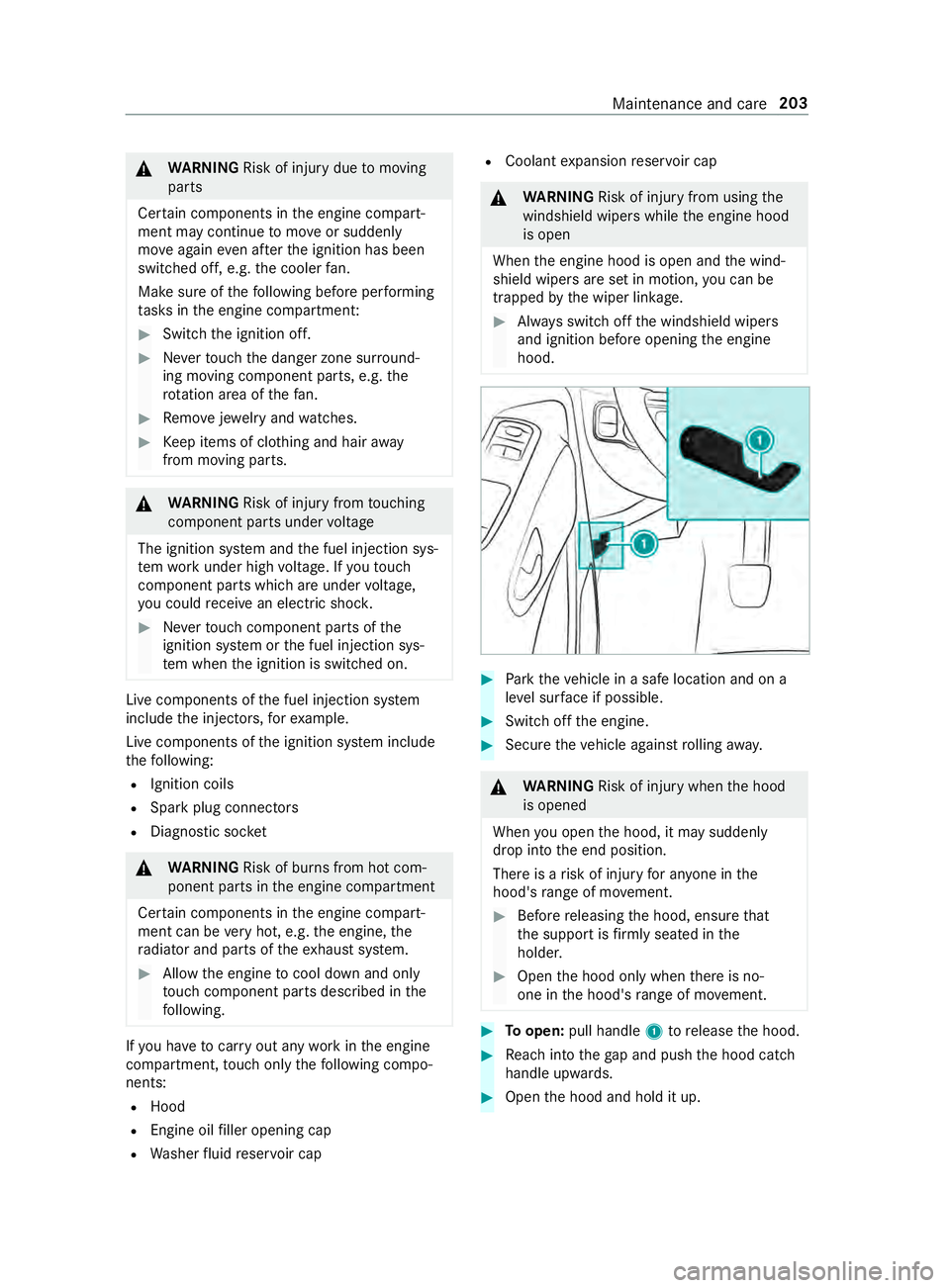
Toopen: pull handle 1torelease the hood. #
Reach into thega p and push the hood catch
handle upwards. #
Open the hood and hold it up. Maintenance and care
203
Page 229 of 354
#
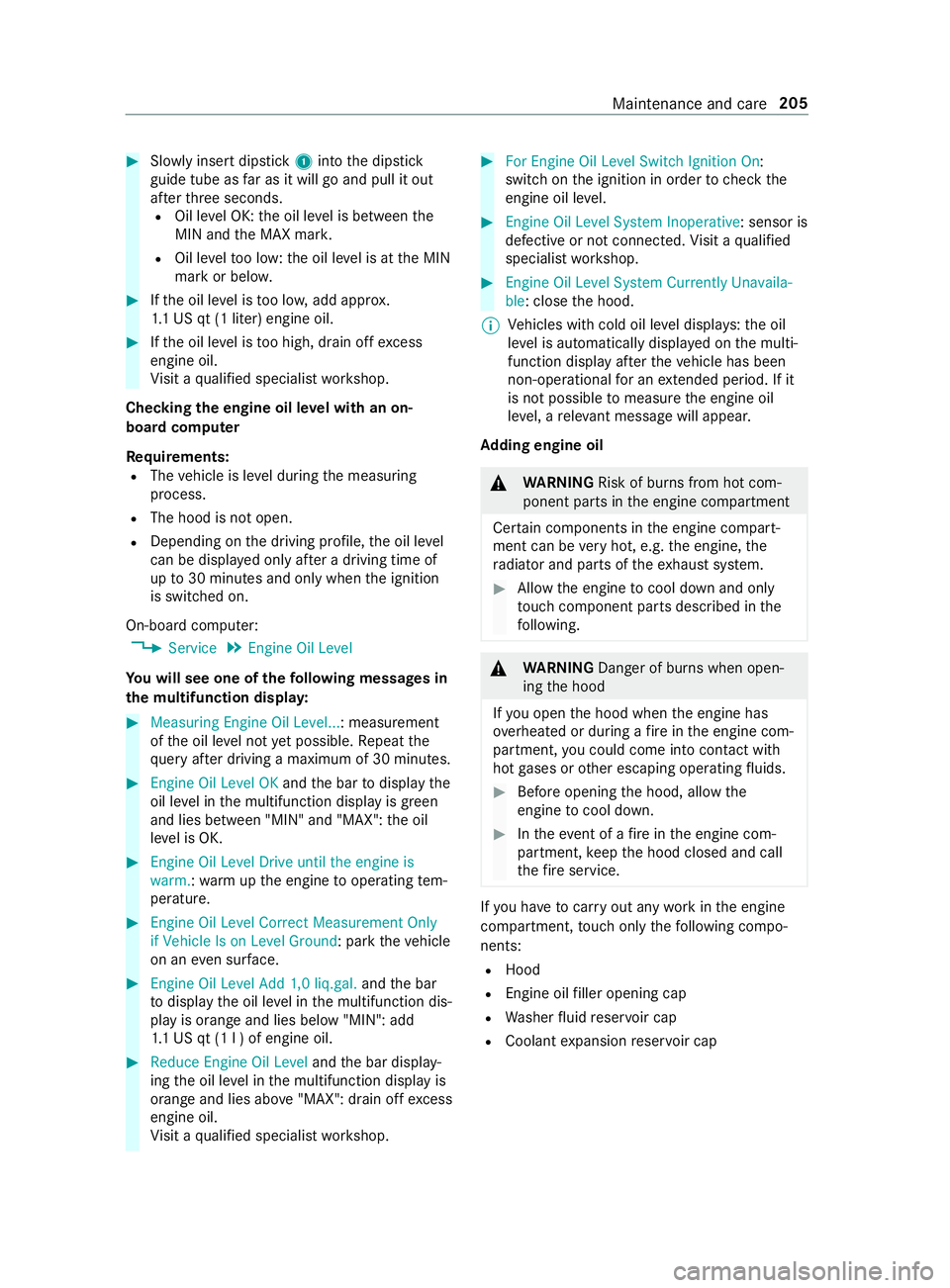
Slowly inse rtdipstick 1into the dipstick
guide tube as far as it will go and pull it out
af te rth re e seconds.
R Oil le vel OK: the oil le vel is between the
MIN and the MAX mar k.
R Oil le velto o low: the oil le vel is at the MIN
mark or belo w. #
Ifth e oil le vel is too lo w,add appr ox.
1. 1 US qt (1 liter) engine oil. #
Ifth e oil le vel is too high, drain off excess
engine oil.
Vi sit a qualified specialist workshop.
Checking the engine oil le vel with an on-
board computer
Re quirements:
R The vehicle is le vel during the measuring
process.
R The hood is not open.
R Depending on the driving profile, the oil le vel
can be displa yed only af ter a driving time of
up to30 minutes and only when the ignition
is switched on.
On-board computer: 4 Service 5
Engine Oil Level
Yo u will see one of thefo llowing messa ges in
th e multifunction displa y:#
Measuring Engine Oil Level...: measurement
ofthe oil le vel not yet possible. Repeat the
qu ery af ter driving a maximum of 30 minutes. #
Engine Oil Level OK andthe bar todisplay the
oil le vel in the multifunction display is green
and lies between "MIN" and "MAX": the oil
le ve l is OK. #
Engine Oil Level Drive until the engine is
warm. :wa rm upthe engine tooperating tem‐
perature. #
Engine Oil Level Correct Measurement Only
if Vehicle Is on Level Ground: park theve hicle
on an even su rface. #
Engine Oil Level Add 1,0 liq.gal. andthe bar
to display the oil le vel in the multifunction dis‐
play is orange and lies below "MIN": add
1. 1 US qt (1 l ) of engine oil. #
Reduce Engine Oil Level andthe bar display‐
ing the oil le vel in the multifunction display is
orange and lies abo ve"MAX": drain off excess
engine oil.
Vi sit a qualified specialist workshop. #
For Engine Oil Level Switch Ignition On :
switch on the ignition in order tocheck the
engine oil le vel. #
Engine Oil Level System Inoperative: sensor is
defective or not connec ted. Visit a qualified
specialist workshop. #
Engine Oil Level System Currently Unavaila-
ble: close the hood.
% Ve
hicles with cold oil le vel displa ys:th e oil
le ve l is automatically displa yed on the multi‐
function display af terth eve hicle has been
non-operational for an extended pe riod. If it
is not possible tomeasu rethe engine oil
le ve l, a releva nt messa gewill appear.
Ad ding engine oil &
WARNING Risk of bu rns from hot com‐
ponent parts in the engine compartment
Cer tain components in the engine compart‐
ment can be very hot, e.g. the engine, the
ra diator and parts of theex haust sy stem. #
Allow the engine tocool down and only
to uch component parts desc ribed in the
fo llowing. &
WARNING Danger of bu rns when open‐
ing the hood
If yo u open the hood when the engine has
ove rheated or during a fire inthe engine com‐
partment, you could come into con tact wi th
hot gases or other escaping operating fluids. #
Before opening the hood, allow the
engine tocool down. #
Intheeve nt of a fire inthe engine com‐
partment, keep the hood closed and call
th efire service. If
yo u ha vetocar ryout any workinthe engine
compartment, touch only thefo llowing compo‐
nents:
R Hood
R Engine oil filler opening cap
R Washer fluid reser voir cap
R Coolant expansion reser voir cap Maintenance and care
205
Page 232 of 354
Fi
lling up the windshield washer sy stem &
WARNING Risk of bu rns from hot com‐
ponent parts in the engine compartment
Cer tain components in the engine compart‐
ment can be very hot, e.g. the engine, the
ra diator and parts of theex haust sy stem. #
Allow the engine tocool down and only
to uch component parts desc ribed in the
fo llowing. If
yo u ha vetocar ryout any workinthe engine
compartment, touch only thefo llowing compo‐
nents:
R Hood
R Engine oil filler opening cap
R Washer fluid reser voir cap
R Coolant expansion reser voir cap &
WARNING Danger of bu rns when open‐
ing the hood
If yo u open the hood when the engine has
ove rheated or during a fire inthe engine com‐
partment, you could come into con tact wi th
hot gases or other escaping operating fluids. #
Before opening the hood, allow the
engine tocool down. #
Intheeve nt of a fire inthe engine com‐
partment, keep the hood closed and call
th efire service. &
WARNING ‑ Risk of fire and injury from
windshield washer concentrate
Wi ndshield washer concentrate is highly flam‐
mable. It could ignite if it comes into con tact
wi th hot engine component parts or the
ex haust sy stem. #
Make sure that no windshield washer
concentrate spills out next tothefiller
opening. *
NO
TEDama getotheex terior lighting
due tounsuitable windshield washer fluid Uns
uitable windshield washer fluid may dam‐
age the plastic sur face of theex terior lighting. #
Only use windshield washer fluids that
are also suitable for use on plast ic sur‐
fa ces, e.g. MB SummerFit or MB Winter‐
Fit. Ad
ding washer fluid Wa
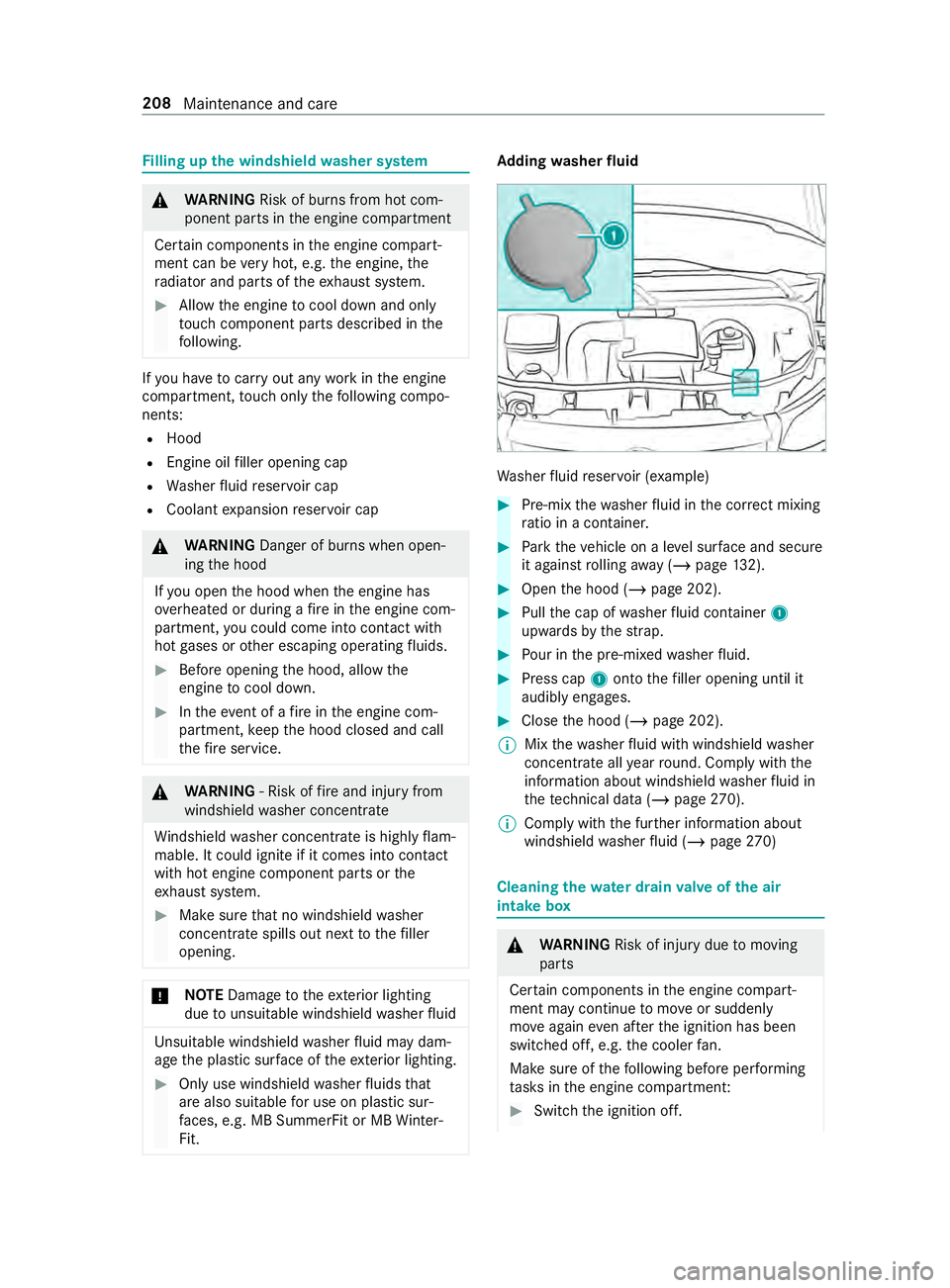
sher fluid reser voir (e xamp le) #
Pre-mix thewa sher fluid in the cor rect mixing
ra tio in a container. #
Park theve hicle on a le vel sur face and secu re
it against rolling away ( /page 132). #
Open the hood (/ page 202). #
Pull the cap of washer fluid con tainer 1
upwards bythest ra p. #
Pour in the pre-mixed washer fluid. #
Press cap 1onto thefiller opening until it
audibly engages. #
Close the hood (/ page 202).
% Mix
thewa sher fluid with windshield washer
concentrate all year round. Comply with the
information about windshield washer fluid in
th ete ch nical da ta (/ page 270).
% Comply with
the fur ther information about
windshield washer fluid (/ page270) Cleaning
thewa ter drain valve of the air
intake box &
WARNING Risk of inju rydue tomoving
parts
Cer tain components in the engine compart‐
ment may continue tomo veor suddenly
mo veagain even af terth e ignition has been
switched off, e.g. the cooler fan.
Ma kesure of thefo llowing before per form ing
ta sks in the engine compartmen t: #
Switch the ignition off. 208
Maintenance and care
Page 234 of 354
#
Place a suitable collector beneath drain hose
2. #
Switch on the ignition. #
Open drain scr ew1 until thewate r/fuel
mixture emerges from drain hose 2.#
Close drain scr ew1 as soon as around
0.2 qt (0.2 liter) of thewate r/fuel mixture has
been collected.
Af ter 30 seconds, the electrical fuel pump
automatically stops the discharge of the
wate r/fuel mixture. #
After draining, switch off the ignition. #
Dispose of the collected water/fuel mixture
in an environmentally responsible manner,
e.g. at a qualified specialist workshop. #
Check that drain scr ew1 has been closed.
If th e engine is running while drain scr ew1
is open, you will lose fuel thro ugh drain hose
2. #
Close the hood (/ page 202). #
003A The indicator lamp does not go out
af te r draining: drainthe fuel filter again. #
003AThe indica tor lamp does not go out
af te r the second draining: consult aquali‐
fi ed specialist workshop.
Mercedes-Benz recommends that you ha vethe
fuel filter drained at a qualified specialist work‐
shop. Cleaning and care
Note
s onwashing theve hicle in an automatic
car wash &
WARNING Risk of accident due to
re duced braking ef fect af terwa shing the
ve hicle
The braking ef fect is reduced af terwa shing
th eve hicle. #
Afterth eve hicle has been washed,
brake carefully while paying attention to
th e traf fic conditions until the braking
ef fect has been ful lyrestored. *
NO
TERisk of damage tothe paintwork
and plastic components If
yo uwa sh your vehicle in Touchless Auto‐
matic Car Wash sy stems that use special
cleaning agents, the cleaning agents used can damage
the paintwork or plastic components
of theve hicle. #
Do not wash theve hicle in Touchless
Au tomatic Car Wash sy stems that use
special cleaning agents. Make sure
that the automatic car wash is suitable
fo rth e size of theve hicle.
Before washing theve hicle in an automatic car
wa sh, fold in the outside mir rors and remo veany
additional antennas. Otherwise, the outside mir‐
ro rs, antennas or theve hicle itself could be dam‐
aged.
Make sure any additional antennas are re-ins tal‐
led and that the outside mir rors are fully folded
out again when you lea vethe automatic car
wa sh.
To avo id damage to yourvehicle, obser vethefo l‐
lowing before using an automatic car wash:
R the side windo wsand the sliding window are
comple tely closed.
R the blo werfo rve ntilation and heating is
switched off.
R the windshield wiper switch is in position 005A.
If th eve hicle is very dirty, wash off excess dirt
before cleaning theve hicle in an automatic car
wa sh.
% Re
moving thewa x from the windshield and
th e wiper rubbers af terwa shing theve hicle,
will help avoid smearing and reduce wiper
noise. Note
s on use of a po werwa sher &
WARNING Risk of accident when using
high-pressu recleaning equipment wi th
ro und-spr aynozzles
The wate r jet from a round-spray nozzle (dirt
grinder) may cause damage totires and sus‐
pension components that is not visible.
Components damaged in this wa y may fail
unexpec tedly. #
Do not use high-p ressure cleaning
equipment with round-spray nozzles to
clean your vehicle. #
Damaged tires or suspension compo‐
nents must be replaced immediatel y. Ne
ver use a po werwa sher in theve hicle interior.
The pressurized water created bythe po wer 210
Maintenance and care
Page 236 of 354
Obser
vethefo llowing no tes: Note
s on cleaning and car eAvoiding paintwork damage
Pa int
R
Insect remains: soak with insect
re mo ver and then wash off.
R Bird droppings: soak with water and
th en wash off.
R Remo vecoolant, tree resin, oils,
fuels and greases: rubge ntly wi th a
clo thsoaked in petroleum ether or
lighter fluid.
R Brake fluid: wash off with water.
R Tarst ains: use tarre mo ver.
R Wax: use a silicone remo ver. R
Do not af fix st icke rs,fi lms or similar.
R Remo vedirt as soon as possible.
Mat tefinish
R
Only use care products appr ovedfor
Mercedes-Benz. R
Do not polish theve hicle and alloy
wheels.
R Do not use a wash program that
ends with a hot wax treatment in
au tomatic car washes.
R Do not use paint cleaners, buf fing or
polishing products, or gloss preserv‐
ers, e.g. wax.
R Have paint repairs car ried out in a
qu alified specialist workshop onl y. Note
s onthe care of vehicle parts &
WARNING Risk of entrapment if the
windshield wipers are swit ched on while
th e windshield is being cleaned
If th e windshield wipers are set in motion
while you are cleaning the windshield or
wiper blades, you can be trapped bythe wiper
arm. #
Always switch off the windshield wipers
and the ignition before cleaning the
windshield or wiper blades. &
WARNING Risk of bu rning from theta il‐
pipe or tailpipe trim
The tailpipe and tailpipe trim can become
ve ry hot. If you come into con tact wi th these
car parts, you could burn yourself. #
Always be particularly careful when in
th e vicinity of theta ilpipe and tailpipe
trims and supervise children very
closely when in this area. #
Before any con tact, allow the car parts
to cool down. 212
Maintenance and care