light MERCEDES-BENZ SPRINTER 2019 MY19 with Base Radio Operator’s Manual
[x] Cancel search | Manufacturer: MERCEDES-BENZ, Model Year: 2019, Model line: SPRINTER, Model: MERCEDES-BENZ SPRINTER 2019Pages: 330, PDF Size: 5.98 MB
Page 171 of 330
Yo
uc an ha vethef ollowing status information for
AT TENTION ASSIS Tdispla yedint he Assis tance
menu of theo n-boar dcomputer:
R The journe ylengt hsince thel astb reak
R The attention le veld etermined byATTENTION
ASSIS T:
- The fuller theb ar is, theh igher thed etec‐
te da ttention le velis
- The bar em pties as attentivenes sdecrea‐
ses
If AT TENTION ASSIS Tcann otcalculat ethe atten‐
tion le vela nd canno tissue awarning ,the Atten-
tion Level messageappears.
If AT TENTION ASSIS Tisdeactivated, the00D7
symbol appear sinthe assis tance graphi cinthe
instrument display whenthee ngine is running.
AT TENTION ASSIS Tisactivated automatically
when thee ngine is re-sta rted. The las tselected
sensitivity le velremain sstore d.
Sy stem limitations
AT TENTION ASSIS Tisactiveint he37 mph
(60 km/h) to124m ph (200 km/h )spee drange.
Th ef unctionality of ATTENTION ASSIS Tisrestric‐
te d, and warnings ma ybedelayedorn otoccur at
all, in thef ollowing situations:
R The journe ylasts less than appr oximately
30 minutes
R The road condition is poor (une venr oad sur‐
fa ce or po tholes)
R The vehicle is subjected toas tron gc rosswind
R Youh ave asporty drivin gstyle (hig hcorner‐
ing speeds or high ratesofa cceleration)
R The time is se tincor rectly
R Youc hang elane sand vary your spee dfre‐
qu ently in activ edriving situations
The ATTENTION ASSIS Tdrow sines sora lertness
assessment is dele teda nd restar tedw hen con‐
tinuin gthe journe yinthefollowing situations:
R Ifyo us wit ch offt he engine
R Ifyo uu nfas teny our seat belt and open the
driver's door (e.g. chang edrive rs or take a
break) Setting
ATTENTION ASSI ST
On-boar dcomputer:
4 Settings 5
DriveAssist
5 Attention Assist (Attention Assist)
Setting options
The following settings ar eavailable:
R Standard
R Sensitive
R Off #
Select asetting. Blin
dSpotA ssist Fu
nction of Blind Spo tAssis twith exitwa rn‐
ing
Blind Spo tAssis tuses tw olateral, rear-facing
ra dar sensor stomonitor thea read irectl ynextto
and on thes ide behind thev ehicle.
% US
Ao nly:
This device has been appr ovedbyt he FCC as
a" Vehicular Radar Sy stem". The radar sensor
is intended foru se in an automotiv eradar
sy stem onl y.Re mo val,ta mp ering, or altering
of thed evice will void an ywarranties, and is
no tp ermit tedbyt he FCC. Do no ttamper
with, alter or use in an ynon-appr ovedw ay.
An yu nauthorize dmodificatio ntothis device
could void theu ser ’sauthority tooperat ethe
equipment. &
WARNING Risk of accident despit eBlind
Spo tAssist
Blind Spo tAssis treacts neither tostationary
object snortovehicles approaching and over‐
ta king youatag reatly di fferent speed.
As aresult, Blind Spo tAssis tcanno twarn
driver sinthese situations. #
Alwaysp aycareful attention tothet raf‐
fi cs ituation and maintai nasafed is‐
ta nce at thes ide of thev ehicle. Blind Spo
tAssis tiso nlyana id. It ma yfail to
de tect some vehicles and is no substitut efor
attentiv edriving. Alw ayse nsur ethat ther eiss uf‐
fi cient dis tance tothes ide foro ther road users
and obs tacles.
If av ehicle is de tected ab oves peeds of appr ox‐
imatel y7.5mp h(12 km/h) and this vehicle sub‐
sequentl yenter sthe monitoring rang ed irec tly
next toyour vehicle, thew arning lam pinthe out‐
side mir rorlights up red. Driving and parking
147
Page 173 of 330
Ve
hicles with Blind Spo tAssis t:driver scan
also be warned of an ycrossing traf ficw henb ack‐
in gupo ut ofaparkin gspace. If avehicle is
de tected, thew arning lam pinthe outside mir ror
on ther ele vant sid elights up red. If it de tects a
critica lsituation, awarning tone also sounds.
Ve hicles with Blind Spo tAssis tand Parking
Assis tPARKTRONIC: driverscan also be warned
of an ycrossing traf ficw henb ackin gupo ut of a
parkin gspace. If acritical situation is de tected, a
wa rning symbol appear sonthe camera imag eof
th em ultimedia sy stem. If thed rive rd oes not
re spond tothew arning ,the vehicle's brakes can
be applieda utomatically.In this case, awarning
to ne sounds.
The Rear Cross Traf ficA lertfunction is acti ve
unde rthe following conditions:
R BlindSpotA ssis tisa ctivated.
R Reverseg ear is engaged or thev ehicle is
backing up at walkin gpace.
R Ifth em aneuvering assis tance function is acti‐
va tedint he multimedia sy stem.
The Rear Cross Traf ficA lertfunction is una vaila‐
ble when driving wit hatrailer. Lane
Keeping Assis tand Activ eL aneK eeping
Assist Fu
nctions of Lane Keeping Assist Lane
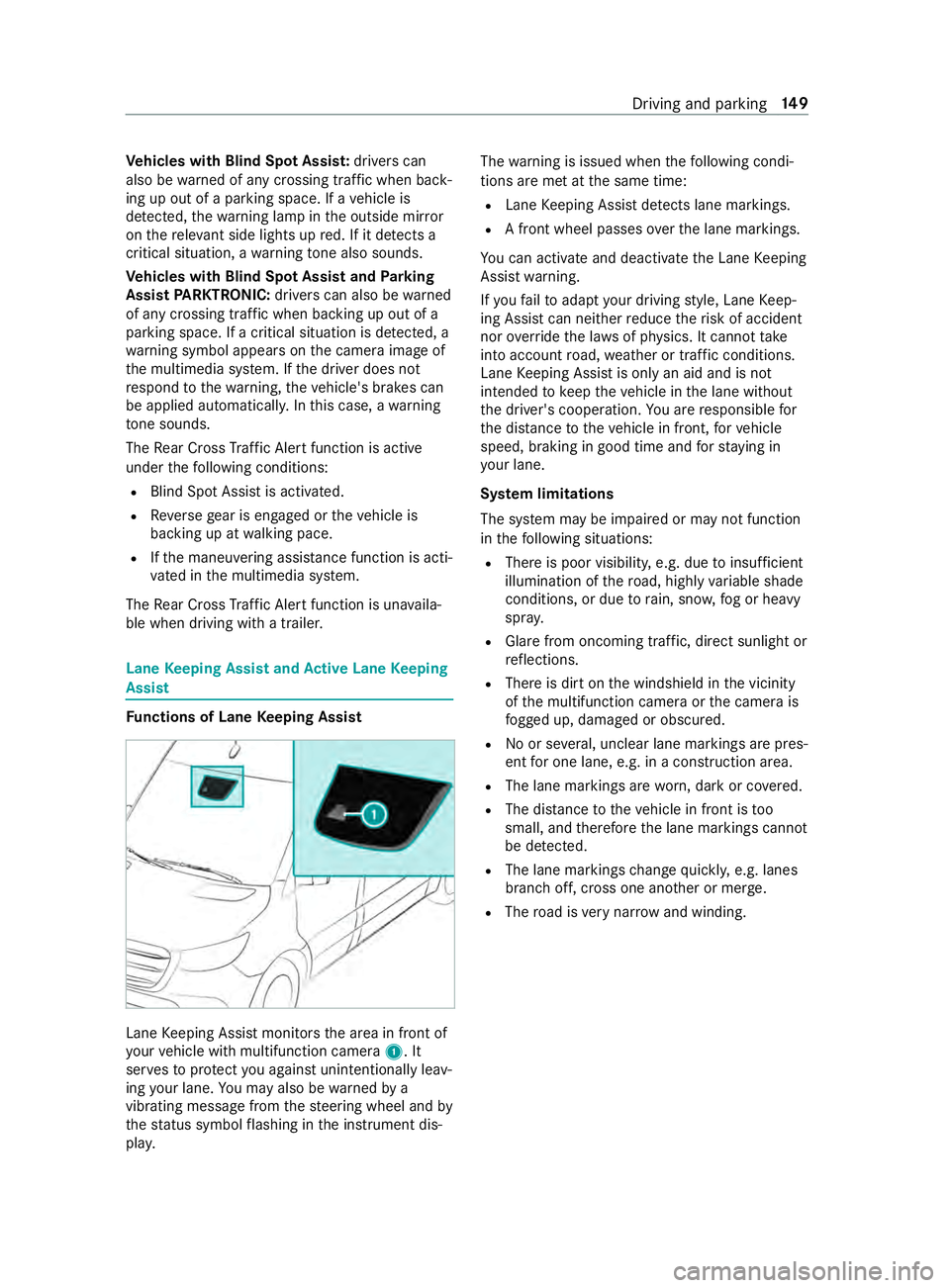
Keeping Assis tmonitor sthe area in front of
yo ur vehicle wit hmultifunction camera 1.It
ser vestop rotect youa gains tunin tentionally le av‐
ing your lane .You ma yalso be warned by a
vibrating messa gefrom thes teering wheel and by
th es tatus symbo lflashing in thei nstrument dis‐
pla y. The
warning is issued when thef ollowing condi‐
tions ar emetat thes ame time:
R Lane Keeping Assis tdetects lane markings.
R Afront wheel passe soverthe lane markings.
Yo uc an activat eand deactivat ethe Lane Keeping
Assis twarning.
If yo uf ail toadap tyour driving style, Lane Keep‐
ing Assis tcan neither reduce ther isk of accident
nor override thel aw sofp hysics. It canno ttake
int oa ccount road, weather or traf ficc onditions.
Lane Keeping Assis tisonlyana id and is not
intended tokeep thev ehicle in thel ane without
th ed rive r's cooperation. Youa re re sponsible for
th ed ista nce tothev ehicle in front, forv ehicle
speed, braking in good time and fors taying in
yo ur lane.
Sy stem limitations
The sy stem ma ybeimpaired or ma ynotfunction
in thef ollowing situations:
R Ther eisp oor visibilit y,e.g. due toinsuf ficient
illumination of ther oad, high lyvariable shade
conditions, or due torain, sno w,fogorh eavy
spr ay.
R Glar efromo ncomin gtraf fic, direct sunligh tor
re flections.
R Ther eisd irtont he windshield in thev icinity
of them ultifunction camer aorthe camera is
fo gged up, damaged or obscured.
R No or se veral, unclear lane markings ar epres‐
ent foro ne lane, e.g. in aconstruction area.
R The lane markings ar eworn, dar korcovered.
R The dis tance tothev ehicle in front is too
small, and therefor ethe lane markings cannot
be de tected.
R The lane markings chang equickl y,e.g. lanes
branc hoff,c ross one ano ther or mer ge.
R The road is very nar row and winding. Drivin
gand parking 14 9
Page 178 of 330

Drivin
gtips
If th et railer sw ays, remember thef ollowing
points:
R Do no taccelerat eunder an ycircums tances.
R Do no tcounter steer.
R If necessar y,appl ythe brakes.
% Yo
uc an pr eventthet railer from sw aying and
rock ingbyretrofitting stabilizer bar sortrailer
st abilit yprograms. Youc an obtain fur ther
information from an authorized Mercedes-
Benz Center.
R Maintain alarge rd ista nce than when driving
without atrailer.
R Avoid braking abruptl y.If possible, brak egen‐
tl yf irst of al lsot hatthet railer closes up
behind your vehicle. Then, increase theb rak‐
ing forc er apidl y.
R The values given fors tart-o ff gradeability
re fertos ea level. When driving in moun tain‐
ous areas, no tethat engine output, and there‐
fo re start-of fgradeability ,will dec rease with
inc reasin galtitude. Coupling/uncoupling
atrailer Coupling
atrailer
* NO
TEDama getothev ehicle batter ydue
to full discharge Charging
thet railer batter yusing thep ower
supply of thet railer can damag ethe vehicle
batter y. #
Do no tuse thev ehicle's po wersupply
to charge thet railer batter y. #
Shif tthe selector le vertop osition 005D. #
Appl ythe vehicle's parking brake. #
Close all thed oors. #
Position thet railer on alevel sur face behind
th ev ehicle.
% The ball head height
changes depending on
th ev ehicle's load. In this case, use atrailer
wit hah eight-adjus table trailer dr awbar. #
Couple up thet railer. #
Establish all electrical and other connections
to thet railer. #
Remo veobject sordevices whic hpreve nt the
traile rfromr olling, e.g. wheel choc ks. #
Release thet railer's parking brake.
% The
vehicle harness has acable connection
to theb rake light indicator lamp.
Obser vethem aximum permissible trailer dimen‐
sions (widt hand length).
Mos tUSs tatesa nd all Canadian pr ovinces pre‐
scribe thef ollowing points, and youa reurge ntly
re commended tocomply wi th these:
R Safetyc hains between thet ow ing vehicle and
th et railer .The chains should be routed in a
criss-cross pat tern unde rthe trailer dr awbar.
The ym ustbec onnected tothet railer tow
hitc hand no ttothe bumper or tothev ehicle
axle.
Lea vesuf ficient sla ckinthec hains. This
allo wsfore vens harp cornering.
R Aseparat ebrake system is requ ired forc er‐
ta in trailers.
R Asafet yf eatur eisrequired forb rake dt railers.
De term ine thes pecific requ irements acco rd‐
ing tother ele vant la ws.
If th et railer becomes de tach ed from thet ow‐
ing vehicle, thes afet yf eatur etrigger sthe
trailer brakes and can thus reduce thed anger.
Un coupling atrailer &
WARNING Risk of being crushed and
becoming trapped whe nuncoupling a
trailer
Whe nuncoupling atrail er wi than engaged
ine rtia-activated brake, your han dmay
become trapped between thev ehicle and the
traile rdrawbar. #
Do no tuncouple trailer swithan
engaged overrun brake. Do no
tuncouple atrailer wit hanoverrun brak ein
as tate ofove rrun. Otherwise, ther ebound of the
ove rrunb rake can damag eyour vehicle. #
Shif tthe selector le vertop osition 005D. #
Appl ythe vehicle's parking brake. #
Close all thed oors. #
Appl ythe trailer's parking brake. #
Secur ethe trailer agains trolling away wit ha
wheel choc kors imilar object. #
Remo vethet railer cables and saf etyc hains. #
Uncouple thet railer. 15 4
Driving and pa rking
Page 179 of 330

Information abou
ttow ing atrailer Operatin
gatrailer is subject toman ystatutory
re gulations suc hasspeedrestrictions.
Man ystatesa lso requ ireana uxiliaryseparate
functional brakin gsystem when towing aweight
th at exc eeds acertain limit .For your saf ety, it is
re commended touse aseparat efunctional brak‐
ing sy stem on an ytowe dvehicle.
Mak esuret hat your trailer combinatio nmeets
local regulations. This no tonlya pplies to your
plac eofr esidence, but also to your destination.
In fo rm atio nont his can be obtained from the
police and local authorities.
Compl ywitht he following when driving wit ha
trailer:
R Practice cornering, stopping and backing up
in at raffic-free location. In this wa y,yo uw ill
ga in driving experience and become accus‐
to med tothen ew handling characteristics.
R Befor edriving, checkt he following:
- that thet railer towh itch and ball coupling
ar es ecure
- that thes afet ys wit ch forb rake dt railer sis
functioning cor rectly
- that thes afet yc hains ar esecur eand
undamaged
- that thee lectrical connection saresecure
- that thel ights ar efunctioning cor rectly
- thew heels ford ama geand cor rect tire
pressur e(/ page 209)
R Adjus tthe outside mir rors so that youh ave a
clea rviewoft herear sectio nofthe trailer.
R Ifth et railer is equipped wit hanindividual
braking sy stem, checkb efor eeachj ourney
whe ther theb rake sa refunctioning cor rectl y.
R Ifth et railer has electronicall ycont rolled
brakes, pull away carefully wi th thevehicle/
trailer combination .Brake manually using the
brak econtroller and checkw hether the
brakes ar efunctioning cor rectl y.
R Secu rethel oad on thet railer in line wit hthe
re qu irements and rules forl oad-securing
me thods.
R When driving wit hatrailer ,chec katr egular
inter vals that thel oad is secur eand that the
light sand brakes ar efunctioning cor rectl y.
R Bea rinm indthat theh andling characteristics
ar em oreu nstable when towing atrailer than when drivin
gwithout atrailer .Avoid sudden
st eering mo vements.
R The vehicle/trailer combination is heavier,
accelerates mor eslowl y,has areduced
climbing ability and an increased braking dis‐
ta nce. It is mor esusceptible toside winds
and requ ires careful steering.
R If possible, do no tbrake suddenl y,but rath er
moderately at firs tsot hatthet railer can acti‐
va te its brakes. Then inc rease thep ressur eon
th eb rake pedal.
R Ifth ea utomatic transmission shifts between
ge arsonu phill or downhill gradients, restrict
th es hiftrange. Select shif trang e4,3,2or1.
Al ow ergear and reduced speed decrease the
ri sk of engine damage.
R When driving on adownhill gradient, shif ttoa
lo we rgear touse thee ngine' sbraking ef fect.
Av oid cons tant braking, as this could cause
th ev ehicle brakes and possibly also the
traile rbrake stoo verheat.
R Ifth ec oolant temp eratur eincreases signifi‐
cant lywhen thea ir-conditionin gsystemis
switched on, switc hthe air-conditioning sys‐
te mo ff.
Coolant heat can also be dissipated by
switching thea irflow and thet emperatur eof
th eh eater or air conditioning tothem aximum
le ve l. Open thew indo wsif necessar y.
R When overtaking ,pay particular attention to
th ei ncreased overtakin gdista nce of your
ve hicle/trailer combination.
Due tothel engt hofy ourvehicle/trailer com‐
bination youw illrequ ireal onger stre tchof
ro ad befor eswit ching bac ktothe original
lane. Pe
rm issible trailer loads and trailer dr awbar
nose weights We
ight information &
WARNING Risk of accident du eto
unbraked trailer wit hexcessivel yhigh
gross weight
If yo ut ow atrailer without aseparat efunc‐
tional brakin gsystema ndagross trailer
we ight (G TW)ofm oret han 1635 lbs (750 kg),
th en thev ehicle brak esystemm ayove rheat.
This increases theb raking dis tance and the
brak esystem ma yevenf ail. Driving and parking
15 5
Page 185 of 330
Setting
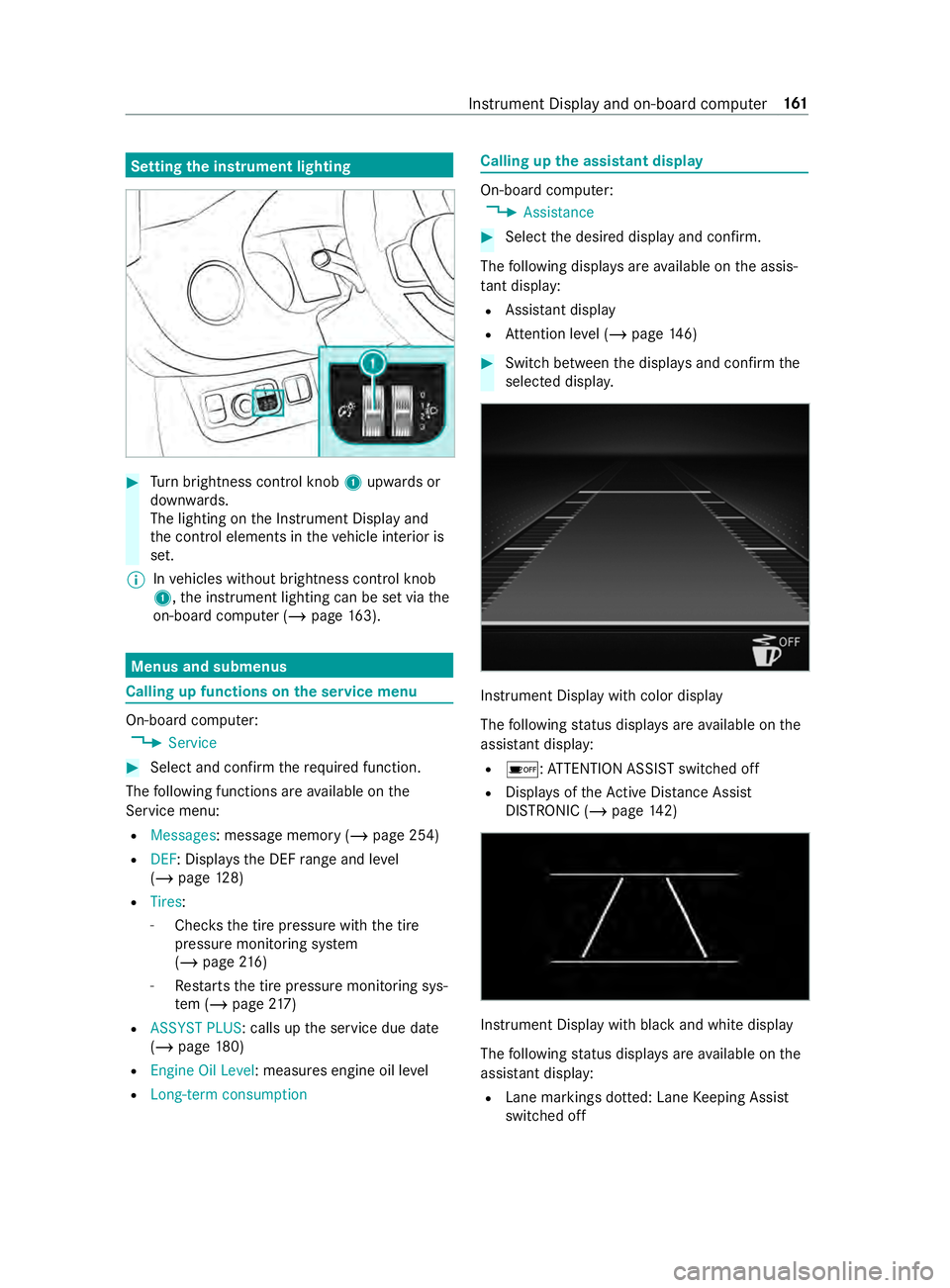
thei nstrument lighting #
Turn brightness control knob 1upwards or
down wards.
The lighting on theI nstrument Displa yand
th ec ont role lements in thev ehicle interior is
set.
% In
vehicles without brightness contro lknob
1 ,the instrument lighting can be se tviathe
on-boar dcomputer (/ page163). Menus and submenus
Callin
gupf unction sont he servic emenu On-boar
dcomputer:
4 Service #
Selec tand con firm ther equired function.
The following function sareavailable on the
Service menu:
R Messages:m essagememo ry (/ pag e254)
R DEF:D isplays th eDEFrang ea nd le vel
( / pag e128)
R Tires:
- Che ckst he tir epressur ewitht he tire
pressur emonitoring sy stem
(/ page216 )
- Restarts thet irep ressur emonitoring sys‐
te m( /pag e217 )
R ASSYST PLUS:c alls upthes ervice due date
(/ page180)
R Engine Oil Level :measu rese ngine oil le vel
R Long-term consumption Calling up
thea ssistant display On-boar
dcomputer:
4 Assistance #
Selec tthe desired displa yand confirm.
The following displa ysarea vailable on thea ssis‐
ta nt displ ay:
R Assi stant display
R Attention le vel(/ pag e146) #
Switc hbetwe en thed ispla ysand con firm the
selected displa y. Instrument Displa
ywithc olor display
The following status displa ysarea vailable on the
assis tant displ ay:
R 00D7 :ATTENTION ASSIS Tswitched off
R Displa ysoftheA ctiv eDista nce Assi st
DISTRONI C(/pag e142) Instrument Displa
ywithb lack and whit edisplay
The following status displa ysarea vailable on the
assis tant displ ay:
R Lane markings dotted: Lane Keeping Assist
switched off Instrument Displa
yand on-boar dcomputer 161
Page 187 of 330

Re
setting values on theo n-boa rdcompu ter
trip menu On-board computer:
4 Trip
% The spelling of
thed ispla yedm ain menu may
dif fer. Therefore, pa yattention tothem enu
ove rviewf orthei nstrument display
(/ page159).
Yo uc an rese tthe values of thef ollowing func‐
tions:
R Trip Odometer:
- Reset Trip Odometer?
R Trip computer:
- FromS tart
- FromR eset
R ECOd isplay #
Selec tthe function that is tobe rese ta nd
confir mthis selection. #
Confir mtheReset Values? promptwith Yes. Calling up settings on
theo n-boa rdcompu ter On-boar
dcomputer:
4 Settings
The following ent ries can be se tonthe Settings
menu:
R DriveAssist
- Switching ESP(ESP) on and off
- Switching Akt. Spurhalte-Assistent (Active
Lane Keeping Assist) on and off
- Switching Spurhalte-Assistent (Lane
Ke eping Assist) on and off
- Switching Aktiver Brems-Assistent (Active
Brak eAssist) on and off
- Switching Totwinkel-Assistent (Blind Spot
Assist) on and off
- Switching Attention Assist (Attention
Assist) on and off
R Light
- Switching Tagfahrlicht (Daytimerunning
lights )ona nd off
- Switching Leuchtzeitinnen (Illumination
pe riod inside) on and off
- Switching Leuchtzeit außen (Illumination
period outside) on and off -
Switching Auffindbeleuchtung (Locator
lighting) on and off
- Setting Instrument lighting
R Vehicle
- Setting Winterreifen-Limit (Winter tires
limit)
- Switching Akust.Schließen (Acoustic
locking) on and off
- Switching Autom. Verriegelung (Autom.
locking) on and off
- Switching Ruhezustand (Standby) on and
off
- Switching Regensensor (Rainsensor) on
and off
R Setting Heating
R Displa yand Operation
- Selecting Sprache (Language)
- Setting Uhrzeit
- Setting Datum
- Setting Einheiten
- Switching pe rmanent Display DE VLevel
on and off
- Operation: Swit chAkust. Bedienrückmeld.
(Acou stic operational feedback) on and
of fa nd set Touch-Control-Empfindl.
(Touch-Cont rols ensitivity)
R Factory Settings:R estoring settings #
Select an entr yand confir mthe selection. #
Mak ethe necessar ychanges. Instrument Displa
yand on-boar dcomputer 16 3
Page 191 of 330
Overvie
wand operation Overvie
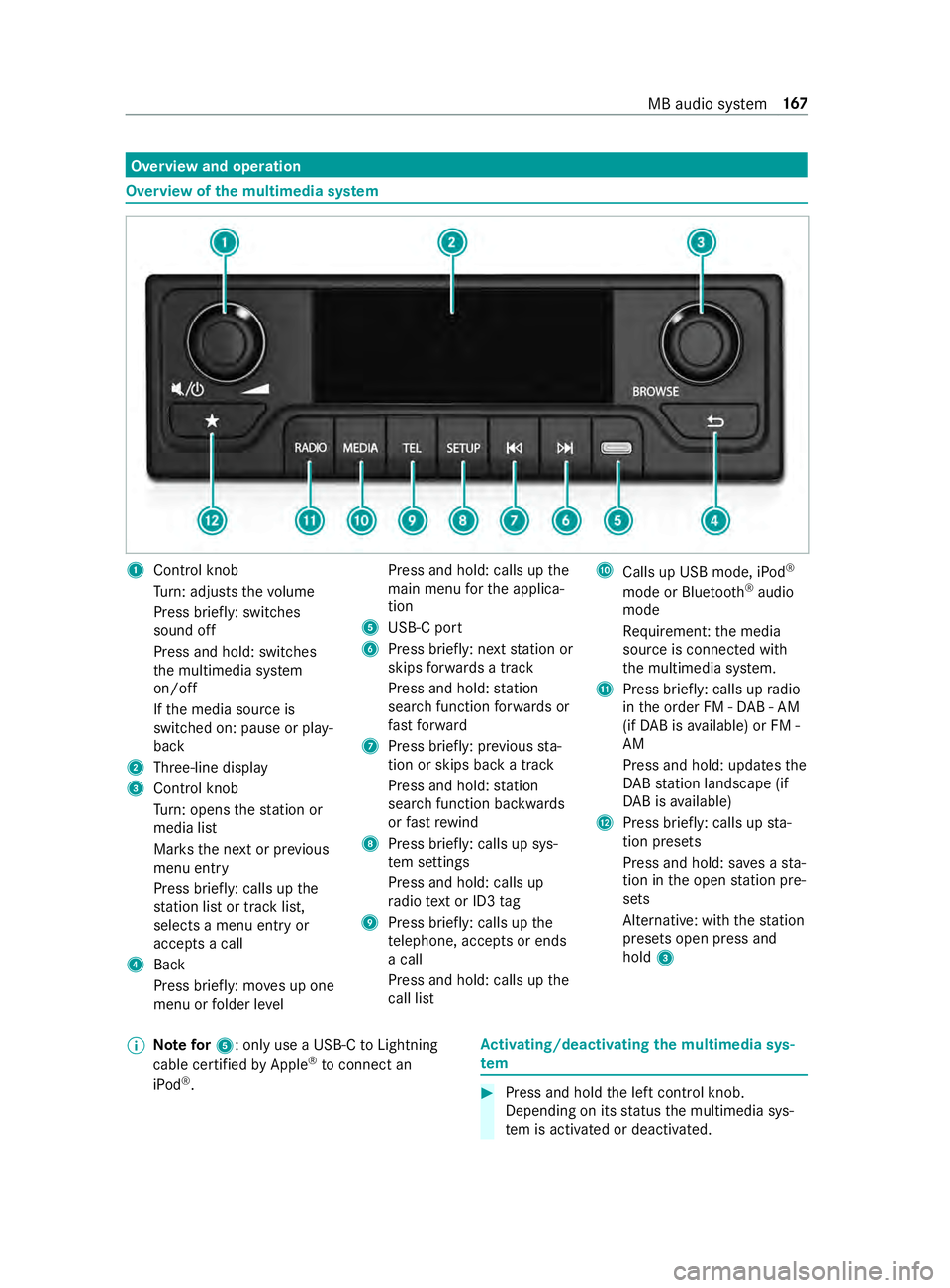
wofthe multi media sy stem 1
Cont rolk nob
Tu rn:a djusts thev olume
Press brief ly:s witches
sound off
Press and hold: switches
th em ultimedia sy stem
on/o ff
If th em edia source is
switched on: pause or play‐
back
2 Three-line display
3 Control knob
Turn:o pens thes tatio nor
media list
Mar ksthen extorp revious
menu entry
Press brief ly:c alls up the
st atio nlistort rack list,
selects amenue ntry or
accepts acall
4 Back
Press brief ly:m ove supo ne
menu or folder le vel Press and hold: calls up
the
main menu fort he applica‐
tion
5 USB-Cp ort
6 Press brief ly:n exts tatio nor
skips forw ards atrack
Press and hold: station
sear chfunction forw ards or
fast forw ard
7 Press brief ly:p reviou ssta‐
tio nors kips bac katrack
Press and hold: station
sear chfunction backwards
or fast rewind
8 Press brief ly:c alls up sys‐
te ms ettings
Press and hold: call sup
ra dio text or ID3 tag
9 Press brief ly:c alls up the
te lephone, acce ptsore nds
ac all
Press and hold: calls up the
cal llist A
Calls up US Bmode,iPod ®
mode or Blue tooth®
audio
mode
Re quiremen t:them edia
source is connected with
th em ultimedia sy stem.
B Press brief ly:c alls up radio
in theo rder FM -DAB -AM
(if DA Bisa vailable) or FM -
AM
Press and hold: updates the
DA Bs tatio nlandscape (if
DA Bisa vailable)
C Press brief ly:c alls up sta‐
tio np resets
Press and hold: sa vesas ta‐
tio nint he open statio npre‐
sets
Alternative: wit hthe station
presets open press and
hold 3
% Note
for5:only us eaUSB-C toLightning
cable certified byApple ®
to connect an
iPod ®
. Ac
tivating/deactivatin gthe multimedi asys‐
tem #
Press and hold thel eftc ont rolk no b.
Depending on its status them ultimedia sys‐
te misa ctivated or deactivated. MB audio sy
stem 167
Page 194 of 330

%
Only use
acertified USB-C toLightning cable
to connect an iPod ®
.
Multimedia sy stem:
4 00FD #
Press the00FD button repeatedl yuntil iPod ®
is thea ctiv em edia source. #
Press or tur nthe lef tcont rolk no b.
The following categories ar edispla yed:
R Playlists
R Artists
R Albums
R Tracks #
Select acategor y. #
Select atrack.
Playbac kstarts. Showing trac
kinformation Re
quirements:
R Playbac kfromaU SB device is active.
Multimedia sy stem:
4 00FD #
Press and hold theSETUP button.
Information on albums, artists and track
names is shown. Controling playback
Re
quirements:
R Playbac kfromaU SB device or Blue tooth®
audio equipmen tisactive. #
Toselect then exttrack: press 0055. #
Toselect thep revious trac k:press0054.
% If
th ec urrent trac khasalre ady been playing
fo rm oret han eigh tsecond sthen youw ill
skip bac ktothe beginning of thet rack. #
Topause playback: pressthel eftc ont rol
knob. #
Tofast forw ard/r ewind: press the0054 or
0055 button until thed esired position is
re ached. Setting playba
ckoptions Multimedia sy
stem:
4 SETUP 5
Audio settings 5
Play Mode
Ac tivating/deactivatin grandom playback #
Select Mix.
Depending on its pr evious status thef unction
is activated or deactivated.
Ac tivating/deactivatin gthe repeat function #
Select Repeat.
The following settings ar epossible:
R OFF :nor epetition.
R ALL:t he comple tepla ylistisr epeated.
R ONE:t he current trac kisrepeated. #
Press repeatedl yuntil thed esired setting is
re ached. Te
lephone Te
lephony Note
sont elephony &
WARNING Risk of distraction from oper‐
ating integrated communication equip‐
ment while thev ehicle is in motion
If yo uo perat ecommunication equipment
integ ratedint hevehicle when driving, you
will be distracted from thet raffic situation.
This could also cause youtol ose control of
th ev ehicle. #
Onlyoperat ethis equipment when the
traf fics ituation permits. #
Ifyo uc anno tbes ureoft his,stop the
ve hicle whils tpaying attention toroad
and traf ficc onditions and ope rate the
equipment wit hthe vehicle stationar y. &
WARNING Risk of distraction from oper‐
ating mobile communication equipment
while thev ehicle is in motion
If yo uo perat emobile communication equip‐
men twhen driving, youw ill be distracted
from thet raffic situation .Thisc ould also
cause youtol ose control of thev ehicle. #
Onlyoperat ethis equipment when the
ve hicle is stationar y. Yo
um usto bse rvet he legal requirements fort he
countr yinwhich youa recur rentl yd riving when 17 0
MB audios ystem
Page 200 of 330
light
weight loads. La yanti-slip mats underneath
th el oad tosecur ethe load additionally. Installing and
removing tie-down eyes #
Toinstall: slidethet ie-down eyet hrough a
re cess in thel oading rail close tothel oad
until locking mechanism engages in the
re cess.
% Whe
nyou pull locking mechanism up and out
of ther ecess, thet ie-down eyeisa bleto
mo vewithin thel oading rail. Mak esuret hat
locking mechanism is alw ayse ngaged in a
re cess. #
Che ckthet ie-down eyef or firm seating. #
Toremo ve: pull lo cking mechanism up and
pull thet ie-down eyet ow ards thel ocking
mechanism and out of thel oading rail
th ro ugh arecess. Car
rier sy stems Information abou
tthe roof rack &
WARNING Risk of inju rydue tothem axi‐
mum roof load being exceeded
When youp laceal oad on ther oof as well as
all outer and inner attachments, thev ehicle's
center of gr avity will rise and thef amiliar driv‐
ing characteristic saswell asthes teering and
braking characteristic swillch ange. When
drivin garound bends, thev ehicle will tilt
mor eheavily and ma yreact mor esluggishly
to steering mo vements.
If yo ue xceed them aximum roof load, the
driving characteristics, as well as thes teering
and braking, will be greatl yimp aired. #
Nevere xceed them aximum roof load
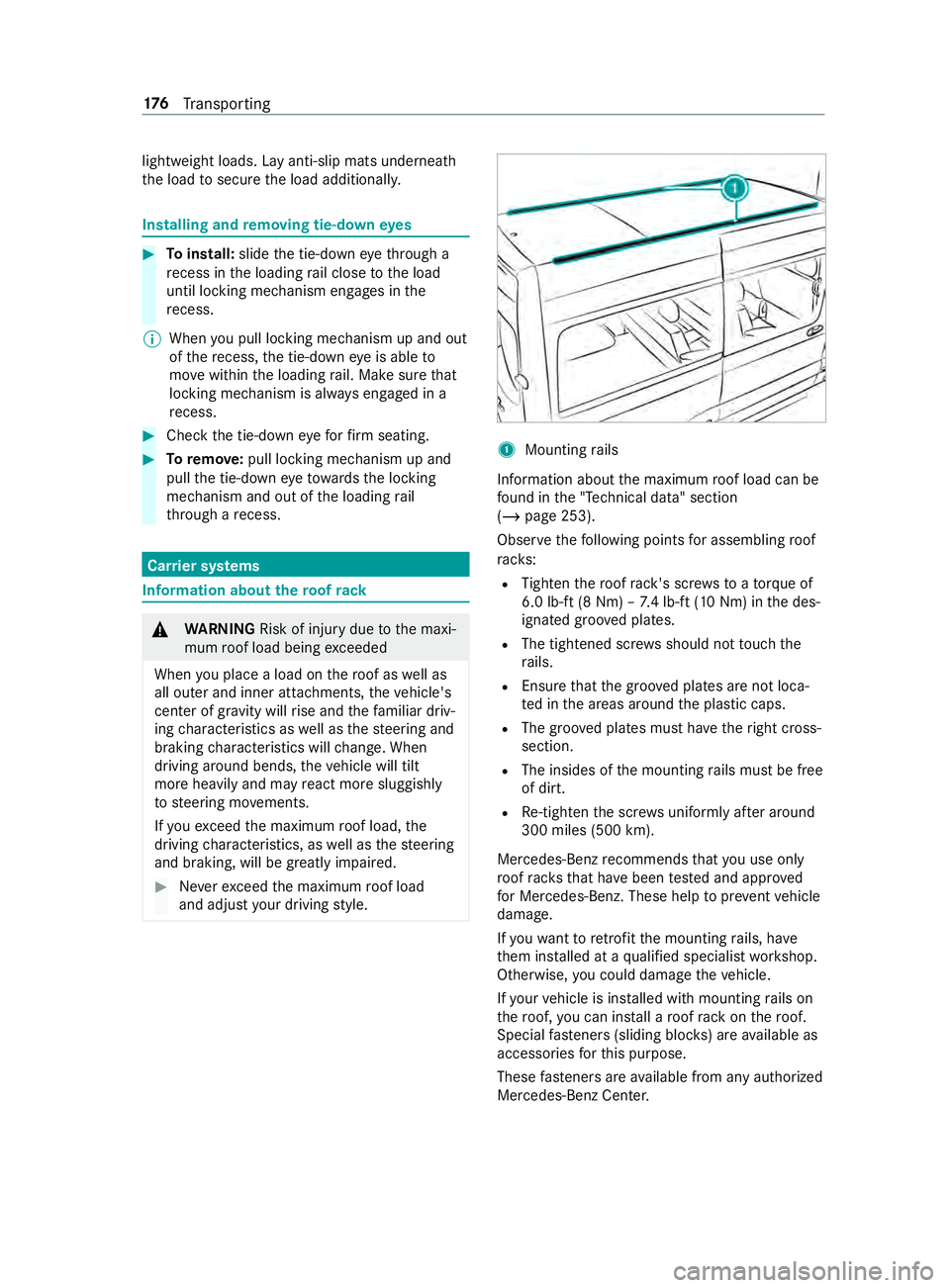
and adjus tyour driving style. 1
Mountin grails
Informatio nabout them aximum roof load can be
fo und in the" Tech nical data" section
(/ page253).
Obser vethef ollowing points fora ssembling roof
ra ck s:
R Tighten ther oof rack 's scr ewstoat orque of
6.0 lb-f t(8N m)–7.4 lb-f t(10 Nm) in thed es‐
ignated groo vedp lates.
R The tightened scr ewsshould no ttouc hthe
ra ils.
R Ensur ethat theg roove dplates ar enotloca‐
te dint he areas around thep lastic caps.
R The groo vedp lates mus thave ther ight cross-
sectio n.
R The insides of them ounting rails mus tbefree
of dirt.
R Re-tigh tent he scr ewsu niformly af tera round
300 mile s(500 km).
Mercedes-Benz recommends that youu se on ly
ro of rack st hat ha vebeen tested and appr oved
fo rM ercedes-Benz. These help topreve ntvehicle
damage.
If yo uw ant toretrofit them ounting rails, ha ve
th em ins talled at aqualified specialis tworks hop.
Otherwise, youc oul dd amag ethe vehicle.
If yo ur vehicle is ins talled wit hmountin grails on
th er oof, youc an install aroof rack on ther oof.
Special fastener s(sliding bloc ks)a re available as
accesso ries fort his purpose.
These fastener sareavailable from an yauthorized
Mercedes-Ben zCenter. 176
Transporting
Page 202 of 330
#
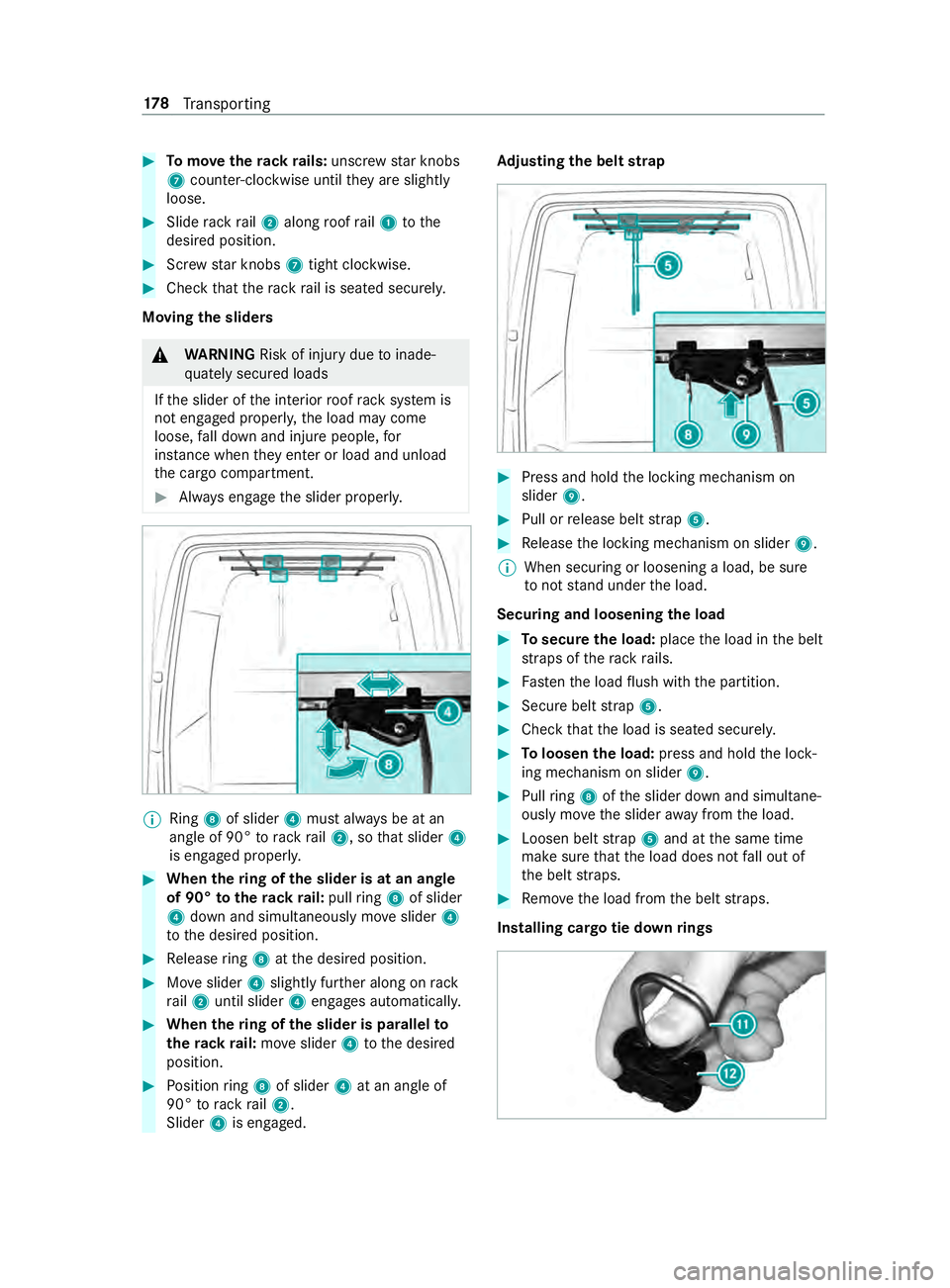
Tomo vether ackr ails: unscr ewstar knobs
7 coun ter-clockwise until they ares lightly
loose. #
Sliderackr ail 2 along roof rail1 tothe
desired position. #
Screw star knobs 7tight clo ckwise. #
Chec kthat ther ackr ail is seated securely.
Moving thes liders &
WARNING Risk of inju rydue toinade‐
qu atel ysecured loads
If th es lider of thei nterior roof rack system is
no te ngaged proper ly,t he load ma ycome
loose, fall down and injur epeople, for
ins tance when they enter or load and unload
th ec argo compartment. #
Alwayse ngag ethe slider properly. %
Ring
8of slider 4mus talway sbeatan
angle of 90° torack rail2,sot hat slider 4
is engaged proper ly. #
When ther ing of thes lider is at an angle
of 90° tother ackr ail: pullring 8of slider
4 down an dsimul taneously mo veslider 4
to thed esired position. #
Release ring 8 atthed esired position. #
Moveslider 4slightl yfurther along on rack
ra il2 until slider 4engages automaticall y. #
When ther ing of thes lider is pa rallel to
th er ackr ail: moveslider 4tothed esired
position. #
Position ring 8 of slider 4at an angle of
90° torack rail2.
Slider 4is engaged. Ad
justin gthe belt strap #
Press and hold thel ocking mechanism on
slider 9. #
Pull or release belt strap 5. #
Release thel ocking mechanism on slider 9.
% When securing or loosening
aload, be sure
to nots tand unde rthe load.
Securing and loosening thel oad #
Tosecur ethe load: placethel oad in theb elt
st ra ps of ther ackr ails. #
Fasten thel oad flush wit hthe partition. #
Secur ebelt strap 5. #
Chec kthat thel oad is seated securel y. #
Toloosen thel oad: press and hold thel ock‐
ing mechanism on slider 9. #
Pull ring 8 ofthes lider down and simultane‐
ously mo vethes lider away from thel oad. #
Loosen belt strap 5and at thes ame time
mak esuret hat thel oad does no tfall out of
th eb elt stra ps. #
Remo vethel oad from theb elt stra ps.
Installing cargo tie down rings 17 8
Transporting