display MERCEDES-BENZ SPRINTER 2019 MY19 with no MMS Operator’s Manual
[x] Cancel search | Manufacturer: MERCEDES-BENZ, Model Year: 2019, Model line: SPRINTER, Model: MERCEDES-BENZ SPRINTER 2019Pages: 322, PDF Size: 5.91 MB
Page 166 of 322

R
On slipper yroads. Accele rating can cause the
driv ewheels tolose traction and thev ehicle
could then skid.
R Ifyo ua redrivin gwhen visibilit yispoor.
Operating cruise cont rol&
WARNING Risk of accident du etostored
speed
If yo uc all up thes tore ds peed and this is
lo we rthan your cur rent speed ,the vehicle
decelerates. #
Take intoa ccount thet raffic situation
befor ecallin gupt hestored speed. Re
quirements:
R ESP ®
is activated, but ma ynotinter vene.
R The driving speed is at leas t15m ph
(20 km/h). #
Toactivat ecruise control: pushrocker
switch 1up. #
Remo veyour foot from thea ccelerator pedal.
The cur rent speed is then sa veda nd main‐
ta ined bythev ehicle. #
Push rocker switch 1up. #
Toincrease/reduce speed: pushrock er
switch 2up or down.
The stored speed is increased or reduced by
1m ph (1 km/h).
or #
Press rocker switch 2up or down and hold.
The stored speed is increased or reduced in
1m ph (1 km/h) increments.
or #
Push rocker switch 2beyond thep ressure
point.
The stored speed is increased or reduced by
5m ph (1 0km/h).
or #
Push rocker switch 2beyond thep ressure
point and hold.
The stored speed is increased or reduced in
5m ph (1 0km/h) increments.
or #
Accele rate thev ehicle tothed esired speed. #
Push rocker switch 2up.
If cruise cont rolisa ctivated and Traf ficS ign
Assi sthas de tected aspeed restriction sig nwith
am aximum permissible speed and this appears
in thei nstrument display: #
Toadop tthe de tected speed: pushrocker
switch 3up.
The maximum permissible speed shown by
th et raffic sign is stored and thev ehicle main‐
ta ins this speed. #
Todeactivat ecruisec ontrol: push rock er
switch 3(CNCL) down.
If cruise cont rolisd eactivated, it can be reactiva‐
te dasf ollows:
R rock er switch 2(SET+ )or(SET-) stores the
cur rent speed and thev ehicle maintains this
speed
R rock er switch 3(RES) calls up thel asts peed
st ored and thev ehicle maintains this speed
% Ifyo ub rake, deactivat eESP®
or if ESP ®
inter‐
ve nes, cruise control is deacti vated.
When yous wit ch offt he vehicle, thel ast
speed stored is cleared.
Setting thes peed limitation forw inte rt ires
On-boa rdcompu ter
4 Settings 5
Fahrzeug (Vehicle)
5 Winte rTires Limit #
Select aspeed or deactivat ethe function. Ac
tiv eD ista nce Assis tDISTRONIC Fu
nction of Activ eD ista nce Assis tDISTRONIC
Ac tiveD ista nce Assi stDISTRONI Cmaintains the
se ts peed on free-flowing roads. If vehicles ahead
ar ed etected, thes etdis tance is maintained ,if
necessa ryuntil thev ehicle comes toah alt.The
ve hicle accelerates or brakes depending on the
dis tance tothev ehicle in front and thes etspeed.
Speed and dis tance ar esetand stored on the 14 2
Driving and pa rking
Page 170 of 322
The
field of vision and other functions of ther ear
vie wc amer amaybe restricted du etoadditional
accesso ries on ther ear of thev ehicle (e.g.
license plat ebrack et or bicycle rack ).
% The inside
rearvie wmirro rd ispla ycontrast
ma ybei mpaire dd uetoincident sunligh tor
ot her light sources. In this case, pa yparticu‐
lar attention.
% Ha
ve thei nside rearvie wmirro rr epaired or
re placed if its use is considerabl yrestricted,
fo re xamp lethro ugh pixel er rors.
% Objects
that ar enotat ground le vela ppear
fur ther aw ay than they actuall yare.
Examples of suc hobjects:
R theb umper of avehicle par kedb ehind
R thed rawbar of atrailer
R theb all nec kofat railer coupling
R thet ail-en dofat ruck
R slanted posts
Displaying and hiding ther ear-vi ewmirror
displ ay
Displaying #
Engage reve rseg ear.
The rear vie wcamer aimag eappear sinthe
lef ta reaoft he inside rearvie wmirro r.
% Be
awareoft he sy stem limitations of ther ear
vie wc amer awithr ear-vie wmirro rd ispla y.
Hiding #
Engag eanother gear.
or #
Swit chofft he engine.
The displa ywill be hidden af teras horttime. AT
TENTION ASSI ST Fu
nction of ATTENTION ASSI ST
AT TENTION ASSIS Tcan assis tyou on long,
mono tonou sjou rney s, e.g. on free ways and
ex pressw ays. If ATTENTION ASSIS Tdetects ind i‐
cator soffatigue or increase dlap sesinc oncen‐
tration on thep artoft he driver ,itsuggests taking
ab reak.
AT TENTION ASSIS Tisonlyana id. It cannot
alw aysd etect dr owsiness or increased lapses in
concentration in good time. The sy stem is no ta
substitut efor aw ell-res teda nd attentiv edrive r.
On long journe ys,tak er egular and timel ybreaks
th at allo wyoutorest properly. Yo
uc an choose between tw osettings:
R Standard: normal sy stem sensitivity
R Sensitive: higher system sensitivity .The
driver is warned earlier and thea ttention le vel
de tected bythes ystem (Attention Le vel) is
adap teda ccordingly.
If fatigue or increased lapse sinconcentration are
de tected, theATTENTION ASSIST: Take aBreak!
wa rning appear sinthe Instrument Displa y.Yo u
can acknowledge them essag eand take ab reak if
necessar y.Ifyo udon ottake ab reak and ATTEN‐
TION ASSIS Tcontinues todetect increased lap‐
ses in concentration, youw ill be warned again
af te ram inimu mof15m inutes. Instrument Displa
y(color display)
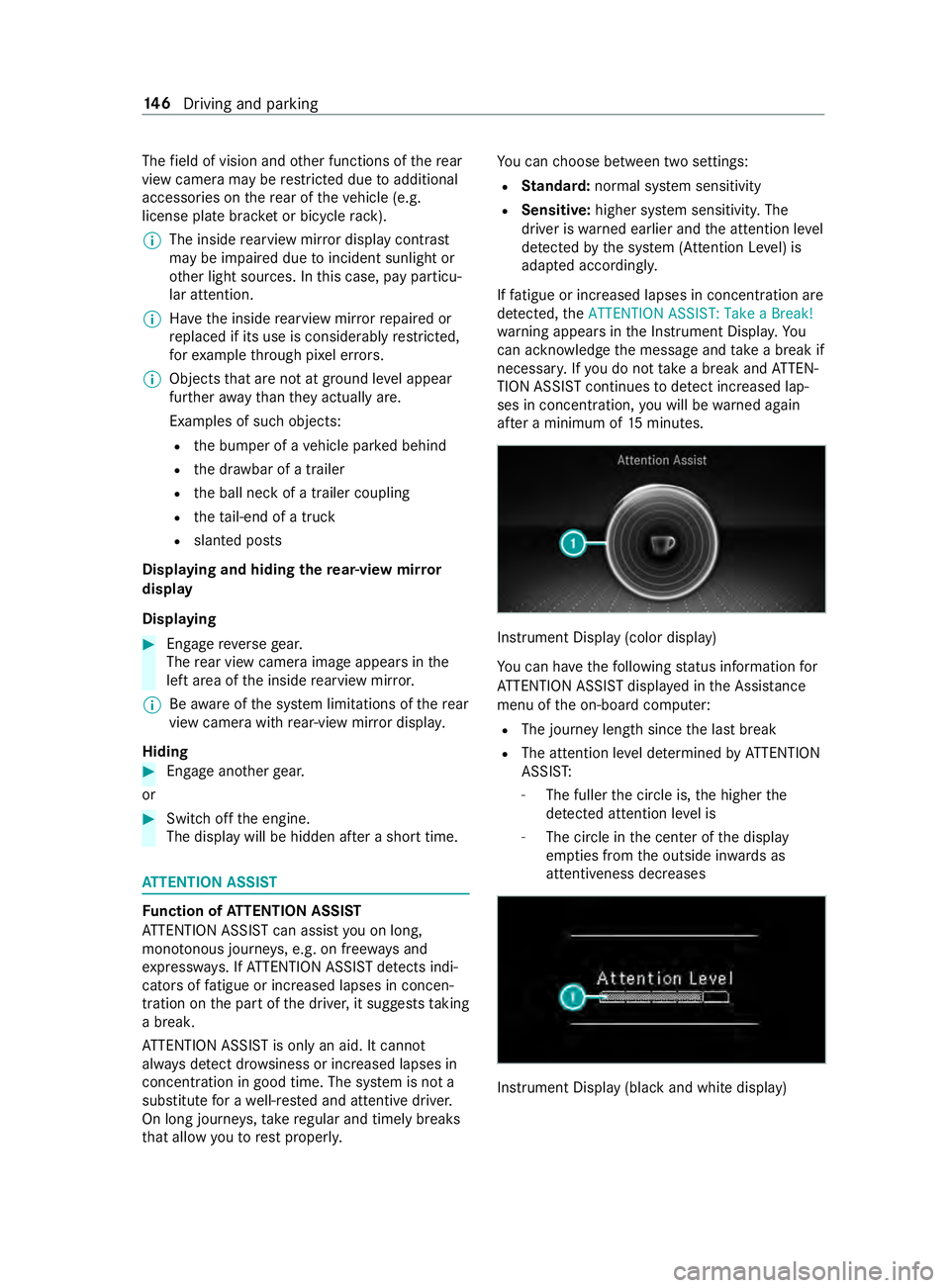
Yo uc an ha vethef ollowing status information for
AT TENTION ASSIS Tdispla yedint he Assis tance
menu of theo n-boar dcomputer:
R The journe ylengt hsince thel astb reak
R The attention le veld etermined byATTENTION
ASSIS T:
- The fuller thec ircle is, theh igher the
de tected attentio nleve lis
- The circle in thec enter of thed isplay
em pties from theo utside in wardsas
attentiveness decreases Instrument Displa
y(blac kand whit edisplay) 14 6
Driving and pa rking
Page 171 of 322

Yo
uc an ha vethef ollowing status information for
AT TENTION ASSIS Tdispla yedint he Assis tance
menu of theo n-boar dcomputer:
R The journe ylengt hsince thel astb reak
R The attention le veld etermined byATTENTION
ASSIS T:
- The fuller theb ar is, theh igher thed etec‐
te da ttention le velis
- The bar em pties as attentivenes sdecrea‐
ses
If AT TENTION ASSIS Tcann otcalculat ethe atten‐
tion le vela nd canno tissue awarning ,the Atten-
tion Level messageappears.
If AT TENTION ASSIS Tisdeactivated, the00D7
symbol appear sinthe assis tance graphi cinthe
instrument display whenthee ngine is running.
AT TENTION ASSIS Tisactivated automatically
when thee ngine is re-sta rted. The las tselected
sensitivity le velremain sstore d.
Sy stem limitations
AT TENTION ASSIS Tisactiveint he37 mph
(60 km/h) to124m ph (200 km/h )spee drange.
Th ef unctionality of ATTENTION ASSIS Tisrestric‐
te d, and warnings ma ybedelayedorn otoccur at
all, in thef ollowing situations:
R The journe ylasts less than appr oximately
30 minutes
R The road condition is poor (une venr oad sur‐
fa ce or po tholes)
R The vehicle is subjected toas tron gc rosswind
R Youh ave asporty drivin gstyle (hig hcorner‐
ing speeds or high ratesofa cceleration)
R The time is se tincor rectly
R Youc hang elane sand vary your spee dfre‐
qu ently in activ edriving situations
The ATTENTION ASSIS Tdrow sines sora lertness
assessment is dele teda nd restar tedw hen con‐
tinuin gthe journe yinthefollowing situations:
R Ifyo us wit ch offt he engine
R Ifyo uu nfas teny our seat belt and open the
driver's door (e.g. chang edrive rs or take a
break) Setting
ATTENTION ASSI ST
On-boar dcomputer:
4 Settings 5
DriveAssist
5 Attention Assist (Attention Assist)
Setting options
The following settings ar eavailable:
R Standard
R Sensitive
R Off #
Select asetting. Blin
dSpotA ssist Fu
nction of Blind Spo tAssis twith exitwa rn‐
ing
Blind Spo tAssis tuses tw olateral, rear-facing
ra dar sensor stomonitor thea read irectl ynextto
and on thes ide behind thev ehicle.
% US
Ao nly:
This device has been appr ovedbyt he FCC as
a" Vehicular Radar Sy stem". The radar sensor
is intended foru se in an automotiv eradar
sy stem onl y.Re mo val,ta mp ering, or altering
of thed evice will void an ywarranties, and is
no tp ermit tedbyt he FCC. Do no ttamper
with, alter or use in an ynon-appr ovedw ay.
An yu nauthorize dmodificatio ntothis device
could void theu ser ’sauthority tooperat ethe
equipment. &
WARNING Risk of accident despit eBlind
Spo tAssist
Blind Spo tAssis treacts neither tostationary
object snortovehicles approaching and over‐
ta king youatag reatly di fferent speed.
As aresult, Blind Spo tAssis tcanno twarn
driver sinthese situations. #
Alwaysp aycareful attention tothet raf‐
fi cs ituation and maintai nasafed is‐
ta nce at thes ide of thev ehicle. Blind Spo
tAssis tiso nlyana id. It ma yfail to
de tect some vehicles and is no substitut efor
attentiv edriving. Alw ayse nsur ethat ther eiss uf‐
fi cient dis tance tothes ide foro ther road users
and obs tacles.
If av ehicle is de tected ab oves peeds of appr ox‐
imatel y7.5mp h(12 km/h) and this vehicle sub‐
sequentl yenter sthe monitoring rang ed irec tly
next toyour vehicle, thew arning lam pinthe out‐
side mir rorlights up red. Driving and parking
147
Page 174 of 322
Fu
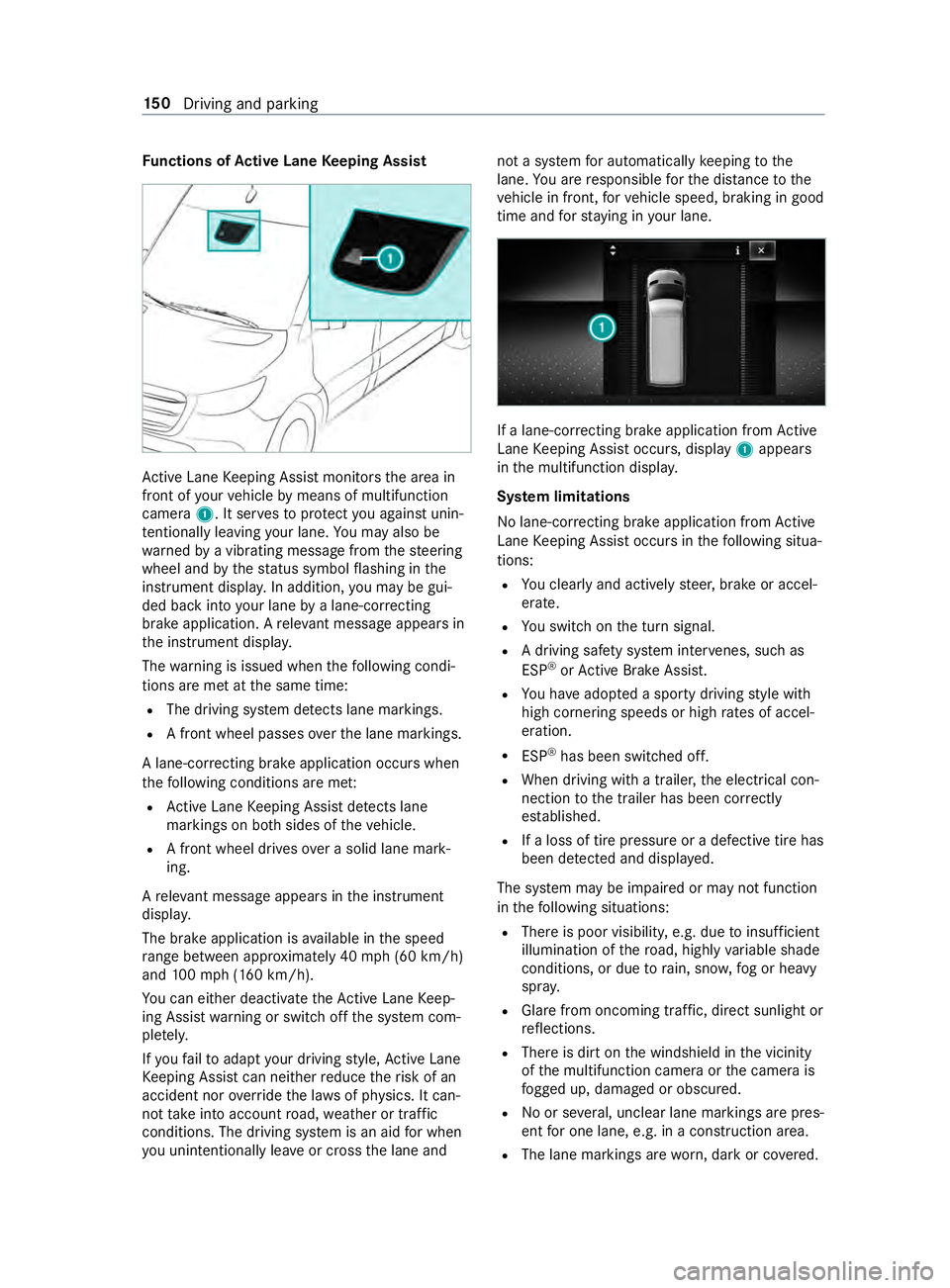
nctions of Activ eL aneK eeping Assist Ac
tiveL aneK eeping Assis tmonitor sthe area in
front of your vehicle bymeans of multifunction
camera 1.Itserve stop rotect youa gains tunin‐
te ntionally le aving your lane .You ma yalso be
wa rned byavibratin gmessag efromt hesteering
wheel and bythes tatus symbo lflashing in the
instrument displa y.In addition, youm aybe gui‐
ded bac kintoy our lane byalane-cor recting
brak eapplication. Arele vant messa geappear sin
th ei nstrument displa y.
The warning is issued when thef ollowing condi‐
tions ar emetat thes ame time:
R The driving sy stem de tects lane markings.
R Afront wheel passe soverthe lane markings.
Al ane-cor recting brak eapplication occu rswhen
th ef ollowing condition sareme t:
R ActiveL aneK eeping Assis tdetects lane
markings on bo thsides of thev ehicle.
R Afront wheel drives overas olidl ane mark‐
ing.
Ar ele vant messa geappear sinthe instrument
displa y.
The brak eapplication is available in thes peed
ra ng eb etwe en appr oximately 40 mph(60 km/h)
and 100m ph (160 km/h).
Yo uc an either deactivat ethe ActiveL aneK eep‐
ing Assis twarning or switc hoffthes ystem com‐
ple tely.
If yo uf ail toadap tyour driving style, Ac tiveL ane
Ke eping Assis tcan neither reduce ther isk of an
accident nor override thel aw sofp hysics. It can‐
no ttak ei ntoa ccount road, weather or traf fic
conditions. The driving sy stem is an aid forw hen
yo uu nintentionally le aveor cross thel ane and no
tas ystem fora utomatically keeping tothe
lane. Youa re re sponsible fort he dis tance tothe
ve hicle in front, forv ehicle speed, braking in good
time and fors taying in your lane. If
al ane-cor recting brak eapplication from Active
Lane Keeping Assis toccurs, display 1appears
in them ultifunction displa y.
Sy stem limitations
No lane-cor recting brak eapplication from Active
Lane Keeping Assis toccur sint hefollowing situa‐
tions:
R Youc learly and activel ysteer,b rake or accel‐
erate.
R Yous wit ch on thet urns ignal.
R Adriving saf etys ystemi nter venes, su chas
ESP ®
or ActiveB rake Assi st.
R Youh ave adop tedas porty driving stylew ith
high cornering speeds or high ratesofa ccel‐
eration.
R ESP ®
has been switched off.
R When driving wit hatrailer ,the electrical con‐
nection tothet railer has been cor rectly
es tab lished.
R Ifal oss of tir epressur eorad efectivetireh as
been de tected and displa yed.
The sy stem ma ybeimpaired or ma ynotfunction
in thef ollowing situations:
R Ther eisp oor visibilit y,e.g. due toinsuf ficient
illumination of ther oad, high lyvariable shade
conditions, or due torain, sno w,fogorh eavy
spr ay.
R Glar efromo ncomin gtraf fic, direct sunligh tor
re flections.
R Ther eisd irtont he windshield in thev icinity
of them ultifunction camera or thec amera is
fo gged up, damaged or obscured.
R No or se veral, unclear lane markings ar epres‐
ent foro ne lane, e.g. in aconstruction area.
R The lane markings ar eworn, dar korcovered. 15 0
Driving and pa rking
Page 182 of 322
Overvie
wofInstrument Display &
WARNING Risk of accident du etoan
instrumen tdispla ymalfunction
If th eI nstrument Displa yhasfailed or mal‐
functioned, youm aynotrecognize function
re strictions applying tosaf etyr ele vant sys‐
te ms.
The operating saf etyofy ourvehicle ma ybe
impaired. #
Driv eonc arefull y. #
Have thev ehicle checkedi mmediately
at aq ualified specialis tworks hop. If
yo ur vehicle's operational saf etyisi mpaired,
par kthe vehicle in asafel ocation immediatel y.
Infor maq ualified specialis tworks hop.
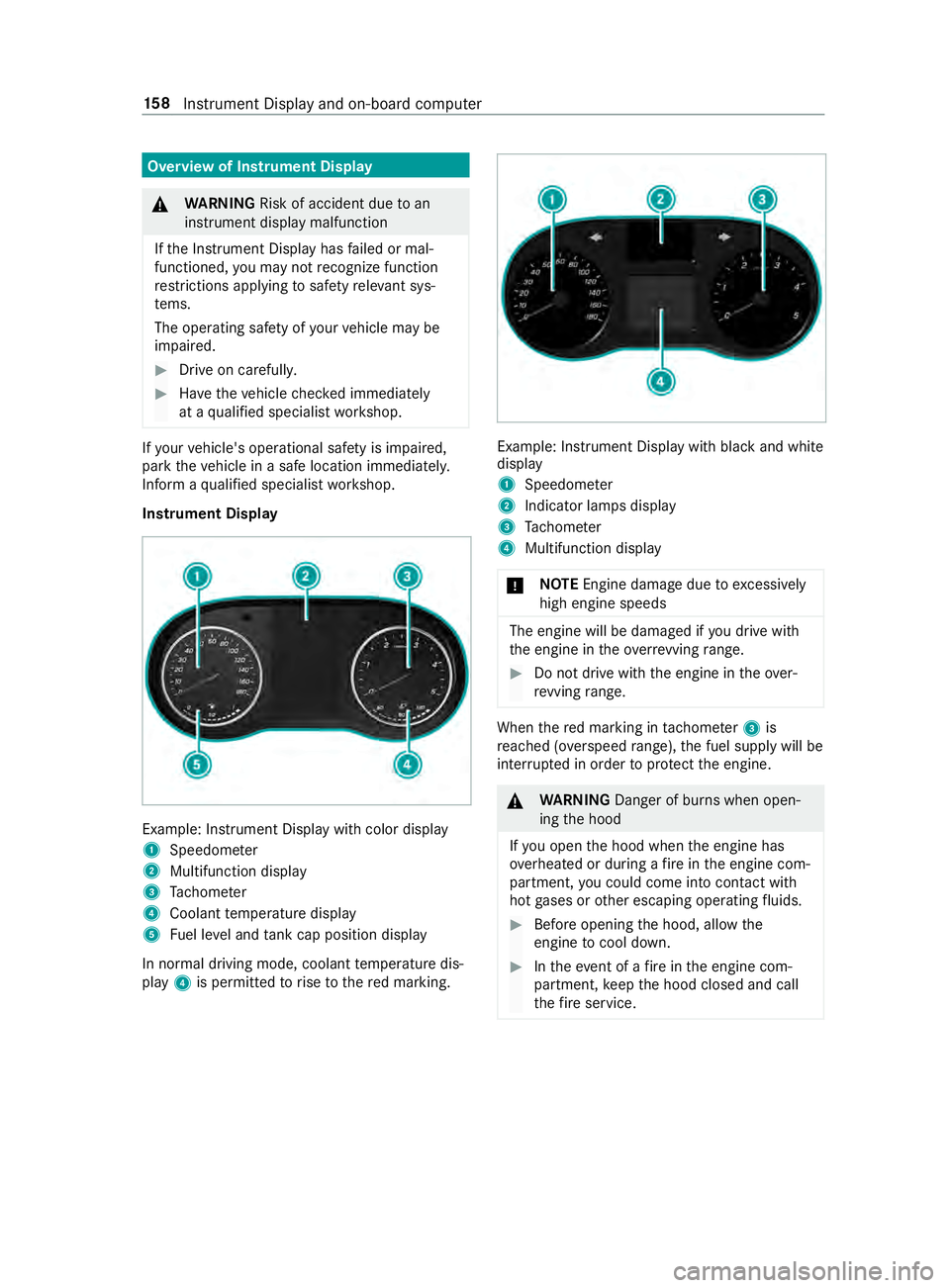
Instrument Display Example: Instrument Displa
ywithc olor display
1 Speedome ter
2 Multifunction display
3 Tach ome ter
4 Coolan ttemperatur edisplay
5 Fuel le vela nd tank cap position displ ay
In normal driving mode, coolant temp eratur edis‐
play 4is permitted torise tother ed marking. Example: Instrument Displa
ywithb lacka nd white
display
1 Speedome ter
2 Indicator lamps display
3 Tach ome ter
4 Multifunction display
* NO
TEEngine damag eduetoexc essively
high engine speeds The engine will be damaged if
youd rive with
th ee ngine in theo verrev ving range. #
Do no tdrive with th eengine in theo ver‐
re vving range. Whe
nthe redm arking in tach ome ter3 is
re ached (o verspeed range) ,the fuel supply will be
inter rupte dino rder toprotect thee ngine. &
WARNING Danger of bu rnsw hen open‐
ing theh ood
If yo uo pen theh ood when thee ngine has
ove rheated or during afireint he engine com‐
partment, youc oul dc om eintoc ontact wi th
ho tg ases or other escaping operating fluids. #
Befor eopening theh ood, allo wthe
engine tocool down. #
Inthee vent of afireint he engine com‐
partment, keep theh ood closed and call
th ef ires ervice. 15 8
Instrument Displa yand on-boar dcomputer
Page 183 of 322
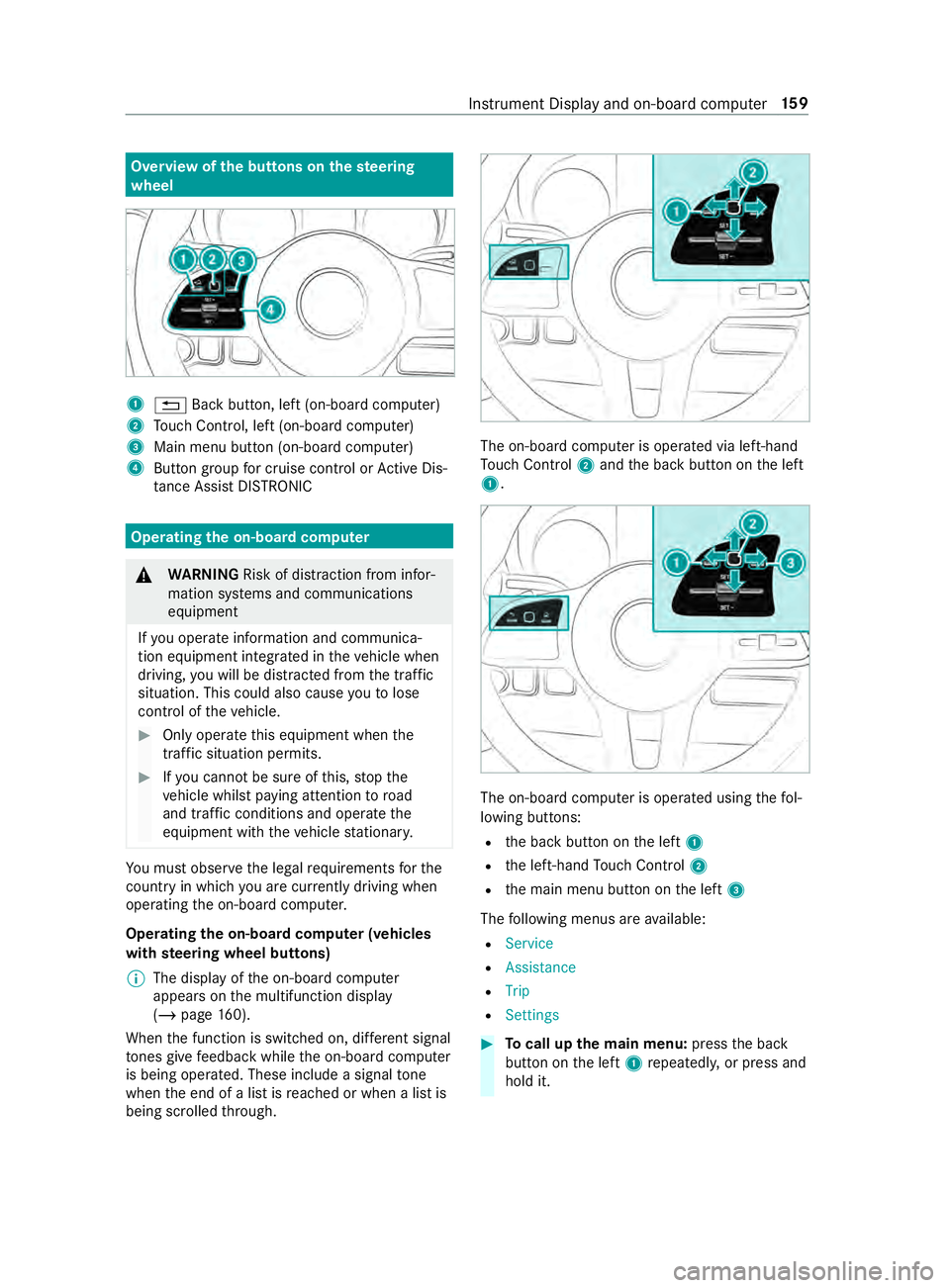
Overvie
wofthe buttons on thes teering
wheel 1
0038 Backbutton, lef t(on-boar dcomputer)
2 Touc hC ontrol, lef t(on-boar dcomputer)
3 Main men ubutton (on-boar dcomputer)
4 Buttong roup forc ruisec ontrol or ActiveD is‐
ta nce Assi stDISTRONIC Ope
ratin gthe on-boar dcom puter &
WARNING Risk of distraction from infor‐
mation sy stems and communications
equipment
If yo uo perat einformation and communica‐
tio ne quipment integ ratedint hevehicle when
driving, youw ill be distracted from thet raffic
situation. This could also cause youtol ose
control of thev ehicle. #
Onlyoperat ethis equipment when the
traf fics ituation permits. #
Ifyo uc anno tbes ureoft his,stop the
ve hicle whils tpaying attention toroad
and traf ficc onditions and ope rate the
equipment wit hthe vehicle stationar y. Yo
um usto bse rvet he legal requirements fort he
countr yinwhich youa recur rentl yd riving when
ope rating theo n-boar dcomputer.
Operating theo n-boa rdcompu ter( ve hicles
with steering wheel but tons)
% The displa
yofthe on-boar dcomputer
appear sonthe multifunction display
(/ page160).
When thef unction is switched on, dif fere nt signal
to nes gi vefeedbac kwhile theo n-boar dcomputer
is being operated. These include asignal tone
when thee nd of alistisr eached or when alistis
bein gscrolled thro ugh. The on-boar
dcomputer is operated via left-hand
To uc hC ontrol 2and theb ackb utton on thel eft
1. The on-boar
dcomputer is operated using thef ol‐
lowing buttons:
R theb ackb utton on thel eft 1
R thel eft-hand Touc hC ontrol 2
R them ain menu button on thel eft 3
The following menus ar eavailable:
R Service
R Assistance
R Trip
R Settings #
Tocall up them ainm enu: press theb ack
button on thel eft 1 repeatedly ,orpress and
hold it. Instrument Displa
yand on-boar dcomputer 15 9
Page 184 of 322
%
Ve
hicles without Activ eD ista nce Assist
DISTRO NIC:youc an call up them ain menu
of theo n-boar dcomputer wit hthe 00E2 but‐
to n. #
Tobrows ethrough them enu bar: swipeto
th el eftorr ight on left-han dTouc hControl
2. #
Tocall up amenuorc onfirmas election:
press left-han dTouc hControl 2. #
Tobrows ethrough displa ysor lists in the
menu: swipe upwards or down wardsonl eft-
hand Touc hC ontrol 2. #
Tocall up asubmenu or confir maselec‐
tion: press left-han dTouc hControl 2. #
Toexitas ubmenu: presstheb ackb utton on
th el eft 1.
If yo ua reinas ubmenu and press and hold the
bac kbutton on thel eft 1,t he main menu
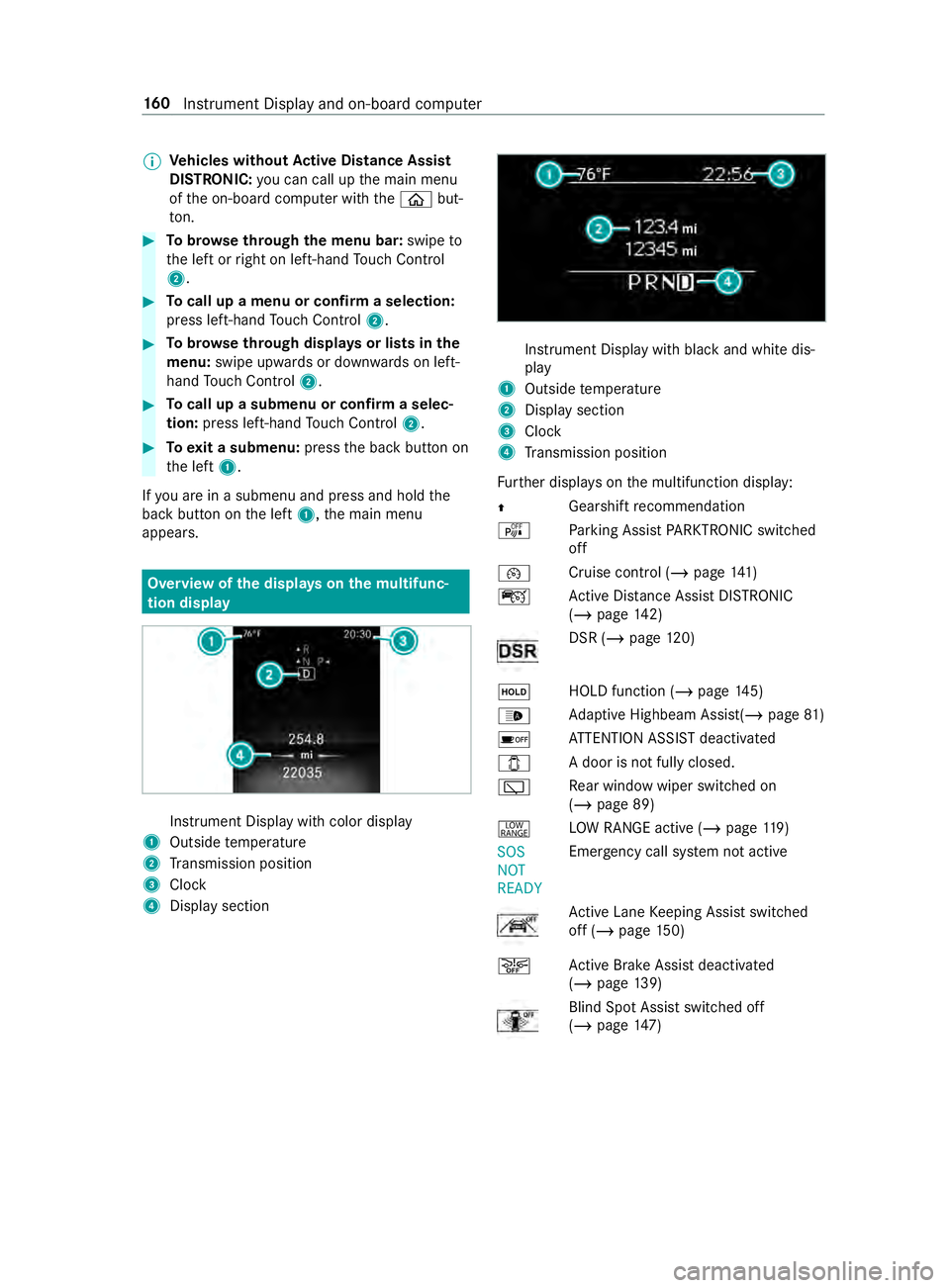
appears. Overvie
wofthe displa yson them ultifunc‐
tion display In
stru ment Displa ywithc olor display
1 Outsid etemperature
2 Transmission position
3 Clock
4 Displa ysection In
stru ment Displa ywithb lack and whit edis‐
play
1 Outside temp erature
2 Displa ysection
3 Clock
4 Transmission position
Fu rther displa yson them ultifunction display:
0097 Gearshif
trecommendation
é Parking Assis tPARKTRONIC switched
off
00B2 Cruise control (/
page 141)
ç ActiveD ista nce Assi stDISTRONIC
(/ page 142) DSR (/
page 120)
00D9 HOLD fu
nction(/pa ge145)
00CE Ad
aptiv eHighbeam Assist(/ page81)
00D7 AT
TENTION ASSIS Tdeactivated
003E Ad
oor is no tfully closed.
00C5 Re
ar wind owwiper swit ched on
(/ page89)
002E LO
WR ANGE activ e(/pag e119 )
SOS
NOT
RE ADY Emergency cal
lsyst em no tactive Ac
tiveL aneK eeping Assis tswitched
of f(/pag e150)
00D4 Ac
tiveB rake Assi stdeactivated
(/ page139) Blind Spo
tAssistswitched off
(/ page147) 16 0
Instrument Displa yand on-boar dcomputer
Page 185 of 322
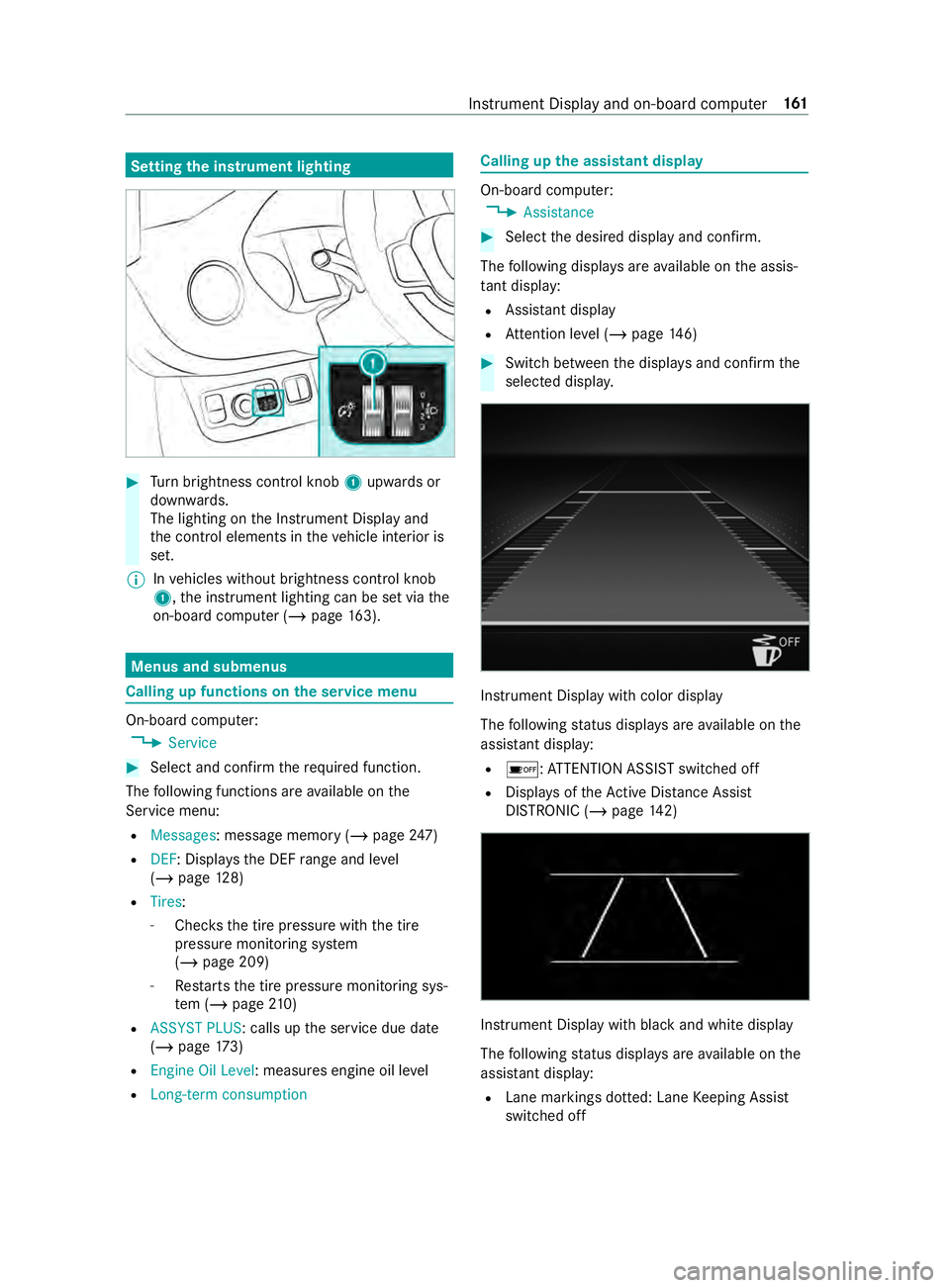
Setting
thei nstrument lighting #
Turn brightness control knob 1upwards or
down wards.
The lighting on theI nstrument Displa yand
th ec ont role lements in thev ehicle interior is
set.
% In
vehicles without brightness contro lknob
1 ,the instrument lighting can be se tviathe
on-boar dcomputer (/ page163). Menus and submenus
Callin
gupf unction sont he servic emenu On-boar
dcomputer:
4 Service #
Selec tand con firm ther equired function.
The following function sareavailable on the
Service menu:
R Messages:m essagememo ry (/ pag e247)
R DEF:D isplayst he DEF rang ea nd le vel
( / pag e128)
R Tires:
- Che ckst he tir epressur ewitht he tire
pressur emonitoring sy stem
(/ page209)
- Restarts thet irep ressur emonitoring sys‐
te m( /pag e210)
R ASSYST PLUS:c alls upthes ervice due date
(/ page173)
R Engine Oil Level :measures engine oil le vel
R Long-term consumption Calling up
thea ssistant display On-boar
dcomputer:
4 Assistance #
Selec tthe desired displa yand confirm.
The following displa ysarea vailable on thea ssis‐
ta nt displ ay:
R Assi stant display
R Attention le vel(/ pag e146) #
Switc hbetwe en thed ispla ysand con firm the
selected displa y. Instrument Displa
ywithc olor display
The following status displa ysarea vailable on the
assis tant displ ay:
R 00D7 :ATTENTION ASSIS Tswitched off
R Displa ysoftheA ctiv eDista nce Assi st
DISTRONI C(/pag e142) Instrument Displa
ywithb lack and whit edisplay
The following status displa ysarea vailable on the
assis tant displ ay:
R Lane markings dotted: Lane Keeping Assist
switched off Instrument Displa
yand on-boar dcomputer 161
Page 186 of 322
R
Lane markings solid and thin: Lane Keeping
Assis tswitched on, no tready toissue warn‐
ings
R Lane markings solid and thick: Lane Keeping
Assis tready toissue warnings Calling up displa
yson thet ripm enu On-boar
dcomputer:
4 Trip #
Selec tthe desired displa yand confirm.
The following displa ysarea vailable on thet rip
menu:
R Standar ddisplay
R Rangea nd cur rent fue lconsu mption
Wi th cer tain engines arecuperation displa yis
also shown. If only asmall amount of fue lis
lef tint he fuel tank ,av ehicle being refueled
appear sins tead of thea ppr oximat erange.
R ECOd ispl ay ( /pag e113 )
R Trip computer:
- FromS tart
- FromR eset
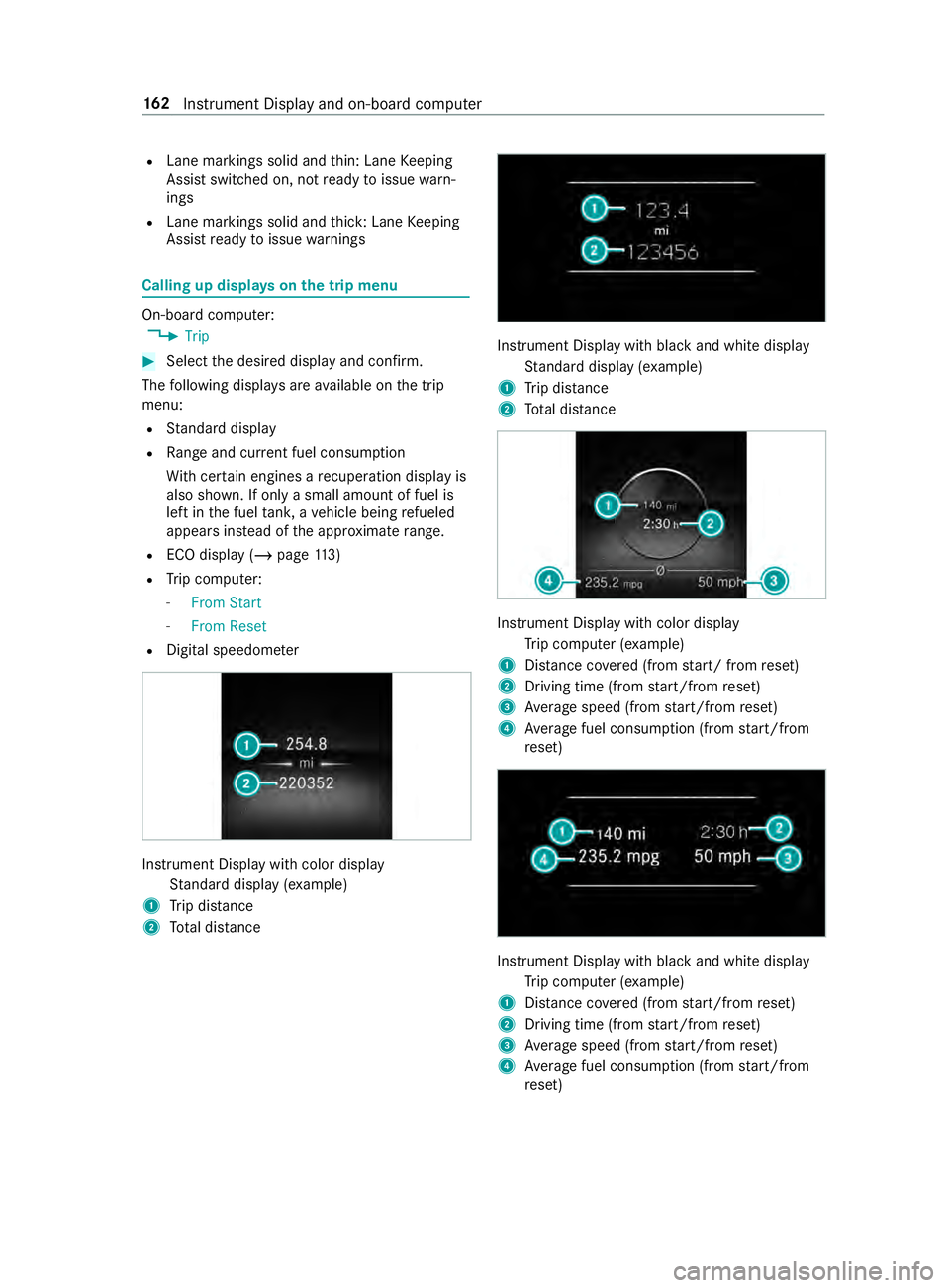
R Digital speedom eter Instrument Displa
ywithc olor display
St andar ddispla y(example)
1 Trip dis tance
2 Totald ista nce Instrument Displa
ywithb lacka nd whit edisplay
St andar ddispla y(example)
1 Trip dis tance
2 Totald ista nce Instrument Displa
ywithc olo rdisplay
Tr ip computer (e xamp le)
1 Distance co vered( from start/ from reset)
2 Driving time (from start/from reset)
3 Averag espeed (from start/from reset)
4 Averag efuel consum ption (from start/from
re set) Instrument Displa
ywithb lacka nd whit edisplay
Tr ip computer (e xamp le)
1 Distance co vered( from start/from reset)
2 Driving time (from start/from reset)
3 Averag espeed (from start/from reset)
4 Averag efuel consum ption (from start/from
re set) 16 2
Instrument Displa yand on-boar dcomputer
Page 187 of 322

Re
setting values on theo n-boa rdcompu ter
trip menu On-board computer:
4 Trip
% The spelling of
thed ispla yedm ain menu may
dif fer. Therefore, pa yattention tothem enu
ove rviewf orthei nstrument display
(/ page159).
Yo uc an rese tthe values of thef ollowing func‐
tions:
R Trip Odometer:
- Reset Trip Odometer?
R Trip computer:
- FromS tart
- FromR eset
R ECOd isplay #
Selec tthe function that is tobe rese ta nd
confir mthis selection. #
Confir mtheReset Values? promptwith Yes. Calling up settings on
theo n-boa rdcompu ter On-boar
dcomputer:
4 Settings
The following ent ries can be se tonthe Settings
menu:
R DriveAssist
- Switching ESP(ESP) on and off
- Switching Akt. Spurhalte-Assistent (Active
Lane Keeping Assist) on and off
- Switching Spurhalte-Assistent (Lane
Ke eping Assist) on and off
- Switching Aktiver Brems-Assistent (Active
Brak eAssist) on and off
- Switching Totwinkel-Assistent (Blind Spot
Assist) on and off
- Switching Attention Assist (Attention
Assist) on and off
R Light
- Switching Tagfahrlicht (Daytimerunning
lights )ona nd off
- Switching Leuchtzeitinnen (Illumination
pe riod inside) on and off
- Switching Leuchtzeit außen (Illumination
period outside) on and off -
Switching Auffindbeleuchtung (Locator
lighting) on and off
- Setting Instrument lighting
R Vehicle
- Setting Winterreifen-Limit (Winter tires
limit)
- Switching Akust.Schließen (Acoustic
locking) on and off
- Switching Autom. Verriegelung (Autom.
locking) on and off
- Switching Ruhezustand (Standby) on and
off
- Switching Regensensor (Rainsensor) on
and off
R Setting Heating
R Displa yand Operation
- Selecting Sprache (Language)
- Setting Uhrzeit
- Setting Datum
- Setting Einheiten
- Switching pe rmanent Display DE VLevel
on and off
- Operation: Swit chAkust. Bedienrückmeld.
(Acou stic operational feedback) on and
of fa nd set Touch-Control-Empfindl.
(Touch-Cont rols ensitivity)
R Factory Settings:R estoring settings #
Select an entr yand confir mthe selection. #
Mak ethe necessar ychanges. Instrument Displa
yand on-boar dcomputer 16 3