warning MERCEDES-BENZ SPRINTER 2020 MY20 with 7” screen
[x] Cancel search | Manufacturer: MERCEDES-BENZ, Model Year: 2020, Model line: SPRINTER, Model: MERCEDES-BENZ SPRINTER 2020Pages: 348, PDF Size: 5.84 MB
Page 176 of 348
Overvie
wofInstrument Display &
WARNING Risk of accident du etoan
instrumen tdispla ymalfunction
If th eI nstrument Displa yhasfailed or mal‐
functioned, youm aynotrecognize function
re strictions applying tosaf etyr ele vant sys‐
te ms.
The operating saf etyofy ourvehicle ma ybe
impaired. #
Driv eonc arefull y. #
Have thev ehicle checkedi mmediately
at aq ualified specialis tworks hop. If
yo ua reuncer tain rega rding theo perational
saf etyofy ourvehicle, par kthe vehicle safel yas
soon as possible. Infor maqualified specialist
wo rkshop.
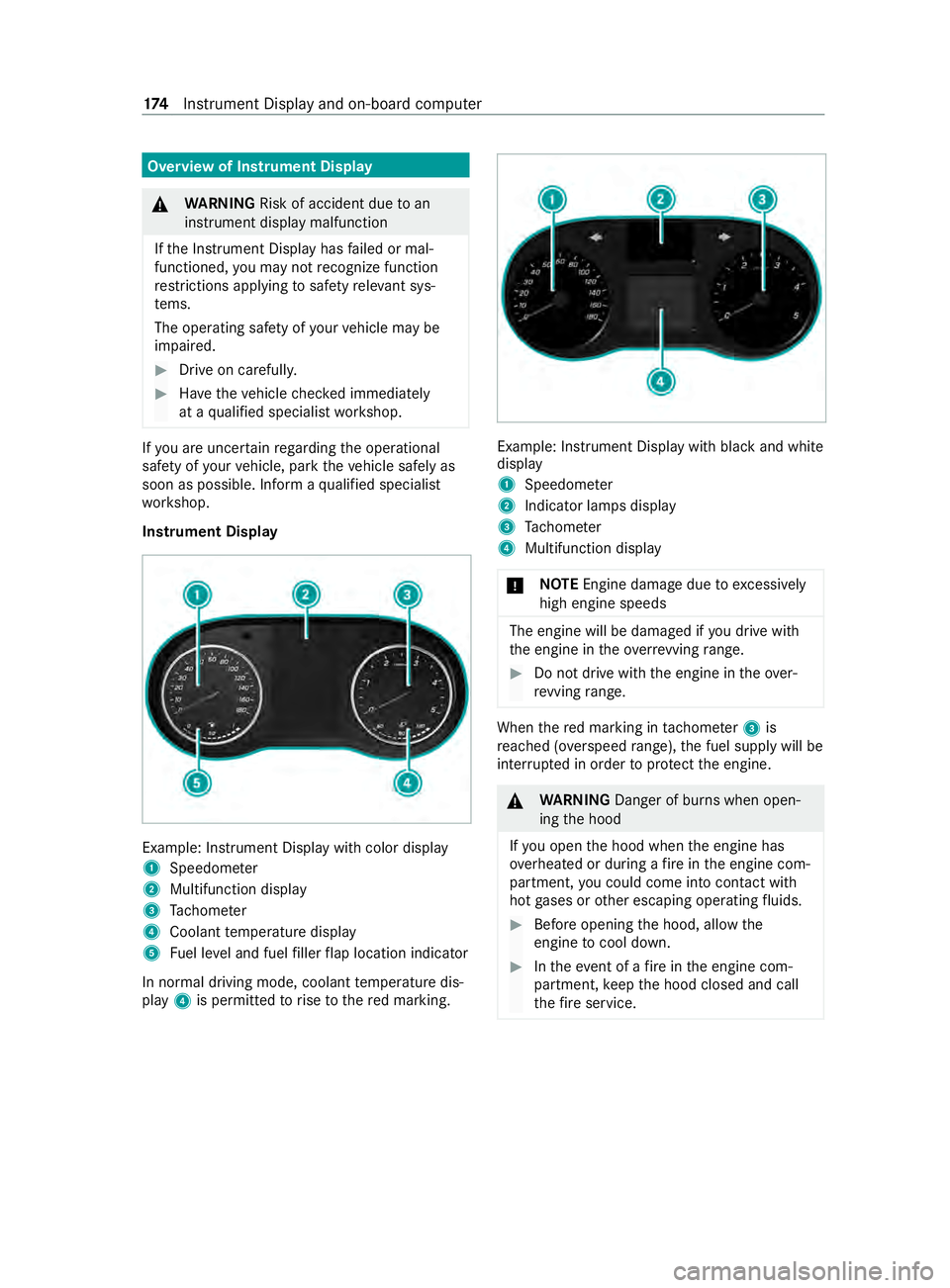
Instrument Display Example: Instrument Displa
ywithc olor display
1 Speedome ter
2 Multifunction display
3 Tach ome ter
4 Coolan ttemperatur edisplay
5 Fuel le vela nd fuel filler flap locatio nindicator
In normal drivin gmode,coolant temp eratur edis‐
play 4is permitted torise tother ed marking. Example: Instrument Displa
ywithb lacka nd white
display
1 Speedome ter
2 Indicator lamps display
3 Tach ome ter
4 Multifunction display
* NO
TEEngine damag eduetoexc essively
high engine speeds The engine will be damaged if
youd rive with
th ee ngine in theo verrev ving range. #
Do no tdrive with th eengine in theo ver‐
re vving range. Whe
nthe redm arking in tach ome ter3 is
re ached (o verspeed range) ,the fuel supply will be
inter rupte dino rder toprotect thee ngine. &
WARNING Danger of bu rnsw hen open‐
ing theh ood
If yo uo pen theh ood when thee ngine has
ove rheated or during afireint he engine com‐
partment, youc oul dc om eintoc ontact wi th
ho tg ases or other escaping operating fluids. #
Befor eopening theh ood, allo wthe
engine tocool down. #
Inthee vent of afireint he engine com‐
partment, keep theh ood closed and call
th ef ires ervice. 174
Instrument Displa yand on-boar dcomputer
Page 177 of 348
Overvie
wofthe buttons on thes teering
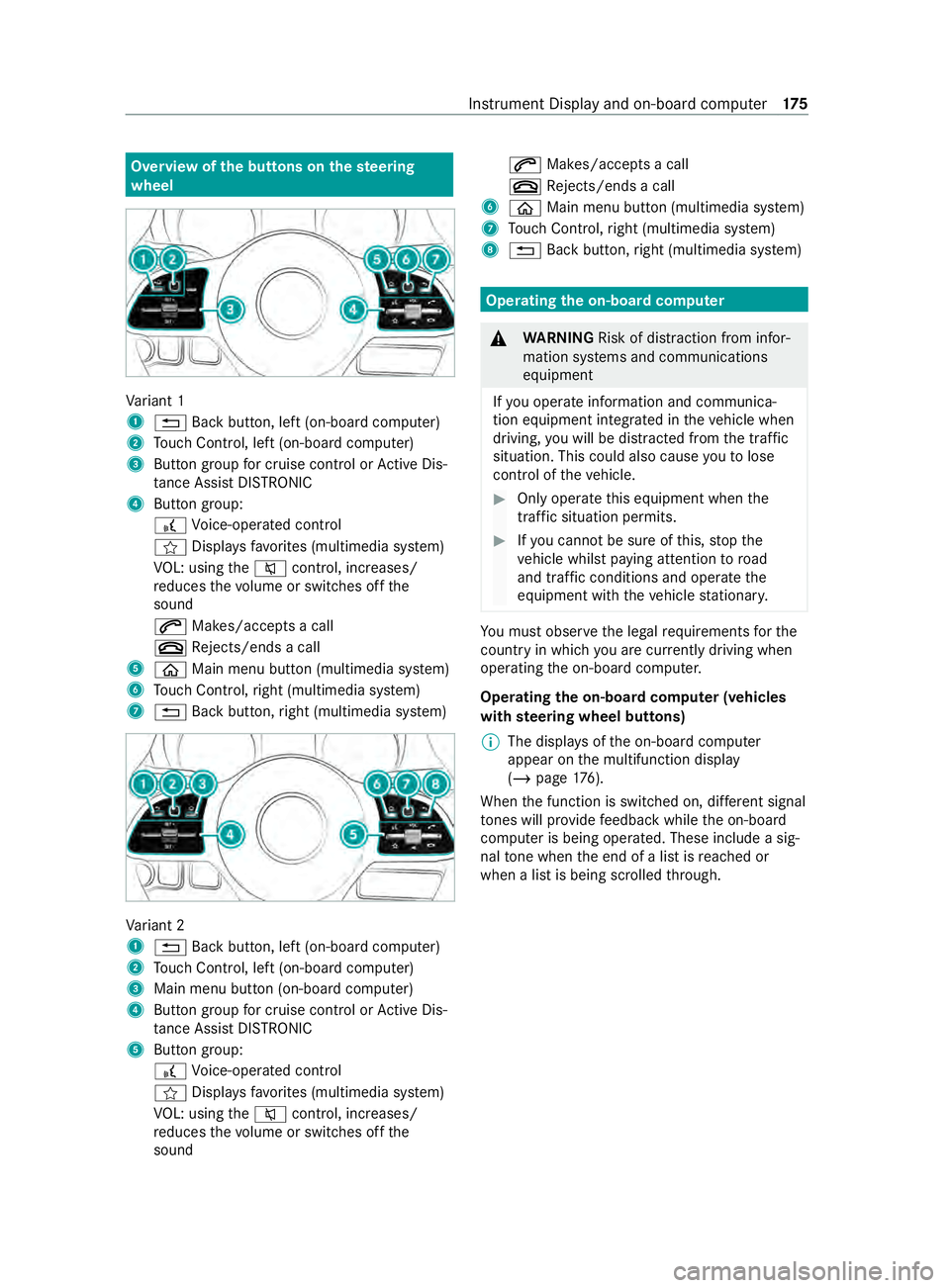
wheel Va
riant 1
1 0038 Backbutton, lef t(on-boar dcomputer)
2 Touc hC ontrol, lef t(on-boar dcomputer)
3 Buttong roup forc ruisec ontrol or ActiveD is‐
ta nce Assi stDISTRONIC
4 Button group:
£ Voice-opera tedc ontrol
f Displa ysfavo rite s( multimedia sy stem)
VO L: using the0063 control, inc reases/
re duces thev olume or switches of fthe
sound
0061 Makes/accepts acall
0076 Rejects/end sacall
5 00E2 Main menu button (multimedia sy stem)
6 Touc hC ontrol, right (multimedia sy stem)
7 0038 Backbutton, right (multimedia sy stem) Va
riant 2
1 0038 Backbutton, lef t(on-boar dcomputer)
2 Touc hC ontrol, lef t(on-boar dcomputer)
3 Main men ubutton (on-boar dcomputer)
4 Buttong roup forc ruisec ontrol or ActiveD is‐
ta nce Assi stDISTRONIC
5 Button group:
£ Voice-opera tedc ontrol
f Displa ysfavo rite s( multimedia sy stem)
VO L: using the0063 control, inc reases/
re duces thev olume or switches of fthe
sound 0061
Makes/accepts acall
0076 Rejects/end sacall
6 00E2 Main menu button (multimedia sy stem)
7 Touc hC ontrol, right (multimedia sy stem)
8 0038 Backbutton, right (multimedia sy stem) Operating
theo n-boa rdcompu ter &
WARNING Risk of distraction from infor‐
mation sy stems and communications
equipment
If yo uo perat einformation and communica‐
tio ne quipment integ ratedint hevehicle when
driving, youw ill be distracted from thet raffic
situation. This could also cause youtol ose
control of thev ehicle. #
Onlyoperat ethis equipment when the
traf fics ituation permits. #
Ifyo uc anno tbes ureoft his,stop the
ve hicle whils tpaying attention toroad
and traf ficc onditions and ope rate the
equipment wit hthe vehicle stationar y. Yo
um usto bse rvet he legal requirements fort he
countr yinwhich youa recur rentl yd riving when
ope rating theo n-boar dcomputer.
Operating theo n-boa rdcompu ter( ve hicles
with steering wheel but tons)
% The displa
ysoftheo n-boar dcomputer
appear on them ultifunction display
(/ page176).
When thef unction is switched on, dif fere nt signal
to nes will pr ovide feedbac kwhile theo n-board
computer is being operated. These include asig‐
nal tone when thee nd of alistisr eached or
when alistisb eingscrolled thro ugh. In
stru ment Displa yand on-boar dcomputer 175
Page 180 of 348
Callin
gupt he Assistance graphic display On-board computer:
4 Assistance #
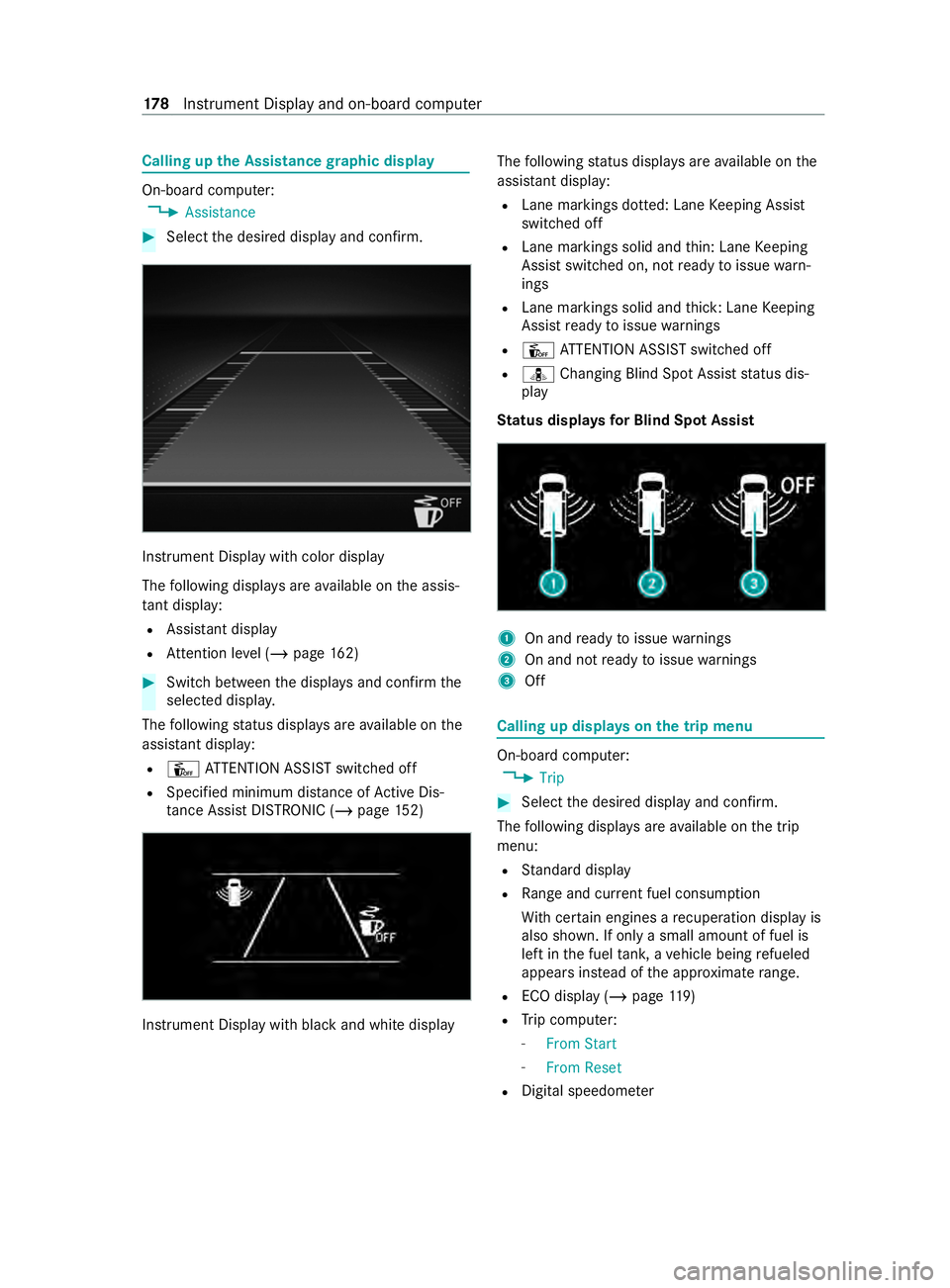
Select thed esired displa yand confirm. Instrument Displa
ywithc olor display
The following displa ysarea vailable on thea ssis‐
ta nt displ ay:
R Assi stant display
R Attention le vel(/ pag e162) #
Switc hbetwe en thed ispla ysand con firm the
selected displa y.
The following status displa ysarea vailable on the
assis tant displ ay:
R Û ATTENTION ASSIS Tswitched off
R Specified minimum dis tance of ActiveD is‐
ta nce Assi stDISTRONI C(/pag e152) Instrument Displ
aywit hb lacka nd whit edisplay The
following status displa ysarea vailable on the
assis tant displ ay:
R Lane markings dotted: Lane Keeping Assist
switched off
R Lane markings solid and thin: Lane Keeping
Assis tswitched on, no tready toissue warn‐
ings
R Lane markings solid and thick: Lane Keeping
Assis tready toissue warnings
R Û ATTENTION ASSIS Tswitched off
R ¸ Changing Blind Spo tAssis tstatus dis‐
play
St atus displa ysforB lind Spo tAssist 1
On an dready toissue warnings
2 On and no tready toissue warnings
3 Off Calling up displa
yson thet ripm enu On-boar
dcomputer:
4 Trip #
Selec tthe desired displa yand confirm.
The following displa ysarea vailable on thet rip
menu:
R Standar ddisplay
R Rangea nd cur rent fue lconsu mption
Wi th cer tain engines arecuperation displa yis
also shown. If only asmall amount of fue lis
lef tint he fuel tank ,av ehicle being refueled
appear sins tead of thea ppr oximat erange.
R ECOd ispl ay ( /pag e119 )
R Trip computer:
- FromS tart
- FromR eset
R Digital speedom eter 17 8
Instrument Displa yand on-boar dcomputer
Page 182 of 348
Selecting
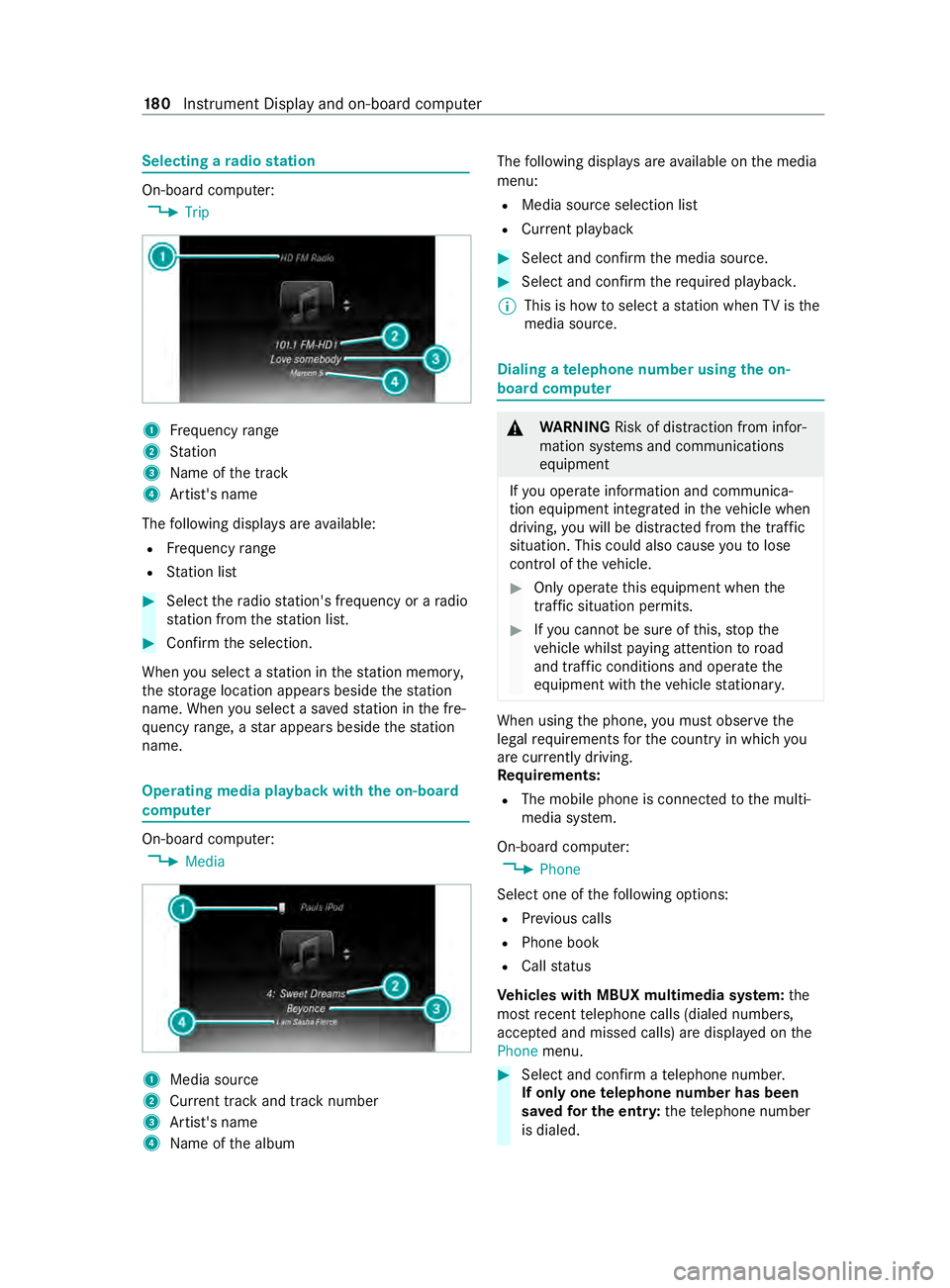
aradio station On-board computer:
4 Trip 1
Frequency range
2 Station
3 Name of thet rack
4 Artist's name
The following displa ysarea vailable:
R Frequency range
R Statio nlist #
Select ther adio station' sfrequ encyorar adio
st atio nfromt hestatio nlist. #
Confir mthe selection.
When yous elec tas tatio nint hestatio nm emor y,
th es tora ge location appear sbeside thes tation
name. When yous elec tas avedstatio nint he fre‐
qu ency range, astara ppear sbesid ethe station
name. Operating media playba
ckwit hthe on-board
comp uter On-boar
dcomputer:
4 Media 1
Media source
2 Current trac kand trac knumber
3 Artist's name
4 Name of thea lbum The
following displa ysarea vailable on them edia
menu:
R Media source selection list
R Current pl ayback #
Select and con firm them edia source. #
Select and confir mtherequ ired playbac k.
% This is ho
wtoselectastatio nw hen TVisthe
media source. Dialing
atelephone number using theo n-
boar dcompu ter &
WARNING Risk of distraction from infor‐
mation sy stems and communications
equipment
If yo uo perat einformation and communica‐
tio ne quipment integ ratedint hevehicle when
driving, youw ill be distracted from thet raffic
situation. This could also cause youtol ose
control of thev ehicle. #
Onlyoperat ethis equipment when the
traf fics ituation permits. #
Ifyo uc anno tbes ureoft his,stop the
ve hicle whils tpaying attention toroad
and traf ficc onditions and ope rate the
equipment wit hthe vehicle stationar y. When using
thep hone, youm usto bse rvet he
legal requirements fort he countr yinwhichyou
ar ec urrently driving.
Re quirements:
R The mobile phone is connec tedtot he multi‐
media sy stem.
On-boar dcomputer:
4 Phone
Select one of thef ollowing options:
R Prev ious calls
R Phon ebook
R Call status
Ve hicles with MBUX multimedia sy stem: the
mos trecen ttelephone calls (dialed numbers,
accep teda nd missed calls) ar edispla yedont he
Phone menu. #
Select and confir matelephone number.
If onl yone telephone number has been
sa ve df or th eentry: thet elephone number
is dialed. 18 0
Instrument Displa yand on-boar dcomputer
Page 187 of 348
Overvie
wand operation Overvie
wofthe MBUX multi media sy stem &
WARNING Risk of distraction from infor‐
mation sy stems and communications
equipment
If yo uo perat einformation and communica‐
tio ne quipment integ ratedint hevehicle when
driving, youw ill be distracted from thet raffic
situation. This could also cause youtol ose
control of thev ehicle. #
Onlyoperat ethis equipment when the
traf fics ituation permits. #
Ifyo uc anno tbes ureoft his,stop the
ve hicle whils tpaying attention toroad
and traf ficc onditions and ope rate the
equipment wit hthe vehicle stationar y. Yo
um usto bse rvet he legal requirements fort he
countr yinwhich youa recur rentl yd riving when
ope rating them ultimedia sy stem.
MBUX stands forM ercedes-Benz User Experi‐
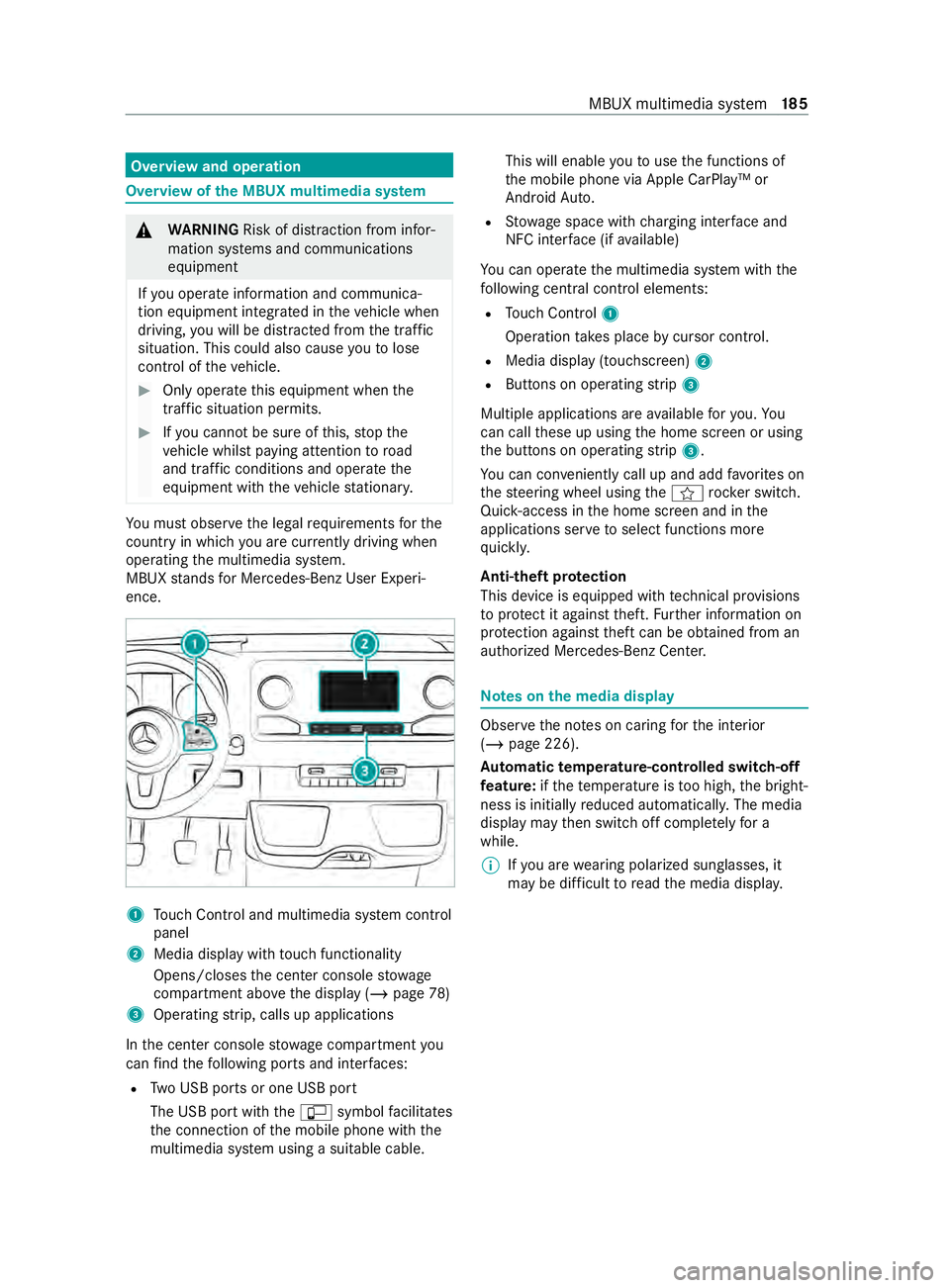
ence. 1
Touc hC ontrol and multimedia sy stem cont rol
panel
2 Media displa ywitht ouc hfunctionality
Opens/closes thec enter console stowage
compartment abo vethed ispla y(/pag e78)
3 Operating strip, calls up applications
In thec enter console stowagec ompartment you
can find thef ollowing ports and inter faces:
R TwoU SB ports or one USB port
The USB por twitht he ç symbol facilitates
th ec onnection of them obile phone wit hthe
multimedia sy stem using asuitable cable. This will enable
youtou sethef unctions of
th em obile phone via Apple CarPlay™ or
Android Auto.
R Stow ages pac ewithc harging inter face and
NFC inter face (i favailable)
Yo uc an operat ethe multimedia sy stem wit hthe
fo llowing central control elements:
R Touc hC ontrol 1
Operatio ntakes plac ebycursor control.
R Media displa y(touchscreen) 2
R Button sonoperating strip 3
Multiple applications ar eavailable fory ou. Yo u
can cal lthese up using theh ome screen or using
th eb uttons on operating strip 3.
Yo uc an con veniently cal lupand ad dfavo rite son
th es teering wheel using thef rock er switch.
Quic k-access in theh ome screen and in the
applications ser vetoselect functions more
qu ickl y.
Anti-thef tprotection
This devic eisequipped wit htechnical pr ovisions
to protect it agains ttheft. Further information on
pr otection agains tthef tcan be obtained from an
authorized Mercedes-Benz Center. Note
sont he media display Obser
vethen otes on caring fort he interior
(/ page226).
Au tomatic temperature-cont rolled switch-off
fe ature: ifth et emperatur eistoo high, theb right‐
ness is initiall yreduced automaticall y.The media
displa ymaythen switc hoffcomple tely fora
while.
% If
yo ua rewe aring polarize dsunglasses ,it
ma ybed ifficul ttor eadthem edia displa y. MBUX multimedia sy
stem 18 5
Page 192 of 348
#
Press on aphone number until theOPTIONS
menu is shown. #
Select Save as Favorite.
The contact is added as afavo rite. #
Tosto rearadio station as aglobal favo r‐
ite: setar adio statio n(/ pag e205). #
Press on ther adio statio nuntil the OPTIONS
menu is shown. #
Select Save as Favorite.
The radio statio nisa dded as afavo rite.
Re naming favo rites #
Tapon©in them edia displa y.
The home screen is shown. #
Swipe up until FAVORITESis shown. #
Press on afavo rite until theOPTIONS menu is
shown. #
Select Rename . #
Ente rthe name. #
Select OK.
Moving favo rites
Moving favo rite sint hefavo rite sm enu #
Tapon©in them edia displa y.
The home screen is shown. #
Swipe up until FAVORITESis shown. #
Press on afavo rite until theOPTIONS menu is
shown. #
Select Move. #
Movethef avo rite to then ew position. #
Tapon00FB .
Deleting favo rites #
Tapon©in them edia displa y.
The home screen is shown. #
Swipe up until FAVORITESis shown. #
Press on afavo rite until theOPTIONS menu is
shown. #
Select Delete. #
Select Yes. Entering
characters Using
thec haracter input function &
WARNING Risk of distraction from infor‐
mation sy stems and communications
equipment
If yo uo perat einformation and communica‐
tio ne quipment integ ratedint hevehicle when
driving, youw ill be distracted from thet raffic
situation. This could also cause youtol ose
control of thev ehicle. #
Onlyoperat ethis equipment when the
traf fics ituation permits. #
Ifyo uc anno tbes ureoft his,stop the
ve hicle whils tpaying attention toroad
and traf ficc onditions and ope rate the
equipment wit hthe vehicle stationar y. Yo
um usto bse rvet he legal requirements fort he
countr yinwhich youa recur rentl yd riving when
ope rating them ultimedia sy stem.
Character entry can be carried out wit hthese
contro lelements:
R Touc hC ontrol
R Touchsc reen (media display)
Character entry take sp lace bycursor control
whe nusing theT ouc hControl.
Character input can be star tedw ithac ontrol ele‐
ment and resumed wit hanother. #
When thek eyboar diss hown, en tert he char‐
acter sont he contro lelemen tbyswiping and
pressing or bytapping (touchscreen).
or #
Writet he character on thet ouchscreen.
Examples of character ent ry:
R Renaming afavo rite
R Entering atelephone number 19 0
MBUX multimedia sy stem
Page 196 of 348
Te
lephone Te
lephony Te
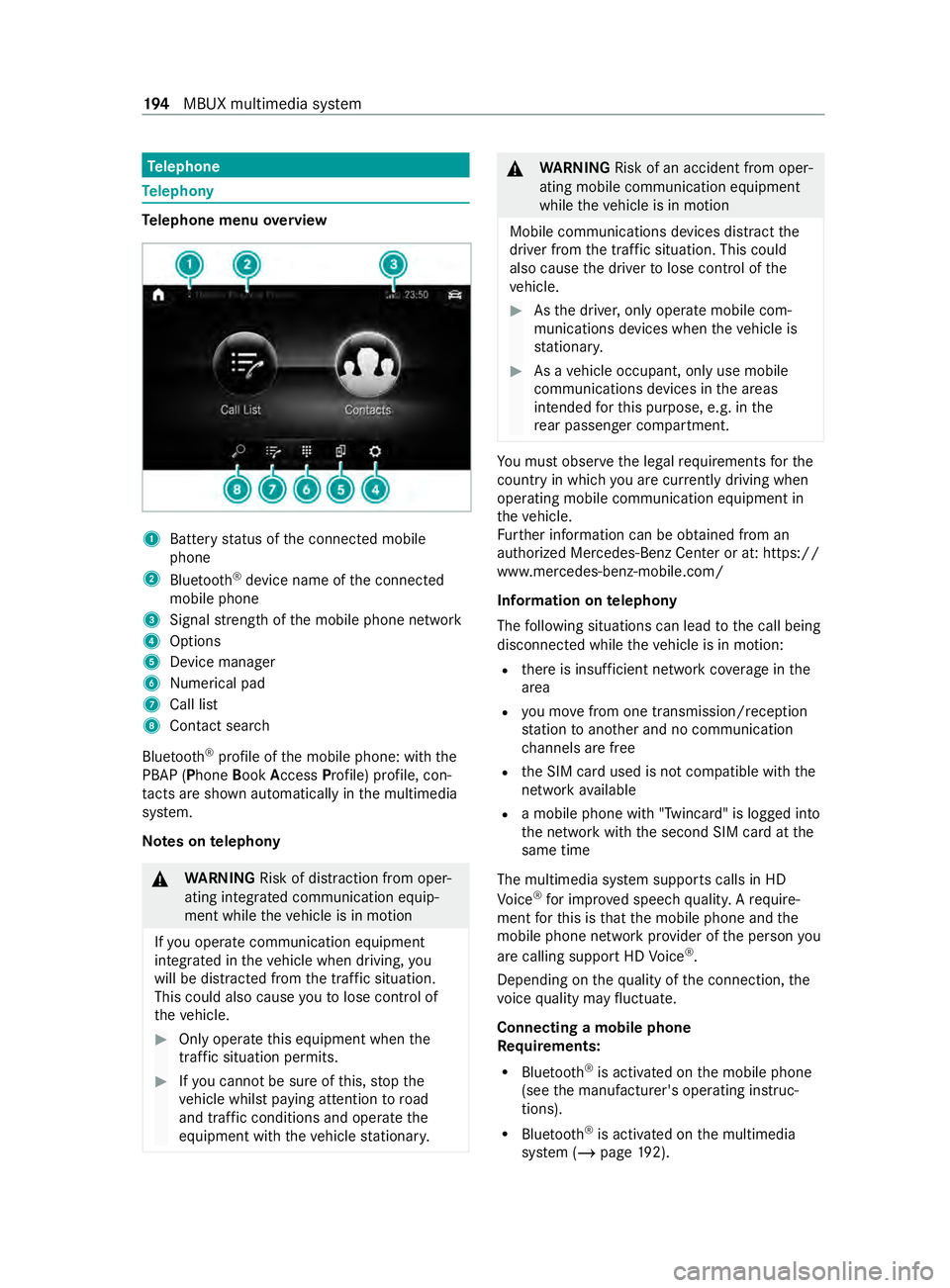
lephone menu overview 1
Batter ystatus of thec onnected mobile
phone
2 Blue tooth ®
device name of thec onnected
mobile phone
3 Signal stre ngt hoft he mobile phone network
4 Options
5 Device manager
6 Numerical pad
7 Call list
8 Contact sear ch
Blu etoo th®
profile of them obile phone: wit hthe
PBAP (Phone BookAccess Profile) profile, con‐
ta cts ar eshown au tomatically in them ultimedia
sy stem.
Note sont elephony &
WARNING Risk of distraction from oper‐
ating integrated communication equip‐
ment while thev ehicle is in motion
If yo uo perat ecommunication equipment
integ ratedint hevehicle when driving, you
will be distracted from thet raffic situation.
This could also cause youtol ose control of
th ev ehicle. #
Onlyoperat ethis equipment when the
traf fics ituation permits. #
Ifyo uc anno tbes ureoft his,stop the
ve hicle whils tpaying attention toroad
and traf ficc onditions and ope rate the
equipment wit hthe vehicle stationar y. &
WARNING Risk of an accident from oper‐
ating mobile communication equipment
while thev ehicle is in motion
Mobile communication sdevices distract the
driver from thet raffic situation .Thisc ould
also cause thed rive rtol ose control of the
ve hicle. #
Asthed rive r,onl yoperat emobile com‐
munications devices when thev ehicle is
st ationar y. #
Asavehicle occupant, onl yuse mobile
communication sdevices in thea reas
intended fort his purpose, e.g. in the
re ar passenger compartment. Yo
um usto bse rvet he legal requirements fort he
countr yinwhich youa recur rentl yd riving when
ope rating mobil ecommunication equipment in
th ev ehicle.
Fu rther information can be obtained from an
authorized Mercedes-BenzC enter or at:https://
www.mercedes-benz-mobile.com/
Information on telephony
The following situations can lead tothec all being
disconnected while thev ehicle is in motion:
R ther eisi nsufficient networ kcove rage inthe
area
R youm ovef romo ne transmission/reception
st atio ntoa nother and no communication
ch annels ar efree
R theS IM car dused is no tcompatible wit hthe
networ kavailable
R amobile phon ewith" Twincard" is logged into
th en etwo rkwit hthe second SIM car datthe
same time
The multimedia sy stem supports calls in HD
Vo ice ®
fori mp rove ds peec hquality .Arequire‐
ment fort his is that them obile phone and the
mobil ephone networ kprovide roft he person you
ar ec allin gsuppor tHDV oice®
.
Depending on theq uality of thec onnection ,the
vo ice quality ma yfluctuate.
Connecting amobile phone
Re quirements:
R Blue tooth ®
is activated on them obile phone
(see them anufacturer's operating instruc‐
tions).
R Blue tooth ®
is activated on them ultimedia
sy stem (/ page192). 194
MBUX multimedia sy stem
Page 200 of 348
If
th eP BAPB luetooth ®
profile is no tsuppor ted,
th ee ffects ar easfollows:
R The multimedia sy stem generates acalllist
independentl yassoon as calls ar emade in
th ev ehicle.
R The call lis tisnotsynchronized wit hthe call
lists in them obile phone.
Making acall from thec all list
Multimedia sy stem:
4 © 5
Phone #
Select +Recent Calls. #
Select an entry.
The call is made.
Calling up additional options in thec all list
Multimedia sy stem:
4 © 5
Phone #
Select +Recent Calls. #
Forp reviousl ystore dc ontacts: select 0048in
th el ine of an entry.
The sear chresults ar edispla yed. Apple CarPlay
® Overvie
wofApple CarPlay ® &
WARNING Risk of distraction from infor‐
mation sy stems and communications
equipment
If yo uo perat einformation and communica‐
tio ne quipment integ ratedint hevehicle when
driving, youw ill be distracted from thet raffic
situation. This could also cause youtol ose
control of thev ehicle. #
Onlyoperat ethis equipment when the
traf fics ituation permits. #
Ifyo uc anno tbes ureoft his,stop the
ve hicle whils tpaying attention toroad
and traf ficc onditions and ope rate the
equipment wit hthe vehicle stationar y. Yo
um usto bse rvet he legal requirements fort he
countr yinwhich youa recur rentl yd riving when
ope rating them ultimedia sy stem.
iPhone ®
functions can be used via them ultime‐
dia sy stem using Apple CarPlay ®
.T he ya reoper‐
ated using thet ouchscreen, Touc hC ontrol or the
Siri ®
vo ice-operated control sy stem. Youc an acti‐
va te thev oice-operated control sy stem bypress‐ ing and holding
the£ button on them ultifunc‐
tion steering wheel.
Onl yone mobile phone at atime can be connec‐
te dv ia Apple CarPlay ®
to them ultimedia sy stem.
The availabilit yofApple CarPlay ®
ma yvary
according tothec ount ry.
The service pr ovider is responsible fort his appli‐
cation and thes ervices and content connected to
it.
Apple CarPlay ®
is ar egis tere dt rademar kof
Apple Inc.
Information on Apple CarPlay ®
When Apple CarPlay ®
is being used, thei Pod ®
media source is no tavailable fort he respective
iPhone ®
.
Connecting an iPhone ®
via Apple CarPlay ®
(with cable)
Requ irements:
R The multimedia sy stem is equipped wit hthe
function.
R The cur rent version of your device's operating
sy stem is being used (see them anufacturer's
operating instructions).
R The full rang eoff unctions forA pple CarPlay ®
is only available wit hanInterne tconnection. #
Connect thei Phone ®
to the ç USB port
on them ultimedia sy stem using asuitable
cable (/ page203). #
If no other device is connected wit hthe sys‐
te mv ia Blue tooth®
:c onfir mthe dat aprotec‐
tion pr ovisions. #
If ano ther device is connected via Blue tooth®
or Apple CarPlay ®
(wireless) wit hthe sy stem:
ta pont heTap here to start Apple CarPlay
for:
or #
Select thei Phone ®
in the í device list
under thea pplication.
The pr evious connection via Blue tooth®
or
Apple CarPlay ®
(wireless) is disconnected.
The device newl yconnected via cable is
active.
Ac cepting/rejecting thed atap rotection pro‐
visions
Am essag ewitht he dat aprotection pr ovisions
appears. #
Select Accept &Start. 19 8
MBUX multimedia sy stem
Page 201 of 348
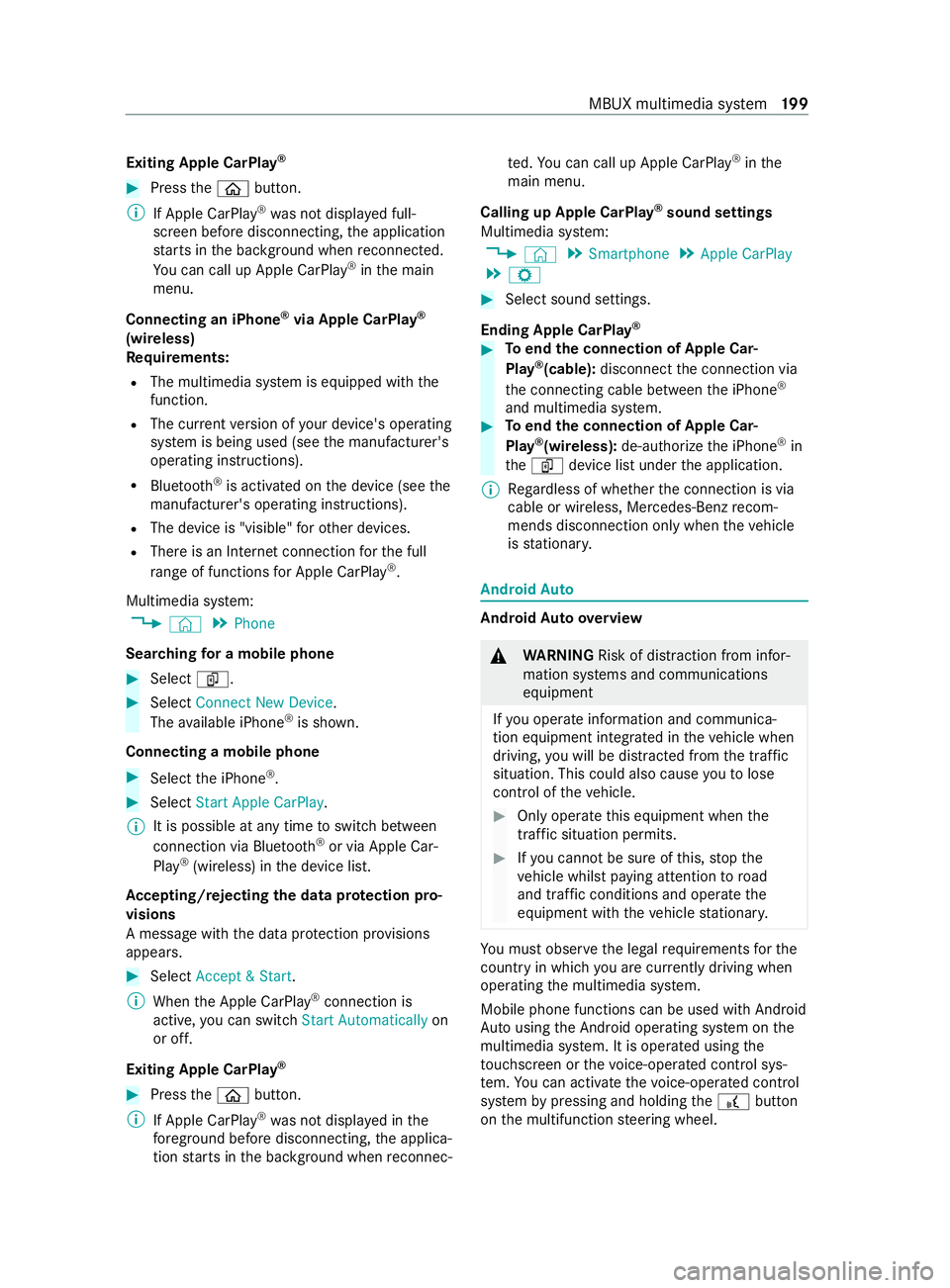
Exiting Apple CarPlay
®#
Press the00E2 button.
% If Apple CarPlay ®
wa sn otdispla yedf ull-
screen befor edisconnecting, thea pplication
st arts in theb ackg round when reconnected.
Yo uc an call up Apple CarPlay ®
in them ain
menu.
Connecting an iPhone ®
via Apple CarPlay ®
(wireless)
Requ irements:
R The multimedia sy stem is equipped wit hthe
function.
R The cur rent version of your device's operating
sy stem is being used (see them anufacturer's
operating instructions).
R Blue tooth ®
is activated on thed evice (see the
manufacturer's operating instructions).
R The device is "visible" foro ther devices.
R Ther eisanI nternetconnection fort he full
ra ng eoff unctions forA pple CarPlay ®
.
Multimedi asyst em:
4 © 5
Phone
Sear ching foram obilephone #
Select í. #
Select Connect New Device.
The available iPhone ®
is shown.
Connecting amobile phone #
Select thei Phone ®
. #
Select StartApple CarPlay.
% It is possible at an
ytime toswitc hbetwe en
connection via Blue tooth®
or via Apple Car‐
Play ®
(wireless) in thed evice list.
Ac cepting/rejecting thed atap rote ction pro‐
visions
Am essag ewitht he dat aprotection pr ovisions
appears. #
Select Accept &Start.
% When theA pple CarPlay ®
connection is
active, youc an swit chStart Automatically on
or off.
Exiting Appl eCarPlay ® #
Press the00E2 button.
% If Apple CarPlay ®
wa sn otdispla yedint he
fo re ground be fore disconnecting, thea pplica‐
tion starts in theb ackg round when reconnec‐ te
d. Youc an call up Apple CarPlay ®
in the
main menu.
Calling up Apple CarPlay ®
sound settings
Multimedia sy stem:
4 © 5
Smartphone 5
Apple CarPlay
5 Z #
Select sound settings.
Ending Apple CarPlay ® #
Toend thec onnection of Apple Car‐
Play ®
(cable): disconnect thec onnection via
th ec onnectin gcable between thei Phone ®
and multimedia sy stem. #
Toend thec onnection of Apple Car‐
Play ®
(wireless): de-authorize thei Phone ®
in
the í device lis tunder thea pplication.
% Re
gardless of whe ther thec onnection is via
cable or wireless, Mercedes-Benz recom‐
mends disconnection only whe nthe vehicle
is stationar y. Android
Auto Android
Autoove rview &
WARNING Risk of distraction from infor‐
mation sy stems and communications
equipment
If yo uo perat einformation and communica‐
tio ne quipment integ ratedint hevehicle when
driving, youw ill be distracted from thet raffic
situation. This could also cause youtol ose
control of thev ehicle. #
Onlyoperat ethis equipment when the
traf fics ituation permits. #
Ifyo uc anno tbes ureoft his,stop the
ve hicle whils tpaying attention toroad
and traf ficc onditions and ope rate the
equipment wit hthe vehicle stationar y. Yo
um usto bse rvet he legal requirements fort he
countr yinwhich youa recur rentl yd riving when
ope rating them ultimedia sy stem.
Mobile phone functions can be used wit hAndroid
Au tousin gthe Android operating sy stem on the
multimedia sy stem. It is operated using the
to uchsc reen or thev oice-operated control sys‐
te m. Youc an activat ethe voice-opera tedc ontrol
sy stem bypressing and holding the£ button
on them ultifunction steering wheel. MBUX multimedia sy
stem 19 9
Page 203 of 348
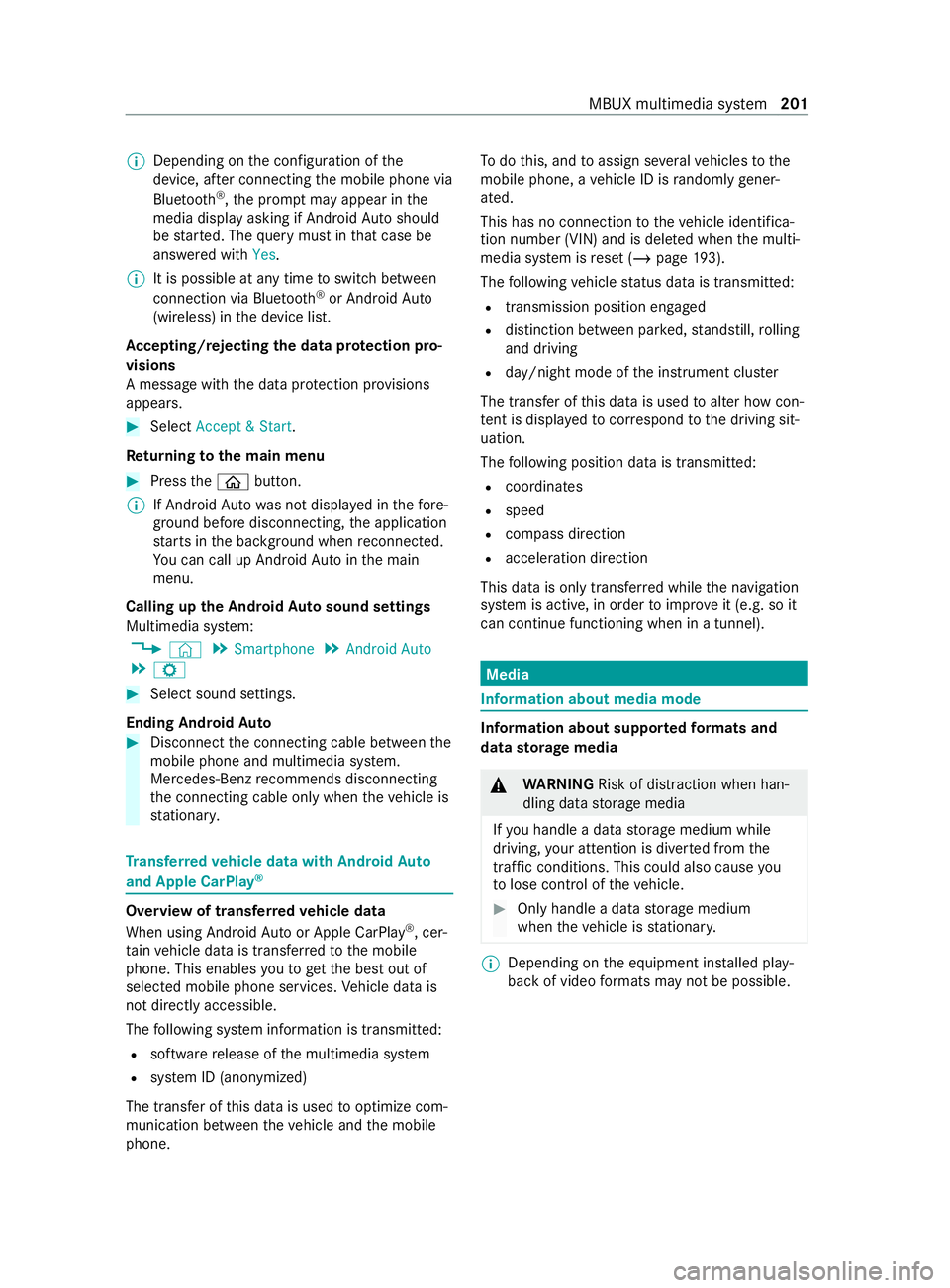
%
Depending on
thec onfiguration of the
device, af terc onnecting them obile phone via
Blue tooth ®
,t he prom ptma yappear in the
media displa yasking if Android Autoshould
be star ted. The querym ustint hat case be
answered with Yes.
% It is possible at an
ytime toswitc hbetwe en
connection via Blue tooth®
or Android Auto
(wireless) in thed evice list.
Ac cepting/rejecting thed atap rotection pro‐
visions
Am essag ewitht he dat aprotection pr ovisions
appears. #
Select Accept &Start.
Re turning tothem ainm enu #
Press the00E2 button.
% If Android
Autowa sn otdispla yedint hefore‐
ground befor edisconnecting, thea pplication
st arts in theb ackg round when reconnected.
Yo uc an call up Android Autointhem ain
menu.
Calling up theA ndroid Autosound settings
Multimedia sy stem:
4 © 5
Smartphone 5
Android Auto
5 Z #
Select sound settings.
Ending Android Auto #
Disconnect thec onnectin gcable between the
mobil ephone and multimedia sy stem.
Mercedes-Benz recommends disconnecting
th ec onnectin gcable onl ywhen thev ehicle is
st ationar y. Tr
ansfer redv ehicle dat awith Android Auto
and Apple CarPlay ®Overvie
woftransfer redv ehicle data
Whe nusing Android Autoor Apple CarPlay ®
,c er‐
ta in vehicle dat aistransfer redtot he mobile
phone. This enables youtog ettheb esto ut of
selected mobile phone services. Vehicle dat ais
no td irectl yaccessible.
The following sy stem information is transmit ted:
R softwar erelease of them ultimedia sy stem
R system ID (anonymized)
The transfer of this dat aisusedtooptimize com‐
munication between thev ehicle and them obile
phone. To
do this, and toassig nseve ralv ehicles tothe
mobil ephone, avehicle ID is random lyge ner‐
ated.
Thi sh asno connection tothev ehicle identifica‐
tion number (VIN) and is dele tedw hen them ulti‐
media sy stem is rese t(/ pag e193).
The following vehicle status dat aistransmitted:
R transmission position engaged
R distinction between par ked, standstill ,rolling
and driving
R day/night mode of thei nstrument clus ter
The transfer of this dat aisusedtoalter ho wcon‐
te nt is displ ayed tocor respond tothed riving sit‐
uation.
The following position dat aistransmitted:
R coordinates
R speed
R compass direction
R acceleration direction
This dat aisonlyt ransfer redw hile then avigation
sy stem is active, in order toimpr oveit (e.g. so it
can continue functioning when in atunnel). Media
Information about media mode
Information about suppor
tedf ormats and
dat astorage media &
WARNING Risk of distraction whe nhan‐
dling da tastorag emedia
If yo uh andle adatas torage medium while
driving, your attention is diver tedf romt he
traf ficc onditions. Thi scould also cause you
to lose control of thev ehicle. #
Onlyhandle adatas tora ge medium
when thev ehicle is stationar y. %
Depending on
thee quipment ins talled play‐
bac kofv ideoform ats ma ynotbe possible. MBU
Xmultimedi asystem 201