light MERCEDES-BENZ SPRINTER 2020 MY20 with Base Radio Operator’s Manual
[x] Cancel search | Manufacturer: MERCEDES-BENZ, Model Year: 2020, Model line: SPRINTER, Model: MERCEDES-BENZ SPRINTER 2020Pages: 324, PDF Size: 5.45 MB
Page 150 of 324
Ac
tivating/deactivatin gESP®
(Electronic Sta‐
bility Prog ram) On-boa
rdcompu ter:
4 Settings 5
DriveAssist 5
ESP (ESP) #
Select Ein(On) or Aus00BB (Off). Fu
nctions of ESP ®
Crosswind Assist Crosswind Assis
tdoes no treact under thef ollow‐
ing conditions:
R The vehicle is subjected tosevere jolts and
vib rations, e.g .asar esult of une vens urfaces
or po tholes.
R The vehicle loses traction, e.g. on sno worice
or when hydroplaning.
R The driver is per form ing sudden and lar ge
st eering mo vements.
Crosswind Assis tisoperational again as soon as
th ed riving conditions retur nton ormal.
Crosswind Assi stdetects stro ng crosswind gu sts
th at can impair abilit yofyourvehicle todrive
st ra ight ahead. Crosswin dAssis tinter venes
depending on thed irection and stre ngt hoft he
crosswind.
As tabilizin gbrake applicatio nhelps youtok eep
th ev ehicle on trac k.
Information is shown in thei nstrument clus terin
th ee vent of aclear lydiscernible inter vention by
Crosswind Assist.
Crosswind Assis tisactiveabove avehicle speed
of 50 mph(80 km/h) when driving stra ight or
slightly cornering. Fu
nction of ESP ®
trailer stabilization &
WARNING Risk of accident in poo rroad
and weather conditions
In poor road and weather conditions, the
traile rstabilizatio ncanno tpreve nt lur ching of
th ev ehicle/trailer combination .Trailer sw ith
ah igh cen terofg ravity ma ytipove rbefore
ESP ®
de tects this. #
Alwaysa dap tyour driving styletos uit
th ec urrent road and weather condi‐
tions. ESP
®
trailer stabilizatio ncoun tera cts critica ldriv‐
ing situations in goo dtime and thereb yprovides conside
rable assis tance when driving wi th a
traile r. Trailer stabilizatio nispartofE SP®
.
If th es ensor sy stem and evaluatio nlogic de tect
trailer swinging mo vements, ESP ®
trailer stabili‐
zation initiall ybrake sindividual vehicle wheels in
at arge tedm anner .Itthus cou nteracts swinging
mo vements. If thes winging mo vements do not
st op, thev ehicle is braked until thev ehicle/
trailer combination is stabilized. If necessar y,the
ve hicle's engine output is limited.
If yo ur vehicle wit htrailer (vehicle/trailer combi‐
nation) starts toswer ve,y ou ar eable tostabilize
th ev ehicle/trailer combination onl ybybraking.
ESP ®
trailer stabilizatio nhelps youtos tabilize
th ev ehicle/trailer combination in this situation.
ESP ®
trailer stabilizatio nisactiveats peeds
abo veappr oximately 40 mph(65 km/h).
If ESP ®
is de activated because of amalfunction,
trailer stabilizatio nwill no tfunction. Fu
nction of EBD (electronic brak eforce distri‐
bution) EB
Dh asthef ollowing characteristics:
R monitoring and controllin gthe braking force
on ther ear wheels
R impr oving driving stabilizatio nwhen braking,
especiall yonb ends Fu
nction of Activ eB rake Assi st Ac
tiveB rake Assi stconsi stsoft hefollowing func‐
tions:
R Distance warning function
R Autonomous braking function
R Situation-dependent braking assis tance
Ac tiveB rake Assi stcan hel pyou tominimize the
ri sk of acollision wit hvehicles or pedestrians or
to reduce thee ffects of suc hacollision.
If Ac tiveB rake Assi sthas de tected arisk of colli‐
sion, youw ill be warned visuall yand acousticall y.
If yo udon otreact tothev isual or acoustic warn‐
ing, autonomous brakin gcan be initiated in criti‐
cal situations.
If th er ea repedestrians and cyclists crossing: in
especiall ycritical situations, ActiveB rake Assi st
can initiat eauton omous braking di rectl y.In this
case, thev isual and acoustic warning occurs
simultaneousl ywitht he braking application. 14 8
Driving and pa rking
Page 151 of 324
If
yo ua ppl ythe brak eyourself in acritical situa‐
tion, or appl ythe brakes during autonomous
braking, situation-dependent braking assis tance
occu rs.T he brak epressur eincreases up tomaxi‐
mum full-s topb raking if necessar y.Situation-
dependent braking assis tance only inter venes
when theb rake sa reapplied firm ly;o therwise, it
re mains within thea utonomous braking process. &
WARNING Risk of accident caused by
limited de tection per form anc eofA ctive
Brak eAssist
Ac tiveB rake Assi stcanno talway sc lea rly
identify object sand comple xtraf fics itua‐
tions.
Due tothen atur eoft he sy stem, complex
driving conditions ma yalso cause Brake
Assis ttointervene or no tinter vene wi thout
re ason .Ins uchc ases, and in thee vent of
Ac tiveB rake Assi stmalfunctioning, theb rake
sy stem will continue tobe available wit hfull
brak eboos tand BAS. #
Alwaysp aycareful attention tothet raf‐
fi cs ituation; do no trelyo nA ctiv eBrake
Assi stalone. ActiveB rake Assi stis only an aid. The driver of
thev ehicle is
re sponsible fork eeping asufficiently
saf ed ista nce tothev ehicle in front, for
ve hicle speed and forb raking in good
time. #
Be prepare dtobrake or swer veif nec‐
essar y. Also obser
vethes ysteml imits of ActiveB rake
Assi st.
The individua lsubfunctions ar eavailable in
th ef ollowing speed ranges:
Distance warning function
The dis tance warning function warnsy ou at
speeds greater than appr oximatel y4mph
(7 km/h), if your vehicle is critically close to a
ve hicle or pedestrian.
An intermittent warning tone sounds and the
00BA distance warning lam plight supint he
instrument clus ter.
Brak eimmedia tely or take eva sivea ction, pr ovi‐
ded it is saf etodosoa ndthet raffic situation
allo ws th is.
Th ed istance warning function can aid youint hefollowing situations wit hanintermit tent wa rn‐
ing tone and awarnin glamp: Ve
hicles tr avel‐
ing in front St
ationar yvehi‐
cles Crossing
vehi‐
cles Crossing pedes‐
trians/cycli
stsSt
ationary
pedestrians
Up toappr ox.
15 5m ph
(250 km/h) Up
toappr ox.
12 4m ph
(200 km/h) No
reaction Uptoappr ox.
37 mph
(60 km/h) No
reaction Au
tonomous braking function
The autonomous braking function ma yinter vene at speeds starting from appr oxima tely 4m ph
(7 km/h )inthefollowing situations: Ve
hicles tr avel‐
ing in front St
ationar yvehi‐
cles Crossing
vehi‐
cles Crossing pedes‐
trians/cycli
stsSt
ationary
pedestrians
Up toappr ox.
15 5m ph
(250 km/h) Up
toappr ox.
12 4m ph
(200 km/h) No
reaction Uptoappr ox.
37 mph
(60 km/h) No
reaction Drivin
gand parking 14 9
Page 154 of 324

#
Press rocker switch 2up or down and hold.
The stored speed is increased or reduced in
1m ph (1 km/h) increments.
or #
Push rocker switch 2beyond thep ressure
point.
The stored speed is increased or reduced by
5m ph (1 0km/h).
or #
Push rocker switch 2beyond thep ressure
point and hold.
The stored speed is increased or reduced in
5m ph (1 0km/h) increments.
or #
Accele rate thev ehicle tothed esired speed. #
Push rocker switch 2up.
If cruise cont rolisa ctivated and Traf ficS ign
Assi sthas de tected aspeed restriction sig nwith
am aximum permissible speed and this appears
in thei nstrument display: #
Toadop tthe de tected speed: pushrocker
switch 3up.
The maximum permissible speed shown by
th et raffic sign is stored and thev ehicle main‐
ta ins this speed. #
Todeactivat ecruisec ontrol: push rock er
switch 3(CNCL) down.
If cruise cont rolisd eactivated, it can be reactiva‐
te dasf ollows:
R rock er switch 2(SET+ )or(SET-) stores the
cur rent speed and thev ehicle maintains this
speed
R rock er switch 3(RES) calls up thel asts peed
st ored and thev ehicle maintains this speed
% Ifyo ub rake, deactivat eESP®
or if ESP ®
inter‐
ve nes, cruise control is deacti vated.
When yous wit ch offt he vehicle, thel ast
speed stored is cleared.
Setting thes peed limit forw inte rt ires
On-boa rdcompu ter
4 Settings 5
Fahrzeug (Vehicle)
5 Winte rTires Limit #
Select aspeed or deactivat ethe function. Ac
tiv eD ista nce Assis tDISTR ON IC Fu
nction of Activ eD ista nce Assis tDISTRONIC
Ac tiveD ista nce Assi stDISTRONI Cmaintains the
se ts peed on free-flowing roads. If vehicles ahead ar
ed etected, thes etdis tance is maintained ,if
necessa ryuntil thev ehicle comes toah alt.The
ve hicle accelerates or brakes depending on the
dis tance tothev ehicle in front and thes etspeed.
Speed and dis tance ar esetand stored on the
st eering wheel. The speed can be se tintherange
between 15mp h(20 km/h) and 99 mph
(160 km/h) or between 15mp h(20 km/h) and
th ev ehicle's maximum speed.
Other features of ActiveD ista nce Assi st
DISTRONIC:
R Depending on thep reselected dis tance,
DISTRONIC inter venes ei ther dynamically
(shor tdista nce) or tosave fuel (long dis‐
ta nce).
R Depending on thev ehicle mass de tected, the
dynamics of theD ISTRONIC inter vention are
re duced.
R Rapid acceleration tothes tore ds peed is initi‐
ated if thet urns ignal indicator is switched on
to chang etot heovertak ing lane.
Ac tiveD ista nce Assi stDISTRONI Cisonly an aid.
The driver is responsible fort he dis tancetothe
ve hicle in front, forv ehicle speed and forb raking
in good time.
Sy stem limitations
The sy stem ma ybeimpaired or ma ynotfunction
in thef ollowing ins tances:
R The radar sensor sareaffected bysno w,rain,
fo g, heavy spr ay,g lare, direct sunlight or
greatl yvarying ambien tlight.
R The radar sensor smaymalfunction in parking
ga rage soronr oads wit hsteep uphill or
downhill gradients.
R Ifth er adar sensor saredirty or co vered.
R On icy or slipper yroads, braking or accelerat‐
ing can caus ethe driv ewheels tolose trac‐
tion and thev ehicle could then skid.
R Stationar yobject sarenotd etected if these
we renotp reviousl ydetected as moving.
R On bends, target vehicles ma ybelostorn ot
re cognized cor rectl y.As aresult, atarget
ve hicle is no tused toregulat ethe speed
whic hmaylead tounwa nted accele ration.
Do no tuse ActiveD ista nce Assi stDISTRONI Cin
th ese situations. 15 2
Driving and pa rking
Page 158 of 324
sho
wall objects whic harevery nea rtooru nder
th er ear bumper .Itwill notwarny ou of acolli‐
sion ,peopl eoro bjects.
The area behin dthe vehicle is displa yedasam ir‐
ro rimage.
Sy stem limitations
The rear vie wcamer awithi nside rearvie wmirror
displa ywill no tfunction ,orwill onlypartially
function ,inthefollowing situations:
R ifth er eish eavyrain, sno worfog
R ifth ea mbient light is poor ,e.g. at night
R ifth ea reaisi lluminated wit hfluorescent
lighting, thei nside rearvie wmirro rd isplay
ma yflicker
R ifth et emperatur echanges very quickl y,for
ex ample if youd rive out of thec old int oa
heated garage inthew inter
R ifth ea mbient temp eratur eisveryh igh
R ifth ec amera lens is co vered, dirty or fogged
up. Obser vethen otes on cleaning ther ear
vie wc amer a(/pag e202).
R thec amera or rear of your vehicle is dam‐
aged. In this case, ha vethec amera and its
position and setting checkedataq ualified
specialis tworks hop.
The field of vision and other functions of ther ear
vie wc amer amaybe restricted du etoadditional
accesso ries on ther ear of thev ehicle (e.g.
license plat ebrack et or bicycle rack ).
% The inside
rearvie wmirro rd ispla ycontrast
ma ybei mpaire dd uetoincident sunligh tor
ot her light sources. In this case, pa yparticu‐
lar attention.
% Ha
ve thei nside rearvie wmirro rr epaired or
re placed if its use is considerabl yrestricted,
fo re xamp lethro ugh pixel er rors.
% Objects
that ar enotat ground le vela ppear
fur ther aw ay than they actuall yare.
Examples of suc hobjects:
R theb umper of avehicle par kedb ehind
R thed rawbar of atrailer
R theb all nec kofat railer coupling
R thet ail-en dofat ruck
R slanted posts Displaying and hiding
ther ear-vi ewmirror
displ ay
Displaying #
Engage reve rseg ear.
The rear vie wcamer aimag eappear sonthe
lef tside of thei nside rearvie wmirro r.
% Be
awareoft he sy stem limitations of ther ear
vie wc amer awithr ear-vie wmirro rd ispla y.
Hiding #
Engag eanother gear.
or #
Swit chofft he engine.
The displa ywill be hidden af teras horttime. AT
TENTION ASSI ST Fu
nction of ATTENTION ASSI ST
AT TENTION ASSIS Tcan assis tyou on long,
mono tonou sjou rney s, e.g. on highw aysa nd trunk
ro ads. If ATTENTION ASSIS Tdetects ind icator sof
fa tigue or increased lapse sinconcentration on
th ep artoft he driver ,itsuggests taking abreak.
AT TENTION ASSIS Tisonlyana id. It cannot
alw aysd etect dr owsiness or increased lapses in
concentration in good time. The sy stem is no ta
substitut efor aw ell-res teda nd attentiv edrive r.
On long journe ys,tak er egular and timel ybreaks
th at allo wyoutorest properly.
Yo uc an choose between tw osettings:
R Standard: normal sy stem sensitivity
R Sensitive: higher system sensitivity .The
driver is warned earlier and thea ttention le vel
de tected bythes ystem( Attention Le vel) is
adap teda ccordingly.
If fatigue or increased lapse sinconcentration are
de tected, theATTENTION ASSIST: Take aBreak!
wa rning appear sinthe Instrument Displa y.Yo u
can acknowledg ethe messag eand take ab reak if
necessar y.Ifyo udon ottake ab reak and ATTEN‐
TION ASSIS Tcontinues todetect increased lap‐
ses in concentration, youw ill be warned again
af te ram inimu mof15m inutes. 15 6
Driving and pa rking
Page 160 of 324
This device has been appr
ovedbyt he FCC as
a" Vehicular Radar Sy stem". The radar sensor
is intended foru se in an automotiv eradar
sy stem onl y.Re mo val,ta mp ering, or altering
of thed evice will void an ywarranties, and is
no tp ermit tedbyt he FCC. Do no ttamper
with, alter or use in an ynon-appr ovedw ay.
An yu nauthorize dmodificatio ntothis device
could void theu ser's authority tooperat ethe
equipment. &
WARNING Risk of accident despit eBlind
Spo tAssist
Blind Spo tAssis treacts neither tostationary
object snortovehicles approaching and over‐
ta king youatag reatly di fferent speed.
As aresult, Blind Spo tAssis tcanno twarn
driver sinthese situations. #
Alwaysp aycareful attention tothet raf‐
fi cs ituation and maintai nasafed is‐
ta nce at thes ide of thev ehicle. Blind Spo
tAssis tiso nlyana id. It ma yfail to
de tect some vehicles and is no substitut efor
attentiv edriving. Alw ayse nsur ethat ther eiss uf‐
fi cient dis tance tothes ide foro ther road users
and obs tacles.
If av ehicle is de tected ab oves peeds of appr ox‐
imatel y7.5mp h(12 km/h) and this vehicle sub‐
sequentl yenter sthe monitoring rang ed irec tly
next toyour vehicle, thew arning lam pinthe out‐
side mir rorlights up red.
% When
atrailer is connected, ther adar sen‐
sor's field of vision ma ybeimpaired, thereby
making limited monitoring possible. Alw ays
pa yc areful attention tothet raffic situation
and maintain asafed ista nce at thes ide of
th ev ehicle.
If av ehicle is de tected clos etoyourvehicle in the
lateral monitoring rang ea nd yous wit ch on the
tur ns igna lindica torint he cor responding direc‐
tion, awarning tone sounds. The redw arning
lam pint he outside mir rorf lashes. If thet urns ig‐
nal indicator remains switched on, all other
de tected vehicles ar eindicated only bythef lash‐
ing of ther ed warning lamp.
If yo uo vertak eav ehicle quickl y,no warning is
given.
Exit warning
The exitwa rning is an additional function of Blind
Spo tAssis tand warnsv ehicle occupants when leaving
thev ehicle about an yapproaching vehi‐
cles. &
WARNING Risk of accident despit eexit
wa rning
The exitwa rning react sneith er tostationary
object snortovehicles approaching youata
great lydif fere nt speed.
As aresult, thee xit warning canno twarnd riv‐
er sint hese situations. #
Alwaysp ayparticular attention tothe
traf fics ituation whe nopening thed oors
and mak esuret her eiss ufficient clear‐
ance. %
An
exitwa rning is no tissued fors liding doors
and rear-en ddoors.
Overview When thev ehicle is
st ationar y,an object
is de tected from
behind in them onitor‐
ing range. Displa
yinoutsid em ir‐
ror
When thev ehicle is
st ationar y,ad oor on
th er ele vant sid eof
th ev ehicle is opened.
An object whic his
close to yourvehicle
is de tected in the
monitoring range. Vi
sual and audible
wa rning %
This additional function is onl
yavailable when
Blin dSpotA ssistisa ctivated and up to a
maximu mofthree minutes af tert he drive
sy stem has been switched off. The end of the
av ailabilit yoftheexitwa rning function is indi‐
cated byaseries of flashes in theo utside
mir ror.
The exitwa rning function is onl yanaid and is no
substitut efor thea ttentiveness of thev ehicle
occupants. Responsibility alw aysl ies wit hthe
ve hicle occupants when opening door sand leav‐
ing thev ehicle. 15 8
Driving and pa rking
Page 162 of 324

obscured
byvehicles or other objects, de tection
is no tpossible.
% Also
read then otes on Blind Spo tAssist
(/ page157).
Ve hicles with Blind Spo tAssis t:driver scan
also be warned of an ycrossing tra ffic when back‐
ing up out of aparkin gspace. If avehicle is
de tected, thew arning lam pinthe outside mir ror
on thec orresponding side lights up red. If it
de tects acritica lsituation, awarning tone also
sounds.
Ve hicles with Blind Spo tAssis tand Parking
Assis tPARKTRONIC: driverscan also be warned
of an ycrossing tra ffic when backin gupout of a
parkin gspace. If acritical situation is de tected, a
wa rning symbol appear sonthe camer aimag eof
th em ultimedia sy stem. If thed rive rd oes not
re spond tothew arning ,the vehicle's brakes can
be applieda utomatically.Inthis case, awarning
to ne sounds.
The Rear Cross Traf ficA lertfunction is acti ve
unde rthe following conditions:
R BlindSpotA ssis tisa ctivated.
R Reverseg ear is engaged or thev ehicle is
backing up at walkin gpace.
R Ifth em aneuvering assis tance function is acti‐
va tedint he multimedia sy stem.
The Rear Cross Traf ficA lertfunction is una vaila‐
ble when driving wit hatrailer. Lane
Keeping Assis tand Activ eL aneK eeping
Assist Fu
nctions of Lane Keeping Assist Lane
Keeping Assis tmonitor sthe area in front of
yo ur vehicle wit hmultifunction camera 1.Itser
vestop rotect youa gains tunin tentionally le av‐
ing your lane .You ma yalso be warned by a
vibrating messa gefrom thes teering wheel and by
th es tatus symbo lflashing in theI nstrument Dis‐
pla y.
The warning is issued when thef ollowing condi‐
tions ar emetat thes ame time:
R Lane Keeping Assis tdetects lane markings.
R Afront wheel drives overal ane marking.
Yo uc an activat eand deactivat ethe Lane Keeping
Assis twarning.
If yo uf ail toadap tyour driving style, Lane Keep‐
ing Assis tcan neither reduce ther isk of accident
nor override thel aw sofp hysics. It canno ttake
int oa ccount road, weather or traf ficc onditions.
Lane Keeping Assis tisonlyana id and is not
intended tokeep thev ehicle in thel ane without
th ed rive r's cooperation. Youa re re sponsible for
th es afed ista nce tothev ehicle in front, forv ehi‐
cle speed, braking in good time and fors taying in
yo ur lane.
Sy stem limits
The sy stem ma ybeimpaired or ma ynotfunction
in thef ollowing situations:
R Ther eisp oor visibilit y,e.g. due toinsuf ficient
illumination of ther oad, if ther ea rehighly
va riable shade condition sorinrain, sno w,fog
or spr ay.
R Glar efromo ncomin gtraffic, di rect sunligh tor
re flections.
R Ther eisd irtont he windshield in thev icinity
of them ultifunction camera or thec amer ais
fo gged up, damaged or obscured.
R No or se veralu nclear lane markings ar epres‐
ent foro ne lane, e.g. in aconstruction area.
R The lane markings ar eworn, dar korcovered.
R The dis tance tothev ehicle driving in front is
to os hor tand thus thel ane markings cann ot
be de tected.
R The lane markings chang equickl y,e.g. lanes
branc hoff,c ross one ano ther or mer ge.
R The road is very nar row and winding. 16 0
Driving and pa rking
Page 167 of 324

Yo
ur vehicle will beha vediffere ntl yw ithat railer
re lativ etow ithout atrailer ,and will consume
mor efuel. In thec ase of along and steep
descent, youm usts elec tshif trange 3,2or 1in
good time.
% This also applies if
thec ruise cont rolis
switched on.
Yo uw illthereb ymakeu se of thee ngine' sbraking
ef fect and will no thave tobrak easo ften tocon‐
trol thes peed. This will take some of thes train
of ft he brak esystema nd pr event theb rake sf rom
ove rheating and wearing tooq uickl y.Ifyo un eed
additional braking, depress theb rake pedal inter‐
mittently rath er than continuousl y.
Drivin gtips
If th et railer sw ays, remember thef ollowing
points:
R Do no taccelerat eunder an ycircums tances.
R Do no tcounter steer.
R If necessar y,appl ythe brakes.
% Yo
uc an pr eventthet railer from sw aying and
rock ingbyretrofitting stabilizer bar or trailer
st abilit yprograms. Youc an obtain fur ther
information from an authorized Mercedes-
Benz Center.
When youa redrivin gwithat railer ,compl ywith
th ef ollowing points:
R Maintain agreater dis tance than when driving
without atrailer.
R Avoid braking abruptl y.If possible, brak egen‐
tl yf irst of al lsot hatthet railer closes up
behind your vehicle. Then, increase theb rak‐
ing forc er apidl y.
R The values given fors tart-o ff gradeability
re fertos ea level. When driving in moun tain‐
ous areas, no tethat engine output, and there‐
fo re start-of fgradeability ,will dec rease with
inc reasin galtitude. Coupling/uncoupling
atrailer Coupling
atrailer
* NO
TEDama getothev ehicle batter ydue
to full discharge Charging
thet railer batter yusing thep ower
supply of thet railer can damag ethe vehicle
batter y. #
Do no tuse thev ehicle's po wersupply
to charge thet railer batter y. #
Shif tthe selector le vertop osition 005D. #
Appl ythe vehicle's parking brake. #
Close all thed oors. #
Position thet railer on alevel sur face behind
th ev ehicle.
% The ball head height
changes depending on
th ev ehicle's load. In this case, use atrailer
wit hah eight-adjus table trailer dr awbar. #
Couple up thet railer. #
Establish all electrical and other connections
to thet railer. #
Remo veobject sordevices whic hpreve nt the
traile rfromr olling, e.g. wheel choc ks. #
Release thet railer's parking brake.
% The
vehicle harness has acable connection
to theb rake light indicator lamp.
Obser vethem aximum permissible trailer dimen‐
sions (widt hand length).
Mos tUSs tatesa nd all Canadian pr ovinces pre‐
scribe thef ollowing points, and youa reurge ntly
re commended tocomply wi th these:
R Safetyc hains between thet ow ing vehicle and
th et railer .The chains should be routed in a
criss-cross pat tern unde rthe trailer dr awbar.
The ym ustbec onnected tothet railer tow
hitc hand no ttothe bumper or tothev ehicle
axle.
Lea vesuf ficient sla ckinthec hains. This
allo wsfore vens harp cornering.
R Aseparat ebrake system is requ ired forc er‐
ta in trailers.
R Asafet yf eatur eisrequired forb rake dt railers.
De term ine thes pecific requ irements acco rd‐
ing tother ele vant la ws.
If th et railer becomes de tach ed from thet ow‐
ing vehicle, thes afet yf eatur etrigger sthe
trailer brakes and can thus reduce thed anger.
Un coupling atrailer &
WARNING Risk of being crushed and
becoming trapped whe nuncoupling a
trailer
Whe nuncoupling atrail er wi than engaged
ine rtia-activated brake, your han dmay Drivin
gand parking 16 5
Page 168 of 324

become trapped between
thev ehicle and the
traile rdrawbar. #
Do no tuncouple trailer swithan
engaged overrun brake. Do no
tuncouple atrailer wit hanoverrun brak ein
as tate ofove rrun. Otherwise, ther ebound of the
ove rrunb rake can damag eyour vehicle. #
Shif tthe selector le vertop osition 005D. #
Appl ythe vehicle's parking brake. #
Close all thed oors. #
Appl ythe trailer's parking brake. #
Secur ethe trailer agains trolling away wit ha
wheel choc kors imilar object. #
Remo vethet railer cables and saf etyc hains. #
Uncouple thet railer. Information about
towing atrailer Operatin
gatrailer is subject toman ystatutory
re gulations suc hasspeedrestrictions.
Man ystatesa lso requ ireana uxiliaryseparate
functional brakin gsystem when towing aweight
th at exc eeds acertain limit .For your saf ety, it is
re commended touse aseparat efunctional brak‐
ing sy stem on an ytowe dvehicle.
Mak esuret hat your trailer combinatio nmeets
local regulations. This no tonlya pplies to your
plac eofr esidence, but also to your destination.
In fo rm atio nont his can be obtained from the
police and local authorities.
Compl ywitht he following when driving wit ha
trailer:
R Practice cornering, stopping and backing up
in at raffic-free location. In this wa y,yo uw ill
ga in driving experience and become accus‐
to med tothen ew handling characteristics.
R Befor edriving, checkt he following:
- that thet railer towh itch and ball coupling
ar es ecure
- that thes afet ys wit ch forb rake dt railer sis
functioning cor rectly
- that thes afet yc hains ar esecur eand
undamaged
- that thee lectrical connection saresecure
- that thel ights ar efunctioning cor rectly
- thew heels ford ama geand cor rect tire
pressur e(/ page 222) R
Adjus tthe outside mir rors so that youh ave a
clea rviewoft herear sectio nofthe trailer.
R Ifth et railer is equipped wit hanindividual
braking sy stem, checkb efor eeachj ourney
whe ther theb rake sa refunctioning cor rectl y.
R Ifth et railer has electronicall ycont rolled
brakes, pull away carefully wi th thevehicle/
trailer combination .Brake manually using the
brak econtroller and checkw hether the
brakes ar efunctioning cor rectl y.
R Secu rethel oad on thet railer in line wit hthe
re qu irements and rules forl oad-securing
me thods.
R When driving wit hatrailer ,chec katr egular
inter vals that thel oad is secur eand that the
light sand brakes ar efunctioning cor rectl y.
R Bea rinm indthat theh andling characteristics
ar em oreu nstable when towing atrailer than
when drivin gwithout atrailer .Avoid sudden
st eering mo vements.
R The vehicle/trailer combination is heavier,
accelerates mor eslowl y,has areduced
climbing ability and an increased braking dis‐
ta nce. It is mor esusceptible toside winds
and requ ires careful steering.
R If possible, do no tbrake suddenl y,but rath er
moderately at firs tsot hatthet railer can acti‐
va te its brakes. Then inc rease thep ressur eon
th eb rake pedal.
R Ifth ea utomatic transmission shifts between
ge arsonu phill or downhill gradients, restrict
th es hiftrange. Select shif trang e4,3,2or1.
Al ow ergear and reduced speed decrease the
ri sk of engine damage.
R When driving on adownhill gradient, shif ttoa
lo we rgear touse thee ngine' sbraking ef fect.
Av oid cons tant braking, as this could cause
th ev ehicle brakes and possibly also the
traile rbrake stoo verheat.
R Ifth ec oolant temp eratur eincreases signifi‐
cant lywhen thea ir-conditionin gsystemis
switched on, switc hthe air-conditioning sys‐
te mo ff.
Coolant heat can also be dissipated by
switching thea irflow and thet emperatur eof
th eh eater or air conditioning tothem aximum
le ve l. Open thew indo wsif necessar y.
R When overtaking ,pay particular attention to
th ei ncreased overtakin gdista nce of your
ve hicle/trailer combination. 16 6
Driving and pa rking
Page 173 of 324

%
Ve
hicles without Activ eD ista nce Assist
DISTRO NIC:youc an call up them ain menu
of theo n-boar dcomputer wit hthe 00E2 but‐
to n. #
Tobrows ethrough them enu bar: swipeto
th el eftorr ight on left-han dTouc hControl
2. #
Tocall up amenuorc onfirmas election:
press left-han dTouc hControl 2. #
Tobrows ethrough displa ysor lists in the
menu: swipe upwards or down wardsonl eft-
hand Touc hC ontrol 2. #
Tocall up asubmenu or confir maselec‐
tion: press left-han dTouc hControl 2. #
Toexitas ubmenu: press backbutton on the
left 1.
If yo ua reinas ubmenu and press and hold back
button on thel eft 1,t he main menu will appear. Overvie
wofthe displa yson them ultifunc‐
tion display In
stru ment Displa ywithc olor display
1 Outsid etemperature
2 Transmission position
3 Time
4 Displa ysection Instrument Displa
ywithb lack and whit edis‐
play
1 Outside temp erature 2
Displa ysection
3 Time
4 Transmission position
Fu rther displa yson them ultifunction display:
0097 Gearshif
trecommendation
é Parking Assis tPARKTRONIC switched
off
00B2 Cruise control (/
page 151)
ç ActiveD ista nce Assi stDISTRONIC
(/ page 152)
z DSR (/page126)
00D9 HOLD function (/
page154)
00CE Ad
aptiv eHighbeam Assist
(/ page86)
Û ATTENTION ASSIS Tswitched off
003E Ad
oor is no tfully closed.
00C5 Re
ar wind owwiper swit ched on
(/ page95)
002E LO
WR ANGE activ e(/pag e126)
SOS
NOT
READY Emergency call sy
stem no tactive
h ActiveL aneK eeping Assis tswitched
of f(/pag e161 )
00D4 Ac
tiveB rake Assi stswitched off
(/ page148)
e Blind SpotAssistswitched off
(/ page157) Se
ttin gthe in strumen tlighting Instrument Displ
ayand on-boar dcomputer 171
Page 174 of 324
#
Turn brightness control knob 1upwards or
down wards.
The lighting on theI nstrument Displa yand
th ec ont role lements in thev ehicle interior is
set.
% In
vehicles without brightness contro lknob
1 ,the instrument lighting can be se tviathe
on-boar dcomputer (/ page174). Menu
sand submenus Calling up function
sonthe servic emenu On-boar
dcomputer:
4 Service #
Selec tand con firm ther equired function.
The following function sareavailable on the
service menu:
R Announcements:m essagememory
(/ page269)
R DEF:d isplaythe DEF fill le vel(/pag e137)
R Tires:
- Che ckthet irep ressur ewitht he tir epres‐
sur em onitor (/ page230)
- Restar tt he tir epressur emonitor
(/ page230)
R ASSYST PLUS:c all upthes ervice due date
(/ page192)
R Engine Oil Level :measu rethee ngine oil le vel Callin
gupt he Assistance graphic display On-board computer:
4 Assistance #
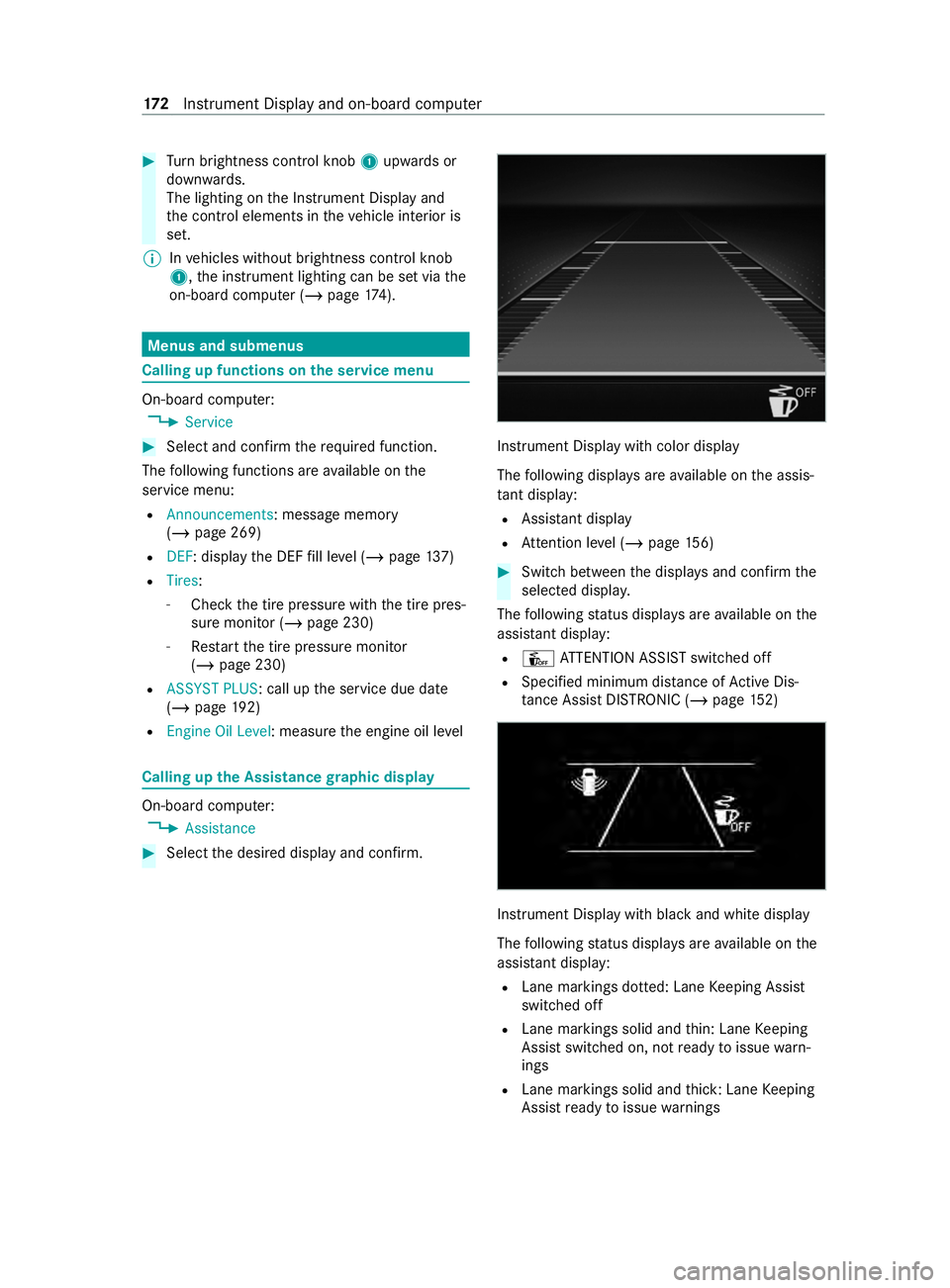
Select thed esired displa yand confirm. Instrument Displa
ywithc olor display
The following displa ysarea vailable on thea ssis‐
ta nt displ ay:
R Assi stant display
R Attention le vel(/ pag e156) #
Switc hbetwe en thed ispla ysand con firm the
selected displa y.
The following status displa ysarea vailable on the
assis tant displ ay:
R Û ATTENTION ASSIS Tswitched off
R Specified minimum dis tance of ActiveD is‐
ta nce Assi stDISTRONI C(/pag e152) Instrument Displ
aywit hb lacka nd whit edisplay
The following status displa ysarea vailable on the
assis tant displ ay:
R Lane markings dotted: Lane Keeping Assist
switched off
R Lane markings solid and thin: Lane Keeping
Assis tswitched on, no tready toissue warn‐
ings
R Lane markings solid and thick: Lane Keeping
Assis tready toissue warnings 17 2
Instrument Displa yand on-boar dcomputer