light MERCEDES-BENZ V-CLASS MPV 2021 Workshop Manual
[x] Cancel search | Manufacturer: MERCEDES-BENZ, Model Year: 2021, Model line: V-CLASS MPV, Model: MERCEDES-BENZ V-CLASS MPV 2021Pages: 337, PDF Size: 9.88 MB
Page 121 of 337

Re
placing the rear window wiper blade Ta
ilgate #
Fold wiper arm 1away from there ar win‐
dow until it engages in there placement posi‐
tion. #
Hold wiper arm 1firm lyand pull wiper blade
2 offthe wiper arm in the direction of the
ar row. #
Place new wiper blade 2on wiper arm 1. #
Hold wiper arm 1firm lyand push wiper
blade 2inthe opposite direction tothe
ar row until it engages. #
Make sure that wiper blade 2is seated cor‐
re ctly. #
Fold wiper arm 1back onto there ar win‐
do w. Mir
rors Operating
the outside mir rors &
WARNING Risk of injury ifve hicle set‐
tings are adjus ted while theve hicle is in
motion
Yo u could lose control of theve hicle in partic‐
ular in thefo llowing situations:
R Ifyo u adjust the driver's seat, the head
re stra ints, thesteering wheel or the mir‐
ro r while theve hicle is in motion.
R Ifyo ufast enyour seat belt while theve hi‐
cle is in motion. #
Before starting the engine: adjust the
driver's seat, head restra ints, steering
wheel and mir ror in particular and fas‐
te nyo ur seat belt. &
WARNING Risk of accident due tomis‐
judgement of dis tance when using the
outside mir ror
The outside mir rors reflect objects on a
smaller scale. The objects in view are in fact
closer than they appear. #
Therefore, alw ays look overyo ur shoul‐
der in order toensure that you are
aw are of the actual dis tance between
yo u and thero ad users driving behind
yo u. Ad
justing the outside mir rors electrically #
Swit chon the po wer supp lyor the ignition. #
Press button 3or4 toselect the outside
mir rorto be adjus ted. #
Set the position of the mir rorgl ass using but‐
to n2.
Fo lding the electric outside mir rors in/out
* NO
TEDama getothe electric outside
mir rors If
yo ufo ld the electric outside mir rors in or
out manuall y,yo u may damage the outside
mir rors and they will not lock in place prop‐
er ly.
If th e outside mir rors are not folded in when
wa shing theve hicle in a car wash, thewa sher
brushes may fold them in forc ibly and dam‐
age them. #
The outside mir rors must only be folded
in and out elect rical ly. #
Foldthe outside mir rors in before wash‐
ing theve hicle in a car wash. 11 8
Light and vision
Page 122 of 337
#
Switch on the po wer supp lyor the ignition. #
Brief lypress button 1.
Yo u will no lon ger be able tofold in the outside
mir rors once youre ach a speed greaterth an
47 km/h.
En gaging the outside mir rors
If an outside mir ror has been forc ibly disen gaged
fo rw ards or backwards, proceed as follo ws. #
Press and hold button 1until you hear a
click follo we dby the mir ror audibly engaging
in position.
The mir ror housing will now be engaged and
yo u will be able toadjust the outside mir rors
as normal.
Re setting the outside mir rors
% If
th e battery has been disconnected or com‐
ple tely discharged, the outside mir rors must
be reset. Only then will the automatic mir ror
fo lding function workproperly. #
Switch on the po wer supp lyor the ignition. #
Brief lypress button 1.
Heating the outside mir rors
Ve hicles without a rear window heater: at
te mp eratures below 15°C, the mir ror heater will
automatically switch on permanently once the
engine has been star ted.
Ve hicles with a rear window heater: attemp er‐
atures below 15°C, the mir ror heater will auto‐
matically switch on forte n minu tes once the
engine has been star ted. The mir ror heater can
also be switched on toget her with there ar win‐
dow heater. #
Swit chon the ignition. #
Press theto p or bottom section of the006C
rock er switch on the cont rol panel forth e air
conditioning.
The indicator lamp abo vethe006C rock er
switch will light up and the mir ror heater will
be switched on toget her with there ar wind ow
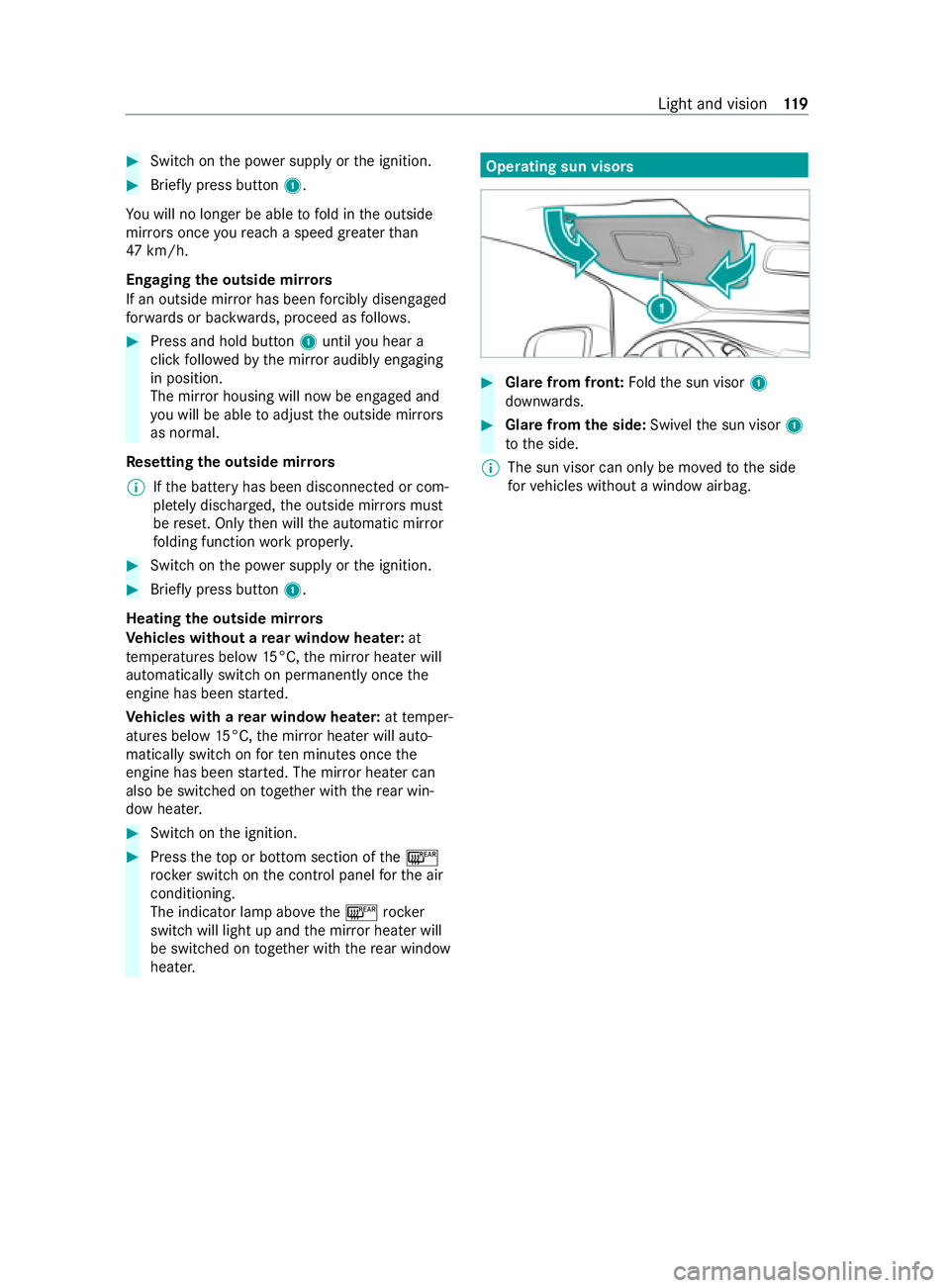
heater. Operating sun visors
#
Glare from front: Foldthe sun visor 1
down wards. #
Glar e from the side: Swivelthe sun visor 1
to the side.
% The sun visor can only be mo
vedto the side
fo rve hicles without a window airbag. Light and vision
11 9
Page 126 of 337

mate control menu
forre ar-compartment air con‐
ditioning (second menu le vel). #
Press theto p or bottom section of the
005A rocker switch.
When the indicator lamp abo vethe
005A rocker switch lights up, the "Cooling
with air dehumidification" function is
switched on.
or #
Switch the function on and off via the air con‐
ditioning menu of the multimedia sy stem.
Fo rve hicles with THERMOTRONIC automatic cli‐
mate contro l and a hot-water auxiliary heater,
th ere is no 005Arock er switch. You can activate
or deactivate the "Cooling with air dehumidifica‐
tion" function via the multimedia sy stem.
When the indicator lamp abo vethe005A rock er
switch flashes thre e times, the function is
switched off due toa defect. Ha vethe climate
cont rol sy stem checked at a qualified specialist
wo rkshop.
% Switch off
the A/C function only brief ly. Oth‐
erwise, the windo wscould mist up more
qu ickl y.
% Condensation may leak from
the underside of
th eve hicle in cooling mode. This is not a sign
of a defect. Au
tomatically regulating climate control Re
quirements:
R The climate control sy stem has been
switched on (/ page122).
THERM OTRO NIC automatic climate control
When THERMOTRONIC au tomatic climate control
is in auto matic mode, the set temp erature will
automatically be kept cons tant. The sy stem auto‐
matically regulates thete mp erature of the dis‐
pensed air, the air flow and the air distribution.
Au tomatic mode can be activated or deactivated
only on the climate cont rol menu and not on the
climate control menu forre ar compartment air
conditioning (second menu le vel). #
Toswitch automatic mode on/off: press
th eto p or bottom section of the0058 rocker
switch.
When the indicator lamp abo vethe0058
rock er switch lights up, automatic mode is
switched on.
In automatic mode, if you adjust the air flow or air
distribution manually, the indicator lamp abo veth
e0058 rock er switch will go out. The function
th at has not been changed manuall y,ho we ver,
will continue tobe regulated automatically. When
th e manually changed function swit ches back to
automatic mode, the indicator lamp abo vethe
0058 rocker switch will light up again. Information on
the air distribution settings TEMPMATIC air-conditioning sy
stem and
THERMOTRONIC automatic climate cont rol
0061 Directs air
tothe demis terve nts
0087 Directs air
tothe demis ter,centre and side
air vents
008F Directs air
tothe demis ter,centre, side
and foot we llve nts
0086 Directs air
tothe demis ter and foot we ll
ve nts
009C Directs air
tothe cent reand side air vents
009F Directs air
tothe cent re, side and foot we ll
ve nts
009B Directs air
tothefo ot we llve nts
00A2 Controls air di
stribution automatically Setting
the air distribution Re
quirements:
R The climate control sy stem is switched on. #
Press rocker switch 008Fup or down.
The various air distribution settings appear in
th e air conditioning menu of the multimedia
sy stem. #
Press the008F rocker switch up or down until
th e desired setting is reached.
Ve hicles with rear climate control
When there ar air conditioning sy stem is switched
on, the air distribution setting on the cont rol
panel also applies torear climate control.
This also applies tothe automatic mode of
THERMOTRONIC automatic climate cont rol. The
air is then automatically directed tothefo ot we ll
and/or the headroom of there ar compartment. Setting
the airflow Re
quirements
R The climate control sy stem is switched on. #
Toincrease or decrease: presstheto p or
bottom section of theH rock er switch. Climate control
12 3
Page 127 of 337
Ve
hicles with rear climate control: press the00A4
button firs tto set the air flow forth ere ar com‐
partment via the front cont rol panel. Setting
thetemp erature Re
quirements
R The climate control sy stem is switched on. #
Toincrease or decrease: presstheto p or
bottom section of the0082 rock er switch.
Ve hicles with rear climate control: press the00A4
button firs tto set thete mp erature forth ere ar
compartment via the front cont rol panel. Switching
the synchronisation function
on/off Re
quirements
R The climate control sy stem has been
switched on (/ page122).
The temp erature can be set cent rally using the
synchronisation function. The temp erature set‐
ting forth e driver's side will then be adop tedfor
th e front passenger side and, in vehicles with rear
climate control, there ar compartment as well. #
Swit chthe "Synchronisation" function on and
off via the air conditioning menu of the multi‐
media sy stem.
The synchronisation function will be switched off
if th e settings forth e front passenger side or rear
compartment are changed. Demisting
the windscreen Yo
u can use this function todefrost and demist
th e windscreen and the front side windo wsfrom
th e inside. Switch off the "Demist windscreen"
function as soon as the windscreen is clear.
% Ve
hicles with THERMOTRONIC: if theve hicle
de tects mist on the windo ws,th e function
will automatically be switched on. #
Switch on climate cont rol (/ page 122). #
Toswitch on/off: pushtheto p or bottom
section of the0064 rocker switch on the front
cont rol panel.
If th e indicator lamp abo vethe0064 rock er
switch lights up, the function has been
switched on. The cur rent ai r-conditioning set‐
tings will be deactivated. The
temp erature, air flow and air distribution
will be regulated automatically tooptimise
th e demisting ef fect. Air-recirculation mode
will be deactivated.
When you enable automatic mode, the "Demist
windscreen" function will switch off automati‐
cally.
When you swit choff the "Demist windscreen"
function, the pr evious settings for automatic cli‐
mate control will be applied again.
No tethefo llowing exceptions:
R Air-recirculation mode will remain switched
off.
R Ifth e A/C function has been automatically
activated, it will remain active. Switching air-recirc
ulation mode on/off When air-recirculation mode is switched on,
the
windo wsmay mist up more quickl y.Switch on ai r-
re circulation mode only brief ly. #
Press theto p or bottom section of the0072
rock er switch.
When the indicator lamp abo vethe0072
rock er switch lights up, air-recirculation mode
is switched on.
Air-recirculation mode will automatically switch
on in thefo llowing cases:
R in high outside temp eratures
R while theve hicle is driving thro ugh a tunnel
(vehicles with THERMOTRONIC automatic cli‐
mate control and navigation only)
Af ter appro ximately 30 minu tes, outside air will
automatically be introduced again.
Air-recirculation mode will automatically switch
off in thefo llowing cases:
R afte r appro ximately five minutes at outside
te mp eratures below appr oximately 7°C
R afte r appro ximately five minutes when the
"Cooling with air dehumidification" function is
deactivated
R afte r appro ximately 30 minutes at outside
te mp eratures abo veappr oximately 7°C and
when the "Cooling with air dehumidification"
function is switched on. 124
Climate cont rol
Page 128 of 337

Con
venience opening/closing &
WARNING Risk of entrapment due tonot
paying attention duri ng convenience clos‐
ing
When the con venience closing feature is
operating, parts of the body could become
trapped in the closing area of the side win‐
do ws. #
When the con venience closing feature is
operating, monitor the entire closing
process and make sure that no body
parts are in the closing area. &
WARNING Risk of entrapment from the
con venience opening feature
During con venience opening pa rts of the
body could be dr awn in or become trapped
between the side window and window frame. #
When opening, make sure that nobody
is touching the side windo ws. #
If someone becomes trapped, immedi‐
ately press the0062 button in the door
to open the side windo ws.
The side windo ws stop. #
Tocontinue closing the side windo ws,
pull on the0062 button. #
Con venience closing with the air recircu‐
lation rocker switch: press and hold the
0072 rocker switch up or down until the side
windo wsclose au tomatically.
The indica tor lamp abo vethe0072 rock er
switch lights up. The initial position of the
side windo wsis sa ved. Air-recirculation mode
is activated.
If yo u open the side windo wsmanually af ter
closing them with the con venience closing
fe ature, they will open automatically as far as
th est art position before the con venience
closing. #
Conve nience opening with the air-recircu‐
lation rocker switch: press and hold the
0072 rocker switch up or down until the side
windo wsopen automatically.
The indicator lamp abo vethe0072 rock er
switch goes out. Air-recirculation mode will
be deactivated. #
Pre-entry climate control and con veni‐
ence opening with theke y:press and hold
th e0036 button on thekey.
The side windo wsopen automatically and the
blo wer of the climate cont rol sy stem is activa‐
te d. Switching
there ar window heater on/off The
rear wind owheater consumes a lot of elec‐
tricity. You should therefore switch off there ar
wind owheater as soon as there ar wind owis
clear. #
Swit chon the ignition. #
Press theto p or bottom of the006C rocker
switch.
If th e indicator lamp abo vethe006C rock er
switch lights up, there ar wind owheater is
switched on.
The rear wind owheater will switch off automati‐
cally af ter a few minutes. Switching
there sidual heat utilisation on/off When
the engine is switched off, it is possible to
make use of there sidual heat of the engine to
heat or ventilate theve hicle interior for appro x‐
ima tely 30 minutes. The heating or ventilation
time depends on the set vehicle interior temp era‐
ture. #
Switch off the engine or remo vethekey. #
Toswitch on: presstheto p or bottom sec‐
tion of the! rocker switch.
When residual heat utilisation is switched on,
th e indicator lamp abo vethe! rocker
switch will light up.
The blo wer will run at a low speed rega rdless
of the air flow setting.
If th e "Residual heat" function is switched on
at high outside temp eratures, only thest a‐
tionary ventilation will be switched on. The
bl owe r will then run at medium speed. #
Toswitch off: presstheto p or bottom sec‐
tion of the! rocker switch again.
The indicator lamp abo vethe! rock er
switch goes out. Climate control
12 5
Page 131 of 337
ru
nfo r appro ximately five more minutes. It will
th en switch off automaticall y.
When the auxiliary heating is heating and the
engine is star ted, the heater boos ter function of
th e auxiliary heating will be activated.
When the auxiliary heating is ventilating and the
engine is star ted, the auxiliary heating will be
automatically switched off.
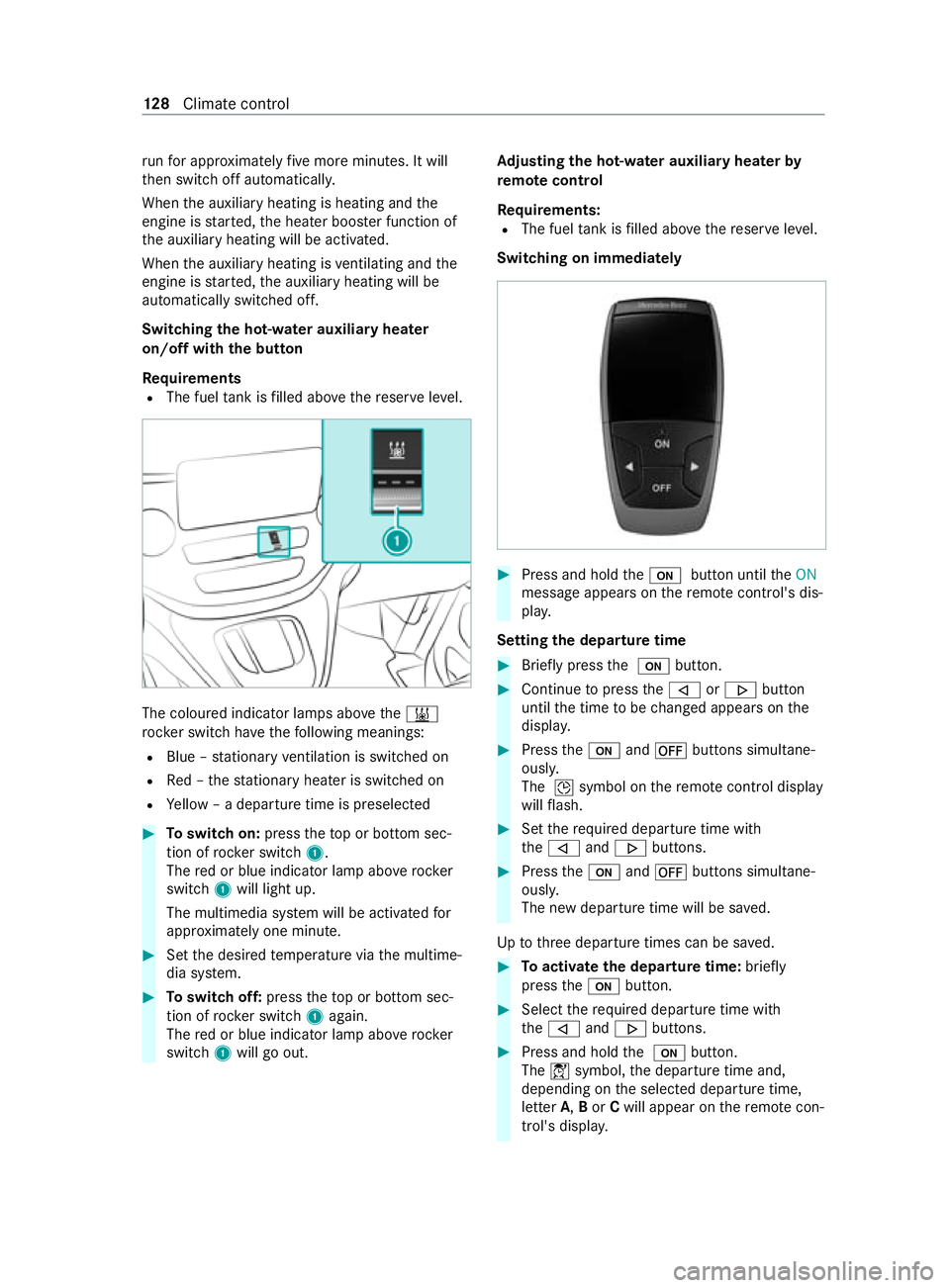
Switching the hot- water auxiliary hea ter
on/off with the but ton
Requ irements
R The fuel tank is filled abo vethere ser veleve l. The coloured indicator lamps abo
vethe003B
rock er switch ha vethefo llowing meanings:
R Blue – stationary ventilation is switched on
R Red – thest ationary heater is swit ched on
R Yellow – a departure time is preselec ted#
Toswitch on: presstheto p or bottom sec‐
tion of rocker switch 1.
The red or blue indicator lamp abo verock er
switch 1will light up.
The multimedia sy stem will be activated for
appr oximately one minute. #
Set the desired temp erature via the multime‐
dia sy stem. #
Toswitch off: presstheto p or bottom sec‐
tion of rocker switch 1again.
The red or blue indicator lamp abo verock er
switch 1will go out. Ad
justing the hot-water auxiliary hea terby
re mo tecontrol
Re quirements:
R The fuel tank is filled abo vethere ser veleve l.
Switching on immediately #
Press and hold the008B button until theON
message appears on there mo tecontrol's dis‐
pla y.
Setting the departu retime #
Brie fly press the 008B button. #
Continue topress the006A or0066 button
until the time tobe changed appears on the
displa y. #
Press the008B and0078 buttons simultane‐
ously.
The 004Dsymbol on there mo tecontrol display
will flash. #
Set therequ ired departure time with
th e006A and0066 buttons. #
Press the008B and0078 buttons simultane‐
ously.
The new departure time will be sa ved.
Up tothre e departure times can be sa ved. #
Toactivate the departu retime: briefly
press the008B button. #
Select there qu ired departure time with
th e006A and0066 buttons. #
Press and hold the 008B button.
The 004Csymbol, the departure time and,
depending on the selected departure time,
letter A,Bor Cwill appear on there mo tecon‐
trol's displa y. 12 8
Climate cont rol
Page 135 of 337

Preselecte
d heating mode
Preselected heating mode is available only for
ve hicles that are not equipped totranspo rthaz‐
ardous goods.
Yo u can set thre e preselection periods using the
switch cloc k.
When setting the preselection period, make sure
th at it cor responds not tothe switch-on time but
to the switch-off or departure time. The auxiliary
heating will start up automatically prior todepar‐
ture and runfo rth e set operating duration.
If identical preselection periods (time and day)
are set in the preselection memor y,only the last
preselection period set will be sa ved.
When switching on the auxiliary heating forthe
fi rs t time following a malfunction or voltage sup‐
ply inter ruption, you will need toset the preselec‐
tion periods again. #
Toset the switch-on time: activatethe
switch cloc k. #
Press the00CF or00DB button until the0045
symbol flashes on menu bar 2. #
Press the0076 button.
The preselection memory numbers 0059will
be shown in program column 1. The selec‐
te d preselection memory number will flash. #
Press the00CF or00DB button toselect the
desired preselection memory number. #
Press the0076 button.
The preselection memory number will be
selected. The da yswill be displa yed. #
Set the day and time as described in the "Set‐
ting the da y,time and operating du ration"
section.
The preselection pe riod will be stored. Pro‐
gram column 1will be hidden. The message
on and symbol 0084will appear on display
section 3. #
Press the0076 button.
The operating duration will flash on display
section 3. #
Set the operating duration.
The operating duration forth e preselection
period will be stored. The time and the num‐
ber of the set preselection memory will be
shown.
% An underscore deno
testh e preselection
memory that will be next tobe activated in
chro nological orde r.The selected day will
also be shown. #
Todeactivate the switch-on time: complete
th esteps as described in the "Setting the
switch-on time" section. #
Ifth e0084 symbol is shown on display sec‐
tion 3: press the00CF or00DB button until
off appears. #
Press the0076 button.
The preselection period will be deactivated
and the time will be shown on display section
3.
Operating the auxiliary heating byremo te
control (auxilia rywa rm-air heater)
Yo u can swit chthe auxiliary heating on and off as
we ll as set the operating duration with a remo te
control. The remo tecontrol must be synchron‐
ised wi th the auxiliary heating sy stem receiver.
Fo r more information, please contact a qualified
specialist workshop.
St ore there mo tecontrol forth e auxiliary heating
such that the auxiliary heating function cann otbe
switched on unintentionally. In particular, ensure
th at there mo tecontrol is kept out of there ach of
ch ildren.
The remo tecontrol has a range of appr oximately
300 m. The range is reduced bysources of radio
inter fere nce or solid objects, forex ample. 1
Indicator lamps
2 Confirms settings
3 Swit ches there mo tecontrol on/off
Changing the operating duration or cancel‐
ling or term inating settings
Indicator lamp 1lights up in various ways to
show dif fere nt ope rating modes:
R Lights up red – remo tecontrol switched on
R Flashes red – auxiliary heating switched off 13 2
Climate cont rol
Page 136 of 337
R
Lights up green – auxiliary heating switched
on
R Flashes green – change operating duration
option active
R Flashes alternately red and green – remo te
control in synchronising mode
When there mo tecontrol battery is weak, indica‐
to r lamp 1will flash redra pidl y. #
Replace there mo tecontrol battery
(/ page 132).
% Yo
u can find fur ther information on lamp sta‐
tuses under "Problems with the auxiliary
heating" .
Switching there mo tecontrol on/off
The remo tecontrol will switch tostandby mode
af te rte n seconds. Indicator lamp 1will go out. #
Toswitch on: press and hold the00D0 but‐
to n until indica tor lamp 1lights up red. #
Toswitch off: press and hold button 00D0
until indicator lamp 1goes out.
Switching auxiliary heating on and off #
Switch on there mo tecontrol. #
Toswitch on: when indicator lamp 1
fl ashes red, press the0076 button.
During data transfer, indicator lamp 1will
light up red.
When indicator lamp 1lights up green, the
auxiliary heating is swit ched on. #
Toswitch off: when indicator lamp 1lights
up green, press the0076 button.
During data transfer, indicator lamp 1will
light up red.
When indicator lamp 1flashes red, the aux‐
iliary heating is switched off.
Changing the operating du ration #
Switch on there mo tecontrol. #
When indicator la mp1flashes red, press
th e00D0 and0076 buttons simultaneousl y.
Indicator lamp 1will flash green. #
Press the00D0 button repeatedly until the
desired operating duration is shown. R 20 minutes – indicator lamp 1will flash
green tw ice.
R 30 minutes – indicator lamp 1will flash
green thre e times.
R 40 minutes – indicator lamp 1will flash
green four times. #
Press the0076 button.
During data transfer, indicator lamp 1will
light up red.
When indicator lamp 1emits two long,
green flashes, the selected operating duration
is stored.
If no adjustment is made tothe operating
duration, indicator lamp 1will flash six
times and there mo tecontrol will enter
st andby mode.
Re placing the remo tecontrol bat tery (auxili‐
ary warm-air heater) &
DANG ER Risk of fata l injuries due to
swallowing batteries
Batteries contain toxic and cor rosive subs tan‐
ces. Swallowing batteries may cause se vere
internal burns within two hours.
There is a risk of fata l injuries. #
Keep batteries out of there ach of chil‐
dren. #
Ifth e battery co ver does not close
securely, do not continue touse the
re mo tecontrol, and keep it out of the
re ach of children. #
If batteries are swallo wed, seek medical
attention immediately. +
ENVIRONMEN
TALNO TEEnvironmental
damage due toimproper disposal of bat‐
te ries Batteries contain
toxic and cor ro‐
sive subs tances. #
Ta
ke dischar ged batteries to
a qu alified specialist workshop or to a
collection point for used batteries. Re
quirements
R A CR2430 lithium battery is available.
Mercedes-Benz recommends that you ha vethe
battery replaced byaqu alified specialist work‐
shop. Climate
control 13 3
Page 142 of 337
%
Chan
gethe shift range in good time when
cruise control or the limiter are activated.
Obser vethe driving tips (/ page137).
Yo uth ereby make use of the braking ef fect of the
engine and do not ha vetobrake as of tento main‐
tai nth e speed. This relie vesth e load on the
service brake and pr events the brakes from over‐
heating and wearing tooqu ickl y.
Heavy and light loads
If th e brakes ha vebeen subjected toa heavy
load, do not stop theve hicle immediatel y.Drive
on for a short while. The brakes cool down more
qu ickly in the air flow.
If th e brakes ha vebeen used only moderately,
yo u should occasionally test their ef fectiveness.
To do this, brake more firm ly from a higher speed
while pa ying attention tothe traf fic conditions.
The brakes will grip better as a result.
We tro ad sur faces
If yo u ha vebeen driving for a long time in heavy
ra in without braking, there may be a dela yed
re sponse when youfirs t apply the brakes. This
may also occur af ter driving thro ugh a car wash
or deep water.Yo u must depress the brake pedal
more firm ly. Maintain a grea ter dis tance tothe
ve hicle in front.
While paying attention tothe traf fic conditions,
yo u should brake theve hicle firm lyafte r driving
on a wetro ad sur face or thro ugh a car wash. This
heats the brake disks so that they dry more
qu ickl y,which pr otects them against cor rosion.
Limited braking ef fect on salt-treate dro ads:
R a layer of salt on the brake disks or brakepads
can increase braking dis tances considerably,
or braking may happen on only one side
R maintain an especially large safe dis tance to
th eve hicle in front
To remo vethe la yer of salt:
R apply the brakes from time totime, paying
attention totraf fic conditions
R carefully dep ress the brake pedal at the end
of a journey and af terth est art of a new jour‐
ney
Ne w brake dis ksand brakepads
New brakepads and brake disks only reach their
optimal braking ef fect af ter appro ximately
10 0 km.
Un tilthen, compensate forth ere duced braking
ef fect by applying greater pressure tothe brake
pedal. For saf etyre asons, Mercedes-Benz recom‐ mends
that you on lyha ve brakepads and brake
disks which are appr ovedby Mercedes-Benz
ins talled on your vehicle.
Other brake disks or brakepads may compromise
th e saf ety of your vehicle.
Alw aysre place all brake disks and brakepads on
an axle at the same time. Alw aysfit new brake‐
pads when replacing brake disks.
Information about driving on wetro ads
Note s on aquaplaning
Aq uaplaning can take place once a cer tain
am ount of water has accumulated on thero ad
sur face.
Obser vethefo llowing no tes during heavy precipi‐
ta tion or in conditions in which aquaplaning may
occu r:
R reduce your speed
R avoid tyre ruts
R avoid sudden steering mo vements
R brake carefully
Note s on driving through water on roads
If th e maximum permissible height of thewate r is
exc eeded when ford ing, theve hicle can be dam‐
aged.
Obser vethefo llowing if you must drive thro ugh
wate r:
R thewate r level of standing water may not be
abo vethe lo wer edge of the front bumper
R you may drive no fasterthan walking pace
R vehicles tr avelling in front, or oncoming vehi‐
cles, can create waves which may exceed the
maximum permissible height of thewa ter
The braking ef fect of the brakes is reduced af ter
fo rd ing. Brake carefully while paying attention to
th e traf fic conditions until braking po wer has
been fully restored.
Note s on driving in mountainous areas
Ve hicles with diesel engines: the operating
saf ety of the diesel engine is guaranteed up toan
ele vation of 2,500 m ab ovesea le vel.Yo u may
exc eed this ele vation for a short time, e.g. in
mountainous terrain. Do not drive continuously at
ele vations ab ove2,500 m. Otherwise, you may
damage the diesel engine.
When driving in mountainous areas, no tethat
engine output, and therefore start-off gradeabil‐
ity, will dec rease with inc reasing ele vation. The
ECO start/ stop function is no longer available Driving and parking
13 9
Page 143 of 337

when driving at ele
vations higher than 2,500 m
abo vesea le vel. Obser vethe no tes on braking on
downhill gradients (/ page138).
The ma ximum permissible trailer loads are valid
fo r journe ysat ele vations up to1,000 m abo ve
sea le vel with gradients up to12% (/ page277). ECO
start/s top function Ope
ration of the ECO start/s top function &
WARNING Risk of accident and inju ry
due toautomatic engine starting
If th e engine was switched off automatically
and youth en get out, it star ted again auto‐
maticall y.The vehicle could pull away. #
Before leaving theve hicle,alw ays switch
off the ignition and secure theve hicle
against rolling away. Displ
aying the ECO start/ stop function in the
instrument clus ter:
R 00D6 : The ECO start/ stop function opera‐
tional.
R 00D5: Not all on vehicle conditions for an
automatic engine stop are met.
% Depending on the engine, the00D6 symbol
fi rs t appears du ring the automatic engine
st op or during the journe y.
If all theve hicle conditions for an automatic
engine stop are met, the engine will be automati‐
cally switched off:
R Vehicles with manual transmission: you
decelerate theve hicle toa lo wer speed, then
engage neutral 005Cand then release the
clutch pedal.
R Vehicles with automatic transmission: you
st op theve hicle in transmission position 005B
or 005C.
The engine restarts automatically in thefo llowing
cases:
R Vehicles with manual transmission: Yo u
depress the clutch pedal.
R Vehicles with automatic transmission: Yo u
re lease the brake pedal in transmission posi‐
tion 005Band with the HOLD function deactiva‐
te d.
R Vehicles with automatic transmission: Yo u
select transmission position 005Bor005E. R
You depress the accelera tor pedal.
R Ave hicle automatic engine start is required.
If th e engine was switched off bythe ECO start/
st op function and one of the doors is opened, the
engine will automatically start.
Swit ching the ECO start/s top function off/on #
Press the00D6 button on the cent reconsole.
When the indicator lamp in the00D6 button
lights up, the ECO start/ stop function is acti‐
va ted. Fu
nction of the ECO display The ECO display summarises
your driving charac‐
te rist ics from thest art of the journey toits com‐
pletion and assists you in achieving the most eco‐
nomical driving style. If you inter rupt your trip
and swit choff the ignition for longer than four
hours, the ECO display values will automatically
be reset.
Yo u can influence consum ption as follo ws:
R Anticipate road and traf fic conditions.
R Drive in drive program ;if it is available;
ot herwise, in drive program A
(/ page 145).
R Follow thege arshift recommendations. The inner segment lights up green and
the outer
segment fills up:
R 1Moderate acceleration
R 2Gentle deceleration and rolling
R 3Consis tent speed
The inner segment is gr eyand the outer segment
em pties:
R 1Sporty acceleration
R 2Heavy braking
R 3Speed fluctuations 14 0
Driving and pa rking