light MERCEDES-BENZ V-CLASS MPV 2021 Manual PDF
[x] Cancel search | Manufacturer: MERCEDES-BENZ, Model Year: 2021, Model line: V-CLASS MPV, Model: MERCEDES-BENZ V-CLASS MPV 2021Pages: 337, PDF Size: 9.88 MB
Page 168 of 337

Yo
u can find information on the assis tance
graphic menu under "Assis tance graphic"
(/ page 183).
% If
yo u set the speed, the Assis tance graphic
brie fly appears in the multifunction displa y.
Displa yson the speedome ter
When Active Dis tance Assi stDISTRONIC is acti‐
va ted, one or two indicator segments light up in
th estored speed range of the speedome ter.
If Ac tive Dis tance Assi stDISTRONIC de tects a
ve hicle in front, the indicator segments, located
between the speed of theve hicle in front and the
st ored speed, light up. Information on Hill
Start Assist Hill
Start Assist holds theve hicle for a short time
when pulling away on a hill under thefo llowing
conditions:
R Vehicles with manual transmission: age ar
is engaged.
R Vehicles with automatic transmission: the
transmission is in position 005Bor005E.
R The pa rking brake has been released.
This gives you enough time tomo veyour foot
from the brake pedal tothe accelera tor pedal and
depress it before theve hicle begins toroll. &
WARNING Risk of accident and inju ry
due totheve hicle rolling away
Af ter a short time, Hill Start Assist no lon ger
holds theve hicle. #
Swiftly mo veyour foot from the brake
pedal tothe accelera tor pedal. Do not
lea vetheve hicle when it is being held
by Hill Start Assist. HOLD function
HOLD function
The HOLD function is only
available forve hicles
with automatic transmission.
The HOLD function holds theve hicle at a stand‐
st ill without requ iring youto depress the brake
pedal, e.g. when pulling away on steep slopes or
when waiting in traf fic. When you depress the
accelerator pedal topull away,th e braking ef fect
is cancelled and the HOLD function is deactiva‐
te d. The HOLD function is only an aid. The
responsibil‐
ity forth eve hicle safely standing still remains
with the driver.
Sy stem limits
The HOLD function is only intended toprov ide
assis tance when driving and is not a su fficient
means of safeguarding theve hicle against rolling
aw ay when stationar y.
R The incline may not be greater than 30%.
Ac tivating or deactivating the HOLD function
Requ irements
R The vehicle is stationar y.
R The engine is running or it has been au tomati‐
cally switched off bythe ECO start/ stop func‐
tion.
R Allthe doors and theta ilgate are closed and
th e seatbelt is fastened.
R The parking brake has been released.
R The selec tor le ver is in the005B, 005Eor005C posi‐
tion.
R Active Dis tance Assi stDISTRONIC is deacti va‐
te d.
Ac tivating the HOLD function &
WARNING Risk of an accident due tothe
HOLD function being active when you
lea vetheve hicle
If th eve hicle is only braked with the HOLD
function it could, in thefo llowing situations,
ro llaw ay:
R Ifth ere is a malfunction in the sy stem or
in the po wer supply.
R Ifth e HOLD function is deactivated by
depressing the accelera tor pedal or brake
pedal, e.g. byave hicle occupant. #
Always secure theve hicle against rolling
aw ay before you lea veit. #
Depress the brake pedal until the00D9 dis‐
play appears in the multifunction displa y.
The HOLD function is activated. You can
re lease the brake pedal.
% If depressing
the brake pedal thefirs t time
does not acti vate the HOLD function, wait
brief lyand then try again.
Deactivating the HOLD function #
Depress the accelerator pedal topull away.
or Driving and parking
16 5
Page 170 of 337

Re
ar area warning display in there ar at the
centre of thero of lining
1 Warning segments forth e left side of the
ve hicle
2 Measurement operational readiness indicator
3 Warning segments forth eright side of the
ve hicle
At least one segment will light up as theve hicle
approaches an obs tacle, depending on theve hi‐
cle's dis tance from the obs tacle.
In addition, warning tones are emitted. When the
dis tance tothe obs tacle is suf ficient, you will
hear an intermit tent wa rning tone. The sho rter
th e dis tance tothe obs tacle, the shor terth e fre‐
qu ency of the intermittent warning tones
becomes. When the minimum dis tance is
re ached, you hear a continuous warning tone.
The warning display for each side of theve hicle is
divided into five yellow and two red segments.
PA RKTRONIC is active if measurement opera‐
tional readiness indicator 2lights up.
Sy stem limits
PA RKTRONIC may not take thefo llowing obs ta‐
cles into account:
R obstacles bel owthe de tection range, e.g.
people, animals or objects
R obstacles ab ovethe de tection range, e.g.
ove rhanging loads, overhangs or loading
ra mp s of lor ries
The sensors must be free of dirt, ice and slush.
Otherwise, they may not function cor rectly. Clean
th e sensors regularly, taking care not toscratch
or damage them (/ page 229). Problems with
PARKTRONIC
The reis a malfunction if only there d segments of
th ewa rning display light up. In addition, a warn‐
ing tone sounds for appro ximately two seconds. If
problems pe rsist, ha vePARKTRONIC checked at
a qu alified specialist workshop.
If th ewa rning indicators are displaying implausi‐
ble dis tances, it may be due tothefo llowing cau‐
ses:
R The sensors are dirty: cleanthe sensors.
Obser vethe no tes on care of vehicle parts
(/ page 229).
R Licence plates or
other detachable parts
in the vicinity of the sensors are not cor‐
re ctly faste ned:check the licence plate or
th e de tach able parts for cor rect fit.
R In
te rference byano ther source of radio or
ultrasound waves:check the function of
PA RKTRONIC at ano ther location.
Deactivating/activating PARKTRONIC #
Press theé button.
If PA RKTRONIC is deactivated, the indicator
lamp of theé button lights up. Re
versing camera Fu
nction of there ve rsing camera
The reve rsing camera is located next totheta il‐
ga te handle and is pr otected from raindrops and
dust bymeans of a flap. When there ve rsing cam‐
era is activated, this flap opens (/ page153).
The flap closes again when you ha veended the
manoeuvring process or you swit choff the
engine. Driving and parking
167
Page 171 of 337

Fo
rte ch nical reasons, theflap may remain open
brief lyafte rth ere ve rsing camera has been deac‐
tivated.
Yo u can activate the automatic display function of
th ere ve rsing camera in the multimedia sy stem .
When you engage reve rsege ar, the image from
th ere ve rsing camera is shown automatically in
th e media displa y.Dynamic guide lines show the
path theve hicle will take forth e cur rent steering
mo vement. This helps youto orient yourself and
to avoid obs tacles when reve rsing.
The reve rsing camera is only an aid. It is not a
substitute foryo u paying attention tothe sur‐
ro undings. You are alw aysre sponsible for safe
manoeuvring and parking. Make sure that there
are no persons, animals or objects etc. in the
manoeuvring area while manoeuvring and parking
in parking spaces.
Yo u can use the softk eys located below or tothe
side tochoose between thefo llowing vie ws: Normal view
1 Yellow guide line, vehicle width (driven sur‐
fa ce) depending on the cur rent steering
angle (dynamic)
2 Yellow guide line at a dis tance of appr ox‐
imately 1.0 m from there ar area
3 Yellow path marking the course the tyres will
ta ke atthe cur rent steering position
(dynamic)
4 Bumper
5 Red guide line at a dis tance of appr oximately
0.3 m from there ar area Wi
de-angle view Tr
ailer view (vehicles with a trailer hit ch)
1 Yellow guide line, locating aid
2 Red guide line at a dis tance of appr oximately
0.3 m tothe ball head of the trailer hitch
3 Ball head of the trailer hitch
Obser vethe no tes on cleaning and care of the
re ve rsing camera (/ page 229).
The reve rsing camera may show a dis torted view
of obs tacles, show them incor rectly or not at all.
The reve rsing camera cannot show all objects
which are very near toor under there ar bumper.
It will not warnyou of a collision, people or
objects.
The area behind theve hicle is displa yed as a mir‐
ro r image, as in the inside rearview mir ror.
When you shift out of reve rsege ar, the dynamic
guide lines are faded out. If, af ter shifting out of
re ve rsege ar, you drive fasterthan 16 km/h, the
re ve rsing camera is deactivated.
Sy stem limits
The reve rsing camera will not function or will only
partially function in thefo llowing situations:
R ifth eta ilgate is open
R ifth ere is heavy rain, snow or fog
R ifth e light conditions are poor, e.g. at night 16 8
Driving and pa rking
Page 172 of 337
R
ifth e camera lens is co vered, dirty or mis ted
up.
R if cameras, or vehicle components in which
th e cameras are fitted, are dama ged. Ha ve
th e cameras, their positions and their setting
ch ecked at a qualified specialist workshop.
% The media display contra
stmay be impaired
due todirect sunlight or other light sources.
In this case, pay particular attention.
% Ha
ve the media display repaired or replaced
if, forex ample, pixel er rors considerably
re strict its use.
% Objects that are not at ground le vel appear
fur ther aw ay than they actually are. This
includes, forex ample:
R the bumper of a vehicle par ked behind
R the dr awbar of a trailer
R the ball neck of a trailer hitch
R theta il-end of a lor ry
R slanted posts
Only use the guide lines of the camera image
fo r orientation. Do not tr avel fur ther than the
lo west horizontal guide line when approach‐
ing objects. You may otherwise damage your
ve hicle and/or the object.
Opening there ve rsing camera co ver
Multimedia sy stem:
4 © 5
Settings 5
Vehicle
5 Rear view camera #
Select Open camera cover .
% The camera co
ver closes automatically af ter
a while or when the engine is switched off
with the co ver open. Ac
tive Parking Assist Fu
nction of Active Parking Assist
Ac tive Parking Assist is an electro nic parking
assis tance sy stem which automatically locates
and measures parking spaces on bo thsides of
th eve hicle when you are driving forw ards up to a
speed of appr oximately 35 km/h.
If all requ irements are met, theÇ display
appears in the multifunction displa y.The sy stem
th en independently locates and measures parallel
and perpendicular parking spaces on bo thsides
of theve hicle.
When Active Parking Assist has de tected park ing
spaces, theÈ display appears in the multi‐ function displa
y.The ar rowsshow on which side
of thero ad free parking spaces are located.
Ac tive Parking Assist displa ysparking spaces on
th e co-driver side as standard. The parking
spaces on the driver's side are only displa yed if
yo u operate the turn signal on the driver's side.
When parking on the driver's side, you must oper‐
ate the turn signal until you ha vestar ted active
parking assis tancebypressing the0076 steering-
wheel button.
Ac tive Parking Assist can assist you with an
active steering inter vention and brake application
du ring pa rking and exiting the parking space. The
active brake application is dependent on the
countr y-specific version of theve hicle. On vehi‐
cles with manual transmission, active parking
assis tance is limited exclusively topowe r-st eering
assis tance.
Ac tive Parking Assist is only an aid. It is not a
substitute foryo ur attention tothe sur roundings.
Yo u are alw aysre sponsible for safe manoeuvring,
parking and exiting a parking space. Make sure
th at no persons, animals or objects etc. are in the
path of your vehicle.
Ac tive Parking Assist is cancelled in thefo llowing
cases, among others:
R Parking Assist PARKTRONIC is deactivated.
R Yousteer.
R You apply the parking brake.
R Parking using Active Parking Assist is no lon‐
ge r possible.
R Youexc eed a speed of 10km/h.
R A wheel spins and ESP ®
inter venes or fails.
R You engage transmission position 005D.
R You open the driver's door or a sliding door
on vehicles with a manual transmission.
R You open a door or theta ilgate, or unfas ten
yo ur seat belt, on vehicles with an automatic
transmission.
PA RKTRONIC is deactivated forth ere ar area
when you ha vea trailer coupled up and es tablish
an electrical connection between your vehicle
and the trailer. Active Parking Assist is then not
av ailable.
Sy stem limits
Objects located abo veor below the de tection
ra nge of Active Parking Assist are not de tected
when the parking space is being measured. They
are also not take n into account when the parking
manoeuvre is calculated, e.g. overhanging loads, Driving and parking
16 9
Page 176 of 337
Yo
u can choose between thefo llowing settings:
R Off
R Standard: normal sy stem sensitivity.
R Sensitive: higher sy stem sensitivity. The driver
is wa rned earlier and the attention le vel
de tected bythe sy stem (Attention Le vel) is
adap ted according ly. Tr
af fic Sign Assist Fu
nction of Traf fic Sign Assist
Tr af fic Sign Assi staids youby displaying de tected
speed limits and overtaking restrictions in the
instrument clus ter.
Since Traf fic Sign Assi stalso uses the data
st ored in the navigation sy stem, it can also
update the display without de tecting traf fic signs.
The came raalso de tects traf fic signs wi th a
re striction indicated byan additional sign (e.g.
when wet).
% Traf fic signs are only displa yed with the
re striction indicated byan additional sign in
th efo llowing cases:
R the traf fic signs must be obser ved with
th ere striction
R the sy stem is unable toclea rly de term ine
whe ther there striction applies
If th e sy stem de tects that you are driving on to a
section of road in the wrong direction of tra vel, it
triggers a warning. This function is not available
in all countries.
Tr af fic Sign Assi stis only an aid and is not alw ays
able tocor rectly display speed limits and overtak‐
ing restrictions. The actual traf fic signs al ways
ha ve priority over theTr af fic Sign Assi stdispla y.
Obser vethe no tes on driving sy stems and your
re sponsibility; you may otherwise failto recog‐
nise dangers (/ page 153).
Ins trument clus ter display
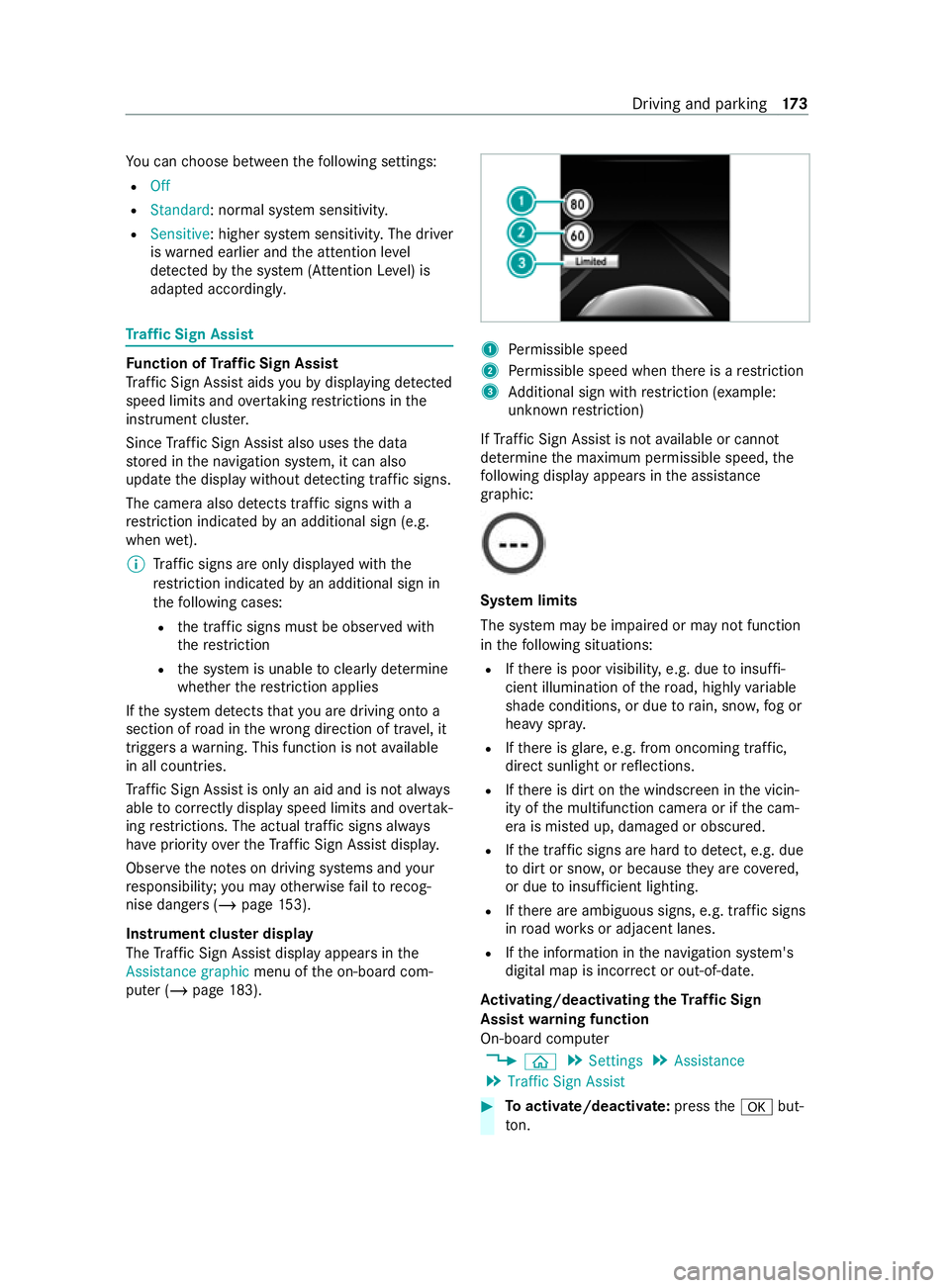
The Traf fic Sign Assi stdisplay appears in the
Assistance graphic menu ofthe on-board com‐
puter (/ page183). 1
Perm issible speed
2 Perm issible speed when there is a restriction
3 Additional sign with restriction (e xample:
unknown restriction)
If Traf fic Sign Assi stis not available or cannot
de term ine the maximum permissible speed, the
fo llowing display appears in the assis tance
graphic: Sy
stem limits
The sy stem may be impaired or may not function
in thefo llowing situations:
R Ifth ere is poor visibility, e.g. due toinsuf fi‐
cient illumination of thero ad, highly variable
shade conditions, or due torain, sno w,fog or
heavy spr ay.
R Ifth ere is glare, e.g. from oncoming traf fic,
direct sunlight or reflections.
R Ifth ere is dirt on the windscreen in the vicin‐
ity of the multifunction camera or if the cam‐
era is mis ted up, damaged or obscured.
R Ifth e tra ffic signs are hard todetect, e.g. due
to dirt or sno w,or because they are co vered,
or due toinsuf ficient lighting.
R Ifth ere are ambiguous signs, e.g. traf fic signs
in road works or adjacent lanes.
R Ifth e information in the navigation sy stem's
digital map is incor rect or out-of-da te.
Ac tivating/deactivating the Traf fic Sign
Assist warning function
On-board computer
4 00E2 5
Settings 5
Assistance
5 Traffic Sign Assist #
Toactivate/deactivate: pressthe0076 but‐
to n. Driving and pa
rking 17 3
Page 177 of 337
When
thewa rning function is active and you pass
a traf fic sign, the instrument clus ter sho wsthe
traf fic re gulations (speed limit and overtaking
re striction) forfive seconds. The pr evious menu
th en reappears automaticall y.
The wrong-w aywarning remains active if you
deactivate thewa rning function of Traf fic Sign
Assi st. Blind Spot Assist
Fu
nction of Blind Spot Assist
Blind Spot Assist uses two lateral, rear-facing
ra dar sensors tomonitor the area up to3 m
behind and 3 m directly next to yourvehicle. &
WARNING Risk of accident despite Blind
Spot Assi st
Blind Spot Assist does not react toeither sta‐
tionary objects or vehicles approaching and
ove rtaking you at a greatly di fferent speed.
Blind Spot Assist cann otwa rndrivers in these
situations. #
Always pay careful attention tothe traf‐
fi c situation and maintain a safe dis‐
ta nce at the side of theve hicle. Obser
vethe no tes on driving sy stems and your
re sponsibility; you may otherwise failto recog‐
nise dangers (/ page 153).
If a vehicle is de tected above speeds of appr ox‐
imately 30 km/h and this vehicle subsequently
enters the monitoring range di rectly next toyour
ve hicle, thewa rning lamp in the outside mir ror
lights up red.
If a vehicle is de tected close to yourvehicle in the
lateral monitoring range and you swit chon the
turn signal indica tor in the cor responding direc‐
tion, a warning tone sounds. The redwa rning
lamp in the outside mir rorflashes. If the turn sig‐
nal indicator remains switched on, all other
de tected vehicles are indicated only bytheflash‐
ing of there dwa rning lamp.
When youove rtake a vehicle, thewa rning only
occurs if the dif fere nce in speed is less than
11 km/h. Sy
stem limits
Blind Spot Assist may be limited in thefo llowing
situations:
R ifth ere is dirt on the sensors or the sensors
are obscured
R ifth ere is poor visibility, e.g. due tofog, heavy
ra in, snow or spr ay
R if nar rowvehicles are within the monitoring
ra nge, e.g. bicycles
R ifth ero ad has very wide or very nar row lanes
R ifve hicles are not driving in the middle of
th eir lane
Wa rnings may be issued in er ror when driving
close tocrash barr iers or similar solid lane bor‐
ders. Warnings may be inter rupte d when driving
alongside long vehicles, forex ample lor ries, for a
prolonged time.
Blind Spot Assist is not operational when reve rse
ge ar is engaged.
If yo u couple up a trailer, make sure that you ha ve
cor rectly es tablished the electrical connection.
Blind Spot Assist is then deactivated and the
Blind Spot Assist currently unavailable See Own-
er's Manual message appea rsinthe multifunc‐
tion displa y.
Ac tivating/deactivating Blind Spot Assi st
On-board computer:
4 00E2 5
Settings 5
Assistance
5 Blind Spot Assist #
Toactivate/deactivate: pressthe0076 but‐
to n.
When Blind Spot Assi stis activated, grey radar
wav es propagating backwards appear next tothe
ve hicle in the assis tance graphic in the multifunc‐
tion displa y.Ifyo u drive fasterthan 30 km/h with
Blind Spot Assist activated, thera dar waves in
th e assis tance graphic appear green. Blind Spot
Assi stisready for use.
If yo u swit chon the ignition while Blind Spot
Assist is activated, thewa rning lamps in the out‐
side mir rors light up for appro x.1.5 seconds. Lane
Keeping Assist Fu
nction of Lane Keeping Assist
Lane Keeping Assist ser vesto protect you against
unin tentionally le aving your lane. You are also
wa rned bya vibration in thesteering wheel and
by thest atus symbol flashing in the instrument 174
Driving and pa rking
Page 178 of 337

clu
ster. Lane Keeping Assist is only an aid and is
not intended tokeep theve hicle in the lane with‐
out the driver's cooperation.
Obser vethe no tes on driving sy stems and your
re sponsibility; you may otherwise failto recog‐
nise dangers (/ page 153).
The function is available in the speed range
between 60 km/h and 200 km/h.
The warning is issued when thefo llowing condi‐
tions are met at the same time:
R If Lane Keeping Assist de tects lane markings.
R If a front wheel drives over lane markings.
To ensure that you are warned only when neces‐
sary and in good time if you cross the lane mark‐
ing, the sy stem de tects cer tain conditions and
wa rnsyo u accordin gly.
The warning vibration occurs earlier under the
fo llowing conditions:
R you approach the outer lane marking on a
bend.
R thero ad has very wide lanes, e.g. a mo tor‐
wa y.
R the sy stem de tects solid lane markings.
The warning vibration occurs later under thefo l‐
lowing conditions:
R you are driving on a road with nar row lanes.
R you cut the corner on a bend.
% Yo
u may also be warned bya vibration in the
st eering wheel (4x2 model) or byawa rning
to ne (4x4 model) and bythest atus symbol
fl ashing in the Instrument Displa y.
Sy stem limits
The sy stem may be impaired or may not function
in thefo llowing situations:
R Ifth ere is poor visibility, e.g. due toinsuf fi‐
cient illumination of thero ad, if there are
highly variable shade conditions or in rain,
sno w,fog or spr ay.
R Glare from oncoming traf fic, direct sunlight or
re flections.
R There is dirt on the windscreen in the vicinity
of the multifunction camera or the camera is
mis ted up, damaged or obscured.
R No or se veral unclear lane markings are pres‐
ent for one lane, e.g. in a construction area.
R Ifth e lane markings are wornaw ay, dark or
co vered up. R
Ifth e dis tance totheve hicle in front is too
short and thus the lane markings cann otbe
de tected.
R The lane markings change quickl y,e.g. lanes
branch off, cross one ano ther or mer ge.
R The car riag ewa y is very nar row and winding.
Ac tivating/deactivating Lane Keeping Assist #
Press theÇ button.
If th e indicator lamp in the button is lit, Lane
Ke eping Assist is activated. If all conditions
ha ve been satisfied, there may be a warning.
If Lane Keeping Assist is activated and you
are driving at speeds abo ve60 km/h and
lane markings are de tected, the lines in the
assis tance displ aymenu of the on-board com‐
puter are shown in green. Lane Keeping
Assist is ready for use.
When the sy stem switches over,th eLane
Keeping Assist on orLane Keeping Assist off
message is shown brief lyin the multifunction
displa y.
% Yo
u can find information on the assis tance
graphic menu under "Assis tance graphic"
(/ page 183).
Setting the sensitivity of Lane Keeping Assist
On-board computer:
4 00E2 5
Settings 5
Assistance
5 Lane Keeping Assist #
Select theStandard orAdaptive setting. Driving and parking
175
Page 182 of 337
#
Position the trailer on a le vel sur face behind
th eve hicle.
% The height of
the ball head will change
depending on theve hicle's load. In this case,
use a trailer with a height-adjus table dr aw‐
bar. #
Couple up the trailer. #
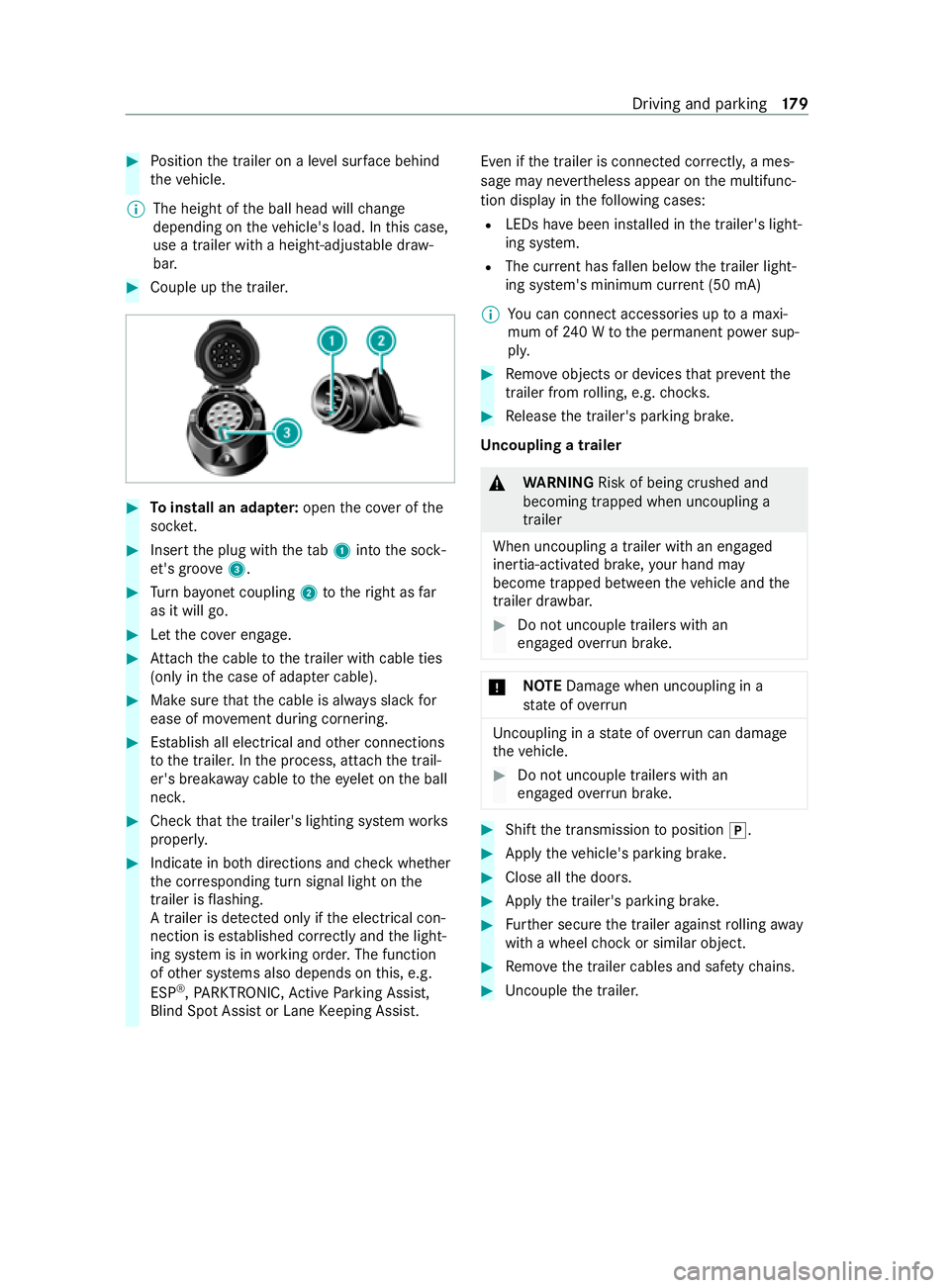
Toinstall an adapt er:open the co ver of the
soc ket. #
Inse rtthe plug with theta b1 into the sock‐
et 's groo ve3 . #
Turn bayonet coupling 2totheright as far
as it will go. #
Let the co ver engage. #
Attach the cable tothe trailer with cable ties
(only in the case of adap ter cable). #
Make sure that the cable is alw ays slack for
ease of mo vement during cornering. #
Establish all electrical and other connections
to the trailer. In the process, attach the trail‐
er's break away cable totheeye let on the ball
nec k. #
Check that the trailer's lighting sy stem works
properly. #
Indicate in bo thdirections and check whe ther
th e cor responding turn signal light on the
trailer is flashing.
A trailer is de tected only if the electrical con‐
nection is es tablished cor rectly and the light‐
ing sy stem is in working order. The function
of other sy stems also depends on this, e.g.
ESP ®
,PA RKTRONIC, Active Parking Assist,
Blind Spot Assist or Lane Keeping Assist. Even if
the trailer is connected cor rectly, a mes‐
sage may ne vertheless appear on the multifunc‐
tion display in thefo llowing cases:
R LEDs ha vebeen ins talled in the trailer's light‐
ing sy stem.
R The cur rent has fallen below the trailer light‐
ing sy stem's minimum cur rent (50 mA)
% Yo
u can connect accesso ries up toa maxi‐
mum of 240 W tothe permanent po wer sup‐
ply. #
Remo veobjects or devices that pr event the
trailer from rolling, e.g. choc ks. #
Release the trailer's parking brake.
Un coupling a trailer &
WARNING Risk of being crushed and
becoming trapped when uncoupling a
trailer
When uncoupling a trailer with an engaged
ine rtia-activated brake, your hand may
become trapped between theve hicle and the
trailer dr awbar. #
Do not uncouple trailers with an
engaged overrun brake. *
NO
TEDama gewhen uncoupling in a
st ate of overrun Uncou
pling in a state of overru n can damage
th eve hicle. #
Do not uncouple trailers with an
engaged overrun brake. #
Shift the transmission toposition 005D. #
Apply theve hicle's parking brake. #
Close all the doors. #
Apply the trailer's parking brake. #
Further secure the trailer against rolling away
with a wheel chock or similar object. #
Remo vethe trailer cables and saf etych ains. #
Uncou plethe trailer. Driving and parking
17 9
Page 183 of 337

Note
s onthe instrument clus ter and on-
board co mputer &
WARNING Risk of accident due toan
instrument clus ter malfunction
If th e instrument clus ter has failed or mal‐
functioned, you may not notice restrictions to
saf ety-re leva nt sy stem functions.
The operating saf ety of your vehicle may be
impaired. #
Drive on carefull y. #
Have theve hicle checked immediately
at a qualified specialist workshop. If
yo u are uncer tain rega rding the operational
saf ety of your vehicle, park theve hicle safely as
soon as possible. Inform a qualified specialist
wo rkshop.
The on-board computer will show only messages
and warnings from cer tain sy stems on the dis‐
pla y.Yo u should therefore make sure your vehicle
is operating safely at all times.
Yo u can find an overview of the indicator and
wa rning lamps on the instrument clus ter in "At a
gl ance". Overview of
the instrument clus ter Instrument clus
ter (e xamp le)
1 Speedome ter
2 Multifunction display
3 Rev counter
4 Coolant temp erature display
5 Fuel le vel
Speedome ter
In vehicles with Active Dis tance Assi st
DISTRONIC, there are illuminated segments on
th e speedome ter dial. These segments show
you what speed range is
av ailable:
R Variable limiter activated (/ page159)
The segments light up from thest art of the
scale tothe selected limit speed.
R Active Dis tance Assi stDISTRONIC switched
on (/ page 162)
One or two segments light up in the sa ved
speed range.
R Active Dis tance Assi stDISTRONIC de tects a
ve hicle in front.
The segments light up from the speed of the
ve hicle in front up tothe sa ved speed.
Yo u can show the speed as a digital speedome ter
on the display as well.
If yo uch ange your vehicle's wheel size, check its
assignment tothe wheel size group
(/ page 258). If the assignment changes with‐
out recoding the cont rol units in theve hicle, the
speedome ter will not display the speed accu‐
ra tely. The cur rent vehicle speed may then be
higher than the speed shown bythe speedome‐
te r.Driving and driving sa fety sy stems may then
be operationally impaired or may de tect a mal‐
function and switch themselves off.
In some count ries, an audible signal will sound
and/or a message will appear on the display
when theve hicle reaches the maximum speed
permitted bylaw, e.g. at 120 km/h.
Re v counter
* NO
TEEngine damage due tomaximum
engine speed being exceeded If
th e maximum permissible engine speed is
exc eeded, the engine may be damaged. #
Avoid driving in there d speed range
(danger zone). Outside
temperature display
Yo u should pay special attention toroad condi‐
tions when temp eratures are around freezing
point.
The outside temp erature is displa yed on the mul‐
tifunction display (/ page182).
Changes in the outside temp erature will be dis‐
pla yed af ter a short dela y. 18 0
Instrument clus ter and on-board computer
Page 186 of 337
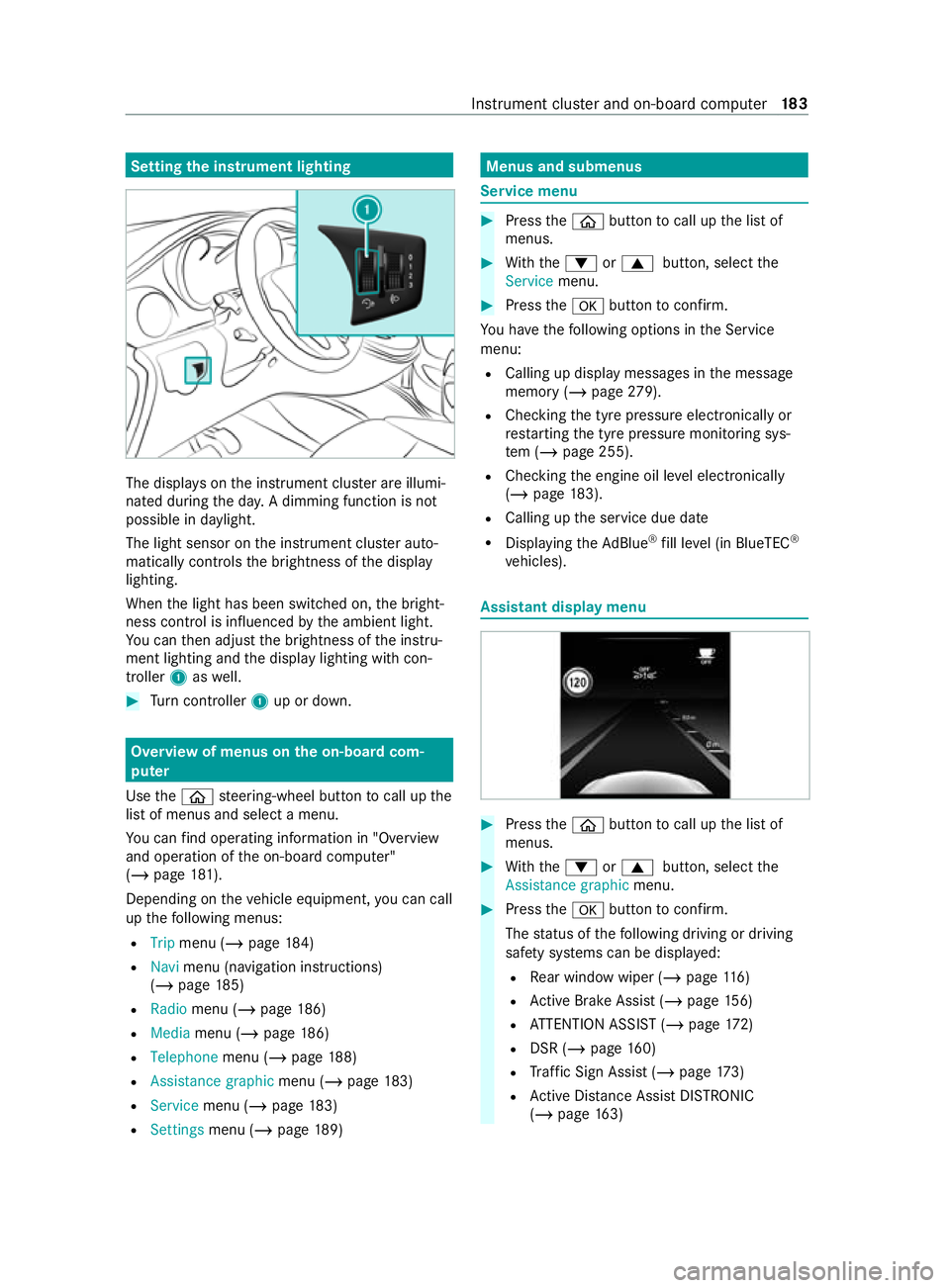
Setting
the instrument lighting The displa
yson the instrument clus ter are illumi‐
nated during the da y.A dimming function is not
possible in da ylight.
The light sensor on the instrument clus ter auto‐
matically controls the brightness of the display
lighting.
When the light has been switched on, the bright‐
ness contro l is influenced bythe ambient light.
Yo u can then adjust the brightness of the instru‐
ment lighting and the display lighting with con‐
troller 1aswell. #
Turn controller 1up or down. Overview of menus on the on-board com‐
puter
Use the00E2 steering-wheel button tocall up the
list of menus and select a menu.
Yo u can find ope rating information in "O verview
and operation of the on-board computer"
(/ page 181).
Depending on theve hicle equipment, you can call
up thefo llowing menus:
R Trip menu (/ page184)
R Navi menu (navigation instructions)
(/ page 185)
R Radio menu (/ page 186)
R Media menu (/ page186)
R Telepho nemenu (/ page 188)
R Assistance graphic menu (/page 183)
R Service menu (/ page183)
R Settings menu (/ page189) Menus and submenus
Service menu
#
Press the00E2 button tocall up the list of
menus. #
With th e0064 or0063 button, select the
Service menu. #
Press the0076 button toconfirm.
Yo u ha vethefo llowing options in the Service
menu:
R Calling up display messages in the message
memory (/ page279).
R Che cking the tyre pressure electronically or
re starting the tyre pressure monitoring sys‐
te m (/ page 255).
R Checking the engine oil le vel elect ronically
(/ page 183).
R Calling up the service due date
R Displaying theAd Blue ®
fill le vel (in BlueTEC ®
ve hicles). Assistant display menu
#
Press the00E2 button tocall up the list of
menus. #
With th e0064 or0063 button, select the
Assistance graphic menu. #
Press the0076 button toconfirm.
The status of thefo llowing driving or driving
saf ety sy stems can be displa yed:
R Rear wind owwiper (/ page116)
R Active Brake Assi st (/ page 156)
R ATTENTION ASSIST (/ page172)
R DSR (/ page 160)
R Traf fic Sign Assi st (/ page 173)
R Active Dis tance Assi stDISTRONIC
(/ page 163) Instrument clus
ter and on-board computer 18 3