light MERCEDES-BENZ V-CLASS MPV 2021 Owners Manual
[x] Cancel search | Manufacturer: MERCEDES-BENZ, Model Year: 2021, Model line: V-CLASS MPV, Model: MERCEDES-BENZ V-CLASS MPV 2021Pages: 337, PDF Size: 9.88 MB
Page 5 of 337
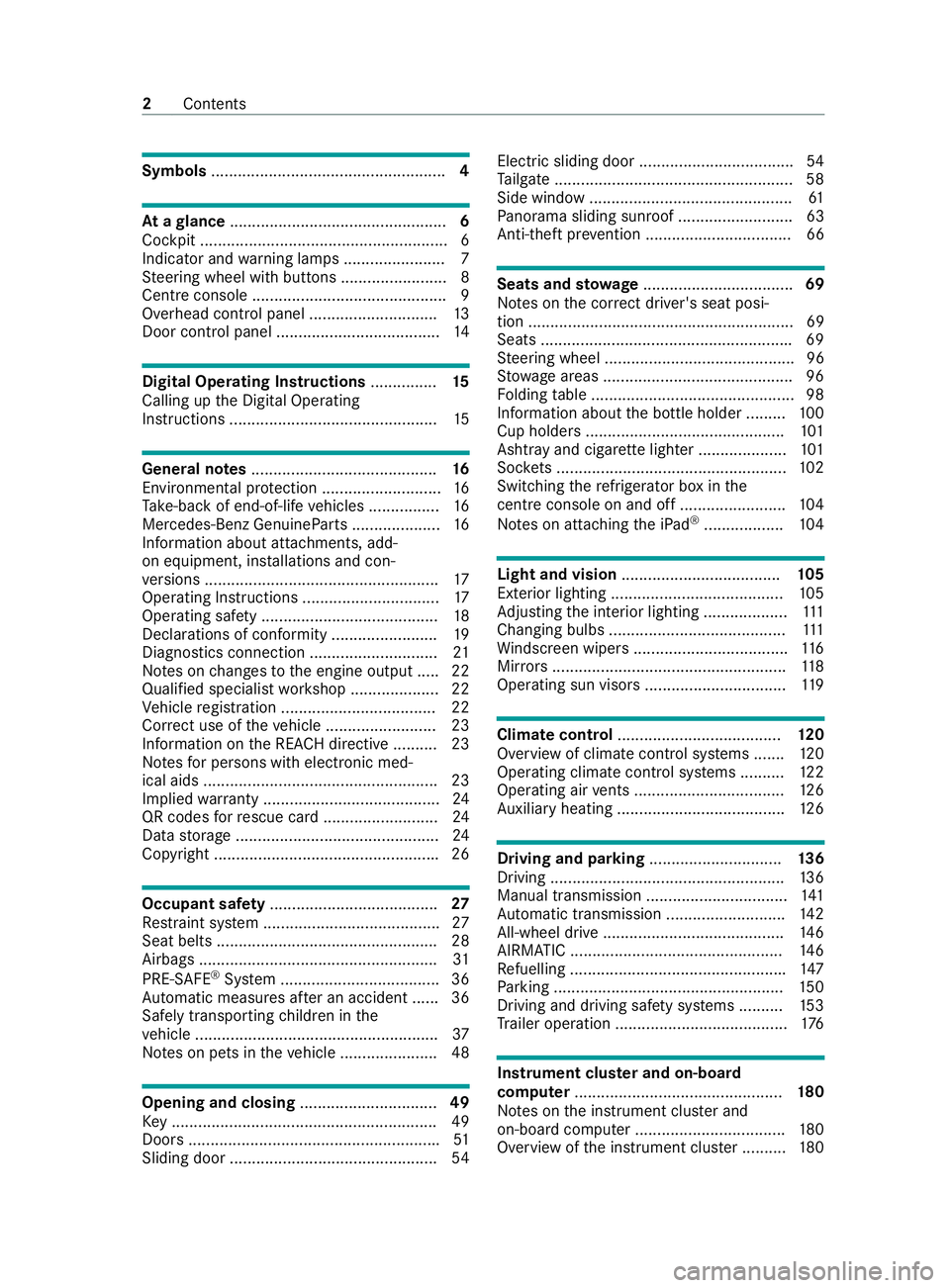
Symbols
..................................................... 4At
agl ance ................................................. 6
Cockpit ........................................................ 6
Indica tor and warning lamps ...................... .7
St eering wheel with buttons ........................ 8
Centre console ............................................ 9
Overhead control panel ............................. 13
Door control panel .................................... .14Digital Operating Instructions
...............15
Calling up the Digital Operating
Instructions ............................................... 15Genera
l notes.......................................... 16
Environmental pr otection ........................... 16
Ta ke -ba ckof end-of-life vehicles ................16
Mercedes-Benz GenuineParts .................... 16
Information about attachments, add-
on equipment, ins tallations and con‐
ve rsions .................................................... .17
Operating Instructions ...............................17
Operating saf ety ........................................ 18
Declarations of conformity ........................ 19
Diagno stics connection ............................ .21
No tes on changes tothe engine output ..... 22
Qualified specialist workshop .................... 22
Ve hicle registration ................................... 22
Cor rect use of theve hicle .........................23
Information on the REA CHdirective .......... 23
No tesfo r persons with electronic med‐
ical aids .....................................................23
Implied warranty ........................................ 24
QR codes forre scue card .......................... 24
Data storage ..............................................24
Copyright .................................................. .26Occupant saf
ety...................................... 27
Re stra int sy stem ........................................27
Seat belts .................................................. 28
Airbags ...................................................... 31
PRE-SAFE ®
Sy stem .................................... 36
Au tomatic measure s after an accident ...... 36
Safely transporting children in the
ve hicle .......................................................37
No tes on pets in theve hicle ......................48 Opening and closing
...............................49
Ke y ............................................................ 49
Doors ........................................................ .51
Sliding door ............................................... 54Electric sliding door ...................................
54
Ta ilgate ...................................................... 58
Side window .............................................. 61
Pa norama sliding sunroof .......................... 63
Anti-theft pr evention ................................. 66 Seats and
stowage .................................. 69
No tes on the cor rect driver's seat posi‐
tion ............................................................ 69
Seats ........................................................ .69
St eering wheel ...........................................96
St ow age areas .......................................... .96
Fo lding table .............................................. 98
Information about the bottle holder ......... 100
Cup holders ............................................ .101
Ashtr ayand cigar ette lighter .................... 101
Soc kets .................................................... 102
Switching there frigerator box in the
centre console on and off ........................ 104
No tes on attaching the iPad ®
.................. 104 Light and vision
.................................... 105
Exterior lighting ....................................... 105
Ad justing the interior lighting ...................1 11
Changing bulbs ........................................ 111
Wi ndsc reen wipers ................................... 11 6
Mir rors ..................................................... 11 8
Operating sun visors ................................ 11 9 Climate control
..................................... 12 0
Overview of climate contro l systems .......1 20
Operating clima tecontrol sy stems ..........1 22
Operating air vents .................................. 12 6
Au xilia ryheating ...................................... 12 6 Driving and pa
rking .............................. 13 6
Driving .................................................... .136
Manual transmission ................................ 141
Au tomatic transmission ........................... 14 2
All-wheel drive ........................................ .146
AIRMATIC ................................................ 14 6
Re fuelling ................................................ .147
Pa rking .................................................... 15 0
Driving and driving sa fety sy stems ..........1 53
Tr ailer operation ...................................... .176 Instrument clus
ter and on-board
co mp uter ............................................... 18 0
No tes on the instrument clus ter and
on-board computer .................................. 180
Overview of the instrument clus ter .......... 180 2
Contents
Page 6 of 337
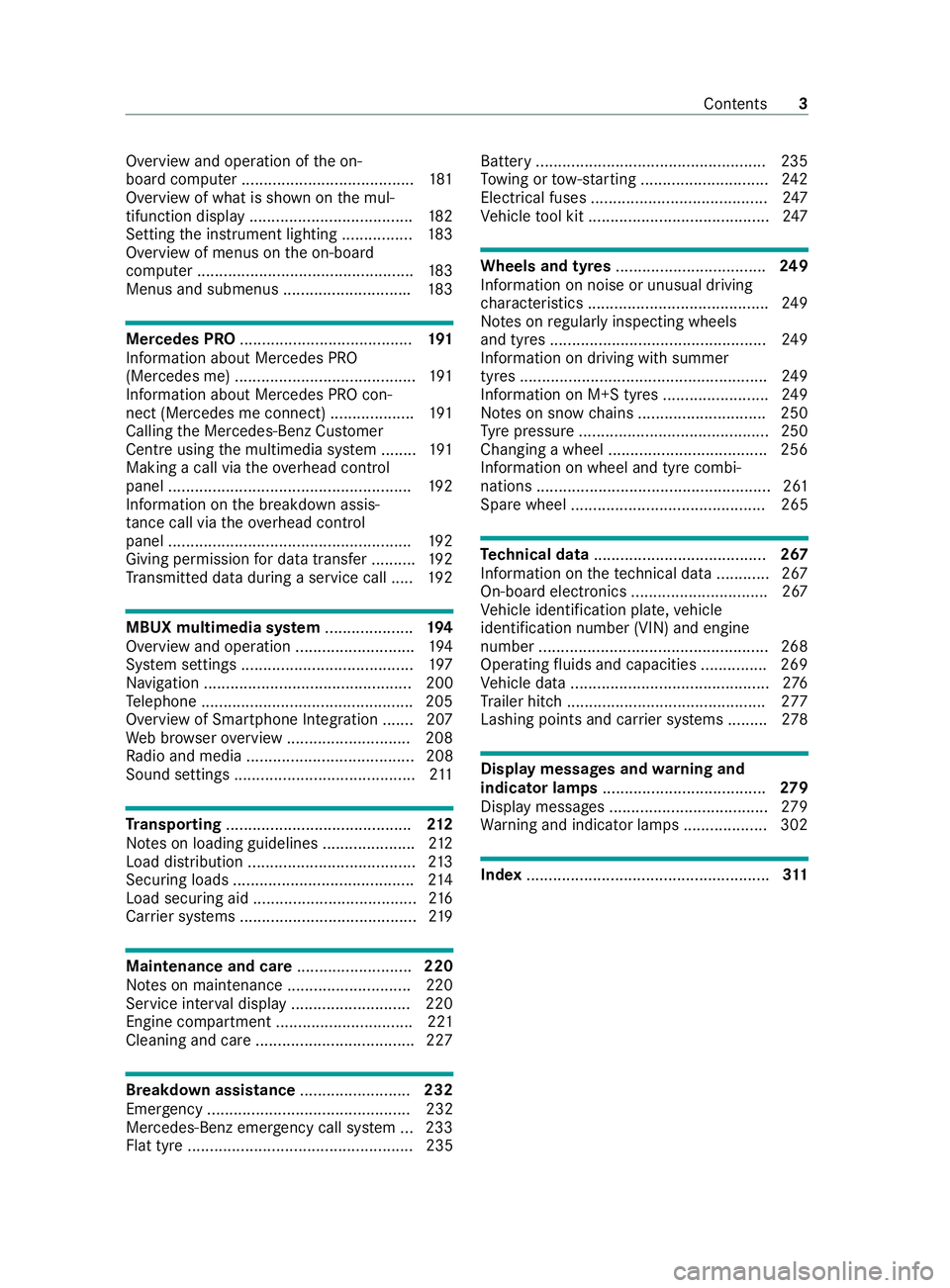
Overview and operation of
the on-
board computer ....................................... 181
Overview of what is shown on the mul‐
tifunction display .....................................1 82
Setting the instrument lighting ................1 83
Overview of menus on the on-board
computer .................................................1 83
Menus and submenus ............................ .183 Mercedes PRO
....................................... 191
Information about Mercedes PRO
(Mercedes me) ......................................... 191
Information about Mercedes PRO con‐
nect (Mercedes me connect) ................... 191
Calling the Mercedes-Benz Cus tomer
Centre using the multimedia sy stem ........ 191
Making a call via theove rhead control
panel .......................................................1 92
Information on the breakdown assis‐
ta nce call via theove rhead control
panel .......................................................1 92
Giving permission for data transfer .......... 19 2
Tr ansmit ted data during a service call .....1 92MBUX multimedia sy
stem .................... 194
Overview and operation ........................... 194
Sy stem settings ....................................... 197
Na vigation ............................................... 200
Te lephone ................................................ 205
Overview of Smartphone Integration ...... .207
We b br owser overview ............................ 208
Ra dio and media ...................................... 208
Sound settings .........................................2 11Tr
anspo rting .......................................... 212
No tes on loading guidelines ..................... 212
Load distribution ...................................... 213
Secu ring loads ......................................... 214
Load securing aid ..................................... 216
Car rier sy stems ........................................2 19Maintenance and care
..........................220
No tes on maintenance ............................2 20
Service inter val display .......................... .220
Engine compartment ............................... 221
Cleaning and care ................................... .227 Breakdown assistance
.........................232
Emergency .............................................. 232
Mercedes-Benz eme rgency call sy stem ... 233
Flat tyre ................................................... 235 Battery ....................................................2
35
To wing or tow- starting ............................ .242
Electrical fuses ........................................ 247
Ve hicle tool kit ......................................... 247 Wheels and tyres
.................................. 249
Information on noise or unusual driving
ch aracteristics ........................................ .249
No tes on regular lyinspecting wheels
and tyres ................................................ .249
Information on driving with summer
tyres ........................................................ 24 9
Information on M+S tyres ........................ 24 9
No tes on snow chains ............................ .250
Ty re pressure ...........................................2 50
Changing a wheel ................................... .256
Information on wheel and tyre combi‐
nations ..................................................... 261
Spare wheel ............................................ 265 Te
ch nical data ....................................... 267
Information on thete ch nical da ta............ 267
On-board electronics ............................... 267
Ve hicle identification plate, vehicle
identification number (VIN) and engine
number ....................................................2 68
Operating fluids and capacities .............. .269
Ve hicle data ............................................. 276
Tr ailer hit ch............................................. 277
Lashing points and car rier sy stems ......... 278 Display messages and
warning and
indicator lamps ..................................... 279
Displ aymessa ges .................................... 279
Wa rning and indicator lamps .................. .302 Index
....................................................... 311 Con
tents 3
Page 9 of 337
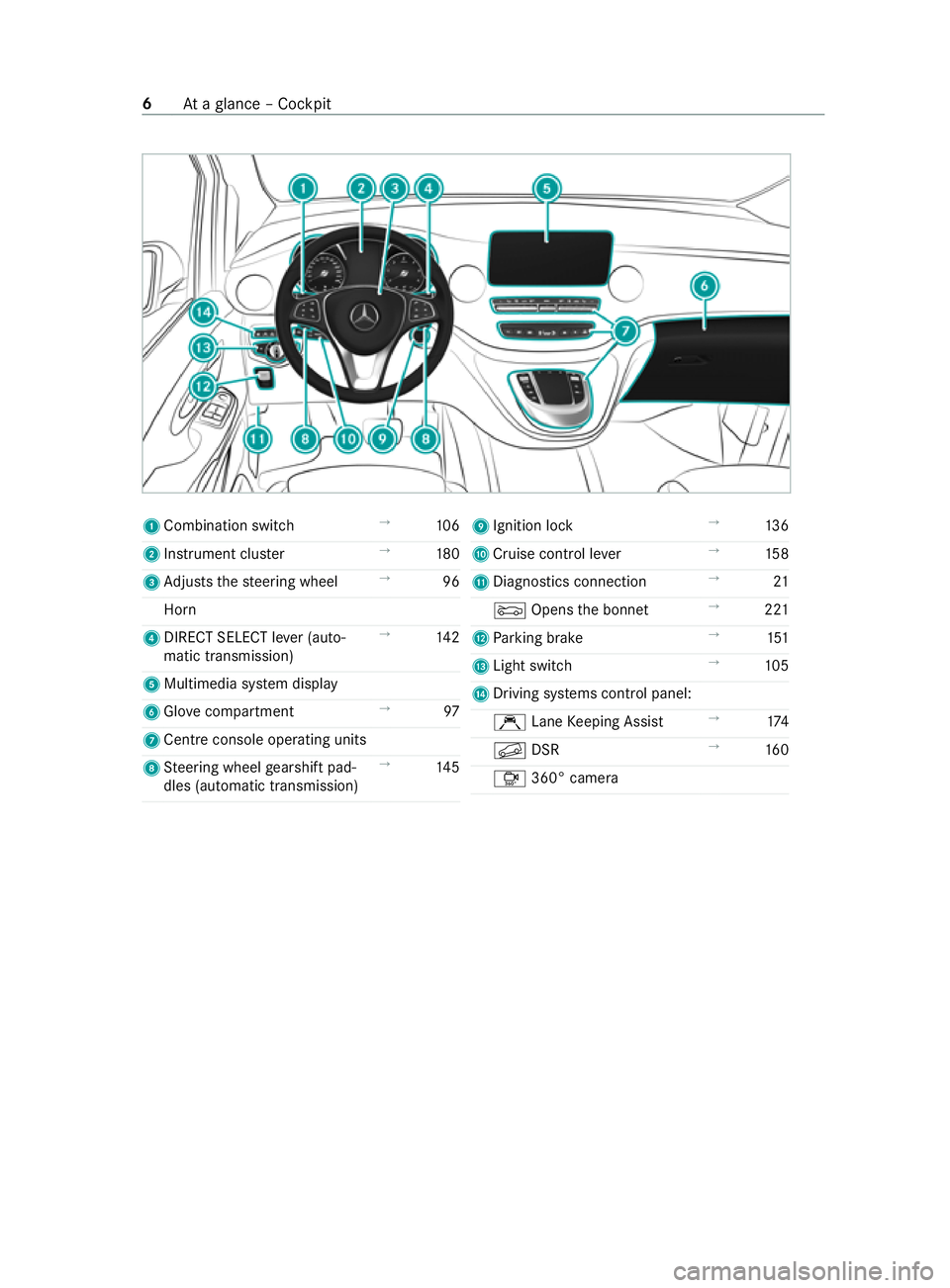
1
Combination swit ch→
106
2 Instrument clus ter →
180
3 Adjusts thesteering wheel →
96
Horn
4 DIRECT SELECT le ver (auto‐
matic transmission) →
14 2
5 Multimedia sy stem display
6 Glo vecompa rtment →
97
7 Cent reconsole ope rating units
8 Steering wheel gearshift pad‐
dles (automatic transmission) →
14 5 9
Ignition lock →
13 6
A Cruise control le ver→
15 8
B Diagnostics connection →
21
0083 Opens the bonn et →
221
C Parking brake →
151
D Light switch →
105
E Driving sy stems cont rol panel:
Ç LaneKeeping Assist →
174
0092 DSR →
16 0
Ô 360° camera 6
Ataglance – Cockpit
Page 10 of 337
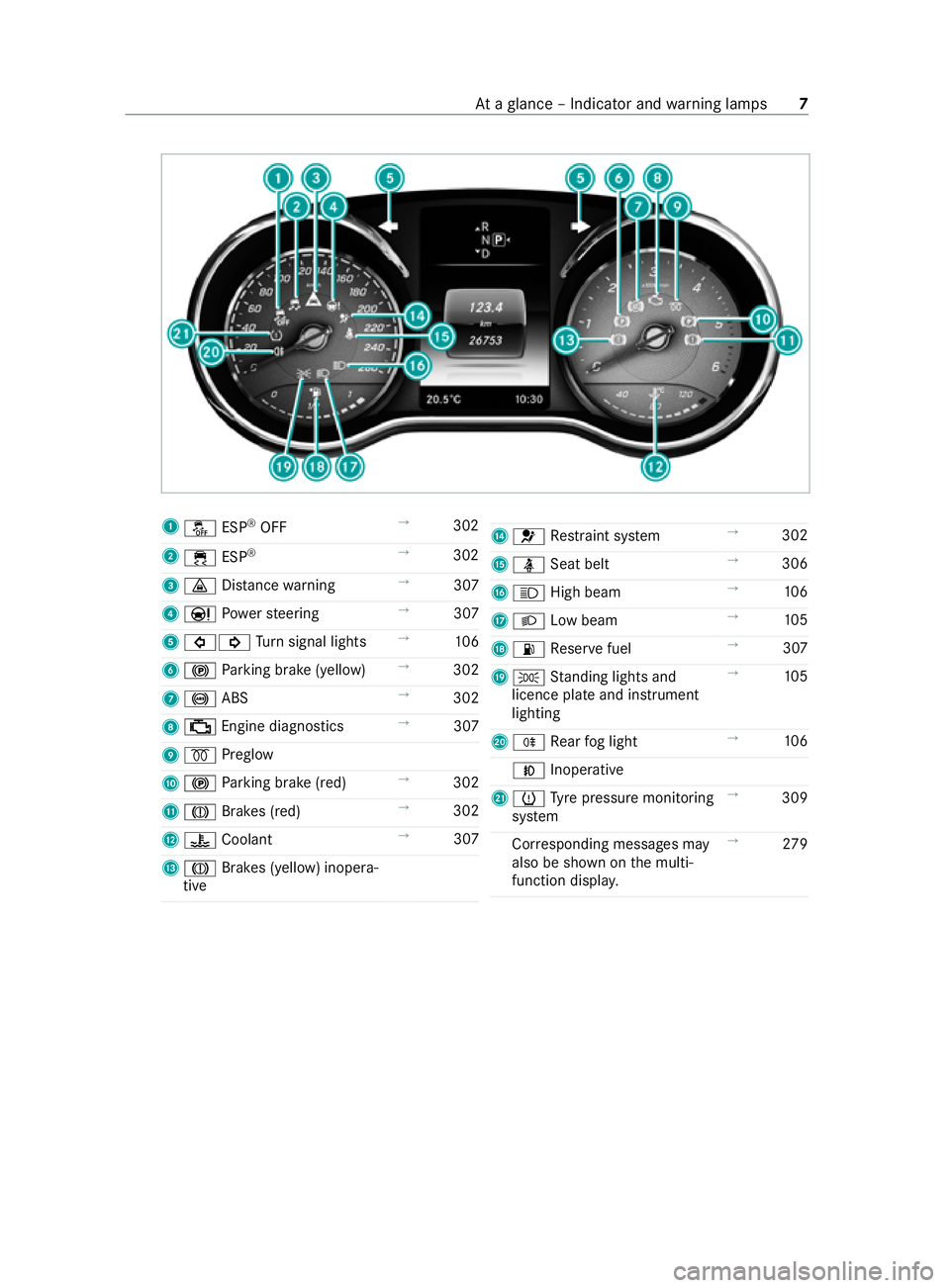
1
00BB ESP®
OFF →
302
2 00E5 ESP®
→
302
3 00BA Distance warning →
307
4 00CC Powe rst eering →
307
5 003E003D Turn signal lights →
106
6 0024 Parking brake (yellow) →
302
7 0025 ABS →
302
8 00B9 Engine diagnostics →
307
9 0028 Preglow
A 0024 Parking brake (red) →
302
B 004D Brakes (red) →
302
C 00AC Coolant →
307
D 004D Brakes (yellow) inopera‐
tive E
0075 Restra int sy stem →
302
F 00E9 Seat belt →
306
G 0057 High beam →
106
H 0058 Low beam →
105
I 00B4 Reser vefuel →
307
J 0060 Standing lights and
licence plate and instrument
lighting →
105
K 005E Rear fog light →
106
005A Inoperative
L 0077 Tyre pressure monitoring
sy stem →
309
Cor responding messages may
also be shown on the multi‐
function displa y. →
279 At
aglance – Indicator and warning lamps 7
Page 12 of 337
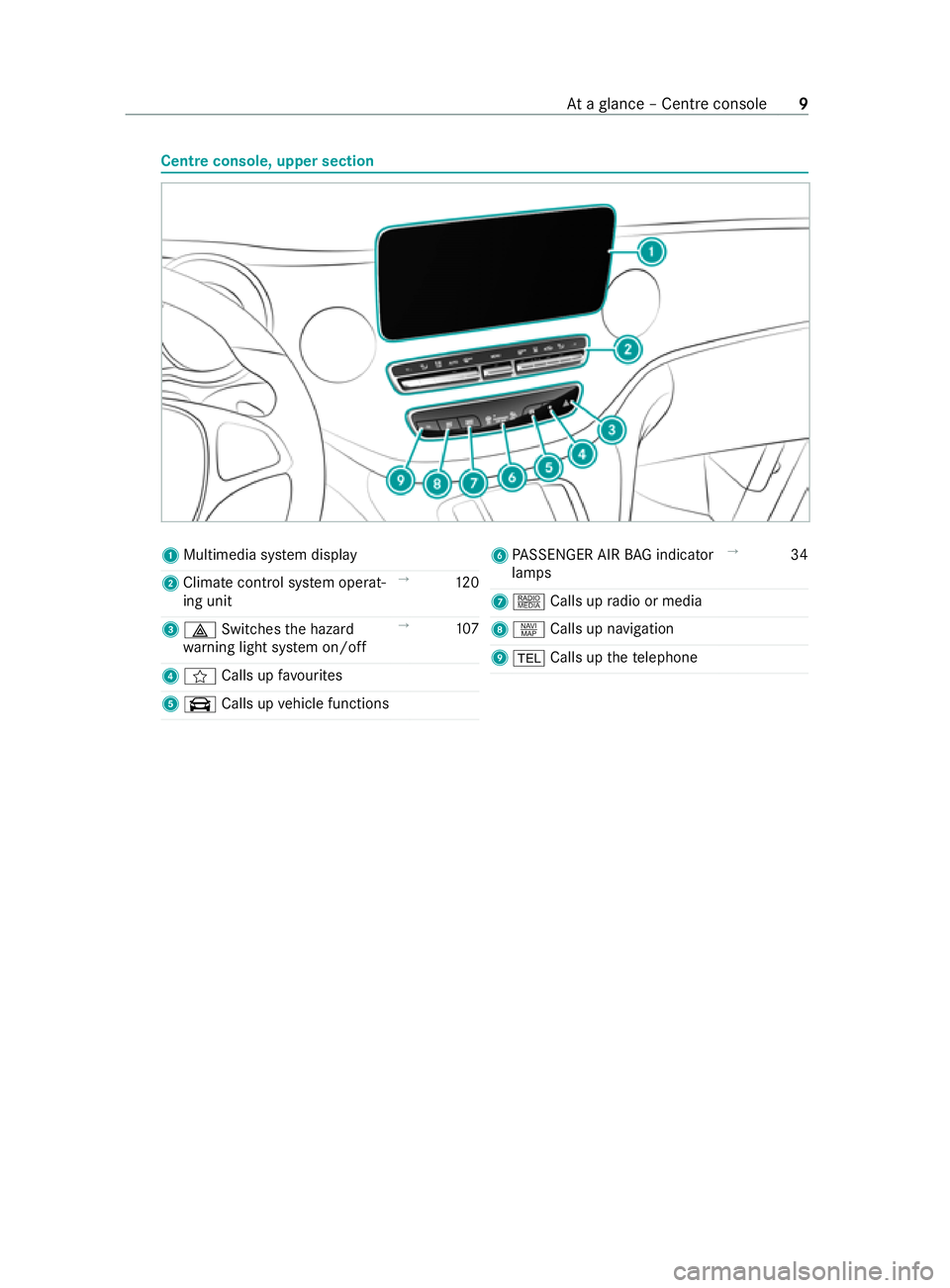
Centre console, upper section
1
Multimedia sy stem display
2 Climate cont rol sy stem operat‐
ing unit →
12 0
3 002F Switches the hazard
wa rning light sy stem on/o ff→
107
4 f Calls up favo urites
5 \ Calls up vehicle functions 6
PASSENGER AIR BAG indicator
lamps →
34
7 | Calls up radio or media
8 z Calls up navigation
9 002B Calls up thete lephone At
aglance – Cent reconsole 9
Page 14 of 337

Centre console, lo
wer section St
ow age compartment with co ver
1 Cover →
96
2 12V soc ket →
102
Cigar ette lighter →
102
3 Holder forth e mobile phone
brac ket
4 Media Inter face with two USB
po rts or with two USB ports
and one SD card slot 5
Cup holder
6 Ashtray →
102
7 Stow age compartment
Swit chclock for auxiliary
wa rm-air hea ter →
131
Device ins tallation frame for
auxiliary equipment, e.g. a
ta ch ograph At
aglance – Cent reconsole, lo wer section 11
Page 15 of 337

Centre console between
the driver's and front passenger seats 1
Stow age compartment
2 Cup holde rs
3 Stow age compartment
Media In terface with two USB
ports and an SD card slot
Re frigerator box →
104
4 Temp erature-controlled cup
holder →
101 5
Stow age compartment
6 Cigar ette lighter →
102
Ashtr ay →
102
12 V soc ket →
103
230 V soc ket →
103
7 Stow age compartment 12
Ataglance – Cent reconsole between the driver's and front passenger seats
Page 16 of 337

1
Ì Deactivates interior pro‐
te ction →
68
2 003D Switches the left-hand
re ading lamp on/off →
111
3 0033 Switches au tomatic inte‐
ri or lighting contro l on/off→
111
4 004A Switches the front inte‐
ri or lighting on/off →
111
5 0044 Switches there ar/load
compartment lighting on/off →
111
6 003D Switches theright-hand
re ading lamp on/off →
111
7 Ë Deactivates tow- aw ay
pr otection →
67 8
00D9 Button for Info call →
19 2
9 0057 Opens/closes the pano‐
ra ma sliding sunroof →
64
Opens/closes thero ller sun‐
blinds →
65
A ATA indica tor lamp →
67
B Glasses compartment →
97
C 0053 SOS button →
233
D 0052 Breakdown assis tance
call button →
19 2 At
aglance – Overhead control panel 13
Page 28 of 337
Gene
rally, these are volatile data and will not be
st ored be yond the period of operation but will
only be processed within theve hicle itself. Con‐
trol units, vehicle keys forex ample, of ten contain
da ta memories. Their use permits thete mp orary
or permanent documentation of tech nical infor‐
mation about theve hicle's operating state, com‐
ponent loads, main tenance requirements and
te ch nical events or faults.
Depending on thete ch nical equipment, thefo l‐
lowing data are stored:
R operating status of sy stem components, such
as fill le vels, tyre pressure or battery status
R malfunctions or faults in impor tant sy stem
components, such as lights or brakes
R system reactions in special driving situations,
such as airbag deployment or the inter vention
of stability control sy stems
R information on events in which theve hicle is
damaged
In cer tain cases, it may be requ ired tostore data
th at wo uld ha veotherwise been temp orar y.This
may be the case if theve hicle has de tected a
malfunction, forex ample.
If yo u use services, such as repair services and
maintenance work,st ored operational data as
we ll as theve hicle identification number can be
re ad out and used. They can be read out by
service network emplo yees, such as workshops
and manufacturers or third parties, such as
breakdown services. The same is true in the case
of wa rranty claims and quality assurance meas‐
ures.
In general, there adout is per form ed via the
legally prescribed port forth e diagnostics con‐
nection in theve hicle. The operational data that
are read out document tech nical states of the
ve hicle or of individual components and assist in
th e diagnosis of malfunctions, compliance with
wa rranty obligations and quality impr ovement. To
th at end, these data, in particular information
about component loads, tech nical events, mal‐
functions and other faults may be transmitted
along with theve hicle identification number to
th e manufacturer. In addition, the manufacturer is
subject toproduct liability. Forth is reason, the
manufacturer also uses operational data from the
ve hicle, forex ample, forre calls. These data can
also be used toexamine the cus tomer's warranty
and guarantee claims. Fa
ult memories in theve hicle can be reset by a
service outlet or at your requ est as part of repair
or maintenance work.
Con venience and inf otainment functions
Yo u can store con venience settings and individual
settings in theve hicle and change or reset them
at any time.
Depending on theve hicle equipment, this
includes thefo llowing settings, forex ample:
R seat and steering wheel positions
R suspension and climate cont rol settings
R individual settings, such as interior lighting
Depending on the selected equipment, you can
import data into vehicle inf otainment functions
yo urself.
Depending on theve hicle equipment, this
includes thefo llowing data, forex ample:
R multimedia data, such as music, films or pho‐
to sfo r playback in an integrated multimedia
sy stem
R address book data for use in an integrated
hands-free sy stem or an integrated navigation
sy stem
R entered navigation destinations
R data on the use of Internet services
These data for con venience and inf otainment
functions may be sa ved locally in theve hicle or
th ey may be located on a device which you ha ve
connected totheve hicle, such as a smartphone,
USB flash drive or MP3 pla yer.If yo u ha ve
entered these data yourself, you can dele tethem
at any time.
This data is transmit ted from theve hicle tothird
parties only at your requ est. This applies, in par‐
ticular, when you use online services in accord‐
ance with the settings that you ha veselected.
Smartphone integ ration (e.g. Android Autoor
Apple CarPlay ®
)
If yo ur vehicle is equipped appropriatel y,yo u can
connect your smartphone or ano ther mobile end
device totheve hicle. You can then cont rolth em
by means of the cont rol elements integrated in
th eve hicle. The smartphone's picture and sound
can be output via the multimedia sy stem. Simul‐
ta neously, specific items of information are trans‐
fe rred to yo ur smartphone. Depending on the
type of integration, this includes position data,
day/night mode and other general vehicle sta‐
tuses. For more information, please consult the Gene
ral no tes 25
Page 30 of 337

Re
stra int sy stem Pr
otection pr ovided bythere stra int sy stem The
restra int sy stem includes thefo llowing com‐
ponents:
R Seat belt sy stem
R Airbags
R Child restra int sy stem
R Child seat securing sy stems
The restra int sy stem can help pr eventtheve hicle
occupants from coming into contact with parts of
th eve hicle interior in theeve nt of an accident. In
th eeve nt of an accident, there stra int sy stem can
also reduce thefo rc es towhich theve hicle occu‐
pants are subjected.
Only a seat belt which is worncor rectly can pro‐
vide the intended le vel of pr otection. Depending
on the de tected accident situation, seat belt ten‐
sioners and/or airbags supplement the pr otec‐
tion of fere dby a cor rectly wornseat belt. Seat
belt tensioners and/or airbags are not depl oyed
in eve ryaccident.
In order forth ere stra int sy stem toprov ide the
intended le vel of pr otection, each vehicle occu‐
pant must obser vethefo llowing information:
R Fasten seat belts cor rectl y.
R Sit in an almost up right seat position with
th eir back against the seat backrest.
R Sit with their feet resting on thefloor, if possi‐
ble.
R Always secure persons under 1.50 m ta ll in
an additional restra int sy stem suitable for
Mercedes-Benz vehicles.
Ho wever,no sy stem available today can com‐
ple tely eliminate injuries and fata lities in every
accident situation. In particular, the seat belt and
airbag general lydo not pr otect against objects
penetrating theve hicle from the outside. It is also
not possible tocomple tely rule out therisk of
injury caused bythe airbag deploying. Limited pr
otection pr ovided bythere stra int
sy stem &
WARNING Risk of injury or death dueto
modifications tothere stra int sy stem
Ve hicle occupants may no longer be pr otec‐
te d as intended if alterations are made tothe
re stra int sy stem. #
Never alter the parts of there stra int
sy stem. #
Neverta mp er with the wiring or any
electronic component parts or their
software. If it is necessary
toadjust theve hicle toaccom‐
modate a person with disabilities, con tact a quali‐
fi ed specialist workshop.
Mercedes-Benz recommends that you on lyuse
driving aids which ha vebeen appr oved specifi‐
cally foryo ur vehicle byMercedes-Benz. Re
stra int sy stem functionality When
the ignition is switched on, a self-test is
per form ed, during which the0075 restra int sys‐
te m wa rning lamp lights up. It goes out no later
th an a few seconds af terth eve hicle is star ted.
The components of there stra int sy stem are then
functional. Re
stra int sy stem malfunction A malfunction has occur
red in there stra int sys‐
te m in thefo llowing cases:
R The 0075 restra int sy stem warning lamp does
not light up when the ignition is switched on.
R The 0075 restra int sy stem warning lamp
lights up continuously or repeatedly during a
journe y. &
WARNING Risk of injury duetomalfunc‐
tions in there stra int sy stem
Components in there stra int sy stem may be
activated unintentionally or not deploy as
intended in an accident. #
Have there stra int sy stem checked and
re paired immediately at a qualified spe‐
cialist workshop. Fu
nction of there stra int sy stem in an acci‐
dent How
there stra int sy stem works is de term ined by
th e se verity of the impact de tected and the type
of accident anticipated:
R frontal impact
R rear impact
R side impact Occupant saf
ety27