wheel MINI 3 door 2013 Service Manual
[x] Cancel search | Manufacturer: MINI, Model Year: 2013, Model line: 3 door, Model: MINI 3 door 2013Pages: 233, PDF Size: 17.19 MB
Page 156 of 233
Bluetooth hands-free systemVehicle equipmentAll standard, country-specific and optional
equipment that is offered in the model series is
described in this chapter. Therefore, equipment
is also described that is not available in a vehi‐
cle, e. g., because of the selected optional
equipment or country variant. This also applies
for safety-related functions and systems.
The concept Mobile phones can be connected to the vehicle
via Bluetooth. After the mobile phones are
paired once, they are recognized automatically
when the ignition is switched on. As soon as
they are inside the vehicle they can be oper‐
ated via the radio and via the buttons on the
steering wheel.
Hints Using the mobile phone while driving
Make entries only when traffic and road
conditions allow. Do not hold the mobile phone
in your hand while you are driving; use the
hands-free system instead. If you do not ob‐
serve this precaution, you can endanger the ve‐
hicle occupants and other road users. ◀
Certain functions may need to be enabled by
the mobile phone provider or service provider.
At high temperatures, the charge functions of
the mobile phone can be limited under certain
circumstances, and functions are no longer
executed.
When the mobile phone is used via the vehicle,
refer to the operating manual of the mobile
phone.Approved mobile phones
Accurate information about which mobile
phones are supported with a Bluetooth inter‐
face is available at www.mini.com/connectivity.
Displaying the vehicle identification
number and software part number
The vehicle identification number and the soft‐
ware part number are needed to determine
which mobile phones are supported by the mo‐
bile phone preparation package. The software
version of the mobile phone may also be re‐
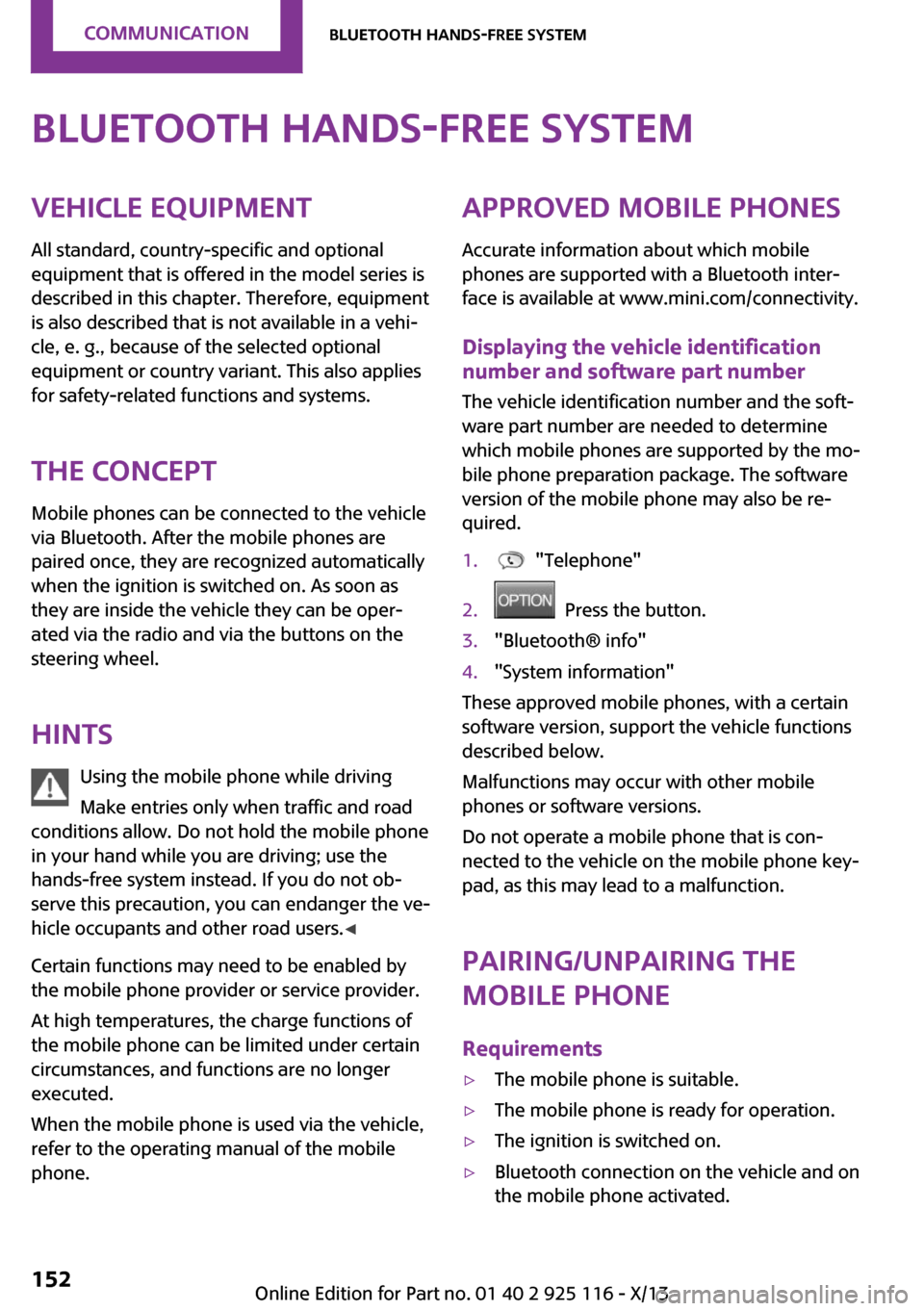
quired.1. "Telephone"2. Press the button.3."Bluetooth® info"4."System information"
These approved mobile phones, with a certain
software version, support the vehicle functions
described below.
Malfunctions may occur with other mobile
phones or software versions.
Do not operate a mobile phone that is con‐
nected to the vehicle on the mobile phone key‐
pad, as this may lead to a malfunction.
Pairing/unpairing the
mobile phone
Requirements
▷The mobile phone is suitable.▷The mobile phone is ready for operation.▷The ignition is switched on.▷Bluetooth connection on the vehicle and on
the mobile phone activated.Seite 152CommunicationBluetooth hands-free system152
Online Edition for Part no. 01 40 2 925 116 - X/13
Page 158 of 233
▷Do the control numbers on the mobile
phone and vehicle match? Repeat the pair‐
ing procedure.▷Are too many Bluetooth devices connected
to the mobile phone? Delete connections to
other devices.▷Is the mobile phone in power-save mode or
does it have only a limited remaining bat‐
tery life? Charge the mobile phone.
The mobile phone no longer reacts?
▷Switch the mobile phone off and on again.▷Ambient temperature too high or too low?
Do not subject the mobile phone to ex‐
treme ambient temperatures.
No or not all phone book entries are displayed,
or they are incomplete.
▷Transmission of the entries is not yet com‐
plete.▷It is possible that only the phone book en‐
tries from the mobile phone or from the
SIM card are transmitted.▷It may not be possible to display phone
book entries with special characters.▷The number of phone book entries being
stored is too high.
The phone connection quality is poor.
▷It may be possible to adjust the strength of
the Bluetooth signal on the mobile phone.▷Adjust the volume of the microphone and
loudspeakers separately.
If all points in this list have been checked and
the required function is still not available, con‐
tact BMW Customer Relations or the service
center.
Controls Adjusting the volumeTurn the left button on the radio until the de‐
sired volume is set. The volume can only be set
during an active conversation.
Automatic volume control
The automatic volume control can only be ad‐
justed during an active conversation.1. "Settings"2."Tone"3."Volume settings"4.Select the desired setting: "Microphone" or
"Loudspeak."5.Adjusting: press and turn controller.6.To store: press the controller.
Incoming call
Receiving calls If the number of the caller is stored in the mo‐
bile phone, the name of the contact is shown in
the display of the radio. If the name is not
saved, the number is displayed.
Accepting a call
About the radio
"Accept"
Via the button on the steering wheel
Press the button.
Via the instrument cluster
"Accept"
Rejecting a call
About the radio
"Reject"
Via the instrument cluster
"Reject"
Seite 154CommunicationBluetooth hands-free system154
Online Edition for Part no. 01 40 2 925 116 - X/13
Page 159 of 233
Ending a callAbout the radio
"End call ( )"
Via the button on the steering wheel
Press the button.
Via the instrument cluster
"End call"
Dialing a number
1. "Telephone"2."Dial number"3.Enter numbers using the right rotary knob.4. Select the symbol.
Calls with multiple parties
Accepting a second call
If a second call is received during an ongoing
call, a call waiting signal sounds.
"Accept"
The second call is accepted and the existing call
is put on hold.
Establishing a second call Establish another call during an active call.
The first call is put on hold.
Switching between two calls, hold call You can switch between two calls.
Select line with symbol in order to switch
between the conversations.
Active conversation.
Call on hold.
Establishing a conference call
Two calls can be connected to a single tele‐
phone conference call.1.Establish two calls.2. "Conference call"
When terminating the conference call, both
calls are ended. If one call is terminated by an‐
other party, the other call is continued if neces‐
sary.
Switching the microphone to mute When a call is active, the microphone can be
muted.
1. "Telephone"2."Active calls"3. "Microphone mute"
DTMF suffix dialing
1.Dialing a number, refer to page 155.2."Keypad dialing"3.Enter the desired number.4. Select the symbol.
Favorites
Up to 12 phone numbers can be stored in the
favorites. Only the occupied places of the favor‐
ites list are displayed.
1. "Telephone"2."Favorites"3. "Add favorite"4.Select the list from which the entry is to be
added:▷"Phone book"▷"Outgoing calls"▷"Received calls"5.Select entry from list and desired phone
number.6.Position and select the cursor at the desired
place in the Favorites.Seite 155Bluetooth hands-free systemCommunication155
Online Edition for Part no. 01 40 2 925 116 - X/13
Page 161 of 233
Add phone numbers to favorites1.Select the entry from the list.2.Highlight the desired phone number.3.Press the right button, and select the phone
number.
Or
Press the button and "Add to
favorites".
4.Insert and select the cursor at the desired
place in the Favorites.
Dialing the number via the instrument
cluster
This is possible when there is no active call.
1. Press the button on the steering
wheel.
The last numbers selected are displayed in
the instrument cluster.
2.If necessary, select another number.3. Press the key again to establish the
connection.
Received calls
The list of the 20 last received or missed calls of
the cell phone are displayed.
1. "Telephone"2."Received calls"
Add phone numbers to favorites
1.Select the entry from the list.2.Highlight the desired phone number.3.Press the right button, and select the phone
number.
Or
Press the button and "Add to
favorites".
4.Insert and select the cursor at the desired
place in the Favorites.
Hands-free system
General information
Calls that are being made on the hands-free
system can be continued on the mobile phone
and vice versa.
From the mobile phone to the hands-
free system
Calls that were begun outside of the Bluetooth
range of the vehicle can be continued on the
hands-free system with the ignition switched
on.
Depending on the mobile phone, the system
automatically switches to the hands-free sys‐
tem.
If the system does not switch over automati‐
cally, follow the instructions on the mobile
phone display; refer also to the mobile phone
operating instructions.
From the hands-free system to the
mobile phone
Calls that are made on the hands-free system
can in some cases be continued on the mobile
phone; this depends on the mobile phone.
Follow the instructions on the mobile phone
display; refer also to the mobile phone operat‐
ing instructions.
Seite 157Bluetooth hands-free systemCommunication157
Online Edition for Part no. 01 40 2 925 116 - X/13
Page 170 of 233
Wheels and tiresVehicle equipment
All standard, country-specific and optional
equipment that is offered in the model series is
described in this chapter. Therefore, equipment
is also described that is not available in a vehi‐
cle, e. g., because of the selected optional
equipment or country variant. This also applies
for safety-related functions and systems.
Tire inflation pressure
Safety information The tire characteristics and tire inflation pres‐
sure influence the following:▷The service life of the tires.▷Road safety.▷Driving comfort.
Checking the pressure
Tires have a natural, consistent loss of pressure.
Check the tire inflation pressure regularly
Regularly check the tire inflation pressure,
and correct it as needed: at least twice a month
and before a long trip. If you fail to observe this
precaution, you may be driving on tires with in‐
correct tire pressures, a condition that may not
only compromise your vehicle's driving stabil‐
ity, but also lead to tire damage and the risk of
an accident. ◀
Tires heat up during driving, and the tire infla‐
tion pressure increases along with the temper‐
ature of the tire. The tire inflation pressure
specifications relate to cold tires or tires with
the ambient temperature.
Only check the tire inflation pressure when the
tires are cold. This means after driving no more
than 1.25 miles/2 km or when the vehicle has
been parked for at least 2 hours. When the tires
are warm, the tire inflation pressure is higher.
After correcting the tire inflation pressure:▷Reinitialize the Flat Tire Monitor.▷Reinitialize the Tire Pressure Monitor.
Checking the inflation pressure of the
compact wheel
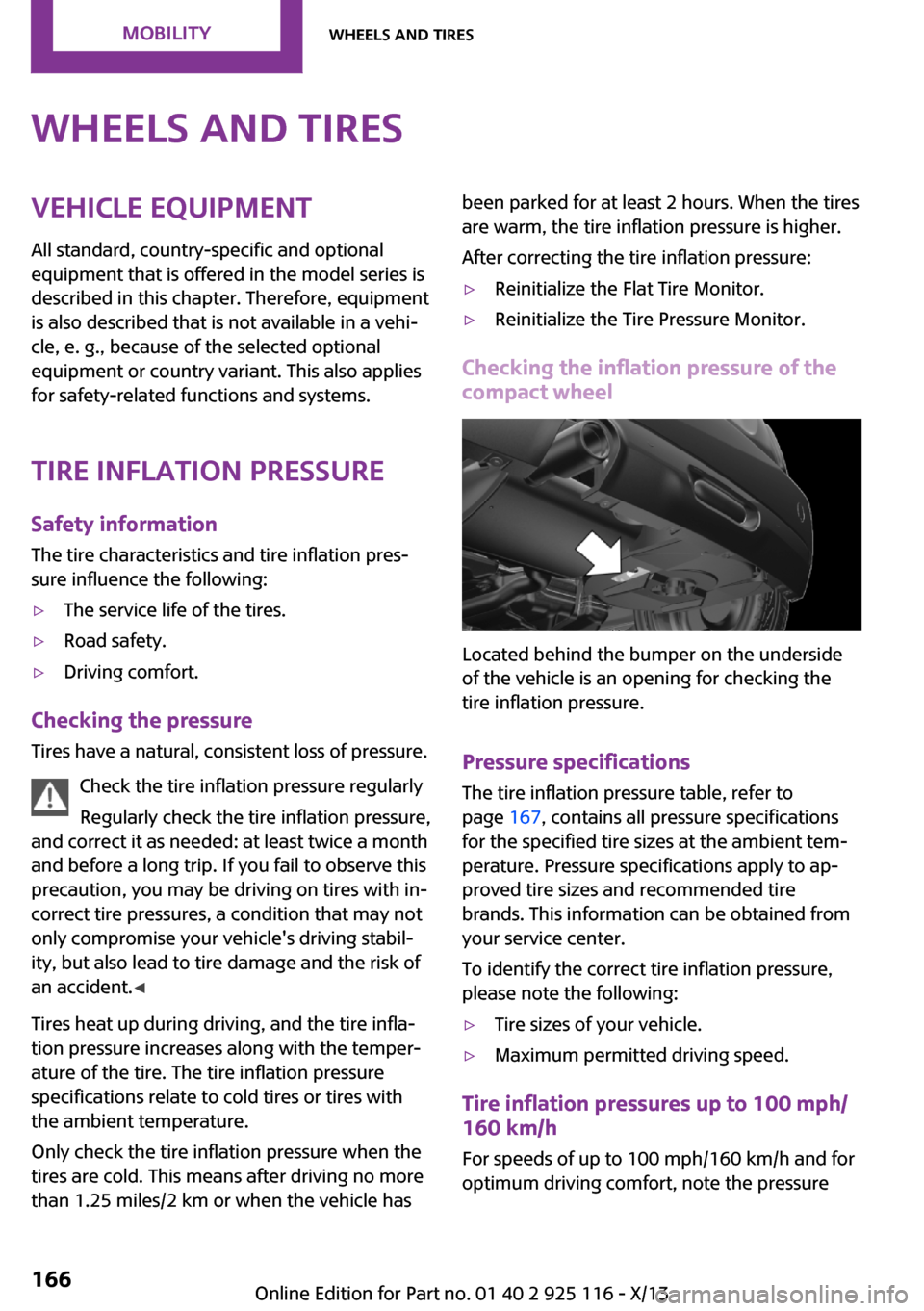
Located behind the bumper on the underside
of the vehicle is an opening for checking the
tire inflation pressure.
Pressure specifications
The tire inflation pressure table, refer to
page 167, contains all pressure specifications
for the specified tire sizes at the ambient tem‐
perature. Pressure specifications apply to ap‐
proved tire sizes and recommended tire
brands. This information can be obtained from
your service center.
To identify the correct tire inflation pressure,
please note the following:
▷Tire sizes of your vehicle.▷Maximum permitted driving speed.
Tire inflation pressures up to 100 mph/
160 km/h
For speeds of up to 100 mph/160 km/h and for
optimum driving comfort, note the pressure
Seite 166MobilityWheels and tires166
Online Edition for Part no. 01 40 2 925 116 - X/13
Page 171 of 233
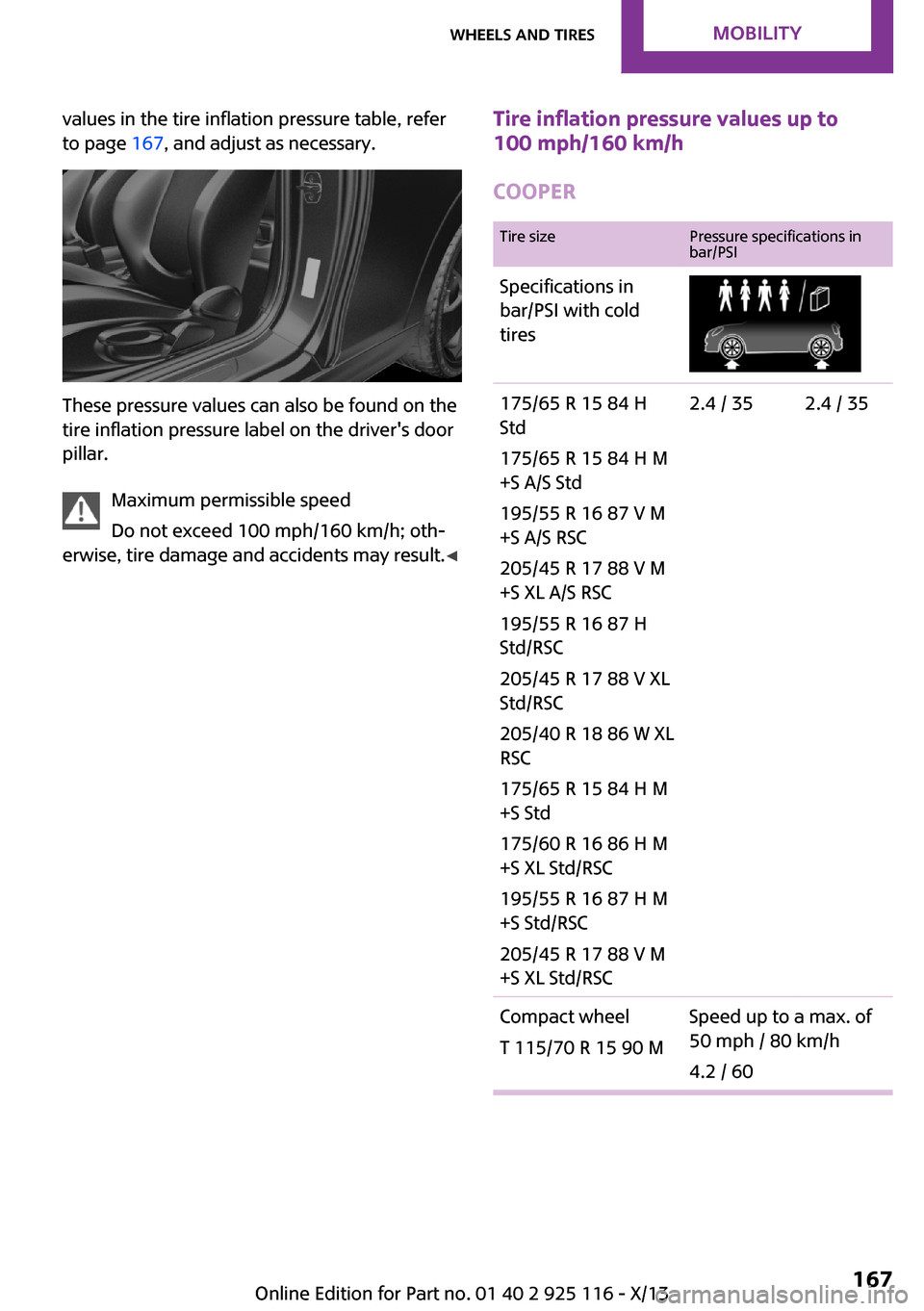
values in the tire inflation pressure table, refer
to page 167, and adjust as necessary.
These pressure values can also be found on the
tire inflation pressure label on the driver's door
pillar.
Maximum permissible speed
Do not exceed 100 mph/160 km/h; oth‐
erwise, tire damage and accidents may result. ◀
Tire inflation pressure values up to
100 mph/160 km/h
COOPERTire sizePressure specifications in
bar/PSISpecifications in
bar/PSI with cold
tires175/65 R 15 84 H
Std
175/65 R 15 84 H M
+S A/S Std
195/55 R 16 87 V M
+S A/S RSC
205/45 R 17 88 V M
+S XL A/S RSC
195/55 R 16 87 H
Std/RSC
205/45 R 17 88 V XL
Std/RSC
205/40 R 18 86 W XL
RSC
175/65 R 15 84 H M
+S Std
175/60 R 16 86 H M
+S XL Std/RSC
195/55 R 16 87 H M
+S Std/RSC
205/45 R 17 88 V M
+S XL Std/RSC2.4 / 352.4 / 35Compact wheel
T 115/70 R 15 90 MSpeed up to a max. of
50 mph / 80 km/h
4.2 / 60Seite 167Wheels and tiresMobility167
Online Edition for Part no. 01 40 2 925 116 - X/13
Page 172 of 233
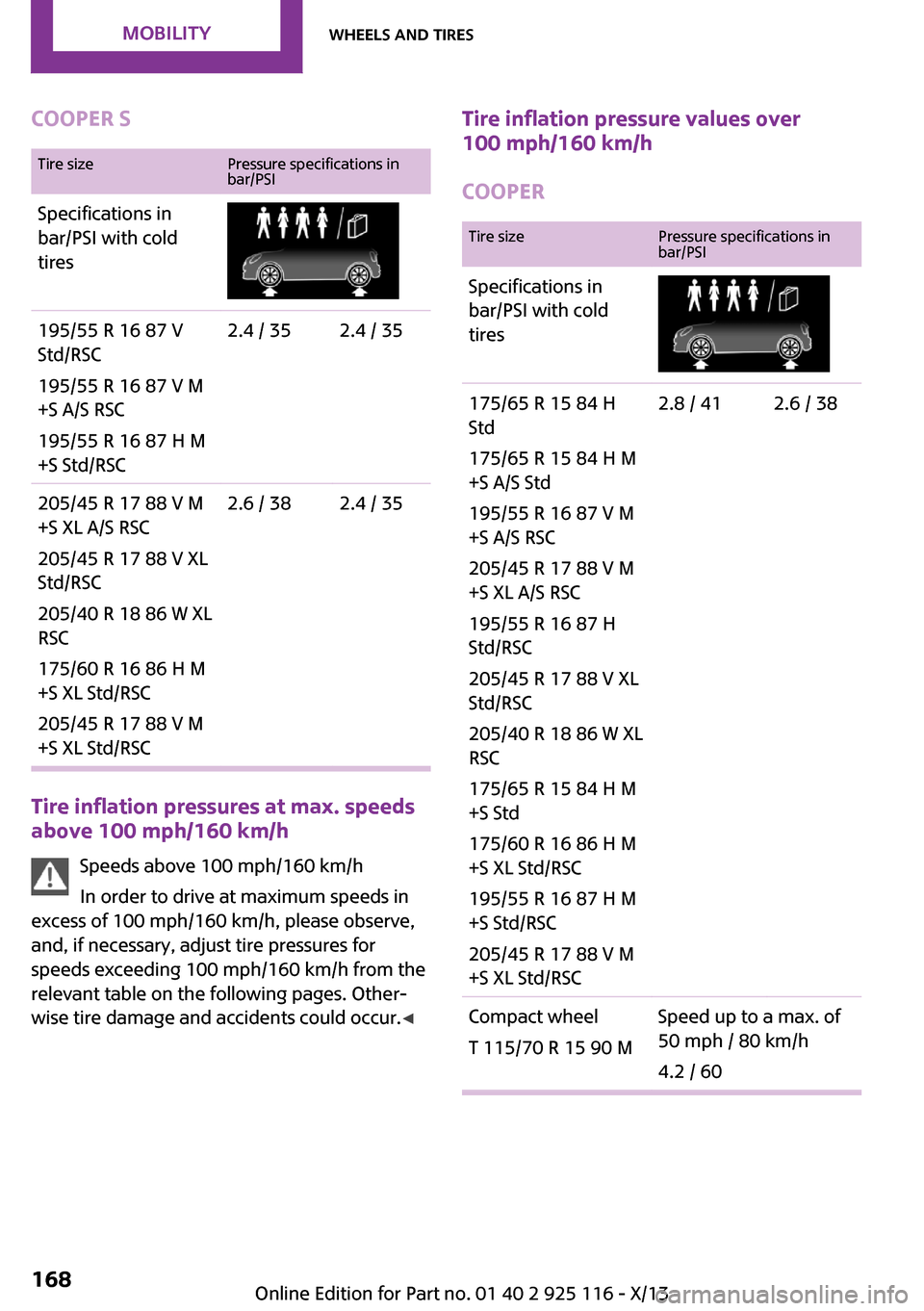
COOPER STire sizePressure specifications in
bar/PSISpecifications in
bar/PSI with cold
tires195/55 R 16 87 V
Std/RSC
195/55 R 16 87 V M
+S A/S RSC
195/55 R 16 87 H M
+S Std/RSC2.4 / 352.4 / 35205/45 R 17 88 V M
+S XL A/S RSC
205/45 R 17 88 V XL
Std/RSC
205/40 R 18 86 W XL
RSC
175/60 R 16 86 H M
+S XL Std/RSC
205/45 R 17 88 V M
+S XL Std/RSC2.6 / 382.4 / 35
Tire inflation pressures at max. speeds
above 100 mph/160 km/h
Speeds above 100 mph/160 km/h
In order to drive at maximum speeds in
excess of 100 mph/160 km/h, please observe,
and, if necessary, adjust tire pressures for
speeds exceeding 100 mph/160 km/h from the
relevant table on the following pages. Other‐
wise tire damage and accidents could occur. ◀
Tire inflation pressure values over
100 mph/160 km/h
COOPERTire sizePressure specifications in
bar/PSISpecifications in
bar/PSI with cold
tires175/65 R 15 84 H
Std
175/65 R 15 84 H M
+S A/S Std
195/55 R 16 87 V M
+S A/S RSC
205/45 R 17 88 V M
+S XL A/S RSC
195/55 R 16 87 H
Std/RSC
205/45 R 17 88 V XL
Std/RSC
205/40 R 18 86 W XL
RSC
175/65 R 15 84 H M
+S Std
175/60 R 16 86 H M
+S XL Std/RSC
195/55 R 16 87 H M
+S Std/RSC
205/45 R 17 88 V M
+S XL Std/RSC2.8 / 412.6 / 38Compact wheel
T 115/70 R 15 90 MSpeed up to a max. of
50 mph / 80 km/h
4.2 / 60Seite 168MobilityWheels and tires168
Online Edition for Part no. 01 40 2 925 116 - X/13
Page 173 of 233
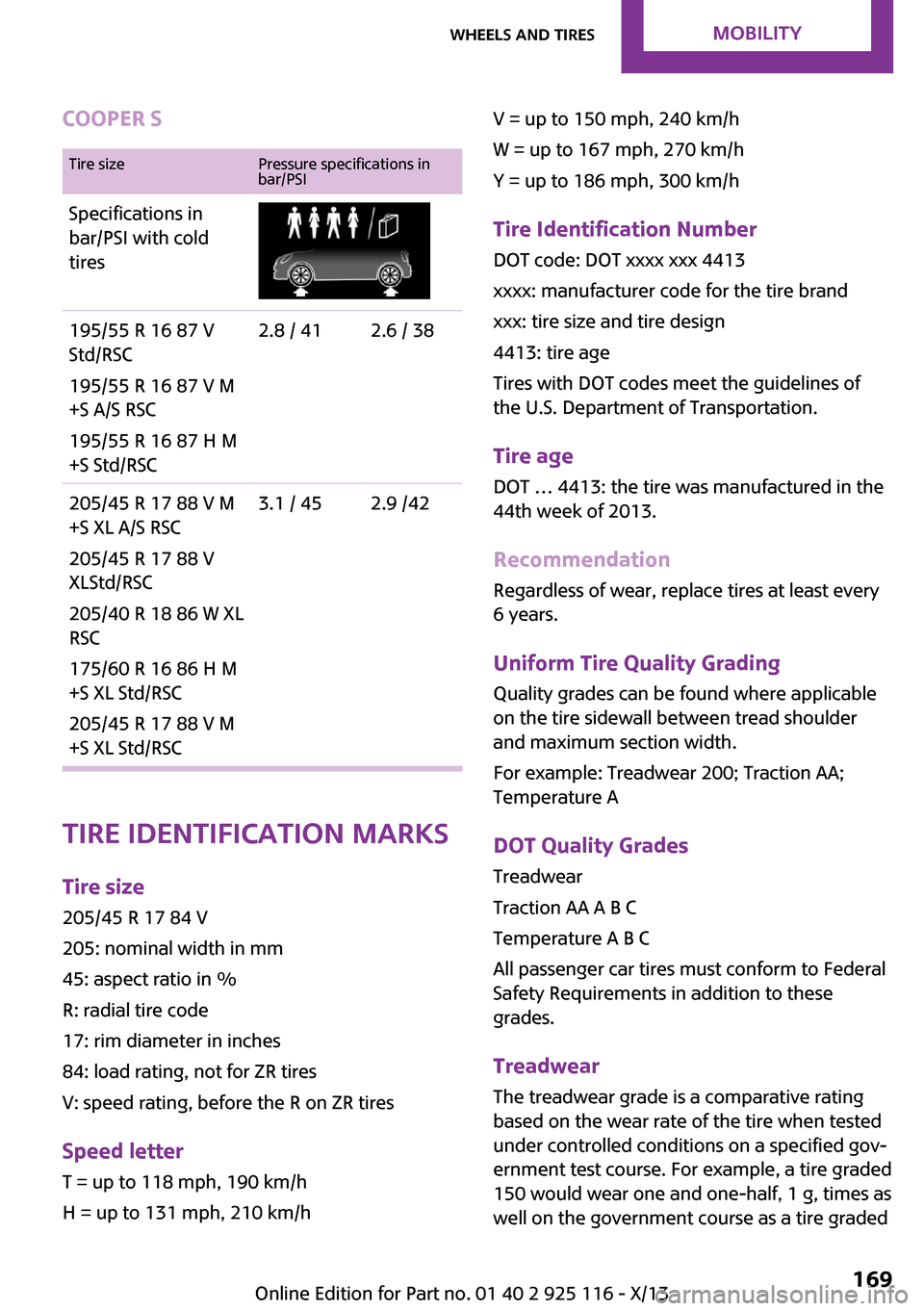
COOPER STire sizePressure specifications in
bar/PSISpecifications in
bar/PSI with cold
tires195/55 R 16 87 V
Std/RSC
195/55 R 16 87 V M
+S A/S RSC
195/55 R 16 87 H M
+S Std/RSC2.8 / 412.6 / 38205/45 R 17 88 V M
+S XL A/S RSC
205/45 R 17 88 V
XLStd/RSC
205/40 R 18 86 W XL
RSC
175/60 R 16 86 H M
+S XL Std/RSC
205/45 R 17 88 V M
+S XL Std/RSC3.1 / 452.9 /42
Tire identification marks
Tire size 205/45 R 17 84 V
205: nominal width in mm
45: aspect ratio in %
R: radial tire code
17: rim diameter in inches
84: load rating, not for ZR tires
V: speed rating, before the R on ZR tires
Speed letter T = up to 118 mph, 190 km/h
H = up to 131 mph, 210 km/h
V = up to 150 mph, 240 km/h
W = up to 167 mph, 270 km/h
Y = up to 186 mph, 300 km/h
Tire Identification NumberDOT code: DOT xxxx xxx 4413
xxxx: manufacturer code for the tire brand
xxx: tire size and tire design
4413: tire age
Tires with DOT codes meet the guidelines of
the U.S. Department of Transportation.
Tire age DOT … 4413: the tire was manufactured in the
44th week of 2013.
Recommendation Regardless of wear, replace tires at least every
6 years.
Uniform Tire Quality Grading
Quality grades can be found where applicable
on the tire sidewall between tread shoulder
and maximum section width.
For example: Treadwear 200; Traction AA;
Temperature A
DOT Quality Grades
Treadwear
Traction AA A B C
Temperature A B C
All passenger car tires must conform to Federal
Safety Requirements in addition to these
grades.
Treadwear
The treadwear grade is a comparative rating
based on the wear rate of the tire when tested
under controlled conditions on a specified gov‐
ernment test course. For example, a tire graded
150 would wear one and one-half, 1 g, times as
well on the government course as a tire gradedSeite 169Wheels and tiresMobility169
Online Edition for Part no. 01 40 2 925 116 - X/13
Page 174 of 233
100. The relative performance of tires depends
upon the actual conditions of their use, how‐
ever, and may depart significantly from the
norm due to variations in driving habits, service
practices and differences in road characteristics
and climate.
Traction The traction grades, from highest to lowest, are
AA, A, B, and C.
Those grades represent the tire's ability to stop
on wet pavement as measured under control‐
led conditions on specified government test
surfaces of asphalt and concrete. A tire marked
C may have poor traction performance.
The traction grade assigned to this tire is based
on straight-ahead braking traction tests, and
does not include acceleration, cornering, hy‐
droplaning, or peak traction characteristics.
Temperature The temperature grades are A, the highest, B,
and C, representing the tire's resistance to the
generation of heat and its ability to dissipate
heat when tested under controlled conditions
on a specified indoor laboratory test wheel.
Sustained high temperature can cause the ma‐
terial of the tire to degenerate and reduce tire
life, and excessive temperature can lead to
sudden tire failure. The grade C corresponds to
a level of performance which all passenger car
tires must meet under the Federal Motor Vehi‐
cle Safety Standard No. 109. Grades Band A
represent higher levels of performance on the
laboratory test wheel than the minimum re‐
quired by law.
Temperature grade for this tire
The temperature grade for this tire is es‐
tablished for a tire that is properly inflated and
not overloaded. Excessive speed, underinfla‐
tion, or excessive loading, either separately or
in combination, can cause heat buildup and
possible tire failure.
If necessary, have the vehicle towed. ◀RSC – Run-flat tires
Run-flat tires, refer to page 173, are labeled
with a circular symbol containing the letters
RSC marked on the sidewall.
M+S Winter and all-season tires with better cold
weather performance than summer tires.
Tire tread Summer tires
Do not drive with a tire tread depth of less than
0.12 in/3 mm.
There is an increased danger of hydroplaning if
the tread depth is less than 0.12 in/3 mm.
Winter tires Do not drive with a tire tread depth of less than
0.16 in/4 mm.
Below a tread depth of 0.16 in/4 mm, tires are
less suitable for winter operation.
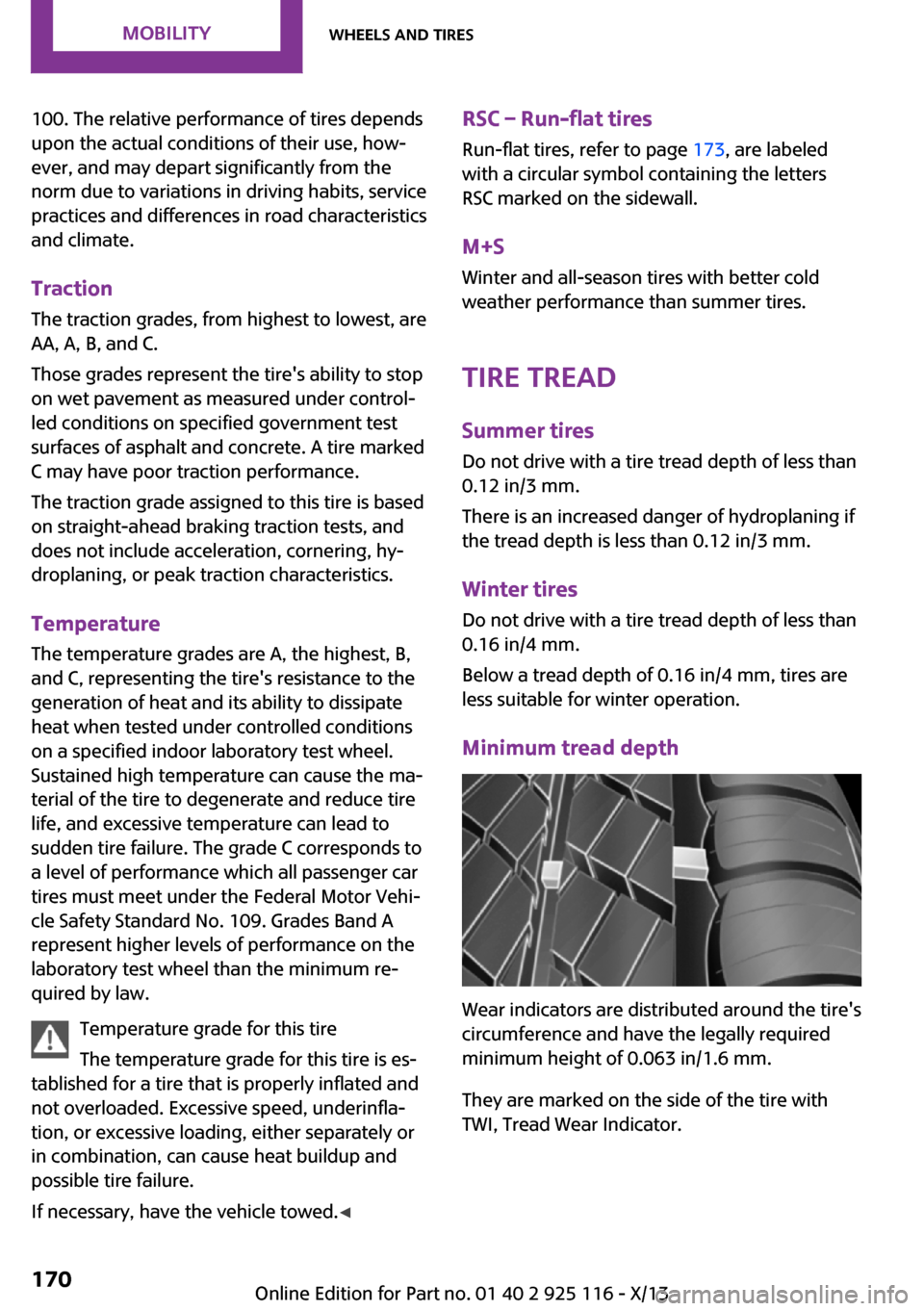
Minimum tread depth
Wear indicators are distributed around the tire's
circumference and have the legally required
minimum height of 0.063 in/1.6 mm.
They are marked on the side of the tire with
TWI, Tread Wear Indicator.
Seite 170MobilityWheels and tires170
Online Edition for Part no. 01 40 2 925 116 - X/13
Page 175 of 233
Tire damage
General information Inspect your tires often for damage, foreign ob‐
jects lodged in the tread, and tread wear.
Hints
Driving over rough or damaged road surfaces,
as well as debris, curbs and other obstacles can
cause serious damage to wheels, tires and sus‐
pension parts. This is more likely to occur with
low-profile tires, which provide less cushioning
between the wheel and the road. Be careful to
avoid road hazards and reduce your speed, es‐
pecially if your vehicle is equipped with low-
profile tires.
Indications of tire damage or other vehicle de‐
fects:▷Unusual vibrations during driving.▷Unusual handling such as a strong ten‐
dency to pull to the left or right.
Damage can, e. g., be caused by driving over
curbs, road damage, or similar things.
In case of tire damage
If there are indications of tire damage, re‐
duce your speed immediately and have the
wheels and tires checked right away; other‐
wise, there is the increased risk of an accident.
Drive carefully to the nearest service center.
Have the vehicle towed or transported there.
Otherwise, tire damage can become life threat‐
ening for vehicle occupants and also other road
users. ◀
Repair of tire damage
For safety reasons, the manufacturer of
your vehicle recommends that you do not have
damaged tires repaired; they should be re‐
placed. Otherwise, damage can occur as a re‐
sult. ◀
Changing wheels and
tires
Mounting Information on mounting tires
Have mounting and balancing performed
only by a service center.
If this work is not carried out properly, there is
the danger of subsequent damage and related
safety hazards. ◀
Wheel and tire combination Information on the correct wheel-tire combina‐
tion and rim versions for your vehicle can be
obtained from your service center.
Incorrect wheel and tire combinations impair
the function of a variety of systems such as ABS
or DSC.
To maintain good handling and vehicle re‐
sponse, use only tires with a single tread con‐
figuration from a single manufacturer.
Following tire damage, have the original wheel
and tire combination remounted on the vehicle
as soon as possible.
Approved wheels and tires
The manufacturer of your vehicle recom‐
mends that you use only wheels and tires that
have been approved for your particular vehicle
model.
For example, despite having the same official
size ratings, variations can lead to body contact
and with it, the risk of severe accidents.
The manufacturer of your vehicle cannot evalu‐
ate non-approved wheels and tires to deter‐
mine if they are suited for use, and therefore
cannot ensure the operating safety of the vehi‐
cle if they are mounted. ◀Seite 171Wheels and tiresMobility171
Online Edition for Part no. 01 40 2 925 116 - X/13