roof MINI 3 door 2014 Owner's Manual
[x] Cancel search | Manufacturer: MINI, Model Year: 2014, Model line: 3 door, Model: MINI 3 door 2014Pages: 240, PDF Size: 11.05 MB
Page 21 of 240
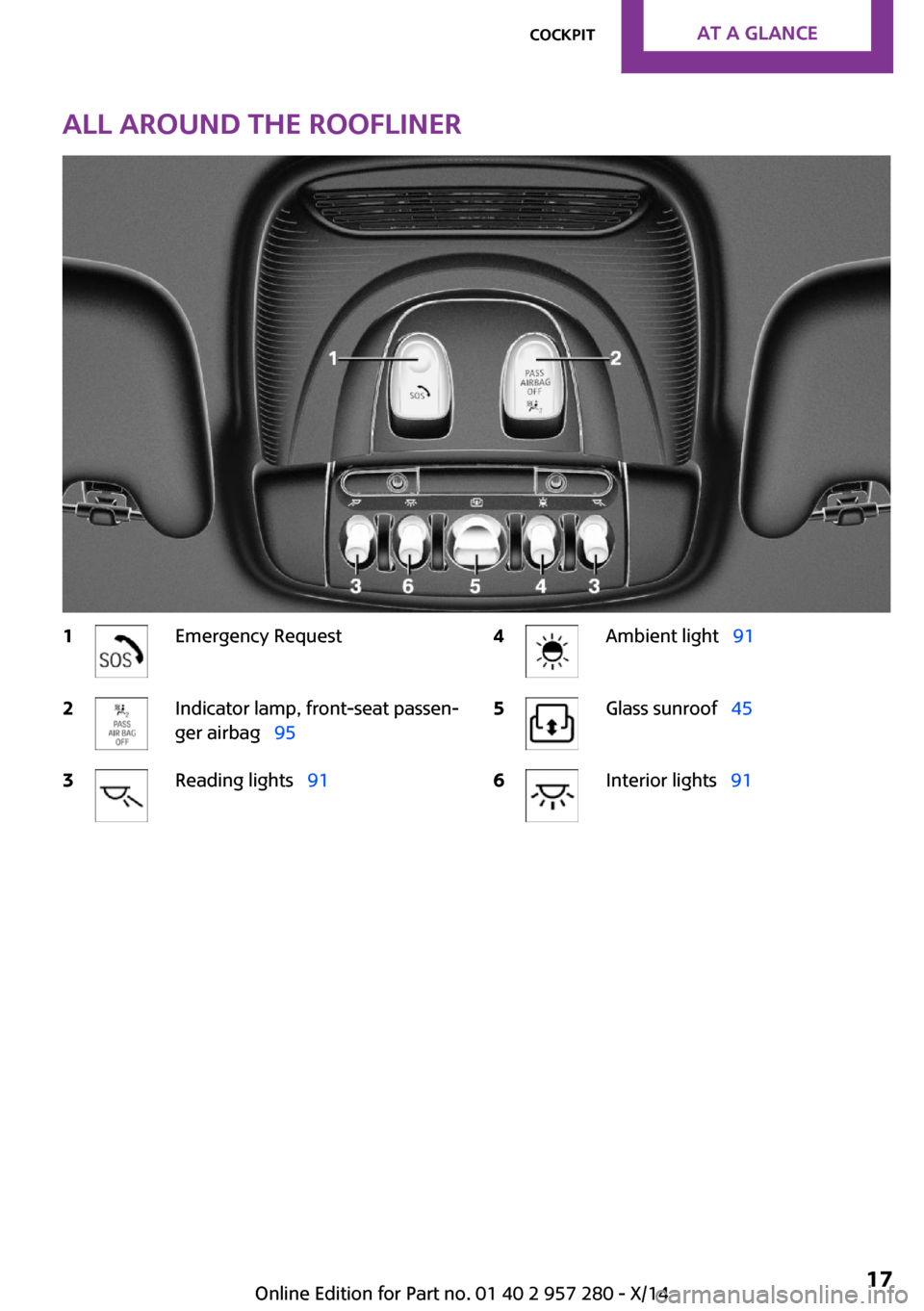
All around the roofliner1Emergency Request2Indicator lamp, front-seat passen‐
ger airbag 953Reading lights 914Ambient light 915Glass sunroof 456Interior lights 91Seite 17CockpitAT A GLANCE17
Online Edition for Part no. 01 40 2 957 280 - X/14
Page 31 of 240
Executing functions using short
commands
Execute functions on the main menu via short
commands. It almost doesn't matter which
menu item is selected, e.g., ›Vehicle status‹.
Help dialog for the voice activation
system
Calling up help dialog: ›Help‹
Additional commands for the help dialog:▷›Help with examples‹: announces informa‐
tion about the current operating options
and the most important commands for
them.▷›Help with voice activation‹: information
about the principle of operation for the
voice activation system is announced.
One example: open the
tone settings
Via the main menu
The commands of the menu items are spoken
just as they are selected via the controller.
1.Turn on the Entertainment sound output if
needed.2. Press button on the steering wheel.3.›Radio‹4.›Tone‹
Via short command
The desired tone settings can also be started
via a short command.
1.Turn on the Entertainment sound output if
needed.2. Press button on the steering wheel.3.›Tone‹Setting the voice dialog
Set system to standard dialog or use a short
version.
The short version of the voice dialog plays back short messages in abbreviated form.
On the Control Display:1."Settings"2."Language/Units"3."Speech type:"4.Select setting.
Adjusting the volume
Turn the volume button while giving an instruc‐
tion until the desired volume is set.
▷The volume remains constant even if the
volume of other audio sources is changed.▷The volume is stored for the profile cur‐
rently in use.
Hints on Emergency Re‐
quests
Do not use the voice activation system to ini‐
tiate an Emergency Request. In stressful situa‐
tions, the voice and vocal pitch can change.
This can unnecessarily delay the establishment
of a phone connection.
Environmental condi‐
tions
▷Say the commands, numbers, and letters
smoothly and with normal volume, empha‐
sis, and speed.▷Always say commands in the language of
the voice activation system.▷Keep the doors, windows, and glass sun‐
roof closed to prevent noise interference.Seite 27Voice activation systemAT A GLANCE27
Online Edition for Part no. 01 40 2 957 280 - X/14
Page 41 of 240
Existing settings and contacts are overwritten
with the imported profile.1. "Settings"2."Profiles"3."Import profile"4."USB device"
Using the guest profile
The guest profile is for individual settings that
are saved in none of the three personal profiles.
This can be useful for drivers who are using the
vehicle temporarily and do not have their own
profile.
1. "Settings"2."Profiles"3."Guest"4.Adjust the settings.
The guest profile cannot be renamed. It is not
assigned to the current remote control.
Display profile list during start The profile list can be displayed during each
start to select the desired profile.
1. "Settings"2."Profiles"3.Open "Options".4."Display user list at startup"
Using the remote con‐
trol
Note Take the remote control with you
People or animals left unattended in a
parked vehicle can lock the doors from the in‐
side. Always take the remote control with you
when leaving the vehicle so that the vehicle
can then be opened from the outside. ◀
Unlocking
Press button on the remote control.▷The vehicle is unlocked.▷Interior lamps and courtesy lamps are acti‐
vated. This function is not available, if the
interior lamps were switched off manually.▷The welcome lamps are switched on, if this
function was activated.▷Exterior mirrors folded through convenient
closing are folded open.
On 3-door models:
Press button on the remote control
twice.
When the door is opened, the window is low‐
ered to make it easier to enter the vehicle.
You can set how the vehicle is to be unlocked.
Create the settings, refer to page 42.
The alarm system, refer to page 43, is dis‐
armed.
Convenient opening Press and hold this button on the re‐
mote control after unlocking.
The windows and the glass sunroof are opened,
as long as the button on the remote control is
pressed.
Locking Press button on the remote control.
Locking from the outside
Do not lock the vehicle from the outside
with people inside the car, as the vehicle can‐
not be unlocked from inside without special
knowledge. ◀
The alarm system, refer to page 43, is armed.
Seite 37Opening and closingCONTROLS37
Online Edition for Part no. 01 40 2 957 280 - X/14
Page 45 of 240
▷The engine can only be started if the re‐
mote control is in the vehicle.
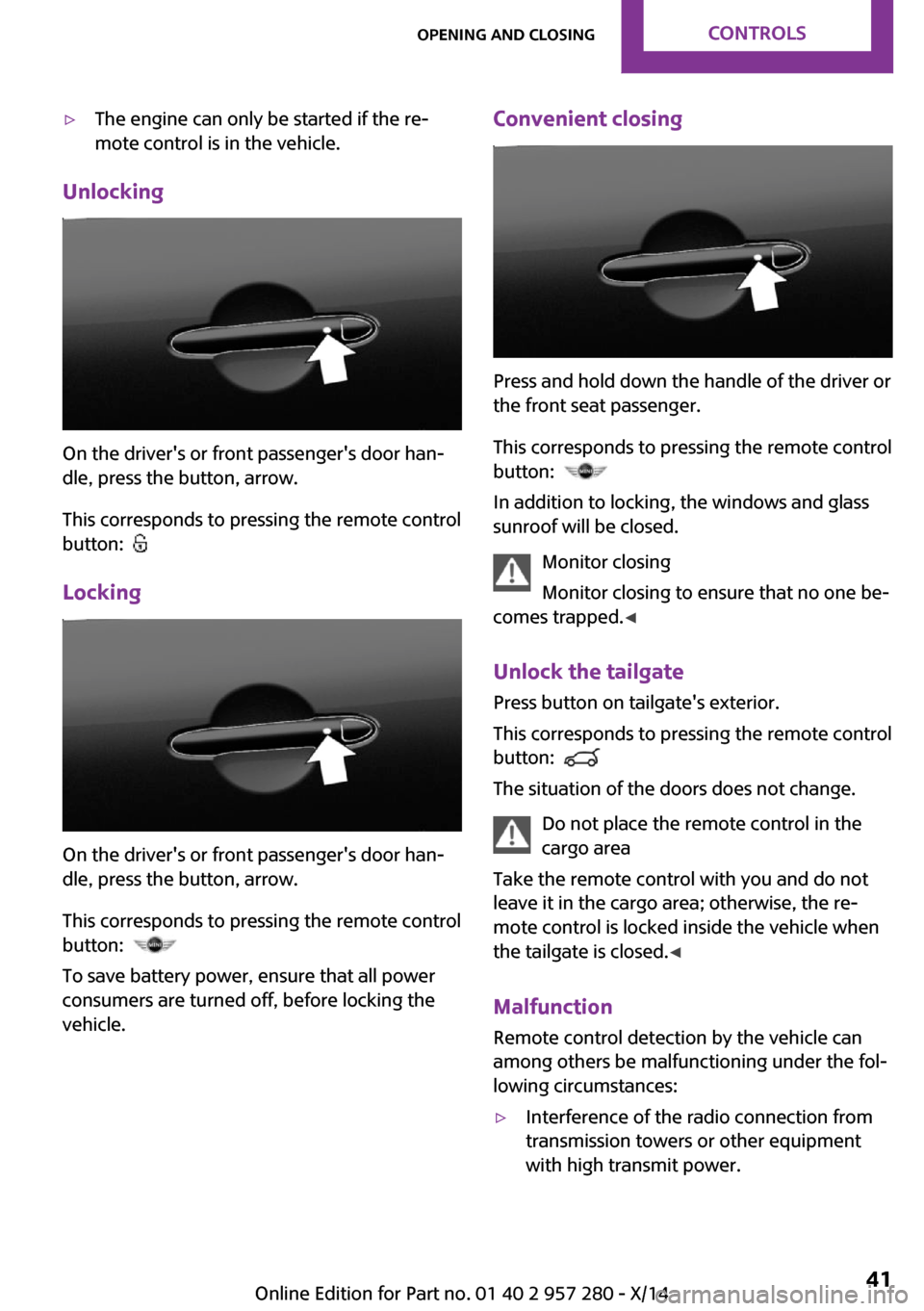
Unlocking
On the driver's or front passenger's door han‐
dle, press the button, arrow.
This corresponds to pressing the remote control
button:
Locking
On the driver's or front passenger's door han‐
dle, press the button, arrow.
This corresponds to pressing the remote control
button:
To save battery power, ensure that all power
consumers are turned off, before locking the
vehicle.
Convenient closing
Press and hold down the handle of the driver or
the front seat passenger.
This corresponds to pressing the remote control
button:
In addition to locking, the windows and glass
sunroof will be closed.
Monitor closing
Monitor closing to ensure that no one be‐
comes trapped. ◀
Unlock the tailgate Press button on tailgate's exterior.
This corresponds to pressing the remote control
button:
The situation of the doors does not change.
Do not place the remote control in the
cargo area
Take the remote control with you and do not
leave it in the cargo area; otherwise, the re‐
mote control is locked inside the vehicle when
the tailgate is closed. ◀
Malfunction Remote control detection by the vehicle can
among others be malfunctioning under the fol‐
lowing circumstances:
▷Interference of the radio connection from
transmission towers or other equipment
with high transmit power.Seite 41Opening and closingCONTROLS41
Online Edition for Part no. 01 40 2 957 280 - X/14
Page 48 of 240
Interior motion sensorThe windows and glass sunroof must be closed
for the system to function properly.
Avoiding unintentional alarms
The tilt alarm sensor and interior motion sensor
can be switched off together, such as in the fol‐
lowing situations:▷In automatic car washes.▷In duplex garages.▷During transport on trains carrying vehicles,
at sea or on a trailer.▷With animals in the vehicle.
Switching off the tilt alarm sensor and
interior motion sensor
Press the remote control button again
within 10 seconds as soon as the vehi‐
cle is locked.
The indicator lamp lights up for approx. 2 sec‐
onds and then continues to flash.
The tilt alarm sensor and interior motion sensor
are turned off, until the vehicle is locked again.
Switching off the alarm
▷Unlock vehicle with the remote control or
reel on the ignition, if needed through
emergency detection of remote control, re‐
fer to page 35.▷With Comfort Access: If you are carrying the
remote control on your person, grasp the
driver side or front passenger side door
handle completely.
Unlock vehicle with the remote control or reel
on the ignition, if needed through emergency
detection of remote control, refer to page 35.
Power windows
Note Take the remote control with you
Take the remote control with you when
leaving the vehicle so that children, e.g., cannot
operate the power windows and injure them‐
selves. ◀
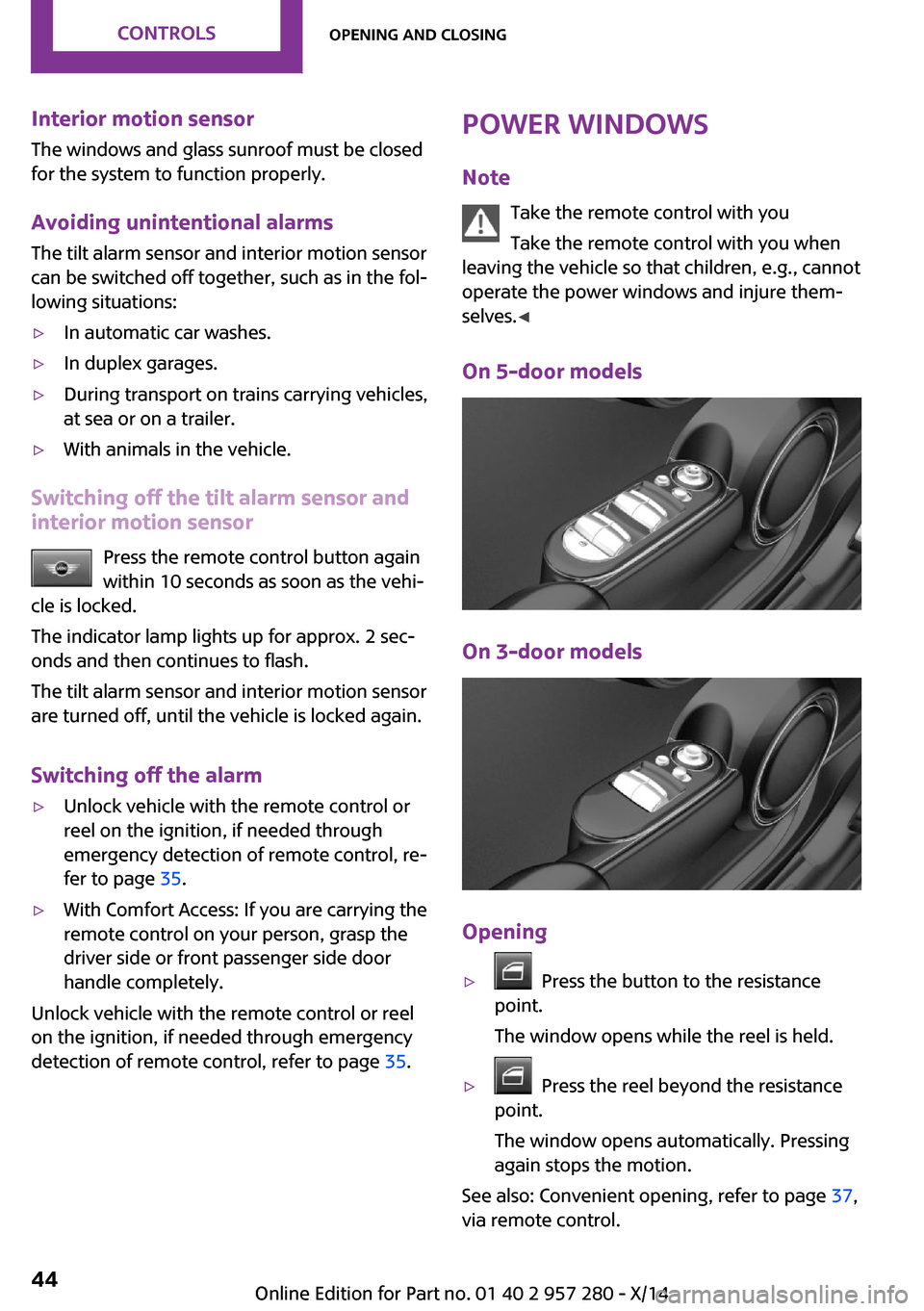
On 5-door models
On 3-door models
Opening
▷ Press the button to the resistance
point.
The window opens while the reel is held.▷ Press the reel beyond the resistance
point.
The window opens automatically. Pressing
again stops the motion.
See also: Convenient opening, refer to page 37,
via remote control.
Seite 44CONTROLSOpening and closing44
Online Edition for Part no. 01 40 2 957 280 - X/14
Page 49 of 240
ClosingKeep the closing path clear
Monitor closing and make sure that the
closing path of the window is clear; otherwise,
injuries may result. ◀
Pull switch up.
The window closes while the reel is held.
See also: closing by means of Comfort Access, refer to page 41.
Pinch protection system If closing force exceeds a specific margin as a
window closes, closing is interrupted.
The window reopens slightly.
Danger of jamming even with pinch pro‐
tection
Even with the pinch protection system, check
that the window's closing path is clear; other‐
wise, the closing action may not stop in certain
situations, e.g., if thin objects are present. ◀
No window accessories
Do not install any accessories in the win‐
dow's range of movement; otherwise, the
pinch protection system will be impaired. ◀
Closing without the pinch protection
system
Keep the closing path clear
Monitor closing and make sure that the
closing path of the window is clear; otherwise,
injuries may result. ◀
E.g. danger from the outside or ice might pre‐
vent window from closing properly - proceed as
follows:1.Pull the reel past the resistance point and
hold it there.
The pinch protection is limited and the win‐
dow reopens slightly if the closing force ex‐
ceeds a certain margin.2.Pull the reel past the resistance point again
within approx. 4 seconds and hold it there.
The window closes without jam protection.
On 5-door models: safety reel
The safety reel in the driver's door can be used
to prevent children, e.g., from opening and
closing the rear windows using the switches in
the rear.
Switching on and off Press button.
The LED lights up if the safety function
is switched on.
Safety reel for rear operation
Press the safety reel when transporting
children in the rear; otherwise, injury may result
if the windows are closed without supervi‐
sion. ◀
Panoramic glass sun‐
roof
Hints Keep the closing path clear
Monitor closing and make sure that the
closing path of the glass sunroof is clear; other‐
wise, injuries may result. ◀
Take the remote control with you
Take the remote control with you when
leaving the vehicle so that children, e.g., cannot
operate the glass sunroof and injure them‐
selves. ◀
Seite 45Opening and closingCONTROLS45
Online Edition for Part no. 01 40 2 957 280 - X/14
Page 50 of 240
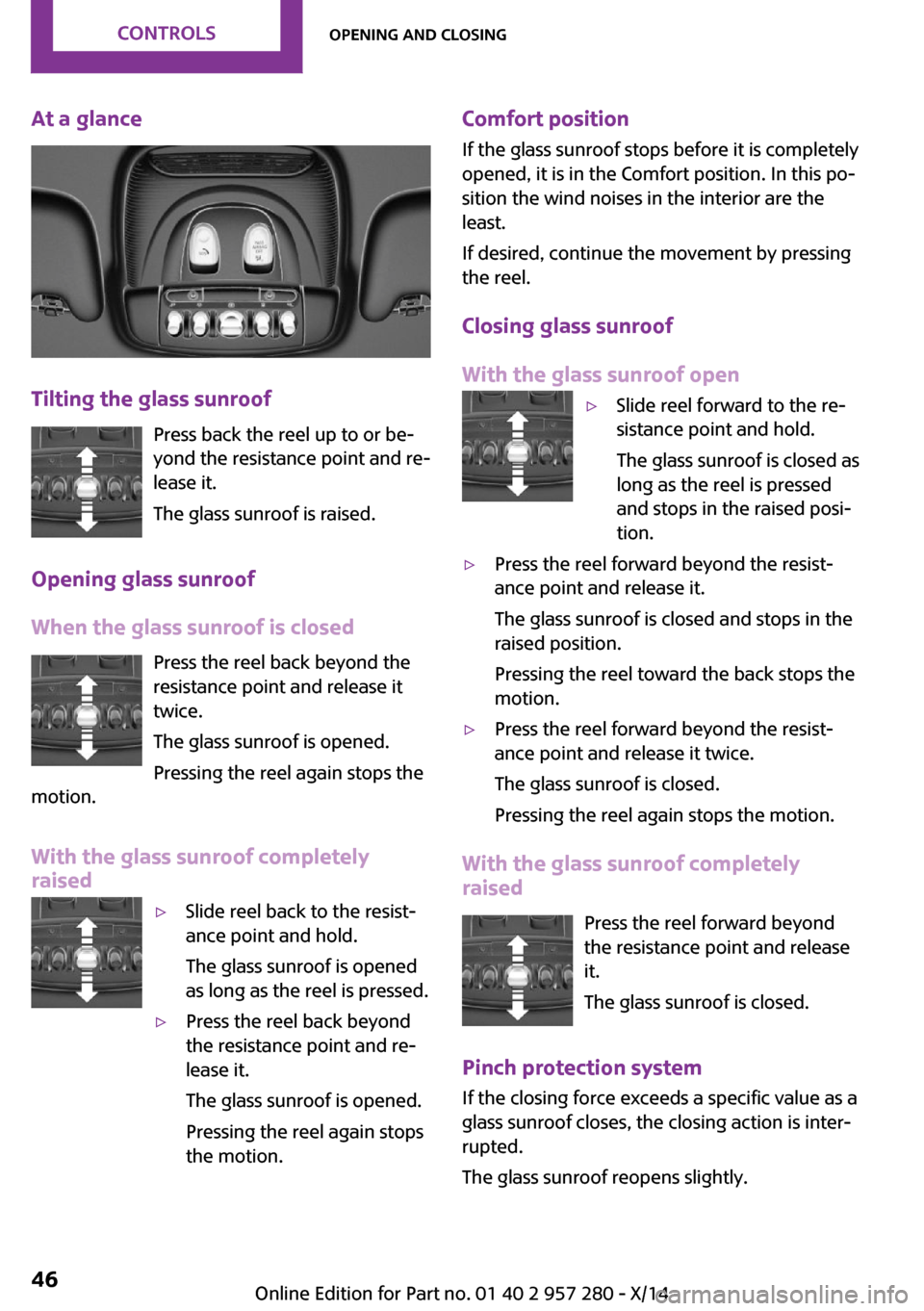
At a glance
Tilting the glass sunroofPress back the reel up to or be‐
yond the resistance point and re‐
lease it.
The glass sunroof is raised.
Opening glass sunroof
When the glass sunroof is closed Press the reel back beyond the
resistance point and release it
twice.
The glass sunroof is opened.
Pressing the reel again stops the
motion.
With the glass sunroof completely
raised
▷Slide reel back to the resist‐
ance point and hold.
The glass sunroof is opened
as long as the reel is pressed.▷Press the reel back beyond
the resistance point and re‐
lease it.
The glass sunroof is opened.
Pressing the reel again stops
the motion.Comfort position
If the glass sunroof stops before it is completely
opened, it is in the Comfort position. In this po‐
sition the wind noises in the interior are the
least.
If desired, continue the movement by pressing
the reel.
Closing glass sunroof
With the glass sunroof open▷Slide reel forward to the re‐
sistance point and hold.
The glass sunroof is closed as
long as the reel is pressed
and stops in the raised posi‐
tion.▷Press the reel forward beyond the resist‐
ance point and release it.
The glass sunroof is closed and stops in the
raised position.
Pressing the reel toward the back stops the
motion.▷Press the reel forward beyond the resist‐
ance point and release it twice.
The glass sunroof is closed.
Pressing the reel again stops the motion.
With the glass sunroof completely
raised
Press the reel forward beyond
the resistance point and release
it.
The glass sunroof is closed.
Pinch protection system If the closing force exceeds a specific value as a
glass sunroof closes, the closing action is inter‐
rupted.
The glass sunroof reopens slightly.
Seite 46CONTROLSOpening and closing46
Online Edition for Part no. 01 40 2 957 280 - X/14
Page 51 of 240
Danger of jamming even with pinch pro‐
tection
Despite the pinch protection system, check that
the glass sunroof's closing path is clear; other‐
wise, the closing action may not be interrupted
in certain extreme situations, such as when thin
objects are present. ◀
Closing without the pinch protection
system
E. g. if there is an external danger, proceed as
follows:1.Press the reel forward beyond the resist‐
ance point and hold it.
The pinch protection is limited and the
glass sunroof reopens slightly if the closing
force exceeds a certain margin.2.Press the reel forward again beyond the re‐
sistance point and hold until the glass sun‐
roof closes without jam protection. Make
sure that the closing area is clear.
Initializing after a power failure
After a power failure, it can happen that the
glass sunroof can only be raised. The system
must be initialized in this case. MINI recom‐
mends having this work performed by your
service center.
Seite 47Opening and closingCONTROLS47
Online Edition for Part no. 01 40 2 957 280 - X/14
Page 98 of 240
Ejection MitigationThe system consists of an extension of the head
airbag system and is a kind of curtain. The sys‐
tem is activated under certain conditions in the
event of a rollover accident, and should help to
prevent the vehicle occupant from being
thrown out of the vehicle.
Knee airbag
The knee airbag supports the legs in a frontal
impact.
Protective action
Airbags are not triggered in every impact situa‐
tion, e.g., in less severe accidents or rear-end
collisions.
Information on how to ensure the opti‐
mal protective effect of the airbags▷Keep at a distance from the airbags.▷Always grasp the steering wheel on the
steering wheel rim, holding your hands at
the 3 o'clock and 9 o'clock positions, to
keep the risk of injury to your hands or
arms as low as possible when the airbag is
triggered.▷There should be no person, animals, or ob‐
jects between an airbag and a person.▷Do not use the cover of the front airbag on
the front passenger side as a storage area.▷Dashboard and windshield on the front
passenger side must stay clear - do not at‐
tach adhesive labels or coverings and do
not attach brackets or cables, e. g., for GPS
devices or' mobile phones.▷Make sure that the front passenger is sitting
correctly, i.e., keeps his or her feet and legs
in the footwell; otherwise, leg injuries might
occur when front airbag is activated.▷Do not place slip covers, seat cushions or
other objects on the front passenger seat
that are not approved specifically for seats
with integrated side airbags.▷Do not hang pieces of clothing, such as
jackets, over the backrests.▷Make sure that occupants keep their heads
away from the side airbag and do not rest
against the head airbag; otherwise, injuries
might occur when airbag is activated.▷Do not remove the airbag system.▷Do not remove the steering wheel.▷Do not apply adhesive materials to the air‐
bag cover panels, do not cover them or
modify them in any way.▷Never modify either the individual compo‐
nents or the wiring in the airbag system.
This also applies to steering wheel covers,
the dashboard, the seats, the roof pillars
and the sides of the roofliner. ◀
Even when you follow all instructions very
closely, injury from contact with the airbags
cannot be ruled out in certain situations.
The ignition and inflation noise may lead to
short-term and, in most cases, temporary hear‐
ing impairment in sensitive individuals.
Malfunction, deactivation and after de‐
ploying the airbags
Do not touch the individual components imme‐
diately after the system has been triggered;
otherwise, you may risk burns.
Only have the airbags checked, repaired or dis‐
mantled and the airbag generator scrapped by
the service center or an authorized repair shop
for handling explosives.
Non-professional attempts to service the sys‐
tem could lead to failure in an emergency or
unintentional activation of the airbag - both
may lead to injury. ◀
Warnings and information on the airbags are
also found on the sun visors.
Seite 94CONTROLSSafety94
Online Edition for Part no. 01 40 2 957 280 - X/14
Page 150 of 240

Storage compartment
above the glove com‐
partment
Opening
Press the lower edge of the cover. Immediately close the storage compart‐
ment
Close the storage compartment immediately
after use while driving; otherwise, injury may
occur during accidents. ◀
Closing
Push the cover back into the original position.
Compartments in the
doors
Do not stow any breakable objects
Do not store any breakable objects, e. g.
glass bottles, in the compartments, or there is
an increased risk of injury in the event of an ac‐
cident. ◀
Center armrest The center armrest contains a storage compart‐
ment.
Opening
Press button, arrow 1, and open center arm
rest upward, arrow 2.
Adjusting the height
Press button, arrow 1, and swing center arm
rest upward or downward into the desired
height, arrow 2.
Cupholders
Hints Shatter-proof containers and no hot
drinks
Use light and shatter-proof containers and do
not transport hot drinks. Otherwise, there is the
increased danger of injury in an accident. ◀
Unsuitable containers
Do not forcefully push unsuitable contain‐
ers into the cupholders. This may result in dam‐
age. ◀
Seite 146CONTROLSStorage compartments146
Online Edition for Part no. 01 40 2 957 280 - X/14