fuel pressure MINI Clubman 2009 Owner's Manual
[x] Cancel search | Manufacturer: MINI, Model Year: 2009, Model line: Clubman, Model: MINI Clubman 2009Pages: 158, PDF Size: 2.51 MB
Page 14 of 158
Cockpit
12
Displays
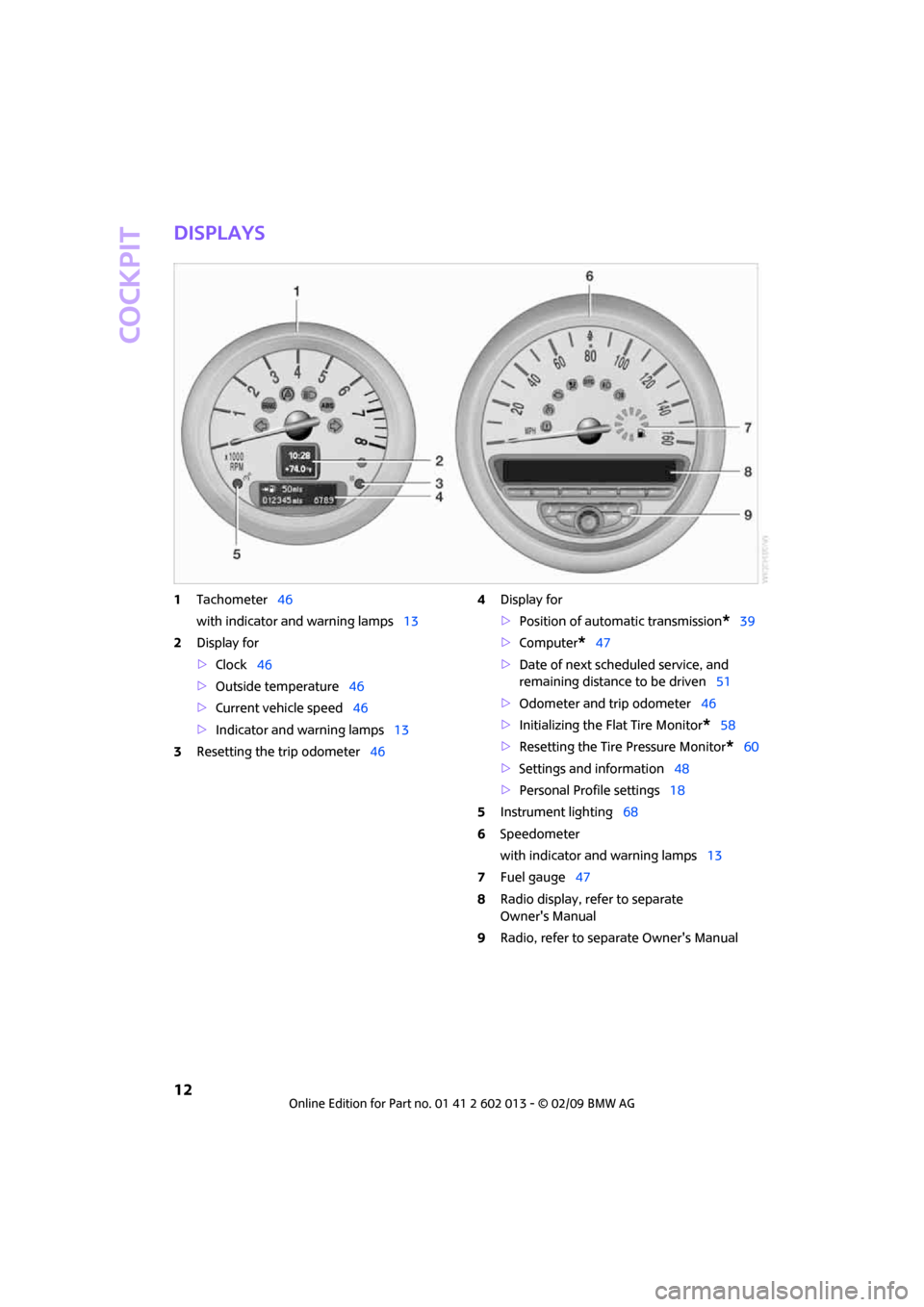
1Tachometer46
with indicator and warning lamps13
2Display for
>Clock46
>Outside temperature46
>Current vehicle speed46
>Indicator and warning lamps13
3Resetting the trip odometer464Display for
>Position of automatic transmission
*39
>Computer
*47
>Date of next scheduled service, and
remaining distance to be driven51
>Odometer and trip odometer46
>Initializing the Flat Tire Monitor
*58
>Resetting the Tire Pressure Monitor
*60
>Settings and information48
>Personal Profile settings18
5Instrument lighting68
6Speedometer
with indicator and warning lamps13
7Fuel gauge47
8Radio display, refer to separate
Owner's Manual
9Radio, refer to separate Owner's Manual
Page 50 of 158
Everything under control
48
Current fuel consumption
Displays the current fuel consumption to allow
you to see whether your current driving style is
conducive to fuel economy with minimum
exhaust emissions.
Average speed
Periods with the vehicle parked and the engine
switched off are not included in the calculations
of average speed.
To reset average speed: press the button in the
turn indicator lever for approx. 2 seconds.
Current vehicle speed
To have the current speed shown in the upper
display otherwise serving for the outside tem-
perature display and clock.
1.Press the button in the turn indicator lever
repeatedly until the current speed appears
in the lower display.
2.Wait for the speed display to automatically
move to the upper display.
The outside temperature then appears in the
lower display of the computer.
Settings and information
Operating principle
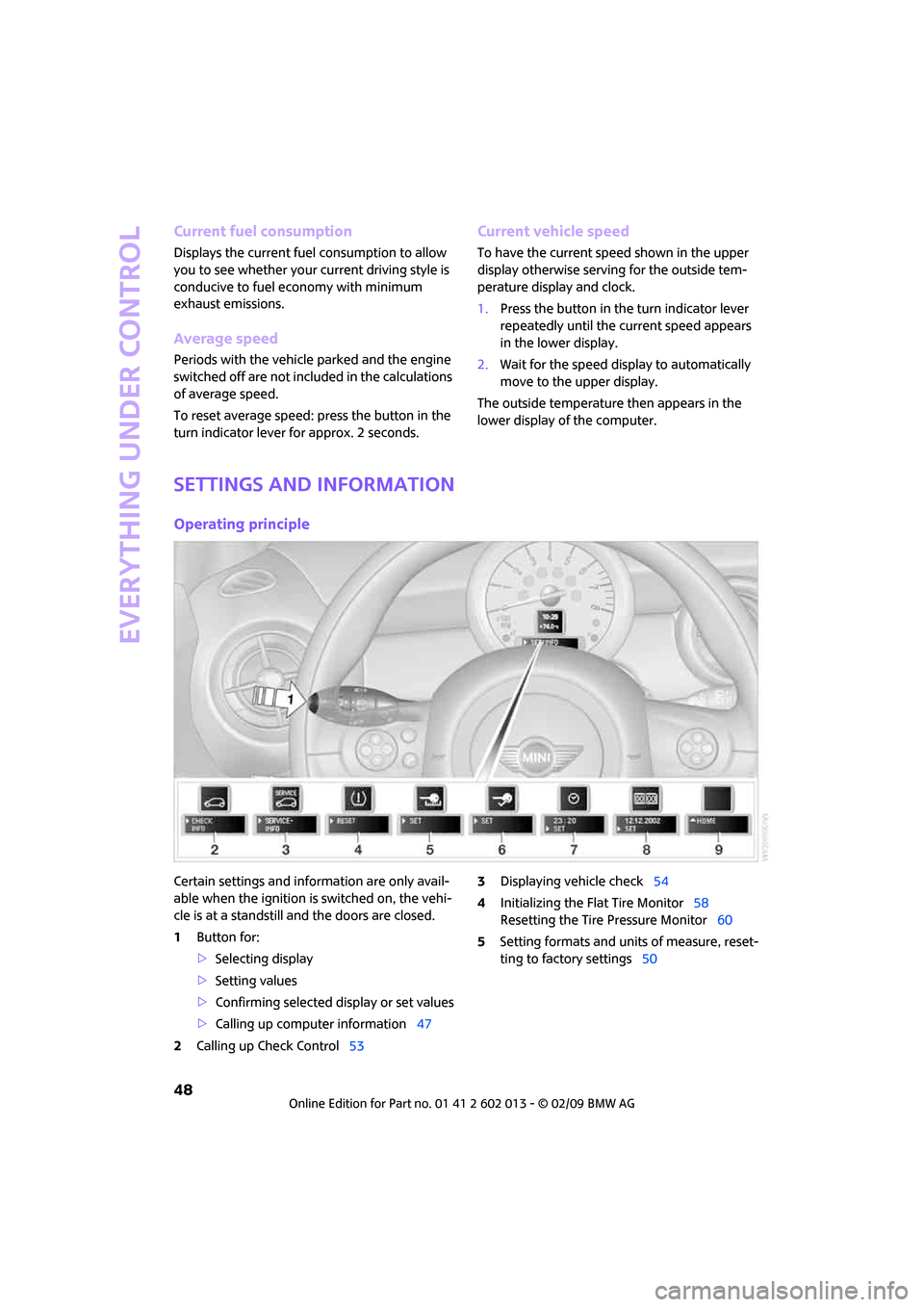
Certain settings and information are only avail-
able when the ignition is switched on, the vehi-
cle is at a standstill and the doors are closed.
1Button for:
>Selecting display
>Setting values
>Confirming selected display or set values
>Calling up computer information47
2Calling up Check Control533Displaying vehicle check54
4Initializing the Flat Tire Monitor58
Resetting the Tire Pressure Monitor60
5Setting formats and units of measure, reset-
ting to factory settings50
Page 64 of 158
Technology for driving comfort and safety
62
Declaration according to
NHTSA/FMVSS 138 Tire Pressure
Monitoring Systems
Each tire, including the spare, should be
checked monthly when cold and inflated to the
inflation pressure recommended by the vehicle
manufacturer on the vehicle placard or tire infla-
tion pressure label. If your vehicle has tires of a
different size than the size indicated on the vehi-
cle placard or tire inflation pressure label, you
should determine the proper tire inflation pres-
sure for those tires. As an added safety feature,
your vehicle has been equipped with a tire pres-
sure monitoring system TPMS that illuminates a
low tire pressure telltale when one or more of
your tires are significantly under-inflated.
Accordingly, when the low tire pressure telltale
illuminates, you should stop and check your tires
as soon as possible, and inflate them to the
proper pressure. Driving on a significantly
under-inflated tire causes the tire to overheat
and can lead to tire failure. Underinflation also
reduces fuel efficiency and tire tread life, and
may affect the vehicle's handling and stopping
ability. Please note that the TPMS is not a substi-
tute for proper tire maintenance, and it is the
driver's responsibility to maintain correct tire
pressure, even if underinflation has not reached
the level at which the TPMS low tire pressure tell-
tale illuminates.
The TPMS malfunction indicator is combined
with the low tire pressure telltale. When the sys-
tem detects a malfunction, the telltale will flash
for approximately one minute and then remain
continuously lit. This sequence will continue
upon subsequent vehicle startups as long as the
malfunction exists. When the malfunction indi-
cator is illuminated, the system may not be able
to detect or signal low tire pressure as intended.
TPMS malfunctions may occur for a variety of
reasons, including the installation of replace-
ment or alternate tires or wheels on the vehicle
that prevent the TPMS from functioning prop-
erly. Always check the TPMS malfunction telltale
after replacing one or more tires or wheels on
your vehicle to ensure that the replacement or
alternate tires and wheels allow the TPMS to
continue to function properly.
Page 89 of 158
REFERENCEAT A GLANCE CONTROLS DRIVING TIPS MOBILITY
87
operating safety is no longer assured and the
vehicle will not be in compliance with the certifi-
cation regulations.
Heavy or hard objects should not be carried
loose inside the car, since they could be thrown
around, for example as a result of heavy braking,
sudden swerves, etc., and endanger the occu-
pants. Do not secure cargo using the fastening
points for the tether strap, page35; they may
become damaged.<
Roof-mounted
luggage rack*
A special rack system is available as an option for
your MINI. Your MINI Dealer will be glad to
advise you. Comply with the installation instruc-
tions supplied with the rack system.
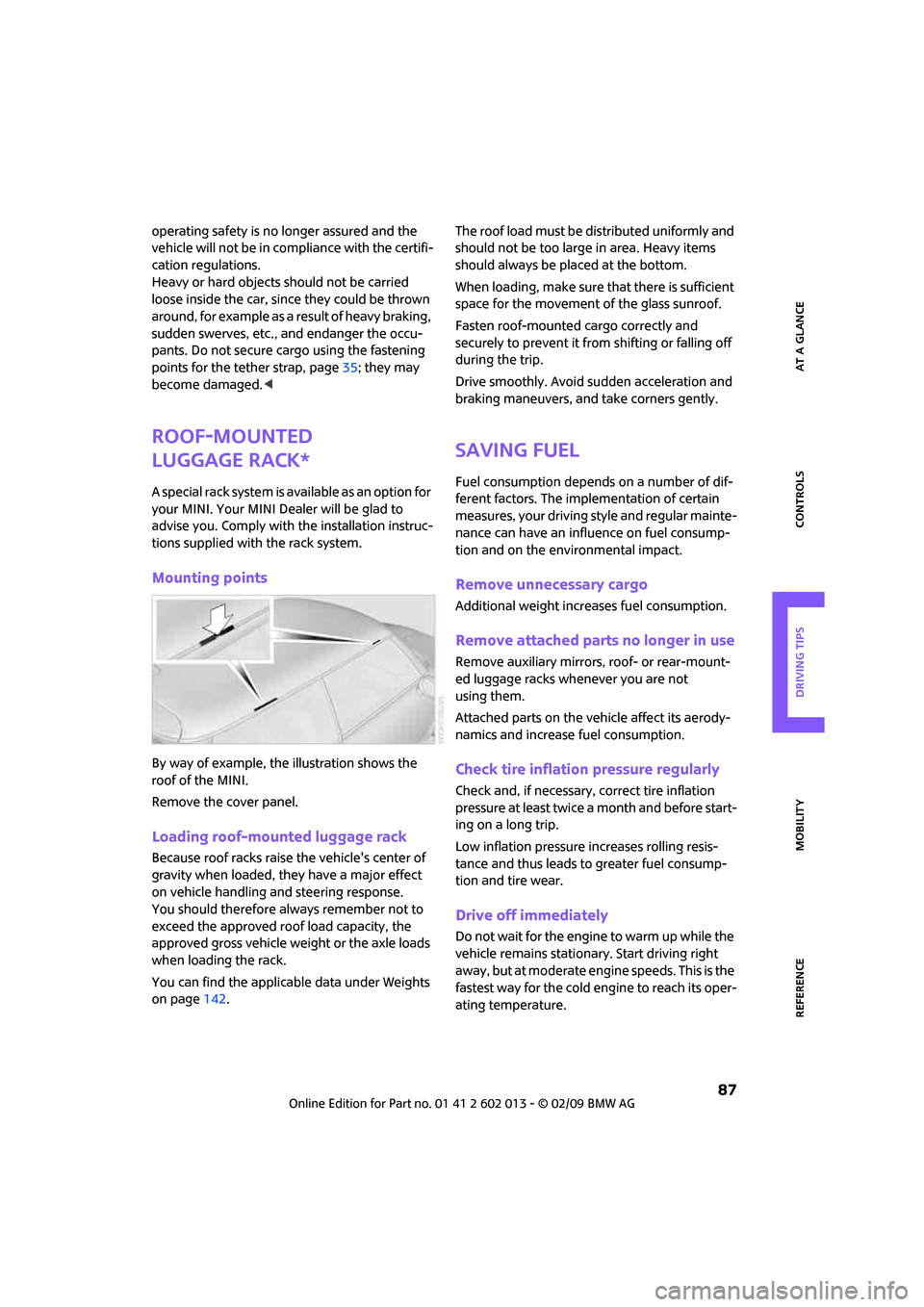
Mounting points
By way of example, the illustration shows the
roof of the MINI.
Remove the cover panel.
Loading roof-mounted luggage rack
Because roof racks raise the vehicle's center of
gravity when loaded, they have a major effect
on vehicle handling and steering response.
You should therefore always remember not to
exceed the approved roof load capacity, the
approved gross vehicle weight or the axle loads
when loading the rack.
You can find the applicable data under Weights
on page142.The roof load must be distributed uniformly and
should not be too large in area. Heavy items
should always be placed at the bottom.
When loading, make sure that there is sufficient
space for the movement of the glass sunroof.
Fasten roof-mounted cargo correctly and
securely to prevent it from shifting or falling off
during the trip.
Drive smoothly. Avoid sudden acceleration and
braking maneuvers, and take corners gently.
Saving fuel
Fuel consumption depends on a number of dif-
ferent factors. The implementation of certain
measures, your driving style and regular mainte-
nance can have an influence on fuel consump-
tion and on the environmental impact.
Remove unnecessary cargo
Additional weight increases fuel consumption.
Remove attached parts no longer in use
Remove auxiliary mirrors, roof- or rear-mount-
ed luggage racks whenever you are not
using them.
Attached parts on the vehicle affect its aerody-
namics and increase fuel consumption.
Check tire inflation pressure regularly
Check and, if necessary, correct tire inflation
pressure at least twice a month and before start-
ing on a long trip.
Low inflation pressure increases rolling resis-
tance and thus leads to greater fuel consump-
tion and tire wear.
Drive off immediately
Do not wait for the engine to warm up while the
vehicle remains stationary. Start driving right
away, but at moderate engine speeds. This is the
fastest way for the cold engine to reach its oper-
ating temperature.
Page 103 of 158
REFERENCEAT A GLANCE CONTROLS DRIVING TIPS MOBILITY
101
When properly used, these tires meet the high-
est standards in terms of safety and handling
characteristics.
Run-Flat Tires*
When mounting new tires or changing over from
summer to winter tires and vice versa, mount
Run-Flat Tires for your own safety. Keep in mind
that no space-saver spare tire is available in the
event of a flat. Your MINI Dealer will be glad to
advise you.
Special characteristics of winter tires
The manufacturer of MINI recommends the use
of winter tires on snowy roads or if temperatures
drop below 457/ +76. Although all-season
M+S tires provide better winter traction than
summer tires, they generally fail to provide the
same levels of cold-weather performance as
winter tires.
Pay attention to speed
Always comply with the speed limit for
the winter tires mounted on your car; fail-
ure to do so could result in tire damage and
accidents.<
If the car is capable of speeds higher than that
permitted for the winter tires, a label stating the
maximum permitted speed for the mounted
tires must be displayed in your field of view. Spe-
cialist tire dealers and your MINI Dealer can sup-
ply these labels.
Storage
Always store wheels and tires in a cool, dry place
with as little exposure to light as possible.
Always protect tires against all contact with oil,
grease and fuels.
Do not exceed the maximum tire inflation pres-
sure indicated on the sidewall of the tire.
Swapping wheels among the axles
Depending on the individual use, front and rear
tires may exhibit different wear and tear.
In order to maintain an even wear and tear, the
wheels may be rotated between the axles. Your
MINI Dealer will be glad to advise you.Always check the inflation pressure after the tire
rotation, if necessary change the pressure.
Snow chains*
Only certain types of fine-link snow chains have
been tested by the manufacturer of your MINI,
classified as road-safe and recommended. Con-
tact your MINI Dealer for more details.
Only attach snow chains in pairs to the front
wheels with the following tires.
>175/65 R 15 M+S
>175/60 R 16 M+S
John Cooper Works:
>185/50 R 17 86 H M+S XL RSC
Observe the manufacturer's instructions when
mounting snow chains. Do not exceed a speed
of 30 mph or 50 km/h.
Do not initialize the Flat Tire Monitor if
snow chains are mounted, otherwise the
instrument might issue an incorrect reading.
When driving with snow chains, it can be useful
to briefly deactivate the DSC or activate the DTC,
refer to page57.<
Page 111 of 158
REFERENCEAT A GLANCE CONTROLS DRIVING TIPS MOBILITY
109
maximum temperature of 1407/606.
If the distance is too close, the pressure too high,
or the temperature too high, parts of the vehicle
can be damaged, or water can penetrate.
Observe the operating instructions for high-
pressure washers.<
Do not spray sensors such as Park Dis-
tance Control with high-pressure washers
for a long time or at a distance of less than 1 ft/
30 cm.<
Manual washing
Use a great deal of water and, if necessary, car
shampoo when washing your car by hand. Clean
the vehicle with a sponge or a washing brush
applying a slight amount of pressure.
Before cleaning the windshield, deacti-
vate the rain sensor or turn off the ignition
to prevent unintentional wiping.<
Observe local regulations regarding wash-
ing vehicles by hand.<
Headlamps
Do not wipe dry and do not use abrasive or cor-
rosive cleaning agents. Remove dirt and con-
tamination, such as insects, by soaking with
shampoo and then washing with plenty of
water.
Do not remove accumulated ice and snow with
an ice scraper; use window de-icers instead.
Windows
Clean the outside and inside of the windows and
mirrors with a window cleaner.
Do not clean the mirrors with cleaners
containing quartz.<
Wiper blades
Clean with soapy water and change regularly to
prevent the formation of streaks.
Wax, preservatives and dirt on the win-
dows cause streaks when the windshield
wipers are on, and can cause premature wear
of the wiper blades and interfere with the rain
sensor.<
Paintwork, care
Regular care helps your vehicle retain its value
and protects the paint from the long-term
effects of aggressive substances.
In some regions, environmental factors can
affect the vehicle paintwork and damage it. It is
therefore important to adjust the frequency and
extent of vehicle care correspondingly.
Immediately remove aggressive materials such
as spilled fuel, oil, grease, brake fluid, tree sap
or bird droppings to prevent damage to the
paintwork.
Removing paintwork damage
Depending on the severity of the damage,
immediately repair stone damage or
scratches to prevent rusting.<
The manufacturer of the MINI recommends
repairing paint damage professionally according
to factory specifications with original MINI
paints.
Preservation
Preservation is necessary when water no longer
beads on the clean paint surface. To preserve
the paint, only use preservatives that contain
carnauba or synthetic waxes.
Rubber seals
Only treat with water or rubber care products.
Do not use silicon sprays or other silicon-
containing care products on rubber seals,
otherwise noise and damage could occur.<
Chrome parts*
Carefully clean vehicle parts such as the radiator
grill and door handles with copious quantities of
water and, if necessary, a shampoo additive,
especially when contaminated with road salt.
For additional treatment, use chrome polish.
Light-alloy wheels*
The system produces brake dust that collects on
the light alloy wheels. Clean them regularly with
acid-free wheel cleaner.
Page 146 of 158
From A to Z
144
From A to Z
INDEX
A
Accessories, refer to Your
individual vehicle4
Activated-charcoal filter for
automatic climate control74
Additives
– coolant105
– engine oil104
Adjusting temperature inside
the car, refer to Air
conditioner71
Adjusting temperature inside
the car, refer to Automatic
climate control72
Air conditioner70
Air conditioning mode
– air conditioner71
– automatic climate control72
– ventilation74
Air distribution
– automatic73
– individual72
– manual72
Air flow rate71,72
– air conditioning system71
– automatic climate control72
– heating, ventilation71
Air outlets, refer to Air vents70
Air pressure, checking, refer to
Tire inflation pressure94
Air recirculation, refer to
Recirculated-air
mode71,73
Air supply
– air conditioner71
– automatic climate control72
– ventilation74
Air vents70
Airbags63
– sitting safely29
– warning lamp64
Airing, refer to Ventilation74AKI, refer to Fuel
specifications93
Alarm system24
All-season tires, refer to Winter
tires101
Ambient air, refer to
Recirculated-air
mode71,73
Ambient lighting69
Antenna, care108
Antifreeze
– coolant105
– washer fluid44
Antilock Brake System ABS56
Anti-theft alarm system, refer
to Alarm system24
Anti-theft system
19
Approved axle loads, refer to
Weights142
Approved engine oils104
Approved gross vehicle
weight, refer to Weights142
Armrest, refer to Center
armrest77
Ashtray79
Assistant systems, refer to
– Dynamic Stability Control
DSC56
Audio device, external77
AUTO program for automatic
climate control73
Automatic
– air distribution73
– air flow rate73
– cruise control44
– headlamp control65
Automatic climate control70
– automatic air distribution73Automatic transmission with
Steptronic39
– interlock39
– overriding selector lever
lock41
– shiftlock39
– sport program40
AUX-In, refer to External audio
device77
Average fuel consumption47
– setting the units49
Average speed48
Axle loads, refer to
Weights142B
Background lighting, refer to
Ambient lighting69
Backrests, refer to Seats29
Backup lamps
– replacing bulb115
Band-aids, refer to First aid
pouch122
Bar, refer to Tow-starting,
towing away124
Battery120
– charging120
– disposal27,120
– jump starting122
– temporary power failure120
Battery renewal
– remote control27
Being towed124
Belt tensioner, refer to Safety
belts32
Belts, refer to Safety belts32
Beverage holders, refer to Cup
holders79
Blower, refer to Air flow
rate71,72
Bonnet102
Page 149 of 158
REFERENCEAT A GLANCE CONTROLS DRIVING TIPS MOBILITY
147
Engine
– breaking in82
– data140
– overheated, refer to Coolant
temperature46
– speed140
– starting37
– starting, convenient
access25
– switching off38
Engine compartment103
Engine coolant, refer to
Coolant105
Engine oil
– adding104
– additives, refer to Approved
engine oils104
– approved engine oils104
– capacity104
– checking level103
– dipstick103
– intervals between changes,
refer to Service
requirements51
– MINI Maintenance
System106
Engine oil level, checking103
Engine output, refer to Engine
data140
Engine starting, refer to
Starting the engine37
Error messages, refer to Check
Control53
ESP Electronic Stability
Program, refer to Dynamic
Stability Control DSC56
Event data recorders107
Exhaust system, refer to Hot
exhaust system82
Exterior mirrors32
– adjusting32
– automatic heating33
– folding in and out33
External audio device77
Eyes
– for tow-starting and towing
away123
– for tying down loads86F
Failure messages, refer to
Check Control53
Failure of an electrical
consumer121
Fasten safety belts reminder,
refer to Seat belt
reminder32
Fastening safety belts, refer to
Safety belts32
Filter
– microfilter for air
conditioner72
– microfilter/activated-
charcoal filter for automatic
climate control74
Fine wood, care110
First aid pouch122
Fixture for remote control,
refer to Ignition lock37
Flash when locking/
unlocking20
Flat tire
– Run-Flat Tires100
– Tire Pressure Monitor TPM60
Flat Tire Monitor FTM58
– indicating a flat tire59
– initializing the system58
– snow chains58
– system limits58
Flat tires, refer to Tire
condition99
Floor mats, care110
Floor plate, see Level load
floor85
Fog lamps
– replacing bulb114,116
Folding rear seat backrest84
Footbrake, refer to Braking
safely83
Footwell lamps68
For your own safety4
Front airbags63
Front fog lamps68
– indicator lamp126
– replacing bulb114
Front seat adjustment29Frost on windows, refer to
Defrosting windows72,73
FTM, refer to Flat Tire
Monitor58
Fuel93
– gauge47
– high-quality brands93
– quality93
– specifications93
– tank capacity142
Fuel clock, refer to Fuel
gauge47
Fuel display, refer to Fuel
gauge47
Fuel filler door92
– releasing in the event of
electrical malfunction92
Fuses121
G
Garage door opener, refer to
Integrated universal remote
control75
Gasoline
– refer to Average
consumption47
Gasoline display, refer to Fuel
gauge47
Gasoline, refer to Required
fuel93
Gear indicator
– automatic transmission with
Steptronic39
Gear shifting
– automatic transmission39
– manual transmission39
Gearshift lever
– automatic transmission with
Steptronic39
– manual transmission39
General driving notes82
Glass sunroof, electric27
– convenient operation20,22
– opening, closing27
– raising27
– remote control20
Glove compartment76
Grills, refer to Air vents70
Page 151 of 158
REFERENCEAT A GLANCE CONTROLS DRIVING TIPS MOBILITY
149
Lighter79
– socket79
Lighting
– lamps and bulbs112
– of the instruments68
– of vehicle, refer to Lamps65
Limit137
Load85
Load securing equipment,
refer to Securing cargo86
Lock buttons of doors, refer to
Locking22
Locking
– adjusting confirmation
signal20
– from inside22
– from outside20
– without remote control, refer
to Convenient access25
Locking and unlocking doors
– confirmation signals20
– from inside22
– from outside19
Low beams65
– automatic65
– replacing bulb113
Lower back support, refer to
Lumbar support30
Luggage compartment doors,
refer to Splitdoor23
Luggage compartment
partition net, refer to
Partition net85
Luggage rack, refer to Roof-
mounted luggage rack87
Lumbar support30
M
M+S tires, refer to Winter
tires101
Maintenance, refer to Service
Booklet
Maintenance system106
Malfunction warnings, refer to
Check Control53
Manual air distribution72Manual mode
– automatic transmission with
Steptronic40
Manual operation
– door lock22
– fuel filler door92
– transmission lock, automatic
transmission41
Manual transmission39
Manual washing109
Master key, refer to Integrated
key/remote control18
Maximum cooling73
Maximum speed
– with winter tires101
Medical assistance, refer to
First aid pouch122
Microfilter
– for air conditioner72
– for automatic climate
control74
– MINI Maintenance
System106
Microfilter/activated-charcoal
filter
– MINI Maintenance
System106
Microphone for telephone14
MINI Internet page4
MINI Maintenance System106
Mirror dimming feature33
Mirrors32
– exterior mirrors32
– heating33
– interior rearview mirror33
Mobile phone
– installation location, refer to
Center armrest77
– refer to separate Owner's
Manual
Mobile phone, installation
location, refer to Center
armrest77
Mobile phone, refer to the
separate Owner's Manual
Mobility System116
Modifications, technical, refer
to For your own safety4Monitoring system for tire
pressures, refer to Flat Tire
Monitor58
Multifunction switch
– refer to Turn signals/
headlamp flasher41
– refer to Wiper system42
Multifunctional steering
wheel, refer to Buttons on
the steering wheel11
N
Neck support, refer to Head
restraints31
Nets, refer to Storage
compartments78
New tires100
Number of cylinders, refer to
Engine data140
Nylon rope, refer to Tow
rope124
O
OBD socket, refer to Socket for
Onboard Diagnosis106
Octane ratings, refer to Fuel
specifications93
Odometer46
Oil consumption103
Oil level103
Oil, refer to Engine oil103
Old batteries, refer to
Disposal120
Onboard tool kit112
Opening and closing
– convenient access25
– from inside22
– from outside19
– using the door lock21
– via the remote control19
Opening and unlocking
– from inside22
Opening/closing the splitdoor
– 24
Outlets
– refer to Ventilation74
Outlets, refer to Air vents70
Page 152 of 158
From A to Z
150
Output, refer to Engine
data140
Outside temperature
display46
– changing unit of measure49
– on onboard computer49
Outside-air mode
– automatic climate control73
Overheated engine, refer to
Coolant temperature46
P
Paintwork, care109
Park Distance Control PDC55
Parking
– vehicle38
Parking aid, refer to Park
Distance Control PDC55
Parking brake38
Parking lamps, replacing
bulb114
Parking lamps/low beams65
Partition net85
Parts and accessories, refer to
Your individual vehicle4
Pathway lighting65
Personal Profile18
Pinch protection system
– windows28
Plastic parts, care110
Pollen
– refer to Microfilter for air
conditioner72
– refer to Microfilter/activated-
charcoal filter for automatic
climate control74
Power failure120
Power windows28
Power windows, refer to
Windows28
Pressure monitoring of tires,
refer to Tire Pressure Monitor
TPM60
Pressure monitoring, tires58
– Flat Tire Monitor58
Pressure, tires94Protective function, refer to
Pinch protection system
– windows28
Puncture
– Flat Tire Monitor58
R
Radio key, refer to Integrated
key/remote control18
Radio position, refer to Radio
readiness37
Radio readiness37
– switched off37
– switched on37
Rain sensor42
Range, refer to Cruising
range47
Reading lamps69
Rear door, refer to
Clubdoor23
Rear doors, refer to
Splitdoor23
Rear double doors, refer to
Splitdoor23
Rear fog lamp68
– indicator lamp126
– replacing bulb116
Rear lamps
– bulb replacement115
Rear lamps, refer to Tail
lamps115
Rear seat backrest, folding84
Rear seats
– folding the backrests84
Rear window heating71,73
Rearview mirror, refer to
Mirrors32
Recirculated-air mode71,73
Recirculation of air, refer to
Recirculated-air
mode71,73
Reclining seat, refer to
Backrest30
Refueling92
Releasing
– bonnet102Remote control18
– battery renewal27
– convenient access25
– garage door opener75
– malfunctions21,26
– service data106
– splitdoor21
Replacement remote
control18
Replacing bulbs, refer to
Lamps and bulbs112
Replacing tires, refer to New
wheels and tires100
Reporting safety defects6
Reserve warning, refer to Fuel
gauge47
Reservoir for washer
systems44
Restraint systems
– for children34
– refer to Safety belts32
Reverse gear
– automatic transmission with
Steptronic40
– manual transmission39
Roadside Assistance122
Roadside parking lamps67
– replacing bulb114
Roadworthiness test, refer to
Service requirements51
Roof load capacity142
Roof-mounted luggage
rack87
Rope, refer to Tow-starting,
towing away124
RSC Runflat System
Component, refer to Run-
Flat Tires100
Rubber parts, care109
Runflat System Component
RSC, refer to Run-Flat
Tires100
Run-Flat Tires100
– flat tire59
– new tires100
– tire inflation pressure94
– winter tires101
Runflat Tyres, refer to Run-Flat
Tires100