inflation pressure MINI Clubman 2010 (Mini Connected) User Guide
[x] Cancel search | Manufacturer: MINI, Model Year: 2010, Model line: Clubman, Model: MINI Clubman 2010Pages: 218, PDF Size: 3.97 MB
Page 168 of 218
Wheels and tires
166
When properly used, these tires meet the high-
est standards in terms of safety and handling
characteristics.
Run-flat tires*
When mounting new tires or changing over from
summer to winter tires and vice versa, mount
run-flat tires for your own safety. Keep in mind
that no space-saver spare tire is available in the
event of a flat. Your MINI dealer will be glad to
advise you.
Special characteristics of winter tires
The manufacturer of MINI recommends the use
of winter tires on snowy roads or if temperatures
drop below 457/ +76. Although all-season
M+S tires provide better winter traction than
summer tires, they generally fail to provide the
same levels of cold-weather performance as
winter tires.
Pay attention to speed
Always comply with the speed limit for the
winter tires mounted on your car; failure
to do so could result in tire damage and acci-
dents.<
If the car is capable of speeds higher than that
permitted for the winter tires, a label stating the
maximum permitted speed for the mounted
tires must be displayed in your field of view. Spe-
cialist tire dealers and your MINI dealer can sup-
ply these labels.
Storage
Always store wheels and tires in a cool, dry place
with as little exposure to light as possible.
Always protect tires against all contact with oil,
grease and fuels.
Do not exceed the maximum tire inflation pres-
sure indicated on the sidewall of the tire.
Swapping wheels among the axles
Depending on the individual use, front and rear
tires may exhibit different wear and tear.
In order to maintain an even wear and tear, the
wheels may be rotated between the axles. Your
MINI dealer will be glad to advise you.Always check the inflation pressure after the tire
rotation, if necessary change the pressure.
Snow chains*
Only certain types of fine-link snow chains have
been tested by the manufacturer of your MINI,
classified as road-safe and recommended. Con-
tact your MINI dealer for more details.
Only attach snow chains in pairs to the front
wheels with the following tires.
>175/65 R 15 M+S
>175/60 R 16 M+S
John Cooper Works:
>185/50 R 17 86 H M+S XL RSC
Observe the manufacturer's instructions when
mounting snow chains. Do not exceed a speed
of 30 mph or 50 km/h.
Do not initialize the Flat Tire Monitor if
snow chains are mounted; otherwise, the
instrument might issue an incorrect reading.
When driving with snow chains, it can be useful
to briefly deactivate the DSC or activate the DTC,
refer to page72.<
Page 183 of 218
MOBILITYAT A GLANCE CONTROLS DRIVING TIPS ENTERTAINMENT
181
NAVIGATION REFERENCE
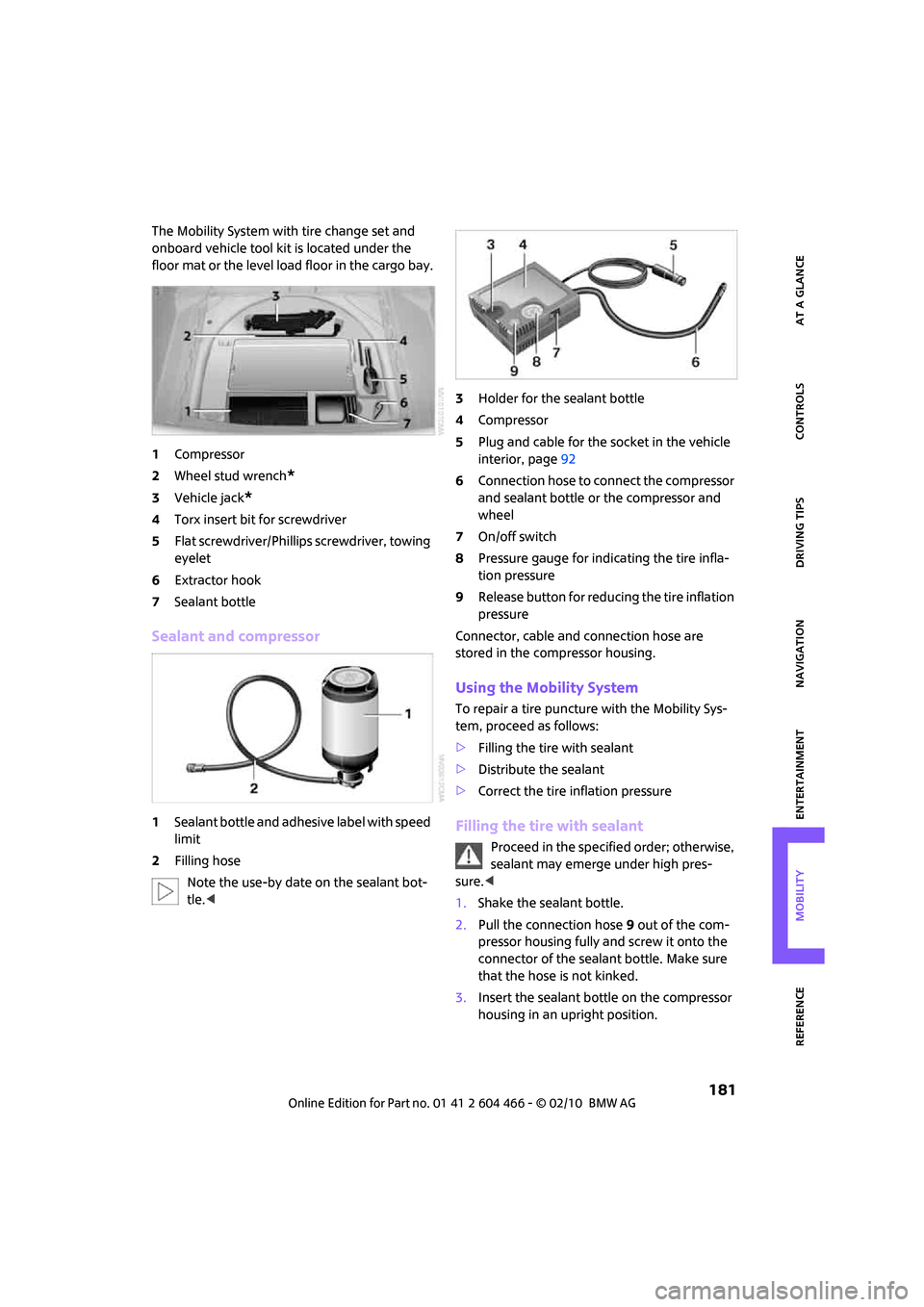
The Mobility System with tire change set and
onboard vehicle tool kit is located under the
floor mat or the level load floor in the cargo bay.
1Compressor
2Wheel stud wrench
*
3Vehicle jack*
4Torx insert bit for screwdriver
5Flat screwdriver/Phillips screwdriver, towing
eyelet
6Extractor hook
7Sealant bottle
Sealant and compressor
1Sealant bottle and adhesive label with speed
limit
2Filling hose
Note the use-by date on the sealant bot-
tle.<3Holder for the sealant bottle
4Compressor
5Plug and cable for the socket in the vehicle
interior, page92
6Connection hose to connect the compressor
and sealant bottle or the compressor and
wheel
7On/off switch
8Pressure gauge for indicating the tire infla-
tion pressure
9Release button for reducing the tire inflation
pressure
Connector, cable and connection hose are
stored in the compressor housing.
Using the Mobility System
To repair a tire puncture with the Mobility Sys-
tem, proceed as follows:
>Filling the tire with sealant
>Distribute the sealant
>Correct the tire inflation pressure
Filling the tire with sealant
Proceed in the specified order; otherwise,
sealant may emerge under high pres-
sure.<
1.Shake the sealant bottle.
2.Pull the connection hose9 out of the com-
pressor housing fully and screw it onto the
connector of the sealant bottle. Make sure
that the hose is not kinked.
3.Insert the sealant bottle on the compressor
housing in an upright position.
Page 184 of 218
Replacing components
182
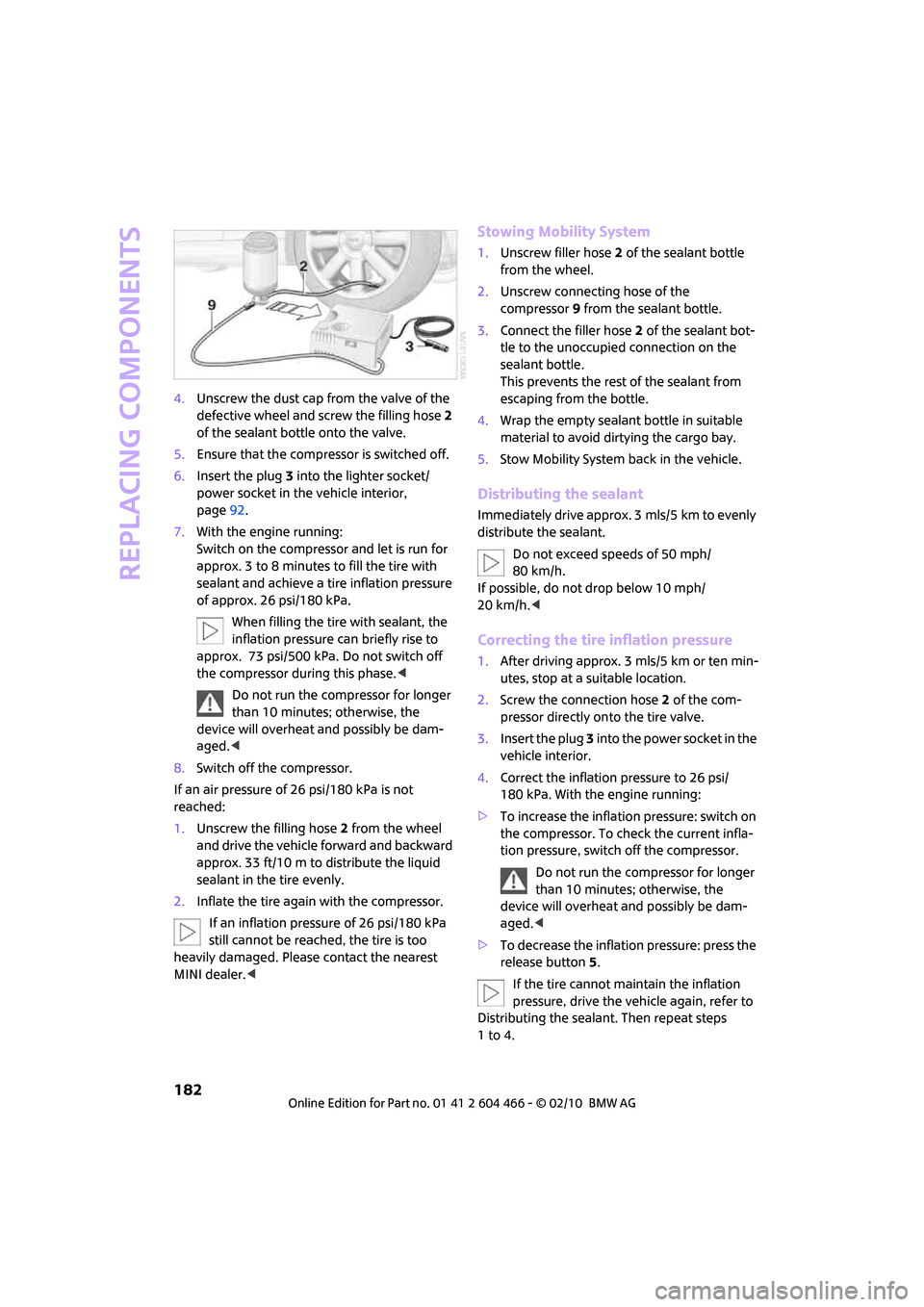
4.Unscrew the dust cap from the valve of the
defective wheel and screw the filling hose 2
of the sealant bottle onto the valve.
5.Ensure that the compressor is switched off.
6.Insert the plug 3 into the lighter socket/
power socket in the vehicle interior,
page92.
7.With the engine running:
Switch on the compressor and let is run for
approx. 3 to 8 minutes to fill the tire with
sealant and achieve a tire inflation pressure
of approx. 26 psi/180 kPa.
When filling the tire with sealant, the
inflation pressure can briefly rise to
approx. 73 psi/500 kPa. Do not switch off
the compressor during this phase.<
Do not run the compressor for longer
than 10 minutes; otherwise, the
device will overheat and possibly be dam-
aged.<
8.Switch off the compressor.
If an air pressure of 26 psi/180 kPa is not
reached:
1.Unscrew the filling hose 2 from the wheel
and drive the vehicle forward and backward
approx. 33 ft/10 m to distribute the liquid
sealant in the tire evenly.
2.Inflate the tire again with the compressor.
If an inflation pressure of 26 psi/180 kPa
still cannot be reached, the tire is too
heavily damaged. Please contact the nearest
MINI dealer.<
Stowing Mobility System
1.Unscrew filler hose2 of the sealant bottle
from the wheel.
2.Unscrew connecting hose of the
compressor9 from the sealant bottle.
3.Connect the filler hose2 of the sealant bot-
tle to the unoccupied connection on the
sealant bottle.
This prevents the rest of the sealant from
escaping from the bottle.
4.Wrap the empty sealant bottle in suitable
material to avoid dirtying the cargo bay.
5.Stow Mobility System back in the vehicle.
Distributing the sealant
Immediately drive approx. 3 mls/5 km to evenly
distribute the sealant.
Do not exceed speeds of 50 mph/
80 km/h.
If possible, do not drop below 10 mph/
20 km/h.<
Correcting the tire inflation pressure
1.After driving approx. 3 mls/5 km or ten min-
utes, stop at a suitable location.
2.Screw the connection hose 2 of the com-
pressor directly onto the tire valve.
3.Insert the plug 3 into the power socket in the
vehicle interior.
4.Correct the inflation pressure to 26 psi/
180 kPa. With the engine running:
>To increase the inflation pressure: switch on
the compressor. To check the current infla-
tion pressure, switch off the compressor.
Do not run the compressor for longer
than 10 minutes; otherwise, the
device will overheat and possibly be dam-
aged.<
>To decrease the inflation pressure: press the
release button5.
If the tire cannot maintain the inflation
pressure, drive the vehicle again, refer to
Distributing the sealant. Then repeat steps
1to4.
Page 185 of 218
MOBILITYAT A GLANCE CONTROLS DRIVING TIPS ENTERTAINMENT
183
NAVIGATION REFERENCE
If an inflation pressure of 26 psi/180 kPa still
cannot be reached, the tire is too heavily dam-
aged. Contact the nearest MINI dealer.<
Driving on
Do not exceed the permitted maximum
speed of 50 mph/80 km/h; doing so may
result in an accident.<
Replace the defective tire as soon as possible
and have the new wheel/tire assembly bal-
anced.
Have the Mobility System refilled.
Changing wheels
Space-saver spare tire*
To change a space-saver spare tire, proceed as
follows:
>Remove the space-saver spare tire,
page183
>Prepare for tire change, page184
>Jack up vehicle, page184
>Mount space-saver spare tire, page184
>Tighten lug bolts, page184
>Drive with space-saver spare tire, page183
Tire change set for a space-saver spare
tire*
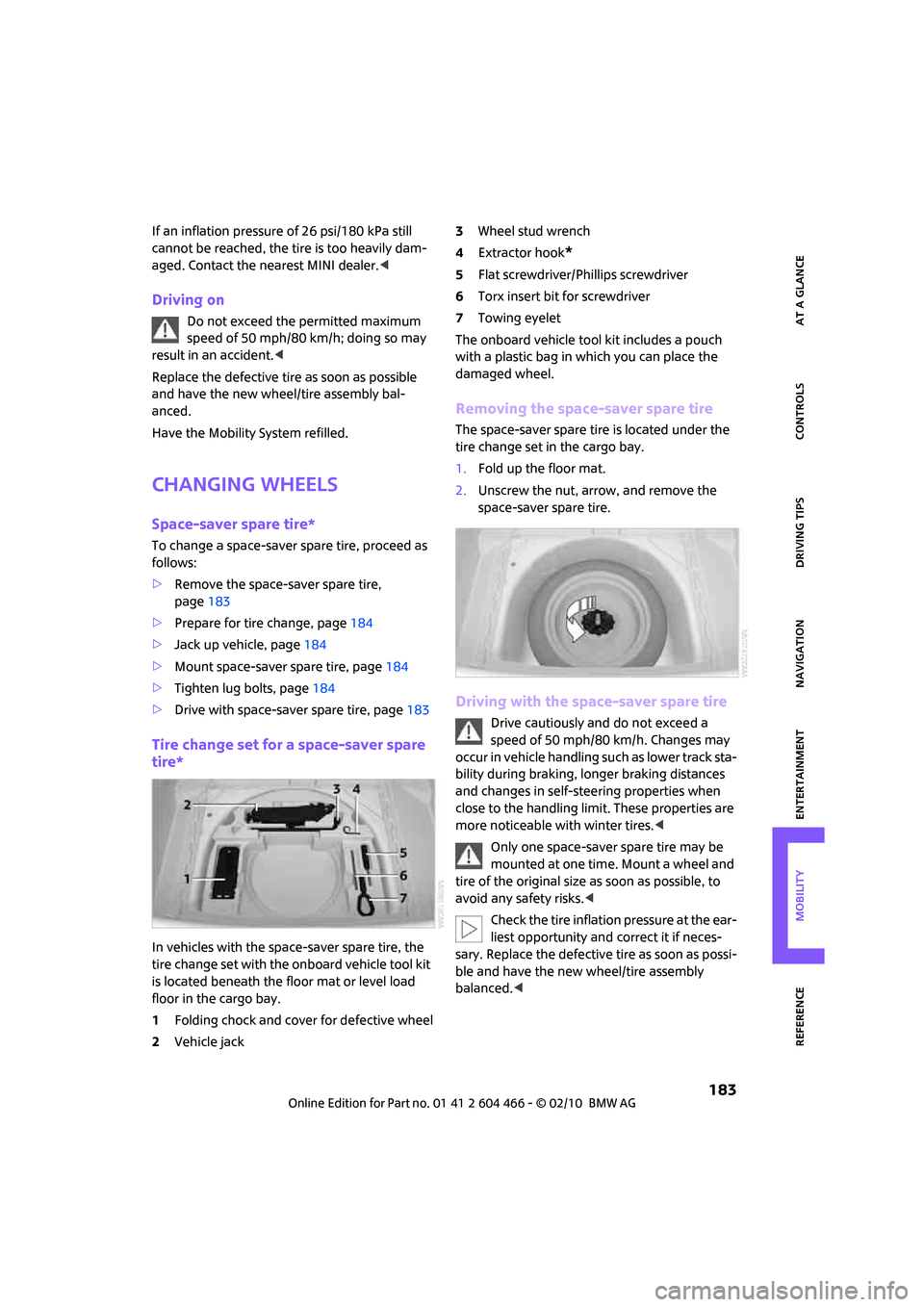
In vehicles with the space-saver spare tire, the
tire change set with the onboard vehicle tool kit
is located beneath the floor mat or level load
floor in the cargo bay.
1Folding chock and cover for defective wheel
2Vehicle jack3Wheel stud wrench
4Extractor hook
*
5Flat screwdriver/Phillips screwdriver
6Torx insert bit for screwdriver
7Towing eyelet
The onboard vehicle tool kit includes a pouch
with a plastic bag in which you can place the
damaged wheel.
Removing the space-saver spare tire
The space-saver spare tire is located under the
tire change set in the cargo bay.
1.Fold up the floor mat.
2.Unscrew the nut, arrow, and remove the
space-saver spare tire.
Driving with the space-saver spare tire
Drive cautiously and do not exceed a
speed of 50 mph/80 km/h. Changes may
occur in vehicle handling such as lower track sta-
bility during braking, longer braking distances
and changes in self-steering properties when
close to the handling limit. These properties are
more noticeable with winter tires.<
Only one space-saver spare tire may be
mounted at one time. Mount a wheel and
tire of the original size as soon as possible, to
avoid any safety risks.<
Check the tire inflation pressure at the ear-
liest opportunity and correct it if neces-
sary. Replace the defective tire as soon as possi-
ble and have the new wheel/tire assembly
balanced.<
Page 202 of 218
Everything from A to Z
200
Everything from A to Z
INDEX
"..." Identifies Control Display
texts used to select
individual functions and tells
you where to find them.
A
Accessories, refer to Your
individual vehicle4
Acknowledgment signals for
locking/unlocking vehicle28
Activated-charcoal filter for
automatic climate control87
"Add to destination list"111
Additives
– coolant169
– engine oil169
Address for navigation
– deleting117
– entering108,111,116
– selecting116
– storing116
– storing current position116
Adjusting temperature inside
the car, refer to Automatic
climate control86
Adjusting the sound during
audio playback, refer to Tone
control133
Air conditioning mode
– automatic climate control86
– ventilation87
Air distribution
– automatic86
Air flow rate86
– automatic climate control86
Air pressure, checking, refer to
Tire inflation pressure158
Air recirculation, refer to
Recirculated-air mode86Air supply
– automatic climate control86
– ventilation87
Air vents85
Airbags79
– sitting safely37
– warning lamp80
Airing, refer to Ventilation87
AKI, refer to Fuel grade157
Alarm system31
"All channels"141
All-season tires, refer to Winter
tires166
"AM", waveband132
Ambient air, refer to
Recirculated-air mode86
Ambient lighting84
Antenna, care172
Antifreeze
– coolant169
– washer fluid52
Antilock Brake System ABS71
Anti-theft alarm system, refer
to Alarm system31
Anti-theft system27
Approved axle loads, refer to
Weights
194
Approved engine oils169
Approved gross vehicle
weight, refer to Weights194
Armrest, refer to Center
armrest90
Arrival time
– computer57
– destination guidance120
"Arrow display" in
Navigation121
Ashtray91
Assistant systems, refer to
– Dynamic Stability Control
DSC71Audio132
– controls132
– switching on/off132
– tone control133
– volume133
Audio device, external90
AUTO program for automatic
climate control86
Automatic
– air distribution86
– air flow rate86
– cruise control53
– headlamp control81
– storing of stations136
Automatic climate control85
– automatic air distribution86
Automatic station search136
Automatic transmission with
Steptronic48
– interlock48
– overriding selector lever
lock50
– shiftlock48
– sport program49
"Autostore"
– on the radio137
"AUX"149,151
– AUX-IN port149
– USB audio interface150
AUX-IN port149
AUX-IN, refer to External audio
device90
Average fuel consumption56
– setting the units60
Average speed57
"Avoid ferries" in
Navigation118
"Avoid highways" in
Navigation118
Page 207 of 218
REFERENCEAT A GLANCE CONTROLS DRIVING TIPS MOBILITY
205
G
Garage door opener, refer to
Integrated universal remote
control88
Gasoline
– refer to Average fuel
consumption56
Gasoline display, refer to Fuel
gauge56
Gasoline, refer to Required
fuel157
Gear indicator
– automatic transmission with
Steptronic48
Gear shifting
– automatic transmission48
– manual transmission48
Gearshift lever
– automatic transmission with
Steptronic48
– manual transmission48
General driving notes96
Glass sunroof, electric34
– convenient operation28,29
– opening, closing35
– raising35
– remote control28
Glove compartment89
GPS navigation, refer to
Navigation system106
Grills85
Gross vehicle weight, refer to
Weights194
H
Halogen lamps
– replacing bulb177
Handbrake, refer to Parking
brake47
Hands-free system14
Hazard warning flashers14
"HD radio"138
HD radio, refer to High
Definition Radio138
Head airbags79
Head restraints39
– sitting safely37Headlamp control,
automatic81
Headlamp flasher50
– indicator lamp11,13
Headlamps
– replacing bulb177
Headlamps, care173
Headlight glass lens177
Heated
– mirrors41
– rear window87
– seats40
Heating
– mirrors41
– rear window87
– seats40
Heavy loads, refer to Stowing
cargo100
Height adjustment
– seats38
– steering wheel41
Height, refer to
Dimensions193
High beams82
– headlamp flasher82
– indicator lamp13
– replacing bulb177
High Definition Radio, refer to
HD Radio138
High water, refer to Driving
through water97
Highways, refer to Route
criteria118
Hill Assist73
Hills97
Holders for cups91
Home address117
"Home address" in
Navigation118
Homepage4
Hood167
Horn10
Hot exhaust system96
"Hour memo"64
"House number" in
destination input
111
Hydroplaning96
I
IBOC, refer to HD Radio138
Ice warning55
ID3 tag, refer to Information
about the track144
Ignition46
– switched off46
– switched on46
Ignition key position 1, refer to
Radio readiness46
Ignition key position 2, refer to
Ignition on46
Ignition key, refer to
Integrated key/remote
control26
Ignition lock46
Imprint2
Indicator and warning
lamps13
– Tire Pressure Monitor TPM77
Indicator lighting, refer to
Instrument lighting83
Individual settings, refer to
Personal Profile26
Inflation pressure monitoring,
refer to Tire Pressure Monitor
TPM75
Information
– on another location114
– on country114
– on current position114
– on destination location114
"Information" in
Navigation114
"Information on
destination"115
Initializing
– Flat Tire Monitor FTM74
– glass sunroof, electric35
Installation location
– drive for navigation DVD and
audio CD106
Instructions for navigation
system, refer to Voice
instructions123
Page 211 of 218
REFERENCEAT A GLANCE CONTROLS DRIVING TIPS MOBILITY
209
Rear fog lamp83
– indicator lamp13
– replacing bulb180
Rear lamps
– bulb replacement179
Rear lamps, refer to Tail
lamps179
Rear seat backrest, folding98
Rear seats
– folding the backrests98
Rear window defroster87
Rearview mirror, refer to
Mirrors41
Receiving level of mobile
phone, refer to Status
information20
Reception
– radio station138
Recirculated-air mode86
Recirculation of air, refer to
Recirculated-air mode86
Reclining seat, refer to
Backrest38
Recording times, refer to
Stopwatch68
Refueling156
Releasing
– hood167
Remote control26
– battery renewal34
– Comfort Access33
– garage door opener88
– malfunctions29,34
– service data170
– splitdoor29
"Repeat directory" during
audio playback146
"Repeat track" during audio
playback146
Replacement remote
control26
Replacing bulbs, refer to
Lamps and bulbs176
Replacing tires, refer to New
wheels and tires165
Reporting safety defects6
Reserve warning, refer to Fuel
gauge56Reservoir for washer
systems52
"Reset"74
"Reset" of tone settings134
Reset, refer to Resetting tone
settings134
"Reset" the stopwatch68
Restraint systems
– for children43
– refer to Safety belts40
Reverse
– CD changer146
– CD player146
Reverse gear
– automatic transmission with
Steptronic49
– manual transmission48
Road map121
Roadside Assistance186
Roadside parking lamps82
– replacing bulb178
Roadworthiness test, refer to
Service requirements60
Roof load capacity194
Roof-mounted luggage
rack101
Rope, refer to Tow-starting,
towing away188
Route118
– changing118,124
– display121
– displaying arrow view121
– displaying map view121
– displaying town123
– list123
– selecting118
– selecting criteria118
– taking detours124
Route selection118
RSC Run-flat System
Component, refer to Run-flat
tires165
Rubber parts, care173
Run-flat System Component
RSC, refer to Run-flat
tires165Run-flat tires165
– flat tire74
– tire inflation pressure158
– tire replacement165
– winter tires166
S
Safety belt
– number37
Safety Belt Reminder40
Safety belts40
– damage40
– indicator lamp40
– reminder40
– sitting safely37
Safety belts, care174
Safety systems
– airbags79
– Antilock Brake System
ABS71
– Dynamic Stability Control
DSC71
– safety belts40
Safety tires, refer to Run-flat
tires165
"SAT" on the radio132,140
Satellite radio140
– enabling channel140
– selecting channel140
– storing channel140
Scale for navigation,
changing122
"Scan"
– Briefly play stations on the
radio136
Scan
– CD changer144
– CD player144
– radio136
"Scan all" during audio
playback145
"Scan directory" during audio
playback145
Screen, refer to Onboard
monitor controls16
Screw thread for tow
fitting187
Page 212 of 218
Everything from A to Z
210
SDARS, refer to Satellite
radio140
Seat adjustment
– mechanical38
Seats37
– adjusting the seats38
– heating40
– sitting safely37
Securing the vehicle
– from inside30
– from outside27
Select "All stations" on the
radio135
"Select as destination"114
"Select current speed"68
Select "Presets" on the
radio135
Selecting an audio source132
Selecting menu items19
Selecting the route118
Selection options for
navigation118
Selector lever
– automatic transmission with
Steptronic48
Selector lever lock
– automatic transmission with
Steptronic, refer to
Shiftlock48
– overriding manually50
Selector lever positions
– automatic transmission with
Steptronic48
"Service"67
Service car, refer to Roadside
Assistance186
Service data in the remote
control170
Service Interval Display, refer
to Condition Based Service
CBS170
Service, refer to Roadside
Assistance186
Service requirement display,
refer to Condition Based
Service CBS170
"Service requirements"61,62
Service requirements60
"Set date"65Settings
– clock, 12h/24h mode64
– date format65
Shifting gears
– automatic transmission with
Steptronic49
– manual transmission48
Shiftlock
– automatic transmission, refer
to Changing selector lever
positions48
Short commands for the voice
activation system195
"Short route" in
Navigation118
Shortest route in navigation,
refer to Selecting route
118
"Show current position"113
"Show destination
position"113
Shuffled, refer to Random
– CD changer146
– CD player146
Side airbags79
Side door, rear, refer to
Clubdoor31
Side turn signal indicator
– replacing bulb179
Side windows, refer to
Windows35
Signal horn, refer to Horn10
Sitting safely37
– airbags37
– safety belts37
– with head restraint37
Size, refer to Dimensions193
Sliding/tilt sunroof
– refer to Glass sunroof,
electric34
Slot for remote control46
Smokers' package, refer to
Ashtray92
Snap-in adapter, refer to
Center armrest storage
compartment90
Snow chains166
Socket for Onboard Diagnosis
OBD170Socket, refer to Connecting
electrical appliances92
Song search, refer to Playing a
track144
Sound output for
entertainment on/off132
Space-saver spare tire
– changing tires183
– inflation pressure158
Spare wheel, refer to Space-
saver spare tire183
Speaking, refer to Voice
instructions from navigation
system123
Special oils, refer to Approved
engine oils169
Speed192
– with winter tires166
Speed limit67
– setting67
Speed limit warning, refer to
Speed limit67
"Speed volume", refer to Tone
control134
Speed-dependent volume133
Speedometer12
Split rear seat backrest, refer to
Expanding the cargo bay98
Splitdoor31
– opening from outside31
– unlocking with remote
control29
Sport button73
Stability control, refer to
Driving stability control
systems71
"Start guidance"115,117
Start menu17
Start/stop button46
– starting the engine47
– switching off the engine47
Starting assistance, refer to
Jump-starting186
Starting, refer to Starting the
engine47
Starting the engine
– start/stop button46
Page 213 of 218
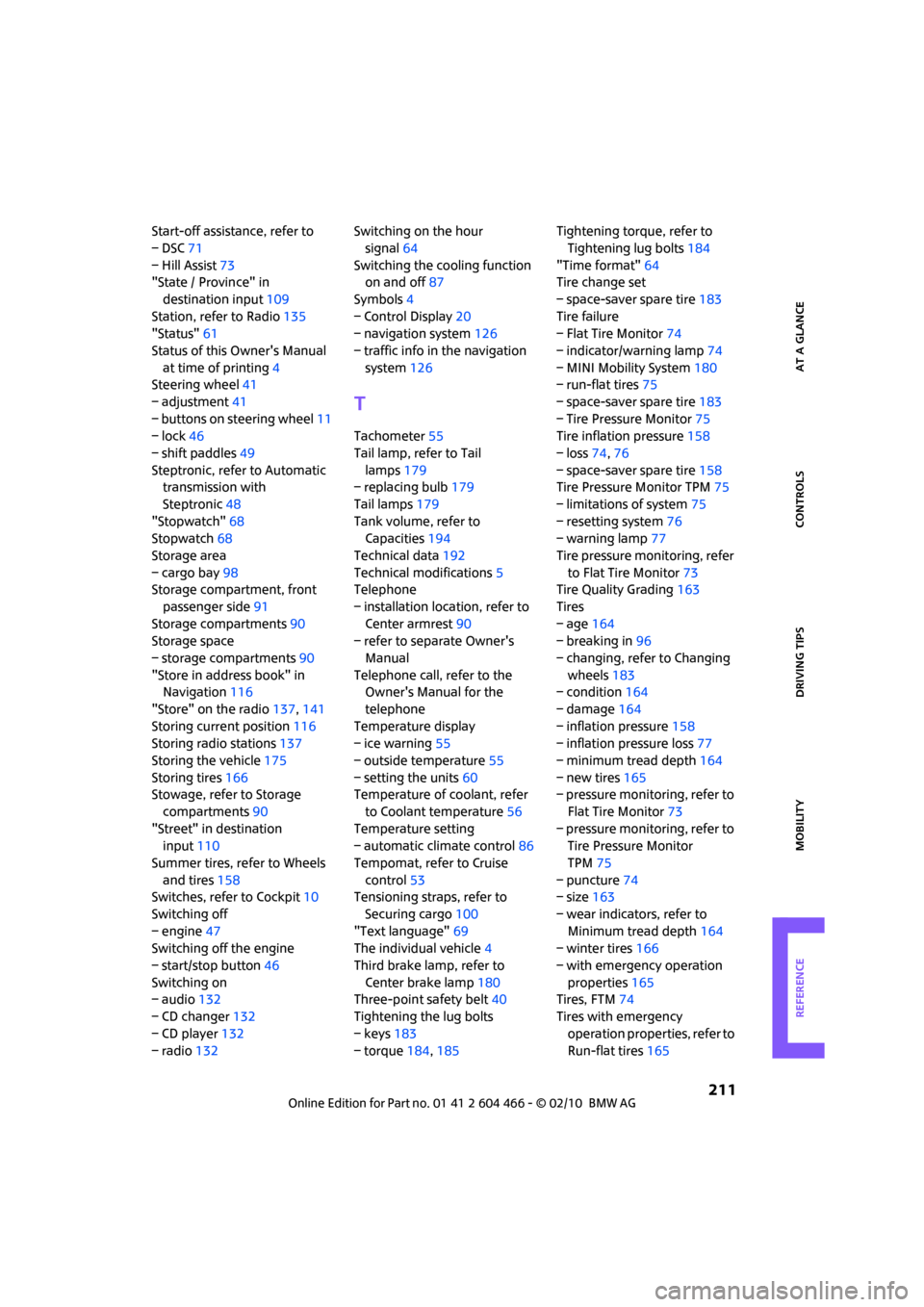
REFERENCEAT A GLANCE CONTROLS DRIVING TIPS MOBILITY
211
Start-off assistance, refer to
– DSC71
– Hill Assist73
"State / Province" in
destination input109
Station, refer to Radio135
"Status"61
Status of this Owner's Manual
at time of printing4
Steering wheel41
– adjustment41
– buttons on steering wheel11
– lock46
– shift paddles49
Steptronic, refer to Automatic
transmission with
Steptronic48
"Stopwatch"68
Stopwatch68
Storage area
– cargo bay98
Storage compartment, front
passenger side91
Storage compartments90
Storage space
– storage compartments90
"Store in address book" in
Navigation116
"Store" on the radio137,141
Storing current position116
Storing radio stations137
Storing the vehicle175
Storing tires166
Stowage, refer to Storage
compartments90
"Street" in destination
input110
Summer tires, refer to Wheels
and tires158
Switches, refer to Cockpit10
Switching off
– engine47
Switching off the engine
– start/stop button46
Switching on
– audio132
– CD changer132
– CD player132
– radio132Switching on the hour
signal64
Switching the cooling function
on and off87
Symbols4
– Control Display20
– navigation system126
– traffic info in the navigation
system126
T
Tachometer55
Tail lamp, refer to Tail
lamps179
– replacing bulb179
Tail lamps179
Tank volume, refer to
Capacities194
Technical data192
Technical modifications5
Telephone
– installation location, refer to
Center armrest90
– refer to separate Owner's
Manual
Telephone call, refer to the
Owner's Manual for the
telephone
Temperature display
– ice warning55
– outside temperature55
– setting the units60
Temperature of coolant, refer
to Coolant temperature56
Temperature setting
– automatic climate control86
Tempomat, refer to Cruise
control53
Tensioning straps, refer to
Securing cargo100
"Text language"69
The individual vehicle4
Third brake lamp, refer to
Center brake lamp180
Three-point safety belt40
Tightening the lug bolts
– keys183
– torque184,185Tightening torque, refer to
Tightening lug bolts184
"Time format"64
Tire change set
– space-saver spare tire183
Tire failure
– Flat Tire Monitor74
– indicator/warning lamp74
– MINI Mobility System180
– run-flat tires75
– space-saver spare tire183
– Tire Pressure Monitor75
Tire inflation pressure158
– loss74,76
– space-saver spare tire158
Tire Pressure Monitor TPM75
– limitations of system75
– resetting system76
– warning lamp77
Tire pressure monitoring, refer
to Flat Tire Monitor73
Tire Quality Grading163
Tires
– age164
– breaking in96
– changing, refer to Changing
wheels183
– condition164
– damage164
– inflation pressure158
– inflation pressure loss77
– minimum tread depth164
– new tires165
– pressure monitoring, refer to
Flat Tire Monitor73
– pressure monitoring, refer to
Tire Pressure Monitor
TPM75
– puncture74
– size163
– wear indicators, refer to
Minimum tread depth164
– winter tires166
– with emergency operation
properties165
Tires, FTM74
Tires with emergency
operation properties, refer to
Run-flat tires165