rear entertainment MINI Clubman 2010 (Mini Connected) Owner's Guide
[x] Cancel search | Manufacturer: MINI, Model Year: 2010, Model line: Clubman, Model: MINI Clubman 2010Pages: 218, PDF Size: 3.97 MB
Page 181 of 218
MOBILITYAT A GLANCE CONTROLS DRIVING TIPS ENTERTAINMENT
179
NAVIGATION REFERENCE
Replacing a fog lamp bulb
H8 bulb, 35 watts
1.Turn in the wheel.
2.Remove cover 2.
To do so, turn the cover counterclockwise.
3.Screw out the lower bulb counterclockwise.
4.To insert the new bulb and replace the
cover, proceed in reverse order.
Side turn signal indicators
5 watt bulb, W 5 W
1.Push the lamp with the ventilation grate for-
ward and remove.
2.Screw out the bulb holder counterclockwise.
3.Pull out and replace the bulb.
4.To insert the new bulb and replace the
cover, proceed in reverse order.
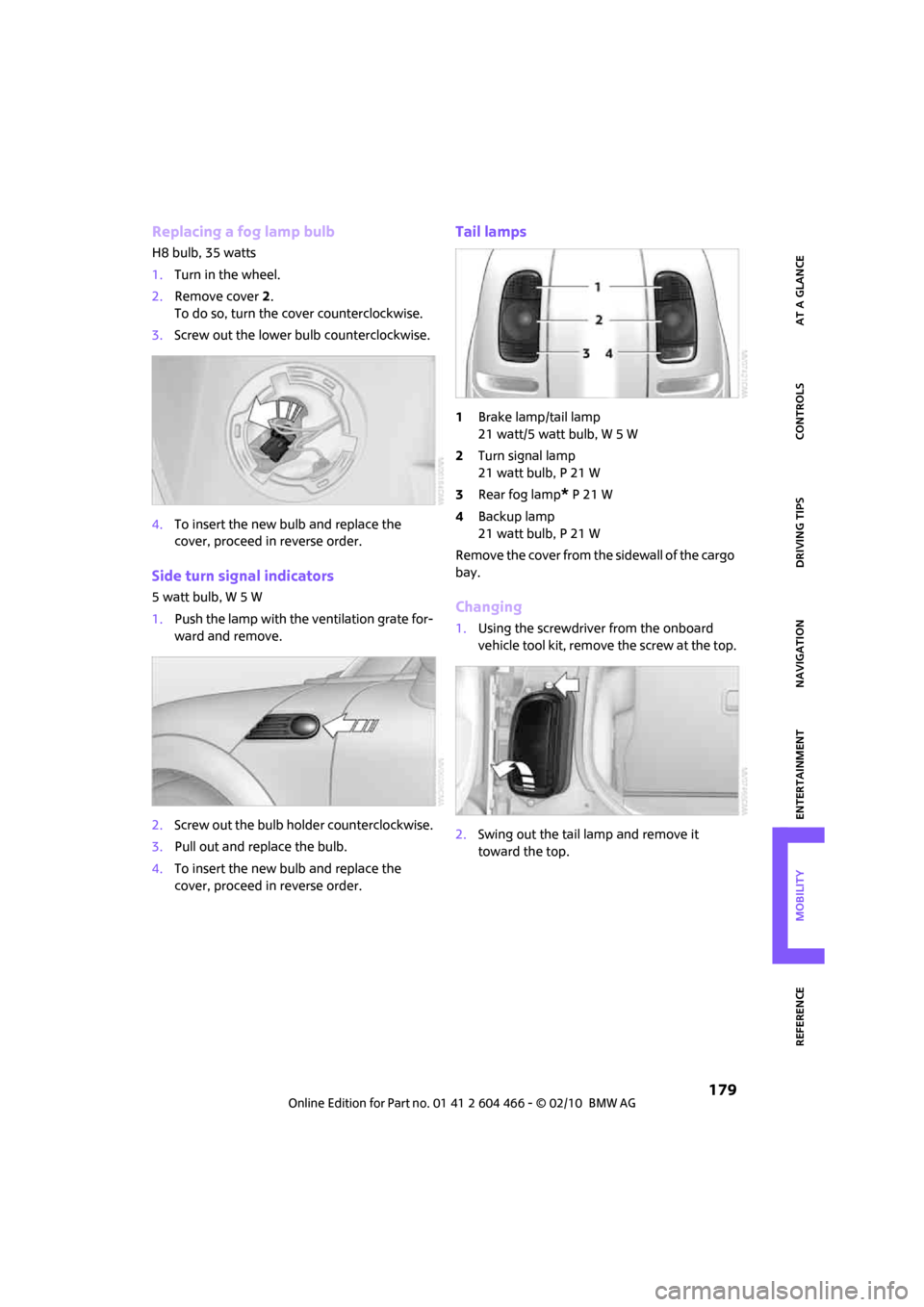
Tail lamps
1Brake lamp/tail lamp
21 watt/5 watt bulb, W 5 W
2Turn signal lamp
21 watt bulb, P 21 W
3Rear fog lamp
* P 21 W
4Backup lamp
21 watt bulb, P 21 W
Remove the cover from the sidewall of the cargo
bay.
Changing
1.Using the screwdriver from the onboard
vehicle tool kit, remove the screw at the top.
2.Swing out the tail lamp and remove it
toward the top.
Page 189 of 218
MOBILITYAT A GLANCE CONTROLS DRIVING TIPS ENTERTAINMENT
187
NAVIGATION REFERENCE
2.Release the tabs of the positive terminal
cover
* on the left and right, arrows1, and
lift the cover to open, arrow2.
3.Attach one terminal clamp of the plus/+
jumper cable to the positive terminal of the
battery or to a starting-aid terminal of the
vehicle providing assistance.
4.Attach the second terminal clamp of the
plus/+ jumper cable to the positive terminal
of the battery or a starting-aid terminal of
the vehicle to be started.
5.Attach one terminal clamp of the minus/–
jumper cable to the negative terminal of the
battery or to an engine or body ground of
the assisting vehicle.
Body ground in MINI:
6.Attach the second terminal clamp of the
minus/– jumper cable to the negative termi-
nal of the battery or to the engine or body
ground of the vehicle to be started.
Starting the engine
1.Start the engine of the donor vehicle and
allow it to run for a few minutes at slightly
increased idle speed.
2.Start the engine of the other vehicle in the
usual manner. If the first start attempt is not successful,
wait a few minutes before another attempt
in order to allow the discharged battery to
recharge.
3.Let the engines run for a few minutes.
4.Disconnect the jumper cables by reversing
the above connecting sequence.
If necessary, have the battery checked and
recharged.
Never use spray fluids to start the
engine.<
Tow-starting, towing
away
Observe the applicable laws and regula-
tions for tow-starting and towing vehi-
cles.<
Do not transport any passengers other
than the driver in a vehicle that is being
towed.<
Using a tow fitting
The screw-in tow fitting must always be carried
in the car. It can be screwed in at the front or
rear of the MINI.
It is stored in the onboard vehicle tool kit in the
cargo bay underneath the cover on the right-
hand side, page176.
Use only the tow fitting provided with the
vehicle and screw it all the way in. Use the
tow fitting for towing on paved roads only. Avoid
lateral loading of the tow fitting, e.g. do not lift
the vehicle by the tow fitting. Otherwise, the tow
fitting and the vehicle could be damaged.<
Access to screw thread
Push out the cover of the towing eye out of the
recess in the bumper.
Page 212 of 218
Everything from A to Z
210
SDARS, refer to Satellite
radio140
Seat adjustment
– mechanical38
Seats37
– adjusting the seats38
– heating40
– sitting safely37
Securing the vehicle
– from inside30
– from outside27
Select "All stations" on the
radio135
"Select as destination"114
"Select current speed"68
Select "Presets" on the
radio135
Selecting an audio source132
Selecting menu items19
Selecting the route118
Selection options for
navigation118
Selector lever
– automatic transmission with
Steptronic48
Selector lever lock
– automatic transmission with
Steptronic, refer to
Shiftlock48
– overriding manually50
Selector lever positions
– automatic transmission with
Steptronic48
"Service"67
Service car, refer to Roadside
Assistance186
Service data in the remote
control170
Service Interval Display, refer
to Condition Based Service
CBS170
Service, refer to Roadside
Assistance186
Service requirement display,
refer to Condition Based
Service CBS170
"Service requirements"61,62
Service requirements60
"Set date"65Settings
– clock, 12h/24h mode64
– date format65
Shifting gears
– automatic transmission with
Steptronic49
– manual transmission48
Shiftlock
– automatic transmission, refer
to Changing selector lever
positions48
Short commands for the voice
activation system195
"Short route" in
Navigation118
Shortest route in navigation,
refer to Selecting route
118
"Show current position"113
"Show destination
position"113
Shuffled, refer to Random
– CD changer146
– CD player146
Side airbags79
Side door, rear, refer to
Clubdoor31
Side turn signal indicator
– replacing bulb179
Side windows, refer to
Windows35
Signal horn, refer to Horn10
Sitting safely37
– airbags37
– safety belts37
– with head restraint37
Size, refer to Dimensions193
Sliding/tilt sunroof
– refer to Glass sunroof,
electric34
Slot for remote control46
Smokers' package, refer to
Ashtray92
Snap-in adapter, refer to
Center armrest storage
compartment90
Snow chains166
Socket for Onboard Diagnosis
OBD170Socket, refer to Connecting
electrical appliances92
Song search, refer to Playing a
track144
Sound output for
entertainment on/off132
Space-saver spare tire
– changing tires183
– inflation pressure158
Spare wheel, refer to Space-
saver spare tire183
Speaking, refer to Voice
instructions from navigation
system123
Special oils, refer to Approved
engine oils169
Speed192
– with winter tires166
Speed limit67
– setting67
Speed limit warning, refer to
Speed limit67
"Speed volume", refer to Tone
control134
Speed-dependent volume133
Speedometer12
Split rear seat backrest, refer to
Expanding the cargo bay98
Splitdoor31
– opening from outside31
– unlocking with remote
control29
Sport button73
Stability control, refer to
Driving stability control
systems71
"Start guidance"115,117
Start menu17
Start/stop button46
– starting the engine47
– switching off the engine47
Starting assistance, refer to
Jump-starting186
Starting, refer to Starting the
engine47
Starting the engine
– start/stop button46