service MINI Clubman 2011 (Mini Connected) Owner's Guide
[x] Cancel search | Manufacturer: MINI, Model Year: 2011, Model line: Clubman, Model: MINI Clubman 2011Pages: 256, PDF Size: 3.75 MB
Page 200 of 256

MOBILITYUnder the hood
198
Under the hood
Never attempt to perform any service or
repair operations on your vehicle without
the required professional technical training. If
you are not familiar with the regulations to be
observed, have the necessary work on your
vehicle carried out only by a MINI dealer or a
workshop that has specially trained personnel
working in accordance with the specifications of
the MINI manufacturer. If this work is not carried
out properly, there is a danger of subsequent
damage and related safety hazards. <
Hood
Releasing
Pull the lever.
Do not clean the windshield and head-
lamps if the hood is unlocked as this may
damage the headlamp washer system
*. <
Opening
To avoid damage, make sure that the
wiper arms are against the windshield
before you open the hood. <
Press the release handle and open the hood.
Closing
Close the hood from a height of approx. 16 in/
40 cm with momentum. It must be clearly heard
to engage.
If you notice any signs while driving your
vehicle that the hood is not completely
closed, stop at once and close it securely.
Make sure that the closing path of the hood is
clear; otherwise, injuries may result. <
Page 204 of 256

MOBILITYMaintenance
202
Maintenance
MINI Maintenance System
The MINI Maintenance System supports the
preservation of the traffic and operating safety
of your MINI. The objective is to optimize efforts
with respect to minimal vehicle maintenance
costs.
If and when you come to sell your MINI, a com-
prehensive record of serv icing will prove a signif-
icant benefit.
Condition Based Service CBS
Sensors and special algorithms take the different
driving conditions of your MINI into account.
Condition Based Service uses this to determine
the current and future se rvice requirements. By
letting you define a service and maintenance
regimen that reflects your own individual
requirements, the system builds the basis for
trouble-free driving.
On the Control Display, you can have the
remaining times or distan ces for selected main-
tenance tasks and any le gally prescribed dates
displayed, page 60.
Service data in the remote control
Your vehicle continuously stores service-
requirement information in the remote control
while you are driving. Your MINI dealer can read
out this data from the remote control unit, and
propose an optimized maintenance approach.
Whenever you take your car in for servicing you should therefore hand your MINI dealer the
remote control unit that you last used.
Make sure that the date is always set cor-
rectly, page 63; otherwise, the effective-
ness of Condition Based Service CBS is not
assured. <
Service and Warranty Information
Booklet for US mode ls and Warranty and
Service Guide Booklet for Canadian
models
Please consult your Service and Warranty Infor-
mation Booklet for US models and Warranty and
Service Guide Booklet for Canadian models for
additional information on service requirements.
The manufacturer of the MINI recom-
mends that you have service and repair
operations performed at your MINI dealer.
Take the time to ensure that these service pro-
cedures are confirmed by entries in your vehi-
cle's Service and Warran ty Information Booklet
for US models and Warranty and Service Guide
Booklet for Canadian models. These entries ver-
ify that your vehicle has received the specified
regular maintenance. <
Page 205 of 256
MaintenanceMOBILITY
203
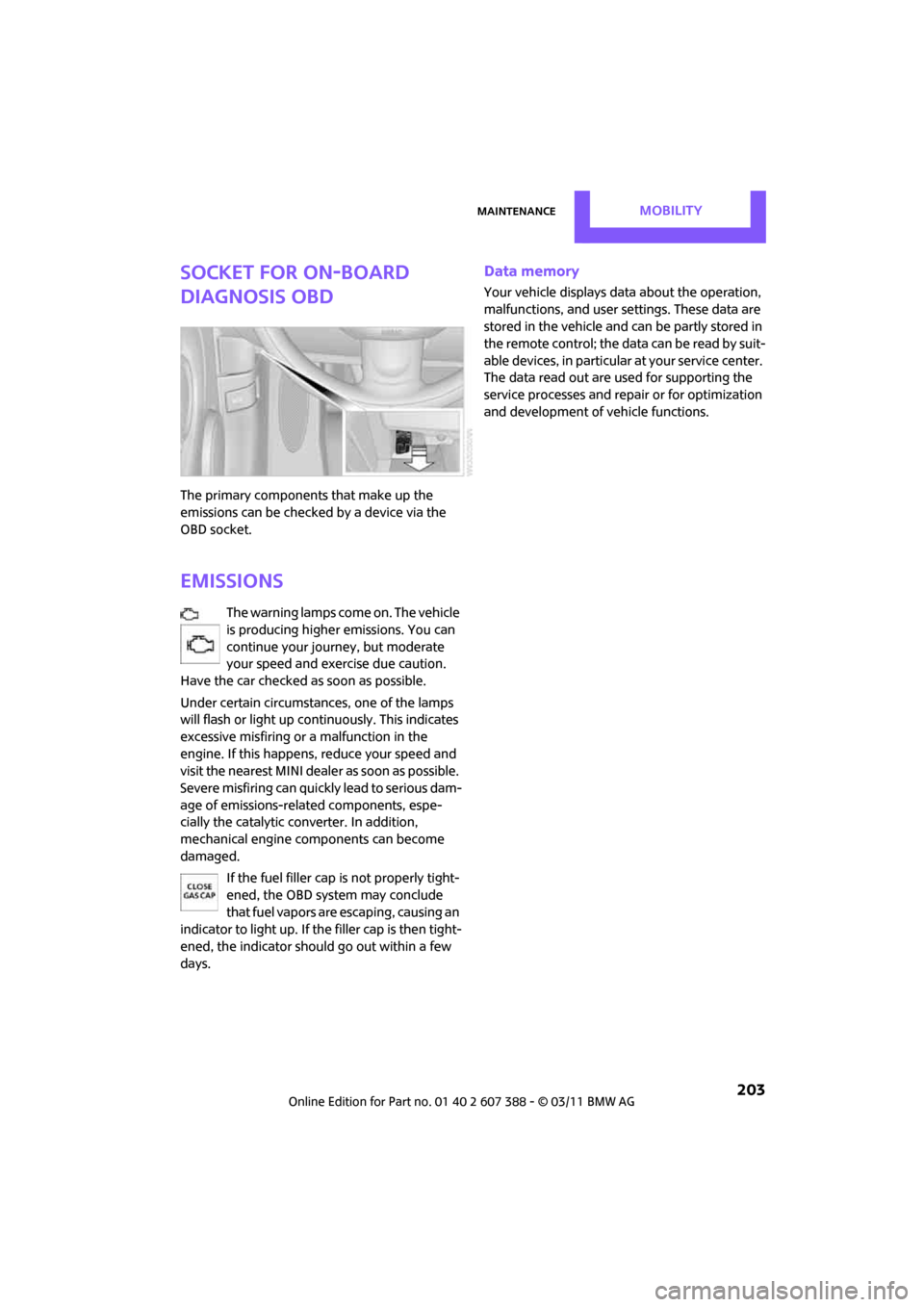
Socket for On-Board
Diagnosis OBD
The primary components that make up the
emissions can be checked by a device via the
OBD socket.
Emissions
The warning lamps come on. The vehicle
is producing higher emissions. You can
continue your journey, but moderate
your speed and exercise due caution.
Have the car checked as soon as possible.
Under certain circumstances, one of the lamps
will flash or light up continuously. This indicates
excessive misfiring or a malfunction in the
engine. If this happens, reduce your speed and
visit the nearest MINI dealer as soon as possible.
Severe misfiring can quickly lead to serious dam-
age of emissions-related components, espe-
cially the catalytic converter. In addition,
mechanical engine components can become
damaged.
If the fuel filler cap is not properly tight-
ened, the OBD system may conclude
that fuel vapors are escaping, causing an
indicator to light up. If the filler cap is then tight-
ened, the indicator should go out within a few
days.
Data memory
Your vehicle displays data about the operation,
malfunctions, and user settings. These data are
stored in the vehicle and can be partly stored in
the remote control; the da ta can be read b y su it-
able devices, in particular at your service center.
The data read out are used for supporting the
service processes and repair or for optimization
and development of vehicle functions.
Page 206 of 256
MOBILITYCare
204
Care
Car-care products
Regular cleaning and care helps to maintain the
value of your MINI.
The manufacturer of your MINI recommends
using manufacturer-approved products to clean
and care for your vehicle.
Your MINI dealer would be pleased to advise
you on cleaning and care products and services
for your MINI.The ingredients of original MINI Care Prod-
ucts have been tested, and the products
have been tested in the laboratory and in prac-
tice. They offer optimum care and protection for
your vehicle. <
Do not use any cleansers containing alco-
hol or solvents as these may cause dam-
age. <
Cleaning agents may contain hazardous
or health-damaging substances. Follow
the warning and hazard instructions on the
packaging. For interior cleaning, always open
the doors or windows of the vehicle.
Do not use any products that are not intended
for cleaning the vehicle. <
External care
Washing your vehicle
Especially during the winter months the
vehicle should be frequently washed. Dirt
and road salt can damage the vehicle. <
After washing the vehicle, apply the
brakes briefly to dry them; otherwise,
water can reduce braking efficiency over the
short term and the brake rotors can corrode. <
Car washes
Preference should be given to cloth car washes. Do not use automatic high-pressure car
washes; otherwise, water may drip into
the vehicle around the windows. <
Before driving in to the car wash, check if the sys-
tem is suitable for your MINI. Observe the fol-
lowing points:
> Vehicle dimensions, page 227
> If necessary: fold in the outside mirrors,
page 41
> Maximum permissible tire width
Avoid car washes with tracks higher than
4 in/10 cm; otherwise, the chassis could
be damaged. <
Preparations for driving into the car wash:
> Unscrew the rod antenna.
> Deactivate the rain sensor
* to prevent unin-
tentional wiping.
> Deactivate the rear window wiper
* and pro-
tect it from damage. Ask the car wash oper-
ator about measures that can be taken to
protect the wipers.
> Remove additional atta chments, e.g. spoil-
ers or telephone antennas, if there is a pos-
sibility that they could be damaged.
> Inserting the remote control into the ignition
lock.
Automatic transmission
Before driving into the car wash, make sure that
the vehicle can roll:
1.Place the remote control, even with Comfort
Access, in the ignition lock.
2. Move the selector le ver to position N.
3. Release the parking brake.
4. Switch off the engine.
5. Insert the remote control in the ignition lock
so that the vehicle can roll.
Page 211 of 256
Replacing componentsMOBILITY
209
4.Unhook the wiper blade toward the wind-
shield.
5. Pull the wiper blade past the wiper arm
toward the top.
6. Insert the new wiper blade.
7. Press into position until you hear it engage.
8. Fold down the wiper arm.
To avoid damage, make sure that the
wiper arms are against the windshield
before you open the hood. <
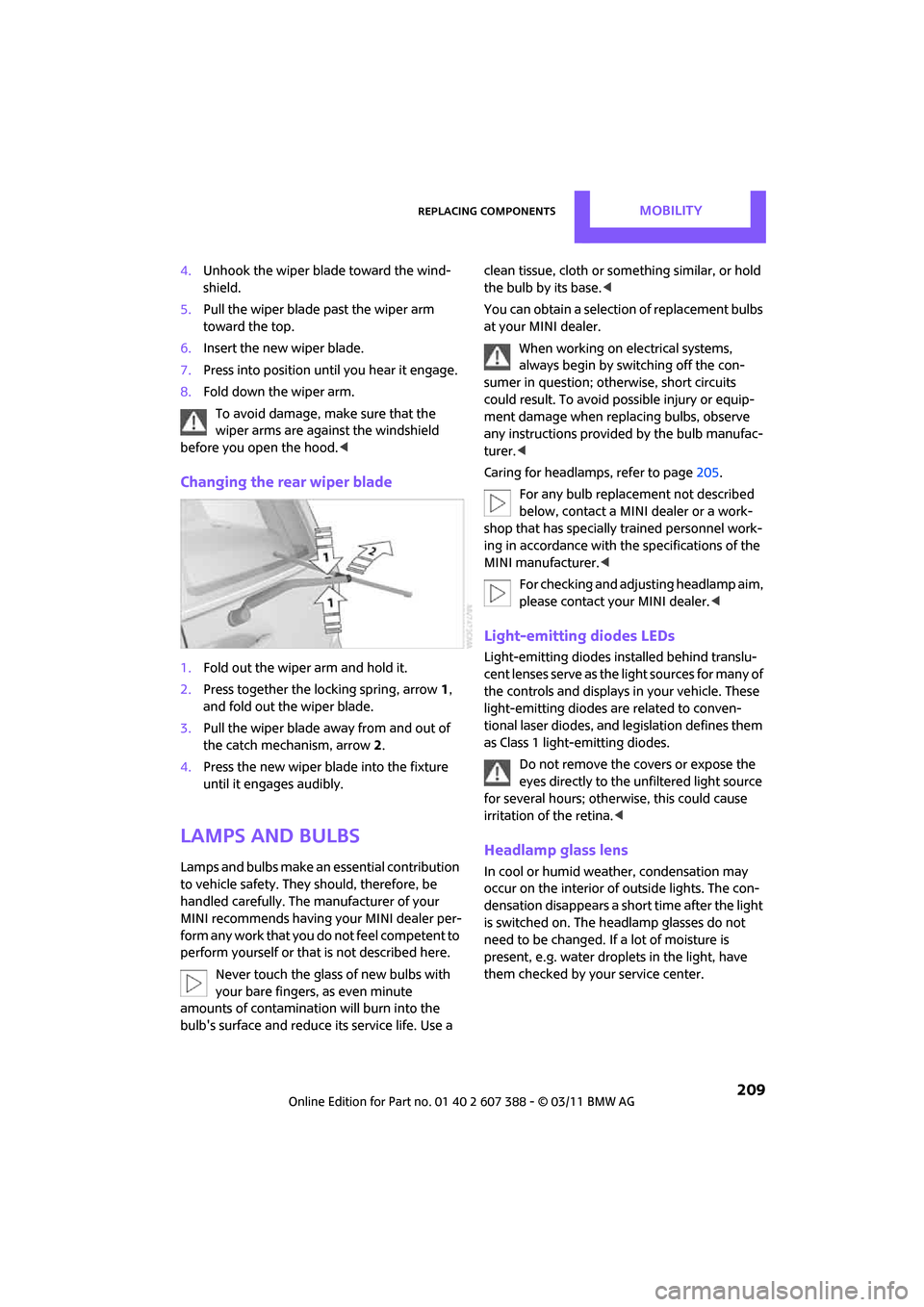
Changing the rear wiper blade
1.Fold out the wiper arm and hold it.
2. Press together the locking spring, arrow 1,
and fold out the wiper blade.
3. Pull the wiper blade away from and out of
the catch mechanism, arrow 2.
4. Press the new wiper blade into the fixture
until it engages audibly.
Lamps and bulbs
Lamps and bulbs make an essential contribution
to vehicle safety. They should, therefore, be
handled carefully. The manufacturer of your
MINI recommends having your MINI dealer per-
form any work that you do not feel competent to
perform yourself or that is not described here.
Never touch the glass of new bulbs with
your bare fingers, as even minute
amounts of contaminatio n will burn into the
bulb's surface and reduce its service life. Use a clean tissue, cloth or some
thing similar, or hold
the bulb by its base.<
You can obtain a selectio n of replacement bulbs
at your MINI dealer.
When working on electrical systems,
always begin by switching off the con-
sumer in question; otherwise, short circuits
could result. To avoid possible injury or equip-
ment damage when replacing bulbs, observe
any instructions provided by the bulb manufac-
turer. <
Caring for headlamps, refer to page 205.
For any bulb replacement not described
below, contact a MINI dealer or a work-
shop that has specially trained personnel work-
ing in accordance with th e specifications of the
MINI manufacturer. <
For checking and adjusting headlamp aim,
please contact your MINI dealer. <
Light-emitting diodes LEDs
Light-emitting diodes installed behind translu-
cent lenses serve as the light sources for many of
the controls and displays in your vehicle. These
light-emitting diodes are related to conven-
tional laser diodes, and legislation defines them
as Class 1 light-emitting diodes.
Do not remove the covers or expose the
eyes directly to the unfiltered light source
for several hours; otherwise, this could cause
irritation of the retina. <
Headlamp glass lens
In cool or humid weather, condensation may
occur on the interior of outside lights. The con-
densation disappears a short time after the light
is switched on. The headlamp glasses do not
need to be changed. If a lot of moisture is
present, e.g. water droplets in the light, have
them checked by your service center.
Page 212 of 256
MOBILITYReplacing components
210
Xenon lamps*
The service life of these bulbs is very long and
the probability of failure very low, provided that
they are not switched on and off an excessive
number of times. If a xenon lamp fails neverthe-
less, switch on the fog lamps and continue the
journey with great care, provided that local leg-
islation does not prohibit this.
Have any work on the xenon lamp system,
including bulb replacement, carried out
only by a MINI dealer or a workshop that has
specially trained personnel working in accor-
dance with the specifications of the MINI manu-
facturer. Due to high voltage, there is a risk of
fatal injury if work on the xenon lamps is carried
out improperly.<
Halogen low beams and high beams
H13 bulb, 60/55 watts
The H13 bulb is pressurized. Therefore,
wear safety glasses and protective gloves.
Otherwise, there is a risk of injury if the bulb is
damaged. <
Be careful when insta lling the cover; oth-
erwise, leaks could occur and cause dam-
age to the headlamp system. <
Accessing the lamp from the engine
compartment
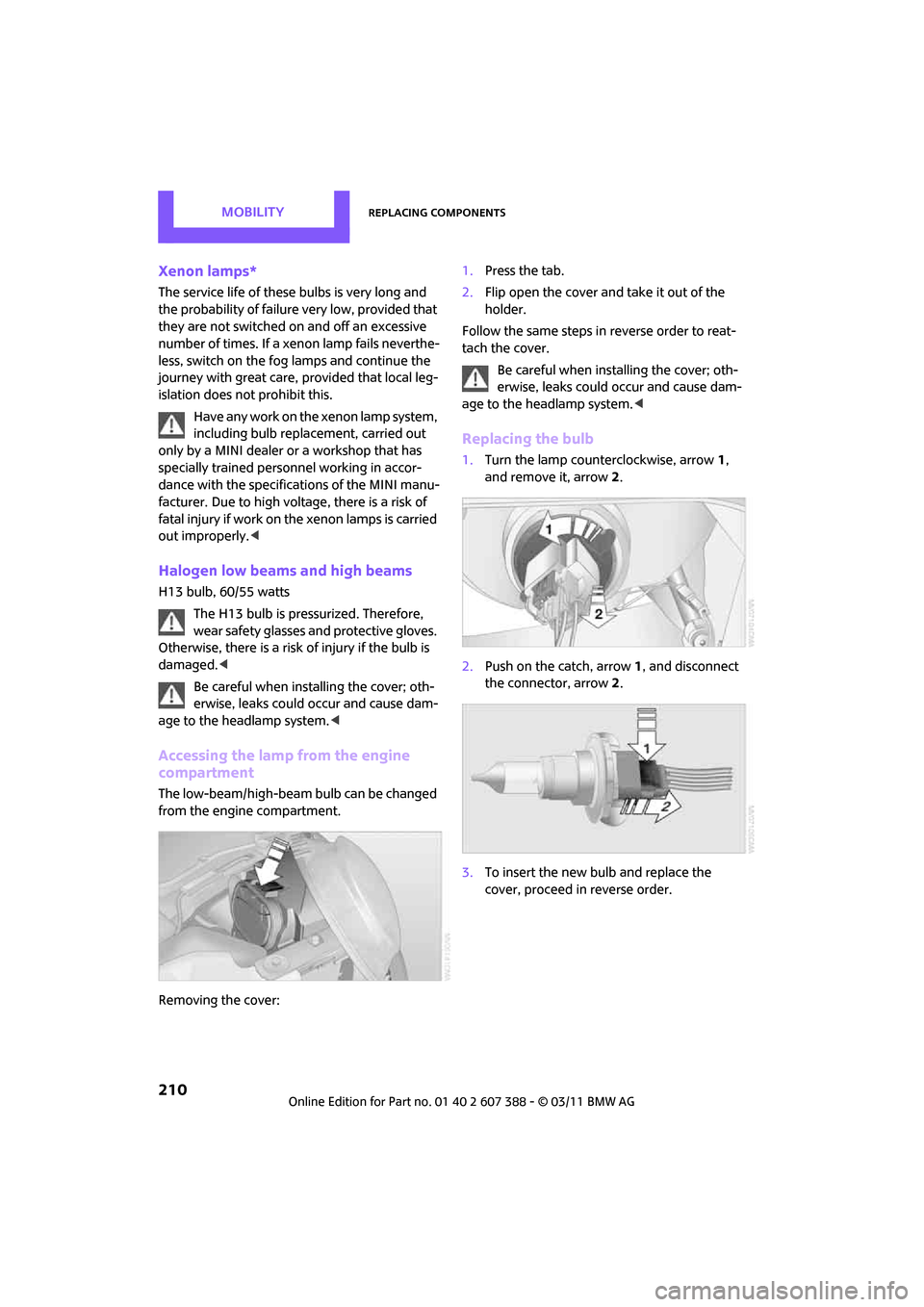
The low-beam/high-beam bulb can be changed
from the engine compartment.
Removing the cover: 1.
Press the tab.
2. Flip open the cover and take it out of the
holder.
Follow the same steps in reverse order to reat-
tach the cover. Be careful when insta lling the cover; oth-
erwise, leaks could occur and cause dam-
age to the headlamp system. <
Replacing the bulb
1.Turn the lamp counterclockwise, arrow 1,
and remove it, arrow 2.
2. Push on the catch, arrow 1, and disconnect
the connector, arrow 2.
3. To insert the new bulb and replace the
cover, proceed in reverse order.
Page 232 of 256

REFERENCEShort commands for the voice activation system
230
Short commands for the voice
activation system
General information
For instructions on the voice activation system,
refer to page21.
Having the possible spoken commands read
aloud: {Voice commands } The following short commands apply to vehicles
with voice activation syst
ems. They do not apply
to equipment with which only the cell phone can
be voice operated.
Useful short commands
*
FunctionCommand
Accessing tone control {Tone }
Accessing settings {Settings }
Accessing the computer {Onboard info }
Accessing contacts
*{ Contacts }
Displaying the phone book
*{ Phonebook }
Accessing services
*{ Assist }
Selecting destination entry
*{ Enter address}
Accessing route guidance
*{ Guidance }
Page 241 of 256
Everything from A to ZREFERENCE
239
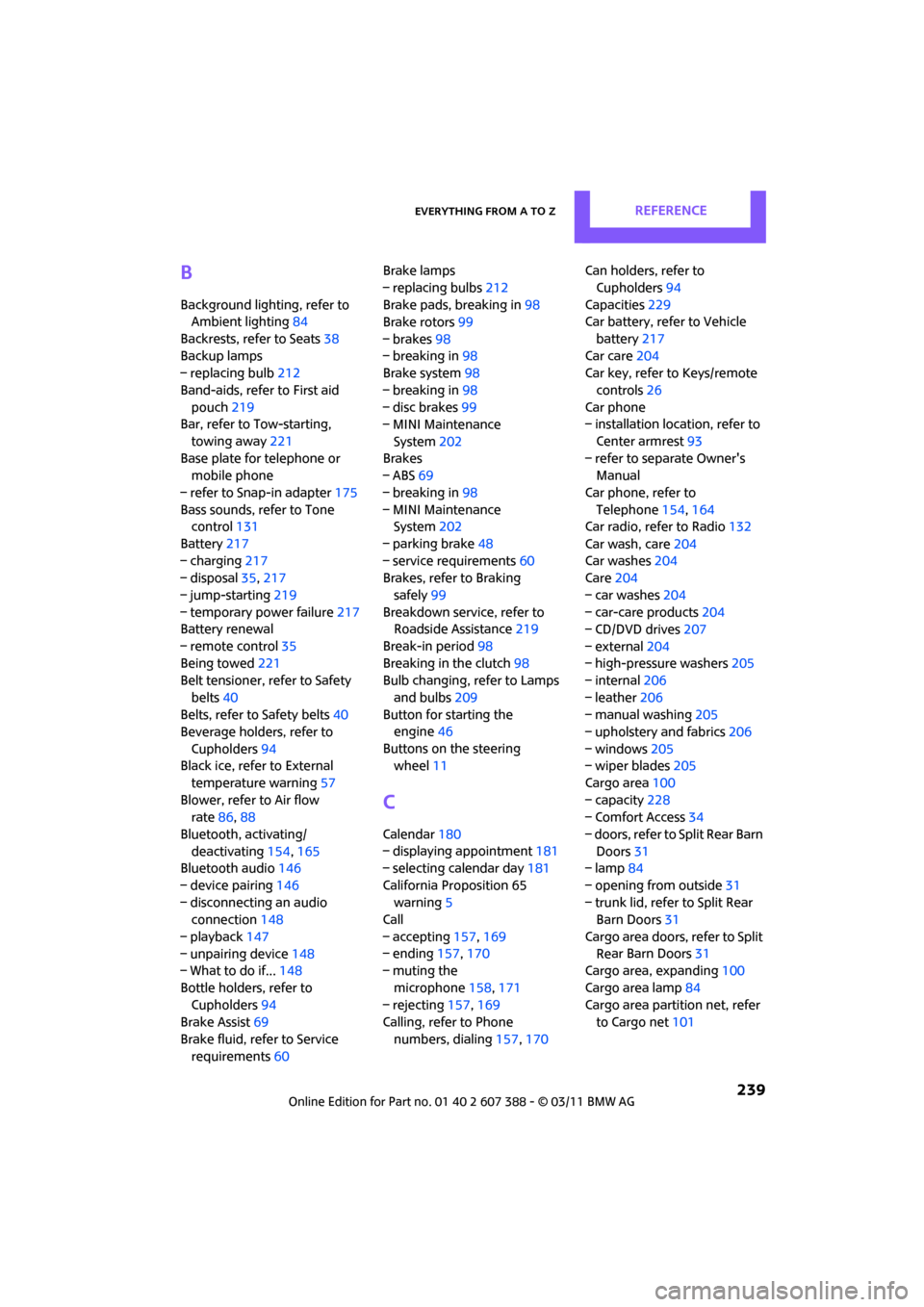
B
Background lighting, refer to
Ambient lighting 84
Backrests, refer to Seats 38
Backup lamps
– replacing bulb 212
Band-aids, refer to First aid pouch 219
Bar, refer to Tow-starting,
towing away 221
Base plate for telephone or mobile phone
– refer to Snap-in adapter 175
Bass sounds, refer to Tone control 131
Battery 217
– charging 217
– disposal 35,217
– jump-starting 219
– temporary power failure 217
Battery renewal
– remote control 35
Being towed 221
Belt tensioner, refer to Safety
belts 40
Belts, refer to Safety belts 40
Beverage holders, refer to
Cupholders 94
Black ice, refer to External
temperature warning 57
Blower, refer to Air flow rate 86,88
Bluetooth, activating/ deactivating 154,165
Bluetooth audio 146
– device pairing 146
– disconnecting an audio connection 148
– playback 147
– unpairing device 148
– What to do if... 148
Bottle holders, refer to Cupholders 94
Brake Assist 69
Brake fluid, refer to Service requirements 60 Brake lamps
– replacing bulbs
212
Brake pads, breaking in 98
Brake rotors 99
– brakes 98
– breaking in 98
Brake system 98
– breaking in 98
– disc brakes 99
– MINI Maintenance
System 202
Brakes
– ABS 69
– b
reaking in 98
– MINI Maintenance System 202
– parking brake 48
– service requirements 60
Brakes, refer to Braking
safely 99
Breakdown service, refer to Roadside Assistance 219
Break-in period 98
Breaking in the clutch 98
Bulb changing, refer to Lamps
and bulbs 209
Button for starting the engine 46
Buttons on the steering wheel 11
C
Calendar 180
– displaying appointment 181
– selecting calendar day 181
California Proposition 65 warning 5
Call
– accepting 157,169
– ending 157,170
– muting the
microphone 158,171
– rejecting 157,169
Calling, refer to Phone
numbers, dialing 157,170 Can holders, refer to
Cupholders 94
Capacities 229
Car battery, refer to Vehicle
battery 217
Car care 204
Car key, refer to Keys/remote
controls 26
Car phone
– installation location, refer to
Center armrest 93
– refer to separate Owner's Manual
Car phone, refer to Telephone 154,164
Car radio, refer to Radio 132
Car wash, care 204
Car washes 204
Care 204
– car washes 204
– car-care products 204
– CD/DVD drives 207
– external 204
– high-pressure washers 205
– internal 206
– leather 206
– manual washing 205
– upholstery and fabrics 206
– windows 205
– wiper blades 205
Cargo area 100
– capacity 228
– Comfort Access 34
– doors, refer to Split Rear Barn Doors 31
– lamp 84
– opening from outside 31
– trunk lid, refer to Split Rear Barn Doors 31
Cargo area doors, refer to Split Re
ar Barn Doors 31
Cargo area, expanding 100
Cargo area lamp 84
Cargo area partition net, refer to Cargo net 101
Page 242 of 256
REFERENCEEverything from A to Z
240
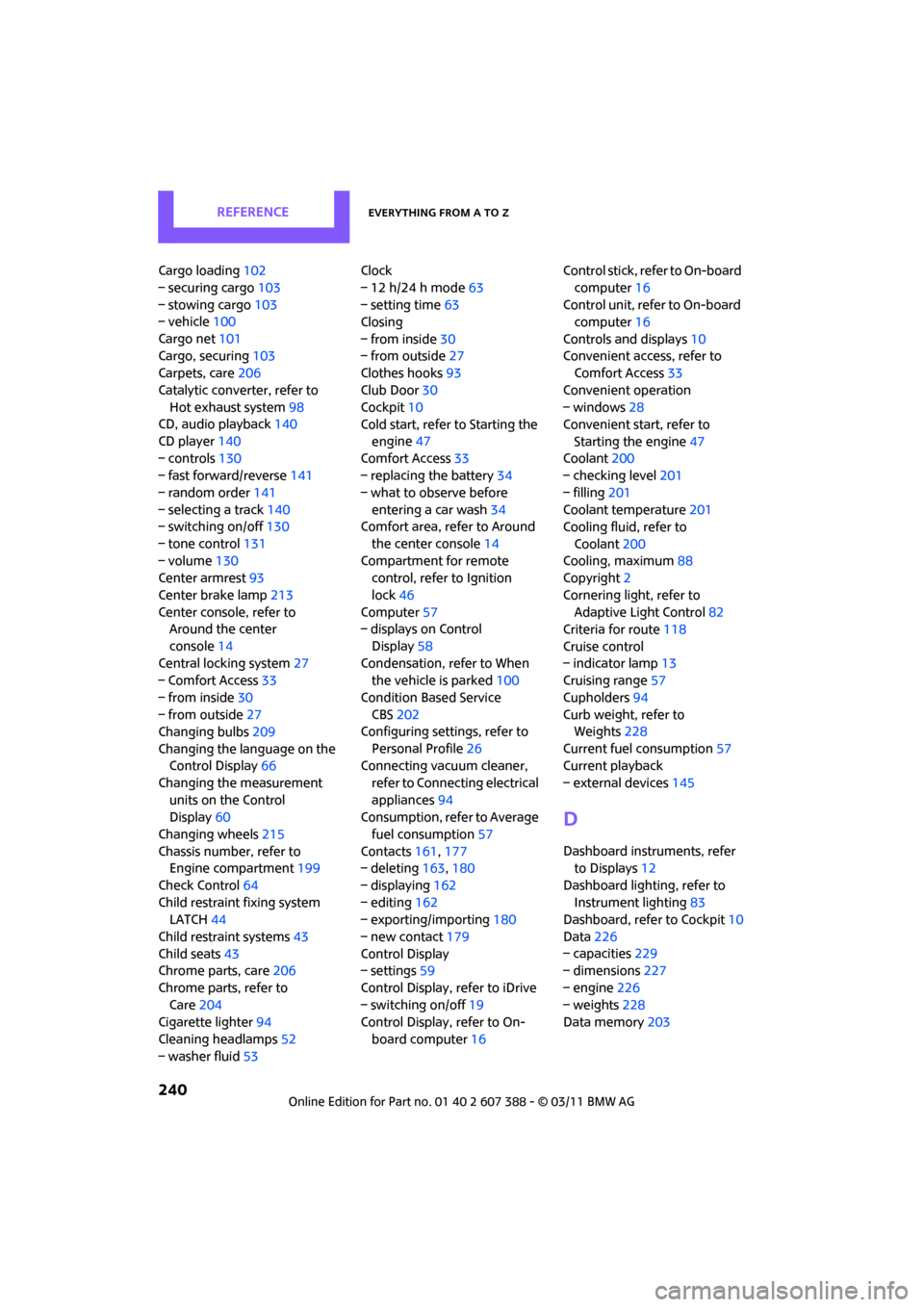
Cargo loading102
– securing cargo 103
– stowing cargo 103
– vehicle 100
Cargo net 101
Cargo, securing 103
Carpets, care 206
Catalytic conver ter, refer to
Hot exhaust system 98
CD, audio playback 140
CD player 140
– controls 130
– fast forward/reverse 141
– random order 141
– selecting a track 140
– switching on/off 130
– tone control 131
– volume 130
Center armrest 93
Center brake lamp 213
Center console, refer to Around the center
console 14
Central locking system 27
– Comfort Access 33
– from inside 30
– from outside 27
Changing bulbs 209
Changing the language on the Control Display 66
Changing the measurement units on the Control
Display 60
Changing wheels 215
Chassis number, refer to Engine compartment 199
Check Control 64
Child restraint fixing system LATCH 44
Child restraint systems 43
Child seats 43
Chrome parts, care 206
Chrome parts, refer to Care 204
Cigarette lighter 94
Cleaning headlamps 52
– washer fluid 53 Clock
– 12 h/24 h mode
63
– setting time 63
Closing
– from inside 30
– from outside 27
Clothes hooks 93
Club Door 30
Cockpit 10
Cold start, refer to Starting the
en
gine 47
Comfort Access 33
– replacing the battery 34
– what to observe before entering a car wash 34
Comfort area, refer to Around
the center console 14
Compartment for remote control, refer to Ignition
lock 46
Computer 57
– displays on Control
Display 58
Condensation, refer to When the vehicle is parked 100
Condition Based Service CBS 202
Configuring settings, refer to
Personal Profile 26
Connecting vacuum cleaner,
refer to Connecting electrical
appliances 94
Consumption, refer to Average
fuel consumption 57
Contacts 161,177
– deleting 163,180
– displaying 162
– editing 162
– exporting/importing 180
– new contact 179
Control Display
– settings 59
Control Display, refer to iDrive
– switching on/off 19
Control Display, refer to On-
board computer 16Control stick, refer to On-board
computer 16
Control unit, refer to On-board computer 16
Controls and displays 10
Convenient access, refer to Comfort Access 33
Convenient operation
– windows 28
Convenient star t, refer to
Starting the engine 47
Coolant 200
– checking level 201
– filling 201
Coolant temperature 201
Cooling fluid, refer to
Coolant 200
Cooling, maximum 88
Copyright 2
Cornering light, refer to Adaptive Light Control 82
Criteria for route 118
Cruise control
– in
dicator lamp 13
Cruising range 57
Cupholders 94
Curb weight, refer to Weights 228
Current fuel consumption 57
Current playback
– external devices 145
D
Dashboard instruments, refer
to Displays 12
Dashboard lighting, refer to Instrument lighting 83
Dashboard, refer to Cockpit 10
Data 226
– capacities 229
– dimensions 227
– engine 226
– weights 228
Data memory 203
Page 243 of 256
Everything from A to ZREFERENCE
241
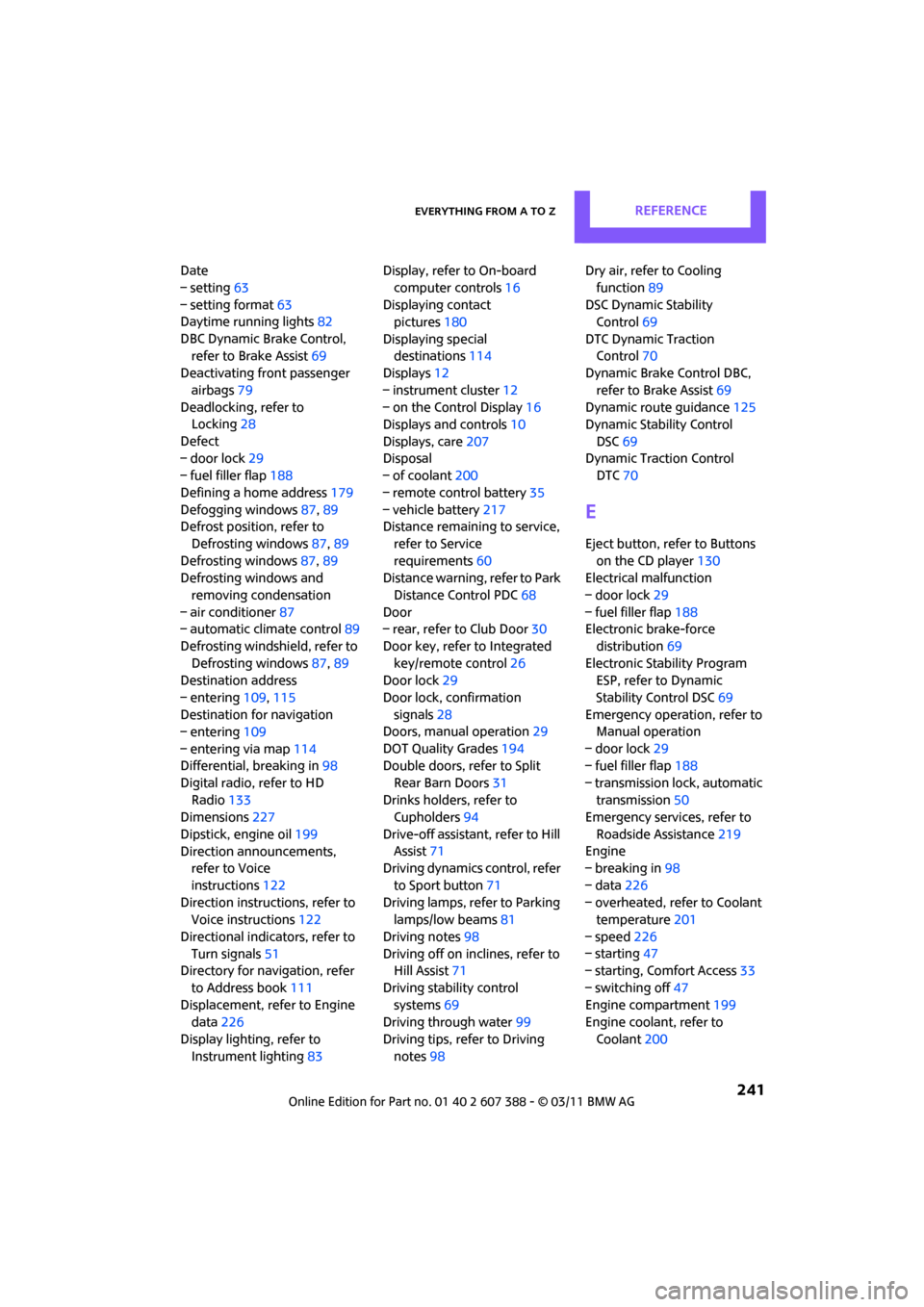
Date
– setting63
– setting format 63
Daytime running lights 82
DBC Dynamic Brake Control, refer to Brake Assist 69
Deactivating front passenger
airbags 79
Deadlocking, refer to Locking 28
Defect
– door lock 29
– fuel filler flap 188
Defining a home address 179
Defogging windows 87,89
Defrost position, refer to
Defrosting windows 87,89
Defrosting windows 87,89
Defrosting windows and
removing condensation
– air conditioner 87
– automatic climate control 89
Defrosting windshield, refer to Defrosting windows 87,89
Destination address
– entering 109,115
Destination for navigation
– entering 109
– entering via map 114
Differential, breaking in 98
Digital radio, refer to HD Radio 133
Dimensions 227
Dipstick, engine oil 199
Direction announcements, refer to Voice
instructions 122
Direction instructions, refer to Voice instructions 122
Directional indicators, refer to Turn signals 51
Directory for navigation, refer
to Address book 111
Displacement, refer to Engine data 226
Display lighting, refer to Instrument lighting 83Display, refer to On-board
computer controls 16
Displaying contact pictures 180
Displaying special destinations 114
Displays 12
– instrument cluster 12
– on the Control Display 16
Displays and controls 10
Displays, care 207
Disp
osal
– of coolant 200
– remote control battery 35
– vehicle battery 217
Distance remaining to service,
refer to Service
requirements 60
Distance warning, refer to Park
Distance Control PDC 68
Door
– rear, refer to Club Door 30
Door key, refer to Integrated key/remote control 26
Door lock 29
Door lock, confirmation signals 28
Doors, manual operation 29
DOT Quality Grades 194
Double doors, refer to Split
Rear Barn Doors 31
Drinks holders, refer to Cupholders 94
Drive-off assistant, refer to Hill
Assist 71
Driving dynamics control, refer
to Sport button 71
Driving lamps, refer to Parking lamps/low beams 81
Driving notes 98
Driving off on inclines, refer to Hill Assist 71
Driving stability control systems 69
Driving through water 99
Driving tips, refer to Driving notes 98 Dry air, refer to Cooling
function 89
DSC Dynamic Stability Control 69
DTC Dynamic Traction Control 70
Dynamic Brake Control DBC,
refer to Brake Assist 69
Dynamic route guidance 125
Dynamic Stability Control
DSC 69
Dynamic Traction Control DTC 70
E
Eject button, refer to Buttons
on the CD player 130
Electrical malfunction
– door lock 29
– fuel filler flap 188
Electronic brake-force
distribution 69
Electronic Stability Program ESP, refer to Dynamic
Stability Control DSC 69
Emergency operation, refer to Manual operation
– door lock 29
– fuel filler flap 188
– transmission lock, automatic transmission 50
Emergency services, refer to
Roadside Assistance 219
Engine
– breaking in 98
– data 226
– overheated, refer to Coolant temperature 201
– speed 226
– starting 47
– starting, Comfort Access 33
– switching off 47
Engine compartment 199
Engine coolant, refer to
Coolant 200