change wheel MINI COOPER 2011 User Guide
[x] Cancel search | Manufacturer: MINI, Model Year: 2011, Model line: COOPER, Model: MINI COOPER 2011Pages: 210, PDF Size: 3.19 MB
Page 167 of 210
Replacing componentsMOBILITY
165
Distributing the sealant
Immediate drive approx. 3.1 miles/5 km so that
the sealant evenly distributes itself.Do not exceed speeds of 50 mph/
80 km/h.
If possible, do not drop below 10 mph/
20 km/h.<
Adjusting the tire pressure
1. After driving approx. 3.1 miles/5 km or
10 minutes, stop at a suitable location.
2. Screw the connection hose 6 of the
compressor directly onto the tire valve.
3. Insert the plug 5 into the power socket in
the vehicle interior.
4. Correct inflation pressu re to 26 psi/180 kPa.
With the engine running:
> To increase the inflatio n pressure: switch on
the compressor. To check the current infla-
tion pressure, switch off the compressor.
Do not run the compressor for longer
than 10 minutes; otherwise, the
device will overheat and possibly be
damaged. <
> To decrease the inflation pressure: press the
release button 9.
If the tire cannot ma intain the inflation
pressure, drive the vehicle again, refer to
Distributing the sealan t. Then repeat steps
1to4.
If an inflation pressure of 26 psi/180 kPa still
cannot be reached, the tire is too heavily dam-
aged. Contact the nearest MINI dealer. <
Driving on
Do not exceed the permitted maximum
speed of 50 mph/80 km/h; doing so may
result in an accident. <
Replace the defective tire as soon as possible
and have the new wheel/tire assembly
balanced.
Have the Mobility System refilled.
Changing wheels
Run-flat tires*
Tire change for run-flat tires:
> Prepare for tire change, page 166
> Jack up vehicle, page 167
> Tighten lug bolts, page 167
Space-saver spare tire*
Tire change with space-saver spare tire:
>Remove the space-saver spare tire,
page 165
> Prepare for tire change, page 166
> Jack up vehicle, page 167
> Mount space-saver spare tire, page 167
> Tighten lug bolts, page 167
> Drive with space-saver spare tire, page 166
Removing the space-saver spare tire
The screw connection of the space-saver spare
tire is under the floor mat in the cargo area, on
the base of the storage compartment for the tire
change set.
1. Unscrew the screw connection with the
special wrench.
2. Take out the cover panel.
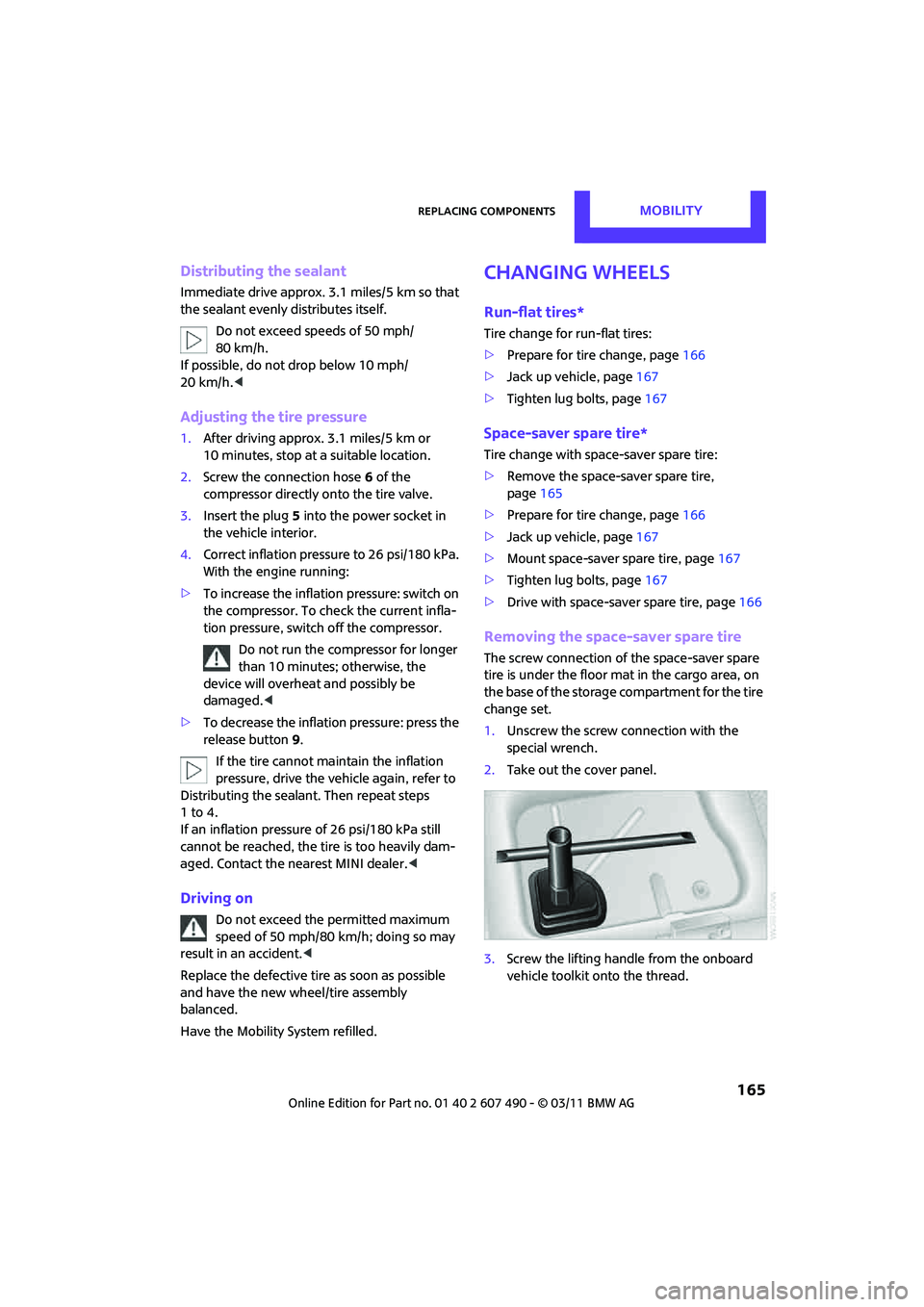
3. Screw the lifting handle from the onboard
vehicle toolkit onto the thread.
Page 168 of 210

MOBILITYReplacing components
166
4.Raise the lifting handle slightly.
5. Squeeze the securing spring.
6. The space-saver spare tire is released and
must be held by the lifting handle.
7. Lower the space-saver spare tire with the
lifting handle.
8. Unscrew the lifting handle.
9. Pull the space-saver spare tire underneath
the vehicle out toward the rear.
10. Position the space-save r spare tire with the
valve facing upward.
11. Unscrew the valve extension from the valve
of the space-saver spare tire. 12.
Unscrew the dust cap from the extension
and place it on the valve of the space-saver
spare tire.
Due to its different dimensions, the
damaged wheel cannot be placed in the
recess for the space-saver spare tire. <
Driving with the space-saver spare tire
Drive cautiously and do not exceed a
speed of 50 mph/80 km/h. Changes may
occur in vehicle handling such as lower track
stability during braking, longer braking dis-
tances and changes in self-steering properties
when close to the handling limit. These proper-
ties are more noticeable with winter tires. <
Only one space-saver spare tire may be
mounted at one time. Mount a wheel and
tire of the original size as soon as possible, to
avoid any safety risks. <
Check the tire inflat ion pressure at the
earliest opportunity and correct it if
necessary. Replace the defe ctive tire as soon as
possible and have the ne w wheel/tire assembly
balanced. <
Preparing for a tire change
Observe the safety precautions regarding
flat tires on page 163.<
Additional safety measures when chang-
ing tires:
Only change the tire wh en parked on a surface
that is level, firm and not slippery.
The vehicle or the jack could slip sideways on
soft or slippery support surfaces, such as snow,
ice, flagstones, etc.
Do not use a wooden block or similar object as a
support base for the jack, as this would prevent
it from extending to its full support height and
reduce its load-carrying capacity.
Do not lie under the vehicle or start the engine
when the vehicle is supported by the jack; other-
wise, there is a risk of fatal injury. <
Page 169 of 210

Replacing componentsMOBILITY
167
1.Place the foldable chock* behind the front
wheel on the other side of the vehicle or in
front of the wheel if the vehicle is on an
incline. If the wheel is changed on a surface
with a more severe slope, take additional
precautions to secure the vehicle from
rolling.
2. Uncover the lug bolts if necessary.
3. Loosen the lug bolts by a half turn.
Jacking up the vehicle
The vehicle jack is designed for changing
wheels only. Do not attempt to raise
another vehicle model with it or to raise any load
of any kind. To do so could cause accidents and
personal injury. <
1. Place the jack at the jacking point closest to
the wheel.
The jack base must be perpendicular to the
surface beneath the jacking point.
2. During jacking up, insert the jack head in the
square recess of the jacking point.
3. Jack the vehicle up until the wheel you are
changing is raised off the ground.
Mounting the space-saver spare tire
1.Unscrew the lug bolts and remove the
wheel.
2. Remove accumulations of mud or dirt from
the mounting surfaces of the wheel and
hub. Clean the lug bolts.
3. Lift the new wheel into place.
4. Screw at least two lug bo lts finger-tight into
opposite bolt holes.
5. Screw in the remaining bolts.
6. Tighten all the lug bolts firmly in a diagonal
pattern.
7. Lower the vehicle.
8. Remove the jack.
Tightening the lug bolts
Tighten the lug bolts in a diagonal pattern.
Immediately have the wheels checked
with a calibrated torque wrench to ensure
that the lug bolts are firmly seated. Otherwise,
incorrectly tightened lug bolts can present a
safety hazard. <
Tightening torque: 103.3 lb ft or 140 Nm.
Replace the defective tire as soon as possible
and have the new wheel/tire assembly
balanced.
Vehicle battery
Maintenance
The battery is 100 % maintenance-free, the
electrolyte will last for the life of the battery
when the vehicle is operated in a temperate
climate.
Page 205 of 210
Everything from A to ZREFERENCE
203
Starting assistance, refer to Jump-starting 169
Starting the engine
– Start/Stop button 46
Start-off assistance, refer to
– DSC 67
– Hill Assist 69
Stations, refer to Radio MINI Boost CD 108
Status of this Owner's Manual
at time of printing 4
Steering wheel 42
– adjustment 42
– buttons on steering wheel 11
– lock 46
– shift paddles 50
Steptronic, refer to Automatic transmission with
Steptronic 48
Storage area
– cargo area 98
Storage compartment, front
passenger side 92
Storage compartments 92
Storage space
– storage compartments 92
Storage space, refer to
– Luggage compartment in the
MINI Convertible 99
Storing the vehicle 156
Storing tires 145
Stowage, refer to Storage compartments 92
Summer tires, re fer to Wheels
and tires 134
Switches, refer to Cockpit 10
Switching off
– engine 47
Switching off the engine
– Start/Stop button 46
Switching on
– CD player 106,111
– Radio MINI Boost CD 106
Switching the cooling function on and off 88
Symbols 4T
Tachometer 56
Tail lamp, refer to Tail
lamps 161
– replacing bulb 161
Tail lamps 161
Tank volume, refer to Capacities 193
Technical data 188
Technical modifications 5
Telephone 118
– hands-free system 126
– installation location, refer to Center armrest 92
– refer to separate Owner's
Manual
– voice commands 127
Telephone call, refer to the
Owner's Manual for the
telephone
Temperature display
– setting the units 61
Temperature of coolant, refer to Coolant temperature 149
Temperature setting
– air conditioner 85
– automatic climate control 87
Tempomat, refer to Cruise control 54
Tensioning straps, refer to Securing cargo 101
The individual vehicle 4
Third brake lamp, refer to Center brake lamp 163
Three-point safety belt 40
Tightening the lug bolts
– keys 157
– torque 167,168
Tightening torque, refer to Tightening lug bolts 167
Time
– setting 107
Tire change set
– space-saver spare tire 157Tire failure
– Flat Tire Monitor
71
– indicator/warning lamp 71
– MINI Mobility System 163
– run-flat tires 71
– space-saver spare tire 165
– Tire Pressure Monitor 72
Tire inflation pressure 134
– loss 71
– space-saver spare tire 134
Tire pressure monitoring, refer to Flat Tire Monitor 69
Tire Pressure Monitor TPM 72
– limitations of system 72
– resetting system 72
– warning lamp 73
Tire Quality Grading 142
Tires
– age 14
3
– breaking in 96
– changing, refe r to Changing
wheels 165
– condition 143
– damage 143
– inflation pressure 134
– inflation pressure loss 73
– minimum tread depth 143
– new tires 144
– pressure monitoring, refer to Flat Tire Monitor 69
– pressure monitoring, refer to Tire Pressure Monitor
TPM 72
– puncture 71
– size 141
– wear indicators, refer to
Minimum tread depth 143
– winter tires 145
– with emergency operation
properties 144
Tires with emergency operation properties, refer to
Run-flat tires 144
Tires with safety features, refer
to Run-flat tires 144