turn signal MINI COOPER 2011 User Guide
[x] Cancel search | Manufacturer: MINI, Model Year: 2011, Model line: COOPER, Model: MINI COOPER 2011Pages: 210, PDF Size: 3.19 MB
Page 62 of 210
CONTROLSControls overview
60
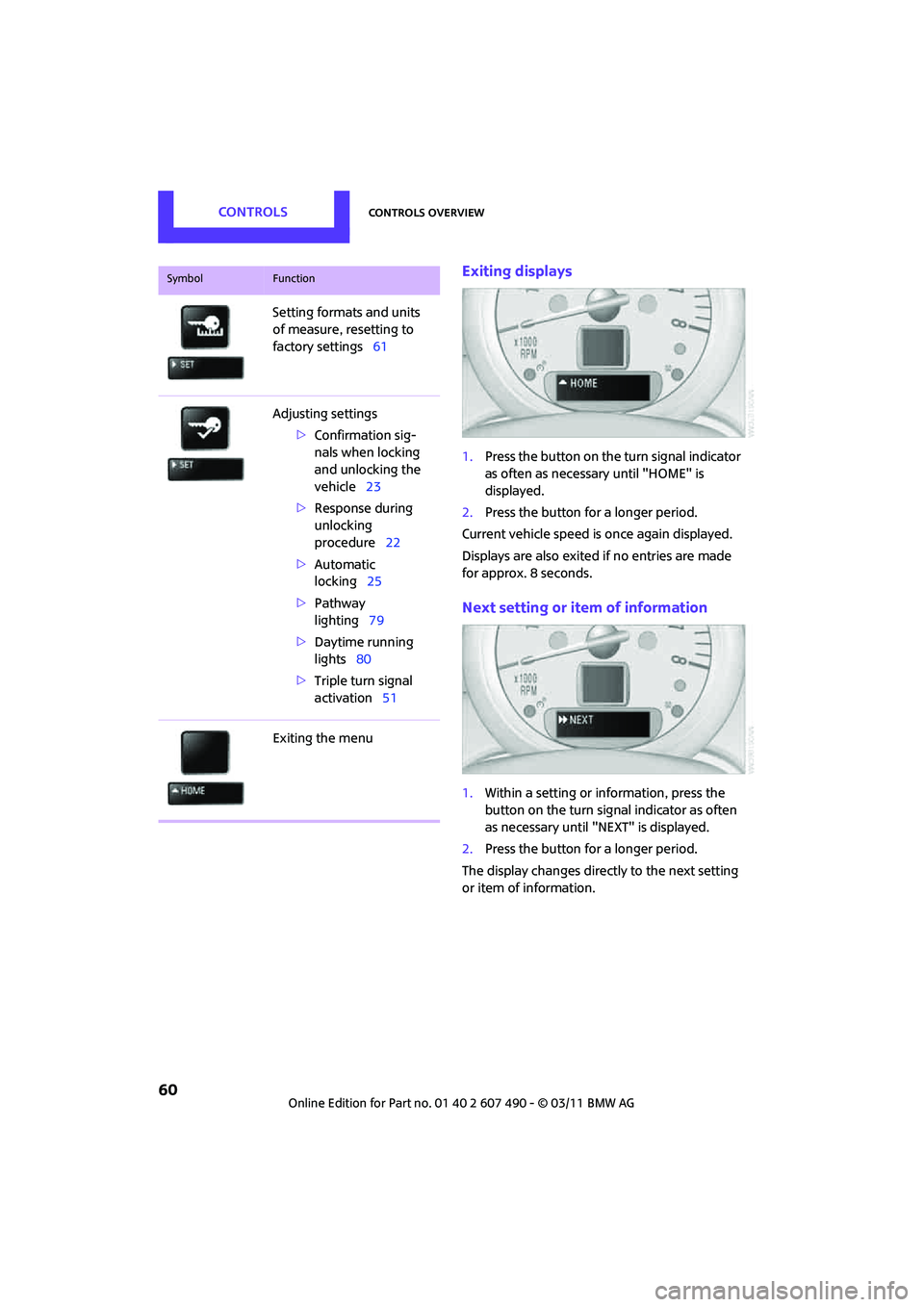
Exiting displays
1.Press the button on the turn signal indicator
as often as necessary until "HOME" is
displayed.
2. Press the button for a longer period.
Current vehicle speed is once again displayed.
Displays are also exited if no entries are made
for approx. 8 seconds.
Next setting or item of information
1. Within a setting or information, press the
button on the turn signal indicator as often
as necessary until "NEXT" is displayed.
2. Press the button for a longer period.
The display changes direct ly to the next setting
or item of information.
Setting formats and units
of measure, resetting to
factory settings
61
Adjusting settings >Confirmation sig-
nals when locking
and unlocking the
vehicle 23
> Response during
unlocking
procedure 22
> Automatic
locking 25
> Pathway
lighting 79
> Daytime running
lights 80
> Triple turn signal
activation 51
Exiting the menu
SymbolFunction
Page 63 of 210
Controls overviewCONTROLS
61
Formats and units of
measure
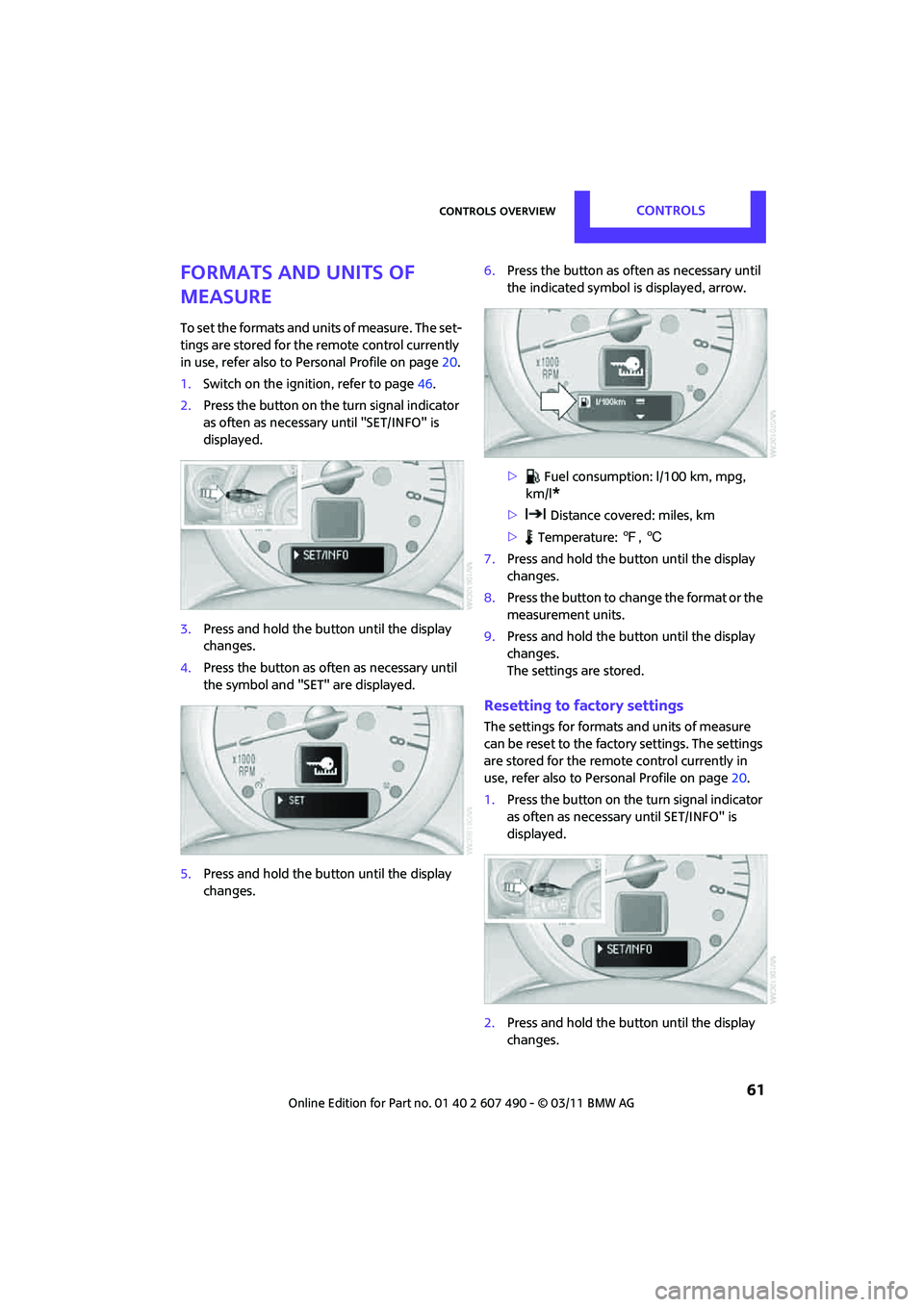
To set the formats and units of measure. The set-
tings are stored for the remote control currently
in use, refer also to Personal Profile on page 20.
1. Switch on the ignition, refer to page 46.
2. Press the button on the turn signal indicator
as often as necessary until "SET/INFO" is
displayed.
3. Press and hold the butt on until the display
changes.
4. Press the button as of ten as necessary until
the symbol and "SET" are displayed.
5. Press and hold the butt on until the display
changes. 6.
Press the button as of ten as necessary until
the indicated symbol is displayed, arrow.
> Fuel consumption: l/100 km, mpg,
km/l
*
> Distance covered: miles, km
> Temperature: 7, 6
7. Press and hold the butt on until the display
changes.
8. Press the button to change the format or the
measurement units.
9. Press and hold the butt on until the display
changes.
The settings are stored.
Resetting to factory settings
The settings for format s and units of measure
can be reset to the factory settings. The settings
are stored for the remote control currently in
use, refer also to Personal Profile on page 20.
1. Press the button on the turn signal indicator
as often as necessary until SET/INFO" is
displayed.
2. Press and hold the butt on until the display
changes.
Page 64 of 210

CONTROLSControls overview
62
3.Press the button as often as necessary until
the symbol and "SET" are displayed.
4. Press and hold the button until the display
changes.
5. Press the button as often as necessary until
RESET" is displayed.
6. Press and hold the button until the display
changes to the first setting.
The settings are reset.
Service requirements
The remaining driving distance and the date of
the next scheduled service are briefly displayed
immediately after you start the engine or switch
on the ignition. The extent of service work required can be
read out from the remote control by your
MINI dealer. <
Displaying vehicle check
For certain maintenance operations, you can
view the respective distance remaining or due
date individually in the tachometer.
1.Switch on the ignition, refer to page 46.
2. Press the button on the turn signal indicator
as often as necessary until "SET/INFO" is
displayed.
3. Press and hold the button until the display
changes.
4. Press the button as often as necessary until
the particular symbol and "SERVICE-INFO"
are displayed.
5. Press and hold the button until the display
changes.
6. Press the button to display the individual
servicing needs; see below.
Page 66 of 210
CONTROLSControls overview
64
Date
Setting date
Radio MINI Boost CD:
1.MENU Press the button.
2. Press the button.
3. Press the button.
4. Select the desired menu item "TT", "MM" or
"JJ".
5. Turn the button on the right to set values.
6. Press the button on the right to store values.
7. Press the button to exit setting
values.
Check Control
The concept
The Check Control monitors vehicle functions
and alerts you to any malfunctions in the
systems monitored. Ch eck Control messages
involve indicator or warning lamps in the dis-
plays and, in some circumstances, an acoustic
signal.
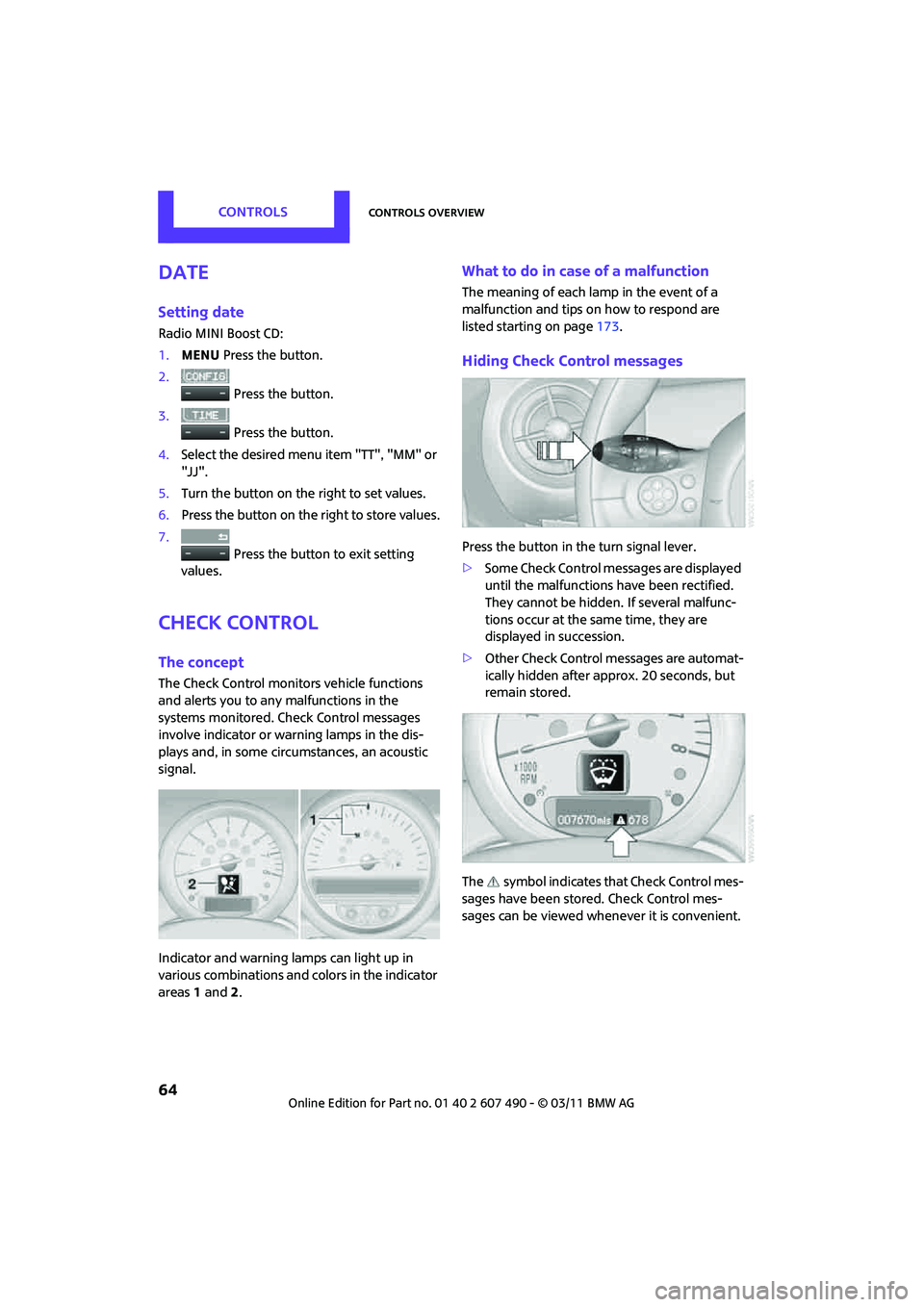
Indicator and warning lamps can light up in
various combinations and colors in the indicator
areas 1 and 2.
What to do in case of a malfunction
The meaning of each lamp in the event of a
malfunction and tips on how to respond are
listed starting on page 173.
Hiding Check Control messages
Press the button in the turn signal lever.
> Some Check Control messages are displayed
until the malfunctions have been rectified.
They cannot be hidden. If several malfunc-
tions occur at the same time, they are
displayed in succession.
> Other Check Control messages are automat-
ically hidden after approx. 20 seconds, but
remain stored.
The symbol indicates that Check Control mes-
sages have been stor ed. Check Control mes-
sages can be viewed whenever it is convenient.
Page 67 of 210

Controls overviewCONTROLS
65
Viewing stored Check Control messages
Stored Check Control messages can only be
displayed if the driver's door is closed.
1.Press the button on the turn signal indicator
as often as necessary until "SET/INFO" is
displayed.
2. Press and hold the butt on until the display
changes.
3. Briefly press the button repeatedly until the
corresponding symbol and "CHECK INFO"
appear in the display.
4. Hold the button down.
If there are no Check Control messages, then
"CHECK OK" is displayed.
If a Check Control messa ge has been stored,
the corresponding message is displayed.
5. Press the button to check for other
messages.
Page 72 of 210
CONTROLSTechnology for driving comfort and safety
70
Functional requirement
The system must have been initialized while the
tire inflation pressure was correct; otherwise,
reliable signaling of a fl at tire is not ensured.
Initialize the system afte r every correction of the
tire inflation pressure and after every tire or
wheel change.
System limitations
Sudden serious tire damage caused by
external influences cannot be indicated in
advance. <
A natural, even pressure loss in all four tires
cannot be detected. Therefore, check the tire
inflation pressure regularly.
In the following situatio ns, the system could be
delayed or malfunction:
> System has not been initialized
> Driving on snowy or sl ippery road surface
> Performance-oriented style of driving: slip in
the drive wheels, high lateral acceleration
> Snow chains are attached
When the vehicle is driven with a space-saver
spare tire
*, page 166, the Flat Tire Monitor
cannot function.
Initializing the system
The initialization process adopts the set inflation
tire pressures as refere nce values for the detec-
tion of a flat tire. Init ialization is started by
confirming the in flation pressures.
Do not initialize the system when driving with
snow chains.
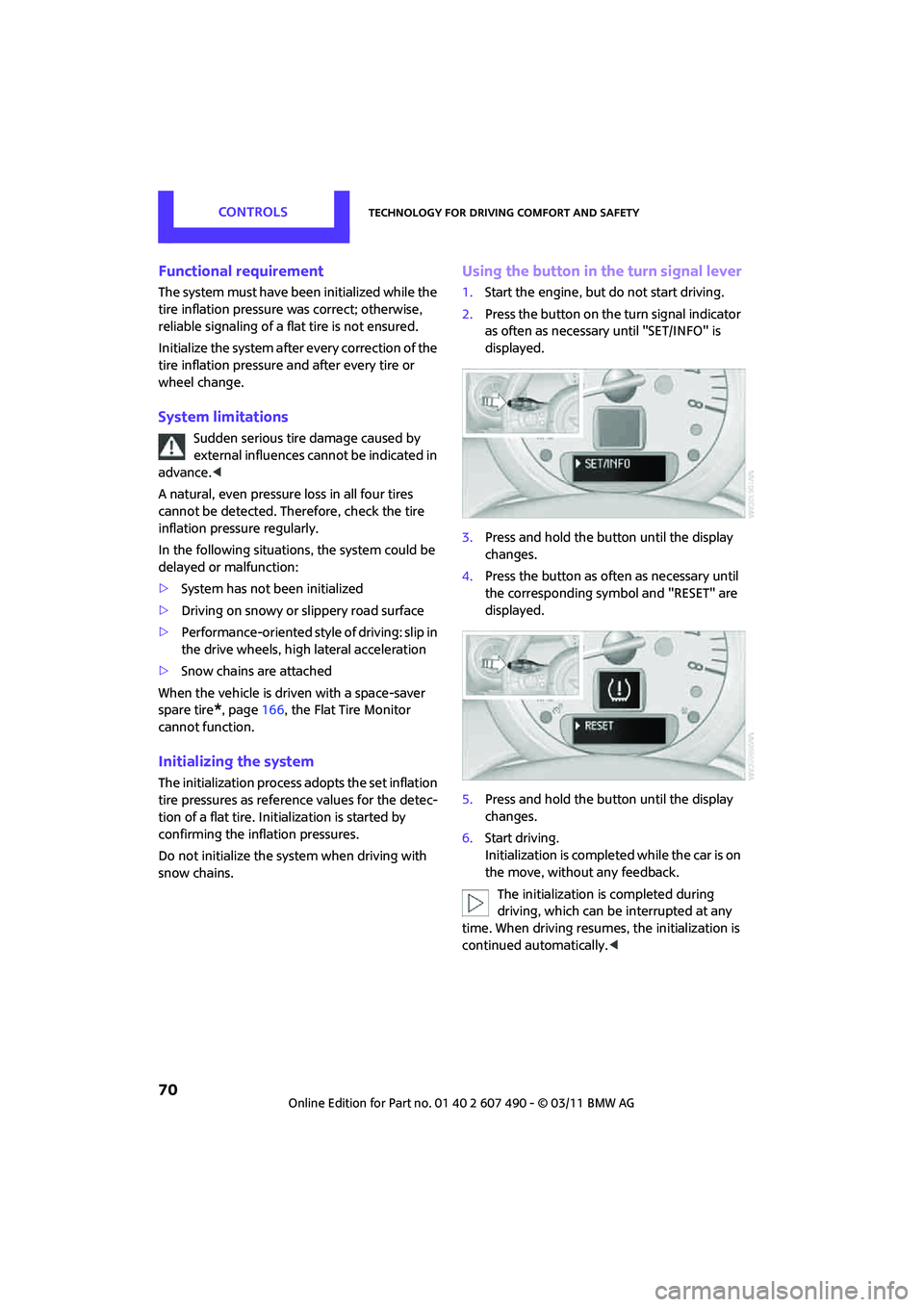
Using the button in the turn signal lever
1. Start the engine, but do not start driving.
2. Press the button on the turn signal indicator
as often as necessary until "SET/INFO" is
displayed.
3. Press and hold the button until the display
changes.
4. Press the button as often as necessary until
the corresponding symbol and "RESET" are
displayed.
5. Press and hold the button until the display
changes.
6. Start driving.
Initialization is completed while the car is on
the move, without any feedback.
The initialization is completed during
driving, which can be interrupted at any
time. When driving resumes, the initialization is
continued automatically. <
Page 73 of 210

Technology for driving comfort and safetyCONTROLS
71
Indication of a flat tire
The warning lamps come on in yellow
and red. An acoustic signal also sounds.
There is a flat tire or a major loss in tire
inflation pressure.
1. Reduce speed and stop the vehicle with
caution. Avoid sudden braking and steering
maneuvers.
2. Check whether the vehicle is equipped with
normal tires or with run-flat tires
*.
Run-flat tires, refer to page 144, are identi-
fied by a circular symbol containing the
letters RSC on the tire sidewall.
If the vehicle is not equipped with run-flat
tires, do not continue driving; continuing
to drive can result in serious accidents. <
When a flat tire is repo rted, the Dynamic Stability
Control DSC is activated.
Actions in the event of a flat tire
Normal tires
1. Identify the damaged tire.
To do so, check the inflation pressure in all
four tires.
The inflation pressure di splay of the Mobility
System, page 163, can be used for this
purpose.
If the inflation pressure in all four tires is
correct, the Flat Tire Monitor might not have
been initialized. The system must then be
initialized.
If it is not possible to identify the damaged
tire, contact your MINI dealer.
2. Use the Mobility System to remedy the flat
tire on the damage d wheel, refer to
page 163, or to replace the damaged wheel,
refer to page 165.
Run-flat tires*
You can continue driving with a damaged tire at
speeds up to 50 mph or 80 km/h.
Continued driving with a flat tire
When driving with a damaged tire:
1.Avoid sudden braking and steering
maneuvers.
2. Do not exceed a speed of 50 mph or 80 km/h.
3. At the next opportunity, check the air
pressure in all four tires.
If the inflation pressure in all four tires is
correct, the Flat Tire Monitor might not have
been initialized. The system must then be
initialized.
Possible driving distance with complete loss of
tire inflation pressure:
The distance it is possible to drive with a flat tire
depends on the load and the stress on the
vehicle while driving.
With an average load, it may be possible to drive
for approx. 50 miles/80 km.
When driving with damage d tires, the handling
characteristics change, e.g. the vehicle will skid
sooner when braking, braking distances will be
longer, or self-steering response will change.
Adapt your driving style accordingly. Avoid
turning abruptly and driv ing over obstacles such
as curbs, potholes, etc.
Since the possible driving distance depends to a
considerable degree on the strain exerted on
the vehicle while driving, it can be shorter or,
with a gentle dr iving style, can also be longer,
depending on the speed, road condition,
external temperature, vehicle load, etc.
Drive cautiously and do not exceed a
speed of 50 mph/80 km/h.
A loss of tire inflation pressure results in a
change in the handling characteristics, e.g.
reduced lane stability during braking, a longer
braking distance and altered self-steering
properties. <
Vibrations or loud noises while driving can
indicate final failure of the tire. Reduce
your speed and bring the vehicle to a stop;
otherwise, pieces of tire may come off, which
could result in an accident. Do not continue
driving and contact your MINI dealer.<
Page 74 of 210
CONTROLSTechnology for driving comfort and safety
72
Tire Pressure Monitor
TPM*
The concept
Measuring the inflation pressure in the four
mounted tires. The system notifies you if there is
a significant loss of pressu re in one or more tires.
Functional requirement
The system must have been reset while the
inflation pressure was correct; otherwise, reli-
able signaling of a flat tire is not ensured.
Always use wheels with TPM electronics to
ensure that the system will operate properly.
Reset the system again af ter each correction of
the tire inflation pressure and after every tire or
wheel change.
System limitations
Sudden, serious tire damage caused by
external influences cannot be indicated in
advance. <
The system does not operate correctly if it has
not been reset. For exampl e, a flat tire may be
indicated despite correct tire inflation pressures.
The system is inactive an d cannot indicate a flat
tire:
> If a wheel without TPM electronics, e.g. a
compact spare wheel
*, is mounted.
> Interference with TPM by other systems or
devices with the sa me transmission
frequency.
Resetting the system
Reset the system again af ter each correction of
the tire inflation pressure and after every tire or
wheel change.
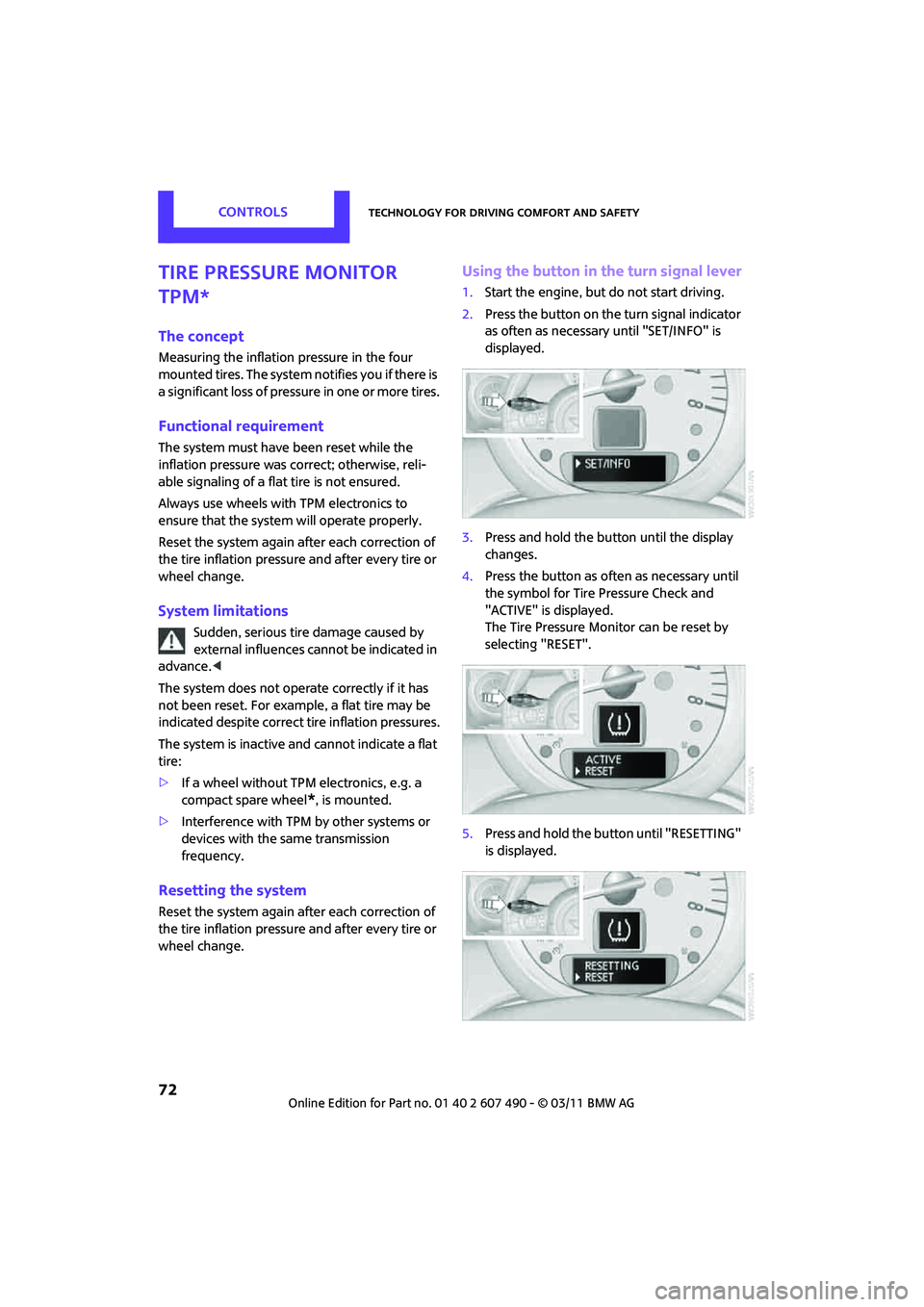
Using the button in the turn signal lever
1. Start the engine, but do not start driving.
2. Press the button on the turn signal indicator
as often as necessary until "SET/INFO" is
displayed.
3. Press and hold the button until the display
changes.
4. Press the button as often as necessary until
the symbol for Tire Pressure Check and
"ACTIVE" is displayed.
The Tire Pressure Monitor can be reset by
selecting "RESET".
5. Press and hold the button until "RESETTING"
is displayed.
Page 75 of 210

Technology for driving comfort and safetyCONTROLS
73
6.Start driving.
After driving a few minu tes, the set inflation
pressures in the tires are accepted as the
target values to be monitored. The system
reset is completed during your drive, and
can be interrupted at any time. When driving
resumes, the reset is continued automati-
cally. The indicator lamp goes out after the
system reset is completed.
Message for low tire inflation pressure
The warning lamps come on in yellow
and red. An acoustic signal also sounds.
The position of the faulty tire is
displayed.
> There is a flat tire or substantial loss of tire
pressure.
> The system was not reset after a wheel
change and thus issues a warning based on
the inflation pressures initialized last.
1. Reduce speed and stop the vehicle with
caution. Avoid sudden braking and steering
maneuvers.
2. Check whether the vehicle is equipped with
normal tires or with run-flat tires
*.
Run-flat tires, refer to page 144, are identi-
fied by a circular symbol containing the
letters RSC on the tire sidewall.
When a low inflation pressure is reported, the
Dynamic Stability Control DSC is activated.
Actions in the event of a flat tire
Normal tires
1. Identify the damaged tire.
To do so, check the inflation pressure in all
four tires. The inflation pressure display of
the Mobility System, refer to page 163, can
be used for this.
If the inflation pressure is correct in all four
tires, then the Tire Pressure Monitor may not
have been reset. The system must then be
reset.
If it is not possible to identify the damaged
tire, contact your MINI dealer. 2.
Use the Mobility System to remedy the flat
tire on the damaged wheel, refer to
page 163, or to replace the damaged wheel,
refer to page. 165.
The use of tire sealant, e.g. Mobility System,
can damage the TPM wheel electronics. In
this case, have the electronics checked and
replaced if necessary at your earliest
opportunity.
Run-flat tires*
You can continue driving with a damaged tire at
speeds up to 50 mph/80 km/h. If the vehicle is not equipped with run-flat
tires, do not continue driving; continuing
to drive can result in serious accidents. <
Continued driving with a flat tire
When driving with a damaged tire:
1.Avoid sudden braking and steering
maneuvers.
2. Do not exceed a speed of 50 mph/80 km/h.
3. At the next opportunity, check the air
pressure in all four tires.
If the inflation pressure is correct in all four
tires, then the Tire Pressure Monitor may not
have been reset. The system must then be
reset.
Possible driving distance with complete loss of
tire inflation pressure:
The distance it is possible to drive with a flat tire
depends on the load and the stress on the
vehicle while driving.
With an average load, it may be possible to drive
for approx. 50 miles/80 km.
When driving with damage d tires, the handling
characteristics change, e.g. the vehicle will skid
sooner when braking, braking distances will be
longer, or self-steering response will change.
Adapt your driving style accordingly. Avoid
turning abruptly and dr iving over obstacles
such as curbs, potholes, etc.
Page 81 of 210
LampsCONTROLS
79
Pathway lighting
If you activate the headlamp flasher after
switching off the ignition with the lamps
switched off, the low beams come on and
remain on for a certain time.
The setting is stored for the remote control in
use, refer to Personal Profile, page 20.
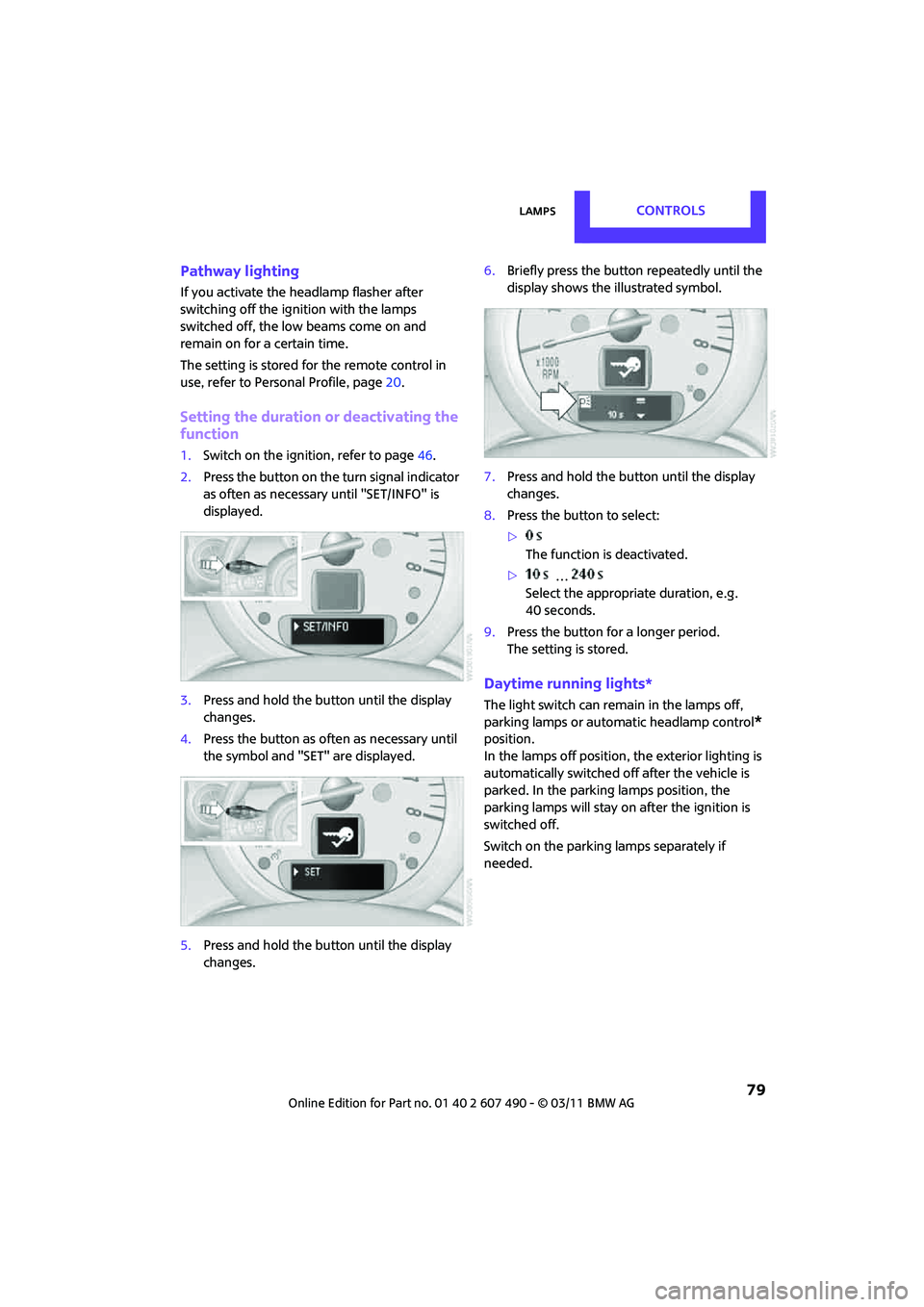
Setting the duration or deactivating the
function
1. Switch on the ignition, refer to page 46.
2. Press the button on the turn signal indicator
as often as necessary until "SET/INFO" is
displayed.
3. Press and hold the butt on until the display
changes.
4. Press the button as of ten as necessary until
the symbol and "SET" are displayed.
5. Press and hold the butt on until the display
changes. 6.
Briefly press the button repeatedly until the
display shows the i llustrated symbol.
7. Press and hold the butt on until the display
changes.
8. Press the button to select:
>
The function is deactivated.
> …
Select the appropriate duration, e.g.
40 seconds.
9. Press the button for a longer period.
The setting is stored.
Daytime running lights*
The light switch can remain in the lamps off,
parking lamps or automatic headlamp control
*
position.
In the lamps off position, the exterior lighting is
automatically switched of f after the vehicle is
parked. In the parking lamps position, the
parking lamps will stay on after the ignition is
switched off.
Switch on the parking lamps separately if
needed.